Glama
Microsoft 365 MCP Server

Microsoft 365 MCP Server

by Softeria

ms-365-mcp-server

npm version build status license

Microsoft 365 MCP Server

A Model Context Protocol (MCP) server for interacting with Microsoft 365 and Microsoft Office services through the Graph API.

Supported Clouds

This server supports multiple Microsoft cloud environments:

Cloud

Description

Auth Endpoint

Graph API Endpoint

Global (default)

International Microsoft 365

login.microsoftonline.com

graph.microsoft.com

China (21Vianet)

Microsoft 365 operated by 21Vianet

login.chinacloudapi.cn

microsoftgraph.chinacloudapi.cn

GCC High

Microsoft 365 US Government GCC High

login.microsoftonline.us

graph.microsoft.us

GCC High has no pre-registered client: register an app in your government tenant and set MS365_MCP_CLIENT_ID (and MS365_MCP_TENANT_ID), then use --cloud gcc-high.

To route Graph traffic through a proxy of your own (one that terminates the client's plain HTTP and originates TLS to Microsoft), set MS365_MCP_GRAPH_BASE_URL to its base URL; see the environment variable list under CLI Options, including what still bypasses it.

Related MCP server: Microsoft Graph MCP Server

Prerequisites

  • Node.js >= 20 (recommended)

  • Node.js 14+ may work with dependency warnings

Features

  • Authentication via Microsoft Authentication Library (MSAL)

  • Comprehensive Microsoft 365 service integration

  • Read-only mode support for safe operations

  • Tool filtering for granular access control

  • Tool presets and dynamic discovery to shrink the tool surface and token usage

Output Format: JSON vs TOON

The server supports two output formats that can be configured globally:

JSON Format (Default)

Standard JSON output with pretty-printing:

{
  "value": [
    {
      "id": "1",
      "displayName": "Alice Johnson",
      "mail": "alice@example.com",
      "jobTitle": "Software Engineer"
    }
  ]
}

(experimental) TOON Format

Token-Oriented Object Notation for efficient LLM token usage:

value[1]{id,displayName,mail,jobTitle}:
  "1",Alice Johnson,alice@example.com,Software Engineer

Benefits:

  • 30-60% fewer tokens vs JSON

  • Best for uniform array data (lists of emails, calendar events, files, etc.)

  • Ideal for cost-sensitive applications at scale

Usage: (experimental) Enable TOON format globally:

Via CLI flag:

npx @softeria/ms-365-mcp-server --toon

Via Claude Desktop configuration:

{
  "mcpServers": {
    "ms365": {
      "command": "npx",
      "args": ["-y", "@softeria/ms-365-mcp-server", "--toon"]
    }
  }
}

Via environment variable:

MS365_MCP_OUTPUT_FORMAT=toon npx @softeria/ms-365-mcp-server

Supported Services & Tools

The server provides 300+ tools covering most of the Microsoft Graph API surface. Each tool maps 1-to-1 to a Graph API endpoint and is defined declaratively in src/endpoints.json.

Personal Account Tools (Available by default)

Email (Outlook), Calendar, OneDrive Files, Excel, OneNote, To Do Tasks, Planner, Contacts, User Profile, Search

Organization Account Tools (Requires --org-mode flag)

Teams & Chats, Online Meetings, Transcripts & Recordings, Attendance Reports, SharePoint Sites & Lists, Shared Mailboxes & Calendars, User Management, Presence, Virtual Events

Custom Teams emojis are available in organization mode through list-custom-emojis and create-custom-emoji (teams and work presets). These use the Microsoft Graph beta API and request the delegated permissions TeamworkCustomEmoji.Read and TeamworkCustomEmoji.Create, respectively. Read-only mode exposes only the list tool. Existing deployments may need consent for these new scopes and reauthentication; adding tool support does not upgrade an already-issued token.

Listing can return contentBytes: null by default. To request base64 PNG/GIF images, pass select: "displayName,contentBytes" or select: ["displayName", "contentBytes"]. Use a small top to keep image responses manageable. To create an emoji, pass body: { displayName, contentBytes } with the exact approved name and base64 PNG/GIF file bytes. See Microsoft's list and create contracts. These tools do not post messages or reactions.

Required Graph API Permissions

Permissions are requested dynamically based on which tools are enabled. Use --list-permissions to see the exact permissions for your configuration:

# Personal mode (default)
npx @softeria/ms-365-mcp-server --list-permissions

# Organization mode (includes Teams, SharePoint, etc.)
npx @softeria/ms-365-mcp-server --org-mode --list-permissions

# Filtered by preset
npx @softeria/ms-365-mcp-server --preset mail --list-permissions

This is useful for enterprise environments where Graph API permissions must be pre-approved and admin-consented before deploying a new version.

The --list-permissions JSON includes:

  • toolPermissions: permissions implied by the tool surface before --allowed-scopes filtering

  • effectivePermissions: permissions implied by the tools that remain enabled after --allowed-scopes

  • permissions: legacy alias for effectivePermissions, kept for compatibility with existing scripts

  • allowedScopes: the configured scope allowlist, when provided

  • disabledTools: tools hidden because their required Graph scopes are not covered by allowedScopes

  • missingAllowedScopesForTools: unique missing scopes across disabled tools

  • extraAllowedScopesNotUsedByTools: allowed scopes that are not used by the current tool surface

Allowed Scopes

By default, MSAL requests the scopes implied by the enabled tools, and the tool surface is controlled by --enabled-tools, --enabled-tools-file, --preset, --org-mode, and --read-only.

Enterprise and headless deployments can add a scope boundary with --allowed-scopes or MS365_MCP_ALLOWED_SCOPES. When configured, the server first computes the normal tool surface, then hides Graph tools whose required scopes are not covered by the allowlist. OAuth metadata and login flows request only the effective permissions for the tools that remain enabled.

npx @softeria/ms-365-mcp-server \
  --org-mode \
  --enabled-tools '^(list-mail-messages|get-mail-message|list-drives|get-drive-item|download-bytes)$' \
  --allowed-scopes 'User.Read Mail.Read Files.Read'

For longer filters, put one regex per line in a file and pass --enabled-tools-file / ENABLED_TOOLS_FILE. Blank lines and whole-line # comments are dropped; the rest are joined with |, so the file is equivalent to --enabled-tools=line1|line2|…:

# tools.txt
^list-mail-messages$
^get-mail-message$
drive|download-bytes
npx @softeria/ms-365-mcp-server --org-mode --enabled-tools-file ./tools.txt

CLI value takes precedence over MS365_MCP_ALLOWED_SCOPES; if neither is set, the default tool-derived scope behavior is unchanged. Supplying an empty value fails at startup so deployments do not accidentally fall back to a wider tool surface.

Scope coverage is hierarchy-aware: for example, Mail.ReadWrite covers tools that require Mail.Read, and Files.ReadWrite.All covers tools that require Files.Read.

SharePoint supports two enterprise permission models:

  • Broad tenant scopes such as Sites.Read.All, Sites.ReadWrite.All, and Sites.Manage.All.

  • Microsoft Graph Sites.Selected, where SharePoint site access is granted to the app on specific site collections and Graph evaluates the signed-in user's own permissions at request time.

The default org-mode behavior continues to request the broad SharePoint scopes used by existing deployments. Enterprises that want selected-site SharePoint access can set an allowlist containing Sites.Selected instead of broad Sites.*.All scopes. Direct site/list/item tools that target an explicit SharePoint site, and the /drives/{drive-id}/... item tools (list, get, upload, folder, move/rename, copy, versions) for drives of a granted site, can run with Sites.Selected; tenant-wide SharePoint discovery and search tools still require broad SharePoint scopes.

npx @softeria/ms-365-mcp-server \
  --org-mode \
  --read-only \
  --enabled-tools 'sharepoint|site|drive|planner' \
  --allowed-scopes 'User.Read Files.Read Notes.Read Tasks.Read Sites.Selected'

In HTTP mode, OAuth discovery advertises the effective filtered permissions so clients request the same consent surface. On-Behalf-Of mode (--obo) still advertises <clientId>/access_as_user for protected-resource metadata and requests it on /authorize; --allowed-scopes does not override OBO, it only narrows the tool surface.

Restricting user profile fields

Deployments can set a comma-separated field filter for selected user-directory paths with --user-fields or MS365_MCP_USER_FIELDS. It narrows the $select sent to Microsoft Graph on /users reads and projects responses on the covered paths listed below. This is a path-specific data filter, not a complete Graph authorization boundary: other Graph routes and resource shapes can expose overlapping profile data.

npx @softeria/ms-365-mcp-server \
  --org-mode \
  --user-fields 'id,displayName,mail,userPrincipalName'

The filter is keyed on known Graph paths rather than tool names. It applies to direct tools, discovery mode's execute-tool, and matching graph-batch subrequests. Batch subrequest URLs are rewritten on covered /users reads, and responses are projected on all covered profile paths. The byte-passthrough tools (download-bytes, download-bytes-to-file, get-download-url) return responses verbatim and refuse targets matching the covered user profile paths while the filter is active.

Two levels of enforcement apply, depending on what Graph returns:

Path

Enforcement

/users, /users/{id}

$select is narrowed on the request and the response is projected, so excluded fields never leave the tenant

/me/manager, /me/directReports, /users/{id}/manager, /users/{id}/directReports, /groups/{id}/members, /groups/{id}/owners

The response is projected. These are typed as directoryObject, where Graph requires an OData cast before it will $select a user-only property such as jobTitle, so narrowing the request would risk breaking calls that work today

While the filter is active, $expand is removed from /me, /groups, and /groups/{id} requests because those resources can expand to related user profiles. This also applies to matching batch subrequests. The base /me and group responses are otherwise not projected.

This does not cover every route that can return a user-shaped object. In particular, generic Graph access can still reach alternate routes or representations such as /directoryObjects/{id}, /groups/{id}/transitiveMembers, or /users('{id}'). Those are not currently normalized to the covered paths. If this setting is a security requirement, also restrict generic Graph access (for example graph-batch) and validate the effective tool surface for your deployment; do not rely on --user-fields alone as a tenant-wide data-access control.

Resources below a user, such as /users/{id}/messages or /users/{id}/photo/$value, are mail, calendar and binary resources rather than profile properties, and are unaffected. The signed-in user's own /me profile is also unaffected, as are the Teams and chat member lists, which return conversationMember rather than user profiles.

Known gap: list-relevant-people

list-relevant-people (/me/people) is not covered. It returns person resources, a different type whose properties only partly overlap with user — it carries jobTitle, department and officeLocation, but addresses arrive as scoredEmailAddresses rather than mail. Applying a user-field allowlist to it would reject valid field names and narrow the result to something the tool could not use.

Deployments that need the people surface closed as well should drop the tool from the surface, for example with --enabled-tools or by choosing a preset that excludes it:

npx @softeria/ms-365-mcp-server \
  --org-mode \
  --user-fields 'id,displayName,mail' \
  --enabled-tools '^(?!list-relevant-people$).*'

CLI values take precedence over the environment variable. A value that names no fields fails at startup. When neither is configured, existing behavior is unchanged. Configure this in the LibreChat MCP server environment or command arguments; project-local .env files are intentionally restricted to application credentials and are not used for this setting.

The allowlist is exhaustive for user properties: unlike an ordinary $select, id is only returned when it appears in the list, so include it if downstream tools need it to address a user. Collection annotations such as @odata.nextLink are retained so paging keeps working. If Graph returns none of the allowlisted properties, the response is projected to empty rather than returned untrimmed.

Requesting extra scopes

--allowed-scopes only ever narrows the token request. To request a Graph scope that no bundled tool needs — for example to drive an endpoint via graph-batch — use --extra-scopes (or MS365_MCP_EXTRA_SCOPES). These scopes are appended verbatim to the token request, on top of the tool-derived scopes.

npx @softeria/ms-365-mcp-server \
  --org-mode \
  --extra-scopes 'CopilotPackages.ReadWrite.All'

This is for use with your own Azure app registration (MS365_MCP_CLIENT_ID / MS365_MCP_CLIENT_SECRET): the default Softeria app only declares a lean, fixed permission set, so request additional scopes against an app you control (your tenant admin consents to them there). CLI value takes precedence over the env var; an empty value fails at startup.

Organization/Work Mode

To access work/school features (Teams, SharePoint, etc.), enable organization mode using any of these flags:

{
  "mcpServers": {
    "ms365": {
      "command": "npx",
      "args": ["-y", "@softeria/ms-365-mcp-server", "--org-mode"]
    }
  }
}

Organization mode must be enabled from the start to access work account features. Without this flag, only personal account features (email, calendar, OneDrive, etc.) are available.

Shared Mailbox Access

To access shared mailboxes, you need:

  1. Organization mode: Shared mailbox tools require --org-mode flag (work/school accounts only)

  2. Delegated permissions: Mail.Read.Shared to read, Mail.ReadWrite.Shared to create, update or move messages, Mail.Send.Shared to send, reply or forward, and Calendars.Read.Shared for the shared calendar tools

  3. Exchange permissions: The signed-in user must have been granted access to the shared mailbox

  4. Usage: Use the shared mailbox's email address as the user-id parameter in the shared mailbox tools

Finding shared mailboxes: Use the list-users tool to discover available users and shared mailboxes in your organization.

Example: list-shared-mailbox-messages with user-id set to shared-mailbox@company.com

Quick Start Example

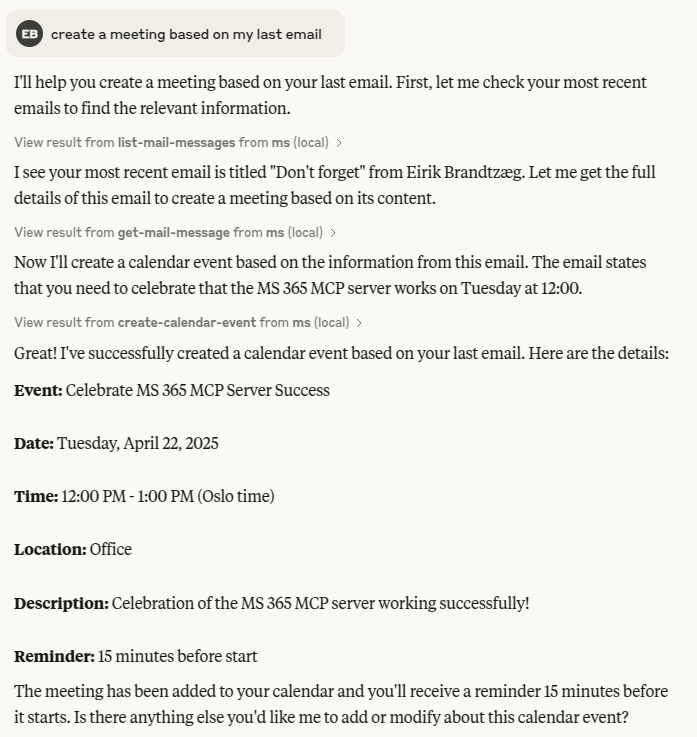
Test login in Claude Desktop:
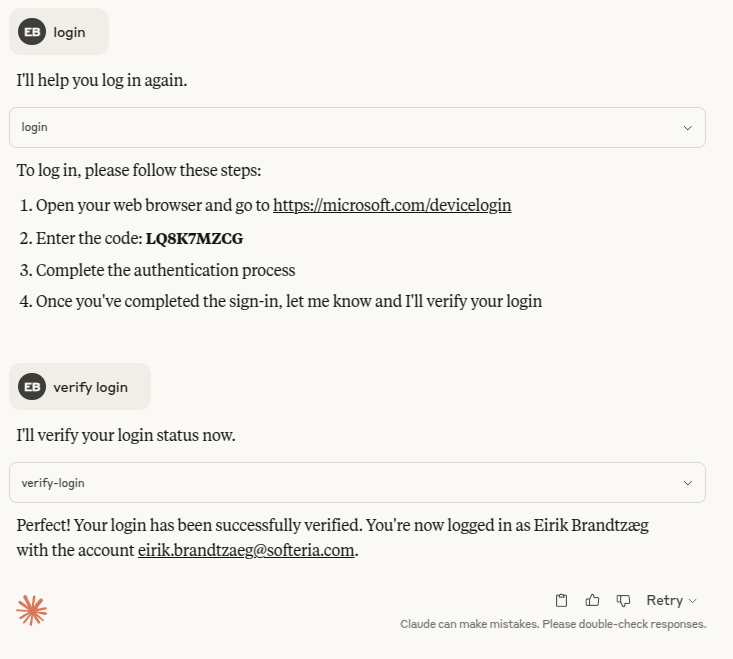
Login example

Examples

Image

Integration

Claude Desktop

To add this MCP server to Claude Desktop, edit the config file under Settings > Developer.

Personal Account (MSA)

{
  "mcpServers": {
    "ms365": {
      "command": "npx",
      "args": ["-y", "@softeria/ms-365-mcp-server"]
    }
  }
}

Work/School Account (Global)

{
  "mcpServers": {
    "ms365": {
      "command": "npx",
      "args": ["-y", "@softeria/ms-365-mcp-server", "--org-mode"]
    }
  }
}

Work/School Account (China 21Vianet)

{
  "mcpServers": {
    "ms365-china": {
      "command": "npx",
      "args": ["-y", "@softeria/ms-365-mcp-server", "--org-mode", "--cloud", "china"]
    }
  }
}

Claude Code CLI

Personal Account (MSA)

claude mcp add ms365 -- npx -y @softeria/ms-365-mcp-server

Work/School Account (Global)

# macOS/Linux
claude mcp add ms365 -- npx -y @softeria/ms-365-mcp-server --org-mode

# Windows (use cmd /c wrapper)
claude mcp add ms365 -s user -- cmd /c "npx -y @softeria/ms-365-mcp-server --org-mode"

Work/School Account (China 21Vianet)

# macOS/Linux
claude mcp add ms365-china -- npx -y @softeria/ms-365-mcp-server --org-mode --cloud china

# Windows (use cmd /c wrapper)
claude mcp add ms365-china -s user -- cmd /c "npx -y @softeria/ms-365-mcp-server --org-mode --cloud china"

For other interfaces that support MCPs, please refer to their respective documentation for the correct integration method.

Open WebUI

Open WebUI supports MCP servers via HTTP transport with OAuth 2.1.

  1. Start the server with HTTP mode:

    npx @softeria/ms-365-mcp-server --http
  2. In Open WebUI, go to Admin Settings → Tools (/admin/settings/tools) → Add Connection:

    • Type: MCP Streamable HTTP

    • URL: Your MCP server URL with /mcp path

    • Auth: OAuth 2.1

  3. Click Register Client.

Note: Dynamic client registration is enabled by default in HTTP mode. Use --no-dynamic-registration (or set MS365_MCP_DISABLE_DCR=true) to disable it. If using a custom Azure Entra app, the platform type for your redirect URI depends on whether the app has a client secret: with a secret use "Web", without one use "Mobile and desktop applications" (never "Single-page application").

Quick test setup using the default Azure app (ID ms-365 and localhost:8080 are pre-configured):

docker run -d -p 8080:8080 \
  -e WEBUI_AUTH=false \
  -e OPENAI_API_KEY \
  ghcr.io/open-webui/open-webui:main

npx @softeria/ms-365-mcp-server --http

Then add connection with URL http://localhost:3000/mcp and ID ms-365.

Open WebUI MCP Connection

Running in Docker behind a reverse proxy? Set --public-url https://your-domain.com so the OAuth authorize URL handed to the user's browser is reachable from outside the container network. See docs/deployment.md for the full guide.

Local Development

For local development or testing:

# From the project directory
claude mcp add ms -- npx tsx src/index.ts --org-mode

Or configure Claude Desktop manually:

{
  "mcpServers": {
    "ms365": {
      "command": "node",
      "args": ["/absolute/path/to/ms-365-mcp-server/dist/index.js", "--org-mode"]
    }
  }
}

Note: Run npm run build after code changes to update the dist/ folder.

Authentication

⚠️ You must authenticate before using tools.

The server supports three authentication methods:

1. Device Code Flow (Default)

For interactive authentication via device code:

  • MCP client login:

    • Call the login tool (auto-checks existing token)

    • If needed, get URL+code, visit in browser

    • Use verify-login tool to confirm

  • CLI login:

    npx @softeria/ms-365-mcp-server --login

    Follow the URL and code prompt in the terminal.

Tokens are cached securely in your OS credential store (fallback to file).

2. OAuth Authorization Code Flow (HTTP mode only)

When running with --http, the server requires OAuth authentication:

npx @softeria/ms-365-mcp-server --http 3000

This mode:

  • Advertises OAuth capabilities to MCP clients

  • Provides OAuth endpoints at /auth/* (authorize, token, metadata)

  • Requires Authorization: Bearer <token> for all MCP requests

  • Validates tokens with Microsoft Graph API

  • Disables login/logout tools by default (use --enable-auth-tools to enable them)

MCP clients will automatically handle the OAuth flow when they see the advertised capabilities.

Setting up Azure AD for OAuth Testing

To use OAuth mode with custom Azure credentials (recommended for production), you'll need to set up an Azure AD app registration:

  1. Create Azure AD App Registration:

  • Go to Azure Portal

  • Navigate to Azure Active Directory → App registrations → New registration

  • Set name: "MS365 MCP Server"

  1. Configure Redirect URIs:

  • Configure the OAuth callback URI: Go to your app registration and on the left side, go to Authentication.

  • Under Platform configurations:

    • Click Add a platform (if you don’t already see one for "Mobile and desktop applications" / "Public client").

    • Choose Mobile and desktop applications or Public client/native (mobile & desktop) (label depends on portal version).

  1. Testing with MCP Inspector (npm run inspector):

  • Go to your app registration and on the left side, go to Authentication.

  • Under Platform configurations:

    • Click Add a platform (if you don’t already see one for "Web").

    • Choose Web.

    • Configure the following redirect URIs

      • http://localhost:6274/oauth/callback

      • http://localhost:6274/oauth/callback/debug

      • http://localhost:3000/callback (optional, for server callback)

  1. Get Credentials:

  • Copy the Application (client) ID from Overview page

  • Go to Certificates & secrets → New client secret → Copy the secret value (optional for public apps)

  1. Configure Environment Variables: Create a .env file in your project root:

    MS365_MCP_CLIENT_ID=your-azure-ad-app-client-id-here
    MS365_MCP_CLIENT_SECRET=your-secret-here  # Optional for public apps
    MS365_MCP_TENANT_ID=common

With these configured, the server will use your custom Azure app instead of the built-in one.

Note: .env is read from the directory the server is started in, and the MCP client decides what that is. Only MS365_MCP_CLIENT_ID, MS365_MCP_CLIENT_SECRET, MS365_MCP_TENANT_ID and MS365_MCP_CLOUD_TYPE are read from it. Every other variable listed above must be set in your shell or MCP client config; anything else found in a .env is ignored with a warning on stderr.

3. Bring Your Own Token (BYOT)

If you are running ms-365-mcp-server as part of a larger system that manages Microsoft OAuth tokens externally, you can provide an access token directly to this MCP server:

MS365_MCP_OAUTH_TOKEN=your_oauth_token npx @softeria/ms-365-mcp-server

This method:

  • Bypasses the interactive authentication flows

  • Use your pre-existing OAuth token for Microsoft Graph API requests

  • Does not handle token refresh (token lifecycle management is your responsibility)

4. App Mode (application permissions, no signed-in user)

Warning: application permissions apply to the whole tenant. Mail.Read granted to the app reads every mailbox, Files.ReadWrite.All writes every OneDrive and site, and whoever can call this server acts with them. Grant the fewest permissions you can. To limit which mailboxes and calendars it reaches, grant the mail and calendar permissions with RBAC for Applications in Exchange Online instead of in Microsoft Entra: the two add up, so an Entra Mail.Read grant left in place still reaches every mailbox. SharePoint sites can be narrowed with Sites.Selected.

For unattended agents that act as the app registration itself (client credentials):

MS365_MCP_CLIENT_ID=<your app id> \
MS365_MCP_TENANT_ID=<your tenant id or domain> \
MS365_MCP_CLIENT_SECRET=<secret> \
npx @softeria/ms-365-mcp-server --app-mode --read-only
  • Use your own app registration with application permissions and admin consent, and set exactly one credential:

    • MS365_MCP_CLIENT_SECRET

    • MS365_MCP_CLIENT_CERTIFICATE_PATH: a PEM file with the certificate and its unencrypted private key

    • MS365_MCP_FEDERATED_TOKEN_FILE: a token from an identity provider the app trusts through workload identity federation, read again on every token request. On AKS set it to $AZURE_FEDERATED_TOKEN_FILE, which Kubernetes keeps fresh. A GitHub Actions OIDC token is valid for 5 minutes, so writing it to a file once only covers the first Graph token (about an hour) unless something rewrites the file. If Entra answers AADSTS700213, set the federated credential's subject to the one quoted in the error (GitHub's subject can include the owner and repo ids).

    MS365_MCP_TENANT_ID must be a real tenant, not common.

  • On an Azure host (App Service, Container Apps, VM, ...) set MS365_MCP_MANAGED_IDENTITY=system, or the client id of a user-assigned identity, instead. No app registration, tenant id or secret is needed, and Key Vault (MS365_MCP_KEYVAULT_URL) is not read. Graph application permissions for a managed identity can't be granted in the portal; assign them with PowerShell or the Graph API. On Azure Container Instances, give the container one kind of identity: with both a system- and a user-assigned identity, the system-assigned token request fails there.

  • Tokens are renewed automatically. Nothing is cached on disk.

  • Only tools that work with application permissions are offered: the /users/{user-id} mail and calendar tools (pass a UPN or object id as user-id), users and groups, OneDrive/SharePoint drives and lists, Planner, Teams reads, presence, places and subscriptions. /me tools, Excel, OneNote and sending Teams chat or channel messages are not available, because Graph does not support them with application permissions.

  • --list-permissions --app-mode lists the application permissions the offered tools use. --allowed-scopes, --enabled-tools, --preset and --read-only narrow the surface as usual.

  • --verify-login --app-mode gets a token and shows the app id, tenant and granted roles (Exchange RBAC grants do not show up there).

  • The mail, calendar and outlook presets are built from /me tools and leave little in app mode; the /users/{user-id} mail and calendar tools are in work.

  • stdio only. It refuses --http, --obo, --extra-scopes, MS365_MCP_OAUTH_TOKEN and the login/account options.

  • Webinar tools also need an application access policy assigned to the organizer.

Note: HTTP mode requires authentication. For unauthenticated testing, use stdio mode with device code flow.

Authentication Tools: In HTTP mode, login/logout tools are disabled by default since OAuth handles authentication. Use --enable-auth-tools if you need them available.

Multi-Account Support

Use a single server instance to serve multiple Microsoft accounts. When more than one account is logged in, an account parameter is automatically injected into every tool, allowing you to specify which account to use per tool call.

Login multiple accounts (one-time per account):

# Login first account (device code flow)
npx @softeria/ms-365-mcp-server --login
# Follow the device code prompt, sign in as personal@outlook.com

# Login second account
npx @softeria/ms-365-mcp-server --login
# Follow the device code prompt, sign in as work@company.com

List configured accounts:

npx @softeria/ms-365-mcp-server --list-accounts

Use in tool calls: Pass "account": "work@company.com" in any tool request:

{ "tool": "list-mail-messages", "arguments": { "account": "work@company.com" } }

Behavior:

  • With a single account configured, it auto-selects (no account parameter needed).

  • With multiple accounts and no account parameter, the server uses the selected default or returns a helpful error listing available accounts.

  • 100% backward compatible: existing single-account setups work unchanged.

  • The account parameter accepts email address (e.g. user@outlook.com) or MSAL homeAccountId.

Strict Account Pinning

Headless stdio deployments can pin the local MSAL cache to one expected Microsoft account:

# Username matching is case-insensitive
MS365_MCP_EXPECTED_USERNAME=work@company.com npx @softeria/ms-365-mcp-server --login

# Or pin the exact MSAL homeAccountId shown by --list-accounts
npx @softeria/ms-365-mcp-server --expected-home-account-id <homeAccountId> --login

Use --list-accounts to discover homeAccountId values. The MCP list-accounts tool intentionally hides account IDs, so use the CLI for exact ID pinning.

Pinning is opt-in and local-MSAL only:

  • CLI values (--expected-username, --expected-home-account-id) take precedence over MS365_MCP_EXPECTED_USERNAME and MS365_MCP_EXPECTED_HOME_ACCOUNT_ID.

  • Supplying an empty pin value fails at startup instead of being ignored.

  • Username pins are compared case-insensitively; homeAccountId pins are exact.

  • If both pins are set, they must resolve to the same cached account.

  • Local stdio startup fails fast when the expected account is not in the token cache. Bootstrap by setting the pin, running --login, then starting the headless server.

  • Device-code and browser logins reject a missing or mismatched account before persisting the selected account or token cache.

  • Pinning collapses the effective MCP mode to single-account: the server does not advertise an account parameter and MCP instructions do not suggest account switching.

  • --http, --obo, and MS365_MCP_OAUTH_TOKEN use request-provided tokens for Graph calls, so account pins are warning-only in those modes. If HTTP auth tools are enabled, the pin still applies to those local MSAL helper flows.

  • --logout clears all cached accounts, including the pinned account. For surgical cleanup, prefer --remove-account <id>.

For MCP multiplexers (Legate, Governor): Multi-account mode replaces the N-process pattern. Instead of spawning one server per account, a single instance handles all accounts via the account parameter, reducing tool duplication from N×110 to 110.

Tool Presets

To reduce initial connection overhead and token usage, use preset tool categories instead of loading the full tool set:

npx @softeria/ms-365-mcp-server --preset mail
npx @softeria/ms-365-mcp-server --list-presets  # See all available presets

Available presets: mail, calendar, files, personal, work, excel, contacts, tasks, onenote, search, users, outlook, onedrive, teams, teams-write, all

See PRESETS.md for the full list of tools each preset unlocks (regenerated on npm run generate).

Each endpoint in endpoints.json declares which presets it belongs to via a presets array, so every preset is an exact tool-name allow-list that never over-matches across apps (e.g. mail does not include shared-mailbox tools; those are in work). The universal binary reader download-bytes is included in every preset except teams-write, so whatever an app returns (a file, an attachment, a photo, a recording) can always be fetched; get-download-url (a pre-authenticated URL for drive/SharePoint files) rides with the drive-backed presets, and joins every other preset (bar teams-write) when HTTP mode runs with --enable-attachment-urls. So a preset that can find a file can always read its bytes.

The outlook, onedrive and teams presets are app-scoped: they expose exactly one Microsoft app. Use these for "expose exactly one app" deployments:

# Outlook only (mail + calendar + contacts; no shared mailboxes, no files)
npx @softeria/ms-365-mcp-server --preset outlook

# Teams only (requires --org-mode)
npx @softeria/ms-365-mcp-server --org-mode --preset teams

The teams-write preset is the send-only counterpart to --read-only: send in chats, send/reply in channels, list chats/teams/channels by name, and activity notifications - no message reading and no byte downloaders. The requested token is minimal by construction (Chat.ReadBasic, the *.Send scopes, and basic team/channel listing - nothing that can read message content):

npx @softeria/ms-365-mcp-server --org-mode --preset teams-write

Dynamic Tool Discovery

Instead of loading every tool upfront, use dynamic discovery so the LLM finds and loads tools only when it needs them:

npx @softeria/ms-365-mcp-server --discovery

Keeps the initial context small and cuts token usage, especially useful for long sessions or cost-sensitive setups (e.g. Open WebUI running against a paid API).

Hybrid discovery with direct tools

Keep the full enabled catalogue discoverable while exposing frequent operations directly:

npx @softeria/ms-365-mcp-server --org-mode --discovery \
  --eager-tools list-mail-messages,get-calendar-view,download-bytes

--eager-tools accepts comma-separated exact Graph or utility tool names, not a regular expression or preset. MS365_MCP_EAGER_TOOLS is the environment fallback; the CLI wins. An empty or whitespace-only environment value is treated as unset, including without discovery; an explicitly empty CLI option is still invalid. The option requires --discovery. Empty entries and unknown names fail startup, including in HTTP mode. Duplicate names are registered once.

Direct tools use the same schemas, annotations and execution handlers as normal mode. They also remain searchable and executable through discovery. Existing --preset, --enabled-tools, --allowed-scopes, --read-only, organization-mode and transport restrictions apply first: an eager selection cannot enable a filtered-out tool or add permissions. Recognized but unavailable tools are omitted with a diagnostic logged once per server instance. HTTP still excludes server-local file tools.

Select a small set: exposing many generated Graph schemas can consume substantial model context. This option does not shrink individual schemas. Without --eager-tools, discovery and normal registration behave as before.

CLI Options

The following options can be used when running ms-365-mcp-server directly from the command line:

--login           Login using device code flow
--logout          Log out and clear saved credentials
--verify-login    Verify login without starting the server
--list-permissions List required Graph API permissions and exit (respects --org-mode, --preset, --enabled-tools, --enabled-tools-file, --allowed-scopes)
--org-mode        Enable organization/work mode from start (includes Teams, SharePoint, etc.)
--work-mode       Alias for --org-mode
--force-work-scopes Backwards compatibility alias for --org-mode (deprecated)
--cloud <type>    Microsoft cloud environment: global (default), china (21Vianet) or gcc-high
--allowed-scopes <scopes> Limit exposed tools to Graph scopes covered by this allowlist
--extra-scopes <scopes> Append additional Graph scopes to the token request (for use with your own app registration + graph-batch)
--expected-username <username> Require local MSAL auth to use this account username
--expected-home-account-id <id> Require local MSAL auth to use this exact homeAccountId

Server Options

When running as an MCP server, the following options can be used:

-v                Enable verbose logging
--read-only       Start server in read-only mode, disabling write operations
--http [port]     Use Streamable HTTP transport instead of stdio (optionally specify port, default: 3000)
                  Starts Express.js server with MCP endpoint at /mcp. Bound to a loopback host
                  (e.g. --http 127.0.0.1:3000 or --http [::1]:3000) with no --public-url, it
                  rejects requests whose Host or Origin is not localhost (not applied to the
                  --attachment-port listener)
--http-local-file-tools Register download-bytes-to-file over HTTP. Anyone who can reach the port
                  can write files as the server's user (without a valid token, only an empty
                  file that is removed again), so enable it only on a single-user machine.
                  With MS365_MCP_UPLOAD_DIRS set it also registers upload-attachment-from-file,
                  which reads files from those directories.
                  Refused unless --http binds a loopback host with no --public-url and no
                  --trust-proxy-auth
--app-mode        Use application permissions (client credentials) with no signed-in user. stdio only
                  (see "App Mode" under Authentication)
--enable-auth-tools Enable login/logout tools when using HTTP mode (disabled by default in HTTP mode)
--enable-attachment-urls Let get-download-url mint a server-served URL for byte resources Graph
                  exposes no pre-authenticated URL for (see "Server-Minted Attachment URLs").
                  Also adds get-download-url to any --preset that lacks it (except teams-write)
--attachment-port <port> Serve /attachment on its own listener on this port instead of on the
                  MCP app, so a fetcher that can read attachments cannot also reach /mcp
                  (requires --enable-attachment-urls; see "Splitting the attachment listener")
--attachment-host <host> Interface the --attachment-port listener binds. Defaults to whatever
                  --http bound, which with a wildcard --http leaves BOTH ports on every
                  interface and so isolates nothing — set this to make the split real
                  (requires --attachment-port; see "Splitting the attachment listener")
--no-dynamic-registration Disable OAuth Dynamic Client Registration (enabled by default in HTTP mode)
--enabled-tools <pattern> Filter tools using regex pattern (e.g., "excel|contact" to enable Excel and Contact tools)
--enabled-tools-file <path> Filter tools using a file with one regex per line (same as --enabled-tools;
                  blank lines and whole-line # comments ignored). Overrides --enabled-tools;
                  overridden by --preset. Equivalent env var: ENABLED_TOOLS_FILE
--preset <names>  Use preset tool categories (comma-separated). See "Tool Presets" section above
--list-presets    List all available presets and exit
--toon            (experimental) Enable TOON output format for 30-60% token reduction
--blob-output     File download tools answer an MCP EmbeddedResource with the file instead of
                  base64 JSON in a text block (see MS365_MCP_BLOB_OUTPUT below)
--discovery       Dynamic tool discovery: loads tools on demand to reduce initial token usage (see "Dynamic Tool Discovery" above)
--public-url <url> Public base URL for OAuth when behind a reverse proxy (see Open WebUI section and docs/deployment.md)

Environment variables:

  • READ_ONLY=true|1: Alternative to --read-only flag

  • ENABLED_TOOLS: Filter tools using a regex pattern (alternative to --enabled-tools flag)

  • ENABLED_TOOLS_FILE: Path to a file with one regex per line (alternative to --enabled-tools-file). Blank lines and whole-line # comments are dropped, then lines are joined with | (same as ENABLED_TOOLS=line1|line2|…). Layering (later wins): --enabled-tools → --enabled-tools-file → --preset → ENABLED_TOOLS → ENABLED_TOOLS_FILE

  • MS365_MCP_ORG_MODE=true|1: Enable organization/work mode (alternative to --org-mode flag)

  • MS365_MCP_FORCE_WORK_SCOPES=true|1: Backwards compatibility for MS365_MCP_ORG_MODE

  • MS365_MCP_APP_MODE=true|1: Enable app mode (alternative to --app-mode flag)

  • MS365_MCP_CLIENT_CERTIFICATE_PATH=<path>: PEM file with a certificate and its unencrypted private key, used instead of MS365_MCP_CLIENT_SECRET in app mode

  • MS365_MCP_FEDERATED_TOKEN_FILE=<path>: Federated token (workload identity federation), used instead of a secret or certificate in app mode

  • MS365_MCP_MANAGED_IDENTITY=system|<client id>: Use the host's managed identity in app mode, instead of an app registration

  • MS365_MCP_OUTPUT_FORMAT=toon: Enable TOON output format (alternative to --toon flag)

  • MS365_MCP_MAX_TOP=<n>: Hard cap for Graph $top / top on list requests (positive integer). When the model passes a larger value, the server clamps it to n so responses stay smaller. Example: MS365_MCP_MAX_TOP=15

  • MS365_MCP_MAX_PAGES=<n>: Maximum number of pages followed when a tool is called with fetchAllPages: true (positive integer, default 100). Bounds memory and latency for large result sets.

  • MS365_MCP_MAX_ITEMS=<n>: Maximum number of items accumulated when fetchAllPages: true (positive integer, default 10000). Pagination stops and the response is truncated once this many items are collected.

  • MS365_MCP_TOOL_DEFINITION_BUDGET=<bytes>: Opt in to trimming oversized request-body schemas so every tool fits a hosted connector's tool-definition budget (1 048 576 bytes of input schema per connector, admitted alphabetically — a tool that no longer fits is silently skipped). 4096 keeps a full org surface at ~78 % of that budget. Only bodies above the ration are trimmed, nested descriptions before structure, field names last. Unset (default): nothing is trimmed; the server still logs the total input-schema bytes served and, in HTTP mode, warns when the surface exceeds the connector budget.

  • MS365_MCP_ALLOW_PAGINATION=0|false|no: Disable multi-page following entirely. When set, the fetchAllPages parameter is not advertised on tools, and any request that still passes it returns only the first page (default: pagination enabled).

  • MS365_MCP_BLOB_OUTPUT=true|1: File download tools (download-bytes, get-mail-message-mime, get-shared-mailbox-message-mime, get-mail-attachment-content, get-shared-mailbox-attachment-content) answer a short JSON text block (name, contentType, size) and an MCP EmbeddedResource with BlobResourceContents (uri, mimeType, blob) instead of base64 JSON in text. The uri's last segment is the optional fileName argument. Default: off. Alternative to the --blob-output flag.

  • MS365_MCP_BLOB_MAX_BYTES=<n>: With blob output on, the largest file a download tool reads (positive integer, default 5242880). The server stops reading past it and answers an error naming the limit.

  • MS365_MCP_BODY_FORMAT=html: Return email bodies as HTML instead of plain text (default: text)

  • MS365_MCP_OBO_ALLOWED_TENANTS=<ids> / MS365_MCP_OBO_ALLOWED_USERS=<ids>: With --obo, only callers whose token tid (tenant id) / oid (user object id) is listed may use the server; others get 403 before any On-Behalf-Of exchange. Comma or space separated; unset = everyone. The claims are read without verifying the signature, which Entra verifies during the exchange, so a token that lies about them still gets no Graph token. A token Entra rejects at the exchange (bad signature, expired, wrong audience, consent needed) gets 401 with a WWW-Authenticate challenge so the client signs in again

  • MS365_MCP_READ_MAIL_TEXT_MAX_CHARS=<n>: Largest result read-mail-text returns, in characters (default 80000). A larger result is refused whole, naming the largest messages, rather than cut (see Reading Mail as Clean Text below)

  • MS365_MCP_MESSAGE_SIGNOFF_PREFIX=<text>: Signoff prepended to outgoing messages so recipients can tell they were agent-sent, e.g. 🤖. Default: none. CLI equivalent: --message-signoff-prefix <text> (see Message Signoff below)

  • MS365_MCP_MESSAGE_SIGNOFF_SUFFIX=<text>: Signoff appended to outgoing messages. Default: none. CLI equivalent: --message-signoff-suffix <text>. --no-message-signoff disables both (see Message Signoff below)

  • MS365_MCP_RATE_LIMIT_DISABLED=true|1: Disable per-IP rate limiting in HTTP mode (default: enabled — 30 req/min on /authorize, /token, /register; 120 req/min on /mcp)

  • MS365_MCP_TRUST_PROXY_HOPS=<n>: Number of trusted reverse-proxy hops in HTTP mode (default 1). Accurate per-IP rate limiting depends on this matching your deployment — set to the number of proxies in front of the server, 0 to use the raw socket peer IP, or a comma-separated subnet list

  • MS365_MCP_ATTACHMENT_PORT=<port>: Serve the attachment route on its own listener on this port (alternative to --attachment-port; requires --enable-attachment-urls)

  • MS365_MCP_ATTACHMENT_HOST=<host>: Interface the MS365_MCP_ATTACHMENT_PORT listener binds (alternative to --attachment-host; requires --attachment-port). Defaults to the host --http bound — which for a wildcard --http means both ports answer everywhere and the port split isolates nothing. See "Splitting the attachment listener"

  • MS365_MCP_HTTP_LOCAL_FILE_TOOLS=true|1: Register download-bytes-to-file, and upload-attachment-from-file when MS365_MCP_UPLOAD_DIRS is set, over HTTP (alternative to --http-local-file-tools; same restrictions)

  • MS365_MCP_UPLOAD_DIRS=<dirs>: Directories upload-attachment-from-file may read from, as absolute paths separated like PATH. Unset (the default) leaves the tool unregistered. See "Attaching a local file in stdio mode"

  • MS365_MCP_CLOUD_TYPE=global|china|gcc-high: Microsoft cloud environment (alternative to --cloud flag)

  • MS365_MCP_GRAPH_BASE_URL=<url>: Send Graph API requests to this base URL instead of the cloud's graph.microsoft.com (e.g. http://127.0.0.1:10255/tenant-a/graph for an egress proxy that originates TLS itself). Absolute http(s) URL without query or fragment; a path prefix is kept, so requests go to <url>/v1.0/.... The login authority and the On-Behalf-Of token resource are unchanged. Two things bypass it: get-download-url returns Graph's pre-authenticated SharePoint URL, and the 302 from /content points straight at SharePoint, so whoever follows either connects to SharePoint directly; if you control egress, allow those SharePoint hosts or disable those tools. Not read from .env

  • LOG_LEVEL: Set logging level (default: 'info')

  • SILENT=true|1: Disable console output

  • MS365_MCP_REDACT_PII=false|0: Disable scrubbing of JWTs, Bearer headers, OAuth token fields, and email addresses from log messages (default: enabled). The server handles live Graph bearer tokens, so redaction is on unless you opt out for fully verbose local debugging.

  • MS365_MCP_CLIENT_ID: Custom Azure app client ID (defaults to built-in app)

  • MS365_MCP_TENANT_ID: Custom tenant ID (defaults to 'common' for multi-tenant). Personal Microsoft accounts should set this to consumers - as of June 2026, refresh tokens issued via the default 'common' authority are rejected at the first refresh, so sessions die roughly an hour after login

  • MS365_MCP_OAUTH_TOKEN: Pre-existing OAuth token for Microsoft Graph API (BYOT method)

  • MS365_MCP_KEYVAULT_URL: Azure Key Vault URL for secrets management (see Azure Key Vault section)

  • MS365_MCP_TOKEN_CACHE_PATH: Custom file path for MSAL token cache (see Token Storage below)

  • MS365_MCP_SELECTED_ACCOUNT_PATH: Custom file path for selected account metadata (see Token Storage below)

  • MS365_MCP_AUTH_CACHE_COMMAND: External executable wrapper for provider-neutral auth-cache storage (see Token Storage below)

  • MS365_MCP_AUTH_CACHE_COMMAND_TIMEOUT_MS: Per-invocation timeout for MS365_MCP_AUTH_CACHE_COMMAND (default: 10000)

  • MS365_MCP_EXPECTED_USERNAME: Require local MSAL auth to use this Microsoft account username (case-insensitive; CLI flag takes precedence)

  • MS365_MCP_EXPECTED_HOME_ACCOUNT_ID: Require local MSAL auth to use this exact MSAL homeAccountId (CLI flag takes precedence)

Reading Mail as Clean Text

read-mail-text returns messages as text with the bulk junk removed. Graph's plain-text body is still mostly not the message: links are wrapped in Safe Links or tracking redirects several hundred characters long, marketing mail pads its preheader with invisible characters, images become [https://…png] lines, and replies carry the whole quoted thread. On a real mailbox, 20 inbox messages came to about 280,000 characters through list-mail-messages and 70,000 through read-mail-text.

The rule is: remove obvious junk, never cut or rewrite the message; anything ambiguous is kept. It removes runs of invisible padding characters, image placeholders (a bracketed address of an image file), and quoted reply history from its header down (a dated On … wrote:, also >-quoted, an Outlook From:/Sent: block, -----Original Message-----). Forwards keep the forwarded content: a subject starting FW: / Fwd: or a localised prefix (VS:, WG:, TR:, RV:, I:, ENC:, …, also after tags such as [EXTERNAL]), or history directly under a Forwarded message / Begin forwarded message: marker. Links are kept: Safe Links, Proofpoint URL Defense and Google redirects are unwrapped to the real address, tracking parameters (utm_* and similar) are dropped, and only an address still longer than 300 characters (a tracking redirect) is shortened to ⟦link: domain⟧. Line endings become \n, and the marker brackets are reserved: a body's own ⟦ ⟧ appear as [ ], so text cannot pose as a marker. Everything else — signatures, footers, whitespace, repeated links — is left as the message has it. get-mail-message returns the raw body.

  • messageIds (up to 20, one $batch), or folderId with optional top (max 20), filter or search.

  • Each message is cut to maxChars characters, default 3,000 (marked truncated): a page of 20 then fits the result limit, and a typical message is whole. Ticket systems that repeat their history in every update put the newest entry first, so the cut keeps it. Pass a larger maxChars (up to 300,000; a raw body beyond that is cleaned only that far) for the whole of a long message; get-mail-message has the raw body.

  • Returns [{ id, from, to, cc, subject, received, hasAttachments, text, chars, truncated }]; an unknown id comes back as { id, error }.

  • A result over MS365_MCP_READ_MAIL_TEXT_MAX_CHARS (default 80,000) is refused whole with the largest messages listed, so the agent narrows the query instead of silently getting part of it.

Server-Minted Attachment URLs

get-download-url returns Microsoft's own pre-authenticated @microsoft.graph.downloadUrl for OneDrive and SharePoint items. Graph publishes no such URL for mail and calendar attachments, meeting recordings, or any other /$value byte endpoint — for those, the only way to read the bytes has been download-bytes, which returns base64 into the agent's context. A 73 KB, 3-page PDF costs about 24,500 tokens that way, and the model cannot parse them anyway.

--enable-attachment-urls (HTTP mode, off by default) closes that gap. When Graph has no URL of its own, get-download-url mints one this server serves. With it on, get-download-url is registered under every --preset (except the send-only teams-write), so a --preset mail agent that lists an attachment can mint a URL for it. A minted URL only works if the preset's scopes cover the resource: a contacts, tasks or excel preset has no Mail scopes, so a URL minted for a mail attachment fails when fetched.

The minted URL looks like:

GET /attachment?t=<ticket>&dgk=<key-id>&dgx=<expiry>&dgs=<signature>

The ticket is 32 bytes of CSPRNG output, single-use, memory-only, and expires after MS365_MCP_ATTACHMENT_URL_TTL_S seconds. Redeeming it streams the Graph bytes as the identity that minted it; the fetcher sends no Authorization header and holds no Microsoft credential.

This grants no authority the calling agent did not already have. Every target that can be minted is one download-bytes would fetch for the same caller on the same account. The ticket only moves those bytes out of the context window and into a direct transfer.

Uploading attachments the same way

The same ticket store works in the other direction. get-upload-url mints a URL for attaching a file to a draft message or an event, so the bytes go straight from the caller to Graph instead of passing as base64 contentBytes through the agent context:

PUT /attachment?t=<ticket>&dgk=<key-id>&dgx=<expiry>&dgs=<signature>
Content-Length: <file size>

<raw file bytes>

target is the item's attachments collection (/me/messages/{id}/attachments for a draft, /me/events/{id}/attachments for an event); name and contentType are recorded on the attachment. Files under 3 MB are attached inline; larger ones, up to Graph's 150 MB, stream through an upload session in 3.75 MiB chunks, so the server never holds more than one chunk. Content-Length is required. The ticket is single-use and burnt on first presentation whatever the outcome, and the upload is attached as the identity that minted it, exactly as downloads are fetched. An upload ticket presented to GET (or a download ticket to PUT) is refused with the same 404 as any other bad ticket.

Attaching a local file in stdio mode

In stdio mode the server and the files are on the same machine, so no URL is needed. upload-attachment-from-file takes the same target and an absolute filePath, reads the file from disk and attaches it, with the same 3 MB and 150 MB limits. It is the upload counterpart of download-bytes-to-file.

The tool is off until you list the directories it may read from:

MS365_MCP_UPLOAD_DIRS=/Users/me/Documents/invitations:/Users/me/Scans

Entries are absolute paths, separated like PATH (: on macOS and Linux, ; on Windows). A file outside them is refused, and symlinks are resolved first, so a link inside an allowed directory cannot point the read somewhere else. The variable is not read from .env.

Over HTTP the tool is registered only with --http-local-file-tools, like download-bytes-to-file.

Configuration

MS365_MCP_ATTACHMENT_URL_BASE=http://m365-mcp:3000   # required
MS365_MCP_ATTACHMENT_URL_KEY=...                     # optional (or _KEY_FILE=/path), see below
MS365_MCP_ATTACHMENT_URL_KEY_ID=1                    # optional, default 1; needs a key
MS365_MCP_ATTACHMENT_URL_TTL_S=120                   # optional, default 120, max 300

MS365_MCP_ATTACHMENT_URL_BASE is deliberately not MS365_MCP_PUBLIC_URL: that one is browser-facing, for OAuth redirects, while this is fetched server-to-server and is commonly a container address. A missing or malformed setting fails at startup rather than per-request.

The signing key is optional. Without one, minted URLs are just /attachment?t=<ticket> and any HTTP client can fetch them; the ticket alone authorises redemption. Set a key only if the fetcher verifies the dgk/dgx/dgs signature (see below), such as a docglean-mcp sidecar, which will refuse an unsigned URL. Setting _KEY_ID without a key, or a _KEY_FILE that is empty or unreadable, fails at startup.

Splitting the attachment listener

By default /attachment is served by the same Express app, on the same port, as /mcp. That is fine when callers are authenticated by a bearer token, and it is a problem when they are not. Under --trust-proxy-auth the MCP endpoint reads no Authorization header at all — reachability is the authentication — so one shared port means the sidecar you allowed through in order to fetch a PDF can also call every tool on the server.

--attachment-port <port> (or MS365_MCP_ATTACHMENT_PORT) moves the route onto a listener of its own, and --attachment-host <host> (or MS365_MCP_ATTACHMENT_HOST) says which interface that listener binds:

ms-365-mcp-server --http 10.89.0.2:3000 --trust-proxy-auth \
                  --enable-attachment-urls \
                  --attachment-port 3001 --attachment-host 10.89.1.2
MS365_MCP_ATTACHMENT_URL_BASE=http://m365-mcp:3001   # note: the attachment port
  • GET /attachment on 3001 works; on 3000 it is 404 — the MCP app never mounts it.

  • /mcp on 3001 is 404, as is everything else: the second app has the attachment route and nothing more. No OAuth router, no body parsers, no CORS, no health check.

  • The 60 req/min limiter that guards the route follows it onto the new listener.

  • trust proxy is off on the attachment listener (and MS365_MCP_TRUST_PROXY_HOPS is not read for it), unlike the MCP listener, which trusts one hop. This port is meant to be dialled directly on a container network; honouring X-Forwarded-For on the server's one uncredentialed surface would let a caller choose its own rate-limit bucket.

The flag requires --enable-attachment-urls and refuses to start without it — on its own it would open a port with nothing on it while the operator believed the surfaces were separated. In stdio mode it warns and is ignored, like the flag it depends on. --attachment-host likewise requires --attachment-port: alone it would name an interface for a listener that does not exist.

Two ports are not two surfaces unless they bind two interfaces

This is the part that decides whether any of the above is worth anything. Read it before you deploy the split.

--attachment-port on its own separates the two surfaces inside the process. It does not separate them on the network. Without --attachment-host the attachment listener inherits whatever host --http bound — and --http 3000, the common form, names no host at all, so Node binds the wildcard and both ports answer on every interface:

ms-365-mcp-server --http 3000 --trust-proxy-auth \
                  --enable-attachment-urls --attachment-port 3001   # NOT isolated

Container networks grant a peer every port on a container, not one port. Put a document-conversion sidecar on a shared bridge so it can fetch /attachment on 3001, and that same sidecar can dial :3000/mcp — which under --trust-proxy-auth reads no Authorization header at all and hands back the full tool catalogue. Nothing fails, nothing is logged as an error, and the config looks exactly like the isolated one.

To make it real, give the two listeners different addresses, and put only the attachment address on the network the fetcher is on:

# docker compose — the MCP port on the agent's own bridge, the attachment port on the
# bridge shared with the converter. The converter can reach 3001 and cannot route to 3000.
services:
  m365-mcp:
    networks: { agent-net: { ipv4_address: 10.89.0.2 }, convert-net: { ipv4_address: 10.89.1.2 } }
    command: >
      --http 10.89.0.2:3000 --trust-proxy-auth
      --enable-attachment-urls
      --attachment-port 3001 --attachment-host 10.89.1.2
  docglean:
    networks: [convert-net]

The MCP port is then unreachable from convert-net by binding — there is no socket listening on that interface — rather than by a firewall rule that has to keep matching.

The server warns at startup if you run --trust-proxy-auth with --attachment-port while both listeners still answer on a common interface (either sharing an address, or either one on the wildcard). Both bound addresses are logged, read back from the socket rather than from the flags, so Server listening on … and Attachment listener on … can be compared directly.

--attachment-host takes a bare IPv4 address, IPv6 address (bracketed [::1] or bare ::1) or hostname. It is refused rather than coerced — --attachment-host 10.0.0.5:3001 is an error naming --attachment-port, not a bind to something else. Note that with a signing key set, MS365_MCP_ATTACHMENT_URL_BASE must not be an IPv6 literal (the URL signature covers the host and the two implementations normalise IPv6 differently); if you bind the listener to an IPv6 address, name it in the base by hostname. Without a key there is no such restriction.

Point MS365_MCP_ATTACHMENT_URL_BASE at the attachment port. The server cannot check this for you: the base is usually a container name on a network this process cannot resolve, so a wrong port here shows up as a fetch failure in the sidecar, not an error here. Both the base and the bound port are logged at startup, one line apart, for exactly that comparison.

The signature, and who checks what

This server never checks dgk/dgx/dgs on redemption, and that is deliberate. They exist for the fetcher: a document-conversion sidecar that refuses to dial a private address unless the URL carries a valid HMAC from an origin it has been configured to trust. What authorises redemption here is the ticket. Verifying the signature on the way back in would prove only that we minted the URL — which the ticket already proves — while coupling redemption to the sidecar's clock and to the key surviving a restart.

The wire format is docglean-mcp's signing.py (canonical_string), and src/lib/url-signing.ts is a port of it. The canonical string is \n-joined: v1, lowercased scheme, lowercased host, the port always explicit, the path, the remaining query with dgk/dgx/dgs removed and the rest sorted and re-encoded, and the expiry. The test vectors in test/attachment-url-signing.test.ts were verified against the Python implementation byte for byte — three places where the obvious JavaScript disagrees with Python (!*'() escaping, + decoding as a space, and code-point vs UTF-16 sort order) are why that check exists rather than being assumed.

The ticket travels in the query, not the path, because the verifying sidecar keeps a fetched URL's path in its error messages and strips the query.

Whose identity the bytes are read as

Under --trust-proxy-auth the server reads with its own cached account, and redemption looks that account up again.

In plain --http and --obo, identity arrives per request on the caller's Authorization header, and a ticket is redeemed later by a fetcher that sends none. So the ticket keeps the Graph token the minting request used (the exchanged one, under --obo) and redemption reads with that token and nothing else. It stays in server memory and is never part of the URL.

With MS365_MCP_OAUTH_TOKEN set, the ticket keeps that token instead, --trust-proxy-auth or not.

A token kept this way cannot be refreshed. If it expires before the URL is fetched, redemption answers 502. The agent can mint again once its client has a fresh token; an expired MS365_MCP_OAUTH_TOKEN has to be replaced by the operator.

Tickets live in the memory of the process that minted them, so a URL has to be redeemed on the same instance. Behind a load balancer that means one replica or sticky routing.

Token Storage

Authentication tokens are stored in an encrypted file (AES-256-GCM). Only the 32-byte encryption key goes to the OS credential store via keytar.

The cache itself is too big for some credential stores to hold - a Windows Credential Manager blob caps out at 2560 bytes and a real token cache is several times that, so on Windows the write could never succeed. A key is 32 bytes regardless of how many accounts are signed in, so this works the same way on every platform.

Default paths are in the per-user config directory:

Platform

Location

Windows

%APPDATA%\ms-365-mcp-server\

macOS

~/Library/Application Support/ms-365-mcp-server/

Linux

$XDG_CONFIG_HOME/ms-365-mcp-server/ (or ~/.config/ms-365-mcp-server/)

Earlier versions defaulted to a path inside the installed package, which under npx resolves to a content-hashed cache directory that npm cache clean or a version bump throws away. A cache still sitting in the package directory is moved to the new location on first run.

That covers global and local installs, and npx when the hash has not changed. It cannot reach a cache left behind in a previous npx hash directory, so upgrading an npx install one last time means signing in again. Adopting a cache from another directory would mean trusting a directory this package cannot prove it wrote, which is not worth one saved sign-in.

Override the paths if you need to:

export MS365_MCP_TOKEN_CACHE_PATH="$HOME/.config/ms365-mcp/.token-cache.json"
export MS365_MCP_SELECTED_ACCOUNT_PATH="$HOME/.config/ms365-mcp/.selected-account.json"

Parent directories are created automatically. Files are written with 0600 permissions.

Without a credential store (headless Linux, most containers) the key is written to .cache-key next to the cache file, with 0600 permissions. That stops the tokens showing up in a stray cat, a backup or an accidental commit. It does not protect against anyone who can already read the directory - the key is right there. Use MS365_MCP_AUTH_CACHE_COMMAND below if you need the cache in a real secret store.

Skipping the credential store on purpose:

export MS365_MCP_USE_KEYTAR=0   # also accepts false, no or off

The key then goes to .cache-key on every platform, exactly as it does where no credential store exists, and nothing in the server calls keytar. Useful when the credential store prompts on each start - macOS re-asks whenever the calling binary changes, which under npx is every version bump - or when the native module misbehaves on your platform rather than simply failing to load. Any other value leaves the credential store in use, and an unrecognised one is warned about rather than passed over silently.

Switching it off strands a cache that was encrypted under a key already in the credential store, since nothing can reach that key any more. The server says so and replaces that cache on the next sign-in, which signs out every account it held, not just the one you sign back in as. Unset the variable first if that cache is worth keeping.

Only a cache that nothing on the machine can open is replaced. One that fails to decrypt while a usable key is sitting right there - a truncated file, a downgrade to an older build, a cache from somewhere else - is damage rather than a stranded cache, and is left alone exactly as it is by default.

Two things it deliberately does not do. It never deletes what this server already put in the credential store, on logout or otherwise, because reaching the store is the thing you just asked it to stop doing - clear the ms-365-mcp-server entries by hand if you want them gone. And a .cache-key that exists but cannot be read (wrong owner on a bind-mounted config directory, say) is treated as recoverable rather than missing: the server refuses both to overwrite a cache and to mint a replacement key, and says so, rather than deleting a key that would work again once the permissions are fixed. Fix the permissions, or delete .cache-key yourself to start over - which does mean signing in again.

If the cache cannot be decrypted - key lost, keychain locked, file modified - you are asked to sign in again rather than the server failing to start. The cache file is left exactly as it was: not deleted, and not overwritten by that new sign-in either. A keychain that is merely locked usually reads fine on the next start, and the cache is still there when it does.

The cost is that the new session is not saved while this lasts, so each start asks you to sign in again. If the key is genuinely gone and the cache will never open, delete .token-cache.json to start over - the log says so, and names the path.

Hosted/sandboxed environments (e.g. Anthropic Cowork): Set MS365_MCP_TOKEN_CACHE_PATH and MS365_MCP_SELECTED_ACCOUNT_PATH to a persistent mount so tokens survive between sessions.

External auth-cache command

Headless local-MSAL deployments can replace the built-in keytar/file storage with a provider-neutral external command:

export MS365_MCP_AUTH_CACHE_COMMAND="/path/to/ms365-auth-cache-store"
export MS365_MCP_AUTH_CACHE_COMMAND_TIMEOUT_MS=10000

When MS365_MCP_AUTH_CACHE_COMMAND is set for a local auth flow, the server uses only that command for the MSAL token cache and selected-account metadata. It does not fall back to keytar or local files. If the command path is missing, not executable on POSIX, exits non-zero, times out, or returns malformed data, auth-cache operations fail closed with a sanitized error message.

The value must be a real executable wrapper path. It is not a shell command string, and there is no companion args environment variable. Put any interpreter, region, profile, or provider-specific settings inside the wrapper. Windows users should point the variable at a wrapper executable or script that can be launched directly by Node without shell parsing.

The server invokes the wrapper with:

$MS365_MCP_AUTH_CACHE_COMMAND load token-cache
$MS365_MCP_AUTH_CACHE_COMMAND save token-cache
$MS365_MCP_AUTH_CACHE_COMMAND delete token-cache
$MS365_MCP_AUTH_CACHE_COMMAND load selected-account
$MS365_MCP_AUTH_CACHE_COMMAND save selected-account
$MS365_MCP_AUTH_CACHE_COMMAND delete selected-account

Protocol v1:

  • load <key> reads no stdin. Exit 0 with {"found":true,"value":"<stored envelope string>"} when present. A miss is exit 0 with {"found":false} or empty stdout.

  • save <key> receives {"value":"<stamped envelope string>"} on stdin and must exit 0 only after the value is durably committed. There are no fire-and-forget or coalesced saves in v1.

  • delete <key> reads no stdin and exits 0 whether the key existed or not.

  • <key> is token-cache or selected-account.

  • Any non-zero exit is a storage error. Do not use exit code 2 for cache misses.

  • Stderr is captured and truncated in sanitized errors. Stdin and stdout payloads are never logged by the server.

  • Token-cache payloads can be large; wrappers should handle at least 256 KB values.

Normal stateless HTTP Graph requests do not use local auth-cache storage. In HTTP mode, command storage is skipped at startup and per request unless local auth tools are explicitly enabled or a local account command such as --login, --verify-login, --list-accounts, --select-account, or --logout is used.

Azure Key Vault Integration

For production deployments, you can store secrets in Azure Key Vault instead of environment variables. This is particularly useful for Azure Container Apps with managed identity.

Setup

  1. Create a Key Vault (if you don't have one):

    az keyvault create --name your-keyvault-name --resource-group your-rg --location eastus
  2. Add secrets to Key Vault:

    az keyvault secret set --vault-name your-keyvault-name --name ms365-mcp-client-id --value "your-client-id"
    az keyvault secret set --vault-name your-keyvault-name --name ms365-mcp-tenant-id --value "your-tenant-id"
    # Optional: if using confidential client flow
    az keyvault secret set --vault-name your-keyvault-name --name ms365-mcp-client-secret --value "your-secret"
  3. Grant access to Key Vault:

    For Azure Container Apps with managed identity:

    # Get the managed identity principal ID
    PRINCIPAL_ID=$(az containerapp show --name your-app --resource-group your-rg --query identity.principalId -o tsv)
    
    # Grant access to Key Vault secrets
    az keyvault set-policy --name your-keyvault-name --object-id $PRINCIPAL_ID --secret-permissions get list

    For local development with Azure CLI:

    # Your Azure CLI identity already has access if you have appropriate RBAC roles
    az login
  4. Configure the server:

    MS365_MCP_KEYVAULT_URL=https://your-keyvault-name.vault.azure.net npx @softeria/ms-365-mcp-server

Secret Name Mapping

Key Vault Secret Name

Environment Variable

Required

ms365-mcp-client-id

MS365_MCP_CLIENT_ID

Yes

ms365-mcp-tenant-id

MS365_MCP_TENANT_ID

No (defaults to 'common')

ms365-mcp-client-secret

MS365_MCP_CLIENT_SECRET

No

Authentication

The Key Vault integration uses DefaultAzureCredential from the Azure Identity SDK, which automatically tries multiple authentication methods in order:

  1. Environment variables (AZURE_CLIENT_ID, AZURE_CLIENT_SECRET, AZURE_TENANT_ID)

  2. Managed Identity (recommended for Azure Container Apps)

  3. Azure CLI credentials (for local development)

  4. Visual Studio Code credentials

  5. Azure PowerShell credentials

Optional Dependencies

The Azure Key Vault packages (@azure/identity and @azure/keyvault-secrets) are optional dependencies. They are only loaded when MS365_MCP_KEYVAULT_URL is configured. If you don't use Key Vault, these packages are not required.

Message Signoff

Outgoing messages can be wrapped in a configurable signoff (e.g. a 🤖 prefix) so recipients can tell agent-sent messages from ones you typed yourself. Off by default — enable it with --message-signoff-prefix / --message-signoff-suffix (env: MS365_MCP_MESSAGE_SIGNOFF_PREFIX / MS365_MCP_MESSAGE_SIGNOFF_SUFFIX); --no-message-signoff or an empty env value turns it back off.

Once configured, it applies to all Teams messages (sends, replies and edits, including via graph-batch), to direct mail sends (send-mail, reply/forward, their shared-mailbox variants, and group thread replies), and to mail drafts as their content is written — send-draft-message sends a draft as-is, so a draft you wrote yourself goes out untouched. A message that already carries the marker is not signed twice, and a send whose body cannot take the signoff is refused rather than sent unsigned.

Markers may contain markup (e.g. a coloured <span>) as long as it renders visible text. Note that the signoff is a guardrail against an agent misusing the tools it was given, not a hard security boundary — an agent with shell access on the same machine could simply restart the server without it.

Production Deployment

See docs/deployment.md for a full guide to hosting the server for organization-wide access, including Docker, Azure Container Apps, Azure App Service, Azure AD app registration, reverse proxy setup, client configuration, and exposed endpoints.

Contributing

We welcome contributions! Before submitting a pull request, please ensure your changes meet our quality standards.

Run the verification script to check all code quality requirements:

npm run verify

For Developers

After cloning the repository, you may need to generate the client code from the Microsoft Graph OpenAPI specification:

npm run generate
  • ms-365-admin-mcp-server by @okapi-ca: companion server for admin/daemon scenarios using application permissions (client credentials flow), covering security alerts, audit logs, service health, and usage reports.

Support

If you're having problems or need help:

License

MIT © 2026 Softeria

Available Tools

202 tools
accept-calendar-eventaccept-calendar-eventA
Destructive

Accept the specified event in a user calendar.

💡 TIP: Accepts a meeting invitation. Optional body: { sendResponse: true, comment: 'I will attend.' }. Set sendResponse to false to accept silently without notifying the organizer.

NameRequiredDescriptionDefault
bodyYes
confirmNoFor destructive operations when the confirm gate is enabled (MS365_MCP_REQUIRE_CONFIRM=true; off by default). Set to true only after the user has explicitly approved this action. When the gate is on, calls without confirm: true return { error: "confirmation_required" } without touching user data.
eventIdYesValue for the 'eventId' path segment. Pass it under the name 'eventId', not as 'id'. Use the 'id' field of the event object as returned by Microsoft Graph.
includeHeadersNoInclude response headers (including ETag) in the response metadata
excludeResponseNoExclude the full response body and only return success or failure indication

TDQS

A4/5.0
Behavior4/5

Does the description disclose side effects, auth requirements, rate limits, or destructive behavior?

Annotations already flag the operation as destructive and not read-only. The description adds valuable context by explaining that the organizer is notified by default unless sendResponse is set to false, and it provides an example of the optional body. This goes beyond the annotations and clarifies the side effect of notifying the organizer.

Agents need to know what a tool does to the world before calling it. Descriptions should go beyond structured annotations to explain consequences.

Conciseness5/5

Is the description appropriately sized, front-loaded, and free of redundancy?

The description is concise: two sentences and a tip. The purpose is front-loaded, and the tip provides a compact, actionable clarification. No unnecessary words, and the structure flows logically from purpose to usage detail.

Shorter descriptions cost fewer tokens and are easier for agents to parse. Every sentence should earn its place.

Completeness4/5

Given the tool's complexity, does the description cover enough for an agent to succeed on first attempt?

For a tool with five parameters and a nested object, the description covers the primary action and key behavior (organizer notification). The schema handles the remaining parameters, including the confirm gate. It does not mention the confirm parameter, but that is documented in the schema, so the description is mostly complete. It could be slightly richer about destructive implications, but the annotations compensate.

Complex tools with many parameters or behaviors need more documentation. Simple tools need less. This dimension scales expectations accordingly.

Parameters4/5

Does the description clarify parameter syntax, constraints, interactions, or defaults beyond what the schema provides?

Schema coverage is high (80%), but the description enhances parameter understanding by showing an example of the body parameter with sendResponse and comment, and explicitly explains that sendResponse: false suppresses organizer notification. This adds meaning beyond the schema's default value and property types.

Input schemas describe structure but not intent. Descriptions should explain non-obvious parameter relationships and valid value ranges.

Purpose5/5

Does the description clearly state what the tool does and how it differs from similar tools?

The description clearly states the action: 'Accept the specified event in a user calendar.' It also specifies it accepts a 'meeting invitation' in the tip, which distinguishes it from sibling tools like decline-calendar-event or cancel-calendar-event. This is a specific verb+resource with enough context to understand its scope.

Agents choose between tools based on descriptions. A clear purpose with a specific verb and resource helps agents select the right tool.

Usage Guidelines2/5

Does the description explain when to use this tool, when not to, or what alternatives exist?

The description does not provide any guidance on when to use this tool versus its many sibling calendar-event actions (e.g., tentatively-accept-calendar-event, decline-calendar-event). It only explains the optional sendResponse behavior, but no selection criteria or alternatives are mentioned, leaving the agent to infer usage from the name alone.

Agents often have multiple tools that could apply. Explicit usage guidance like "use X instead of Y when Z" prevents misuse.

add-calendar-event-attachmentadd-calendar-event-attachmentA
Destructive

Use this API to add an attachment to an existing event. This operation limits the size of the attachment you can add to under 3 MB. If an organizer adds an attachment to a meeting event, the organizer can subsequently update the event to send the attachment and update the event for each attendee as well.

💡 TIP: Under 3MB only. Body requires @odata.type: {"@odata.type": "#microsoft.graph.fileAttachment", "name": "file.pdf", "contentBytes": ""}. At 3MB and above use create-calendar-event-attachment-upload-session.

NameRequiredDescriptionDefault
bodyYes
confirmNoFor destructive operations when the confirm gate is enabled (MS365_MCP_REQUIRE_CONFIRM=true; off by default). Set to true only after the user has explicitly approved this action. When the gate is on, calls without confirm: true return { error: "confirmation_required" } without touching user data.
eventIdYesValue for the 'eventId' path segment. Pass it under the name 'eventId', not as 'id'. Use the 'id' field of the event object as returned by Microsoft Graph.
includeHeadersNoInclude response headers (including ETag) in the response metadata
excludeResponseNoExclude the full response body and only return success or failure indication

TDQS

A4.5/5.0
Behavior4/5

Does the description disclose side effects, auth requirements, rate limits, or destructive behavior?

Annotations already declare that this is a non-read-only, open-world, destructive-capable mutation. The description adds important behavioral context beyond annotations: the 3 MB size cap and the organizer's ability to later update the event so attendees receive the attachment. It does not discuss the confirm gate or auth/permission nuances, but the schema covers confirm.

Agents need to know what a tool does to the world before calling it. Descriptions should go beyond structured annotations to explain consequences.

Conciseness4/5

Is the description appropriately sized, front-loaded, and free of redundancy?

The description is short and front-loads the core action and size limit. The size cap is repeated in the TIP section, which is slightly redundant but still useful because that section also contains the exact body format.

Shorter descriptions cost fewer tokens and are easier for agents to parse. Every sentence should earn its place.

Completeness4/5

Given the tool's complexity, does the description cover enough for an agent to succeed on first attempt?

For a nested-body mutation with no output schema, the description covers the key operational details: size limit, body shape, and the large-attachment alternative. It omits return behavior and confirmation-gate behavior, but the confirm parameter is well documented in the schema.

Complex tools with many parameters or behaviors need more documentation. Simple tools need less. This dimension scales expectations accordingly.

Parameters4/5

Does the description clarify parameter syntax, constraints, interactions, or defaults beyond what the schema provides?

Schema coverage is high at 80%, so most parameters are already documented. The description adds critical meaning not present in the schema: the body must include @odata.type set to #microsoft.graph.fileAttachment and contentBytes as base64, which is essential for correct invocation.

Input schemas describe structure but not intent. Descriptions should explain non-obvious parameter relationships and valid value ranges.

Purpose5/5

Does the description clearly state what the tool does and how it differs from similar tools?

The description states a specific verb and resource: add an attachment to an existing calendar event. It also explicitly distinguishes the small-attachment path from the upload-session sibling for attachments of 3 MB and above.

Agents choose between tools based on descriptions. A clear purpose with a specific verb and resource helps agents select the right tool.

Usage Guidelines5/5

Does the description explain when to use this tool, when not to, or what alternatives exist?

It gives a clear usage condition: under 3 MB use this tool, and at 3 MB or above use create-calendar-event-attachment-upload-session. This directly routes the agent to the correct sibling without needing to infer limits from the schema.

Agents often have multiple tools that could apply. Explicit usage guidance like "use X instead of Y when Z" prevents misuse.

add-excel-table-rowsadd-excel-table-rowsA
Destructive

Add Excel table rows.

💡 TIP: Adds rows to a table. Body: { values: [['col1val', 'col2val', 'col3val'], ['row2col1', 'row2col2', 'row2col3']] }. Each inner array is one row. Values must match the number of columns in the table.

NameRequiredDescriptionDefault
bodyYes
confirmNoFor destructive operations when the confirm gate is enabled (MS365_MCP_REQUIRE_CONFIRM=true; off by default). Set to true only after the user has explicitly approved this action. When the gate is on, calls without confirm: true return { error: "confirmation_required" } without touching user data.
driveIdYesValue for the 'driveId' path segment. Pass it under the name 'driveId', not as 'id'. Use the 'id' field of the drive object as returned by Microsoft Graph.
driveItemIdYesValue for the 'driveItemId' path segment. Pass it under the name 'driveItemId', not as 'id'. Use the 'id' field of the drive item object as returned by Microsoft Graph.
includeHeadersNoInclude response headers (including ETag) in the response metadata
excludeResponseNoExclude the full response body and only return success or failure indication
workbookTableIdYesValue for the 'workbookTableId' path segment. Pass it under the name 'workbookTableId', not as 'id'. Use the 'id' field of the workbook table object as returned by Microsoft Graph.

TDQS

A3.8/5.0
Behavior2/5

Does the description disclose side effects, auth requirements, rate limits, or destructive behavior?

The annotations declare readOnlyHint=false and destructiveHint=true, indicating this is a mutating operation. The description does not add behavioral context beyond that, such as confirming that rows are appended to the end of the table, that it does not modify existing rows, or any side effects like overwriting data if the table changes. With no additional context, an agent knows it is destructive but not the precise behavior, which is a notable gap.

Agents need to know what a tool does to the world before calling it. Descriptions should go beyond structured annotations to explain consequences.

Conciseness5/5

Is the description appropriately sized, front-loaded, and free of redundancy?

The description is succinct, using a single line for the core action and a well-formatted tip that provides the essential body example. It is front-loaded with the primary purpose, and every element earns its place: the action, the body template, and the column-count constraint. There is no verbose or redundant content.

Shorter descriptions cost fewer tokens and are easier for agents to parse. Every sentence should earn its place.

Completeness4/5

Given the tool's complexity, does the description cover enough for an agent to succeed on first attempt?

Given the tool's moderate complexity (nested body, 4 required parameters) and no output schema, the description adequately covers the key usage: how to structure the values array and the column constraint. However, it does not mention what happens after execution (e.g., returns the added rows) or the confirm gate behavior (though confirm is documented in the schema). This is acceptable for a simple tool, but a mention of the append operation's effect would have made it more complete.

Complex tools with many parameters or behaviors need more documentation. Simple tools need less. This dimension scales expectations accordingly.

Parameters4/5

Does the description clarify parameter syntax, constraints, interactions, or defaults beyond what the schema provides?

The schema covers most parameters (86% coverage), but the description adds crucial semantics for the 'body' parameter by showing the exact structure: an array of arrays where each inner array is a row. It also clarifies the constraint that values must match the number of columns. This goes beyond the schema's terse description of 'values' and helps the agent construct a correct payload.

Input schemas describe structure but not intent. Descriptions should explain non-obvious parameter relationships and valid value ranges.

Purpose5/5

Does the description clearly state what the tool does and how it differs from similar tools?

The description states a specific verb and resource: 'Add Excel table rows.' This clearly distinguishes it from sibling tools like list-excel-table-rows, update-excel-table-row, and delete-excel-table-row. The added tip reinforces the action by showing an example of the body payload, so an agent can immediately grasp the tool's purpose.

Agents choose between tools based on descriptions. A clear purpose with a specific verb and resource helps agents select the right tool.

Usage Guidelines3/5

Does the description explain when to use this tool, when not to, or what alternatives exist?

The description does not explicitly state when to use this tool versus alternatives such as update-excel-table-row or delete-excel-table-row. The purpose is implied by the name, but there is no explicit 'use this when you need to append rows' or 'use this instead of update for new rows.' This leaves some ambiguity for an agent choosing among the Excel table row operations.

Agents often have multiple tools that could apply. Explicit usage guidance like "use X instead of Y when Z" prevents misuse.

add-mail-attachmentadd-mail-attachmentA
Destructive

Use this API to create a new Attachment. An attachment can be one of the following types: All these types of attachment resources are derived from the attachment resource.

💡 TIP: The only path for attachments under 3MB. contentBytes must carry the complete base64 verbatim; a truncated argument fails with 400 UnableToDeserializePostBody. At 3MB and above use create-mail-attachment-upload-session, which rejects anything smaller. Body requires @odata.type: {"@odata.type": "#microsoft.graph.fileAttachment", "name": "file.pdf", "contentBytes": ""}.

NameRequiredDescriptionDefault
bodyYes
confirmNoFor destructive operations when the confirm gate is enabled (MS365_MCP_REQUIRE_CONFIRM=true; off by default). Set to true only after the user has explicitly approved this action. When the gate is on, calls without confirm: true return { error: "confirmation_required" } without touching user data.
messageIdYesValue for the 'messageId' path segment. Pass it under the name 'messageId', not as 'id'. Use the 'id' field of the message object as returned by Microsoft Graph.
includeHeadersNoInclude response headers (including ETag) in the response metadata
excludeResponseNoExclude the full response body and only return success or failure indication

TDQS

A4.1/5.0
Behavior4/5

Does the description disclose side effects, auth requirements, rate limits, or destructive behavior?

Annotations already declare destructiveHint=true and openWorldHint=true, so the safety profile is covered. The description goes beyond them by disclosing a concrete failure mode (truncated contentBytes yields 400 UnableToDeserializePostBody) and the verbatim-base64 requirement, which is real operational guidance. It stops short of discussing message-size effects or permissions, so not a 5.

Agents need to know what a tool does to the world before calling it. Descriptions should go beyond structured annotations to explain consequences.

Conciseness3/5

Is the description appropriately sized, front-loaded, and free of redundancy?

The actionable content is well front-loaded in the TIP, but the middle sentences ('An attachment can be one of the following types: All these types...') are truncated doc boilerplate that promises a list it never delivers and wastes the reader's attention.

Shorter descriptions cost fewer tokens and are easier for agents to parse. Every sentence should earn its place.

Completeness4/5

Given the tool's complexity, does the description cover enough for an agent to succeed on first attempt?

For a 5-param, nested-body mutation with no output schema, the description covers the essentials: correct payload shape, size threshold routing, and the primary error condition. It leaves response behavior to the includeHeaders/excludeResponse schema fields, which is reasonable. Slightly incomplete on whether an existing attachment with the same name is replaced.

Complex tools with many parameters or behaviors need more documentation. Simple tools need less. This dimension scales expectations accordingly.

Parameters4/5

Does the description clarify parameter syntax, constraints, interactions, or defaults beyond what the schema provides?

Schema coverage is 80%, but the schema's `body` object does not even declare `@odata.type`, so the description supplies genuinely missing semantics with a concrete payload example ('{"@odata.type": "#microsoft.graph.fileAttachment", "name": ..., "contentBytes": ...}'). It also constrains contentBytes to complete, non-truncated base64. It does not explain confirm/includeHeaders/excludeResponse, but those are documented in the schema.

Input schemas describe structure but not intent. Descriptions should explain non-obvious parameter relationships and valid value ranges.

Purpose4/5

Does the description clearly state what the tool does and how it differs from similar tools?

Opens with a concrete verb+resource ('create a new Attachment') and the TIP makes the actual operation unambiguous: it attaches a base64 file to a mail message. The dangling sentence ('An attachment can be one of the following types:' with no list) is vestigial boilerplate that adds noise but not confusion about the purpose. It also implicitly distinguishes itself from create-mail-attachment-upload-session by the size rule.

Agents choose between tools based on descriptions. A clear purpose with a specific verb and resource helps agents select the right tool.

Usage Guidelines5/5

Does the description explain when to use this tool, when not to, or what alternatives exist?

Gives an explicit, testable routing rule: under 3MB use this tool, at 3MB and above use create-mail-attachment-upload-session, which 'rejects anything smaller.' That is exactly the when-to-use / when-not-to-use / alternative pattern an agent needs, and it names the sibling directly.

Agents often have multiple tools that could apply. Explicit usage guidance like "use X instead of Y when Z" prevents misuse.

cancel-calendar-eventcancel-calendar-eventA
Destructive

This action allows the organizer of a meeting to send a cancellation message and cancel the event. The action moves the event to the Deleted Items folder. The organizer can also cancel an occurrence of a recurring meeting by providing the occurrence event ID. An attendee calling this action gets an error (HTTP 400 Bad Request), with the following error message: 'Your request can't be completed. You need to be an organizer to cancel a meeting.' This action differs from Delete in that Cancel is available to only the organizer, and lets the organizer send a custom message to the attendees about the cancellation.

💡 TIP: Cancels a meeting (organizer only) and sends a cancellation message to all attendees. Body: { Comment (optional string, custom message) }. Use this instead of delete-calendar-event when you want attendees to see 'Canceled' in their calendar. Attendees calling this get HTTP 400 — they should use decline-calendar-event instead.

NameRequiredDescriptionDefault
bodyYes
confirmNoFor destructive operations when the confirm gate is enabled (MS365_MCP_REQUIRE_CONFIRM=true; off by default). Set to true only after the user has explicitly approved this action. When the gate is on, calls without confirm: true return { error: "confirmation_required" } without touching user data.
eventIdYesValue for the 'eventId' path segment. Pass it under the name 'eventId', not as 'id'. Use the 'id' field of the event object as returned by Microsoft Graph.
includeHeadersNoInclude response headers (including ETag) in the response metadata
excludeResponseNoExclude the full response body and only return success or failure indication

TDQS

A4.4/5.0
Behavior4/5

Does the description disclose side effects, auth requirements, rate limits, or destructive behavior?

Annotations already declare destructiveHint=true, but the description adds substantial behavior: the event is moved to Deleted Items, it can cancel occurrences of recurring meetings, it sends a cancellation message, and attendees get an HTTP 400 error. These are behavioral traits not covered by annotations. While the description doesn't explicitly mention the confirm gate parameter, that is documented in the schema. It adds significant context beyond annotations.

Agents need to know what a tool does to the world before calling it. Descriptions should go beyond structured annotations to explain consequences.

Conciseness4/5

Is the description appropriately sized, front-loaded, and free of redundancy?

The description is informative but somewhat verbose, with a detailed first paragraph and a separate tip. However, it is well-structured: the purpose is front-loaded, then details, then a quick-reference tip. Every sentence adds value, though there is slight repetition of the cancellation purpose between the first paragraph and the tip. Not overly long for the complexity.

Shorter descriptions cost fewer tokens and are easier for agents to parse. Every sentence should earn its place.

Completeness5/5

Given the tool's complexity, does the description cover enough for an agent to succeed on first attempt?

For a complex tool with organizer-only semantics, recurring event support, and error behavior, the description covers all key aspects: what it does, the move to Deleted Items, the custom message, the difference from delete, and the attendee error. No output schema exists, so explaining return values is not required. An agent has sufficient information to decide when and how to call this tool correctly.

Complex tools with many parameters or behaviors need more documentation. Simple tools need less. This dimension scales expectations accordingly.

Parameters3/5

Does the description clarify parameter syntax, constraints, interactions, or defaults beyond what the schema provides?

Schema description coverage is 80%, so most parameters are documented. The description only adds a mention of the Comment field in the tip, which is already in the schema. It doesn't provide additional meaning for parameters like eventId or confirm beyond what the schema offers. The baseline for high coverage is 3, and the description doesn't elevate it.

Input schemas describe structure but not intent. Descriptions should explain non-obvious parameter relationships and valid value ranges.

Purpose5/5

Does the description clearly state what the tool does and how it differs from similar tools?

The description clearly states the action: the organizer of a meeting can cancel an event and send a cancellation message. It specifies the resource (calendar event) and the action (cancel), and distinguishes it from delete-calendar-event and decline-calendar-event by noting the organizer-only restriction and the ability to send a custom message. This fully differentiates it from siblings without needing to inspect schemas.

Agents choose between tools based on descriptions. A clear purpose with a specific verb and resource helps agents select the right tool.

Usage Guidelines5/5

Does the description explain when to use this tool, when not to, or what alternatives exist?

The description explicitly says when to use this tool instead of delete-calendar-event (when attendees should see 'Canceled') and directs attendees to use decline-calendar-event instead. It also explains the error condition for attendees, giving clear guidance on when not to use the tool. No inference is required.

Agents often have multiple tools that could apply. Explicit usage guidance like "use X instead of Y when Z" prevents misuse.

clear-excel-rangeclear-excel-rangeA
Destructive

Clear an Excel range.

💡 TIP: Clear cell contents and/or formatting on the given range. Body: { applyTo: 'All' | 'Formats' | 'Contents' }. 'Contents' wipes values but keeps formatting; 'Formats' resets styling but keeps values; 'All' wipes both. Use this to reset a worksheet section before a fresh write rather than overwriting cell-by-cell.

NameRequiredDescriptionDefault
bodyYes
addressYesValue for the 'address' path segment.
confirmNoFor destructive operations when the confirm gate is enabled (MS365_MCP_REQUIRE_CONFIRM=true; off by default). Set to true only after the user has explicitly approved this action. When the gate is on, calls without confirm: true return { error: "confirmation_required" } without touching user data.
driveIdYesValue for the 'driveId' path segment. Pass it under the name 'driveId', not as 'id'. Use the 'id' field of the drive object as returned by Microsoft Graph.
driveItemIdYesValue for the 'driveItemId' path segment. Pass it under the name 'driveItemId', not as 'id'. Use the 'id' field of the drive item object as returned by Microsoft Graph.
includeHeadersNoInclude response headers (including ETag) in the response metadata
excludeResponseNoExclude the full response body and only return success or failure indication
workbookWorksheetIdYesValue for the 'workbookWorksheetId' path segment. Pass it under the name 'workbookWorksheetId', not as 'id'. Use the 'id' field of the workbook worksheet object as returned by Microsoft Graph.

TDQS

A4.5/5.0
Behavior4/5

Does the description disclose side effects, auth requirements, rate limits, or destructive behavior?

Annotations already declare destructiveHint: true, so the description doesn't need to restate that. It adds valuable behavior details about what each applyTo value does (wipes values vs resets formatting vs both), which goes beyond the annotation. It does not contradict annotations and provides useful context for resetting worksheet sections.

Agents need to know what a tool does to the world before calling it. Descriptions should go beyond structured annotations to explain consequences.

Conciseness5/5

Is the description appropriately sized, front-loaded, and free of redundancy?

The description is two sentences, front-loads the core purpose ('Clear an Excel range'), and then provides a concise, high-value tip. There is no fluff; every sentence earns its place. The structure is efficient and scannable.

Shorter descriptions cost fewer tokens and are easier for agents to parse. Every sentence should earn its place.

Completeness5/5

Given the tool's complexity, does the description cover enough for an agent to succeed on first attempt?

For a destructive clear operation, the description covers the key behavior (what gets cleared), the options, and a typical use case. The schema handles the remaining parameters (path segments, confirm, etc.). No critical information is missing for an agent to call this tool correctly.

Complex tools with many parameters or behaviors need more documentation. Simple tools need less. This dimension scales expectations accordingly.

Parameters4/5

Does the description clarify parameter syntax, constraints, interactions, or defaults beyond what the schema provides?

The schema has 88% coverage and already documents most parameters. The description significantly enriches the body.applyTo parameter by explaining the allowed values and their exact effects, which the schema only lists as a string. This adds meaningful semantics beyond the schema baseline.

Input schemas describe structure but not intent. Descriptions should explain non-obvious parameter relationships and valid value ranges.

Purpose5/5

Does the description clearly state what the tool does and how it differs from similar tools?

The description clearly states the action ('Clear an Excel range') with a specific resource and intent. It also explains the three modes (Contents, Formats, All) and their effects, which distinguishes it from sibling tools like update-excel-range or format-excel-range. The purpose is unambiguous.

Agents choose between tools based on descriptions. A clear purpose with a specific verb and resource helps agents select the right tool.

Usage Guidelines4/5

Does the description explain when to use this tool, when not to, or what alternatives exist?

The tip gives concrete usage context: 'Use this to reset a worksheet section before a fresh write rather than overwriting cell-by-cell.' This explains when to apply the tool, but it does not explicitly name alternative tools or state when not to use it. Still, the guidance is clear and actionable.

Agents often have multiple tools that could apply. Explicit usage guidance like "use X instead of Y when Z" prevents misuse.

copy-drive-itemcopy-drive-itemA
Destructive

Copy a drive item.

💡 TIP: Asynchronously copy a file or folder to a new location and/or name. Body: { parentReference: { driveId: '...', id: '...' }, name?: 'New Name.xlsx' }. Returns 202 Accepted with a Location header pointing at a monitor URL for the async job. Ideal for duplicating templates (e.g. clone an Armhr Census Template per prospect), bulk file provisioning, or preserving an immutable snapshot of a working file.

NameRequiredDescriptionDefault
bodyYes
confirmNoFor destructive operations when the confirm gate is enabled (MS365_MCP_REQUIRE_CONFIRM=true; off by default). Set to true only after the user has explicitly approved this action. When the gate is on, calls without confirm: true return { error: "confirmation_required" } without touching user data.
driveIdYesValue for the 'driveId' path segment. Pass it under the name 'driveId', not as 'id'. Use the 'id' field of the drive object as returned by Microsoft Graph.
driveItemIdYesValue for the 'driveItemId' path segment. Pass it under the name 'driveItemId', not as 'id'. Use the 'id' field of the drive item object as returned by Microsoft Graph.
includeHeadersNoInclude response headers (including ETag) in the response metadata
excludeResponseNoExclude the full response body and only return success or failure indication

TDQS

A3.6/5.0
Behavior1/5

Does the description disclose side effects, auth requirements, rate limits, or destructive behavior?

The description's semantics ('copy', 'duplicating', 'preserving an immutable snapshot') directly conflict with annotations' destructiveHint=true. Even though the description usefully discloses async execution and the 202/Location monitor response, the rubric requires a score of 1 when the description contradicts an annotation.

Agents need to know what a tool does to the world before calling it. Descriptions should go beyond structured annotations to explain consequences.

Conciseness4/5

Is the description appropriately sized, front-loaded, and free of redundancy?

The description is front-loaded with the operation, then gives a compact body example, response note, and use cases. It is efficient and scannable, though the three-item use-case list is slightly more expansive than strictly necessary.

Shorter descriptions cost fewer tokens and are easier for agents to parse. Every sentence should earn its place.

Completeness3/5

Given the tool's complexity, does the description cover enough for an agent to succeed on first attempt?

With no output schema, mentioning '202 Accepted with a Location header pointing at a monitor URL' is helpful, but the async workflow is incomplete: it never says to poll the monitor URL, explains failure behavior, or covers body options such as childrenOnly and includeAllVersionHistory. Adequate, but with clear gaps.

Complex tools with many parameters or behaviors need more documentation. Simple tools need less. This dimension scales expectations accordingly.

Parameters4/5

Does the description clarify parameter syntax, constraints, interactions, or defaults beyond what the schema provides?

Schema coverage is 83%, so the schema does most of the parameter documentation work. The description adds value beyond it with a concrete body example ('parentReference: { driveId: '...', id: '...' }, name?: 'New Name.xlsx'') and by connecting the 'new location and/or name' idea to the body fields.

Input schemas describe structure but not intent. Descriptions should explain non-obvious parameter relationships and valid value ranges.

Purpose5/5

Does the description clearly state what the tool does and how it differs from similar tools?

The description opens with 'Copy a drive item' and elaborates 'Asynchronously copy a file or folder to a new location and/or name.' This gives a specific verb, resource, and scope, and it is naturally distinct from sibling move, delete, and share operations.

Agents choose between tools based on descriptions. A clear purpose with a specific verb and resource helps agents select the right tool.

Usage Guidelines4/5

Does the description explain when to use this tool, when not to, or what alternatives exist?

The description gives concrete when-to-use guidance: 'Ideal for duplicating templates..., bulk file provisioning, or preserving an immutable snapshot.' It clearly sets context but does not explicitly state when not to use the tool or name alternatives, so it falls short of a full 5.

Agents often have multiple tools that could apply. Explicit usage guidance like "use X instead of Y when Z" prevents misuse.

copy-mail-messagecopy-mail-messageA
Destructive

Copy a message to a folder within the user's mailbox.

💡 TIP: Copies a message to another mail folder. Body: { DestinationId: '<mailFolder-id or well-known name like inbox, archive, junkemail>' }. Returns the newly created message (with a new id) in the destination folder. For moving instead of copying, use move-mail-message.

NameRequiredDescriptionDefault
bodyYes
confirmNoFor destructive operations when the confirm gate is enabled (MS365_MCP_REQUIRE_CONFIRM=true; off by default). Set to true only after the user has explicitly approved this action. When the gate is on, calls without confirm: true return { error: "confirmation_required" } without touching user data.
messageIdYesValue for the 'messageId' path segment. Pass it under the name 'messageId', not as 'id'. Use the 'id' field of the message object as returned by Microsoft Graph.
includeHeadersNoInclude response headers (including ETag) in the response metadata
excludeResponseNoExclude the full response body and only return success or failure indication

TDQS

A4.6/5.0
Behavior4/5

Does the description disclose side effects, auth requirements, rate limits, or destructive behavior?

Annotations already provide readOnlyHint=false and destructiveHint=true, so the safety profile is known. The description adds behavioral context by specifying that it returns a newly created message with a new id, and it clarifies the destination folder format. It does not contradict the annotations, and it provides sufficient detail about the operation's effect and output.

Agents need to know what a tool does to the world before calling it. Descriptions should go beyond structured annotations to explain consequences.

Conciseness5/5

Is the description appropriately sized, front-loaded, and free of redundancy?

The description is concise and well-structured: the first sentence states the core purpose, the tip line expands on the body and return value, and the final sentence routes the user to the sibling tool. No redundant words, front-loaded with key info, and every sentence earns its place.

Shorter descriptions cost fewer tokens and are easier for agents to parse. Every sentence should earn its place.

Completeness4/5

Given the tool's complexity, does the description cover enough for an agent to succeed on first attempt?

Given the tool's moderate complexity (5 parameters, nested object) and no output schema, the description covers the essential usage: body structure, return value, and alternative. It does not dwell on confirm/includeHeaders/excludeResponse, but those are self-explanatory and documented in the schema. Minor gaps like permission requirements or error cases are not critical for an agent to invoke it correctly.

Complex tools with many parameters or behaviors need more documentation. Simple tools need less. This dimension scales expectations accordingly.

Parameters4/5

Does the description clarify parameter syntax, constraints, interactions, or defaults beyond what the schema provides?

The schema covers 80% of parameters with descriptions. The description adds meaningful semantics to the DestinationId parameter by providing concrete examples like 'inbox, archive, junkemail' and clarifying it accepts a well-known name or ID. This goes beyond the schema's generic string type and helps an agent format the request correctly.

Input schemas describe structure but not intent. Descriptions should explain non-obvious parameter relationships and valid value ranges.

Purpose5/5

Does the description clearly state what the tool does and how it differs from similar tools?

The description clearly states the action: 'Copy a message to a folder within the user's mailbox.' It identifies the resource (message), the operation (copy), and the destination (folder). It also explicitly differentiates from the sibling tool by stating 'For moving instead of copying, use move-mail-message,' which disambiguates it from similar operations.

Agents choose between tools based on descriptions. A clear purpose with a specific verb and resource helps agents select the right tool.

Usage Guidelines5/5

Does the description explain when to use this tool, when not to, or what alternatives exist?

The description tells when to use this tool versus alternatives: it copies a message, and for moving, it points to move-mail-message. This explicit guidance helps the agent choose correctly. It also explains the body structure and return value, providing operational context within the same description.

Agents often have multiple tools that could apply. Explicit usage guidance like "use X instead of Y when Z" prevents misuse.

create-calendarcreate-calendarC
Destructive

Create a new calendar for a user.

💡 TIP: Creates a new personal calendar. Body: { name: 'My Calendar', color: 'auto' }. Available colors: auto, lightBlue, lightGreen, lightOrange, lightGray, lightYellow, lightTeal, lightPink, lightBrown, lightRed, maxColor.

NameRequiredDescriptionDefault
bodyYes
confirmNoFor destructive operations when the confirm gate is enabled (MS365_MCP_REQUIRE_CONFIRM=true; off by default). Set to true only after the user has explicitly approved this action. When the gate is on, calls without confirm: true return { error: "confirmation_required" } without touching user data.
includeHeadersNoInclude response headers (including ETag) in the response metadata
excludeResponseNoExclude the full response body and only return success or failure indication

TDQS

C2.8/5.0
Behavior2/5

Does the description disclose side effects, auth requirements, rate limits, or destructive behavior?

Annotations already declare readOnlyHint=false, destructiveHint=true and openWorldHint=true, so the safety profile is supplied. The description adds nothing beyond that: it does not explain what happens on duplicate names, whether the calendar belongs to the signed-in mailbox, what the confirm gate means in practice, or what the call returns.

Agents need to know what a tool does to the world before calling it. Descriptions should go beyond structured annotations to explain consequences.

Conciseness3/5

Is the description appropriately sized, front-loaded, and free of redundancy?

The opening sentence is front-loaded and clear, but the TIP's "Creates a new personal calendar" restates the first sentence, and the eleven-value color list duplicates the schema enum verbatim. Roughly half the text is redundant.

Shorter descriptions cost fewer tokens and are easier for agents to parse. Every sentence should earn its place.

Completeness2/5

Given the tool's complexity, does the description cover enough for an agent to succeed on first attempt?

For a mutation tool with a deeply nested body object, no output schema, and annotations only, the description is thin: it omits return shape, error/duplicate behavior, and any permission or scope context. Only the minimal happy-path payload is covered.

Complex tools with many parameters or behaviors need more documentation. Simple tools need less. This dimension scales expectations accordingly.

Parameters3/5

Does the description clarify parameter syntax, constraints, interactions, or defaults beyond what the schema provides?

Schema description coverage is high (75%), so the baseline is 3. The example body { name, color } implicitly signals that name and color are the practical fields for creation, which is useful given the enormous read-only body schema, but it never states that other body fields (id, events, canEdit, hexColor) are ignored, and the color list simply repeats the schema enum.

Input schemas describe structure but not intent. Descriptions should explain non-obvious parameter relationships and valid value ranges.

Purpose4/5

Does the description clearly state what the tool does and how it differs from similar tools?

The first sentence gives a specific verb and resource ("Create a new calendar"), and the TIP narrows it to a personal calendar, which is a real scope clarification. It does not distinguish itself from siblings such as list-calendars, update-calendar, or create-my-calendar-permission, and the phrase "for a user" is ambiguous since no user parameter exists.

Agents choose between tools based on descriptions. A clear purpose with a specific verb and resource helps agents select the right tool.

Usage Guidelines2/5

Does the description explain when to use this tool, when not to, or what alternatives exist?

There is no guidance on when to use this versus update-calendar, list-calendars, or create-my-calendar-permission, nor any prerequisite advice such as checking for an existing calendar first. Usage is only implied by the verb.

Agents often have multiple tools that could apply. Explicit usage guidance like "use X instead of Y when Z" prevents misuse.

create-calendar-eventcreate-calendar-eventA
Destructive

Create (schedule) a new calendar event — a meeting or appointment — on the user's calendar. Times use nested objects, not flat fields: start: {dateTime, timeZone}, end: {dateTime, timeZone}. Do NOT use startDateTime/startTimeZone. For one-off events, UTC is simplest (e.g. 3:30 PM AEDT = 04:30 UTC). For recurring events, use the organizer's own time zone name instead — Graph resolves DST against the zone in start.timeZone, so UTC drifts after DST changes. Get the zone from get-mailbox-settings, or validate one with list-supported-time-zones instead of guessing from memory. Set subject, location, body, and attendees; supports online meetings and recurrence.

💡 TIP: CRITICAL: Do not try to guess the email address of the recipients. Use the list-users tool to find the email address of the recipients.

NameRequiredDescriptionDefault
bodyYes
confirmNoFor destructive operations when the confirm gate is enabled (MS365_MCP_REQUIRE_CONFIRM=true; off by default). Set to true only after the user has explicitly approved this action. When the gate is on, calls without confirm: true return { error: "confirmation_required" } without touching user data.
includeHeadersNoInclude response headers (including ETag) in the response metadata
excludeResponseNoExclude the full response body and only return success or failure indication

TDQS

A4/5.0
Behavior4/5

Does the description disclose side effects, auth requirements, rate limits, or destructive behavior?

Annotations already declare readOnly=false, destructive=true, and openWorld=true, so the safety profile is carried; the description still adds real behavioral knowledge beyond that — Graph resolves DST against start.timeZone so UTC drifts for recurring series, and online meetings plus recurrence are supported. It does not mention that attendees receive invitations or that a confirm gate may block the call, though the latter is documented in the schema.

Agents need to know what a tool does to the world before calling it. Descriptions should go beyond structured annotations to explain consequences.

Conciseness4/5

Is the description appropriately sized, front-loaded, and free of redundancy?

Front-loaded with purpose, then dense, non-redundant operational detail; nearly every sentence carries a real constraint. The emoji-tagged "CRITICAL" tip is slightly stylistically noisy and the two timezone sentences overlap somewhat, but the size is proportionate to a deeply nested schema.

Shorter descriptions cost fewer tokens and are easier for agents to parse. Every sentence should earn its place.

Completeness4/5

Given the tool's complexity, does the description cover enough for an agent to succeed on first attempt?

No output schema exists, but a create tool doesn't require return-value documentation. The description covers the genuinely hard part — time and timezone semantics in nested objects — yet omits two facts that matter for correct invocation: which calendar is targeted (assumed default) and whether saving sends invites to attendees.

Complex tools with many parameters or behaviors need more documentation. Simple tools need less. This dimension scales expectations accordingly.

Parameters4/5

Does the description clarify parameter syntax, constraints, interactions, or defaults beyond what the schema provides?

Schema coverage is 75%, and the description meaningfully adds to it by spelling out the nested shape start:{dateTime,timeZone} / end:{dateTime,timeZone} and explicitly forbidding the flat startDateTime/startTimeZone form an agent would plausibly invent. It adds nothing about confirm, includeHeaders, or excludeResponse, but those are already described in the schema.

Input schemas describe structure but not intent. Descriptions should explain non-obvious parameter relationships and valid value ranges.

Purpose4/5

Does the description clearly state what the tool does and how it differs from similar tools?

States a specific verb and resource ("Create (schedule) a new calendar event — a meeting or appointment — on the user's calendar"), making the operation unmistakable. However, it never distinguishes itself from close siblings such as create-specific-calendar-event, create-calendar, or update-calendar-event, so an agent must infer which creation tool applies.

Agents choose between tools based on descriptions. A clear purpose with a specific verb and resource helps agents select the right tool.

Usage Guidelines4/5

Does the description explain when to use this tool, when not to, or what alternatives exist?

Gives actionable conditional guidance: UTC for one-off events, the organizer's zone name for recurring events, and points to get-mailbox-settings and list-supported-time-zones for obtaining a valid zone. The embedded tip also steers the agent to look up recipient addresses rather than guess. What is missing is tool-level routing — when to pick this versus create-specific-calendar-event or update-calendar-event.

Agents often have multiple tools that could apply. Explicit usage guidance like "use X instead of Y when Z" prevents misuse.

create-calendar-event-attachment-upload-sessioncreate-calendar-event-attachment-upload-sessionA
Destructive

Create an upload session that allows an app to iteratively upload ranges of a file, so as to attach the file to the specified Outlook item. The item can be a message or event. Use this approach to attach a file if the file size is between 3 MB and 150 MB. To attach a file that's smaller than 3 MB, do a POST operation on the attachments navigation property of the Outlook item; see how to do this for a message or for an event. As part of the response, this action returns an upload URL that you can use in subsequent sequential PUT queries. Request headers for each PUT operation let you specify the exact range of bytes to be uploaded. This allows transfer to be resumed, in case the network connection is dropped during upload. The following are the steps to attach a file to an Outlook item using an upload session: See attach large files to Outlook messages or events for an example.

💡 TIP: For attachments 3MB to 150MB; under 3MB use add-calendar-event-attachment. Body: { AttachmentItem: { attachmentType: 'file', name: 'report.pdf', size: 5000000 } }. Returns a pre-authenticated uploadUrl; the caller PUTs the bytes there itself in ranges up to 4MB.

NameRequiredDescriptionDefault
bodyYes
confirmNoFor destructive operations when the confirm gate is enabled (MS365_MCP_REQUIRE_CONFIRM=true; off by default). Set to true only after the user has explicitly approved this action. When the gate is on, calls without confirm: true return { error: "confirmation_required" } without touching user data.
eventIdYesValue for the 'eventId' path segment. Pass it under the name 'eventId', not as 'id'. Use the 'id' field of the event object as returned by Microsoft Graph.
includeHeadersNoInclude response headers (including ETag) in the response metadata
excludeResponseNoExclude the full response body and only return success or failure indication

TDQS

A4.4/5.0
Behavior4/5

Does the description disclose side effects, auth requirements, rate limits, or destructive behavior?

Annotations already declare destructiveHint=true and openWorldHint=true, and the description adds substantial non-obvious behavior: it returns a pre-authenticated uploadUrl that the caller must PUT bytes to itself, in ranges up to 4MB, and the transfer is resumable if the connection drops. It does not restate the destructive/confirm semantics already carried by the schema's confirm parameter and annotations, so it stops short of 5.

Agents need to know what a tool does to the world before calling it. Descriptions should go beyond structured annotations to explain consequences.

Conciseness3/5

Is the description appropriately sized, front-loaded, and free of redundancy?

The TIP block is tightly front-loaded and high value, but the first paragraph is a verbatim chunk of Graph documentation that ends in a dangling fragment ('The following are the steps to attach a file to an Outlook item using an upload session: See attach large files... for an example.') with no actual steps. That sentence does not earn its place and dilutes the otherwise efficient structure.

Shorter descriptions cost fewer tokens and are easier for agents to parse. Every sentence should earn its place.

Completeness4/5

Given the tool's complexity, does the description cover enough for an agent to succeed on first attempt?

With no output schema, the description correctly compensates by describing the return value (a pre-authenticated uploadUrl) and the subsequent PUT usage, plus the size band that gates use. The remaining gap is the dangling step-list reference, which leaves the enumeration promised in the text unfulfilled.

Complex tools with many parameters or behaviors need more documentation. Simple tools need less. This dimension scales expectations accordingly.

Parameters4/5

Does the description clarify parameter syntax, constraints, interactions, or defaults beyond what the schema provides?

Schema coverage is 80%, so the baseline is 3; the description goes beyond it by supplying a concrete body example ({ AttachmentItem: { attachmentType: 'file', name: 'report.pdf', size: 5000000 } }) and the 4MB PUT range, which is not encoded in the schema. The eventId and confirm semantics are left to the schema, which documents them well.

Input schemas describe structure but not intent. Descriptions should explain non-obvious parameter relationships and valid value ranges.

Purpose5/5

Does the description clearly state what the tool does and how it differs from similar tools?

The description states a specific verb and resource (create an upload session to attach a file to a specified Outlook item, which may be a message or event) and explicitly names the sibling tool to use instead for small files. An agent can distinguish this from add-calendar-event-attachment or create-mail-attachment-upload-session without opening any schema.

Agents choose between tools based on descriptions. A clear purpose with a specific verb and resource helps agents select the right tool.

Usage Guidelines5/5

Does the description explain when to use this tool, when not to, or what alternatives exist?

It gives an explicit size threshold ('between 3 MB and 150 MB') and names the condition that selects the alternative ('smaller than 3 MB, do a POST on the attachments navigation property' / 'use add-calendar-event-attachment'). The two-step follow-up workflow (call this, then PUT to the returned uploadUrl) is also spelled out.

Agents often have multiple tools that could apply. Explicit usage guidance like "use X instead of Y when Z" prevents misuse.

create-contact-child-foldercreate-contact-child-folderA
Destructive

Create a new contactFolder as a child of a specified folder. You can also create a new contactFolder under the user's default contact folder.

💡 TIP: Creates a sub-folder under an existing contact folder. Body: { displayName: 'Sub-folder name' }. Use list-contact-folders to discover the parent id. The returned contactFolder has its own id usable with update-contact-folder, delete-contact-folder, list-contact-folder-contacts, and create-contact-in-folder — contactFolder ids are mailbox-unique regardless of nesting depth.

NameRequiredDescriptionDefault
bodyYes
confirmNoFor destructive operations when the confirm gate is enabled (MS365_MCP_REQUIRE_CONFIRM=true; off by default). Set to true only after the user has explicitly approved this action. When the gate is on, calls without confirm: true return { error: "confirmation_required" } without touching user data.
includeHeadersNoInclude response headers (including ETag) in the response metadata
contactFolderIdYesValue for the 'contactFolderId' path segment. Pass it under the name 'contactFolderId', not as 'id'. Use the 'id' field of the contact folder object as returned by Microsoft Graph.
excludeResponseNoExclude the full response body and only return success or failure indication

TDQS

A4.3/5.0
Behavior4/5

Does the description disclose side effects, auth requirements, rate limits, or destructive behavior?

Annotations already declare readOnlyHint=false, destructiveHint=true, openWorldHint=true, so the safety profile is covered. The description adds genuinely useful context beyond that: the returned folder has its own id usable with update/delete/list/create-contact-in-folder, and ids are mailbox-unique regardless of nesting depth.

Agents need to know what a tool does to the world before calling it. Descriptions should go beyond structured annotations to explain consequences.

Conciseness4/5

Is the description appropriately sized, front-loaded, and free of redundancy?

Purpose is front-loaded in the first sentence and the TIP block delivers practical extras. There's mild redundancy between 'as a child of a specified folder' and 'Creates a sub-folder under an existing contact folder', but overall it's efficient.

Shorter descriptions cost fewer tokens and are easier for agents to parse. Every sentence should earn its place.

Completeness4/5

Given the tool's complexity, does the description cover enough for an agent to succeed on first attempt?

It covers what gets created, how to find the parent, and what the returned id enables downstream — enough to call correctly even without an output schema. It omits mention of the confirm gate that the schema exposes for destructive operations, a minor gap.

Complex tools with many parameters or behaviors need more documentation. Simple tools need less. This dimension scales expectations accordingly.

Parameters4/5

Does the description clarify parameter syntax, constraints, interactions, or defaults beyond what the schema provides?

With 80% schema coverage the baseline is 3, and the description adds a concrete body example ('Body: { displayName: Sub-folder name }') plus guidance to obtain the parent id via list-contact-folders. It doesn't address confirm/includeHeaders/excludeResponse, but those are documented in the schema.

Input schemas describe structure but not intent. Descriptions should explain non-obvious parameter relationships and valid value ranges.

Purpose5/5

Does the description clearly state what the tool does and how it differs from similar tools?

The description states a specific verb and resource — 'Create a new contactFolder as a child of a specified folder' — and distinguishes it from sibling create-contact-folder (top-level) and create-contact-in-folder (contacts inside a folder) by emphasizing the child/sub-folder relationship.

Agents choose between tools based on descriptions. A clear purpose with a specific verb and resource helps agents select the right tool.

Usage Guidelines4/5

Does the description explain when to use this tool, when not to, or what alternatives exist?

It names list-contact-folders as the discovery tool for the parent id and explains the default-folder alternative, giving an agent clear routing. It doesn't explicitly state when NOT to use this versus create-contact-folder, which keeps it short of a 5.

Agents often have multiple tools that could apply. Explicit usage guidance like "use X instead of Y when Z" prevents misuse.

create-contact-foldercreate-contact-folderA
Destructive

Create a new contactFolder under the user's default contacts folder. You can also create a new contactfolder as a child of any specified contact folder.

💡 TIP: Creates a new contact folder under the user's mailbox root. Body: { displayName: 'Family' }. Returns the created contactFolder with its id. To create a sub-folder under an existing folder, use create-contact-child-folder.

NameRequiredDescriptionDefault
bodyYes
confirmNoFor destructive operations when the confirm gate is enabled (MS365_MCP_REQUIRE_CONFIRM=true; off by default). Set to true only after the user has explicitly approved this action. When the gate is on, calls without confirm: true return { error: "confirmation_required" } without touching user data.
includeHeadersNoInclude response headers (including ETag) in the response metadata
excludeResponseNoExclude the full response body and only return success or failure indication

TDQS

A3.9/5.0
Behavior3/5

Does the description disclose side effects, auth requirements, rate limits, or destructive behavior?

Annotations already flag destructiveHint=true and openWorldHint=true, so the description's remaining job is to explain the consequences of that flag. It does state the return value (the created contactFolder with its id) and the request body shape, but never mentions the confirm gate that the schema says guards destructive operations, nor permission requirements.

Agents need to know what a tool does to the world before calling it. Descriptions should go beyond structured annotations to explain consequences.

Conciseness3/5

Is the description appropriately sized, front-loaded, and free of redundancy?

The description restates the same fact three times: default contacts folder, mailbox root, and the TIP's opening line. The routing hint and body example earn their place; the repetition does not.

Shorter descriptions cost fewer tokens and are easier for agents to parse. Every sentence should earn its place.

Completeness3/5

Given the tool's complexity, does the description cover enough for an agent to succeed on first attempt?

No output schema exists, and the description does cover the return value, which is good. But for a tool flagged destructive with openWorldHint, the absence of any note about the confirmation gate or the contradiction between 'any specified contact folder' and the sibling pointer leaves material ambiguity.

Complex tools with many parameters or behaviors need more documentation. Simple tools need less. This dimension scales expectations accordingly.

Parameters4/5

Does the description clarify parameter syntax, constraints, interactions, or defaults beyond what the schema provides?

Schema coverage is 75%, so a baseline of 3 applies, but the description goes beyond it by showing a concrete body payload ({ displayName: 'Family' }) and noting the returned id. It omits parentFolderId even while discussing child-folder creation, leaving a gap on the one parameter that would drive that path.

Input schemas describe structure but not intent. Descriptions should explain non-obvious parameter relationships and valid value ranges.

Purpose5/5

Does the description clearly state what the tool does and how it differs from similar tools?

States a specific verb and resource (create a contactFolder) and scopes the default case to the user's default contacts folder. The sibling create-contact-child-folder is named explicitly, so an agent can distinguish the two without reading either schema.

Agents choose between tools based on descriptions. A clear purpose with a specific verb and resource helps agents select the right tool.

Usage Guidelines4/5

Does the description explain when to use this tool, when not to, or what alternatives exist?

The TIP gives explicit routing: use create-contact-child-folder for sub-folders, and a concrete body example for the default case. However, the opening line also claims you can create a folder as a child of any specified folder, which muddies the rule the TIP just established.

Agents often have multiple tools that could apply. Explicit usage guidance like "use X instead of Y when Z" prevents misuse.

create-contact-in-foldercreate-contact-in-folderA
Destructive

Add a contact to the root Contacts folder or to the contacts endpoint of another contact folder.

💡 TIP: Creates a contact inside a specific folder (instead of the default Contacts folder). Body is a contact resource: { givenName, surname, displayName, emailAddresses: [{ address, name }], businessPhones: [], mobilePhone, jobTitle, companyName, ... }. The existing create-outlook-contact (POST /me/contacts) writes to the default folder only; use this when organizing contacts into named folders. Get the folder id via list-contact-folders.

NameRequiredDescriptionDefault
bodyYes
confirmNoFor destructive operations when the confirm gate is enabled (MS365_MCP_REQUIRE_CONFIRM=true; off by default). Set to true only after the user has explicitly approved this action. When the gate is on, calls without confirm: true return { error: "confirmation_required" } without touching user data.
includeHeadersNoInclude response headers (including ETag) in the response metadata
contactFolderIdYesValue for the 'contactFolderId' path segment. Pass it under the name 'contactFolderId', not as 'id'. Use the 'id' field of the contact folder object as returned by Microsoft Graph.
excludeResponseNoExclude the full response body and only return success or failure indication

TDQS

A4.5/5.0
Behavior4/5

Does the description disclose side effects, auth requirements, rate limits, or destructive behavior?

Annotations already declare destructiveHint=true and openWorldHint=true, so the safety profile is covered; the description adds real context beyond that: the contact is created inside an existing folder, the folder is not created here, and the folder id must come from list-contact-folders. It does not mention the confirm gate or error/response behavior, but those live in the schema, so this is strong without being exhaustive.

Agents need to know what a tool does to the world before calling it. Descriptions should go beyond structured annotations to explain consequences.

Conciseness4/5

Is the description appropriately sized, front-loaded, and free of redundancy?

Front-loaded with the core action, then a clearly marked TIP block containing the useful detail; no filler sentences. Slight redundancy between the first sentence and the TIP's restatement of 'creates a contact inside a specific folder', but the size is justified by the complexity of the nested body.

Shorter descriptions cost fewer tokens and are easier for agents to parse. Every sentence should earn its place.

Completeness4/5

Given the tool's complexity, does the description cover enough for an agent to succeed on first attempt?

For a mutation tool with a deeply nested body and no output schema, the description covers the action, the folder-scoping semantics, the sibling alternative, and the folder-id source. What remains unsaid (confirm gate behavior, response shape, failure modes) is documented in the schema, so an agent has enough to call it correctly.

Complex tools with many parameters or behaviors need more documentation. Simple tools need less. This dimension scales expectations accordingly.

Parameters4/5

Does the description clarify parameter syntax, constraints, interactions, or defaults beyond what the schema provides?

Schema coverage is high (~80%), so the schema carries most parameter documentation, but the description adds a compact body shape summary (givenName, surname, displayName, emailAddresses as {address, name}, businessPhones, jobTitle, companyName) and clarifies how to source contactFolderId. Minor value-add beyond structured fields, though 'mobilePhone' in the tip is not a listed schema property.

Input schemas describe structure but not intent. Descriptions should explain non-obvious parameter relationships and valid value ranges.

Purpose5/5

Does the description clearly state what the tool does and how it differs from similar tools?

States a specific verb and resource ('Add a contact') plus a precise scope ('to the root Contacts folder or to the contacts endpoint of another contact folder'), and explicitly distinguishes itself from create-outlook-contact. An agent can tell exactly which contact-creation tool this is without reading the schema.

Agents choose between tools based on descriptions. A clear purpose with a specific verb and resource helps agents select the right tool.

Usage Guidelines5/5

Does the description explain when to use this tool, when not to, or what alternatives exist?

Gives an explicit when-to-use rule ('use this when organizing contacts into named folders'), names the alternative (create-outlook-contact POST /me/contacts) and its limitation (default folder only), and tells the agent where to obtain the required folder id (list-contact-folders). All routing decisions are resolved in the description.

Agents often have multiple tools that could apply. Explicit usage guidance like "use X instead of Y when Z" prevents misuse.

create-draft-emailcreate-draft-emailA
Destructive

Create a draft Outlook email message in the signed-in user's Drafts folder. Set subject, body, toRecipients, ccRecipients, and importance. The draft is saved, not sent — use send-mail to send a message directly, or send the draft afterwards.

NameRequiredDescriptionDefault
bodyYes
confirmNoFor destructive operations when the confirm gate is enabled (MS365_MCP_REQUIRE_CONFIRM=true; off by default). Set to true only after the user has explicitly approved this action. When the gate is on, calls without confirm: true return { error: "confirmation_required" } without touching user data.
includeHeadersNoInclude response headers (including ETag) in the response metadata
excludeResponseNoExclude the full response body and only return success or failure indication

TDQS

A3.6/5.0
Behavior3/5

Does the description disclose side effects, auth requirements, rate limits, or destructive behavior?

The key behavioral fact — the message is persisted as a draft and not delivered — is stated, which is more than the annotations convey. With destructiveHint=true declared on what is effectively a create operation, the description does not explain the confirm gate, required scopes, or what happens to the created object; it only partially covers the mutation profile.

Agents need to know what a tool does to the world before calling it. Descriptions should go beyond structured annotations to explain consequences.

Conciseness4/5

Is the description appropriately sized, front-loaded, and free of redundancy?

Three tight sentences, front-loaded with the action and destination, with the not-sent caveat placed where it matters. No redundant restatement of the title beyond the opening clause.

Shorter descriptions cost fewer tokens and are easier for agents to parse. Every sentence should earn its place.

Completeness3/5

Given the tool's complexity, does the description cover enough for an agent to succeed on first attempt?

For a mutation tool with no output schema, an agent is left unsure what comes back (draft ID?) needed to later send it, and the confirm-gate behavior is only in the schema. Adequate but with a real gap around follow-up actions.

Complex tools with many parameters or behaviors need more documentation. Simple tools need less. This dimension scales expectations accordingly.

Parameters3/5

Does the description clarify parameter syntax, constraints, interactions, or defaults beyond what the schema provides?

Schema description coverage is 75%, so the schema already carries most field meaning. The description enumerates subject, body, toRecipients, ccRecipients and importance but omits bccRecipients, attachments, and the confirm/includeHeaders/excludeResponse controls, and adds no syntax or formatting guidance beyond the schema.

Input schemas describe structure but not intent. Descriptions should explain non-obvious parameter relationships and valid value ranges.

Purpose4/5

Does the description clearly state what the tool does and how it differs from similar tools?

States a specific verb and resource ('Create a draft Outlook email message') plus the destination ('signed-in user's Drafts folder'), which distinguishes it from the send-* siblings. It does not explicitly differentiate from create-reply-draft or create-forward-draft, though the 'set subject, body, recipients' framing implies a from-scratch draft.

Agents choose between tools based on descriptions. A clear purpose with a specific verb and resource helps agents select the right tool.

Usage Guidelines4/5

Does the description explain when to use this tool, when not to, or what alternatives exist?

Explicitly says the draft is saved and not sent, and routes to 'send-mail' for direct sending versus sending the draft afterwards. Clear use context, but it never names the actual sibling tools (send-draft-message, create-reply-draft, create-forward-draft) an agent would have to choose between.

Agents often have multiple tools that could apply. Explicit usage guidance like "use X instead of Y when Z" prevents misuse.

create-drive-item-previewcreate-drive-item-previewA
Destructive

Create a drive item preview.

💡 TIP: Generate a short-lived embeddable preview URL for a file (Office docs, PDFs, images). Body: { page?: number | string, zoom?: number, viewer?: 'onedrive' | 'office' }. Returns getUrl (interactive) and postUrl (form-post). Useful for surfacing inline previews in summary emails or chat messages without needing the recipient to open the file.

NameRequiredDescriptionDefault
bodyYes
confirmNoFor destructive operations when the confirm gate is enabled (MS365_MCP_REQUIRE_CONFIRM=true; off by default). Set to true only after the user has explicitly approved this action. When the gate is on, calls without confirm: true return { error: "confirmation_required" } without touching user data.
driveIdYesValue for the 'driveId' path segment. Pass it under the name 'driveId', not as 'id'. Use the 'id' field of the drive object as returned by Microsoft Graph.
driveItemIdYesValue for the 'driveItemId' path segment. Pass it under the name 'driveItemId', not as 'id'. Use the 'id' field of the drive item object as returned by Microsoft Graph.
includeHeadersNoInclude response headers (including ETag) in the response metadata
excludeResponseNoExclude the full response body and only return success or failure indication

TDQS

A3.7/5.0
Behavior1/5

Does the description disclose side effects, auth requirements, rate limits, or destructive behavior?

The annotations declare destructiveHint: true, but the description describes a benign 'create preview' operation with no mention of destructive side effects. This directly contradicts the annotation. The description gives the impression of a safe, non-destructive action, which is misleading given the annotation. This is a serious inconsistency.

Agents need to know what a tool does to the world before calling it. Descriptions should go beyond structured annotations to explain consequences.

Conciseness5/5

Is the description appropriately sized, front-loaded, and free of redundancy?

The description is concise, front-loads the core action, and uses a tip to provide key details. It includes body structure and return values in a compact format, with no redundant text. Excellent structure.

Shorter descriptions cost fewer tokens and are easier for agents to parse. Every sentence should earn its place.

Completeness3/5

Given the tool's complexity, does the description cover enough for an agent to succeed on first attempt?

The description covers the main functional aspects, use case, and return values, but fails to disclose the destructive nature indicated by annotations. Without that disclosure, the agent may make an incorrect safety assessment. While the schema and output information are adequate, the destructiveHint contradiction makes the description incomplete for safe usage.

Complex tools with many parameters or behaviors need more documentation. Simple tools need less. This dimension scales expectations accordingly.

Parameters4/5

Does the description clarify parameter syntax, constraints, interactions, or defaults beyond what the schema provides?

Schema coverage is high (83%), but the description adds value by specifying the body fields (page, zoom, viewer) and explaining the return values (getUrl and postUrl). It also clarifies the purpose of the body. While it doesn't detail driveId/driveItemId, those are already described in the schema. The additional viewer option (not in schema properties) is useful.

Input schemas describe structure but not intent. Descriptions should explain non-obvious parameter relationships and valid value ranges.

Purpose5/5

Does the description clearly state what the tool does and how it differs from similar tools?

The description states a clear verb and resource ('Create a drive item preview') and explains the purpose: generates a short-lived embeddable preview URL for files. It differentiates from sharing tools by emphasizing previews for inline use in emails/chats. This is specific and unambiguous.

Agents choose between tools based on descriptions. A clear purpose with a specific verb and resource helps agents select the right tool.

Usage Guidelines4/5

Does the description explain when to use this tool, when not to, or what alternatives exist?

The description provides a concrete use case ('surfacing inline previews in summary emails or chat messages') and notes the URLs are short-lived and embeddable. It does not explicitly exclude alternatives like share links, but the context makes the intended scenario clear. Sufficient guidance for most agents, though not exhaustive.

Agents often have multiple tools that could apply. Explicit usage guidance like "use X instead of Y when Z" prevents misuse.

create-excel-chartcreate-excel-chartC
Destructive

Creates a new chart.

NameRequiredDescriptionDefault
bodyYes
confirmNoFor destructive operations when the confirm gate is enabled (MS365_MCP_REQUIRE_CONFIRM=true; off by default). Set to true only after the user has explicitly approved this action. When the gate is on, calls without confirm: true return { error: "confirmation_required" } without touching user data.
driveIdYesValue for the 'driveId' path segment. Pass it under the name 'driveId', not as 'id'. Use the 'id' field of the drive object as returned by Microsoft Graph.
driveItemIdYesValue for the 'driveItemId' path segment. Pass it under the name 'driveItemId', not as 'id'. Use the 'id' field of the drive item object as returned by Microsoft Graph.
includeHeadersNoInclude response headers (including ETag) in the response metadata
excludeResponseNoExclude the full response body and only return success or failure indication
workbookWorksheetIdYesValue for the 'workbookWorksheetId' path segment. Pass it under the name 'workbookWorksheetId', not as 'id'. Use the 'id' field of the workbook worksheet object as returned by Microsoft Graph.

TDQS

C2.2/5.0
Behavior2/5

Does the description disclose side effects, auth requirements, rate limits, or destructive behavior?

Annotations indicate destructiveHint: true and readOnlyHint: false, so the tool is known to mutate data. The description adds no behavioral context beyond that—it doesn't disclose that it modifies the workbook, that confirmation may be required, or any side effects. It does not contradict annotations, but it also doesn't add value over them.

Agents need to know what a tool does to the world before calling it. Descriptions should go beyond structured annotations to explain consequences.

Conciseness2/5

Is the description appropriately sized, front-loaded, and free of redundancy?

The description is extremely short—one sentence—which is concise in length but not in usefulness. It omits essential context, making it under-specified rather than efficiently concise. Important information about usage and parameters is missing entirely.

Shorter descriptions cost fewer tokens and are easier for agents to parse. Every sentence should earn its place.

Completeness1/5

Given the tool's complexity, does the description cover enough for an agent to succeed on first attempt?

This is a complex operation requiring a workbook driveItem, worksheet, and a body describing chart details. Without any explanation of these requirements, the description is completely inadequate. It doesn't mention that the operation is destructive, that confirmation might be gated, or what the expected inputs are. An agent cannot call this tool correctly based on the description alone.

Complex tools with many parameters or behaviors need more documentation. Simple tools need less. This dimension scales expectations accordingly.

Parameters2/5

Does the description clarify parameter syntax, constraints, interactions, or defaults beyond what the schema provides?

Schema description coverage is 86%, but the tool description adds nothing about parameters. The body parameter's subproperties (type, seriesBy, sourceData) are undocumented in both the schema and the tool description. With high schema coverage, the baseline is 3, but the description fails to explain what kind of data to pass, especially for the body object, which is critical for chart creation.

Input schemas describe structure but not intent. Descriptions should explain non-obvious parameter relationships and valid value ranges.

Purpose3/5

Does the description clearly state what the tool does and how it differs from similar tools?

The description states 'Creates a new chart,' which identifies the verb and resource clearly. However, it provides no context about what kind of chart, where it is created, or how it relates to the Excel workbook. It does not distinguish itself from other Excel tools in the sibling list, though no other chart-creation tool exists.

Agents choose between tools based on descriptions. A clear purpose with a specific verb and resource helps agents select the right tool.

Usage Guidelines2/5

Does the description explain when to use this tool, when not to, or what alternatives exist?

There is no guidance on when to use this tool versus alternatives. The description says nothing about the required workbook/worksheet context or that it modifies an existing Excel file. No exclusions or alternative tool recommendations are provided.

Agents often have multiple tools that could apply. Explicit usage guidance like "use X instead of Y when Z" prevents misuse.

create-excel-tablecreate-excel-tableA
Destructive

Create a new table. The range source address determines the worksheet under which the table will be added. If the table can't be added (for example, because the address is invalid, or the table would overlap with another table), an error is generated.

💡 TIP: Convert a worksheet range into a formal Excel table. Body: { address: 'A1:H171', hasHeaders: true }. Required before using add-excel-table-rows / update-excel-table-row / delete-excel-table-row on a plain-cells sheet.

NameRequiredDescriptionDefault
bodyYes
confirmNoFor destructive operations when the confirm gate is enabled (MS365_MCP_REQUIRE_CONFIRM=true; off by default). Set to true only after the user has explicitly approved this action. When the gate is on, calls without confirm: true return { error: "confirmation_required" } without touching user data.
driveIdYesValue for the 'driveId' path segment. Pass it under the name 'driveId', not as 'id'. Use the 'id' field of the drive object as returned by Microsoft Graph.
driveItemIdYesValue for the 'driveItemId' path segment. Pass it under the name 'driveItemId', not as 'id'. Use the 'id' field of the drive item object as returned by Microsoft Graph.
includeHeadersNoInclude response headers (including ETag) in the response metadata
excludeResponseNoExclude the full response body and only return success or failure indication
workbookWorksheetIdYesValue for the 'workbookWorksheetId' path segment. Pass it under the name 'workbookWorksheetId', not as 'id'. Use the 'id' field of the workbook worksheet object as returned by Microsoft Graph.

TDQS

A4.2/5.0
Behavior3/5

Does the description disclose side effects, auth requirements, rate limits, or destructive behavior?

Annotations already indicate it's a non-read-only, destructive-capable operation. The description adds an error condition (invalid address or overlap) and clarifies the address-to-worksheet mapping. It doesn't mention side effects like confirm-gate behavior (handled by schema note) or what the response contains, but it does add meaningful behavioral detail beyond annotations.

Agents need to know what a tool does to the world before calling it. Descriptions should go beyond structured annotations to explain consequences.

Conciseness5/5

Is the description appropriately sized, front-loaded, and free of redundancy?

The description is two focused sentences plus a succinct tip. The core action is front-loaded, the error behavior is summarized, and the example is placed as a separate tip. No wasted words – every sentence earns its place.

Shorter descriptions cost fewer tokens and are easier for agents to parse. Every sentence should earn its place.

Completeness4/5

Given the tool's complexity, does the description cover enough for an agent to succeed on first attempt?

Given the tool's complexity (7 params, nested body, no output schema) and the schema's high coverage (86%), the description covers the essential use case, error conditions, and prerequisite relationship. It doesn't explain return values (no output schema) but is otherwise sufficient for an agent to call it correctly.

Complex tools with many parameters or behaviors need more documentation. Simple tools need less. This dimension scales expectations accordingly.

Parameters4/5

Does the description clarify parameter syntax, constraints, interactions, or defaults beyond what the schema provides?

The schema lacks descriptions for the body's address and hasHeaders properties, but the description compensates with an explicit example ('Body: { address: 'A1:H171', hasHeaders: true }') and explains that the address determines the worksheet. This adds practical meaning beyond the schema's type-only definition.

Input schemas describe structure but not intent. Descriptions should explain non-obvious parameter relationships and valid value ranges.

Purpose5/5

Does the description clearly state what the tool does and how it differs from similar tools?

The description states a specific verb and resource ('Create a new table') and clarifies the relationship to the worksheet via the address. It clearly differentiates from sibling table operations (list/get/update/delete rows) by focusing on creation. The tip reinforces the purpose: converting a range into a formal Excel table.

Agents choose between tools based on descriptions. A clear purpose with a specific verb and resource helps agents select the right tool.

Usage Guidelines4/5

Does the description explain when to use this tool, when not to, or what alternatives exist?

It explicitly states when this tool is required: before using add/update/delete-excel-table-rows on a plain-cells sheet. This gives clear context and a prerequisite. It doesn't mention when not to use it, but the specificity of the prerequisite is strong guidance.

Agents often have multiple tools that could apply. Explicit usage guidance like "use X instead of Y when Z" prevents misuse.

create-focused-inbox-overridecreate-focused-inbox-overrideA
Destructive

Create an override for a sender identified by an SMTP address. Future messages from that SMTP address will be consistently classified as specified in the override. Note

💡 TIP: Creates a Focused Inbox override for a sender. Body: { classifyAs: 'focused', senderEmailAddress: { name: 'Display Name', address: 'sender@example.com' } }. classifyAs must be 'focused' or 'other'. If an override already exists for that SMTP address, POST updates the existing override's name and classifyAs (use this to rename a sender). Resolve the sender's address with list-users or by reading a recent mail header — do not invent SMTP addresses.

NameRequiredDescriptionDefault
bodyYes
confirmNoFor destructive operations when the confirm gate is enabled (MS365_MCP_REQUIRE_CONFIRM=true; off by default). Set to true only after the user has explicitly approved this action. When the gate is on, calls without confirm: true return { error: "confirmation_required" } without touching user data.
includeHeadersNoInclude response headers (including ETag) in the response metadata
excludeResponseNoExclude the full response body and only return success or failure indication

TDQS

A4.4/5.0
Behavior4/5

Does the description disclose side effects, auth requirements, rate limits, or destructive behavior?

Annotations already mark this as destructive (destructiveHint: true) and openWorldHint: true. The description adds behavioral context beyond that: it explains the upsert behavior ('If an override already exists for that SMTP address, POST updates the existing override's name and classifyAs') and clarifies that classifyAs must be 'focused' or 'other'. No contradiction with annotations, and the added context is valuable for correct invocation.

Agents need to know what a tool does to the world before calling it. Descriptions should go beyond structured annotations to explain consequences.

Conciseness4/5

Is the description appropriately sized, front-loaded, and free of redundancy?

The description is reasonably concise and front-loaded with the main purpose. It includes a practical tip and important constraints (e.g., do not invent addresses). While it's slightly longer than necessary, each part adds value and the structure (description followed by tip) aids readability.

Shorter descriptions cost fewer tokens and are easier for agents to parse. Every sentence should earn its place.

Completeness5/5

Given the tool's complexity, does the description cover enough for an agent to succeed on first attempt?

Given the nested body schema, the upsert behavior, and the need for address resolution, the description is complete. It covers the body format, permissible classifyAs values, behavior on existing overrides, and how to obtain a valid sender address. There is no output schema, but the description doesn't need to explain return values; the essential operational details are all present.

Complex tools with many parameters or behaviors need more documentation. Simple tools need less. This dimension scales expectations accordingly.

Parameters4/5

Does the description clarify parameter syntax, constraints, interactions, or defaults beyond what the schema provides?

The schema covers 75% of parameters, and the description enriches meaning by providing a concrete body example ({ classifyAs: 'focused', senderEmailAddress: { name: 'Display Name', address: 'sender@example.com' } }) and stating that classifyAs must be one of two values. It also emphasizes resolving the sender's address reliably, which is a key semantic point beyond the schema's field descriptions.

Input schemas describe structure but not intent. Descriptions should explain non-obvious parameter relationships and valid value ranges.

Purpose5/5

Does the description clearly state what the tool does and how it differs from similar tools?

The description clearly states the tool's action: 'Create an override for a sender identified by an SMTP address' and the effect ('Future messages from that SMTP address will be consistently classified'). It is specific about the resource (Focused Inbox override) and distinguishes it implicitly from sibling tools like update-focused-inbox-override and delete-focused-inbox-override by describing the create/upsert behavior.

Agents choose between tools based on descriptions. A clear purpose with a specific verb and resource helps agents select the right tool.

Usage Guidelines4/5

Does the description explain when to use this tool, when not to, or what alternatives exist?

The description provides clear context on when to use this tool: it creates an override and, if one already exists, it updates it (useful for renaming a sender). It also advises resolving the sender's address using list-users or reading a mail header, and explicitly says 'do not invent SMTP addresses'. However, it does not explicitly contrast with the sibling update-focused-inbox-override, so it lacks a direct 'when not to use this' exclusion.

Agents often have multiple tools that could apply. Explicit usage guidance like "use X instead of Y when Z" prevents misuse.

create-forward-draftcreate-forward-draftA
Destructive

Create a forward draft.

💡 TIP: Create a forward draft (does not send). Useful when user wants to review before sending.

NameRequiredDescriptionDefault
bodyYes
confirmNoFor destructive operations when the confirm gate is enabled (MS365_MCP_REQUIRE_CONFIRM=true; off by default). Set to true only after the user has explicitly approved this action. When the gate is on, calls without confirm: true return { error: "confirmation_required" } without touching user data.
messageIdYesValue for the 'messageId' path segment. Pass it under the name 'messageId', not as 'id'. Use the 'id' field of the message object as returned by Microsoft Graph.
includeHeadersNoInclude response headers (including ETag) in the response metadata
excludeResponseNoExclude the full response body and only return success or failure indication

TDQS

A3.6/5.0
Behavior3/5

Does the description disclose side effects, auth requirements, rate limits, or destructive behavior?

Annotations already declare readOnlyHint=false and destructiveHint=true, and the description adds the important behavioral note that the draft is not sent. However, it doesn't mention where the draft lands, that it is a mutation requiring an existing message, or the confirm-gate behavior covered in the schema.

Agents need to know what a tool does to the world before calling it. Descriptions should go beyond structured annotations to explain consequences.

Conciseness4/5

Is the description appropriately sized, front-loaded, and free of redundancy?

Very short and front-loaded, with the key 'does not send' constraint early. Slightly hurt by repeating 'Create a forward draft' verbatim between the first sentence and the tip.

Shorter descriptions cost fewer tokens and are easier for agents to parse. Every sentence should earn its place.

Completeness3/5

Given the tool's complexity, does the description cover enough for an agent to succeed on first attempt?

For a nested, mutation-style tool with 5 params and no output schema, the description is adequate but thin: it covers purpose and non-sending behavior, while the how-to-invoke details live entirely in the rich schema. It says nothing about the returned draft or error conditions.

Complex tools with many parameters or behaviors need more documentation. Simple tools need less. This dimension scales expectations accordingly.

Parameters3/5

Does the description clarify parameter syntax, constraints, interactions, or defaults beyond what the schema provides?

Schema description coverage is 80%, so the schema already documents messageId, confirm, includeHeaders, and excludeResponse. The description adds no parameter-level detail, so the baseline 3 for high coverage applies.

Input schemas describe structure but not intent. Descriptions should explain non-obvious parameter relationships and valid value ranges.

Purpose4/5

Does the description clearly state what the tool does and how it differs from similar tools?

States a specific verb and resource ('Create a forward draft') and adds the crucial scope qualifier 'does not send,' which separates it from the sending sibling forward-mail-message without naming it. Clear but no explicit sibling differentiation by name.

Agents choose between tools based on descriptions. A clear purpose with a specific verb and resource helps agents select the right tool.

Usage Guidelines4/5

Does the description explain when to use this tool, when not to, or what alternatives exist?

'Useful when user wants to review before sending' gives a concrete use case and implicitly contrasts with forward-mail-message/send-draft-message. No exclusion conditions or named alternatives, which keeps it at 4 rather than 5.

Agents often have multiple tools that could apply. Explicit usage guidance like "use X instead of Y when Z" prevents misuse.

create-mail-attachment-upload-sessioncreate-mail-attachment-upload-sessionA
Destructive

Create an upload session that allows an app to iteratively upload ranges of a file, so as to attach the file to the specified Outlook item. The item can be a message or event. Use this approach to attach a file if the file size is between 3 MB and 150 MB. To attach a file that's smaller than 3 MB, do a POST operation on the attachments navigation property of the Outlook item; see how to do this for a message or for an event. As part of the response, this action returns an upload URL that you can use in subsequent sequential PUT queries. Request headers for each PUT operation let you specify the exact range of bytes to be uploaded. This allows transfer to be resumed, in case the network connection is dropped during upload. The following are the steps to attach a file to an Outlook item using an upload session: See attach large files to Outlook messages or events for an example.

💡 TIP: For attachments 3MB to 150MB. Graph rejects smaller files with ErrorAttachmentSizeShouldNotBeLessThanMinimumSize, so under 3MB use add-mail-attachment instead. Body: { AttachmentItem: { attachmentType: 'file', name: 'report.pdf', size: 5000000 } }. Returns a pre-authenticated uploadUrl; the caller PUTs the bytes there itself in ranges up to 4MB. This server does not perform the PUT.

NameRequiredDescriptionDefault
bodyYes
confirmNoFor destructive operations when the confirm gate is enabled (MS365_MCP_REQUIRE_CONFIRM=true; off by default). Set to true only after the user has explicitly approved this action. When the gate is on, calls without confirm: true return { error: "confirmation_required" } without touching user data.
messageIdYesValue for the 'messageId' path segment. Pass it under the name 'messageId', not as 'id'. Use the 'id' field of the message object as returned by Microsoft Graph.
includeHeadersNoInclude response headers (including ETag) in the response metadata
excludeResponseNoExclude the full response body and only return success or failure indication

TDQS

A4.4/5.0
Behavior4/5

Does the description disclose side effects, auth requirements, rate limits, or destructive behavior?

The description discloses that the tool returns an upload URL and that the caller must perform sequential PUT operations, stating 'This server does not perform the PUT.' It also mentions the error for smaller files. The annotations (readOnlyHint=false, destructiveHint=true) are not contradicted; the description supplements them with the workflow and error scenario.

Agents need to know what a tool does to the world before calling it. Descriptions should go beyond structured annotations to explain consequences.

Conciseness3/5

Is the description appropriately sized, front-loaded, and free of redundancy?

The description is lengthy but organized with a clear explanation, example, and tip. It front-loads the purpose and usage, though it could be more concise by trimming redundant references. The structure is logical but could be tightened.

Shorter descriptions cost fewer tokens and are easier for agents to parse. Every sentence should earn its place.

Completeness4/5

Given the tool's complexity, does the description cover enough for an agent to succeed on first attempt?

The description covers the entire workflow: when to use, what to include in the body, that it returns an upload URL, and that the caller performs PUTs. Given there's no output schema, it adequately explains the expected output and next steps. Some details like exact PUT range headers are not covered but are standard for this pattern.

Complex tools with many parameters or behaviors need more documentation. Simple tools need less. This dimension scales expectations accordingly.

Parameters4/5

Does the description clarify parameter syntax, constraints, interactions, or defaults beyond what the schema provides?

The schema already provides detailed parameter descriptions (80% coverage), and the description adds a concrete example for the body parameter, showing the structure with AttachmentItem fields. It also clarifies that messageId should be passed as 'messageId' not 'id', reinforcing the schema guidance.

Input schemas describe structure but not intent. Descriptions should explain non-obvious parameter relationships and valid value ranges.

Purpose5/5

Does the description clearly state what the tool does and how it differs from similar tools?

The description clearly states the tool's function: create an upload session for attaching files to Outlook items (message or event). It explicitly distinguishes from the sibling 'add-mail-attachment' via the 3-150 MB size range, which is a specific verb+resource+scope definition.

Agents choose between tools based on descriptions. A clear purpose with a specific verb and resource helps agents select the right tool.

Usage Guidelines5/5

Does the description explain when to use this tool, when not to, or what alternatives exist?

The description explicitly states when to use this tool (file size between 3 MB and 150 MB) and when not to (use POST on attachments for smaller files). It also notes the caller must perform PUTs, providing clear context and exclusions. The TIP reinforces the alternative 'add-mail-attachment' for under 3 MB.

Agents often have multiple tools that could apply. Explicit usage guidance like "use X instead of Y when Z" prevents misuse.

create-mail-child-foldercreate-mail-child-folderA
Destructive

Use this API to create a new child mailFolder. If you intend a new folder to be hidden, you must set the isHidden property to true on creation.

💡 TIP: Creates a subfolder inside an existing mail folder. Use list-mail-folders or list-mail-child-folders to find the parent folder ID.

NameRequiredDescriptionDefault
bodyYes
confirmNoFor destructive operations when the confirm gate is enabled (MS365_MCP_REQUIRE_CONFIRM=true; off by default). Set to true only after the user has explicitly approved this action. When the gate is on, calls without confirm: true return { error: "confirmation_required" } without touching user data.
mailFolderIdYesValue for the 'mailFolderId' path segment. Pass it under the name 'mailFolderId', not as 'id'. Use the 'id' field of the mail folder object as returned by Microsoft Graph.
includeHeadersNoInclude response headers (including ETag) in the response metadata
excludeResponseNoExclude the full response body and only return success or failure indication

TDQS

A3.7/5.0
Behavior3/5

Does the description disclose side effects, auth requirements, rate limits, or destructive behavior?

Annotations already declare readOnlyHint=false, destructiveHint=true and openWorldHint=true, so the safety profile is carried by structured data. The description adds one genuine behavioral fact not in the annotations — isHidden can only be set at creation time — but says nothing about permissions, failure modes, or side effects of the mutation.

Agents need to know what a tool does to the world before calling it. Descriptions should go beyond structured annotations to explain consequences.

Conciseness4/5

Is the description appropriately sized, front-loaded, and free of redundancy?

Two short sentences plus a labeled tip, all front-loaded with the core action first. Every sentence carries information; the emoji tip marker is the only decorative element.

Shorter descriptions cost fewer tokens and are easier for agents to parse. Every sentence should earn its place.

Completeness3/5

Given the tool's complexity, does the description cover enough for an agent to succeed on first attempt?

For a mutation tool with a large nested body schema and no output schema, the description covers the parent-folder lookup and the hidden flag but omits that displayName is required and which body fields are meaningful versus read-only noise in the schema. An agent could construct an invalid body from the description alone.

Complex tools with many parameters or behaviors need more documentation. Simple tools need less. This dimension scales expectations accordingly.

Parameters4/5

Does the description clarify parameter syntax, constraints, interactions, or defaults beyond what the schema provides?

Schema coverage is 80%, so the schema does most of the work, but the description adds real meaning: it explains where the parent folder ID comes from (list-mail-folders / list-mail-child-folders) and warns that isHidden is create-only. It does not mention displayName, which is required to actually create the folder.

Input schemas describe structure but not intent. Descriptions should explain non-obvious parameter relationships and valid value ranges.

Purpose4/5

Does the description clearly state what the tool does and how it differs from similar tools?

The description states a specific verb and resource ("create a new child mailFolder") and the tip restates it operationally as "Creates a subfolder inside an existing mail folder." It is distinguishable from list-mail-child-folders and update-mail-folder, though it never names the closely related create-mail-folder sibling to contrast top-level vs. child creation.

Agents choose between tools based on descriptions. A clear purpose with a specific verb and resource helps agents select the right tool.

Usage Guidelines4/5

Does the description explain when to use this tool, when not to, or what alternatives exist?

It gives a clear prerequisite workflow: use list-mail-folders or list-mail-child-folders to obtain the parent folder ID before calling. It also flags the isHidden-at-creation rule. It does not state when to prefer this over create-mail-folder or what to do if the folder already exists.

Agents often have multiple tools that could apply. Explicit usage guidance like "use X instead of Y when Z" prevents misuse.

create-mail-foldercreate-mail-folderA
Destructive

Use this API to create a new mail folder in the root folder of the user's mailbox. If you intend a new folder to be hidden, you must set the isHidden property to true on creation.

💡 TIP: Creates a top-level mail folder. Use create-mail-child-folder to create a subfolder inside an existing folder. Use list-mail-folders to find existing folder IDs.

NameRequiredDescriptionDefault
bodyYes
confirmNoFor destructive operations when the confirm gate is enabled (MS365_MCP_REQUIRE_CONFIRM=true; off by default). Set to true only after the user has explicitly approved this action. When the gate is on, calls without confirm: true return { error: "confirmation_required" } without touching user data.
includeHeadersNoInclude response headers (including ETag) in the response metadata
excludeResponseNoExclude the full response body and only return success or failure indication

TDQS

A4.2/5.0
Behavior3/5

Does the description disclose side effects, auth requirements, rate limits, or destructive behavior?

The annotations already declare readOnlyHint=false, destructiveHint=true, and openWorldHint=true. The description adds useful creation context, especially that isHidden must be set at creation, but it does not explain the confirmation gate or other mutation-side behavioral details beyond what the schema and annotations provide.

Agents need to know what a tool does to the world before calling it. Descriptions should go beyond structured annotations to explain consequences.

Conciseness5/5

Is the description appropriately sized, front-loaded, and free of redundancy?

The description is front-loaded with the core action, then adds one important creation constraint and a sibling-routing tip. Every sentence contributes directly to selecting or invoking the tool correctly.

Shorter descriptions cost fewer tokens and are easier for agents to parse. Every sentence should earn its place.

Completeness4/5

Given the tool's complexity, does the description cover enough for an agent to succeed on first attempt?

For a mutation tool with annotations and a rich nested schema, the description is largely complete: it identifies the scope, hidden-folder behavior, and sibling alternatives. Minor gaps remain around the confirm gate and the displayName field, but the schema documents those fields.

Complex tools with many parameters or behaviors need more documentation. Simple tools need less. This dimension scales expectations accordingly.

Parameters3/5

Does the description clarify parameter syntax, constraints, interactions, or defaults beyond what the schema provides?

Schema description coverage is 75%, so the schema carries most parameter meaning. The description reinforces the isHidden creation-time requirement but does not clarify the top-level body fields, such as displayName, or the confirm/includeHeaders/excludeResponse parameters.

Input schemas describe structure but not intent. Descriptions should explain non-obvious parameter relationships and valid value ranges.

Purpose5/5

Does the description clearly state what the tool does and how it differs from similar tools?

The description states a specific verb and resource: create a new mail folder. It also scopes the operation to the root of the user's mailbox and explicitly distinguishes it from create-mail-child-folder for subfolders.

Agents choose between tools based on descriptions. A clear purpose with a specific verb and resource helps agents select the right tool.

Usage Guidelines5/5

Does the description explain when to use this tool, when not to, or what alternatives exist?

It gives explicit routing guidance: use create-mail-child-folder for subfolders and list-mail-folders to find existing folder IDs. It also states the condition for hidden folders, so an agent knows both when to use this tool and how it differs from alternatives.

Agents often have multiple tools that could apply. Explicit usage guidance like "use X instead of Y when Z" prevents misuse.

create-mail-rulecreate-mail-ruleA
Destructive

Create a messageRule object by specifying a set of conditions and actions. Outlook carries out those actions if an incoming message in the user's Inbox meets the specified conditions.

💡 TIP: Creates a message rule for a mail folder. Use the Inbox folder ID (get it from list-mail-folders) for inbox rules. Body: { displayName: 'Rule name', sequence: 1, isEnabled: true, conditions: { fromAddresses: [{ emailAddress: { address: 'user@example.com' } }] }, actions: { moveToFolder: 'folder-id' } }. Actions: moveToFolder, copyToFolder, forwardTo, forwardAsAttachmentTo, delete, markAsRead, markImportance, stopProcessingRules.

NameRequiredDescriptionDefault
bodyYes
confirmNoFor destructive operations when the confirm gate is enabled (MS365_MCP_REQUIRE_CONFIRM=true; off by default). Set to true only after the user has explicitly approved this action. When the gate is on, calls without confirm: true return { error: "confirmation_required" } without touching user data.
mailFolderIdYesValue for the 'mailFolderId' path segment. Pass it under the name 'mailFolderId', not as 'id'. Use the 'id' field of the mail folder object as returned by Microsoft Graph.
includeHeadersNoInclude response headers (including ETag) in the response metadata
excludeResponseNoExclude the full response body and only return success or failure indication

TDQS

A4.3/5.0
Behavior4/5

Does the description disclose side effects, auth requirements, rate limits, or destructive behavior?

Annotations already declare destructiveHint=true and openWorldHint=true, so the safety profile is known; the description adds real behavioral context that the rule acts automatically on future incoming messages once enabled. It does not warn that destructive actions (delete, permanentDelete) apply without further prompting, nor mention the confirm gate beyond what the schema already documents.

Agents need to know what a tool does to the world before calling it. Descriptions should go beyond structured annotations to explain consequences.

Conciseness4/5

Is the description appropriately sized, front-loaded, and free of redundancy?

Purpose is front-loaded in the first sentence, followed by a compact TIP block with the folder-ID source, an example payload, and an action list. Nothing is wasted, though the action list partially duplicates schema content.

Shorter descriptions cost fewer tokens and are easier for agents to parse. Every sentence should earn its place.

Completeness4/5

Given the tool's complexity, does the description cover enough for an agent to succeed on first attempt?

For a nested-object mutation with no output schema, the description supplies the payload shape and the source of mailFolderId, which are the pieces the schema alone makes tedious to infer. It leaves return-value behavior and the sheer breadth of available condition types to the schema, which is an acceptable division of labor.

Complex tools with many parameters or behaviors need more documentation. Simple tools need less. This dimension scales expectations accordingly.

Parameters4/5

Does the description clarify parameter syntax, constraints, interactions, or defaults beyond what the schema provides?

Schema coverage is 80%, so the field-level baseline is met by the schema; the description goes further with a complete example body showing the exact nesting of displayName, sequence, isEnabled, conditions, and actions. The action enumeration largely repeats schema descriptions, keeping it from a 5.

Input schemas describe structure but not intent. Descriptions should explain non-obvious parameter relationships and valid value ranges.

Purpose5/5

Does the description clearly state what the tool does and how it differs from similar tools?

The description states a specific verb and resource (create a messageRule object) plus the mechanism: conditions trigger actions on incoming Inbox mail. This clearly separates it from the sibling tools update-mail-rule, list-mail-rules, and delete-mail-rule without ambiguity.

Agents choose between tools based on descriptions. A clear purpose with a specific verb and resource helps agents select the right tool.

Usage Guidelines4/5

Does the description explain when to use this tool, when not to, or what alternatives exist?

It gives concrete usage context: use the Inbox folder ID obtained from list-mail-folders when the intent is an inbox rule, which is exactly the prerequisite an agent would otherwise miss. It does not state when-not to use it (e.g., editing an existing rule via update-mail-rule), which keeps it below a 5.

Agents often have multiple tools that could apply. Explicit usage guidance like "use X instead of Y when Z" prevents misuse.

create-my-calendar-permissioncreate-my-calendar-permissionA
Destructive

Create a calendarPermission resource to specify the identity and role of the user with whom the specified calendar is being shared or delegated.

💡 TIP: Shares the user's primary calendar with another user (or sets up a delegate). Body: { emailAddress: { name: 'Adele Vance', address: 'adele@contoso.com' }, role: 'read' | 'write' | 'delegateWithoutPrivateEventAccess' | 'delegateWithPrivateEventAccess', isInsideOrganization: true, isRemovable: true }. Use list-users to resolve the recipient SMTP. Returns the created calendarPermission with its id (used by update-my-calendar-permission and delete-my-calendar-permission).

NameRequiredDescriptionDefault
bodyYes
confirmNoFor destructive operations when the confirm gate is enabled (MS365_MCP_REQUIRE_CONFIRM=true; off by default). Set to true only after the user has explicitly approved this action. When the gate is on, calls without confirm: true return { error: "confirmation_required" } without touching user data.
includeHeadersNoInclude response headers (including ETag) in the response metadata
excludeResponseNoExclude the full response body and only return success or failure indication

TDQS

A4.3/5.0
Behavior4/5

Does the description disclose side effects, auth requirements, rate limits, or destructive behavior?

Annotations already indicate destructiveHint=true and readOnlyHint=false, so the description's 'create' aligns with them. Beyond annotations, the description adds useful behavioral context: it shares the primary calendar, specifies the body structure, and notes the return value (id for subsequent operations). It doesn't disclose potential side effects like overriding existing permissions, but the given context is sufficient given the annotation coverage.

Agents need to know what a tool does to the world before calling it. Descriptions should go beyond structured annotations to explain consequences.

Conciseness4/5

Is the description appropriately sized, front-loaded, and free of redundancy?

The description is well-structured: a concise purpose sentence followed by a tip that includes an example and related guidance. The tip is informative but could be slightly trimmed (e.g., the example contains placeholder names and addresses that could be abbreviated). Still, every sentence carries useful information, and the main purpose is front-loaded.

Shorter descriptions cost fewer tokens and are easier for agents to parse. Every sentence should earn its place.

Completeness4/5

Given the tool's complexity, does the description cover enough for an agent to succeed on first attempt?

The description covers the essential aspects for an agent: what it does, the exact body structure, the role values, and the return value. It also provides a practical hint to resolve recipient SMTP via list-users. Minor gaps include no mention of side effects on existing permissions or the confirm parameter, but these are covered by schema and annotations. Overall, it's adequate for correct invocation.

Complex tools with many parameters or behaviors need more documentation. Simple tools need less. This dimension scales expectations accordingly.

Parameters4/5

Does the description clarify parameter syntax, constraints, interactions, or defaults beyond what the schema provides?

Schema description coverage is 75%, so the schema already documents most parameters. The description adds value with a concrete example body including emailAddress, role enum values, and other fields. It also clarifies the role options ('read' | 'write' | 'delegateWithoutPrivateEventAccess' | 'delegateWithPrivateEventAccess'). This goes beyond the schema's generic enum by showing a realistic payload.

Input schemas describe structure but not intent. Descriptions should explain non-obvious parameter relationships and valid value ranges.

Purpose5/5

Does the description clearly state what the tool does and how it differs from similar tools?

The description clearly states the action ('create a calendarPermission resource'), the resource type, and the purpose (specify identity and role for sharing/delegating a calendar). The tip further clarifies it's the user's primary calendar, which distinguishes it from other calendar-related creation tools like 'create-calendar'. The verb and resource are specific and unambiguous.

Agents choose between tools based on descriptions. A clear purpose with a specific verb and resource helps agents select the right tool.

Usage Guidelines4/5

Does the description explain when to use this tool, when not to, or what alternatives exist?

The description provides a clear use case: 'Shares the user's primary calendar with another user (or sets up a delegate)'. It also gives a prerequisite ('Use list-users to resolve the recipient SMTP') and ties the returned id to update/delete operations, implying when to use this vs alternatives. However, it doesn't explicitly state when not to use it or mention alternatives like creating permissions for other calendars, which would make it fully explicit.

Agents often have multiple tools that could apply. Explicit usage guidance like "use X instead of Y when Z" prevents misuse.

create-onedrive-foldercreate-onedrive-folderA
Destructive

Create a OneDrive folder.

💡 TIP: Creates a new folder inside the specified drive item. Body must include name (string) and folder ({}) fields. Use @microsoft.graph.conflictBehavior to control behavior on name conflict: 'rename' (default), 'replace', or 'fail'.

NameRequiredDescriptionDefault
bodyYes
confirmNoFor destructive operations when the confirm gate is enabled (MS365_MCP_REQUIRE_CONFIRM=true; off by default). Set to true only after the user has explicitly approved this action. When the gate is on, calls without confirm: true return { error: "confirmation_required" } without touching user data.
driveIdYesValue for the 'driveId' path segment. Pass it under the name 'driveId', not as 'id'. Use the 'id' field of the drive object as returned by Microsoft Graph.
driveItemIdYesValue for the 'driveItemId' path segment. Pass it under the name 'driveItemId', not as 'id'. Use the 'id' field of the drive item object as returned by Microsoft Graph.
includeHeadersNoInclude response headers (including ETag) in the response metadata
excludeResponseNoExclude the full response body and only return success or failure indication

TDQS

A3.9/5.0
Behavior4/5

Does the description disclose side effects, auth requirements, rate limits, or destructive behavior?

Annotations already declare destructiveHint=true and openWorldHint=true, but the description adds genuinely new behavior: the @microsoft.graph.conflictBehavior options with 'rename' documented as the default, which tells the agent what happens on name collisions. It stops short of describing prerequisites (permissions) or what is overwritten when 'replace' is used.

Agents need to know what a tool does to the world before calling it. Descriptions should go beyond structured annotations to explain consequences.

Conciseness5/5

Is the description appropriately sized, front-loaded, and free of redundancy?

Two compact sentences, front-loaded with the action, followed by a single tip block covering body shape and conflict handling. No repetition of the name or filler.

Shorter descriptions cost fewer tokens and are easier for agents to parse. Every sentence should earn its place.

Completeness4/5

Given the tool's complexity, does the description cover enough for an agent to succeed on first attempt?

For a create tool with a very large nested body schema and no output schema, the description covers the essential minimum (body requirements, conflict behavior). Missing pieces — the confirm gate (documented in schema) and precondition/permission notes — are minor.

Complex tools with many parameters or behaviors need more documentation. Simple tools need less. This dimension scales expectations accordingly.

Parameters4/5

Does the description clarify parameter syntax, constraints, interactions, or defaults beyond what the schema provides?

Schema coverage is 83%, so the baseline is 3, but the description earns more: it states that body must include name and folder ({}) — both of which the schema marks optional/nullable — and introduces conflictBehavior, a field absent from the schema properties entirely. It does not explain where conflictBehavior is placed or how driveItemId is discovered.

Input schemas describe structure but not intent. Descriptions should explain non-obvious parameter relationships and valid value ranges.

Purpose4/5

Does the description clearly state what the tool does and how it differs from similar tools?

States a specific verb and resource ('Create a OneDrive folder') and clarifies scope: a new folder inside the specified drive item. It implicitly distinguishes creation from siblings like move-rename-onedrive-item and upload-file-content, though it never names an alternative tool.

Agents choose between tools based on descriptions. A clear purpose with a specific verb and resource helps agents select the right tool.

Usage Guidelines3/5

Does the description explain when to use this tool, when not to, or what alternatives exist?

Usage is only implied by the operation itself; there is no explicit when-to-use guidance or comparison with siblings such as move-rename-onedrive-item or upload-file-content. The tip explains how to call it, not when to choose it.

Agents often have multiple tools that could apply. Explicit usage guidance like "use X instead of Y when Z" prevents misuse.

create-onenote-notebookcreate-onenote-notebookC
Destructive

Create a new OneNote notebook.

💡 TIP: Creates a new OneNote notebook. Body: { displayName: 'Notebook Name' }. The name must be unique across the user's notebooks.

NameRequiredDescriptionDefault
bodyYes
confirmNoFor destructive operations when the confirm gate is enabled (MS365_MCP_REQUIRE_CONFIRM=true; off by default). Set to true only after the user has explicitly approved this action. When the gate is on, calls without confirm: true return { error: "confirmation_required" } without touching user data.
includeHeadersNoInclude response headers (including ETag) in the response metadata
excludeResponseNoExclude the full response body and only return success or failure indication

TDQS

C2.9/5.0
Behavior3/5

Does the description disclose side effects, auth requirements, rate limits, or destructive behavior?

The uniqueness requirement ('name must be unique across the user's notebooks') is genuine behavioral context not derivable from the annotations or schema. However, annotations mark this destructiveHint=true and openWorldHint=true, and the description never mentions the confirm gate or that calls may fail with confirmation_required — that detail lives only in the schema. It also says nothing about what permissions or account context are needed.

Agents need to know what a tool does to the world before calling it. Descriptions should go beyond structured annotations to explain consequences.

Conciseness3/5

Is the description appropriately sized, front-loaded, and free of redundancy?

The tip sentence restates the first sentence almost verbatim ('Create a new OneNote notebook.' vs 'Creates a new OneNote notebook.'), which is wasted space. The remaining content (body shape, uniqueness) is front-loaded and useful.

Shorter descriptions cost fewer tokens and are easier for agents to parse. Every sentence should earn its place.

Completeness2/5

Given the tool's complexity, does the description cover enough for an agent to succeed on first attempt?

For a destructive, open-world mutation with a 4-parameter schema containing a deeply nested body object and no output schema, the description leaves too much unsaid: what happens on duplicate names, whether the confirm gate applies, and what the response contains are not addressed. Only the one required field is hinted at out of a large writable surface.

Complex tools with many parameters or behaviors need more documentation. Simple tools need less. This dimension scales expectations accordingly.

Parameters3/5

Does the description clarify parameter syntax, constraints, interactions, or defaults beyond what the schema provides?

Schema description coverage is 75%, so the baseline is 3. The concrete body example ({ displayName: 'Notebook Name' }) is genuinely helpful because the body schema is a huge nested notebook object where almost every other field is marked read-only — but the description does not say that the read-only fields should be omitted or ignored, so it only partially compensates.

Input schemas describe structure but not intent. Descriptions should explain non-obvious parameter relationships and valid value ranges.

Purpose4/5

Does the description clearly state what the tool does and how it differs from similar tools?

States a specific verb and resource ('Create a new OneNote notebook'), which is unambiguous against siblings like create-onenote-section or create-onenote-page. It does not explicitly differentiate itself from those siblings, but the resource noun does that work adequately.

Agents choose between tools based on descriptions. A clear purpose with a specific verb and resource helps agents select the right tool.

Usage Guidelines2/5

Does the description explain when to use this tool, when not to, or what alternatives exist?

No guidance on when to use this versus create-onenote-section or create-onenote-page, no prerequisites (e.g. must the user be signed in, does it require a notebook listing first), and no exclusions. The only usage-adjacent statement is the uniqueness constraint on the name.

Agents often have multiple tools that could apply. Explicit usage guidance like "use X instead of Y when Z" prevents misuse.

create-onenote-pagecreate-onenote-pageB
Destructive

Create a new OneNote page in the default section of the default notebook. To create a page in a different section in the default notebook, you can use the sectionName query parameter. Example: ../onenote/pages?sectionName=My%20section The POST /onenote/pages operation is used only to create pages in the current user's default notebook. If you're targeting other notebooks, you can create pages in a specified section.

💡 TIP: Body must be a full HTML document (with ......). Partial HTML or plain text fails silently or creates malformed pages.

NameRequiredDescriptionDefault
bodyYes
confirmNoFor destructive operations when the confirm gate is enabled (MS365_MCP_REQUIRE_CONFIRM=true; off by default). Set to true only after the user has explicitly approved this action. When the gate is on, calls without confirm: true return { error: "confirmation_required" } without touching user data.
includeHeadersNoInclude response headers (including ETag) in the response metadata
excludeResponseNoExclude the full response body and only return success or failure indication

TDQS

B3.1/5.0
Behavior3/5

Does the description disclose side effects, auth requirements, rate limits, or destructive behavior?

The HTML tip is genuinely valuable behavioral context beyond the annotations: it warns that partial HTML or plain text 'fails silently or creates malformed pages,' which prevents a real failure mode. Against that, the annotations flag destructiveHint=true and openWorldHint=true, yet the description never mentions the confirm gate, permission/scope requirements, or what side effects a create has on the default notebook.

Agents need to know what a tool does to the world before calling it. Descriptions should go beyond structured annotations to explain consequences.

Conciseness3/5

Is the description appropriately sized, front-loaded, and free of redundancy?

The HTML tip is front-loaded and high value, but the middle paragraph is repetitive, restating the default-notebook restriction twice, and devotes two sentences to a parameter the tool cannot accept. Trimming the redundant Graph API prose would sharpen it considerably.

Shorter descriptions cost fewer tokens and are easier for agents to parse. Every sentence should earn its place.

Completeness3/5

Given the tool's complexity, does the description cover enough for an agent to succeed on first attempt?

For a mutating, open-world tool with no output schema, the definition should cover the return shape (it returns the created page object, per the body schema) and the confirm gate. The critical body-format requirement is covered well, but the missing confirm/permission guidance and the phantom sectionName parameter leave the agent with an incomplete operational picture.

Complex tools with many parameters or behaviors need more documentation. Simple tools need less. This dimension scales expectations accordingly.

Parameters2/5

Does the description clarify parameter syntax, constraints, interactions, or defaults beyond what the schema provides?

The description spends most of its parameter discussion on a 'sectionName query parameter' that does not exist in the input schema, which will lead agents to pass an invalid argument. The actually required parameter, body, is only addressed by the HTML tip, and the schema-documented confirm/includeHeaders/excludeResponse flags are not mentioned.

Input schemas describe structure but not intent. Descriptions should explain non-obvious parameter relationships and valid value ranges.

Purpose4/5

Does the description clearly state what the tool does and how it differs from similar tools?

The description states a specific verb and resource ('Create a new OneNote page') and narrows the scope to the default section of the default notebook, which an agent can act on. It does not name the distinguishing sibling create-onenote-section-page for the non-default case, so the sibling boundary is left implicit.

Agents choose between tools based on descriptions. A clear purpose with a specific verb and resource helps agents select the right tool.

Usage Guidelines3/5

Does the description explain when to use this tool, when not to, or what alternatives exist?

It explains that this endpoint only targets the current user's default notebook, which is a useful usage constraint. However, the alternative for other sections is described only as a 'sectionName query parameter' and a vague 'you can create pages in a specified section' line, with no named alternative tool despite create-onenote-section-page being available.

Agents often have multiple tools that could apply. Explicit usage guidance like "use X instead of Y when Z" prevents misuse.

create-onenote-sectioncreate-onenote-sectionB
Destructive

Create a new onenoteSection in the specified notebook.

💡 TIP: Creates a new section in a notebook. Body: { displayName: 'Section Name' }.

NameRequiredDescriptionDefault
bodyYes
confirmNoFor destructive operations when the confirm gate is enabled (MS365_MCP_REQUIRE_CONFIRM=true; off by default). Set to true only after the user has explicitly approved this action. When the gate is on, calls without confirm: true return { error: "confirmation_required" } without touching user data.
notebookIdYesValue for the 'notebookId' path segment. Pass it under the name 'notebookId', not as 'id'. Use the 'id' field of the notebook object as returned by Microsoft Graph.
includeHeadersNoInclude response headers (including ETag) in the response metadata
excludeResponseNoExclude the full response body and only return success or failure indication

TDQS

B3.2/5.0
Behavior2/5

Does the description disclose side effects, auth requirements, rate limits, or destructive behavior?

Annotations already declare readOnlyHint=false, destructiveHint=true and openWorldHint=true, and the description adds nothing beyond restating that a section is created. It does not mention the confirmation gate, permission requirements, or that the operation is irreversible, all of which matter for a tool flagged destructive.

Agents need to know what a tool does to the world before calling it. Descriptions should go beyond structured annotations to explain consequences.

Conciseness4/5

Is the description appropriately sized, front-loaded, and free of redundancy?

Two short, front-loaded sentences with the action stated first and the body shape second; nothing is padded. The TIP sentence partly restates the first sentence, which is minor redundancy but still earns its place by giving the payload shape.

Shorter descriptions cost fewer tokens and are easier for agents to parse. Every sentence should earn its place.

Completeness3/5

Given the tool's complexity, does the description cover enough for an agent to succeed on first attempt?

Annotations and a rich schema cover the safety profile and parameters, and no output schema means return values need no explanation. For a destructive create operation, though, the description omits confirmation-gate behavior, prerequisites, and error conditions that an agent would need to call it safely.

Complex tools with many parameters or behaviors need more documentation. Simple tools need less. This dimension scales expectations accordingly.

Parameters3/5

Does the description clarify parameter syntax, constraints, interactions, or defaults beyond what the schema provides?

Schema coverage is 80%, so the baseline is 3, and the tip 'Body: { displayName: \'Section Name\' }' genuinely helps because the body schema is a sprawling Graph object full of read-only fields. However, the description says nothing about notebookId, confirm, or excludeResponse, so it does not fully compensate for the remaining coverage gap.

Input schemas describe structure but not intent. Descriptions should explain non-obvious parameter relationships and valid value ranges.

Purpose4/5

Does the description clearly state what the tool does and how it differs from similar tools?

States a specific verb and resource ('Create a new onenoteSection') plus the parent scope ('in the specified notebook'), which separates it from create-onenote-notebook and create-onenote-section-page. It stops short of naming those siblings or stating the containment relationship explicitly, so an agent must infer the hierarchy.

Agents choose between tools based on descriptions. A clear purpose with a specific verb and resource helps agents select the right tool.

Usage Guidelines3/5

Does the description explain when to use this tool, when not to, or what alternatives exist?

The phrase 'in the specified notebook' implies a notebook must already exist and be identified, which is the only usage signal given. There is no guidance on how to obtain the notebookId (e.g., via list-onenote-notebooks) and no when-not-to-use or alternative tool named.

Agents often have multiple tools that could apply. Explicit usage guidance like "use X instead of Y when Z" prevents misuse.

create-onenote-section-pagecreate-onenote-section-pageA
Destructive

Create a new page in the specified section.

💡 TIP: Body must be a full HTML document (with ......). Partial HTML fails silently.

NameRequiredDescriptionDefault
bodyYes
confirmNoFor destructive operations when the confirm gate is enabled (MS365_MCP_REQUIRE_CONFIRM=true; off by default). Set to true only after the user has explicitly approved this action. When the gate is on, calls without confirm: true return { error: "confirmation_required" } without touching user data.
includeHeadersNoInclude response headers (including ETag) in the response metadata
excludeResponseNoExclude the full response body and only return success or failure indication
onenoteSectionIdYesValue for the 'onenoteSectionId' path segment. Pass it under the name 'onenoteSectionId', not as 'id'. Use the 'id' field of the onenote section object as returned by Microsoft Graph.

TDQS

A3.6/5.0
Behavior4/5

Does the description disclose side effects, auth requirements, rate limits, or destructive behavior?

Annotations already declare the mutation profile (readOnlyHint=false, destructiveHint=true, openWorldHint=true), so the description's job is to add traits they can't express. It does exactly that with the highest-value disclosure here: partial HTML fails silently, which is a non-obvious failure mode no structured field conveys. Missing are permission requirements or what an empty/partial result leaves behind, so it is strong but not complete.

Agents need to know what a tool does to the world before calling it. Descriptions should go beyond structured annotations to explain consequences.

Conciseness5/5

Is the description appropriately sized, front-loaded, and free of redundancy?

Two sentences: the operation first, then the one tip that prevents a silent failure. No restated name, no filler, and the critical constraint is impossible to miss.

Shorter descriptions cost fewer tokens and are easier for agents to parse. Every sentence should earn its place.

Completeness3/5

Given the tool's complexity, does the description cover enough for an agent to succeed on first attempt?

For a destructive, open-world mutation with a nested body object and no output schema, the description should say what comes back (created page ID?) and what permissions or ID prerequisites exist. The HTML constraint is well covered, but sibling disambiguation and return/id-recovery information are absent.

Complex tools with many parameters or behaviors need more documentation. Simple tools need less. This dimension scales expectations accordingly.

Parameters4/5

Does the description clarify parameter syntax, constraints, interactions, or defaults beyond what the schema provides?

Schema description coverage is 80%, so the baseline is 3, and the description adds meaning beyond it: it constrains the `body` parameter to a full HTML document and warns that non-conforming input fails silently. The `onenoteSectionId` naming caveat is already handled in the schema, and confirm/includeHeaders/excludeResponse are not addressed in the description.

Input schemas describe structure but not intent. Descriptions should explain non-obvious parameter relationships and valid value ranges.

Purpose4/5

Does the description clearly state what the tool does and how it differs from similar tools?

States a specific verb and resource — 'Create a new page in the specified section' — so an agent knows exactly what is produced. However, the sibling set contains both `create-onenote-page` and `create-onenote-section-page`, and the description does nothing to distinguish them or explain which one addresses which ID shape.

Agents choose between tools based on descriptions. A clear purpose with a specific verb and resource helps agents select the right tool.

Usage Guidelines2/5

Does the description explain when to use this tool, when not to, or what alternatives exist?

There is no explicit when-to-use guidance and no exclusions; the reader must infer from the name that the section ID must already exist. It never routes the agent to `list-onenote-notebook-sections` to obtain an ID, nor names `create-onenote-page` as the alternative sibling.

Agents often have multiple tools that could apply. Explicit usage guidance like "use X instead of Y when Z" prevents misuse.

create-outlook-categorycreate-outlook-categoryA
Destructive

Create an outlookCategory object in the user's master list of categories.

💡 TIP: Creates a new Outlook category. Body: { displayName (unique), color (one of: none, preset0 … preset24 — maps to red, orange, yellow, green, teal, olive, blue, purple, cranberry, steel, dark-steel, gray, dark-gray, black, dark-red, dark-orange, dark-yellow, dark-green, dark-teal, dark-olive, dark-blue, dark-purple, dark-cranberry) }. Category names are case-sensitive when applied to messages/events.

NameRequiredDescriptionDefault
bodyYes
confirmNoFor destructive operations when the confirm gate is enabled (MS365_MCP_REQUIRE_CONFIRM=true; off by default). Set to true only after the user has explicitly approved this action. When the gate is on, calls without confirm: true return { error: "confirmation_required" } without touching user data.
includeHeadersNoInclude response headers (including ETag) in the response metadata
excludeResponseNoExclude the full response body and only return success or failure indication

TDQS

A3.8/5.0
Behavior3/5

Does the description disclose side effects, auth requirements, rate limits, or destructive behavior?

Annotations already declare readOnlyHint=false and destructiveHint=true, so the description does not carry the full safety burden. It adds behavioral context such as uniqueness and case sensitivity, which are beyond annotations. However, it does not explain side effects, permission requirements, or the result of creation, leaving gaps that annotations only partially cover.

Agents need to know what a tool does to the world before calling it. Descriptions should go beyond structured annotations to explain consequences.

Conciseness4/5

Is the description appropriately sized, front-loaded, and free of redundancy?

The description is fairly concise and front-loads the main action. The tip section repeats the action but also provides essential parameter details (color mapping, uniqueness) that are not redundant. There is minor redundancy between the first sentence and the tip, but overall it is efficient and well-structured with a clear format.

Shorter descriptions cost fewer tokens and are easier for agents to parse. Every sentence should earn its place.

Completeness3/5

Given the tool's complexity, does the description cover enough for an agent to succeed on first attempt?

The tool has a nested body schema, no output schema, and annotations already indicate it is a write operation. The description explains required parameters and constraints, but does not mention authentication prerequisites, potential confirmation requirements (though the schema documents the confirm parameter), or what the response contains. It is adequate but not exhaustive for an agent that might need to handle responses or understand side effects.

Complex tools with many parameters or behaviors need more documentation. Simple tools need less. This dimension scales expectations accordingly.

Parameters4/5

Does the description clarify parameter syntax, constraints, interactions, or defaults beyond what the schema provides?

The description adds meaning beyond the input schema by mapping color preset values to human-readable names and emphasizing displayName uniqueness and case sensitivity. With schema coverage at 75%, the description compensates for the undocumented 'color' parameter and enriches understanding of 'body' fields, which is valuable.

Input schemas describe structure but not intent. Descriptions should explain non-obvious parameter relationships and valid value ranges.

Purpose5/5

Does the description clearly state what the tool does and how it differs from similar tools?

The description states a specific action (create) with a clear resource (outlookCategory object) and scope (user's master list of categories). It is not a tautology and clearly distinguishes from sibling tools like list-outlook-categories by its verb. The addition of uniqueness and case-sensitivity constraints further clarifies the object's semantics.

Agents choose between tools based on descriptions. A clear purpose with a specific verb and resource helps agents select the right tool.

Usage Guidelines3/5

Does the description explain when to use this tool, when not to, or what alternatives exist?

The description implies usage by stating it creates a category, but it does not explicitly mention when to use this tool versus alternatives, nor does it provide exclusions or preconditions. The note about case sensitivity is a usage detail, but there is no guidance on when to prefer this over other category-related tools.

Agents often have multiple tools that could apply. Explicit usage guidance like "use X instead of Y when Z" prevents misuse.

create-outlook-contactcreate-outlook-contactB
Destructive

Add a contact to the root Contacts folder or to the contacts endpoint of another contact folder.

NameRequiredDescriptionDefault
bodyYes
confirmNoFor destructive operations when the confirm gate is enabled (MS365_MCP_REQUIRE_CONFIRM=true; off by default). Set to true only after the user has explicitly approved this action. When the gate is on, calls without confirm: true return { error: "confirmation_required" } without touching user data.
includeHeadersNoInclude response headers (including ETag) in the response metadata
excludeResponseNoExclude the full response body and only return success or failure indication

TDQS

B3.1/5.0
Behavior2/5

Does the description disclose side effects, auth requirements, rate limits, or destructive behavior?

Annotations already declare readOnlyHint=false, destructiveHint=true and openWorldHint=true, so safety is largely covered. Beyond restating "add a contact," the description adds nothing about side effects, permission requirements, or the confirmation gate that the schema exposes via the confirm parameter. It is not contradictory, just thin.

Agents need to know what a tool does to the world before calling it. Descriptions should go beyond structured annotations to explain consequences.

Conciseness4/5

Is the description appropriately sized, front-loaded, and free of redundancy?

A single front-loaded sentence with no filler or repetition. It is efficient, though its brevity leaves the definition under-informative for a create operation with a deep payload.

Shorter descriptions cost fewer tokens and are easier for agents to parse. Every sentence should earn its place.

Completeness2/5

Given the tool's complexity, does the description cover enough for an agent to succeed on first attempt?

For a mutation tool with a large nested contact payload, no output schema, and three sibling contact-creation/update tools, the description does not supply enough context: nothing about the return value, error behavior, or how it differs from create-contact-in-folder. It relies almost entirely on the schema and annotations.

Complex tools with many parameters or behaviors need more documentation. Simple tools need less. This dimension scales expectations accordingly.

Parameters3/5

Does the description clarify parameter syntax, constraints, interactions, or defaults beyond what the schema provides?

Schema description coverage is 75% and the large nested body object documents its fields well, so baseline 3 applies. The description says nothing about the confirm, includeHeaders, or excludeResponse parameters or about which body fields are required versus read-only.

Input schemas describe structure but not intent. Descriptions should explain non-obvious parameter relationships and valid value ranges.

Purpose4/5

Does the description clearly state what the tool does and how it differs from similar tools?

States a specific verb and resource ("Add a contact") plus the target location (root Contacts folder or another folder's contacts endpoint), so the action is unambiguous. However, it offers no differentiation from the closely related siblings create-contact-in-folder and create-contact-child-folder, which an agent could easily confuse with this one.

Agents choose between tools based on descriptions. A clear purpose with a specific verb and resource helps agents select the right tool.

Usage Guidelines3/5

Does the description explain when to use this tool, when not to, or what alternatives exist?

The phrase "root Contacts folder or ... another contact folder" implies when this tool is appropriate versus folder-scoped variants, but only implicitly. There is no explicit when-to-use, no mention of the alternative siblings, and no prerequisites such as authentication state.

Agents often have multiple tools that could apply. Explicit usage guidance like "use X instead of Y when Z" prevents misuse.

create-planner-bucketcreate-planner-bucketC
Destructive

Create a new plannerBucket object.

NameRequiredDescriptionDefault
bodyYes
confirmNoFor destructive operations when the confirm gate is enabled (MS365_MCP_REQUIRE_CONFIRM=true; off by default). Set to true only after the user has explicitly approved this action. When the gate is on, calls without confirm: true return { error: "confirmation_required" } without touching user data.
includeHeadersNoInclude response headers (including ETag) in the response metadata
excludeResponseNoExclude the full response body and only return success or failure indication

TDQS

C2.9/5.0
Behavior2/5

Does the description disclose side effects, auth requirements, rate limits, or destructive behavior?

Annotations already declare destructiveHint=true and openWorldHint=true, so the agent knows this is a mutating, externally visible operation. However, the description adds no behavioral context beyond 'create' — it does not explain what gets created, required plan association, whether the returned bucket is populated with tasks, or permissions needed.

Agents need to know what a tool does to the world before calling it. Descriptions should go beyond structured annotations to explain consequences.

Conciseness4/5

Is the description appropriately sized, front-loaded, and free of redundancy?

The single sentence is front-loaded and waste-free. It is appropriately terse for a name-like operation, though its brevity contributes to under-specification rather than genuine concision.

Shorter descriptions cost fewer tokens and are easier for agents to parse. Every sentence should earn its place.

Completeness2/5

Given the tool's complexity, does the description cover enough for an agent to succeed on first attempt?

For a destructive, open-world mutation with a complex nested body, no output schema, and a required planId relationship, a one-sentence description leaves major gaps. The agent lacks context about the required body, plan association, side effects, and return behavior.

Complex tools with many parameters or behaviors need more documentation. Simple tools need less. This dimension scales expectations accordingly.

Parameters3/5

Does the description clarify parameter syntax, constraints, interactions, or defaults beyond what the schema provides?

Schema description coverage is 75%, with the nested body fields mostly documented, so the schema carries substantial semantic weight. The description itself adds no parameter meaning, not even identifying the required body or planId relationship, but it does not need to repeat every schema detail.

Input schemas describe structure but not intent. Descriptions should explain non-obvious parameter relationships and valid value ranges.

Purpose4/5

Does the description clearly state what the tool does and how it differs from similar tools?

The description states a specific verb and resource: 'Create a new plannerBucket object.' An agent can identify the operation as creating a Planner bucket, though it does not differentiate this from sibling tools such as create-planner-plan or update-planner-bucket.

Agents choose between tools based on descriptions. A clear purpose with a specific verb and resource helps agents select the right tool.

Usage Guidelines2/5

Does the description explain when to use this tool, when not to, or what alternatives exist?

There is no guidance on when to use this tool versus alternatives, no prerequisites, and no mention that the bucket must be associated with a plan via planId. The agent is left to infer everything from the name and schema.

Agents often have multiple tools that could apply. Explicit usage guidance like "use X instead of Y when Z" prevents misuse.

create-planner-plancreate-planner-planA
Destructive

Create a new plannerPlan object.

💡 TIP: Body: {"container": {"url": "https://graph.microsoft.com/v1.0/groups/{group-id}"}, "title": "..."}. For a team, the group id is the team id. The signed-in user must be a member of the group. The container cannot be changed later. Returns the new plan id; to show the plan in a channel, add a Planner tab with create-channel-tab.

NameRequiredDescriptionDefault
bodyYes
confirmNoFor destructive operations when the confirm gate is enabled (MS365_MCP_REQUIRE_CONFIRM=true; off by default). Set to true only after the user has explicitly approved this action. When the gate is on, calls without confirm: true return { error: "confirmation_required" } without touching user data.
includeHeadersNoInclude response headers (including ETag) in the response metadata
excludeResponseNoExclude the full response body and only return success or failure indication

TDQS

A4.4/5.0
Behavior4/5

Does the description disclose side effects, auth requirements, rate limits, or destructive behavior?

Annotations already flag destructiveHint=true and openWorldHint=true, so the agent knows it is a state-changing operation. The description adds crucial context: group membership requirement, container immutability, and that it returns the new plan id. It does not explain why destructiveHint is true, but does not contradict it.

Agents need to know what a tool does to the world before calling it. Descriptions should go beyond structured annotations to explain consequences.

Conciseness5/5

Is the description appropriately sized, front-loaded, and free of redundancy?

Front-loads the action, then a compact tip with body example and key constraints. No wasted sentences; each adds actionable detail.

Shorter descriptions cost fewer tokens and are easier for agents to parse. Every sentence should earn its place.

Completeness4/5

Given the tool's complexity, does the description cover enough for an agent to succeed on first attempt?

For a nested create operation with no output schema, the description covers how to structure the body, auth prerequisite, immutability, and return value. It omits the confirm gate but the schema handles it.

Complex tools with many parameters or behaviors need more documentation. Simple tools need less. This dimension scales expectations accordingly.

Parameters4/5

Does the description clarify parameter syntax, constraints, interactions, or defaults beyond what the schema provides?

Schema coverage is 75%, so most parameters are documented. The description adds a concrete body example showing the minimal required container.url and title, plus the team/group id mapping, which goes beyond schema. It does not cover confirm/includeHeaders/excludeResponse, but those have schema descriptions.

Input schemas describe structure but not intent. Descriptions should explain non-obvious parameter relationships and valid value ranges.

Purpose5/5

Does the description clearly state what the tool does and how it differs from similar tools?

States a specific verb 'Create' and resource 'plannerPlan object', and the body example clarifies what a plan consists of. This distinguishes it from update-planner-plan and get-planner-plan.

Agents choose between tools based on descriptions. A clear purpose with a specific verb and resource helps agents select the right tool.

Usage Guidelines4/5

Does the description explain when to use this tool, when not to, or what alternatives exist?

Gives clear preconditions: signed-in user must be a member of the group, and the container cannot be changed later. It mentions an alternative follow-up action (create-channel-tab) to show the plan in a channel, but does not explicitly compare with update-planner-plan.

Agents often have multiple tools that could apply. Explicit usage guidance like "use X instead of Y when Z" prevents misuse.

create-planner-taskcreate-planner-taskC
Destructive

Create a new plannerTask.

NameRequiredDescriptionDefault
bodyYes
confirmNoFor destructive operations when the confirm gate is enabled (MS365_MCP_REQUIRE_CONFIRM=true; off by default). Set to true only after the user has explicitly approved this action. When the gate is on, calls without confirm: true return { error: "confirmation_required" } without touching user data.
includeHeadersNoInclude response headers (including ETag) in the response metadata
excludeResponseNoExclude the full response body and only return success or failure indication

TDQS

C2.3/5.0
Behavior2/5

Does the description disclose side effects, auth requirements, rate limits, or destructive behavior?

Annotations already declare readOnlyHint=false, destructiveHint=true and openWorldHint=true, so the safety profile is partly covered elsewhere. The description adds nothing about the confirm gate (even though a `confirm` parameter exists), what gets created, or side effects; for a mutation tool with nested payloads this is a real gap, though not a contradiction.

Agents need to know what a tool does to the world before calling it. Descriptions should go beyond structured annotations to explain consequences.

Conciseness2/5

Is the description appropriately sized, front-loaded, and free of redundancy?

One short sentence with no waste, but the brevity is under-specification rather than efficiency: there is no front-loaded detail an agent could act on beyond the name.

Shorter descriptions cost fewer tokens and are easier for agents to parse. Every sentence should earn its place.

Completeness2/5

Given the tool's complexity, does the description cover enough for an agent to succeed on first attempt?

Given a required nested `body` object with many read-only fields, no output schema, and a confirm-gate parameter, the description is far too thin to guide a correct call. It supplies none of the operational context the structured fields don't already state.

Complex tools with many parameters or behaviors need more documentation. Simple tools need less. This dimension scales expectations accordingly.

Parameters2/5

Does the description clarify parameter syntax, constraints, interactions, or defaults beyond what the schema provides?

Schema coverage is 75%, below the high-coverage baseline, and the description names no parameters at all. It never mentions that `body` is required or that planId/title are the meaningful fields, leaving the agent to reverse-engineer the large nested payload itself.

Input schemas describe structure but not intent. Descriptions should explain non-obvious parameter relationships and valid value ranges.

Purpose3/5

Does the description clearly state what the tool does and how it differs from similar tools?

The sentence names a verb and resource ('Create a new plannerTask'), so the action is identifiable, but it does no more than restate the tool name/title. It gives no clue how it differs from create-planner-plan, create-planner-bucket, or create-todo-task in the sibling list.

Agents choose between tools based on descriptions. A clear purpose with a specific verb and resource helps agents select the right tool.

Usage Guidelines2/5

Does the description explain when to use this tool, when not to, or what alternatives exist?

There is no guidance on when to use this versus update-planner-task or create-todo-task, and no mention of prerequisites such as needing an existing planId or a bucket that belongs to that plan. The agent must infer everything from the schema.

Agents often have multiple tools that could apply. Explicit usage guidance like "use X instead of Y when Z" prevents misuse.

create-planner-task-messagecreate-planner-task-messageA
Destructive

[beta] Create a new plannerTaskChatMessage on a plannerTask.

💡 TIP: Posts a message to a Planner task's chat (the modern 'task chat', not the legacy conversationThreadId comment). Microsoft is retiring the classic task comments experience and hiding it from the task (Planner 2026 update), so task chat is the current supported way to post per-task updates teammates will see, with @mentions. Body: { content: 'plain text or sanitized HTML', mentions?: [{ mentioned: 'user-id', position: 0, mentionType: 'user' }] } (mentions optional). No ETag/If-Match required. BETA Graph API: subject to change; delegated work/school accounts only — no application permissions, no personal Microsoft accounts, global cloud only (not GCC/DoD/21Vianet).

NameRequiredDescriptionDefault
bodyYes
confirmNoFor destructive operations when the confirm gate is enabled (MS365_MCP_REQUIRE_CONFIRM=true; off by default). Set to true only after the user has explicitly approved this action. When the gate is on, calls without confirm: true return { error: "confirmation_required" } without touching user data.
plannerTaskIdYesValue for the 'plannerTaskId' path segment. Pass it under the name 'plannerTaskId', not as 'id'. Use the 'id' field of the planner task object as returned by Microsoft Graph.
includeHeadersNoInclude response headers (including ETag) in the response metadata
excludeResponseNoExclude the full response body and only return success or failure indication

TDQS

A4.2/5.0
Behavior3/5

Does the description disclose side effects, auth requirements, rate limits, or destructive behavior?

Annotations already indicate readOnlyHint false and destructiveHint true, so the burden on the description is reduced. The description explains the effect (posts a message teammates will see) and adds deployment constraints (beta, delegated accounts, global cloud). However, it does not mention that this is considered destructive or that confirmation might be required (the confirm parameter is only in the schema). It adds some context but not fully beyond annotations.

Agents need to know what a tool does to the world before calling it. Descriptions should go beyond structured annotations to explain consequences.

Conciseness5/5

Is the description appropriately sized, front-loaded, and free of redundancy?

The description is dense but every sentence earns its place: purpose, modernization context, body structure example, and critical constraints (beta, environment, no ETag). It is front-loaded with the core action and uses a tip for guidance. No fluff or repetition.

Shorter descriptions cost fewer tokens and are easier for agents to parse. Every sentence should earn its place.

Completeness4/5

Given the tool's complexity, does the description cover enough for an agent to succeed on first attempt?

Given there is no output schema, the description covers the input structure, provides an example, and lists constraints. It doesn't explain the return value, but for a create operation that is often standard. It omits mention of the confirm parameter, but the schema describes it. Overall, the description is sufficient for an agent to call it correctly in most scenarios.

Complex tools with many parameters or behaviors need more documentation. Simple tools need less. This dimension scales expectations accordingly.

Parameters4/5

Does the description clarify parameter syntax, constraints, interactions, or defaults beyond what the schema provides?

Schema coverage is high (80%), but the description adds a concrete body example: { content: 'plain text or sanitized HTML', mentions?: [...] } and clarifies that mentions are optional. It also warns that plannerTaskId must be passed under that name, not as 'id'. This goes beyond the schema descriptions and provides practical usage guidance.

Input schemas describe structure but not intent. Descriptions should explain non-obvious parameter relationships and valid value ranges.

Purpose5/5

Does the description clearly state what the tool does and how it differs from similar tools?

The description opens with 'Create a new plannerTaskChatMessage on a plannerTask' – a specific verb and resource. It further distinguishes this from the legacy conversationThreadId comment, clarifying exactly what object is being created. The name itself is unambiguous, and the description reinforces the purpose without ambiguity.

Agents choose between tools based on descriptions. A clear purpose with a specific verb and resource helps agents select the right tool.

Usage Guidelines4/5

Does the description explain when to use this tool, when not to, or what alternatives exist?

The tip clearly states this is the modern 'task chat' versus the legacy comment thread, and notes that Microsoft is retiring classic comments, so this is the supported path. It also indicates the body structure and mentions. It doesn't explicitly name alternative tools like list-planner-task-messages or delete-planner-task-message, but the context implies when to use it (for posting) vs. those. The beta and environment constraints are also noted, which help an agent decide suitability.

Agents often have multiple tools that could apply. Explicit usage guidance like "use X instead of Y when Z" prevents misuse.

create-reply-all-draftcreate-reply-all-draftA
Destructive

Create a draft to reply to the sender and all recipients of a message in either JSON or MIME format. When using JSON format:

  • Specify either a comment or the body property of the message parameter. Specifying both will return an HTTP 400 Bad Request error.

  • If the original message specifies a recipient in the replyTo property, per Internet Message Format (RFC 2822), you should send the reply to the recipients in the replyTo and toRecipients properties, and not the recipients in the from and toRecipients properties.

  • You can update the draft later to add reply content to the body or change other message properties. When using MIME format:

  • Provide the applicable Internet message headers and the MIME content, all encoded in base64 format in the request body.

  • Add any attachments and S/MIME properties to the MIME content. Send the draft message in a subsequent operation. Alternatively, reply-all to a message in a single action.

💡 TIP: For HTML replies pass Message.body.contentType: 'html' with Message.body.content as HTML. Note: supplying Message.body replaces the whole draft body, so the original quoted history is not included. Specifying both 'comment' and Message.body returns 400. Signatures are added by the Outlook client only, not via Graph.

NameRequiredDescriptionDefault
bodyYes
confirmNoFor destructive operations when the confirm gate is enabled (MS365_MCP_REQUIRE_CONFIRM=true; off by default). Set to true only after the user has explicitly approved this action. When the gate is on, calls without confirm: true return { error: "confirmation_required" } without touching user data.
messageIdYesValue for the 'messageId' path segment. Pass it under the name 'messageId', not as 'id'. Use the 'id' field of the message object as returned by Microsoft Graph.
includeHeadersNoInclude response headers (including ETag) in the response metadata
excludeResponseNoExclude the full response body and only return success or failure indication

TDQS

A4.7/5.0
Behavior5/5

Does the description disclose side effects, auth requirements, rate limits, or destructive behavior?

Annotations already flag destructiveHint=true and openWorldHint=true, but the description adds critical behavior beyond them: the comment/body mutual exclusion returning HTTP 400, that Message.body replaces and discards the quoted history, that signatures are only added client-side, and the RFC 2822 replyTo routing rule. This is exactly the extra context an agent needs before mutating a draft.

Agents need to know what a tool does to the world before calling it. Descriptions should go beyond structured annotations to explain consequences.

Conciseness4/5

Is the description appropriately sized, front-loaded, and free of redundancy?

Purpose is front-loaded, then organized into JSON/MIME bullet branches, with the TIP consolidating HTML and body-replacement caveats. It is slightly long and repeats the 400-on-both-fields rule twice, but every section carries actionable content.

Shorter descriptions cost fewer tokens and are easier for agents to parse. Every sentence should earn its place.

Completeness4/5

Given the tool's complexity, does the description cover enough for an agent to succeed on first attempt?

For a mutation tool with nested params and no output schema, the description covers format choice, encoding, attachment/S-MIME handling, and body-replacement caveats. It omits required Graph scopes and the shape of the returned draft, minor gaps for a tool whose schema already documents confirm and response flags.

Complex tools with many parameters or behaviors need more documentation. Simple tools need less. This dimension scales expectations accordingly.

Parameters4/5

Does the description clarify parameter syntax, constraints, interactions, or defaults beyond what the schema provides?

Schema description coverage is 80% (baseline 3), and the description adds real meaning on top: the comment-vs-body exclusivity, base64 header/content requirements for MIME, and the replyTo recipient semantics. It stops short of explaining confirm/includeHeaders/excludeResponse, which are left to their schema descriptions.

Input schemas describe structure but not intent. Descriptions should explain non-obvious parameter relationships and valid value ranges.

Purpose5/5

Does the description clearly state what the tool does and how it differs from similar tools?

States a specific verb and resource ('Create a draft to reply to the sender and all recipients of a message') that immediately distinguishes it from create-reply-draft (reply only) and reply-all-mail-message (single-action send). The draft-vs-send scope is explicit.

Agents choose between tools based on descriptions. A clear purpose with a specific verb and resource helps agents select the right tool.

Usage Guidelines5/5

Does the description explain when to use this tool, when not to, or what alternatives exist?

Gives explicit when-to-use conditions plus the alternative path: 'Send the draft message in a subsequent operation. Alternatively, reply-all to a message in a single action.' It also spells out the JSON vs MIME decision points, so the agent knows which format branch and which sibling to route to.

Agents often have multiple tools that could apply. Explicit usage guidance like "use X instead of Y when Z" prevents misuse.

create-reply-draftcreate-reply-draftA
Destructive

Create a draft to reply to the sender of a message in either JSON or MIME format. When using JSON format:

  • Specify either a comment or the body property of the message parameter. Specifying both will return an HTTP 400 Bad Request error.

  • If replyTo is specified in the original message, per Internet Message Format (RFC 2822), you should send the reply to the recipients in replyTo, and not the recipients in from.

  • You can update the draft later to add reply content to the body or change other message properties. When using MIME format:

  • Provide the applicable Internet message headers and the MIME content, all encoded in base64 format in the request body.

  • Add any attachments and S/MIME properties to the MIME content. Send the draft message in a subsequent operation. Alternatively, reply to a message in a single operation.

💡 TIP: For HTML replies pass Message.body.contentType: 'html' with Message.body.content as HTML. Note: supplying Message.body replaces the whole draft body, so the original quoted history is not included. Specifying both 'comment' and Message.body returns 400. Signatures are added by the Outlook client only, not via Graph.

NameRequiredDescriptionDefault
bodyYes
confirmNoFor destructive operations when the confirm gate is enabled (MS365_MCP_REQUIRE_CONFIRM=true; off by default). Set to true only after the user has explicitly approved this action. When the gate is on, calls without confirm: true return { error: "confirmation_required" } without touching user data.
messageIdYesValue for the 'messageId' path segment. Pass it under the name 'messageId', not as 'id'. Use the 'id' field of the message object as returned by Microsoft Graph.
includeHeadersNoInclude response headers (including ETag) in the response metadata
excludeResponseNoExclude the full response body and only return success or failure indication

TDQS

A4.6/5.0
Behavior5/5

Does the description disclose side effects, auth requirements, rate limits, or destructive behavior?

The annotations declare this destructive and open-world, so the description goes beyond the minimum needed by adding rules that matter: it says that specifying both comment and Message.body returns HTTP 400, that supplying Message.body replaces the whole draft body and drops the quoted history, and that signatures are added by the Outlook client rather than by Graph. These are behavioral constraints an agent could not learn from the schema or annotations.

Agents need to know what a tool does to the world before calling it. Descriptions should go beyond structured annotations to explain consequences.

Conciseness4/5

Is the description appropriately sized, front-loaded, and free of redundancy?

The description is front-loaded with the core action and then uses parallel bullets for the two formats and a clearly marked tip. There is some redundancy, though: the comment-plus-body 400 error appears in the opening bullets and again in the tip, and the MIME paragraph mixes bulk fields with a how-to. That is slightly more text than a strict reading needs.

Shorter descriptions cost fewer tokens and are easier for agents to parse. Every sentence should earn its place.

Completeness5/5

Given the tool's complexity, does the description cover enough for an agent to succeed on first attempt?

Given a nested-object schema with 5 parameters, 80% description coverage, and no output schema, the description still covers what the agent needs: the two request shapes, the encoding requirements, the mutual-exclusion pitfall, reply routing, where the draft goes next ('send the draft message in a subsequent operation'), and the alternative single-call tool. No critical gap is left for a destructive, open-world write operation.

Complex tools with many parameters or behaviors need more documentation. Simple tools need less. This dimension scales expectations accordingly.

Parameters4/5

Does the description clarify parameter syntax, constraints, interactions, or defaults beyond what the schema provides?

Schema coverage is 80%, so the baseline is 3, but the description still adds real meaning: the mutual exclusion of comment and body, how to set contentType html (with the warning that body replaces the quoted history), and the replyTo-vs-from RFC 2822 routing rule. The MIME/base64 guidance for the request body is also useful because the schema does not capture it. The description does not explain confirm, includeHeaders, or excludeResponse, so it falls short of 5.

Input schemas describe structure but not intent. Descriptions should explain non-obvious parameter relationships and valid value ranges.

Purpose5/5

Does the description clearly state what the tool does and how it differs from similar tools?

The description opens with a specific verb and resource ('Create a draft to reply to the sender of a message') and immediately bounds scope with 'in either JSON or MIME format'. Combined with the 'reply to the sender' phrasing, it clearly differentiates itself from siblings like create-reply-all-draft and create-forward-draft, and the replyTo paragraph in the body reinforces that.

Agents choose between tools based on descriptions. A clear purpose with a specific verb and resource helps agents select the right tool.

Usage Guidelines4/5

Does the description explain when to use this tool, when not to, or what alternatives exist?

It lays out two modes with concrete conditions for each: JSON when you want to set Comment or Message.body, MIME when you need headers, attachments, or S/MIME. It also points to the alternative single-operation path ('Alternatively, reply to a message in a single operation'), which maps to reply-mail-message. It never names the sibling tools explicitly, so an agent still has to infer the mapping from the natural-language pointer — hence 4, not 5.

Agents often have multiple tools that could apply. Explicit usage guidance like "use X instead of Y when Z" prevents misuse.

create-specific-calendar-eventcreate-specific-calendar-eventA
Destructive

Create a calendar event on a specific calendar. Requires calendarId (the target calendar's ID). Times use nested {dateTime, timeZone} objects — do NOT use startDateTime/startTimeZone. UTC is simplest for one-off events; for recurring events use the organizer's own time zone (from get-mailbox-settings or list-supported-time-zones) instead of UTC, since Graph resolves DST against that zone.

💡 TIP: CRITICAL: Do not try to guess the email address of the recipients. Use the list-users tool to find the email address of the recipients.

NameRequiredDescriptionDefault
bodyYes
confirmNoFor destructive operations when the confirm gate is enabled (MS365_MCP_REQUIRE_CONFIRM=true; off by default). Set to true only after the user has explicitly approved this action. When the gate is on, calls without confirm: true return { error: "confirmation_required" } without touching user data.
calendarIdYesValue for the 'calendarId' path segment. Pass it under the name 'calendarId', not as 'id'. Use the 'id' field of the calendar object as returned by Microsoft Graph.
includeHeadersNoInclude response headers (including ETag) in the response metadata
excludeResponseNoExclude the full response body and only return success or failure indication

TDQS

A4.3/5.0
Behavior4/5

Does the description disclose side effects, auth requirements, rate limits, or destructive behavior?

Annotations already declare destructiveHint=true and openWorldHint=true, so the safety profile is known. The description adds genuine behavioral context beyond that: DST is resolved against the organizer's zone, UTC is simplest for one-offs, and nested time objects are required. It omits the side effect that attendees will receive invitations, which is the main 'destructive' consequence, keeping it from a 5.

Agents need to know what a tool does to the world before calling it. Descriptions should go beyond structured annotations to explain consequences.

Conciseness4/5

Is the description appropriately sized, front-loaded, and free of redundancy?

Front-loaded with the core action and required calendarId, then progressively more specific time-zone and recipient guidance. Every sentence carries information; the emoji-flagged TIP block is slightly awkward but its content (don't guess emails) is high-value. No filler.

Shorter descriptions cost fewer tokens and are easier for agents to parse. Every sentence should earn its place.

Completeness4/5

Given the tool's complexity, does the description cover enough for an agent to succeed on first attempt?

For a mutation tool with no output schema and a very large nested body schema, the description covers the calling-critical concerns: target calendar, time format, time zone selection, and recipient lookup. It could mention invitation side effects or confirm-gate behavior, but the confirm parameter is already documented in the schema, so nothing essential is missing.

Complex tools with many parameters or behaviors need more documentation. Simple tools need less. This dimension scales expectations accordingly.

Parameters4/5

Does the description clarify parameter syntax, constraints, interactions, or defaults beyond what the schema provides?

Schema coverage is 80% so the baseline is 3, but the description earns extra: it clarifies calendarId usage, mandates nested {dateTime, timeZone} objects, and explicitly warns against startDateTime/startTimeZone — a real-world pitfall not obvious from the schema. That adds meaning beyond the documented fields.

Input schemas describe structure but not intent. Descriptions should explain non-obvious parameter relationships and valid value ranges.

Purpose5/5

Does the description clearly state what the tool does and how it differs from similar tools?

States a specific verb+resource+scope: 'Create a calendar event on a specific calendar.' The word 'specific' plus the calendarId requirement cleanly separates it from the sibling create-calendar-event (default calendar). An agent can tell which creation tool to pick without opening schemas.

Agents choose between tools based on descriptions. A clear purpose with a specific verb and resource helps agents select the right tool.

Usage Guidelines4/5

Does the description explain when to use this tool, when not to, or what alternatives exist?

Gives concrete when-to guidance: UTC for one-off events, organizer's own time zone for recurring events, and points to get-mailbox-settings / list-supported-time-zones for the zone value. Also warns against guessing recipient emails and routes to list-users. It does not explicitly name create-calendar-event as the alternative for the primary calendar, so it falls just short of a full routing statement.

Agents often have multiple tools that could apply. Explicit usage guidance like "use X instead of Y when Z" prevents misuse.

create-subscriptioncreate-subscriptionA
Destructive

Subscribes a listener application to receive change notifications when the requested type of changes occur to the specified resource in Microsoft Graph. To identify the resources for which you can create subscriptions and the limitations on subscriptions, see Set up notifications for changes in resource data: Supported resources. Some resources support rich notifications, that is, notifications that include resource data. For more information about these resources, see Set up change notifications that include resource data: Supported resources.

💡 TIP: Creates a webhook subscription for change notifications. Required body: { changeType (comma-separated: 'created,updated,deleted'), notificationUrl (HTTPS, must validate with token echo), resource (e.g. '/me/mailFolders/inbox/messages', '/users/{id}/events', '/teams/{id}/channels/{id}/messages'), expirationDateTime (ISO 8601, max varies by resource type — 1 hour for calls, 24h for messages, 3 days for mail), clientState (opaque string returned in notifications, for validation) }. Optional: includeResourceData (true enables rich notifications, requires encryptionCertificate + encryptionCertificateId). No dedicated scope — caller must have a read permission for the target resource (e.g. Mail.Read, Calendars.Read, ChannelMessage.Read.All, Files.Read.All).

NameRequiredDescriptionDefault
bodyYes
confirmNoFor destructive operations when the confirm gate is enabled (MS365_MCP_REQUIRE_CONFIRM=true; off by default). Set to true only after the user has explicitly approved this action. When the gate is on, calls without confirm: true return { error: "confirmation_required" } without touching user data.
includeHeadersNoInclude response headers (including ETag) in the response metadata
excludeResponseNoExclude the full response body and only return success or failure indication

TDQS

A4.2/5.0
Behavior4/5

Does the description disclose side effects, auth requirements, rate limits, or destructive behavior?

Annotations declare destructiveHint=true and openWorldHint=true, but the description adds substantial behavioral context beyond them: expiration limits vary per resource (1h calls, 24h messages, 3d mail), notificationUrl must validate via token echo, and rich notifications require encryptionCertificate + encryptionCertificateId. It does not explain what happens on subscription failure or the lifecycle notification handshake, but it goes well beyond the annotations.

Agents need to know what a tool does to the world before calling it. Descriptions should go beyond structured annotations to explain consequences.

Conciseness3/5

Is the description appropriately sized, front-loaded, and free of redundancy?

The opening paragraph is largely boilerplate Microsoft documentation with cross-references ('see Set up notifications for changes in resource data: Supported resources') that an agent cannot follow. The TIP block that follows is dense and useful, but it is placed after the boilerplate rather than front-loaded, and there is some redundancy with the schema descriptions.

Shorter descriptions cost fewer tokens and are easier for agents to parse. Every sentence should earn its place.

Completeness4/5

Given the tool's complexity, does the description cover enough for an agent to succeed on first attempt?

For a complex nested-object mutation with no output schema, the description covers the required body fields, permission prerequisites, expiration constraints, and rich-notification requirements well. Minor gaps remain around response/return behavior and failure modes, but an agent has enough to call it correctly.

Complex tools with many parameters or behaviors need more documentation. Simple tools need less. This dimension scales expectations accordingly.

Parameters4/5

Does the description clarify parameter syntax, constraints, interactions, or defaults beyond what the schema provides?

Schema coverage is 75%, so the schema already documents most body fields, but the description adds meaning the schema does not: comma-separated changeType values, concrete resource path examples, per-resource expiration ceilings, and the clientState validation purpose. This materially extends parameter understanding beyond the structured fields.

Input schemas describe structure but not intent. Descriptions should explain non-obvious parameter relationships and valid value ranges.

Purpose5/5

Does the description clearly state what the tool does and how it differs from similar tools?

States a specific verb and resource: subscribes a listener application to receive change notifications for a specified resource in Microsoft Graph. It is clearly distinguishable from the subscription siblings (list-, get-, update-, delete-, reauthorize-subscription), which all operate on existing subscriptions rather than creating one.

Agents choose between tools based on descriptions. A clear purpose with a specific verb and resource helps agents select the right tool.

Usage Guidelines4/5

Does the description explain when to use this tool, when not to, or what alternatives exist?

Provides concrete usage context — required body shape, HTTPS requirement, the token-echo validation handshake, and the fact that no dedicated scope exists so the caller needs a read permission for the target resource (Mail.Read, Calendars.Read, etc.). It does not explicitly route the agent between this tool and update-subscription/reauthorize-subscription when a subscription already exists, so it stops short of full when/when-not guidance.

Agents often have multiple tools that could apply. Explicit usage guidance like "use X instead of Y when Z" prevents misuse.

create-todo-checklist-itemcreate-todo-checklist-itemA
Destructive

Create a new checklistItem object.

💡 TIP: Adds a step (checklist item) to an existing To Do task. Body: { displayName: "..." }; optional isChecked (defaults to false). Returns the new item with its id. To add steps while creating a task, pass checklistItems in the create-todo-task body instead.

NameRequiredDescriptionDefault
bodyYes
confirmNoFor destructive operations when the confirm gate is enabled (MS365_MCP_REQUIRE_CONFIRM=true; off by default). Set to true only after the user has explicitly approved this action. When the gate is on, calls without confirm: true return { error: "confirmation_required" } without touching user data.
todoTaskIdYesValue for the 'todoTaskId' path segment. Pass it under the name 'todoTaskId', not as 'id'. Use the 'id' field of the todo task object as returned by Microsoft Graph.
includeHeadersNoInclude response headers (including ETag) in the response metadata
todoTaskListIdYesValue for the 'todoTaskListId' path segment. Pass it under the name 'todoTaskListId', not as 'id'. Use the 'id' field of the todo task list object as returned by Microsoft Graph.
excludeResponseNoExclude the full response body and only return success or failure indication

TDQS

A4.5/5.0
Behavior4/5

Does the description disclose side effects, auth requirements, rate limits, or destructive behavior?

Annotations declare destructiveHint=true and openWorldHint=true, so the safety profile is already conveyed; the description adds real value by stating the isChecked default and that the created item is returned with its id. It does not mention the confirm-gate behavior, but the schema's confirm parameter already documents it thoroughly, so this is a minor gap rather than a contradiction.

Agents need to know what a tool does to the world before calling it. Descriptions should go beyond structured annotations to explain consequences.

Conciseness4/5

Is the description appropriately sized, front-loaded, and free of redundancy?

The useful content (the TIP and the sibling alternative) is front-loaded and compact, with no filler. The opening line restates the name, but it functions as a hook before the substantive guidance, so waste is minimal.

Shorter descriptions cost fewer tokens and are easier for agents to parse. Every sentence should earn its place.

Completeness4/5

Given the tool's complexity, does the description cover enough for an agent to succeed on first attempt?

With no output schema, the description correctly tells the agent what comes back (the new item with its id). It covers the nested body object, the default, and the alternative creation path; only the confirmation-gate nuance is left entirely to the schema.

Complex tools with many parameters or behaviors need more documentation. Simple tools need less. This dimension scales expectations accordingly.

Parameters4/5

Does the description clarify parameter syntax, constraints, interactions, or defaults beyond what the schema provides?

Schema coverage is 83%, giving a baseline of 3, and the description earns an extra point by supplying a concrete body shape ({ displayName: "..." }) and clarifying that isChecked defaults to false — a default the schema does not state. It adds nothing for todoTaskId/todoTaskListId, but those are already richly described in the schema.

Input schemas describe structure but not intent. Descriptions should explain non-obvious parameter relationships and valid value ranges.

Purpose5/5

Does the description clearly state what the tool does and how it differs from similar tools?

The description names a specific verb and resource ("Create a new checklistItem object") and immediately clarifies the domain meaning: "Adds a step (checklist item) to an existing To Do task." It also distinguishes itself from the sibling create-todo-task by explaining that bulk steps belong there instead.

Agents choose between tools based on descriptions. A clear purpose with a specific verb and resource helps agents select the right tool.

Usage Guidelines5/5

Does the description explain when to use this tool, when not to, or what alternatives exist?

It states the triggering condition (task already exists, adding one step) and names the explicit alternative path ("pass checklistItems in the create-todo-task body instead"). Combined with the sibling tools list-todo-checklist-items / update-todo-checklist-item, the routing is unambiguous.

Agents often have multiple tools that could apply. Explicit usage guidance like "use X instead of Y when Z" prevents misuse.

create-todo-linked-resourcecreate-todo-linked-resourceA
Destructive

Create a linkedResource object to associate a specified task with an item in a partner application. For example, you can associate a task with an email item in Outlook that spurred the task, and you can create a linkedResource object to track its association. You can also create a linkedResource object while creating a task.

💡 TIP: Links a resource to a To Do task. Body: { webUrl: 'https://...', applicationName: 'Mail', displayName: 'Related email', externalId: 'optional-id' }. Use to link tasks to emails, files, or web pages for context.

NameRequiredDescriptionDefault
bodyYes
confirmNoFor destructive operations when the confirm gate is enabled (MS365_MCP_REQUIRE_CONFIRM=true; off by default). Set to true only after the user has explicitly approved this action. When the gate is on, calls without confirm: true return { error: "confirmation_required" } without touching user data.
todoTaskIdYesValue for the 'todoTaskId' path segment. Pass it under the name 'todoTaskId', not as 'id'. Use the 'id' field of the todo task object as returned by Microsoft Graph.
includeHeadersNoInclude response headers (including ETag) in the response metadata
todoTaskListIdYesValue for the 'todoTaskListId' path segment. Pass it under the name 'todoTaskListId', not as 'id'. Use the 'id' field of the todo task list object as returned by Microsoft Graph.
excludeResponseNoExclude the full response body and only return success or failure indication

TDQS

A4/5.0
Behavior3/5

Does the description disclose side effects, auth requirements, rate limits, or destructive behavior?

The annotations declare readOnlyHint=false and destructiveHint=true, aligning with the description's 'Create' action, so there is no contradiction. However, the description doesn't disclose additional behavioral aspects beyond what the annotations already convey. It does add an example of the body structure, but that pertains to parameters rather than behavior. Since the annotation already indicates a destructive write, the description doesn't add significant behavioral context.

Agents need to know what a tool does to the world before calling it. Descriptions should go beyond structured annotations to explain consequences.

Conciseness3/5

Is the description appropriately sized, front-loaded, and free of redundancy?

The description is somewhat verbose and has redundancy. The main description and the tip share similar information (both explain linking a resource and provide body examples). It could be tightened without losing meaning. The core purpose is clear, but the extra example and tip repeat content, reducing conciseness.

Shorter descriptions cost fewer tokens and are easier for agents to parse. Every sentence should earn its place.

Completeness4/5

Given the tool's complexity, does the description cover enough for an agent to succeed on first attempt?

For a create operation with a required body and path parameters, the description provides enough context: it explains what the tool does, gives an example body, and clarifies the association scenario. The required parameters are documented in the schema, and the description doesn't overlook any critical usage detail. The lack of an output schema is typical for create operations, so no additional return-value explanation is needed.

Complex tools with many parameters or behaviors need more documentation. Simple tools need less. This dimension scales expectations accordingly.

Parameters4/5

Does the description clarify parameter syntax, constraints, interactions, or defaults beyond what the schema provides?

Schema coverage is 83%, meaning most parameters are described in the schema. The description adds a concrete example of the body object with fields like webUrl, applicationName, displayName, and externalId, giving a template that helps an agent construct the body. This enriches the schema descriptions and helps clarify expected values, especially for the nested body parameter.

Input schemas describe structure but not intent. Descriptions should explain non-obvious parameter relationships and valid value ranges.

Purpose5/5

Does the description clearly state what the tool does and how it differs from similar tools?

The description explicitly states the tool's purpose: 'Create a linkedResource object to associate a specified task with an item in a partner application.' It uses a specific verb (create), a specific resource (linkedResource), and clarifies the association intent. This clearly distinguishes it from siblings like list-todo-linked-resources and delete-todo-linked-resource.

Agents choose between tools based on descriptions. A clear purpose with a specific verb and resource helps agents select the right tool.

Usage Guidelines4/5

Does the description explain when to use this tool, when not to, or what alternatives exist?

The description provides contextual use cases, e.g., 'you can associate a task with an email item in Outlook that spurred the task,' and notes you can create a linkedResource during task creation. It also gives guidance on when to use it ('Use to link tasks to emails, files, or web pages for context'). It doesn't explicitly state when not to use it, but the siblings are obvious alternatives that are not relevant here.

Agents often have multiple tools that could apply. Explicit usage guidance like "use X instead of Y when Z" prevents misuse.

create-todo-taskcreate-todo-taskA
Destructive

Create a new task object in a specified todoTaskList.

💡 TIP: Creates a new task in a Microsoft To Do list. Body: { title: "..." }; optional dueDateTime, reminderDateTime, importance, body (notes), recurrence, categories, and checklistItems: [{ displayName: "...", isChecked: false }] to create the task's steps inline (isChecked is optional). Requires todoTaskListId from list-todo-task-lists. To change steps after the task exists, use the *-todo-checklist-item tools.

NameRequiredDescriptionDefault
bodyYes
confirmNoFor destructive operations when the confirm gate is enabled (MS365_MCP_REQUIRE_CONFIRM=true; off by default). Set to true only after the user has explicitly approved this action. When the gate is on, calls without confirm: true return { error: "confirmation_required" } without touching user data.
includeHeadersNoInclude response headers (including ETag) in the response metadata
todoTaskListIdYesValue for the 'todoTaskListId' path segment. Pass it under the name 'todoTaskListId', not as 'id'. Use the 'id' field of the todo task list object as returned by Microsoft Graph.
excludeResponseNoExclude the full response body and only return success or failure indication

TDQS

A3.9/5.0
Behavior3/5

Does the description disclose side effects, auth requirements, rate limits, or destructive behavior?

Annotations already declare readOnlyHint=false, destructiveHint=true and openWorldHint=true, so the write nature is covered. The description adds genuinely useful behavior — that checklist steps can be created inline in one call and that isChecked is optional — but says nothing about the confirm gate (only documented in the schema), the auth requirement, or what the call returns. Adequate rather than rich, given the annotation coverage.

Agents need to know what a tool does to the world before calling it. Descriptions should go beyond structured annotations to explain consequences.

Conciseness4/5

Is the description appropriately sized, front-loaded, and free of redundancy?

The core statement is front-loaded and the rest is dense, example-driven, and useful. The only waste is the TIP line opening with "Creates a new task in a Microsoft To Do list", which restates the first sentence before adding the checklistItems detail.

Shorter descriptions cost fewer tokens and are easier for agents to parse. Every sentence should earn its place.

Completeness4/5

Given the tool's complexity, does the description cover enough for an agent to succeed on first attempt?

For a tool with a very large nested payload, no output schema, and multiple look-alike siblings, the description covers the required inputs, the highest-value optional fields, the id dependency, and where to go for later mutations. Missing pieces — the return shape and the destructive/confirm behavior — are partly carried by the schema, so the gap is small.

Complex tools with many parameters or behaviors need more documentation. Simple tools need less. This dimension scales expectations accordingly.

Parameters3/5

Does the description clarify parameter syntax, constraints, interactions, or defaults beyond what the schema provides?

Schema description coverage is 80%, so the baseline is 3. The description does add some framing beyond the schema by naming the practical payload shape ({ title: ... } plus optional dueDateTime, reminderDateTime, importance, recurrence, categories, checklistItems) and flagging isChecked as optional. However, calling "body" the notes field while the top-level required parameter is also named body is mildly ambiguous, and the remaining parameters (confirm, includeHeaders, excludeResponse) are left entirely to the schema.

Input schemas describe structure but not intent. Descriptions should explain non-obvious parameter relationships and valid value ranges.

Purpose5/5

Does the description clearly state what the tool does and how it differs from similar tools?

The description gives a specific verb and resource ("Create a new task object in a specified todoTaskList") and immediately positions it against siblings: it says steps are created inline via checklistItems, and that post-creation step edits belong to the *-todo-checklist-item tools. An agent can distinguish this from update-todo-task and create-todo-checklist-item without consulting either schema.

Agents choose between tools based on descriptions. A clear purpose with a specific verb and resource helps agents select the right tool.

Usage Guidelines4/5

Does the description explain when to use this tool, when not to, or what alternatives exist?

It states the prerequisite ("Requires todoTaskListId from list-todo-task-lists") and an explicit alternative for the after-creation case. It does not cover when to prefer this over create-planner-task or how to obtain a list id if none exists, so it is strong but not exhaustive.

Agents often have multiple tools that could apply. Explicit usage guidance like "use X instead of Y when Z" prevents misuse.

create-todo-task-listcreate-todo-task-listA
Destructive

Create a new lists object.

💡 TIP: Creates a new Microsoft To Do task list (the named buckets shown in the To Do app sidebar). Body: { displayName: 'My new list' }. Returns the created todoTaskList with its id, displayName, isOwner, isShared, and wellknownListName ('none' for user-created lists). The built-in lists ('Tasks', 'Flagged emails') already exist and cannot be re-created. Pair with create-todo-task to populate it.

NameRequiredDescriptionDefault
bodyYes
confirmNoFor destructive operations when the confirm gate is enabled (MS365_MCP_REQUIRE_CONFIRM=true; off by default). Set to true only after the user has explicitly approved this action. When the gate is on, calls without confirm: true return { error: "confirmation_required" } without touching user data.
includeHeadersNoInclude response headers (including ETag) in the response metadata
excludeResponseNoExclude the full response body and only return success or failure indication

TDQS

A3.8/5.0
Behavior3/5

Does the description disclose side effects, auth requirements, rate limits, or destructive behavior?

Annotations already declare readOnlyHint=false, destructiveHint=true, and openWorldHint=true, so the agent knows this is a mutating call. The description adds useful behavior beyond that: the returned fields (id, displayName, isOwner, isShared, wellknownListName) and the constraint that built-in lists cannot be recreated. It omits the confirm-gate behavior for destructive operations and any permission/scope requirements, which matters given destructiveHint=true.

Agents need to know what a tool does to the world before calling it. Descriptions should go beyond structured annotations to explain consequences.

Conciseness4/5

Is the description appropriately sized, front-loaded, and free of redundancy?

Compact and structured, with the concrete meaning, body example, return shape, and constraint each earning their place. The first sentence 'Create a new lists object' is redundant with the TIP that follows and could be dropped without loss.

Shorter descriptions cost fewer tokens and are easier for agents to parse. Every sentence should earn its place.

Completeness4/5

Given the tool's complexity, does the description cover enough for an agent to succeed on first attempt?

There is no output schema, so the description properly covers the return value, and it explains the body shape and the built-in-list limitation. For a create tool with a heavily nested input schema this is nearly sufficient; the missing piece is any mention of the confirmation gate that governs this destructive-hinted operation.

Complex tools with many parameters or behaviors need more documentation. Simple tools need less. This dimension scales expectations accordingly.

Parameters4/5

Does the description clarify parameter syntax, constraints, interactions, or defaults beyond what the schema provides?

With schema coverage at 75%, the baseline is 3, but the description usefully clarifies that body is effectively { displayName: 'My new list' } — valuable because the nested schema superficially offers dozens of read-only task fields that should not be sent. It does not address the confirm, includeHeaders, or excludeResponse parameters, though their schema descriptions are self-explanatory.

Input schemas describe structure but not intent. Descriptions should explain non-obvious parameter relationships and valid value ranges.

Purpose4/5

Does the description clearly state what the tool does and how it differs from similar tools?

The TIP sentence states a specific verb and resource: creates a Microsoft To Do task list, described as 'the named buckets shown in the To Do app sidebar,' which is concrete for an agent. It implicitly distinguishes itself from create-todo-task ('Pair with create-todo-task to populate it'). The opening line 'Create a new lists object' is vague and slightly undermines the otherwise sharp statement.

Agents choose between tools based on descriptions. A clear purpose with a specific verb and resource helps agents select the right tool.

Usage Guidelines4/5

Does the description explain when to use this tool, when not to, or what alternatives exist?

Gives clear when-to-use context (making a new task list) and an explicit when-not: the built-in lists 'Tasks' and 'Flagged emails' already exist and cannot be re-created. It also names the follow-up tool, create-todo-task. It does not mention list-todo-task-lists as a way to check existing lists first, so one alternative is left implicit.

Agents often have multiple tools that could apply. Explicit usage guidance like "use X instead of Y when Z" prevents misuse.

create-upload-sessioncreate-upload-sessionA
Destructive

Create an upload session.

💡 TIP: For large file uploads (no size limit, and no minimum unlike the Outlook attachment session). Returns a pre-authenticated uploadUrl; the caller PUTs the bytes there itself. This server does not perform the PUT. For new files use path: /items/{parentId}:/{fileName}:/createUploadSession. Body (optional): { item: { '@microsoft.graph.conflictBehavior': 'rename' } }.

NameRequiredDescriptionDefault
bodyYes
confirmNoFor destructive operations when the confirm gate is enabled (MS365_MCP_REQUIRE_CONFIRM=true; off by default). Set to true only after the user has explicitly approved this action. When the gate is on, calls without confirm: true return { error: "confirmation_required" } without touching user data.
driveIdYesValue for the 'driveId' path segment. Pass it under the name 'driveId', not as 'id'. Use the 'id' field of the drive object as returned by Microsoft Graph.
driveItemIdYesValue for the 'driveItemId' path segment. Pass it under the name 'driveItemId', not as 'id'. Use the 'id' field of the drive item object as returned by Microsoft Graph.
includeHeadersNoInclude response headers (including ETag) in the response metadata
excludeResponseNoExclude the full response body and only return success or failure indication

TDQS

A4.7/5.0
Behavior5/5

Does the description disclose side effects, auth requirements, rate limits, or destructive behavior?

Discloses the critical non-obvious behavior that the server only mints the uploadUrl and does NOT perform the PUT — the caller must upload the bytes itself. That goes well beyond the annotations (readOnlyHint=false, destructiveHint=true, openWorldHint=true) and prevents a common misuse pattern.

Agents need to know what a tool does to the world before calling it. Descriptions should go beyond structured annotations to explain consequences.

Conciseness5/5

Is the description appropriately sized, front-loaded, and free of redundancy?

The core purpose is front-loaded in the first sentence, followed by a tight set of tips that each carry distinct information (size behavior, return value, caller responsibility, body example). No filler.

Shorter descriptions cost fewer tokens and are easier for agents to parse. Every sentence should earn its place.

Completeness5/5

Given the tool's complexity, does the description cover enough for an agent to succeed on first attempt?

For a nested-body upload-session tool with no output schema, the description covers the return value, who performs the byte transfer, sibling differentiation, and a usable body template. Upload session expiry is unmentioned but is minor relative to what is supplied.

Complex tools with many parameters or behaviors need more documentation. Simple tools need less. This dimension scales expectations accordingly.

Parameters4/5

Does the description clarify parameter syntax, constraints, interactions, or defaults beyond what the schema provides?

Schema coverage is 83%, so the baseline is 3; the description adds a concrete body shape ({ item: { '@microsoft.graph.conflictBehavior': 'rename' } }) and a path-construction hint for new files, which is real value beyond the schema. Minor issue: it calls the body "(optional)" while the schema marks it required, which could mislead an agent.

Input schemas describe structure but not intent. Descriptions should explain non-obvious parameter relationships and valid value ranges.

Purpose5/5

Does the description clearly state what the tool does and how it differs from similar tools?

States a specific verb and resource ("Create an upload session") and immediately clarifies the return contract (a pre-authenticated uploadUrl). It differentiates from the Outlook/calendar attachment session siblings by noting the lack of size limits and minimums, so an agent can pick it out of a large sibling list.

Agents choose between tools based on descriptions. A clear purpose with a specific verb and resource helps agents select the right tool.

Usage Guidelines4/5

Does the description explain when to use this tool, when not to, or what alternatives exist?

Gives clear context: use for large file uploads, and unlike the Outlook attachment session there is no size limit or minimum. It does not explicitly route small uploads to the sibling upload-file-content, and never states when not to use this tool, so it stops short of full when/when-not/alternative guidance.

Agents often have multiple tools that could apply. Explicit usage guidance like "use X instead of Y when Z" prevents misuse.

decline-calendar-eventdecline-calendar-eventA
Destructive

Decline invitation to the specified event in a user calendar. If the event allows proposals for new times, on declining the event, an invitee can choose to suggest an alternative time by including the proposedNewTime parameter. For more information on how to propose a time, and how to receive and accept a new time proposal, see Propose new meeting times.

💡 TIP: Declines a meeting invitation. Optional body: { sendResponse: true, comment: 'Cannot attend, conflict.' }. The event remains in the calendar as declined unless the user deletes it.

NameRequiredDescriptionDefault
bodyYes
confirmNoFor destructive operations when the confirm gate is enabled (MS365_MCP_REQUIRE_CONFIRM=true; off by default). Set to true only after the user has explicitly approved this action. When the gate is on, calls without confirm: true return { error: "confirmation_required" } without touching user data.
eventIdYesValue for the 'eventId' path segment. Pass it under the name 'eventId', not as 'id'. Use the 'id' field of the event object as returned by Microsoft Graph.
includeHeadersNoInclude response headers (including ETag) in the response metadata
excludeResponseNoExclude the full response body and only return success or failure indication

TDQS

A4.1/5.0
Behavior4/5

Does the description disclose side effects, auth requirements, rate limits, or destructive behavior?

Annotations already declare destructiveHint: true and readOnlyHint: false, so the description's job is to add context. It does by stating that 'The event remains in the calendar as declined unless the user deletes it,' which clarifies the persistence behavior. It also mentions the tip with an example body, conveying sendResponse and comment semantics, though it stops short of describing all recovery options or side effects.

Agents need to know what a tool does to the world before calling it. Descriptions should go beyond structured annotations to explain consequences.

Conciseness4/5

Is the description appropriately sized, front-loaded, and free of redundancy?

The description is two short paragraphs, with the core action front-loaded and a separate tip that offers a concrete example. It avoids unnecessary fluff but does repeat 'Declines a meeting invitation' in the tip, which is minor redundancy. The structure is clear and scannable for an agent.

Shorter descriptions cost fewer tokens and are easier for agents to parse. Every sentence should earn its place.

Completeness4/5

Given the tool's complexity, does the description cover enough for an agent to succeed on first attempt?

Given the tool's complexity (5 params, nested objects) and no output schema, the description covers the essential usage: what it does, how to propose a new time, and the persistence behavior. It lacks an explicit statement about the response format, but that is not critical because the schema does not define one. It also points to further documentation for proposals. Overall, enough context for an agent to call it correctly.

Complex tools with many parameters or behaviors need more documentation. Simple tools need less. This dimension scales expectations accordingly.

Parameters4/5

Does the description clarify parameter syntax, constraints, interactions, or defaults beyond what the schema provides?

Schema coverage is 80%, so most parameters have descriptions. The description adds value by explicitly mentioning the proposedNewTime parameter and providing a concrete example body ('sendResponse: true, comment: ...'), which clarifies how to use the body object. It also reinforces the eventId usage, but the schema already explains that. Overall it augments the schema without redundancy.

Input schemas describe structure but not intent. Descriptions should explain non-obvious parameter relationships and valid value ranges.

Purpose5/5

Does the description clearly state what the tool does and how it differs from similar tools?

The description clearly states the action: 'Decline invitation to the specified event in a user calendar.' It uses a specific verb and resource, making the purpose unambiguous. It also distinguishes itself from sibling operations like accept or cancel by focusing on declining, and the proposedNewTime option adds nuance.

Agents choose between tools based on descriptions. A clear purpose with a specific verb and resource helps agents select the right tool.

Usage Guidelines3/5

Does the description explain when to use this tool, when not to, or what alternatives exist?

The description implies the tool is used when the user wants to decline a meeting invitation, and it explains the optional proposedNewTime scenario. However, it does not explicitly contrast it with alternatives such as accept-calendar-event, tentatively-accept, or cancel, leaving the choice to inference. There is no clear 'when not to use' guidance.

Agents often have multiple tools that could apply. Explicit usage guidance like "use X instead of Y when Z" prevents misuse.

delete-calendardelete-calendarA
Destructive

Delete a calendar other than the default calendar.

💡 TIP: Deletes a calendar and all its events. The default calendar cannot be deleted. This action cannot be undone.

NameRequiredDescriptionDefault
confirmNoFor destructive operations when the confirm gate is enabled (MS365_MCP_REQUIRE_CONFIRM=true; off by default). Set to true only after the user has explicitly approved this action. When the gate is on, calls without confirm: true return { error: "confirmation_required" } without touching user data.
If-MatchNoETag
calendarIdYesValue for the 'calendarId' path segment. Pass it under the name 'calendarId', not as 'id'. Use the 'id' field of the calendar object as returned by Microsoft Graph.
includeHeadersNoInclude response headers (including ETag) in the response metadata
excludeResponseNoExclude the full response body and only return success or failure indication

TDQS

A4.4/5.0
Behavior5/5

Does the description disclose side effects, auth requirements, rate limits, or destructive behavior?

Beyond the annotations (destructiveHint=true), the description adds critical behavioral details: it deletes all events in the calendar, the default calendar is protected, and the action is irreversible. This gives the agent a complete picture of side effects and consequences, going beyond what structured metadata provides.

Agents need to know what a tool does to the world before calling it. Descriptions should go beyond structured annotations to explain consequences.

Conciseness5/5

Is the description appropriately sized, front-loaded, and free of redundancy?

Extremely concise: a single sentence stating the action and constraint, followed by a brief tip with two key consequences. No filler, and the most important information is front-loaded. Every word earns its place.

Shorter descriptions cost fewer tokens and are easier for agents to parse. Every sentence should earn its place.

Completeness4/5

Given the tool's complexity, does the description cover enough for an agent to succeed on first attempt?

For a destructive tool, the description covers the essential: what it does, the cascade effect, the default calendar restriction, and irreversibility. It does not explicitly mention the confirmation gate or response behavior, but those are already covered in the schema and annotations. Given the moderate complexity and high annotation coverage, this is quite complete.

Complex tools with many parameters or behaviors need more documentation. Simple tools need less. This dimension scales expectations accordingly.

Parameters3/5

Does the description clarify parameter syntax, constraints, interactions, or defaults beyond what the schema provides?

The input schema fully documents all parameters (calendarId, confirm, If-Match, etc.) with descriptions, so the baseline is 3. The description does not add parameter-specific semantics beyond hinting that calendarId must refer to a non-default calendar. Since schema coverage is 100%, the description does not need to compensate, and it adds minimal extra value here.

Input schemas describe structure but not intent. Descriptions should explain non-obvious parameter relationships and valid value ranges.

Purpose5/5

Does the description clearly state what the tool does and how it differs from similar tools?

The description clearly states the action (delete), the resource (calendar), and a key constraint (other than the default calendar). It also mentions that it deletes all events, which adds specificity and distinguishes it from other calendar-related tools like update-calendar or delete-calendar-event.

Agents choose between tools based on descriptions. A clear purpose with a specific verb and resource helps agents select the right tool.

Usage Guidelines4/5

Does the description explain when to use this tool, when not to, or what alternatives exist?

The description explicitly states that the default calendar cannot be deleted, which tells the agent when NOT to use it. It does not name alternative tools, but this is the only tool for deleting a calendar, so that distinction is sufficient. The guidance is clear enough for correct selection.

Agents often have multiple tools that could apply. Explicit usage guidance like "use X instead of Y when Z" prevents misuse.

delete-calendar-eventdelete-calendar-eventA
Destructive

Removes the specified event from the containing calendar. If the event is a meeting, deleting the event on the organizer's calendar sends a cancellation message to the meeting attendees.

💡 TIP: Deleting a seriesMaster deletes ALL occurrences of the recurring event. To cancel a single occurrence, delete that specific instance ID from list-calendar-event-instances.

NameRequiredDescriptionDefault
confirmNoFor destructive operations when the confirm gate is enabled (MS365_MCP_REQUIRE_CONFIRM=true; off by default). Set to true only after the user has explicitly approved this action. When the gate is on, calls without confirm: true return { error: "confirmation_required" } without touching user data.
eventIdYesValue for the 'eventId' path segment. Pass it under the name 'eventId', not as 'id'. Use the 'id' field of the event object as returned by Microsoft Graph.
If-MatchNoETag
includeHeadersNoInclude response headers (including ETag) in the response metadata
excludeResponseNoExclude the full response body and only return success or failure indication

TDQS

A3.9/5.0
Behavior4/5

Does the description disclose side effects, auth requirements, rate limits, or destructive behavior?

The description discloses important behavioral side effects: deleting an organizer's event sends a cancellation message to attendees. It also explains the cascading behavior for seriesMaster. Annotations already mark destructiveHint true, so the destructive nature is known, but the description adds specific consequences that an agent needs to anticipate. It does not mention the confirm gate, but the schema documents that parameter, so this is adequately covered elsewhere.

Agents need to know what a tool does to the world before calling it. Descriptions should go beyond structured annotations to explain consequences.

Conciseness4/5

Is the description appropriately sized, front-loaded, and free of redundancy?

The description is concise and well-structured: the core action is stated first, followed by a relevant behavioral note, and a tip for recurring events. No redundant sentences. The tip is valuable and earns its place. Slightly longer than the minimum, but each sentence adds meaningful information.

Shorter descriptions cost fewer tokens and are easier for agents to parse. Every sentence should earn its place.

Completeness4/5

Given the tool's complexity, does the description cover enough for an agent to succeed on first attempt?

Given the tool's moderate complexity (reacting to series/instance behavior and meeting cancellation), the description covers the critical behavioral nuances. The schema handles parameter semantics, and output schema is absent so no return info is expected. The description could have mentioned the confirm gate, but that is documented in the schema, so completeness is acceptable. It is adequate for an agent to use the tool correctly.

Complex tools with many parameters or behaviors need more documentation. Simple tools need less. This dimension scales expectations accordingly.

Parameters3/5

Does the description clarify parameter syntax, constraints, interactions, or defaults beyond what the schema provides?

Schema description coverage is 100%, so all parameters are already documented in the input schema. The description adds no parameter-specific information beyond what the schema provides; it only touches on eventId interpretation implicitly via the recurring-event tip. Since the schema carries the full parameter documentation, a baseline of 3 is appropriate.

Input schemas describe structure but not intent. Descriptions should explain non-obvious parameter relationships and valid value ranges.

Purpose4/5

Does the description clearly state what the tool does and how it differs from similar tools?

The description clearly states the verb ('Removes') and resource ('specified event from the containing calendar'), and it implicitly distinguishes from sibling cancel-calendar-event by noting that deleting the organizer's event sends a cancellation message. However, it does not explicitly name or contrast with cancel-calendar-event or delete-specific-calendar-event, leaving some differentiation to inference.

Agents choose between tools based on descriptions. A clear purpose with a specific verb and resource helps agents select the right tool.

Usage Guidelines4/5

Does the description explain when to use this tool, when not to, or what alternatives exist?

The description provides a concrete usage guideline for recurring events: it explains that deleting a seriesMaster deletes all occurrences and directs to delete a specific instance ID from list-calendar-event-instances for a single occurrence. This gives a when-to-use alternative. It stops short of explicitly recommending this tool over cancel-calendar-event for any scenario, but the recurring-event guidance is practical and actionable.

Agents often have multiple tools that could apply. Explicit usage guidance like "use X instead of Y when Z" prevents misuse.

delete-contact-folderdelete-contact-folderA
Destructive

Delete contactFolder other than the default contactFolder.

💡 TIP: Deletes a contact folder. The default 'Contacts' folder cannot be deleted — Graph returns an error. The folder (and its contents) typically lands in Deleted Items rather than being permanently removed. Get the folder id via list-contact-folders.

NameRequiredDescriptionDefault
confirmNoFor destructive operations when the confirm gate is enabled (MS365_MCP_REQUIRE_CONFIRM=true; off by default). Set to true only after the user has explicitly approved this action. When the gate is on, calls without confirm: true return { error: "confirmation_required" } without touching user data.
If-MatchNoETag
includeHeadersNoInclude response headers (including ETag) in the response metadata
contactFolderIdYesValue for the 'contactFolderId' path segment. Pass it under the name 'contactFolderId', not as 'id'. Use the 'id' field of the contact folder object as returned by Microsoft Graph.
excludeResponseNoExclude the full response body and only return success or failure indication

TDQS

A4.4/5.0
Behavior5/5

Does the description disclose side effects, auth requirements, rate limits, or destructive behavior?

Annotations already mark destructiveHint=true, so the description carries additional behavioral disclosure. It explains that the folder 'typically lands in Deleted Items rather than being permanently removed,' and that the default folder triggers a Graph error. This goes beyond the annotation by detailing the consequence and exception, which is valuable for an agent deciding to call this tool.

Agents need to know what a tool does to the world before calling it. Descriptions should go beyond structured annotations to explain consequences.

Conciseness5/5

Is the description appropriately sized, front-loaded, and free of redundancy?

The description is concise: two sentences and a tip, all tightly packed with relevant information. It front-loads the core purpose and then adds the key caveat and workflow hint. No filler words—every sentence earns its place.

Shorter descriptions cost fewer tokens and are easier for agents to parse. Every sentence should earn its place.

Completeness4/5

Given the tool's complexity, does the description cover enough for an agent to succeed on first attempt?

For a destructive operation, the description covers the main behavioral aspects (default folder exception, Deleted Items behavior) and the prerequisite (get folder id). It doesn't mention response format, but for a delete operation that's less critical, and the schema already includes parameters for controlling the response (excludeResponse, includeHeaders). Given no output schema exists, the description is sufficiently complete for an agent to call correctly.

Complex tools with many parameters or behaviors need more documentation. Simple tools need less. This dimension scales expectations accordingly.

Parameters3/5

Does the description clarify parameter syntax, constraints, interactions, or defaults beyond what the schema provides?

Schema coverage is 100%, so all parameters have thorough descriptions. The tool description adds no new parameter-specific semantics beyond mentioning how to get the contactFolderId via list-contact-folders, which reinforces usage but doesn't expand on the schema. Baseline 3 is appropriate since the schema already documents parameters well.

Input schemas describe structure but not intent. Descriptions should explain non-obvious parameter relationships and valid value ranges.

Purpose5/5

Does the description clearly state what the tool does and how it differs from similar tools?

The description states a specific verb ('Delete') and resource ('contactFolder'), and explicitly distinguishes it from the default folder: 'Delete contactFolder other than the default contactFolder.' It also clarifies what the tool does with 'Deletes a contact folder.' This clearly differentiates from siblings like delete-mail-folder or delete-calendar, and the tip reinforces the scope.

Agents choose between tools based on descriptions. A clear purpose with a specific verb and resource helps agents select the right tool.

Usage Guidelines4/5

Does the description explain when to use this tool, when not to, or what alternatives exist?

The description provides clear context: it mentions the default folder cannot be deleted and that you should 'Get the folder id via list-contact-folders,' implying a prerequisite workflow. It doesn't explicitly name alternatives but gives enough guidance to avoid misuse. It also warns about the error if trying to delete the default folder, which is a useful usage note.

Agents often have multiple tools that could apply. Explicit usage guidance like "use X instead of Y when Z" prevents misuse.

delete-drive-item-permissiondelete-drive-item-permissionA
Destructive

Delete a drive item permission.

💡 TIP: Removes a specific permission from a file or folder. Only permissions that are not inherited can be deleted. Use list-drive-item-permissions first to find the permission ID.

NameRequiredDescriptionDefault
confirmNoFor destructive operations when the confirm gate is enabled (MS365_MCP_REQUIRE_CONFIRM=true; off by default). Set to true only after the user has explicitly approved this action. When the gate is on, calls without confirm: true return { error: "confirmation_required" } without touching user data.
driveIdYesValue for the 'driveId' path segment. Pass it under the name 'driveId', not as 'id'. Use the 'id' field of the drive object as returned by Microsoft Graph.
If-MatchNoETag
driveItemIdYesValue for the 'driveItemId' path segment. Pass it under the name 'driveItemId', not as 'id'. Use the 'id' field of the drive item object as returned by Microsoft Graph.
permissionIdYesValue for the 'permissionId' path segment. Pass it under the name 'permissionId', not as 'id'. Use the 'id' field of the permission object as returned by Microsoft Graph.
includeHeadersNoInclude response headers (including ETag) in the response metadata
excludeResponseNoExclude the full response body and only return success or failure indication

TDQS

A4/5.0
Behavior3/5

Does the description disclose side effects, auth requirements, rate limits, or destructive behavior?

Annotations already declare destructiveHint=true and readOnlyHint=false, so the description adds the constraint that only non-inherited permissions can be deleted. It does not mention potential side effects (e.g., impact on sharing) or failure behavior for inherited permissions, but the annotation covers the destructive nature. The added constraint is useful context beyond the annotation.

Agents need to know what a tool does to the world before calling it. Descriptions should go beyond structured annotations to explain consequences.

Conciseness5/5

Is the description appropriately sized, front-loaded, and free of redundancy?

The description is very concise: a one-sentence purpose plus a clearly separated tip. It front-loads the main verb/resource and keeps the tip separate for readability. No wasted words.

Shorter descriptions cost fewer tokens and are easier for agents to parse. Every sentence should earn its place.

Completeness4/5

Given the tool's complexity, does the description cover enough for an agent to succeed on first attempt?

For a destructive tool with complete schema documentation and a destructiveHint annotation, the description covers the essential prerequisite (finding the permission ID) and a key constraint (non-inherited). It does not explain return values, but no output schema exists, and the schema details all parameters. The information is sufficient for an agent to correctly invoke the tool.

Complex tools with many parameters or behaviors need more documentation. Simple tools need less. This dimension scales expectations accordingly.

Parameters3/5

Does the description clarify parameter syntax, constraints, interactions, or defaults beyond what the schema provides?

Schema description coverage is 100%, and each parameter has a detailed schema description (e.g., driveId, driveItemId, permissionId, confirm, includeHeaders). The tool description does not add any additional parameter information beyond what the schema already provides, so it earns the baseline 3 for high coverage.

Input schemas describe structure but not intent. Descriptions should explain non-obvious parameter relationships and valid value ranges.

Purpose5/5

Does the description clearly state what the tool does and how it differs from similar tools?

The description states the exact action ('Delete a drive item permission') and clarifies it applies to a file or folder. It clearly distinguishes itself from other permission tools (like share or list) by specifying it removes an existing permission. The tip reinforces the purpose by explaining it removes a specific permission.

Agents choose between tools based on descriptions. A clear purpose with a specific verb and resource helps agents select the right tool.

Usage Guidelines4/5

Does the description explain when to use this tool, when not to, or what alternatives exist?

The tip provides actionable guidance: use list-drive-item-permissions first to find the permission ID, and only non-inherited permissions can be deleted. This gives a clear prerequisite and a condition for use. It stops short of explicitly naming alternatives or when not to use this tool, but the guidance is sufficient for correct selection.

Agents often have multiple tools that could apply. Explicit usage guidance like "use X instead of Y when Z" prevents misuse.

delete-excel-rangedelete-excel-rangeA
Destructive

Delete an Excel range.

💡 TIP: Delete cells at the given range, shifting remaining content. Body: { shift: 'Up' } or { shift: 'Left' }. Use 'Up' to delete entire rows.

NameRequiredDescriptionDefault
bodyYes
addressYesValue for the 'address' path segment.
confirmNoFor destructive operations when the confirm gate is enabled (MS365_MCP_REQUIRE_CONFIRM=true; off by default). Set to true only after the user has explicitly approved this action. When the gate is on, calls without confirm: true return { error: "confirmation_required" } without touching user data.
driveIdYesValue for the 'driveId' path segment. Pass it under the name 'driveId', not as 'id'. Use the 'id' field of the drive object as returned by Microsoft Graph.
driveItemIdYesValue for the 'driveItemId' path segment. Pass it under the name 'driveItemId', not as 'id'. Use the 'id' field of the drive item object as returned by Microsoft Graph.
includeHeadersNoInclude response headers (including ETag) in the response metadata
excludeResponseNoExclude the full response body and only return success or failure indication
workbookWorksheetIdYesValue for the 'workbookWorksheetId' path segment. Pass it under the name 'workbookWorksheetId', not as 'id'. Use the 'id' field of the workbook worksheet object as returned by Microsoft Graph.

TDQS

A3.5/5.0
Behavior3/5

Does the description disclose side effects, auth requirements, rate limits, or destructive behavior?

The description goes beyond the destructiveHint annotation by explaining that deletion shifts remaining content and that the shift direction is controlled via the body. It doesn't mention side effects like irreversibility or the confirmation gate, but the destructive annotation already covers the core risk, and the shift behavior is a useful addition.

Agents need to know what a tool does to the world before calling it. Descriptions should go beyond structured annotations to explain consequences.

Conciseness4/5

Is the description appropriately sized, front-loaded, and free of redundancy?

The description is concise and front-loaded with the core action, followed by a helpful tip. There's no redundant text, and the format makes the key information easy to find. Slightly informal due to the emoji, but that doesn't detract.

Shorter descriptions cost fewer tokens and are easier for agents to parse. Every sentence should earn its place.

Completeness3/5

Given the tool's complexity, does the description cover enough for an agent to succeed on first attempt?

For a destructive operation with multiple required identifiers, the description covers the main behavior and the critical shift parameter, but it doesn't address the confirmation mechanism (though it's in the schema) or provide examples for the address format. It's adequate but not exhaustive, leaving a few gaps for an agent to fill.

Complex tools with many parameters or behaviors need more documentation. Simple tools need less. This dimension scales expectations accordingly.

Parameters4/5

Does the description clarify parameter syntax, constraints, interactions, or defaults beyond what the schema provides?

Schema description coverage is high (88%), and the description adds meaningful semantics for the body.shift parameter by explaining the allowed values ('Up'/'Left') and that 'Up' deletes entire rows. Other parameters (driveId, address, etc.) are adequately described in the schema, so the description's extra detail for shift is valuable.

Input schemas describe structure but not intent. Descriptions should explain non-obvious parameter relationships and valid value ranges.

Purpose4/5

Does the description clearly state what the tool does and how it differs from similar tools?

The description clearly states that the tool deletes an Excel range and specifies that it shifts remaining content, which distinguishes it from a plain clear operation. It doesn't explicitly name sibling tools like clear-excel-range, but the behavior is enough to infer the purpose.

Agents choose between tools based on descriptions. A clear purpose with a specific verb and resource helps agents select the right tool.

Usage Guidelines3/5

Does the description explain when to use this tool, when not to, or what alternatives exist?

The tip implies the tool is for deletion with shifting, and specifically mentions using 'Up' to delete entire rows. However, it does not explicitly state when to choose this over alternative range operations (e.g., clear-excel-range) or provide exclusions, leaving the usage guidance somewhat implicit.

Agents often have multiple tools that could apply. Explicit usage guidance like "use X instead of Y when Z" prevents misuse.

delete-excel-table-rowdelete-excel-table-rowA
Destructive

Delete an Excel table row.

💡 TIP: Delete a single row from a formal Excel table by zero-based row index.

NameRequiredDescriptionDefault
indexYesValue for the 'index' path segment.
confirmNoFor destructive operations when the confirm gate is enabled (MS365_MCP_REQUIRE_CONFIRM=true; off by default). Set to true only after the user has explicitly approved this action. When the gate is on, calls without confirm: true return { error: "confirmation_required" } without touching user data.
driveIdYesValue for the 'driveId' path segment. Pass it under the name 'driveId', not as 'id'. Use the 'id' field of the drive object as returned by Microsoft Graph.
driveItemIdYesValue for the 'driveItemId' path segment. Pass it under the name 'driveItemId', not as 'id'. Use the 'id' field of the drive item object as returned by Microsoft Graph.
includeHeadersNoInclude response headers (including ETag) in the response metadata
excludeResponseNoExclude the full response body and only return success or failure indication
workbookTableIdYesValue for the 'workbookTableId' path segment. Pass it under the name 'workbookTableId', not as 'id'. Use the 'id' field of the workbook table object as returned by Microsoft Graph.

TDQS

A4/5.0
Behavior4/5

Does the description disclose side effects, auth requirements, rate limits, or destructive behavior?

Annotations already declare destructiveHint=true, so the description does not need to restate that. It adds meaningful context by specifying the zero-based row index and that it applies to a formal Excel table, which goes beyond the annotations and helps the agent understand the deletion semantics.

Agents need to know what a tool does to the world before calling it. Descriptions should go beyond structured annotations to explain consequences.

Conciseness5/5

Is the description appropriately sized, front-loaded, and free of redundancy?

The description is extremely concise—two sentences with no wasted words. The purpose is stated upfront, and the tip adds a key detail in a scannable format with an emoji. Perfectly sized for quick parsing.

Shorter descriptions cost fewer tokens and are easier for agents to parse. Every sentence should earn its place.

Completeness4/5

Given the tool's complexity, does the description cover enough for an agent to succeed on first attempt?

For a delete operation, the description covers the essential action and target. It does not describe return values, but no output schema exists and delete responses are typically minimal. The parameters are well-documented in the schema, and the zero-based index detail fills a critical gap. It is complete enough for an agent to call correctly.

Complex tools with many parameters or behaviors need more documentation. Simple tools need less. This dimension scales expectations accordingly.

Parameters4/5

Does the description clarify parameter syntax, constraints, interactions, or defaults beyond what the schema provides?

Schema coverage is 100%, so the baseline is 3. The description adds value by clarifying that the 'index' parameter is zero-based, which is not obvious from the schema's generic 'Value for the index path segment.' This specific detail improves parameter understanding.

Input schemas describe structure but not intent. Descriptions should explain non-obvious parameter relationships and valid value ranges.

Purpose5/5

Does the description clearly state what the tool does and how it differs from similar tools?

The description clearly states 'Delete an Excel table row' with a specific verb and resource. The tip adds that it targets a single row in a formal Excel table by zero-based index, distinguishing it from range operations and sibling tools like update-excel-table-row.

Agents choose between tools based on descriptions. A clear purpose with a specific verb and resource helps agents select the right tool.

Usage Guidelines2/5

Does the description explain when to use this tool, when not to, or what alternatives exist?

No explicit guidance on when to use this tool versus alternatives such as update-excel-table-row or list-excel-table-rows. The tip clarifies the index semantics but does not explain when deletion is appropriate or when other tools should be chosen instead.

Agents often have multiple tools that could apply. Explicit usage guidance like "use X instead of Y when Z" prevents misuse.

delete-focused-inbox-overridedelete-focused-inbox-overrideA
Destructive

Delete an override specified by its ID.

💡 TIP: Deletes a Focused Inbox override. Future messages from that sender revert to the Outlook ML classifier's default behavior. Use list-focused-inbox-overrides to find the ID first.

NameRequiredDescriptionDefault
confirmNoFor destructive operations when the confirm gate is enabled (MS365_MCP_REQUIRE_CONFIRM=true; off by default). Set to true only after the user has explicitly approved this action. When the gate is on, calls without confirm: true return { error: "confirmation_required" } without touching user data.
If-MatchNoETag
includeHeadersNoInclude response headers (including ETag) in the response metadata
excludeResponseNoExclude the full response body and only return success or failure indication
inferenceClassificationOverrideIdYesValue for the 'inferenceClassificationOverrideId' path segment. Pass it under the name 'inferenceClassificationOverrideId', not as 'id'. Use the 'id' field of the inference classification override object as returned by Microsoft Graph.

TDQS

A4.2/5.0
Behavior4/5

Does the description disclose side effects, auth requirements, rate limits, or destructive behavior?

Annotations already declare destructiveHint=true and readOnlyHint=false, so the description doesn't need to restate that. It adds value by disclosing the behavioral consequence: 'Future messages from that sender revert to the Outlook ML classifier's default behavior.' This goes beyond the bare 'delete' and gives the agent a clear understanding of the side effect. However, it doesn't mention irreversibility (covered by destructiveHint) or any authorization requirements, which are reasonable to omit given the annotations.

Agents need to know what a tool does to the world before calling it. Descriptions should go beyond structured annotations to explain consequences.

Conciseness5/5

Is the description appropriately sized, front-loaded, and free of redundancy?

The description is two sentences: a direct statement of the action and a concise tip. The primary verb is front-loaded, and the tip is actionable without extra fluff. There is zero waste; every sentence serves a purpose for correct invocation.

Shorter descriptions cost fewer tokens and are easier for agents to parse. Every sentence should earn its place.

Completeness4/5

Given the tool's complexity, does the description cover enough for an agent to succeed on first attempt?

For a destructive operation with one required parameter, the description covers the core behavior, the consequence, and how to obtain the required ID. The sibling set includes list and update versions, so the tool's role is clear. An output schema is absent, so no return format is specified, but that's not unusual for a delete operation. The description is complete enough for an agent to call it correctly given the schema and annotations.

Complex tools with many parameters or behaviors need more documentation. Simple tools need less. This dimension scales expectations accordingly.

Parameters3/5

Does the description clarify parameter syntax, constraints, interactions, or defaults beyond what the schema provides?

Schema description coverage is 100%, so all parameters are documented in the schema itself. The description does not add extra semantic meaning beyond what the schema provides (e.g., it doesn't elaborate on the confirm parameter's behavior or If-Match usage). It only points to list-focused-inbox-overrides for finding the ID, which is a usage hint rather than parameter semantics. The baseline of 3 is appropriate since the schema fully covers parameter meaning.

Input schemas describe structure but not intent. Descriptions should explain non-obvious parameter relationships and valid value ranges.

Purpose5/5

Does the description clearly state what the tool does and how it differs from similar tools?

The description states a specific verb ('Delete') and resource ('an override'), and further clarifies it's a Focused Inbox override. The tip explicitly mentions the behavior change (reverting to default sentiment) and distinguishes it from list/create/update siblings. An agent can clearly tell what this tool does.

Agents choose between tools based on descriptions. A clear purpose with a specific verb and resource helps agents select the right tool.

Usage Guidelines4/5

Does the description explain when to use this tool, when not to, or what alternatives exist?

The description provides a direct usage hint: 'Use list-focused-inbox-overrides to find the ID first.' This is a concrete prerequisite for calling the tool correctly. It doesn't explicitly state when not to use it, but the destructive nature and the alternative (update) are implied. The guidance is adequate for correct invocation, though it could be more explicit about scenarios where deletion might be inappropriate.

Agents often have multiple tools that could apply. Explicit usage guidance like "use X instead of Y when Z" prevents misuse.

delete-mail-attachmentdelete-mail-attachmentB
Destructive

Delete a mail attachment.

NameRequiredDescriptionDefault
confirmNoFor destructive operations when the confirm gate is enabled (MS365_MCP_REQUIRE_CONFIRM=true; off by default). Set to true only after the user has explicitly approved this action. When the gate is on, calls without confirm: true return { error: "confirmation_required" } without touching user data.
If-MatchNoETag
messageIdYesValue for the 'messageId' path segment. Pass it under the name 'messageId', not as 'id'. Use the 'id' field of the message object as returned by Microsoft Graph.
attachmentIdYesValue for the 'attachmentId' path segment. Pass it under the name 'attachmentId', not as 'id'. Use the 'id' field of the attachment object as returned by Microsoft Graph.
includeHeadersNoInclude response headers (including ETag) in the response metadata
excludeResponseNoExclude the full response body and only return success or failure indication

TDQS

B3.3/5.0
Behavior2/5

Does the description disclose side effects, auth requirements, rate limits, or destructive behavior?

The annotations already declare destructiveHint=true and readOnlyHint=false, so the description's 'Delete' adds no behavioral insight beyond the structured metadata. The description does not disclose whether the deletion is permanent, any cascading effects, or the existence of the confirm gate, which is only mentioned in the schema parameter descriptions. It fails to add context that would help the agent understand the consequences beyond what annotations already state.

Agents need to know what a tool does to the world before calling it. Descriptions should go beyond structured annotations to explain consequences.

Conciseness5/5

Is the description appropriately sized, front-loaded, and free of redundancy?

The description is a single, concise sentence that conveys the core purpose with no unnecessary words. It is ideally sized for a simple operation, front-loading the essential information without redundancy.

Shorter descriptions cost fewer tokens and are easier for agents to parse. Every sentence should earn its place.

Completeness3/5

Given the tool's complexity, does the description cover enough for an agent to succeed on first attempt?

For a straightforward delete operation, the description is minimal but not fully comprehensive. It omits mention of the confirm gate behavior (only in schema) and any post-deletion effects. However, given the schema covers all parameters and the annotations indicate destructiveness, the description is sufficient for the agent to call the tool correctly in most cases.

Complex tools with many parameters or behaviors need more documentation. Simple tools need less. This dimension scales expectations accordingly.

Parameters3/5

Does the description clarify parameter syntax, constraints, interactions, or defaults beyond what the schema provides?

Schema coverage is 100%, so all parameters are already documented. The description adds no additional meaning about parameters, but the schema sufficiently explains messageId and attachmentId requirements. Since the schema carries the full burden, a baseline score of 3 is appropriate.

Input schemas describe structure but not intent. Descriptions should explain non-obvious parameter relationships and valid value ranges.

Purpose5/5

Does the description clearly state what the tool does and how it differs from similar tools?

The description clearly states the verb 'Delete' and the resource 'mail attachment', making the purpose unambiguous. The tool name is self-explanatory and distinct from siblings like delete-mail-message, so there is no confusion about what it removes.

Agents choose between tools based on descriptions. A clear purpose with a specific verb and resource helps agents select the right tool.

Usage Guidelines2/5

Does the description explain when to use this tool, when not to, or what alternatives exist?

The description provides no guidance on when to use this tool versus alternatives, such as list-mail-attachments or add-mail-attachment. It does not mention prerequisites like retrieving the message and attachment IDs or any context like permanent deletion. There is no distinction of when this tool is appropriate versus other delete operations.

Agents often have multiple tools that could apply. Explicit usage guidance like "use X instead of Y when Z" prevents misuse.

delete-mail-folderdelete-mail-folderA
Destructive

Delete the specified mailFolder. The folder can be a mailSearchFolder. You can specify a mail folder by its folder ID, or by its well-known folder name, if one exists.

💡 TIP: Deletes a mail folder and all its contents. This action is irreversible. Use list-mail-folders to find the folder ID.

NameRequiredDescriptionDefault
confirmNoFor destructive operations when the confirm gate is enabled (MS365_MCP_REQUIRE_CONFIRM=true; off by default). Set to true only after the user has explicitly approved this action. When the gate is on, calls without confirm: true return { error: "confirmation_required" } without touching user data.
If-MatchNoETag
mailFolderIdYesValue for the 'mailFolderId' path segment. Pass it under the name 'mailFolderId', not as 'id'. Use the 'id' field of the mail folder object as returned by Microsoft Graph.
includeHeadersNoInclude response headers (including ETag) in the response metadata
excludeResponseNoExclude the full response body and only return success or failure indication

TDQS

A4.7/5.0
Behavior5/5

Does the description disclose side effects, auth requirements, rate limits, or destructive behavior?

Annotations already include destructiveHint=true, but the description adds crucial specifics: 'Deletes a mail folder and all its contents. This action is irreversible.' This goes beyond the annotation and helps the agent set expectations.

Agents need to know what a tool does to the world before calling it. Descriptions should go beyond structured annotations to explain consequences.

Conciseness5/5

Is the description appropriately sized, front-loaded, and free of redundancy?

Two crisp sentences plus a tip. Front-loads the core action, then provides essential operational details (irreversibility, how to find ID). No fluff or redundancy.

Shorter descriptions cost fewer tokens and are easier for agents to parse. Every sentence should earn its place.

Completeness5/5

Given the tool's complexity, does the description cover enough for an agent to succeed on first attempt?

For a destructive operation with no output schema, the description covers what is deleted (folder + contents), irreversibility, how to specify the folder, and a pointer to a sibling tool for discovery. The confirm gate is covered in the schema, so nothing critical is missing.

Complex tools with many parameters or behaviors need more documentation. Simple tools need less. This dimension scales expectations accordingly.

Parameters4/5

Does the description clarify parameter syntax, constraints, interactions, or defaults beyond what the schema provides?

Schema coverage is 100%, so baseline is 3. The description adds value by mentioning that the folder can be specified by well-known name (not just ID), which the schema does not mention. This extra guidance pushes it above baseline.

Input schemas describe structure but not intent. Descriptions should explain non-obvious parameter relationships and valid value ranges.

Purpose5/5

Does the description clearly state what the tool does and how it differs from similar tools?

States a specific verb ('Delete') and resource ('mailFolder'), and clarifies it supports mailSearchFolder and how to specify via ID or well-known name. Clearly distinct from update/create/move siblings.

Agents choose between tools based on descriptions. A clear purpose with a specific verb and resource helps agents select the right tool.

Usage Guidelines4/5

Does the description explain when to use this tool, when not to, or what alternatives exist?

Provides a tip to use list-mail-folders to find the folder ID, which aids usage. Does not explicitly discuss when to avoid this tool (e.g., if a soft delete is needed) or name alternative deletion methods, but the context is clear enough.

Agents often have multiple tools that could apply. Explicit usage guidance like "use X instead of Y when Z" prevents misuse.

delete-mail-messagedelete-mail-messageA
Destructive

Delete an Outlook email message by its message ID. This is a soft delete that moves the message to Deleted Items.

💡 TIP: Soft delete — moves to Deleted Items. To permanently delete, delete again from Deleted Items.

NameRequiredDescriptionDefault
confirmNoFor destructive operations when the confirm gate is enabled (MS365_MCP_REQUIRE_CONFIRM=true; off by default). Set to true only after the user has explicitly approved this action. When the gate is on, calls without confirm: true return { error: "confirmation_required" } without touching user data.
If-MatchNoETag
messageIdYesValue for the 'messageId' path segment. Pass it under the name 'messageId', not as 'id'. Use the 'id' field of the message object as returned by Microsoft Graph.
includeHeadersNoInclude response headers (including ETag) in the response metadata
excludeResponseNoExclude the full response body and only return success or failure indication

TDQS

A4/5.0
Behavior4/5

Does the description disclose side effects, auth requirements, rate limits, or destructive behavior?

Annotations already declare destructiveHint=true and readOnlyHint=false, so the tool is known to be destructive. The description adds valuable context: it specifies 'soft delete' and its behavior (moves to Deleted Items), which is beyond annotations. It also explains the confirm gate parameter, revealing that without confirm: true, calls will fail under certain configurations. This is helpful behavioral context not present in annotations.

Agents need to know what a tool does to the world before calling it. Descriptions should go beyond structured annotations to explain consequences.

Conciseness4/5

Is the description appropriately sized, front-loaded, and free of redundancy?

The description is two sentences and a tip, all relevant. It's concise and the tip repeats the first sentence, which is slightly redundant. However, it's not lengthy. The core purpose is front-loaded, and the tip is a quick reminder. No wasted words. It's efficient but could be more concise by removing the repetition.

Shorter descriptions cost fewer tokens and are easier for agents to parse. Every sentence should earn its place.

Completeness4/5

Given the tool's complexity, does the description cover enough for an agent to succeed on first attempt?

Given the tool has a destructive operation, annotations indicate destructiveHint true, and there is no output schema. The description covers the soft-delete behavior, the confirm requirement, and the identifier usage is covered in schema. The description is sufficient for an agent to understand how to delete correctly, including the potential need for confirmation. It doesn't cover return values, but that's acceptable without an output schema.

Complex tools with many parameters or behaviors need more documentation. Simple tools need less. This dimension scales expectations accordingly.

Parameters4/5

Does the description clarify parameter syntax, constraints, interactions, or defaults beyond what the schema provides?

Schema coverage is 100%, so all parameters are described in the schema. The description itself adds no additional parameter semantics, but the schema descriptions are thorough, including specific guidance on messageId (use 'id' from Graph, not as 'id'). The description's tip doesn't add parameter info. Baseline for 100% coverage is 3, but the description's tip reinforces the soft-delete behavior which is relevant to the confirm parameter. This slightly elevates it.

Input schemas describe structure but not intent. Descriptions should explain non-obvious parameter relationships and valid value ranges.

Purpose4/5

Does the description clearly state what the tool does and how it differs from similar tools?

The description states a specific verb ('Delete'), resource ('Outlook email message'), and identifies the key identifier ('message ID'). It distinguishes itself from other delete operations in the sibling list (e.g., delete-calendar, delete-todo-task). However, it doesn't explicitly contrast it with related mail operations like move-mail-message or delete-mail-folder, but the purpose is clear.

Agents choose between tools based on descriptions. A clear purpose with a specific verb and resource helps agents select the right tool.

Usage Guidelines4/5

Does the description explain when to use this tool, when not to, or what alternatives exist?

The description clearly notes this is a 'soft delete' and states the consequence ('moves to Deleted Items'). It also provides a behavioral tip about permanent deletion. It doesn't explicitly state when to use this vs alternatives, but given the sibling list, the purpose is unambiguous enough. It doesn't mention exclusions or alternatives, but the context of deleting a specific message is clear.

Agents often have multiple tools that could apply. Explicit usage guidance like "use X instead of Y when Z" prevents misuse.

delete-mail-ruledelete-mail-ruleA
Destructive

Delete the specified messageRule object.

💡 TIP: Deletes a message rule permanently. Use the Inbox folder ID (get it from list-mail-folders) for inbox rules.

NameRequiredDescriptionDefault
confirmNoFor destructive operations when the confirm gate is enabled (MS365_MCP_REQUIRE_CONFIRM=true; off by default). Set to true only after the user has explicitly approved this action. When the gate is on, calls without confirm: true return { error: "confirmation_required" } without touching user data.
If-MatchNoETag
mailFolderIdYesValue for the 'mailFolderId' path segment. Pass it under the name 'mailFolderId', not as 'id'. Use the 'id' field of the mail folder object as returned by Microsoft Graph.
messageRuleIdYesValue for the 'messageRuleId' path segment. Pass it under the name 'messageRuleId', not as 'id'. Use the 'id' field of the message rule object as returned by Microsoft Graph.
includeHeadersNoInclude response headers (including ETag) in the response metadata
excludeResponseNoExclude the full response body and only return success or failure indication

TDQS

A4.4/5.0
Behavior4/5

Does the description disclose side effects, auth requirements, rate limits, or destructive behavior?

Annotations already declare destructiveHint=true, so the description's 'permanently' adds extra behavioral context beyond what annotations provide. No contradictions with the readOnlyHint=false annotation.

Agents need to know what a tool does to the world before calling it. Descriptions should go beyond structured annotations to explain consequences.

Conciseness5/5

Is the description appropriately sized, front-loaded, and free of redundancy?

Two sentences with zero waste. The action is front-loaded, and the tip is concise and directly relevant. Every part earns its place.

Shorter descriptions cost fewer tokens and are easier for agents to parse. Every sentence should earn its place.

Completeness4/5

Given the tool's complexity, does the description cover enough for an agent to succeed on first attempt?

For a delete operation with no output schema, the description covers the essential action and a usage hint. It doesn't describe response format, but that is acceptable given the schema's comprehensive parameter guidance and the straightforward nature of a delete.

Complex tools with many parameters or behaviors need more documentation. Simple tools need less. This dimension scales expectations accordingly.

Parameters4/5

Does the description clarify parameter syntax, constraints, interactions, or defaults beyond what the schema provides?

Schema covers all parameters with descriptions (100% coverage), and the description adds a useful tip about sourcing mailFolderId from list-mail-folders, which complements the schema's own description without redundancy.

Input schemas describe structure but not intent. Descriptions should explain non-obvious parameter relationships and valid value ranges.

Purpose5/5

Does the description clearly state what the tool does and how it differs from similar tools?

States a specific verb (Delete) and resource (specified messageRule object), and adds 'permanently' to clarify irreversibility. Clearly distinguishes from sibling update-mail-rule by focusing on deletion.

Agents choose between tools based on descriptions. A clear purpose with a specific verb and resource helps agents select the right tool.

Usage Guidelines4/5

Does the description explain when to use this tool, when not to, or what alternatives exist?

Clear that it deletes a message rule; the tip about obtaining the Inbox folder ID from list-mail-folders gives a concrete usage scenario. Does not explicitly mention alternative tools, but the delete purpose is unambiguous and the tip is actionable.

Agents often have multiple tools that could apply. Explicit usage guidance like "use X instead of Y when Z" prevents misuse.

delete-my-calendar-permissiondelete-my-calendar-permissionA
Destructive

Delete my calendar permission.

💡 TIP: Revokes a calendar share or delegate access. Get the permission id via list-my-calendar-permissions. Permissions where isRemovable=false (e.g. the implicit 'My Organization' default) cannot be deleted — Graph returns an error.

NameRequiredDescriptionDefault
confirmNoFor destructive operations when the confirm gate is enabled (MS365_MCP_REQUIRE_CONFIRM=true; off by default). Set to true only after the user has explicitly approved this action. When the gate is on, calls without confirm: true return { error: "confirmation_required" } without touching user data.
If-MatchNoETag
includeHeadersNoInclude response headers (including ETag) in the response metadata
excludeResponseNoExclude the full response body and only return success or failure indication
calendarPermissionIdYesValue for the 'calendarPermissionId' path segment. Pass it under the name 'calendarPermissionId', not as 'id'. Use the 'id' field of the calendar permission object as returned by Microsoft Graph.

TDQS

A4.7/5.0
Behavior5/5

Does the description disclose side effects, auth requirements, rate limits, or destructive behavior?

Annotations already indicate destructiveHint=true, so the bar is lower. The description adds valuable behavioral context beyond annotations: it states that this revokes share/delegate access, that non-removable permissions (e.g., implicit 'My Organization') will cause a Graph error, and that the permission id comes from list-my-calendar-permissions. No contradiction with annotations.

Agents need to know what a tool does to the world before calling it. Descriptions should go beyond structured annotations to explain consequences.

Conciseness5/5

Is the description appropriately sized, front-loaded, and free of redundancy?

Two tightly written sentences with zero fluff. The core action is front-loaded, followed by the practical tip and error condition. The emoji and line break aid readability without wasting space. Every sentence earns its place.

Shorter descriptions cost fewer tokens and are easier for agents to parse. Every sentence should earn its place.

Completeness5/5

Given the tool's complexity, does the description cover enough for an agent to succeed on first attempt?

For a destructive delete tool with no output schema, the description covers all needed operational details: how to obtain the required id, likely error conditions, and the exact scope ('my'). Annotations cover the destructive nature, and the schema covers parameters. Nothing essential is missing for correct invocation.

Complex tools with many parameters or behaviors need more documentation. Simple tools need less. This dimension scales expectations accordingly.

Parameters4/5

Does the description clarify parameter syntax, constraints, interactions, or defaults beyond what the schema provides?

Schema coverage is 100% with descriptions for all params, so baseline is 3. The description adds extra meaning: the tip to fetch the permission id from list-my-calendar-permissions and the note about isRemovable=false affecting deletion. This provides context beyond the schema's param descriptions, justifying a 4.

Input schemas describe structure but not intent. Descriptions should explain non-obvious parameter relationships and valid value ranges.

Purpose5/5

Does the description clearly state what the tool does and how it differs from similar tools?

The description states a clear verb and resource ('Delete my calendar permission') and clarifies the action as revoking calendar share or delegate access. It distinguishes itself from sibling tools like list/create/update-my-calendar-permission by being the delete operation, so an agent can easily identify it.

Agents choose between tools based on descriptions. A clear purpose with a specific verb and resource helps agents select the right tool.

Usage Guidelines4/5

Does the description explain when to use this tool, when not to, or what alternatives exist?

Provides actionable usage guidance: tells the agent to get the permission id via list-my-calendar-permissions and warns about non-removable permissions (isRemovable=false) that will cause an error. It doesn't explicitly mention alternatives but clearly implies this is for deletion, and the 'when not to use' (non-removable) is covered.

Agents often have multiple tools that could apply. Explicit usage guidance like "use X instead of Y when Z" prevents misuse.

delete-onedrive-filedelete-onedrive-fileA
Destructive

Delete a OneDrive file.

NameRequiredDescriptionDefault
confirmNoFor destructive operations when the confirm gate is enabled (MS365_MCP_REQUIRE_CONFIRM=true; off by default). Set to true only after the user has explicitly approved this action. When the gate is on, calls without confirm: true return { error: "confirmation_required" } without touching user data.
driveIdYesValue for the 'driveId' path segment. Pass it under the name 'driveId', not as 'id'. Use the 'id' field of the drive object as returned by Microsoft Graph.
If-MatchNoETag
driveItemIdYesValue for the 'driveItemId' path segment. Pass it under the name 'driveItemId', not as 'id'. Use the 'id' field of the drive item object as returned by Microsoft Graph.
includeHeadersNoInclude response headers (including ETag) in the response metadata
excludeResponseNoExclude the full response body and only return success or failure indication

TDQS

A3.6/5.0
Behavior3/5

Does the description disclose side effects, auth requirements, rate limits, or destructive behavior?

Annotations already declare destructiveHint=true, so the agent knows this is destructive. The description adds no additional behavioral context (e.g., whether deletion is permanent, if recycle bin is used, or any consequences). The 'confirm' parameter is documented in the schema, not the description, and the description does not mention the destructive nature beyond the name. Since annotations cover the destructive hint, a baseline of 3 is appropriate, but the description could add details about permanence or recovery.

Agents need to know what a tool does to the world before calling it. Descriptions should go beyond structured annotations to explain consequences.

Conciseness4/5

Is the description appropriately sized, front-loaded, and free of redundancy?

The description is a single sentence, very concise and front-loaded with the core action. It is not verbose. It could include a bit more detail about usage context but achieves the goal of being concise. Given the tool's simplicity and the rich schema, a single sentence is acceptable.

Shorter descriptions cost fewer tokens and are easier for agents to parse. Every sentence should earn its place.

Completeness4/5

Given the tool's complexity, does the description cover enough for an agent to succeed on first attempt?

For a deletion tool with two required parameters, the schema descriptions are thorough and the annotations cover the destructive nature. The description does not need to explain return values because there is no output schema. The tool is relatively simple, and the schema provides enough context for the agent to call it correctly. The only missing piece is explicit mention of when to use this vs. alternatives, but given the sibling list, the name is self-explanatory. Overall, complete enough.

Complex tools with many parameters or behaviors need more documentation. Simple tools need less. This dimension scales expectations accordingly.

Parameters4/5

Does the description clarify parameter syntax, constraints, interactions, or defaults beyond what the schema provides?

The schema description coverage is 100%, so the baseline is 3. However, the schema descriptions are unusually detailed: they explain that 'driveId' and 'driveItemId' must be passed under those exact names (not 'id') and how to obtain them from the drive object. This adds value beyond the basic type and required flags. The 'confirm' parameter is well-explained with the gate behavior. The description itself adds little, but the schema carries the semantic weight, so a 4 is justified because the schema descriptions are exceptionally clear.

Input schemas describe structure but not intent. Descriptions should explain non-obvious parameter relationships and valid value ranges.

Purpose4/5

Does the description clearly state what the tool does and how it differs from similar tools?

The description clearly states the action ('Delete') and the resource ('a OneDrive file'). It is distinct from sibling tools like 'delete-drive-item-permission' and 'move-rename-onedrive-item' because it focuses on deleting the file itself. However, it does not explicitly differentiate from other deletion tools in the OneDrive family, though the name itself is clear.

Agents choose between tools based on descriptions. A clear purpose with a specific verb and resource helps agents select the right tool.

Usage Guidelines3/5

Does the description explain when to use this tool, when not to, or what alternatives exist?

The description does not provide explicit guidance on when to use this tool versus alternatives. It is implied that this is the tool for deleting a specific file when you have its driveId and driveItemId. No exclusions or alternative tool mentions are given, but the context of sibling tools (e.g., deleting permissions, moving files) makes the purpose relatively clear.

Agents often have multiple tools that could apply. Explicit usage guidance like "use X instead of Y when Z" prevents misuse.

delete-onenote-pagedelete-onenote-pageA
Destructive

Delete a OneNote page.

💡 TIP: Deletes a OneNote page permanently. This cannot be undone.

NameRequiredDescriptionDefault
confirmNoFor destructive operations when the confirm gate is enabled (MS365_MCP_REQUIRE_CONFIRM=true; off by default). Set to true only after the user has explicitly approved this action. When the gate is on, calls without confirm: true return { error: "confirmation_required" } without touching user data.
If-MatchNoETag
onenotePageIdYesValue for the 'onenotePageId' path segment. Pass it under the name 'onenotePageId', not as 'id'. Use the 'id' field of the onenote page object as returned by Microsoft Graph.
includeHeadersNoInclude response headers (including ETag) in the response metadata
excludeResponseNoExclude the full response body and only return success or failure indication

TDQS

A3.7/5.0
Behavior4/5

Does the description disclose side effects, auth requirements, rate limits, or destructive behavior?

Annotations already declare destructiveHint=true and readOnlyHint=false, but the description adds a crucial detail that the deletion is permanent and irreversible, which is not redundant. It does not contradict annotations. The description also does not mention potential side effects like cascading deletions, but given the annotations, the added permanence tip is valuable.

Agents need to know what a tool does to the world before calling it. Descriptions should go beyond structured annotations to explain consequences.

Conciseness5/5

Is the description appropriately sized, front-loaded, and free of redundancy?

The description is extremely concise, consisting of a single declarative sentence plus a short tip. The main purpose is front-loaded, and every word earns its place with no extraneous information.

Shorter descriptions cost fewer tokens and are easier for agents to parse. Every sentence should earn its place.

Completeness3/5

Given the tool's complexity, does the description cover enough for an agent to succeed on first attempt?

The tool is a straightforward destructive operation with annotations covering safety and a schema fully detailing parameters. However, it lacks usage guidance (when to delete versus other actions), which is a notable gap for an agent selecting among many OneNote-related tools. The lack of an output schema is acceptable since it is a delete operation, but the missing usage context prevents a higher score.

Complex tools with many parameters or behaviors need more documentation. Simple tools need less. This dimension scales expectations accordingly.

Parameters3/5

Does the description clarify parameter syntax, constraints, interactions, or defaults beyond what the schema provides?

The input schema has 100% coverage, with all five parameters (confirm, If-Match, onenotePageId, includeHeaders, excludeResponse) described. The description adds no parameter-level information, so it neither compensates nor detracts. Baseline of 3 is appropriate as the schema does the heavy lifting.

Input schemas describe structure but not intent. Descriptions should explain non-obvious parameter relationships and valid value ranges.

Purpose5/5

Does the description clearly state what the tool does and how it differs from similar tools?

The description states a clear verb and resource: 'Delete a OneNote page.' The tip adds that it is permanent and cannot be undone, which further clarifies the exact intent. It is distinct from other sibling tools that target different resources (e.g., delete-calendar, delete-onedrive-file).

Agents choose between tools based on descriptions. A clear purpose with a specific verb and resource helps agents select the right tool.

Usage Guidelines2/5

Does the description explain when to use this tool, when not to, or what alternatives exist?

The description provides no guidance on when to use this tool versus alternatives, nor does it mention any prerequisites or context for deletion. There is no reference to other OneNote operations (like moving a page or creating a page) that an agent might consider instead. The tool name and schema imply usage, but explicit guidance is absent.

Agents often have multiple tools that could apply. Explicit usage guidance like "use X instead of Y when Z" prevents misuse.

delete-outlook-contactdelete-outlook-contactB
Destructive

Delete a contact.

NameRequiredDescriptionDefault
confirmNoFor destructive operations when the confirm gate is enabled (MS365_MCP_REQUIRE_CONFIRM=true; off by default). Set to true only after the user has explicitly approved this action. When the gate is on, calls without confirm: true return { error: "confirmation_required" } without touching user data.
If-MatchNoETag
contactIdYesValue for the 'contactId' path segment. Pass it under the name 'contactId', not as 'id'. Use the 'id' field of the contact object as returned by Microsoft Graph.
includeHeadersNoInclude response headers (including ETag) in the response metadata
excludeResponseNoExclude the full response body and only return success or failure indication

TDQS

B3.3/5.0
Behavior3/5

Does the description disclose side effects, auth requirements, rate limits, or destructive behavior?

The annotations already declare destructiveHint: true, so the description isn't required to state that deletion is destructive. However, it adds no extra context—such as irreversibility, permission requirements, or effects on related data—beyond what the annotation provides. It neither contradicts nor enriches the behavioral understanding, earning a baseline score given annotation coverage.

Agents need to know what a tool does to the world before calling it. Descriptions should go beyond structured annotations to explain consequences.

Conciseness5/5

Is the description appropriately sized, front-loaded, and free of redundancy?

The description is a single, efficient sentence with zero waste. It front-loads the action without extraneous detail, which is appropriately sized for a simple deletion operation. It could never be more concise without losing completeness.

Shorter descriptions cost fewer tokens and are easier for agents to parse. Every sentence should earn its place.

Completeness3/5

Given the tool's complexity, does the description cover enough for an agent to succeed on first attempt?

For a destructive tool with no output schema, the description is minimal but not entirely inadequate. It doesn't mention that deletion is permanent, but the annotation covers destructiveHint. It also doesn't explain the confirm gate or ETag behavior, though the schema does. Given the tool's simplicity and the rich schema, it's acceptable but could benefit from one caveat about irreversibility.

Complex tools with many parameters or behaviors need more documentation. Simple tools need less. This dimension scales expectations accordingly.

Parameters3/5

Does the description clarify parameter syntax, constraints, interactions, or defaults beyond what the schema provides?

The input schema has 100% description coverage, thoroughly explaining the confirm gate, ETag, contactId, includeHeaders, and excludeResponse. The description adds nothing to parameter meaning—it doesn't even mention them. Baseline of 3 is appropriate because the schema carries the full semantic burden and the description doesn't need to repeat it.

Input schemas describe structure but not intent. Descriptions should explain non-obvious parameter relationships and valid value ranges.

Purpose5/5

Does the description clearly state what the tool does and how it differs from similar tools?

The description states a specific verb ('Delete') and resource ('a contact'), which clearly distinguishes it from sibling tools like 'update-outlook-contact' and 'create-outlook-contact'. The action is unambiguous and the tool name reinforces it, so an agent can easily infer the purpose without ambiguity.

Agents choose between tools based on descriptions. A clear purpose with a specific verb and resource helps agents select the right tool.

Usage Guidelines1/5

Does the description explain when to use this tool, when not to, or what alternatives exist?

The description provides no guidance on when to use this tool versus alternatives, nor does it mention any prerequisites, such as requiring the user's explicit approval for a destructive operation or the confirm gate. There is no indication of when deletion is appropriate versus other contact operations, leaving the agent to infer usage solely from the name.

Agents often have multiple tools that could apply. Explicit usage guidance like "use X instead of Y when Z" prevents misuse.

delete-planner-bucketdelete-planner-bucketA
Destructive

Delete plannerBucket.

💡 TIP: CRITICAL: Requires If-Match header with ETag from get-planner-bucket (use includeHeaders=true).

NameRequiredDescriptionDefault
confirmNoFor destructive operations when the confirm gate is enabled (MS365_MCP_REQUIRE_CONFIRM=true; off by default). Set to true only after the user has explicitly approved this action. When the gate is on, calls without confirm: true return { error: "confirmation_required" } without touching user data.
If-MatchNoETag
includeHeadersNoInclude response headers (including ETag) in the response metadata
excludeResponseNoExclude the full response body and only return success or failure indication
plannerBucketIdYesValue for the 'plannerBucketId' path segment. Pass it under the name 'plannerBucketId', not as 'id'. Use the 'id' field of the planner bucket object as returned by Microsoft Graph.

TDQS

A4.2/5.0
Behavior4/5

Does the description disclose side effects, auth requirements, rate limits, or destructive behavior?

Annotations already flag destructiveHint=true and readOnlyHint=false, so the destructive nature is clear. The description adds important behavioral context beyond the annotations: the ETag requirement and the need to fetch it first. This is valuable and does not contradict annotations. The description could further disclose post-deletion effects, but given the annotation coverage, the additional context is sufficient.

Agents need to know what a tool does to the world before calling it. Descriptions should go beyond structured annotations to explain consequences.

Conciseness5/5

Is the description appropriately sized, front-loaded, and free of redundancy?

The description is extremely concise: one line for the purpose and one line for the critical prerequisite. It is front-loaded with the action and the crucial tip. Every sentence earns its place, with zero waste. Excellent structure.

Shorter descriptions cost fewer tokens and are easier for agents to parse. Every sentence should earn its place.

Completeness4/5

Given the tool's complexity, does the description cover enough for an agent to succeed on first attempt?

For a destructive tool with 5 parameters and no output schema, the description covers the essential operational requirement (the ETag prerequisite). It does not explain the return format or side effects, but given the simplicity of a delete operation and the schema covering parameters, the description is sufficiently complete. It could mention the confirm gate, but that is already in the schema.

Complex tools with many parameters or behaviors need more documentation. Simple tools need less. This dimension scales expectations accordingly.

Parameters3/5

Does the description clarify parameter syntax, constraints, interactions, or defaults beyond what the schema provides?

Schema description coverage is 100%, and every parameter has a description in the schema. The tool description does not add any parameter-specific semantics beyond what the schema provides. Baseline is 3 per calibration, and the description does not compensate with additional details.

Input schemas describe structure but not intent. Descriptions should explain non-obvious parameter relationships and valid value ranges.

Purpose5/5

Does the description clearly state what the tool does and how it differs from similar tools?

The description states 'Delete plannerBucket' with a clear verb and resource. It unambiguously identifies the action and distinguishes it from sibling tools like update-planner-bucket or create-planner-bucket. The purpose is specific and immediately clear.

Agents choose between tools based on descriptions. A clear purpose with a specific verb and resource helps agents select the right tool.

Usage Guidelines4/5

Does the description explain when to use this tool, when not to, or what alternatives exist?

The description provides explicit usage guidance via the critical tip: it requires an If-Match header with an ETag from get-planner-bucket (obtained with includeHeaders=true). This tells the agent the necessary prerequisite and sequence. It does not mention alternatives or when not to use it, but it gives clear context for the main workflow.

Agents often have multiple tools that could apply. Explicit usage guidance like "use X instead of Y when Z" prevents misuse.

delete-planner-task-messagedelete-planner-task-messageA
Destructive

[beta] Delete a plannerTaskChatMessage object.

💡 TIP: Deletes a message from a Planner task's chat. No request body; If-Match is optional if you want conditional deletion; returns 204. BETA Graph API: subject to change; delegated work/school accounts only — no application permissions, no personal Microsoft accounts, global cloud only (not GCC/DoD/21Vianet).

NameRequiredDescriptionDefault
confirmNoFor destructive operations when the confirm gate is enabled (MS365_MCP_REQUIRE_CONFIRM=true; off by default). Set to true only after the user has explicitly approved this action. When the gate is on, calls without confirm: true return { error: "confirmation_required" } without touching user data.
If-MatchNoETag
plannerTaskIdYesValue for the 'plannerTaskId' path segment. Pass it under the name 'plannerTaskId', not as 'id'. Use the 'id' field of the planner task object as returned by Microsoft Graph.
includeHeadersNoInclude response headers (including ETag) in the response metadata
excludeResponseNoExclude the full response body and only return success or failure indication
plannerTaskChatMessageIdYesValue for the 'plannerTaskChatMessageId' path segment. Pass it under the name 'plannerTaskChatMessageId', not as 'id'. Use the 'id' field of the planner task chat message object as returned by Microsoft Graph.

TDQS

A4.7/5.0
Behavior5/5

Does the description disclose side effects, auth requirements, rate limits, or destructive behavior?

Goes beyond the annotations (destructiveHint=true) by detailing behavior: no request body, optional If-Match for conditional deletion, 204 response, and clear limitations (beta, delegated work/school accounts, global cloud only). This gives the agent a solid understanding of constraints and effects.

Agents need to know what a tool does to the world before calling it. Descriptions should go beyond structured annotations to explain consequences.

Conciseness5/5

Is the description appropriately sized, front-loaded, and free of redundancy?

Compact and well-structured: opens with the purpose, then a useful tip with key operational details, and closes with limitations. Every sentence adds information; no fluff or repetition.

Shorter descriptions cost fewer tokens and are easier for agents to parse. Every sentence should earn its place.

Completeness5/5

Given the tool's complexity, does the description cover enough for an agent to succeed on first attempt?

For a delete tool with two required path parameters and a well-documented schema, the description covers purpose, behavior, return code, and constraints. With no output schema, it doesn't need to explain return values. An agent has everything needed to invoke it correctly.

Complex tools with many parameters or behaviors need more documentation. Simple tools need less. This dimension scales expectations accordingly.

Parameters4/5

Does the description clarify parameter syntax, constraints, interactions, or defaults beyond what the schema provides?

Schema has 100% coverage, so the baseline is 3. The description adds value by explaining that If-Match is optional and for conditional deletion, which the schema label 'ETag' doesn't fully convey. However, it doesn't elaborate on the required path parameters beyond what the schema already states.

Input schemas describe structure but not intent. Descriptions should explain non-obvious parameter relationships and valid value ranges.

Purpose5/5

Does the description clearly state what the tool does and how it differs from similar tools?

States the exact operation 'Delete a plannerTaskChatMessage object' and adds a clarifying tip that it deletes a message from a Planner task's chat. Clearly distinguishes from sibling tools like create and list by using the delete verb and target resource.

Agents choose between tools based on descriptions. A clear purpose with a specific verb and resource helps agents select the right tool.

Usage Guidelines4/5

Does the description explain when to use this tool, when not to, or what alternatives exist?

Provides context on deletion and conditional deletion with If-Match, and notes account/cloud restrictions. It doesn't explicitly name alternatives or say 'use this when you want to remove a message', but the purpose is unambiguous so an agent can infer the right time to use it.

Agents often have multiple tools that could apply. Explicit usage guidance like "use X instead of Y when Z" prevents misuse.

delete-specific-calendar-eventdelete-specific-calendar-eventA
Destructive

Delete a specific calendar event. Requires calendarId (the target calendar's ID) and eventId (the event's own ID).

💡 TIP: Deleting a seriesMaster deletes ALL occurrences. To cancel a single occurrence, use the specific instance ID.

NameRequiredDescriptionDefault
confirmNoFor destructive operations when the confirm gate is enabled (MS365_MCP_REQUIRE_CONFIRM=true; off by default). Set to true only after the user has explicitly approved this action. When the gate is on, calls without confirm: true return { error: "confirmation_required" } without touching user data.
eventIdYesValue for the 'eventId' path segment. Pass it under the name 'eventId', not as 'id'. Use the 'id' field of the event object as returned by Microsoft Graph.
If-MatchNoETag
calendarIdYesValue for the 'calendarId' path segment. Pass it under the name 'calendarId', not as 'id'. Use the 'id' field of the calendar object as returned by Microsoft Graph.
includeHeadersNoInclude response headers (including ETag) in the response metadata
excludeResponseNoExclude the full response body and only return success or failure indication

TDQS

A3.9/5.0
Behavior4/5

Does the description disclose side effects, auth requirements, rate limits, or destructive behavior?

Annotations already declare destructiveHint=true and openWorldHint=true, so the safety profile is covered. The description adds meaningful behavioral detail the annotations cannot convey: that deleting a seriesMaster cascades to ALL occurrences, which materially affects the agent's choice of ID. It does not mention the confirm gate, but the schema parameter documents that fully.

Agents need to know what a tool does to the world before calling it. Descriptions should go beyond structured annotations to explain consequences.

Conciseness4/5

Is the description appropriately sized, front-loaded, and free of redundancy?

Front-loaded with the action, then required params, then a clearly marked TIP. Two compact sentences plus one line of guidance, with minimal waste; the only slight redundancy is restating the two required IDs that the schema already names.

Shorter descriptions cost fewer tokens and are easier for agents to parse. Every sentence should earn its place.

Completeness4/5

Given the tool's complexity, does the description cover enough for an agent to succeed on first attempt?

For a destructive 6-parameter operation with no output schema, the description covers the action, the required identifiers, and the highest-risk behavioral trap (occurrence cascade). Annotations carry the safety signal and the schema carries the confirm gate, so nothing critical is missing.

Complex tools with many parameters or behaviors need more documentation. Simple tools need less. This dimension scales expectations accordingly.

Parameters3/5

Does the description clarify parameter syntax, constraints, interactions, or defaults beyond what the schema provides?

Schema description coverage is 100%, so calendarId, eventId, confirm, If-Match, includeHeaders and excludeResponse are all self-documenting. The description names calendarId and eventId but adds no format, syntax, or constraint detail beyond what the schema already states, so baseline 3 applies.

Input schemas describe structure but not intent. Descriptions should explain non-obvious parameter relationships and valid value ranges.

Purpose4/5

Does the description clearly state what the tool does and how it differs from similar tools?

States a specific verb and resource ('Delete a specific calendar event') so the agent knows the operation immediately. However, the sibling set contains both 'delete-calendar-event' and 'delete-specific-calendar-event', and the description does nothing to explain how this tool differs from that near-identical sibling.

Agents choose between tools based on descriptions. A clear purpose with a specific verb and resource helps agents select the right tool.

Usage Guidelines4/5

Does the description explain when to use this tool, when not to, or what alternatives exist?

The TIP gives real conditional guidance: deleting a seriesMaster wipes all occurrences, so use a specific instance ID to cancel just one. That is genuinely actionable routing advice. It still does not say when to prefer this over 'delete-calendar-event' or 'cancel-calendar-event', so it stops short of full when/when-not coverage.

Agents often have multiple tools that could apply. Explicit usage guidance like "use X instead of Y when Z" prevents misuse.

delete-subscriptiondelete-subscriptionA
Destructive

Delete a subscription. For the list of resources that support subscribing to change notifications, see the table in the Permissions section.

💡 TIP: Deletes a webhook subscription. No further change notifications will be sent. Use this to clean up stale subscriptions or stop receiving notifications. Use list-subscriptions to find the id.

NameRequiredDescriptionDefault
confirmNoFor destructive operations when the confirm gate is enabled (MS365_MCP_REQUIRE_CONFIRM=true; off by default). Set to true only after the user has explicitly approved this action. When the gate is on, calls without confirm: true return { error: "confirmation_required" } without touching user data.
If-MatchNoETag
includeHeadersNoInclude response headers (including ETag) in the response metadata
subscriptionIdYesValue for the 'subscriptionId' path segment. Pass it under the name 'subscriptionId', not as 'id'. Use the 'id' field of the subscription object as returned by Microsoft Graph.
excludeResponseNoExclude the full response body and only return success or failure indication

TDQS

A4.6/5.0
Behavior4/5

Does the description disclose side effects, auth requirements, rate limits, or destructive behavior?

Annotations already declare destructiveHint=true and readOnlyHint=false, covering the safety profile. The description adds meaningful behavioral context by stating that no further change notifications will be sent after deletion, which is a direct consequence beyond the annotations. No contradiction.

Agents need to know what a tool does to the world before calling it. Descriptions should go beyond structured annotations to explain consequences.

Conciseness5/5

Is the description appropriately sized, front-loaded, and free of redundancy?

The description is two short sentences plus a tip. No fluff, all content earns its place, and the core action is front-loaded. The tip is supplementary but highly relevant and concise.

Shorter descriptions cost fewer tokens and are easier for agents to parse. Every sentence should earn its place.

Completeness4/5

Given the tool's complexity, does the description cover enough for an agent to succeed on first attempt?

For a destructive delete operation with no output schema, the description covers the core function, the consequence, and how to locate the target. It omits details like idempotency or error handling, but those are not essential for an agent to invoke correctly. The permissions link offers additional context. Complete enough for the complexity.

Complex tools with many parameters or behaviors need more documentation. Simple tools need less. This dimension scales expectations accordingly.

Parameters4/5

Does the description clarify parameter syntax, constraints, interactions, or defaults beyond what the schema provides?

Schema coverage is 100%, so all parameters are already documented. The description's tip ('Use list-subscriptions to find the id') adds practical guidance for the subscriptionId parameter that goes beyond the schema's purely positional description. This extra hint elevates it above the baseline 3.

Input schemas describe structure but not intent. Descriptions should explain non-obvious parameter relationships and valid value ranges.

Purpose5/5

Does the description clearly state what the tool does and how it differs from similar tools?

The description states a specific verb and resource ('Delete a subscription') and immediately clarifies it refers to webhook subscriptions via the tip. It is clearly distinguishable from siblings like update-subscription, get-subscription, and list-subscriptions. The purpose is unambiguous.

Agents choose between tools based on descriptions. A clear purpose with a specific verb and resource helps agents select the right tool.

Usage Guidelines5/5

Does the description explain when to use this tool, when not to, or what alternatives exist?

Explicitly states when to use the tool ('clean up stale subscriptions or stop receiving notifications') and provides a concrete pointer to the sibling tool list-subscriptions for finding the target id. It gives actionable context without needing inference.

Agents often have multiple tools that could apply. Explicit usage guidance like "use X instead of Y when Z" prevents misuse.

delete-todo-checklist-itemdelete-todo-checklist-itemA
Destructive

Delete a checklistItem object.

💡 TIP: Deletes a step (checklist item) from a To Do task. This cannot be undone. Requires checklistItemId from list-todo-checklist-items.

NameRequiredDescriptionDefault
confirmNoFor destructive operations when the confirm gate is enabled (MS365_MCP_REQUIRE_CONFIRM=true; off by default). Set to true only after the user has explicitly approved this action. When the gate is on, calls without confirm: true return { error: "confirmation_required" } without touching user data.
If-MatchNoETag
todoTaskIdYesValue for the 'todoTaskId' path segment. Pass it under the name 'todoTaskId', not as 'id'. Use the 'id' field of the todo task object as returned by Microsoft Graph.
includeHeadersNoInclude response headers (including ETag) in the response metadata
todoTaskListIdYesValue for the 'todoTaskListId' path segment. Pass it under the name 'todoTaskListId', not as 'id'. Use the 'id' field of the todo task list object as returned by Microsoft Graph.
checklistItemIdYesValue for the 'checklistItemId' path segment. Pass it under the name 'checklistItemId', not as 'id'. Use the 'id' field of the checklist item object as returned by Microsoft Graph.
excludeResponseNoExclude the full response body and only return success or failure indication

TDQS

A3.7/5.0
Behavior3/5

Does the description disclose side effects, auth requirements, rate limits, or destructive behavior?

Annotations already declare destructiveHint=true and readOnlyHint=false, so irreversibility is covered structurally. The description reinforces 'This cannot be undone', which is good corroborating context. But it doesn't mention the optional confirm gate (which the schema describes) or that missing confirmation returns an error without touching data — that behavioral nuance lives only in the schema.

Agents need to know what a tool does to the world before calling it. Descriptions should go beyond structured annotations to explain consequences.

Conciseness5/5

Is the description appropriately sized, front-loaded, and free of redundancy?

Very tight: one sentence plus one clearly-marked TIP. Front-loaded with the action and the key constraint (irreversible). No waste.

Shorter descriptions cost fewer tokens and are easier for agents to parse. Every sentence should earn its place.

Completeness4/5

Given the tool's complexity, does the description cover enough for an agent to succeed on first attempt?

For a destructive mutation with rich annotations and 100% schema coverage, the description covers what and why, plus ID provenance. Minor gap: no mention of the confirm-gate behavior, which is important for correct invocation when enabled, though the schema supplies it.

Complex tools with many parameters or behaviors need more documentation. Simple tools need less. This dimension scales expectations accordingly.

Parameters4/5

Does the description clarify parameter syntax, constraints, interactions, or defaults beyond what the schema provides?

Schema coverage is 100%, so the schema fully documents all 7 params. The description adds the dependency direction ('Requires checklistItemId from list-todo-checklist-items'), which is useful chaining info beyond raw schema. Baseline is 3; the ID-sourcing hint nudges it to 4.

Input schemas describe structure but not intent. Descriptions should explain non-obvious parameter relationships and valid value ranges.

Purpose4/5

Does the description clearly state what the tool does and how it differs from similar tools?

States a specific verb+resource ('Delete a checklistItem object') and the tip clarifies it removes a step from a To Do task. Clear, though it doesn't explicitly distinguish itself from sibling delete-todo-task or other deletion tools beyond the resource name.

Agents choose between tools based on descriptions. A clear purpose with a specific verb and resource helps agents select the right tool.

Usage Guidelines3/5

Does the description explain when to use this tool, when not to, or what alternatives exist?

The TIP explains the domain context (a step of a To Do task) and points to the source of the required ID ('Requires checklistItemId from list-todo-checklist-items'). That is useful routing. However, there's no explicit when-to-use vs. when-not-to-use, and no mention of the confirm gate or prerequisite creation flow.

Agents often have multiple tools that could apply. Explicit usage guidance like "use X instead of Y when Z" prevents misuse.

delete-todo-linked-resourcedelete-todo-linked-resourceC
Destructive

Delete a linkedResource object.

💡 TIP: Removes a linked resource from a To Do task.

NameRequiredDescriptionDefault
confirmNoFor destructive operations when the confirm gate is enabled (MS365_MCP_REQUIRE_CONFIRM=true; off by default). Set to true only after the user has explicitly approved this action. When the gate is on, calls without confirm: true return { error: "confirmation_required" } without touching user data.
If-MatchNoETag
todoTaskIdYesValue for the 'todoTaskId' path segment. Pass it under the name 'todoTaskId', not as 'id'. Use the 'id' field of the todo task object as returned by Microsoft Graph.
includeHeadersNoInclude response headers (including ETag) in the response metadata
todoTaskListIdYesValue for the 'todoTaskListId' path segment. Pass it under the name 'todoTaskListId', not as 'id'. Use the 'id' field of the todo task list object as returned by Microsoft Graph.
excludeResponseNoExclude the full response body and only return success or failure indication
linkedResourceIdYesValue for the 'linkedResourceId' path segment. Pass it under the name 'linkedResourceId', not as 'id'. Use the 'id' field of the linked resource object as returned by Microsoft Graph.

TDQS

C2.9/5.0
Behavior2/5

Does the description disclose side effects, auth requirements, rate limits, or destructive behavior?

The description does not disclose any behavioral traits beyond what annotations already provide. Since destructiveHint is true and readOnlyHint is false, the agent already knows this is destructive. The description adds no additional context about irreversibility, confirmation, or side effects.

Agents need to know what a tool does to the world before calling it. Descriptions should go beyond structured annotations to explain consequences.

Conciseness4/5

Is the description appropriately sized, front-loaded, and free of redundancy?

The description is extremely concise, comprising two short sentences. It front-loads the operation and adds a helpful tip, but it is sparse. It is appropriately sized for a simple delete, though it lacks useful context.

Shorter descriptions cost fewer tokens and are easier for agents to parse. Every sentence should earn its place.

Completeness2/5

Given the tool's complexity, does the description cover enough for an agent to succeed on first attempt?

Given that this is a destructive operation with no output schema, the description lacks details about return values, error conditions, or confirmation requirements. The schema includes a confirm parameter for destructive operations, but the description does not mention it, leaving the agent without guidance on confirmation behavior.

Complex tools with many parameters or behaviors need more documentation. Simple tools need less. This dimension scales expectations accordingly.

Parameters3/5

Does the description clarify parameter syntax, constraints, interactions, or defaults beyond what the schema provides?

The schema already documents all 7 parameters with descriptions (100% coverage). The description adds no parameter-specific meaning beyond what the schema provides, so it meets the baseline.

Input schemas describe structure but not intent. Descriptions should explain non-obvious parameter relationships and valid value ranges.

Purpose4/5

Does the description clearly state what the tool does and how it differs from similar tools?

The description clearly states the verb 'Delete' and the resource 'linkedResource object', and the tip adds that it removes a linked resource from a To Do task. This gives a clear purpose, though it doesn't explicitly differentiate from sibling delete tools, but the resource name does that.

Agents choose between tools based on descriptions. A clear purpose with a specific verb and resource helps agents select the right tool.

Usage Guidelines2/5

Does the description explain when to use this tool, when not to, or what alternatives exist?

No guidance on when to use this tool versus alternatives. There is no mention of prerequisites, exclusions, or conditions, leaving the agent to infer from context.

Agents often have multiple tools that could apply. Explicit usage guidance like "use X instead of Y when Z" prevents misuse.

delete-todo-taskdelete-todo-taskC
Destructive

Delete a todoTask object.

NameRequiredDescriptionDefault
confirmNoFor destructive operations when the confirm gate is enabled (MS365_MCP_REQUIRE_CONFIRM=true; off by default). Set to true only after the user has explicitly approved this action. When the gate is on, calls without confirm: true return { error: "confirmation_required" } without touching user data.
If-MatchNoETag
todoTaskIdYesValue for the 'todoTaskId' path segment. Pass it under the name 'todoTaskId', not as 'id'. Use the 'id' field of the todo task object as returned by Microsoft Graph.
includeHeadersNoInclude response headers (including ETag) in the response metadata
todoTaskListIdYesValue for the 'todoTaskListId' path segment. Pass it under the name 'todoTaskListId', not as 'id'. Use the 'id' field of the todo task list object as returned by Microsoft Graph.
excludeResponseNoExclude the full response body and only return success or failure indication

TDQS

C2.9/5.0
Behavior2/5

Does the description disclose side effects, auth requirements, rate limits, or destructive behavior?

Annotations already declare destructiveHint=true, and the description 'Delete' aligns with that. However, the description adds no additional behavioral context beyond what the annotations provide. It doesn't mention side effects, required permissions, reversibility, or the confirm gate that might be mandatory. Given the annotations cover the core destructive nature, the description contributes nothing extra, earning a 2.

Agents need to know what a tool does to the world before calling it. Descriptions should go beyond structured annotations to explain consequences.

Conciseness4/5

Is the description appropriately sized, front-loaded, and free of redundancy?

The description is a single concise sentence, 'Delete a todoTask object.' It's minimal and efficient with no wasted words. For a straightforward delete operation, this is appropriately sized, though it could be slightly more informative without losing conciseness.

Shorter descriptions cost fewer tokens and are easier for agents to parse. Every sentence should earn its place.

Completeness2/5

Given the tool's complexity, does the description cover enough for an agent to succeed on first attempt?

For a destructive operation, the description is too sparse. It doesn't mention the confirm gate requirement (even though it's in the schema, the description doesn't point to it), nor does it provide any context about irreversible consequences or when confirmations are needed. The output schema is absent, but the description doesn't clarify return behavior either. An agent has to rely entirely on schema and annotations, which are sufficient for parameters but not for usage context. This is incomplete for a delete operation of this complexity.

Complex tools with many parameters or behaviors need more documentation. Simple tools need less. This dimension scales expectations accordingly.

Parameters3/5

Does the description clarify parameter syntax, constraints, interactions, or defaults beyond what the schema provides?

Schema coverage is 100%, meaning all six parameters are documented in the schema with descriptions. The tool description itself provides no additional semantic meaning for the parameters. Since the schema fully describes parameters like todoTaskId and the confirm gate, the baseline 3 applies—the description doesn't need to compensate.

Input schemas describe structure but not intent. Descriptions should explain non-obvious parameter relationships and valid value ranges.

Purpose4/5

Does the description clearly state what the tool does and how it differs from similar tools?

The description 'Delete a todoTask object.' clearly states the verb (delete) and the resource (todoTask), making the purpose unambiguous. It doesn't explicitly differentiate from sibling delete tools like delete-todo-task-list, but the resource name is specific enough to avoid confusion. A 4 is appropriate because it's clear but doesn't provide any additional context about scope or variations.

Agents choose between tools based on descriptions. A clear purpose with a specific verb and resource helps agents select the right tool.

Usage Guidelines2/5

Does the description explain when to use this tool, when not to, or what alternatives exist?

The description provides no guidance on when to use this tool versus alternatives. It doesn't mention any conditions, prerequisites, or scenarios. The confirm gate behavior is described in the schema parameter, but the description itself gives no usage context or exclusions. An agent would have no idea from the description alone when this tool is appropriate.

Agents often have multiple tools that could apply. Explicit usage guidance like "use X instead of Y when Z" prevents misuse.

delete-todo-task-listdelete-todo-task-listA
Destructive

Deletes a todoTaskList object.

💡 TIP: Deletes a Microsoft To Do task list. Built-in lists (Flagged emails, the default Tasks list) cannot be deleted — the API returns an error for those. Get list ids via list-todo-task-lists.

NameRequiredDescriptionDefault
confirmNoFor destructive operations when the confirm gate is enabled (MS365_MCP_REQUIRE_CONFIRM=true; off by default). Set to true only after the user has explicitly approved this action. When the gate is on, calls without confirm: true return { error: "confirmation_required" } without touching user data.
If-MatchNoETag
includeHeadersNoInclude response headers (including ETag) in the response metadata
todoTaskListIdYesValue for the 'todoTaskListId' path segment. Pass it under the name 'todoTaskListId', not as 'id'. Use the 'id' field of the todo task list object as returned by Microsoft Graph.
excludeResponseNoExclude the full response body and only return success or failure indication

TDQS

A4.2/5.0
Behavior4/5

Does the description disclose side effects, auth requirements, rate limits, or destructive behavior?

Annotations already declare destructiveHint=true and readOnlyHint=false, so the safety profile is known. The description adds the specific behavioral trait that built-in lists (Flagged emails, default Tasks) return an error, which is beyond the annotations. This enriches the agent's understanding without contradicting the metadata.

Agents need to know what a tool does to the world before calling it. Descriptions should go beyond structured annotations to explain consequences.

Conciseness5/5

Is the description appropriately sized, front-loaded, and free of redundancy?

The description is two sentences with zero waste. The core action is front-loaded, and the tip adds critical caveats without verbosity. Every sentence earns its place.

Shorter descriptions cost fewer tokens and are easier for agents to parse. Every sentence should earn its place.

Completeness4/5

Given the tool's complexity, does the description cover enough for an agent to succeed on first attempt?

For a destructive delete operation with no output schema, the description covers the essential behavior, key limitation, and how to obtain the required parameter. It doesn't explain return values or error handling beyond the built-in list case, but given the annotations cover the destructive nature and the schema covers all parameters, this is reasonably complete. A minor gap is not mentioning idempotency or whether deleting a nonexistent list errors, but that's not critical.

Complex tools with many parameters or behaviors need more documentation. Simple tools need less. This dimension scales expectations accordingly.

Parameters3/5

Does the description clarify parameter syntax, constraints, interactions, or defaults beyond what the schema provides?

Schema description coverage is 100% and each parameter (todoTaskListId, confirm, If-Match, includeHeaders, excludeResponse) is already documented with clear meaning. The description only reiterates getting ids via list-todo-task-lists, which is usage guidance rather than additional parameter semantics. Baseline of 3 is appropriate since the schema does the heavy lifting.

Input schemas describe structure but not intent. Descriptions should explain non-obvious parameter relationships and valid value ranges.

Purpose5/5

Does the description clearly state what the tool does and how it differs from similar tools?

The description states a specific verb ('Deletes') and resource ('todoTaskList object'), and clarifies it is a Microsoft To Do task list. This distinguishes it from other delete tools like delete-todo-task or delete-calendar, and the tip about built-in lists adds further scope precision.

Agents choose between tools based on descriptions. A clear purpose with a specific verb and resource helps agents select the right tool.

Usage Guidelines4/5

Does the description explain when to use this tool, when not to, or what alternatives exist?

The description provides clear context on when to use it (delete a Microsoft To Do task list) and explicitly notes a limitation: built-in lists cannot be deleted and will cause an error. It also directs to list-todo-task-lists to obtain ids, which serves as a prerequisite. However, it doesn't explicitly contrast with sibling delete-todo-task or other alternatives, so it's not a full when-not-to-use.

Agents often have multiple tools that could apply. Explicit usage guidance like "use X instead of Y when Z" prevents misuse.

dismiss-calendar-event-reminderdismiss-calendar-event-reminderA
Destructive

Dismiss a reminder that has been triggered for an event in a user calendar.

💡 TIP: Dismisses a triggered event reminder so it won't re-fire. No request body required. Pair with list-calendar-events or get-schedule to find active reminders.

NameRequiredDescriptionDefault
confirmNoFor destructive operations when the confirm gate is enabled (MS365_MCP_REQUIRE_CONFIRM=true; off by default). Set to true only after the user has explicitly approved this action. When the gate is on, calls without confirm: true return { error: "confirmation_required" } without touching user data.
eventIdYesValue for the 'eventId' path segment. Pass it under the name 'eventId', not as 'id'. Use the 'id' field of the event object as returned by Microsoft Graph.
includeHeadersNoInclude response headers (including ETag) in the response metadata
excludeResponseNoExclude the full response body and only return success or failure indication

TDQS

A4.3/5.0
Behavior4/5

Does the description disclose side effects, auth requirements, rate limits, or destructive behavior?

Annotations already declare destructiveHint=true, so the safety profile is known. The description adds that dismissal prevents re-firing and requires no body, which adds behavioral context beyond the annotation.

Agents need to know what a tool does to the world before calling it. Descriptions should go beyond structured annotations to explain consequences.

Conciseness5/5

Is the description appropriately sized, front-loaded, and free of redundancy?

Two sentences with no redundancy. The purpose is front-loaded, and the tip provides extra usage context without bloating.

Shorter descriptions cost fewer tokens and are easier for agents to parse. Every sentence should earn its place.

Completeness5/5

Given the tool's complexity, does the description cover enough for an agent to succeed on first attempt?

For a simple tool with one required parameter, a fully documented schema, and destructive annotations, the description covers purpose, usage, and pairing. No missing information an agent would need to call it correctly.

Complex tools with many parameters or behaviors need more documentation. Simple tools need less. This dimension scales expectations accordingly.

Parameters3/5

Does the description clarify parameter syntax, constraints, interactions, or defaults beyond what the schema provides?

Schema covers 100% of parameters with descriptions, including the confirm gate and eventId naming. The description adds no additional parameter semantics, so baseline 3 applies.

Input schemas describe structure but not intent. Descriptions should explain non-obvious parameter relationships and valid value ranges.

Purpose5/5

Does the description clearly state what the tool does and how it differs from similar tools?

The description clearly states the action (dismiss), the resource (a triggered reminder for an event), and the effect (won't re-fire). It distinguishes from siblings like snooze-calendar-event-reminder by focusing on dismissal.

Agents choose between tools based on descriptions. A clear purpose with a specific verb and resource helps agents select the right tool.

Usage Guidelines4/5

Does the description explain when to use this tool, when not to, or what alternatives exist?

Provides explicit pairing guidance with list-calendar-events or get-schedule to find active reminders. Does not explicitly state when not to use (e.g., snooze instead), but the action is specific enough that the context is clear.

Agents often have multiple tools that could apply. Explicit usage guidance like "use X instead of Y when Z" prevents misuse.

download-bytesA
Read-only

Download binary content from Microsoft Graph and return it as base64. Single tool for any binary read: drive file content, mail attachment, profile photo, Teams hosted content, meeting recording. Returns { contentType, encoding: "base64", contentLength, contentBytes }. For large drive/SharePoint file content, prefer get-download-url, which returns a pre-authenticated URL to stream bytes out-of-band instead of base64 through the agent context. With the server's blob output on, the bytes come back as a file resource instead (capped by the server's download limit); pass fileName to name it.

NameRequiredDescriptionDefault
targetYesRelative Microsoft Graph path starting with "/". Common paths: /drives/{drive-id}/items/{driveItem-id}/content (drive file content); /me/messages/{message-id}/attachments/{attachment-id}/$value (mail attachment, list-mail-attachments returns the IDs); /me/photo/$value or /users/{user-id}/photo/$value (profile photo); /chats/{chat-id}/messages/{chatMessage-id}/hostedContents/{chatMessageHostedContent-id}/$value (Teams chat hosted content, list-chat-message-hosted-contents returns the IDs); /teams/{team-id}/channels/{channel-id}/messages/{chatMessage-id}/hostedContents/{chatMessageHostedContent-id}/$value (Teams channel hosted content). For meeting recordings, use get-meeting-recording-content where available; Microsoft Graph returns authenticated recording bytes, not a pre-authenticated download URL.
fileNameNoName of the file, used as the last segment of the returned resource URI when the server runs with blob output. Optional.

TDQS

A4.4/5.0
Behavior4/5

Does the description disclose side effects, auth requirements, rate limits, or destructive behavior?

Annotations already declare readOnlyHint=true and openWorldHint=true, so safety is covered; the description adds genuinely useful behavior beyond that: the exact return shape, the blob-output mode that returns a file resource (capped by the server download limit), and how fileName affects naming. It stops short of describing auth prerequisites or error conditions, so it is strong but not exhaustive.

Agents need to know what a tool does to the world before calling it. Descriptions should go beyond structured annotations to explain consequences.

Conciseness5/5

Is the description appropriately sized, front-loaded, and free of redundancy?

Front-loads the core action and coverage, then the return shape, then the sibling alternative, then the blob-output nuance. No sentence is wasted and the most decision-relevant information (what it does and when to prefer the alternative) comes first.

Shorter descriptions cost fewer tokens and are easier for agents to parse. Every sentence should earn its place.

Completeness4/5

Given the tool's complexity, does the description cover enough for an agent to succeed on first attempt?

With no output schema, the description usefully spells out the return fields and the alternative file-resource mode, so an agent knows what to expect. It is complete enough to call correctly, though a note on permissions/auth context for these Graph paths would round it out.

Complex tools with many parameters or behaviors need more documentation. Simple tools need less. This dimension scales expectations accordingly.

Parameters3/5

Does the description clarify parameter syntax, constraints, interactions, or defaults beyond what the schema provides?

Schema description coverage is 100%, so both parameters are already fully documented, including detailed path examples for target and the blob-output role of fileName. The description's mention of fileName ('pass fileName to name it') largely restates what the schema says, so baseline 3 is appropriate.

Input schemas describe structure but not intent. Descriptions should explain non-obvious parameter relationships and valid value ranges.

Purpose5/5

Does the description clearly state what the tool does and how it differs from similar tools?

States a specific verb (Download) and resource (binary content from Microsoft Graph) and enumerates the concrete binary-read cases it covers (drive file, mail attachment, profile photo, Teams hosted content, meeting recording). It explicitly positions itself as the 'single tool for any binary read,' which distinguishes it from siblings like get-download-url and download-bytes-to-file.

Agents choose between tools based on descriptions. A clear purpose with a specific verb and resource helps agents select the right tool.

Usage Guidelines5/5

Does the description explain when to use this tool, when not to, or what alternatives exist?

Gives an explicit routing rule: for large drive/SharePoint file content, prefer get-download-url to stream bytes out-of-band; the schema also points to get-meeting-recording-content for recordings. This is a clear when-to-use-this vs when-to-use-alternative statement rather than implied guidance.

Agents often have multiple tools that could apply. Explicit usage guidance like "use X instead of Y when Z" prevents misuse.

download-bytes-to-fileA
Read-only

Write authenticated Microsoft Graph byte content to a local file on the server, returning { path, contentType, bytesWritten } instead of base64. The only out-of-band way to save mail attachments and meeting recordings, whose bytes are exposed solely through authenticated endpoints. Also handles profile photos and Teams hosted content. Writes to an absolute outputPath and never overwrites an existing file. stdio mode, or HTTP with --http-local-file-tools. For OneDrive or SharePoint file content, get-download-url is preferred — it returns a pre-authenticated URL for fully out-of-band download without the server fetching the bytes.

NameRequiredDescriptionDefault
targetYesRelative Microsoft Graph path starting with "/". Common paths: /drives/{drive-id}/items/{driveItem-id}/content (drive file content); /me/messages/{message-id}/attachments/{attachment-id}/$value (mail attachment, list-mail-attachments returns the IDs); /me/photo/$value or /users/{user-id}/photo/$value (profile photo); /chats/{chat-id}/messages/{chatMessage-id}/hostedContents/{chatMessageHostedContent-id}/$value (Teams chat hosted content, list-chat-message-hosted-contents returns the IDs); /teams/{team-id}/channels/{channel-id}/messages/{chatMessage-id}/hostedContents/{chatMessageHostedContent-id}/$value (Teams channel hosted content). For meeting recordings, use get-meeting-recording-content where available; Microsoft Graph returns authenticated recording bytes, not a pre-authenticated download URL.
outputPathYesAbsolute path on the server's filesystem where the bytes are written, e.g. /Users/me/downloads/invoice.pdf. Must be absolute; relative paths are rejected. The parent directory must already exist, and an existing file is never overwritten (the call errors if outputPath already exists).

TDQS

A4.5/5.0
Behavior4/5

Does the description disclose side effects, auth requirements, rate limits, or destructive behavior?

Annotations already declare readOnlyHint=true, and the description adds valuable behavioral details beyond that: it returns { path, contentType, bytesWritten } instead of base64, never overwrites existing files, and mentions the stdio/HTTP modes. It does not contradict the annotations.

Agents need to know what a tool does to the world before calling it. Descriptions should go beyond structured annotations to explain consequences.

Conciseness5/5

Is the description appropriately sized, front-loaded, and free of redundancy?

The description is dense but well-organized, front-loading the core purpose and then providing routing guidance and specific constraints. Every sentence contributes value, and the structure is clear despite the length.

Shorter descriptions cost fewer tokens and are easier for agents to parse. Every sentence should earn its place.

Completeness5/5

Given the tool's complexity, does the description cover enough for an agent to succeed on first attempt?

The description covers all major use cases (mail attachments, meeting recordings, profile photos, Teams hosted content), explicitly explains the return value, and directs the agent to alternatives for other scenarios. Given the lack of an output schema, it sufficiently explains the output format, making it complete for an agent to decide when to use it.

Complex tools with many parameters or behaviors need more documentation. Simple tools need less. This dimension scales expectations accordingly.

Parameters3/5

Does the description clarify parameter syntax, constraints, interactions, or defaults beyond what the schema provides?

The schema already provides 100% coverage with detailed descriptions for both parameters. The description adds minor context (e.g., a note about meeting recordings and the output format), but this does not significantly extend the parameter semantics beyond what the schema already documents, so the baseline of 3 applies.

Input schemas describe structure but not intent. Descriptions should explain non-obvious parameter relationships and valid value ranges.

Purpose5/5

Does the description clearly state what the tool does and how it differs from similar tools?

The description clearly states the verb ('Write'), the resource ('authenticated Microsoft Graph byte content'), and the destination ('local file on the server'), and distinguishes itself from siblings by noting it is the only out-of-band way for mail attachments and meeting recordings, and explicitly compares to get-download-url for OneDrive/SharePoint.

Agents choose between tools based on descriptions. A clear purpose with a specific verb and resource helps agents select the right tool.

Usage Guidelines5/5

Does the description explain when to use this tool, when not to, or what alternatives exist?

It explicitly states when to use this tool ('The only out-of-band way to save mail attachments and meeting recordings') and when not to ('For OneDrive or SharePoint file content, get-download-url is preferred'), plus it mentions alternative tools like get-meeting-recording-content. This leaves no ambiguity for an agent.

Agents often have multiple tools that could apply. Explicit usage guidance like "use X instead of Y when Z" prevents misuse.

format-excel-rangeformat-excel-rangeA
Destructive

Format an Excel range.

💡 TIP: Apply rangeFormat properties to a specific range. Required path param 'address' (e.g. 'A1:E5' or 'Sheet1!A1:E5'). Body: { horizontalAlignment, verticalAlignment, wrapText, columnWidth, rowHeight }. Font, fill, and borders are NOT set here; use format-excel-range-font, format-excel-range-fill, and format-excel-range-border for those.

NameRequiredDescriptionDefault
bodyYes
addressYesValue for the 'address' path segment.
confirmNoFor destructive operations when the confirm gate is enabled (MS365_MCP_REQUIRE_CONFIRM=true; off by default). Set to true only after the user has explicitly approved this action. When the gate is on, calls without confirm: true return { error: "confirmation_required" } without touching user data.
driveIdYesValue for the 'driveId' path segment. Pass it under the name 'driveId', not as 'id'. Use the 'id' field of the drive object as returned by Microsoft Graph.
driveItemIdYesValue for the 'driveItemId' path segment. Pass it under the name 'driveItemId', not as 'id'. Use the 'id' field of the drive item object as returned by Microsoft Graph.
includeHeadersNoInclude response headers (including ETag) in the response metadata
excludeResponseNoExclude the full response body and only return success or failure indication
workbookWorksheetIdYesValue for the 'workbookWorksheetId' path segment. Pass it under the name 'workbookWorksheetId', not as 'id'. Use the 'id' field of the workbook worksheet object as returned by Microsoft Graph.

TDQS

A4.4/5.0
Behavior3/5

Does the description disclose side effects, auth requirements, rate limits, or destructive behavior?

Annotations indicate readOnlyHint=false (it modifies) and destructiveHint=true (potentially destructive). The description adds some context by specifying the properties that are set and clarifying that font/fill/borders are excluded. However, it does not mention the confirm gate or any side effects like overwriting existing formatting. It repeats the destructive nature implicitly through the property list but adds limited new behavioral detail beyond the annotations.

Agents need to know what a tool does to the world before calling it. Descriptions should go beyond structured annotations to explain consequences.

Conciseness5/5

Is the description appropriately sized, front-loaded, and free of redundancy?

The description is concise and well-structured. It starts with a direct purpose, then a valuable tip with the most actionable info (required path param and body properties), and ends with exclusions pointing to siblings. No wasted words; every sentence earns its place.

Shorter descriptions cost fewer tokens and are easier for agents to parse. Every sentence should earn its place.

Completeness4/5

Given the tool's complexity, does the description cover enough for an agent to succeed on first attempt?

Given the relatively simple operation, high schema coverage, and annotations covering safety, the description is fairly complete. It tells the agent what to set, what not to set, and where to go for other formatting. It does not explain return values, but there is no output schema and the operation likely returns a simple success indicator. It omits mention of the confirm parameter (when gate enabled), but that appears in the schema and may be a general pattern across tools. Overall adequate.

Complex tools with many parameters or behaviors need more documentation. Simple tools need less. This dimension scales expectations accordingly.

Parameters4/5

Does the description clarify parameter syntax, constraints, interactions, or defaults beyond what the schema provides?

Schema coverage is high (88%), but the description adds crucial meaning by listing which body properties are actually applied (horizontalAlignment, verticalAlignment, wrapText, columnWidth, rowHeight) and explicitly stating that font, fill, and borders are NOT set here. The address example ('A1:E5' or 'Sheet1!A1:E5') clarifies the format required. This goes beyond the schema's generic descriptions.

Input schemas describe structure but not intent. Descriptions should explain non-obvious parameter relationships and valid value ranges.

Purpose5/5

Does the description clearly state what the tool does and how it differs from similar tools?

The description clearly states what the tool does: 'Format an Excel range' and specifies it applies rangeFormat properties. It explicitly lists which properties are set (horizontalAlignment, verticalAlignment, wrapText, columnWidth, rowHeight) and distinguishes it from sibling tools (format-excel-range-font, format-excel-range-fill, format-excel-range-border) by stating what it does NOT handle. This distinguishes it effectively.

Agents choose between tools based on descriptions. A clear purpose with a specific verb and resource helps agents select the right tool.

Usage Guidelines5/5

Does the description explain when to use this tool, when not to, or what alternatives exist?

The description explicitly states when to use: 'Apply rangeFormat properties to a specific range' and lists the relevant properties. It also gives clear exclusions: 'Font, fill, and borders are NOT set here; use format-excel-range-font, format-excel-range-fill, and format-excel-range-border for those.' This provides both when and when-not guidance with named alternatives.

Agents often have multiple tools that could apply. Explicit usage guidance like "use X instead of Y when Z" prevents misuse.

format-excel-range-borderformat-excel-range-borderA
Destructive

Format an Excel range border.

💡 TIP: Sets one border side. The {sideIndex} path param selects which side: EdgeTop, EdgeBottom, EdgeLeft, EdgeRight, InsideVertical, InsideHorizontal, DiagonalDown, or DiagonalUp. To outline all four edges, call once per side.

NameRequiredDescriptionDefault
bodyYes
addressYesValue for the 'address' path segment.
confirmNoFor destructive operations when the confirm gate is enabled (MS365_MCP_REQUIRE_CONFIRM=true; off by default). Set to true only after the user has explicitly approved this action. When the gate is on, calls without confirm: true return { error: "confirmation_required" } without touching user data.
driveIdYesValue for the 'driveId' path segment. Pass it under the name 'driveId', not as 'id'. Use the 'id' field of the drive object as returned by Microsoft Graph.
sideIndexYesValue for the 'sideIndex' path segment.
driveItemIdYesValue for the 'driveItemId' path segment. Pass it under the name 'driveItemId', not as 'id'. Use the 'id' field of the drive item object as returned by Microsoft Graph.
includeHeadersNoInclude response headers (including ETag) in the response metadata
excludeResponseNoExclude the full response body and only return success or failure indication
workbookWorksheetIdYesValue for the 'workbookWorksheetId' path segment. Pass it under the name 'workbookWorksheetId', not as 'id'. Use the 'id' field of the workbook worksheet object as returned by Microsoft Graph.

TDQS

A3.7/5.0
Behavior3/5

Does the description disclose side effects, auth requirements, rate limits, or destructive behavior?

Annotations already declare readOnlyHint=false and destructiveHint=true, indicating a mutating operation. The description adds that it sets one border side, which is a useful behavioral detail, but it doesn't mention side effects on existing borders, reversal, or permission requirements. The description does not contradict annotations.

Agents need to know what a tool does to the world before calling it. Descriptions should go beyond structured annotations to explain consequences.

Conciseness5/5

Is the description appropriately sized, front-loaded, and free of redundancy?

The description is two sentences, front-loaded with the core purpose and followed by a practical tip. There is no wasted text, and the tip is directly relevant to the tool's main concept of side selection. It earns its place.

Shorter descriptions cost fewer tokens and are easier for agents to parse. Every sentence should earn its place.

Completeness4/5

Given the tool's complexity, does the description cover enough for an agent to succeed on first attempt?

For a tool with 9 parameters, some required, the description covers the most critical nuance (sideIndex) and how to compose multiple calls. The schema handles the rest. There is no output schema, so return value explanation isn't needed. However, given the destructive annotation, it could have mentioned the confirm gate, but that is covered in the confirm parameter description, so it's acceptable.

Complex tools with many parameters or behaviors need more documentation. Simple tools need less. This dimension scales expectations accordingly.

Parameters4/5

Does the description clarify parameter syntax, constraints, interactions, or defaults beyond what the schema provides?

Schema coverage is 89%, so most parameters already have descriptions. The description adds value by explicitly listing the valid values for sideIndex (EdgeTop, EdgeBottom, etc.) and explaining how to use it for multiple sides. This goes beyond the schema's generic 'Value for the 'sideIndex' path segment.' The body parameters (color, style, weight) are well-covered in the schema, so no need to repeat.

Input schemas describe structure but not intent. Descriptions should explain non-obvious parameter relationships and valid value ranges.

Purpose4/5

Does the description clearly state what the tool does and how it differs from similar tools?

The description states 'Format an Excel range border' which clearly identifies the verb and resource. It distinguishes from sibling formatting tools (fill, font) by specifying 'border', and the tip clarifies it sets one border side. However, it doesn't explicitly state that it sets the style, color, and weight of that side, which would make it even more precise.

Agents choose between tools based on descriptions. A clear purpose with a specific verb and resource helps agents select the right tool.

Usage Guidelines3/5

Does the description explain when to use this tool, when not to, or what alternatives exist?

The description gives usage guidance on how to outline all four edges by calling once per side, and explains the sideIndex parameter selects the side. However, it does not mention alternatives like format-excel-range or when to use this tool versus those siblings. There is no explicit 'when not to use' guidance.

Agents often have multiple tools that could apply. Explicit usage guidance like "use X instead of Y when Z" prevents misuse.

format-excel-range-fillformat-excel-range-fillC
Destructive

Format an Excel range fill.

💡 TIP: Set the background fill color of a range's cells.

NameRequiredDescriptionDefault
bodyYes
addressYesValue for the 'address' path segment.
confirmNoFor destructive operations when the confirm gate is enabled (MS365_MCP_REQUIRE_CONFIRM=true; off by default). Set to true only after the user has explicitly approved this action. When the gate is on, calls without confirm: true return { error: "confirmation_required" } without touching user data.
driveIdYesValue for the 'driveId' path segment. Pass it under the name 'driveId', not as 'id'. Use the 'id' field of the drive object as returned by Microsoft Graph.
driveItemIdYesValue for the 'driveItemId' path segment. Pass it under the name 'driveItemId', not as 'id'. Use the 'id' field of the drive item object as returned by Microsoft Graph.
includeHeadersNoInclude response headers (including ETag) in the response metadata
excludeResponseNoExclude the full response body and only return success or failure indication
workbookWorksheetIdYesValue for the 'workbookWorksheetId' path segment. Pass it under the name 'workbookWorksheetId', not as 'id'. Use the 'id' field of the workbook worksheet object as returned by Microsoft Graph.

TDQS

C2.9/5.0
Behavior2/5

Does the description disclose side effects, auth requirements, rate limits, or destructive behavior?

Annotations declare destructiveHint=true and readOnlyHint=false, but the description adds no further context about behavioral effects, such as whether the existing fill is replaced, what happens if no color is provided, or whether the confirm gate applies. It does not supplement the annotation-provided safety profile.

Agents need to know what a tool does to the world before calling it. Descriptions should go beyond structured annotations to explain consequences.

Conciseness4/5

Is the description appropriately sized, front-loaded, and free of redundancy?

The description is very short and front-loaded, stating the core action in the first sentence. However, the tip is somewhat redundant with the main sentence, and the extreme brevity sacrifices important context, such as usage alternatives and behavioral details.

Shorter descriptions cost fewer tokens and are easier for agents to parse. Every sentence should earn its place.

Completeness2/5

Given the tool's complexity, does the description cover enough for an agent to succeed on first attempt?

Given that this is a potentially destructive mutation tool with many sibling formatting tools, the description is insufficient. It does not explain consequences, how it interacts with the confirm gate, or when to prefer it over other formatting tools. The agent lacks guidance on critical decisions.

Complex tools with many parameters or behaviors need more documentation. Simple tools need less. This dimension scales expectations accordingly.

Parameters3/5

Does the description clarify parameter syntax, constraints, interactions, or defaults beyond what the schema provides?

Schema description coverage is 88%, so parameters like color, address, driveId, etc. are already well-documented in the schema. The description adds no parameter-level meaning beyond what the schema provides, so the baseline score of 3 is appropriate.

Input schemas describe structure but not intent. Descriptions should explain non-obvious parameter relationships and valid value ranges.

Purpose4/5

Does the description clearly state what the tool does and how it differs from similar tools?

The description states a clear verb and resource ('Format an Excel range fill') and the tip clarifies that 'fill' means the background fill color. It distinguishes this from other formatting tools like format-excel-range-font and format-excel-range-border, though not explicitly by name.

Agents choose between tools based on descriptions. A clear purpose with a specific verb and resource helps agents select the right tool.

Usage Guidelines2/5

Does the description explain when to use this tool, when not to, or what alternatives exist?

There is no guidance on when to use this tool versus alternatives. It does not mention that this should be used specifically for setting background fill color as opposed to font or border formatting, nor does it note any exclusions or prerequisites. The tip is a restatement, not a usage guideline.

Agents often have multiple tools that could apply. Explicit usage guidance like "use X instead of Y when Z" prevents misuse.

format-excel-range-fontformat-excel-range-fontB
Destructive

Format an Excel range font.

💡 TIP: Set font formatting on a range: bold, italic, underline, size, color, and font name.

NameRequiredDescriptionDefault
bodyYes
addressYesValue for the 'address' path segment.
confirmNoFor destructive operations when the confirm gate is enabled (MS365_MCP_REQUIRE_CONFIRM=true; off by default). Set to true only after the user has explicitly approved this action. When the gate is on, calls without confirm: true return { error: "confirmation_required" } without touching user data.
driveIdYesValue for the 'driveId' path segment. Pass it under the name 'driveId', not as 'id'. Use the 'id' field of the drive object as returned by Microsoft Graph.
driveItemIdYesValue for the 'driveItemId' path segment. Pass it under the name 'driveItemId', not as 'id'. Use the 'id' field of the drive item object as returned by Microsoft Graph.
includeHeadersNoInclude response headers (including ETag) in the response metadata
excludeResponseNoExclude the full response body and only return success or failure indication
workbookWorksheetIdYesValue for the 'workbookWorksheetId' path segment. Pass it under the name 'workbookWorksheetId', not as 'id'. Use the 'id' field of the workbook worksheet object as returned by Microsoft Graph.

TDQS

B3.3/5.0
Behavior2/5

Does the description disclose side effects, auth requirements, rate limits, or destructive behavior?

Annotations indicate readOnlyHint=false and destructiveHint=true, so it is a destructive write operation. The description adds no behavioral details beyond this, such as whether existing formatting is overwritten, whether confirmation is needed, or any permission requirements. With annotations present, the bar for additional disclosure is lower, but the description provides no extra context about the operation's effects.

Agents need to know what a tool does to the world before calling it. Descriptions should go beyond structured annotations to explain consequences.

Conciseness5/5

Is the description appropriately sized, front-loaded, and free of redundancy?

The description is extremely concise: a single sentence followed by a helpful tip. The main purpose is front-loaded, and the tip adds actionable detail without redundancy. There is no fluff, and every phrase contributes to understanding the tool's function.

Shorter descriptions cost fewer tokens and are easier for agents to parse. Every sentence should earn its place.

Completeness3/5

Given the tool's complexity, does the description cover enough for an agent to succeed on first attempt?

For a tool with a simple purpose and well-described parameters, the description is adequate. The annotations cover the destructive nature and confirm gate, and the schema covers the required parameters. However, it does not mention that formatting will overwrite existing font settings or specify any return values (though no output schema exists). It is complete enough for basic invocation but lacks a few nuanced details.

Complex tools with many parameters or behaviors need more documentation. Simple tools need less. This dimension scales expectations accordingly.

Parameters3/5

Does the description clarify parameter syntax, constraints, interactions, or defaults beyond what the schema provides?

Schema description coverage is 88%, so most parameters are already documented (e.g., name, size, color, underline enum). The description's tip simply lists the same properties (bold, italic, underline, size, color, font name) without offering additional meaning or examples beyond the schema. Since the schema does the heavy lifting, this score reflects that no extra value is added.

Input schemas describe structure but not intent. Descriptions should explain non-obvious parameter relationships and valid value ranges.

Purpose4/5

Does the description clearly state what the tool does and how it differs from similar tools?

The description states a clear verb and resource: 'Format an Excel range font.' The tip adds the specific font properties that can be set (bold, italic, underline, size, color, font name). While it does not explicitly contrast with sibling tools like format-excel-range-border or format-excel-range-fill, the purpose is specific enough for an agent to distinguish it based on the font focus.

Agents choose between tools based on descriptions. A clear purpose with a specific verb and resource helps agents select the right tool.

Usage Guidelines3/5

Does the description explain when to use this tool, when not to, or what alternatives exist?

The description implies usage when font formatting is needed ('Set font formatting on a range'), which provides situational context. However, it does not mention alternatives or when not to use this tool, such as when dealing with borders or fills. The guidance is implied but not explicit, so it meets the baseline for implied usage.

Agents often have multiple tools that could apply. Explicit usage guidance like "use X instead of Y when Z" prevents misuse.

forward-calendar-eventforward-calendar-eventA
Destructive

This action allows the organizer or attendee of a meeting event to forward the meeting request to a new recipient. If the meeting event is forwarded from an attendee's Microsoft 365 mailbox to another recipient, this action also sends a message to notify the organizer of the forwarding, and adds the recipient to the organizer's copy of the meeting event. This convenience is not available when forwarding from an Outlook.com account.

💡 TIP: Forwards a meeting invitation to additional recipients. Body: { ToRecipients: [{ emailAddress: { address, name } }], Comment (optional) }. If the forwarder is an attendee (not organizer), the organizer is also notified and the new recipient is added to the organizer's attendee list.

NameRequiredDescriptionDefault
bodyYes
confirmNoFor destructive operations when the confirm gate is enabled (MS365_MCP_REQUIRE_CONFIRM=true; off by default). Set to true only after the user has explicitly approved this action. When the gate is on, calls without confirm: true return { error: "confirmation_required" } without touching user data.
eventIdYesValue for the 'eventId' path segment. Pass it under the name 'eventId', not as 'id'. Use the 'id' field of the event object as returned by Microsoft Graph.
includeHeadersNoInclude response headers (including ETag) in the response metadata
excludeResponseNoExclude the full response body and only return success or failure indication

TDQS

A4.3/5.0
Behavior4/5

Does the description disclose side effects, auth requirements, rate limits, or destructive behavior?

Annotations already indicate a write/destructive operation. The description adds useful behavioral detail: it forwards the meeting request, notifies the organizer when forwarding from an attendee's mailbox, and adds the recipient to the organizer's copy. It also notes the Outlook.com limitation. No contradiction with annotations.

Agents need to know what a tool does to the world before calling it. Descriptions should go beyond structured annotations to explain consequences.

Conciseness4/5

Is the description appropriately sized, front-loaded, and free of redundancy?

The description is well-organized into a clear statement of action, side effects, and a tip. It's a bit redundant (the tip repeats some info) but remains readable and front-loaded with the main purpose.

Shorter descriptions cost fewer tokens and are easier for agents to parse. Every sentence should earn its place.

Completeness4/5

Given the tool's complexity, does the description cover enough for an agent to succeed on first attempt?

For a tool with no output schema, the description covers the main operation, side effects, and body format. It doesn't mention the return value, but that may be less critical. It also doesn't mention permissions, which are implicit for calendar operations. Overall quite complete.

Complex tools with many parameters or behaviors need more documentation. Simple tools need less. This dimension scales expectations accordingly.

Parameters4/5

Does the description clarify parameter syntax, constraints, interactions, or defaults beyond what the schema provides?

The description explicitly shows the body structure: '{ ToRecipients: [{ emailAddress: { address, name } }], Comment (optional) }', which complements the schema and clarifies that Comment is optional. With 80% schema coverage, this adds meaningful guidance beyond the schema for the key body parameter.

Input schemas describe structure but not intent. Descriptions should explain non-obvious parameter relationships and valid value ranges.

Purpose5/5

Does the description clearly state what the tool does and how it differs from similar tools?

The description clearly states the action forwards a meeting event to a new recipient, using specific verbs 'forward' and resource 'meeting event'. It also explains side effects (notifying organizer, adding recipient), which helps distinguish it from email-forwarding tools like forward-mail-message.

Agents choose between tools based on descriptions. A clear purpose with a specific verb and resource helps agents select the right tool.

Usage Guidelines4/5

Does the description explain when to use this tool, when not to, or what alternatives exist?

The description provides clear context for when to use this tool (forwarding meeting requests) and notes an important limitation (not available for Outlook.com accounts). However, it doesn't explicitly name alternative tools or state when not to use it beyond the account limitation.

Agents often have multiple tools that could apply. Explicit usage guidance like "use X instead of Y when Z" prevents misuse.

forward-mail-messageforward-mail-messageA
Destructive

Forward a message using either JSON or MIME format. When using JSON format, you can:

  • Specify either a comment or the body property of the message parameter. Specifying both will return an HTTP 400 Bad Request error.

  • Specify either the toRecipients parameter or the toRecipients property of the message parameter. Specifying both or specifying neither will return an HTTP 400 Bad Request error. When using MIME format:

  • Provide the applicable Internet message headers and the MIME content, all encoded in base64 format in the request body.

  • Add any attachments and S/MIME properties to the MIME content. This method saves the message in the Sent Items folder. Alternatively, create a draft to forward a message, and send it later.

💡 TIP: Forward an email preserving full HTML formatting and attachments. The 'comment' field adds text above the forwarded content. toRecipients is required. Do NOT reconstruct the email manually - this endpoint handles everything server-side.

NameRequiredDescriptionDefault
bodyYes
confirmNoFor destructive operations when the confirm gate is enabled (MS365_MCP_REQUIRE_CONFIRM=true; off by default). Set to true only after the user has explicitly approved this action. When the gate is on, calls without confirm: true return { error: "confirmation_required" } without touching user data.
messageIdYesValue for the 'messageId' path segment. Pass it under the name 'messageId', not as 'id'. Use the 'id' field of the message object as returned by Microsoft Graph.
includeHeadersNoInclude response headers (including ETag) in the response metadata
excludeResponseNoExclude the full response body and only return success or failure indication

TDQS

A4.4/5.0
Behavior4/5

Does the description disclose side effects, auth requirements, rate limits, or destructive behavior?

The annotations already declare destructiveHint=true and openWorldHint=true, so the description's job is to add specifics — and it does: it discloses that the message is saved to Sent Items (a real side effect), that MIME bodies must be base64 with headers inline, and the exact HTTP 400 conditions for conflicting parameters. What it omits is that this is irreversible once sent and that the confirm gate exists; that fact lives only in the schema's confirm field.

Agents need to know what a tool does to the world before calling it. Descriptions should go beyond structured annotations to explain consequences.

Conciseness4/5

Is the description appropriately sized, front-loaded, and free of redundancy?

Front-loaded with the verb and the format branch, and each bullet carries a real constraint rather than filler. It is somewhat redundant — 'toRecipients is required' restates the earlier 'specifying neither will return 400' — and the appended TIP block repeats the HTML/attachment point, so it runs longer than necessary.

Shorter descriptions cost fewer tokens and are easier for agents to parse. Every sentence should earn its place.

Completeness5/5

Given the tool's complexity, does the description cover enough for an agent to succeed on first attempt?

For a destructive, deeply nested mutation with no output schema, the description covers the two payload shapes, encoding rules, conflict errors, and the Sent Items side effect — enough for an agent to invoke it correctly. The remaining unknowns (exact response shape, permission requirements) are either low-stakes or already handled by annotations and sibling verification tools such as verify-login.

Complex tools with many parameters or behaviors need more documentation. Simple tools need less. This dimension scales expectations accordingly.

Parameters4/5

Does the description clarify parameter syntax, constraints, interactions, or defaults beyond what the schema provides?

Schema coverage is 80%, so a 3 would be the baseline, but the description adds constraint semantics the schema does not express: comment vs message.body is mutually exclusive, and toRecipients vs message.toRecipients must have exactly one supplied or the call fails with 400. That is genuinely actionable. It does not explain confirm, includeHeaders or excludeResponse, though those are already described in the schema.

Input schemas describe structure but not intent. Descriptions should explain non-obvious parameter relationships and valid value ranges.

Purpose5/5

Does the description clearly state what the tool does and how it differs from similar tools?

The opening sentence names a specific verb and resource (forward a mail message) and immediately frames the two supported payload formats (JSON vs MIME). The closing note explicitly contrasts with the deferred alternative ('create a draft to forward a message, and send it later'), which maps to the sibling create-forward-draft, so an agent can pick between them without opening either schema.

Agents choose between tools based on descriptions. A clear purpose with a specific verb and resource helps agents select the right tool.

Usage Guidelines4/5

Does the description explain when to use this tool, when not to, or what alternatives exist?

Clear context is given: use this to send a forward immediately, use a draft if you want to send later, and pick JSON vs MIME depending on whether you need raw Internet headers/S-MIME. However, the trade-off between the two formats is described mechanically rather than as a decision rule, and there is no guidance on prerequisites (e.g. permission scopes or account selection).

Agents often have multiple tools that could apply. Explicit usage guidance like "use X instead of Y when Z" prevents misuse.

get-calendar-eventget-calendar-eventB
Read-only

Get the properties and relationships of the specified event object. Currently, this operation returns event bodies in only HTML format. There are two scenarios where an app can get an event in another user's calendar: Since the event resource supports extensions, you can also use the GET operation to get custom properties and extension data in an event instance.

NameRequiredDescriptionDefault
expandNoNavigation properties to inline, e.g. attachments on a message or event. Only navigation properties can be expanded: expanding a non-navigation property such as a message body fails with "Parsing OData Select and Expand failed". Request ordinary fields with $select instead. Some APIs accept only one relationship per request, so prefer a single value. Some relationships support nested selection, e.g. children($select=id,name).
selectNoComma-separated fields to return, e.g. id,subject,from,receivedDateTime
eventIdYesValue for the 'eventId' path segment. Pass it under the name 'eventId', not as 'id'. Use the 'id' field of the event object as returned by Microsoft Graph.
timezoneNoIANA timezone name (e.g., "America/New_York", "Europe/London", "Asia/Tokyo") for calendar event times. If not specified, times are returned in UTC.
fetchAllPagesNoFollow @odata.nextLink and merge up to 100 pages into one response. Can return enormous payloads—only when the user explicitly needs a full export. Prefer a small $top first, then paginate or narrow with $filter/$search.
includeHeadersNoInclude response headers (including ETag) in the response metadata
excludeResponseNoExclude the full response body and only return success or failure indication
expandExtendedPropertiesNoWhen true, expands singleValueExtendedProperties on each event. Use this to retrieve custom extended properties (e.g., sync metadata) stored on calendar events.

TDQS

B3.1/5.0
Behavior3/5

Does the description disclose side effects, auth requirements, rate limits, or destructive behavior?

Annotations already declare readOnlyHint=true, destructiveHint=false, openWorldHint=true. The description adds a concrete behavioral note that bodies come back only in HTML format, which is useful context. It does not mention paging or permission scoping, but it adds some value beyond the annotations, meriting a 3.

Agents need to know what a tool does to the world before calling it. Descriptions should go beyond structured annotations to explain consequences.

Conciseness3/5

Is the description appropriately sized, front-loaded, and free of redundancy?

Three sentences that are reasonably compact, but the middle sentence dangles an incomplete thought ('two scenarios…') without enumerating them, which is filler rather than value. The HTML-format note is front-loaded well enough.

Shorter descriptions cost fewer tokens and are easier for agents to parse. Every sentence should earn its place.

Completeness3/5

Given the tool's complexity, does the description cover enough for an agent to succeed on first attempt?

For a read-only getter with full schema coverage and annotations, the description is minimally adequate. However, the dangling 'two scenarios' clause implies capabilities it never explains, leaving a real gap in completeness.

Complex tools with many parameters or behaviors need more documentation. Simple tools need less. This dimension scales expectations accordingly.

Parameters3/5

Does the description clarify parameter syntax, constraints, interactions, or defaults beyond what the schema provides?

Schema description coverage is 100%, so the schema already documents all 8 parameters, including expand, select, timezone, fetchAllPages, and eventId. The description adds no parameter-level detail beyond the schema, so the baseline of 3 is correct.

Input schemas describe structure but not intent. Descriptions should explain non-obvious parameter relationships and valid value ranges.

Purpose4/5

Does the description clearly state what the tool does and how it differs from similar tools?

States a specific verb+resource: gets properties and relationships of a specified event object. Clear about what is retrieved. It does not differentiate itself from close siblings like get-specific-calendar-event, but the resource and action are unambiguous.

Agents choose between tools based on descriptions. A clear purpose with a specific verb and resource helps agents select the right tool.

Usage Guidelines2/5

Does the description explain when to use this tool, when not to, or what alternatives exist?

The description mentions 'two scenarios where an app can get an event in another user's calendar' but never enumerates them, so no actionable when-to-use guidance is delivered. There is no mention of when to prefer get-specific-calendar-event or get-calendar-view instead.

Agents often have multiple tools that could apply. Explicit usage guidance like "use X instead of Y when Z" prevents misuse.

get-calendar-viewget-calendar-viewA
Read-only

Get the occurrences, exceptions, and single instances of events in a calendar view defined by a time range, from the user's default calendar, or from some other calendar of the user.

💡 TIP: Returns expanded recurring event instances (not just seriesMaster) within a date range for the default calendar. Requires startDateTime and endDateTime query parameters in ISO 8601 format (e.g., 2024-01-01T00:00:00Z). Use get-specific-calendar-view if you need a non-default calendar. To find Teams meetings, use $select=subject,start,isOnlineMeeting,onlineMeetingProvider,onlineMeeting and keep the events with isOnlineMeeting true and onlineMeetingProvider teamsForBusiness; neither property is filterable (isOnlineMeeting returns 400 ErrorInvalidProperty). To search by subject, use $filter=contains(subject,'keyword'). Teams meetings expose their join link as onlineMeeting/joinUrl; the event resource has no joinWebUrl property. Pass that joinUrl to list-online-meetings as $filter=JoinWebUrl eq '{url}' to reach transcripts.

NameRequiredDescriptionDefault
topNoPage size (Graph $top). Start small (e.g. 5–15) so responses fit the model context; raise only if needed. Use $select to return fewer fields per item. For more rows, use @odata.nextLink from the response instead of a very large $top.
skipNoItems to skip for pagination. Not supported with $search.
countNoSet true to enable advanced query mode (ConsistencyLevel: eventual). Required for complex $filter on flag/flagStatus or contains(). The response then includes @odata.count, the total for the filtered collection, which can exceed the items returned when fetchAllPages hits its page/item cap.
expandNoNavigation properties to inline, e.g. attachments on a message or event. Only navigation properties can be expanded: expanding a non-navigation property such as a message body fails with "Parsing OData Select and Expand failed". Request ordinary fields with $select instead. Some APIs accept only one relationship per request, so prefer a single value. Some relationships support nested selection, e.g. children($select=id,name).
filterNoOData filter expression. Add $count=true for advanced filters (flag/flagStatus, contains()). Cannot combine with $search.
searchNoKQL search query in one pair of double quotes; directory (users/groups) instead quotes each clause with no outer pair. Cannot combine with $filter.
selectNoComma-separated fields to return, e.g. id,subject,from,receivedDateTime
orderbyNoSort expression, e.g. receivedDateTime desc
timezoneNoIANA timezone name (e.g., "America/New_York", "Europe/London", "Asia/Tokyo") for calendar event times. If not specified, times are returned in UTC.
skiptokenNoNext page: the @odata.nextLink from the previous response. Keep the other arguments the same.
endDateTimeYesThe end date and time of the time range, represented in ISO 8601 format. For example, 2019-11-08T20:00:00-08:00
fetchAllPagesNoFollow @odata.nextLink and merge up to 100 pages into one response. Can return enormous payloads—only when the user explicitly needs a full export. Prefer a small $top first, then paginate or narrow with $filter/$search.
startDateTimeYesThe start date and time of the time range, represented in ISO 8601 format. For example, 2019-11-08T19:00:00-08:00
includeHeadersNoInclude response headers (including ETag) in the response metadata
excludeResponseNoExclude the full response body and only return success or failure indication
expandExtendedPropertiesNoWhen true, expands singleValueExtendedProperties on each event. Use this to retrieve custom extended properties (e.g., sync metadata) stored on calendar events.

TDQS

A4.5/5.0
Behavior5/5

Does the description disclose side effects, auth requirements, rate limits, or destructive behavior?

Annotations already declare readOnlyHint=true, destructiveHint=false, and openWorldHint=true, so the safety profile is covered. The description adds substantial behavioral context: it returns expanded recurring event instances rather than series masters, requires ISO 8601 start/end parameters, discloses that isOnlineMeeting and onlineMeetingProvider are not filterable (isOnlineMeeting throws 400 ErrorInvalidProperty), notes the event resource lacks joinWebUrl, and explains how to reach transcripts via list-online-meetings.

Agents need to know what a tool does to the world before calling it. Descriptions should go beyond structured annotations to explain consequences.

Conciseness4/5

Is the description appropriately sized, front-loaded, and free of redundancy?

The description is front-loaded with the core purpose and then a dense 'TIP' section. Every sentence carries operational value (query examples, error constraints, sibling routing), with little filler. It is lengthy but appropriately sized for a 16-parameter tool with no output schema.

Shorter descriptions cost fewer tokens and are easier for agents to parse. Every sentence should earn its place.

Completeness5/5

Given the tool's complexity, does the description cover enough for an agent to succeed on first attempt?

Given the tool's complexity (16 parameters, 2 required, no output schema) and annotations that only cover safety, the description is thorough. It covers purpose, alternatives, query construction, known API limitations, and how to chain into list-online-meetings. Nothing critical for correct invocation appears to be missing.

Complex tools with many parameters or behaviors need more documentation. Simple tools need less. This dimension scales expectations accordingly.

Parameters4/5

Does the description clarify parameter syntax, constraints, interactions, or defaults beyond what the schema provides?

Schema coverage is 100%, so the baseline is 3, but the description adds meaningful parameter-value guidance beyond the schema. It supplies concrete examples for $select, $filter, contains(subject,'keyword'), and warns about non-filterable fields on Teams meetings. It does not document every one of the 16 parameters, but the added query pitfalls are genuinely useful.

Input schemas describe structure but not intent. Descriptions should explain non-obvious parameter relationships and valid value ranges.

Purpose4/5

Does the description clearly state what the tool does and how it differs from similar tools?

The first sentence clearly states the verb (get), resource (calendar view), and scope (occurrences, exceptions, single instances of events within a time range). It also names the sibling tool for non-default calendars. However, the initial phrase 'or from some other calendar of the user' conflicts with the later routing to get-specific-calendar-view for non-default calendars, and the schema contains no calendar-selector parameter, creating minor ambiguity.

Agents choose between tools based on descriptions. A clear purpose with a specific verb and resource helps agents select the right tool.

Usage Guidelines5/5

Does the description explain when to use this tool, when not to, or what alternatives exist?

Explicitly states when to use a different tool: 'Use get-specific-calendar-view if you need a non-default calendar.' It also provides detailed operational guidance for finding Teams meetings, searching by subject with $filter=contains, and passing the joinUrl to list-online-meetings. This goes well beyond a simple when-to-use statement.

Agents often have multiple tools that could apply. Explicit usage guidance like "use X instead of Y when Z" prevents misuse.

get-current-userget-current-userB
Read-only

Retrieve the properties and relationships of user object. This operation returns by default only a subset of the more commonly used properties for each user. These default properties are noted in the Properties section. To get properties that are not returned by default, do a GET operation for the user and specify the properties in a $select OData query option. Because the user resource supports extensions, you can also use the GET operation to get custom properties and extension data in a user instance. Customers through Microsoft Entra ID for customers can also use this API operation to retrieve their details.

NameRequiredDescriptionDefault
expandNoNavigation properties to inline, e.g. attachments on a message or event. Only navigation properties can be expanded: expanding a non-navigation property such as a message body fails with "Parsing OData Select and Expand failed". Request ordinary fields with $select instead. Some APIs accept only one relationship per request, so prefer a single value. Some relationships support nested selection, e.g. children($select=id,name).
selectNoComma-separated fields to return, e.g. id,subject,from,receivedDateTime
fetchAllPagesNoFollow @odata.nextLink and merge up to 100 pages into one response. Can return enormous payloads—only when the user explicitly needs a full export. Prefer a small $top first, then paginate or narrow with $filter/$search.
includeHeadersNoInclude response headers (including ETag) in the response metadata
excludeResponseNoExclude the full response body and only return success or failure indication
ConsistencyLevelNoIndicates the requested consistency level. Documentation URL: https://docs.microsoft.com/graph/aad-advanced-queries

TDQS

B3/5.0
Behavior4/5

Does the description disclose side effects, auth requirements, rate limits, or destructive behavior?

Annotations already declare readOnlyHint=true and destructiveHint=false, so safety is covered. The description adds genuine behavioral context beyond that: the default call returns only a subset of common properties, non-default properties require $select, and custom/extension data is reachable through the same operation. That partial-return behavior is a real trait not conveyed by the annotations.

Agents need to know what a tool does to the world before calling it. Descriptions should go beyond structured annotations to explain consequences.

Conciseness3/5

Is the description appropriately sized, front-loaded, and free of redundancy?

It is a single dense paragraph lifted from vendor docs, with the trailing Entra ID customers sentence adding little for the calling agent. The most important scoping fact — that this is the signed-in user — is absent rather than front-loaded, so length is spent on lower-value detail.

Shorter descriptions cost fewer tokens and are easier for agents to parse. Every sentence should earn its place.

Completeness3/5

Given the tool's complexity, does the description cover enough for an agent to succeed on first attempt?

For a 6-parameter, zero-required, read-only tool with full schema coverage and no output schema, the safety and parameter story is adequately covered by structured fields. What is missing is the identity scoping and any differentiation from get-my-profile; the default-property disclosure partially compensates, so this lands at the minimum-viable level.

Complex tools with many parameters or behaviors need more documentation. Simple tools need less. This dimension scales expectations accordingly.

Parameters3/5

Does the description clarify parameter syntax, constraints, interactions, or defaults beyond what the schema provides?

Schema description coverage is 100%, so the baseline is 3. The description mentions $select and extension data, but the schema already documents $select, $expand, fetchAllPages, and the rest in detail, so the description adds no syntax or meaning beyond it.

Input schemas describe structure but not intent. Descriptions should explain non-obvious parameter relationships and valid value ranges.

Purpose3/5

Does the description clearly state what the tool does and how it differs from similar tools?

The description gives a specific verb (Retrieve) and resource (user object), but never states that this targets the *current/authenticated* user, which is the only thing distinguishing it from the sibling get-my-profile. The text reads as generic Graph API documentation for the user resource rather than a scoped tool, leaving the agent to guess the target.

Agents choose between tools based on descriptions. A clear purpose with a specific verb and resource helps agents select the right tool.

Usage Guidelines2/5

Does the description explain when to use this tool, when not to, or what alternatives exist?

There is no when-to-use guidance and no mention of alternatives, even though siblings like get-my-profile, verify-login, and list-accounts overlap in purpose. The only procedural hint is 'do a GET... and specify $select', which is a schema-level detail rather than usage routing.

Agents often have multiple tools that could apply. Explicit usage guidance like "use X instead of Y when Z" prevents misuse.

get-download-urlA
Read-only

Resolve a short-lived, pre-authenticated download URL for Microsoft Graph binary content that exposes one (drive/SharePoint file content). The returned URL streams the bytes with NO Authorization header, so the client can fetch it straight to disk (e.g. curl) without round-tripping base64 through the agent context. Prefer this over download-bytes for any file above a few KB or any bulk download. Returns { downloadUrl, name?, size?, contentType? }. Mail file attachments (/messages/{id}/attachments/{id}/$value), meeting recordings and other $value byte endpoints have no pre-authenticated URL from Graph itself, but call this tool for them anyway: a server running with --enable-attachment-urls mints its own single-use URL for them, and one without it answers with the reason and points at download-bytes.

NameRequiredDescriptionDefault
targetYesRelative Microsoft Graph path starting with "/". Either a driveItem content path or the item path itself, e.g. /drives/{drive-id}/items/{driveItem-id}/content, /me/drive/items/{driveItem-id}/content, or /sites/{site-id}/drive/items/{driveItem-id}. A trailing /content is optional and is stripped automatically for drive items. Mail attachment $value paths and meeting recordings are accepted on a server running with --enable-attachment-urls.

TDQS

A4.6/5.0
Behavior5/5

Does the description disclose side effects, auth requirements, rate limits, or destructive behavior?

Annotations only declare readOnlyHint and openWorldHint; the description goes well beyond by disclosing that the URL is short-lived and pre-authenticated, that it streams bytes with NO Authorization header, that it avoids base64 round-tripping through the agent context, and that failure on unsupported endpoints returns the reason and points at download-bytes. These are exactly the behavioral traits an agent needs and can't infer from structured fields.

Agents need to know what a tool does to the world before calling it. Descriptions should go beyond structured annotations to explain consequences.

Conciseness4/5

Is the description appropriately sized, front-loaded, and free of redundancy?

Front-loads the core action and its safety property, then the alternative, then the return shape, then the edge case. Dense and purposeful, though the $value/--enable-attachment-urls case is stated twice (once in the guidance and again in the parameter note), adding minor length.

Shorter descriptions cost fewer tokens and are easier for agents to parse. Every sentence should earn its place.

Completeness5/5

Given the tool's complexity, does the description cover enough for an agent to succeed on first attempt?

No output schema exists, and the description compensates by naming the return fields ({ downloadUrl, name?, size?, contentType? }). Combined with the usage rule, the no-auth streaming detail, and the unsupported-endpoint fallback, an agent has everything needed to call or avoid this tool correctly.

Complex tools with many parameters or behaviors need more documentation. Simple tools need less. This dimension scales expectations accordingly.

Parameters3/5

Does the description clarify parameter syntax, constraints, interactions, or defaults beyond what the schema provides?

Schema description coverage is 100% and the single 'target' param is already documented in full, including trailing-/content stripping and the --enable-attachment-urls caveat. The description mentions the same accepted path families, so it is largely redundant with the schema; baseline 3 is appropriate.

Input schemas describe structure but not intent. Descriptions should explain non-obvious parameter relationships and valid value ranges.

Purpose5/5

Does the description clearly state what the tool does and how it differs from similar tools?

States a specific verb+resource ('Resolve a short-lived, pre-authenticated download URL for Microsoft Graph binary content') and immediately scopes it to drive/SharePoint file content. It explicitly names the sibling download-bytes as the thing it supersedes, so an agent can route correctly without opening either schema.

Agents choose between tools based on descriptions. A clear purpose with a specific verb and resource helps agents select the right tool.

Usage Guidelines5/5

Does the description explain when to use this tool, when not to, or what alternatives exist?

Gives an explicit selection rule ('Prefer this over download-bytes for any file above a few KB or any bulk download') and additionally rules in a case the agent would otherwise get wrong: mail attachment $value paths and meeting recordings, with an explanation of what happens on a server with vs. without --enable-attachment-urls. Both when-to-use and when-the-other-tool-answers-instead are covered.

Agents often have multiple tools that could apply. Explicit usage guidance like "use X instead of Y when Z" prevents misuse.

get-drive-deltaget-drive-deltaA
Read-only

Track changes in a driveItem and its children over time. Your app begins by calling delta without any parameters. The service starts enumerating the drive's hierarchy, returning pages of items and either an @odata.nextLink or an @odata.deltaLink, as described below. Your app should continue calling with the @odata.nextLink until you no longer see an @odata.nextLink returned, or you see a response with an empty set of changes. After you have finished receiving all the changes, you may apply them to your local state. To check for changes in the future, call delta again with the @odata.deltaLink from the previous response. Deleted items are returned with the deleted facet. Items with this property set should be removed from your local state.

💡 TIP: Tracks changes to a driveItem and its children over time. Returns a collection of driveItems that have been created, modified, or deleted. Use get-drive-root-item first to get the root driveItem-id, then pass it here. Supports $select and delta tokens for incremental sync via @odata.deltaLink.

NameRequiredDescriptionDefault
topNoPage size (Graph $top). Start small (e.g. 5–15) so responses fit the model context; raise only if needed. Use $select to return fewer fields per item. For more rows, use @odata.nextLink from the response instead of a very large $top.
skipNoItems to skip for pagination. Not supported with $search.
countNoSet true to enable advanced query mode (ConsistencyLevel: eventual). Required for complex $filter on flag/flagStatus or contains(). The response then includes @odata.count, the total for the filtered collection, which can exceed the items returned when fetchAllPages hits its page/item cap.
expandNoNavigation properties to inline, e.g. attachments on a message or event. Only navigation properties can be expanded: expanding a non-navigation property such as a message body fails with "Parsing OData Select and Expand failed". Request ordinary fields with $select instead. Some APIs accept only one relationship per request, so prefer a single value. Some relationships support nested selection, e.g. children($select=id,name).
filterNoOData filter expression. Add $count=true for advanced filters (flag/flagStatus, contains()). Cannot combine with $search.
searchNoKQL search query in one pair of double quotes; directory (users/groups) instead quotes each clause with no outer pair. Cannot combine with $filter.
selectNoComma-separated fields to return, e.g. id,subject,from,receivedDateTime
driveIdYesValue for the 'driveId' path segment. Pass it under the name 'driveId', not as 'id'. Use the 'id' field of the drive object as returned by Microsoft Graph.
orderbyNoSort expression, e.g. receivedDateTime desc
skiptokenNoNext page: the @odata.nextLink from the previous response. Keep the other arguments the same.
driveItemIdYesValue for the 'driveItemId' path segment. Pass it under the name 'driveItemId', not as 'id'. Use the 'id' field of the drive item object as returned by Microsoft Graph.
fetchAllPagesNoFollow @odata.nextLink and merge up to 100 pages into one response. Can return enormous payloads—only when the user explicitly needs a full export. Prefer a small $top first, then paginate or narrow with $filter/$search.
includeHeadersNoInclude response headers (including ETag) in the response metadata
excludeResponseNoExclude the full response body and only return success or failure indication

TDQS

A4/5.0
Behavior4/5

Does the description disclose side effects, auth requirements, rate limits, or destructive behavior?

Annotations already declare readOnlyHint/destructiveHint=false, but the description adds real behavioral context: deleted items carry the deleted facet and should be removed from local state, an empty change set signals completion, and the nextLink/deltaLink lifecycle. No auth or rate-limit disclosure, hence 4 not 5.

Agents need to know what a tool does to the world before calling it. Descriptions should go beyond structured annotations to explain consequences.

Conciseness3/5

Is the description appropriately sized, front-loaded, and free of redundancy?

Purpose is front-loaded, but the TIP block largely restates the opening sentences ('Tracks changes to a driveItem and its children over time. Returns a collection of driveItems that have been created, modified, or deleted'), producing redundancy across an already long description.

Shorter descriptions cost fewer tokens and are easier for agents to parse. Every sentence should earn its place.

Completeness4/5

Given the tool's complexity, does the description cover enough for an agent to succeed on first attempt?

Covers the delta workflow, pagination continuation, deletion semantics, and return shape, which is sufficient for a read-only tool with no output schema. The many OData parameters are left entirely to the schema, but that is acceptable given full coverage.

Complex tools with many parameters or behaviors need more documentation. Simple tools need less. This dimension scales expectations accordingly.

Parameters3/5

Does the description clarify parameter syntax, constraints, interactions, or defaults beyond what the schema provides?

Schema description coverage is 100%, so the schema already documents all 14 parameters (top, select, skiptoken, fetchAllPages, etc.) in detail. The description only echoes @odata.deltaLink and $select, adding little beyond the schema — baseline 3.

Input schemas describe structure but not intent. Descriptions should explain non-obvious parameter relationships and valid value ranges.

Purpose5/5

Does the description clearly state what the tool does and how it differs from similar tools?

States a specific verb+resource+scope: track changes in a driveItem and its children over time, returning created/modified/deleted driveItems. The delta-sync framing distinguishes it from sibling listing tools like list-folder-files and get-drive-item.

Agents choose between tools based on descriptions. A clear purpose with a specific verb and resource helps agents select the right tool.

Usage Guidelines4/5

Does the description explain when to use this tool, when not to, or what alternatives exist?

Gives an explicit operational sequence: call without parameters first, follow @odata.nextLink until exhausted, then reuse @odata.deltaLink for future checks, and names get-drive-root-item as the prerequisite. Lacks explicit routing away from non-delta siblings (e.g. when to prefer list-folder-files), so not a full 5.

Agents often have multiple tools that could apply. Explicit usage guidance like "use X instead of Y when Z" prevents misuse.

get-drive-itemget-drive-itemA
Read-only

All items contained in the drive. Read-only. Nullable.

💡 TIP: Gets metadata for a file or folder: name, size, lastModifiedDateTime, createdBy, webUrl, file (mimeType, hashes), folder (childCount), parentReference, and @microsoft.graph.downloadUrl. For large drive/SharePoint files, call get-download-url with target=/drives/{drive-id}/items/{driveItem-id}/content to fetch out-of-band with no Authorization header. For small files where base64 in the tool response is acceptable, call download-bytes with the same /content target.

NameRequiredDescriptionDefault
expandNoNavigation properties to inline, e.g. attachments on a message or event. Only navigation properties can be expanded: expanding a non-navigation property such as a message body fails with "Parsing OData Select and Expand failed". Request ordinary fields with $select instead. Some APIs accept only one relationship per request, so prefer a single value. Some relationships support nested selection, e.g. children($select=id,name).
selectNoComma-separated fields to return, e.g. id,subject,from,receivedDateTime
driveIdYesValue for the 'driveId' path segment. Pass it under the name 'driveId', not as 'id'. Use the 'id' field of the drive object as returned by Microsoft Graph.
driveItemIdYesValue for the 'driveItemId' path segment. Pass it under the name 'driveItemId', not as 'id'. Use the 'id' field of the drive item object as returned by Microsoft Graph.
fetchAllPagesNoFollow @odata.nextLink and merge up to 100 pages into one response. Can return enormous payloads—only when the user explicitly needs a full export. Prefer a small $top first, then paginate or narrow with $filter/$search.
includeHeadersNoInclude response headers (including ETag) in the response metadata
excludeResponseNoExclude the full response body and only return success or failure indication

TDQS

A4/5.0
Behavior4/5

Does the description disclose side effects, auth requirements, rate limits, or destructive behavior?

Annotations already declare readOnlyHint=true, destructiveHint=false and openWorldHint=true, so safety is covered. The description adds real context beyond that: the exact metadata fields returned and the behavioral note that the out-of-band fetch carries no Authorization header. It does not discuss pagination or error behavior, but the added detail is solid.

Agents need to know what a tool does to the world before calling it. Descriptions should go beyond structured annotations to explain consequences.

Conciseness3/5

Is the description appropriately sized, front-loaded, and free of redundancy?

The actionable TIP is front-loaded after the name, which is good, but the opening fragment 'All items contained in the drive. Read-only. Nullable.' is boilerplate that does not earn its place and actively muddies the purpose. The remainder is dense but justified.

Shorter descriptions cost fewer tokens and are easier for agents to parse. Every sentence should earn its place.

Completeness4/5

Given the tool's complexity, does the description cover enough for an agent to succeed on first attempt?

With no output schema, the description helpfully enumerates the returned metadata fields (name, size, lastModifiedDateTime, createdBy, webUrl, file, folder, parentReference, downloadUrl), which compensates. Combined with the download routing guidance, an agent has enough to call it correctly; only pagination/error behavior is unaddressed.

Complex tools with many parameters or behaviors need more documentation. Simple tools need less. This dimension scales expectations accordingly.

Parameters3/5

Does the description clarify parameter syntax, constraints, interactions, or defaults beyond what the schema provides?

Schema description coverage is 100%, so expand, select, driveId, driveItemId, fetchAllPages, includeHeaders and excludeResponse are already documented in the schema. The description adds no parameter-level syntax or format guidance, so the baseline of 3 is appropriate.

Input schemas describe structure but not intent. Descriptions should explain non-obvious parameter relationships and valid value ranges.

Purpose4/5

Does the description clearly state what the tool does and how it differs from similar tools?

The TIP sentence states a specific verb and resource: it 'Gets metadata for a file or folder,' enumerating the fields returned. However, the lead sentence 'All items contained in the drive' reads like a list operation and is copied from a schema field description, which briefly misleads before the TIP corrects it. Sibling names like get-drive-root-item and list-folder-files are not contrasted, so differentiation is implicit.

Agents choose between tools based on descriptions. A clear purpose with a specific verb and resource helps agents select the right tool.

Usage Guidelines5/5

Does the description explain when to use this tool, when not to, or what alternatives exist?

Explicit routing guidance names two alternatives with the exact condition that selects each: get-download-url for large drive/SharePoint files (out-of-band, no Authorization header) and download-bytes for small files where base64 is acceptable, both with the same /content target. An agent can choose correctly without opening sibling schemas.

Agents often have multiple tools that could apply. Explicit usage guidance like "use X instead of Y when Z" prevents misuse.

get-drive-root-itemget-drive-root-itemC
Read-only

The root folder of the drive. Read-only.

NameRequiredDescriptionDefault
expandNoNavigation properties to inline, e.g. attachments on a message or event. Only navigation properties can be expanded: expanding a non-navigation property such as a message body fails with "Parsing OData Select and Expand failed". Request ordinary fields with $select instead. Some APIs accept only one relationship per request, so prefer a single value. Some relationships support nested selection, e.g. children($select=id,name).
selectNoComma-separated fields to return, e.g. id,subject,from,receivedDateTime
driveIdYesValue for the 'driveId' path segment. Pass it under the name 'driveId', not as 'id'. Use the 'id' field of the drive object as returned by Microsoft Graph.
fetchAllPagesNoFollow @odata.nextLink and merge up to 100 pages into one response. Can return enormous payloads—only when the user explicitly needs a full export. Prefer a small $top first, then paginate or narrow with $filter/$search.
includeHeadersNoInclude response headers (including ETag) in the response metadata
excludeResponseNoExclude the full response body and only return success or failure indication

TDQS

C2.8/5.0
Behavior2/5

Does the description disclose side effects, auth requirements, rate limits, or destructive behavior?

Annotations already declare readOnlyHint=true, destructiveHint=false and openWorldHint=true, so 'Read-only' merely restates structured data and earns no credit. The description adds nothing about what the returned root item contains, whether permissions are required, or how the response is shaped.

Agents need to know what a tool does to the world before calling it. Descriptions should go beyond structured annotations to explain consequences.

Conciseness3/5

Is the description appropriately sized, front-loaded, and free of redundancy?

At two short sentences it is certainly concise and front-loaded, but the second sentence duplicates the readOnlyHint annotation and consumes space without adding information. Minimal but not wasteful to the point of harm.

Shorter descriptions cost fewer tokens and are easier for agents to parse. Every sentence should earn its place.

Completeness2/5

Given the tool's complexity, does the description cover enough for an agent to succeed on first attempt?

For a tool with six parameters and no output schema, the description says almost nothing about what an agent receives back or that the driveId must come from a drive object. Annotations cover safety and the schema covers inputs, but the description leaves the agent to infer the entire result shape.

Complex tools with many parameters or behaviors need more documentation. Simple tools need less. This dimension scales expectations accordingly.

Parameters3/5

Does the description clarify parameter syntax, constraints, interactions, or defaults beyond what the schema provides?

Schema description coverage is 100%, including detailed guidance on expand, select, fetchAllPages and driveId, so the schema carries the full parameter burden. The description contributes no additional parameter meaning, which is the expected baseline of 3 when coverage is this high.

Input schemas describe structure but not intent. Descriptions should explain non-obvious parameter relationships and valid value ranges.

Purpose4/5

Does the description clearly state what the tool does and how it differs from similar tools?

The description names a precise, unambiguous resource: the root folder of a specific drive, which combined with the get-* name leaves little doubt about the operation. It does not, however, distinguish this tool from close siblings such as get-drive-item or list-drives, and it omits an explicit verb.

Agents choose between tools based on descriptions. A clear purpose with a specific verb and resource helps agents select the right tool.

Usage Guidelines2/5

Does the description explain when to use this tool, when not to, or what alternatives exist?

There is no when-to-use guidance, no note about prerequisites (e.g. needing a driveId obtained from list-drives), and no pointer to alternative tools like get-drive-item for non-root items. The only guidance-like phrase, 'Read-only', is a safety property rather than usage context.

Agents often have multiple tools that could apply. Explicit usage guidance like "use X instead of Y when Z" prevents misuse.

get-excel-rangeget-excel-rangeC
Read-only

Get an Excel range.

NameRequiredDescriptionDefault
addressYesValue for the 'address' path segment.
driveIdYesValue for the 'driveId' path segment. Pass it under the name 'driveId', not as 'id'. Use the 'id' field of the drive object as returned by Microsoft Graph.
driveItemIdYesValue for the 'driveItemId' path segment. Pass it under the name 'driveItemId', not as 'id'. Use the 'id' field of the drive item object as returned by Microsoft Graph.
fetchAllPagesNoFollow @odata.nextLink and merge up to 100 pages into one response. Can return enormous payloads—only when the user explicitly needs a full export. Prefer a small $top first, then paginate or narrow with $filter/$search.
includeHeadersNoInclude response headers (including ETag) in the response metadata
excludeResponseNoExclude the full response body and only return success or failure indication
workbookWorksheetIdYesValue for the 'workbookWorksheetId' path segment. Pass it under the name 'workbookWorksheetId', not as 'id'. Use the 'id' field of the workbook worksheet object as returned by Microsoft Graph.

TDQS

C2.8/5.0
Behavior2/5

Does the description disclose side effects, auth requirements, rate limits, or destructive behavior?

Annotations already cover readOnlyHint=true and destructiveHint=false, so the agent knows it's a safe read operation. The description adds no extra behavioral context—no mention of pagination (though fetchAllPages exists), response structure, or potential limitations. It fails to provide any value beyond the annotations.

Agents need to know what a tool does to the world before calling it. Descriptions should go beyond structured annotations to explain consequences.

Conciseness3/5

Is the description appropriately sized, front-loaded, and free of redundancy?

The description is a single sentence with no fluff, which is concise. However, it is too minimal to be well-structured; it lacks any contextual organization or flow that would help an agent parse critical information quickly. It's under-specified rather than efficiently concise.

Shorter descriptions cost fewer tokens and are easier for agents to parse. Every sentence should earn its place.

Completeness2/5

Given the tool's complexity, does the description cover enough for an agent to succeed on first attempt?

This tool has 7 parameters, 4 required, no output schema, and numerous sibling tools. The description is woefully incomplete—it doesn't explain what the tool returns (e.g., cell values, formulas, metadata), how to format the address parameter, or any caveats about range size. The schema covers parameter syntax but not the tool's overall behavior, leaving agents underinformed.

Complex tools with many parameters or behaviors need more documentation. Simple tools need less. This dimension scales expectations accordingly.

Parameters3/5

Does the description clarify parameter syntax, constraints, interactions, or defaults beyond what the schema provides?

Schema description coverage is 100%, meaning all parameters are described in the schema itself (e.g., driveId, address, fetchAllPages). The tool description adds no parameter-level information, so it doesn't enhance what the schema already provides. Per rubric, a baseline of 3 is appropriate given the high coverage.

Input schemas describe structure but not intent. Descriptions should explain non-obvious parameter relationships and valid value ranges.

Purpose4/5

Does the description clearly state what the tool does and how it differs from similar tools?

The description states a specific verb ('Get') and resource ('Excel range'), which clearly differentiates it from sibling tools like get-excel-table or get-excel-used-range. However, it doesn't specify whether the tool returns values, formatting, or the range object itself, making the purpose slightly vague but still understandable.

Agents choose between tools based on descriptions. A clear purpose with a specific verb and resource helps agents select the right tool.

Usage Guidelines2/5

Does the description explain when to use this tool, when not to, or what alternatives exist?

The description provides no guidance on when to use this tool versus alternatives such as get-excel-used-range or get-excel-table. There are no usage contexts, exclusions, or conditions mentioned, leaving the agent to infer appropriate usage.

Agents often have multiple tools that could apply. Explicit usage guidance like "use X instead of Y when Z" prevents misuse.

get-excel-range-formatget-excel-range-formatA
Read-only

Returns a format object, encapsulating the range's font, fill, borders, alignment, and other properties. Read-only.

💡 TIP: Reads a range's format: alignment, wrapText, columnWidth, rowHeight. Font, fill, and borders are nested and omitted by default; add font, fill, and borders to the $expand parameter to include them in one call. Cell styling often encodes meaning (a fill or font color flagging status such as tentative or reconciled), so expand these to interpret what the cells mean.

NameRequiredDescriptionDefault
expandNoNavigation properties to inline, e.g. attachments on a message or event. Only navigation properties can be expanded: expanding a non-navigation property such as a message body fails with "Parsing OData Select and Expand failed". Request ordinary fields with $select instead. Some APIs accept only one relationship per request, so prefer a single value. Some relationships support nested selection, e.g. children($select=id,name).
selectNoComma-separated fields to return, e.g. id,subject,from,receivedDateTime
addressYesValue for the 'address' path segment.
driveIdYesValue for the 'driveId' path segment. Pass it under the name 'driveId', not as 'id'. Use the 'id' field of the drive object as returned by Microsoft Graph.
driveItemIdYesValue for the 'driveItemId' path segment. Pass it under the name 'driveItemId', not as 'id'. Use the 'id' field of the drive item object as returned by Microsoft Graph.
fetchAllPagesNoFollow @odata.nextLink and merge up to 100 pages into one response. Can return enormous payloads—only when the user explicitly needs a full export. Prefer a small $top first, then paginate or narrow with $filter/$search.
includeHeadersNoInclude response headers (including ETag) in the response metadata
excludeResponseNoExclude the full response body and only return success or failure indication
workbookWorksheetIdYesValue for the 'workbookWorksheetId' path segment. Pass it under the name 'workbookWorksheetId', not as 'id'. Use the 'id' field of the workbook worksheet object as returned by Microsoft Graph.

TDQS

A3.8/5.0
Behavior4/5

Does the description disclose side effects, auth requirements, rate limits, or destructive behavior?

Annotations already declare readOnlyHint=true and destructiveHint=false, so safety is covered. The description adds real behavioral value beyond that: font, fill, and borders are nested and omitted by default, and must be pulled via $expand in one call. This default-omission behavior is not stated in the annotations or the generic schema expand description.

Agents need to know what a tool does to the world before calling it. Descriptions should go beyond structured annotations to explain consequences.

Conciseness4/5

Is the description appropriately sized, front-loaded, and free of redundancy?

Front-loaded with the return shape, then a clearly marked TIP. There is mild redundancy between the first sentence ('font, fill, borders, alignment') and the tip restating those same fields, but no filler and every sentence carries information.

Shorter descriptions cost fewer tokens and are easier for agents to parse. Every sentence should earn its place.

Completeness4/5

Given the tool's complexity, does the description cover enough for an agent to succeed on first attempt?

This is a read-only getter with no output schema and 9 well-documented params. The description covers the default-omission pitfall and the remedy, which is the main risk of misinvocation. It could note the required path segments or that $select is separate, but nothing essential is missing.

Complex tools with many parameters or behaviors need more documentation. Simple tools need less. This dimension scales expectations accordingly.

Parameters4/5

Does the description clarify parameter syntax, constraints, interactions, or defaults beyond what the schema provides?

Schema coverage is 100%, so the baseline is 3. The description adds meaning the schema lacks: the schema's own expand description is generic (mentions message attachments and navigation properties) and does not tell the agent that font, fill, and borders are the relevant navigations here. The description compensates by naming exactly what to expand.

Input schemas describe structure but not intent. Descriptions should explain non-obvious parameter relationships and valid value ranges.

Purpose4/5

Does the description clearly state what the tool does and how it differs from similar tools?

States a specific verb and resource: 'Returns a format object, encapsulating the range's font, fill, borders, alignment, and other properties.' Combined with 'Read-only,' it implicitly contrasts with the format-excel-range setter siblings. It does not explicitly name a sibling or distinguish from get-excel-range (values vs. format), so it stops short of full differentiation.

Agents choose between tools based on descriptions. A clear purpose with a specific verb and resource helps agents select the right tool.

Usage Guidelines3/5

Does the description explain when to use this tool, when not to, or what alternatives exist?

The TIP gives actionable guidance on when to paginate the $expand parameter to include font/fill/borders and why (styling encodes meaning like status). That is useful context, but it never states when to choose this tool over get-excel-range or the format-excel-range setters, and there are no exclusions. Usage is implied rather than explicit.

Agents often have multiple tools that could apply. Explicit usage guidance like "use X instead of Y when Z" prevents misuse.

get-excel-tableget-excel-tableC
Read-only

Represents a collection of tables associated with the workbook. Read-only.

💡 TIP: Gets a specific table by name or ID. Returns table properties including columns, showHeaders, showTotals, and style.

NameRequiredDescriptionDefault
expandNoNavigation properties to inline, e.g. attachments on a message or event. Only navigation properties can be expanded: expanding a non-navigation property such as a message body fails with "Parsing OData Select and Expand failed". Request ordinary fields with $select instead. Some APIs accept only one relationship per request, so prefer a single value. Some relationships support nested selection, e.g. children($select=id,name).
selectNoComma-separated fields to return, e.g. id,subject,from,receivedDateTime
driveIdYesValue for the 'driveId' path segment. Pass it under the name 'driveId', not as 'id'. Use the 'id' field of the drive object as returned by Microsoft Graph.
driveItemIdYesValue for the 'driveItemId' path segment. Pass it under the name 'driveItemId', not as 'id'. Use the 'id' field of the drive item object as returned by Microsoft Graph.
fetchAllPagesNoFollow @odata.nextLink and merge up to 100 pages into one response. Can return enormous payloads—only when the user explicitly needs a full export. Prefer a small $top first, then paginate or narrow with $filter/$search.
includeHeadersNoInclude response headers (including ETag) in the response metadata
excludeResponseNoExclude the full response body and only return success or failure indication
workbookTableIdYesValue for the 'workbookTableId' path segment. Pass it under the name 'workbookTableId', not as 'id'. Use the 'id' field of the workbook table object as returned by Microsoft Graph.

TDQS

C2.7/5.0
Behavior3/5

Does the description disclose side effects, auth requirements, rate limits, or destructive behavior?

Annotations already declare readOnlyHint=true, destructiveHint=false, and openWorldHint=true, so 'Read-only' adds nothing. The description does add return-shape context ('columns, showHeaders, showTotals, and style'), which is genuinely useful because there is no output schema, but it discloses nothing about auth needs, pagination, or error behavior.

Agents need to know what a tool does to the world before calling it. Descriptions should go beyond structured annotations to explain consequences.

Conciseness2/5

Is the description appropriately sized, front-loaded, and free of redundancy?

The opening sentence is both irrelevant to a single-table GET and actively misleading, so it does not earn its place. The TIP sentence is well-formed and front-loaded, but half the description is wasted or counterproductive.

Shorter descriptions cost fewer tokens and are easier for agents to parse. Every sentence should earn its place.

Completeness3/5

Given the tool's complexity, does the description cover enough for an agent to succeed on first attempt?

For an 8-parameter read tool with no output schema, the description supplies a partial return-field list and the annotations cover the safety profile, so the basics are present. However, it omits routing to list-excel-tables and any note on pagination or the optional response-shaping parameters, leaving gaps an agent must close from the schema alone.

Complex tools with many parameters or behaviors need more documentation. Simple tools need less. This dimension scales expectations accordingly.

Parameters3/5

Does the description clarify parameter syntax, constraints, interactions, or defaults beyond what the schema provides?

Schema description coverage is 100% and all eight parameters (expand, select, driveId, driveItemId, fetchAllPages, includeHeaders, excludeResponse, workbookTableId) carry thorough descriptions. The description adds no parameter-level detail beyond what the schema provides, so the baseline 3 applies.

Input schemas describe structure but not intent. Descriptions should explain non-obvious parameter relationships and valid value ranges.

Purpose3/5

Does the description clearly state what the tool does and how it differs from similar tools?

The leading sentence, 'Represents a collection of tables associated with the workbook,' describes a collection resource and reads like the sibling list-excel-tables blurb, not a single-table fetch. The TIP line does state the real operation ('Gets a specific table by name or ID'), but it also misstates the lookup key, since the schema requires workbookTableId (an ID), not a name. The purpose is recoverable but muddied by an inaccurate first sentence.

Agents choose between tools based on descriptions. A clear purpose with a specific verb and resource helps agents select the right tool.

Usage Guidelines2/5

Does the description explain when to use this tool, when not to, or what alternatives exist?

No when-to-use guidance is given and no alternative is named, even though list-excel-tables, list-excel-table-rows, and get-excel-range are obvious neighbors in the sibling list. The only usage-adjacent signal is the 'Read-only' label, which merely restates the annotation rather than helping the agent choose this tool.

Agents often have multiple tools that could apply. Explicit usage guidance like "use X instead of Y when Z" prevents misuse.

get-excel-used-rangeget-excel-used-rangeA
Read-only

Get an Excel used range.

💡 TIP: Get the smallest range that encompasses any cells with values or formatting on the worksheet. Returns address, values, formulas, numberFormat, rowCount, columnCount. Use this to discover the populated bounds of a sheet before reading or appending — avoids guessing how far data extends. Optional $select to trim the response.

NameRequiredDescriptionDefault
driveIdYesValue for the 'driveId' path segment. Pass it under the name 'driveId', not as 'id'. Use the 'id' field of the drive object as returned by Microsoft Graph.
driveItemIdYesValue for the 'driveItemId' path segment. Pass it under the name 'driveItemId', not as 'id'. Use the 'id' field of the drive item object as returned by Microsoft Graph.
fetchAllPagesNoFollow @odata.nextLink and merge up to 100 pages into one response. Can return enormous payloads—only when the user explicitly needs a full export. Prefer a small $top first, then paginate or narrow with $filter/$search.
includeHeadersNoInclude response headers (including ETag) in the response metadata
excludeResponseNoExclude the full response body and only return success or failure indication
workbookWorksheetIdYesValue for the 'workbookWorksheetId' path segment. Pass it under the name 'workbookWorksheetId', not as 'id'. Use the 'id' field of the workbook worksheet object as returned by Microsoft Graph.

TDQS

A4.2/5.0
Behavior4/5

Does the description disclose side effects, auth requirements, rate limits, or destructive behavior?

Annotations already declare readOnlyHint=true, openWorldHint=true, and destructiveHint=false, covering safety. The description adds behavioral detail by enumerating the returned fields (address, values, formulas, numberFormat, rowCount, columnCount) and explaining that it returns the smallest encompassing range. It also hints at response trimming via $select. This goes beyond the annotations and gives the agent a clear picture of the operation's result.

Agents need to know what a tool does to the world before calling it. Descriptions should go beyond structured annotations to explain consequences.

Conciseness5/5

Is the description appropriately sized, front-loaded, and free of redundancy?

The description is three sentences, with the core purpose first, then a tip explaining the concept, a list of return fields, and a usage recommendation. It is front-loaded, informative, and free of fluff. Every sentence contributes to understanding the tool's function and value. Structure is exemplary.

Shorter descriptions cost fewer tokens and are easier for agents to parse. Every sentence should earn its place.

Completeness4/5

Given the tool's complexity, does the description cover enough for an agent to succeed on first attempt?

For a read-only retrieval tool with high schema coverage and safety annotations, the description covers the essential aspects: what it returns, when to use it, and how to trim output. It does not describe pagination beyond the fetchAllPages parameter (already in schema) or error handling, but those are not critical for this simple operation. The absence of an output schema is compensated by enumerating returned fields. Overall, an agent has enough guidance to call this tool correctly.

Complex tools with many parameters or behaviors need more documentation. Simple tools need less. This dimension scales expectations accordingly.

Parameters3/5

Does the description clarify parameter syntax, constraints, interactions, or defaults beyond what the schema provides?

Schema coverage is 100%, with each parameter already described (e.g., driveId, driveItemId, workbookWorksheetId, fetchAllPages). The description does not elaborate on these parameters but adds a tip about the optional $select query, which is not in the schema. This is minor added value. Since the schema does the heavy lifting, a baseline of 3 is appropriate; the $select mention is a small bonus but not enough to raise the score.

Input schemas describe structure but not intent. Descriptions should explain non-obvious parameter relationships and valid value ranges.

Purpose5/5

Does the description clearly state what the tool does and how it differs from similar tools?

The description states a specific action ('Get an Excel used range') and elaborates on what a used range is (smallest range with values or formatting) and what it returns (address, values, formulas, etc.). This exceeds a simple verb+resource by clarifying the semantic scope, making it distinct from siblings like get-excel-range, which retrieves an arbitrary range. The purpose is unambiguous.

Agents choose between tools based on descriptions. A clear purpose with a specific verb and resource helps agents select the right tool.

Usage Guidelines4/5

Does the description explain when to use this tool, when not to, or what alternatives exist?

The description explicitly recommends using this tool 'to discover the populated bounds of a sheet before reading or appending,' providing clear context on when it is appropriate. It does not name specific alternative tools or exclusion conditions, but the use case is well-defined enough to guide an agent. The mention of '$select to trim the response' adds practical guidance on output control.

Agents often have multiple tools that could apply. Explicit usage guidance like "use X instead of Y when Z" prevents misuse.

get-mail-attachment-contentget-mail-attachment-contentA
Read-only

Download the raw bytes of a file attachment of an Outlook message in the signed-in user's mailbox, by message ID and attachment ID.

💡 TIP: Find the attachment id with list-mail-attachments first. With the server's blob output on, the bytes come back as a file resource; pass fileName (the attachment's name) to name it. Files over the server's download limit are refused with an error naming the limit.

NameRequiredDescriptionDefault
fileNameNoName of the file, used as the last segment of the returned resource URI when the server runs with blob output. Optional.
messageIdYesValue for the 'messageId' path segment. Pass it under the name 'messageId', not as 'id'. Use the 'id' field of the message object as returned by Microsoft Graph.
attachmentIdYesValue for the 'attachmentId' path segment. Pass it under the name 'attachmentId', not as 'id'. Use the 'id' field of the attachment object as returned by Microsoft Graph.
fetchAllPagesNoFollow @odata.nextLink and merge up to 100 pages into one response. Can return enormous payloads—only when the user explicitly needs a full export. Prefer a small $top first, then paginate or narrow with $filter/$search.
includeHeadersNoInclude response headers (including ETag) in the response metadata
excludeResponseNoExclude the full response body and only return success or failure indication

TDQS

A4.3/5.0
Behavior4/5

Does the description disclose side effects, auth requirements, rate limits, or destructive behavior?

Annotations cover the safety profile (readOnlyHint, destructiveHint false, openWorldHint), so the description focuses on adding value: blob-output mode returning a file resource, the role of fileName in naming that resource, and the download-limit refusal with an error naming the limit. This usefully discloses failure behavior, though it stops short of describing pagination or the non-blob return shape.

Agents need to know what a tool does to the world before calling it. Descriptions should go beyond structured annotations to explain consequences.

Conciseness5/5

Is the description appropriately sized, front-loaded, and free of redundancy?

Front-loads the verb and resource in the first sentence, then a single tip sentence covering the prerequisite, blob-output behavior, fileName, and the limit error. No filler; every clause earns its place.

Shorter descriptions cost fewer tokens and are easier for agents to parse. Every sentence should earn its place.

Completeness5/5

Given the tool's complexity, does the description cover enough for an agent to succeed on first attempt?

For a read-only binary-fetch tool with annotations already declaring safety and no output schema, the description covers the remaining essentials: the required identifiers, how to obtain them, the return form, and the failure mode at the download limit. An agent has everything needed to call it correctly.

Complex tools with many parameters or behaviors need more documentation. Simple tools need less. This dimension scales expectations accordingly.

Parameters3/5

Does the description clarify parameter syntax, constraints, interactions, or defaults beyond what the schema provides?

Schema description coverage is 100%, so all six parameters are already documented, which sets the baseline at 3. The description adds only modestly, explaining that fileName names the returned resource under blob output; the messageId/attachmentId semantics are already fully covered by the schema.

Input schemas describe structure but not intent. Descriptions should explain non-obvious parameter relationships and valid value ranges.

Purpose5/5

Does the description clearly state what the tool does and how it differs from similar tools?

States a specific verb (Download), the exact resource (raw bytes of a file attachment of an Outlook message in the signed-in user's mailbox), and the identifying keys (message ID and attachment ID). It also names the sibling list-mail-attachments as the way to obtain the required id, distinguishing it from adjacent tools.

Agents choose between tools based on descriptions. A clear purpose with a specific verb and resource helps agents select the right tool.

Usage Guidelines4/5

Does the description explain when to use this tool, when not to, or what alternatives exist?

Explicitly routes the agent: 'Find the attachment id with list-mail-attachments first', which is a clear prerequisite and names the alternative for the lookup step. It gives clear context but does not compare against other nearby retrieval options (e.g. get-mail-message-mime or download-bytes) or state when-not-to-use, so it falls short of a full 5.

Agents often have multiple tools that could apply. Explicit usage guidance like "use X instead of Y when Z" prevents misuse.

get-mailbox-settingsget-mailbox-settingsA
Read-only

Get the user's mailboxSettings. You can view all mailbox settings, or get specific settings. Users can set the following settings for their mailboxes through an Outlook client: Users can set their preferred date and time formats using Outlook on the web. Users can choose one of the supported short date or short time formats. This GET operation returns the format the user has chosen. Users can set the time zone they prefer on any Outlook client, by choosing from the supported time zones that their administrator has set up for their mailbox server. The administrator can set up time zones in the Windows time zone format or Internet Assigned Numbers Authority (IANA) time zone (also known as Olson time zone) format. The Windows format is the default. This GET operation returns the user's preferred time zone in the format that the administrator has set up. If you want that time zone to be in a specific format (Windows or IANA), you can first update the preferred time zone in that format as a mailbox setting. Subsequently you will be able to get the time zone in that format. Alternatively, you can manage the format conversion separately in your app.

💡 TIP: Gets the current user's mailbox settings including automaticRepliesSetting (out-of-office status, message, scheduledStartDateTime/EndDateTime, externalAudience), language, timeZone, dateFormat, timeFormat, delegateMeetingMessageDeliveryOptions, and userPurpose.

NameRequiredDescriptionDefault
expandNoNavigation properties to inline, e.g. attachments on a message or event. Only navigation properties can be expanded: expanding a non-navigation property such as a message body fails with "Parsing OData Select and Expand failed". Request ordinary fields with $select instead. Some APIs accept only one relationship per request, so prefer a single value. Some relationships support nested selection, e.g. children($select=id,name).
selectNoComma-separated fields to return, e.g. id,subject,from,receivedDateTime
fetchAllPagesNoFollow @odata.nextLink and merge up to 100 pages into one response. Can return enormous payloads—only when the user explicitly needs a full export. Prefer a small $top first, then paginate or narrow with $filter/$search.
includeHeadersNoInclude response headers (including ETag) in the response metadata
excludeResponseNoExclude the full response body and only return success or failure indication

TDQS

A3.5/5.0
Behavior4/5

Does the description disclose side effects, auth requirements, rate limits, or destructive behavior?

Annotations already declare readOnlyHint=true and destructiveHint=false, so safety is covered. The description adds real behavioral context beyond that: the returned time zone format depends on what the administrator configured, and a specific format can only be obtained by first updating the setting. It does not mention pagination or response shape, but the added semantics are meaningful.

Agents need to know what a tool does to the world before calling it. Descriptions should go beyond structured annotations to explain consequences.

Conciseness2/5

Is the description appropriately sized, front-loaded, and free of redundancy?

The core purpose is front-loaded, but the middle is bloated with Outlook-client prose about how users set date/time formats and administrator time zone configuration that an agent does not need to call the tool. Only the closing TIP about returned fields earns its place; the rest is copied API documentation.

Shorter descriptions cost fewer tokens and are easier for agents to parse. Every sentence should earn its place.

Completeness4/5

Given the tool's complexity, does the description cover enough for an agent to succeed on first attempt?

There is no output schema, so the description must carry return-value information, and the TIP does list the returned fields (automaticRepliesSetting, language, timeZone, dateFormat, timeFormat, delegateMeetingMessageDeliveryOptions, userPurpose). That covers the essential gap; only pagination and response envelope behavior remain unspecified.

Complex tools with many parameters or behaviors need more documentation. Simple tools need less. This dimension scales expectations accordingly.

Parameters3/5

Does the description clarify parameter syntax, constraints, interactions, or defaults beyond what the schema provides?

Schema description coverage is 100%, so expand, select, fetchAllPages, includeHeaders, and excludeResponse are fully documented in the schema. The description mentions getting 'specific settings' (implying $select) but adds no syntax or format detail beyond the schema. Baseline 3 applies.

Input schemas describe structure but not intent. Descriptions should explain non-obvious parameter relationships and valid value ranges.

Purpose4/5

Does the description clearly state what the tool does and how it differs from similar tools?

The description opens with a specific verb+resource ('Get the user's mailboxSettings') and clarifies that it can return all settings or a subset. It is clearly distinguishable from the sibling update-mailbox-settings by framing the operation as a GET that 'returns' the user's chosen formats, though it never names the sibling explicitly.

Agents choose between tools based on descriptions. A clear purpose with a specific verb and resource helps agents select the right tool.

Usage Guidelines3/5

Does the description explain when to use this tool, when not to, or what alternatives exist?

'You can view all mailbox settings, or get specific settings' implies usage but does not state when to prefer this tool over update-mailbox-settings or list-supported-time-zones, nor any prerequisites. Usage is inferable but not guided.

Agents often have multiple tools that could apply. Explicit usage guidance like "use X instead of Y when Z" prevents misuse.

get-mail-messageget-mail-messageA
Read-only

Get a single Outlook email message by its message ID, including full subject, sender, recipients, body, and attachment flags. Use list-mail-messages first to obtain the message ID.

NameRequiredDescriptionDefault
expandNoNavigation properties to inline, e.g. attachments on a message or event. Only navigation properties can be expanded: expanding a non-navigation property such as a message body fails with "Parsing OData Select and Expand failed". Request ordinary fields with $select instead. Some APIs accept only one relationship per request, so prefer a single value. Some relationships support nested selection, e.g. children($select=id,name).
selectNoComma-separated fields to return, e.g. id,subject,from,receivedDateTime
messageIdYesValue for the 'messageId' path segment. Pass it under the name 'messageId', not as 'id'. Use the 'id' field of the message object as returned by Microsoft Graph.
fetchAllPagesNoFollow @odata.nextLink and merge up to 100 pages into one response. Can return enormous payloads—only when the user explicitly needs a full export. Prefer a small $top first, then paginate or narrow with $filter/$search.
includeHeadersNoInclude response headers (including ETag) in the response metadata
excludeResponseNoExclude the full response body and only return success or failure indication

TDQS

A3.6/5.0
Behavior3/5

Does the description disclose side effects, auth requirements, rate limits, or destructive behavior?

Annotations already declare readOnlyHint=true and destructiveHint=false, so the safety profile is covered by structured data. The description adds the returned-field scope and 'attachment flags', but says nothing about permissions required, behavior on a missing/invalid message ID, or whether the body is returned in full or truncated.

Agents need to know what a tool does to the world before calling it. Descriptions should go beyond structured annotations to explain consequences.

Conciseness5/5

Is the description appropriately sized, front-loaded, and free of redundancy?

Two tight sentences, front-loaded with the core action and return payload, followed by the prerequisite. Every clause earns its place with no filler.

Shorter descriptions cost fewer tokens and are easier for agents to parse. Every sentence should earn its place.

Completeness4/5

Given the tool's complexity, does the description cover enough for an agent to succeed on first attempt?

No output schema exists, so the description correctly compensates by naming the returned fields, and the 6-parameter schema is fully self-documenting. It is nearly complete for a simple read tool; only missing pieces are error/edge-case behavior and explicit sibling disambiguation.

Complex tools with many parameters or behaviors need more documentation. Simple tools need less. This dimension scales expectations accordingly.

Parameters3/5

Does the description clarify parameter syntax, constraints, interactions, or defaults beyond what the schema provides?

Schema description coverage is 100%, and the schema itself carries rich guidance for expand, select, fetchAllPages, includeHeaders and excludeResponse. The description only echoes that the messageId is the ID; it adds no meaning for the five optional parameters, so baseline 3 applies.

Input schemas describe structure but not intent. Descriptions should explain non-obvious parameter relationships and valid value ranges.

Purpose4/5

Does the description clearly state what the tool does and how it differs from similar tools?

States a specific verb and resource ('Get a single Outlook email message by its message ID') and enumerates the returned fields (subject, sender, recipients, body, attachment flags), which implies the full-JSON variant versus the MIME sibling. It never names get-mail-message-mime or otherwise explicitly disambiguates against it, so sibling differentiation is inferred rather than stated.

Agents choose between tools based on descriptions. A clear purpose with a specific verb and resource helps agents select the right tool.

Usage Guidelines3/5

Does the description explain when to use this tool, when not to, or what alternatives exist?

Provides one concrete workflow prerequisite: 'Use list-mail-messages first to obtain the message ID.' That is genuinely useful sequencing guidance, but there is no when-not guidance, no statement about which alternative to pick (MIME vs full message), and no mention of error behavior for unknown IDs.

Agents often have multiple tools that could apply. Explicit usage guidance like "use X instead of Y when Z" prevents misuse.

get-mail-message-mimeget-mail-message-mimeA
Read-only

Download the raw MIME source (RFC 5322 .eml content) of an Outlook email message by its message ID. Returns the complete original message including headers and encoded attachments.

💡 TIP: Download an email message as raw RFC 5322 MIME content (.eml format). Use this when archiving an email to disk preserving all original headers, body, and inline-encoded attachments. Returns the MIME stream as text. Find the message id with list-mail-messages first.

NameRequiredDescriptionDefault
AcceptNoAccept header for the response representation. Defaults to "text/plain". Only set this when Graph asks for a different format — e.g. a 403 SpeakerAttributionNotAllowed on transcript content names the media type to retry with.
fileNameNoName of the file, used as the last segment of the returned resource URI when the server runs with blob output. Optional.
messageIdYesValue for the 'messageId' path segment. Pass it under the name 'messageId', not as 'id'. Use the 'id' field of the message object as returned by Microsoft Graph.
fetchAllPagesNoFollow @odata.nextLink and merge up to 100 pages into one response. Can return enormous payloads—only when the user explicitly needs a full export. Prefer a small $top first, then paginate or narrow with $filter/$search.
includeHeadersNoInclude response headers (including ETag) in the response metadata
excludeResponseNoExclude the full response body and only return success or failure indication
includeHiddenMessagesNoInclude Hidden Messages

TDQS

A3.8/5.0
Behavior4/5

Does the description disclose side effects, auth requirements, rate limits, or destructive behavior?

Annotations already declare readOnly/openWorld/non-destructive, so the burden is reduced, and the description adds real behavioral value by describing the payload ('complete original message including headers and encoded attachments', 'MIME stream as text'). It omits anything about auth scopes, throttling, or large-message behavior.

Agents need to know what a tool does to the world before calling it. Descriptions should go beyond structured annotations to explain consequences.

Conciseness3/5

Is the description appropriately sized, front-loaded, and free of redundancy?

The opening sentence and the body of the TIP restate the same fact twice ('raw MIME source (RFC 5322 .eml content)' vs 'raw RFC 5322 MIME content (.eml format)'), which is visible redundancy. It is front-loaded and readable, but a sentence does not earn its place.

Shorter descriptions cost fewer tokens and are easier for agents to parse. Every sentence should earn its place.

Completeness4/5

Given the tool's complexity, does the description cover enough for an agent to succeed on first attempt?

For a single-resource download with no output schema and full parameter documentation, the description covers purpose, return payload, and ID sourcing. The remaining gaps (auth requirements, size/throttling caveats) are minor for this tool class.

Complex tools with many parameters or behaviors need more documentation. Simple tools need less. This dimension scales expectations accordingly.

Parameters3/5

Does the description clarify parameter syntax, constraints, interactions, or defaults beyond what the schema provides?

Schema description coverage is 100% and every parameter (Accept, fileName, messageId, fetchAllPages, includeHeaders, excludeResponse, includeHiddenMessages) is documented in-schema, so the description only needs to add color. It mentions the messageId source but nothing about the output-affecting flags, so baseline 3 is correct.

Input schemas describe structure but not intent. Descriptions should explain non-obvious parameter relationships and valid value ranges.

Purpose4/5

Does the description clearly state what the tool does and how it differs from similar tools?

States a specific verb (Download) and a distinctive resource (raw MIME source / RFC 5322 .eml content) of an Outlook message, which implicitly separates it from the structured get-mail-message. It never names that sibling explicitly, so differentiation is by resource type rather than by routing language.

Agents choose between tools based on descriptions. A clear purpose with a specific verb and resource helps agents select the right tool.

Usage Guidelines4/5

Does the description explain when to use this tool, when not to, or what alternatives exist?

The TIP gives clear context ('use this when archiving an email to disk preserving all original headers, body, and inline-encoded attachments') and points the agent at list-mail-messages to obtain the ID. There is no explicit when-not or named alternative for retrieving the parsed message instead.

Agents often have multiple tools that could apply. Explicit usage guidance like "use X instead of Y when Z" prevents misuse.

get-mail-tipsget-mail-tipsA
Read-only

Get the MailTips of one or more recipients as available to the signed-in user. Note that by making a POST call to the getMailTips action, you can request specific types of MailTips to be returned for more than one recipient at one time. The requested MailTips are returned in a mailTips collection.

💡 TIP: Looks up MailTips for one or more recipients before sending an email — answers 'is this person on auto-reply / OOF?', 'will my email exceed their mailbox quota?', 'are they an external recipient?', 'is this a mailbox or distribution list?'. Body: { EmailAddresses: ['user@contoso.com', ...], MailTipsOptions: 'automaticReplies, mailboxFullStatus, customMailTip, externalMemberCount, totalMemberCount, maxMessageSize, deliveryRestriction, moderationStatus, recipientScope, recipientSuggestions' (comma-separated subset) }. Returns mailTips per recipient with the requested fields populated. Use this to short-circuit urgent emails when a recipient is OOF, or to warn before fanning out to a large DL.

NameRequiredDescriptionDefault
bodyYes
includeHeadersNoInclude response headers (including ETag) in the response metadata
excludeResponseNoExclude the full response body and only return success or failure indication

TDQS

A4.3/5.0
Behavior4/5

Does the description disclose side effects, auth requirements, rate limits, or destructive behavior?

Annotations already declare readOnlyHint=true and destructiveHint=false, so the description doesn't need to cover safety. It adds valuable context beyond annotations by explaining the POST call behavior, request body format, and the fact that it returns a mailTips collection per recipient. It does not detail errors or permissions, but these are less critical given the read-only nature.

Agents need to know what a tool does to the world before calling it. Descriptions should go beyond structured annotations to explain consequences.

Conciseness4/5

Is the description appropriately sized, front-loaded, and free of redundancy?

The description is front-loaded with the main purpose, and the tip paragraph is practical but somewhat lengthy. Every sentence contributes useful information (purpose, body example, return format, usage suggestion), though it could be tightened. It is not over-verbose and maintains good structure.

Shorter descriptions cost fewer tokens and are easier for agents to parse. Every sentence should earn its place.

Completeness4/5

Given the tool's complexity, does the description cover enough for an agent to succeed on first attempt?

The tool has a nested body object and no output schema, so the description carries the burden of explaining request and response. It covers the body format, MailTipsOptions values, and return contents ('mailTips per recipient'). It does not address edge cases like invalid recipients or error handling, but for a read-only tool with clear annotations, this is adequate.

Complex tools with many parameters or behaviors need more documentation. Simple tools need less. This dimension scales expectations accordingly.

Parameters4/5

Does the description clarify parameter syntax, constraints, interactions, or defaults beyond what the schema provides?

Schema coverage is 67% (only includeHeaders and excludeResponse have descriptions). The description compensates by explaining the body structure with a concrete example: EmailAddresses array and MailTipsOptions as a comma-separated subset of allowed values. This gives agents guidance on how to construct the required body, adding significant value beyond the bare schema.

Input schemas describe structure but not intent. Descriptions should explain non-obvious parameter relationships and valid value ranges.

Purpose5/5

Does the description clearly state what the tool does and how it differs from similar tools?

The description clearly states it retrieves MailTips for recipients as seen by the signed-in user. It gives a specific verb (get) and resource (MailTips), and the tip section explains concrete use cases (auto-reply/OOF, quota, external recipient, DL). This distinguishes it from any sibling tools, none of which cover MailTips.

Agents choose between tools based on descriptions. A clear purpose with a specific verb and resource helps agents select the right tool.

Usage Guidelines4/5

Does the description explain when to use this tool, when not to, or what alternatives exist?

The tip explicitly says to use it 'before sending an email' and recommends it for short-circuiting urgent emails when a recipient is OOF or warning before fanned out to a large DL. It gives clear when-to-use guidance, though it does not mention alternatives or when-not-to-use. Since no sibling tool competes directly, this is sufficient.

Agents often have multiple tools that could apply. Explicit usage guidance like "use X instead of Y when Z" prevents misuse.

get-my-profileget-my-profileA
Read-only

[beta] Retrieve the properties and relationships of a profile object for a given user. The profile resource exposes various rich properties that are descriptive of the user as relationships, for example, anniversaries and education activities. To get one of these navigation properties, use the corresponding GET method on that property. See the methods exposed by profile.

💡 TIP: Retrieves the signed-in user's rich profile - a richer object than get-current-user, exposing relationships like skills, projects, languages, education and work positions. Use $expand to pull related collections (e.g. $expand=skills,projects).

NameRequiredDescriptionDefault
expandNoNavigation properties to inline, e.g. attachments on a message or event. Only navigation properties can be expanded: expanding a non-navigation property such as a message body fails with "Parsing OData Select and Expand failed". Request ordinary fields with $select instead. Some APIs accept only one relationship per request, so prefer a single value. Some relationships support nested selection, e.g. children($select=id,name).
selectNoComma-separated fields to return, e.g. id,subject,from,receivedDateTime
fetchAllPagesNoFollow @odata.nextLink and merge up to 100 pages into one response. Can return enormous payloads—only when the user explicitly needs a full export. Prefer a small $top first, then paginate or narrow with $filter/$search.
includeHeadersNoInclude response headers (including ETag) in the response metadata
excludeResponseNoExclude the full response body and only return success or failure indication

TDQS

A3.9/5.0
Behavior4/5

Does the description disclose side effects, auth requirements, rate limits, or destructive behavior?

Annotations already declare readOnly/openWorld/non-destructive, so the safety profile is covered. The description adds real context beyond that: beta status, that navigation properties require the corresponding GET method, and the $expand idiom for related collections. No auth or rate-limit details, but those are not critical for a read-only profile fetch.

Agents need to know what a tool does to the world before calling it. Descriptions should go beyond structured annotations to explain consequences.

Conciseness3/5

Is the description appropriately sized, front-loaded, and free of redundancy?

The core TIP is compact and useful, but the first paragraph is largely Graph documentation boilerplate ('exposes various rich properties that are descriptive of the user as relationships...') that restates the resource model without adding actionable guidance. Some trimming would help.

Shorter descriptions cost fewer tokens and are easier for agents to parse. Every sentence should earn its place.

Completeness4/5

Given the tool's complexity, does the description cover enough for an agent to succeed on first attempt?

With no output schema, the description adequately conveys what is returned (rich profile properties and relationships). All 5 parameters are schema-documented, so the description only needs to supplement, which it does for expand. Sufficient for an agent to call correctly.

Complex tools with many parameters or behaviors need more documentation. Simple tools need less. This dimension scales expectations accordingly.

Parameters4/5

Does the description clarify parameter syntax, constraints, interactions, or defaults beyond what the schema provides?

Schema description coverage is 100%, so the baseline is 3. The description earns extra credit by giving profile-specific expand values ('$expand=skills,projects'), which is more targeted than the schema's generic expand text that oddly references message/event attachments.

Input schemas describe structure but not intent. Descriptions should explain non-obvious parameter relationships and valid value ranges.

Purpose4/5

Does the description clearly state what the tool does and how it differs from similar tools?

States a specific verb+resource ('Retrieve the properties and relationships of a profile object') and the TIP explicitly differentiates it from the sibling get-current-user as 'a richer object'. Minor ambiguity: 'for a given user' implies a user parameter that does not exist, though the TIP corrects this to the signed-in user.

Agents choose between tools based on descriptions. A clear purpose with a specific verb and resource helps agents select the right tool.

Usage Guidelines4/5

Does the description explain when to use this tool, when not to, or what alternatives exist?

The TIP tells the agent to use $expand to pull related collections and gives concrete examples (skills, projects). It positions the tool relative to get-current-user by calling it 'richer', implying the selection condition, but stops short of an explicit when-to-prefer-which rule or any when-not-to-use guidance.

Agents often have multiple tools that could apply. Explicit usage guidance like "use X instead of Y when Z" prevents misuse.

get-onenote-page-contentget-onenote-page-contentD
Read-only

The page's HTML content.

NameRequiredDescriptionDefault
fetchAllPagesNoFollow @odata.nextLink and merge up to 100 pages into one response. Can return enormous payloads—only when the user explicitly needs a full export. Prefer a small $top first, then paginate or narrow with $filter/$search.
onenotePageIdYesValue for the 'onenotePageId' path segment. Pass it under the name 'onenotePageId', not as 'id'. Use the 'id' field of the onenote page object as returned by Microsoft Graph.
includeHeadersNoInclude response headers (including ETag) in the response metadata
excludeResponseNoExclude the full response body and only return success or failure indication

TDQS

D1.7/5.0
Behavior1/5

Does the description disclose side effects, auth requirements, rate limits, or destructive behavior?

Annotations already declare readOnlyHint=true and destructiveHint=false, so the safety profile is covered. However, the description adds no behavioral context—it does not mention how the content is returned, potential large payloads (only hinted in a parameter description), or any other runtime behavior. Since the description contributes nothing beyond annotations, it scores at the floor.

Agents need to know what a tool does to the world before calling it. Descriptions should go beyond structured annotations to explain consequences.

Conciseness2/5

Is the description appropriately sized, front-loaded, and free of redundancy?

The description is extremely short, but it is under-specified rather than concise. It lacks essential information about the tool's action and scope. While it is front-loaded and free of fluff, it fails to 'earn its place' because it conveys almost no useful content to an agent.

Shorter descriptions cost fewer tokens and are easier for agents to parse. Every sentence should earn its place.

Completeness1/5

Given the tool's complexity, does the description cover enough for an agent to succeed on first attempt?

With four parameters, one required, no output schema, and only basic read-only annotations, the description does not provide sufficient context. It does not explain what the HTML content represents, how it is structured, potential errors, or when it is appropriate to use. The tool's behavior is almost entirely unspecified.

Complex tools with many parameters or behaviors need more documentation. Simple tools need less. This dimension scales expectations accordingly.

Parameters3/5

Does the description clarify parameter syntax, constraints, interactions, or defaults beyond what the schema provides?

Schema description coverage is 100%, so the baseline is 3. The tool description itself does not elaborate on any parameters, but the schema provides detailed descriptions for each (e.g., onenotePageId has a clear explanation of usage). Thus, the description does not need to compensate, and a baseline score is appropriate.

Input schemas describe structure but not intent. Descriptions should explain non-obvious parameter relationships and valid value ranges.

Purpose2/5

Does the description clearly state what the tool does and how it differs from similar tools?

The description 'The page's HTML content.' is a noun phrase rather than a clear verb+resource statement. It does not explicitly state the action (e.g., 'Retrieves the HTML content of a OneNote page'), and it offers no differentiation from sibling tools like list-onenote-pages or get-onenote-page. An agent would have to infer that this tool fetches HTML content.

Agents choose between tools based on descriptions. A clear purpose with a specific verb and resource helps agents select the right tool.

Usage Guidelines1/5

Does the description explain when to use this tool, when not to, or what alternatives exist?

There is no guidance on when to use this tool versus alternatives. No mention of context (e.g., needing a specific page's content vs. listing pages), no exclusions, and no mention of preference over other retrieval tools. The lack of any usage direction leaves the agent without decision support.

Agents often have multiple tools that could apply. Explicit usage guidance like "use X instead of Y when Z" prevents misuse.

get-outlook-contactget-outlook-contactC
Read-only

Retrieve the properties and relationships of a contact object. There are two scenarios where an app can get a contact in another user's contact folder:

NameRequiredDescriptionDefault
expandNoNavigation properties to inline, e.g. attachments on a message or event. Only navigation properties can be expanded: expanding a non-navigation property such as a message body fails with "Parsing OData Select and Expand failed". Request ordinary fields with $select instead. Some APIs accept only one relationship per request, so prefer a single value. Some relationships support nested selection, e.g. children($select=id,name).
selectNoComma-separated fields to return, e.g. id,subject,from,receivedDateTime
contactIdYesValue for the 'contactId' path segment. Pass it under the name 'contactId', not as 'id'. Use the 'id' field of the contact object as returned by Microsoft Graph.
fetchAllPagesNoFollow @odata.nextLink and merge up to 100 pages into one response. Can return enormous payloads—only when the user explicitly needs a full export. Prefer a small $top first, then paginate or narrow with $filter/$search.
includeHeadersNoInclude response headers (including ETag) in the response metadata
excludeResponseNoExclude the full response body and only return success or failure indication

TDQS

C2.7/5.0
Behavior2/5

Does the description disclose side effects, auth requirements, rate limits, or destructive behavior?

Annotations already declare readOnlyHint=true, openWorldHint=true and destructiveHint=false, so the safety profile is covered. The description adds no meaningful behavioral context beyond that—no auth/permission requirements for cross-user folder access (which the truncated sentence hints at but never explains), no return-shape or pagination notes despite fetchAllPages being present.

Agents need to know what a tool does to the world before calling it. Descriptions should go beyond structured annotations to explain consequences.

Conciseness2/5

Is the description appropriately sized, front-loaded, and free of redundancy?

The description is short but ends with a colon and an unfinished clause, leaving a dangling, non-functional sentence. This is under-specification rather than conciseness—the second sentence consumes space without delivering information.

Shorter descriptions cost fewer tokens and are easier for agents to parse. Every sentence should earn its place.

Completeness2/5

Given the tool's complexity, does the description cover enough for an agent to succeed on first attempt?

With no output schema and a non-trivial 6-parameter read tool, the description should clarify what is returned and the cross-user access caveat it hints at. It instead truncates mid-thought, so an agent lacks necessary context on the 'other user's contact folder' scenario.

Complex tools with many parameters or behaviors need more documentation. Simple tools need less. This dimension scales expectations accordingly.

Parameters3/5

Does the description clarify parameter syntax, constraints, interactions, or defaults beyond what the schema provides?

Schema description coverage is 100%, so all six parameters (including expand, select, contactId aliasing, fetchAllPages, includeHeaders, excludeResponse) are fully documented in the schema. The description adds no parameter detail of its own; baseline 3 applies when the schema carries the load.

Input schemas describe structure but not intent. Descriptions should explain non-obvious parameter relationships and valid value ranges.

Purpose4/5

Does the description clearly state what the tool does and how it differs from similar tools?

States a clear verb+resource: 'Retrieve the properties and relationships of a contact object.' An agent can tell this is a single-object read, distinguishing it from list-outlook-contacts. However, it does not name or contrast with siblings, so it falls short of a 5.

Agents choose between tools based on descriptions. A clear purpose with a specific verb and resource helps agents select the right tool.

Usage Guidelines2/5

Does the description explain when to use this tool, when not to, or what alternatives exist?

The description attempts usage guidance with 'There are two scenarios where an app can get a contact in another user's contact folder:' but the sentence is truncated and never delivers the scenarios. No when-to-use vs alternatives (e.g. list-outlook-contacts, get-mail-message-style retrieval) is provided.

Agents often have multiple tools that could apply. Explicit usage guidance like "use X instead of Y when Z" prevents misuse.

get-planner-bucketget-planner-bucketA
Read-only

Retrieve the properties and relationships of a plannerBucket object.

💡 TIP: Response includes @odata.etag — required as If-Match for update-planner-bucket and delete-planner-bucket. Use includeHeaders=true.

NameRequiredDescriptionDefault
expandNoNavigation properties to inline, e.g. attachments on a message or event. Only navigation properties can be expanded: expanding a non-navigation property such as a message body fails with "Parsing OData Select and Expand failed". Request ordinary fields with $select instead. Some APIs accept only one relationship per request, so prefer a single value. Some relationships support nested selection, e.g. children($select=id,name).
selectNoComma-separated fields to return, e.g. id,subject,from,receivedDateTime
fetchAllPagesNoFollow @odata.nextLink and merge up to 100 pages into one response. Can return enormous payloads—only when the user explicitly needs a full export. Prefer a small $top first, then paginate or narrow with $filter/$search.
includeHeadersNoInclude response headers (including ETag) in the response metadata
excludeResponseNoExclude the full response body and only return success or failure indication
plannerBucketIdYesValue for the 'plannerBucketId' path segment. Pass it under the name 'plannerBucketId', not as 'id'. Use the 'id' field of the planner bucket object as returned by Microsoft Graph.

TDQS

A3.8/5.0
Behavior4/5

Does the description disclose side effects, auth requirements, rate limits, or destructive behavior?

Annotations already declare readOnlyHint=true and destructiveHint=false, so the safety profile is covered. The description adds genuine value by disclosing that @odata.etag is returned and is required as If-Match for the update/delete siblings, which is beyond what annotations convey.

Agents need to know what a tool does to the world before calling it. Descriptions should go beyond structured annotations to explain consequences.

Conciseness5/5

Is the description appropriately sized, front-loaded, and free of redundancy?

Two compact sentences front-loaded with the core purpose; the TIP is directly actionable and includes the specific parameter name. Every sentence earns its place.

Shorter descriptions cost fewer tokens and are easier for agents to parse. Every sentence should earn its place.

Completeness4/5

Given the tool's complexity, does the description cover enough for an agent to succeed on first attempt?

Given a single-resource read with rich 100%-covered schema and readOnly annotations, the description plus TIP cover the main behavioral need (ETag for subsequent writes). A note on response shape or pagination is not strictly necessary since no output schema exists but fetchAllPages is already documented in the schema.

Complex tools with many parameters or behaviors need more documentation. Simple tools need less. This dimension scales expectations accordingly.

Parameters3/5

Does the description clarify parameter syntax, constraints, interactions, or defaults beyond what the schema provides?

Schema coverage is 100%, so all six parameters including plannerBucketId, expand, select, fetchAllPages, includeHeaders, and excludeResponse are already documented. The description only touches one parameter (includeHeaders) for the ETag path, so it adds marginal meaning over the schema and the 100% coverage baseline of 3 applies.

Input schemas describe structure but not intent. Descriptions should explain non-obvious parameter relationships and valid value ranges.

Purpose4/5

Does the description clearly state what the tool does and how it differs from similar tools?

States a specific verb and resource ('Retrieve the properties and relationships of a plannerBucket object'), which clearly identifies it as a single-resource read. It doesn't explicitly differentiate from get-planner-plan or get-planner-task by noting it targets a bucket by ID, but the resource noun is unambiguous.

Agents choose between tools based on descriptions. A clear purpose with a specific verb and resource helps agents select the right tool.

Usage Guidelines3/5

Does the description explain when to use this tool, when not to, or what alternatives exist?

The TIP implicitly routes the agent to this tool when it needs an ETag before updating or deleting a bucket, but there is no explicit 'use this when / use X instead' guidance and no mention of siblings like list-plan-buckets for enumeration.

Agents often have multiple tools that could apply. Explicit usage guidance like "use X instead of Y when Z" prevents misuse.

get-planner-planget-planner-planC
Read-only

Retrieve the properties and relationships of a plannerplan object.

NameRequiredDescriptionDefault
expandNoNavigation properties to inline, e.g. attachments on a message or event. Only navigation properties can be expanded: expanding a non-navigation property such as a message body fails with "Parsing OData Select and Expand failed". Request ordinary fields with $select instead. Some APIs accept only one relationship per request, so prefer a single value. Some relationships support nested selection, e.g. children($select=id,name).
selectNoComma-separated fields to return, e.g. id,subject,from,receivedDateTime
fetchAllPagesNoFollow @odata.nextLink and merge up to 100 pages into one response. Can return enormous payloads—only when the user explicitly needs a full export. Prefer a small $top first, then paginate or narrow with $filter/$search.
plannerPlanIdYesValue for the 'plannerPlanId' path segment. Pass it under the name 'plannerPlanId', not as 'id'. Use the 'id' field of the planner plan object as returned by Microsoft Graph.
includeHeadersNoInclude response headers (including ETag) in the response metadata
excludeResponseNoExclude the full response body and only return success or failure indication

TDQS

C2.9/5.0
Behavior2/5

Does the description disclose side effects, auth requirements, rate limits, or destructive behavior?

Annotations already declare readOnlyHint=true, destructiveHint=false, and openWorldHint=true, so the safety profile is covered. The description adds almost nothing beyond that – it does not mention the expand/select behavior in practice, payload size concerns, or permission requirements for a read against Graph.

Agents need to know what a tool does to the world before calling it. Descriptions should go beyond structured annotations to explain consequences.

Conciseness4/5

Is the description appropriately sized, front-loaded, and free of redundancy?

A single, front-loaded sentence with no filler or repetition. It is efficient, though its brevity comes partly from under-specification rather than deliberate compression.

Shorter descriptions cost fewer tokens and are easier for agents to parse. Every sentence should earn its place.

Completeness3/5

Given the tool's complexity, does the description cover enough for an agent to succeed on first attempt?

For a simple read tool with full schema coverage this is borderline adequate, but with no output schema the description could reasonably say what a plannerplan object contains or what 'relationships' are returned. The parameter docs also carry mail/event-centric examples from a shared template, which may mislead in a Planner context.

Complex tools with many parameters or behaviors need more documentation. Simple tools need less. This dimension scales expectations accordingly.

Parameters3/5

Does the description clarify parameter syntax, constraints, interactions, or defaults beyond what the schema provides?

Schema description coverage is 100%, so all six parameters (including expand, select, fetchAllPages, plannerPlanId) are already documented in the schema. The description supplies no additional parameter meaning, so the baseline 3 applies.

Input schemas describe structure but not intent. Descriptions should explain non-obvious parameter relationships and valid value ranges.

Purpose4/5

Does the description clearly state what the tool does and how it differs from similar tools?

States a clear verb (Retrieve) and resource (plannerplan object) with the added nuance of 'properties and relationships'. However, it does nothing to distinguish itself from sibling getters such as get-planner-bucket, get-planner-task, or get-planner-task-details, so an agent gets no help choosing among them.

Agents choose between tools based on descriptions. A clear purpose with a specific verb and resource helps agents select the right tool.

Usage Guidelines2/5

Does the description explain when to use this tool, when not to, or what alternatives exist?

There is no statement of when to use this tool versus alternatives (e.g. list-plan-buckets, list-plan-tasks) and no prerequisites such as needing a valid plannerPlanId from an existing plan. Usage must be inferred entirely from the name.

Agents often have multiple tools that could apply. Explicit usage guidance like "use X instead of Y when Z" prevents misuse.

get-planner-taskget-planner-taskA
Read-only

Retrieve the properties and relationships of plannerTask object.

💡 TIP: Response includes @odata.etag — save it, required as If-Match header for update-planner-task. Use includeHeaders=true to capture it.

NameRequiredDescriptionDefault
expandNoNavigation properties to inline, e.g. attachments on a message or event. Only navigation properties can be expanded: expanding a non-navigation property such as a message body fails with "Parsing OData Select and Expand failed". Request ordinary fields with $select instead. Some APIs accept only one relationship per request, so prefer a single value. Some relationships support nested selection, e.g. children($select=id,name).
selectNoComma-separated fields to return, e.g. id,subject,from,receivedDateTime
fetchAllPagesNoFollow @odata.nextLink and merge up to 100 pages into one response. Can return enormous payloads—only when the user explicitly needs a full export. Prefer a small $top first, then paginate or narrow with $filter/$search.
plannerTaskIdYesValue for the 'plannerTaskId' path segment. Pass it under the name 'plannerTaskId', not as 'id'. Use the 'id' field of the planner task object as returned by Microsoft Graph.
includeHeadersNoInclude response headers (including ETag) in the response metadata
excludeResponseNoExclude the full response body and only return success or failure indication

TDQS

A3.9/5.0
Behavior4/5

Does the description disclose side effects, auth requirements, rate limits, or destructive behavior?

Annotations already declare readOnlyHint=true, destructiveHint=false and openWorldHint=true, so safety is covered. The description adds real behavioral value beyond them: the response carries an @odata.etag that is required as an If-Match header for update-planner-task, and includeHeaders=true is the way to capture it — a cross-tool constraint an agent could not infer from the schema.

Agents need to know what a tool does to the world before calling it. Descriptions should go beyond structured annotations to explain consequences.

Conciseness4/5

Is the description appropriately sized, front-loaded, and free of redundancy?

Two sentences, front-loaded with the purpose and followed by a visually marked TIP that is the highest-value content. The opening sentence is generic Microsoft Graph boilerplate ('properties and relationships of'), which slightly dilutes the otherwise tight structure.

Shorter descriptions cost fewer tokens and are easier for agents to parse. Every sentence should earn its place.

Completeness5/5

Given the tool's complexity, does the description cover enough for an agent to succeed on first attempt?

With no output schema, the description still tells the agent what comes back that matters (the ETag), how to opt into headers, and how to suppress the body via excludeResponse. For a single-object read tool with fully documented parameters, nothing needed to call it correctly is missing.

Complex tools with many parameters or behaviors need more documentation. Simple tools need less. This dimension scales expectations accordingly.

Parameters4/5

Does the description clarify parameter syntax, constraints, interactions, or defaults beyond what the schema provides?

Schema description coverage is 100%, so the baseline is 3 and the schema already documents expand, select, fetchAllPages, plannerTaskId, includeHeaders and excludeResponse thoroughly. The description goes one step further by explaining why includeHeaders matters (ETag capture for subsequent If-Match updates), adding meaning the schema alone does not convey.

Input schemas describe structure but not intent. Descriptions should explain non-obvious parameter relationships and valid value ranges.

Purpose4/5

Does the description clearly state what the tool does and how it differs from similar tools?

States a specific verb and resource ('Retrieve the properties and relationships of plannerTask object'), which is unambiguous on its own. However, it never distinguishes itself from the very similar sibling get-planner-task-details (which holds the task's description/checklist), so an agent must guess which one carries which fields.

Agents choose between tools based on descriptions. A clear purpose with a specific verb and resource helps agents select the right tool.

Usage Guidelines3/5

Does the description explain when to use this tool, when not to, or what alternatives exist?

Usage is implied rather than stated: the TIP hints at the fetch-then-update-planner-task workflow and suggests includeHeaders=true to capture the etag. There is no explicit when-to-use guidance versus get-planner-task-details or list-planner-tasks, and no stated prerequisites (e.g. which IDs/plans are reachable).

Agents often have multiple tools that could apply. Explicit usage guidance like "use X instead of Y when Z" prevents misuse.

get-planner-task-detailsget-planner-task-detailsA
Read-only

Retrieve the properties and relationships of a plannerTaskDetails object.

💡 TIP: Response includes @odata.etag — required for update-planner-task-details. Use includeHeaders=true.

NameRequiredDescriptionDefault
expandNoNavigation properties to inline, e.g. attachments on a message or event. Only navigation properties can be expanded: expanding a non-navigation property such as a message body fails with "Parsing OData Select and Expand failed". Request ordinary fields with $select instead. Some APIs accept only one relationship per request, so prefer a single value. Some relationships support nested selection, e.g. children($select=id,name).
selectNoComma-separated fields to return, e.g. id,subject,from,receivedDateTime
fetchAllPagesNoFollow @odata.nextLink and merge up to 100 pages into one response. Can return enormous payloads—only when the user explicitly needs a full export. Prefer a small $top first, then paginate or narrow with $filter/$search.
plannerTaskIdYesValue for the 'plannerTaskId' path segment. Pass it under the name 'plannerTaskId', not as 'id'. Use the 'id' field of the planner task object as returned by Microsoft Graph.
includeHeadersNoInclude response headers (including ETag) in the response metadata
excludeResponseNoExclude the full response body and only return success or failure indication

TDQS

A3.9/5.0
Behavior3/5

Does the description disclose side effects, auth requirements, rate limits, or destructive behavior?

Annotations already declare readOnlyHint=true and destructiveHint=false, so the safety profile is covered. The description adds the non-obvious fact that the etag lives in response headers and must be requested via includeHeaders, which is a genuine behavioral dependency not visible in the schema. Beyond that it discloses nothing about auth, permissions, or whether plannerTaskDetails may be empty for a task.

Agents need to know what a tool does to the world before calling it. Descriptions should go beyond structured annotations to explain consequences.

Conciseness5/5

Is the description appropriately sized, front-loaded, and free of redundancy?

Two sentences, front-loaded with the core action and the actionable hint immediately after. Every clause carries information; no filler.

Shorter descriptions cost fewer tokens and are easier for agents to parse. Every sentence should earn its place.

Completeness4/5

Given the tool's complexity, does the description cover enough for an agent to succeed on first attempt?

No output schema exists, and the description at least characterizes the return (properties, relationships, @odata.etag) and how to surface the etag. Adequate for a single-required-param read tool, though it says nothing about permissions or empty-details behavior in a crowded planner namespace.

Complex tools with many parameters or behaviors need more documentation. Simple tools need less. This dimension scales expectations accordingly.

Parameters4/5

Does the description clarify parameter syntax, constraints, interactions, or defaults beyond what the schema provides?

Schema coverage is 100%, so the baseline is 3, and the description meaningfully adds to includeHeaders by tying it to the etag/update workflow rather than leaving it as an opaque boolean. It adds nothing to expand/select/fetchAllPages/excludeResponse, but those are already well documented in the schema.

Input schemas describe structure but not intent. Descriptions should explain non-obvious parameter relationships and valid value ranges.

Purpose4/5

Does the description clearly state what the tool does and how it differs from similar tools?

"Retrieve the properties and relationships of a plannerTaskDetails object" is a specific verb+resource and matches the actual Graph entity name. However, it does not distinguish this tool from the very close sibling get-planner-task (and list-planner-tasks), so an agent must infer that 'Details' is a distinct object rather than a modifier.

Agents choose between tools based on descriptions. A clear purpose with a specific verb and resource helps agents select the right tool.

Usage Guidelines4/5

Does the description explain when to use this tool, when not to, or what alternatives exist?

The TIP gives an explicit conditional workflow rule: fetch with includeHeaders=true to capture the @odata.etag that update-planner-task-details requires. That is real when-to-use guidance. It stops short of stating when to prefer this over get-planner-task or what read scope is needed.

Agents often have multiple tools that could apply. Explicit usage guidance like "use X instead of Y when Z" prevents misuse.

get-specific-calendar-eventget-specific-calendar-eventA
Read-only

Get a single event from one of the signed-in user's calendars, addressed by calendar ID and event ID. Any calendar can be addressed this way, including the default one.

NameRequiredDescriptionDefault
expandNoNavigation properties to inline, e.g. attachments on a message or event. Only navigation properties can be expanded: expanding a non-navigation property such as a message body fails with "Parsing OData Select and Expand failed". Request ordinary fields with $select instead. Some APIs accept only one relationship per request, so prefer a single value. Some relationships support nested selection, e.g. children($select=id,name).
selectNoComma-separated fields to return, e.g. id,subject,from,receivedDateTime
eventIdYesValue for the 'eventId' path segment. Pass it under the name 'eventId', not as 'id'. Use the 'id' field of the event object as returned by Microsoft Graph.
timezoneNoIANA timezone name (e.g., "America/New_York", "Europe/London", "Asia/Tokyo") for calendar event times. If not specified, times are returned in UTC.
calendarIdYesValue for the 'calendarId' path segment. Pass it under the name 'calendarId', not as 'id'. Use the 'id' field of the calendar object as returned by Microsoft Graph.
fetchAllPagesNoFollow @odata.nextLink and merge up to 100 pages into one response. Can return enormous payloads—only when the user explicitly needs a full export. Prefer a small $top first, then paginate or narrow with $filter/$search.
includeHeadersNoInclude response headers (including ETag) in the response metadata
excludeResponseNoExclude the full response body and only return success or failure indication
expandExtendedPropertiesNoWhen true, expands singleValueExtendedProperties on each event. Use this to retrieve custom extended properties (e.g., sync metadata) stored on calendar events.

TDQS

A3.5/5.0
Behavior3/5

Does the description disclose side effects, auth requirements, rate limits, or destructive behavior?

Annotations already declare readOnlyHint=true, destructiveHint=false, and openWorldHint=true, so the safety profile is covered. The description adds that the addressability spans all calendars including the default, but says nothing about auth/permission requirements or rate behavior beyond what annotations provide.

Agents need to know what a tool does to the world before calling it. Descriptions should go beyond structured annotations to explain consequences.

Conciseness4/5

Is the description appropriately sized, front-loaded, and free of redundancy?

Two short sentences with the core addressing scheme front-loaded and no filler. It is efficient, though the second sentence is largely a restatement/expansion of the first rather than new information.

Shorter descriptions cost fewer tokens and are easier for agents to parse. Every sentence should earn its place.

Completeness4/5

Given the tool's complexity, does the description cover enough for an agent to succeed on first attempt?

For a read-only single-resource fetch with annotated safety profile and full schema coverage, the description covers what is needed to call it correctly. Absence of return-format detail is acceptable since no output schema exists but the read semantics are simple; the missing sibling routing is the only real gap.

Complex tools with many parameters or behaviors need more documentation. Simple tools need less. This dimension scales expectations accordingly.

Parameters3/5

Does the description clarify parameter syntax, constraints, interactions, or defaults beyond what the schema provides?

Schema description coverage is 100% and the schema already documents every parameter in detail, including the calendarId/eventId path-segment semantics and expand/select. The description merely restates that the event is addressed by calendar ID and event ID, adding no syntax or format detail beyond the schema.

Input schemas describe structure but not intent. Descriptions should explain non-obvious parameter relationships and valid value ranges.

Purpose4/5

Does the description clearly state what the tool does and how it differs from similar tools?

States a specific verb (get) and resource (a single calendar event) and scopes it by calendar ID and event ID. It indirectly differentiates from default-calendar siblings by noting any calendar, including the default, can be addressed, but never names a sibling like get-calendar-event or list-specific-calendar-events.

Agents choose between tools based on descriptions. A clear purpose with a specific verb and resource helps agents select the right tool.

Usage Guidelines3/5

Does the description explain when to use this tool, when not to, or what alternatives exist?

'Any calendar can be addressed this way, including the default one' implies the tool is the general-purpose single-event fetch, which is useful context. However there is no explicit when-to-use/when-not guidance nor any named alternative for fetching one event from the default calendar only.

Agents often have multiple tools that could apply. Explicit usage guidance like "use X instead of Y when Z" prevents misuse.

get-specific-calendar-viewget-specific-calendar-viewA
Read-only

List the occurrences, exceptions, and single instances of events over a time range, from one of the signed-in user's calendars addressed by calendar ID.

💡 TIP: Returns expanded recurring event instances (not just seriesMaster) within a date range for a specific calendar. Requires startDateTime and endDateTime query parameters in ISO 8601 format (e.g., 2024-01-01T00:00:00Z). Each instance includes seriesMasterId and type (occurrence/exception) fields for recurring event linkage. Use fetchAllPages=true to retrieve all results when there are many events. To find Teams meetings, use $select=subject,start,isOnlineMeeting,onlineMeetingProvider,onlineMeeting and keep the events with isOnlineMeeting true and onlineMeetingProvider teamsForBusiness; neither property is filterable (isOnlineMeeting returns 400 ErrorInvalidProperty). Teams meetings expose their join link as onlineMeeting/joinUrl; the event resource has no joinWebUrl property. Pass that joinUrl to list-online-meetings as $filter=JoinWebUrl eq '{url}' to reach transcripts.

NameRequiredDescriptionDefault
topNoPage size (Graph $top). Start small (e.g. 5–15) so responses fit the model context; raise only if needed. Use $select to return fewer fields per item. For more rows, use @odata.nextLink from the response instead of a very large $top.
skipNoItems to skip for pagination. Not supported with $search.
countNoSet true to enable advanced query mode (ConsistencyLevel: eventual). Required for complex $filter on flag/flagStatus or contains(). The response then includes @odata.count, the total for the filtered collection, which can exceed the items returned when fetchAllPages hits its page/item cap.
expandNoNavigation properties to inline, e.g. attachments on a message or event. Only navigation properties can be expanded: expanding a non-navigation property such as a message body fails with "Parsing OData Select and Expand failed". Request ordinary fields with $select instead. Some APIs accept only one relationship per request, so prefer a single value. Some relationships support nested selection, e.g. children($select=id,name).
filterNoOData filter expression. Add $count=true for advanced filters (flag/flagStatus, contains()). Cannot combine with $search.
searchNoKQL search query in one pair of double quotes; directory (users/groups) instead quotes each clause with no outer pair. Cannot combine with $filter.
selectNoComma-separated fields to return, e.g. id,subject,from,receivedDateTime
orderbyNoSort expression, e.g. receivedDateTime desc
timezoneNoIANA timezone name (e.g., "America/New_York", "Europe/London", "Asia/Tokyo") for calendar event times. If not specified, times are returned in UTC.
skiptokenNoNext page: the @odata.nextLink from the previous response. Keep the other arguments the same.
calendarIdYesValue for the 'calendarId' path segment. Pass it under the name 'calendarId', not as 'id'. Use the 'id' field of the calendar object as returned by Microsoft Graph.
endDateTimeYesThe end date and time of the time range, represented in ISO 8601 format. For example, 2019-11-08T20:00:00-08:00
fetchAllPagesNoFollow @odata.nextLink and merge up to 100 pages into one response. Can return enormous payloads—only when the user explicitly needs a full export. Prefer a small $top first, then paginate or narrow with $filter/$search.
startDateTimeYesThe start date and time of the time range, represented in ISO 8601 format. For example, 2019-11-08T19:00:00-08:00
includeHeadersNoInclude response headers (including ETag) in the response metadata
excludeResponseNoExclude the full response body and only return success or failure indication
expandExtendedPropertiesNoWhen true, expands singleValueExtendedProperties on each event. Use this to retrieve custom extended properties (e.g., sync metadata) stored on calendar events.

TDQS

A4.4/5.0
Behavior5/5

Does the description disclose side effects, auth requirements, rate limits, or destructive behavior?

Annotations already cover read-only/non-destructive/open-world, and the description goes well beyond them: it discloses that expanded recurring instances (not seriesMaster) are returned, the seriesMasterId/type linkage fields, that fetchAllPages can return enormous payloads, and that filtering on isOnlineMeeting yields a 400 ErrorInvalidProperty. This is substantive behavioral context.

Agents need to know what a tool does to the world before calling it. Descriptions should go beyond structured annotations to explain consequences.

Conciseness4/5

Is the description appropriately sized, front-loaded, and free of redundancy?

The purpose is front-loaded in the first sentence before the TIP block, and every section is dense with usable detail. However the TIP paragraph is long and somewhat repetitive of schema content (ISO 8601, fetchAllPages), slightly exceeding what is needed.

Shorter descriptions cost fewer tokens and are easier for agents to parse. Every sentence should earn its place.

Completeness5/5

Given the tool's complexity, does the description cover enough for an agent to succeed on first attempt?

For a read-only list tool with no output schema, the description fully compensates by describing the returned item shape (seriesMasterId, type), how recurring instances are expanded, pagination behavior, and the onlineMeeting/joinUrl field plus its lack of a joinWebUrl counterpart. Nothing an agent needs to call it correctly is missing.

Complex tools with many parameters or behaviors need more documentation. Simple tools need less. This dimension scales expectations accordingly.

Parameters3/5

Does the description clarify parameter syntax, constraints, interactions, or defaults beyond what the schema provides?

Schema description coverage is 100%, so the schema already documents all 17 parameters thoroughly; the baseline is 3. The description restates ISO 8601 datetime format and fetchAllPages guidance already present in the schema, adding only marginal cross-parameter workflow hints rather than new per-parameter meaning.

Input schemas describe structure but not intent. Descriptions should explain non-obvious parameter relationships and valid value ranges.

Purpose4/5

Does the description clearly state what the tool does and how it differs from similar tools?

States a specific verb (List) and resource (occurrences/exceptions/single instances of events) scoped to one calendar addressed by calendarId. The 'specific calendar' scoping implicitly distinguishes it from the general get-calendar-view sibling, but it never names or contrasts that alternative explicitly.

Agents choose between tools based on descriptions. A clear purpose with a specific verb and resource helps agents select the right tool.

Usage Guidelines5/5

Does the description explain when to use this tool, when not to, or what alternatives exist?

Explains when to use fetchAllPages, how to narrow with $select for the Teams-meeting workflow, and explicitly routes the agent to the list-online-meetings sibling with a concrete $filter example. Requirements (startDateTime/endDateTime) and the non-filterable isOnlineMeeting caveat are spelled out.

Agents often have multiple tools that could apply. Explicit usage guidance like "use X instead of Y when Z" prevents misuse.

get-subscriptionget-subscriptionA
Read-only

Retrieve the properties and relationships of a subscription. See the table in the Permissions section for the list of resources that support subscribing to change notifications.

💡 TIP: Gets a specific webhook subscription by id. Use list-subscriptions to find the id. Returns full subscription details including resource, changeType, notificationUrl, expirationDateTime, applicationId.

NameRequiredDescriptionDefault
selectNoComma-separated fields to return, e.g. id,subject,from,receivedDateTime
fetchAllPagesNoFollow @odata.nextLink and merge up to 100 pages into one response. Can return enormous payloads—only when the user explicitly needs a full export. Prefer a small $top first, then paginate or narrow with $filter/$search.
includeHeadersNoInclude response headers (including ETag) in the response metadata
subscriptionIdYesValue for the 'subscriptionId' path segment. Pass it under the name 'subscriptionId', not as 'id'. Use the 'id' field of the subscription object as returned by Microsoft Graph.
excludeResponseNoExclude the full response body and only return success or failure indication

TDQS

A3.9/5.0
Behavior3/5

Does the description disclose side effects, auth requirements, rate limits, or destructive behavior?

Annotations already declare readOnlyHint=true and destructiveHint=false, covering the safety profile. The description adds useful context about return contents ('full subscription details including resource, changeType, notificationUrl, expirationDateTime, applicationId') but does not disclose additional behavioral traits such as auth requirements, rate limits, or error conditions.

Agents need to know what a tool does to the world before calling it. Descriptions should go beyond structured annotations to explain consequences.

Conciseness4/5

Is the description appropriately sized, front-loaded, and free of redundancy?

The description is compact and front-loaded with the core purpose, followed by a practical tip. The permission reference adds context but is somewhat generic; overall no sentence is wasted, though the two purpose statements are slightly redundant.

Shorter descriptions cost fewer tokens and are easier for agents to parse. Every sentence should earn its place.

Completeness4/5

Given the tool's complexity, does the description cover enough for an agent to succeed on first attempt?

For a single-required-parameter read operation with no output schema, the description covers how to identify the target, what will be returned, and where to find permission-relevant resources. It lacks detail on error cases or response shape beyond the listed fields, but it is complete enough for correct invocation.

Complex tools with many parameters or behaviors need more documentation. Simple tools need less. This dimension scales expectations accordingly.

Parameters3/5

Does the description clarify parameter syntax, constraints, interactions, or defaults beyond what the schema provides?

Schema description coverage is 100%, and the parameter descriptions are already detailed, especially for subscriptionId, select, and fetchAllPages. The description does not add parameter-level meaning beyond the schema, so the baseline of 3 applies.

Input schemas describe structure but not intent. Descriptions should explain non-obvious parameter relationships and valid value ranges.

Purpose5/5

Does the description clearly state what the tool does and how it differs from similar tools?

The description uses a specific verb and resource ('Retrieve the properties and relationships of a subscription') and immediately distinguishes itself from listing by stating 'Gets a specific webhook subscription by id.' This clearly separates it from sibling list-subscriptions without requiring schema inspection.

Agents choose between tools based on descriptions. A clear purpose with a specific verb and resource helps agents select the right tool.

Usage Guidelines4/5

Does the description explain when to use this tool, when not to, or what alternatives exist?

The description explicitly routes the agent to list-subscriptions to find the id, which is a clear alternative and usage signal. It implies this tool is for retrieval when an id is already known, though it does not explicitly state when not to use it or mention the write-oriented sibling tools.

Agents often have multiple tools that could apply. Explicit usage guidance like "use X instead of Y when Z" prevents misuse.

get-todo-taskget-todo-taskA
Read-only

Read the properties and relationships of a todoTask object.

💡 TIP: Returns a single To Do task. Use $expand=linkedResources to include linked email/resource. Returns body content (HTML format), checklist items, and linked resources.

NameRequiredDescriptionDefault
expandNoNavigation properties to inline, e.g. attachments on a message or event. Only navigation properties can be expanded: expanding a non-navigation property such as a message body fails with "Parsing OData Select and Expand failed". Some APIs accept only one relationship per request, so prefer a single value. Some relationships support nested selection, e.g. children($select=id,name).
todoTaskIdYesValue for the 'todoTaskId' path segment. Pass it under the name 'todoTaskId', not as 'id'. Use the 'id' field of the todo task object as returned by Microsoft Graph.
fetchAllPagesNoFollow @odata.nextLink and merge up to 100 pages into one response. Can return enormous payloads—only when the user explicitly needs a full export.
includeHeadersNoInclude response headers (including ETag) in the response metadata
todoTaskListIdYesValue for the 'todoTaskListId' path segment. Pass it under the name 'todoTaskListId', not as 'id'. Use the 'id' field of the todo task list object as returned by Microsoft Graph.
excludeResponseNoExclude the full response body and only return success or failure indication

TDQS

A3.6/5.0
Behavior3/5

Does the description disclose side effects, auth requirements, rate limits, or destructive behavior?

Annotations already declare readOnlyHint=true and destructiveHint=false, so the safety profile is covered. The description adds useful context about what is returned (HTML body content, checklist items, linked resources) and the expand trick, but does not address pagination, permissions, or the interaction of fetchAllPages with a single-task fetch.

Agents need to know what a tool does to the world before calling it. Descriptions should go beyond structured annotations to explain consequences.

Conciseness4/5

Is the description appropriately sized, front-loaded, and free of redundancy?

Two short sentences, front-loaded with the core purpose and followed by return-format detail; no filler. The '💡 TIP' emoji formatting is slightly gimmicky but does not bloat the text.

Shorter descriptions cost fewer tokens and are easier for agents to parse. Every sentence should earn its place.

Completeness4/5

Given the tool's complexity, does the description cover enough for an agent to succeed on first attempt?

With no output schema, the description correctly takes on the burden of describing return values (body in HTML, checklist items, linked resources), which is the key missing piece. For a simple read tool with full schema coverage and read-only annotations, that is close to complete.

Complex tools with many parameters or behaviors need more documentation. Simple tools need less. This dimension scales expectations accordingly.

Parameters4/5

Does the description clarify parameter syntax, constraints, interactions, or defaults beyond what the schema provides?

Schema description coverage is 100%, so the baseline is 3, and the description adds value by showing a concrete expand usage ('$expand=linkedResources') that maps to a real parameter. It does not, however, clarify the other four optional params (fetchAllPages, includeHeaders, excludeResponse).

Input schemas describe structure but not intent. Descriptions should explain non-obvious parameter relationships and valid value ranges.

Purpose4/5

Does the description clearly state what the tool does and how it differs from similar tools?

The description states a specific verb and resource ('Read the properties and relationships of a todoTask object') and clarifies scope with 'Returns a single To Do task,' which implicitly separates it from the sibling list-todo-tasks. It never names the sibling explicitly, so differentiation is inferred rather than stated.

Agents choose between tools based on descriptions. A clear purpose with a specific verb and resource helps agents select the right tool.

Usage Guidelines3/5

Does the description explain when to use this tool, when not to, or what alternatives exist?

It gives a concrete usage tip ('Use $expand=linkedResources to include linked email/resource'), which is actionable guidance for one scenario. However, there is no explicit when-to-use versus list-todo-tasks or list-todo-checklist-items, and no when-not guidance, so usage is only partially covered.

Agents often have multiple tools that could apply. Explicit usage guidance like "use X instead of Y when Z" prevents misuse.

get-upload-urlA

Mint a short-lived, single-use URL that this server serves for uploading a file as an attachment to a draft message or an event, so the bytes go straight from the caller to Microsoft Graph instead of passing as base64 through the agent context. target is the attachments collection of the item: /me/messages/{message-id}/attachments (a draft; create it first) or /me/events/{event-id}/attachments. PUT the raw file bytes to the returned uploadUrl with a Content-Length (e.g. curl -T file ""); the response confirms the attachment. Files under 3 MB are attached directly, larger ones (up to 150 MB) through a Graph upload session. Pass contentId to attach inline, e.g. a signature picture the HTML body shows with . Requires --enable-attachment-urls. Returns { uploadUrl, method, expiresAt, singleUse, maxBytes }.

NameRequiredDescriptionDefault
nameYesAttachment file name as the recipient will see it, e.g. report.pdf
targetYesAttachments collection of a draft message or an event, e.g. /me/messages/{message-id}/attachments, /me/events/{event-id}/attachments, or /users/{user-id}/messages/{message-id}/attachments for another mailbox.
contentIdNoAttach inline under this Content-ID instead of as a regular attachment, so the HTML body can show the file with <img src="cid:<contentId>">, e.g. a picture in an email signature. Letters, digits, ".", "_", "@", "-".
contentTypeNoMIME type of the file, e.g. application/pdf. Defaults to application/octet-stream.

TDQS

A4.6/5.0
Behavior5/5

Does the description disclose side effects, auth requirements, rate limits, or destructive behavior?

With only readOnlyHint=false and openWorldHint=true from annotations, the description carries the burden well: it discloses the URL is short-lived and single-use, states the size thresholds (3 MB direct, 150 MB via Graph upload session), names the required server flag --enable-attachment-urls, and spells out the exact PUT procedure and confirmation behavior.

Agents need to know what a tool does to the world before calling it. Descriptions should go beyond structured annotations to explain consequences.

Conciseness4/5

Is the description appropriately sized, front-loaded, and free of redundancy?

Front-loaded with the purpose in the first clause, then procedures and constraints. Every sentence carries operational content (size limits, flag gate, PUT wording, return shape). It is dense and long for a single paragraph, which costs a little scannability.

Shorter descriptions cost fewer tokens and are easier for agents to parse. Every sentence should earn its place.

Completeness5/5

Given the tool's complexity, does the description cover enough for an agent to succeed on first attempt?

No output schema exists, and the description compensates by enumerating the return shape { uploadUrl, method, expiresAt, singleUse, maxBytes }. Combined with the size limits, auth flag requirement, and target examples, an agent has everything needed to call and consume this tool correctly.

Complex tools with many parameters or behaviors need more documentation. Simple tools need less. This dimension scales expectations accordingly.

Parameters4/5

Does the description clarify parameter syntax, constraints, interactions, or defaults beyond what the schema provides?

Schema coverage is 100%, so baseline is 3; the description goes beyond it by explaining target as a collection path with a concrete draft-vs-event distinction and by tying contentId to the cid: reference in HTML bodies. It doesn't elaborate much on name or contentType beyond schema, but the added semantics for the two key parameters are real.

Input schemas describe structure but not intent. Descriptions should explain non-obvious parameter relationships and valid value ranges.

Purpose5/5

Does the description clearly state what the tool does and how it differs from similar tools?

States a specific verb+resource: mint a short-lived, single-use upload URL for attaching a file to a draft message or event. It also pins the scope (attachments collection of a draft message or event) and explains the architectural reason (bytes go straight to Graph, not through agent context), which distinguishes it from add-mail-attachment and create-mail-attachment-upload-session.

Agents choose between tools based on descriptions. A clear purpose with a specific verb and resource helps agents select the right tool.

Usage Guidelines4/5

Does the description explain when to use this tool, when not to, or what alternatives exist?

Gives concrete when-to-use context: target must be an existing draft ('create it first') or an event, PUT raw bytes with Content-Length, use contentId for inline images, and requires --enable-attachment-urls. The 3 MB / 150 MB thresholds implicitly route small files to a different mechanism, but no sibling is named explicitly as the alternative for those cases.

Agents often have multiple tools that could apply. Explicit usage guidance like "use X instead of Y when Z" prevents misuse.

graph-batchgraph-batchA
Destructive

Combine up to 20 Graph requests into a single HTTP call. Body: { requests: [{ id: '1', method: 'GET'|'POST'|'PATCH'|'DELETE', url: '/me/messages?$top=5', headers?: {...}, body?: {...}, dependsOn?: ['1'] }, ...] }. Returns { responses: [{ id, status, body, headers }] } in arbitrary order — match by id. Use cases: (1) parallelize many small reads (e.g. fetch 15 mail messages by id in one round-trip); (2) sequence dependent writes via dependsOn; (3) batch many Excel range writes into one call to dramatically reduce latency on large workbook builds. Note: each sub-request URL is relative to the Graph version root (/me/..., /drives/..., NOT https://graph.microsoft.com/v1.0/...).

💡 TIP: Combine up to 20 Graph requests into a single HTTP call. Body: { requests: [{ id: '1', method: 'GET'|'POST'|'PATCH'|'DELETE', url: '/me/messages?$top=5', headers?: {...}, body?: {...}, dependsOn?: ['1'] }, ...] }. Returns { responses: [{ id, status, body, headers }] } in arbitrary order — match by id. Use cases: (1) parallelize many small reads (e.g. fetch 15 mail messages by id in one round-trip); (2) sequence dependent writes via dependsOn; (3) batch many Excel range writes into one call to dramatically reduce latency on large workbook builds. Note: each sub-request URL is relative to the Graph version root (/me/..., /drives/..., NOT https://graph.microsoft.com/v1.0/...).

NameRequiredDescriptionDefault
bodyYes
confirmNoFor destructive operations when the confirm gate is enabled (MS365_MCP_REQUIRE_CONFIRM=true; off by default). Set to true only after the user has explicitly approved this action. When the gate is on, calls without confirm: true return { error: "confirmation_required" } without touching user data.
includeHeadersNoInclude response headers (including ETag) in the response metadata
excludeResponseNoExclude the full response body and only return success or failure indication

TDQS

A4.2/5.0
Behavior4/5

Does the description disclose side effects, auth requirements, rate limits, or destructive behavior?

Annotations already indicate destructiveHint=true, so the description need not repeat that it can mutate. It adds valuable behavioral context beyond the annotations: responses are in arbitrary order and must be matched by id, and sub-request URLs are relative to the Graph root. The confirm gate is documented in the schema, so no gap there. It does not contradict annotations.

Agents need to know what a tool does to the world before calling it. Descriptions should go beyond structured annotations to explain consequences.

Conciseness2/5

Is the description appropriately sized, front-loaded, and free of redundancy?

The description is duplicated verbatim (the same text appears twice in the description field), which is a clear structural flaw that wastes tokens and reflects poor quality control. Otherwise, the content is well-organized: purpose first, then body example, then use cases, then a critical note. But the duplication knocks the score down.

Shorter descriptions cost fewer tokens and are easier for agents to parse. Every sentence should earn its place.

Completeness4/5

Given the tool's complexity, does the description cover enough for an agent to succeed on first attempt?

For a complex meta-tool, the description is quite complete: it specifies the 20-request limit, the request/response structure, the use cases, and the URL relativity rule. It does not mention error handling or rate limits, but given the openWorldHint and lack of an output schema, the provided information covers the essential calling contract. One could argue the confirm gate is not mentioned, but it is in the schema. Overall, only minor gaps remain.

Complex tools with many parameters or behaviors need more documentation. Simple tools need less. This dimension scales expectations accordingly.

Parameters5/5

Does the description clarify parameter syntax, constraints, interactions, or defaults beyond what the schema provides?

The schema provides no description for the 'body' parameter (it is an empty object with additionalProperties true). The description fully compensates by giving a detailed example with id, method, url, headers, body, and dependsOn, including method enum and URL format. This is essential, as the body is the core parameter and without this example the tool would be unusable. The other three parameters are already described in the schema.

Input schemas describe structure but not intent. Descriptions should explain non-obvious parameter relationships and valid value ranges.

Purpose5/5

Does the description clearly state what the tool does and how it differs from similar tools?

The description states the specific verb 'Combine' and resource 'Graph requests into a single HTTP call', clearly distinguishing this meta-tool from the many sibling tools that each handle a single resource. It also includes the body format and response shape, leaving no ambiguity about what the tool does.

Agents choose between tools based on descriptions. A clear purpose with a specific verb and resource helps agents select the right tool.

Usage Guidelines4/5

Does the description explain when to use this tool, when not to, or what alternatives exist?

The description explicitly lists three concrete use cases (parallelizing reads, sequencing writes via dependsOn, batching Excel writes), which effectively communicate when to use it. It also provides a crucial note about relative URLs, but does not explicitly state when NOT to use it (e.g., for a single request). This is a minor gap.

Agents often have multiple tools that could apply. Explicit usage guidance like "use X instead of Y when Z" prevents misuse.

insert-excel-rangeinsert-excel-rangeA
Destructive

Insert an Excel range.

💡 TIP: Insert blank cells at the given range, shifting existing content. Body: { shift: 'Down' } or { shift: 'Right' }. Use 'Down' to insert blank rows above existing data.

NameRequiredDescriptionDefault
bodyYes
addressYesValue for the 'address' path segment.
confirmNoFor destructive operations when the confirm gate is enabled (MS365_MCP_REQUIRE_CONFIRM=true; off by default). Set to true only after the user has explicitly approved this action. When the gate is on, calls without confirm: true return { error: "confirmation_required" } without touching user data.
driveIdYesValue for the 'driveId' path segment. Pass it under the name 'driveId', not as 'id'. Use the 'id' field of the drive object as returned by Microsoft Graph.
driveItemIdYesValue for the 'driveItemId' path segment. Pass it under the name 'driveItemId', not as 'id'. Use the 'id' field of the drive item object as returned by Microsoft Graph.
includeHeadersNoInclude response headers (including ETag) in the response metadata
excludeResponseNoExclude the full response body and only return success or failure indication
workbookWorksheetIdYesValue for the 'workbookWorksheetId' path segment. Pass it under the name 'workbookWorksheetId', not as 'id'. Use the 'id' field of the workbook worksheet object as returned by Microsoft Graph.

TDQS

A3.8/5.0
Behavior4/5

Does the description disclose side effects, auth requirements, rate limits, or destructive behavior?

Annotations already mark this as destructive (destructiveHint: true), so the description does not need to reiterate that. It adds useful behavior details: inserts blank cells at the given range and shifts existing content. It does not mention side effects like formatting or undo, but given annotation coverage, it provides sufficient extra context.

Agents need to know what a tool does to the world before calling it. Descriptions should go beyond structured annotations to explain consequences.

Conciseness5/5

Is the description appropriately sized, front-loaded, and free of redundancy?

The description is concise, using two sentences plus a tip. It is front-loaded with the main action and immediately provides the key parameter direction. There is no fluff.

Shorter descriptions cost fewer tokens and are easier for agents to parse. Every sentence should earn its place.

Completeness3/5

Given the tool's complexity, does the description cover enough for an agent to succeed on first attempt?

For a destructive operation with no output schema and multiple path parameters, the description is lean but adequate. It explains the core effect and gives a tip for the shift parameter. It does not discuss response format, confirmation requirements, or error cases, but these are not critical given the schema and annotations. It could be slightly more thorough about what 'range' means in terms of the address parameter.

Complex tools with many parameters or behaviors need more documentation. Simple tools need less. This dimension scales expectations accordingly.

Parameters4/5

Does the description clarify parameter syntax, constraints, interactions, or defaults beyond what the schema provides?

The schema already describes all parameters with high coverage (88%). The description adds specific guidance for the 'shift' parameter by showing valid values ('Down' or 'Right') and their effect, which is not present in the schema. This enhances parameter understanding beyond the basic type definition.

Input schemas describe structure but not intent. Descriptions should explain non-obvious parameter relationships and valid value ranges.

Purpose4/5

Does the description clearly state what the tool does and how it differs from similar tools?

The description clearly states the action: inserting blank cells at the given range and shifting existing content. It distinguishes from siblings like delete-excel-range or clear-excel-range by explicitly describing the insertion-and-shift behavior. The verb 'insert' is specific, and the tip clarifies the exact effect, though it does not mention the address parameter explicitly.

Agents choose between tools based on descriptions. A clear purpose with a specific verb and resource helps agents select the right tool.

Usage Guidelines3/5

Does the description explain when to use this tool, when not to, or what alternatives exist?

The description gives one practical usage hint: using 'Down' to insert rows above existing data. However, it does not explain when to choose this tool over alternatives like delete-excel-range or clear-excel-range, nor does it mention any prerequisites or context. The guidance is minimal and focuses on the shift direction rather than overall usage.

Agents often have multiple tools that could apply. Explicit usage guidance like "use X instead of Y when Z" prevents misuse.

list-accountsA
Read-only

List all Microsoft accounts configured in this server. Use this to discover available account emails before making tool calls. Reflects accounts added mid-session via --login.

NameRequiredDescriptionDefault

No parameters

TDQS

A4.5/5.0
Behavior4/5

Does the description disclose side effects, auth requirements, rate limits, or destructive behavior?

Annotations already mark readOnlyHint=true, and the description adds the valuable context that the tool reflects accounts added mid-session via --login. This is meaningful dynamic behavior beyond what the schema or annotations convey.

Agents need to know what a tool does to the world before calling it. Descriptions should go beyond structured annotations to explain consequences.

Conciseness5/5

Is the description appropriately sized, front-loaded, and free of redundancy?

The description is two short sentences: the first states the core function, the second states its primary purpose and a dynamic behavior. No filler or repetition of schema details.

Shorter descriptions cost fewer tokens and are easier for agents to parse. Every sentence should earn its place.

Completeness5/5

Given the tool's complexity, does the description cover enough for an agent to succeed on first attempt?

For a zero-parameter list tool with readOnlyHint, the description fully covers what the agent needs: what is listed, why to call it, and that it stays current with mid-session account additions.

Complex tools with many parameters or behaviors need more documentation. Simple tools need less. This dimension scales expectations accordingly.

Parameters4/5

Does the description clarify parameter syntax, constraints, interactions, or defaults beyond what the schema provides?

The tool has zero parameters, and the schema is correspondingly empty, so there is no parameter meaning to add. The description appropriately focuses on the result, which is the full set of configured account emails.

Input schemas describe structure but not intent. Descriptions should explain non-obvious parameter relationships and valid value ranges.

Purpose5/5

Does the description clearly state what the tool does and how it differs from similar tools?

The description uses a specific verb-resource pair ('List all Microsoft accounts configured in this server') and immediately distinguishes this from account-management siblings like login, logout, select-account, and remove-account. The intent is unambiguous.

Agents choose between tools based on descriptions. A clear purpose with a specific verb and resource helps agents select the right tool.

Usage Guidelines4/5

Does the description explain when to use this tool, when not to, or what alternatives exist?

The description explicitly states when to use the tool: 'Use this to discover available account emails before making tool calls.' This is clear context, though it does not name alternative tools or explicitly say when not to use it.

Agents often have multiple tools that could apply. Explicit usage guidance like "use X instead of Y when Z" prevents misuse.

list-all-onenote-sectionslist-all-onenote-sectionsA
Read-only

Retrieve a list of onenoteSection objects.

💡 TIP: Lists all sections across all notebooks. Use list-onenote-notebook-sections to list sections within a specific notebook instead.

NameRequiredDescriptionDefault
topNoPage size (Graph $top). Start small (e.g. 5–15) so responses fit the model context; raise only if needed. Use $select to return fewer fields per item. For more rows, use @odata.nextLink from the response instead of a very large $top.
skipNoItems to skip for pagination. Not supported with $search.
countNoSet true to enable advanced query mode (ConsistencyLevel: eventual). Required for complex $filter on flag/flagStatus or contains(). The response then includes @odata.count, the total for the filtered collection, which can exceed the items returned when fetchAllPages hits its page/item cap.
expandNoNavigation properties to inline, e.g. attachments on a message or event. Only navigation properties can be expanded: expanding a non-navigation property such as a message body fails with "Parsing OData Select and Expand failed". Request ordinary fields with $select instead. Some APIs accept only one relationship per request, so prefer a single value. Some relationships support nested selection, e.g. children($select=id,name).
filterNoOData filter expression. Add $count=true for advanced filters (flag/flagStatus, contains()). Cannot combine with $search.
searchNoKQL search query in one pair of double quotes; directory (users/groups) instead quotes each clause with no outer pair. Cannot combine with $filter.
selectNoComma-separated fields to return, e.g. id,subject,from,receivedDateTime
orderbyNoSort expression, e.g. receivedDateTime desc
skiptokenNoNext page: the @odata.nextLink from the previous response. Keep the other arguments the same.
fetchAllPagesNoFollow @odata.nextLink and merge up to 100 pages into one response. Can return enormous payloads—only when the user explicitly needs a full export. Prefer a small $top first, then paginate or narrow with $filter/$search.
includeHeadersNoInclude response headers (including ETag) in the response metadata
excludeResponseNoExclude the full response body and only return success or failure indication

TDQS

A4.3/5.0
Behavior3/5

Does the description disclose side effects, auth requirements, rate limits, or destructive behavior?

Annotations already declare readOnlyHint=true, destructiveHint=false, and openWorldHint=true, so the safety profile of a read-only open-world listing is covered. The description adds the cross-notebook scope but says nothing about rate limits, auth requirements, or result volume — and the heavy pagination/volume caveats live only in the schema's parameter descriptions, not here. Adequate but thin beyond annotations.

Agents need to know what a tool does to the world before calling it. Descriptions should go beyond structured annotations to explain consequences.

Conciseness5/5

Is the description appropriately sized, front-loaded, and free of redundancy?

Two short sentences, front-loaded with the action and scope, followed by the routing tip. No filler, no restating of the title.

Shorter descriptions cost fewer tokens and are easier for agents to parse. Every sentence should earn its place.

Completeness5/5

Given the tool's complexity, does the description cover enough for an agent to succeed on first attempt?

For a read-only list endpoint, the description plus rich schema parameter docs and annotations cover everything needed: what it returns, its scope, and which sibling handles the narrower case. No output schema exists, but the return type (onenoteSection objects) is stated.

Complex tools with many parameters or behaviors need more documentation. Simple tools need less. This dimension scales expectations accordingly.

Parameters3/5

Does the description clarify parameter syntax, constraints, interactions, or defaults beyond what the schema provides?

Schema description coverage is 100% across all 12 parameters, and those descriptions are unusually thorough (pagination, $count/ConsistencyLevel mode, fetchAllPages caps). The description adds no parameter-level meaning beyond the schema, so the baseline 3 applies.

Input schemas describe structure but not intent. Descriptions should explain non-obvious parameter relationships and valid value ranges.

Purpose5/5

Does the description clearly state what the tool does and how it differs from similar tools?

The description names a specific verb and resource ('Retrieve a list of onenoteSection objects') and immediately scopes it ('Lists all sections across all notebooks'). It explicitly distinguishes itself from the sibling list-onenote-notebook-sections, which handles the per-notebook case, so an agent can disambiguate without opening either schema.

Agents choose between tools based on descriptions. A clear purpose with a specific verb and resource helps agents select the right tool.

Usage Guidelines5/5

Does the description explain when to use this tool, when not to, or what alternatives exist?

The TIP names the alternative tool explicitly and states the condition that selects it ('to list sections within a specific notebook instead'). This is a clear when-to-use/when-to-use-the-other routing instruction.

Agents often have multiple tools that could apply. Explicit usage guidance like "use X instead of Y when Z" prevents misuse.

list-calendar-event-instanceslist-calendar-event-instancesA
Read-only

The occurrences of a recurring series, if the event is a series master. This property includes occurrences that are part of the recurrence pattern, and exceptions modified, but doesn't include occurrences canceled from the series. Navigation property. Read-only. Nullable.

💡 TIP: Expand a recurring event into individual instances within a date range. Requires startDateTime and endDateTime query parameters in ISO 8601 format (e.g., 2024-01-01T00:00:00Z). Use this to see all occurrences of a recurring event.

NameRequiredDescriptionDefault
topNoPage size (Graph $top). Start small (e.g. 5–15) so responses fit the model context; raise only if needed. Use $select to return fewer fields per item. For more rows, use @odata.nextLink from the response instead of a very large $top.
skipNoItems to skip for pagination. Not supported with $search.
countNoSet true to enable advanced query mode (ConsistencyLevel: eventual). Required for complex $filter on flag/flagStatus or contains(). The response then includes @odata.count, the total for the filtered collection, which can exceed the items returned when fetchAllPages hits its page/item cap.
expandNoNavigation properties to inline, e.g. attachments on a message or event. Only navigation properties can be expanded: expanding a non-navigation property such as a message body fails with "Parsing OData Select and Expand failed". Request ordinary fields with $select instead. Some APIs accept only one relationship per request, so prefer a single value. Some relationships support nested selection, e.g. children($select=id,name).
filterNoOData filter expression. Add $count=true for advanced filters (flag/flagStatus, contains()). Cannot combine with $search.
searchNoKQL search query in one pair of double quotes; directory (users/groups) instead quotes each clause with no outer pair. Cannot combine with $filter.
selectNoComma-separated fields to return, e.g. id,subject,from,receivedDateTime
eventIdYesValue for the 'eventId' path segment. Pass it under the name 'eventId', not as 'id'. Use the 'id' field of the event object as returned by Microsoft Graph.
orderbyNoSort expression, e.g. receivedDateTime desc
timezoneNoIANA timezone name (e.g., "America/New_York", "Europe/London", "Asia/Tokyo") for calendar event times. If not specified, times are returned in UTC.
skiptokenNoNext page: the @odata.nextLink from the previous response. Keep the other arguments the same.
calendarIdYesValue for the 'calendarId' path segment. Pass it under the name 'calendarId', not as 'id'. Use the 'id' field of the calendar object as returned by Microsoft Graph.
endDateTimeYesThe end date and time of the time range, represented in ISO 8601 format. For example, 2019-11-08T20:00:00-08:00
fetchAllPagesNoFollow @odata.nextLink and merge up to 100 pages into one response. Can return enormous payloads—only when the user explicitly needs a full export. Prefer a small $top first, then paginate or narrow with $filter/$search.
startDateTimeYesThe start date and time of the time range, represented in ISO 8601 format. For example, 2019-11-08T19:00:00-08:00
includeHeadersNoInclude response headers (including ETag) in the response metadata
excludeResponseNoExclude the full response body and only return success or failure indication
expandExtendedPropertiesNoWhen true, expands singleValueExtendedProperties on each event. Use this to retrieve custom extended properties (e.g., sync metadata) stored on calendar events.

TDQS

A3.6/5.0
Behavior4/5

Does the description disclose side effects, auth requirements, rate limits, or destructive behavior?

Annotations already declare readOnlyHint=true and destructiveHint=false, so safety is covered. The description adds genuine behavior beyond that: occurrence inclusion (recurrence-pattern occurrences and modified exceptions) and exclusion (canceled occurrences), plus the required date-range constraint. This is useful context not derivable from the schema alone.

Agents need to know what a tool does to the world before calling it. Descriptions should go beyond structured annotations to explain consequences.

Conciseness3/5

Is the description appropriately sized, front-loaded, and free of redundancy?

The TIP is well-structured and front-loaded with the actionable instruction, but the opening lines read as pasted Graph API property prose ("Navigation property. Read-only. Nullable.") that duplicates what the annotations already convey. Some trimming would sharpen it.

Shorter descriptions cost fewer tokens and are easier for agents to parse. Every sentence should earn its place.

Completeness4/5

Given the tool's complexity, does the description cover enough for an agent to succeed on first attempt?

For an 18-parameter read tool with no output schema and 100% schema coverage, the description supplies the key mental model (what an instance is, that a date range is mandatory) and defers detail to the schema. Pagination, timezone, and expand behavior are documented in the schema, so the description needn't repeat them.

Complex tools with many parameters or behaviors need more documentation. Simple tools need less. This dimension scales expectations accordingly.

Parameters3/5

Does the description clarify parameter syntax, constraints, interactions, or defaults beyond what the schema provides?

Schema coverage is 100%, so the schema already documents all 18 parameters. The description adds only that startDateTime/endDateTime are required and in ISO 8601, which is already stated in the schema. Baseline 3 applies when the schema does the heavy lifting.

Input schemas describe structure but not intent. Descriptions should explain non-obvious parameter relationships and valid value ranges.

Purpose4/5

Does the description clearly state what the tool does and how it differs from similar tools?

The TIP states a specific verb+resource: expand a recurring event into individual instances within a date range, and the body clarifies it returns occurrences of a series master while excluding canceled occurrences. It's clearly distinguishable from get-calendar-view or list-calendar-events, though it never names those siblings explicitly.

Agents choose between tools based on descriptions. A clear purpose with a specific verb and resource helps agents select the right tool.

Usage Guidelines3/5

Does the description explain when to use this tool, when not to, or what alternatives exist?

"Use this to see all occurrences of a recurring event" gives an explicit usage context, and the requirement for startDateTime/endDateTime is stated. However, it offers no when-not guidance and never routes the agent to alternatives like get-calendar-view for non-recurring events.

Agents often have multiple tools that could apply. Explicit usage guidance like "use X instead of Y when Z" prevents misuse.

list-calendar-eventslist-calendar-eventsA
Read-only

Get a list of event objects in the user's mailbox. The list contains single instance meetings and series masters. To get expanded event instances, you can get the calendar view, or get the instances of an event. Currently, this operation returns event bodies in only HTML format. There are two scenarios where an app can get events in another user's calendar:

💡 TIP: WARNING: Does NOT expand recurring events — only returns seriesMaster. Use get-calendar-view instead to see individual occurrences within a date range.

NameRequiredDescriptionDefault
topNoPage size (Graph $top). Start small (e.g. 5–15) so responses fit the model context; raise only if needed. Use $select to return fewer fields per item. For more rows, use @odata.nextLink from the response instead of a very large $top.
skipNoItems to skip for pagination. Not supported with $search.
countNoSet true to enable advanced query mode (ConsistencyLevel: eventual). Required for complex $filter on flag/flagStatus or contains(). The response then includes @odata.count, the total for the filtered collection, which can exceed the items returned when fetchAllPages hits its page/item cap.
expandNoNavigation properties to inline, e.g. attachments on a message or event. Only navigation properties can be expanded: expanding a non-navigation property such as a message body fails with "Parsing OData Select and Expand failed". Request ordinary fields with $select instead. Some APIs accept only one relationship per request, so prefer a single value. Some relationships support nested selection, e.g. children($select=id,name).
filterNoOData filter expression. Add $count=true for advanced filters (flag/flagStatus, contains()). Cannot combine with $search.
searchNoKQL search query in one pair of double quotes; directory (users/groups) instead quotes each clause with no outer pair. Cannot combine with $filter.
selectNoComma-separated fields to return, e.g. id,subject,from,receivedDateTime
orderbyNoSort expression, e.g. receivedDateTime desc
timezoneNoIANA timezone name (e.g., "America/New_York", "Europe/London", "Asia/Tokyo") for calendar event times. If not specified, times are returned in UTC.
skiptokenNoNext page: the @odata.nextLink from the previous response. Keep the other arguments the same.
fetchAllPagesNoFollow @odata.nextLink and merge up to 100 pages into one response. Can return enormous payloads—only when the user explicitly needs a full export. Prefer a small $top first, then paginate or narrow with $filter/$search.
includeHeadersNoInclude response headers (including ETag) in the response metadata
excludeResponseNoExclude the full response body and only return success or failure indication
expandExtendedPropertiesNoWhen true, expands singleValueExtendedProperties on each event. Use this to retrieve custom extended properties (e.g., sync metadata) stored on calendar events.

TDQS

A3.9/5.0
Behavior4/5

Does the description disclose side effects, auth requirements, rate limits, or destructive behavior?

Annotations already declare readOnlyHint=true and destructiveHint=false, so the safety profile is handled. The description adds non-obvious behavioral facts beyond that: only series masters are returned (no expansion), and event bodies come back only in HTML format. The dangling 'two scenarios' sentence for another user's calendar is presented but never actually listed, so the disclosure is incomplete.

Agents need to know what a tool does to the world before calling it. Descriptions should go beyond structured annotations to explain consequences.

Conciseness3/5

Is the description appropriately sized, front-loaded, and free of redundancy?

The core purpose and the TIP are front-loaded and efficient, but the sentence 'There are two scenarios where an app can get events in another user's calendar:' trails off without ever listing them, which is dead weight that actively confuses. The TIP label and body are also mashed together in one line.

Shorter descriptions cost fewer tokens and are easier for agents to parse. Every sentence should earn its place.

Completeness3/5

Given the tool's complexity, does the description cover enough for an agent to succeed on first attempt?

With 14 parameters and no output schema, the description carries the burden of describing the return shape, and it only partially does so ('list of event objects', HTML-only bodies, series masters). The truncated 'two scenarios' clause leaves a stated-but-unfilled gap, and pagination/size behavior is left entirely to the schema.

Complex tools with many parameters or behaviors need more documentation. Simple tools need less. This dimension scales expectations accordingly.

Parameters3/5

Does the description clarify parameter syntax, constraints, interactions, or defaults beyond what the schema provides?

Schema description coverage is 100% across all 14 parameters, so the schema already documents top, filter, select, timezone, fetchAllPages, etc. in detail. The description adds nothing about parameter syntax or interaction (e.g. filter vs search, page-size advice), so the baseline 3 applies.

Input schemas describe structure but not intent. Descriptions should explain non-obvious parameter relationships and valid value ranges.

Purpose5/5

Does the description clearly state what the tool does and how it differs from similar tools?

States a specific verb+resource ('Get a list of event objects in the user's mailbox') and immediately scopes what is returned: single instances and series masters, not expanded occurrences. It names the siblings that do the other job (get-calendar-view, get instances of an event), so an agent can route without opening a schema.

Agents choose between tools based on descriptions. A clear purpose with a specific verb and resource helps agents select the right tool.

Usage Guidelines4/5

Does the description explain when to use this tool, when not to, or what alternatives exist?

The TIP explicitly states when NOT to use this tool ('Does NOT expand recurring events — only returns seriesMaster') and names the alternative (get-calendar-view) for seeing occurrences within a date range. There is no guidance on the delta or list-specific-calendar-events siblings, but the main routing decision is covered.

Agents often have multiple tools that could apply. Explicit usage guidance like "use X instead of Y when Z" prevents misuse.

list-calendar-events-deltalist-calendar-events-deltaA
Read-only

Get a set of event resources that have been added, deleted, or updated in a calendarView (a range of events defined by start and end dates) of the user's primary calendar. Typically, synchronizing events in a calendarView in a local store entails a round of multiple delta function calls. The initial call is a full synchronization, and every subsequent delta call in the same round gets the incremental changes (additions, deletions, or updates). This allows you to maintain and synchronize a local store of events in the specified calendarView, without having to fetch all the events of that calendar from the server every time.

💡 TIP: Incremental sync of events across the default calendar. First call returns all events plus @odata.deltaLink. Subsequent calls with that link return only additions/updates/removals. Deltas expire after ~30 days — start over if the server returns 410 Gone. For a time-bounded view with delta semantics, use list-calendar-view-delta instead.

NameRequiredDescriptionDefault
skiptokenNoNext page: the @odata.nextLink from the previous response. Keep the other arguments the same.
fetchAllPagesNoFollow @odata.nextLink and merge up to 100 pages into one response. Can return enormous payloads—only when the user explicitly needs a full export.
startDateTimeYesThe start date and time of the time range in the function, represented in ISO 8601 format. For example, 2019-11-08T20:00:00-08:00
includeHeadersNoInclude response headers (including ETag) in the response metadata
excludeResponseNoExclude the full response body and only return success or failure indication

TDQS

A4.6/5.0
Behavior5/5

Does the description disclose side effects, auth requirements, rate limits, or destructive behavior?

Annotations already cover the safety profile (readOnlyHint, destructiveHint=false), but the description goes well beyond them: it explains the @odata.deltaLink round semantics, that subsequent calls return only additions/updates/removals, that deltas expire after ~30 days, and that a 410 Gone response means starting over. That is real operational behavior an agent cannot infer from structured fields.

Agents need to know what a tool does to the world before calling it. Descriptions should go beyond structured annotations to explain consequences.

Conciseness4/5

Is the description appropriately sized, front-loaded, and free of redundancy?

The core definition is front-loaded and the TIP block puts the highest-value operational facts (deltaLink, expiry, 410 handling, alternative tool) in one scan-friendly place. The first paragraph is somewhat repetitive in restating the local-store/maintain-sync benefit, which keeps it short of a 5.

Shorter descriptions cost fewer tokens and are easier for agents to parse. Every sentence should earn its place.

Completeness5/5

Given the tool's complexity, does the description cover enough for an agent to succeed on first attempt?

For a 5-parameter delta-sync tool with no output schema, the description supplies everything needed: return semantics (event set plus deltaLink), pagination guidance, expiry/error recovery, and the sibling alternative. Nothing an agent needs to invoke it correctly is missing.

Complex tools with many parameters or behaviors need more documentation. Simple tools need less. This dimension scales expectations accordingly.

Parameters3/5

Does the description clarify parameter syntax, constraints, interactions, or defaults beyond what the schema provides?

Schema description coverage is 100%, so every parameter (skiptoken, fetchAllPages, startDateTime, includeHeaders, excludeResponse) is already documented in the schema, including the pagination and full-export warnings. The description adds no parameter-level syntax or format detail beyond that, so baseline 3 applies.

Input schemas describe structure but not intent. Descriptions should explain non-obvious parameter relationships and valid value ranges.

Purpose5/5

Does the description clearly state what the tool does and how it differs from similar tools?

States a specific verb+resource (get event resources added/deleted/updated in a calendarView of the user's primary calendar) and scopes it precisely. It explicitly differentiates itself from the closest sibling by naming list-calendar-view-delta as the time-bounded alternative, so an agent can pick between them without opening a schema.

Agents choose between tools based on descriptions. A clear purpose with a specific verb and resource helps agents select the right tool.

Usage Guidelines5/5

Does the description explain when to use this tool, when not to, or what alternatives exist?

It spells out the full sync workflow (initial full sync, then incremental calls in the same round) and the exact condition under which to use a sibling ('For a time-bounded view with delta semantics, use list-calendar-view-delta instead'). The when-to-use and when-to-use-something-else are both explicit.

Agents often have multiple tools that could apply. Explicit usage guidance like "use X instead of Y when Z" prevents misuse.

list-calendarslist-calendarsB
Read-only

Get all the user's calendars (/calendars navigation property), get the calendars from the default calendar group or from a specific calendar group.

NameRequiredDescriptionDefault
topNoPage size (Graph $top). Start small (e.g. 5–15) so responses fit the model context; raise only if needed. Use $select to return fewer fields per item. For more rows, use @odata.nextLink from the response instead of a very large $top.
skipNoItems to skip for pagination. Not supported with $search.
countNoSet true to enable advanced query mode (ConsistencyLevel: eventual). Required for complex $filter on flag/flagStatus or contains(). The response then includes @odata.count, the total for the filtered collection, which can exceed the items returned when fetchAllPages hits its page/item cap.
expandNoNavigation properties to inline, e.g. attachments on a message or event. Only navigation properties can be expanded: expanding a non-navigation property such as a message body fails with "Parsing OData Select and Expand failed". Request ordinary fields with $select instead. Some APIs accept only one relationship per request, so prefer a single value. Some relationships support nested selection, e.g. children($select=id,name).
filterNoOData filter expression. Add $count=true for advanced filters (flag/flagStatus, contains()). Cannot combine with $search.
searchNoKQL search query in one pair of double quotes; directory (users/groups) instead quotes each clause with no outer pair. Cannot combine with $filter.
selectNoComma-separated fields to return, e.g. id,subject,from,receivedDateTime
orderbyNoSort expression, e.g. receivedDateTime desc
skiptokenNoNext page: the @odata.nextLink from the previous response. Keep the other arguments the same.
fetchAllPagesNoFollow @odata.nextLink and merge up to 100 pages into one response. Can return enormous payloads—only when the user explicitly needs a full export. Prefer a small $top first, then paginate or narrow with $filter/$search.
includeHeadersNoInclude response headers (including ETag) in the response metadata
excludeResponseNoExclude the full response body and only return success or failure indication

TDQS

B3.2/5.0
Behavior3/5

Does the description disclose side effects, auth requirements, rate limits, or destructive behavior?

Annotations already declare readOnlyHint=true, destructiveHint=false, and openWorldHint=true, so the safety profile is covered. The description adds the useful scope context (all calendars vs. a calendar group), but says nothing about pagination behavior, response size, or how a specific calendar group is targeted, which is the key behavioral question here.

Agents need to know what a tool does to the world before calling it. Descriptions should go beyond structured annotations to explain consequences.

Conciseness4/5

Is the description appropriately sized, front-loaded, and free of redundancy?

A single front-loaded sentence with no padding. It is efficient, though the comma-spliced phrasing of the two scope variants is slightly awkward rather than maximally crisp.

Shorter descriptions cost fewer tokens and are easier for agents to parse. Every sentence should earn its place.

Completeness3/5

Given the tool's complexity, does the description cover enough for an agent to succeed on first attempt?

The schema fully covers the generic query parameters and annotations cover safety, so much is already handled. However, the description claims retrieval 'from a specific calendar group' while no parameter in the schema obviously selects a calendar group, leaving an unexplained gap an agent would need to resolve.

Complex tools with many parameters or behaviors need more documentation. Simple tools need less. This dimension scales expectations accordingly.

Parameters3/5

Does the description clarify parameter syntax, constraints, interactions, or defaults beyond what the schema provides?

Schema description coverage is 100% and all 12 OData query parameters are richly documented in the schema itself, so the baseline of 3 applies. The description contributes no parameter-level meaning beyond what the schema already provides.

Input schemas describe structure but not intent. Descriptions should explain non-obvious parameter relationships and valid value ranges.

Purpose4/5

Does the description clearly state what the tool does and how it differs from similar tools?

States a specific verb ('Get') and resource ('calendars') and clarifies the underlying Graph '/calendars navigation property', plus the scope variants (all calendars, default calendar group, specific calendar group). It does not, however, differentiate itself from siblings like list-calendar-events or list-my-calendar-permissions, so it lands at clear-but-undifferentiated.

Agents choose between tools based on descriptions. A clear purpose with a specific verb and resource helps agents select the right tool.

Usage Guidelines2/5

Does the description explain when to use this tool, when not to, or what alternatives exist?

The description never says when to choose this tool over the many calendar-related siblings (list-calendar-events, get-calendar-view, list-my-calendar-permissions). Usage is only implied by the resource name; there are no exclusions or alternative-routing hints.

Agents often have multiple tools that could apply. Explicit usage guidance like "use X instead of Y when Z" prevents misuse.

list-calendar-view-deltalist-calendar-view-deltaA
Read-only

Get a set of event resources that have been added, deleted, or updated in a calendarView (a range of events defined by start and end dates) of the user's primary calendar. Typically, synchronizing events in a calendarView in a local store entails a round of multiple delta function calls. The initial call is a full synchronization, and every subsequent delta call in the same round gets the incremental changes (additions, deletions, or updates). This allows you to maintain and synchronize a local store of events in the specified calendarView, without having to fetch all the events of that calendar from the server every time.

💡 TIP: Incremental sync of events within a time window. Required query params on first call: startDateTime, endDateTime (ISO 8601). Returns events in the window plus @odata.deltaLink; subsequent calls with that link return only changes. Expands recurring events to individual occurrences (unlike list-calendar-events-delta which returns the series master). Use this for calendar UIs showing a week/month view.

NameRequiredDescriptionDefault
timezoneNoIANA timezone name (e.g., "America/New_York", "Europe/London", "Asia/Tokyo") for calendar event times. If not specified, times are returned in UTC.
skiptokenNoNext page: the @odata.nextLink from the previous response. Keep the other arguments the same.
endDateTimeYesThe end date and time of the time range in the function, represented in ISO 8601 format. For example, 2019-11-08T20:00:00-08:00
fetchAllPagesNoFollow @odata.nextLink and merge up to 100 pages into one response. Can return enormous payloads—only when the user explicitly needs a full export.
startDateTimeYesThe start date and time of the time range in the function, represented in ISO 8601 format. For example, 2019-11-08T20:00:00-08:00
includeHeadersNoInclude response headers (including ETag) in the response metadata
excludeResponseNoExclude the full response body and only return success or failure indication

TDQS

A4.7/5.0
Behavior5/5

Does the description disclose side effects, auth requirements, rate limits, or destructive behavior?

Annotations already declare readOnlyHint=true, openWorldHint=true, and destructiveHint=false, so safety is covered. The description adds substantial behavior beyond that: delta rounds, @odata.deltaLink semantics, and the recurring-event expansion behavior that differentiates it from the sibling. This is real behavioral context, not repetition of structured fields.

Agents need to know what a tool does to the world before calling it. Descriptions should go beyond structured annotations to explain consequences.

Conciseness4/5

Is the description appropriately sized, front-loaded, and free of redundancy?

Purpose is front-loaded and the TIP block is a useful quick-reference, but the same facts (delta link, incremental sync, recurring-event expansion) recur across the main paragraph and the TIP, so it is a paragraph or two longer than strictly necessary. Still well organized and scannable.

Shorter descriptions cost fewer tokens and are easier for agents to parse. Every sentence should earn its place.

Completeness4/5

Given the tool's complexity, does the description cover enough for an agent to succeed on first attempt?

For a 7-param delta-sync tool with no output schema, the description covers the sync lifecycle, required inputs, and the key return artifact (@odata.deltaLink) an agent needs to drive subsequent calls. It stops short of describing pagination/nextLink handling and rate-limit expectations, but is close to complete.

Complex tools with many parameters or behaviors need more documentation. Simple tools need less. This dimension scales expectations accordingly.

Parameters4/5

Does the description clarify parameter syntax, constraints, interactions, or defaults beyond what the schema provides?

Schema coverage is 100%, so the baseline is 3 and the schema documents all seven params including timezone, skiptoken, and fetchAllPages. The description reinforces that startDateTime and endDateTime are required ISO 8601 on the first call and that subsequent calls reuse the returned delta link, adding meaning slightly beyond the schema text.

Input schemas describe structure but not intent. Descriptions should explain non-obvious parameter relationships and valid value ranges.

Purpose5/5

Does the description clearly state what the tool does and how it differs from similar tools?

States a specific verb (Get), resource (event resources added/deleted/updated), and scope (a calendarView of the user's primary calendar). It explicitly contrasts with the sibling list-calendar-events-delta, noting it expands recurring events to occurrences rather than returning the series master, so an agent can pick the right tool without opening schemas.

Agents choose between tools based on descriptions. A clear purpose with a specific verb and resource helps agents select the right tool.

Usage Guidelines5/5

Does the description explain when to use this tool, when not to, or what alternatives exist?

Describes the full sync workflow (initial full sync, then incremental delta calls in the same round) and names the alternative (list-calendar-events-delta) with the condition that selects between them. The TIP adds the required first-call params and a concrete use case (week/month calendar UIs), leaving little to inference.

Agents often have multiple tools that could apply. Explicit usage guidance like "use X instead of Y when Z" prevents misuse.

list-contact-folder-child-folderslist-contact-folder-child-foldersA
Read-only

Get a collection of child folders under the specified contact folder.

💡 TIP: Lists immediate sub-folders under a given contact folder. Returns id, displayName, parentFolderId. Use list-contact-folders to discover top-level folders, then this tool to traverse one level deeper. Supports $filter, $top, $orderby. Note: contact folders are typically a flat list in Outlook clients, but Graph allows nesting via this endpoint.

NameRequiredDescriptionDefault
topNoPage size (Graph $top). Start small (e.g. 5–15) so responses fit the model context; raise only if needed. Use $select to return fewer fields per item. For more rows, use @odata.nextLink from the response instead of a very large $top.
skipNoItems to skip for pagination. Not supported with $search.
countNoSet true to enable advanced query mode (ConsistencyLevel: eventual). Required for complex $filter on flag/flagStatus or contains(). The response then includes @odata.count, the total for the filtered collection, which can exceed the items returned when fetchAllPages hits its page/item cap.
expandNoNavigation properties to inline, e.g. attachments on a message or event. Only navigation properties can be expanded: expanding a non-navigation property such as a message body fails with "Parsing OData Select and Expand failed". Request ordinary fields with $select instead. Some APIs accept only one relationship per request, so prefer a single value. Some relationships support nested selection, e.g. children($select=id,name).
filterNoOData filter expression. Add $count=true for advanced filters (flag/flagStatus, contains()). Cannot combine with $search.
searchNoKQL search query in one pair of double quotes; directory (users/groups) instead quotes each clause with no outer pair. Cannot combine with $filter.
selectNoComma-separated fields to return, e.g. id,subject,from,receivedDateTime
orderbyNoSort expression, e.g. receivedDateTime desc
skiptokenNoNext page: the @odata.nextLink from the previous response. Keep the other arguments the same.
fetchAllPagesNoFollow @odata.nextLink and merge up to 100 pages into one response. Can return enormous payloads—only when the user explicitly needs a full export. Prefer a small $top first, then paginate or narrow with $filter/$search.
includeHeadersNoInclude response headers (including ETag) in the response metadata
contactFolderIdYesValue for the 'contactFolderId' path segment. Pass it under the name 'contactFolderId', not as 'id'. Use the 'id' field of the contact folder object as returned by Microsoft Graph.
excludeResponseNoExclude the full response body and only return success or failure indication

TDQS

A4.3/5.0
Behavior4/5

Does the description disclose side effects, auth requirements, rate limits, or destructive behavior?

Annotations already cover the safety profile (readOnlyHint=true, destructiveHint=false, openWorldHint=true), so the description adds the key behavioral nuance: it returns id, displayName, parentFolderId, and that nesting is unusual for contact folders in Outlook clients. This is useful context beyond annotations, though it does not add much on pagination or rate-limit behavior.

Agents need to know what a tool does to the world before calling it. Descriptions should go beyond structured annotations to explain consequences.

Conciseness4/5

Is the description appropriately sized, front-loaded, and free of redundancy?

Front-loaded with the operation, then the alternative and caveat. There is mild redundancy between 'Get a collection of child folders under the specified contact folder' and the TIP line restating 'Lists immediate sub-folders under a given contact folder,' which costs a little conciseness.

Shorter descriptions cost fewer tokens and are easier for agents to parse. Every sentence should earn its place.

Completeness4/5

Given the tool's complexity, does the description cover enough for an agent to succeed on first attempt?

No output schema exists, but the description names the returned fields (id, displayName, parentFolderId), and the rich schema plus annotations cover parameters and safety. For a 13-param list tool this is nearly complete, with only minor gaps on pagination/response shape details not restated in prose.

Complex tools with many parameters or behaviors need more documentation. Simple tools need less. This dimension scales expectations accordingly.

Parameters3/5

Does the description clarify parameter syntax, constraints, interactions, or defaults beyond what the schema provides?

Schema description coverage is 100%, so all 13 parameters are already fully documented in the schema. The description's mention of $filter/$top/$orderby adds nothing beyond what the schema already states, so the baseline 3 is appropriate.

Input schemas describe structure but not intent. Descriptions should explain non-obvious parameter relationships and valid value ranges.

Purpose5/5

Does the description clearly state what the tool does and how it differs from similar tools?

States a specific verb and resource ('Get a collection of child folders under the specified contact folder') and distinguishes itself from the sibling list-contact-folders by describing 'immediate sub-folders' and the one-level-deeper traversal. An agent can tell it apart from list-contact-folders and list-contact-folder-contacts without opening a schema.

Agents choose between tools based on descriptions. A clear purpose with a specific verb and resource helps agents select the right tool.

Usage Guidelines5/5

Does the description explain when to use this tool, when not to, or what alternatives exist?

Explicitly routes the agent: 'Use list-contact-folders to discover top-level folders, then this tool to traverse one level deeper.' It also preempts a likely confusion by noting contact folders are typically flat in Outlook clients but Graph allows nesting via this endpoint, which is genuine when-to-use/when-not guidance.

Agents often have multiple tools that could apply. Explicit usage guidance like "use X instead of Y when Z" prevents misuse.

list-contact-folder-contactslist-contact-folder-contactsA
Read-only

Get a contact collection from the default Contacts folder of the signed-in user (.../me/contacts), or from the specified contact folder.

💡 TIP: Lists contacts inside a specific folder. Pair with list-contact-folders to discover the folder id. Note: the existing list-outlook-contacts (GET /me/contacts) only returns contacts from the default folder — use this tool to read contacts from any folder. Supports $filter, $search='query', $orderby, $top, $select.

NameRequiredDescriptionDefault
topNoPage size (Graph $top). Start small (e.g. 5–15) so responses fit the model context; raise only if needed. Use $select to return fewer fields per item. For more rows, use @odata.nextLink from the response instead of a very large $top.
skipNoItems to skip for pagination. Not supported with $search.
countNoSet true to enable advanced query mode (ConsistencyLevel: eventual). Required for complex $filter on flag/flagStatus or contains(). The response then includes @odata.count, the total for the filtered collection, which can exceed the items returned when fetchAllPages hits its page/item cap.
expandNoNavigation properties to inline, e.g. attachments on a message or event. Only navigation properties can be expanded: expanding a non-navigation property such as a message body fails with "Parsing OData Select and Expand failed". Request ordinary fields with $select instead. Some APIs accept only one relationship per request, so prefer a single value. Some relationships support nested selection, e.g. children($select=id,name).
filterNoOData filter expression. Add $count=true for advanced filters (flag/flagStatus, contains()). Cannot combine with $search.
searchNoKQL search query in one pair of double quotes; directory (users/groups) instead quotes each clause with no outer pair. Cannot combine with $filter.
selectNoComma-separated fields to return, e.g. id,subject,from,receivedDateTime
orderbyNoSort expression, e.g. receivedDateTime desc
skiptokenNoNext page: the @odata.nextLink from the previous response. Keep the other arguments the same.
fetchAllPagesNoFollow @odata.nextLink and merge up to 100 pages into one response. Can return enormous payloads—only when the user explicitly needs a full export. Prefer a small $top first, then paginate or narrow with $filter/$search.
includeHeadersNoInclude response headers (including ETag) in the response metadata
contactFolderIdYesValue for the 'contactFolderId' path segment. Pass it under the name 'contactFolderId', not as 'id'. Use the 'id' field of the contact folder object as returned by Microsoft Graph.
excludeResponseNoExclude the full response body and only return success or failure indication

TDQS

A4.3/5.0
Behavior4/5

Does the description disclose side effects, auth requirements, rate limits, or destructive behavior?

Annotations already declare readOnlyHint=true and destructiveHint=false, so safety is covered. The description adds useful behavioral context beyond that: the folder-scoping semantics, and supported OData capabilities ($filter, $search, $orderby, $top, $select). It does not mention rate limits or payload-size caveats itself, but the schema carries pagination guidance.

Agents need to know what a tool does to the world before calling it. Descriptions should go beyond structured annotations to explain consequences.

Conciseness4/5

Is the description appropriately sized, front-loaded, and free of redundancy?

Front-loaded with the core purpose in the first sentence, then the differentiating TIP and sibling note. Some formatting overhead (emoji, em-dashes) but every clause carries routing or scope information. Reasonably tight for a 13-parameter tool.

Shorter descriptions cost fewer tokens and are easier for agents to parse. Every sentence should earn its place.

Completeness4/5

Given the tool's complexity, does the description cover enough for an agent to succeed on first attempt?

For a read-only list tool with 100% schema coverage and full annotations, the description supplies the one thing structured fields cannot: how it relates to its sibling and the folder-discovery workflow. No output schema exists, but a list tool's return shape is predictable. The only minor gap is that the description implies the default folder is an option while contactFolderId is required.

Complex tools with many parameters or behaviors need more documentation. Simple tools need less. This dimension scales expectations accordingly.

Parameters3/5

Does the description clarify parameter syntax, constraints, interactions, or defaults beyond what the schema provides?

Schema description coverage is 100%, so every parameter (top, skip, count, expand, filter, search, select, orderby, skiptoken, fetchAllPages, contactFolderId, etc.) is already fully documented in the schema. The description only lists which query options are supported, adding no syntax or format detail beyond the schema. Baseline 3 for a fully-documented schema.

Input schemas describe structure but not intent. Descriptions should explain non-obvious parameter relationships and valid value ranges.

Purpose5/5

Does the description clearly state what the tool does and how it differs from similar tools?

States a specific verb+resource ('Get a contact collection') and its scope (default Contacts folder /me/contacts, or a specified folder). It explicitly distinguishes itself from the sibling list-outlook-contacts by noting that sibling only reads the default folder. An agent can select correctly without opening either schema.

Agents choose between tools based on descriptions. A clear purpose with a specific verb and resource helps agents select the right tool.

Usage Guidelines5/5

Does the description explain when to use this tool, when not to, or what alternatives exist?

Explicitly names the alternative (list-outlook-contacts) and the condition that selects this tool ('use this tool to read contacts from any folder'). It also gives a workflow pairing: use list-contact-folders to discover the folder id. When-to-use and routing are fully spelled out.

Agents often have multiple tools that could apply. Explicit usage guidance like "use X instead of Y when Z" prevents misuse.

list-contact-folderslist-contact-foldersA
Read-only

Get the contact folder collection in the default Contacts folder of the signed-in user.

💡 TIP: Lists the user's Outlook contact folders (the named buckets that organize contacts). Always includes the built-in 'Contacts' folder; user-created folders also appear. Returns id, displayName, and parentFolderId. To identify the default folder, match displayName === 'Contacts'. Use this before list-contact-folder-contacts or create-contact-in-folder to discover folder ids. Supports OData query parameters.

NameRequiredDescriptionDefault
topNoPage size (Graph $top). Start small (e.g. 5–15) so responses fit the model context; raise only if needed. Use $select to return fewer fields per item. For more rows, use @odata.nextLink from the response instead of a very large $top.
skipNoItems to skip for pagination. Not supported with $search.
countNoSet true to enable advanced query mode (ConsistencyLevel: eventual). Required for complex $filter on flag/flagStatus or contains(). The response then includes @odata.count, the total for the filtered collection, which can exceed the items returned when fetchAllPages hits its page/item cap.
expandNoNavigation properties to inline, e.g. attachments on a message or event. Only navigation properties can be expanded: expanding a non-navigation property such as a message body fails with "Parsing OData Select and Expand failed". Request ordinary fields with $select instead. Some APIs accept only one relationship per request, so prefer a single value. Some relationships support nested selection, e.g. children($select=id,name).
filterNoOData filter expression. Add $count=true for advanced filters (flag/flagStatus, contains()). Cannot combine with $search.
searchNoKQL search query in one pair of double quotes; directory (users/groups) instead quotes each clause with no outer pair. Cannot combine with $filter.
selectNoComma-separated fields to return, e.g. id,subject,from,receivedDateTime
orderbyNoSort expression, e.g. receivedDateTime desc
skiptokenNoNext page: the @odata.nextLink from the previous response. Keep the other arguments the same.
fetchAllPagesNoFollow @odata.nextLink and merge up to 100 pages into one response. Can return enormous payloads—only when the user explicitly needs a full export. Prefer a small $top first, then paginate or narrow with $filter/$search.
includeHeadersNoInclude response headers (including ETag) in the response metadata
excludeResponseNoExclude the full response body and only return success or failure indication

TDQS

A4.2/5.0
Behavior4/5

Does the description disclose side effects, auth requirements, rate limits, or destructive behavior?

Annotations already declare readOnlyHint=true, destructiveHint=false, openWorldHint=true, so the safety profile is covered. The description adds genuinely useful behavior beyond that: the built-in 'Contacts' folder is always present, user-created folders also appear, the default folder is identified by displayName === 'Contacts', and OData query parameters are supported. Pagination behavior is left entirely to the schema.

Agents need to know what a tool does to the world before calling it. Descriptions should go beyond structured annotations to explain consequences.

Conciseness4/5

Is the description appropriately sized, front-loaded, and free of redundancy?

Purpose is front-loaded in the first sentence and the remaining content is organized into a clearly delimited tip block, so nothing is buried. It is slightly padded — the parenthetical 'the named buckets that organize contacts' and the emoji tip marker are stylistic rather than load-bearing — but every sentence still contributes.

Shorter descriptions cost fewer tokens and are easier for agents to parse. Every sentence should earn its place.

Completeness5/5

Given the tool's complexity, does the description cover enough for an agent to succeed on first attempt?

For a zero-required-parameter read-only listing with full annotation coverage and full schema coverage, the description supplies the missing pieces an agent needs: what the collection contains, the guaranteed default entry, how to recognize it, and the downstream tools it feeds. The absence of an output schema is mitigated by stating the returned fields (id, displayName, parentFolderId).

Complex tools with many parameters or behaviors need more documentation. Simple tools need less. This dimension scales expectations accordingly.

Parameters3/5

Does the description clarify parameter syntax, constraints, interactions, or defaults beyond what the schema provides?

Schema description coverage is 100% and every one of the 12 parameters (top, filter, search, select, skiptoken, fetchAllPages, etc.) is thoroughly documented in the schema itself. The description only adds the generic sentence 'Supports OData query parameters,' which conveys no syntax or format detail beyond what the schema already provides. Baseline 3 is correct.

Input schemas describe structure but not intent. Descriptions should explain non-obvious parameter relationships and valid value ranges.

Purpose5/5

Does the description clearly state what the tool does and how it differs from similar tools?

States a specific verb and resource ('Get the contact folder collection in the default Contacts folder of the signed-in user') and immediately disambiguates the domain: these are Outlook contact folders (buckets that organize contacts), not mail folders. An agent can distinguish it from list-mail-folders and list-contact-folder-child-folders without opening any schema.

Agents choose between tools based on descriptions. A clear purpose with a specific verb and resource helps agents select the right tool.

Usage Guidelines4/5

Does the description explain when to use this tool, when not to, or what alternatives exist?

Explicitly routes the agent: 'Use this before list-contact-folder-contacts or create-contact-in-folder to discover folder ids.' That is a concrete when-to-use with named downstream tools. It does not state any when-not condition or contrast against the sibling child-folder/mail-folder listers, so it falls short of a full 5.

Agents often have multiple tools that could apply. Explicit usage guidance like "use X instead of Y when Z" prevents misuse.

list-drive-item-permissionslist-drive-item-permissionsB
Read-only

The set of permissions for the item. Read-only. Nullable.

💡 TIP: Lists all permissions (sharing links, direct access, inherited) on a file or folder. Each permission has roles, grantedTo (user), link (sharing URL), and inheritedFrom.

NameRequiredDescriptionDefault
topNoPage size (Graph $top). Start small (e.g. 5–15) so responses fit the model context; raise only if needed. Use $select to return fewer fields per item. For more rows, use @odata.nextLink from the response instead of a very large $top.
skipNoItems to skip for pagination. Not supported with $search.
countNoSet true to enable advanced query mode (ConsistencyLevel: eventual). Required for complex $filter on flag/flagStatus or contains(). The response then includes @odata.count, the total for the filtered collection, which can exceed the items returned when fetchAllPages hits its page/item cap.
expandNoNavigation properties to inline, e.g. attachments on a message or event. Only navigation properties can be expanded: expanding a non-navigation property such as a message body fails with "Parsing OData Select and Expand failed". Request ordinary fields with $select instead. Some APIs accept only one relationship per request, so prefer a single value. Some relationships support nested selection, e.g. children($select=id,name).
filterNoOData filter expression. Add $count=true for advanced filters (flag/flagStatus, contains()). Cannot combine with $search.
searchNoKQL search query in one pair of double quotes; directory (users/groups) instead quotes each clause with no outer pair. Cannot combine with $filter.
selectNoComma-separated fields to return, e.g. id,subject,from,receivedDateTime
driveIdYesValue for the 'driveId' path segment. Pass it under the name 'driveId', not as 'id'. Use the 'id' field of the drive object as returned by Microsoft Graph.
orderbyNoSort expression, e.g. receivedDateTime desc
skiptokenNoNext page: the @odata.nextLink from the previous response. Keep the other arguments the same.
driveItemIdYesValue for the 'driveItemId' path segment. Pass it under the name 'driveItemId', not as 'id'. Use the 'id' field of the drive item object as returned by Microsoft Graph.
fetchAllPagesNoFollow @odata.nextLink and merge up to 100 pages into one response. Can return enormous payloads—only when the user explicitly needs a full export. Prefer a small $top first, then paginate or narrow with $filter/$search.
includeHeadersNoInclude response headers (including ETag) in the response metadata
excludeResponseNoExclude the full response body and only return success or failure indication

TDQS

B3.1/5.0
Behavior3/5

Does the description disclose side effects, auth requirements, rate limits, or destructive behavior?

Annotations already declare readOnlyHint=true, destructiveHint=false and openWorldHint=true, so safety is covered. The description adds useful substance beyond that by enumerating what permissions contain (sharing links, direct access, inherited) and the fields returned (roles, grantedTo, link, inheritedFrom). It says nothing about pagination or result volume, which matters for a tool with fetchAllPages.

Agents need to know what a tool does to the world before calling it. Descriptions should go beyond structured annotations to explain consequences.

Conciseness3/5

Is the description appropriately sized, front-loaded, and free of redundancy?

The description is short and the actionable content is front-loaded in the TIP, which is good. However, the opening sentence 'The set of permissions for the item. Read-only. Nullable.' is inherited schema noise — 'Nullable' is meaningless for a collection listing and duplicates what the TIP already conveys, so a sentence does not fully earn its place.

Shorter descriptions cost fewer tokens and are easier for agents to parse. Every sentence should earn its place.

Completeness3/5

Given the tool's complexity, does the description cover enough for an agent to succeed on first attempt?

With no output schema, the description partially compensates by naming the permission fields returned, and annotations cover the read-only profile while the schema covers pagination controls. Still, for a 14-parameter tool it omits any mention of response size, nextLink-based paging expectations, or what an empty permission set means.

Complex tools with many parameters or behaviors need more documentation. Simple tools need less. This dimension scales expectations accordingly.

Parameters3/5

Does the description clarify parameter syntax, constraints, interactions, or defaults beyond what the schema provides?

Schema description coverage is 100%, so the schema fully documents driveId, driveItemId and the OData query parameters; baseline is 3. The description contributes no additional parameter meaning (no note on which filters are meaningful for permissions, for example), so it neither helps nor hurts.

Input schemas describe structure but not intent. Descriptions should explain non-obvious parameter relationships and valid value ranges.

Purpose4/5

Does the description clearly state what the tool does and how it differs from similar tools?

The TIP line states a specific verb and resource: 'Lists all permissions (sharing links, direct access, inherited) on a file or folder.' That is enough to distinguish it from write-side siblings like delete-drive-item-permission or share-drive-item. The leading sentence ('The set of permissions for the item') is a property-schema leftover that merely restates the name, so it does not add differentiation, and no sibling is named explicitly.

Agents choose between tools based on descriptions. A clear purpose with a specific verb and resource helps agents select the right tool.

Usage Guidelines2/5

Does the description explain when to use this tool, when not to, or what alternatives exist?

There is no when-to-use/when-not-to-use guidance and no named alternative (e.g. get-drive-item or create-drive-item-share-link). The word 'Read-only' implies a safe listing operation, but the agent gets no explicit routing signal for choosing this over other permission-related siblings.

Agents often have multiple tools that could apply. Explicit usage guidance like "use X instead of Y when Z" prevents misuse.

list-drive-item-thumbnailslist-drive-item-thumbnailsA
Read-only

Collection of thumbnailSet objects associated with the item. For more information, see getting thumbnails. Read-only. Nullable.

💡 TIP: Lists thumbnail sets for a file. Each set contains small (96px), medium (176px), large (800px) thumbnails with url and dimensions. Returns empty for unsupported types (text docs). Use $select=small,medium,large or $expand=small($select=url) to fetch specific sizes. The returned URLs are short-lived — fetch the bytes immediately.

NameRequiredDescriptionDefault
topNoPage size (Graph $top). Start small (e.g. 5–15) so responses fit the model context; raise only if needed. Use $select to return fewer fields per item. For more rows, use @odata.nextLink from the response instead of a very large $top.
skipNoItems to skip for pagination. Not supported with $search.
countNoSet true to enable advanced query mode (ConsistencyLevel: eventual). Required for complex $filter on flag/flagStatus or contains(). The response then includes @odata.count, the total for the filtered collection, which can exceed the items returned when fetchAllPages hits its page/item cap.
expandNoNavigation properties to inline, e.g. attachments on a message or event. Only navigation properties can be expanded: expanding a non-navigation property such as a message body fails with "Parsing OData Select and Expand failed". Request ordinary fields with $select instead. Some APIs accept only one relationship per request, so prefer a single value. Some relationships support nested selection, e.g. children($select=id,name).
filterNoOData filter expression. Add $count=true for advanced filters (flag/flagStatus, contains()). Cannot combine with $search.
searchNoKQL search query in one pair of double quotes; directory (users/groups) instead quotes each clause with no outer pair. Cannot combine with $filter.
selectNoComma-separated fields to return, e.g. id,subject,from,receivedDateTime
driveIdYesValue for the 'driveId' path segment. Pass it under the name 'driveId', not as 'id'. Use the 'id' field of the drive object as returned by Microsoft Graph.
orderbyNoSort expression, e.g. receivedDateTime desc
skiptokenNoNext page: the @odata.nextLink from the previous response. Keep the other arguments the same.
driveItemIdYesValue for the 'driveItemId' path segment. Pass it under the name 'driveItemId', not as 'id'. Use the 'id' field of the drive item object as returned by Microsoft Graph.
fetchAllPagesNoFollow @odata.nextLink and merge up to 100 pages into one response. Can return enormous payloads—only when the user explicitly needs a full export. Prefer a small $top first, then paginate or narrow with $filter/$search.
includeHeadersNoInclude response headers (including ETag) in the response metadata
excludeResponseNoExclude the full response body and only return success or failure indication

TDQS

A3.9/5.0
Behavior4/5

Does the description disclose side effects, auth requirements, rate limits, or destructive behavior?

Annotations already cover read-only (readOnlyHint=true, destructiveHint=false), but the description adds genuinely useful behavior beyond them: empty results for unsupported item types and the critical warning that returned URLs are short-lived and bytes must be fetched immediately. That is real operational context an agent cannot infer.

Agents need to know what a tool does to the world before calling it. Descriptions should go beyond structured annotations to explain consequences.

Conciseness3/5

Is the description appropriately sized, front-loaded, and free of redundancy?

The TIP block is dense and front-loaded with the information that matters, but the leading sentence duplicates Graph documentation prose and 'Read-only. Nullable.' merely restate what annotations and schema already convey. Roughly a third of the text does not earn its place.

Shorter descriptions cost fewer tokens and are easier for agents to parse. Every sentence should earn its place.

Completeness4/5

Given the tool's complexity, does the description cover enough for an agent to succeed on first attempt?

For a 14-parameter read tool with no output schema, the description covers the return shape at a useful level (each set contains small/medium/large thumbnails with url and dimensions) plus the empty-result case and URL lifetime. Missing only how the shared pagination/query params interact with thumbnails specifically.

Complex tools with many parameters or behaviors need more documentation. Simple tools need less. This dimension scales expectations accordingly.

Parameters4/5

Does the description clarify parameter syntax, constraints, interactions, or defaults beyond what the schema provides?

Schema description coverage is 100%, so baseline is 3; the description earns above it by grounding generic $select/$expand parameters in thumbnail-specific values (small,medium,large and nested small($select=url)). It stops short of explaining pagination or top/skip in thumbnail terms, but adds meaningful specificity.

Input schemas describe structure but not intent. Descriptions should explain non-obvious parameter relationships and valid value ranges.

Purpose4/5

Does the description clearly state what the tool does and how it differs from similar tools?

The TIP sentence 'Lists thumbnail sets for a file' gives a specific verb and resource, and the size/url detail distinguishes it from generic drive-item retrieval siblings. The opening sentence is lifted doc prose ('Collection of thumbnailSet objects associated with the item'), which is weaker, but the tool's identity is unambiguous.

Agents choose between tools based on descriptions. A clear purpose with a specific verb and resource helps agents select the right tool.

Usage Guidelines4/5

Does the description explain when to use this tool, when not to, or what alternatives exist?

It states a clear when-not: 'Returns empty for unsupported types (text docs)', and tells the agent to use $select/$expand for specific sizes. It does not name a competing sibling (e.g. get-drive-item or download-bytes) explicitly, so routing is inferred rather than spelled out.

Agents often have multiple tools that could apply. Explicit usage guidance like "use X instead of Y when Z" prevents misuse.

list-drive-item-versionslist-drive-item-versionsA
Read-only

The list of previous versions of the item. For more info, see getting previous versions. Read-only. Nullable.

💡 TIP: Lists version history of a file. Each version has id, lastModifiedDateTime, lastModifiedBy, and size. Use the version id with /versions/{id}/content to download a specific version.

NameRequiredDescriptionDefault
topNoPage size (Graph $top). Start small (e.g. 5–15) so responses fit the model context; raise only if needed. Use $select to return fewer fields per item. For more rows, use @odata.nextLink from the response instead of a very large $top.
skipNoItems to skip for pagination. Not supported with $search.
countNoSet true to enable advanced query mode (ConsistencyLevel: eventual). Required for complex $filter on flag/flagStatus or contains(). The response then includes @odata.count, the total for the filtered collection, which can exceed the items returned when fetchAllPages hits its page/item cap.
expandNoNavigation properties to inline, e.g. attachments on a message or event. Only navigation properties can be expanded: expanding a non-navigation property such as a message body fails with "Parsing OData Select and Expand failed". Request ordinary fields with $select instead. Some APIs accept only one relationship per request, so prefer a single value. Some relationships support nested selection, e.g. children($select=id,name).
filterNoOData filter expression. Add $count=true for advanced filters (flag/flagStatus, contains()). Cannot combine with $search.
searchNoKQL search query in one pair of double quotes; directory (users/groups) instead quotes each clause with no outer pair. Cannot combine with $filter.
selectNoComma-separated fields to return, e.g. id,subject,from,receivedDateTime
driveIdYesValue for the 'driveId' path segment. Pass it under the name 'driveId', not as 'id'. Use the 'id' field of the drive object as returned by Microsoft Graph.
orderbyNoSort expression, e.g. receivedDateTime desc
skiptokenNoNext page: the @odata.nextLink from the previous response. Keep the other arguments the same.
driveItemIdYesValue for the 'driveItemId' path segment. Pass it under the name 'driveItemId', not as 'id'. Use the 'id' field of the drive item object as returned by Microsoft Graph.
fetchAllPagesNoFollow @odata.nextLink and merge up to 100 pages into one response. Can return enormous payloads—only when the user explicitly needs a full export. Prefer a small $top first, then paginate or narrow with $filter/$search.
includeHeadersNoInclude response headers (including ETag) in the response metadata
excludeResponseNoExclude the full response body and only return success or failure indication

TDQS

A3.6/5.0
Behavior4/5

Does the description disclose side effects, auth requirements, rate limits, or destructive behavior?

Annotations already declare readOnlyHint=true, openWorldHint=true, destructiveHint=false, and the description redundantly confirms 'Read-only.' More usefully, it discloses the return shape (id, lastModifiedDateTime, lastModifiedBy, size), which matters because there is no output schema. It stops short of pagination expectations, though the schema params cover those.

Agents need to know what a tool does to the world before calling it. Descriptions should go beyond structured annotations to explain consequences.

Conciseness3/5

Is the description appropriately sized, front-loaded, and free of redundancy?

The actionable content is front-loaded in the TIP and the download pointer, but the leading line contains Graph API artifacts ('For more info, see getting previous versions. Nullable.') that do not earn their place. It is reasonably sized but not waste-free.

Shorter descriptions cost fewer tokens and are easier for agents to parse. Every sentence should earn its place.

Completeness4/5

Given the tool's complexity, does the description cover enough for an agent to succeed on first attempt?

For a 14-parameter list tool with no output schema, the description supplies the missing return-field detail and a concrete next step (downloading a version), which is what an agent needs to act. Combined with annotations covering the safety profile, it is largely complete, lacking only explicit pagination or filtering guidance.

Complex tools with many parameters or behaviors need more documentation. Simple tools need less. This dimension scales expectations accordingly.

Parameters3/5

Does the description clarify parameter syntax, constraints, interactions, or defaults beyond what the schema provides?

Schema description coverage is 100%, so all 14 parameters are already documented in the schema (top, skip, select, fetchAllPages, etc.). The description adds no per-parameter meaning beyond what the schema provides, making the baseline 3 appropriate.

Input schemas describe structure but not intent. Descriptions should explain non-obvious parameter relationships and valid value ranges.

Purpose4/5

Does the description clearly state what the tool does and how it differs from similar tools?

The TIP sentence states a specific verb and resource: 'Lists version history of a file.' This distinguishes the tool from siblings like get-drive-item or list-drive-item-permissions. The leading boilerplate ('The list of previous versions of the item... Nullable.') is less clean but the purpose is still unambiguous.

Agents choose between tools based on descriptions. A clear purpose with a specific verb and resource helps agents select the right tool.

Usage Guidelines3/5

Does the description explain when to use this tool, when not to, or what alternatives exist?

It implies usage via the follow-on instruction 'Use the version id with /versions/{id}/content to download a specific version,' which explains the downstream workflow. However, it never states when to reach for this vs. alternatives such as get-drive-item, and offers no exclusions or prerequisites beyond the required ids.

Agents often have multiple tools that could apply. Explicit usage guidance like "use X instead of Y when Z" prevents misuse.

list-driveslist-drivesB
Read-only

Retrieve the list of Drive resources available for a target User, Group, or Site.

NameRequiredDescriptionDefault
topNoPage size (Graph $top). Start small (e.g. 5–15) so responses fit the model context; raise only if needed. Use $select to return fewer fields per item. For more rows, use @odata.nextLink from the response instead of a very large $top.
skipNoItems to skip for pagination. Not supported with $search.
countNoSet true to enable advanced query mode (ConsistencyLevel: eventual). Required for complex $filter on flag/flagStatus or contains(). The response then includes @odata.count, the total for the filtered collection, which can exceed the items returned when fetchAllPages hits its page/item cap.
expandNoNavigation properties to inline, e.g. attachments on a message or event. Only navigation properties can be expanded: expanding a non-navigation property such as a message body fails with "Parsing OData Select and Expand failed". Request ordinary fields with $select instead. Some APIs accept only one relationship per request, so prefer a single value. Some relationships support nested selection, e.g. children($select=id,name).
filterNoOData filter expression. Add $count=true for advanced filters (flag/flagStatus, contains()). Cannot combine with $search.
searchNoKQL search query in one pair of double quotes; directory (users/groups) instead quotes each clause with no outer pair. Cannot combine with $filter.
selectNoComma-separated fields to return, e.g. id,subject,from,receivedDateTime
orderbyNoSort expression, e.g. receivedDateTime desc
skiptokenNoNext page: the @odata.nextLink from the previous response. Keep the other arguments the same.
fetchAllPagesNoFollow @odata.nextLink and merge up to 100 pages into one response. Can return enormous payloads—only when the user explicitly needs a full export. Prefer a small $top first, then paginate or narrow with $filter/$search.
includeHeadersNoInclude response headers (including ETag) in the response metadata
excludeResponseNoExclude the full response body and only return success or failure indication

TDQS

B3.2/5.0
Behavior3/5

Does the description disclose side effects, auth requirements, rate limits, or destructive behavior?

Annotations already declare readOnlyHint=true, openWorldHint=true, and destructiveHint=false, so the safety profile is covered. The description adds only the scoping notion of User/Group/Site, with no mention of pagination, auth requirements, or result shape; it neither contradicts nor enriches the annotations much, so a minimum-viable 3 is warranted.

Agents need to know what a tool does to the world before calling it. Descriptions should go beyond structured annotations to explain consequences.

Conciseness4/5

Is the description appropriately sized, front-loaded, and free of redundancy?

A single, front-loaded sentence with no wasted words. It is appropriately sized, though the 'target User, Group, or Site' clause introduces ambiguity that a more precise phrasing would avoid.

Shorter descriptions cost fewer tokens and are easier for agents to parse. Every sentence should earn its place.

Completeness3/5

Given the tool's complexity, does the description cover enough for an agent to succeed on first attempt?

With no output schema, the description should clarify what a returned 'Drive resource' looks like, but it does not. The 12 parameters are fully covered by the schema and annotations cover safety, so the core gaps are the unexplained scoping target and the unspecified return shape.

Complex tools with many parameters or behaviors need more documentation. Simple tools need less. This dimension scales expectations accordingly.

Parameters3/5

Does the description clarify parameter syntax, constraints, interactions, or defaults beyond what the schema provides?

Schema description coverage is 100%, and all 12 parameters (top, skip, count, filter, search, skiptoken, fetchAllPages, etc.) are thoroughly documented in the schema itself. The description adds no parameter-level detail, so the baseline 3 applies since the schema carries the full burden.

Input schemas describe structure but not intent. Descriptions should explain non-obvious parameter relationships and valid value ranges.

Purpose4/5

Does the description clearly state what the tool does and how it differs from similar tools?

States a specific verb (Retrieve/list) and resource (Drive resources), and scopes it to a target User, Group, or Site, which distinguishes it from siblings like get-drive-root-item or list-folder-files. However, the described 'target' has no corresponding parameter in the schema, so the scoping claim is unclear and only partially helps an agent differentiate.

Agents choose between tools based on descriptions. A clear purpose with a specific verb and resource helps agents select the right tool.

Usage Guidelines2/5

Does the description explain when to use this tool, when not to, or what alternatives exist?

The description gives no when-to-use guidance and never names alternatives such as get-drive-root-item, search-onedrive-files, get-drive-delta, or list-folder-files, despite many drive-related siblings. An agent must infer usage from the name alone.

Agents often have multiple tools that could apply. Explicit usage guidance like "use X instead of Y when Z" prevents misuse.

list-excel-table-rowslist-excel-table-rowsB
Read-only

The list of all the rows in the table. Read-only.

💡 TIP: Lists all rows in a table. Each row has index and values (array of cell values). Use $top and $skip for pagination on large tables.

NameRequiredDescriptionDefault
topNoPage size (Graph $top). Start small (e.g. 5–15) so responses fit the model context; raise only if needed. Use $select to return fewer fields per item. For more rows, use @odata.nextLink from the response instead of a very large $top.
skipNoItems to skip for pagination. Not supported with $search.
countNoSet true to enable advanced query mode (ConsistencyLevel: eventual). Required for complex $filter on flag/flagStatus or contains(). The response then includes @odata.count, the total for the filtered collection, which can exceed the items returned when fetchAllPages hits its page/item cap.
expandNoNavigation properties to inline, e.g. attachments on a message or event. Only navigation properties can be expanded: expanding a non-navigation property such as a message body fails with "Parsing OData Select and Expand failed". Request ordinary fields with $select instead. Some APIs accept only one relationship per request, so prefer a single value. Some relationships support nested selection, e.g. children($select=id,name).
filterNoOData filter expression. Add $count=true for advanced filters (flag/flagStatus, contains()). Cannot combine with $search.
searchNoKQL search query in one pair of double quotes; directory (users/groups) instead quotes each clause with no outer pair. Cannot combine with $filter.
selectNoComma-separated fields to return, e.g. id,subject,from,receivedDateTime
driveIdYesValue for the 'driveId' path segment. Pass it under the name 'driveId', not as 'id'. Use the 'id' field of the drive object as returned by Microsoft Graph.
orderbyNoSort expression, e.g. receivedDateTime desc
skiptokenNoNext page: the @odata.nextLink from the previous response. Keep the other arguments the same.
driveItemIdYesValue for the 'driveItemId' path segment. Pass it under the name 'driveItemId', not as 'id'. Use the 'id' field of the drive item object as returned by Microsoft Graph.
fetchAllPagesNoFollow @odata.nextLink and merge up to 100 pages into one response. Can return enormous payloads—only when the user explicitly needs a full export. Prefer a small $top first, then paginate or narrow with $filter/$search.
includeHeadersNoInclude response headers (including ETag) in the response metadata
excludeResponseNoExclude the full response body and only return success or failure indication
workbookTableIdYesValue for the 'workbookTableId' path segment. Pass it under the name 'workbookTableId', not as 'id'. Use the 'id' field of the workbook table object as returned by Microsoft Graph.

TDQS

B3.2/5.0
Behavior3/5

Does the description disclose side effects, auth requirements, rate limits, or destructive behavior?

Annotations already declare readOnlyHint=true, destructiveHint=false, and openWorldHint=true, so 'Read-only' in the description is redundant rather than additive. What the description does add beyond annotations is the return shape ('each row has index and values (array of cell values)'), which is genuinely useful with no output schema, but it omits any permission, throttling, or large-table caveats.

Agents need to know what a tool does to the world before calling it. Descriptions should go beyond structured annotations to explain consequences.

Conciseness4/5

Is the description appropriately sized, front-loaded, and free of redundancy?

Very short and front-loaded, with the core purpose in the first sentence. There is mild redundancy: the first line and the TIP sentence both restate that all rows in a table are listed, so one of them could be dropped.

Shorter descriptions cost fewer tokens and are easier for agents to parse. Every sentence should earn its place.

Completeness3/5

Given the tool's complexity, does the description cover enough for an agent to succeed on first attempt?

For a 15-parameter tool with no output schema, the description does supply the one thing the schema cannot: the shape of a returned row (index plus value array) and the pagination entry point. However, it leaves thin the practical context a caller needs (which identifiers locate the table, behavior on large workbooks, interaction with filter/search), making it only minimally adequate for the tool's complexity.

Complex tools with many parameters or behaviors need more documentation. Simple tools need less. This dimension scales expectations accordingly.

Parameters3/5

Does the description clarify parameter syntax, constraints, interactions, or defaults beyond what the schema provides?

Schema description coverage is 100%, so the schema already documents all 15 parameters in detail, including pagination and the advanced-query requirements. The description only echoes $top/$skip (and even uses dollar-prefixed names that differ from the actual param names 'top'/'skip'), adding no new semantic value.

Input schemas describe structure but not intent. Descriptions should explain non-obvious parameter relationships and valid value ranges.

Purpose4/5

Does the description clearly state what the tool does and how it differs from similar tools?

States a specific verb and resource ('Lists all rows in a table') so the agent knows this is a read operation on table rows. It is distinguishable from the write siblings (add/update/delete-excel-table-row) by name and content, though it does not explicitly contrast itself with e.g. get-excel-range or get-excel-table.

Agents choose between tools based on descriptions. A clear purpose with a specific verb and resource helps agents select the right tool.

Usage Guidelines2/5

Does the description explain when to use this tool, when not to, or what alternatives exist?

There is no when-to-use guidance relative to alternatives such as get-excel-table, get-excel-used-range, or get-excel-range. The only usage advice given is about pagination technique ($top/$skip), not about when this tool is the right choice versus other retrieval tools in the Excel family.

Agents often have multiple tools that could apply. Explicit usage guidance like "use X instead of Y when Z" prevents misuse.

list-excel-tableslist-excel-tablesA
Read-only

Represents a collection of tables associated with the workbook. Read-only.

💡 TIP: Lists all named tables in a workbook. Each table has id, name, showHeaders, showTotals, columns, and style. Use the table name or id with other table endpoints.

NameRequiredDescriptionDefault
topNoPage size (Graph $top). Start small (e.g. 5–15) so responses fit the model context; raise only if needed. Use $select to return fewer fields per item. For more rows, use @odata.nextLink from the response instead of a very large $top.
skipNoItems to skip for pagination. Not supported with $search.
countNoSet true to enable advanced query mode (ConsistencyLevel: eventual). Required for complex $filter on flag/flagStatus or contains(). The response then includes @odata.count, the total for the filtered collection, which can exceed the items returned when fetchAllPages hits its page/item cap.
expandNoNavigation properties to inline, e.g. attachments on a message or event. Only navigation properties can be expanded: expanding a non-navigation property such as a message body fails with "Parsing OData Select and Expand failed". Request ordinary fields with $select instead. Some APIs accept only one relationship per request, so prefer a single value. Some relationships support nested selection, e.g. children($select=id,name).
filterNoOData filter expression. Add $count=true for advanced filters (flag/flagStatus, contains()). Cannot combine with $search.
searchNoKQL search query in one pair of double quotes; directory (users/groups) instead quotes each clause with no outer pair. Cannot combine with $filter.
selectNoComma-separated fields to return, e.g. id,subject,from,receivedDateTime
driveIdYesValue for the 'driveId' path segment. Pass it under the name 'driveId', not as 'id'. Use the 'id' field of the drive object as returned by Microsoft Graph.
orderbyNoSort expression, e.g. receivedDateTime desc
skiptokenNoNext page: the @odata.nextLink from the previous response. Keep the other arguments the same.
driveItemIdYesValue for the 'driveItemId' path segment. Pass it under the name 'driveItemId', not as 'id'. Use the 'id' field of the drive item object as returned by Microsoft Graph.
fetchAllPagesNoFollow @odata.nextLink and merge up to 100 pages into one response. Can return enormous payloads—only when the user explicitly needs a full export. Prefer a small $top first, then paginate or narrow with $filter/$search.
includeHeadersNoInclude response headers (including ETag) in the response metadata
excludeResponseNoExclude the full response body and only return success or failure indication

TDQS

A3.6/5.0
Behavior4/5

Does the description disclose side effects, auth requirements, rate limits, or destructive behavior?

Annotations already declare readOnlyHint=true and destructiveHint=false, so safety is covered. The description adds value beyond that by enumerating the returned shape ('id, name, showHeaders, showTotals, columns, and style'), which matters because there is no output schema. It does not disclose pagination behavior despite 14 query-style params, but the field listing is a genuine addition.

Agents need to know what a tool does to the world before calling it. Descriptions should go beyond structured annotations to explain consequences.

Conciseness3/5

Is the description appropriately sized, front-loaded, and free of redundancy?

The TIP is front-loaded and efficient, but the opening sentence ('Represents a collection of tables associated with the workbook. Read-only.') restates what the annotations already say ('read-only') and describes the resource rather than the action, adding a redundant line before the useful content. Not bloated, but one sentence is largely wasted.

Shorter descriptions cost fewer tokens and are easier for agents to parse. Every sentence should earn its place.

Completeness4/5

Given the tool's complexity, does the description cover enough for an agent to succeed on first attempt?

With 14 params, 2 required, 100% schema coverage and no output schema, the description supplies the missing return-shape information and routes the agent to downstream endpoints, which is enough to call the tool correctly. It omits any mention of pagination (nextLink/top interplay) for what is clearly a paged collection, which is a minor gap given the schema covers it.

Complex tools with many parameters or behaviors need more documentation. Simple tools need less. This dimension scales expectations accordingly.

Parameters3/5

Does the description clarify parameter syntax, constraints, interactions, or defaults beyond what the schema provides?

Schema description coverage is 100%, so every parameter (top, skip, filter, select, fetchAllPages, etc.) is already documented in the schema itself. The description adds no parameter-level syntax or meaning, so the schema carries the full burden and the baseline of 3 applies.

Input schemas describe structure but not intent. Descriptions should explain non-obvious parameter relationships and valid value ranges.

Purpose4/5

Does the description clearly state what the tool does and how it differs from similar tools?

The TIP states a specific verb+resource: 'Lists all named tables in a workbook.' However, the leading sentence ('Represents a collection of tables associated with the workbook') reads like a resource-schema blurb rather than an action, which blurs the framing. The purpose is clear once the TIP is read, and it hints at the sibling relationship ('other table endpoints'), but doesn't cleanly distinguish from get-excel-table or list-excel-table-rows.

Agents choose between tools based on descriptions. A clear purpose with a specific verb and resource helps agents select the right tool.

Usage Guidelines3/5

Does the description explain when to use this tool, when not to, or what alternatives exist?

The line 'Use the table name or id with other table endpoints' implies this is a discovery/entry point whose output feeds other tools, which is useful context. But there is no explicit when-to-use-vs-alternative guidance (e.g., get-excel-table for a single table, list-excel-table-rows for row data), so usage is only implied.

Agents often have multiple tools that could apply. Explicit usage guidance like "use X instead of Y when Z" prevents misuse.

list-excel-worksheetslist-excel-worksheetsC
Read-only

Represents a collection of worksheets associated with the workbook. Read-only.

NameRequiredDescriptionDefault
topNoPage size (Graph $top). Start small (e.g. 5–15) so responses fit the model context; raise only if needed. Use $select to return fewer fields per item. For more rows, use @odata.nextLink from the response instead of a very large $top.
skipNoItems to skip for pagination. Not supported with $search.
countNoSet true to enable advanced query mode (ConsistencyLevel: eventual). Required for complex $filter on flag/flagStatus or contains(). The response then includes @odata.count, the total for the filtered collection, which can exceed the items returned when fetchAllPages hits its page/item cap.
expandNoNavigation properties to inline, e.g. attachments on a message or event. Only navigation properties can be expanded: expanding a non-navigation property such as a message body fails with "Parsing OData Select and Expand failed". Request ordinary fields with $select instead. Some APIs accept only one relationship per request, so prefer a single value. Some relationships support nested selection, e.g. children($select=id,name).
filterNoOData filter expression. Add $count=true for advanced filters (flag/flagStatus, contains()). Cannot combine with $search.
searchNoKQL search query in one pair of double quotes; directory (users/groups) instead quotes each clause with no outer pair. Cannot combine with $filter.
selectNoComma-separated fields to return, e.g. id,subject,from,receivedDateTime
driveIdYesValue for the 'driveId' path segment. Pass it under the name 'driveId', not as 'id'. Use the 'id' field of the drive object as returned by Microsoft Graph.
orderbyNoSort expression, e.g. receivedDateTime desc
skiptokenNoNext page: the @odata.nextLink from the previous response. Keep the other arguments the same.
driveItemIdYesValue for the 'driveItemId' path segment. Pass it under the name 'driveItemId', not as 'id'. Use the 'id' field of the drive item object as returned by Microsoft Graph.
fetchAllPagesNoFollow @odata.nextLink and merge up to 100 pages into one response. Can return enormous payloads—only when the user explicitly needs a full export. Prefer a small $top first, then paginate or narrow with $filter/$search.
includeHeadersNoInclude response headers (including ETag) in the response metadata
excludeResponseNoExclude the full response body and only return success or failure indication

TDQS

C2.5/5.0
Behavior2/5

Does the description disclose side effects, auth requirements, rate limits, or destructive behavior?

Annotations already declare readOnlyHint=true and destructiveHint=false, so the description's 'Read-only' adds nothing beyond structured data. It says nothing about the workbook/worksheet relationship, response shape, or pagination behavior that the schema parameters ($top, $skiptoken, fetchAllPages) hint at but don't frame for this specific resource.

Agents need to know what a tool does to the world before calling it. Descriptions should go beyond structured annotations to explain consequences.

Conciseness3/5

Is the description appropriately sized, front-loaded, and free of redundancy?

Two short sentences with no filler, but neither sentence earns much: the first merely restates the tool name and the second repeats the readOnly annotation. Brevity here reflects under-specification rather than disciplined concision.

Shorter descriptions cost fewer tokens and are easier for agents to parse. Every sentence should earn its place.

Completeness2/5

Given the tool's complexity, does the description cover enough for an agent to succeed on first attempt?

With no output schema, the description should at least indicate what a returned worksheet contains (id, name, position) for an agent to consume the result; it does not. For a 14-parameter list tool, the description omits return semantics, the workbook scope, and pagination expectations.

Complex tools with many parameters or behaviors need more documentation. Simple tools need less. This dimension scales expectations accordingly.

Parameters3/5

Does the description clarify parameter syntax, constraints, interactions, or defaults beyond what the schema provides?

Schema description coverage is 100% across all 14 parameters, so the schema already carries the full parameter burden with detailed OData guidance. The description adds no parameter meaning whatsoever, leaving this at the baseline for a fully documented schema.

Input schemas describe structure but not intent. Descriptions should explain non-obvious parameter relationships and valid value ranges.

Purpose3/5

Does the description clearly state what the tool does and how it differs from similar tools?

The description identifies the resource ('collection of worksheets associated with the workbook') and no verb is needed to convey listing, but it is a noun-phrase restatement of the tool name rather than a specific verb+resource statement. It also fails to distinguish itself from close siblings like list-excel-tables, which an agent must select between.

Agents choose between tools based on descriptions. A clear purpose with a specific verb and resource helps agents select the right tool.

Usage Guidelines2/5

Does the description explain when to use this tool, when not to, or what alternatives exist?

There is no guidance on when to use this tool versus alternatives such as list-excel-tables or get-excel-table, nor any mention of prerequisites beyond what the required path params imply. The single context signal ('associated with the workbook') is implicit rather than stated as a usage rule.

Agents often have multiple tools that could apply. Explicit usage guidance like "use X instead of Y when Z" prevents misuse.

list-focused-inbox-overrideslist-focused-inbox-overridesA
Read-only

Get the overrides that a user has set up to always classify messages from certain senders in specific ways. Each override corresponds to an SMTP address of a sender. Initially, a user doesn't have any overrides.

💡 TIP: Lists Focused Inbox classification overrides — explicit rules that force messages from a given sender (by SMTP address) into either the Focused or Other tab, regardless of what the Outlook ML classifier would predict. Each override has id, classifyAs ('focused' or 'other'), and senderEmailAddress {name, address}. Returns an empty collection if the user has never set an override.

NameRequiredDescriptionDefault
topNoPage size (Graph $top). Start small (e.g. 5–15) so responses fit the model context; raise only if needed. Use $select to return fewer fields per item. For more rows, use @odata.nextLink from the response instead of a very large $top.
skipNoItems to skip for pagination. Not supported with $search.
countNoSet true to enable advanced query mode (ConsistencyLevel: eventual). Required for complex $filter on flag/flagStatus or contains(). The response then includes @odata.count, the total for the filtered collection, which can exceed the items returned when fetchAllPages hits its page/item cap.
expandNoNavigation properties to inline, e.g. attachments on a message or event. Only navigation properties can be expanded: expanding a non-navigation property such as a message body fails with "Parsing OData Select and Expand failed". Request ordinary fields with $select instead. Some APIs accept only one relationship per request, so prefer a single value. Some relationships support nested selection, e.g. children($select=id,name).
filterNoOData filter expression. Add $count=true for advanced filters (flag/flagStatus, contains()). Cannot combine with $search.
searchNoKQL search query in one pair of double quotes; directory (users/groups) instead quotes each clause with no outer pair. Cannot combine with $filter.
selectNoComma-separated fields to return, e.g. id,subject,from,receivedDateTime
orderbyNoSort expression, e.g. receivedDateTime desc
skiptokenNoNext page: the @odata.nextLink from the previous response. Keep the other arguments the same.
fetchAllPagesNoFollow @odata.nextLink and merge up to 100 pages into one response. Can return enormous payloads—only when the user explicitly needs a full export. Prefer a small $top first, then paginate or narrow with $filter/$search.
includeHeadersNoInclude response headers (including ETag) in the response metadata
excludeResponseNoExclude the full response body and only return success or failure indication

TDQS

A3.8/5.0
Behavior4/5

Does the description disclose side effects, auth requirements, rate limits, or destructive behavior?

Annotations already declare readOnlyHint=true and destructiveHint=false, so the safety profile is covered. The description adds genuinely useful behavior beyond that: it names the returned fields (id, classifyAs, senderEmailAddress) and states that an empty collection is returned for users who have never set an override, which is real context not present in the schema.

Agents need to know what a tool does to the world before calling it. Descriptions should go beyond structured annotations to explain consequences.

Conciseness3/5

Is the description appropriately sized, front-loaded, and free of redundancy?

The purpose is front-loaded, but the first paragraph and the TIP paragraph restate the same core idea twice ('overrides ... to always classify messages from certain senders' vs 'explicit rules that force messages ... into either tab'). One of the two could be cut without information loss.

Shorter descriptions cost fewer tokens and are easier for agents to parse. Every sentence should earn its place.

Completeness4/5

Given the tool's complexity, does the description cover enough for an agent to succeed on first attempt?

There is no output schema, but the description compensates by enumerating the returned fields and the empty-collection case. Combined with annotations that carry the read-only safety profile, an agent has enough to call this correctly; only explicit pagination/alternative guidance is missing.

Complex tools with many parameters or behaviors need more documentation. Simple tools need less. This dimension scales expectations accordingly.

Parameters3/5

Does the description clarify parameter syntax, constraints, interactions, or defaults beyond what the schema provides?

Schema description coverage is 100%, so the 12 OData-style parameters (top, skip, filter, select, fetchAllPages, etc.) are already fully documented in the schema. The description adds nothing about how parameters interact with this specific resource, so the baseline 3 applies.

Input schemas describe structure but not intent. Descriptions should explain non-obvious parameter relationships and valid value ranges.

Purpose5/5

Does the description clearly state what the tool does and how it differs from similar tools?

States a specific verb (Get/Lists) and resource (Focused Inbox classification overrides), and the TIP paragraph explains exactly what an override is — an explicit rule forcing a sender's mail into Focused or Other. This clearly distinguishes it from the sibling create/update/delete-focused-inbox-override tools.

Agents choose between tools based on descriptions. A clear purpose with a specific verb and resource helps agents select the right tool.

Usage Guidelines3/5

Does the description explain when to use this tool, when not to, or what alternatives exist?

Usage is implied by the verb (read the list of overrides), but there is no explicit when-to-use guidance, no prerequisites, and no naming of alternatives such as create-focused-inbox-override or delete-focused-inbox-override. An agent must infer the routing on its own.

Agents often have multiple tools that could apply. Explicit usage guidance like "use X instead of Y when Z" prevents misuse.

list-folder-fileslist-folder-filesB
Read-only

Return a collection of DriveItems in the children relationship of a DriveItem. DriveItems with a non-null folder or package facet can have one or more child DriveItems.

NameRequiredDescriptionDefault
topNoPage size (Graph $top). Start small (e.g. 5–15) so responses fit the model context; raise only if needed. Use $select to return fewer fields per item. For more rows, use @odata.nextLink from the response instead of a very large $top.
skipNoItems to skip for pagination. Not supported with $search.
countNoSet true to enable advanced query mode (ConsistencyLevel: eventual). Required for complex $filter on flag/flagStatus or contains(). The response then includes @odata.count, the total for the filtered collection, which can exceed the items returned when fetchAllPages hits its page/item cap.
expandNoNavigation properties to inline, e.g. attachments on a message or event. Only navigation properties can be expanded: expanding a non-navigation property such as a message body fails with "Parsing OData Select and Expand failed". Request ordinary fields with $select instead. Some APIs accept only one relationship per request, so prefer a single value. Some relationships support nested selection, e.g. children($select=id,name).
filterNoOData filter expression. Add $count=true for advanced filters (flag/flagStatus, contains()). Cannot combine with $search.
searchNoKQL search query in one pair of double quotes; directory (users/groups) instead quotes each clause with no outer pair. Cannot combine with $filter.
selectNoComma-separated fields to return, e.g. id,subject,from,receivedDateTime
driveIdYesValue for the 'driveId' path segment. Pass it under the name 'driveId', not as 'id'. Use the 'id' field of the drive object as returned by Microsoft Graph.
orderbyNoSort expression, e.g. receivedDateTime desc
skiptokenNoNext page: the @odata.nextLink from the previous response. Keep the other arguments the same.
driveItemIdYesValue for the 'driveItemId' path segment. Pass it under the name 'driveItemId', not as 'id'. Use the 'id' field of the drive item object as returned by Microsoft Graph.
fetchAllPagesNoFollow @odata.nextLink and merge up to 100 pages into one response. Can return enormous payloads—only when the user explicitly needs a full export. Prefer a small $top first, then paginate or narrow with $filter/$search.
includeHeadersNoInclude response headers (including ETag) in the response metadata
excludeResponseNoExclude the full response body and only return success or failure indication

TDQS

B3.2/5.0
Behavior3/5

Does the description disclose side effects, auth requirements, rate limits, or destructive behavior?

Annotations already declare readOnlyHint=true and destructiveHint=false, so the safety profile is covered elsewhere. The description adds one genuine behavioral fact — that only DriveItems with a non-null folder or package facet have children, implying an empty result for files — but says nothing about paging, throttling, or permission requirements for a 14-parameter listing tool.

Agents need to know what a tool does to the world before calling it. Descriptions should go beyond structured annotations to explain consequences.

Conciseness4/5

Is the description appropriately sized, front-loaded, and free of redundancy?

Two short sentences, front-loaded with the core action and free of padding. The second sentence is close to restating the first in Graph's own vocabulary, but it does earn its place by noting the folder/package precondition.

Shorter descriptions cost fewer tokens and are easier for agents to parse. Every sentence should earn its place.

Completeness3/5

Given the tool's complexity, does the description cover enough for an agent to succeed on first attempt?

With 14 parameters, no output schema, and pagination-heavy behavior, the description is minimal — it never mentions that results are paged, that nextLink/skiptoken continue a listing, or that fetchAllPages can be dangerous. The annotations and the detailed schema compensate, making it adequate but not complete.

Complex tools with many parameters or behaviors need more documentation. Simple tools need less. This dimension scales expectations accordingly.

Parameters3/5

Does the description clarify parameter syntax, constraints, interactions, or defaults beyond what the schema provides?

Schema description coverage is 100% and the parameter docs are unusually rich (top, skiptoken, fetchAllPages, count, expand all explained in depth), so the schema carries the full semantic load. The description contributes nothing parameter-specific, which is the expected baseline of 3 under high coverage.

Input schemas describe structure but not intent. Descriptions should explain non-obvious parameter relationships and valid value ranges.

Purpose4/5

Does the description clearly state what the tool does and how it differs from similar tools?

The description gives a specific verb and resource ('Return a collection of DriveItems in the children relationship of a DriveItem'), which is clearer than the hyphenated tool name. It does not, however, differentiate this from siblings like get-drive-item, get-drive-root-item, or search-onedrive-files, nor does it plainly say 'lists the files and subfolders inside a folder' for an agent unfamiliar with Graph's children relationship.

Agents choose between tools based on descriptions. A clear purpose with a specific verb and resource helps agents select the right tool.

Usage Guidelines2/5

Does the description explain when to use this tool, when not to, or what alternatives exist?

There is no statement of when to use this tool, when not to, or which sibling to prefer (e.g., search-onedrive-files for name lookup, get-drive-delta for changes, list-drive-item-versions for history). The agent must infer the usage context purely from the name and parameters.

Agents often have multiple tools that could apply. Explicit usage guidance like "use X instead of Y when Z" prevents misuse.

list-group-planner-planslist-group-planner-plansA
Read-only

Retrieve a list of plannerPlan objects owned by a group object.

💡 TIP: Lists the plans owned by a Microsoft 365 group. For a team, the group id is the team id.

NameRequiredDescriptionDefault
topNoPage size (Graph $top). Start small (e.g. 5–15) so responses fit the model context; raise only if needed. Use $select to return fewer fields per item. For more rows, use @odata.nextLink from the response instead of a very large $top.
skipNoItems to skip for pagination. Not supported with $search.
countNoSet true to enable advanced query mode (ConsistencyLevel: eventual). Required for complex $filter on flag/flagStatus or contains(). The response then includes @odata.count, the total for the filtered collection, which can exceed the items returned when fetchAllPages hits its page/item cap.
expandNoNavigation properties to inline, e.g. attachments on a message or event. Only navigation properties can be expanded: expanding a non-navigation property such as a message body fails with "Parsing OData Select and Expand failed". Request ordinary fields with $select instead. Some APIs accept only one relationship per request, so prefer a single value. Some relationships support nested selection, e.g. children($select=id,name).
filterNoOData filter expression. Add $count=true for advanced filters (flag/flagStatus, contains()). Cannot combine with $search.
searchNoKQL search query in one pair of double quotes; directory (users/groups) instead quotes each clause with no outer pair. Cannot combine with $filter.
selectNoComma-separated fields to return, e.g. id,subject,from,receivedDateTime
groupIdYesValue for the 'groupId' path segment. Pass it under the name 'groupId', not as 'id'. Use the 'id' field of the group object as returned by Microsoft Graph.
orderbyNoSort expression, e.g. receivedDateTime desc
skiptokenNoNext page: the @odata.nextLink from the previous response. Keep the other arguments the same.
fetchAllPagesNoFollow @odata.nextLink and merge up to 100 pages into one response. Can return enormous payloads—only when the user explicitly needs a full export. Prefer a small $top first, then paginate or narrow with $filter/$search.
includeHeadersNoInclude response headers (including ETag) in the response metadata
excludeResponseNoExclude the full response body and only return success or failure indication

TDQS

A3.6/5.0
Behavior3/5

Does the description disclose side effects, auth requirements, rate limits, or destructive behavior?

Annotations already declare readOnlyHint=true, destructiveHint=false, and openWorldHint=true, so the safety profile is covered. The description adds only the ownership scope; it says nothing about pagination behavior, payload size, or how many plans typically come back, which is where an agent could get burned.

Agents need to know what a tool does to the world before calling it. Descriptions should go beyond structured annotations to explain consequences.

Conciseness4/5

Is the description appropriately sized, front-loaded, and free of redundancy?

Two short sentences, front-loaded with the core action, then the tip. The tip slightly restates the first sentence ('lists the plans owned by a group'), costing a bit of efficiency, but nothing is bloated.

Shorter descriptions cost fewer tokens and are easier for agents to parse. Every sentence should earn its place.

Completeness3/5

Given the tool's complexity, does the description cover enough for an agent to succeed on first attempt?

There is no output schema, so the description carries the burden of describing return values, and it only says 'plannerPlan objects' without indicating which fields come back or how paging surfaces (@odata.nextLink). Given 13 parameters and no output schema, that is a noticeable gap, though the annotations and rich schema cover most of the rest.

Complex tools with many parameters or behaviors need more documentation. Simple tools need less. This dimension scales expectations accordingly.

Parameters3/5

Does the description clarify parameter syntax, constraints, interactions, or defaults beyond what the schema provides?

Schema description coverage is 100% and all 13 parameters (top, skip, filter, select, skiptoken, fetchAllPages, etc.) are documented in the schema itself. The description adds no parameter-level meaning beyond what is already there, so the baseline 3 applies.

Input schemas describe structure but not intent. Descriptions should explain non-obvious parameter relationships and valid value ranges.

Purpose4/5

Does the description clearly state what the tool does and how it differs from similar tools?

States a specific verb ('Retrieve a list') and resource ('plannerPlan objects owned by a group object'), which distinguishes it from task- or bucket-listing siblings. The tip reinforces the group-scoping. It doesn't name an explicit alternative tool, but the scope is unambiguous.

Agents choose between tools based on descriptions. A clear purpose with a specific verb and resource helps agents select the right tool.

Usage Guidelines4/5

Does the description explain when to use this tool, when not to, or what alternatives exist?

The tip supplies real usage context: this lists plans for a Microsoft 365 group, and for a team you pass the team id as the group id. That resolves the most common ambiguity an agent would hit. No explicit exclusions or named alternatives, so it falls short of a 5.

Agents often have multiple tools that could apply. Explicit usage guidance like "use X instead of Y when Z" prevents misuse.

list-mail-attachmentslist-mail-attachmentsA
Read-only

Retrieve a list of attachment objects.

💡 TIP: Lists attachments on a message: id, name, contentType, size, isInline. To download the bytes, call download-bytes with target=/me/messages/{message-id}/attachments/{attachment-id}/$value (the /$value suffix returns raw bytes; the bare attachment URL embeds contentBytes in JSON which can truncate large files).

NameRequiredDescriptionDefault
topNoPage size (Graph $top). Start small (e.g. 5–15) so responses fit the model context; raise only if needed. Use $select to return fewer fields per item. For more rows, use @odata.nextLink from the response instead of a very large $top.
skipNoItems to skip for pagination. Not supported with $search.
countNoSet true to enable advanced query mode (ConsistencyLevel: eventual). Required for complex $filter on flag/flagStatus or contains(). The response then includes @odata.count, the total for the filtered collection, which can exceed the items returned when fetchAllPages hits its page/item cap.
expandNoNavigation properties to inline, e.g. attachments on a message or event. Only navigation properties can be expanded: expanding a non-navigation property such as a message body fails with "Parsing OData Select and Expand failed". Request ordinary fields with $select instead. Some APIs accept only one relationship per request, so prefer a single value. Some relationships support nested selection, e.g. children($select=id,name).
filterNoOData filter expression. Add $count=true for advanced filters (flag/flagStatus, contains()). Cannot combine with $search.
searchNoKQL search query in one pair of double quotes; directory (users/groups) instead quotes each clause with no outer pair. Cannot combine with $filter.
selectNoComma-separated fields to return, e.g. id,subject,from,receivedDateTime
orderbyNoSort expression, e.g. receivedDateTime desc
messageIdYesValue for the 'messageId' path segment. Pass it under the name 'messageId', not as 'id'. Use the 'id' field of the message object as returned by Microsoft Graph.
skiptokenNoNext page: the @odata.nextLink from the previous response. Keep the other arguments the same.
fetchAllPagesNoFollow @odata.nextLink and merge up to 100 pages into one response. Can return enormous payloads—only when the user explicitly needs a full export. Prefer a small $top first, then paginate or narrow with $filter/$search.
includeHeadersNoInclude response headers (including ETag) in the response metadata
excludeResponseNoExclude the full response body and only return success or failure indication

TDQS

A4.2/5.0
Behavior4/5

Does the description disclose side effects, auth requirements, rate limits, or destructive behavior?

Annotations already declare readOnly/openWorld/non-destructive, and the description adds real value beyond them: it enumerates the returned fields (id, name, contentType, size, isInline) and warns that the bare attachment URL embeds contentBytes in JSON which can truncate large files. It does not cover pagination behavior, but the schema does.

Agents need to know what a tool does to the world before calling it. Descriptions should go beyond structured annotations to explain consequences.

Conciseness5/5

Is the description appropriately sized, front-loaded, and free of redundancy?

Front-loads the core purpose in one short sentence, then a single tight tip that carries the field list and the download alternative with zero filler. Every sentence earns its place.

Shorter descriptions cost fewer tokens and are easier for agents to parse. Every sentence should earn its place.

Completeness4/5

Given the tool's complexity, does the description cover enough for an agent to succeed on first attempt?

With no output schema, the description compensates by naming the returned fields, and the schema fully covers the 13 query parameters. A reader has enough to call it correctly, though return-shape nuances like pagination are only implied by the schema.

Complex tools with many parameters or behaviors need more documentation. Simple tools need less. This dimension scales expectations accordingly.

Parameters3/5

Does the description clarify parameter syntax, constraints, interactions, or defaults beyond what the schema provides?

Schema description coverage is 100%, so all 13 parameters (top, skip, count, filter, select, messageId, etc.) are fully documented in the schema. The description adds no parameter-level syntax or semantics of its own, so baseline 3 applies.

Input schemas describe structure but not intent. Descriptions should explain non-obvious parameter relationships and valid value ranges.

Purpose5/5

Does the description clearly state what the tool does and how it differs from similar tools?

States a specific verb (Retrieve) and resource (a list of attachment objects) scoped to a message, and differentiates from the download path by naming download-bytes. An agent can tell this is the metadata-listing tool rather than the byte-fetching one.

Agents choose between tools based on descriptions. A clear purpose with a specific verb and resource helps agents select the right tool.

Usage Guidelines4/5

Does the description explain when to use this tool, when not to, or what alternatives exist?

Clearly signals when to use it (list attachment metadata) and routes to download-bytes when the actual bytes are needed, including the correct /$value target syntax. It stops short of stating exclusions or contrasting with get-mail-attachment-content.

Agents often have multiple tools that could apply. Explicit usage guidance like "use X instead of Y when Z" prevents misuse.

list-mail-child-folderslist-mail-child-foldersA
Read-only

Get the folder collection under the specified folder. You can use the .../me/mailFolders shortcut to get the top-level folder collection and navigate to another folder. By default, this operation doesn't return hidden folders. Use a query parameter includeHiddenFolders to include them in the response.

NameRequiredDescriptionDefault
topNoPage size (Graph $top). Start small (e.g. 5–15) so responses fit the model context; raise only if needed. Use $select to return fewer fields per item. For more rows, use @odata.nextLink from the response instead of a very large $top.
skipNoItems to skip for pagination. Not supported with $search.
countNoSet true to enable advanced query mode (ConsistencyLevel: eventual). Required for complex $filter on flag/flagStatus or contains(). The response then includes @odata.count, the total for the filtered collection, which can exceed the items returned when fetchAllPages hits its page/item cap.
expandNoNavigation properties to inline, e.g. attachments on a message or event. Only navigation properties can be expanded: expanding a non-navigation property such as a message body fails with "Parsing OData Select and Expand failed". Request ordinary fields with $select instead. Some APIs accept only one relationship per request, so prefer a single value. Some relationships support nested selection, e.g. children($select=id,name).
filterNoOData filter expression. Add $count=true for advanced filters (flag/flagStatus, contains()). Cannot combine with $search.
searchNoKQL search query in one pair of double quotes; directory (users/groups) instead quotes each clause with no outer pair. Cannot combine with $filter.
selectNoComma-separated fields to return, e.g. id,subject,from,receivedDateTime
orderbyNoSort expression, e.g. receivedDateTime desc
skiptokenNoNext page: the @odata.nextLink from the previous response. Keep the other arguments the same.
mailFolderIdYesValue for the 'mailFolderId' path segment. Pass it under the name 'mailFolderId', not as 'id'. Use the 'id' field of the mail folder object as returned by Microsoft Graph.
fetchAllPagesNoFollow @odata.nextLink and merge up to 100 pages into one response. Can return enormous payloads—only when the user explicitly needs a full export. Prefer a small $top first, then paginate or narrow with $filter/$search.
includeHeadersNoInclude response headers (including ETag) in the response metadata
excludeResponseNoExclude the full response body and only return success or failure indication
includeHiddenFoldersNoInclude Hidden Folders

TDQS

A3.6/5.0
Behavior4/5

Does the description disclose side effects, auth requirements, rate limits, or destructive behavior?

Annotations already declare readOnlyHint=true, destructiveHint=false, and openWorldHint=true, so the safety profile is covered and the bar is lower. The description adds genuinely useful non-schema behavior: hidden folders are excluded by default and must be opted into via includeHiddenFolders. It could say more about paging limits, but this is solid added context.

Agents need to know what a tool does to the world before calling it. Descriptions should go beyond structured annotations to explain consequences.

Conciseness4/5

Is the description appropriately sized, front-loaded, and free of redundancy?

The core action and the hidden-folder default are front-loaded in the first and third sentences with no filler. The middle sentence about the mailFolders shortcut is slightly tangential but still short and relevant to navigating to the folder being queried.

Shorter descriptions cost fewer tokens and are easier for agents to parse. Every sentence should earn its place.

Completeness3/5

Given the tool's complexity, does the description cover enough for an agent to succeed on first attempt?

For a read-only list tool with a 100%-covered schema and no output schema, this is minimally complete: an agent knows it returns child folders and the hidden-folder default. It omits return shape and pagination behavior (top, fetchAllPages, skiptoken), which the description leaves entirely to the schema.

Complex tools with many parameters or behaviors need more documentation. Simple tools need less. This dimension scales expectations accordingly.

Parameters3/5

Does the description clarify parameter syntax, constraints, interactions, or defaults beyond what the schema provides?

Schema description coverage is 100%, so the schema already documents all 14 parameters, including includeHiddenFolders, and the description merely restates that parameter. Baseline 3 applies when the schema does the heavy lifting and the description adds no parameter syntax or format detail beyond it.

Input schemas describe structure but not intent. Descriptions should explain non-obvious parameter relationships and valid value ranges.

Purpose4/5

Does the description clearly state what the tool does and how it differs from similar tools?

States a specific verb (Get) and resource (folder collection under the specified folder), so the agent knows this returns child folders rather than the folders themselves. It does not explicitly distinguish itself from the sibling list-mail-folders or list-contact-folder-child-folders, but the 'under the specified folder' qualifier makes the hierarchy level reasonably clear.

Agents choose between tools based on descriptions. A clear purpose with a specific verb and resource helps agents select the right tool.

Usage Guidelines3/5

Does the description explain when to use this tool, when not to, or what alternatives exist?

The description mentions the .../me/mailFolders shortcut for navigating from the top level and states the hidden-folder default, which implies when this tool is used (after locating a parent folder). However, it never names list-mail-folders as the top-level alternative or says when to prefer one over the other, so usage guidance is implied rather than explicit.

Agents often have multiple tools that could apply. Explicit usage guidance like "use X instead of Y when Z" prevents misuse.

list-mail-folder-messageslist-mail-folder-messagesA
Read-only

Get all the messages in the specified user's mailbox, or those messages in a specified folder in the mailbox.

💡 TIP: List read search Outlook emails within a specific mail folder. CRITICAL: When searching emails, the $search parameter value MUST be wrapped in double quotes. Format: $search="your search query here". Use KQL (Keyword Query Language) syntax to search specific properties: 'from:', 'subject:', 'body:', 'to:', 'cc:', 'bcc:', 'attachment:', 'hasAttachments:', 'importance:', 'received:', 'sent:'. Examples: $search="from:john@example.com" | $search="subject:meeting AND hasAttachments:true" | $search="body:urgent AND received>=2024-01-01" | $search="from:alice AND importance:high". Remember: ALWAYS wrap the entire search expression in double quotes! Reference: https://learn.microsoft.com/en-us/graph/search-query-parameter IMPORTANT: Always use $select to limit returned fields and reduce response size. Recommended default: $select=id,subject,from,toRecipients,receivedDateTime,bodyPreview,isRead,hasAttachments. Use bodyPreview instead of body for listings. To read the full email body, use get-mail-message with the specific message id.

NameRequiredDescriptionDefault
topNoPage size (Graph $top). Start small (e.g. 5–15) so responses fit the model context; raise only if needed. Use $select to return fewer fields per item. For more rows, use @odata.nextLink from the response instead of a very large $top.
skipNoItems to skip for pagination. Not supported with $search.
countNoSet true to enable advanced query mode (ConsistencyLevel: eventual). Required for complex $filter on flag/flagStatus or contains(). The response then includes @odata.count, the total for the filtered collection, which can exceed the items returned when fetchAllPages hits its page/item cap.
expandNoNavigation properties to inline, e.g. attachments on a message or event. Only navigation properties can be expanded: expanding a non-navigation property such as a message body fails with "Parsing OData Select and Expand failed". Request ordinary fields with $select instead. Some APIs accept only one relationship per request, so prefer a single value. Some relationships support nested selection, e.g. children($select=id,name).
filterNoOData filter expression. Add $count=true for advanced filters (flag/flagStatus, contains()). Cannot combine with $search.
searchNoKQL search query in one pair of double quotes; directory (users/groups) instead quotes each clause with no outer pair. Cannot combine with $filter.
selectNoComma-separated fields to return, e.g. id,subject,from,receivedDateTime
orderbyNoSort expression, e.g. receivedDateTime desc
skiptokenNoNext page: the @odata.nextLink from the previous response. Keep the other arguments the same.
mailFolderIdYesValue for the 'mailFolderId' path segment. Pass it under the name 'mailFolderId', not as 'id'. Use the 'id' field of the mail folder object as returned by Microsoft Graph.
fetchAllPagesNoFollow @odata.nextLink and merge up to 100 pages into one response. Can return enormous payloads—only when the user explicitly needs a full export. Prefer a small $top first, then paginate or narrow with $filter/$search.
includeHeadersNoInclude response headers (including ETag) in the response metadata
excludeResponseNoExclude the full response body and only return success or failure indication

TDQS

A3.6/5.0
Behavior4/5

Does the description disclose side effects, auth requirements, rate limits, or destructive behavior?

Annotations already declare readOnlyHint=true, destructiveHint=false, and openWorldHint=true, so the safety profile is covered. The description adds genuinely useful behavioral context the annotations cannot convey: the mandatory double-quoting of $search and response-size management via $select/bodyPreview. It stops short of describing return format or pagination mechanics, which lowers it from a 5.

Agents need to know what a tool does to the world before calling it. Descriptions should go beyond structured annotations to explain consequences.

Conciseness3/5

Is the description appropriately sized, front-loaded, and free of redundancy?

The purpose is front-loaded and correct, but the body is bloated with stacked emphasis markers ('💡 TIP', 'CRITICAL', 'IMPORTANT', 'Remember: ALWAYS') and several example searches that could be compressed. The repeated insistence on quoting $search is redundant with the schema's own search description.

Shorter descriptions cost fewer tokens and are easier for agents to parse. Every sentence should earn its place.

Completeness4/5

Given the tool's complexity, does the description cover enough for an agent to succeed on first attempt?

For a 13-parameter, no-output-schema tool, the description covers the operationally important gaps: search syntax, field limiting, and when to escalate to get-mail-message. Combined with a fully documented schema and clear read-only annotations, an agent has enough to call it correctly.

Complex tools with many parameters or behaviors need more documentation. Simple tools need less. This dimension scales expectations accordingly.

Parameters3/5

Does the description clarify parameter syntax, constraints, interactions, or defaults beyond what the schema provides?

Schema description coverage is 100%, so every one of the 13 parameters is already documented in the schema. The description's mention of $select and $search quoting largely restates schema content. Baseline 3 is appropriate when the schema does the heavy lifting.

Input schemas describe structure but not intent. Descriptions should explain non-obvious parameter relationships and valid value ranges.

Purpose4/5

Does the description clearly state what the tool does and how it differs from similar tools?

The opening sentence gives a specific verb+resource+scope: retrieving messages from a user's mailbox or a named folder. It partially differentiates from siblings by pointing to get-mail-message for full bodies, but never contrasts itself with list-mail-messages or list-mail-folder-messages-delta, which is the ambiguity an agent actually faces here.

Agents choose between tools based on descriptions. A clear purpose with a specific verb and resource helps agents select the right tool.

Usage Guidelines3/5

Does the description explain when to use this tool, when not to, or what alternatives exist?

Usage guidance is implied through the $search/$select tips and the hand-off to get-mail-message when a full body is needed. However there is no explicit statement of when this folder-scoped lister should be chosen over the mailbox-wide list-mail-messages or the delta variant, so the routing decision is left to inference.

Agents often have multiple tools that could apply. Explicit usage guidance like "use X instead of Y when Z" prevents misuse.

list-mail-folder-messages-deltalist-mail-folder-messages-deltaA
Read-only

Get a set of messages added, deleted, or updated in a specified folder. A delta function call for messages in a folder is similar to a GET request, except that by appropriately applying state tokens in one or more of these calls, you can query for incremental changes in the messages in that folder. It allows you to maintain and synchronize a local store of a user's messages without having to fetch the entire set of messages from the server every time.

💡 TIP: Incremental sync of messages within a mail folder. Graph only supports delta scoped to a folder — use mailFolder-id = 'inbox' for the well-known inbox, or another folder id from list-mail-folders. First call returns all messages plus @odata.deltaLink; subsequent calls with that link return only changes (created/updated/deleted). @odata.nextLink paginates within a single delta window. Deltas expire after ~30 days of inactivity — start over if the server returns 410. Prefer this over full re-list for polling.

NameRequiredDescriptionDefault
topNoPage size (Graph $top). Start small (e.g. 5–15) so responses fit the model context; raise only if needed. Use $select to return fewer fields per item. For more rows, use @odata.nextLink from the response instead of a very large $top.
skipNoItems to skip for pagination. Not supported with $search.
countNoSet true to enable advanced query mode (ConsistencyLevel: eventual). Required for complex $filter on flag/flagStatus or contains(). The response then includes @odata.count, the total for the filtered collection, which can exceed the items returned when fetchAllPages hits its page/item cap.
expandNoNavigation properties to inline, e.g. attachments on a message or event. Only navigation properties can be expanded: expanding a non-navigation property such as a message body fails with "Parsing OData Select and Expand failed". Request ordinary fields with $select instead. Some APIs accept only one relationship per request, so prefer a single value. Some relationships support nested selection, e.g. children($select=id,name).
filterNoOData filter expression. Add $count=true for advanced filters (flag/flagStatus, contains()). Cannot combine with $search.
searchNoKQL search query in one pair of double quotes; directory (users/groups) instead quotes each clause with no outer pair. Cannot combine with $filter.
selectNoComma-separated fields to return, e.g. id,subject,from,receivedDateTime
orderbyNoSort expression, e.g. receivedDateTime desc
skiptokenNoNext page: the @odata.nextLink from the previous response. Keep the other arguments the same.
changeTypeNoA custom query option to filter the delta response based on the type of change. Supported values are created, updated or deleted.
mailFolderIdYesValue for the 'mailFolderId' path segment. Pass it under the name 'mailFolderId', not as 'id'. Use the 'id' field of the mail folder object as returned by Microsoft Graph.
fetchAllPagesNoFollow @odata.nextLink and merge up to 100 pages into one response. Can return enormous payloads—only when the user explicitly needs a full export. Prefer a small $top first, then paginate or narrow with $filter/$search.
includeHeadersNoInclude response headers (including ETag) in the response metadata
excludeResponseNoExclude the full response body and only return success or failure indication

TDQS

A4.5/5.0
Behavior5/5

Does the description disclose side effects, auth requirements, rate limits, or destructive behavior?

Annotations only carry the read-only safety profile; the description adds the behavior that really matters for a delta endpoint — deltaLink semantics, nextLink pagination within a window, ~30 day delta expiry, and restarting on a 410. This is context an agent cannot get from readOnlyHint/destructiveHint.

Agents need to know what a tool does to the world before calling it. Descriptions should go beyond structured annotations to explain consequences.

Conciseness3/5

Is the description appropriately sized, front-loaded, and free of redundancy?

The TIP block is front-loaded and dense with useful detail, but the opening paragraph is verbose Graph documentation boilerplate ('similar to a GET request, except that by appropriately applying state tokens...') that largely restates what the TIP says more cleanly. Some trimming would improve it.

Shorter descriptions cost fewer tokens and are easier for agents to parse. Every sentence should earn its place.

Completeness5/5

Given the tool's complexity, does the description cover enough for an agent to succeed on first attempt?

For a 14-parameter delta tool with no output schema, the description covers the lifecycle (first call, incremental calls, pagination, expiry, restart), the folder scoping restriction, and the polling use case. Nothing an agent needs to invoke it correctly is missing.

Complex tools with many parameters or behaviors need more documentation. Simple tools need less. This dimension scales expectations accordingly.

Parameters4/5

Does the description clarify parameter syntax, constraints, interactions, or defaults beyond what the schema provides?

Schema coverage is 100%, so the baseline is 3, but the description contributes real added meaning: it explains the mailFolderId value convention ('inbox' well-known name, or an id from list-mail-folders) and how state tokens/paging links drive subsequent calls. It adds more than the schema repeats, though it doesn't clarify the less obvious options like changeType or fetchAllPages.

Input schemas describe structure but not intent. Descriptions should explain non-obvious parameter relationships and valid value ranges.

Purpose5/5

Does the description clearly state what the tool does and how it differs from similar tools?

States a specific verb+resource (get messages added/deleted/updated in a folder) and frames it precisely as a delta query, which distinguishes it from the plain full-listing siblings like list-mail-folder-messages and list-mail-messages. An agent can tell exactly what it returns without opening the schema.

Agents choose between tools based on descriptions. A clear purpose with a specific verb and resource helps agents select the right tool.

Usage Guidelines4/5

Does the description explain when to use this tool, when not to, or what alternatives exist?

Explicitly says 'Prefer this over full re-list for polling' and explains the first-call-vs-subsequent-call contract, plus the folder-scoping constraint ('Graph only supports delta scoped to a folder'). It stops short of naming the specific alternative tool (list-mail-folder-messages) or stating when a full re-list is actually preferable.

Agents often have multiple tools that could apply. Explicit usage guidance like "use X instead of Y when Z" prevents misuse.

list-mail-folderslist-mail-foldersA
Read-only

Get the mail folder collection directly under the root folder of the signed-in user. The returned collection includes any mail search folders directly under the root. By default, this operation doesn't return hidden folders. Use a query parameter includeHiddenFolders to include them in the response. This operation doesn't return all mail folders in a mailbox, only the child folders of the root folder. To return all mail folders in a mailbox, each child folder must be traversed separately.

NameRequiredDescriptionDefault
topNoPage size (Graph $top). Start small (e.g. 5–15) so responses fit the model context; raise only if needed. Use $select to return fewer fields per item. For more rows, use @odata.nextLink from the response instead of a very large $top.
skipNoItems to skip for pagination. Not supported with $search.
countNoSet true to enable advanced query mode (ConsistencyLevel: eventual). Required for complex $filter on flag/flagStatus or contains(). The response then includes @odata.count, the total for the filtered collection, which can exceed the items returned when fetchAllPages hits its page/item cap.
expandNoNavigation properties to inline, e.g. attachments on a message or event. Only navigation properties can be expanded: expanding a non-navigation property such as a message body fails with "Parsing OData Select and Expand failed". Request ordinary fields with $select instead. Some APIs accept only one relationship per request, so prefer a single value. Some relationships support nested selection, e.g. children($select=id,name).
filterNoOData filter expression. Add $count=true for advanced filters (flag/flagStatus, contains()). Cannot combine with $search.
searchNoKQL search query in one pair of double quotes; directory (users/groups) instead quotes each clause with no outer pair. Cannot combine with $filter.
selectNoComma-separated fields to return, e.g. id,subject,from,receivedDateTime
orderbyNoSort expression, e.g. receivedDateTime desc
skiptokenNoNext page: the @odata.nextLink from the previous response. Keep the other arguments the same.
fetchAllPagesNoFollow @odata.nextLink and merge up to 100 pages into one response. Can return enormous payloads—only when the user explicitly needs a full export. Prefer a small $top first, then paginate or narrow with $filter/$search.
includeHeadersNoInclude response headers (including ETag) in the response metadata
excludeResponseNoExclude the full response body and only return success or failure indication
includeHiddenFoldersNoInclude Hidden Folders

TDQS

A4.3/5.0
Behavior4/5

Does the description disclose side effects, auth requirements, rate limits, or destructive behavior?

Annotations already declare readOnlyHint=true and destructiveHint=false, so safety is covered, and the description adds genuine behavior beyond that: hidden folders are excluded by default and only appear with includeHiddenFolders, plus the depth limitation of the result set. It does not discuss pagination, but that is handled per-parameter in the schema.

Agents need to know what a tool does to the world before calling it. Descriptions should go beyond structured annotations to explain consequences.

Conciseness4/5

Is the description appropriately sized, front-loaded, and free of redundancy?

Front-loaded with the core operation, then scope caveats. Slightly redundant — the 'doesn't return all mail folders… only child folders of the root folder' sentence overlaps with the opening scope statement — but every sentence carries real information.

Shorter descriptions cost fewer tokens and are easier for agents to parse. Every sentence should earn its place.

Completeness4/5

Given the tool's complexity, does the description cover enough for an agent to succeed on first attempt?

No output schema and a read-only operation, so the description's job is scope and filtering defaults, both of which are covered. With 13 parameters and no output schema, an agent still gets a complete picture of what comes back and how to widen it.

Complex tools with many parameters or behaviors need more documentation. Simple tools need less. This dimension scales expectations accordingly.

Parameters4/5

Does the description clarify parameter syntax, constraints, interactions, or defaults beyond what the schema provides?

Schema coverage is 100%, so the baseline is 3, and the description goes one step further by explaining the default hidden-folder behavior that includeHiddenFolders toggles. The remaining query options (top, filter, search, etc.) are left entirely to the schema.

Input schemas describe structure but not intent. Descriptions should explain non-obvious parameter relationships and valid value ranges.

Purpose5/5

Does the description clearly state what the tool does and how it differs from similar tools?

States a specific verb+resource ('Get the mail folder collection') and pins the scope to direct children of the root folder, explicitly noting it does not return the whole mailbox tree. This scope statement lets an agent distinguish it from list-mail-child-folders and list-mail-folder-messages without opening schemas.

Agents choose between tools based on descriptions. A clear purpose with a specific verb and resource helps agents select the right tool.

Usage Guidelines4/5

Does the description explain when to use this tool, when not to, or what alternatives exist?

Clearly frames when the tool applies (children of root only) and explains the follow-up path — 'each child folder must be traversed separately' — for a full-mailbox walk. It stops short of naming the sibling tool that performs that traversal, so the alternative is implied rather than explicit.

Agents often have multiple tools that could apply. Explicit usage guidance like "use X instead of Y when Z" prevents misuse.

list-mail-messageslist-mail-messagesA
Read-only

List, search, and filter Outlook email messages in the signed-in user's mailbox across all folders. Returns message metadata (subject, from, receivedDateTime, isRead, hasAttachments) plus a body preview. Use $search for keyword queries, $filter to narrow by sender/read state/date, $top to limit page size, and $select to trim fields.

💡 TIP: List read search my Outlook emails across folders. CRITICAL: When searching emails, the $search parameter value MUST be wrapped in double quotes. Format: $search="your search query here". Use KQL (Keyword Query Language) syntax to search specific properties: 'from:', 'subject:', 'body:', 'to:', 'cc:', 'bcc:', 'attachment:', 'hasAttachments:', 'importance:', 'received:', 'sent:'. Examples: $search="from:john@example.com" | $search="subject:meeting AND hasAttachments:true" | $search="body:urgent AND received>=2024-01-01" | $search="from:john AND importance:high". Remember: ALWAYS wrap the entire search expression in double quotes! Reference: https://learn.microsoft.com/en-us/graph/search-query-parameter IMPORTANT: Always use $select to limit returned fields and reduce response size. Recommended default: $select=id,subject,from,toRecipients,receivedDateTime,bodyPreview,isRead,hasAttachments. Use bodyPreview instead of body for listings. To read the full email body, use get-mail-message with the specific message id.

NameRequiredDescriptionDefault
topNoPage size (Graph $top). Start small (e.g. 5–15) so responses fit the model context; raise only if needed. Use $select to return fewer fields per item. For more rows, use @odata.nextLink from the response instead of a very large $top.
skipNoItems to skip for pagination. Not supported with $search.
countNoSet true to enable advanced query mode (ConsistencyLevel: eventual). Required for complex $filter on flag/flagStatus or contains(). The response then includes @odata.count, the total for the filtered collection, which can exceed the items returned when fetchAllPages hits its page/item cap.
expandNoNavigation properties to inline, e.g. attachments on a message or event. Only navigation properties can be expanded: expanding a non-navigation property such as a message body fails with "Parsing OData Select and Expand failed". Request ordinary fields with $select instead. Some APIs accept only one relationship per request, so prefer a single value. Some relationships support nested selection, e.g. children($select=id,name).
filterNoOData filter expression. Add $count=true for advanced filters (flag/flagStatus, contains()). Cannot combine with $search.
searchNoKQL search query in one pair of double quotes; directory (users/groups) instead quotes each clause with no outer pair. Cannot combine with $filter.
selectNoComma-separated fields to return, e.g. id,subject,from,receivedDateTime
orderbyNoSort expression, e.g. receivedDateTime desc
skiptokenNoNext page: the @odata.nextLink from the previous response. Keep the other arguments the same.
fetchAllPagesNoFollow @odata.nextLink and merge up to 100 pages into one response. Can return enormous payloads—only when the user explicitly needs a full export. Prefer a small $top first, then paginate or narrow with $filter/$search.
includeHeadersNoInclude response headers (including ETag) in the response metadata
excludeResponseNoExclude the full response body and only return success or failure indication
includeHiddenMessagesNoInclude Hidden Messages

TDQS

A4.1/5.0
Behavior4/5

Does the description disclose side effects, auth requirements, rate limits, or destructive behavior?

Annotations already declare readOnlyHint/openWorldHint/destructiveHint, so the safety profile is covered. The description adds genuinely useful behavior beyond that: the shape of returned data (metadata plus body preview), the response-size risk of large pages, the $search double-quote requirement, and KQL syntax. The keyword-stuffing TIP line dilutes this but doesn't negate it.

Agents need to know what a tool does to the world before calling it. Descriptions should go beyond structured annotations to explain consequences.

Conciseness2/5

Is the description appropriately sized, front-loaded, and free of redundancy?

Front-loads purpose well, but the body is bloated: the '💡 TIP: List read search my Outlook emails across folders' line is keyword stuffing, and the double-quote requirement is repeated three times ('MUST be wrapped', 'ALWAYS wrap', 'Reference...'). Sentences do not all earn their place.

Shorter descriptions cost fewer tokens and are easier for agents to parse. Every sentence should earn its place.

Completeness4/5

Given the tool's complexity, does the description cover enough for an agent to succeed on first attempt?

With no output schema, the description carries the return-value burden and does so ('message metadata... plus a body preview'). It covers the main query modes and pagination hints across 13 params. Missing only explicit guidance on a few peripheral flags like fetchAllPages/excludeResponse, but those are documented in the schema.

Complex tools with many parameters or behaviors need more documentation. Simple tools need less. This dimension scales expectations accordingly.

Parameters4/5

Does the description clarify parameter syntax, constraints, interactions, or defaults beyond what the schema provides?

Schema coverage is 100%, so baseline is 3. The description goes further by explaining KQL property syntax (from:, subject:, body:, importance:, etc.) and the mandatory double-quoting of $search, which adds operational meaning the schema only hints at.

Input schemas describe structure but not intent. Descriptions should explain non-obvious parameter relationships and valid value ranges.

Purpose5/5

Does the description clearly state what the tool does and how it differs from similar tools?

States a specific verb set (list/search/filter), the resource (Outlook email messages), and scope ('in the signed-in user's mailbox across all folders'), which distinguishes it from list-mail-folder-messages (folder-scoped) and get-mail-message (single message). An agent can route correctly without opening the schema.

Agents choose between tools based on descriptions. A clear purpose with a specific verb and resource helps agents select the right tool.

Usage Guidelines4/5

Does the description explain when to use this tool, when not to, or what alternatives exist?

Gives clear context for the main query params ($search for keywords, $filter to narrow by sender/read state/date, $select to trim) and explicitly routes to the sibling: 'To read the full email body, use get-mail-message with the specific message id.' It lacks an explicit when-not statement against list-mail-folder-messages, so it falls short of a 5.

Agents often have multiple tools that could apply. Explicit usage guidance like "use X instead of Y when Z" prevents misuse.

list-mail-ruleslist-mail-rulesA
Read-only

Get all the messageRule objects defined for the user's inbox.

💡 TIP: Lists all message rules for a mail folder. Use the Inbox folder ID (get it from list-mail-folders) for inbox rules. Each rule has displayName, sequence, isEnabled, conditions (fromAddresses, subjectContains, etc.), actions (moveToFolder, forwardTo, delete, etc.), and exceptions.

NameRequiredDescriptionDefault
topNoPage size (Graph $top). Start small (e.g. 5–15) so responses fit the model context; raise only if needed. Use $select to return fewer fields per item. For more rows, use @odata.nextLink from the response instead of a very large $top.
skipNoItems to skip for pagination. Not supported with $search.
countNoSet true to enable advanced query mode (ConsistencyLevel: eventual). Required for complex $filter on flag/flagStatus or contains(). The response then includes @odata.count, the total for the filtered collection, which can exceed the items returned when fetchAllPages hits its page/item cap.
expandNoNavigation properties to inline, e.g. attachments on a message or event. Only navigation properties can be expanded: expanding a non-navigation property such as a message body fails with "Parsing OData Select and Expand failed". Request ordinary fields with $select instead. Some APIs accept only one relationship per request, so prefer a single value. Some relationships support nested selection, e.g. children($select=id,name).
filterNoOData filter expression. Add $count=true for advanced filters (flag/flagStatus, contains()). Cannot combine with $search.
searchNoKQL search query in one pair of double quotes; directory (users/groups) instead quotes each clause with no outer pair. Cannot combine with $filter.
selectNoComma-separated fields to return, e.g. id,subject,from,receivedDateTime
orderbyNoSort expression, e.g. receivedDateTime desc
skiptokenNoNext page: the @odata.nextLink from the previous response. Keep the other arguments the same.
mailFolderIdYesValue for the 'mailFolderId' path segment. Pass it under the name 'mailFolderId', not as 'id'. Use the 'id' field of the mail folder object as returned by Microsoft Graph.
fetchAllPagesNoFollow @odata.nextLink and merge up to 100 pages into one response. Can return enormous payloads—only when the user explicitly needs a full export. Prefer a small $top first, then paginate or narrow with $filter/$search.
includeHeadersNoInclude response headers (including ETag) in the response metadata
excludeResponseNoExclude the full response body and only return success or failure indication

TDQS

A3.9/5.0
Behavior4/5

Does the description disclose side effects, auth requirements, rate limits, or destructive behavior?

Annotations already declare readOnlyHint=true and destructiveHint=false, so safety is covered. The description adds real value by enumerating what a returned rule contains (displayName, sequence, isEnabled, conditions, actions, exceptions), which matters because there is no output schema.

Agents need to know what a tool does to the world before calling it. Descriptions should go beyond structured annotations to explain consequences.

Conciseness4/5

Is the description appropriately sized, front-loaded, and free of redundancy?

Front-loaded with the purpose, then the prerequisite and return shape in a short TIP block. The field enumeration is somewhat list-heavy and the inbox/mail-folder phrasing repeats the scope twice, but nothing is wasted at length.

Shorter descriptions cost fewer tokens and are easier for agents to parse. Every sentence should earn its place.

Completeness4/5

Given the tool's complexity, does the description cover enough for an agent to succeed on first attempt?

For a 13-parameter tool with no output schema, the description supplies the purpose, prerequisite, and return-field shape while the schema fully covers paging, filtering, and expansion options. Only the paging behavior is left entirely to the schema, which handles it adequately.

Complex tools with many parameters or behaviors need more documentation. Simple tools need less. This dimension scales expectations accordingly.

Parameters3/5

Does the description clarify parameter syntax, constraints, interactions, or defaults beyond what the schema provides?

Schema coverage is 100%, so each of the 13 parameters is already documented in detail. The description only adds that the folder ID determines whose rules are returned (inbox vs. other folders), which is marginal meaning beyond what the schema and TIP already convey.

Input schemas describe structure but not intent. Descriptions should explain non-obvious parameter relationships and valid value ranges.

Purpose4/5

Does the description clearly state what the tool does and how it differs from similar tools?

States a specific verb and resource ('Get all the messageRule objects') and the TIP clarifies the actual scope is a mail folder, disambiguating the slightly misleading 'user's inbox' opening. No sibling lists rules, so no differentiation is strictly needed, but the first sentence versus the TIP creates a small self-correction.

Agents choose between tools based on descriptions. A clear purpose with a specific verb and resource helps agents select the right tool.

Usage Guidelines4/5

Does the description explain when to use this tool, when not to, or what alternatives exist?

Gives an explicit prerequisite chain: pass a mail folder ID and obtain it from list-mail-folders, using the Inbox folder ID for inbox rules. There is no alternative list-rules tool to contrast against, so the remaining gap is only 'when not to use'.

Agents often have multiple tools that could apply. Explicit usage guidance like "use X instead of Y when Z" prevents misuse.

list-my-calendar-permissionslist-my-calendar-permissionsA
Read-only

The permissions of the users with whom the calendar is shared.

💡 TIP: Lists share recipients and delegates on the user's primary calendar. Returns calendarPermission objects with id, role ('none' | 'freeBusyRead' | 'limitedRead' | 'read' | 'write' | 'delegateWithoutPrivateEventAccess' | 'delegateWithPrivateEventAccess' | 'custom'), emailAddress { name, address }, isInsideOrganization, isRemovable, allowedRoles. Returns an empty collection when called by a delegate or share recipient (only the calendar owner sees the full list). For a non-primary calendar, use /me/calendars/{calendar-id}/calendarPermissions — not currently exposed.

NameRequiredDescriptionDefault
topNoPage size (Graph $top). Start small (e.g. 5–15) so responses fit the model context; raise only if needed. Use $select to return fewer fields per item. For more rows, use @odata.nextLink from the response instead of a very large $top.
skipNoItems to skip for pagination. Not supported with $search.
countNoSet true to enable advanced query mode (ConsistencyLevel: eventual). Required for complex $filter on flag/flagStatus or contains(). The response then includes @odata.count, the total for the filtered collection, which can exceed the items returned when fetchAllPages hits its page/item cap.
expandNoNavigation properties to inline, e.g. attachments on a message or event. Only navigation properties can be expanded: expanding a non-navigation property such as a message body fails with "Parsing OData Select and Expand failed". Request ordinary fields with $select instead. Some APIs accept only one relationship per request, so prefer a single value. Some relationships support nested selection, e.g. children($select=id,name).
filterNoOData filter expression. Add $count=true for advanced filters (flag/flagStatus, contains()). Cannot combine with $search.
searchNoKQL search query in one pair of double quotes; directory (users/groups) instead quotes each clause with no outer pair. Cannot combine with $filter.
selectNoComma-separated fields to return, e.g. id,subject,from,receivedDateTime
orderbyNoSort expression, e.g. receivedDateTime desc
skiptokenNoNext page: the @odata.nextLink from the previous response. Keep the other arguments the same.
fetchAllPagesNoFollow @odata.nextLink and merge up to 100 pages into one response. Can return enormous payloads—only when the user explicitly needs a full export. Prefer a small $top first, then paginate or narrow with $filter/$search.
includeHeadersNoInclude response headers (including ETag) in the response metadata
excludeResponseNoExclude the full response body and only return success or failure indication

TDQS

A4.2/5.0
Behavior4/5

Does the description disclose side effects, auth requirements, rate limits, or destructive behavior?

Annotations already declare readOnlyHint=true and destructiveHint=false, so safety is covered. The description adds genuinely non-obvious behavior: the result is empty for delegates/recipients and only the owner sees the full list. It does not mention pagination behavior, which keeps it from a 5.

Agents need to know what a tool does to the world before calling it. Descriptions should go beyond structured annotations to explain consequences.

Conciseness4/5

Is the description appropriately sized, front-loaded, and free of redundancy?

Front-loads the purpose, then the tip and return shape; the field enumeration and owner-only caveat each carry useful information. The '💡 TIP:' styling and the long role enum are slightly noisy, but nothing is truly wasted.

Shorter descriptions cost fewer tokens and are easier for agents to parse. Every sentence should earn its place.

Completeness5/5

Given the tool's complexity, does the description cover enough for an agent to succeed on first attempt?

With no output schema, the description takes on the burden of describing the return shape (calendarPermission fields, roles, emailAddress) and the owner-only empty-collection quirk, and it points to the non-primary alternative. All 12 params are covered by the schema. Nothing an agent needs to call this correctly is missing.

Complex tools with many parameters or behaviors need more documentation. Simple tools need less. This dimension scales expectations accordingly.

Parameters3/5

Does the description clarify parameter syntax, constraints, interactions, or defaults beyond what the schema provides?

Schema description coverage is 100% across all 12 parameters, so the schema fully documents $top, $skip, $filter, etc. The description adds no parameter-level syntax or format detail beyond what the schema already provides, making 3 the appropriate baseline.

Input schemas describe structure but not intent. Descriptions should explain non-obvious parameter relationships and valid value ranges.

Purpose5/5

Does the description clearly state what the tool does and how it differs from similar tools?

States a specific verb (list) and resource (calendar share permissions) and distinguishes itself from siblings: it names the primary-calendar scope and explicitly contrasts with the non-primary-calendar endpoint. An agent can tell it apart from create/update/delete-my-calendar-permission without opening any schema.

Agents choose between tools based on descriptions. A clear purpose with a specific verb and resource helps agents select the right tool.

Usage Guidelines4/5

Does the description explain when to use this tool, when not to, or what alternatives exist?

Gives clear context for when the tool is useful (owner listing share recipients/delegates) and what to expect (empty collection for delegates/recipients), plus the alternative path for non-primary calendars. It does not explicitly contrast against the sibling create/update/delete permission tools, but the list-vs-mutate distinction is implicit.

Agents often have multiple tools that could apply. Explicit usage guidance like "use X instead of Y when Z" prevents misuse.

list-onenote-notebookslist-onenote-notebooksC
Read-only

Retrieve a list of notebook objects.

NameRequiredDescriptionDefault
topNoPage size (Graph $top). Start small (e.g. 5–15) so responses fit the model context; raise only if needed. Use $select to return fewer fields per item. For more rows, use @odata.nextLink from the response instead of a very large $top.
skipNoItems to skip for pagination. Not supported with $search.
countNoSet true to enable advanced query mode (ConsistencyLevel: eventual). Required for complex $filter on flag/flagStatus or contains(). The response then includes @odata.count, the total for the filtered collection, which can exceed the items returned when fetchAllPages hits its page/item cap.
expandNoNavigation properties to inline, e.g. attachments on a message or event. Only navigation properties can be expanded: expanding a non-navigation property such as a message body fails with "Parsing OData Select and Expand failed". Request ordinary fields with $select instead. Some APIs accept only one relationship per request, so prefer a single value. Some relationships support nested selection, e.g. children($select=id,name).
filterNoOData filter expression. Add $count=true for advanced filters (flag/flagStatus, contains()). Cannot combine with $search.
searchNoKQL search query in one pair of double quotes; directory (users/groups) instead quotes each clause with no outer pair. Cannot combine with $filter.
selectNoComma-separated fields to return, e.g. id,subject,from,receivedDateTime
orderbyNoSort expression, e.g. receivedDateTime desc
skiptokenNoNext page: the @odata.nextLink from the previous response. Keep the other arguments the same.
fetchAllPagesNoFollow @odata.nextLink and merge up to 100 pages into one response. Can return enormous payloads—only when the user explicitly needs a full export. Prefer a small $top first, then paginate or narrow with $filter/$search.
includeHeadersNoInclude response headers (including ETag) in the response metadata
excludeResponseNoExclude the full response body and only return success or failure indication

TDQS

C2.9/5.0
Behavior2/5

Does the description disclose side effects, auth requirements, rate limits, or destructive behavior?

Annotations already declare readOnlyHint=true, destructiveHint=false, and openWorldHint=true, so the safety profile is fully covered by structured data. The description adds nothing beyond that — no pagination behavior, no default result size, no auth/tenant context — so it contributes no behavioral value over the annotations.

Agents need to know what a tool does to the world before calling it. Descriptions should go beyond structured annotations to explain consequences.

Conciseness4/5

Is the description appropriately sized, front-loaded, and free of redundancy?

A single short sentence with zero waste and the core action front-loaded. It is efficient rather than padded, though the brevity borders on under-specification for a 12-parameter tool.

Shorter descriptions cost fewer tokens and are easier for agents to parse. Every sentence should earn its place.

Completeness3/5

Given the tool's complexity, does the description cover enough for an agent to succeed on first attempt?

No output schema exists, but the input schema is very rich and annotations carry the safety profile, so an agent can still invoke the tool correctly. The description itself is thin relative to the tool's complexity, offering no hint about default paging, result volume, or how it relates to the other OneNote listers.

Complex tools with many parameters or behaviors need more documentation. Simple tools need less. This dimension scales expectations accordingly.

Parameters3/5

Does the description clarify parameter syntax, constraints, interactions, or defaults beyond what the schema provides?

Schema description coverage is 100% and the 12 OData-style parameters (top, skip, count, filter, search, select, orderby, skiptoken, fetchAllPages, etc.) are documented in detail in the schema itself. The description adds no parameter meaning whatsoever, so the baseline 3 applies.

Input schemas describe structure but not intent. Descriptions should explain non-obvious parameter relationships and valid value ranges.

Purpose4/5

Does the description clearly state what the tool does and how it differs from similar tools?

States a clear verb and resource ('Retrieve a list of notebook objects'), so an agent knows it is a read/list operation over OneNote notebooks. It does not, however, distinguish itself from close siblings such as list-onenote-notebook-sections, list-all-onenote-sections, or list-onenote-pages, and never names OneNote explicitly.

Agents choose between tools based on descriptions. A clear purpose with a specific verb and resource helps agents select the right tool.

Usage Guidelines2/5

Does the description explain when to use this tool, when not to, or what alternatives exist?

There is no when-to-use guidance at all: no statement of prerequisites, no indication of when to prefer this over the sibling notebook-section or section-group listers, and no mention of the default page size or how results are paged. The agent must infer everything from the tool name.

Agents often have multiple tools that could apply. Explicit usage guidance like "use X instead of Y when Z" prevents misuse.

list-onenote-notebook-sectionslist-onenote-notebook-sectionsB
Read-only

Retrieve a list of onenoteSection objects from the specified notebook.

NameRequiredDescriptionDefault
topNoPage size (Graph $top). Start small (e.g. 5–15) so responses fit the model context; raise only if needed. Use $select to return fewer fields per item. For more rows, use @odata.nextLink from the response instead of a very large $top.
skipNoItems to skip for pagination. Not supported with $search.
countNoSet true to enable advanced query mode (ConsistencyLevel: eventual). Required for complex $filter on flag/flagStatus or contains(). The response then includes @odata.count, the total for the filtered collection, which can exceed the items returned when fetchAllPages hits its page/item cap.
expandNoNavigation properties to inline, e.g. attachments on a message or event. Only navigation properties can be expanded: expanding a non-navigation property such as a message body fails with "Parsing OData Select and Expand failed". Request ordinary fields with $select instead. Some APIs accept only one relationship per request, so prefer a single value. Some relationships support nested selection, e.g. children($select=id,name).
filterNoOData filter expression. Add $count=true for advanced filters (flag/flagStatus, contains()). Cannot combine with $search.
searchNoKQL search query in one pair of double quotes; directory (users/groups) instead quotes each clause with no outer pair. Cannot combine with $filter.
selectNoComma-separated fields to return, e.g. id,subject,from,receivedDateTime
orderbyNoSort expression, e.g. receivedDateTime desc
skiptokenNoNext page: the @odata.nextLink from the previous response. Keep the other arguments the same.
notebookIdYesValue for the 'notebookId' path segment. Pass it under the name 'notebookId', not as 'id'. Use the 'id' field of the notebook object as returned by Microsoft Graph.
fetchAllPagesNoFollow @odata.nextLink and merge up to 100 pages into one response. Can return enormous payloads—only when the user explicitly needs a full export. Prefer a small $top first, then paginate or narrow with $filter/$search.
includeHeadersNoInclude response headers (including ETag) in the response metadata
excludeResponseNoExclude the full response body and only return success or failure indication

TDQS

B3.1/5.0
Behavior2/5

Does the description disclose side effects, auth requirements, rate limits, or destructive behavior?

Annotations already declare readOnlyHint=true, openWorldHint=true, and destructiveHint=false, so the safety profile is covered. The description adds no behavioral context beyond restating the retrieval action: it does not mention pagination, auth requirements, rate limits, or return behavior. With annotations present, the bar is lower, but this description contributes almost nothing extra.

Agents need to know what a tool does to the world before calling it. Descriptions should go beyond structured annotations to explain consequences.

Conciseness5/5

Is the description appropriately sized, front-loaded, and free of redundancy?

The description is a single, front-loaded sentence with no wasted words. It states the action, the resource, and the scoping context immediately. No unnecessary repetition or filler is present.

Shorter descriptions cost fewer tokens and are easier for agents to parse. Every sentence should earn its place.

Completeness3/5

Given the tool's complexity, does the description cover enough for an agent to succeed on first attempt?

The schema is rich and fully documented, annotations cover the safety profile, and no output schema exists, so the description need not explain return values. However, it omits useful sibling differentiation from list-all-onenote-sections and list-onenote-section-groups, and it does not summarize the pagination model already described in the schema. It is minimally complete for a list operation but leaves contextual gaps for an agent choosing among OneNote listing tools.

Complex tools with many parameters or behaviors need more documentation. Simple tools need less. This dimension scales expectations accordingly.

Parameters3/5

Does the description clarify parameter syntax, constraints, interactions, or defaults beyond what the schema provides?

Schema description coverage is 100%, so the input schema already documents all 13 parameters thoroughly, including pagination, filtering, and expansion details. The description only mentions the specified notebook, adding no meaning beyond what the schema provides for notebookId or the other query parameters. Baseline 3 is appropriate when the schema fully carries parameter semantics.

Input schemas describe structure but not intent. Descriptions should explain non-obvious parameter relationships and valid value ranges.

Purpose4/5

Does the description clearly state what the tool does and how it differs from similar tools?

The description states a specific verb and resource: retrieve a list of onenoteSection objects from the specified notebook. This clearly distinguishes it from siblings like list-onenote-notebooks or list-all-onenote-sections by scope. However, it does not explicitly differentiate itself from list-onenote-section-groups or other related OneNote listing tools.

Agents choose between tools based on descriptions. A clear purpose with a specific verb and resource helps agents select the right tool.

Usage Guidelines2/5

Does the description explain when to use this tool, when not to, or what alternatives exist?

The description provides no explicit when-to-use guidance, no exclusions, and no alternatives. It only implies usage by naming the resource and the required notebook context. An agent must infer that this tool is for listing sections inside one notebook rather than all sections or section groups.

Agents often have multiple tools that could apply. Explicit usage guidance like "use X instead of Y when Z" prevents misuse.

list-onenote-pageslist-onenote-pagesA
Read-only

Retrieve a list of page objects.

💡 TIP: Lists all OneNote pages across every notebook and section the user has access to — transverse alternative to walking notebooks → sections → pages. Default returns top 20 ordered by lastModifiedTime desc. Supports $filter (e.g. lastModifiedTime gt 2026-01-01, or contains(tolower(title), 'topic') for title search), $top (max 100), $select, and $expand=parentNotebook,parentSection. Use this instead of bouncing through list-onenote-notebooks / list-all-onenote-sections / list-onenote-section-pages when you have a topic in mind.

NameRequiredDescriptionDefault
topNoPage size (Graph $top). Start small (e.g. 5–15) so responses fit the model context; raise only if needed. Use $select to return fewer fields per item. For more rows, use @odata.nextLink from the response instead of a very large $top.
skipNoItems to skip for pagination. Not supported with $search.
countNoSet true to enable advanced query mode (ConsistencyLevel: eventual). Required for complex $filter on flag/flagStatus or contains(). The response then includes @odata.count, the total for the filtered collection, which can exceed the items returned when fetchAllPages hits its page/item cap.
expandNoNavigation properties to inline, e.g. attachments on a message or event. Only navigation properties can be expanded: expanding a non-navigation property such as a message body fails with "Parsing OData Select and Expand failed". Request ordinary fields with $select instead. Some APIs accept only one relationship per request, so prefer a single value. Some relationships support nested selection, e.g. children($select=id,name).
filterNoOData filter expression. Add $count=true for advanced filters (flag/flagStatus, contains()). Cannot combine with $search.
searchNoKQL search query in one pair of double quotes; directory (users/groups) instead quotes each clause with no outer pair. Cannot combine with $filter.
selectNoComma-separated fields to return, e.g. id,subject,from,receivedDateTime
orderbyNoSort expression, e.g. receivedDateTime desc
skiptokenNoNext page: the @odata.nextLink from the previous response. Keep the other arguments the same.
fetchAllPagesNoFollow @odata.nextLink and merge up to 100 pages into one response. Can return enormous payloads—only when the user explicitly needs a full export. Prefer a small $top first, then paginate or narrow with $filter/$search.
includeHeadersNoInclude response headers (including ETag) in the response metadata
excludeResponseNoExclude the full response body and only return success or failure indication

TDQS

A4.3/5.0
Behavior4/5

Does the description disclose side effects, auth requirements, rate limits, or destructive behavior?

With readOnlyHint=true and destructiveHint=false already declaring the safe read profile, the description adds real context: the default page size/ordering (top 20 by lastModifiedTime desc) and the supported query surface including $expand=parentNotebook,parentSection. It does not discuss rate limits or return payload shape, but the added defaults are meaningful behavioral value.

Agents need to know what a tool does to the world before calling it. Descriptions should go beyond structured annotations to explain consequences.

Conciseness4/5

Is the description appropriately sized, front-loaded, and free of redundancy?

Purpose and routing are front-loaded, and the description stays compact with no filler. The '💡 TIP:' framing is slightly informal but does not obscure the content.

Shorter descriptions cost fewer tokens and are easier for agents to parse. Every sentence should earn its place.

Completeness4/5

Given the tool's complexity, does the description cover enough for an agent to succeed on first attempt?

For a list tool with no output schema but rich annotation and parameter coverage, the description supplies the key missing behavioral facts: default result size, default ordering, and the filtering/pagination surface. Returning pagination details for @odata.nextLink is left to the schema, which is acceptable.

Complex tools with many parameters or behaviors need more documentation. Simple tools need less. This dimension scales expectations accordingly.

Parameters3/5

Does the description clarify parameter syntax, constraints, interactions, or defaults beyond what the schema provides?

Schema description coverage is 100%, so all 12 parameters are already well documented by the schema itself, establishing a baseline of 3. The description only restates the supported clauses ($filter/$top/$select/$expand) and adds one page-specific expand example, which is marginal added meaning.

Input schemas describe structure but not intent. Descriptions should explain non-obvious parameter relationships and valid value ranges.

Purpose5/5

Does the description clearly state what the tool does and how it differs from similar tools?

States a clear verb and resource ('retrieve a list of page objects') and immediately clarifies scope: OneNote pages across every notebook and section. It also names the sibling tools it replaces (list-onenote-notebooks, list-all-onenote-sections, list-onenote-section-pages), so an agent can distinguish it without opening any schema.

Agents choose between tools based on descriptions. A clear purpose with a specific verb and resource helps agents select the right tool.

Usage Guidelines5/5

Does the description explain when to use this tool, when not to, or what alternatives exist?

Explicitly frames itself as a transverse alternative to walking the notebook → section → page hierarchy and gives a concrete selection condition ('when you have a topic in mind'). It names the exact alternative tools to avoid, leaving nothing to inference.

Agents often have multiple tools that could apply. Explicit usage guidance like "use X instead of Y when Z" prevents misuse.

list-onenote-section-groupslist-onenote-section-groupsA
Read-only

Retrieve a list of sectionGroup objects.

💡 TIP: Lists all OneNote section groups (subfolders inside notebooks that contain their own sections and nested section groups) for the user. A section group is a folder-like container — many notebooks use them to organize sections by theme. Default sort is name asc. Supports $expand=sections,sectionGroups,parentNotebook,parentSectionGroup to traverse the full hierarchy. Pair with list-onenote-notebooks for a complete picture of the user's notebook structure.

NameRequiredDescriptionDefault
topNoPage size (Graph $top). Start small (e.g. 5–15) so responses fit the model context; raise only if needed. Use $select to return fewer fields per item. For more rows, use @odata.nextLink from the response instead of a very large $top.
skipNoItems to skip for pagination. Not supported with $search.
countNoSet true to enable advanced query mode (ConsistencyLevel: eventual). Required for complex $filter on flag/flagStatus or contains(). The response then includes @odata.count, the total for the filtered collection, which can exceed the items returned when fetchAllPages hits its page/item cap.
expandNoNavigation properties to inline, e.g. attachments on a message or event. Only navigation properties can be expanded: expanding a non-navigation property such as a message body fails with "Parsing OData Select and Expand failed". Request ordinary fields with $select instead. Some APIs accept only one relationship per request, so prefer a single value. Some relationships support nested selection, e.g. children($select=id,name).
filterNoOData filter expression. Add $count=true for advanced filters (flag/flagStatus, contains()). Cannot combine with $search.
searchNoKQL search query in one pair of double quotes; directory (users/groups) instead quotes each clause with no outer pair. Cannot combine with $filter.
selectNoComma-separated fields to return, e.g. id,subject,from,receivedDateTime
orderbyNoSort expression, e.g. receivedDateTime desc
skiptokenNoNext page: the @odata.nextLink from the previous response. Keep the other arguments the same.
fetchAllPagesNoFollow @odata.nextLink and merge up to 100 pages into one response. Can return enormous payloads—only when the user explicitly needs a full export. Prefer a small $top first, then paginate or narrow with $filter/$search.
includeHeadersNoInclude response headers (including ETag) in the response metadata
excludeResponseNoExclude the full response body and only return success or failure indication

TDQS

A4/5.0
Behavior4/5

Does the description disclose side effects, auth requirements, rate limits, or destructive behavior?

Annotations already declare readOnlyHint=true and destructiveHint=false, so safety is covered. The description still adds useful behavior beyond that: default sort is name asc and the specific $expand navigation properties (sections, sectionGroups, parentNotebook, parentSectionGroup) that traverse the hierarchy. Pagination behavior is left to the schema.

Agents need to know what a tool does to the world before calling it. Descriptions should go beyond structured annotations to explain consequences.

Conciseness4/5

Is the description appropriately sized, front-loaded, and free of redundancy?

Front-loads the one-line definition, then the tip and hierarchy details. Mostly earns its place, though the emoji prefix and the somewhat redundant restatement of 'Lists all OneNote section groups' after the opening sentence add mild bloat.

Shorter descriptions cost fewer tokens and are easier for agents to parse. Every sentence should earn its place.

Completeness4/5

Given the tool's complexity, does the description cover enough for an agent to succeed on first attempt?

With 12 optional params fully documented in the schema, rich annotations, and no output schema, the description needs only to establish the resource and routing. It does that well, including the expandable hierarchy; it does not discuss pagination, but the schema covers that thoroughly.

Complex tools with many parameters or behaviors need more documentation. Simple tools need less. This dimension scales expectations accordingly.

Parameters4/5

Does the description clarify parameter syntax, constraints, interactions, or defaults beyond what the schema provides?

Schema coverage is 100%, so the baseline is 3. The description adds meaningful parameter guidance the schema does not: the default sort order and the concrete set of expandable relationships for this specific resource, which helps the agent pick $expand values on the first attempt.

Input schemas describe structure but not intent. Descriptions should explain non-obvious parameter relationships and valid value ranges.

Purpose4/5

Does the description clearly state what the tool does and how it differs from similar tools?

States a specific verb and resource ('Retrieve a list of sectionGroup objects') and then defines what a section group actually is (a folder-like container inside notebooks holding sections and nested section groups). This distinguishes it from the notebook- and section-listing siblings, though it never explicitly names the sibling it is not (e.g. list-all-onenote-sections).

Agents choose between tools based on descriptions. A clear purpose with a specific verb and resource helps agents select the right tool.

Usage Guidelines4/5

Does the description explain when to use this tool, when not to, or what alternatives exist?

Gives real context: 'for the user', notes many notebooks organize sections by theme, and advises pairing with list-onenote-notebooks for a complete structural picture. No exclusion rule or explicit when-not-to-use versus list-all-onenote-sections, so it stops short of the top score.

Agents often have multiple tools that could apply. Explicit usage guidance like "use X instead of Y when Z" prevents misuse.

list-onenote-section-pageslist-onenote-section-pagesB
Read-only

Retrieve a list of page objects from the specified section.

NameRequiredDescriptionDefault
topNoPage size (Graph $top). Start small (e.g. 5–15) so responses fit the model context; raise only if needed. Use $select to return fewer fields per item. For more rows, use @odata.nextLink from the response instead of a very large $top.
skipNoItems to skip for pagination. Not supported with $search.
countNoSet true to enable advanced query mode (ConsistencyLevel: eventual). Required for complex $filter on flag/flagStatus or contains(). The response then includes @odata.count, the total for the filtered collection, which can exceed the items returned when fetchAllPages hits its page/item cap.
expandNoNavigation properties to inline, e.g. attachments on a message or event. Only navigation properties can be expanded: expanding a non-navigation property such as a message body fails with "Parsing OData Select and Expand failed". Request ordinary fields with $select instead. Some APIs accept only one relationship per request, so prefer a single value. Some relationships support nested selection, e.g. children($select=id,name).
filterNoOData filter expression. Add $count=true for advanced filters (flag/flagStatus, contains()). Cannot combine with $search.
searchNoKQL search query in one pair of double quotes; directory (users/groups) instead quotes each clause with no outer pair. Cannot combine with $filter.
selectNoComma-separated fields to return, e.g. id,subject,from,receivedDateTime
orderbyNoSort expression, e.g. receivedDateTime desc
skiptokenNoNext page: the @odata.nextLink from the previous response. Keep the other arguments the same.
fetchAllPagesNoFollow @odata.nextLink and merge up to 100 pages into one response. Can return enormous payloads—only when the user explicitly needs a full export. Prefer a small $top first, then paginate or narrow with $filter/$search.
includeHeadersNoInclude response headers (including ETag) in the response metadata
excludeResponseNoExclude the full response body and only return success or failure indication
onenoteSectionIdYesValue for the 'onenoteSectionId' path segment. Pass it under the name 'onenoteSectionId', not as 'id'. Use the 'id' field of the onenote section object as returned by Microsoft Graph.

TDQS

B3.2/5.0
Behavior3/5

Does the description disclose side effects, auth requirements, rate limits, or destructive behavior?

Annotations already declare readOnlyHint=true, openWorldHint=true, and destructiveHint=false, so the safety profile is covered by structured data. The description adds no behavioral context beyond what annotations provide (no mention of pagination limits or Graph call behavior), but it also does not contradict them. With annotations present the bar is lower, so a 3 is appropriate.

Agents need to know what a tool does to the world before calling it. Descriptions should go beyond structured annotations to explain consequences.

Conciseness4/5

Is the description appropriately sized, front-loaded, and free of redundancy?

A single efficient sentence with the resource and scope front-loaded and no filler. It is appropriately sized, though arguably too terse to route the agent among similar list tools.

Shorter descriptions cost fewer tokens and are easier for agents to parse. Every sentence should earn its place.

Completeness3/5

Given the tool's complexity, does the description cover enough for an agent to succeed on first attempt?

For a read-only list tool with a 100%-covered 13-parameter schema and no output schema, the schema carries most of the load, so nothing critical is missing. However, the description does not resolve the ambiguity against the very similar 'list-onenote-pages' sibling, leaving selection uncertain.

Complex tools with many parameters or behaviors need more documentation. Simple tools need less. This dimension scales expectations accordingly.

Parameters3/5

Does the description clarify parameter syntax, constraints, interactions, or defaults beyond what the schema provides?

Schema description coverage is 100%, and the parameter descriptions are unusually rich (top, skip, count, expand, filter, search, fetchAllPages, skiptoken are all explained). The description itself contributes nothing about parameters, so the baseline 3 applies when the schema does all the work.

Input schemas describe structure but not intent. Descriptions should explain non-obvious parameter relationships and valid value ranges.

Purpose4/5

Does the description clearly state what the tool does and how it differs from similar tools?

States a specific verb and resource ('Retrieve a list of page objects') with a clear scope constraint ('from the specified section'), which reads cleanly. It does not, however, differentiate itself from close sibling 'list-onenote-pages' or 'list-all-onenote-sections', so an agent cannot tell the two apart without opening both schemas.

Agents choose between tools based on descriptions. A clear purpose with a specific verb and resource helps agents select the right tool.

Usage Guidelines2/5

Does the description explain when to use this tool, when not to, or what alternatives exist?

The description offers no when-to-use guidance, no prerequisites, and never names an alternative such as list-onenote-pages. With many similar list-* siblings in the toolset, the absence of routing information is a real gap.

Agents often have multiple tools that could apply. Explicit usage guidance like "use X instead of Y when Z" prevents misuse.

list-outlook-categorieslist-outlook-categoriesA
Read-only

Get all the categories that have been defined for a user.

💡 TIP: Lists the user's Outlook categories (colored labels) used to tag messages, events, contacts, and tasks. Each category has displayName and color (preset0 through preset24, or 'none'). Use this to show available tags before applying via update-mail-message or update-calendar-event with body { categories: ['Category Name'] }.

NameRequiredDescriptionDefault
topNoPage size (Graph $top). Start small (e.g. 5–15) so responses fit the model context; raise only if needed. Use $select to return fewer fields per item. For more rows, use @odata.nextLink from the response instead of a very large $top.
skipNoItems to skip for pagination. Not supported with $search.
countNoSet true to enable advanced query mode (ConsistencyLevel: eventual). Required for complex $filter on flag/flagStatus or contains(). The response then includes @odata.count, the total for the filtered collection, which can exceed the items returned when fetchAllPages hits its page/item cap.
expandNoNavigation properties to inline, e.g. attachments on a message or event. Only navigation properties can be expanded: expanding a non-navigation property such as a message body fails with "Parsing OData Select and Expand failed". Request ordinary fields with $select instead. Some APIs accept only one relationship per request, so prefer a single value. Some relationships support nested selection, e.g. children($select=id,name).
filterNoOData filter expression. Add $count=true for advanced filters (flag/flagStatus, contains()). Cannot combine with $search.
searchNoKQL search query in one pair of double quotes; directory (users/groups) instead quotes each clause with no outer pair. Cannot combine with $filter.
selectNoComma-separated fields to return, e.g. id,subject,from,receivedDateTime
orderbyNoSort expression, e.g. receivedDateTime desc
skiptokenNoNext page: the @odata.nextLink from the previous response. Keep the other arguments the same.
fetchAllPagesNoFollow @odata.nextLink and merge up to 100 pages into one response. Can return enormous payloads—only when the user explicitly needs a full export. Prefer a small $top first, then paginate or narrow with $filter/$search.
includeHeadersNoInclude response headers (including ETag) in the response metadata
excludeResponseNoExclude the full response body and only return success or failure indication

TDQS

A4.1/5.0
Behavior4/5

Does the description disclose side effects, auth requirements, rate limits, or destructive behavior?

Annotations already declare readOnlyHint=true and destructiveHint=false, so safety is covered; the description adds value by disclosing the return shape (each category has displayName and color, preset0–preset24 or 'none'), which matters since no output schema exists. It does not discuss pagination or rate limits, but the returned-field detail is genuinely useful.

Agents need to know what a tool does to the world before calling it. Descriptions should go beyond structured annotations to explain consequences.

Conciseness4/5

Is the description appropriately sized, front-loaded, and free of redundancy?

Front-loaded with the core action, followed by a compact tip. Two sentences earn their place by adding return shape and a usage pointer, with no redundancy.

Shorter descriptions cost fewer tokens and are easier for agents to parse. Every sentence should earn its place.

Completeness4/5

Given the tool's complexity, does the description cover enough for an agent to succeed on first attempt?

For a 12-param read tool with no output schema, the description supplies the essential return-item detail an agent needs. Pagination and filtering behavior are covered by well-documented schema fields, so overall completeness is good, only marginal gaps remain.

Complex tools with many parameters or behaviors need more documentation. Simple tools need less. This dimension scales expectations accordingly.

Parameters3/5

Does the description clarify parameter syntax, constraints, interactions, or defaults beyond what the schema provides?

Schema description coverage is 100% with 12 fully documented parameters, so the schema already carries the load. The description adds no parameter-level guidance, which is the correct baseline of 3 when the schema is comprehensive.

Input schemas describe structure but not intent. Descriptions should explain non-obvious parameter relationships and valid value ranges.

Purpose5/5

Does the description clearly state what the tool does and how it differs from similar tools?

States a specific verb and resource ('Get all the categories that have been defined for a user') and clarifies these are Outlook colored labels used to tag messages, events, contacts, and tasks. This clearly separates it from siblings like list-outlook-contacts or list-mail-folders.

Agents choose between tools based on descriptions. A clear purpose with a specific verb and resource helps agents select the right tool.

Usage Guidelines4/5

Does the description explain when to use this tool, when not to, or what alternatives exist?

Gives concrete usage context: 'Use this to show available tags before applying via update-mail-message or update-calendar-event with body { categories: [...] }'. It names the downstream tools that consume the result, though it does not state exclusions or when-not-to-use cases.

Agents often have multiple tools that could apply. Explicit usage guidance like "use X instead of Y when Z" prevents misuse.

list-outlook-contactslist-outlook-contactsB
Read-only

Get a contact collection from the default contacts folder of the signed-in user. There are two scenarios where an app can get contacts in another user's contact folder:

💡 TIP: $filter only supports startswith() — contains() and eq on emailAddresses do not work. Use $search as alternative for broader matching.

NameRequiredDescriptionDefault
topNoPage size (Graph $top). Start small (e.g. 5–15) so responses fit the model context; raise only if needed. Use $select to return fewer fields per item. For more rows, use @odata.nextLink from the response instead of a very large $top.
skipNoItems to skip for pagination. Not supported with $search.
countNoSet true to enable advanced query mode (ConsistencyLevel: eventual). Required for complex $filter on flag/flagStatus or contains(). The response then includes @odata.count, the total for the filtered collection, which can exceed the items returned when fetchAllPages hits its page/item cap.
expandNoNavigation properties to inline, e.g. attachments on a message or event. Only navigation properties can be expanded: expanding a non-navigation property such as a message body fails with "Parsing OData Select and Expand failed". Request ordinary fields with $select instead. Some APIs accept only one relationship per request, so prefer a single value. Some relationships support nested selection, e.g. children($select=id,name).
filterNoOData filter expression. Add $count=true for advanced filters (flag/flagStatus, contains()). Cannot combine with $search.
searchNoKQL search query in one pair of double quotes; directory (users/groups) instead quotes each clause with no outer pair. Cannot combine with $filter.
selectNoComma-separated fields to return, e.g. id,subject,from,receivedDateTime
orderbyNoSort expression, e.g. receivedDateTime desc
skiptokenNoNext page: the @odata.nextLink from the previous response. Keep the other arguments the same.
fetchAllPagesNoFollow @odata.nextLink and merge up to 100 pages into one response. Can return enormous payloads—only when the user explicitly needs a full export. Prefer a small $top first, then paginate or narrow with $filter/$search.
includeHeadersNoInclude response headers (including ETag) in the response metadata
excludeResponseNoExclude the full response body and only return success or failure indication

TDQS

B3.4/5.0
Behavior4/5

Does the description disclose side effects, auth requirements, rate limits, or destructive behavior?

Annotations already declare readOnlyHint=true, destructiveHint=false and openWorldHint=true, so the safety profile is covered. The description adds genuine behavioral context beyond that: the default-folder scoping and the limitation that $filter cannot do contains() or eq on emailAddresses, which tells the agent which queries will silently fail. The dangling 'two scenarios' sentence is an unresolved gap but not a contradiction.

Agents need to know what a tool does to the world before calling it. Descriptions should go beyond structured annotations to explain consequences.

Conciseness2/5

Is the description appropriately sized, front-loaded, and free of redundancy?

The usable content is brief, but a large fraction of it is a broken promise: the sentence introducing 'two scenarios' about another user's contact folder is cut off with a colon and never enumerates them. A description this short cannot afford a dangling clause that consumes space without conveying information.

Shorter descriptions cost fewer tokens and are easier for agents to parse. Every sentence should earn its place.

Completeness3/5

Given the tool's complexity, does the description cover enough for an agent to succeed on first attempt?

With readOnly annotations and 100% schema coverage, an agent has enough to invoke the tool. The missing piece is the promised explanation of the other-user contact-folder scenarios, which is exactly the ambiguity a listing tool spanning folders should resolve; no output schema exists, so return values need not be described.

Complex tools with many parameters or behaviors need more documentation. Simple tools need less. This dimension scales expectations accordingly.

Parameters3/5

Does the description clarify parameter syntax, constraints, interactions, or defaults beyond what the schema provides?

Schema description coverage is 100% across all 12 parameters, so the schema already carries the semantics and the baseline is 3. The description's $filter tip nominally adds meaning, but it conflicts with the schema's own claim that $count=true enables contains(), so it cannot be credited as reliable extra parameter guidance.

Input schemas describe structure but not intent. Descriptions should explain non-obvious parameter relationships and valid value ranges.

Purpose4/5

Does the description clearly state what the tool does and how it differs from similar tools?

States a concrete verb and resource ('Get a contact collection') and pins the scope to the default contacts folder of the signed-in user, which distinguishes it from list-contact-folder-contacts and get-outlook-contact. However, the second sentence ('There are two scenarios where an app can get contacts in another user's contact folder:') is truncated and delivers no content, so the scope story is left half-told.

Agents choose between tools based on descriptions. A clear purpose with a specific verb and resource helps agents select the right tool.

Usage Guidelines3/5

Does the description explain when to use this tool, when not to, or what alternatives exist?

The TIP gives practical query guidance: $filter only supports startswith() and $search is the alternative for broader matching. That is real usage advice, but it addresses query syntax rather than when to choose this tool over siblings such as list-contact-folder-contacts or get-outlook-contact, and no prerequisites or exclusions are stated.

Agents often have multiple tools that could apply. Explicit usage guidance like "use X instead of Y when Z" prevents misuse.

list-plan-bucketslist-plan-bucketsC
Read-only

Retrieve a list of plannerBucket objects contained by a plannerPlan object.

NameRequiredDescriptionDefault
topNoPage size (Graph $top). Start small (e.g. 5–15) so responses fit the model context; raise only if needed. Use $select to return fewer fields per item. For more rows, use @odata.nextLink from the response instead of a very large $top.
skipNoItems to skip for pagination. Not supported with $search.
countNoSet true to enable advanced query mode (ConsistencyLevel: eventual). Required for complex $filter on flag/flagStatus or contains(). The response then includes @odata.count, the total for the filtered collection, which can exceed the items returned when fetchAllPages hits its page/item cap.
expandNoNavigation properties to inline, e.g. attachments on a message or event. Only navigation properties can be expanded: expanding a non-navigation property such as a message body fails with "Parsing OData Select and Expand failed". Request ordinary fields with $select instead. Some APIs accept only one relationship per request, so prefer a single value. Some relationships support nested selection, e.g. children($select=id,name).
filterNoOData filter expression. Add $count=true for advanced filters (flag/flagStatus, contains()). Cannot combine with $search.
searchNoKQL search query in one pair of double quotes; directory (users/groups) instead quotes each clause with no outer pair. Cannot combine with $filter.
selectNoComma-separated fields to return, e.g. id,subject,from,receivedDateTime
orderbyNoSort expression, e.g. receivedDateTime desc
skiptokenNoNext page: the @odata.nextLink from the previous response. Keep the other arguments the same.
fetchAllPagesNoFollow @odata.nextLink and merge up to 100 pages into one response. Can return enormous payloads—only when the user explicitly needs a full export. Prefer a small $top first, then paginate or narrow with $filter/$search.
plannerPlanIdYesValue for the 'plannerPlanId' path segment. Pass it under the name 'plannerPlanId', not as 'id'. Use the 'id' field of the planner plan object as returned by Microsoft Graph.
includeHeadersNoInclude response headers (including ETag) in the response metadata
excludeResponseNoExclude the full response body and only return success or failure indication

TDQS

C2.9/5.0
Behavior2/5

Does the description disclose side effects, auth requirements, rate limits, or destructive behavior?

Annotations already declare readOnlyHint=true, destructiveHint=false, and openWorldHint=true, so the safety profile is covered. The description itself adds nothing beyond the name and the object containment relationship, saying nothing about pagination behavior, response shape, or result size limits that the tool actually exposes.

Agents need to know what a tool does to the world before calling it. Descriptions should go beyond structured annotations to explain consequences.

Conciseness4/5

Is the description appropriately sized, front-loaded, and free of redundancy?

A single efficient sentence with the resource and scope front-loaded and zero filler. It is lean, though arguably under-specified rather than truly optimized.

Shorter descriptions cost fewer tokens and are easier for agents to parse. Every sentence should earn its place.

Completeness3/5

Given the tool's complexity, does the description cover enough for an agent to succeed on first attempt?

For a read-only list tool whose annotations carry the safety profile and whose schema fully documents 13 parameters, the core need is met. However, with no output schema, the description offers no hint of the returned collection structure or pagination semantics, leaving a gap.

Complex tools with many parameters or behaviors need more documentation. Simple tools need less. This dimension scales expectations accordingly.

Parameters3/5

Does the description clarify parameter syntax, constraints, interactions, or defaults beyond what the schema provides?

Schema description coverage is 100%, with detailed per-parameter docs covering $top, $count, filter, expand, and $skiptoken. The description adds no parameter meaning beyond what the schema already provides, so the baseline 3 applies.

Input schemas describe structure but not intent. Descriptions should explain non-obvious parameter relationships and valid value ranges.

Purpose4/5

Does the description clearly state what the tool does and how it differs from similar tools?

States a specific verb and resource ("Retrieve a list of plannerBucket objects") plus the containment scope ("contained by a plannerPlan object"). This clearly distinguishes it from get-planner-bucket (single) and list-plan-tasks, though it never names a sibling explicitly.

Agents choose between tools based on descriptions. A clear purpose with a specific verb and resource helps agents select the right tool.

Usage Guidelines2/5

Does the description explain when to use this tool, when not to, or what alternatives exist?

There is no when-to-use guidance, no prerequisites, and no mention of alternatives such as list-plan-tasks or get-planner-bucket. The agent must infer usage purely from the tool name and the fact that plannerPlanId is required.

Agents often have multiple tools that could apply. Explicit usage guidance like "use X instead of Y when Z" prevents misuse.

list-planner-task-messageslist-planner-task-messagesA
Read-only

[beta] Retrieve a list of plannerTaskChatMessage objects associated with a plannerTask.

💡 TIP: Lists messages in a Planner task's chat — the modern Planner 'task chat', distinct from the legacy conversationThreadId comments (which live in the M365 group conversation thread). Each message has id, content (HTML), createdBy, createdDateTime, mentions, reactions. BETA Graph API: subject to change; delegated work/school accounts only — no application permissions, no personal Microsoft accounts, global cloud only (not GCC/DoD/21Vianet).

NameRequiredDescriptionDefault
topNoPage size (Graph $top). Start small (e.g. 5–15) so responses fit the model context; raise only if needed. Use $select to return fewer fields per item. For more rows, use @odata.nextLink from the response instead of a very large $top.
skipNoItems to skip for pagination. Not supported with $search.
countNoSet true to enable advanced query mode (ConsistencyLevel: eventual). Required for complex $filter on flag/flagStatus or contains(). The response then includes @odata.count, the total for the filtered collection, which can exceed the items returned when fetchAllPages hits its page/item cap.
expandNoNavigation properties to inline, e.g. attachments on a message or event. Only navigation properties can be expanded: expanding a non-navigation property such as a message body fails with "Parsing OData Select and Expand failed". Request ordinary fields with $select instead. Some APIs accept only one relationship per request, so prefer a single value. Some relationships support nested selection, e.g. children($select=id,name).
filterNoOData filter expression. Add $count=true for advanced filters (flag/flagStatus, contains()). Cannot combine with $search.
searchNoKQL search query in one pair of double quotes; directory (users/groups) instead quotes each clause with no outer pair. Cannot combine with $filter.
selectNoComma-separated fields to return, e.g. id,subject,from,receivedDateTime
orderbyNoSort expression, e.g. receivedDateTime desc
skiptokenNoNext page: the @odata.nextLink from the previous response. Keep the other arguments the same.
fetchAllPagesNoFollow @odata.nextLink and merge up to 100 pages into one response. Can return enormous payloads—only when the user explicitly needs a full export. Prefer a small $top first, then paginate or narrow with $filter/$search.
plannerTaskIdYesValue for the 'plannerTaskId' path segment. Pass it under the name 'plannerTaskId', not as 'id'. Use the 'id' field of the planner task object as returned by Microsoft Graph.
includeHeadersNoInclude response headers (including ETag) in the response metadata
excludeResponseNoExclude the full response body and only return success or failure indication

TDQS

A4.5/5.0
Behavior5/5

Does the description disclose side effects, auth requirements, rate limits, or destructive behavior?

Goes well beyond the readOnly/openWorld annotations by disclosing BETA API volatility, delegated work/school-only auth (no application permissions, no personal accounts), and cloud restrictions (global only, not GCC/DoD/21Vianet). It also enumerates the return shape (id, HTML content, createdBy, createdDateTime, mentions, reactions).

Agents need to know what a tool does to the world before calling it. Descriptions should go beyond structured annotations to explain consequences.

Conciseness5/5

Is the description appropriately sized, front-loaded, and free of redundancy?

Well front-loaded: the beta flag and core verb lead, followed by a clearly delimited TIP block. Every sentence carries information — auth scope, cloud limits, return fields — with no repetition of the schema.

Shorter descriptions cost fewer tokens and are easier for agents to parse. Every sentence should earn its place.

Completeness5/5

Given the tool's complexity, does the description cover enough for an agent to succeed on first attempt?

For a no-output-schema list tool with a rich annotated schema, the description supplies the missing pieces: return fields, auth/permission constraints, and API maturity. Nothing an agent needs to call it correctly is absent.

Complex tools with many parameters or behaviors need more documentation. Simple tools need less. This dimension scales expectations accordingly.

Parameters3/5

Does the description clarify parameter syntax, constraints, interactions, or defaults beyond what the schema provides?

Schema description coverage is 100%, so the schema already documents all 13 parameters in depth (pagination, filter/search tradeoffs, fetchAllPages warnings). The description adds no parameter-level meaning beyond that, so the baseline 3 applies.

Input schemas describe structure but not intent. Descriptions should explain non-obvious parameter relationships and valid value ranges.

Purpose5/5

Does the description clearly state what the tool does and how it differs from similar tools?

States a specific verb (Retrieve a list) and resource (plannerTaskChatMessage objects) scoped to a plannerTask. It explicitly distinguishes itself from the legacy conversationThreadId comments, so an agent can tell it apart from sibling planner tools without opening a schema.

Agents choose between tools based on descriptions. A clear purpose with a specific verb and resource helps agents select the right tool.

Usage Guidelines4/5

Does the description explain when to use this tool, when not to, or what alternatives exist?

The TIP gives clear context for when this tool applies (a Planner task's modern chat, as opposed to the legacy M365 group conversation thread). It does not name a specific alternative sibling to call instead, but the routing distinction is well drawn.

Agents often have multiple tools that could apply. Explicit usage guidance like "use X instead of Y when Z" prevents misuse.

list-planner-taskslist-planner-tasksB
Read-only

Retrieve a list of plannertask objects assigned to a User.

💡 TIP: Priority is 0-10 (lower = higher priority); Planner's own UI presets are 1=Urgent, 3=Important, 5=Medium, 9=Low.

NameRequiredDescriptionDefault
topNoPage size (Graph $top). Start small (e.g. 5–15) so responses fit the model context; raise only if needed. Use $select to return fewer fields per item. For more rows, use @odata.nextLink from the response instead of a very large $top.
skipNoItems to skip for pagination. Not supported with $search.
countNoSet true to enable advanced query mode (ConsistencyLevel: eventual). Required for complex $filter on flag/flagStatus or contains(). The response then includes @odata.count, the total for the filtered collection, which can exceed the items returned when fetchAllPages hits its page/item cap.
expandNoNavigation properties to inline, e.g. attachments on a message or event. Only navigation properties can be expanded: expanding a non-navigation property such as a message body fails with "Parsing OData Select and Expand failed". Request ordinary fields with $select instead. Some APIs accept only one relationship per request, so prefer a single value. Some relationships support nested selection, e.g. children($select=id,name).
filterNoOData filter expression. Add $count=true for advanced filters (flag/flagStatus, contains()). Cannot combine with $search.
searchNoKQL search query in one pair of double quotes; directory (users/groups) instead quotes each clause with no outer pair. Cannot combine with $filter.
selectNoComma-separated fields to return, e.g. id,subject,from,receivedDateTime
orderbyNoSort expression, e.g. receivedDateTime desc
skiptokenNoNext page: the @odata.nextLink from the previous response. Keep the other arguments the same.
fetchAllPagesNoFollow @odata.nextLink and merge up to 100 pages into one response. Can return enormous payloads—only when the user explicitly needs a full export. Prefer a small $top first, then paginate or narrow with $filter/$search.
includeHeadersNoInclude response headers (including ETag) in the response metadata
excludeResponseNoExclude the full response body and only return success or failure indication

TDQS

B3.2/5.0
Behavior3/5

Does the description disclose side effects, auth requirements, rate limits, or destructive behavior?

Annotations already declare readOnlyHint=true, openWorldHint=true, and destructiveHint=false, so the safety profile is covered. The description adds one genuinely useful behavioral detail (priority scale 0-10 with UI presets), but says nothing about pagination behavior, default page size, or the mechanism by which tasks are filtered to a user, despite 12 OData options being available.

Agents need to know what a tool does to the world before calling it. Descriptions should go beyond structured annotations to explain consequences.

Conciseness4/5

Is the description appropriately sized, front-loaded, and free of redundancy?

Two tight sentences with scope stated first and the supplementary tip clearly marked. Nothing is padded, though the priority tip is somewhat tangential to the tool's invocation.

Shorter descriptions cost fewer tokens and are easier for agents to parse. Every sentence should earn its place.

Completeness3/5

Given the tool's complexity, does the description cover enough for an agent to succeed on first attempt?

No output schema exists, but the input schema is fully documented and annotations cover safety, lowering the burden. The remaining gap is the unexplained 'assigned to a User' scope with no corresponding parameter or filtering instruction, which is the one thing an agent would need to call this correctly versus list-plan-tasks.

Complex tools with many parameters or behaviors need more documentation. Simple tools need less. This dimension scales expectations accordingly.

Parameters3/5

Does the description clarify parameter syntax, constraints, interactions, or defaults beyond what the schema provides?

Schema description coverage is 100%, so all 12 OData parameters are already self-documenting and the baseline is 3. The description adds no parameter-level meaning; the priority note describes a returned field, not an input, and 'assigned to a User' is never mapped to any parameter.

Input schemas describe structure but not intent. Descriptions should explain non-obvious parameter relationships and valid value ranges.

Purpose4/5

Does the description clearly state what the tool does and how it differs from similar tools?

States a specific verb ('Retrieve') and resource ('plannertask objects') and adds a scope qualifier ('assigned to a User') that separates it from sibling list-plan-tasks (tasks within a plan). However, it never names the sibling it competes with, so the agent must infer the distinction.

Agents choose between tools based on descriptions. A clear purpose with a specific verb and resource helps agents select the right tool.

Usage Guidelines2/5

Does the description explain when to use this tool, when not to, or what alternatives exist?

The only guidance offered is a field-semantics tip about priority values, which is not usage guidance. There is no statement of when to prefer this over list-plan-tasks, list-todo-tasks, or get-planner-task, and no prerequisites or exclusions.

Agents often have multiple tools that could apply. Explicit usage guidance like "use X instead of Y when Z" prevents misuse.

list-plan-taskslist-plan-tasksB
Read-only

Retrieve a list of plannerTask objects associated with a plannerPlan object.

💡 TIP: Priority is 0-10 (lower = higher priority); Planner's own UI presets are 1=Urgent, 3=Important, 5=Medium, 9=Low.

NameRequiredDescriptionDefault
topNoPage size (Graph $top). Start small (e.g. 5–15) so responses fit the model context; raise only if needed. Use $select to return fewer fields per item. For more rows, use @odata.nextLink from the response instead of a very large $top.
skipNoItems to skip for pagination. Not supported with $search.
countNoSet true to enable advanced query mode (ConsistencyLevel: eventual). Required for complex $filter on flag/flagStatus or contains(). The response then includes @odata.count, the total for the filtered collection, which can exceed the items returned when fetchAllPages hits its page/item cap.
expandNoNavigation properties to inline, e.g. attachments on a message or event. Only navigation properties can be expanded: expanding a non-navigation property such as a message body fails with "Parsing OData Select and Expand failed". Request ordinary fields with $select instead. Some APIs accept only one relationship per request, so prefer a single value. Some relationships support nested selection, e.g. children($select=id,name).
filterNoOData filter expression. Add $count=true for advanced filters (flag/flagStatus, contains()). Cannot combine with $search.
searchNoKQL search query in one pair of double quotes; directory (users/groups) instead quotes each clause with no outer pair. Cannot combine with $filter.
selectNoComma-separated fields to return, e.g. id,subject,from,receivedDateTime
orderbyNoSort expression, e.g. receivedDateTime desc
skiptokenNoNext page: the @odata.nextLink from the previous response. Keep the other arguments the same.
fetchAllPagesNoFollow @odata.nextLink and merge up to 100 pages into one response. Can return enormous payloads—only when the user explicitly needs a full export. Prefer a small $top first, then paginate or narrow with $filter/$search.
plannerPlanIdYesValue for the 'plannerPlanId' path segment. Pass it under the name 'plannerPlanId', not as 'id'. Use the 'id' field of the planner plan object as returned by Microsoft Graph.
includeHeadersNoInclude response headers (including ETag) in the response metadata
excludeResponseNoExclude the full response body and only return success or failure indication

TDQS

B3.2/5.0
Behavior3/5

Does the description disclose side effects, auth requirements, rate limits, or destructive behavior?

Annotations already declare readOnlyHint=true, openWorldHint=true and destructiveHint=false, so the safety profile is covered. The description adds genuinely useful domain context on the priority scale, but says nothing about pagination behavior, result ordering, or auth scope beyond what annotations and schema provide.

Agents need to know what a tool does to the world before calling it. Descriptions should go beyond structured annotations to explain consequences.

Conciseness4/5

Is the description appropriately sized, front-loaded, and free of redundancy?

Front-loads purpose in one sentence and appends a compact, useful TIP about priority encoding. No filler; every sentence carries information, though the TIP only helps interpret output rather than call the tool.

Shorter descriptions cost fewer tokens and are easier for agents to parse. Every sentence should earn its place.

Completeness3/5

Given the tool's complexity, does the description cover enough for an agent to succeed on first attempt?

With no output schema but 13 fully documented parameters and annotations covering the read-only safety profile, the description is adequate for invocation. However, it never characterizes the returned plannerTask collection or pagination semantics, leaving the priority TIP as the only return-value context.

Complex tools with many parameters or behaviors need more documentation. Simple tools need less. This dimension scales expectations accordingly.

Parameters3/5

Does the description clarify parameter syntax, constraints, interactions, or defaults beyond what the schema provides?

Schema description coverage is 100%, so every parameter (top, skip, filter, select, orderby, fetchAllPages, plannerPlanId, etc.) is already documented in the schema. The description adds no syntactic or semantic detail about any parameter, so the baseline 3 applies.

Input schemas describe structure but not intent. Descriptions should explain non-obvious parameter relationships and valid value ranges.

Purpose4/5

Does the description clearly state what the tool does and how it differs from similar tools?

States a specific verb ('Retrieve a list of') plus resource ('plannerTask objects') and scope ('associated with a plannerPlan object'). This distinguishes it from the singular get-planner-task and the plan-wide list-planner-tasks, though it does not name those siblings explicitly.

Agents choose between tools based on descriptions. A clear purpose with a specific verb and resource helps agents select the right tool.

Usage Guidelines2/5

Does the description explain when to use this tool, when not to, or what alternatives exist?

The description gives no when-to-use versus when-not guidance and no alternatives. The TIP explains priority encoding but that is domain interpretation, not usage direction; nothing tells the agent when this tool beats get-planner-task or list-planner-tasks.

Agents often have multiple tools that could apply. Explicit usage guidance like "use X instead of Y when Z" prevents misuse.

list-specific-calendar-eventslist-specific-calendar-eventsA
Read-only

List events from one of the signed-in user's calendars, addressed by calendar ID.

💡 TIP: WARNING: Does NOT expand recurring events — only returns seriesMaster. Use get-specific-calendar-view instead.

NameRequiredDescriptionDefault
topNoPage size (Graph $top). Start small (e.g. 5–15) so responses fit the model context; raise only if needed. Use $select to return fewer fields per item. For more rows, use @odata.nextLink from the response instead of a very large $top.
skipNoItems to skip for pagination. Not supported with $search.
countNoSet true to enable advanced query mode (ConsistencyLevel: eventual). Required for complex $filter on flag/flagStatus or contains(). The response then includes @odata.count, the total for the filtered collection, which can exceed the items returned when fetchAllPages hits its page/item cap.
expandNoNavigation properties to inline, e.g. attachments on a message or event. Only navigation properties can be expanded: expanding a non-navigation property such as a message body fails with "Parsing OData Select and Expand failed". Request ordinary fields with $select instead. Some APIs accept only one relationship per request, so prefer a single value. Some relationships support nested selection, e.g. children($select=id,name).
filterNoOData filter expression. Add $count=true for advanced filters (flag/flagStatus, contains()). Cannot combine with $search.
searchNoKQL search query in one pair of double quotes; directory (users/groups) instead quotes each clause with no outer pair. Cannot combine with $filter.
selectNoComma-separated fields to return, e.g. id,subject,from,receivedDateTime
orderbyNoSort expression, e.g. receivedDateTime desc
timezoneNoIANA timezone name (e.g., "America/New_York", "Europe/London", "Asia/Tokyo") for calendar event times. If not specified, times are returned in UTC.
skiptokenNoNext page: the @odata.nextLink from the previous response. Keep the other arguments the same.
calendarIdYesValue for the 'calendarId' path segment. Pass it under the name 'calendarId', not as 'id'. Use the 'id' field of the calendar object as returned by Microsoft Graph.
fetchAllPagesNoFollow @odata.nextLink and merge up to 100 pages into one response. Can return enormous payloads—only when the user explicitly needs a full export. Prefer a small $top first, then paginate or narrow with $filter/$search.
includeHeadersNoInclude response headers (including ETag) in the response metadata
excludeResponseNoExclude the full response body and only return success or failure indication
expandExtendedPropertiesNoWhen true, expands singleValueExtendedProperties on each event. Use this to retrieve custom extended properties (e.g., sync metadata) stored on calendar events.

TDQS

A3.9/5.0
Behavior4/5

Does the description disclose side effects, auth requirements, rate limits, or destructive behavior?

Annotations already declare readOnlyHint=true and destructiveHint=false, so safety is covered. The description adds genuinely useful behavioral context beyond the annotations: recurring events are NOT expanded and only seriesMaster is returned. It does not mention throttling or payload-size caveats, but the critical gotcha is disclosed.

Agents need to know what a tool does to the world before calling it. Descriptions should go beyond structured annotations to explain consequences.

Conciseness4/5

Is the description appropriately sized, front-loaded, and free of redundancy?

Two short sentences, front-loaded with the tool's scope before the caveat. The '💡 TIP: WARNING:' prefix mixes two signals awkwardly, but there is no filler and every clause earns its place.

Shorter descriptions cost fewer tokens and are easier for agents to parse. Every sentence should earn its place.

Completeness4/5

Given the tool's complexity, does the description cover enough for an agent to succeed on first attempt?

For a 15-parameter, no-output-schema tool, the schema and annotations do the heavy lifting while the description supplies the one behavioral trap an agent must know (no recurrence expansion). Reasonably complete, though it could note pagination expectations without contradicting the rich schema.

Complex tools with many parameters or behaviors need more documentation. Simple tools need less. This dimension scales expectations accordingly.

Parameters3/5

Does the description clarify parameter syntax, constraints, interactions, or defaults beyond what the schema provides?

Schema description coverage is 100% across all 15 parameters, so the schema carries the full parameter burden (pagination, $filter/$search, $top guidance, fetchAllPages caps). The description only echoes the required calendar ID, adding no semantics beyond the schema. Baseline 3 applies.

Input schemas describe structure but not intent. Descriptions should explain non-obvious parameter relationships and valid value ranges.

Purpose4/5

Does the description clearly state what the tool does and how it differs from similar tools?

States a specific verb and resource ('List events') and scopes it precisely to 'one of the signed-in user's calendars, addressed by calendar ID'. This scope wording implicitly distinguishes it from list-calendar-events (all calendars), though it never names that sibling, keeping it short of 5.

Agents choose between tools based on descriptions. A clear purpose with a specific verb and resource helps agents select the right tool.

Usage Guidelines4/5

Does the description explain when to use this tool, when not to, or what alternatives exist?

The warning gives an explicit when-not case (recurring event expansion) and names the correct alternative (get-specific-calendar-view). It stops short of 5 because it offers no guidance for the ordinary case versus list-calendar-events or get-calendar-view.

Agents often have multiple tools that could apply. Explicit usage guidance like "use X instead of Y when Z" prevents misuse.

list-subscriptionslist-subscriptionsA
Read-only

Retrieve the properties and relationships of webhook subscriptions, based on the app ID, the user, and the user's role with a tenant. The content of the response depends on the context in which the app is calling; for details, see the scenarios in the Permissions section.

💡 TIP: Lists webhook subscriptions owned by the current app/user. Returns id, resource, changeType, notificationUrl, expirationDateTime, clientState. Use $filter=resource eq '/me/messages' to find subscriptions for a specific resource. No dedicated 'Subscription.*' scope exists — the caller must already have a read permission for the subscribed resource (e.g. Mail.Read for /me/messages), which is supplied by the tool that reads that resource.

NameRequiredDescriptionDefault
topNoPage size (Graph $top). Start small (e.g. 5–15) so responses fit the model context; raise only if needed. Use $select to return fewer fields per item. For more rows, use @odata.nextLink from the response instead of a very large $top.
skipNoItems to skip for pagination. Not supported with $search.
countNoSet true to enable advanced query mode (ConsistencyLevel: eventual). Required for complex $filter on flag/flagStatus or contains(). The response then includes @odata.count, the total for the filtered collection, which can exceed the items returned when fetchAllPages hits its page/item cap.
expandNoNavigation properties to inline, e.g. attachments on a message or event. Only navigation properties can be expanded: expanding a non-navigation property such as a message body fails with "Parsing OData Select and Expand failed". Request ordinary fields with $select instead. Some APIs accept only one relationship per request, so prefer a single value. Some relationships support nested selection, e.g. children($select=id,name).
filterNoOData filter expression. Add $count=true for advanced filters (flag/flagStatus, contains()). Cannot combine with $search.
searchNoKQL search query in one pair of double quotes; directory (users/groups) instead quotes each clause with no outer pair. Cannot combine with $filter.
selectNoComma-separated fields to return, e.g. id,subject,from,receivedDateTime
orderbyNoSort expression, e.g. receivedDateTime desc
skiptokenNoNext page: the @odata.nextLink from the previous response. Keep the other arguments the same.
fetchAllPagesNoFollow @odata.nextLink and merge up to 100 pages into one response. Can return enormous payloads—only when the user explicitly needs a full export. Prefer a small $top first, then paginate or narrow with $filter/$search.
includeHeadersNoInclude response headers (including ETag) in the response metadata
excludeResponseNoExclude the full response body and only return success or failure indication

TDQS

A4.3/5.0
Behavior4/5

Does the description disclose side effects, auth requirements, rate limits, or destructive behavior?

Annotations already declare readOnlyHint=true, destructiveHint=false, openWorldHint=true, so the safety profile is covered. The description adds genuinely non-obvious behavior: the response depends on calling context, and there is no dedicated 'Subscription.*' scope so the caller must already hold a read permission for the subscribed resource. It omits pagination behavior, but the schema covers that.

Agents need to know what a tool does to the world before calling it. Descriptions should go beyond structured annotations to explain consequences.

Conciseness4/5

Is the description appropriately sized, front-loaded, and free of redundancy?

The tip block is front-loaded with purpose, return fields, filter recipe, and the permission caveat in a compact form. The opening sentence is somewhat padded and points to a 'Permissions section' that is not present in the definition, which is mild wasted space.

Shorter descriptions cost fewer tokens and are easier for agents to parse. Every sentence should earn its place.

Completeness4/5

Given the tool's complexity, does the description cover enough for an agent to succeed on first attempt?

With no output schema, the description usefully enumerates the subscription fields returned (id, resource, changeType, notificationUrl, expirationDateTime, clientState) and flags the permission prerequisite — enough to call the tool correctly. The dangling reference to an external 'Permissions section' and silence on pagination are minor gaps given the 100%-documented schema.

Complex tools with many parameters or behaviors need more documentation. Simple tools need less. This dimension scales expectations accordingly.

Parameters4/5

Does the description clarify parameter syntax, constraints, interactions, or defaults beyond what the schema provides?

Schema description coverage is 100%, so the baseline is 3. The description goes beyond it by naming the concrete filter form to use for this resource ('$filter=resource eq /me/messages') and enumerating the returned fields, which gives the agent a domain-specific starting point rather than generic OData boilerplate.

Input schemas describe structure but not intent. Descriptions should explain non-obvious parameter relationships and valid value ranges.

Purpose5/5

Does the description clearly state what the tool does and how it differs from similar tools?

States a specific verb and resource ('Retrieve the properties and relationships of webhook subscriptions') and explicitly scopes it to subscriptions owned by the current app/user, which separates it from get-subscription, create-subscription, update-subscription, and delete-subscription without opening any schema.

Agents choose between tools based on descriptions. A clear purpose with a specific verb and resource helps agents select the right tool.

Usage Guidelines4/5

Does the description explain when to use this tool, when not to, or what alternatives exist?

Gives concrete usage context: it lists only subscriptions owned by the current caller, and shows how to narrow to a specific resource with $filter=resource eq '/me/messages'. It does not explicitly name the sibling alternatives (get-subscription, create-subscription) or when to prefer them, so it stops short of 5.

Agents often have multiple tools that could apply. Explicit usage guidance like "use X instead of Y when Z" prevents misuse.

list-supported-languageslist-supported-languagesA
Read-only

Get the list of locales and languages that are supported for the user, as configured on the user's mailbox server. When setting up an Outlook client, the user selects the preferred language from this supported list. You can subsequently get the preferred language by getting the user's mailbox settings.

💡 TIP: Lists locales and languages the user's mailbox server supports for the Outlook UI and message rendering. Returns localeInfo objects with locale (e.g. 'en-US') and displayName ('English (United States)'). Use this to validate the locale value before calling update-mailbox-settings to change the user's preferred language.

NameRequiredDescriptionDefault
topNoPage size (Graph $top). Start small (e.g. 5–15) so responses fit the model context; raise only if needed. Use $select to return fewer fields per item. For more rows, use @odata.nextLink from the response instead of a very large $top.
skipNoItems to skip for pagination. Not supported with $search.
countNoSet true to enable advanced query mode (ConsistencyLevel: eventual). Required for complex $filter on flag/flagStatus or contains(). The response then includes @odata.count, the total for the filtered collection, which can exceed the items returned when fetchAllPages hits its page/item cap.
filterNoOData filter expression. Add $count=true for advanced filters (flag/flagStatus, contains()). Cannot combine with $search.
searchNoKQL search query in one pair of double quotes; directory (users/groups) instead quotes each clause with no outer pair. Cannot combine with $filter.
skiptokenNoNext page: the @odata.nextLink from the previous response. Keep the other arguments the same.
fetchAllPagesNoFollow @odata.nextLink and merge up to 100 pages into one response. Can return enormous payloads—only when the user explicitly needs a full export. Prefer a small $top first, then paginate or narrow with $filter/$search.
includeHeadersNoInclude response headers (including ETag) in the response metadata
excludeResponseNoExclude the full response body and only return success or failure indication

TDQS

A4.2/5.0
Behavior4/5

Does the description disclose side effects, auth requirements, rate limits, or destructive behavior?

Annotations already declare readOnlyHint=true, openWorldHint=true, destructiveHint=false, so the safety profile is covered. The description adds real value beyond that: it discloses the return shape ('localeInfo objects with locale (e.g. 'en-US') and displayName'), which is important given there is no output schema, and explains the mailbox-server origin of the data.

Agents need to know what a tool does to the world before calling it. Descriptions should go beyond structured annotations to explain consequences.

Conciseness3/5

Is the description appropriately sized, front-loaded, and free of redundancy?

Purpose is front-loaded, but the first paragraph and the TIP restate the same core fact ('list of locales and languages supported for the user' vs 'lists locales and languages the user's mailbox server supports'), which is redundant. The TIP's return-format and routing details earn their place, but the duplication costs conciseness.

Shorter descriptions cost fewer tokens and are easier for agents to parse. Every sentence should earn its place.

Completeness4/5

Given the tool's complexity, does the description cover enough for an agent to succeed on first attempt?

With no output schema, the description compensates by describing the returned localeInfo objects. All nine parameters are covered by the schema, and the tool's read-only, validation-oriented role is clear. The only gap is that pagination behavior of the returned list is left entirely to the schema.

Complex tools with many parameters or behaviors need more documentation. Simple tools need less. This dimension scales expectations accordingly.

Parameters3/5

Does the description clarify parameter syntax, constraints, interactions, or defaults beyond what the schema provides?

Schema description coverage is 100%, so the nine pagination/filter/query parameters are fully documented in the schema itself. The description adds no parameter-level meaning beyond that, so the baseline of 3 applies.

Input schemas describe structure but not intent. Descriptions should explain non-obvious parameter relationships and valid value ranges.

Purpose5/5

Does the description clearly state what the tool does and how it differs from similar tools?

States a specific verb ('Get the list of') and resource ('locales and languages that are supported for the user'), plus the scoping detail that the list is 'as configured on the user's mailbox server.' An agent can distinguish it from the sibling list-supported-time-zones without opening either schema.

Agents choose between tools based on descriptions. A clear purpose with a specific verb and resource helps agents select the right tool.

Usage Guidelines5/5

Does the description explain when to use this tool, when not to, or what alternatives exist?

Explicitly routes usage: 'Use this to validate the locale value before calling update-mailbox-settings to change the user's preferred language,' and notes the preferred language can be read via get-mailbox-settings. Both the alternative and the condition that selects it are named.

Agents often have multiple tools that could apply. Explicit usage guidance like "use X instead of Y when Z" prevents misuse.

list-supported-time-zoneslist-supported-time-zonesA
Read-only

Get the list of time zones that are supported for the user, as configured on the user's mailbox server. You can explicitly specify to have time zones returned in the Windows time zone format or Internet Assigned Numbers Authority (IANA) time zone (also known as Olson time zone) format. The Windows format is the default. When setting up an Outlook client, the user selects the preferred time zone from this supported list. You can subsequently get the preferred time zone by getting the user's mailbox settings.

💡 TIP: Lists time zones the user's mailbox server supports. TimeZoneStandard path parameter must be one of: Windows (default — Windows time zone names like 'Pacific Standard Time'), or Iana (IANA / Olson names like 'America/Los_Angeles'). Note the PascalCase — the values are case-sensitive enums, not lowercase strings. Returns timeZoneInformation objects with alias and displayName. Use the result to validate or look up the value before calling update-mailbox-settings to change the user's preferred timeZone, or before setting timeZone on a calendar event's start/end (especially for recurring events) — don't guess a time zone name from memory, look it up here.

NameRequiredDescriptionDefault
topNoPage size (Graph $top). Start small (e.g. 5–15) so responses fit the model context; raise only if needed. Use $select to return fewer fields per item. For more rows, use @odata.nextLink from the response instead of a very large $top.
skipNoItems to skip for pagination. Not supported with $search.
countNoSet true to enable advanced query mode (ConsistencyLevel: eventual). Required for complex $filter on flag/flagStatus or contains(). The response then includes @odata.count, the total for the filtered collection, which can exceed the items returned when fetchAllPages hits its page/item cap.
filterNoOData filter expression. Add $count=true for advanced filters (flag/flagStatus, contains()). Cannot combine with $search.
searchNoKQL search query in one pair of double quotes; directory (users/groups) instead quotes each clause with no outer pair. Cannot combine with $filter.
skiptokenNoNext page: the @odata.nextLink from the previous response. Keep the other arguments the same.
fetchAllPagesNoFollow @odata.nextLink and merge up to 100 pages into one response. Can return enormous payloads—only when the user explicitly needs a full export. Prefer a small $top first, then paginate or narrow with $filter/$search.
includeHeadersNoInclude response headers (including ETag) in the response metadata
excludeResponseNoExclude the full response body and only return success or failure indication
TimeZoneStandardYesValue for the 'TimeZoneStandard' path segment.

TDQS

A4.5/5.0
Behavior4/5

Does the description disclose side effects, auth requirements, rate limits, or destructive behavior?

Annotations already declare readOnlyHint/openWorldHint/destructiveHint=false, so safety is covered. The description adds genuine behavioral context beyond that: Windows is the default format, the TimeZoneStandard values are case-sensitive PascalCase enums, and the call returns timeZoneInformation objects with alias and displayName.

Agents need to know what a tool does to the world before calling it. Descriptions should go beyond structured annotations to explain consequences.

Conciseness3/5

Is the description appropriately sized, front-loaded, and free of redundancy?

The TIP is front-loaded and useful, but it duplicates the lead paragraph's statement of purpose ('Lists time zones the user's mailbox server supports'), and the format/default explanation appears twice (lead text and TIP). The duplicated material costs it despite otherwise good structure.

Shorter descriptions cost fewer tokens and are easier for agents to parse. Every sentence should earn its place.

Completeness5/5

Given the tool's complexity, does the description cover enough for an agent to succeed on first attempt?

No output schema exists, and the description compensates by describing the returned shape (timeZoneInformation with alias/displayName). Combined with the 100%-covered input schema and the safety annotations, an agent has everything needed to call it correctly without guessing.

Complex tools with many parameters or behaviors need more documentation. Simple tools need less. This dimension scales expectations accordingly.

Parameters4/5

Does the description clarify parameter syntax, constraints, interactions, or defaults beyond what the schema provides?

Schema coverage is 100%, so baseline is 3, but the description adds meaning the schema lacks: the allowed values for the required TimeZoneStandard path segment (Windows vs Iana/Olson), the concrete name examples, and the case-sensitivity warning. It says nothing extra about top/skip/filter/fetchAllPages, which the schema already documents.

Input schemas describe structure but not intent. Descriptions should explain non-obvious parameter relationships and valid value ranges.

Purpose5/5

Does the description clearly state what the tool does and how it differs from similar tools?

States a specific verb+resource+scope: 'Get the list of time zones that are supported for the user, as configured on the user's mailbox server.' It also distinguishes itself from siblings by naming the consuming tools (update-mailbox-settings, calendar event start/end) rather than being confused with calendar- or mail-listing tools.

Agents choose between tools based on descriptions. A clear purpose with a specific verb and resource helps agents select the right tool.

Usage Guidelines5/5

Does the description explain when to use this tool, when not to, or what alternatives exist?

Explicitly says when to use it: 'before calling update-mailbox-settings to change the user's preferred timeZone, or before setting timeZone on a calendar event's start/end … don't guess a time zone name from memory, look it up here.' It also names the reverse lookup path (get the preferred time zone via the user's mailbox settings), so the agent has both directions covered.

Agents often have multiple tools that could apply. Explicit usage guidance like "use X instead of Y when Z" prevents misuse.

list-todo-checklist-itemslist-todo-checklist-itemsA
Read-only

Get the checklistItem resources associated to a todoTask from the checklistItems navigation property.

💡 TIP: Lists the steps (checklist items) of a To Do task. Each item has id, displayName, isChecked, checkedDateTime, and createdDateTime. Requires todoTaskListId from list-todo-task-lists and todoTaskId from list-todo-tasks.

NameRequiredDescriptionDefault
todoTaskIdYesValue for the 'todoTaskId' path segment. Pass it under the name 'todoTaskId', not as 'id'. Use the 'id' field of the todo task object as returned by Microsoft Graph.
fetchAllPagesNoFollow @odata.nextLink and merge up to 100 pages into one response. Can return enormous payloads—only when the user explicitly needs a full export.
includeHeadersNoInclude response headers (including ETag) in the response metadata
todoTaskListIdYesValue for the 'todoTaskListId' path segment. Pass it under the name 'todoTaskListId', not as 'id'. Use the 'id' field of the todo task list object as returned by Microsoft Graph.
excludeResponseNoExclude the full response body and only return success or failure indication

TDQS

A4.3/5.0
Behavior4/5

Does the description disclose side effects, auth requirements, rate limits, or destructive behavior?

Annotations already declare readOnlyHint=true, openWorldHint=true, and destructiveHint=false, so the safety profile is covered. The description adds value beyond that by enumerating the returned fields (id, displayName, isChecked, checkedDateTime, createdDateTime) and the navigation property source, which matters since there is no output schema.

Agents need to know what a tool does to the world before calling it. Descriptions should go beyond structured annotations to explain consequences.

Conciseness4/5

Is the description appropriately sized, front-loaded, and free of redundancy?

Front-loads the plain-language TIP before the OData-style 'navigation property' phrasing, and every clause carries information (resource, returned fields, required IDs). Slightly redundant between the formal sentence and the TIP, but no wasted content.

Shorter descriptions cost fewer tokens and are easier for agents to parse. Every sentence should earn its place.

Completeness4/5

Given the tool's complexity, does the description cover enough for an agent to succeed on first attempt?

With no output schema, the description correctly compensates by listing the returned fields, and it covers input provenance for both required IDs. It could mention pagination behavior, but the fetchAllPages caveat already lives in the schema, so the definition is substantively complete.

Complex tools with many parameters or behaviors need more documentation. Simple tools need less. This dimension scales expectations accordingly.

Parameters4/5

Does the description clarify parameter syntax, constraints, interactions, or defaults beyond what the schema provides?

Schema coverage is 100%, so the baseline is 3, but the description goes further by explaining where the two required IDs come from (list-todo-task-lists and list-todo-tasks), which is workflow semantics the schema cannot convey. The three optional pagination/output-shaping params remain only in the schema.

Input schemas describe structure but not intent. Descriptions should explain non-obvious parameter relationships and valid value ranges.

Purpose5/5

Does the description clearly state what the tool does and how it differs from similar tools?

States a specific verb (Get/Lists) and resource (checklistItem resources / the steps of a To Do task) and identifies the source navigation property. The plain-language TIP makes it trivially distinguishable from siblings like list-todo-tasks or get-todo-task.

Agents choose between tools based on descriptions. A clear purpose with a specific verb and resource helps agents select the right tool.

Usage Guidelines4/5

Does the description explain when to use this tool, when not to, or what alternatives exist?

Explicitly states the prerequisites: it requires todoTaskListId from list-todo-task-lists and todoTaskId from list-todo-tasks, which tells the agent when the tool is callable and how to obtain inputs. It stops short of naming an alternative tool to prefer under other conditions, but the workflow context is clear.

Agents often have multiple tools that could apply. Explicit usage guidance like "use X instead of Y when Z" prevents misuse.

list-todo-linked-resourceslist-todo-linked-resourcesB
Read-only

Get information of one or more items in a partner application, based on which a specified task was created. The information is represented in a linkedResource object for each item. It includes an external ID for the item in the partner application, and if applicable, a deep link to that item in the application.

💡 TIP: Lists resources linked to a To Do task (emails, URLs, etc.). Each linked resource has displayName, webUrl, applicationName, and externalId.

NameRequiredDescriptionDefault
topNoPage size (Graph $top). Start small (e.g. 5–15) so responses fit the model context; raise only if needed. For more rows, use @odata.nextLink from the response instead of a very large $top.
skipNoItems to skip for pagination.
filterNoOData filter expression.
orderbyNoSort expression, e.g. receivedDateTime desc
skiptokenNoNext page: the @odata.nextLink from the previous response. Keep the other arguments the same.
todoTaskIdYesValue for the 'todoTaskId' path segment. Pass it under the name 'todoTaskId', not as 'id'. Use the 'id' field of the todo task object as returned by Microsoft Graph.
fetchAllPagesNoFollow @odata.nextLink and merge up to 100 pages into one response. Can return enormous payloads—only when the user explicitly needs a full export. Prefer a small $top first, then paginate or narrow with $filter.
includeHeadersNoInclude response headers (including ETag) in the response metadata
todoTaskListIdYesValue for the 'todoTaskListId' path segment. Pass it under the name 'todoTaskListId', not as 'id'. Use the 'id' field of the todo task list object as returned by Microsoft Graph.
excludeResponseNoExclude the full response body and only return success or failure indication

TDQS

B3.2/5.0
Behavior3/5

Does the description disclose side effects, auth requirements, rate limits, or destructive behavior?

Annotations already declare readOnlyHint=true, openWorldHint=true, and destructiveHint=false, so the safety profile is covered structurally. The description adds useful context about what a linkedResource represents (a partner-app item with external ID and deep link) and names the returned fields, which goes beyond the annotations but stops short of describing pagination or ordering behavior.

Agents need to know what a tool does to the world before calling it. Descriptions should go beyond structured annotations to explain consequences.

Conciseness3/5

Is the description appropriately sized, front-loaded, and free of redundancy?

The definition leads with a convoluted sentence about 'items in a partner application' before reaching the plain summary in the TIP, delaying the point. The TIP also restates content already implied earlier, creating mild redundancy without being bloated.

Shorter descriptions cost fewer tokens and are easier for agents to parse. Every sentence should earn its place.

Completeness4/5

Given the tool's complexity, does the description cover enough for an agent to succeed on first attempt?

With no output schema, the description helpfully names the returned linkedResource fields, and the 100%-covered input schema carries the pagination/filter semantics. For a 10-parameter read tool with annotations, this is reasonably complete, though it lacks guidance on ordering or volume expectations beyond the schema's own notes.

Complex tools with many parameters or behaviors need more documentation. Simple tools need less. This dimension scales expectations accordingly.

Parameters3/5

Does the description clarify parameter syntax, constraints, interactions, or defaults beyond what the schema provides?

Schema description coverage is 100%, so the schema already documents all 10 parameters including top, skip, filter, skiptoken, and fetchAllPages. The description adds no parameter-level meaning beyond that baseline; the field names it lists (displayName, webUrl, etc.) describe the response, not inputs.

Input schemas describe structure but not intent. Descriptions should explain non-obvious parameter relationships and valid value ranges.

Purpose4/5

Does the description clearly state what the tool does and how it differs from similar tools?

The leading sentence is oddly indirect ('Get information of one or more items in a partner application'), but the TIP sentence states the purpose plainly: 'Lists resources linked to a To Do task (emails, URLs, etc.).' Together they identify a specific read operation and distinguish it from siblings like create-todo-linked-resource and delete-todo-linked-resource.

Agents choose between tools based on descriptions. A clear purpose with a specific verb and resource helps agents select the right tool.

Usage Guidelines2/5

Does the description explain when to use this tool, when not to, or what alternatives exist?

There is no explicit when-to-use guidance, no mention of prerequisites (beyond the required task/list IDs implied by the signature), and no routing to alternatives such as get-todo-task or list-todo-checklist-items. The only hint of usage is the reviser note about pagination staying in the schema.

Agents often have multiple tools that could apply. Explicit usage guidance like "use X instead of Y when Z" prevents misuse.

list-todo-task-listslist-todo-task-listsA
Read-only

Get a list of the todoTaskList objects and their properties.

💡 TIP: If it returns only 'Flagged Emails', use list-todo-task-lists-delta instead.

NameRequiredDescriptionDefault
topNoPage size (Graph $top). Start small (e.g. 5–15) so responses fit the model context; raise only if needed. For more rows, use @odata.nextLink from the response instead of a very large $top.
skipNoItems to skip for pagination.
filterNoOData filter expression.
skiptokenNoNext page: the @odata.nextLink from the previous response. Keep the other arguments the same.
fetchAllPagesNoFollow @odata.nextLink and merge up to 100 pages into one response. Can return enormous payloads—only when the user explicitly needs a full export. Prefer a small $top first, then paginate or narrow with $filter.
includeHeadersNoInclude response headers (including ETag) in the response metadata
excludeResponseNoExclude the full response body and only return success or failure indication

TDQS

A3.7/5.0
Behavior3/5

Does the description disclose side effects, auth requirements, rate limits, or destructive behavior?

Annotations already declare readOnlyHint=true and destructiveHint=false, so the safety profile is covered. The description adds one genuinely non-obvious behavioral fact — that this endpoint can return only the default 'Flagged Emails' list — which is real value beyond the schema. It says nothing about response shape, ordering, or pagination behavior, so it remains thin for a read tool with no output schema.

Agents need to know what a tool does to the world before calling it. Descriptions should go beyond structured annotations to explain consequences.

Conciseness5/5

Is the description appropriately sized, front-loaded, and free of redundancy?

Two sentences, purpose first, conditional tip second, zero filler. The emoji-marked tip is visually distinct so an agent can skim past it when not relevant.

Shorter descriptions cost fewer tokens and are easier for agents to parse. Every sentence should earn its place.

Completeness3/5

Given the tool's complexity, does the description cover enough for an agent to succeed on first attempt?

With no output schema, the description is the only place that could tell an agent what a todoTaskList looks like and how results are paged, and it does neither. The single quirk disclosure is valuable, but for a 7-parameter paged list tool the definition is only minimally sufficient.

Complex tools with many parameters or behaviors need more documentation. Simple tools need less. This dimension scales expectations accordingly.

Parameters3/5

Does the description clarify parameter syntax, constraints, interactions, or defaults beyond what the schema provides?

Schema description coverage is 100%; every one of the 7 parameters (top, skip, filter, skiptoken, fetchAllPages, includeHeaders, excludeResponse) is documented in the schema itself. The description repeats none of it and adds no parameter meaning, which is the baseline 3 case.

Input schemas describe structure but not intent. Descriptions should explain non-obvious parameter relationships and valid value ranges.

Purpose4/5

Does the description clearly state what the tool does and how it differs from similar tools?

States a specific verb and resource ("Get a list of the todoTaskList objects") and points at the sibling it may need to be swapped for. The differentiation from list-todo-task-lists-delta is real but scoped to one narrow failure condition, and "their properties" is vague about what a task list actually contains.

Agents choose between tools based on descriptions. A clear purpose with a specific verb and resource helps agents select the right tool.

Usage Guidelines4/5

Does the description explain when to use this tool, when not to, or what alternatives exist?

Provides an explicit fallback: if only 'Flagged Emails' comes back, use list-todo-task-lists-delta instead. That is a concrete when-to-use-an-alternative rule, but there is no guidance on the general case (filters, pagination) and no statement of when not to use this tool at all.

Agents often have multiple tools that could apply. Explicit usage guidance like "use X instead of Y when Z" prevents misuse.

list-todo-task-lists-deltalist-todo-task-lists-deltaA
Read-only

Get a set of todoTaskList resources that have been added, deleted, or removed in Microsoft To Do. A delta function call for todoTaskList is similar to a GET request, except that by appropriately applying state tokens in one or more of these calls, you can query for incremental changes in the todoTaskList. This allows you to maintain and synchronize a local store of a user's todoTaskList without having to fetch all the todoTaskList from the server every time.

NameRequiredDescriptionDefault
selectNoComma-separated fields to return, e.g. id,subject,from,receivedDateTime
skiptokenNoNext page: the @odata.nextLink from the previous response. Keep the other arguments the same.
fetchAllPagesNoFollow @odata.nextLink and merge up to 100 pages into one response. Can return enormous payloads—only when the user explicitly needs a full export.
includeHeadersNoInclude response headers (including ETag) in the response metadata
excludeResponseNoExclude the full response body and only return success or failure indication

TDQS

A4/5.0
Behavior4/5

Does the description disclose side effects, auth requirements, rate limits, or destructive behavior?

Annotations already cover read-only, non-destructive and open-world, so the description's job is to add delta mechanics — it does, explaining that repeated calls with state tokens yield incremental changes. It stops short of noting that a first call without a token returns the full set or how the returned delta/next links should be fed back in.

Agents need to know what a tool does to the world before calling it. Descriptions should go beyond structured annotations to explain consequences.

Conciseness4/5

Is the description appropriately sized, front-loaded, and free of redundancy?

Front-loaded with the concrete result (changed todoTaskLists) before the delta explanation. The second sentence is long and repeats 'todoTaskList' several times, but every clause still carries information about the sync use case.

Shorter descriptions cost fewer tokens and are easier for agents to parse. Every sentence should earn its place.

Completeness3/5

Given the tool's complexity, does the description cover enough for an agent to succeed on first attempt?

There is no output schema, and the description never says what a response looks like — the changed collection plus the next/delta token the caller must persist — which is the key thing an agent needs for this tool. The pagination and full-export risks are covered only by the schema descriptions of skiptoken and fetchAllPages.

Complex tools with many parameters or behaviors need more documentation. Simple tools need less. This dimension scales expectations accordingly.

Parameters3/5

Does the description clarify parameter syntax, constraints, interactions, or defaults beyond what the schema provides?

Schema coverage is 100% with per-parameter descriptions for select, skiptoken, fetchAllPages, includeHeaders and excludeResponse, so the schema carries the detail. The description only gestures at 'state tokens', which is loosely aligned with skiptoken but adds no syntax or pagination nuance beyond the schema.

Input schemas describe structure but not intent. Descriptions should explain non-obvious parameter relationships and valid value ranges.

Purpose5/5

Does the description clearly state what the tool does and how it differs from similar tools?

States a specific verb and resource ('Get a set of todoTaskList resources') and narrows it to 'added, deleted, or removed', which is precisely what distinguishes a delta call from the plain list. An agent can tell this apart from list-todo-task-lists without inspecting either schema.

Agents choose between tools based on descriptions. A clear purpose with a specific verb and resource helps agents select the right tool.

Usage Guidelines4/5

Does the description explain when to use this tool, when not to, or what alternatives exist?

The description makes the intended scenario explicit: maintaining and synchronizing a local store without re-fetching everything. It never names list-todo-task-lists as the non-delta alternative, nor does it say when a full listing is preferable, so routing is implied rather than stated.

Agents often have multiple tools that could apply. Explicit usage guidance like "use X instead of Y when Z" prevents misuse.

list-todo-taskslist-todo-tasksA
Read-only

Get the todoTask resources from the tasks navigation property of a specified todoTaskList.

💡 TIP: Lists tasks in a To Do list. Requires todoTaskList-id — use list-todo-task-lists to find it. Use $filter=status eq 'notStarted' or $filter=status eq 'completed' to filter by status. Use $top to limit results. Status values: 'notStarted', 'inProgress', 'completed', 'waitingOnOthers', 'deferred'. $orderby works on createdDateTime, lastModifiedDateTime, importance, status and reminderDateTime/dateTime, not on title or isReminderOn. A $filter on isReminderOn can also return 400; filter it client-side.

NameRequiredDescriptionDefault
topNoPage size (Graph $top). Start small (e.g. 5–15) so responses fit the model context; raise only if needed. For more rows, use @odata.nextLink from the response instead of a very large $top.
skipNoItems to skip for pagination.
expandNoNavigation properties to inline, e.g. attachments on a message or event. Only navigation properties can be expanded: expanding a non-navigation property such as a message body fails with "Parsing OData Select and Expand failed". Some APIs accept only one relationship per request, so prefer a single value. Some relationships support nested selection, e.g. children($select=id,name).
filterNoOData filter expression.
orderbyNoSort expression, e.g. receivedDateTime desc
skiptokenNoNext page: the @odata.nextLink from the previous response. Keep the other arguments the same.
fetchAllPagesNoFollow @odata.nextLink and merge up to 100 pages into one response. Can return enormous payloads—only when the user explicitly needs a full export. Prefer a small $top first, then paginate or narrow with $filter.
includeHeadersNoInclude response headers (including ETag) in the response metadata
todoTaskListIdYesValue for the 'todoTaskListId' path segment. Pass it under the name 'todoTaskListId', not as 'id'. Use the 'id' field of the todo task list object as returned by Microsoft Graph.
excludeResponseNoExclude the full response body and only return success or failure indication

TDQS

A4.8/5.0
Behavior5/5

Does the description disclose side effects, auth requirements, rate limits, or destructive behavior?

Annotations already declare readOnly/not-destructive/openWorld, and the description adds real operational context beyond them: which $orderby fields are valid, that $filter on isReminderOn can return 400 and must be filtered client-side, and the legitimate status values. This is exactly the non-obvious behavior an agent needs.

Agents need to know what a tool does to the world before calling it. Descriptions should go beyond structured annotations to explain consequences.

Conciseness4/5

Is the description appropriately sized, front-loaded, and free of redundancy?

Front-loaded with the core purpose and then the actionable TIP, no filler sentences. The opening sentence is slightly verbose/redundant with the tip line ("Get the todoTask resources from the tasks navigation property"), which is the only real slack.

Shorter descriptions cost fewer tokens and are easier for agents to parse. Every sentence should earn its place.

Completeness5/5

Given the tool's complexity, does the description cover enough for an agent to succeed on first attempt?

For a 10-parameter OData list tool with no output schema, the description covers prerequisites, filtering, ordering constraints, pagination and error quirks; @odata.nextLink-based paging is referenced. Nothing an agent needs to call it correctly is missing.

Complex tools with many parameters or behaviors need more documentation. Simple tools need less. This dimension scales expectations accordingly.

Parameters4/5

Does the description clarify parameter syntax, constraints, interactions, or defaults beyond what the schema provides?

Schema coverage is 100%, so the baseline is 3, but the description adds meaning the schema lacks — concrete filter examples, allowed $orderby fields, the isReminderOn 400 caveat, and $top sizing advice. It goes beyond restating the schema, though a few params (skip, includeHeaders, excludeResponse) are left to the schema.

Input schemas describe structure but not intent. Descriptions should explain non-obvious parameter relationships and valid value ranges.

Purpose5/5

Does the description clearly state what the tool does and how it differs from similar tools?

States a specific verb and resource ("Get the todoTask resources... of a specified todoTaskList") and reiterates plainly as "Lists tasks in a To Do list". An agent can distinguish it from list-todo-task-lists (the parent lists) and get-todo-task (single item) without opening a schema.

Agents choose between tools based on descriptions. A clear purpose with a specific verb and resource helps agents select the right tool.

Usage Guidelines5/5

Does the description explain when to use this tool, when not to, or what alternatives exist?

Explicitly names the prerequisite and the alternative that satisfies it ("Requires todoTaskList-id — use list-todo-task-lists to find it"), and gives concrete conditions for using filters, $top and ordering. The routing guidance is unambiguous.

Agents often have multiple tools that could apply. Explicit usage guidance like "use X instead of Y when Z" prevents misuse.

loginC

Authenticate with Microsoft account

NameRequiredDescriptionDefault
forceNoForce a new login even if already logged in

TDQS

C2.9/5.0
Behavior2/5

Does the description disclose side effects, auth requirements, rate limits, or destructive behavior?

With no annotations, the description must carry behavioral disclosure, but it only says 'Authenticate with Microsoft account.' It does not mention side effects like establishing a session, whether user interaction (e.g., browser prompt) is required, or how the 'force' parameter affects behavior. The parameter is mentioned in the schema but not integrated into the tool's behavioral description.

Agents need to know what a tool does to the world before calling it. Descriptions should go beyond structured annotations to explain consequences.

Conciseness4/5

Is the description appropriately sized, front-loaded, and free of redundancy?

The description is a single, succinct sentence with no wasted words. However, it lacks structured presentation of key aspects (e.g., side effects, usage), so it is very concise but not well structured for complex information.

Shorter descriptions cost fewer tokens and are easier for agents to parse. Every sentence should earn its place.

Completeness2/5

Given the tool's complexity, does the description cover enough for an agent to succeed on first attempt?

For an authentication tool that likely has significant side effects and requires user interaction, the description is incomplete. It does not mention what happens after authentication, return values, or the effect of the 'force' parameter in context. Without annotations or output schema, the agent lacks essential context to predict outcomes.

Complex tools with many parameters or behaviors need more documentation. Simple tools need less. This dimension scales expectations accordingly.

Parameters3/5

Does the description clarify parameter syntax, constraints, interactions, or defaults beyond what the schema provides?

The schema provides complete documentation for the single 'force' parameter (coverage 100%), so the description does not need to add parameter details. It adds no extra meaning beyond the schema, aligning with the baseline of 3.

Input schemas describe structure but not intent. Descriptions should explain non-obvious parameter relationships and valid value ranges.

Purpose4/5

Does the description clearly state what the tool does and how it differs from similar tools?

The description 'Authenticate with Microsoft account' clearly states the verb (authenticate) and resource (Microsoft account). It distinguishes from siblings like verify-login (which checks status) and logout (which ends session), though it does not elaborate on the specific outcome (e.g., establishing a session or obtaining tokens).

Agents choose between tools based on descriptions. A clear purpose with a specific verb and resource helps agents select the right tool.

Usage Guidelines2/5

Does the description explain when to use this tool, when not to, or what alternatives exist?

No guidance is provided on when to use this tool versus related authentication tools such as verify-login, select-account, or remove-account. The description does not mention typical call scenarios, prerequisites, or when the 'force' parameter is appropriate.

Agents often have multiple tools that could apply. Explicit usage guidance like "use X instead of Y when Z" prevents misuse.

logoutB

Log out from Microsoft account

NameRequiredDescriptionDefault

No parameters

TDQS

B3.1/5.0
Behavior2/5

Does the description disclose side effects, auth requirements, rate limits, or destructive behavior?

With no annotations provided, the description carries the full burden of disclosing behavioral traits. It only states the action without explaining side effects such as token invalidation, whether it affects all sessions, or if it is permanent. This lack of detail leaves an agent uncertain about the consequences.

Agents need to know what a tool does to the world before calling it. Descriptions should go beyond structured annotations to explain consequences.

Conciseness4/5

Is the description appropriately sized, front-loaded, and free of redundancy?

The description is a single, clear clause with no unnecessary words. It is appropriately concise for a simple, parameterless action, though it could benefit from a sentence about behavior or usage context without becoming verbose.

Shorter descriptions cost fewer tokens and are easier for agents to parse. Every sentence should earn its place.

Completeness3/5

Given the tool's complexity, does the description cover enough for an agent to succeed on first attempt?

For a simple logout action with no parameters or output schema, the description provides the essential action but lacks context about the result (e.g., does it invalidate tokens? clear local state?). It is sufficient for basic invocation but leaves some behavioral ambiguity.

Complex tools with many parameters or behaviors need more documentation. Simple tools need less. This dimension scales expectations accordingly.

Parameters4/5

Does the description clarify parameter syntax, constraints, interactions, or defaults beyond what the schema provides?

The tool has zero parameters, so the schema fully covers them (100% coverage). The description correctly adds no parameter information because none exist, meeting the baseline of 4 for 0-parameter tools.

Input schemas describe structure but not intent. Descriptions should explain non-obvious parameter relationships and valid value ranges.

Purpose4/5

Does the description clearly state what the tool does and how it differs from similar tools?

The description clearly states the action ('Log out') and the resource ('Microsoft account'), making the primary purpose unambiguous. It does not explicitly differentiate from siblings like 'remove-account' or 'login', but the verb and resource are specific enough that the intent is clear.

Agents choose between tools based on descriptions. A clear purpose with a specific verb and resource helps agents select the right tool.

Usage Guidelines2/5

Does the description explain when to use this tool, when not to, or what alternatives exist?

The description provides no guidance on when to use this tool versus alternatives such as 'remove-account' or 'login'. It does not mention context like ending a session before switching accounts, nor does it explain differences from related sibling tools.

Agents often have multiple tools that could apply. Explicit usage guidance like "use X instead of Y when Z" prevents misuse.

merge-excel-rangemerge-excel-rangeA
Destructive

Merge an Excel range.

💡 TIP: Merge the cells in the given range into a single cell. Body: { across: false } merges the entire range into one cell; { across: true } merges each row separately. Useful for building styled headers, banner rows, and report layouts.

NameRequiredDescriptionDefault
bodyYes
addressYesValue for the 'address' path segment.
confirmNoFor destructive operations when the confirm gate is enabled (MS365_MCP_REQUIRE_CONFIRM=true; off by default). Set to true only after the user has explicitly approved this action. When the gate is on, calls without confirm: true return { error: "confirmation_required" } without touching user data.
driveIdYesValue for the 'driveId' path segment. Pass it under the name 'driveId', not as 'id'. Use the 'id' field of the drive object as returned by Microsoft Graph.
driveItemIdYesValue for the 'driveItemId' path segment. Pass it under the name 'driveItemId', not as 'id'. Use the 'id' field of the drive item object as returned by Microsoft Graph.
includeHeadersNoInclude response headers (including ETag) in the response metadata
excludeResponseNoExclude the full response body and only return success or failure indication
workbookWorksheetIdYesValue for the 'workbookWorksheetId' path segment. Pass it under the name 'workbookWorksheetId', not as 'id'. Use the 'id' field of the workbook worksheet object as returned by Microsoft Graph.

TDQS

A3.6/5.0
Behavior3/5

Does the description disclose side effects, auth requirements, rate limits, or destructive behavior?

Annotations declare destructiveHint=true and readOnlyHint=false, so the mutation nature is known. The description adds the `across`-dependent behavior (merging entire range vs. each row separately), which is useful. It does not describe side effects on cell contents or reversibility, but given annotation coverage, this is adequate.

Agents need to know what a tool does to the world before calling it. Descriptions should go beyond structured annotations to explain consequences.

Conciseness5/5

Is the description appropriately sized, front-loaded, and free of redundancy?

The description is compact—two sentences plus a tip—and the critical `across` distinction is front-loaded within the tip. No wasted words; every part earns its place.

Shorter descriptions cost fewer tokens and are easier for agents to parse. Every sentence should earn its place.

Completeness3/5

Given the tool's complexity, does the description cover enough for an agent to succeed on first attempt?

The tool is destructive and has no output schema, yet the description does not mention return values or what happens after merging (e.g., which cell retains data). It also doesn't address prerequisites like worksheet existence. While adequate for a simple operation, an agent might need additional details about the response or edge cases.

Complex tools with many parameters or behaviors need more documentation. Simple tools need less. This dimension scales expectations accordingly.

Parameters4/5

Does the description clarify parameter syntax, constraints, interactions, or defaults beyond what the schema provides?

Schema coverage is 88%, but the description explicitly explains the `across` parameter's semantics (false merges whole range, true merges per row), which is not evident from the schema alone. It does not elaborate on other parameters, but those are path segments with clear schema descriptions, so the added value is substantial for the key parameter.

Input schemas describe structure but not intent. Descriptions should explain non-obvious parameter relationships and valid value ranges.

Purpose4/5

Does the description clearly state what the tool does and how it differs from similar tools?

The description states a clear verb (merge) and resource (Excel range), and the tip clarifies that merging combines cells into one. It does not explicitly differentiate from siblings like unmerge-excel-range or other range operations, but the purpose is unambiguous enough for an agent to grasp.

Agents choose between tools based on descriptions. A clear purpose with a specific verb and resource helps agents select the right tool.

Usage Guidelines3/5

Does the description explain when to use this tool, when not to, or what alternatives exist?

The tip provides specific use cases ('styled headers, banner rows, and report layouts'), giving implied context for when to use the tool. However, it does not mention alternatives or explicitly state when not to use it, leaving some inference to the agent.

Agents often have multiple tools that could apply. Explicit usage guidance like "use X instead of Y when Z" prevents misuse.

move-mail-messagemove-mail-messageA
Destructive

Move a message to another folder within the specified user's mailbox. This creates a new copy of the message in the destination folder and removes the original message.

💡 TIP: destinationId accepts folder ID or well-known name (inbox, drafts, sentitems, deleteditems, junkemail, archive).

NameRequiredDescriptionDefault
bodyYes
confirmNoFor destructive operations when the confirm gate is enabled (MS365_MCP_REQUIRE_CONFIRM=true; off by default). Set to true only after the user has explicitly approved this action. When the gate is on, calls without confirm: true return { error: "confirmation_required" } without touching user data.
messageIdYesValue for the 'messageId' path segment. Pass it under the name 'messageId', not as 'id'. Use the 'id' field of the message object as returned by Microsoft Graph.
includeHeadersNoInclude response headers (including ETag) in the response metadata
excludeResponseNoExclude the full response body and only return success or failure indication

TDQS

A4.2/5.0
Behavior4/5

Does the description disclose side effects, auth requirements, rate limits, or destructive behavior?

Annotations already declare destructiveHint=true and readOnlyHint=false, but the description adds a critical behavioral detail: 'This creates a new copy of the message in the destination folder and removes the original message.' This goes beyond the annotation by explaining the exact side effect. It also adds the tip about well-known folder names, which clarifies behavior for destination resolution. No contradiction exists.

Agents need to know what a tool does to the world before calling it. Descriptions should go beyond structured annotations to explain consequences.

Conciseness5/5

Is the description appropriately sized, front-loaded, and free of redundancy?

The description is two short sentences plus a single emoji-prefixed tip. The core purpose is stated in the first sentence, the key behavioral consequence in the second, and the tip is genuinely useful. No filler or redundancy. Every sentence earns its place.

Shorter descriptions cost fewer tokens and are easier for agents to parse. Every sentence should earn its place.

Completeness4/5

Given the tool's complexity, does the description cover enough for an agent to succeed on first attempt?

For a destructive move operation with no output schema, the description covers the essential semantics: what it does, where it moves, and how to specify the destination. It does not mention return values, but the confirm parameter is separately documented in the schema, and the destructive nature is already annotated. An agent has enough to invoke it correctly, though it could benefit from a note about the confirm gate when enabled, but that is covered in the confirm parameter description.

Complex tools with many parameters or behaviors need more documentation. Simple tools need less. This dimension scales expectations accordingly.

Parameters4/5

Does the description clarify parameter syntax, constraints, interactions, or defaults beyond what the schema provides?

Schema coverage is 80% and the schema already documents most parameters (e.g., messageId, confirm). The description adds semantic value by clarifying that DestinationId accepts either a folder ID or a well-known name (inbox, drafts, etc.), which is not evident from the schema's bare 'type: string'. This is a meaningful addition beyond the structured definition.

Input schemas describe structure but not intent. Descriptions should explain non-obvious parameter relationships and valid value ranges.

Purpose5/5

Does the description clearly state what the tool does and how it differs from similar tools?

The description opens with a specific verb and resource: 'Move a message to another folder within the specified user's mailbox.' It immediately distinguishes from siblings like copy-mail-message by explicitly stating it removes the original. This leaves no ambiguity about what the tool does relative to other mail operations.

Agents choose between tools based on descriptions. A clear purpose with a specific verb and resource helps agents select the right tool.

Usage Guidelines3/5

Does the description explain when to use this tool, when not to, or what alternatives exist?

The description never names alternative tools or gives exclusions. It implies when to use it based on the semantic of 'move' (removes original) but does not explicitly say 'use this instead of copy-mail-message when you want the original gone.' The tip about DestinationId is operational but not about tool selection. This is adequate but leaves routing to inference.

Agents often have multiple tools that could apply. Explicit usage guidance like "use X instead of Y when Z" prevents misuse.

move-rename-onedrive-itemmove-rename-onedrive-itemA
Destructive

Move or rename a OneDrive item.

💡 TIP: Move and/or rename a file or folder. To move, provide parentReference with the target folder's id. To rename, provide a new name. Both can be done in a single request.

NameRequiredDescriptionDefault
bodyYes
confirmNoFor destructive operations when the confirm gate is enabled (MS365_MCP_REQUIRE_CONFIRM=true; off by default). Set to true only after the user has explicitly approved this action. When the gate is on, calls without confirm: true return { error: "confirmation_required" } without touching user data.
driveIdYesValue for the 'driveId' path segment. Pass it under the name 'driveId', not as 'id'. Use the 'id' field of the drive object as returned by Microsoft Graph.
driveItemIdYesValue for the 'driveItemId' path segment. Pass it under the name 'driveItemId', not as 'id'. Use the 'id' field of the drive item object as returned by Microsoft Graph.
includeHeadersNoInclude response headers (including ETag) in the response metadata
excludeResponseNoExclude the full response body and only return success or failure indication

TDQS

A3.8/5.0
Behavior2/5

Does the description disclose side effects, auth requirements, rate limits, or destructive behavior?

Annotations already declare destructiveHint=true and openWorldHint=true, so the safety profile is covered elsewhere; the description adds nothing further. It does not warn that moving removes the item from its original location, does not mention overwrite/conflict behavior when a same-named item exists at the target, and does not reference the confirm gate that the schema exposes for destructive calls.

Agents need to know what a tool does to the world before calling it. Descriptions should go beyond structured annotations to explain consequences.

Conciseness4/5

Is the description appropriately sized, front-loaded, and free of redundancy?

The actionable constraints are front-loaded in two short sentences with no filler. There is minor redundancy between 'Move or rename a OneDrive item' and the TIP's 'Move and/or rename a file or folder', which keeps it from a perfect score.

Shorter descriptions cost fewer tokens and are easier for agents to parse. Every sentence should earn its place.

Completeness3/5

Given the tool's complexity, does the description cover enough for an agent to succeed on first attempt?

For a destructive, six-parameter tool with a massive nested body schema and no output schema, the description covers the core path but omits what matters most operationally: that only name and parentReference are meaningful in body, and what the response returns. One more sentence on the minimal request shape would close the gap.

Complex tools with many parameters or behaviors need more documentation. Simple tools need less. This dimension scales expectations accordingly.

Parameters4/5

Does the description clarify parameter syntax, constraints, interactions, or defaults beyond what the schema provides?

Schema description coverage is high (83%), so a baseline of 3 applies, but the description earns a bump by mapping intent to specific nested body fields: parentReference.id for the destination folder and name for the rename. That is real guidance the schema does not provide, since the schema only defines parentReference and name generically.

Input schemas describe structure but not intent. Descriptions should explain non-obvious parameter relationships and valid value ranges.

Purpose5/5

Does the description clearly state what the tool does and how it differs from similar tools?

The description opens with a specific verb pair and resource ('Move or rename a OneDrive item') and then expands the scope ('a file or folder'), which is more precise than the tool name alone. It is unmistakable against siblings such as copy-drive-item or delete-onedrive-file, which perform different operations on the same resource.

Agents choose between tools based on descriptions. A clear purpose with a specific verb and resource helps agents select the right tool.

Usage Guidelines4/5

Does the description explain when to use this tool, when not to, or what alternatives exist?

The TIP explicitly tells the agent how to trigger each mode: parentReference with the target folder's id to move, a new name to rename, and that both can be combined in one request. It gives clear positive usage context but names no alternatives or when-not-to-use conditions (e.g., use copy-drive-item if the source should be preserved).

Agents often have multiple tools that could apply. Explicit usage guidance like "use X instead of Y when Z" prevents misuse.

parse-teams-urlA
Read-only

Converts any Teams meeting URL format (short /meet/, full /meetup-join/, or recap ?threadId=) into a standard joinWebUrl. Use this before list-online-meetings when the user provides a recap or short URL.

NameRequiredDescriptionDefault
urlYesTeams meeting URL in any format

TDQS

A4.8/5.0
Behavior4/5

Does the description disclose side effects, auth requirements, rate limits, or destructive behavior?

The description discloses that it performs a conversion, which is a read-only transformation consistent with the readOnlyHint annotation. It adds format-specific details beyond the annotation (enumerating URL types) but does not mention potential error handling or edge cases (e.g., invalid URLs), which would be the next level of transparency.

Agents need to know what a tool does to the world before calling it. Descriptions should go beyond structured annotations to explain consequences.

Conciseness5/5

Is the description appropriately sized, front-loaded, and free of redundancy?

Two sentences with no superfluous words. The core action is front-loaded, and the usage guidance is concise. Every word contributes meaning.

Shorter descriptions cost fewer tokens and are easier for agents to parse. Every sentence should earn its place.

Completeness5/5

Given the tool's complexity, does the description cover enough for an agent to succeed on first attempt?

For a simple single-parameter tool with no output schema, the description fully covers what the tool does, when to use it, and what input forms are expected. Nothing an agent needs to correctly invoke it is missing.

Complex tools with many parameters or behaviors need more documentation. Simple tools need less. This dimension scales expectations accordingly.

Parameters5/5

Does the description clarify parameter syntax, constraints, interactions, or defaults beyond what the schema provides?

While the schema already describes the parameter as 'Teams meeting URL in any format', the description enriches this by specifying the exact format variants accepted. This additional semantic detail helps the agent understand what constitutes a valid input and goes beyond the generic schema description.

Input schemas describe structure but not intent. Descriptions should explain non-obvious parameter relationships and valid value ranges.

Purpose5/5

Does the description clearly state what the tool does and how it differs from similar tools?

The description explicitly states that the tool converts Teams meeting URLs into a standard joinWebUrl, enumerating the specific accepted formats (short /meet/, full /meetup-join/, recap ?threadId=). It clearly distinguishes its purpose from the mentioned sibling list-online-meetings by indicating when it should be used as a precursor.

Agents choose between tools based on descriptions. A clear purpose with a specific verb and resource helps agents select the right tool.

Usage Guidelines5/5

Does the description explain when to use this tool, when not to, or what alternatives exist?

It gives an explicit usage directive: 'Use this before list-online-meetings when the user provides a recap or short URL.' This tells the agent exactly when to invoke this tool and points to the alternative, though it doesn't explicitly state when not to use it for full URLs, the implication is clear enough.

Agents often have multiple tools that could apply. Explicit usage guidance like "use X instead of Y when Z" prevents misuse.

read-mail-textA
Read-only

Triage view of up to 20 mail messages at once, as text with the bulk junk removed: invisible padding, image placeholders and quoted reply history (forwards keep theirs). Links are kept: Safe Links, Proofpoint and Google redirects are unwrapped to the real address and tracking parameters (utm_* and similar) dropped; only an address still over 300 characters (a tracking redirect) is shortened to ⟦link: domain⟧. Everything else (signatures, footers, whitespace) is left as the message has it; line endings become \n and ⟦ ⟧ in the body itself appear as [ ]. Use get-mail-message for the raw body or the quoted thread. Give messageIds (up to 20), or folderId with optional top and filter or search for the newest messages in a folder. Each message is cut to maxChars characters (default 3,000; marked truncated: true): pass a larger maxChars, up to 300,000, for the whole of a long message; a body over 300,000 characters is cleaned only that far. If the whole result would exceed the server limit (MS365_MCP_READ_MAIL_TEXT_MAX_CHARS, default 80000) the call fails, listing the largest messages, instead of returning part of it. Returns [{ id, from, to, cc, subject, received, hasAttachments, text, chars, truncated }].

NameRequiredDescriptionDefault
topNoWith folderId: how many messages, newest first (default and max 20).
filterNoWith folderId: OData $filter, e.g. receivedDateTime ge 2026-10-01T00:00:00Z or from/emailAddress/address eq 'a@example.com'.
searchNoWith folderId: KQL search, e.g. from:paul subject:"quarterly report" (quoting is normalised as for list-mail-messages). Graph cannot combine it with filter.
folderIdNoFolder to read from: a well-known name (inbox, sentitems, drafts, archive, deleteditems, junkemail) or a folder id.
maxCharsNoCut each message text to this many characters (marked truncated). Default 3,000; pass up to 300,000 for the whole of a long message (a body over 300,000 characters is cleaned only that far, also marked truncated).
messageIdsNoIds of the messages to read (max 20). Give messageIds or folderId, not both.

TDQS

A4.8/5.0
Behavior5/5

Does the description disclose side effects, auth requirements, rate limits, or destructive behavior?

Even though annotations already declare readOnlyHint and openWorldHint, the description adds substantial undisclosed behavior: what is stripped (invisible padding, placeholders, quoted history), link unwrapping and the ⟦link: domain⟧ shortening, line-ending normalization, and the server-limit failure mode (MS365_MCP_READ_MAIL_TEXT_MAX_CHARS, default 80000) that fails the whole call rather than returning partial results.

Agents need to know what a tool does to the world before calling it. Descriptions should go beyond structured annotations to explain consequences.

Conciseness4/5

Is the description appropriately sized, front-loaded, and free of redundancy?

Front-loaded with purpose and cleaning behavior, then usage, then return shape; nearly every sentence earns its place. It is dense and long, but the length is carrying real behavioral information rather than filler.

Shorter descriptions cost fewer tokens and are easier for agents to parse. Every sentence should earn its place.

Completeness5/5

Given the tool's complexity, does the description cover enough for an agent to succeed on first attempt?

Covers purpose, cleaning rules, link handling, parameter semantics, the hard server-limit failure mode, and the exact return array shape, which matters since no output schema exists. Nothing needed to invoke it correctly is missing.

Complex tools with many parameters or behaviors need more documentation. Simple tools need less. This dimension scales expectations accordingly.

Parameters4/5

Does the description clarify parameter syntax, constraints, interactions, or defaults beyond what the schema provides?

Schema coverage is 100%, so the baseline is 3, and the description still adds meaningful semantics: it explains the intent behind maxChars (default 3,000, up to 300,000, truncated flag), notes the server-wide cap that interacts with maxChars, and clarifies messageIds vs folderId exclusivity. It does not add syntax the schema lacks for filter/search, which cap it below 5.

Input schemas describe structure but not intent. Descriptions should explain non-obvious parameter relationships and valid value ranges.

Purpose5/5

Does the description clearly state what the tool does and how it differs from similar tools?

States a specific verb and resource ('Triage view of up to 20 mail messages at once, as text with the bulk junk removed') and precisely lists what is stripped versus retained. It distinguishes itself from the sibling get-mail-message, which it explicitly points to for the raw body or quoted thread.

Agents choose between tools based on descriptions. A clear purpose with a specific verb and resource helps agents select the right tool.

Usage Guidelines5/5

Does the description explain when to use this tool, when not to, or what alternatives exist?

Gives explicit selection criteria: 'Give messageIds (up to 20), or folderId with optional top and filter or search' for triage, and 'Use get-mail-message for the raw body or the quoted thread' for the alternative. The two modes of use and the exclusion are spelled out.

Agents often have multiple tools that could apply. Explicit usage guidance like "use X instead of Y when Z" prevents misuse.

reauthorize-subscriptionreauthorize-subscriptionA
Destructive

Reauthorize a subscription when you receive a reauthorizationRequired challenge.

💡 TIP: Reauthorizes a subscription after receiving a 'reauthorizationRequired' lifecycle notification from Microsoft Graph. No body required. Must be called within the reauthorizationRequiredDateTime window (typically 48h) to avoid subscription expiry.

NameRequiredDescriptionDefault
confirmNoFor destructive operations when the confirm gate is enabled (MS365_MCP_REQUIRE_CONFIRM=true; off by default). Set to true only after the user has explicitly approved this action. When the gate is on, calls without confirm: true return { error: "confirmation_required" } without touching user data.
includeHeadersNoInclude response headers (including ETag) in the response metadata
subscriptionIdYesValue for the 'subscriptionId' path segment. Pass it under the name 'subscriptionId', not as 'id'. Use the 'id' field of the subscription object as returned by Microsoft Graph.
excludeResponseNoExclude the full response body and only return success or failure indication

TDQS

A4/5.0
Behavior4/5

Does the description disclose side effects, auth requirements, rate limits, or destructive behavior?

Annotations mark destructiveHint: true, lowering the disclosure bar. The description adds genuinely useful context beyond the annotations: the 48h window, the lifecycle trigger, and the 'no body required' note. It does not explicitly describe timing side effects on expiry, but it goes beyond what annotations declare. No contradiction with the destructiveHint annotation.

Agents need to know what a tool does to the world before calling it. Descriptions should go beyond structured annotations to explain consequences.

Conciseness3/5

Is the description appropriately sized, front-loaded, and free of redundancy?

The core action is front-loaded, and the text is short. However, there is noticeable redundancy: the TIP's first clause ('Reauthorizes a subscription after receiving a reauthorizationRequired lifecycle notification') nearly repeats the main description verbatim. The genuinely useful additions (48h window, no body required) could have been merged into a single tighter paragraph.

Shorter descriptions cost fewer tokens and are easier for agents to parse. Every sentence should earn its place.

Completeness4/5

Given the tool's complexity, does the description cover enough for an agent to succeed on first attempt?

For a tool with a single required parameter, full schema coverage, and a destructiveHint annotation, the description covers the key operational facts: the trigger condition, the time window, and that no body is required. Absent an output schema, return-value behavior is not specified, but this is not critical for a simple reauthorization call. Reasonably complete for its complexity.

Complex tools with many parameters or behaviors need more documentation. Simple tools need less. This dimension scales expectations accordingly.

Parameters3/5

Does the description clarify parameter syntax, constraints, interactions, or defaults beyond what the schema provides?

Schema description coverage is 100%, so the schema already documents all four parameters thoroughly, including the helpful guidance on how to pass subscriptionId (not as 'id'). The description adds 'no body required' but little parameter-specific meaning beyond what the schema supplies. Baseline 3 is appropriate given full schema coverage.

Input schemas describe structure but not intent. Descriptions should explain non-obvious parameter relationships and valid value ranges.

Purpose5/5

Does the description clearly state what the tool does and how it differs from similar tools?

The description states a specific verb (reauthorize) and resource (subscription), and ties it to an explicit trigger: the 'reauthorizationRequired challenge' / lifecycle notification. This clearly distinguishes it from sibling tools like create-subscription, delete-subscription, and update-subscription by its unique trigger condition.

Agents choose between tools based on descriptions. A clear purpose with a specific verb and resource helps agents select the right tool.

Usage Guidelines4/5

Does the description explain when to use this tool, when not to, or what alternatives exist?

The description clearly states when to use the tool — upon receiving a reauthorizationRequired lifecycle notification — and adds a timing constraint (within the reauthorizationRequiredDateTime window, typically 48h). It doesn't explicitly name alternatives or state when-not-to-use, but the trigger is specific enough that the usage context is unambiguous.

Agents often have multiple tools that could apply. Explicit usage guidance like "use X instead of Y when Z" prevents misuse.

remove-accountA

Remove a Microsoft account from the cache. Accepts email address (e.g. user@outlook.com) or account ID. Use list-accounts to discover available accounts.

NameRequiredDescriptionDefault
accountYesEmail address or account ID of the account to remove

TDQS

A4.2/5.0
Behavior3/5

Does the description disclose side effects, auth requirements, rate limits, or destructive behavior?

No annotations are provided, so the description carries the burden. It discloses the core behavior (removing from cache) but does not mention potential side effects (e.g., whether it invalidates tokens, requires re-authentication, or affects active sessions). For a simple cache operation, this is minimally acceptable but not rich.

Agents need to know what a tool does to the world before calling it. Descriptions should go beyond structured annotations to explain consequences.

Conciseness5/5

Is the description appropriately sized, front-loaded, and free of redundancy?

Two concise sentences, front-loaded with the action and input format, followed by a useful usage hint. No wasted words or redundancy.

Shorter descriptions cost fewer tokens and are easier for agents to parse. Every sentence should earn its place.

Completeness4/5

Given the tool's complexity, does the description cover enough for an agent to succeed on first attempt?

For a tool with one parameter, no output schema, and no annotations, the description covers what it does, what input to provide, and how to find that input. It could mention post-removal consequences, but given the simplicity, it is sufficiently complete.

Complex tools with many parameters or behaviors need more documentation. Simple tools need less. This dimension scales expectations accordingly.

Parameters4/5

Does the description clarify parameter syntax, constraints, interactions, or defaults beyond what the schema provides?

The schema already provides a clear parameter description ('Email address or account ID of the account to remove'). The tool description adds value by providing an example format (user@outlook.com) and a discovery hint (list-accounts), going beyond the schema.

Input schemas describe structure but not intent. Descriptions should explain non-obvious parameter relationships and valid value ranges.

Purpose5/5

Does the description clearly state what the tool does and how it differs from similar tools?

The description states a specific action ('Remove a Microsoft account from the cache') and specifies the accepted input format (email or account ID). It clearly differentiates from sibling tools like list-accounts and select-account by focusing on cache removal.

Agents choose between tools based on descriptions. A clear purpose with a specific verb and resource helps agents select the right tool.

Usage Guidelines4/5

Does the description explain when to use this tool, when not to, or what alternatives exist?

Explicitly tells the agent to use list-accounts to discover available accounts, providing a clear prerequisite. It does not explicitly state when not to use it (e.g., versus logout), but the context of cache removal is inferred, making this adequate.

Agents often have multiple tools that could apply. Explicit usage guidance like "use X instead of Y when Z" prevents misuse.

reply-all-mail-messagereply-all-mail-messageA
Destructive

Reply to all recipients of a message using either JSON or MIME format. When using JSON format:

  • Specify either a comment or the body property of the message parameter. Specifying both will return an HTTP 400 Bad Request error.

  • If the original message specifies a recipient in the replyTo property, per Internet Message Format (RFC 2822), send the reply to the recipients in replyTo and not the recipient in the from property. When using MIME format:

  • Provide the applicable Internet message headers and the MIME content, all encoded in base64 format in the request body.

  • Add any attachments and S/MIME properties to the MIME content. This method saves the message in the Sent Items folder. Alternatively, create a draft to reply-all to a message and send it later.

💡 TIP: Reply-all preserving full HTML formatting. The 'comment' field is your reply text.

NameRequiredDescriptionDefault
bodyYes
confirmNoFor destructive operations when the confirm gate is enabled (MS365_MCP_REQUIRE_CONFIRM=true; off by default). Set to true only after the user has explicitly approved this action. When the gate is on, calls without confirm: true return { error: "confirmation_required" } without touching user data.
messageIdYesValue for the 'messageId' path segment. Pass it under the name 'messageId', not as 'id'. Use the 'id' field of the message object as returned by Microsoft Graph.
includeHeadersNoInclude response headers (including ETag) in the response metadata
excludeResponseNoExclude the full response body and only return success or failure indication

TDQS

A4.4/5.0
Behavior4/5

Does the description disclose side effects, auth requirements, rate limits, or destructive behavior?

Annotations declare destructiveHint and openWorldHint, so the description adds real value beyond them: it discloses the Sent Items side effect, the exact HTTP 400 failure when both comment and body are supplied, and RFC 2822 replyTo routing behavior. It stops short of covering permission requirements or what the response contains.

Agents need to know what a tool does to the world before calling it. Descriptions should go beyond structured annotations to explain consequences.

Conciseness4/5

Is the description appropriately sized, front-loaded, and free of redundancy?

Front-loaded with the core action, then organized into two clearly separated format branches. It is somewhat long and the trailing TIP partially restates the comment-field guidance, but every section carries substantive information.

Shorter descriptions cost fewer tokens and are easier for agents to parse. Every sentence should earn its place.

Completeness5/5

Given the tool's complexity, does the description cover enough for an agent to succeed on first attempt?

For a nested, mutation-style send tool with no output schema, the description covers both input modes, error conditions, side effects, attachment/S-MIME handling, and the deferred alternative. Nothing an agent needs to invoke it correctly is missing.

Complex tools with many parameters or behaviors need more documentation. Simple tools need less. This dimension scales expectations accordingly.

Parameters4/5

Does the description clarify parameter syntax, constraints, interactions, or defaults beyond what the schema provides?

With 80% schema coverage the baseline is 3, but the description earns more by explaining the mutual exclusivity of comment vs. body.content and the resulting error, plus the base64 requirement for MIME headers/content. These are semantic constraints the schema's property descriptions do not convey.

Input schemas describe structure but not intent. Descriptions should explain non-obvious parameter relationships and valid value ranges.

Purpose5/5

Does the description clearly state what the tool does and how it differs from similar tools?

States a specific verb and resource ('Reply to all recipients of a message') and immediately scopes it by the two supported formats (JSON and MIME). The 'all recipients' phrasing distinguishes it from the sibling reply-mail-message without ambiguity.

Agents choose between tools based on descriptions. A clear purpose with a specific verb and resource helps agents select the right tool.

Usage Guidelines4/5

Does the description explain when to use this tool, when not to, or what alternatives exist?

Gives clear context for when each format applies and points to the draft-then-send alternative for deferred sending. It does not name the concrete sibling tool (create-reply-all-draft / reply-mail-message) or state when single-recipient reply is preferable, so the guidance is clear but not fully routing.

Agents often have multiple tools that could apply. Explicit usage guidance like "use X instead of Y when Z" prevents misuse.

reply-mail-messagereply-mail-messageA
Destructive

Reply to the sender of a message using either JSON or MIME format. When using JSON format:

  • Specify either a comment or the body property of the message parameter. Specifying both will return an HTTP 400 Bad Request error.

  • If the original message specifies a recipient in the replyTo property, per Internet Message Format (RFC 2822), send the reply to the recipients in replyTo and not the recipient in the from property. When using MIME format:

  • Provide the applicable Internet message headers and the MIME content, all encoded in base64 format in the request body.

  • Add any attachments and S/MIME properties to the MIME content. This method saves the message in the Sent Items folder. Alternatively, create a draft to reply to an existing message and send it later.

💡 TIP: Reply to an email preserving full HTML formatting. The 'comment' field is your reply text. Do NOT reconstruct the email manually.

NameRequiredDescriptionDefault
bodyYes
confirmNoFor destructive operations when the confirm gate is enabled (MS365_MCP_REQUIRE_CONFIRM=true; off by default). Set to true only after the user has explicitly approved this action. When the gate is on, calls without confirm: true return { error: "confirmation_required" } without touching user data.
messageIdYesValue for the 'messageId' path segment. Pass it under the name 'messageId', not as 'id'. Use the 'id' field of the message object as returned by Microsoft Graph.
includeHeadersNoInclude response headers (including ETag) in the response metadata
excludeResponseNoExclude the full response body and only return success or failure indication

TDQS

A3.9/5.0
Behavior4/5

Does the description disclose side effects, auth requirements, rate limits, or destructive behavior?

Annotations already declare destructive=true and openWorld=true, so the safety profile is known. The description adds meaningful side-effect context beyond that: the message is saved in the Sent Items folder, an HTTP 400 is returned when both comment and body are given, and RFC 2822 replyTo routing is applied automatically.

Agents need to know what a tool does to the world before calling it. Descriptions should go beyond structured annotations to explain consequences.

Conciseness4/5

Is the description appropriately sized, front-loaded, and free of redundancy?

The content is front-loaded with the core action, then structured as JSON-format and MIME-format bullet lists, ending with a formatting tip. It is somewhat verbose but every section carries functional information, so little reads as filler.

Shorter descriptions cost fewer tokens and are easier for agents to parse. Every sentence should earn its place.

Completeness4/5

Given the tool's complexity, does the description cover enough for an agent to succeed on first attempt?

For a 5-parameter, deeply nested schema with no output schema, the description covers both request formats, attachment/S-MIME handling, replyTo routing, and Sent Items side effects, which is nearly everything an agent needs. The confirm gate and response-shaping flags are left to the schema, which is acceptable but a minor gap.

Complex tools with many parameters or behaviors need more documentation. Simple tools need less. This dimension scales expectations accordingly.

Parameters3/5

Does the description clarify parameter syntax, constraints, interactions, or defaults beyond what the schema provides?

Schema coverage is high (80%), so the schema already documents messageId, confirm, includeHeaders, and excludeResponse, giving a baseline of 3. The description does add semantic value on the body/comment/MIME interplay, but it does not clarify the meaning of includeHeaders or excludeResponse, leaving part of the parameter surface to the schema alone.

Input schemas describe structure but not intent. Descriptions should explain non-obvious parameter relationships and valid value ranges.

Purpose4/5

Does the description clearly state what the tool does and how it differs from similar tools?

The description states a specific verb+resource ('Reply to the sender of a message') and distinguishes this from a reply-all by scoping to the sender. It also names the two supported formats (JSON vs MIME), so an agent knows exactly what operation it is invoking, though it never explicitly names siblings like reply-all-mail-message or create-reply-draft.

Agents choose between tools based on descriptions. A clear purpose with a specific verb and resource helps agents select the right tool.

Usage Guidelines4/5

Does the description explain when to use this tool, when not to, or what alternatives exist?

It gives concrete selection guidance between JSON and MIME formats and delineates the constraints of each (comment vs body, replyTo behavior, base64 headers/content). It also points to the alternative 'create a draft to reply to an existing message and send it later,' which routes the agent toward create-reply-draft, though it does not explicitly contrast with reply-all or forward.

Agents often have multiple tools that could apply. Explicit usage guidance like "use X instead of Y when Z" prevents misuse.

search-onedrive-filessearch-onedrive-filesA
Read-only

Search the hierarchy of items for items matching a query. You can search within a folder hierarchy, a whole drive, or files shared with the current user.

💡 TIP: Searches for files in a drive by name or content. The q parameter searches file names, metadata, and file content. Returns matching driveItems with id, name, webUrl, size, lastModifiedDateTime. Use list-drives first to get the drive-id.

NameRequiredDescriptionDefault
qYesValue for the 'q' path segment.
topNoPage size (Graph $top). Start small (e.g. 5–15) so responses fit the model context; raise only if needed. Use $select to return fewer fields per item. For more rows, use @odata.nextLink from the response instead of a very large $top.
skipNoItems to skip for pagination. Not supported with $search.
countNoSet true to enable advanced query mode (ConsistencyLevel: eventual). Required for complex $filter on flag/flagStatus or contains(). The response then includes @odata.count, the total for the filtered collection, which can exceed the items returned when fetchAllPages hits its page/item cap.
expandNoNavigation properties to inline, e.g. attachments on a message or event. Only navigation properties can be expanded: expanding a non-navigation property such as a message body fails with "Parsing OData Select and Expand failed". Request ordinary fields with $select instead. Some APIs accept only one relationship per request, so prefer a single value. Some relationships support nested selection, e.g. children($select=id,name).
filterNoOData filter expression. Add $count=true for advanced filters (flag/flagStatus, contains()). Cannot combine with $search.
searchNoKQL search query in one pair of double quotes; directory (users/groups) instead quotes each clause with no outer pair. Cannot combine with $filter.
selectNoComma-separated fields to return, e.g. id,subject,from,receivedDateTime
driveIdYesValue for the 'driveId' path segment. Pass it under the name 'driveId', not as 'id'. Use the 'id' field of the drive object as returned by Microsoft Graph.
orderbyNoSort expression, e.g. receivedDateTime desc
skiptokenNoNext page: the @odata.nextLink from the previous response. Keep the other arguments the same.
fetchAllPagesNoFollow @odata.nextLink and merge up to 100 pages into one response. Can return enormous payloads—only when the user explicitly needs a full export. Prefer a small $top first, then paginate or narrow with $filter/$search.
includeHeadersNoInclude response headers (including ETag) in the response metadata
excludeResponseNoExclude the full response body and only return success or failure indication

TDQS

A3.8/5.0
Behavior4/5

Does the description disclose side effects, auth requirements, rate limits, or destructive behavior?

Annotations already declare readOnlyHint=true, openWorldHint=true, and destructiveHint=false, so safety is covered. The description adds value beyond that by disclosing what the q parameter actually matches (file names, metadata, file content) and describing the returned driveItem shape, which is meaningful since there is no output schema.

Agents need to know what a tool does to the world before calling it. Descriptions should go beyond structured annotations to explain consequences.

Conciseness4/5

Is the description appropriately sized, front-loaded, and free of redundancy?

Front-loaded with the core purpose, then scope, then a practical TIP and a prerequisite. Sentences are short and largely earn their place; the TIP line is slightly redundant with the opening sentence but adds the return-shape and parameter detail.

Shorter descriptions cost fewer tokens and are easier for agents to parse. Every sentence should earn its place.

Completeness4/5

Given the tool's complexity, does the description cover enough for an agent to succeed on first attempt?

For a 14-parameter, no-output-schema tool, the description compensates by naming the return fields (id, name, webUrl, size, lastModifiedDateTime) and the prerequisite driveId source, and by clarifying q's matching scope. Pagination and the many OData-style params are left to the schema, but the core call path is complete.

Complex tools with many parameters or behaviors need more documentation. Simple tools need less. This dimension scales expectations accordingly.

Parameters4/5

Does the description clarify parameter syntax, constraints, interactions, or defaults beyond what the schema provides?

Schema description coverage is 100%, so the schema already documents all parameters (baseline 3). The description adds real semantic value beyond the schema, explaining that q matches names, metadata, and content (the schema only says "Value for the 'q' path segment"), which aids correct invocation.

Input schemas describe structure but not intent. Descriptions should explain non-obvious parameter relationships and valid value ranges.

Purpose4/5

Does the description clearly state what the tool does and how it differs from similar tools?

States a specific verb and resource: searches the hierarchy of items/drive files matching a query, and clarifies it works across a folder hierarchy, a whole drive, or shared files. It distinguishes itself reasonably from siblings by framing itself as a query-based search (vs. get-drive-item or list-folder-files), though it does not explicitly name a competing sibling.

Agents choose between tools based on descriptions. A clear purpose with a specific verb and resource helps agents select the right tool.

Usage Guidelines3/5

Does the description explain when to use this tool, when not to, or what alternatives exist?

It tells the agent to 'use list-drives first to get the drive-id', which is a useful prerequisite, and scopes where to search (folder hierarchy, drive, shared files). However, it never states when to prefer this search over alternatives like list-folder-files or get-drive-item, so usage is only implied rather than explicit.

Agents often have multiple tools that could apply. Explicit usage guidance like "use X instead of Y when Z" prevents misuse.

select-accountA

Select a Microsoft account as the default. Accepts email address (e.g. user@outlook.com) or account ID. Use list-accounts to discover available accounts.

NameRequiredDescriptionDefault
accountYesEmail address or account ID of the account to select

TDQS

A4.3/5.0
Behavior3/5

Does the description disclose side effects, auth requirements, rate limits, or destructive behavior?

No annotations are provided, so the description carries the full burden. It states the action 'select as default,' which implies a persistent state change, but does not disclose side effects (e.g., whether the previous default is replaced, whether authentication is required, or if the change is reversible). For a state-modifying tool with no annotation coverage, this is a moderate gap—not misleading, but incomplete.

Agents need to know what a tool does to the world before calling it. Descriptions should go beyond structured annotations to explain consequences.

Conciseness5/5

Is the description appropriately sized, front-loaded, and free of redundancy?

Two sentences with no filler. The core purpose is front-loaded, followed by accepted formats and a pointed reference to a sibling. Every word earns its place.

Shorter descriptions cost fewer tokens and are easier for agents to parse. Every sentence should earn its place.

Completeness5/5

Given the tool's complexity, does the description cover enough for an agent to succeed on first attempt?

For a simple single-parameter tool with no output schema, the description covers purpose, accepted input, and a discovery path. There are no nested objects or complex edge cases to disclose, so it is complete for an agent to call it correctly.

Complex tools with many parameters or behaviors need more documentation. Simple tools need less. This dimension scales expectations accordingly.

Parameters4/5

Does the description clarify parameter syntax, constraints, interactions, or defaults beyond what the schema provides?

Schema coverage is 100% (the parameter description already states 'Email address or account ID'). The description adds a concrete example (user@outlook.com) and a discovery mechanism (use list-accounts), which goes slightly beyond the schema. It adds value by giving the agent a way to find valid values.

Input schemas describe structure but not intent. Descriptions should explain non-obvious parameter relationships and valid value ranges.

Purpose5/5

Does the description clearly state what the tool does and how it differs from similar tools?

States a specific verb and resource: 'Select a Microsoft account as the default.' It also specifies the accepted identifier forms (email or account ID) and provides a concrete example. This clearly differentiates it from siblings like list-accounts (which discovers) and logout (which ends a session).

Agents choose between tools based on descriptions. A clear purpose with a specific verb and resource helps agents select the right tool.

Usage Guidelines4/5

Does the description explain when to use this tool, when not to, or what alternatives exist?

Explicitly says to use list-accounts to discover available accounts, which routes the agent to the right discovery tool. However, it does not state when not to use this tool (e.g., when needing to log in or out) or list alternatives beyond list-accounts. The guidance is clear for the typical flow but lacks explicit exclusions.

Agents often have multiple tools that could apply. Explicit usage guidance like "use X instead of Y when Z" prevents misuse.

send-draft-messagesend-draft-messageB
Destructive

Send an existing draft message. The draft message can be a new message draft, reply draft, reply-all draft, or a forward draft. This method saves the message in the Sent Items folder. Alternatively, send a new message in a single operation.

💡 TIP: No request body needed — just call with the message ID. Draft must exist in Drafts folder.

NameRequiredDescriptionDefault
confirmNoFor destructive operations when the confirm gate is enabled (MS365_MCP_REQUIRE_CONFIRM=true; off by default). Set to true only after the user has explicitly approved this action. When the gate is on, calls without confirm: true return { error: "confirmation_required" } without touching user data.
messageIdYesValue for the 'messageId' path segment. Pass it under the name 'messageId', not as 'id'. Use the 'id' field of the message object as returned by Microsoft Graph.
includeHeadersNoInclude response headers (including ETag) in the response metadata
excludeResponseNoExclude the full response body and only return success or failure indication

TDQS

B3.3/5.0
Behavior3/5

Does the description disclose side effects, auth requirements, rate limits, or destructive behavior?

Annotations declare destructiveHint true and readOnlyHint false, so the description is not the sole source of side-effect info. It adds that the message is saved to Sent Items and notes no request body needed. However, it doesn't mention irreversibility or what happens to the draft after sending, which would be expected given the destructive hint.

Agents need to know what a tool does to the world before calling it. Descriptions should go beyond structured annotations to explain consequences.

Conciseness5/5

Is the description appropriately sized, front-loaded, and free of redundancy?

Two concise sentences plus a tip, all containing useful information. The primary action is front-loaded, and no filler is present.

Shorter descriptions cost fewer tokens and are easier for agents to parse. Every sentence should earn its place.

Completeness3/5

Given the tool's complexity, does the description cover enough for an agent to succeed on first attempt?

For a straightforward send operation, the description covers core requirements but omits output format, error cases (e.g., missing draft), and any post-send behavior. With no output schema, more detail on expected response or failure modes would improve completeness.

Complex tools with many parameters or behaviors need more documentation. Simple tools need less. This dimension scales expectations accordingly.

Parameters3/5

Does the description clarify parameter syntax, constraints, interactions, or defaults beyond what the schema provides?

Schema coverage is 100%, with all parameters described. The description reinforces that only messageId is needed and that the draft must exist, which is helpful but adds little beyond the existing parameter descriptions. Baseline is appropriate for high schema coverage.

Input schemas describe structure but not intent. Descriptions should explain non-obvious parameter relationships and valid value ranges.

Purpose4/5

Does the description clearly state what the tool does and how it differs from similar tools?

The description clearly states 'Send an existing draft message' and enumerates the draft types (new, reply, reply-all, forward). It distinguishes from sibling mail tools by focusing on drafts, but the 'Alternatively, send a new message in a single operation' clause introduces slight ambiguity about the tool's primary scope.

Agents choose between tools based on descriptions. A clear purpose with a specific verb and resource helps agents select the right tool.

Usage Guidelines2/5

Does the description explain when to use this tool, when not to, or what alternatives exist?

No explicit guidance on when to use this tool versus alternatives like send-mail or create-* draft/send flows. The tip about drafting presence ('Draft must exist in Drafts folder') is a constraint, not a selection criterion. It doesn't mention when to choose this over other send operations.

Agents often have multiple tools that could apply. Explicit usage guidance like "use X instead of Y when Z" prevents misuse.

send-mailsend-mailB
Destructive

Send the message specified in the request body using either JSON or MIME format. When using JSON format, you can include a file attachment in the same sendMail action call. When using MIME format: This method saves the message in the Sent Items folder. Alternatively, create a draft message to send later. To learn more about the steps involved in the backend before a mail is delivered to recipients, see here.

💡 TIP: CRITICAL: Do not try to guess the email address of the recipients. Use the list-users tool to find the email address of the recipients.

NameRequiredDescriptionDefault
bodyYes
confirmNoFor destructive operations when the confirm gate is enabled (MS365_MCP_REQUIRE_CONFIRM=true; off by default). Set to true only after the user has explicitly approved this action. When the gate is on, calls without confirm: true return { error: "confirmation_required" } without touching user data.
includeHeadersNoInclude response headers (including ETag) in the response metadata
excludeResponseNoExclude the full response body and only return success or failure indication

TDQS

B3.3/5.0
Behavior3/5

Does the description disclose side effects, auth requirements, rate limits, or destructive behavior?

Annotations already declare destructiveHint=true, openWorldHint=true, and readOnlyHint=false, so the bar for disclosure is lower. The description adds format-specific behavior and notes that MIME sends save to Sent Items, but it does not discuss irreversibility, confirmation requirements, permissions, or rate limits beyond what the schema already states.

Agents need to know what a tool does to the world before calling it. Descriptions should go beyond structured annotations to explain consequences.

Conciseness3/5

Is the description appropriately sized, front-loaded, and free of redundancy?

The main action is front-loaded in the first sentence, and the format-specific notes are useful. However, the sentence pointing to 'see here' for backend details has no actual link and adds little actionable value, and the tip format is somewhat inconsistent.

Shorter descriptions cost fewer tokens and are easier for agents to parse. Every sentence should earn its place.

Completeness3/5

Given the tool's complexity, does the description cover enough for an agent to succeed on first attempt?

For a nested, destructive, open-world send operation with no output schema, the description covers the core send behavior, JSON/MIME distinction, attachment support, Sent Items behavior, and recipient lookup warning. It leaves gaps around response expectations, the confirm gate, SaveToSentItems semantics, and precise alternative-tool routing.

Complex tools with many parameters or behaviors need more documentation. Simple tools need less. This dimension scales expectations accordingly.

Parameters3/5

Does the description clarify parameter syntax, constraints, interactions, or defaults beyond what the schema provides?

Schema coverage is 75%, so the schema already documents most parameters. The description adds useful meaning around the body format (JSON or MIME) and the ability to include an attachment in the same sendMail call, but it does not clarify confirm, includeHeaders, excludeResponse, or SaveToSentItems behavior beyond the schema descriptions.

Input schemas describe structure but not intent. Descriptions should explain non-obvious parameter relationships and valid value ranges.

Purpose4/5

Does the description clearly state what the tool does and how it differs from similar tools?

The description states a specific verb and resource: 'Send the message specified in the request body using either JSON or MIME format.' It distinguishes the action from creating a draft to send later, though it does not explicitly name siblings such as send-draft-message or the reply/forward tools.

Agents choose between tools based on descriptions. A clear purpose with a specific verb and resource helps agents select the right tool.

Usage Guidelines3/5

Does the description explain when to use this tool, when not to, or what alternatives exist?

It gives some context for JSON versus MIME format and suggests creating a draft to send later as an alternative. However, it does not clearly say when to use this tool versus send-draft-message, create-draft-email, or reply/forward tools, and it references a 'list-users' tool that is not present in the sibling list.

Agents often have multiple tools that could apply. Explicit usage guidance like "use X instead of Y when Z" prevents misuse.

share-drive-itemshare-drive-itemA
Destructive

Send a sharing invitation for a driveItem. A sharing invitation provides permissions to the recipients and, optionally, sends them an email to notify them that the item was shared.

💡 TIP: Shares a file or folder with specific users. Body: { recipients: [{ email: 'user@example.com' }], roles: ['read'], sendInvitation: true, message: 'Please review this file.' }. Roles: 'read', 'write', 'owner'. Set requireSignIn to true to require authentication.

NameRequiredDescriptionDefault
bodyYes
confirmNoFor destructive operations when the confirm gate is enabled (MS365_MCP_REQUIRE_CONFIRM=true; off by default). Set to true only after the user has explicitly approved this action. When the gate is on, calls without confirm: true return { error: "confirmation_required" } without touching user data.
driveIdYesValue for the 'driveId' path segment. Pass it under the name 'driveId', not as 'id'. Use the 'id' field of the drive object as returned by Microsoft Graph.
driveItemIdYesValue for the 'driveItemId' path segment. Pass it under the name 'driveItemId', not as 'id'. Use the 'id' field of the drive item object as returned by Microsoft Graph.
includeHeadersNoInclude response headers (including ETag) in the response metadata
excludeResponseNoExclude the full response body and only return success or failure indication

TDQS

A4.1/5.0
Behavior3/5

Does the description disclose side effects, auth requirements, rate limits, or destructive behavior?

Annotations already declare destructiveHint=true and readOnlyHint=false, so the safety profile is covered structurally. The description adds the behavioral note that an email may be sent to recipients (sendInvitation) via the TIP, but it does not disclose that permissions persist and are only removable via delete-drive-item-permission, nor does it mention reversibility.

Agents need to know what a tool does to the world before calling it. Descriptions should go beyond structured annotations to explain consequences.

Conciseness4/5

Is the description appropriately sized, front-loaded, and free of redundancy?

The core purpose is front-loaded in one sentence, and the TIP section is cleanly separated with an example and role list. Dense but efficient — every part earns its place, though the single-sentence TIP runs long.

Shorter descriptions cost fewer tokens and are easier for agents to parse. Every sentence should earn its place.

Completeness4/5

Given the tool's complexity, does the description cover enough for an agent to succeed on first attempt?

For a nested-body operation with no output schema, the description covers the essential calling behavior: recipient format, roles, sendInvitation, message, and requireSignIn. It omits some body fields (password, expirationDateTime, retainInheritedPermissions), but these are documented in the schema, keeping the burden on the description manageable.

Complex tools with many parameters or behaviors need more documentation. Simple tools need less. This dimension scales expectations accordingly.

Parameters4/5

Does the description clarify parameter syntax, constraints, interactions, or defaults beyond what the schema provides?

Schema coverage is high at 83%, so the baseline is 3. The TIP adds genuine value beyond the schema by enumerating the valid role values ('read', 'write', 'owner') and giving a concrete body example with the correct field shapes — details the schema does not provide.

Input schemas describe structure but not intent. Descriptions should explain non-obvious parameter relationships and valid value ranges.

Purpose5/5

Does the description clearly state what the tool does and how it differs from similar tools?

The description states a specific verb-resource pair ('Send a sharing invitation for a driveItem') and the effect (provides permissions and optionally sends notification email). This clearly distinguishes the tool from its sibling create-drive-item-share-link, which creates anonymous links rather than granting permissions to named recipients.

Agents choose between tools based on descriptions. A clear purpose with a specific verb and resource helps agents select the right tool.

Usage Guidelines4/5

Does the description explain when to use this tool, when not to, or what alternatives exist?

The TIP explicitly frames the use case — 'Shares a file or folder with specific users' — which implies choosing this over link-based sharing alternatives. However, it does not explicitly name the sibling it competes with or state when NOT to use it, leaving part of the routing to inference.

Agents often have multiple tools that could apply. Explicit usage guidance like "use X instead of Y when Z" prevents misuse.

snooze-calendar-event-remindersnooze-calendar-event-reminderA
Destructive

Postpone a reminder for an event in a user calendar until a new time.

💡 TIP: Postpones a triggered event reminder. Body: { NewReminderTime: { dateTime (ISO 8601), timeZone (IANA or Windows, e.g. 'Pacific Standard Time') } }. The reminder will re-fire at the new time.

NameRequiredDescriptionDefault
bodyYes
confirmNoFor destructive operations when the confirm gate is enabled (MS365_MCP_REQUIRE_CONFIRM=true; off by default). Set to true only after the user has explicitly approved this action. When the gate is on, calls without confirm: true return { error: "confirmation_required" } without touching user data.
eventIdYesValue for the 'eventId' path segment. Pass it under the name 'eventId', not as 'id'. Use the 'id' field of the event object as returned by Microsoft Graph.
includeHeadersNoInclude response headers (including ETag) in the response metadata
excludeResponseNoExclude the full response body and only return success or failure indication

TDQS

A4/5.0
Behavior3/5

Does the description disclose side effects, auth requirements, rate limits, or destructive behavior?

Annotations already declare destructiveHint=true and readOnlyHint=false, so the mutation nature is known. The description adds that the reminder re-fires at the new time, which is useful behavioral context. It doesn't contradict annotations, but it also doesn't elaborate on side effects or confirmation requirements beyond what schema and annotations provide.

Agents need to know what a tool does to the world before calling it. Descriptions should go beyond structured annotations to explain consequences.

Conciseness5/5

Is the description appropriately sized, front-loaded, and free of redundancy?

The description is two sentences with no filler. The purpose is front-loaded, and the tip block is concise. Every sentence earns its place, making it highly efficient.

Shorter descriptions cost fewer tokens and are easier for agents to parse. Every sentence should earn its place.

Completeness4/5

Given the tool's complexity, does the description cover enough for an agent to succeed on first attempt?

For a mutation tool with annotations and a detailed input schema, the description covers the essential action and body format. It doesn't explain the confirm gate, includeHeaders, or excludeResponse, but these are generic and already in the schema. The absence of an output schema means the description isn't required to describe return values. Overall, it is adequately complete for an agent to invoke it.

Complex tools with many parameters or behaviors need more documentation. Simple tools need less. This dimension scales expectations accordingly.

Parameters3/5

Does the description clarify parameter syntax, constraints, interactions, or defaults beyond what the schema provides?

Schema description coverage is 80%, and the core body structure (NewReminderTime with dateTime and timeZone) is already documented. The description adds a note about timeZone being IANA or Windows, which slightly clarifies the schema's example, but it does not add substantial new meaning. Thus, the baseline of 3 is appropriate.

Input schemas describe structure but not intent. Descriptions should explain non-obvious parameter relationships and valid value ranges.

Purpose5/5

Does the description clearly state what the tool does and how it differs from similar tools?

The description clearly states the action (postpone) and the resource (a reminder for an event), and the phrase 'triggered event reminder' distinguishes it from related actions like dismissal. This makes the purpose unambiguous and differentiates it from sibling tools.

Agents choose between tools based on descriptions. A clear purpose with a specific verb and resource helps agents select the right tool.

Usage Guidelines4/5

Does the description explain when to use this tool, when not to, or what alternatives exist?

The description conveys when to use it: for a triggered reminder that should re-fire later. It implies the alternative (dismissing) is different but does not explicitly name it or give exclusion criteria. Still, the context is clear enough for an agent to select it appropriately.

Agents often have multiple tools that could apply. Explicit usage guidance like "use X instead of Y when Z" prevents misuse.

sort-excel-rangesort-excel-rangeC
Destructive

Sort an Excel range.

NameRequiredDescriptionDefault
bodyYes
confirmNoFor destructive operations when the confirm gate is enabled (MS365_MCP_REQUIRE_CONFIRM=true; off by default). Set to true only after the user has explicitly approved this action. When the gate is on, calls without confirm: true return { error: "confirmation_required" } without touching user data.
driveIdYesValue for the 'driveId' path segment. Pass it under the name 'driveId', not as 'id'. Use the 'id' field of the drive object as returned by Microsoft Graph.
driveItemIdYesValue for the 'driveItemId' path segment. Pass it under the name 'driveItemId', not as 'id'. Use the 'id' field of the drive item object as returned by Microsoft Graph.
includeHeadersNoInclude response headers (including ETag) in the response metadata
excludeResponseNoExclude the full response body and only return success or failure indication
workbookWorksheetIdYesValue for the 'workbookWorksheetId' path segment. Pass it under the name 'workbookWorksheetId', not as 'id'. Use the 'id' field of the workbook worksheet object as returned by Microsoft Graph.

TDQS

C2.4/5.0
Behavior2/5

Does the description disclose side effects, auth requirements, rate limits, or destructive behavior?

Annotations already declare destructiveHint=true, indicating a mutable operation, and the description adds no additional behavioral context. It does not explain whether sorting modifies data in place, whether it is reversible, or whether confirmation is needed. The description fails to capitalize on the lower bar set by annotations to provide useful context.

Agents need to know what a tool does to the world before calling it. Descriptions should go beyond structured annotations to explain consequences.

Conciseness2/5

Is the description appropriately sized, front-loaded, and free of redundancy?

The one-sentence description is extremely concise and front-loaded, but it is under-specified rather than appropriately sized. While there is no fluff, the brevity comes at the cost of essential information required for correct usage.

Shorter descriptions cost fewer tokens and are easier for agents to parse. Every sentence should earn its place.

Completeness1/5

Given the tool's complexity, does the description cover enough for an agent to succeed on first attempt?

Given the complexity of sorting an Excel range (multiple potential criteria, sorting in place, header handling), the description is woefully incomplete. There is no mention of return values, side effects, or required parameters beyond generic placeholders. The absence of an output schema and sparse description leaves even basics unexplained.

Complex tools with many parameters or behaviors need more documentation. Simple tools need less. This dimension scales expectations accordingly.

Parameters2/5

Does the description clarify parameter syntax, constraints, interactions, or defaults beyond what the schema provides?

The schema covers 86% of parameters with descriptions, but the critical 'body' parameter (which likely contains sort criteria) is only described as having an 'id' and allows additional properties. The description does not explain how to specify sort columns, order, or other options. With schema coverage high, baseline is 3, but the description adds nothing about the core sorting parameters, so a 2 is warranted as it fails to fill the domain-specific gaps.

Input schemas describe structure but not intent. Descriptions should explain non-obvious parameter relationships and valid value ranges.

Purpose4/5

Does the description clearly state what the tool does and how it differs from similar tools?

The description 'Sort an Excel range.' clearly states the verb (sort) and resource (Excel range), making the tool's basic purpose unambiguous. It is distinguishable from range operations like get, update, or clear by the specific action of sorting. However, it does not differentiate itself from potential sibling tools like inserting or formatting ranges, though those have distinct names.

Agents choose between tools based on descriptions. A clear purpose with a specific verb and resource helps agents select the right tool.

Usage Guidelines2/5

Does the description explain when to use this tool, when not to, or what alternatives exist?

The description provides no guidance on when to use this tool versus alternatives, nor does it mention any prerequisites, required parameters like the sort key or order, or preconditions such as selecting a range. An agent would have to inspect the schema and infer usage, which is insufficient for a nuanced operation like sorting.

Agents often have multiple tools that could apply. Explicit usage guidance like "use X instead of Y when Z" prevents misuse.

tentatively-accept-calendar-eventtentatively-accept-calendar-eventA
Destructive

Tentatively accept the specified event in a user calendar. If the event allows proposals for new times, on responding tentative to the event, an invitee can choose to suggest an alternative time by including the proposedNewTime parameter. For more information on how to propose a time, and how to receive and accept a new time proposal, see Propose new meeting times.

💡 TIP: Tentatively accepts a meeting invitation. Optional body: { sendResponse: true, comment: 'I might be able to attend.' }. Use proposedNewTime to suggest an alternative: { proposedNewTime: { start: { dateTime, timeZone }, end: { dateTime, timeZone } } }.

NameRequiredDescriptionDefault
bodyYes
confirmNoFor destructive operations when the confirm gate is enabled (MS365_MCP_REQUIRE_CONFIRM=true; off by default). Set to true only after the user has explicitly approved this action. When the gate is on, calls without confirm: true return { error: "confirmation_required" } without touching user data.
eventIdYesValue for the 'eventId' path segment. Pass it under the name 'eventId', not as 'id'. Use the 'id' field of the event object as returned by Microsoft Graph.
includeHeadersNoInclude response headers (including ETag) in the response metadata
excludeResponseNoExclude the full response body and only return success or failure indication

TDQS

A4.1/5.0
Behavior3/5

Does the description disclose side effects, auth requirements, rate limits, or destructive behavior?

Annotations declare `destructiveHint: true` and `readOnlyHint: false`, indicating this is a write operation. The description adds useful context: the optional body parameters (`sendResponse`, `comment`), the conditional ability to propose a new time, and an example. However, it does not disclose whether the action is reversible, what the event status becomes, or any side effects beyond sending a response. Since annotations already cover the mutation nature, the description adds some value but remains thin on deeper behavioral consequences.

Agents need to know what a tool does to the world before calling it. Descriptions should go beyond structured annotations to explain consequences.

Conciseness4/5

Is the description appropriately sized, front-loaded, and free of redundancy?

The description is verbose, with a main explanatory paragraph and a 'TIP' section containing examples. Each sentence adds actionable information: the core action, the proposal condition, and concrete usage examples. It is more than two sentences but not bloated; the structure is logical with the tip reinforcing the main text. Some redundancy exists (e.g., the phrase 'Tentatively accepts a meeting invitation' echoes the first line), but overall it is efficiently organized.

Shorter descriptions cost fewer tokens and are easier for agents to parse. Every sentence should earn its place.

Completeness4/5

Given the tool's complexity, does the description cover enough for an agent to succeed on first attempt?

The tool has nested objects, optional proposals, a confirm gate, and multiple parameters. The description covers the primary purpose, the optional new-time feature, and provides examples for the most complex part (body). It also flags the confirm gate requirement. It does not describe the response format (no output schema) or specify error conditions (e.g., if the event doesn't allow proposals), but given the absence of an output schema and the moderate complexity, the description provides enough context for an agent to invoke it correctly. A reference to external docs fills the gap for edge cases.

Complex tools with many parameters or behaviors need more documentation. Simple tools need less. This dimension scales expectations accordingly.

Parameters4/5

Does the description clarify parameter syntax, constraints, interactions, or defaults beyond what the schema provides?

Schema coverage is 80%, so many parameters already have descriptions. The description adds significant value beyond the schema: it provides concrete JSON examples for the optional body and proposedNewTime, clarifies that `eventId` must be passed as 'eventId' not 'id', and explains the `confirm` gate. It also disambiguates the nested `proposedNewTime` structure. This extra guidance compensates for the 20% undocumented parameters (like `includeHeaders` and `excludeResponse` are self-explanatory but not covered).

Input schemas describe structure but not intent. Descriptions should explain non-obvious parameter relationships and valid value ranges.

Purpose5/5

Does the description clearly state what the tool does and how it differs from similar tools?

The description clearly states the action: 'Tentatively accept the specified event in a user calendar.' It names the verb, resource (calendar event), and the specific state change (tentative acceptance). It indirectly distinguishes from siblings like `accept-calendar-event` and `decline-calendar-event` by its name and action, and the mention of proposing alternative times adds unique purpose. This is a specific, unambiguous verb+resource combination.

Agents choose between tools based on descriptions. A clear purpose with a specific verb and resource helps agents select the right tool.

Usage Guidelines4/5

Does the description explain when to use this tool, when not to, or what alternatives exist?

The description explains when this tool is appropriate: 'Tentatively accepts a meeting invitation' and describes the optional new-time proposal behavior. It references external documentation for proposing times, but does not explicitly state when to use alternatives like `accept-calendar-event` or `decline-calendar-event`. The context is clear but exclusions against siblings are not spelled out, so it falls short of a perfect score.

Agents often have multiple tools that could apply. Explicit usage guidance like "use X instead of Y when Z" prevents misuse.

unmerge-excel-rangeunmerge-excel-rangeA
Destructive

Unmerge an Excel range.

💡 TIP: Unmerge any merged cells within the given range back into individual cells. No request body. Inverse of merge-excel-range.

NameRequiredDescriptionDefault
addressYesValue for the 'address' path segment.
confirmNoFor destructive operations when the confirm gate is enabled (MS365_MCP_REQUIRE_CONFIRM=true; off by default). Set to true only after the user has explicitly approved this action. When the gate is on, calls without confirm: true return { error: "confirmation_required" } without touching user data.
driveIdYesValue for the 'driveId' path segment. Pass it under the name 'driveId', not as 'id'. Use the 'id' field of the drive object as returned by Microsoft Graph.
driveItemIdYesValue for the 'driveItemId' path segment. Pass it under the name 'driveItemId', not as 'id'. Use the 'id' field of the drive item object as returned by Microsoft Graph.
includeHeadersNoInclude response headers (including ETag) in the response metadata
excludeResponseNoExclude the full response body and only return success or failure indication
workbookWorksheetIdYesValue for the 'workbookWorksheetId' path segment. Pass it under the name 'workbookWorksheetId', not as 'id'. Use the 'id' field of the workbook worksheet object as returned by Microsoft Graph.

TDQS

A4/5.0
Behavior3/5

Does the description disclose side effects, auth requirements, rate limits, or destructive behavior?

Annotations already declare destructiveHint=true and readOnlyHint=false, so the description's responsibility is to add context beyond these. It adds 'No request body' and the inverse relationship, which is useful. However, it omits potential data consequences (e.g., unmerging retains only top-left cell values), which would be valuable for a destructive operation. It provides some additional context but not rich behavioral detail.

Agents need to know what a tool does to the world before calling it. Descriptions should go beyond structured annotations to explain consequences.

Conciseness5/5

Is the description appropriately sized, front-loaded, and free of redundancy?

The description is a single sentence plus a concise tip, with the action front-loaded ('Unmerge an Excel range.') and the clarifying tip immediately following. There is no fluff or redundant information; every word contributes to understanding the tool's purpose and usage.

Shorter descriptions cost fewer tokens and are easier for agents to parse. Every sentence should earn its place.

Completeness4/5

Given the tool's complexity, does the description cover enough for an agent to succeed on first attempt?

For a simple operation with well-documented parameters and annotations covering destructiveness, the description is largely complete. It clearly states what the tool does and references its inverse. A minor gap is the lack of explanation about data preservation after unmerging, but that is not critical given the annotations and the straightforward nature of the operation.

Complex tools with many parameters or behaviors need more documentation. Simple tools need less. This dimension scales expectations accordingly.

Parameters3/5

Does the description clarify parameter syntax, constraints, interactions, or defaults beyond what the schema provides?

Schema description coverage is 100%, so all parameters are documented in the schema. The description does not add parameter-specific meaning beyond the vague 'given range', which loosely maps to the 'address' parameter. Since the schema carries the parameter documentation burden, the description adds minimal value, justifying the baseline score of 3.

Input schemas describe structure but not intent. Descriptions should explain non-obvious parameter relationships and valid value ranges.

Purpose5/5

Does the description clearly state what the tool does and how it differs from similar tools?

The description states a specific verb and resource (unmerge Excel range) and clarifies that it reverses merged cells into individual cells, explicitly calling out the inverse relationship with merge-excel-range. It also notes 'No request body', which further clarifies the operation's scope. This distinguishes it from sibling tools without ambiguity.

Agents choose between tools based on descriptions. A clear purpose with a specific verb and resource helps agents select the right tool.

Usage Guidelines4/5

Does the description explain when to use this tool, when not to, or what alternatives exist?

The description implicitly provides usage guidance by naming the inverse tool (merge-excel-range), allowing an agent to understand when to use this tool (to unmerge) vs the sibling (to merge). It does not explicitly list exclusions or alternative scenarios, but the inverse reference gives clear context for selection.

Agents often have multiple tools that could apply. Explicit usage guidance like "use X instead of Y when Z" prevents misuse.

update-calendarupdate-calendarB
Destructive

Update a calendar.

💡 TIP: Updates a calendar's properties. Body: { name: 'New Name', color: 'lightBlue' }. Cannot update the default calendar's name.

NameRequiredDescriptionDefault
bodyYes
confirmNoFor destructive operations when the confirm gate is enabled (MS365_MCP_REQUIRE_CONFIRM=true; off by default). Set to true only after the user has explicitly approved this action. When the gate is on, calls without confirm: true return { error: "confirmation_required" } without touching user data.
calendarIdYesValue for the 'calendarId' path segment. Pass it under the name 'calendarId', not as 'id'. Use the 'id' field of the calendar object as returned by Microsoft Graph.
includeHeadersNoInclude response headers (including ETag) in the response metadata
excludeResponseNoExclude the full response body and only return success or failure indication

TDQS

B3.2/5.0
Behavior3/5

Does the description disclose side effects, auth requirements, rate limits, or destructive behavior?

Annotations already declare readOnlyHint=false, destructiveHint=true and openWorldHint=true, so the safety profile is covered. The description adds real behavior beyond that: it states only name and color are typically set and that the default calendar's name is immutable. It omits what happens to unspecified properties and whether changes are reversible, which is notable for a destructive tool.

Agents need to know what a tool does to the world before calling it. Descriptions should go beyond structured annotations to explain consequences.

Conciseness3/5

Is the description appropriately sized, front-loaded, and free of redundancy?

It is short and the constraint is placed last, but the opening "Update a calendar." is a tautology of the tool name and is immediately restated as "Updates a calendar's properties." The emoji-tagged tip adds no selection value. Two of four lines carry no unique information.

Shorter descriptions cost fewer tokens and are easier for agents to parse. Every sentence should earn its place.

Completeness3/5

Given the tool's complexity, does the description cover enough for an agent to succeed on first attempt?

For a destructive mutation with a very large nested body schema and no output schema, the definition covers the critical mutability caveats but leaves gaps: no indication of what the response returns, no note that other body fields are ignored or read-only, and no mention of the prerequisite that the caller must be able to write to the calendar.

Complex tools with many parameters or behaviors need more documentation. Simple tools need less. This dimension scales expectations accordingly.

Parameters4/5

Does the description clarify parameter syntax, constraints, interactions, or defaults beyond what the schema provides?

With 80% schema coverage the baseline would be 3, but the description does genuine extra work: the body schema exposes dozens of read-only fields (id, events, changeKey, hexColor), and the example {"name": ..., "color": ...} tells the agent which subset is actually writable in practice. It does not explain calendarId, confirm, includeHeaders, or excludeResponse, hence not a 5.

Input schemas describe structure but not intent. Descriptions should explain non-obvious parameter relationships and valid value ranges.

Purpose4/5

Does the description clearly state what the tool does and how it differs from similar tools?

The description uses a specific verb and resource ("Update a calendar") and names the mutable fields (name, color). It does not distinguish this from near-neighbours in the sibling list such as update-specific-calendar-event, update-my-calendar-permission, or create-calendar, so an agent gets the object right but not the sibling discrimination.

Agents choose between tools based on descriptions. A clear purpose with a specific verb and resource helps agents select the right tool.

Usage Guidelines2/5

Does the description explain when to use this tool, when not to, or what alternatives exist?

There is no when-to-use versus alternatives guidance and no mention of prerequisites such as needing write permission or owning the calendar. The only conditional statement, "Cannot update the default calendar's name," is a constraint on execution rather than help in selecting this tool over a sibling.

Agents often have multiple tools that could apply. Explicit usage guidance like "use X instead of Y when Z" prevents misuse.

update-calendar-eventupdate-calendar-eventA
Destructive

Update an event on the default calendar. Requires eventId (the event's ID from get-calendar-view or list-calendar-events). Times use nested {dateTime, timeZone} objects. UTC is simplest for one-off events; for recurring events use the organizer's own time zone (from get-mailbox-settings or list-supported-time-zones) instead of UTC, since Graph resolves DST against that zone.

💡 TIP: CRITICAL: Do not try to guess the email address of the recipients. Use the list-users tool to find the email address of the recipients. WARNING: Setting attendees replaces the entire attendee list — include all attendees, not just new ones.

NameRequiredDescriptionDefault
bodyYes
confirmNoFor destructive operations when the confirm gate is enabled (MS365_MCP_REQUIRE_CONFIRM=true; off by default). Set to true only after the user has explicitly approved this action. When the gate is on, calls without confirm: true return { error: "confirmation_required" } without touching user data.
eventIdYesValue for the 'eventId' path segment. Pass it under the name 'eventId', not as 'id'. Use the 'id' field of the event object as returned by Microsoft Graph.
includeHeadersNoInclude response headers (including ETag) in the response metadata
excludeResponseNoExclude the full response body and only return success or failure indication

TDQS

A3.9/5.0
Behavior4/5

Does the description disclose side effects, auth requirements, rate limits, or destructive behavior?

Annotations already flag destructiveHint=true and openWorldHint=true, so the bar is lower. The description still adds real behavioral context: setting attendees replaces the entire attendee list, and recurring-event time zones are resolved against the organizer's zone for DST. It doesn't clarify whether omitted properties are preserved or cleared on update, which is the main remaining mutational ambiguity.

Agents need to know what a tool does to the world before calling it. Descriptions should go beyond structured annotations to explain consequences.

Conciseness4/5

Is the description appropriately sized, front-loaded, and free of redundancy?

The operation and ID requirement are front-loaded, followed by time zone guidance and then two targeted warnings. The stacked '💡 TIP: CRITICAL:' labels are redundant noise, but every substantive sentence earns its place.

Shorter descriptions cost fewer tokens and are easier for agents to parse. Every sentence should earn its place.

Completeness4/5

Given the tool's complexity, does the description cover enough for an agent to succeed on first attempt?

For a mutation tool taking a large nested event object with no output schema, the description covers the highest-risk behaviors (attendee list replacement, DST for recurring events, ID provenance). It omits update semantics for unspecified fields and says nothing about what a successful response contains, though the confirm/excludeResponse params are documented in the schema.

Complex tools with many parameters or behaviors need more documentation. Simple tools need less. This dimension scales expectations accordingly.

Parameters3/5

Does the description clarify parameter syntax, constraints, interactions, or defaults beyond what the schema provides?

With 80% schema description coverage, the baseline is 3. The description does add value beyond the schema by naming the source of eventId and explaining the nested {dateTime, timeZone} convention plus the UTC-vs-organizer-zone choice, but it stays at a level the schema largely already supports for the other fields.

Input schemas describe structure but not intent. Descriptions should explain non-obvious parameter relationships and valid value ranges.

Purpose4/5

Does the description clearly state what the tool does and how it differs from similar tools?

The description opens with a specific verb+resource+scope: 'Update an event on the default calendar.' The 'default calendar' qualifier implicitly separates it from update-specific-calendar-event, but the sibling is never named, so the differentiation requires the agent to infer it.

Agents choose between tools based on descriptions. A clear purpose with a specific verb and resource helps agents select the right tool.

Usage Guidelines4/5

Does the description explain when to use this tool, when not to, or what alternatives exist?

It gives concrete prerequisites: fetch eventId from get-calendar-view or list-calendar-events, resolve recipient addresses via list-users rather than guessing, and consult get-mailbox-settings or list-supported-time-zones for recurring events. It does not state when to prefer update-specific-calendar-event over this tool, which is the one sibling routing decision left open.

Agents often have multiple tools that could apply. Explicit usage guidance like "use X instead of Y when Z" prevents misuse.

update-contact-folderupdate-contact-folderA
Destructive

Update the properties of contactfolder object.

💡 TIP: Updates a contact folder. Body: { displayName?: 'New name', parentFolderId?: '' } — both displayName (rename) and parentFolderId (move) are writable. The default 'Contacts' folder may not be renameable. Get the folder id via list-contact-folders.

NameRequiredDescriptionDefault
bodyYes
confirmNoFor destructive operations when the confirm gate is enabled (MS365_MCP_REQUIRE_CONFIRM=true; off by default). Set to true only after the user has explicitly approved this action. When the gate is on, calls without confirm: true return { error: "confirmation_required" } without touching user data.
includeHeadersNoInclude response headers (including ETag) in the response metadata
contactFolderIdYesValue for the 'contactFolderId' path segment. Pass it under the name 'contactFolderId', not as 'id'. Use the 'id' field of the contact folder object as returned by Microsoft Graph.
excludeResponseNoExclude the full response body and only return success or failure indication

TDQS

A4/5.0
Behavior4/5

Does the description disclose side effects, auth requirements, rate limits, or destructive behavior?

Annotations already declare destructiveHint=true and openWorldHint=true. The description adds useful behavioral detail beyond that: which properties are writable, that parentFolderId performs a move, and that the default 'Contacts' folder may not be renameable. It does not repeat the confirm-gate behavior, but that is documented in the schema.

Agents need to know what a tool does to the world before calling it. Descriptions should go beyond structured annotations to explain consequences.

Conciseness4/5

Is the description appropriately sized, front-loaded, and free of redundancy?

The description is short and front-loaded, with the key body shape and caveats in the TIP. There is minor redundancy between 'Update the properties of contactfolder object' and 'TIP: Updates a contact folder,' but no significant wasted content.

Shorter descriptions cost fewer tokens and are easier for agents to parse. Every sentence should earn its place.

Completeness4/5

Given the tool's complexity, does the description cover enough for an agent to succeed on first attempt?

For a complex nested schema with annotations and no output schema, the description covers the critical practical details: writable fields, rename/move semantics, the default-folder caveat, and how to get the folder ID. The confirm gate and other response controls are left to the schema, which is acceptable.

Complex tools with many parameters or behaviors need more documentation. Simple tools need less. This dimension scales expectations accordingly.

Parameters4/5

Does the description clarify parameter syntax, constraints, interactions, or defaults beyond what the schema provides?

Schema coverage is high at 80%, so the baseline is 3. The description adds valuable meaning by clarifying that only displayName and parentFolderId are writable in the body, despite many read-only fields in the schema, and by pointing the agent to list-contact-folders to obtain the contactFolderId.

Input schemas describe structure but not intent. Descriptions should explain non-obvious parameter relationships and valid value ranges.

Purpose4/5

Does the description clearly state what the tool does and how it differs from similar tools?

The description gives a clear verb and resource: 'Update the properties of contactfolder object' and 'Updates a contact folder.' This distinguishes it from most siblings by resource type, though it does not explicitly contrast with update-outlook-contact or other update-* tools.

Agents choose between tools based on descriptions. A clear purpose with a specific verb and resource helps agents select the right tool.

Usage Guidelines4/5

Does the description explain when to use this tool, when not to, or what alternatives exist?

It tells the agent when to use the tool: renaming via displayName or moving via parentFolderId. It also includes the prerequisite 'Get the folder id via list-contact-folders' and a caveat that the default 'Contacts' folder may not be renameable, but it does not explicitly state when not to use it or name a direct alternative.

Agents often have multiple tools that could apply. Explicit usage guidance like "use X instead of Y when Z" prevents misuse.

update-excel-rangeupdate-excel-rangeA
Destructive

Update an Excel range.

💡 TIP: Set cell values, formulas, or number format on any range — does NOT require the worksheet to be a formal Excel table. Body: { values: [['v1','v2','v3']] } for a single row, or [['a','b'],['c','d']] for multi-row. Use this for append (target the next empty row's address, e.g. 'A172:H172'), update (target a single cell like 'H42'), or prepend-style edits (read existing, concatenate, write back). Number of inner-array values must match the column count of the address.

NameRequiredDescriptionDefault
bodyYes
addressYesValue for the 'address' path segment.
confirmNoFor destructive operations when the confirm gate is enabled (MS365_MCP_REQUIRE_CONFIRM=true; off by default). Set to true only after the user has explicitly approved this action. When the gate is on, calls without confirm: true return { error: "confirmation_required" } without touching user data.
driveIdYesValue for the 'driveId' path segment. Pass it under the name 'driveId', not as 'id'. Use the 'id' field of the drive object as returned by Microsoft Graph.
driveItemIdYesValue for the 'driveItemId' path segment. Pass it under the name 'driveItemId', not as 'id'. Use the 'id' field of the drive item object as returned by Microsoft Graph.
includeHeadersNoInclude response headers (including ETag) in the response metadata
excludeResponseNoExclude the full response body and only return success or failure indication
workbookWorksheetIdYesValue for the 'workbookWorksheetId' path segment. Pass it under the name 'workbookWorksheetId', not as 'id'. Use the 'id' field of the workbook worksheet object as returned by Microsoft Graph.

TDQS

A4.3/5.0
Behavior4/5

Does the description disclose side effects, auth requirements, rate limits, or destructive behavior?

Annotations already indicate destructive=true, so the description need not repeat. It adds value by disclosing the tool can set values, formulas, or number format, and clarifies it works on any range (not just tables). The constraint about inner-array count matching column count is also a behavioral detail. No contradictions with annotations.

Agents need to know what a tool does to the world before calling it. Descriptions should go beyond structured annotations to explain consequences.

Conciseness4/5

Is the description appropriately sized, front-loaded, and free of redundancy?

The description is moderately concise (~70 words) and well-organized: starts with purpose, then a tip, then usage patterns, then a constraint. Each sentence carries value, though a slight trim could improve. It is front-loaded with the main verb and resource.

Shorter descriptions cost fewer tokens and are easier for agents to parse. Every sentence should earn its place.

Completeness4/5

Given the tool's complexity, does the description cover enough for an agent to succeed on first attempt?

Given no output schema, the description covers the critical aspects for invocation: what it does, how to format the body, the address format, and usage patterns. It does not explain the confirm gate, but that is documented in the schema parameter. It omits response details but that is acceptable for a mutation tool without an output schema.

Complex tools with many parameters or behaviors need more documentation. Simple tools need less. This dimension scales expectations accordingly.

Parameters4/5

Does the description clarify parameter syntax, constraints, interactions, or defaults beyond what the schema provides?

The schema descriptions for parameters are mostly generic ('Value for the address path segment'), so the description compensates by explaining the body format ({ values: [['v1','v2','v3']] }) and giving address examples. It also clarifies the column-count requirement. This adds meaningful context beyond what the schema provides.

Input schemas describe structure but not intent. Descriptions should explain non-obvious parameter relationships and valid value ranges.

Purpose5/5

Does the description clearly state what the tool does and how it differs from similar tools?

The description clearly states 'Update an Excel range' and expands on what updates are possible (values, formulas, number format). It explicitly notes it does NOT require a formal Excel table, distinguishing it from table-specific tools like update-excel-table-row. This is specific and unambiguous.

Agents choose between tools based on descriptions. A clear purpose with a specific verb and resource helps agents select the right tool.

Usage Guidelines4/5

Does the description explain when to use this tool, when not to, or what alternatives exist?

It gives explicit usage patterns: append (target next empty row), update (single cell), and prepend-style edits (read, concatenate, write back). It provides address examples like 'A172:H172' and 'H42'. However, it does not explicitly name alternative sibling tools or state when NOT to use it beyond the table implication, so it falls short of full 5.

Agents often have multiple tools that could apply. Explicit usage guidance like "use X instead of Y when Z" prevents misuse.

update-excel-table-rowupdate-excel-table-rowA
Destructive

Update an Excel table row.

💡 TIP: Update a single row in a formal Excel table by zero-based row index. Body: { values: [[...]] } with one inner array matching the column count.

NameRequiredDescriptionDefault
bodyYes
indexYesValue for the 'index' path segment.
confirmNoFor destructive operations when the confirm gate is enabled (MS365_MCP_REQUIRE_CONFIRM=true; off by default). Set to true only after the user has explicitly approved this action. When the gate is on, calls without confirm: true return { error: "confirmation_required" } without touching user data.
driveIdYesValue for the 'driveId' path segment. Pass it under the name 'driveId', not as 'id'. Use the 'id' field of the drive object as returned by Microsoft Graph.
driveItemIdYesValue for the 'driveItemId' path segment. Pass it under the name 'driveItemId', not as 'id'. Use the 'id' field of the drive item object as returned by Microsoft Graph.
includeHeadersNoInclude response headers (including ETag) in the response metadata
excludeResponseNoExclude the full response body and only return success or failure indication
workbookTableIdYesValue for the 'workbookTableId' path segment. Pass it under the name 'workbookTableId', not as 'id'. Use the 'id' field of the workbook table object as returned by Microsoft Graph.

TDQS

A4.2/5.0
Behavior4/5

Does the description disclose side effects, auth requirements, rate limits, or destructive behavior?

Annotations already declare destructiveHint=true and readOnlyHint=false, so the safety profile is covered. The description adds useful behavioral context: the zero-based row index and the exact body format ({ values: [[...]] }). It does not contradict annotations.

Agents need to know what a tool does to the world before calling it. Descriptions should go beyond structured annotations to explain consequences.

Conciseness5/5

Is the description appropriately sized, front-loaded, and free of redundancy?

The description is two concise lines, front-loaded with the purpose and followed by a focused tip. Every word contributes value; no fluff or repetition of schema content.

Shorter descriptions cost fewer tokens and are easier for agents to parse. Every sentence should earn its place.

Completeness4/5

Given the tool's complexity, does the description cover enough for an agent to succeed on first attempt?

For an update operation with no output schema and high schema coverage, the description is adequate. It covers the essential body format and indexing. A minor gap: it does not explicitly state that the row contents are fully replaced (versus partial updates), but this is reasonably inferred from the term 'update' and the body structure.

Complex tools with many parameters or behaviors need more documentation. Simple tools need less. This dimension scales expectations accordingly.

Parameters4/5

Does the description clarify parameter syntax, constraints, interactions, or defaults beyond what the schema provides?

Schema coverage is high (88%), so most parameters are self-explanatory, but the body parameter is an untyped object in the schema. The description compensates by specifying the required structure ('values' array with one inner array matching column count) and clarifying that 'index' is zero-based.

Input schemas describe structure but not intent. Descriptions should explain non-obvious parameter relationships and valid value ranges.

Purpose5/5

Does the description clearly state what the tool does and how it differs from similar tools?

The description clearly states the action ('Update an Excel table row') and the resource (a single row in a formal Excel table). It also clarifies the indexing scheme (zero-based) and the specific body structure, which differentiates it from sibling tools like add-excel-table-rows and delete-excel-table-row.

Agents choose between tools based on descriptions. A clear purpose with a specific verb and resource helps agents select the right tool.

Usage Guidelines3/5

Does the description explain when to use this tool, when not to, or what alternatives exist?

The description implies usage for modifying an existing row in a formal Excel table, but it does not explicitly contrast with sibling tools or provide conditions like 'use this instead of add-excel-table-rows when modifying existing data.' The tip adds operational detail but no alternative routing.

Agents often have multiple tools that could apply. Explicit usage guidance like "use X instead of Y when Z" prevents misuse.

update-focused-inbox-overrideupdate-focused-inbox-overrideA
Destructive

Change the classifyAs field of an override as specified. You cannot use PATCH to change any other fields in an inferenceClassificationOverride instance. If an override exists for a sender and the sender changes his/her display name, you can use POST to force an update to the name field in the existing override. If an override exists for a sender and the sender changes his/her SMTP address, deleting the existing override and creating a new one with the new SMTP address is the only way to 'update' the override for this sender.

💡 TIP: Updates the classifyAs field of an existing override. Body: { classifyAs: 'focused' } or { classifyAs: 'other' }. Per Graph API, PATCH cannot change senderEmailAddress — to change the SMTP address, delete and recreate the override. To rename the display name only, POST a new override with the same SMTP address (it will overwrite the name).

NameRequiredDescriptionDefault
bodyYes
confirmNoFor destructive operations when the confirm gate is enabled (MS365_MCP_REQUIRE_CONFIRM=true; off by default). Set to true only after the user has explicitly approved this action. When the gate is on, calls without confirm: true return { error: "confirmation_required" } without touching user data.
includeHeadersNoInclude response headers (including ETag) in the response metadata
excludeResponseNoExclude the full response body and only return success or failure indication
inferenceClassificationOverrideIdYesValue for the 'inferenceClassificationOverrideId' path segment. Pass it under the name 'inferenceClassificationOverrideId', not as 'id'. Use the 'id' field of the inference classification override object as returned by Microsoft Graph.

TDQS

A4.5/5.0
Behavior4/5

Does the description disclose side effects, auth requirements, rate limits, or destructive behavior?

Annotations already declare destructiveHint=true and readOnlyHint=false, so the description need not re-state mutation. It adds valuable behavioral constraints: this PATCH operation cannot change senderEmailAddress, and it explains the workaround for display name and SMTP changes. It also mentions the Graph API restriction. This goes beyond annotation-provided info, though it doesn't describe side effects or confirmation requirements, which are partially covered by the confirm parameter.

Agents need to know what a tool does to the world before calling it. Descriptions should go beyond structured annotations to explain consequences.

Conciseness4/5

Is the description appropriately sized, front-loaded, and free of redundancy?

The description is two paragraphs plus a tip block, which is slightly verbose but each sentence earns its place. The primary purpose is stated first, followed by alternatives. The tip block condenses the key points. It could be tightened, but it's structured and front-loaded enough to be easily scanned.

Shorter descriptions cost fewer tokens and are easier for agents to parse. Every sentence should earn its place.

Completeness4/5

Given the tool's complexity, does the description cover enough for an agent to succeed on first attempt?

For a mutation tool with no output schema, the description covers the essential context: what field can be updated, what cannot, and how to achieve related updates. It does not mention pagination or error handling, but these are not critical for an update operation. The confirm gate is documented in the schema. Overall, an agent has enough to call this tool correctly.

Complex tools with many parameters or behaviors need more documentation. Simple tools need less. This dimension scales expectations accordingly.

Parameters4/5

Does the description clarify parameter syntax, constraints, interactions, or defaults beyond what the schema provides?

Schema coverage is 80%, so most parameters are described in the schema. The description adds concrete payload examples: "Body: { classifyAs: 'focused' } or { classifyAs: 'other' }", which clarifies the exact format expected. It also explains the meaning of inferenceClassificationOverrideId sufficiently in the schema, and the description reinforces the classification value enum. This adds value beyond the schema alone.

Input schemas describe structure but not intent. Descriptions should explain non-obvious parameter relationships and valid value ranges.

Purpose5/5

Does the description clearly state what the tool does and how it differs from similar tools?

The description clearly states the tool's purpose: 'Change the classifyAs field of an override as specified.' It uses a specific verb (change/update) and resource (override), and distinguishes itself from siblings like create-focused-inbox-override and delete-focused-inbox-override by being the update operation. The explicit focus on classifyAs and the prohibition on changing other fields make its scope unambiguous.

Agents choose between tools based on descriptions. A clear purpose with a specific verb and resource helps agents select the right tool.

Usage Guidelines5/5

Does the description explain when to use this tool, when not to, or what alternatives exist?

The description provides explicit guidance on when to use this tool: to update classifyAs. It also names alternatives for other scenarios: 'you can use POST to force an update to the name field' and 'deleting the existing override and creating a new one' for SMTP changes. This clearly routes agents to the correct tool based on the desired mutation, leaving no ambiguity.

Agents often have multiple tools that could apply. Explicit usage guidance like "use X instead of Y when Z" prevents misuse.

update-mailbox-settingsupdate-mailbox-settingsB
Destructive

Enable, configure, or disable one or more of the following settings as part of a user's mailboxSettings: When updating the preferred date or time format for a user, specify it in respectively, the short date or short time format. When updating the preferred time zone for a user, specify it in the Windows or Internet Assigned Numbers Authority (IANA) time zone (also known as Olson time zone) format. You can also further customize the time zone as shown in example 2 below.

💡 TIP: Updates mailbox settings. Common use: configure Out-of-Office (automatic replies). Body example: { automaticRepliesSetting: { status: 'scheduled', scheduledStartDateTime: { dateTime: '2026-03-28T17:00:00', timeZone: 'Eastern Standard Time' }, scheduledEndDateTime: { dateTime: '2026-04-01T08:00:00', timeZone: 'Eastern Standard Time' }, internalReplyMessage: 'I am OOO.', externalReplyMessage: 'I am out of office.' } }. Status values: disabled, alwaysEnabled, scheduled.

NameRequiredDescriptionDefault
bodyYes
confirmNoFor destructive operations when the confirm gate is enabled (MS365_MCP_REQUIRE_CONFIRM=true; off by default). Set to true only after the user has explicitly approved this action. When the gate is on, calls without confirm: true return { error: "confirmation_required" } without touching user data.
includeHeadersNoInclude response headers (including ETag) in the response metadata
excludeResponseNoExclude the full response body and only return success or failure indication

TDQS

B3.4/5.0
Behavior3/5

Does the description disclose side effects, auth requirements, rate limits, or destructive behavior?

Annotations already declare destructiveHint=true and openWorldHint=true, so the safety profile is covered structurally. The description adds format constraints and enum-visible status values but does not disclose the critical PATCH semantics (whether omitted fields like workingHours or language are preserved or cleared) or which mailbox is targeted — no user identifier exists in the schema, yet the text says "a user's mailboxSettings" ambiguously.

Agents need to know what a tool does to the world before calling it. Descriptions should go beyond structured annotations to explain consequences.

Conciseness3/5

Is the description appropriately sized, front-loaded, and free of redundancy?

Length is reasonable (~110 words) and the OOO example is the most useful part, but structure is poor: the first sentence ends in a colon with no list, and the TIP restates the purpose already given. The date/time-format sentences read as paste from external docs and sit awkwardly before the actionable example.

Shorter descriptions cost fewer tokens and are easier for agents to parse. Every sentence should earn its place.

Completeness3/5

Given the tool's complexity, does the description cover enough for an agent to succeed on first attempt?

For a destructive, deeply nested settings updater with no output schema, the definition should explain update/merge behavior, target mailbox scope, and that the confirm gate may be required. It covers the headline use case and field formats well, but those behavioral gaps leave an agent unable to predict the effect of a partial body.

Complex tools with many parameters or behaviors need more documentation. Simple tools need less. This dimension scales expectations accordingly.

Parameters4/5

Does the description clarify parameter syntax, constraints, interactions, or defaults beyond what the schema provides?

Schema description coverage is 75%, which sets a baseline of 3, and the description genuinely adds above that: it specifies that dateFormat/timeFormat use short date/short time formats, that timeZone accepts Windows or IANA/Olson names, and it supplies a full automaticRepliesSetting body example with nested dateTime/timeZone structure. The value is slightly undercut by the garbled "specify it in respectively, the short date or short time format" phrasing.

Input schemas describe structure but not intent. Descriptions should explain non-obvious parameter relationships and valid value ranges.

Purpose4/5

Does the description clearly state what the tool does and how it differs from similar tools?

The opening states a specific verb set ("Enable, configure, or disable") against a named resource ("mailboxSettings"), and the TIP reinforces it as "Updates mailbox settings." It never distinguishes itself from the sibling get-mailbox-settings (read vs. write), and the trailing colon leaves the promised settings list empty, so the purpose is clear but not fully sharpened against siblings.

Agents choose between tools based on descriptions. A clear purpose with a specific verb and resource helps agents select the right tool.

Usage Guidelines3/5

Does the description explain when to use this tool, when not to, or what alternatives exist?

The TIP gives one concrete common use (configuring Out-of-Office with a scheduled window) and the prose gives format expectations for dateFormat, timeFormat and timeZone. There is no guidance on when not to use it, no instruction to read current values first via get-mailbox-settings, and no mention of the sibling list-supported-time-zones for valid time-zone names.

Agents often have multiple tools that could apply. Explicit usage guidance like "use X instead of Y when Z" prevents misuse.

update-mail-folderupdate-mail-folderA
Destructive

Update the properties of mailfolder object.

💡 TIP: Renames a mail folder by updating its displayName. Use list-mail-folders to find the folder ID.

NameRequiredDescriptionDefault
bodyYes
confirmNoFor destructive operations when the confirm gate is enabled (MS365_MCP_REQUIRE_CONFIRM=true; off by default). Set to true only after the user has explicitly approved this action. When the gate is on, calls without confirm: true return { error: "confirmation_required" } without touching user data.
mailFolderIdYesValue for the 'mailFolderId' path segment. Pass it under the name 'mailFolderId', not as 'id'. Use the 'id' field of the mail folder object as returned by Microsoft Graph.
includeHeadersNoInclude response headers (including ETag) in the response metadata
excludeResponseNoExclude the full response body and only return success or failure indication

TDQS

A3.6/5.0
Behavior3/5

Does the description disclose side effects, auth requirements, rate limits, or destructive behavior?

The annotations already declare readOnlyHint=false and destructiveHint=true, so the safety profile is covered outside the description. The description adds that the operation can rename a folder by updating displayName, but it does not explain the destructive impact, confirmation gate, or what else may change beyond renaming.

Agents need to know what a tool does to the world before calling it. Descriptions should go beyond structured annotations to explain consequences.

Conciseness5/5

Is the description appropriately sized, front-loaded, and free of redundancy?

The description is short and front-loaded, with the core action first and the tip immediately after. Every sentence is useful, and there is no redundant restatement of the schema.

Shorter descriptions cost fewer tokens and are easier for agents to parse. Every sentence should earn its place.

Completeness4/5

Given the tool's complexity, does the description cover enough for an agent to succeed on first attempt?

For a 5-parameter update tool with rich annotations and an 80%-described schema, the description is largely complete for the common rename workflow. It could be stronger by clarifying that the body is a mailFolder object with only certain writable fields, but the schema and annotations cover most of that detail.

Complex tools with many parameters or behaviors need more documentation. Simple tools need less. This dimension scales expectations accordingly.

Parameters3/5

Does the description clarify parameter syntax, constraints, interactions, or defaults beyond what the schema provides?

Schema description coverage is 80%, so the schema already carries most parameter meaning and the baseline is 3. The description adds useful context by naming displayName as the rename field and pointing to list-mail-folders for the mailFolderId, but it does not explain confirm, includeHeaders, or excludeResponse semantics.

Input schemas describe structure but not intent. Descriptions should explain non-obvious parameter relationships and valid value ranges.

Purpose4/5

Does the description clearly state what the tool does and how it differs from similar tools?

The description states a specific verb and resource: update a mailFolder object, and the tip clarifies the common use case as renaming via displayName. It is clear, but it does not explicitly distinguish this tool from sibling operations such as create-mail-folder, delete-mail-folder, or update-mail-message.

Agents choose between tools based on descriptions. A clear purpose with a specific verb and resource helps agents select the right tool.

Usage Guidelines3/5

Does the description explain when to use this tool, when not to, or what alternatives exist?

The description gives a useful prerequisite by directing the agent to use list-mail-folders to find the folder ID. However, it does not state when to use this tool versus alternatives or when not to use it, so usage guidance is implied rather than explicit.

Agents often have multiple tools that could apply. Explicit usage guidance like "use X instead of Y when Z" prevents misuse.

update-mail-messageupdate-mail-messageA
Destructive

Update an existing Outlook email message by its message ID — for example mark it read or unread (isRead), flag it (flag), change its categories, importance, or edit a draft's subject, body, or recipients.

NameRequiredDescriptionDefault
bodyYes
confirmNoFor destructive operations when the confirm gate is enabled (MS365_MCP_REQUIRE_CONFIRM=true; off by default). Set to true only after the user has explicitly approved this action. When the gate is on, calls without confirm: true return { error: "confirmation_required" } without touching user data.
messageIdYesValue for the 'messageId' path segment. Pass it under the name 'messageId', not as 'id'. Use the 'id' field of the message object as returned by Microsoft Graph.
includeHeadersNoInclude response headers (including ETag) in the response metadata
excludeResponseNoExclude the full response body and only return success or failure indication

TDQS

A3.5/5.0
Behavior3/5

Does the description disclose side effects, auth requirements, rate limits, or destructive behavior?

The annotations already declare readOnlyHint=false, destructiveHint=true, and openWorldHint=true, so the safety profile is largely covered. The description adds useful details about editable fields and draft editing, but it does not disclose the confirm gate, permission requirements, whether updates apply to sent messages, or what happens to omitted fields.

Agents need to know what a tool does to the world before calling it. Descriptions should go beyond structured annotations to explain consequences.

Conciseness5/5

Is the description appropriately sized, front-loaded, and free of redundancy?

The definition is a single front-loaded sentence with no wasted text. The purpose and representative examples are presented immediately, making it easy to scan.

Shorter descriptions cost fewer tokens and are easier for agents to parse. Every sentence should earn its place.

Completeness3/5

Given the tool's complexity, does the description cover enough for an agent to succeed on first attempt?

For a nested update tool with five parameters and no output schema, the description gives enough to understand the main use cases but leaves gaps around confirmation behavior, response controls, and whether read-only properties are ignored. The unsupported isRead example also reduces completeness.

Complex tools with many parameters or behaviors need more documentation. Simple tools need less. This dimension scales expectations accordingly.

Parameters3/5

Does the description clarify parameter syntax, constraints, interactions, or defaults beyond what the schema provides?

Schema description coverage is 80%, so the schema already carries most parameter meaning and the baseline is 3. The description adds examples mapping updates to fields like flag, categories, importance, subject, body, and recipients, but it mentions isRead without a corresponding schema property and omits confirm, includeHeaders, and excludeResponse.

Input schemas describe structure but not intent. Descriptions should explain non-obvious parameter relationships and valid value ranges.

Purpose4/5

Does the description clearly state what the tool does and how it differs from similar tools?

The description states a specific verb and resource — update an existing Outlook email message by message ID — and gives concrete updatable fields, which distinguishes it from delete/get/move/send siblings. However, it does not explicitly name alternatives or scope boundaries, and it mentions isRead even though that property is not present in the input schema.

Agents choose between tools based on descriptions. A clear purpose with a specific verb and resource helps agents select the right tool.

Usage Guidelines3/5

Does the description explain when to use this tool, when not to, or what alternatives exist?

The examples imply this tool is for in-place field updates such as flagging, categorizing, importance, and draft editing, so an agent can infer when it is appropriate. But there is no explicit when-not-to-use guidance or routing to siblings like move-mail-message, delete-mail-message, or send-draft-message.

Agents often have multiple tools that could apply. Explicit usage guidance like "use X instead of Y when Z" prevents misuse.

update-mail-ruleupdate-mail-ruleA
Destructive

Change writable properties on a messageRule object and save the changes.

💡 TIP: Updates an existing message rule. Use the Inbox folder ID (get it from list-mail-folders) for inbox rules. Send only the properties to change. Common use: { isEnabled: false } to disable a rule, or update conditions/actions.

NameRequiredDescriptionDefault
bodyYes
confirmNoFor destructive operations when the confirm gate is enabled (MS365_MCP_REQUIRE_CONFIRM=true; off by default). Set to true only after the user has explicitly approved this action. When the gate is on, calls without confirm: true return { error: "confirmation_required" } without touching user data.
mailFolderIdYesValue for the 'mailFolderId' path segment. Pass it under the name 'mailFolderId', not as 'id'. Use the 'id' field of the mail folder object as returned by Microsoft Graph.
messageRuleIdYesValue for the 'messageRuleId' path segment. Pass it under the name 'messageRuleId', not as 'id'. Use the 'id' field of the message rule object as returned by Microsoft Graph.
includeHeadersNoInclude response headers (including ETag) in the response metadata
excludeResponseNoExclude the full response body and only return success or failure indication

TDQS

A4.4/5.0
Behavior4/5

Does the description disclose side effects, auth requirements, rate limits, or destructive behavior?

Annotations already disclose destructiveHint=true, readOnlyHint=false, and openWorldHint=true. The description adds useful behavioral context beyond that: only writable properties are accepted, changes are saved immediately, and callers should send only the properties they intend to change. It does not repeat a destructive warning, but annotations already carry that signal.

Agents need to know what a tool does to the world before calling it. Descriptions should go beyond structured annotations to explain consequences.

Conciseness5/5

Is the description appropriately sized, front-loaded, and free of redundancy?

The description is short and front-loaded: a precise first sentence followed by a compact tip with the most important usage details. Every sentence adds practical value without redundancy.

Shorter descriptions cost fewer tokens and are easier for agents to parse. Every sentence should earn its place.

Completeness4/5

Given the tool's complexity, does the description cover enough for an agent to succeed on first attempt?

For a complex nested mutation tool with no output schema, the description covers the essential call pattern: update an existing rule, use the correct folder ID, and send only changed properties. The remaining details, including confirm-gate behavior and the extensive body schema, are handled by the input schema and annotations.

Complex tools with many parameters or behaviors need more documentation. Simple tools need less. This dimension scales expectations accordingly.

Parameters4/5

Does the description clarify parameter syntax, constraints, interactions, or defaults beyond what the schema provides?

Schema description coverage is high at 83%, so the schema already documents most parameters. The description still adds meaning by clarifying that 'body' should contain only changed properties and that 'mailFolderId' should come from list-mail-folders for inbox rules. It does not detail individual body fields, but the schema handles those.

Input schemas describe structure but not intent. Descriptions should explain non-obvious parameter relationships and valid value ranges.

Purpose5/5

Does the description clearly state what the tool does and how it differs from similar tools?

The description states a specific verb and resource: 'Change writable properties on a messageRule object and save the changes.' It also explicitly says 'Updates an existing message rule,' which distinguishes it from sibling tools like create-mail-rule, list-mail-rules, and delete-mail-rule.

Agents choose between tools based on descriptions. A clear purpose with a specific verb and resource helps agents select the right tool.

Usage Guidelines4/5

Does the description explain when to use this tool, when not to, or what alternatives exist?

It gives clear usage context: use the Inbox folder ID from list-mail-folders for inbox rules and send only the properties to change. It even provides a common example, { isEnabled: false }. It stops short of explicit when-not-to-use guidance or naming alternatives like create-mail-rule, so it is not a 5.

Agents often have multiple tools that could apply. Explicit usage guidance like "use X instead of Y when Z" prevents misuse.

update-my-calendar-permissionupdate-my-calendar-permissionA
Destructive

Update my calendar permission.

💡 TIP: Changes the role (permission level) granted to an existing share recipient or delegate. Body: { role: 'read' | 'write' | 'delegateWithoutPrivateEventAccess' | 'delegateWithPrivateEventAccess' }. Only the role property is writable — to change the recipient's email or other properties, delete and recreate via delete-my-calendar-permission + create-my-calendar-permission. Get the permission id via list-my-calendar-permissions.

NameRequiredDescriptionDefault
bodyYes
confirmNoFor destructive operations when the confirm gate is enabled (MS365_MCP_REQUIRE_CONFIRM=true; off by default). Set to true only after the user has explicitly approved this action. When the gate is on, calls without confirm: true return { error: "confirmation_required" } without touching user data.
includeHeadersNoInclude response headers (including ETag) in the response metadata
excludeResponseNoExclude the full response body and only return success or failure indication
calendarPermissionIdYesValue for the 'calendarPermissionId' path segment. Pass it under the name 'calendarPermissionId', not as 'id'. Use the 'id' field of the calendar permission object as returned by Microsoft Graph.

TDQS

A4.2/5.0
Behavior4/5

Does the description disclose side effects, auth requirements, rate limits, or destructive behavior?

Description adds useful behavioral context beyond annotations: it clarifies that only the role property is writable (other body fields ignored) and provides an alternative workflow for changing other fields. Annotations already indicate destructiveness (destructiveHint=true), and the description does not contradict this. It adds value by explaining the constraint and the delete+recreate path.

Agents need to know what a tool does to the world before calling it. Descriptions should go beyond structured annotations to explain consequences.

Conciseness4/5

Is the description appropriately sized, front-loaded, and free of redundancy?

The description is moderately concise and front-loaded with the purpose. The tip block is organized but the misleading role list adds unnecessary length and confusion. It is not overly verbose, but the inaccurate enumeration wastes space and could mislead.

Shorter descriptions cost fewer tokens and are easier for agents to parse. Every sentence should earn its place.

Completeness4/5

Given the tool's complexity, does the description cover enough for an agent to succeed on first attempt?

Covers the core workflow, the writable-only-role constraint, and the alternative for changing other properties. It does not describe the response (no output schema) but that is not expected. The main gap is the incomplete role list, which undermines completeness for valid use cases. The confirm gate is described in the schema, so that is covered.

Complex tools with many parameters or behaviors need more documentation. Simple tools need less. This dimension scales expectations accordingly.

Parameters2/5

Does the description clarify parameter syntax, constraints, interactions, or defaults beyond what the schema provides?

Schema coverage is 80% and the schema already documents parameters, but the description actively misleads: it lists only four role values ('read', 'write', 'delegateWithoutPrivateEventAccess', 'delegateWithPrivateEventAccess') while the schema allows eight enum values including 'none', 'freeBusyRead', 'limitedRead', and 'custom'. This false restriction could prevent an agent from using valid roles. The statement 'Only the role property is writable' is helpful, but the role list error is a significant negative.

Input schemas describe structure but not intent. Descriptions should explain non-obvious parameter relationships and valid value ranges.

Purpose5/5

Does the description clearly state what the tool does and how it differs from similar tools?

Clearly states the action ('Update my calendar permission') with a specific verb and resource, and distinguishes itself by mentioning 'existing share recipient or delegate' and contrasting with delete+create for other properties. It differentiates from sibling tools like delete-my-calendar-permission and list-my-calendar-permissions.

Agents choose between tools based on descriptions. A clear purpose with a specific verb and resource helps agents select the right tool.

Usage Guidelines5/5

Does the description explain when to use this tool, when not to, or what alternatives exist?

Explicitly states when to use this tool (update an existing permission) and when not (to change email or other properties, delete and recreate). It also provides the prerequisite of getting the permission id via list-my-calendar-permissions. No ambiguity.

Agents often have multiple tools that could apply. Explicit usage guidance like "use X instead of Y when Z" prevents misuse.

update-onenote-page-contentupdate-onenote-page-contentC
Destructive

Update OneNote page content.

NameRequiredDescriptionDefault
bodyYes
confirmNoFor destructive operations when the confirm gate is enabled (MS365_MCP_REQUIRE_CONFIRM=true; off by default). Set to true only after the user has explicitly approved this action. When the gate is on, calls without confirm: true return { error: "confirmation_required" } without touching user data.
onenotePageIdYesValue for the 'onenotePageId' path segment. Pass it under the name 'onenotePageId', not as 'id'. Use the 'id' field of the onenote page object as returned by Microsoft Graph.
includeHeadersNoInclude response headers (including ETag) in the response metadata
excludeResponseNoExclude the full response body and only return success or failure indication

TDQS

C2.2/5.0
Behavior2/5

Does the description disclose side effects, auth requirements, rate limits, or destructive behavior?

Annotations already declare destructiveHint=true and openWorldHint=true, so the safety profile is known, but the description adds nothing: it does not say that 'delete' actions destroy page elements irreversibly, that partial replacement is possible, or that a pre-fetched ETag/current content matters. All the substantive behavioral detail lives in the schema's confirm parameter text, not here.

Agents need to know what a tool does to the world before calling it. Descriptions should go beyond structured annotations to explain consequences.

Conciseness2/5

Is the description appropriately sized, front-loaded, and free of redundancy?

A single sentence is structurally compact, but it is a pure tautology that earns no place; brevity here comes from under-specification rather than efficient information density.

Shorter descriptions cost fewer tokens and are easier for agents to parse. Every sentence should earn its place.

Completeness2/5

Given the tool's complexity, does the description cover enough for an agent to succeed on first attempt?

This is a destructive, array-structured mutation with no output schema and no description of what the response contains or what happens on partial failure. For a tool that can delete page elements, the description is far too thin to be complete.

Complex tools with many parameters or behaviors need more documentation. Simple tools need less. This dimension scales expectations accordingly.

Parameters3/5

Does the description clarify parameter syntax, constraints, interactions, or defaults beyond what the schema provides?

Schema coverage is 80% and the schema already explains body actions, targets, content, position, confirm, includeHeaders, and excludeResponse in detail. The description contributes no parameter meaning at all, so the baseline 3 applies — the schema does all the work.

Input schemas describe structure but not intent. Descriptions should explain non-obvious parameter relationships and valid value ranges.

Purpose2/5

Does the description clearly state what the tool does and how it differs from similar tools?

"Update OneNote page content" merely restates the tool name; it names no specific operation, scope, or capability (append/insert/replace/delete element actions) that the tool actually performs. An agent cannot tell from this whether it edits text, replaces whole page bodies, or restructures page elements, nor how it differs from siblings like get-onenote-page-content or delete-onenote-page.

Agents choose between tools based on descriptions. A clear purpose with a specific verb and resource helps agents select the right tool.

Usage Guidelines2/5

Does the description explain when to use this tool, when not to, or what alternatives exist?

There is no guidance on when to use this rather than get-onenote-page-content (read) or create-onenote-page. No prerequisites, no exclusions, no mention that a page ID from list-onenote-pages is required first.

Agents often have multiple tools that could apply. Explicit usage guidance like "use X instead of Y when Z" prevents misuse.

update-outlook-contactupdate-outlook-contactB
Destructive

Update the properties of a contact object.

💡 TIP: emailAddresses array is replaced entirely — include all addresses, not just new ones.

NameRequiredDescriptionDefault
bodyYes
confirmNoFor destructive operations when the confirm gate is enabled (MS365_MCP_REQUIRE_CONFIRM=true; off by default). Set to true only after the user has explicitly approved this action. When the gate is on, calls without confirm: true return { error: "confirmation_required" } without touching user data.
contactIdYesValue for the 'contactId' path segment. Pass it under the name 'contactId', not as 'id'. Use the 'id' field of the contact object as returned by Microsoft Graph.
includeHeadersNoInclude response headers (including ETag) in the response metadata
excludeResponseNoExclude the full response body and only return success or failure indication

TDQS

B3.3/5.0
Behavior3/5

Does the description disclose side effects, auth requirements, rate limits, or destructive behavior?

Annotations already declare destructiveHint=true and openWorldHint=true, so the safety profile is covered externally. The description adds genuine behavioral value by warning that emailAddresses is replaced entirely rather than merged — a non-obvious mutation semantic. It still omits whether other fields are partial-patch or full-replace, and says nothing about the confirm gate or error behavior.

Agents need to know what a tool does to the world before calling it. Descriptions should go beyond structured annotations to explain consequences.

Conciseness5/5

Is the description appropriately sized, front-loaded, and free of redundancy?

Two lines, the core action first and the caveat second. Nothing is padded and the tip is exactly the kind of detail an agent would otherwise get wrong.

Shorter descriptions cost fewer tokens and are easier for agents to parse. Every sentence should earn its place.

Completeness3/5

Given the tool's complexity, does the description cover enough for an agent to succeed on first attempt?

For a destructive, deeply nested mutation of a Graph contact object, the description covers only one of many gotchas. Annotations carry the safety signal and the schema documents most fields, but the partial-vs-full update semantics for the rest of the body remain undocumented.

Complex tools with many parameters or behaviors need more documentation. Simple tools need less. This dimension scales expectations accordingly.

Parameters3/5

Does the description clarify parameter syntax, constraints, interactions, or defaults beyond what the schema provides?

Schema description coverage is 80%, so the baseline is 3. The emailAddresses replacement tip adds real meaning beyond the schema's bare 'The contact's email addresses' description, but contactId, confirm, includeHeaders and excludeResponse get no coverage in the description at all.

Input schemas describe structure but not intent. Descriptions should explain non-obvious parameter relationships and valid value ranges.

Purpose4/5

Does the description clearly state what the tool does and how it differs from similar tools?

States a specific verb and resource ('Update the properties of a contact object'), which clearly separates it from create-outlook-contact, get-outlook-contact and delete-outlook-contact listed as siblings. It does not explicitly name those siblings, so it stops short of a 5.

Agents choose between tools based on descriptions. A clear purpose with a specific verb and resource helps agents select the right tool.

Usage Guidelines2/5

Does the description explain when to use this tool, when not to, or what alternatives exist?

No guidance on when to use this versus the sibling contact tools, and no prerequisites (e.g. that contactId must come from a prior get/list call). The only usage-flavored content is a tip about how the emailAddresses field behaves, not about when to invoke the tool.

Agents often have multiple tools that could apply. Explicit usage guidance like "use X instead of Y when Z" prevents misuse.

update-planner-bucketupdate-planner-bucketA
Destructive

Update the properties of plannerbucket object.

💡 TIP: CRITICAL: Requires If-Match header with ETag from get-planner-bucket (use includeHeaders=true).

NameRequiredDescriptionDefault
bodyYes
confirmNoFor destructive operations when the confirm gate is enabled (MS365_MCP_REQUIRE_CONFIRM=true; off by default). Set to true only after the user has explicitly approved this action. When the gate is on, calls without confirm: true return { error: "confirmation_required" } without touching user data.
If-MatchYesETag value.
includeHeadersNoInclude response headers (including ETag) in the response metadata
excludeResponseNoExclude the full response body and only return success or failure indication
plannerBucketIdYesValue for the 'plannerBucketId' path segment. Pass it under the name 'plannerBucketId', not as 'id'. Use the 'id' field of the planner bucket object as returned by Microsoft Graph.

TDQS

A3.5/5.0
Behavior4/5

Does the description disclose side effects, auth requirements, rate limits, or destructive behavior?

Annotations already declare destructiveHint=true and readOnlyHint=false, so the safety profile is covered. Beyond that, the description discloses the critical If-Match/ETag requirement and how to obtain it, which prevents failed calls and is not derivable from the annotations. It stops short of explaining partial-vs-full update semantics, hence not a 5.

Agents need to know what a tool does to the world before calling it. Descriptions should go beyond structured annotations to explain consequences.

Conciseness4/5

Is the description appropriately sized, front-loaded, and free of redundancy?

Two sentences, front-loaded with purpose then the critical prerequisite. No filler; only the '💡 TIP:' decoration is slightly extraneous, but the content earns its place.

Shorter descriptions cost fewer tokens and are easier for agents to parse. Every sentence should earn its place.

Completeness3/5

Given the tool's complexity, does the description cover enough for an agent to succeed on first attempt?

For a destructive, open-world mutation with no output schema, the description covers the ETag prerequisite but omits whether this is a partial or full replace, whether omitted fields are cleared, and what a successful response looks like. Adequate but with clear gaps given the mutation semantics.

Complex tools with many parameters or behaviors need more documentation. Simple tools need less. This dimension scales expectations accordingly.

Parameters4/5

Does the description clarify parameter syntax, constraints, interactions, or defaults beyond what the schema provides?

Schema description coverage is high (83%), so baseline is 3. The description adds real value by explaining where the If-Match value comes from (get-planner-bucket with includeHeaders=true), which the schema only calls 'ETag value', improving handling of a required parameter.

Input schemas describe structure but not intent. Descriptions should explain non-obvious parameter relationships and valid value ranges.

Purpose3/5

Does the description clearly state what the tool does and how it differs from similar tools?

States a verb and resource ('Update the properties of plannerbucket object'), but 'properties' is vague and does not indicate that only name, orderHint, and planId in the body are meaningfully updatable. It also does not distinguish this from siblings like update-planner-plan or update-planner-task, so an agent gets the resource but not the scope.

Agents choose between tools based on descriptions. A clear purpose with a specific verb and resource helps agents select the right tool.

Usage Guidelines3/5

Does the description explain when to use this tool, when not to, or what alternatives exist?

The TIP gives a concrete prerequisite: fetch the ETag via get-planner-bucket with includeHeaders=true and pass it as If-Match. That is valuable operational guidance, but there is no explicit statement of when to use this vs create/delete-planner-bucket or the other update tools, so usage is only implied.

Agents often have multiple tools that could apply. Explicit usage guidance like "use X instead of Y when Z" prevents misuse.

update-planner-planupdate-planner-planA
Destructive

Update the properties of a plannerPlan object.

💡 TIP: CRITICAL: Requires If-Match header with ETag from get-planner-plan (use includeHeaders=true).

NameRequiredDescriptionDefault
bodyYes
confirmNoFor destructive operations when the confirm gate is enabled (MS365_MCP_REQUIRE_CONFIRM=true; off by default). Set to true only after the user has explicitly approved this action. When the gate is on, calls without confirm: true return { error: "confirmation_required" } without touching user data.
plannerPlanIdYesValue for the 'plannerPlanId' path segment. Pass it under the name 'plannerPlanId', not as 'id'. Use the 'id' field of the planner plan object as returned by Microsoft Graph.
includeHeadersNoInclude response headers (including ETag) in the response metadata
excludeResponseNoExclude the full response body and only return success or failure indication

TDQS

A3.7/5.0
Behavior4/5

Does the description disclose side effects, auth requirements, rate limits, or destructive behavior?

Annotations already declare destructiveHint=true and openWorldHint=true, so the safety profile is known. The description adds genuinely non-obvious operational context not in annotations or schema: an If-Match header with an ETag is mandatory and must be obtained from get-planner-plan with includeHeaders=true. It still omits the confirm gate and what happens on ETag mismatch.

Agents need to know what a tool does to the world before calling it. Descriptions should go beyond structured annotations to explain consequences.

Conciseness4/5

Is the description appropriately sized, front-loaded, and free of redundancy?

Two short, front-loaded sentences with no filler; the critical prerequisite is surfaced immediately. The stacked '💡 TIP: CRITICAL:' prefixes are slightly noisy formatting but cost little.

Shorter descriptions cost fewer tokens and are easier for agents to parse. Every sentence should earn its place.

Completeness3/5

Given the tool's complexity, does the description cover enough for an agent to succeed on first attempt?

For a destructive mutation with a large nested body and no output schema, the definition covers the essential ETag prerequisite but not the practical constraints an agent needs, such as which properties are actually mutable (effectively the title) or the existence of the optional confirm gate.

Complex tools with many parameters or behaviors need more documentation. Simple tools need less. This dimension scales expectations accordingly.

Parameters4/5

Does the description clarify parameter syntax, constraints, interactions, or defaults beyond what the schema provides?

Schema coverage is 80%, so the baseline is 3, but the description adds real meaning by linking includeHeaders to the ETag/If-Match requirement, which the schema only describes generically as 'include response headers'. The nested body properties remain undocumented in the description, relying on schema.

Input schemas describe structure but not intent. Descriptions should explain non-obvious parameter relationships and valid value ranges.

Purpose4/5

Does the description clearly state what the tool does and how it differs from similar tools?

States a specific verb and resource: updating properties of a 'plannerPlan object'. That distinguishes it from siblings like update-planner-task and update-planner-bucket by resource type, though it never names those siblings or contrasts scope explicitly.

Agents choose between tools based on descriptions. A clear purpose with a specific verb and resource helps agents select the right tool.

Usage Guidelines3/5

Does the description explain when to use this tool, when not to, or what alternatives exist?

There is no explicit when-to-use or when-not-to-use guidance, but the TIP gives a concrete prerequisite workflow: fetch the ETag first via get-planner-plan with includeHeaders=true. That is useful implied usage, not a selection rule between alternatives.

Agents often have multiple tools that could apply. Explicit usage guidance like "use X instead of Y when Z" prevents misuse.

update-planner-taskupdate-planner-taskA
Destructive

Update the properties of plannerTask object.

💡 TIP: CRITICAL: Requires If-Match header with the task's @odata.etag value, otherwise returns 412 Precondition Failed. Get the ETag from get-planner-task with includeHeaders=true. Priority is 0-10 (lower = higher priority); Planner's own UI presets are 1=Urgent, 3=Important, 5=Medium, 9=Low.

NameRequiredDescriptionDefault
bodyYes
confirmNoFor destructive operations when the confirm gate is enabled (MS365_MCP_REQUIRE_CONFIRM=true; off by default). Set to true only after the user has explicitly approved this action. When the gate is on, calls without confirm: true return { error: "confirmation_required" } without touching user data.
If-MatchYesETag value.
plannerTaskIdYesValue for the 'plannerTaskId' path segment. Pass it under the name 'plannerTaskId', not as 'id'. Use the 'id' field of the planner task object as returned by Microsoft Graph.
includeHeadersNoInclude response headers (including ETag) in the response metadata
excludeResponseNoExclude the full response body and only return success or failure indication

TDQS

A4/5.0
Behavior4/5

Does the description disclose side effects, auth requirements, rate limits, or destructive behavior?

Annotations already flag this as a destructive, non-read-only, open-world mutation, so the bar is lower, and the description still adds substantive behavior: the mandatory ETag/If-Match contract and the exact 412 failure mode with the recovery path. It does not describe what state is replaced/lost on a partial update or the confirmation gate, but the critical failure behavior is disclosed.

Agents need to know what a tool does to the world before calling it. Descriptions should go beyond structured annotations to explain consequences.

Conciseness4/5

Is the description appropriately sized, front-loaded, and free of redundancy?

Short and front-loaded, with the hard requirement stated first and the ETag recovery path immediately after. The doubled '💡 TIP: CRITICAL:' prefix is redundant markup, and the priority-preset sentence is partly duplicated by the schema, but no sentence is wasted.

Shorter descriptions cost fewer tokens and are easier for agents to parse. Every sentence should earn its place.

Completeness4/5

Given the tool's complexity, does the description cover enough for an agent to succeed on first attempt?

For a 6-parameter destructive mutation with nested body objects and no output schema, the description covers the highest-risk detail an agent must get right (ETag/If-Match) and points at the tool that supplies it. Remaining gaps — what a partial body update does to unspecified fields, and the confirm gate for destructive ops — are modest but present.

Complex tools with many parameters or behaviors need more documentation. Simple tools need less. This dimension scales expectations accordingly.

Parameters4/5

Does the description clarify parameter syntax, constraints, interactions, or defaults beyond what the schema provides?

Schema coverage is 83%, so the baseline is 3; the description earns an extra point by explaining that If-Match must carry the task's @odata.etag and where to obtain it — the schema only says 'ETag value.' The priority explanation (0-10, lower = higher priority, UI presets 1/3/5/9) largely repeats the already-detailed schema description for that field, and no guidance is given for includeHeaders/excludeResponse or the confirm gate.

Input schemas describe structure but not intent. Descriptions should explain non-obvious parameter relationships and valid value ranges.

Purpose4/5

Does the description clearly state what the tool does and how it differs from similar tools?

States a specific verb and resource ('Update the properties of plannerTask object'), which is enough to distinguish it from create-planner-task or get-planner-task. However, it never differentiates itself from the very similar sibling update-planner-task-details, which edits the nested details/checklist/references object rather than the task itself — an agent could easily pick the wrong one.

Agents choose between tools based on descriptions. A clear purpose with a specific verb and resource helps agents select the right tool.

Usage Guidelines4/5

Does the description explain when to use this tool, when not to, or what alternatives exist?

Gives a concrete operational precondition chain: the call needs an If-Match header sourced from get-planner-task with includeHeaders=true, otherwise it fails with 412. That is real 'how to use this correctly' guidance. It stops short of naming alternatives or exclusions (e.g. when to route to update-planner-task-details instead), so it does not reach a 5.

Agents often have multiple tools that could apply. Explicit usage guidance like "use X instead of Y when Z" prevents misuse.

update-planner-task-detailsupdate-planner-task-detailsA
Destructive

Update the properties of plannerTaskDetails object.

💡 TIP: CRITICAL: Requires If-Match header with ETag from get-planner-task-details (use includeHeaders=true). Checklist items use GUID keys: {"checklist": {"": {"title": "...", "isChecked": false}}}.

NameRequiredDescriptionDefault
bodyYes
confirmNoFor destructive operations when the confirm gate is enabled (MS365_MCP_REQUIRE_CONFIRM=true; off by default). Set to true only after the user has explicitly approved this action. When the gate is on, calls without confirm: true return { error: "confirmation_required" } without touching user data.
If-MatchYesETag value.
plannerTaskIdYesValue for the 'plannerTaskId' path segment. Pass it under the name 'plannerTaskId', not as 'id'. Use the 'id' field of the planner task object as returned by Microsoft Graph.
includeHeadersNoInclude response headers (including ETag) in the response metadata
excludeResponseNoExclude the full response body and only return success or failure indication

TDQS

A4.1/5.0
Behavior4/5

Does the description disclose side effects, auth requirements, rate limits, or destructive behavior?

Annotations already mark the tool as destructive (destructiveHint=true), and the description doesn't contradict that. It adds behavioral context beyond annotations: the ETag requirement and the GUID-key structure for checklist items. This tells the agent about a precondition and a format detail not present in the schema, enriching the behavioral profile.

Agents need to know what a tool does to the world before calling it. Descriptions should go beyond structured annotations to explain consequences.

Conciseness5/5

Is the description appropriately sized, front-loaded, and free of redundancy?

The description is concise and efficient. Two sentences plus a focused TIP. The purpose is front-loaded, and the critical prerequisite is highlighted in the TIP. No wasted words, and the critical details are presented without padding.

Shorter descriptions cost fewer tokens and are easier for agents to parse. Every sentence should earn its place.

Completeness4/5

Given the tool's complexity, does the description cover enough for an agent to succeed on first attempt?

For a complex update operation with nested objects, the description covers the vital ETag requirement and checklist format. It doesn't explain every possible property, but those are in the schema. The absence of an output schema means return format is not needed. The description is sufficient for an agent to call it correctly, though it could mention that the operation affects only details, not the main task object, but the name implies that.

Complex tools with many parameters or behaviors need more documentation. Simple tools need less. This dimension scales expectations accordingly.

Parameters4/5

Does the description clarify parameter syntax, constraints, interactions, or defaults beyond what the schema provides?

Schema coverage is high (83%), so parameters are mostly documented. The description adds value by explaining the checklist GUID format and the If-Match/ETag usage, which are not fully covered in the schema. It helps the agent correctly construct the body and headers beyond the schema descriptions.

Input schemas describe structure but not intent. Descriptions should explain non-obvious parameter relationships and valid value ranges.

Purpose4/5

Does the description clearly state what the tool does and how it differs from similar tools?

The description states 'Update the properties of plannerTaskDetails object', which clearly identifies the verb (update), the resource (plannerTaskDetails), and distinguishes it from update-planner-task by specifying 'details'. It lacks an explicit contrast with siblings, but the resource name is specific enough to avoid ambiguity.

Agents choose between tools based on descriptions. A clear purpose with a specific verb and resource helps agents select the right tool.

Usage Guidelines4/5

Does the description explain when to use this tool, when not to, or what alternatives exist?

The description provides critical usage guidance: it requires an If-Match header with the ETag from get-planner-task-details and instructs using includeHeaders=true. This indicates a prerequisite step and clarifies when to fetch the ETag first. It doesn't explicitly mention alternatives, but the ETag requirement effectively routes the agent to the right predecessor.

Agents often have multiple tools that could apply. Explicit usage guidance like "use X instead of Y when Z" prevents misuse.

update-specific-calendar-eventupdate-specific-calendar-eventA
Destructive

Update a specific calendar event. Requires calendarId (from list-calendars) and eventId (from list-specific-calendar-events or get-specific-calendar-view for that same calendar). Times use nested {dateTime, timeZone} objects. UTC is simplest for one-off events; for recurring events use the organizer's own time zone (from get-mailbox-settings or list-supported-time-zones) instead of UTC, since Graph resolves DST against that zone.

💡 TIP: CRITICAL: Do not try to guess the email address of the recipients. Use the list-users tool to find the email address of the recipients. WARNING: Setting attendees replaces the entire attendee list — include all attendees, not just new ones.

NameRequiredDescriptionDefault
bodyYes
confirmNoFor destructive operations when the confirm gate is enabled (MS365_MCP_REQUIRE_CONFIRM=true; off by default). Set to true only after the user has explicitly approved this action. When the gate is on, calls without confirm: true return { error: "confirmation_required" } without touching user data.
eventIdYesValue for the 'eventId' path segment. Pass it under the name 'eventId', not as 'id'. Use the 'id' field of the event object as returned by Microsoft Graph.
calendarIdYesValue for the 'calendarId' path segment. Pass it under the name 'calendarId', not as 'id'. Use the 'id' field of the calendar object as returned by Microsoft Graph.
includeHeadersNoInclude response headers (including ETag) in the response metadata
excludeResponseNoExclude the full response body and only return success or failure indication

TDQS

A3.9/5.0
Behavior4/5

Does the description disclose side effects, auth requirements, rate limits, or destructive behavior?

Annotations already flag destructiveHint=true, but the description adds the single most important non-obvious behavior: supplying attendees replaces the whole list rather than merging. It also explains DST resolution against the event's time zone for recurring events. It stops short of clarifying whether omitted top-level properties are left untouched (partial update) — a critical ambiguity for a mutating tool.

Agents need to know what a tool does to the world before calling it. Descriptions should go beyond structured annotations to explain consequences.

Conciseness4/5

Is the description appropriately sized, front-loaded, and free of redundancy?

Purpose and prerequisites are front-loaded, then time-zone guidance, then the TIP/WARNING block. The emoji-prefixed '💡 TIP: CRITICAL:' formatting is slightly noisy and the list-users reference points outside the sibling set, but overall there is little waste.

Shorter descriptions cost fewer tokens and are easier for agents to parse. Every sentence should earn its place.

Completeness4/5

Given the tool's complexity, does the description cover enough for an agent to succeed on first attempt?

Given a deep nested schema, no output schema, and annotations that already cover the safety profile, the description supplies the ID sourcing, time-zone, and attendee-replacement context an agent needs to call it correctly. Remaining gaps are partial-update semantics and response shape, which are secondary here.

Complex tools with many parameters or behaviors need more documentation. Simple tools need less. This dimension scales expectations accordingly.

Parameters3/5

Does the description clarify parameter syntax, constraints, interactions, or defaults beyond what the schema provides?

Schema coverage is 83%, so the schema already carries most parameter documentation and the baseline of 3 applies. The description adds real value on the nested {dateTime, timeZone} shape, time-zone strategy, and attendee array replacement, but says nothing about confirm, includeHeaders, or excludeResponse, or which of the 30+ body fields matter most.

Input schemas describe structure but not intent. Descriptions should explain non-obvious parameter relationships and valid value ranges.

Purpose4/5

Does the description clearly state what the tool does and how it differs from similar tools?

Names a specific verb and resource ('Update a specific calendar event') and immediately states the two identifiers required, which implies it targets a calendar-scoped event rather than the default calendar. It never explicitly contrasts itself with the sibling update-calendar-event, so an agent must infer the distinction from the calendarId requirement.

Agents choose between tools based on descriptions. A clear purpose with a specific verb and resource helps agents select the right tool.

Usage Guidelines4/5

Does the description explain when to use this tool, when not to, or what alternatives exist?

Gives concrete provenance for both required IDs (list-calendars; list-specific-calendar-events or get-specific-calendar-view) and prescribes when to use UTC versus the organizer's time zone, naming get-mailbox-settings and list-supported-time-zones as sources. It does not state when to prefer this over update-calendar-event, which is the one obvious routing question left open.

Agents often have multiple tools that could apply. Explicit usage guidance like "use X instead of Y when Z" prevents misuse.

update-subscriptionupdate-subscriptionB
Destructive

Renew a subscription by extending its expiry time. The table in the Permissions section lists the resources that support subscribing to change notifications. Subscriptions expire after a length of time that varies by resource type. In order to avoid missing change notifications, an app should renew its subscriptions well in advance of their expiry date. See subscription for maximum length of a subscription for each resource type.

💡 TIP: Renews a webhook subscription by extending its expiration. Body: { expirationDateTime (ISO 8601, new expiry) }. Call before the current expirationDateTime to avoid missing notifications. Max extension varies by resource type — check Microsoft Graph docs for subscription limits.

NameRequiredDescriptionDefault
bodyYes
confirmNoFor destructive operations when the confirm gate is enabled (MS365_MCP_REQUIRE_CONFIRM=true; off by default). Set to true only after the user has explicitly approved this action. When the gate is on, calls without confirm: true return { error: "confirmation_required" } without touching user data.
includeHeadersNoInclude response headers (including ETag) in the response metadata
subscriptionIdYesValue for the 'subscriptionId' path segment. Pass it under the name 'subscriptionId', not as 'id'. Use the 'id' field of the subscription object as returned by Microsoft Graph.
excludeResponseNoExclude the full response body and only return success or failure indication

TDQS

B3.3/5.0
Behavior3/5

Does the description disclose side effects, auth requirements, rate limits, or destructive behavior?

Annotations already declare readOnlyHint=false, destructiveHint=true and openWorldHint=true, so the safety profile is covered. The description adds useful context that subscription lifetime and max extension vary by resource type, but it never explains the destructive classification or what happens if the subscription has already expired.

Agents need to know what a tool does to the world before calling it. Descriptions should go beyond structured annotations to explain consequences.

Conciseness3/5

Is the description appropriately sized, front-loaded, and free of redundancy?

The description is bloated by duplication: the Microsoft Graph doc paragraph and the TIP paragraph restate the same renewal-and-expiry point twice. The more actionable TIP is buried after filler about the Permissions table, so structure is adequate but not tight.

Shorter descriptions cost fewer tokens and are easier for agents to parse. Every sentence should earn its place.

Completeness3/5

Given the tool's complexity, does the description cover enough for an agent to succeed on first attempt?

With no output schema, the description should state what the call returns; it never does (the renewed subscription object is implied only). Expiry semantics are covered, but return behavior and the destructive flag remain unexplained for a mutation tool.

Complex tools with many parameters or behaviors need more documentation. Simple tools need less. This dimension scales expectations accordingly.

Parameters3/5

Does the description clarify parameter syntax, constraints, interactions, or defaults beyond what the schema provides?

Schema coverage is 80%, so the schema already documents the parameters and the baseline is 3. The description confirms expirationDateTime is the ISO 8601 new expiry and the subscriptionId identifies the target, adding marginal meaning but no format specifics beyond the schema.

Input schemas describe structure but not intent. Descriptions should explain non-obvious parameter relationships and valid value ranges.

Purpose4/5

Does the description clearly state what the tool does and how it differs from similar tools?

The description gives a specific verb and resource: 'Renew a subscription by extending its expiry time', which an agent can distinguish from create-/get-/delete-subscription. It does not explicitly differentiate itself from the close sibling reauthorize-subscription, so it stops just short of the top score.

Agents choose between tools based on descriptions. A clear purpose with a specific verb and resource helps agents select the right tool.

Usage Guidelines3/5

Does the description explain when to use this tool, when not to, or what alternatives exist?

There is real timing guidance ('renew well in advance of expiry', 'call before the current expirationDateTime'), which tells the agent when renewal is warranted. However, it names no alternatives (e.g. reauthorize-subscription vs. delete+recreate) and gives no when-not-to-use condition.

Agents often have multiple tools that could apply. Explicit usage guidance like "use X instead of Y when Z" prevents misuse.

update-todo-checklist-itemupdate-todo-checklist-itemA
Destructive

Update the properties of a checklistItem object.

💡 TIP: Updates a step (checklist item) of a To Do task. Use this to check a step off (body: { isChecked: true }), uncheck it (isChecked: false), or rename it (displayName). Requires checklistItemId from list-todo-checklist-items.

NameRequiredDescriptionDefault
bodyYes
confirmNoFor destructive operations when the confirm gate is enabled (MS365_MCP_REQUIRE_CONFIRM=true; off by default). Set to true only after the user has explicitly approved this action. When the gate is on, calls without confirm: true return { error: "confirmation_required" } without touching user data.
todoTaskIdYesValue for the 'todoTaskId' path segment. Pass it under the name 'todoTaskId', not as 'id'. Use the 'id' field of the todo task object as returned by Microsoft Graph.
includeHeadersNoInclude response headers (including ETag) in the response metadata
todoTaskListIdYesValue for the 'todoTaskListId' path segment. Pass it under the name 'todoTaskListId', not as 'id'. Use the 'id' field of the todo task list object as returned by Microsoft Graph.
checklistItemIdYesValue for the 'checklistItemId' path segment. Pass it under the name 'checklistItemId', not as 'id'. Use the 'id' field of the checklist item object as returned by Microsoft Graph.
excludeResponseNoExclude the full response body and only return success or failure indication

TDQS

A4.2/5.0
Behavior3/5

Does the description disclose side effects, auth requirements, rate limits, or destructive behavior?

Annotations already declare readOnlyHint=false, destructiveHint=true and openWorldHint=true, so the safety profile is partly covered. The description adds nothing behavioral: it never says this is a partial update (unmentioned fields left untouched), never mentions the confirm gate that the schema's 'confirm' parameter enforces, and doesn't say what happens to checkedDateTime when isChecked flips. For a mutation with destructiveHint=true, that is a real gap.

Agents need to know what a tool does to the world before calling it. Descriptions should go beyond structured annotations to explain consequences.

Conciseness4/5

Is the description appropriately sized, front-loaded, and free of redundancy?

The first sentence is boilerplate that essentially restates the tool name, but the TIP that follows is dense and front-loaded with the actionable payloads. Two short blocks, no filler beyond that one redundant opening line.

Shorter descriptions cost fewer tokens and are easier for agents to parse. Every sentence should earn its place.

Completeness5/5

Given the tool's complexity, does the description cover enough for an agent to succeed on first attempt?

For a 7-parameter nested-body update tool with no output schema, the description supplies the operational essentials: which fields matter, how to shape the body, and where the ID comes from. Return-value behavior is covered by the excludeResponse/includeHeaders parameters, so nothing critical is missing from the description itself.

Complex tools with many parameters or behaviors need more documentation. Simple tools need less. This dimension scales expectations accordingly.

Parameters4/5

Does the description clarify parameter syntax, constraints, interactions, or defaults beyond what the schema provides?

Schema coverage is 86%, so the baseline is 3; the description earns above that by showing how to construct the nested body (isChecked toggling, displayName for rename) and by naming the upstream call that supplies checklistItemId. It does not address confirm, includeHeaders or excludeResponse, which remain schema-only.

Input schemas describe structure but not intent. Descriptions should explain non-obvious parameter relationships and valid value ranges.

Purpose5/5

Does the description clearly state what the tool does and how it differs from similar tools?

States a specific verb (update) and resource (checklistItem) and immediately narrows scope: a step of a To Do task, not the task itself. The concrete operations named (check off, uncheck, rename) make it unmistakable against siblings like create-todo-checklist-item or delete-todo-checklist-item.

Agents choose between tools based on descriptions. A clear purpose with a specific verb and resource helps agents select the right tool.

Usage Guidelines4/5

Does the description explain when to use this tool, when not to, or what alternatives exist?

The TIP gives explicit use cases with payload shapes ({ isChecked: true } / false / displayName) and states the prerequisite that checklistItemId comes from list-todo-checklist-items. It lacks an explicit 'do not use this to ...' exclusion (e.g., renaming the task itself belongs to update-todo-task), so it falls short of a full 5.

Agents often have multiple tools that could apply. Explicit usage guidance like "use X instead of Y when Z" prevents misuse.

update-todo-taskupdate-todo-taskA
Destructive

Update the properties of a todoTask object.

💡 TIP: Updates a Microsoft To Do task. Use this to mark a to-do item complete or done (body: { status: "completed" }), reopen it (status: "notStarted"), rename it (title), or change its due date (dueDateTime), reminder (reminderDateTime), importance, or notes (body). Requires todoTaskListId from list-todo-task-lists and todoTaskId from list-todo-tasks. Steps (checklistItems) can't be changed here: Graph rejects checklistItems in a PATCH on the task with 400. Use create-todo-checklist-item, update-todo-checklist-item, or delete-todo-checklist-item instead.

NameRequiredDescriptionDefault
bodyYes
confirmNoFor destructive operations when the confirm gate is enabled (MS365_MCP_REQUIRE_CONFIRM=true; off by default). Set to true only after the user has explicitly approved this action. When the gate is on, calls without confirm: true return { error: "confirmation_required" } without touching user data.
todoTaskIdYesValue for the 'todoTaskId' path segment. Pass it under the name 'todoTaskId', not as 'id'. Use the 'id' field of the todo task object as returned by Microsoft Graph.
includeHeadersNoInclude response headers (including ETag) in the response metadata
todoTaskListIdYesValue for the 'todoTaskListId' path segment. Pass it under the name 'todoTaskListId', not as 'id'. Use the 'id' field of the todo task list object as returned by Microsoft Graph.
excludeResponseNoExclude the full response body and only return success or failure indication

TDQS

A4.3/5.0
Behavior4/5

Does the description disclose side effects, auth requirements, rate limits, or destructive behavior?

Annotations already declare readOnlyHint=false, destructiveHint=true, and openWorldHint=true, so the description doesn't need to establish that this mutates state. It adds genuine non-schema knowledge: Graph rejects checklistItems in a PATCH with a 400, and IDs form a dependency chain off the list tools. The gap is that it never mentions the confirm gate or what happens to fields not supplied, though the confirm parameter's own schema description covers the gate.

Agents need to know what a tool does to the world before calling it. Descriptions should go beyond structured annotations to explain consequences.

Conciseness4/5

Is the description appropriately sized, front-loaded, and free of redundancy?

Front-loaded with the purpose, then a TIP block of concrete operations, prerequisites, and the exclusion — a sensible ordering. Minor waste in the heading restating the title and the redundant parenthetical "(status: \"notStarted\")" after already saying "reopen it", but nothing is padding.

Shorter descriptions cost fewer tokens and are easier for agents to parse. Every sentence should earn its place.

Completeness4/5

Given the tool's complexity, does the description cover enough for an agent to succeed on first attempt?

For a mutation tool with a large nested body object, six parameters, and no output schema, the description covers the common field set, the ID prerequisites, and the one trap (checklistItems) that would otherwise produce a 400. It stops short of noting the destructive/confirm behavior or the broader writable fields (recurrence, categories, startDateTime), which the deeply described schema partly compensates for.

Complex tools with many parameters or behaviors need more documentation. Simple tools need less. This dimension scales expectations accordingly.

Parameters3/5

Does the description clarify parameter syntax, constraints, interactions, or defaults beyond what the schema provides?

Schema description coverage is 83%, so the baseline is 3 and the schema already carries most of the load. The description does add real meaning on top—mapping the friendly intent ("notes", "rename") onto the actual body.title, body.body, and status fields, and warning that checklistItems is present in the schema but will fail—which is more than a bare restatement, but it doesn't cover the confirm/includeHeaders/excludeResponse control parameters.

Input schemas describe structure but not intent. Descriptions should explain non-obvious parameter relationships and valid value ranges.

Purpose5/5

Does the description clearly state what the tool does and how it differs from similar tools?

States a specific verb and resource ("Update the properties of a todoTask object") and immediately grounds it in the product ("Updates a Microsoft To Do task"). It then enumerates the concrete mutations available (status, title, dueDateTime, reminderDateTime, importance, notes), so an agent can distinguish it from update-todo-task-list, update-planner-task, or update-todo-checklist-item without opening any schema.

Agents choose between tools based on descriptions. A clear purpose with a specific verb and resource helps agents select the right tool.

Usage Guidelines5/5

Does the description explain when to use this tool, when not to, or what alternatives exist?

Explicit when-to-use guidance with literal payloads ("mark complete" → body: { status: "completed" }, "reopen" → notStarted), explicit prerequisites (todoTaskListId from list-todo-task-lists, todoTaskId from list-todo-tasks), and an explicit exclusion naming three alternative siblings for checklist items. This is the when/when-not/alternatives pattern in full.

Agents often have multiple tools that could apply. Explicit usage guidance like "use X instead of Y when Z" prevents misuse.

update-todo-task-listupdate-todo-task-listA
Destructive

Update the properties of a todoTaskList object.

💡 TIP: Renames a Microsoft To Do task list. Body: { displayName: 'New name' }. Only displayName is writable. Built-in lists (Flagged emails, the default Tasks list) cannot be renamed — the API returns an error. Get list ids via list-todo-task-lists.

NameRequiredDescriptionDefault
bodyYes
confirmNoFor destructive operations when the confirm gate is enabled (MS365_MCP_REQUIRE_CONFIRM=true; off by default). Set to true only after the user has explicitly approved this action. When the gate is on, calls without confirm: true return { error: "confirmation_required" } without touching user data.
includeHeadersNoInclude response headers (including ETag) in the response metadata
todoTaskListIdYesValue for the 'todoTaskListId' path segment. Pass it under the name 'todoTaskListId', not as 'id'. Use the 'id' field of the todo task list object as returned by Microsoft Graph.
excludeResponseNoExclude the full response body and only return success or failure indication

TDQS

A4.4/5.0
Behavior4/5

Does the description disclose side effects, auth requirements, rate limits, or destructive behavior?

Annotations already declare destructiveHint=true and openWorldHint=true, so the mutation profile is covered structurally; the description adds real value beyond that by disclosing that only displayName is writable and that built-in lists fail server-side. It does not say whether the update is a full replace or a partial patch, or what a failure response looks like, which keeps it off a 5.

Agents need to know what a tool does to the world before calling it. Descriptions should go beyond structured annotations to explain consequences.

Conciseness4/5

Is the description appropriately sized, front-loaded, and free of redundancy?

Front-loaded with the operation, then the practical constraint and id source in one compact TIP block. The opening sentence is slightly redundant against the following tip, but nothing else is filler.

Shorter descriptions cost fewer tokens and are easier for agents to parse. Every sentence should earn its place.

Completeness5/5

Given the tool's complexity, does the description cover enough for an agent to succeed on first attempt?

For a nested-body mutation with no output schema, the definition covers the decisive facts an agent needs: which field actually changes, where the id comes from, and which lists reject the call. The bloated body schema is effectively neutralized by the description, leaving no practical gap before invocation.

Complex tools with many parameters or behaviors need more documentation. Simple tools need less. This dimension scales expectations accordingly.

Parameters4/5

Does the description clarify parameter syntax, constraints, interactions, or defaults beyond what the schema provides?

Schema coverage is 80% so the baseline is 3, but the description earns more: it supplies the literal body payload shape ({ displayName: 'New name' }), constrains the otherwise sprawling body object to a single meaningful field, and points at list-todo-task-lists as the source of todoTaskListId, which the schema description only partly conveys.

Input schemas describe structure but not intent. Descriptions should explain non-obvious parameter relationships and valid value ranges.

Purpose5/5

Does the description clearly state what the tool does and how it differs from similar tools?

States a specific verb and resource ('Update the properties of a todoTaskList object') and then narrows it to the actual effective operation ('Renames a Microsoft To Do task list ... Only displayName is writable'), which distinguishes it from create-todo-task-list, delete-todo-task-list and list-todo-task-lists without opening any schema.

Agents choose between tools based on descriptions. A clear purpose with a specific verb and resource helps agents select the right tool.

Usage Guidelines4/5

Does the description explain when to use this tool, when not to, or what alternatives exist?

Gives a concrete precondition and routing hint ('Get list ids via list-todo-task-lists') plus an explicit when-not ('Built-in lists (Flagged emails, the default Tasks list) cannot be renamed — the API returns an error'). It does not compare against update-todo-task, but the list-level vs task-level split is clear from the names.

Agents often have multiple tools that could apply. Explicit usage guidance like "use X instead of Y when Z" prevents misuse.

upload-file-contentupload-file-contentA
Destructive

The content stream, if the item represents a file.

💡 TIP: Body is a base64-encoded string of the file bytes; the server decodes it before PUT. Graph accepts up to 250MB here, but the whole string travels as a tool argument and a truncated one decodes to a truncated file with no error, so use create-upload-session rather than emitting a large base64 string. For new files use path format: /items/root:/path/to/file.txt:/content. Overwrites existing files without warning.

NameRequiredDescriptionDefault
bodyYesBase64-encoded file content. The server decodes it and PUTs the raw bytes to Microsoft Graph.
confirmNoFor destructive operations when the confirm gate is enabled (MS365_MCP_REQUIRE_CONFIRM=true; off by default). Set to true only after the user has explicitly approved this action. When the gate is on, calls without confirm: true return { error: "confirmation_required" } without touching user data.
driveIdYesValue for the 'driveId' path segment. Pass it under the name 'driveId', not as 'id'. Use the 'id' field of the drive object as returned by Microsoft Graph.
driveItemIdYesValue for the 'driveItemId' path segment. Pass it under the name 'driveItemId', not as 'id'. Use the 'id' field of the drive item object as returned by Microsoft Graph.
includeHeadersNoInclude response headers (including ETag) in the response metadata
excludeResponseNoExclude the full response body and only return success or failure indication

TDQS

A3.6/5.0
Behavior4/5

Does the description disclose side effects, auth requirements, rate limits, or destructive behavior?

Annotations flag destructiveHint=true and readOnlyHint=false, and the description adds specific behavioral details: 'Overwrites existing files without warning' and the risk of truncation with no error. It also discloses the 250MB limit and that the body travels as a tool argument. This goes beyond the annotations and gives the agent actionable warnings.

Agents need to know what a tool does to the world before calling it. Descriptions should go beyond structured annotations to explain consequences.

Conciseness3/5

Is the description appropriately sized, front-loaded, and free of redundancy?

The description is compact but structurally scattered. It starts with an ambiguous sentence, then jumps into a tip block, then the overwrite warning. It's not front-loaded with a clear purpose statement, and the information is presented as a series of caveats rather than a coherent explanation. It is still concise, but the organization could be improved.

Shorter descriptions cost fewer tokens and are easier for agents to parse. Every sentence should earn its place.

Completeness3/5

Given the tool's complexity, does the description cover enough for an agent to succeed on first attempt?

The description covers key operational risks (truncation, overwrite, size) and points to the alternative for large files. However, it does not explicitly state the tool's primary function or return value, and it omits any prerequisites (e.g., authentication, permissions). Given no output schema, the agent must infer the purpose from the title and the scattered hints, which introduces ambiguity.

Complex tools with many parameters or behaviors need more documentation. Simple tools need less. This dimension scales expectations accordingly.

Parameters4/5

Does the description clarify parameter syntax, constraints, interactions, or defaults beyond what the schema provides?

Schema coverage is 100%, so baseline is 3. The description adds meaningful context that is not in the schema: the truncation risk when the base64 string is cut off, the size limit, and the path format for new files. This enriches the understanding of the body and driveItemId parameters beyond their schema descriptions.

Input schemas describe structure but not intent. Descriptions should explain non-obvious parameter relationships and valid value ranges.

Purpose3/5

Does the description clearly state what the tool does and how it differs from similar tools?

The description never explicitly states 'This tool uploads file content to a specified drive item.' It opens with an ambiguous fragment, 'The content stream, if the item represents a file,' and then provides operational tips. The purpose is inferable from the title and the tip about path format, but the description itself lacks a clear verb+resource statement.

Agents choose between tools based on descriptions. A clear purpose with a specific verb and resource helps agents select the right tool.

Usage Guidelines4/5

Does the description explain when to use this tool, when not to, or what alternatives exist?

The description provides explicit guidance on when to avoid this tool: it warns against using it for large files and directs the agent to create-upload-session instead. It also notes that new files use a path format, which differentiates from existing items. It does not explicitly state when to use this tool over alternatives, but the exclusion is clear.

Agents often have multiple tools that could apply. Explicit usage guidance like "use X instead of Y when Z" prevents misuse.

upload-my-profile-photoupload-my-profile-photoA
Destructive

Update the photo for the specified contact, group, team, or user in a tenant. The size of the photo you can update to is limited to 4 MB. You can use either PATCH or PUT for this operation.

💡 TIP: Uploads a new profile photo for the signed-in user. Body is a base64-encoded string of the image bytes (the server decodes before PUT). Photo must be JPEG, max 4 MB; the base64 travels as a tool argument and a truncated one is written without error, so resize before encoding instead of emitting a large string. Microsoft 365 generates HD downsized variants automatically (48x48, 64x64, 96x96, 120x120, 240x240, 360x360, 432x432, 504x504, 648x648). For work or school accounts, ProfilePhoto.ReadWrite.All is the more granular alternative permission. Use download-bytes with target=/me/photo/$value to retrieve the current photo.

NameRequiredDescriptionDefault
bodyYesBase64-encoded file content. The server decodes it and PUTs the raw bytes to Microsoft Graph.
confirmNoFor destructive operations when the confirm gate is enabled (MS365_MCP_REQUIRE_CONFIRM=true; off by default). Set to true only after the user has explicitly approved this action. When the gate is on, calls without confirm: true return { error: "confirmation_required" } without touching user data.
includeHeadersNoInclude response headers (including ETag) in the response metadata
excludeResponseNoExclude the full response body and only return success or failure indication

TDQS

A4.7/5.0
Behavior5/5

Does the description disclose side effects, auth requirements, rate limits, or destructive behavior?

With annotations already indicating destructiveHint=true and readOnlyHint=false, the description adds substantial value by disclosing the 4 MB limit, JPEG requirement, automatic HD variant generation, and the critical warning that a truncated base64 string is written without error. It also explains permission requirements and the decoding behavior, making the tool's behavior well-understood beyond the annotations.

Agents need to know what a tool does to the world before calling it. Descriptions should go beyond structured annotations to explain consequences.

Conciseness4/5

Is the description appropriately sized, front-loaded, and free of redundancy?

The description is somewhat verbose, with a formal sentence followed by a detailed tip. However, each piece of information is useful and non-redundant. It is front-loaded with the purpose statement, and the tip is logically appended. While it could be condensed, the extra details (like the truncation warning and HD variant list) justify the length. It is not bloated with irrelevant information.

Shorter descriptions cost fewer tokens and are easier for agents to parse. Every sentence should earn its place.

Completeness5/5

Given the tool's complexity, does the description cover enough for an agent to succeed on first attempt?

The description is complete for an agent to call the tool correctly. It covers the action, format, size constraints, permission considerations, and complementary retrieval method. It also addresses potential failure modes (truncation). Given there is no output schema, the description does not need to explain return values. The only slight ambiguity between 'specified contact, group, team, or user' and 'signed-in user' is resolved in the tip, so nothing critical is missing.

Complex tools with many parameters or behaviors need more documentation. Simple tools need less. This dimension scales expectations accordingly.

Parameters5/5

Does the description clarify parameter syntax, constraints, interactions, or defaults beyond what the schema provides?

Although schema coverage is 100%, the description adds significant meaning to the `body` parameter by explaining it must be a base64-encoded string of image bytes, JPEG format, and max 4 MB, plus the truncation warning. This goes beyond the schema's simple text. It also implicitly explains the confirm parameter's role in the destructive context, adding context that helps the agent decide when to set it true.

Input schemas describe structure but not intent. Descriptions should explain non-obvious parameter relationships and valid value ranges.

Purpose5/5

Does the description clearly state what the tool does and how it differs from similar tools?

The description clearly states the action: 'Update the photo for the specified contact, group, team, or user in a tenant.' It also specifies the resource (profile photo) and the operation (update/upload). The tip clarifies it is specifically for the signed-in user's photo, removing ambiguity. This distinguishes it from sibling tools like upload-file-content or create-upload-session, which are for drive files.

Agents choose between tools based on descriptions. A clear purpose with a specific verb and resource helps agents select the right tool.

Usage Guidelines4/5

Does the description explain when to use this tool, when not to, or what alternatives exist?

The description provides practical usage guidance: it specifies the required format (JPEG), size limit (4 MB), the need to encode as base64, and a warning about truncation. It also suggests using download-bytes to retrieve the current photo, which helps the agent understand complementary tools. However, it does not explicitly compare with alternative upload tools or state when NOT to use this tool, so it falls just short of a 5.

Agents often have multiple tools that could apply. Explicit usage guidance like "use X instead of Y when Z" prevents misuse.

verify-loginA

Check current Microsoft authentication status

NameRequiredDescriptionDefault

No parameters

TDQS

A3.5/5.0
Behavior2/5

Does the description disclose side effects, auth requirements, rate limits, or destructive behavior?

No annotations are provided, so the description carries the full burden of behavioral disclosure. It states 'check', implying a read-only operation with no side effects, but it does not mention dependencies (e.g., requires an active session) or what happens if the user is not authenticated. The description adds no detail beyond the verb.

Agents need to know what a tool does to the world before calling it. Descriptions should go beyond structured annotations to explain consequences.

Conciseness5/5

Is the description appropriately sized, front-loaded, and free of redundancy?

The description is a single, short sentence that is front-loaded with the action word 'Check'. There is zero wasted wording, and it is immediately understandable.

Shorter descriptions cost fewer tokens and are easier for agents to parse. Every sentence should earn its place.

Completeness3/5

Given the tool's complexity, does the description cover enough for an agent to succeed on first attempt?

For a zero-parameter tool with no output schema, the description provides the essential purpose. However, it does not mention what the expected outcome is (e.g., returns a boolean or status object), which could leave an agent uncertain about how to interpret the result. Some additional detail about the return value would improve completeness.

Complex tools with many parameters or behaviors need more documentation. Simple tools need less. This dimension scales expectations accordingly.

Parameters4/5

Does the description clarify parameter syntax, constraints, interactions, or defaults beyond what the schema provides?

The tool has zero parameters and the schema description coverage is 100% (vacuously). Since there are no parameters, the baseline is 4. The description does not need to explain parameters that don't exist.

Input schemas describe structure but not intent. Descriptions should explain non-obvious parameter relationships and valid value ranges.

Purpose5/5

Does the description clearly state what the tool does and how it differs from similar tools?

The description 'Check current Microsoft authentication status' clearly states the verb 'Check' and the resource 'current Microsoft authentication status'. It distinguishes itself from sibling tools like 'login' and 'logout' by focusing on verification rather than initiating or terminating a session.

Agents choose between tools based on descriptions. A clear purpose with a specific verb and resource helps agents select the right tool.

Usage Guidelines2/5

Does the description explain when to use this tool, when not to, or what alternatives exist?

The description provides no guidance on when to use this tool versus alternatives. It does not mention that it should be used to confirm authentication before other operations, nor does it contrast with 'login' or 'logout'. The context is implied but not explicitly stated.

Agents often have multiple tools that could apply. Explicit usage guidance like "use X instead of Y when Z" prevents misuse.

Tool Schema Changelog

Recent tool additions, removals, and schema changes observed during successful MCP inspections.

  1. 6 tool updatesv0.179.1
    • Changedcreate-calendar1 field changed
      • addedInput schema / properties / body / properties / isSharedWithMe
        Added value: +{
        +  "description": "true if someone shared this calendar with the user; false otherwise. This property is always false for a calendar owner. This property is set when sharing is initiated in an Outlook client and can be reset when sharing is canceled through the client or the corresponding calendarPermission resource. Read-only.",
        +  "type": [
        +    "boolean",
        +    "null"
        +  ]
        +}
    • Changedcreate-todo-task1 field changed
      • addedInput schema / properties / body / properties / singleValueExtendedProperties
        Added value: +{
        +  "description": "A collection of custom fields linked to the task.",
        +  "items": {
        +    "additionalProperties": true,
        +    "properties": {
        +      "id": {
        +        "description": "The unique identifier for an entity. Read-only.",
        +        "type": "string"
        +      },
        +      "value": {
        +        "description": "The value of the property.",
        +        "type": [
        +          "string",
        +          "null"
        +        ]
        +      }
        +    },
        +    "type": "object"
        +  },
        +  "type": "array"
        +}
    • Changedcreate-todo-task-list2 fields changed
      • addedInput schema / properties / body / properties / singleValueExtendedProperties
        Added value: +{
        +  "description": "The collection of single-value extended properties defined for the task list. Nullable.",
        +  "items": {
        +    "additionalProperties": true,
        +    "properties": {
        +      "id": {
        +        "description": "The unique identifier for an entity. Read-only.",
        +        "type": "string"
        +      },
        +      "value": {
        +        "description": "The value of the property.",
        +        "type": [
        +          "string",
        +          "null"
        +        ]
        +      }
        +    },
        +    "type": "object"
        +  },
        +  "type": "array"
        +}
      • addedInput schema / properties / body / properties / tasks / items / properties / singleValueExtendedProperties
        Added value: +{
        +  "description": "A collection of custom fields linked to the task.",
        +  "items": {
        +    "additionalProperties": true,
        +    "properties": {
        +      "id": {
        +        "description": "The unique identifier for an entity. Read-only.",
        +        "type": "string"
        +      },
        +      "value": {
        +        "description": "The value of the property.",
        +        "type": [
        +          "string",
        +          "null"
        +        ]
        +      }
        +    },
        +    "type": "object"
        +  },
        +  "type": "array"
        +}
    • Changedupdate-calendar1 field changed
      • addedInput schema / properties / body / properties / isSharedWithMe
        Added value: +{
        +  "description": "true if someone shared this calendar with the user; false otherwise. This property is always false for a calendar owner. This property is set when sharing is initiated in an Outlook client and can be reset when sharing is canceled through the client or the corresponding calendarPermission resource. Read-only.",
        +  "type": [
        +    "boolean",
        +    "null"
        +  ]
        +}
    • Changedupdate-todo-task1 field changed
      • addedInput schema / properties / body / properties / singleValueExtendedProperties
        Added value: +{
        +  "description": "A collection of custom fields linked to the task.",
        +  "items": {
        +    "additionalProperties": true,
        +    "properties": {
        +      "id": {
        +        "description": "The unique identifier for an entity. Read-only.",
        +        "type": "string"
        +      },
        +      "value": {
        +        "description": "The value of the property.",
        +        "type": [
        +          "string",
        +          "null"
        +        ]
        +      }
        +    },
        +    "type": "object"
        +  },
        +  "type": "array"
        +}
    • Changedupdate-todo-task-list2 fields changed
      • addedInput schema / properties / body / properties / singleValueExtendedProperties
        Added value: +{
        +  "description": "The collection of single-value extended properties defined for the task list. Nullable.",
        +  "items": {
        +    "additionalProperties": true,
        +    "properties": {
        +      "id": {
        +        "description": "The unique identifier for an entity. Read-only.",
        +        "type": "string"
        +      },
        +      "value": {
        +        "description": "The value of the property.",
        +        "type": [
        +          "string",
        +          "null"
        +        ]
        +      }
        +    },
        +    "type": "object"
        +  },
        +  "type": "array"
        +}
      • addedInput schema / properties / body / properties / tasks / items / properties / singleValueExtendedProperties
        Added value: +{
        +  "description": "A collection of custom fields linked to the task.",
        +  "items": {
        +    "additionalProperties": true,
        +    "properties": {
        +      "id": {
        +        "description": "The unique identifier for an entity. Read-only.",
        +        "type": "string"
        +      },
        +      "value": {
        +        "description": "The value of the property.",
        +        "type": [
        +          "string",
        +          "null"
        +        ]
        +      }
        +    },
        +    "type": "object"
        +  },
        +  "type": "array"
        +}
  2. 1 tool updatev0.178.0
    • Changedget-upload-url1 field changed
      • changedInput schema / properties / target / description
        Previous value: -"Attachments collection of a draft message or an event, e.g. /me/messages/{message-id}/attachments or /me/events/{event-id}/attachments."New value: +"Attachments collection of a draft message or an event, e.g. /me/messages/{message-id}/attachments, /me/events/{event-id}/attachments, or /users/{user-id}/messages/{message-id}/attachments for another mailbox."
  3. 50 tool updatesv0.176.1
    • Changedadd-calendar-event-attachment1 field changed
      • removedInput schema / properties / body / properties / lastModifiedDateTime / description
        Removed value: -"The Timestamp type represents date and time information using ISO 8601 format and is always in UTC time. For example, midnight UTC on Jan 1, 2014 is 2014-01-01T00:00:00Z"
    • Changedadd-mail-attachment1 field changed
      • removedInput schema / properties / body / properties / lastModifiedDateTime / description
        Removed value: -"The Timestamp type represents date and time information using ISO 8601 format and is always in UTC time. For example, midnight UTC on Jan 1, 2014 is 2014-01-01T00:00:00Z"
    • Changedcreate-calendar14 fields changed
      • removedInput schema / properties / body / properties / calendarView / items / properties / attachments / items / properties / lastModifiedDateTime / description
        Removed value: -"The Timestamp type represents date and time information using ISO 8601 format and is always in UTC time. For example, midnight UTC on Jan 1, 2014 is 2014-01-01T00:00:00Z"
      • removedInput schema / properties / body / properties / calendarView / items / properties / attendees / items / properties / status / properties / time / description
        Removed value: -"The date and time when the response was returned. It uses ISO 8601 format and is always in UTC time. For example, midnight UTC on Jan 1, 2014 is 2014-01-01T00:00:00Z"
      • removedInput schema / properties / body / properties / calendarView / items / properties / createdDateTime / description
        Removed value: -"The Timestamp type represents date and time information using ISO 8601 format and is always in UTC time. For example, midnight UTC on Jan 1, 2014 is 2014-01-01T00:00:00Z"
      • removedInput schema / properties / body / properties / calendarView / items / properties / lastModifiedDateTime / description
        Removed value: -"The Timestamp type represents date and time information using ISO 8601 format and is always in UTC time. For example, midnight UTC on Jan 1, 2014 is 2014-01-01T00:00:00Z"
      • removedInput schema / properties / body / properties / calendarView / items / properties / recurrence / properties / range / properties / endDate / description
        Removed value: -"The date to stop applying the recurrence pattern. Depending on the recurrence pattern of the event, the last occurrence of the meeting may not be this date. Required if type is endDate."
      • removedInput schema / properties / body / properties / calendarView / items / properties / recurrence / properties / range / properties / startDate / description
        Removed value: -"The date to start applying the recurrence pattern. The first occurrence of the meeting may be this date or later, depending on the recurrence pattern of the event. Must be the same value as the start property of the recurring event. Required."
      • removedInput schema / properties / body / properties / calendarView / items / properties / reminderMinutesBeforeStart / description
        Removed value: -"The number of minutes before the event start time that the reminder alert occurs."
      • removedInput schema / properties / body / properties / events / items / properties / attachments / items / properties / lastModifiedDateTime / description
        Removed value: -"The Timestamp type represents date and time information using ISO 8601 format and is always in UTC time. For example, midnight UTC on Jan 1, 2014 is 2014-01-01T00:00:00Z"
      • removedInput schema / properties / body / properties / events / items / properties / attendees / items / properties / status / properties / time / description
        Removed value: -"The date and time when the response was returned. It uses ISO 8601 format and is always in UTC time. For example, midnight UTC on Jan 1, 2014 is 2014-01-01T00:00:00Z"
      • removedInput schema / properties / body / properties / events / items / properties / createdDateTime / description
        Removed value: -"The Timestamp type represents date and time information using ISO 8601 format and is always in UTC time. For example, midnight UTC on Jan 1, 2014 is 2014-01-01T00:00:00Z"
      • removedInput schema / properties / body / properties / events / items / properties / lastModifiedDateTime / description
        Removed value: -"The Timestamp type represents date and time information using ISO 8601 format and is always in UTC time. For example, midnight UTC on Jan 1, 2014 is 2014-01-01T00:00:00Z"
      • removedInput schema / properties / body / properties / events / items / properties / recurrence / properties / range / properties / endDate / description
        Removed value: -"The date to stop applying the recurrence pattern. Depending on the recurrence pattern of the event, the last occurrence of the meeting may not be this date. Required if type is endDate."
      • removedInput schema / properties / body / properties / events / items / properties / recurrence / properties / range / properties / startDate / description
        Removed value: -"The date to start applying the recurrence pattern. The first occurrence of the meeting may be this date or later, depending on the recurrence pattern of the event. Must be the same value as the start property of the recurring event. Required."
      • removedInput schema / properties / body / properties / events / items / properties / reminderMinutesBeforeStart / description
        Removed value: -"The number of minutes before the event start time that the reminder alert occurs."
    • Changedcreate-calendar-event7 fields changed
      • removedInput schema / properties / body / properties / attachments / items / properties / lastModifiedDateTime / description
        Removed value: -"The Timestamp type represents date and time information using ISO 8601 format and is always in UTC time. For example, midnight UTC on Jan 1, 2014 is 2014-01-01T00:00:00Z"
      • removedInput schema / properties / body / properties / attendees / items / properties / status / properties / time / description
        Removed value: -"The date and time when the response was returned. It uses ISO 8601 format and is always in UTC time. For example, midnight UTC on Jan 1, 2014 is 2014-01-01T00:00:00Z"
      • removedInput schema / properties / body / properties / createdDateTime / description
        Removed value: -"The Timestamp type represents date and time information using ISO 8601 format and is always in UTC time. For example, midnight UTC on Jan 1, 2014 is 2014-01-01T00:00:00Z"
      • removedInput schema / properties / body / properties / lastModifiedDateTime / description
        Removed value: -"The Timestamp type represents date and time information using ISO 8601 format and is always in UTC time. For example, midnight UTC on Jan 1, 2014 is 2014-01-01T00:00:00Z"
      • removedInput schema / properties / body / properties / recurrence / properties / range / properties / endDate / description
        Removed value: -"The date to stop applying the recurrence pattern. Depending on the recurrence pattern of the event, the last occurrence of the meeting may not be this date. Required if type is endDate."
      • removedInput schema / properties / body / properties / recurrence / properties / range / properties / startDate / description
        Removed value: -"The date to start applying the recurrence pattern. The first occurrence of the meeting may be this date or later, depending on the recurrence pattern of the event. Must be the same value as the start property of the recurring event. Required."
      • removedInput schema / properties / body / properties / reminderMinutesBeforeStart / description
        Removed value: -"The number of minutes before the event start time that the reminder alert occurs."
    • Changedcreate-contact-child-folder44 fields changed
      • changedInput schema / $defs / def0 / properties / multiValueExtendedProperties / items / $ref
        Previous value: -"#/$defs/def3"New value: +"#/$defs/def5"
      • removedInput schema / $defs / def1 / properties / birthday / description
        Removed value: -"The contact's birthday. The Timestamp type represents date and time information using ISO 8601 format and is always in UTC time. For example, midnight UTC on Jan 1, 2014 is 2014-01-01T00:00:00Z"
      • changedInput schema / $defs / def1 / properties / businessAddress / $ref
        Previous value: -"#/$defs/def2"New value: +"#/$defs/def8"
      • addedInput schema / $defs / def1 / properties / businessPhones / items / $ref
        Added value: +"#/$defs/def9"
      • removedInput schema / $defs / def1 / properties / businessPhones / items / type
        Removed value: -[
        -  "string",
        -  "null"
        -]
      • addedInput schema / $defs / def1 / properties / categories / items / $ref
        Added value: +"#/$defs/def7"
      • removedInput schema / $defs / def1 / properties / categories / items / type
        Removed value: -[
        -  "string",
        -  "null"
        -]
      • addedInput schema / $defs / def1 / properties / children / items / $ref
        Added value: +"#/$defs/def10"
      • removedInput schema / $defs / def1 / properties / children / items / type
        Removed value: -[
        -  "string",
        -  "null"
        -]
      • removedInput schema / $defs / def1 / properties / createdDateTime / description
        Removed value: -"The Timestamp type represents date and time information using ISO 8601 format and is always in UTC time. For example, midnight UTC on Jan 1, 2014 is 2014-01-01T00:00:00Z"
      • addedInput schema / $defs / def1 / properties / emailAddresses / items / $ref
        Added value: +"#/$defs/def11"
      • removedInput schema / $defs / def1 / properties / emailAddresses / items / additionalProperties
        Removed value: -true
      • removedInput schema / $defs / def1 / properties / emailAddresses / items / properties
        Removed value: -{
        -  "address": {
        -    "description": "The email address of the person or entity.",
        -    "type": [
        -      "string",
        -      "null"
        -    ]
        -  },
        -  "name": {
        -    "description": "The display name of the person or entity.",
        -    "type": [
        -      "string",
        -      "null"
        -    ]
        -  }
        -}
      • removedInput schema / $defs / def1 / properties / emailAddresses / items / type
        Removed value: -"object"
      • changedInput schema / $defs / def1 / properties / homeAddress / $ref
        Previous value: -"#/$defs/def2"New value: +"#/$defs/def8"
      • addedInput schema / $defs / def1 / properties / homePhones / items / $ref
        Added value: +"#/$defs/def2"
      • removedInput schema / $defs / def1 / properties / homePhones / items / type
        Removed value: -[
        -  "string",
        -  "null"
        -]
      • addedInput schema / $defs / def1 / properties / imAddresses / items / $ref
        Added value: +"#/$defs/def3"
      • removedInput schema / $defs / def1 / properties / imAddresses / items / type
        Removed value: -[
        -  "string",
        -  "null"
        -]
      • removedInput schema / $defs / def1 / properties / lastModifiedDateTime / description
        Removed value: -"The Timestamp type represents date and time information using ISO 8601 format and is always in UTC time. For example, midnight UTC on Jan 1, 2014 is 2014-01-01T00:00:00Z"
      • changedInput schema / $defs / def1 / properties / multiValueExtendedProperties / items / $ref
        Previous value: -"#/$defs/def3"New value: +"#/$defs/def5"
      • addedInput schema / $defs / def10
        Added value: +{
        +  "type": [
        +    "string",
        +    "null"
        +  ]
        +}
      • addedInput schema / $defs / def11
        Added value: +{
        +  "additionalProperties": true,
        +  "properties": {
        +    "address": {
        +      "description": "The email address of the person or entity.",
        +      "type": [
        +        "string",
        +        "null"
        +      ]
        +    },
        +    "name": {
        +      "description": "The display name of the person or entity.",
        +      "type": [
        +        "string",
        +        "null"
        +      ]
        +    }
        +  },
        +  "type": "object"
        +}
      • addedInput schema / $defs / def12
        Added value: +{
        +  "type": "boolean"
        +}
      • addedInput schema / $defs / def13
        Added value: +{
        +  "type": "boolean"
        +}
      • addedInput schema / $defs / def14
        Added value: +{
        +  "type": "boolean"
        +}
      • removedInput schema / $defs / def2 / additionalProperties
        Removed value: -true
      • removedInput schema / $defs / def2 / properties
        Removed value: -{
        -  "city": {
        -    "description": "The city.",
        -    "type": [
        -      "string",
        -      "null"
        -    ]
        -  },
        -  "countryOrRegion": {
        -    "description": "The country or region. It's a free-format string value, for example, 'United States'.",
        -    "type": [
        -      "string",
        -      "null"
        -    ]
        -  },
        -  "postalCode": {
        -    "description": "The postal code.",
        -    "type": [
        -      "string",
        -      "null"
        -    ]
        -  },
        -  "state": {
        -    "description": "The state.",
        -    "type": [
        -      "string",
        -      "null"
        -    ]
        -  },
        -  "street": {
        -    "description": "The street.",
        -    "type": [
        -      "string",
        -      "null"
        -    ]
        -  }
        -}
      • changedInput schema / $defs / def2 / type
        Previous value: -"object"New value: +[
        +  "string",
        +  "null"
        +]
      • removedInput schema / $defs / def3 / additionalProperties
        Removed value: -true
      • removedInput schema / $defs / def3 / properties
        Removed value: -{
        -  "id": {
        -    "description": "The unique identifier for an entity. Read-only.",
        -    "type": "string"
        -  },
        -  "value": {
        -    "description": "A collection of property values.",
        -    "items": {
        -      "type": [
        -        "string",
        -        "null"
        -      ]
        -    },
        -    "type": "array"
        -  }
        -}
      • changedInput schema / $defs / def3 / type
        Previous value: -"object"New value: +[
        +  "string",
        +  "null"
        +]
      • addedInput schema / $defs / def5
        Added value: +{
        +  "additionalProperties": true,
        +  "properties": {
        +    "id": {
        +      "description": "The unique identifier for an entity. Read-only.",
        +      "type": "string"
        +    },
        +    "value": {
        +      "description": "A collection of property values.",
        +      "items": {
        +        "$ref": "#/$defs/def6"
        +      },
        +      "type": "array"
        +    }
        +  },
        +  "type": "object"
        +}
      • addedInput schema / $defs / def6
        Added value: +{
        +  "type": [
        +    "string",
        +    "null"
        +  ]
        +}
      • addedInput schema / $defs / def7
        Added value: +{
        +  "type": [
        +    "string",
        +    "null"
        +  ]
        +}
      • addedInput schema / $defs / def8
        Added value: +{
        +  "additionalProperties": true,
        +  "properties": {
        +    "city": {
        +      "description": "The city.",
        +      "type": [
        +        "string",
        +        "null"
        +      ]
        +    },
        +    "countryOrRegion": {
        +      "description": "The country or region. It's a free-format string value, for example, 'United States'.",
        +      "type": [
        +        "string",
        +        "null"
        +      ]
        +    },
        +    "postalCode": {
        +      "description": "The postal code.",
        +      "type": [
        +        "string",
        +        "null"
        +      ]
        +    },
        +    "state": {
        +      "description": "The state.",
        +      "type": [
        +        "string",
        +        "null"
        +      ]
        +    },
        +    "street": {
        +      "description": "The street.",
        +      "type": [
        +        "string",
        +        "null"
        +      ]
        +    }
        +  },
        +  "type": "object"
        +}
      • addedInput schema / $defs / def9
        Added value: +{
        +  "type": [
        +    "string",
        +    "null"
        +  ]
        +}
      • changedInput schema / properties / body / properties / multiValueExtendedProperties / items / $ref
        Previous value: -"#/$defs/def3"New value: +"#/$defs/def5"
      • addedInput schema / properties / confirm / allOf
        Added value: +[
        +  {
        +    "$ref": "#/$defs/def12"
        +  }
        +]
      • removedInput schema / properties / confirm / type
        Removed value: -"boolean"
      • addedInput schema / properties / excludeResponse / allOf
        Added value: +[
        +  {
        +    "$ref": "#/$defs/def13"
        +  }
        +]
      • removedInput schema / properties / excludeResponse / type
        Removed value: -"boolean"
      • addedInput schema / properties / includeHeaders / allOf
        Added value: +[
        +  {
        +    "$ref": "#/$defs/def14"
        +  }
        +]
      • removedInput schema / properties / includeHeaders / type
        Removed value: -"boolean"
    • Changedcreate-contact-folder44 fields changed
      • changedInput schema / $defs / def0 / properties / multiValueExtendedProperties / items / $ref
        Previous value: -"#/$defs/def3"New value: +"#/$defs/def5"
      • removedInput schema / $defs / def1 / properties / birthday / description
        Removed value: -"The contact's birthday. The Timestamp type represents date and time information using ISO 8601 format and is always in UTC time. For example, midnight UTC on Jan 1, 2014 is 2014-01-01T00:00:00Z"
      • changedInput schema / $defs / def1 / properties / businessAddress / $ref
        Previous value: -"#/$defs/def2"New value: +"#/$defs/def8"
      • addedInput schema / $defs / def1 / properties / businessPhones / items / $ref
        Added value: +"#/$defs/def9"
      • removedInput schema / $defs / def1 / properties / businessPhones / items / type
        Removed value: -[
        -  "string",
        -  "null"
        -]
      • addedInput schema / $defs / def1 / properties / categories / items / $ref
        Added value: +"#/$defs/def7"
      • removedInput schema / $defs / def1 / properties / categories / items / type
        Removed value: -[
        -  "string",
        -  "null"
        -]
      • addedInput schema / $defs / def1 / properties / children / items / $ref
        Added value: +"#/$defs/def10"
      • removedInput schema / $defs / def1 / properties / children / items / type
        Removed value: -[
        -  "string",
        -  "null"
        -]
      • removedInput schema / $defs / def1 / properties / createdDateTime / description
        Removed value: -"The Timestamp type represents date and time information using ISO 8601 format and is always in UTC time. For example, midnight UTC on Jan 1, 2014 is 2014-01-01T00:00:00Z"
      • addedInput schema / $defs / def1 / properties / emailAddresses / items / $ref
        Added value: +"#/$defs/def11"
      • removedInput schema / $defs / def1 / properties / emailAddresses / items / additionalProperties
        Removed value: -true
      • removedInput schema / $defs / def1 / properties / emailAddresses / items / properties
        Removed value: -{
        -  "address": {
        -    "description": "The email address of the person or entity.",
        -    "type": [
        -      "string",
        -      "null"
        -    ]
        -  },
        -  "name": {
        -    "description": "The display name of the person or entity.",
        -    "type": [
        -      "string",
        -      "null"
        -    ]
        -  }
        -}
      • removedInput schema / $defs / def1 / properties / emailAddresses / items / type
        Removed value: -"object"
      • changedInput schema / $defs / def1 / properties / homeAddress / $ref
        Previous value: -"#/$defs/def2"New value: +"#/$defs/def8"
      • addedInput schema / $defs / def1 / properties / homePhones / items / $ref
        Added value: +"#/$defs/def2"
      • removedInput schema / $defs / def1 / properties / homePhones / items / type
        Removed value: -[
        -  "string",
        -  "null"
        -]
      • addedInput schema / $defs / def1 / properties / imAddresses / items / $ref
        Added value: +"#/$defs/def3"
      • removedInput schema / $defs / def1 / properties / imAddresses / items / type
        Removed value: -[
        -  "string",
        -  "null"
        -]
      • removedInput schema / $defs / def1 / properties / lastModifiedDateTime / description
        Removed value: -"The Timestamp type represents date and time information using ISO 8601 format and is always in UTC time. For example, midnight UTC on Jan 1, 2014 is 2014-01-01T00:00:00Z"
      • changedInput schema / $defs / def1 / properties / multiValueExtendedProperties / items / $ref
        Previous value: -"#/$defs/def3"New value: +"#/$defs/def5"
      • addedInput schema / $defs / def10
        Added value: +{
        +  "type": [
        +    "string",
        +    "null"
        +  ]
        +}
      • addedInput schema / $defs / def11
        Added value: +{
        +  "additionalProperties": true,
        +  "properties": {
        +    "address": {
        +      "description": "The email address of the person or entity.",
        +      "type": [
        +        "string",
        +        "null"
        +      ]
        +    },
        +    "name": {
        +      "description": "The display name of the person or entity.",
        +      "type": [
        +        "string",
        +        "null"
        +      ]
        +    }
        +  },
        +  "type": "object"
        +}
      • addedInput schema / $defs / def12
        Added value: +{
        +  "type": "boolean"
        +}
      • addedInput schema / $defs / def13
        Added value: +{
        +  "type": "boolean"
        +}
      • addedInput schema / $defs / def14
        Added value: +{
        +  "type": "boolean"
        +}
      • removedInput schema / $defs / def2 / additionalProperties
        Removed value: -true
      • removedInput schema / $defs / def2 / properties
        Removed value: -{
        -  "city": {
        -    "description": "The city.",
        -    "type": [
        -      "string",
        -      "null"
        -    ]
        -  },
        -  "countryOrRegion": {
        -    "description": "The country or region. It's a free-format string value, for example, 'United States'.",
        -    "type": [
        -      "string",
        -      "null"
        -    ]
        -  },
        -  "postalCode": {
        -    "description": "The postal code.",
        -    "type": [
        -      "string",
        -      "null"
        -    ]
        -  },
        -  "state": {
        -    "description": "The state.",
        -    "type": [
        -      "string",
        -      "null"
        -    ]
        -  },
        -  "street": {
        -    "description": "The street.",
        -    "type": [
        -      "string",
        -      "null"
        -    ]
        -  }
        -}
      • changedInput schema / $defs / def2 / type
        Previous value: -"object"New value: +[
        +  "string",
        +  "null"
        +]
      • removedInput schema / $defs / def3 / additionalProperties
        Removed value: -true
      • removedInput schema / $defs / def3 / properties
        Removed value: -{
        -  "id": {
        -    "description": "The unique identifier for an entity. Read-only.",
        -    "type": "string"
        -  },
        -  "value": {
        -    "description": "A collection of property values.",
        -    "items": {
        -      "type": [
        -        "string",
        -        "null"
        -      ]
        -    },
        -    "type": "array"
        -  }
        -}
      • changedInput schema / $defs / def3 / type
        Previous value: -"object"New value: +[
        +  "string",
        +  "null"
        +]
      • addedInput schema / $defs / def5
        Added value: +{
        +  "additionalProperties": true,
        +  "properties": {
        +    "id": {
        +      "description": "The unique identifier for an entity. Read-only.",
        +      "type": "string"
        +    },
        +    "value": {
        +      "description": "A collection of property values.",
        +      "items": {
        +        "$ref": "#/$defs/def6"
        +      },
        +      "type": "array"
        +    }
        +  },
        +  "type": "object"
        +}
      • addedInput schema / $defs / def6
        Added value: +{
        +  "type": [
        +    "string",
        +    "null"
        +  ]
        +}
      • addedInput schema / $defs / def7
        Added value: +{
        +  "type": [
        +    "string",
        +    "null"
        +  ]
        +}
      • addedInput schema / $defs / def8
        Added value: +{
        +  "additionalProperties": true,
        +  "properties": {
        +    "city": {
        +      "description": "The city.",
        +      "type": [
        +        "string",
        +        "null"
        +      ]
        +    },
        +    "countryOrRegion": {
        +      "description": "The country or region. It's a free-format string value, for example, 'United States'.",
        +      "type": [
        +        "string",
        +        "null"
        +      ]
        +    },
        +    "postalCode": {
        +      "description": "The postal code.",
        +      "type": [
        +        "string",
        +        "null"
        +      ]
        +    },
        +    "state": {
        +      "description": "The state.",
        +      "type": [
        +        "string",
        +        "null"
        +      ]
        +    },
        +    "street": {
        +      "description": "The street.",
        +      "type": [
        +        "string",
        +        "null"
        +      ]
        +    }
        +  },
        +  "type": "object"
        +}
      • addedInput schema / $defs / def9
        Added value: +{
        +  "type": [
        +    "string",
        +    "null"
        +  ]
        +}
      • changedInput schema / properties / body / properties / multiValueExtendedProperties / items / $ref
        Previous value: -"#/$defs/def3"New value: +"#/$defs/def5"
      • addedInput schema / properties / confirm / allOf
        Added value: +[
        +  {
        +    "$ref": "#/$defs/def12"
        +  }
        +]
      • removedInput schema / properties / confirm / type
        Removed value: -"boolean"
      • addedInput schema / properties / excludeResponse / allOf
        Added value: +[
        +  {
        +    "$ref": "#/$defs/def13"
        +  }
        +]
      • removedInput schema / properties / excludeResponse / type
        Removed value: -"boolean"
      • addedInput schema / properties / includeHeaders / allOf
        Added value: +[
        +  {
        +    "$ref": "#/$defs/def14"
        +  }
        +]
      • removedInput schema / properties / includeHeaders / type
        Removed value: -"boolean"
    • Changedcreate-contact-in-folder3 fields changed
      • removedInput schema / properties / body / properties / birthday / description
        Removed value: -"The contact's birthday. The Timestamp type represents date and time information using ISO 8601 format and is always in UTC time. For example, midnight UTC on Jan 1, 2014 is 2014-01-01T00:00:00Z"
      • removedInput schema / properties / body / properties / createdDateTime / description
        Removed value: -"The Timestamp type represents date and time information using ISO 8601 format and is always in UTC time. For example, midnight UTC on Jan 1, 2014 is 2014-01-01T00:00:00Z"
      • removedInput schema / properties / body / properties / lastModifiedDateTime / description
        Removed value: -"The Timestamp type represents date and time information using ISO 8601 format and is always in UTC time. For example, midnight UTC on Jan 1, 2014 is 2014-01-01T00:00:00Z"
    • Changedcreate-draft-email3 fields changed
      • removedInput schema / properties / body / properties / attachments / items / properties / lastModifiedDateTime / description
        Removed value: -"The Timestamp type represents date and time information using ISO 8601 format and is always in UTC time. For example, midnight UTC on Jan 1, 2014 is 2014-01-01T00:00:00Z"
      • removedInput schema / properties / body / properties / createdDateTime / description
        Removed value: -"The Timestamp type represents date and time information using ISO 8601 format and is always in UTC time. For example, midnight UTC on Jan 1, 2014 is 2014-01-01T00:00:00Z"
      • removedInput schema / properties / body / properties / lastModifiedDateTime / description
        Removed value: -"The Timestamp type represents date and time information using ISO 8601 format and is always in UTC time. For example, midnight UTC on Jan 1, 2014 is 2014-01-01T00:00:00Z"
    • Changedcreate-forward-draft1 field changed
      • changedInput schema / properties / body / properties / Message / anyOf
        Previous value: -[
        -  {
        -    "additionalProperties": true,
        -    "properties": {
        -      "attachments": {
        -        "description": "The fileAttachment and itemAttachment attachments for the message.",
        -        "items": {
        -          "additionalProperties": true,
        -          "properties": {
        -            "contentType": {
        -              "description": "The MIME type.",
        -              "type": [
        -                "string",
        -                "null"
        -              ]
        -            },
        -            "id": {
        -              "description": "The unique identifier for an entity. Read-only.",
        -              "type": "string"
        -            },
        -            "isInline": {
        -              "description": "true if the attachment is an inline attachment; otherwise, false.",
        -              "type": "boolean"
        -            },
        -            "lastModifiedDateTime": {
        -              "anyOf": [
        -                {
        -                  "description": "The Timestamp type represents date and time information using ISO 8601 format and is always in UTC time. For example, midnight UTC on Jan 1, 2014 is 2014-01-01T00:00:00Z",
        -                  "format": "date-time",
        -                  "pattern": "^[0-9]{4,}-(0[1-9]|1[012])-(0[1-9]|[12][0-9]|3[01])T([01][0-9]|2[0-3]):[0-5][0-9]:[0-5][0-9]([.][0-9]{1,12})?(Z|[+-][0-9][0-9]:[0-9][0-9])$",
        -                  "type": "string"
        -                },
        -                {
        -                  "type": "null"
        -                }
        -              ],
        -              "description": "The Timestamp type represents date and time information using ISO 8601 format and is always in UTC time. For example, midnight UTC on Jan 1, 2014 is 2014-01-01T00:00:00Z"
        -            },
        -            "name": {
        -              "description": "The attachment's file name.",
        -              "type": [
        -                "string",
        -                "null"
        -              ]
        -            },
        -            "size": {
        -              "description": "The length of the attachment in bytes.",
        -              "maximum": 2147483647,
        -              "minimum": -2147483648,
        -              "type": "number"
        -            }
        -          },
        -          "type": "object"
        -        },
        -        "type": "array"
        -      },
        -      "bccRecipients": {
        -        "description": "The Bcc: recipients for the message.",
        -        "items": {
        -          "additionalProperties": true,
        -          "properties": {
        -            "emailAddress": {
        -              "additionalProperties": true,
        -              "properties": {
        -                "address": {
        -                  "description": "The email address of the person or entity.",
        -                  "type": [
        -                    "string",
        -                    "null"
        -                  ]
        -                },
        -                "name": {
        -                  "description": "The display name of the person or entity.",
        -                  "type": [
        -                    "string",
        -                    "null"
        -                  ]
        -                }
        -              },
        -              "type": "object"
        -            }
        -          },
        -          "type": "object"
        -        },
        -        "type": "array"
        -      },
        -      "body": {
        -        "additionalProperties": true,
        -        "properties": {
        -          "content": {
        -            "description": "The content of the item.",
        -            "type": [
        -              "string",
        -              "null"
        -            ]
        -          },
        -          "contentType": {
        -            "enum": [
        -              "text",
        -              "html"
        -            ],
        -            "type": "string"
        -          }
        -        },
        -        "type": "object"
        -      },
        -      "bodyPreview": {
        -        "description": "The first 255 characters of the message body. It is in text format.",
        -        "type": [
        -          "string",
        -          "null"
        -        ]
        -      },
        -      "categories": {
        -        "description": "The categories associated with the item",
        -        "items": {
        -          "type": [
        -            "string",
        -            "null"
        -          ]
        -        },
        -        "type": "array"
        -      },
        -      "ccRecipients": {
        -        "description": "The Cc: recipients for the message.",
        -        "items": {
        -          "additionalProperties": true,
        -          "properties": {
        -            "emailAddress": {
        -              "additionalProperties": true,
        -              "properties": {
        -                "address": {
        -                  "description": "The email address of the person or entity.",
        -                  "type": [
        -                    "string",
        -                    "null"
        -                  ]
        -                },
        -                "name": {
        -                  "description": "The display name of the person or entity.",
        -                  "type": [
        -                    "string",
        -                    "null"
        -                  ]
        -                }
        -              },
        -              "type": "object"
        -            }
        -          },
        -          "type": "object"
        -        },
        -        "type": "array"
        -      },
        -      "changeKey": {
        -        "description": "Identifies the version of the item. Every time the item is changed, changeKey changes as well. This allows Exchange to apply changes to the correct version of the object. Read-only.",
        -        "type": [
        -          "string",
        -          "null"
        -        ]
        -      },
        -      "conversationId": {
        -        "description": "The ID of the conversation the email belongs to.",
        -        "type": [
        -          "string",
        -          "null"
        -        ]
        -      },
        -      "conversationIndex": {
        -        "description": "Indicates the position of the message within the conversation.",
        -        "type": [
        -          "string",
        -          "null"
        -        ]
        -      },
        -      "createdDateTime": {
        -        "anyOf": [
        -          {
        -            "description": "The Timestamp type represents date and time information using ISO 8601 format and is always in UTC time. For example, midnight UTC on Jan 1, 2014 is 2014-01-01T00:00:00Z",
        -            "format": "date-time",
        -            "pattern": "^[0-9]{4,}-(0[1-9]|1[012])-(0[1-9]|[12][0-9]|3[01])T([01][0-9]|2[0-3]):[0-5][0-9]:[0-5][0-9]([.][0-9]{1,12})?(Z|[+-][0-9][0-9]:[0-9][0-9])$",
        -            "type": "string"
        -          },
        -          {
        -            "type": "null"
        -          }
        -        ],
        -        "description": "The Timestamp type represents date and time information using ISO 8601 format and is always in UTC time. For example, midnight UTC on Jan 1, 2014 is 2014-01-01T00:00:00Z"
        -      },
        -      "flag": {
        -        "additionalProperties": true,
        -        "properties": {
        -          "completedDateTime": {
        -            "additionalProperties": true,
        -            "properties": {
        -              "dateTime": {
        -                "description": "A single point of time in a combined date and time representation ({date}T{time}; for example, 2017-08-29T04:00:00.0000000).",
        -                "type": "string"
        -              },
        -              "timeZone": {
        -                "description": "Represents a time zone, for example, 'Pacific Standard Time'. See below for more possible values.",
        -                "type": [
        -                  "string",
        -                  "null"
        -                ]
        -              }
        -            },
        -            "type": "object"
        -          },
        -          "dueDateTime": {
        -            "additionalProperties": true,
        -            "properties": {
        -              "dateTime": {
        -                "description": "A single point of time in a combined date and time representation ({date}T{time}; for example, 2017-08-29T04:00:00.0000000).",
        -                "type": "string"
        -              },
        -              "timeZone": {
        -                "description": "Represents a time zone, for example, 'Pacific Standard Time'. See below for more possible values.",
        -                "type": [
        -                  "string",
        -                  "null"
        -                ]
        -              }
        -            },
        -            "type": "object"
        -          },
        -          "flagStatus": {
        -            "enum": [
        -              "notFlagged",
        -              "complete",
        -              "flagged"
        -            ],
        -            "type": "string"
        -          },
        -          "startDateTime": {
        -            "additionalProperties": true,
        -            "properties": {
        -              "dateTime": {
        -                "description": "A single point of time in a combined date and time representation ({date}T{time}; for example, 2017-08-29T04:00:00.0000000).",
        -                "type": "string"
        -              },
        -              "timeZone": {
        -                "description": "Represents a time zone, for example, 'Pacific Standard Time'. See below for more possible values.",
        -                "type": [
        -                  "string",
        -                  "null"
        -                ]
        -              }
        -            },
        -            "type": "object"
        -          }
        -        },
        -        "type": "object"
        -      },
        -      "from": {
        -        "additionalProperties": true,
        -        "properties": {
        -          "emailAddress": {
        -            "additionalProperties": true,
        -            "properties": {
        -              "address": {
        -                "description": "The email address of the person or entity.",
        -                "type": [
        -                  "string",
        -                  "null"
        -                ]
        -              },
        -              "name": {
        -                "description": "The display name of the person or entity.",
        -                "type": [
        -                  "string",
        -                  "null"
        -                ]
        -              }
        -            },
        -            "type": "object"
        -          }
        -        },
        -        "type": "object"
        -      },
        -      "hasAttachments": {
        -        "description": "Indicates whether the message has attachments. This property doesn't include inline attachments, so if a message contains only inline attachments, this property is false. To verify the existence of inline attachments, parse the body property to look for a src attribute, such as <IMG src='cid:image001.jpg@01D26CD8.6C05F070'>.",
        -        "type": [
        -          "boolean",
        -          "null"
        -        ]
        -      },
        -      "id": {
        -        "description": "The unique identifier for an entity. Read-only.",
        -        "type": "string"
        -      },
        -      "importance": {
        -        "enum": [
        -          "low",
        -          "normal",
        -          "high"
        -        ],
        -        "type": "string"
        -      },
        -      "inferenceClassification": {
        -        "enum": [
        -          "focused",
        -          "other"
        -        ],
        -        "type": "string"
        -      },
        -      "internetMessageHeaders": {
        -        "description": "A collection of message headers defined by RFC5322. The set includes message headers indicating the network path taken by a message from the sender to the recipient. It can also contain custom message headers that hold app data for the message.  Requires $select to retrieve. Read-only.",
        -        "items": {
        -          "additionalProperties": true,
        -          "properties": {
        -            "name": {
        -              "description": "Represents the key in a key-value pair.",
        -              "type": [
        -                "string",
        -                "null"
        -              ]
        -            },
        -            "value": {
        -              "description": "The value in a key-value pair.",
        -              "type": [
        -                "string",
        -                "null"
        -              ]
        -            }
        -          },
        -          "type": "object"
        -        },
        -        "type": "array"
        -      },
        -      "internetMessageId": {
        -        "description": "The message ID in the format specified by RFC2822.",
        -        "type": [
        -          "string",
        -          "null"
        -        ]
        -      },
        -      "isDeliveryReceiptRequested": {
        -        "description": "Indicates whether a read receipt is requested for the message.",
        -        "type": [
        -          "boolean",
        -          "null"
        -        ]
        -      },
        -      "isDraft": {
        -        "description": "Indicates whether the message is a draft. A message is a draft if it hasn't been sent yet.",
        -        "type": [
        -          "boolean",
        -          "null"
        -        ]
        -      },
        -      "lastModifiedDateTime": {
        -        "anyOf": [
        -          {
        -            "description": "The Timestamp type represents date and time information using ISO 8601 format and is always in UTC time. For example, midnight UTC on Jan 1, 2014 is 2014-01-01T00:00:00Z",
        -            "format": "date-time",
        -            "pattern": "^[0-9]{4,}-(0[1-9]|1[012])-(0[1-9]|[12][0-9]|3[01])T([01][0-9]|2[0-3]):[0-5][0-9]:[0-5][0-9]([.][0-9]{1,12})?(Z|[+-][0-9][0-9]:[0-9][0-9])$",
        -            "type": "string"
        -          },
        -          {
        -            "type": "null"
        -          }
        -        ],
        -        "description": "The Timestamp type represents date and time information using ISO 8601 format and is always in UTC time. For example, midnight UTC on Jan 1, 2014 is 2014-01-01T00:00:00Z"
        -      },
        -      "multiValueExtendedProperties": {
        -        "description": "The collection of multi-value extended properties defined for the message. Nullable.",
        -        "items": {
        -          "additionalProperties": true,
        -          "properties": {
        -            "id": {
        -              "description": "The unique identifier for an entity. Read-only.",
        -              "type": "string"
        -            },
        -            "value": {
        -              "description": "A collection of property values.",
        -              "items": {
        -                "type": [
        -                  "string",
        -                  "null"
        -                ]
        -              },
        -              "type": "array"
        -            }
        -          },
        -          "type": "object"
        -        },
        -        "type": "array"
        -      },
        -      "singleValueExtendedProperties": {
        -        "description": "The collection of single-value extended properties defined for the message. Nullable.",
        -        "items": {
        -          "additionalProperties": true,
        -          "properties": {
        -            "id": {
        -              "description": "The unique identifier for an entity. Read-only.",
        -              "type": "string"
        -            },
        -            "value": {
        -              "description": "A property value.",
        -              "type": [
        -                "string",
        -                "null"
        -              ]
        -            }
        -          },
        -          "type": "object"
        -        },
        -        "type": "array"
        -      },
        -      "subject": {
        -        "description": "The subject of the message.",
        -        "type": [
        -          "string",
        -          "null"
        -        ]
        -      },
        -      "toRecipients": {
        -        "description": "The To: recipients for the message.",
        -        "items": {
        -          "additionalProperties": true,
        -          "properties": {
        -            "emailAddress": {
        -              "additionalProperties": true,
        -              "properties": {
        -                "address": {
        -                  "description": "The email address of the person or entity.",
        -                  "type": [
        -                    "string",
        -                    "null"
        -                  ]
        -                },
        -                "name": {
        -                  "description": "The display name of the person or entity.",
        -                  "type": [
        -                    "string",
        -                    "null"
        -                  ]
        -                }
        -              },
        -              "type": "object"
        -            }
        -          },
        -          "type": "object"
        -        },
        -        "type": "array"
        -      }
        -    },
        -    "type": "object"
        -  },
        -  {
        -    "additionalProperties": true,
        -    "properties": {},
        -    "type": "object"
        -  }
        -]New value: +[
        +  {
        +    "additionalProperties": true,
        +    "properties": {
        +      "attachments": {
        +        "description": "The fileAttachment and itemAttachment attachments for the message.",
        +        "items": {
        +          "additionalProperties": true,
        +          "properties": {
        +            "contentType": {
        +              "description": "The MIME type.",
        +              "type": [
        +                "string",
        +                "null"
        +              ]
        +            },
        +            "id": {
        +              "description": "The unique identifier for an entity. Read-only.",
        +              "type": "string"
        +            },
        +            "isInline": {
        +              "description": "true if the attachment is an inline attachment; otherwise, false.",
        +              "type": "boolean"
        +            },
        +            "lastModifiedDateTime": {
        +              "anyOf": [
        +                {
        +                  "description": "The Timestamp type represents date and time information using ISO 8601 format and is always in UTC time. For example, midnight UTC on Jan 1, 2014 is 2014-01-01T00:00:00Z",
        +                  "format": "date-time",
        +                  "pattern": "^[0-9]{4,}-(0[1-9]|1[012])-(0[1-9]|[12][0-9]|3[01])T([01][0-9]|2[0-3]):[0-5][0-9]:[0-5][0-9]([.][0-9]{1,12})?(Z|[+-][0-9][0-9]:[0-9][0-9])$",
        +                  "type": "string"
        +                },
        +                {
        +                  "type": "null"
        +                }
        +              ]
        +            },
        +            "name": {
        +              "description": "The attachment's file name.",
        +              "type": [
        +                "string",
        +                "null"
        +              ]
        +            },
        +            "size": {
        +              "description": "The length of the attachment in bytes.",
        +              "maximum": 2147483647,
        +              "minimum": -2147483648,
        +              "type": "number"
        +            }
        +          },
        +          "type": "object"
        +        },
        +        "type": "array"
        +      },
        +      "bccRecipients": {
        +        "description": "The Bcc: recipients for the message.",
        +        "items": {
        +          "additionalProperties": true,
        +          "properties": {
        +            "emailAddress": {
        +              "additionalProperties": true,
        +              "properties": {
        +                "address": {
        +                  "description": "The email address of the person or entity.",
        +                  "type": [
        +                    "string",
        +                    "null"
        +                  ]
        +                },
        +                "name": {
        +                  "description": "The display name of the person or entity.",
        +                  "type": [
        +                    "string",
        +                    "null"
        +                  ]
        +                }
        +              },
        +              "type": "object"
        +            }
        +          },
        +          "type": "object"
        +        },
        +        "type": "array"
        +      },
        +      "body": {
        +        "additionalProperties": true,
        +        "properties": {
        +          "content": {
        +            "description": "The content of the item.",
        +            "type": [
        +              "string",
        +              "null"
        +            ]
        +          },
        +          "contentType": {
        +            "enum": [
        +              "text",
        +              "html"
        +            ],
        +            "type": "string"
        +          }
        +        },
        +        "type": "object"
        +      },
        +      "bodyPreview": {
        +        "description": "The first 255 characters of the message body. It is in text format.",
        +        "type": [
        +          "string",
        +          "null"
        +        ]
        +      },
        +      "categories": {
        +        "description": "The categories associated with the item",
        +        "items": {
        +          "type": [
        +            "string",
        +            "null"
        +          ]
        +        },
        +        "type": "array"
        +      },
        +      "ccRecipients": {
        +        "description": "The Cc: recipients for the message.",
        +        "items": {
        +          "additionalProperties": true,
        +          "properties": {
        +            "emailAddress": {
        +              "additionalProperties": true,
        +              "properties": {
        +                "address": {
        +                  "description": "The email address of the person or entity.",
        +                  "type": [
        +                    "string",
        +                    "null"
        +                  ]
        +                },
        +                "name": {
        +                  "description": "The display name of the person or entity.",
        +                  "type": [
        +                    "string",
        +                    "null"
        +                  ]
        +                }
        +              },
        +              "type": "object"
        +            }
        +          },
        +          "type": "object"
        +        },
        +        "type": "array"
        +      },
        +      "changeKey": {
        +        "description": "Identifies the version of the item. Every time the item is changed, changeKey changes as well. This allows Exchange to apply changes to the correct version of the object. Read-only.",
        +        "type": [
        +          "string",
        +          "null"
        +        ]
        +      },
        +      "conversationId": {
        +        "description": "The ID of the conversation the email belongs to.",
        +        "type": [
        +          "string",
        +          "null"
        +        ]
        +      },
        +      "conversationIndex": {
        +        "description": "Indicates the position of the message within the conversation.",
        +        "type": [
        +          "string",
        +          "null"
        +        ]
        +      },
        +      "createdDateTime": {
        +        "anyOf": [
        +          {
        +            "description": "The Timestamp type represents date and time information using ISO 8601 format and is always in UTC time. For example, midnight UTC on Jan 1, 2014 is 2014-01-01T00:00:00Z",
        +            "format": "date-time",
        +            "pattern": "^[0-9]{4,}-(0[1-9]|1[012])-(0[1-9]|[12][0-9]|3[01])T([01][0-9]|2[0-3]):[0-5][0-9]:[0-5][0-9]([.][0-9]{1,12})?(Z|[+-][0-9][0-9]:[0-9][0-9])$",
        +            "type": "string"
        +          },
        +          {
        +            "type": "null"
        +          }
        +        ]
        +      },
        +      "flag": {
        +        "additionalProperties": true,
        +        "properties": {
        +          "completedDateTime": {
        +            "additionalProperties": true,
        +            "properties": {
        +              "dateTime": {
        +                "description": "A single point of time in a combined date and time representation ({date}T{time}; for example, 2017-08-29T04:00:00.0000000).",
        +                "type": "string"
        +              },
        +              "timeZone": {
        +                "description": "Represents a time zone, for example, 'Pacific Standard Time'. See below for more possible values.",
        +                "type": [
        +                  "string",
        +                  "null"
        +                ]
        +              }
        +            },
        +            "type": "object"
        +          },
        +          "dueDateTime": {
        +            "additionalProperties": true,
        +            "properties": {
        +              "dateTime": {
        +                "description": "A single point of time in a combined date and time representation ({date}T{time}; for example, 2017-08-29T04:00:00.0000000).",
        +                "type": "string"
        +              },
        +              "timeZone": {
        +                "description": "Represents a time zone, for example, 'Pacific Standard Time'. See below for more possible values.",
        +                "type": [
        +                  "string",
        +                  "null"
        +                ]
        +              }
        +            },
        +            "type": "object"
        +          },
        +          "flagStatus": {
        +            "enum": [
        +              "notFlagged",
        +              "complete",
        +              "flagged"
        +            ],
        +            "type": "string"
        +          },
        +          "startDateTime": {
        +            "additionalProperties": true,
        +            "properties": {
        +              "dateTime": {
        +                "description": "A single point of time in a combined date and time representation ({date}T{time}; for example, 2017-08-29T04:00:00.0000000).",
        +                "type": "string"
        +              },
        +              "timeZone": {
        +                "description": "Represents a time zone, for example, 'Pacific Standard Time'. See below for more possible values.",
        +                "type": [
        +                  "string",
        +                  "null"
        +                ]
        +              }
        +            },
        +            "type": "object"
        +          }
        +        },
        +        "type": "object"
        +      },
        +      "from": {
        +        "additionalProperties": true,
        +        "properties": {
        +          "emailAddress": {
        +            "additionalProperties": true,
        +            "properties": {
        +              "address": {
        +                "description": "The email address of the person or entity.",
        +                "type": [
        +                  "string",
        +                  "null"
        +                ]
        +              },
        +              "name": {
        +                "description": "The display name of the person or entity.",
        +                "type": [
        +                  "string",
        +                  "null"
        +                ]
        +              }
        +            },
        +            "type": "object"
        +          }
        +        },
        +        "type": "object"
        +      },
        +      "hasAttachments": {
        +        "description": "Indicates whether the message has attachments. This property doesn't include inline attachments, so if a message contains only inline attachments, this property is false. To verify the existence of inline attachments, parse the body property to look for a src attribute, such as <IMG src='cid:image001.jpg@01D26CD8.6C05F070'>.",
        +        "type": [
        +          "boolean",
        +          "null"
        +        ]
        +      },
        +      "id": {
        +        "description": "The unique identifier for an entity. Read-only.",
        +        "type": "string"
        +      },
        +      "importance": {
        +        "enum": [
        +          "low",
        +          "normal",
        +          "high"
        +        ],
        +        "type": "string"
        +      },
        +      "inferenceClassification": {
        +        "enum": [
        +          "focused",
        +          "other"
        +        ],
        +        "type": "string"
        +      },
        +      "internetMessageHeaders": {
        +        "description": "A collection of message headers defined by RFC5322. The set includes message headers indicating the network path taken by a message from the sender to the recipient. It can also contain custom message headers that hold app data for the message.  Requires $select to retrieve. Read-only.",
        +        "items": {
        +          "additionalProperties": true,
        +          "properties": {
        +            "name": {
        +              "description": "Represents the key in a key-value pair.",
        +              "type": [
        +                "string",
        +                "null"
        +              ]
        +            },
        +            "value": {
        +              "description": "The value in a key-value pair.",
        +              "type": [
        +                "string",
        +                "null"
        +              ]
        +            }
        +          },
        +          "type": "object"
        +        },
        +        "type": "array"
        +      },
        +      "internetMessageId": {
        +        "description": "The message ID in the format specified by RFC2822.",
        +        "type": [
        +          "string",
        +          "null"
        +        ]
        +      },
        +      "isDeliveryReceiptRequested": {
        +        "description": "Indicates whether a read receipt is requested for the message.",
        +        "type": [
        +          "boolean",
        +          "null"
        +        ]
        +      },
        +      "isDraft": {
        +        "description": "Indicates whether the message is a draft. A message is a draft if it hasn't been sent yet.",
        +        "type": [
        +          "boolean",
        +          "null"
        +        ]
        +      },
        +      "lastModifiedDateTime": {
        +        "anyOf": [
        +          {
        +            "description": "The Timestamp type represents date and time information using ISO 8601 format and is always in UTC time. For example, midnight UTC on Jan 1, 2014 is 2014-01-01T00:00:00Z",
        +            "format": "date-time",
        +            "pattern": "^[0-9]{4,}-(0[1-9]|1[012])-(0[1-9]|[12][0-9]|3[01])T([01][0-9]|2[0-3]):[0-5][0-9]:[0-5][0-9]([.][0-9]{1,12})?(Z|[+-][0-9][0-9]:[0-9][0-9])$",
        +            "type": "string"
        +          },
        +          {
        +            "type": "null"
        +          }
        +        ]
        +      },
        +      "multiValueExtendedProperties": {
        +        "description": "The collection of multi-value extended properties defined for the message. Nullable.",
        +        "items": {
        +          "additionalProperties": true,
        +          "properties": {
        +            "id": {
        +              "description": "The unique identifier for an entity. Read-only.",
        +              "type": "string"
        +            },
        +            "value": {
        +              "description": "A collection of property values.",
        +              "items": {
        +                "type": [
        +                  "string",
        +                  "null"
        +                ]
        +              },
        +              "type": "array"
        +            }
        +          },
        +          "type": "object"
        +        },
        +        "type": "array"
        +      },
        +      "singleValueExtendedProperties": {
        +        "description": "The collection of single-value extended properties defined for the message. Nullable.",
        +        "items": {
        +          "additionalProperties": true,
        +          "properties": {
        +            "id": {
        +              "description": "The unique identifier for an entity. Read-only.",
        +              "type": "string"
        +            },
        +            "value": {
        +              "description": "A property value.",
        +              "type": [
        +                "string",
        +                "null"
        +              ]
        +            }
        +          },
        +          "type": "object"
        +        },
        +        "type": "array"
        +      },
        +      "subject": {
        +        "description": "The subject of the message.",
        +        "type": [
        +          "string",
        +          "null"
        +        ]
        +      },
        +      "toRecipients": {
        +        "description": "The To: recipients for the message.",
        +        "items": {
        +          "additionalProperties": true,
        +          "properties": {
        +            "emailAddress": {
        +              "additionalProperties": true,
        +              "properties": {
        +                "address": {
        +                  "description": "The email address of the person or entity.",
        +                  "type": [
        +                    "string",
        +                    "null"
        +                  ]
        +                },
        +                "name": {
        +                  "description": "The display name of the person or entity.",
        +                  "type": [
        +                    "string",
        +                    "null"
        +                  ]
        +                }
        +              },
        +              "type": "object"
        +            }
        +          },
        +          "type": "object"
        +        },
        +        "type": "array"
        +      }
        +    },
        +    "type": "object"
        +  },
        +  {
        +    "additionalProperties": true,
        +    "properties": {},
        +    "type": "object"
        +  }
        +]
    • Changedcreate-mail-child-folder168 fields changed
      • removedInput schema / $defs / def0 / properties / childFolderCount / description
        Removed value: -"The number of immediate child mailFolders in the current mailFolder."
      • changedInput schema / $defs / def0 / properties / messages / items / $ref
        Previous value: -"#/$defs/def29"New value: +"#/$defs/def32"
      • changedInput schema / $defs / def0 / properties / multiValueExtendedProperties / items / $ref
        Previous value: -"#/$defs/def31"New value: +"#/$defs/def36"
      • changedInput schema / $defs / def0 / properties / singleValueExtendedProperties / items / $ref
        Previous value: -"#/$defs/def32"New value: +"#/$defs/def35"
      • removedInput schema / $defs / def0 / properties / totalItemCount / description
        Removed value: -"The number of items in the mailFolder."
      • removedInput schema / $defs / def0 / properties / unreadItemCount / description
        Removed value: -"The number of items in the mailFolder marked as unread."
      • addedInput schema / $defs / def1 / properties / actions / properties / assignCategories / items / $ref
        Added value: +"#/$defs/def12"
      • removedInput schema / $defs / def1 / properties / actions / properties / assignCategories / items / type
        Removed value: -[
        -  "string",
        -  "null"
        -]
      • changedInput schema / $defs / def1 / properties / actions / properties / forwardAsAttachmentTo / items / $ref
        Previous value: -"#/$defs/def2"New value: +"#/$defs/def23"
      • changedInput schema / $defs / def1 / properties / actions / properties / forwardTo / items / $ref
        Previous value: -"#/$defs/def2"New value: +"#/$defs/def23"
      • changedInput schema / $defs / def1 / properties / actions / properties / markImportance / $ref
        Previous value: -"#/$defs/def3"New value: +"#/$defs/def34"
      • changedInput schema / $defs / def1 / properties / actions / properties / redirectTo / items / $ref
        Previous value: -"#/$defs/def2"New value: +"#/$defs/def23"
      • removedInput schema / $defs / def1 / properties / conditions / additionalProperties
        Removed value: -true
      • addedInput schema / $defs / def1 / properties / conditions / allOf
        Added value: +[
        +  {
        +    "$ref": "#/$defs/def31"
        +  }
        +]
      • removedInput schema / $defs / def1 / properties / conditions / properties
        Removed value: -{
        -  "bodyContains": {
        -    "$ref": "#/$defs/def4"
        -  },
        -  "bodyOrSubjectContains": {
        -    "$ref": "#/$defs/def5"
        -  },
        -  "categories": {
        -    "$ref": "#/$defs/def6"
        -  },
        -  "fromAddresses": {
        -    "$ref": "#/$defs/def7"
        -  },
        -  "hasAttachments": {
        -    "$ref": "#/$defs/def8"
        -  },
        -  "headerContains": {
        -    "$ref": "#/$defs/def9"
        -  },
        -  "importance": {
        -    "$ref": "#/$defs/def10"
        -  },
        -  "isApprovalRequest": {
        -    "$ref": "#/$defs/def11"
        -  },
        -  "isAutomaticForward": {
        -    "$ref": "#/$defs/def12"
        -  },
        -  "isAutomaticReply": {
        -    "$ref": "#/$defs/def13"
        -  },
        -  "isEncrypted": {
        -    "$ref": "#/$defs/def14"
        -  },
        -  "isMeetingRequest": {
        -    "$ref": "#/$defs/def15"
        -  },
        -  "isMeetingResponse": {
        -    "$ref": "#/$defs/def16"
        -  },
        -  "isNonDeliveryReport": {
        -    "$ref": "#/$defs/def17"
        -  },
        -  "isPermissionControlled": {
        -    "$ref": "#/$defs/def18"
        -  },
        -  "isReadReceipt": {
        -    "$ref": "#/$defs/def19"
        -  },
        -  "isSigned": {
        -    "$ref": "#/$defs/def20"
        -  },
        -  "isVoicemail": {
        -    "$ref": "#/$defs/def21"
        -  },
        -  "messageActionFlag": {
        -    "$ref": "#/$defs/def22"
        -  },
        -  "notSentToMe": {
        -    "$ref": "#/$defs/def23"
        -  },
        -  "recipientContains": {
        -    "$ref": "#/$defs/def24"
        -  },
        -  "senderContains": {
        -    "$ref": "#/$defs/def25"
        -  },
        -  "sensitivity": {
        -    "$ref": "#/$defs/def26"
        -  },
        -  "sentCcMe": {
        -    "$ref": "#/$defs/def27"
        -  },
        -  "sentOnlyToMe": {
        -    "$ref": "#/$defs/def28"
        -  }
        -}
      • removedInput schema / $defs / def1 / properties / conditions / type
        Removed value: -"object"
      • removedInput schema / $defs / def1 / properties / exceptions / additionalProperties
        Removed value: -true
      • addedInput schema / $defs / def1 / properties / exceptions / allOf
        Added value: +[
        +  {
        +    "$ref": "#/$defs/def31"
        +  }
        +]
      • removedInput schema / $defs / def1 / properties / exceptions / properties
        Removed value: -{
        -  "bodyContains": {
        -    "$ref": "#/$defs/def4"
        -  },
        -  "bodyOrSubjectContains": {
        -    "$ref": "#/$defs/def5"
        -  },
        -  "categories": {
        -    "$ref": "#/$defs/def6"
        -  },
        -  "fromAddresses": {
        -    "$ref": "#/$defs/def7"
        -  },
        -  "hasAttachments": {
        -    "$ref": "#/$defs/def8"
        -  },
        -  "headerContains": {
        -    "$ref": "#/$defs/def9"
        -  },
        -  "importance": {
        -    "$ref": "#/$defs/def10"
        -  },
        -  "isApprovalRequest": {
        -    "$ref": "#/$defs/def11"
        -  },
        -  "isAutomaticForward": {
        -    "$ref": "#/$defs/def12"
        -  },
        -  "isAutomaticReply": {
        -    "$ref": "#/$defs/def13"
        -  },
        -  "isEncrypted": {
        -    "$ref": "#/$defs/def14"
        -  },
        -  "isMeetingRequest": {
        -    "$ref": "#/$defs/def15"
        -  },
        -  "isMeetingResponse": {
        -    "$ref": "#/$defs/def16"
        -  },
        -  "isNonDeliveryReport": {
        -    "$ref": "#/$defs/def17"
        -  },
        -  "isPermissionControlled": {
        -    "$ref": "#/$defs/def18"
        -  },
        -  "isReadReceipt": {
        -    "$ref": "#/$defs/def19"
        -  },
        -  "isSigned": {
        -    "$ref": "#/$defs/def20"
        -  },
        -  "isVoicemail": {
        -    "$ref": "#/$defs/def21"
        -  },
        -  "messageActionFlag": {
        -    "$ref": "#/$defs/def22"
        -  },
        -  "notSentToMe": {
        -    "$ref": "#/$defs/def23"
        -  },
        -  "recipientContains": {
        -    "$ref": "#/$defs/def24"
        -  },
        -  "senderContains": {
        -    "$ref": "#/$defs/def25"
        -  },
        -  "sensitivity": {
        -    "$ref": "#/$defs/def26"
        -  },
        -  "sentCcMe": {
        -    "$ref": "#/$defs/def27"
        -  },
        -  "sentOnlyToMe": {
        -    "$ref": "#/$defs/def28"
        -  }
        -}
      • removedInput schema / $defs / def1 / properties / exceptions / type
        Removed value: -"object"
      • removedInput schema / $defs / def1 / properties / sequence / description
        Removed value: -"Indicates the order in which the rule is executed, among other rules."
      • removedInput schema / $defs / def10 / $ref
        Removed value: -"#/$defs/def3"
      • addedInput schema / $defs / def10 / description
        Added value: +"Indicates whether an incoming message must be automatically forwarded in order for the condition or exception to apply."
      • addedInput schema / $defs / def10 / type
        Added value: +[
        +  "boolean",
        +  "null"
        +]
      • changedInput schema / $defs / def11 / description
        Previous value: -"Indicates whether an incoming message must be an approval request in order for the condition or exception to apply."New value: +"Indicates whether an incoming message must be an auto reply in order for the condition or exception to apply."
      • removedInput schema / $defs / def12 / description
        Removed value: -"Indicates whether an incoming message must be automatically forwarded in order for the condition or exception to apply."
      • changedInput schema / $defs / def12 / type
        Previous value: -[
        -  "boolean",
        -  "null"
        -]New value: +[
        +  "string",
        +  "null"
        +]
      • changedInput schema / $defs / def13 / description
        Previous value: -"Indicates whether an incoming message must be an auto reply in order for the condition or exception to apply."New value: +"Indicates whether an incoming message must be encrypted in order for the condition or exception to apply."
      • changedInput schema / $defs / def14 / description
        Previous value: -"Indicates whether an incoming message must be encrypted in order for the condition or exception to apply."New value: +"Indicates whether an incoming message must be a meeting request in order for the condition or exception to apply."
      • changedInput schema / $defs / def15 / description
        Previous value: -"Indicates whether an incoming message must be a meeting request in order for the condition or exception to apply."New value: +"Indicates whether an incoming message must be a meeting response in order for the condition or exception to apply."
      • changedInput schema / $defs / def16 / description
        Previous value: -"Indicates whether an incoming message must be a meeting response in order for the condition or exception to apply."New value: +"Indicates whether an incoming message must be a non-delivery report in order for the condition or exception to apply."
      • changedInput schema / $defs / def17 / description
        Previous value: -"Indicates whether an incoming message must be a non-delivery report in order for the condition or exception to apply."New value: +"Indicates whether an incoming message must be permission controlled (RMS-protected) in order for the condition or exception to apply."
      • changedInput schema / $defs / def18 / description
        Previous value: -"Indicates whether an incoming message must be permission controlled (RMS-protected) in order for the condition or exception to apply."New value: +"Indicates whether an incoming message must be a read receipt in order for the condition or exception to apply."
      • changedInput schema / $defs / def19 / description
        Previous value: -"Indicates whether an incoming message must be a read receipt in order for the condition or exception to apply."New value: +"Indicates whether an incoming message must be S/MIME-signed in order for the condition or exception to apply."
      • removedInput schema / $defs / def2 / additionalProperties
        Removed value: -true
      • removedInput schema / $defs / def2 / properties
        Removed value: -{
        -  "emailAddress": {
        -    "additionalProperties": true,
        -    "properties": {
        -      "address": {
        -        "description": "The email address of the person or entity.",
        -        "type": [
        -          "string",
        -          "null"
        -        ]
        -      },
        -      "name": {
        -        "description": "The display name of the person or entity.",
        -        "type": [
        -          "string",
        -          "null"
        -        ]
        -      }
        -    },
        -    "type": "object"
        -  }
        -}
      • changedInput schema / $defs / def2 / type
        Previous value: -"object"New value: +[
        +  "string",
        +  "null"
        +]
      • changedInput schema / $defs / def20 / description
        Previous value: -"Indicates whether an incoming message must be S/MIME-signed in order for the condition or exception to apply."New value: +"Indicates whether an incoming message must be a voice mail in order for the condition or exception to apply."
      • removedInput schema / $defs / def21 / description
        Removed value: -"Indicates whether an incoming message must be a voice mail in order for the condition or exception to apply."
      • addedInput schema / $defs / def21 / enum
        Added value: +[
        +  "any",
        +  "call",
        +  "doNotForward",
        +  "followUp",
        +  "fyi",
        +  "forward",
        +  "noResponseNecessary",
        +  "read",
        +  "reply",
        +  "replyToAll",
        +  "review"
        +]
      • changedInput schema / $defs / def21 / type
        Previous value: -[
        -  "boolean",
        -  "null"
        -]New value: +"string"
      • addedInput schema / $defs / def22 / description
        Added value: +"Indicates whether the owner of the mailbox must not be a recipient of an incoming message in order for the condition or exception to apply."
      • removedInput schema / $defs / def22 / enum
        Removed value: -[
        -  "any",
        -  "call",
        -  "doNotForward",
        -  "followUp",
        -  "fyi",
        -  "forward",
        -  "noResponseNecessary",
        -  "read",
        -  "reply",
        -  "replyToAll",
        -  "review"
        -]
      • changedInput schema / $defs / def22 / type
        Previous value: -"string"New value: +[
        +  "boolean",
        +  "null"
        +]
      • addedInput schema / $defs / def23 / additionalProperties
        Added value: +true
      • removedInput schema / $defs / def23 / description
        Removed value: -"Indicates whether the owner of the mailbox must not be a recipient of an incoming message in order for the condition or exception to apply."
      • addedInput schema / $defs / def23 / properties
        Added value: +{
        +  "emailAddress": {
        +    "additionalProperties": true,
        +    "properties": {
        +      "address": {
        +        "description": "The email address of the person or entity.",
        +        "type": [
        +          "string",
        +          "null"
        +        ]
        +      },
        +      "name": {
        +        "description": "The display name of the person or entity.",
        +        "type": [
        +          "string",
        +          "null"
        +        ]
        +      }
        +    },
        +    "type": "object"
        +  }
        +}
      • changedInput schema / $defs / def23 / type
        Previous value: -[
        -  "boolean",
        -  "null"
        -]New value: +"object"
      • addedInput schema / $defs / def24 / items / $ref
        Added value: +"#/$defs/def25"
      • removedInput schema / $defs / def24 / items / type
        Removed value: -[
        -  "string",
        -  "null"
        -]
      • removedInput schema / $defs / def25 / description
        Removed value: -"Represents the strings that appear in the from property of an incoming message in order for the condition or exception to apply."
      • removedInput schema / $defs / def25 / items
        Removed value: -{
        -  "type": [
        -    "string",
        -    "null"
        -  ]
        -}
      • changedInput schema / $defs / def25 / type
        Previous value: -"array"New value: +[
        +  "string",
        +  "null"
        +]
      • addedInput schema / $defs / def26 / description
        Added value: +"Represents the strings that appear in the from property of an incoming message in order for the condition or exception to apply."
      • removedInput schema / $defs / def26 / enum
        Removed value: -[
        -  "normal",
        -  "personal",
        -  "private",
        -  "confidential"
        -]
      • addedInput schema / $defs / def26 / items
        Added value: +{
        +  "$ref": "#/$defs/def27"
        +}
      • changedInput schema / $defs / def26 / type
        Previous value: -"string"New value: +"array"
      • removedInput schema / $defs / def27 / description
        Removed value: -"Indicates whether the owner of the mailbox must be in the ccRecipients property of an incoming message in order for the condition or exception to apply."
      • changedInput schema / $defs / def27 / type
        Previous value: -[
        -  "boolean",
        -  "null"
        -]New value: +[
        +  "string",
        +  "null"
        +]
      • changedInput schema / $defs / def28 / description
        Previous value: -"Indicates whether the owner of the mailbox must be the only recipient in an incoming message in order for the condition or exception to apply."New value: +"Indicates whether the owner of the mailbox must be in the ccRecipients property of an incoming message in order for the condition or exception to apply."
      • removedInput schema / $defs / def29 / additionalProperties
        Removed value: -true
      • addedInput schema / $defs / def29 / description
        Added value: +"Indicates whether the owner of the mailbox must be the only recipient in an incoming message in order for the condition or exception to apply."
      • removedInput schema / $defs / def29 / properties
        Removed value: -{
        -  "attachments": {
        -    "description": "The fileAttachment and itemAttachment attachments for the message.",
        -    "items": {
        -      "additionalProperties": true,
        -      "properties": {
        -        "contentType": {
        -          "description": "The MIME type.",
        -          "type": [
        -            "string",
        -            "null"
        -          ]
        -        },
        -        "id": {
        -          "description": "The unique identifier for an entity. Read-only.",
        -          "type": "string"
        -        },
        -        "isInline": {
        -          "description": "true if the attachment is an inline attachment; otherwise, false.",
        -          "type": "boolean"
        -        },
        -        "lastModifiedDateTime": {
        -          "anyOf": [
        -            {
        -              "description": "The Timestamp type represents date and time information using ISO 8601 format and is always in UTC time. For example, midnight UTC on Jan 1, 2014 is 2014-01-01T00:00:00Z",
        -              "format": "date-time",
        -              "pattern": "^[0-9]{4,}-(0[1-9]|1[012])-(0[1-9]|[12][0-9]|3[01])T([01][0-9]|2[0-3]):[0-5][0-9]:[0-5][0-9]([.][0-9]{1,12})?(Z|[+-][0-9][0-9]:[0-9][0-9])$",
        -              "type": "string"
        -            },
        -            {
        -              "type": "null"
        -            }
        -          ],
        -          "description": "The Timestamp type represents date and time information using ISO 8601 format and is always in UTC time. For example, midnight UTC on Jan 1, 2014 is 2014-01-01T00:00:00Z"
        -        },
        -        "name": {
        -          "description": "The attachment's file name.",
        -          "type": [
        -            "string",
        -            "null"
        -          ]
        -        },
        -        "size": {
        -          "description": "The length of the attachment in bytes.",
        -          "maximum": 2147483647,
        -          "minimum": -2147483648,
        -          "type": "number"
        -        }
        -      },
        -      "type": "object"
        -    },
        -    "type": "array"
        -  },
        -  "bccRecipients": {
        -    "description": "The Bcc: recipients for the message.",
        -    "items": {
        -      "$ref": "#/$defs/def2"
        -    },
        -    "type": "array"
        -  },
        -  "body": {
        -    "additionalProperties": true,
        -    "properties": {
        -      "content": {
        -        "description": "The content of the item.",
        -        "type": [
        -          "string",
        -          "null"
        -        ]
        -      },
        -      "contentType": {
        -        "enum": [
        -          "text",
        -          "html"
        -        ],
        -        "type": "string"
        -      }
        -    },
        -    "type": "object"
        -  },
        -  "bodyPreview": {
        -    "description": "The first 255 characters of the message body. It is in text format.",
        -    "type": [
        -      "string",
        -      "null"
        -    ]
        -  },
        -  "categories": {
        -    "description": "The categories associated with the item",
        -    "items": {
        -      "type": [
        -        "string",
        -        "null"
        -      ]
        -    },
        -    "type": "array"
        -  },
        -  "ccRecipients": {
        -    "description": "The Cc: recipients for the message.",
        -    "items": {
        -      "$ref": "#/$defs/def2"
        -    },
        -    "type": "array"
        -  },
        -  "changeKey": {
        -    "description": "Identifies the version of the item. Every time the item is changed, changeKey changes as well. This allows Exchange to apply changes to the correct version of the object. Read-only.",
        -    "type": [
        -      "string",
        -      "null"
        -    ]
        -  },
        -  "conversationId": {
        -    "description": "The ID of the conversation the email belongs to.",
        -    "type": [
        -      "string",
        -      "null"
        -    ]
        -  },
        -  "conversationIndex": {
        -    "description": "Indicates the position of the message within the conversation.",
        -    "type": [
        -      "string",
        -      "null"
        -    ]
        -  },
        -  "createdDateTime": {
        -    "anyOf": [
        -      {
        -        "description": "The Timestamp type represents date and time information using ISO 8601 format and is always in UTC time. For example, midnight UTC on Jan 1, 2014 is 2014-01-01T00:00:00Z",
        -        "format": "date-time",
        -        "pattern": "^[0-9]{4,}-(0[1-9]|1[012])-(0[1-9]|[12][0-9]|3[01])T([01][0-9]|2[0-3]):[0-5][0-9]:[0-5][0-9]([.][0-9]{1,12})?(Z|[+-][0-9][0-9]:[0-9][0-9])$",
        -        "type": "string"
        -      },
        -      {
        -        "type": "null"
        -      }
        -    ],
        -    "description": "The Timestamp type represents date and time information using ISO 8601 format and is always in UTC time. For example, midnight UTC on Jan 1, 2014 is 2014-01-01T00:00:00Z"
        -  },
        -  "flag": {
        -    "additionalProperties": true,
        -    "properties": {
        -      "completedDateTime": {
        -        "$ref": "#/$defs/def30"
        -      },
        -      "dueDateTime": {
        -        "$ref": "#/$defs/def30"
        -      },
        -      "flagStatus": {
        -        "enum": [
        -          "notFlagged",
        -          "complete",
        -          "flagged"
        -        ],
        -        "type": "string"
        -      },
        -      "startDateTime": {
        -        "$ref": "#/$defs/def30"
        -      }
        -    },
        -    "type": "object"
        -  },
        -  "from": {
        -    "$ref": "#/$defs/def2"
        -  },
        -  "hasAttachments": {
        -    "description": "Indicates whether the message has attachments. This property doesn't include inline attachments, so if a message contains only inline attachments, this property is false. To verify the existence of inline attachments, parse the body property to look for a src attribute, such as <IMG src='cid:image001.jpg@01D26CD8.6C05F070'>.",
        -    "type": [
        -      "boolean",
        -      "null"
        -    ]
        -  },
        -  "id": {
        -    "description": "The unique identifier for an entity. Read-only.",
        -    "type": "string"
        -  },
        -  "importance": {
        -    "$ref": "#/$defs/def3"
        -  },
        -  "inferenceClassification": {
        -    "enum": [
        -      "focused",
        -      "other"
        -    ],
        -    "type": "string"
        -  },
        -  "internetMessageHeaders": {
        -    "description": "A collection of message headers defined by RFC5322. The set includes message headers indicating the network path taken by a message from the sender to the recipient. It can also contain custom message headers that hold app data for the message.  Requires $select to retrieve. Read-only.",
        -    "items": {
        -      "additionalProperties": true,
        -      "properties": {
        -        "name": {
        -          "description": "Represents the key in a key-value pair.",
        -          "type": [
        -            "string",
        -            "null"
        -          ]
        -        },
        -        "value": {
        -          "description": "The value in a key-value pair.",
        -          "type": [
        -            "string",
        -            "null"
        -          ]
        -        }
        -      },
        -      "type": "object"
        -    },
        -    "type": "array"
        -  },
        -  "internetMessageId": {
        -    "description": "The message ID in the format specified by RFC2822.",
        -    "type": [
        -      "string",
        -      "null"
        -    ]
        -  },
        -  "isDeliveryReceiptRequested": {
        -    "description": "Indicates whether a read receipt is requested for the message.",
        -    "type": [
        -      "boolean",
        -      "null"
        -    ]
        -  },
        -  "isDraft": {
        -    "description": "Indicates whether the message is a draft. A message is a draft if it hasn't been sent yet.",
        -    "type": [
        -      "boolean",
        -      "null"
        -    ]
        -  },
        -  "lastModifiedDateTime": {
        -    "anyOf": [
        -      {
        -        "description": "The Timestamp type represents date and time information using ISO 8601 format and is always in UTC time. For example, midnight UTC on Jan 1, 2014 is 2014-01-01T00:00:00Z",
        -        "format": "date-time",
        -        "pattern": "^[0-9]{4,}-(0[1-9]|1[012])-(0[1-9]|[12][0-9]|3[01])T([01][0-9]|2[0-3]):[0-5][0-9]:[0-5][0-9]([.][0-9]{1,12})?(Z|[+-][0-9][0-9]:[0-9][0-9])$",
        -        "type": "string"
        -      },
        -      {
        -        "type": "null"
        -      }
        -    ],
        -    "description": "The Timestamp type represents date and time information using ISO 8601 format and is always in UTC time. For example, midnight UTC on Jan 1, 2014 is 2014-01-01T00:00:00Z"
        -  },
        -  "multiValueExtendedProperties": {
        -    "description": "The collection of multi-value extended properties defined for the message. Nullable.",
        -    "items": {
        -      "$ref": "#/$defs/def31"
        -    },
        -    "type": "array"
        -  },
        -  "singleValueExtendedProperties": {
        -    "description": "The collection of single-value extended properties defined for the message. Nullable.",
        -    "items": {
        -      "$ref": "#/$defs/def32"
        -    },
        -    "type": "array"
        -  },
        -  "subject": {
        -    "description": "The subject of the message.",
        -    "type": [
        -      "string",
        -      "null"
        -    ]
        -  },
        -  "toRecipients": {
        -    "description": "The To: recipients for the message.",
        -    "items": {
        -      "$ref": "#/$defs/def2"
        -    },
        -    "type": "array"
        -  }
        -}
      • changedInput schema / $defs / def29 / type
        Previous value: -"object"New value: +[
        +  "boolean",
        +  "null"
        +]
      • addedInput schema / $defs / def3 / description
        Added value: +"Represents the categories that an incoming message should be labeled with in order for the condition or exception to apply."
      • removedInput schema / $defs / def3 / enum
        Removed value: -[
        -  "low",
        -  "normal",
        -  "high"
        -]
      • addedInput schema / $defs / def3 / items
        Added value: +{
        +  "$ref": "#/$defs/def4"
        +}
      • changedInput schema / $defs / def3 / type
        Previous value: -"string"New value: +"array"
      • removedInput schema / $defs / def30 / additionalProperties
        Removed value: -true
      • removedInput schema / $defs / def30 / properties
        Removed value: -{
        -  "dateTime": {
        -    "description": "A single point of time in a combined date and time representation ({date}T{time}; for example, 2017-08-29T04:00:00.0000000).",
        -    "type": "string"
        -  },
        -  "timeZone": {
        -    "description": "Represents a time zone, for example, 'Pacific Standard Time'. See below for more possible values.",
        -    "type": [
        -      "string",
        -      "null"
        -    ]
        -  }
        -}
      • removedInput schema / $defs / def30 / type
        Removed value: -"object"
      • changedInput schema / $defs / def31 / additionalProperties
        Previous value: -trueNew value: +{
        +  "$ref": "#/$defs/def30"
        +}
      • addedInput schema / $defs / def31 / properties / bodyContains
        Added value: +{
        +  "$ref": "#/$defs/def43"
        +}
      • addedInput schema / $defs / def31 / properties / bodyOrSubjectContains
        Added value: +{
        +  "$ref": "#/$defs/def45"
        +}
      • addedInput schema / $defs / def31 / properties / categories
        Added value: +{
        +  "$ref": "#/$defs/def3"
        +}
      • addedInput schema / $defs / def31 / properties / fromAddresses
        Added value: +{
        +  "$ref": "#/$defs/def5"
        +}
      • addedInput schema / $defs / def31 / properties / hasAttachments
        Added value: +{
        +  "$ref": "#/$defs/def6"
        +}
      • addedInput schema / $defs / def31 / properties / headerContains
        Added value: +{
        +  "$ref": "#/$defs/def7"
        +}
      • removedInput schema / $defs / def31 / properties / id
        Removed value: -{
        -  "description": "The unique identifier for an entity. Read-only.",
        -  "type": "string"
        -}
      • addedInput schema / $defs / def31 / properties / importance
        Added value: +{
        +  "$ref": "#/$defs/def42"
        +}
      • addedInput schema / $defs / def31 / properties / isApprovalRequest
        Added value: +{
        +  "$ref": "#/$defs/def9"
        +}
      • addedInput schema / $defs / def31 / properties / isAutomaticForward
        Added value: +{
        +  "$ref": "#/$defs/def10"
        +}
      • addedInput schema / $defs / def31 / properties / isAutomaticReply
        Added value: +{
        +  "$ref": "#/$defs/def11"
        +}
      • addedInput schema / $defs / def31 / properties / isEncrypted
        Added value: +{
        +  "$ref": "#/$defs/def13"
        +}
      • addedInput schema / $defs / def31 / properties / isMeetingRequest
        Added value: +{
        +  "$ref": "#/$defs/def14"
        +}
      • addedInput schema / $defs / def31 / properties / isMeetingResponse
        Added value: +{
        +  "$ref": "#/$defs/def15"
        +}
      • addedInput schema / $defs / def31 / properties / isNonDeliveryReport
        Added value: +{
        +  "$ref": "#/$defs/def16"
        +}
      • addedInput schema / $defs / def31 / properties / isPermissionControlled
        Added value: +{
        +  "$ref": "#/$defs/def17"
        +}
      • addedInput schema / $defs / def31 / properties / isReadReceipt
        Added value: +{
        +  "$ref": "#/$defs/def18"
        +}
      • addedInput schema / $defs / def31 / properties / isSigned
        Added value: +{
        +  "$ref": "#/$defs/def19"
        +}
      • addedInput schema / $defs / def31 / properties / isVoicemail
        Added value: +{
        +  "$ref": "#/$defs/def20"
        +}
      • addedInput schema / $defs / def31 / properties / messageActionFlag
        Added value: +{
        +  "$ref": "#/$defs/def21"
        +}
      • addedInput schema / $defs / def31 / properties / notSentToMe
        Added value: +{
        +  "$ref": "#/$defs/def22"
        +}
      • addedInput schema / $defs / def31 / properties / recipientContains
        Added value: +{
        +  "$ref": "#/$defs/def24"
        +}
      • addedInput schema / $defs / def31 / properties / senderContains
        Added value: +{
        +  "$ref": "#/$defs/def26"
        +}
      • addedInput schema / $defs / def31 / properties / sensitivity
        Added value: +{
        +  "$ref": "#/$defs/def41"
        +}
      • addedInput schema / $defs / def31 / properties / sentCcMe
        Added value: +{
        +  "$ref": "#/$defs/def28"
        +}
      • addedInput schema / $defs / def31 / properties / sentOnlyToMe
        Added value: +{
        +  "$ref": "#/$defs/def29"
        +}
      • removedInput schema / $defs / def31 / properties / value
        Removed value: -{
        -  "description": "A collection of property values.",
        -  "items": {
        -    "type": [
        -      "string",
        -      "null"
        -    ]
        -  },
        -  "type": "array"
        -}
      • addedInput schema / $defs / def32 / properties / attachments
        Added value: +{
        +  "description": "The fileAttachment and itemAttachment attachments for the message.",
        +  "items": {
        +    "$ref": "#/$defs/def33"
        +  },
        +  "type": "array"
        +}
      • addedInput schema / $defs / def32 / properties / bccRecipients
        Added value: +{
        +  "description": "The Bcc: recipients for the message.",
        +  "items": {
        +    "$ref": "#/$defs/def23"
        +  },
        +  "type": "array"
        +}
      • addedInput schema / $defs / def32 / properties / body
        Added value: +{
        +  "additionalProperties": true,
        +  "properties": {
        +    "content": {
        +      "description": "The content of the item.",
        +      "type": [
        +        "string",
        +        "null"
        +      ]
        +    },
        +    "contentType": {
        +      "enum": [
        +        "text",
        +        "html"
        +      ],
        +      "type": "string"
        +    }
        +  },
        +  "type": "object"
        +}
      • addedInput schema / $defs / def32 / properties / bodyPreview
        Added value: +{
        +  "description": "The first 255 characters of the message body. It is in text format.",
        +  "type": [
        +    "string",
        +    "null"
        +  ]
        +}
      • addedInput schema / $defs / def32 / properties / categories
        Added value: +{
        +  "description": "The categories associated with the item",
        +  "items": {
        +    "$ref": "#/$defs/def38"
        +  },
        +  "type": "array"
        +}
      • addedInput schema / $defs / def32 / properties / ccRecipients
        Added value: +{
        +  "description": "The Cc: recipients for the message.",
        +  "items": {
        +    "$ref": "#/$defs/def23"
        +  },
        +  "type": "array"
        +}
      • addedInput schema / $defs / def32 / properties / changeKey
        Added value: +{
        +  "description": "Identifies the version of the item. Every time the item is changed, changeKey changes as well. This allows Exchange to apply changes to the correct version of the object. Read-only.",
        +  "type": [
        +    "string",
        +    "null"
        +  ]
        +}
      • addedInput schema / $defs / def32 / properties / conversationId
        Added value: +{
        +  "description": "The ID of the conversation the email belongs to.",
        +  "type": [
        +    "string",
        +    "null"
        +  ]
        +}
      • addedInput schema / $defs / def32 / properties / conversationIndex
        Added value: +{
        +  "description": "Indicates the position of the message within the conversation.",
        +  "type": [
        +    "string",
        +    "null"
        +  ]
        +}
      • addedInput schema / $defs / def32 / properties / createdDateTime
        Added value: +{
        +  "anyOf": [
        +    {
        +      "description": "The Timestamp type represents date and time information using ISO 8601 format and is always in UTC time. For example, midnight UTC on Jan 1, 2014 is 2014-01-01T00:00:00Z",
        +      "format": "date-time",
        +      "pattern": "^[0-9]{4,}-(0[1-9]|1[012])-(0[1-9]|[12][0-9]|3[01])T([01][0-9]|2[0-3]):[0-5][0-9]:[0-5][0-9]([.][0-9]{1,12})?(Z|[+-][0-9][0-9]:[0-9][0-9])$",
        +      "type": "string"
        +    },
        +    {
        +      "type": "null"
        +    }
        +  ]
        +}
      • addedInput schema / $defs / def32 / properties / flag
        Added value: +{
        +  "additionalProperties": true,
        +  "properties": {
        +    "completedDateTime": {
        +      "$ref": "#/$defs/def39"
        +    },
        +    "dueDateTime": {
        +      "$ref": "#/$defs/def39"
        +    },
        +    "flagStatus": {
        +      "enum": [
        +        "notFlagged",
        +        "complete",
        +        "flagged"
        +      ],
        +      "type": "string"
        +    },
        +    "startDateTime": {
        +      "$ref": "#/$defs/def39"
        +    }
        +  },
        +  "type": "object"
        +}
      • addedInput schema / $defs / def32 / properties / from
        Added value: +{
        +  "$ref": "#/$defs/def23"
        +}
      • addedInput schema / $defs / def32 / properties / hasAttachments
        Added value: +{
        +  "description": "Indicates whether the message has attachments. This property doesn't include inline attachments, so if a message contains only inline attachments, this property is false. To verify the existence of inline attachments, parse the body property to look for a src attribute, such as <IMG src='cid:image001.jpg@01D26CD8.6C05F070'>.",
        +  "type": [
        +    "boolean",
        +    "null"
        +  ]
        +}
      • addedInput schema / $defs / def32 / properties / importance
        Added value: +{
        +  "$ref": "#/$defs/def34"
        +}
      • addedInput schema / $defs / def32 / properties / inferenceClassification
        Added value: +{
        +  "enum": [
        +    "focused",
        +    "other"
        +  ],
        +  "type": "string"
        +}
      • addedInput schema / $defs / def32 / properties / internetMessageHeaders
        Added value: +{
        +  "description": "A collection of message headers defined by RFC5322. The set includes message headers indicating the network path taken by a message from the sender to the recipient. It can also contain custom message headers that hold app data for the message.  Requires $select to retrieve. Read-only.",
        +  "items": {
        +    "$ref": "#/$defs/def40"
        +  },
        +  "type": "array"
        +}
      • addedInput schema / $defs / def32 / properties / internetMessageId
        Added value: +{
        +  "description": "The message ID in the format specified by RFC2822.",
        +  "type": [
        +    "string",
        +    "null"
        +  ]
        +}
      • addedInput schema / $defs / def32 / properties / isDeliveryReceiptRequested
        Added value: +{
        +  "description": "Indicates whether a read receipt is requested for the message.",
        +  "type": [
        +    "boolean",
        +    "null"
        +  ]
        +}
      • addedInput schema / $defs / def32 / properties / isDraft
        Added value: +{
        +  "description": "Indicates whether the message is a draft. A message is a draft if it hasn't been sent yet.",
        +  "type": [
        +    "boolean",
        +    "null"
        +  ]
        +}
      • addedInput schema / $defs / def32 / properties / lastModifiedDateTime
        Added value: +{
        +  "anyOf": [
        +    {
        +      "description": "The Timestamp type represents date and time information using ISO 8601 format and is always in UTC time. For example, midnight UTC on Jan 1, 2014 is 2014-01-01T00:00:00Z",
        +      "format": "date-time",
        +      "pattern": "^[0-9]{4,}-(0[1-9]|1[012])-(0[1-9]|[12][0-9]|3[01])T([01][0-9]|2[0-3]):[0-5][0-9]:[0-5][0-9]([.][0-9]{1,12})?(Z|[+-][0-9][0-9]:[0-9][0-9])$",
        +      "type": "string"
        +    },
        +    {
        +      "type": "null"
        +    }
        +  ]
        +}
      • addedInput schema / $defs / def32 / properties / multiValueExtendedProperties
        Added value: +{
        +  "description": "The collection of multi-value extended properties defined for the message. Nullable.",
        +  "items": {
        +    "$ref": "#/$defs/def36"
        +  },
        +  "type": "array"
        +}
      • addedInput schema / $defs / def32 / properties / singleValueExtendedProperties
        Added value: +{
        +  "description": "The collection of single-value extended properties defined for the message. Nullable.",
        +  "items": {
        +    "$ref": "#/$defs/def35"
        +  },
        +  "type": "array"
        +}
      • addedInput schema / $defs / def32 / properties / subject
        Added value: +{
        +  "description": "The subject of the message.",
        +  "type": [
        +    "string",
        +    "null"
        +  ]
        +}
      • addedInput schema / $defs / def32 / properties / toRecipients
        Added value: +{
        +  "description": "The To: recipients for the message.",
        +  "items": {
        +    "$ref": "#/$defs/def23"
        +  },
        +  "type": "array"
        +}
      • removedInput schema / $defs / def32 / properties / value
        Removed value: -{
        -  "description": "A property value.",
        -  "type": [
        -    "string",
        -    "null"
        -  ]
        -}
      • addedInput schema / $defs / def33
        Added value: +{
        +  "additionalProperties": true,
        +  "properties": {
        +    "contentType": {
        +      "description": "The MIME type.",
        +      "type": [
        +        "string",
        +        "null"
        +      ]
        +    },
        +    "id": {
        +      "description": "The unique identifier for an entity. Read-only.",
        +      "type": "string"
        +    },
        +    "isInline": {
        +      "description": "true if the attachment is an inline attachment; otherwise, false.",
        +      "type": "boolean"
        +    },
        +    "lastModifiedDateTime": {
        +      "anyOf": [
        +        {
        +          "description": "The Timestamp type represents date and time information using ISO 8601 format and is always in UTC time. For example, midnight UTC on Jan 1, 2014 is 2014-01-01T00:00:00Z",
        +          "format": "date-time",
        +          "pattern": "^[0-9]{4,}-(0[1-9]|1[012])-(0[1-9]|[12][0-9]|3[01])T([01][0-9]|2[0-3]):[0-5][0-9]:[0-5][0-9]([.][0-9]{1,12})?(Z|[+-][0-9][0-9]:[0-9][0-9])$",
        +          "type": "string"
        +        },
        +        {
        +          "type": "null"
        +        }
        +      ]
        +    },
        +    "name": {
        +      "description": "The attachment's file name.",
        +      "type": [
        +        "string",
        +        "null"
        +      ]
        +    },
        +    "size": {
        +      "description": "The length of the attachment in bytes.",
        +      "maximum": 2147483647,
        +      "minimum": -2147483648,
        +      "type": "number"
        +    }
        +  },
        +  "type": "object"
        +}
      • addedInput schema / $defs / def34
        Added value: +{
        +  "enum": [
        +    "low",
        +    "normal",
        +    "high"
        +  ],
        +  "type": "string"
        +}
      • addedInput schema / $defs / def35
        Added value: +{
        +  "additionalProperties": true,
        +  "properties": {
        +    "id": {
        +      "description": "The unique identifier for an entity. Read-only.",
        +      "type": "string"
        +    },
        +    "value": {
        +      "description": "A property value.",
        +      "type": [
        +        "string",
        +        "null"
        +      ]
        +    }
        +  },
        +  "type": "object"
        +}
      • addedInput schema / $defs / def36
        Added value: +{
        +  "additionalProperties": true,
        +  "properties": {
        +    "id": {
        +      "description": "The unique identifier for an entity. Read-only.",
        +      "type": "string"
        +    },
        +    "value": {
        +      "description": "A collection of property values.",
        +      "items": {
        +        "$ref": "#/$defs/def37"
        +      },
        +      "type": "array"
        +    }
        +  },
        +  "type": "object"
        +}
      • addedInput schema / $defs / def37
        Added value: +{
        +  "type": [
        +    "string",
        +    "null"
        +  ]
        +}
      • addedInput schema / $defs / def38
        Added value: +{
        +  "type": [
        +    "string",
        +    "null"
        +  ]
        +}
      • addedInput schema / $defs / def39
        Added value: +{
        +  "additionalProperties": true,
        +  "properties": {
        +    "dateTime": {
        +      "description": "A single point of time in a combined date and time representation ({date}T{time}; for example, 2017-08-29T04:00:00.0000000).",
        +      "type": "string"
        +    },
        +    "timeZone": {
        +      "description": "Represents a time zone, for example, 'Pacific Standard Time'. See below for more possible values.",
        +      "type": [
        +        "string",
        +        "null"
        +      ]
        +    }
        +  },
        +  "type": "object"
        +}
      • removedInput schema / $defs / def4 / description
        Removed value: -"Represents the strings that should appear in the body of an incoming message in order for the condition or exception to apply."
      • removedInput schema / $defs / def4 / items
        Removed value: -{
        -  "type": [
        -    "string",
        -    "null"
        -  ]
        -}
      • changedInput schema / $defs / def4 / type
        Previous value: -"array"New value: +[
        +  "string",
        +  "null"
        +]
      • addedInput schema / $defs / def40
        Added value: +{
        +  "additionalProperties": true,
        +  "properties": {
        +    "name": {
        +      "description": "Represents the key in a key-value pair.",
        +      "type": [
        +        "string",
        +        "null"
        +      ]
        +    },
        +    "value": {
        +      "description": "The value in a key-value pair.",
        +      "type": [
        +        "string",
        +        "null"
        +      ]
        +    }
        +  },
        +  "type": "object"
        +}
      • addedInput schema / $defs / def41
        Added value: +{
        +  "enum": [
        +    "normal",
        +    "personal",
        +    "private",
        +    "confidential"
        +  ],
        +  "type": "string"
        +}
      • addedInput schema / $defs / def42
        Added value: +{
        +  "$ref": "#/$defs/def34"
        +}
      • addedInput schema / $defs / def43
        Added value: +{
        +  "description": "Represents the strings that should appear in the body of an incoming message in order for the condition or exception to apply.",
        +  "items": {
        +    "$ref": "#/$defs/def44"
        +  },
        +  "type": "array"
        +}
      • addedInput schema / $defs / def44
        Added value: +{
        +  "type": [
        +    "string",
        +    "null"
        +  ]
        +}
      • addedInput schema / $defs / def45
        Added value: +{
        +  "description": "Represents the strings that should appear in the body or subject of an incoming message in order for the condition or exception to apply.",
        +  "items": {
        +    "$ref": "#/$defs/def2"
        +  },
        +  "type": "array"
        +}
      • addedInput schema / $defs / def46
        Added value: +{
        +  "type": "boolean"
        +}
      • addedInput schema / $defs / def47
        Added value: +{
        +  "type": "boolean"
        +}
      • addedInput schema / $defs / def48
        Added value: +{
        +  "type": "boolean"
        +}
      • changedInput schema / $defs / def5 / description
        Previous value: -"Represents the strings that should appear in the body or subject of an incoming message in order for the condition or exception to apply."New value: +"Represents the specific sender email addresses of an incoming message in order for the condition or exception to apply."
      • addedInput schema / $defs / def5 / items / $ref
        Added value: +"#/$defs/def23"
      • removedInput schema / $defs / def5 / items / type
        Removed value: -[
        -  "string",
        -  "null"
        -]
      • changedInput schema / $defs / def6 / description
        Previous value: -"Represents the categories that an incoming message should be labeled with in order for the condition or exception to apply."New value: +"Indicates whether an incoming message must have attachments in order for the condition or exception to apply."
      • removedInput schema / $defs / def6 / items
        Removed value: -{
        -  "type": [
        -    "string",
        -    "null"
        -  ]
        -}
      • changedInput schema / $defs / def6 / type
        Previous value: -"array"New value: +[
        +  "boolean",
        +  "null"
        +]
      • changedInput schema / $defs / def7 / description
        Previous value: -"Represents the specific sender email addresses of an incoming message in order for the condition or exception to apply."New value: +"Represents the strings that appear in the headers of an incoming message in order for the condition or exception to apply."
      • changedInput schema / $defs / def7 / items / $ref
        Previous value: -"#/$defs/def2"New value: +"#/$defs/def8"
      • removedInput schema / $defs / def8 / description
        Removed value: -"Indicates whether an incoming message must have attachments in order for the condition or exception to apply."
      • changedInput schema / $defs / def8 / type
        Previous value: -[
        -  "boolean",
        -  "null"
        -]New value: +[
        +  "string",
        +  "null"
        +]
      • changedInput schema / $defs / def9 / description
        Previous value: -"Represents the strings that appear in the headers of an incoming message in order for the condition or exception to apply."New value: +"Indicates whether an incoming message must be an approval request in order for the condition or exception to apply."
      • removedInput schema / $defs / def9 / items
        Removed value: -{
        -  "type": [
        -    "string",
        -    "null"
        -  ]
        -}
      • changedInput schema / $defs / def9 / type
        Previous value: -"array"New value: +[
        +  "boolean",
        +  "null"
        +]
      • removedInput schema / properties / body / properties / childFolderCount / description
        Removed value: -"The number of immediate child mailFolders in the current mailFolder."
      • changedInput schema / properties / body / properties / messages / items / $ref
        Previous value: -"#/$defs/def29"New value: +"#/$defs/def32"
      • changedInput schema / properties / body / properties / multiValueExtendedProperties / items / $ref
        Previous value: -"#/$defs/def31"New value: +"#/$defs/def36"
      • changedInput schema / properties / body / properties / singleValueExtendedProperties / items / $ref
        Previous value: -"#/$defs/def32"New value: +"#/$defs/def35"
      • removedInput schema / properties / body / properties / totalItemCount / description
        Removed value: -"The number of items in the mailFolder."
      • removedInput schema / properties / body / properties / unreadItemCount / description
        Removed value: -"The number of items in the mailFolder marked as unread."
      • addedInput schema / properties / confirm / allOf
        Added value: +[
        +  {
        +    "$ref": "#/$defs/def46"
        +  }
        +]
      • removedInput schema / properties / confirm / type
        Removed value: -"boolean"
      • addedInput schema / properties / excludeResponse / allOf
        Added value: +[
        +  {
        +    "$ref": "#/$defs/def47"
        +  }
        +]
      • removedInput schema / properties / excludeResponse / type
        Removed value: -"boolean"
      • addedInput schema / properties / includeHeaders / allOf
        Added value: +[
        +  {
        +    "$ref": "#/$defs/def48"
        +  }
        +]
      • removedInput schema / properties / includeHeaders / type
        Removed value: -"boolean"
    • Changedcreate-mail-folder168 fields changed
      • removedInput schema / $defs / def0 / properties / childFolderCount / description
        Removed value: -"The number of immediate child mailFolders in the current mailFolder."
      • changedInput schema / $defs / def0 / properties / messages / items / $ref
        Previous value: -"#/$defs/def29"New value: +"#/$defs/def32"
      • changedInput schema / $defs / def0 / properties / multiValueExtendedProperties / items / $ref
        Previous value: -"#/$defs/def31"New value: +"#/$defs/def36"
      • changedInput schema / $defs / def0 / properties / singleValueExtendedProperties / items / $ref
        Previous value: -"#/$defs/def32"New value: +"#/$defs/def35"
      • removedInput schema / $defs / def0 / properties / totalItemCount / description
        Removed value: -"The number of items in the mailFolder."
      • removedInput schema / $defs / def0 / properties / unreadItemCount / description
        Removed value: -"The number of items in the mailFolder marked as unread."
      • addedInput schema / $defs / def1 / properties / actions / properties / assignCategories / items / $ref
        Added value: +"#/$defs/def12"
      • removedInput schema / $defs / def1 / properties / actions / properties / assignCategories / items / type
        Removed value: -[
        -  "string",
        -  "null"
        -]
      • changedInput schema / $defs / def1 / properties / actions / properties / forwardAsAttachmentTo / items / $ref
        Previous value: -"#/$defs/def2"New value: +"#/$defs/def23"
      • changedInput schema / $defs / def1 / properties / actions / properties / forwardTo / items / $ref
        Previous value: -"#/$defs/def2"New value: +"#/$defs/def23"
      • changedInput schema / $defs / def1 / properties / actions / properties / markImportance / $ref
        Previous value: -"#/$defs/def3"New value: +"#/$defs/def34"
      • changedInput schema / $defs / def1 / properties / actions / properties / redirectTo / items / $ref
        Previous value: -"#/$defs/def2"New value: +"#/$defs/def23"
      • removedInput schema / $defs / def1 / properties / conditions / additionalProperties
        Removed value: -true
      • addedInput schema / $defs / def1 / properties / conditions / allOf
        Added value: +[
        +  {
        +    "$ref": "#/$defs/def31"
        +  }
        +]
      • removedInput schema / $defs / def1 / properties / conditions / properties
        Removed value: -{
        -  "bodyContains": {
        -    "$ref": "#/$defs/def4"
        -  },
        -  "bodyOrSubjectContains": {
        -    "$ref": "#/$defs/def5"
        -  },
        -  "categories": {
        -    "$ref": "#/$defs/def6"
        -  },
        -  "fromAddresses": {
        -    "$ref": "#/$defs/def7"
        -  },
        -  "hasAttachments": {
        -    "$ref": "#/$defs/def8"
        -  },
        -  "headerContains": {
        -    "$ref": "#/$defs/def9"
        -  },
        -  "importance": {
        -    "$ref": "#/$defs/def10"
        -  },
        -  "isApprovalRequest": {
        -    "$ref": "#/$defs/def11"
        -  },
        -  "isAutomaticForward": {
        -    "$ref": "#/$defs/def12"
        -  },
        -  "isAutomaticReply": {
        -    "$ref": "#/$defs/def13"
        -  },
        -  "isEncrypted": {
        -    "$ref": "#/$defs/def14"
        -  },
        -  "isMeetingRequest": {
        -    "$ref": "#/$defs/def15"
        -  },
        -  "isMeetingResponse": {
        -    "$ref": "#/$defs/def16"
        -  },
        -  "isNonDeliveryReport": {
        -    "$ref": "#/$defs/def17"
        -  },
        -  "isPermissionControlled": {
        -    "$ref": "#/$defs/def18"
        -  },
        -  "isReadReceipt": {
        -    "$ref": "#/$defs/def19"
        -  },
        -  "isSigned": {
        -    "$ref": "#/$defs/def20"
        -  },
        -  "isVoicemail": {
        -    "$ref": "#/$defs/def21"
        -  },
        -  "messageActionFlag": {
        -    "$ref": "#/$defs/def22"
        -  },
        -  "notSentToMe": {
        -    "$ref": "#/$defs/def23"
        -  },
        -  "recipientContains": {
        -    "$ref": "#/$defs/def24"
        -  },
        -  "senderContains": {
        -    "$ref": "#/$defs/def25"
        -  },
        -  "sensitivity": {
        -    "$ref": "#/$defs/def26"
        -  },
        -  "sentCcMe": {
        -    "$ref": "#/$defs/def27"
        -  },
        -  "sentOnlyToMe": {
        -    "$ref": "#/$defs/def28"
        -  }
        -}
      • removedInput schema / $defs / def1 / properties / conditions / type
        Removed value: -"object"
      • removedInput schema / $defs / def1 / properties / exceptions / additionalProperties
        Removed value: -true
      • addedInput schema / $defs / def1 / properties / exceptions / allOf
        Added value: +[
        +  {
        +    "$ref": "#/$defs/def31"
        +  }
        +]
      • removedInput schema / $defs / def1 / properties / exceptions / properties
        Removed value: -{
        -  "bodyContains": {
        -    "$ref": "#/$defs/def4"
        -  },
        -  "bodyOrSubjectContains": {
        -    "$ref": "#/$defs/def5"
        -  },
        -  "categories": {
        -    "$ref": "#/$defs/def6"
        -  },
        -  "fromAddresses": {
        -    "$ref": "#/$defs/def7"
        -  },
        -  "hasAttachments": {
        -    "$ref": "#/$defs/def8"
        -  },
        -  "headerContains": {
        -    "$ref": "#/$defs/def9"
        -  },
        -  "importance": {
        -    "$ref": "#/$defs/def10"
        -  },
        -  "isApprovalRequest": {
        -    "$ref": "#/$defs/def11"
        -  },
        -  "isAutomaticForward": {
        -    "$ref": "#/$defs/def12"
        -  },
        -  "isAutomaticReply": {
        -    "$ref": "#/$defs/def13"
        -  },
        -  "isEncrypted": {
        -    "$ref": "#/$defs/def14"
        -  },
        -  "isMeetingRequest": {
        -    "$ref": "#/$defs/def15"
        -  },
        -  "isMeetingResponse": {
        -    "$ref": "#/$defs/def16"
        -  },
        -  "isNonDeliveryReport": {
        -    "$ref": "#/$defs/def17"
        -  },
        -  "isPermissionControlled": {
        -    "$ref": "#/$defs/def18"
        -  },
        -  "isReadReceipt": {
        -    "$ref": "#/$defs/def19"
        -  },
        -  "isSigned": {
        -    "$ref": "#/$defs/def20"
        -  },
        -  "isVoicemail": {
        -    "$ref": "#/$defs/def21"
        -  },
        -  "messageActionFlag": {
        -    "$ref": "#/$defs/def22"
        -  },
        -  "notSentToMe": {
        -    "$ref": "#/$defs/def23"
        -  },
        -  "recipientContains": {
        -    "$ref": "#/$defs/def24"
        -  },
        -  "senderContains": {
        -    "$ref": "#/$defs/def25"
        -  },
        -  "sensitivity": {
        -    "$ref": "#/$defs/def26"
        -  },
        -  "sentCcMe": {
        -    "$ref": "#/$defs/def27"
        -  },
        -  "sentOnlyToMe": {
        -    "$ref": "#/$defs/def28"
        -  }
        -}
      • removedInput schema / $defs / def1 / properties / exceptions / type
        Removed value: -"object"
      • removedInput schema / $defs / def1 / properties / sequence / description
        Removed value: -"Indicates the order in which the rule is executed, among other rules."
      • removedInput schema / $defs / def10 / $ref
        Removed value: -"#/$defs/def3"
      • addedInput schema / $defs / def10 / description
        Added value: +"Indicates whether an incoming message must be automatically forwarded in order for the condition or exception to apply."
      • addedInput schema / $defs / def10 / type
        Added value: +[
        +  "boolean",
        +  "null"
        +]
      • changedInput schema / $defs / def11 / description
        Previous value: -"Indicates whether an incoming message must be an approval request in order for the condition or exception to apply."New value: +"Indicates whether an incoming message must be an auto reply in order for the condition or exception to apply."
      • removedInput schema / $defs / def12 / description
        Removed value: -"Indicates whether an incoming message must be automatically forwarded in order for the condition or exception to apply."
      • changedInput schema / $defs / def12 / type
        Previous value: -[
        -  "boolean",
        -  "null"
        -]New value: +[
        +  "string",
        +  "null"
        +]
      • changedInput schema / $defs / def13 / description
        Previous value: -"Indicates whether an incoming message must be an auto reply in order for the condition or exception to apply."New value: +"Indicates whether an incoming message must be encrypted in order for the condition or exception to apply."
      • changedInput schema / $defs / def14 / description
        Previous value: -"Indicates whether an incoming message must be encrypted in order for the condition or exception to apply."New value: +"Indicates whether an incoming message must be a meeting request in order for the condition or exception to apply."
      • changedInput schema / $defs / def15 / description
        Previous value: -"Indicates whether an incoming message must be a meeting request in order for the condition or exception to apply."New value: +"Indicates whether an incoming message must be a meeting response in order for the condition or exception to apply."
      • changedInput schema / $defs / def16 / description
        Previous value: -"Indicates whether an incoming message must be a meeting response in order for the condition or exception to apply."New value: +"Indicates whether an incoming message must be a non-delivery report in order for the condition or exception to apply."
      • changedInput schema / $defs / def17 / description
        Previous value: -"Indicates whether an incoming message must be a non-delivery report in order for the condition or exception to apply."New value: +"Indicates whether an incoming message must be permission controlled (RMS-protected) in order for the condition or exception to apply."
      • changedInput schema / $defs / def18 / description
        Previous value: -"Indicates whether an incoming message must be permission controlled (RMS-protected) in order for the condition or exception to apply."New value: +"Indicates whether an incoming message must be a read receipt in order for the condition or exception to apply."
      • changedInput schema / $defs / def19 / description
        Previous value: -"Indicates whether an incoming message must be a read receipt in order for the condition or exception to apply."New value: +"Indicates whether an incoming message must be S/MIME-signed in order for the condition or exception to apply."
      • removedInput schema / $defs / def2 / additionalProperties
        Removed value: -true
      • removedInput schema / $defs / def2 / properties
        Removed value: -{
        -  "emailAddress": {
        -    "additionalProperties": true,
        -    "properties": {
        -      "address": {
        -        "description": "The email address of the person or entity.",
        -        "type": [
        -          "string",
        -          "null"
        -        ]
        -      },
        -      "name": {
        -        "description": "The display name of the person or entity.",
        -        "type": [
        -          "string",
        -          "null"
        -        ]
        -      }
        -    },
        -    "type": "object"
        -  }
        -}
      • changedInput schema / $defs / def2 / type
        Previous value: -"object"New value: +[
        +  "string",
        +  "null"
        +]
      • changedInput schema / $defs / def20 / description
        Previous value: -"Indicates whether an incoming message must be S/MIME-signed in order for the condition or exception to apply."New value: +"Indicates whether an incoming message must be a voice mail in order for the condition or exception to apply."
      • removedInput schema / $defs / def21 / description
        Removed value: -"Indicates whether an incoming message must be a voice mail in order for the condition or exception to apply."
      • addedInput schema / $defs / def21 / enum
        Added value: +[
        +  "any",
        +  "call",
        +  "doNotForward",
        +  "followUp",
        +  "fyi",
        +  "forward",
        +  "noResponseNecessary",
        +  "read",
        +  "reply",
        +  "replyToAll",
        +  "review"
        +]
      • changedInput schema / $defs / def21 / type
        Previous value: -[
        -  "boolean",
        -  "null"
        -]New value: +"string"
      • addedInput schema / $defs / def22 / description
        Added value: +"Indicates whether the owner of the mailbox must not be a recipient of an incoming message in order for the condition or exception to apply."
      • removedInput schema / $defs / def22 / enum
        Removed value: -[
        -  "any",
        -  "call",
        -  "doNotForward",
        -  "followUp",
        -  "fyi",
        -  "forward",
        -  "noResponseNecessary",
        -  "read",
        -  "reply",
        -  "replyToAll",
        -  "review"
        -]
      • changedInput schema / $defs / def22 / type
        Previous value: -"string"New value: +[
        +  "boolean",
        +  "null"
        +]
      • addedInput schema / $defs / def23 / additionalProperties
        Added value: +true
      • removedInput schema / $defs / def23 / description
        Removed value: -"Indicates whether the owner of the mailbox must not be a recipient of an incoming message in order for the condition or exception to apply."
      • addedInput schema / $defs / def23 / properties
        Added value: +{
        +  "emailAddress": {
        +    "additionalProperties": true,
        +    "properties": {
        +      "address": {
        +        "description": "The email address of the person or entity.",
        +        "type": [
        +          "string",
        +          "null"
        +        ]
        +      },
        +      "name": {
        +        "description": "The display name of the person or entity.",
        +        "type": [
        +          "string",
        +          "null"
        +        ]
        +      }
        +    },
        +    "type": "object"
        +  }
        +}
      • changedInput schema / $defs / def23 / type
        Previous value: -[
        -  "boolean",
        -  "null"
        -]New value: +"object"
      • addedInput schema / $defs / def24 / items / $ref
        Added value: +"#/$defs/def25"
      • removedInput schema / $defs / def24 / items / type
        Removed value: -[
        -  "string",
        -  "null"
        -]
      • removedInput schema / $defs / def25 / description
        Removed value: -"Represents the strings that appear in the from property of an incoming message in order for the condition or exception to apply."
      • removedInput schema / $defs / def25 / items
        Removed value: -{
        -  "type": [
        -    "string",
        -    "null"
        -  ]
        -}
      • changedInput schema / $defs / def25 / type
        Previous value: -"array"New value: +[
        +  "string",
        +  "null"
        +]
      • addedInput schema / $defs / def26 / description
        Added value: +"Represents the strings that appear in the from property of an incoming message in order for the condition or exception to apply."
      • removedInput schema / $defs / def26 / enum
        Removed value: -[
        -  "normal",
        -  "personal",
        -  "private",
        -  "confidential"
        -]
      • addedInput schema / $defs / def26 / items
        Added value: +{
        +  "$ref": "#/$defs/def27"
        +}
      • changedInput schema / $defs / def26 / type
        Previous value: -"string"New value: +"array"
      • removedInput schema / $defs / def27 / description
        Removed value: -"Indicates whether the owner of the mailbox must be in the ccRecipients property of an incoming message in order for the condition or exception to apply."
      • changedInput schema / $defs / def27 / type
        Previous value: -[
        -  "boolean",
        -  "null"
        -]New value: +[
        +  "string",
        +  "null"
        +]
      • changedInput schema / $defs / def28 / description
        Previous value: -"Indicates whether the owner of the mailbox must be the only recipient in an incoming message in order for the condition or exception to apply."New value: +"Indicates whether the owner of the mailbox must be in the ccRecipients property of an incoming message in order for the condition or exception to apply."
      • removedInput schema / $defs / def29 / additionalProperties
        Removed value: -true
      • addedInput schema / $defs / def29 / description
        Added value: +"Indicates whether the owner of the mailbox must be the only recipient in an incoming message in order for the condition or exception to apply."
      • removedInput schema / $defs / def29 / properties
        Removed value: -{
        -  "attachments": {
        -    "description": "The fileAttachment and itemAttachment attachments for the message.",
        -    "items": {
        -      "additionalProperties": true,
        -      "properties": {
        -        "contentType": {
        -          "description": "The MIME type.",
        -          "type": [
        -            "string",
        -            "null"
        -          ]
        -        },
        -        "id": {
        -          "description": "The unique identifier for an entity. Read-only.",
        -          "type": "string"
        -        },
        -        "isInline": {
        -          "description": "true if the attachment is an inline attachment; otherwise, false.",
        -          "type": "boolean"
        -        },
        -        "lastModifiedDateTime": {
        -          "anyOf": [
        -            {
        -              "description": "The Timestamp type represents date and time information using ISO 8601 format and is always in UTC time. For example, midnight UTC on Jan 1, 2014 is 2014-01-01T00:00:00Z",
        -              "format": "date-time",
        -              "pattern": "^[0-9]{4,}-(0[1-9]|1[012])-(0[1-9]|[12][0-9]|3[01])T([01][0-9]|2[0-3]):[0-5][0-9]:[0-5][0-9]([.][0-9]{1,12})?(Z|[+-][0-9][0-9]:[0-9][0-9])$",
        -              "type": "string"
        -            },
        -            {
        -              "type": "null"
        -            }
        -          ],
        -          "description": "The Timestamp type represents date and time information using ISO 8601 format and is always in UTC time. For example, midnight UTC on Jan 1, 2014 is 2014-01-01T00:00:00Z"
        -        },
        -        "name": {
        -          "description": "The attachment's file name.",
        -          "type": [
        -            "string",
        -            "null"
        -          ]
        -        },
        -        "size": {
        -          "description": "The length of the attachment in bytes.",
        -          "maximum": 2147483647,
        -          "minimum": -2147483648,
        -          "type": "number"
        -        }
        -      },
        -      "type": "object"
        -    },
        -    "type": "array"
        -  },
        -  "bccRecipients": {
        -    "description": "The Bcc: recipients for the message.",
        -    "items": {
        -      "$ref": "#/$defs/def2"
        -    },
        -    "type": "array"
        -  },
        -  "body": {
        -    "additionalProperties": true,
        -    "properties": {
        -      "content": {
        -        "description": "The content of the item.",
        -        "type": [
        -          "string",
        -          "null"
        -        ]
        -      },
        -      "contentType": {
        -        "enum": [
        -          "text",
        -          "html"
        -        ],
        -        "type": "string"
        -      }
        -    },
        -    "type": "object"
        -  },
        -  "bodyPreview": {
        -    "description": "The first 255 characters of the message body. It is in text format.",
        -    "type": [
        -      "string",
        -      "null"
        -    ]
        -  },
        -  "categories": {
        -    "description": "The categories associated with the item",
        -    "items": {
        -      "type": [
        -        "string",
        -        "null"
        -      ]
        -    },
        -    "type": "array"
        -  },
        -  "ccRecipients": {
        -    "description": "The Cc: recipients for the message.",
        -    "items": {
        -      "$ref": "#/$defs/def2"
        -    },
        -    "type": "array"
        -  },
        -  "changeKey": {
        -    "description": "Identifies the version of the item. Every time the item is changed, changeKey changes as well. This allows Exchange to apply changes to the correct version of the object. Read-only.",
        -    "type": [
        -      "string",
        -      "null"
        -    ]
        -  },
        -  "conversationId": {
        -    "description": "The ID of the conversation the email belongs to.",
        -    "type": [
        -      "string",
        -      "null"
        -    ]
        -  },
        -  "conversationIndex": {
        -    "description": "Indicates the position of the message within the conversation.",
        -    "type": [
        -      "string",
        -      "null"
        -    ]
        -  },
        -  "createdDateTime": {
        -    "anyOf": [
        -      {
        -        "description": "The Timestamp type represents date and time information using ISO 8601 format and is always in UTC time. For example, midnight UTC on Jan 1, 2014 is 2014-01-01T00:00:00Z",
        -        "format": "date-time",
        -        "pattern": "^[0-9]{4,}-(0[1-9]|1[012])-(0[1-9]|[12][0-9]|3[01])T([01][0-9]|2[0-3]):[0-5][0-9]:[0-5][0-9]([.][0-9]{1,12})?(Z|[+-][0-9][0-9]:[0-9][0-9])$",
        -        "type": "string"
        -      },
        -      {
        -        "type": "null"
        -      }
        -    ],
        -    "description": "The Timestamp type represents date and time information using ISO 8601 format and is always in UTC time. For example, midnight UTC on Jan 1, 2014 is 2014-01-01T00:00:00Z"
        -  },
        -  "flag": {
        -    "additionalProperties": true,
        -    "properties": {
        -      "completedDateTime": {
        -        "$ref": "#/$defs/def30"
        -      },
        -      "dueDateTime": {
        -        "$ref": "#/$defs/def30"
        -      },
        -      "flagStatus": {
        -        "enum": [
        -          "notFlagged",
        -          "complete",
        -          "flagged"
        -        ],
        -        "type": "string"
        -      },
        -      "startDateTime": {
        -        "$ref": "#/$defs/def30"
        -      }
        -    },
        -    "type": "object"
        -  },
        -  "from": {
        -    "$ref": "#/$defs/def2"
        -  },
        -  "hasAttachments": {
        -    "description": "Indicates whether the message has attachments. This property doesn't include inline attachments, so if a message contains only inline attachments, this property is false. To verify the existence of inline attachments, parse the body property to look for a src attribute, such as <IMG src='cid:image001.jpg@01D26CD8.6C05F070'>.",
        -    "type": [
        -      "boolean",
        -      "null"
        -    ]
        -  },
        -  "id": {
        -    "description": "The unique identifier for an entity. Read-only.",
        -    "type": "string"
        -  },
        -  "importance": {
        -    "$ref": "#/$defs/def3"
        -  },
        -  "inferenceClassification": {
        -    "enum": [
        -      "focused",
        -      "other"
        -    ],
        -    "type": "string"
        -  },
        -  "internetMessageHeaders": {
        -    "description": "A collection of message headers defined by RFC5322. The set includes message headers indicating the network path taken by a message from the sender to the recipient. It can also contain custom message headers that hold app data for the message.  Requires $select to retrieve. Read-only.",
        -    "items": {
        -      "additionalProperties": true,
        -      "properties": {
        -        "name": {
        -          "description": "Represents the key in a key-value pair.",
        -          "type": [
        -            "string",
        -            "null"
        -          ]
        -        },
        -        "value": {
        -          "description": "The value in a key-value pair.",
        -          "type": [
        -            "string",
        -            "null"
        -          ]
        -        }
        -      },
        -      "type": "object"
        -    },
        -    "type": "array"
        -  },
        -  "internetMessageId": {
        -    "description": "The message ID in the format specified by RFC2822.",
        -    "type": [
        -      "string",
        -      "null"
        -    ]
        -  },
        -  "isDeliveryReceiptRequested": {
        -    "description": "Indicates whether a read receipt is requested for the message.",
        -    "type": [
        -      "boolean",
        -      "null"
        -    ]
        -  },
        -  "isDraft": {
        -    "description": "Indicates whether the message is a draft. A message is a draft if it hasn't been sent yet.",
        -    "type": [
        -      "boolean",
        -      "null"
        -    ]
        -  },
        -  "lastModifiedDateTime": {
        -    "anyOf": [
        -      {
        -        "description": "The Timestamp type represents date and time information using ISO 8601 format and is always in UTC time. For example, midnight UTC on Jan 1, 2014 is 2014-01-01T00:00:00Z",
        -        "format": "date-time",
        -        "pattern": "^[0-9]{4,}-(0[1-9]|1[012])-(0[1-9]|[12][0-9]|3[01])T([01][0-9]|2[0-3]):[0-5][0-9]:[0-5][0-9]([.][0-9]{1,12})?(Z|[+-][0-9][0-9]:[0-9][0-9])$",
        -        "type": "string"
        -      },
        -      {
        -        "type": "null"
        -      }
        -    ],
        -    "description": "The Timestamp type represents date and time information using ISO 8601 format and is always in UTC time. For example, midnight UTC on Jan 1, 2014 is 2014-01-01T00:00:00Z"
        -  },
        -  "multiValueExtendedProperties": {
        -    "description": "The collection of multi-value extended properties defined for the message. Nullable.",
        -    "items": {
        -      "$ref": "#/$defs/def31"
        -    },
        -    "type": "array"
        -  },
        -  "singleValueExtendedProperties": {
        -    "description": "The collection of single-value extended properties defined for the message. Nullable.",
        -    "items": {
        -      "$ref": "#/$defs/def32"
        -    },
        -    "type": "array"
        -  },
        -  "subject": {
        -    "description": "The subject of the message.",
        -    "type": [
        -      "string",
        -      "null"
        -    ]
        -  },
        -  "toRecipients": {
        -    "description": "The To: recipients for the message.",
        -    "items": {
        -      "$ref": "#/$defs/def2"
        -    },
        -    "type": "array"
        -  }
        -}
      • changedInput schema / $defs / def29 / type
        Previous value: -"object"New value: +[
        +  "boolean",
        +  "null"
        +]
      • addedInput schema / $defs / def3 / description
        Added value: +"Represents the categories that an incoming message should be labeled with in order for the condition or exception to apply."
      • removedInput schema / $defs / def3 / enum
        Removed value: -[
        -  "low",
        -  "normal",
        -  "high"
        -]
      • addedInput schema / $defs / def3 / items
        Added value: +{
        +  "$ref": "#/$defs/def4"
        +}
      • changedInput schema / $defs / def3 / type
        Previous value: -"string"New value: +"array"
      • removedInput schema / $defs / def30 / additionalProperties
        Removed value: -true
      • removedInput schema / $defs / def30 / properties
        Removed value: -{
        -  "dateTime": {
        -    "description": "A single point of time in a combined date and time representation ({date}T{time}; for example, 2017-08-29T04:00:00.0000000).",
        -    "type": "string"
        -  },
        -  "timeZone": {
        -    "description": "Represents a time zone, for example, 'Pacific Standard Time'. See below for more possible values.",
        -    "type": [
        -      "string",
        -      "null"
        -    ]
        -  }
        -}
      • removedInput schema / $defs / def30 / type
        Removed value: -"object"
      • changedInput schema / $defs / def31 / additionalProperties
        Previous value: -trueNew value: +{
        +  "$ref": "#/$defs/def30"
        +}
      • addedInput schema / $defs / def31 / properties / bodyContains
        Added value: +{
        +  "$ref": "#/$defs/def43"
        +}
      • addedInput schema / $defs / def31 / properties / bodyOrSubjectContains
        Added value: +{
        +  "$ref": "#/$defs/def45"
        +}
      • addedInput schema / $defs / def31 / properties / categories
        Added value: +{
        +  "$ref": "#/$defs/def3"
        +}
      • addedInput schema / $defs / def31 / properties / fromAddresses
        Added value: +{
        +  "$ref": "#/$defs/def5"
        +}
      • addedInput schema / $defs / def31 / properties / hasAttachments
        Added value: +{
        +  "$ref": "#/$defs/def6"
        +}
      • addedInput schema / $defs / def31 / properties / headerContains
        Added value: +{
        +  "$ref": "#/$defs/def7"
        +}
      • removedInput schema / $defs / def31 / properties / id
        Removed value: -{
        -  "description": "The unique identifier for an entity. Read-only.",
        -  "type": "string"
        -}
      • addedInput schema / $defs / def31 / properties / importance
        Added value: +{
        +  "$ref": "#/$defs/def42"
        +}
      • addedInput schema / $defs / def31 / properties / isApprovalRequest
        Added value: +{
        +  "$ref": "#/$defs/def9"
        +}
      • addedInput schema / $defs / def31 / properties / isAutomaticForward
        Added value: +{
        +  "$ref": "#/$defs/def10"
        +}
      • addedInput schema / $defs / def31 / properties / isAutomaticReply
        Added value: +{
        +  "$ref": "#/$defs/def11"
        +}
      • addedInput schema / $defs / def31 / properties / isEncrypted
        Added value: +{
        +  "$ref": "#/$defs/def13"
        +}
      • addedInput schema / $defs / def31 / properties / isMeetingRequest
        Added value: +{
        +  "$ref": "#/$defs/def14"
        +}
      • addedInput schema / $defs / def31 / properties / isMeetingResponse
        Added value: +{
        +  "$ref": "#/$defs/def15"
        +}
      • addedInput schema / $defs / def31 / properties / isNonDeliveryReport
        Added value: +{
        +  "$ref": "#/$defs/def16"
        +}
      • addedInput schema / $defs / def31 / properties / isPermissionControlled
        Added value: +{
        +  "$ref": "#/$defs/def17"
        +}
      • addedInput schema / $defs / def31 / properties / isReadReceipt
        Added value: +{
        +  "$ref": "#/$defs/def18"
        +}
      • addedInput schema / $defs / def31 / properties / isSigned
        Added value: +{
        +  "$ref": "#/$defs/def19"
        +}
      • addedInput schema / $defs / def31 / properties / isVoicemail
        Added value: +{
        +  "$ref": "#/$defs/def20"
        +}
      • addedInput schema / $defs / def31 / properties / messageActionFlag
        Added value: +{
        +  "$ref": "#/$defs/def21"
        +}
      • addedInput schema / $defs / def31 / properties / notSentToMe
        Added value: +{
        +  "$ref": "#/$defs/def22"
        +}
      • addedInput schema / $defs / def31 / properties / recipientContains
        Added value: +{
        +  "$ref": "#/$defs/def24"
        +}
      • addedInput schema / $defs / def31 / properties / senderContains
        Added value: +{
        +  "$ref": "#/$defs/def26"
        +}
      • addedInput schema / $defs / def31 / properties / sensitivity
        Added value: +{
        +  "$ref": "#/$defs/def41"
        +}
      • addedInput schema / $defs / def31 / properties / sentCcMe
        Added value: +{
        +  "$ref": "#/$defs/def28"
        +}
      • addedInput schema / $defs / def31 / properties / sentOnlyToMe
        Added value: +{
        +  "$ref": "#/$defs/def29"
        +}
      • removedInput schema / $defs / def31 / properties / value
        Removed value: -{
        -  "description": "A collection of property values.",
        -  "items": {
        -    "type": [
        -      "string",
        -      "null"
        -    ]
        -  },
        -  "type": "array"
        -}
      • addedInput schema / $defs / def32 / properties / attachments
        Added value: +{
        +  "description": "The fileAttachment and itemAttachment attachments for the message.",
        +  "items": {
        +    "$ref": "#/$defs/def33"
        +  },
        +  "type": "array"
        +}
      • addedInput schema / $defs / def32 / properties / bccRecipients
        Added value: +{
        +  "description": "The Bcc: recipients for the message.",
        +  "items": {
        +    "$ref": "#/$defs/def23"
        +  },
        +  "type": "array"
        +}
      • addedInput schema / $defs / def32 / properties / body
        Added value: +{
        +  "additionalProperties": true,
        +  "properties": {
        +    "content": {
        +      "description": "The content of the item.",
        +      "type": [
        +        "string",
        +        "null"
        +      ]
        +    },
        +    "contentType": {
        +      "enum": [
        +        "text",
        +        "html"
        +      ],
        +      "type": "string"
        +    }
        +  },
        +  "type": "object"
        +}
      • addedInput schema / $defs / def32 / properties / bodyPreview
        Added value: +{
        +  "description": "The first 255 characters of the message body. It is in text format.",
        +  "type": [
        +    "string",
        +    "null"
        +  ]
        +}
      • addedInput schema / $defs / def32 / properties / categories
        Added value: +{
        +  "description": "The categories associated with the item",
        +  "items": {
        +    "$ref": "#/$defs/def38"
        +  },
        +  "type": "array"
        +}
      • addedInput schema / $defs / def32 / properties / ccRecipients
        Added value: +{
        +  "description": "The Cc: recipients for the message.",
        +  "items": {
        +    "$ref": "#/$defs/def23"
        +  },
        +  "type": "array"
        +}
      • addedInput schema / $defs / def32 / properties / changeKey
        Added value: +{
        +  "description": "Identifies the version of the item. Every time the item is changed, changeKey changes as well. This allows Exchange to apply changes to the correct version of the object. Read-only.",
        +  "type": [
        +    "string",
        +    "null"
        +  ]
        +}
      • addedInput schema / $defs / def32 / properties / conversationId
        Added value: +{
        +  "description": "The ID of the conversation the email belongs to.",
        +  "type": [
        +    "string",
        +    "null"
        +  ]
        +}
      • addedInput schema / $defs / def32 / properties / conversationIndex
        Added value: +{
        +  "description": "Indicates the position of the message within the conversation.",
        +  "type": [
        +    "string",
        +    "null"
        +  ]
        +}
      • addedInput schema / $defs / def32 / properties / createdDateTime
        Added value: +{
        +  "anyOf": [
        +    {
        +      "description": "The Timestamp type represents date and time information using ISO 8601 format and is always in UTC time. For example, midnight UTC on Jan 1, 2014 is 2014-01-01T00:00:00Z",
        +      "format": "date-time",
        +      "pattern": "^[0-9]{4,}-(0[1-9]|1[012])-(0[1-9]|[12][0-9]|3[01])T([01][0-9]|2[0-3]):[0-5][0-9]:[0-5][0-9]([.][0-9]{1,12})?(Z|[+-][0-9][0-9]:[0-9][0-9])$",
        +      "type": "string"
        +    },
        +    {
        +      "type": "null"
        +    }
        +  ]
        +}
      • addedInput schema / $defs / def32 / properties / flag
        Added value: +{
        +  "additionalProperties": true,
        +  "properties": {
        +    "completedDateTime": {
        +      "$ref": "#/$defs/def39"
        +    },
        +    "dueDateTime": {
        +      "$ref": "#/$defs/def39"
        +    },
        +    "flagStatus": {
        +      "enum": [
        +        "notFlagged",
        +        "complete",
        +        "flagged"
        +      ],
        +      "type": "string"
        +    },
        +    "startDateTime": {
        +      "$ref": "#/$defs/def39"
        +    }
        +  },
        +  "type": "object"
        +}
      • addedInput schema / $defs / def32 / properties / from
        Added value: +{
        +  "$ref": "#/$defs/def23"
        +}
      • addedInput schema / $defs / def32 / properties / hasAttachments
        Added value: +{
        +  "description": "Indicates whether the message has attachments. This property doesn't include inline attachments, so if a message contains only inline attachments, this property is false. To verify the existence of inline attachments, parse the body property to look for a src attribute, such as <IMG src='cid:image001.jpg@01D26CD8.6C05F070'>.",
        +  "type": [
        +    "boolean",
        +    "null"
        +  ]
        +}
      • addedInput schema / $defs / def32 / properties / importance
        Added value: +{
        +  "$ref": "#/$defs/def34"
        +}
      • addedInput schema / $defs / def32 / properties / inferenceClassification
        Added value: +{
        +  "enum": [
        +    "focused",
        +    "other"
        +  ],
        +  "type": "string"
        +}
      • addedInput schema / $defs / def32 / properties / internetMessageHeaders
        Added value: +{
        +  "description": "A collection of message headers defined by RFC5322. The set includes message headers indicating the network path taken by a message from the sender to the recipient. It can also contain custom message headers that hold app data for the message.  Requires $select to retrieve. Read-only.",
        +  "items": {
        +    "$ref": "#/$defs/def40"
        +  },
        +  "type": "array"
        +}
      • addedInput schema / $defs / def32 / properties / internetMessageId
        Added value: +{
        +  "description": "The message ID in the format specified by RFC2822.",
        +  "type": [
        +    "string",
        +    "null"
        +  ]
        +}
      • addedInput schema / $defs / def32 / properties / isDeliveryReceiptRequested
        Added value: +{
        +  "description": "Indicates whether a read receipt is requested for the message.",
        +  "type": [
        +    "boolean",
        +    "null"
        +  ]
        +}
      • addedInput schema / $defs / def32 / properties / isDraft
        Added value: +{
        +  "description": "Indicates whether the message is a draft. A message is a draft if it hasn't been sent yet.",
        +  "type": [
        +    "boolean",
        +    "null"
        +  ]
        +}
      • addedInput schema / $defs / def32 / properties / lastModifiedDateTime
        Added value: +{
        +  "anyOf": [
        +    {
        +      "description": "The Timestamp type represents date and time information using ISO 8601 format and is always in UTC time. For example, midnight UTC on Jan 1, 2014 is 2014-01-01T00:00:00Z",
        +      "format": "date-time",
        +      "pattern": "^[0-9]{4,}-(0[1-9]|1[012])-(0[1-9]|[12][0-9]|3[01])T([01][0-9]|2[0-3]):[0-5][0-9]:[0-5][0-9]([.][0-9]{1,12})?(Z|[+-][0-9][0-9]:[0-9][0-9])$",
        +      "type": "string"
        +    },
        +    {
        +      "type": "null"
        +    }
        +  ]
        +}
      • addedInput schema / $defs / def32 / properties / multiValueExtendedProperties
        Added value: +{
        +  "description": "The collection of multi-value extended properties defined for the message. Nullable.",
        +  "items": {
        +    "$ref": "#/$defs/def36"
        +  },
        +  "type": "array"
        +}
      • addedInput schema / $defs / def32 / properties / singleValueExtendedProperties
        Added value: +{
        +  "description": "The collection of single-value extended properties defined for the message. Nullable.",
        +  "items": {
        +    "$ref": "#/$defs/def35"
        +  },
        +  "type": "array"
        +}
      • addedInput schema / $defs / def32 / properties / subject
        Added value: +{
        +  "description": "The subject of the message.",
        +  "type": [
        +    "string",
        +    "null"
        +  ]
        +}
      • addedInput schema / $defs / def32 / properties / toRecipients
        Added value: +{
        +  "description": "The To: recipients for the message.",
        +  "items": {
        +    "$ref": "#/$defs/def23"
        +  },
        +  "type": "array"
        +}
      • removedInput schema / $defs / def32 / properties / value
        Removed value: -{
        -  "description": "A property value.",
        -  "type": [
        -    "string",
        -    "null"
        -  ]
        -}
      • addedInput schema / $defs / def33
        Added value: +{
        +  "additionalProperties": true,
        +  "properties": {
        +    "contentType": {
        +      "description": "The MIME type.",
        +      "type": [
        +        "string",
        +        "null"
        +      ]
        +    },
        +    "id": {
        +      "description": "The unique identifier for an entity. Read-only.",
        +      "type": "string"
        +    },
        +    "isInline": {
        +      "description": "true if the attachment is an inline attachment; otherwise, false.",
        +      "type": "boolean"
        +    },
        +    "lastModifiedDateTime": {
        +      "anyOf": [
        +        {
        +          "description": "The Timestamp type represents date and time information using ISO 8601 format and is always in UTC time. For example, midnight UTC on Jan 1, 2014 is 2014-01-01T00:00:00Z",
        +          "format": "date-time",
        +          "pattern": "^[0-9]{4,}-(0[1-9]|1[012])-(0[1-9]|[12][0-9]|3[01])T([01][0-9]|2[0-3]):[0-5][0-9]:[0-5][0-9]([.][0-9]{1,12})?(Z|[+-][0-9][0-9]:[0-9][0-9])$",
        +          "type": "string"
        +        },
        +        {
        +          "type": "null"
        +        }
        +      ]
        +    },
        +    "name": {
        +      "description": "The attachment's file name.",
        +      "type": [
        +        "string",
        +        "null"
        +      ]
        +    },
        +    "size": {
        +      "description": "The length of the attachment in bytes.",
        +      "maximum": 2147483647,
        +      "minimum": -2147483648,
        +      "type": "number"
        +    }
        +  },
        +  "type": "object"
        +}
      • addedInput schema / $defs / def34
        Added value: +{
        +  "enum": [
        +    "low",
        +    "normal",
        +    "high"
        +  ],
        +  "type": "string"
        +}
      • addedInput schema / $defs / def35
        Added value: +{
        +  "additionalProperties": true,
        +  "properties": {
        +    "id": {
        +      "description": "The unique identifier for an entity. Read-only.",
        +      "type": "string"
        +    },
        +    "value": {
        +      "description": "A property value.",
        +      "type": [
        +        "string",
        +        "null"
        +      ]
        +    }
        +  },
        +  "type": "object"
        +}
      • addedInput schema / $defs / def36
        Added value: +{
        +  "additionalProperties": true,
        +  "properties": {
        +    "id": {
        +      "description": "The unique identifier for an entity. Read-only.",
        +      "type": "string"
        +    },
        +    "value": {
        +      "description": "A collection of property values.",
        +      "items": {
        +        "$ref": "#/$defs/def37"
        +      },
        +      "type": "array"
        +    }
        +  },
        +  "type": "object"
        +}
      • addedInput schema / $defs / def37
        Added value: +{
        +  "type": [
        +    "string",
        +    "null"
        +  ]
        +}
      • addedInput schema / $defs / def38
        Added value: +{
        +  "type": [
        +    "string",
        +    "null"
        +  ]
        +}
      • addedInput schema / $defs / def39
        Added value: +{
        +  "additionalProperties": true,
        +  "properties": {
        +    "dateTime": {
        +      "description": "A single point of time in a combined date and time representation ({date}T{time}; for example, 2017-08-29T04:00:00.0000000).",
        +      "type": "string"
        +    },
        +    "timeZone": {
        +      "description": "Represents a time zone, for example, 'Pacific Standard Time'. See below for more possible values.",
        +      "type": [
        +        "string",
        +        "null"
        +      ]
        +    }
        +  },
        +  "type": "object"
        +}
      • removedInput schema / $defs / def4 / description
        Removed value: -"Represents the strings that should appear in the body of an incoming message in order for the condition or exception to apply."
      • removedInput schema / $defs / def4 / items
        Removed value: -{
        -  "type": [
        -    "string",
        -    "null"
        -  ]
        -}
      • changedInput schema / $defs / def4 / type
        Previous value: -"array"New value: +[
        +  "string",
        +  "null"
        +]
      • addedInput schema / $defs / def40
        Added value: +{
        +  "additionalProperties": true,
        +  "properties": {
        +    "name": {
        +      "description": "Represents the key in a key-value pair.",
        +      "type": [
        +        "string",
        +        "null"
        +      ]
        +    },
        +    "value": {
        +      "description": "The value in a key-value pair.",
        +      "type": [
        +        "string",
        +        "null"
        +      ]
        +    }
        +  },
        +  "type": "object"
        +}
      • addedInput schema / $defs / def41
        Added value: +{
        +  "enum": [
        +    "normal",
        +    "personal",
        +    "private",
        +    "confidential"
        +  ],
        +  "type": "string"
        +}
      • addedInput schema / $defs / def42
        Added value: +{
        +  "$ref": "#/$defs/def34"
        +}
      • addedInput schema / $defs / def43
        Added value: +{
        +  "description": "Represents the strings that should appear in the body of an incoming message in order for the condition or exception to apply.",
        +  "items": {
        +    "$ref": "#/$defs/def44"
        +  },
        +  "type": "array"
        +}
      • addedInput schema / $defs / def44
        Added value: +{
        +  "type": [
        +    "string",
        +    "null"
        +  ]
        +}
      • addedInput schema / $defs / def45
        Added value: +{
        +  "description": "Represents the strings that should appear in the body or subject of an incoming message in order for the condition or exception to apply.",
        +  "items": {
        +    "$ref": "#/$defs/def2"
        +  },
        +  "type": "array"
        +}
      • addedInput schema / $defs / def46
        Added value: +{
        +  "type": "boolean"
        +}
      • addedInput schema / $defs / def47
        Added value: +{
        +  "type": "boolean"
        +}
      • addedInput schema / $defs / def48
        Added value: +{
        +  "type": "boolean"
        +}
      • changedInput schema / $defs / def5 / description
        Previous value: -"Represents the strings that should appear in the body or subject of an incoming message in order for the condition or exception to apply."New value: +"Represents the specific sender email addresses of an incoming message in order for the condition or exception to apply."
      • addedInput schema / $defs / def5 / items / $ref
        Added value: +"#/$defs/def23"
      • removedInput schema / $defs / def5 / items / type
        Removed value: -[
        -  "string",
        -  "null"
        -]
      • changedInput schema / $defs / def6 / description
        Previous value: -"Represents the categories that an incoming message should be labeled with in order for the condition or exception to apply."New value: +"Indicates whether an incoming message must have attachments in order for the condition or exception to apply."
      • removedInput schema / $defs / def6 / items
        Removed value: -{
        -  "type": [
        -    "string",
        -    "null"
        -  ]
        -}
      • changedInput schema / $defs / def6 / type
        Previous value: -"array"New value: +[
        +  "boolean",
        +  "null"
        +]
      • changedInput schema / $defs / def7 / description
        Previous value: -"Represents the specific sender email addresses of an incoming message in order for the condition or exception to apply."New value: +"Represents the strings that appear in the headers of an incoming message in order for the condition or exception to apply."
      • changedInput schema / $defs / def7 / items / $ref
        Previous value: -"#/$defs/def2"New value: +"#/$defs/def8"
      • removedInput schema / $defs / def8 / description
        Removed value: -"Indicates whether an incoming message must have attachments in order for the condition or exception to apply."
      • changedInput schema / $defs / def8 / type
        Previous value: -[
        -  "boolean",
        -  "null"
        -]New value: +[
        +  "string",
        +  "null"
        +]
      • changedInput schema / $defs / def9 / description
        Previous value: -"Represents the strings that appear in the headers of an incoming message in order for the condition or exception to apply."New value: +"Indicates whether an incoming message must be an approval request in order for the condition or exception to apply."
      • removedInput schema / $defs / def9 / items
        Removed value: -{
        -  "type": [
        -    "string",
        -    "null"
        -  ]
        -}
      • changedInput schema / $defs / def9 / type
        Previous value: -"array"New value: +[
        +  "boolean",
        +  "null"
        +]
      • removedInput schema / properties / body / properties / childFolderCount / description
        Removed value: -"The number of immediate child mailFolders in the current mailFolder."
      • changedInput schema / properties / body / properties / messages / items / $ref
        Previous value: -"#/$defs/def29"New value: +"#/$defs/def32"
      • changedInput schema / properties / body / properties / multiValueExtendedProperties / items / $ref
        Previous value: -"#/$defs/def31"New value: +"#/$defs/def36"
      • changedInput schema / properties / body / properties / singleValueExtendedProperties / items / $ref
        Previous value: -"#/$defs/def32"New value: +"#/$defs/def35"
      • removedInput schema / properties / body / properties / totalItemCount / description
        Removed value: -"The number of items in the mailFolder."
      • removedInput schema / properties / body / properties / unreadItemCount / description
        Removed value: -"The number of items in the mailFolder marked as unread."
      • addedInput schema / properties / confirm / allOf
        Added value: +[
        +  {
        +    "$ref": "#/$defs/def46"
        +  }
        +]
      • removedInput schema / properties / confirm / type
        Removed value: -"boolean"
      • addedInput schema / properties / excludeResponse / allOf
        Added value: +[
        +  {
        +    "$ref": "#/$defs/def47"
        +  }
        +]
      • removedInput schema / properties / excludeResponse / type
        Removed value: -"boolean"
      • addedInput schema / properties / includeHeaders / allOf
        Added value: +[
        +  {
        +    "$ref": "#/$defs/def48"
        +  }
        +]
      • removedInput schema / properties / includeHeaders / type
        Removed value: -"boolean"
    • Changedcreate-mail-rule1 field changed
      • removedInput schema / properties / body / properties / sequence / description
        Removed value: -"Indicates the order in which the rule is executed, among other rules."
    • Changedcreate-onedrive-folder27 fields changed
      • removedInput schema / properties / body / properties / audio / properties / disc / description
        Removed value: -"The number of the disc this audio file came from."
      • removedInput schema / properties / body / properties / audio / properties / discCount / description
        Removed value: -"The total number of discs in this album."
      • removedInput schema / properties / body / properties / audio / properties / track / description
        Removed value: -"The number of the track on the original disc for this audio file."
      • removedInput schema / properties / body / properties / audio / properties / trackCount / description
        Removed value: -"The total number of tracks on the original disc for this audio file."
      • removedInput schema / properties / body / properties / audio / properties / year / description
        Removed value: -"The year the audio file was recorded."
      • removedInput schema / properties / body / properties / bundle / properties / childCount / description
        Removed value: -"Number of children contained immediately within this container."
      • removedInput schema / properties / body / properties / createdByUser / properties / assignedLicenses / items / properties / skuId / description
        Removed value: -"The unique identifier for the SKU. Corresponds to the skuId from subscribedSkus or companySubscription."
      • removedInput schema / properties / body / properties / createdByUser / properties / assignedPlans / items / properties / assignedDateTime / description
        Removed value: -"The date and time at which the plan was assigned. The Timestamp type represents date and time information using ISO 8601 format and is always in UTC time. For example, midnight UTC on Jan 1, 2014 is 2014-01-01T00:00:00Z."
      • removedInput schema / properties / body / properties / createdByUser / properties / assignedPlans / items / properties / servicePlanId / description
        Removed value: -"A GUID that identifies the service plan. For a complete list of GUIDs and their equivalent friendly service names, see Product names and service plan identifiers for licensing."
      • removedInput schema / properties / body / properties / createdByUser / properties / createdDateTime / description
        Removed value: -"The date and time the user was created, in ISO 8601 format and UTC. The value can't be modified and is automatically populated when the entity is created. Nullable. For on-premises users, the value represents when they were first created in Microsoft Entra ID. Property is null for some users created before June 2018 and on-premises users that were synced to Microsoft Entra ID before June 2018. Read-only. Requires $select to retrieve. Supports $filter (eq, ne, not , ge, le, in)."
      • removedInput schema / properties / body / properties / createdByUser / properties / deletedDateTime / description
        Removed value: -"Date and time when this object was deleted. Always null when the object hasn't been deleted."
      • removedInput schema / properties / body / properties / createdByUser / properties / employeeHireDate / description
        Removed value: -"The date and time when the user was hired or will start work in a future hire. Requires $select to retrieve. Supports $filter (eq, ne, not , ge, le, in)."
      • removedInput schema / properties / body / properties / createdByUser / properties / employeeLeaveDateTime / description
        Removed value: -"The date and time when the user left or will leave the organization. To read this property, the calling app must be assigned the User-LifeCycleInfo.Read.All permission. To write this property, the calling app must be assigned the User.Read.All and User-LifeCycleInfo.ReadWrite.All permissions. To read this property in delegated scenarios, the admin needs at least one of the following Microsoft Entra roles: Lifecycle Workflows Administrator (least privilege), Global Reader. To write this property in delegated scenarios, the admin needs the Global Administrator role. Supports $filter (eq, ne, not , ge, le, in). For more information, see Configure the employeeLeaveDateTime property for a user."
      • removedInput schema / properties / body / properties / fileSystemInfo / properties / createdDateTime / description
        Removed value: -"The UTC date and time the file was created on a client."
      • removedInput schema / properties / body / properties / fileSystemInfo / properties / lastAccessedDateTime / description
        Removed value: -"The UTC date and time the file was last accessed. Available for the recent file list only."
      • removedInput schema / properties / body / properties / fileSystemInfo / properties / lastModifiedDateTime / description
        Removed value: -"The UTC date and time the file was last modified on a client."
      • removedInput schema / properties / body / properties / folder / properties / childCount / description
        Removed value: -"Number of children contained immediately within this container."
      • removedInput schema / properties / body / properties / image / properties / height / description
        Removed value: -"Optional. Height of the image, in pixels. Read-only."
      • removedInput schema / properties / body / properties / image / properties / width / description
        Removed value: -"Optional. Width of the image, in pixels. Read-only."
      • removedInput schema / properties / body / properties / lastModifiedByUser / properties / assignedLicenses / items / properties / skuId / description
        Removed value: -"The unique identifier for the SKU. Corresponds to the skuId from subscribedSkus or companySubscription."
      • removedInput schema / properties / body / properties / lastModifiedByUser / properties / assignedPlans / items / properties / assignedDateTime / description
        Removed value: -"The date and time at which the plan was assigned. The Timestamp type represents date and time information using ISO 8601 format and is always in UTC time. For example, midnight UTC on Jan 1, 2014 is 2014-01-01T00:00:00Z."
      • removedInput schema / properties / body / properties / lastModifiedByUser / properties / assignedPlans / items / properties / servicePlanId / description
        Removed value: -"A GUID that identifies the service plan. For a complete list of GUIDs and their equivalent friendly service names, see Product names and service plan identifiers for licensing."
      • removedInput schema / properties / body / properties / lastModifiedByUser / properties / createdDateTime / description
        Removed value: -"The date and time the user was created, in ISO 8601 format and UTC. The value can't be modified and is automatically populated when the entity is created. Nullable. For on-premises users, the value represents when they were first created in Microsoft Entra ID. Property is null for some users created before June 2018 and on-premises users that were synced to Microsoft Entra ID before June 2018. Read-only. Requires $select to retrieve. Supports $filter (eq, ne, not , ge, le, in)."
      • removedInput schema / properties / body / properties / lastModifiedByUser / properties / deletedDateTime / description
        Removed value: -"Date and time when this object was deleted. Always null when the object hasn't been deleted."
      • removedInput schema / properties / body / properties / lastModifiedByUser / properties / employeeHireDate / description
        Removed value: -"The date and time when the user was hired or will start work in a future hire. Requires $select to retrieve. Supports $filter (eq, ne, not , ge, le, in)."
      • removedInput schema / properties / body / properties / lastModifiedByUser / properties / employeeLeaveDateTime / description
        Removed value: -"The date and time when the user left or will leave the organization. To read this property, the calling app must be assigned the User-LifeCycleInfo.Read.All permission. To write this property, the calling app must be assigned the User.Read.All and User-LifeCycleInfo.ReadWrite.All permissions. To read this property in delegated scenarios, the admin needs at least one of the following Microsoft Entra roles: Lifecycle Workflows Administrator (least privilege), Global Reader. To write this property in delegated scenarios, the admin needs the Global Administrator role. Supports $filter (eq, ne, not , ge, le, in). For more information, see Configure the employeeLeaveDateTime property for a user."
      • removedInput schema / properties / body / properties / pendingOperations / properties / pendingContentUpdate / properties / queuedDateTime / description
        Removed value: -"Date and time the pending binary operation was queued in UTC time. Read-only."
    • Changedcreate-onenote-notebook54 fields changed
      • addedInput schema / $defs / def10
        Added value: +{
        +  "type": "boolean"
        +}
      • addedInput schema / $defs / def11
        Added value: +{
        +  "type": "boolean"
        +}
      • removedInput schema / $defs / def4 / additionalProperties
        Removed value: -true
      • addedInput schema / $defs / def4 / enum
        Added value: +[
        +  "None",
        +  "Owner",
        +  "Contributor",
        +  "Reader"
        +]
      • removedInput schema / $defs / def4 / properties
        Removed value: -{
        -  "createdBy": {
        -    "$ref": "#/$defs/def0"
        -  },
        -  "createdDateTime": {
        -    "anyOf": [
        -      {
        -        "description": "The date and time when the page was created. The timestamp represents date and time information using ISO 8601 format and is always in UTC time. For example, midnight UTC on Jan 1, 2014 is 2014-01-01T00:00:00Z. Read-only.",
        -        "format": "date-time",
        -        "pattern": "^[0-9]{4,}-(0[1-9]|1[012])-(0[1-9]|[12][0-9]|3[01])T([01][0-9]|2[0-3]):[0-5][0-9]:[0-5][0-9]([.][0-9]{1,12})?(Z|[+-][0-9][0-9]:[0-9][0-9])$",
        -        "type": "string"
        -      },
        -      {
        -        "type": "null"
        -      }
        -    ],
        -    "description": "The date and time when the page was created. The timestamp represents date and time information using ISO 8601 format and is always in UTC time. For example, midnight UTC on Jan 1, 2014 is 2014-01-01T00:00:00Z. Read-only."
        -  },
        -  "displayName": {
        -    "description": "The name of the notebook.",
        -    "type": [
        -      "string",
        -      "null"
        -    ]
        -  },
        -  "id": {
        -    "description": "The unique identifier for an entity. Read-only.",
        -    "type": "string"
        -  },
        -  "lastModifiedBy": {
        -    "$ref": "#/$defs/def0"
        -  },
        -  "lastModifiedDateTime": {
        -    "anyOf": [
        -      {
        -        "description": "The date and time when the notebook was last modified. The timestamp represents date and time information using ISO 8601 format and is always in UTC time. For example, midnight UTC on Jan 1, 2014 is 2014-01-01T00:00:00Z. Read-only.",
        -        "format": "date-time",
        -        "pattern": "^[0-9]{4,}-(0[1-9]|1[012])-(0[1-9]|[12][0-9]|3[01])T([01][0-9]|2[0-3]):[0-5][0-9]:[0-5][0-9]([.][0-9]{1,12})?(Z|[+-][0-9][0-9]:[0-9][0-9])$",
        -        "type": "string"
        -      },
        -      {
        -        "type": "null"
        -      }
        -    ],
        -    "description": "The date and time when the notebook was last modified. The timestamp represents date and time information using ISO 8601 format and is always in UTC time. For example, midnight UTC on Jan 1, 2014 is 2014-01-01T00:00:00Z. Read-only."
        -  },
        -  "parentNotebook": {
        -    "$ref": "#/$defs/def5"
        -  },
        -  "parentSectionGroup": {
        -    "$ref": "#/$defs/def4"
        -  },
        -  "sectionGroups": {
        -    "description": "The section groups in the section. Read-only. Nullable.",
        -    "items": {
        -      "$ref": "#/$defs/def4"
        -    },
        -    "type": "array"
        -  },
        -  "sectionGroupsUrl": {
        -    "description": "The URL for the sectionGroups navigation property, which returns all the section groups in the section group. Read-only.",
        -    "type": [
        -      "string",
        -      "null"
        -    ]
        -  },
        -  "sections": {
        -    "description": "The sections in the section group. Read-only. Nullable.",
        -    "items": {
        -      "$ref": "#/$defs/def6"
        -    },
        -    "type": "array"
        -  },
        -  "sectionsUrl": {
        -    "description": "The URL for the sections navigation property, which returns all the sections in the section group. Read-only.",
        -    "type": [
        -      "string",
        -      "null"
        -    ]
        -  },
        -  "self": {
        -    "description": "The endpoint where you can get details about the page. Read-only.",
        -    "type": [
        -      "string",
        -      "null"
        -    ]
        -  }
        -}
      • changedInput schema / $defs / def4 / type
        Previous value: -"object"New value: +"string"
      • removedInput schema / $defs / def5 / properties / createdDateTime / description
        Removed value: -"The date and time when the page was created. The timestamp represents date and time information using ISO 8601 format and is always in UTC time. For example, midnight UTC on Jan 1, 2014 is 2014-01-01T00:00:00Z. Read-only."
      • removedInput schema / $defs / def5 / properties / isDefault
        Removed value: -{
        -  "description": "Indicates whether this is the user's default notebook. Read-only.",
        -  "type": [
        -    "boolean",
        -    "null"
        -  ]
        -}
      • removedInput schema / $defs / def5 / properties / isShared
        Removed value: -{
        -  "description": "Indicates whether the notebook is shared. If true, the contents of the notebook can be seen by people other than the owner. Read-only.",
        -  "type": [
        -    "boolean",
        -    "null"
        -  ]
        -}
      • removedInput schema / $defs / def5 / properties / lastModifiedDateTime / description
        Removed value: -"The date and time when the notebook was last modified. The timestamp represents date and time information using ISO 8601 format and is always in UTC time. For example, midnight UTC on Jan 1, 2014 is 2014-01-01T00:00:00Z. Read-only."
      • removedInput schema / $defs / def5 / properties / links
        Removed value: -{
        -  "$ref": "#/$defs/def2"
        -}
      • addedInput schema / $defs / def5 / properties / parentNotebook
        Added value: +{
        +  "$ref": "#/$defs/def6"
        +}
      • addedInput schema / $defs / def5 / properties / parentSectionGroup
        Added value: +{
        +  "$ref": "#/$defs/def5"
        +}
      • changedInput schema / $defs / def5 / properties / sectionGroups / description
        Previous value: -"The section groups in the notebook. Read-only. Nullable."New value: +"The section groups in the section. Read-only. Nullable."
      • changedInput schema / $defs / def5 / properties / sectionGroups / items / $ref
        Previous value: -"#/$defs/def4"New value: +"#/$defs/def5"
      • changedInput schema / $defs / def5 / properties / sectionGroupsUrl / description
        Previous value: -"The URL for the sectionGroups navigation property, which returns all the section groups in the notebook. Read-only."New value: +"The URL for the sectionGroups navigation property, which returns all the section groups in the section group. Read-only."
      • changedInput schema / $defs / def5 / properties / sections / description
        Previous value: -"The sections in the notebook. Read-only. Nullable."New value: +"The sections in the section group. Read-only. Nullable."
      • changedInput schema / $defs / def5 / properties / sections / items / $ref
        Previous value: -"#/$defs/def6"New value: +"#/$defs/def7"
      • changedInput schema / $defs / def5 / properties / sectionsUrl / description
        Previous value: -"The URL for the sections navigation property, which returns all the sections in the notebook. Read-only."New value: +"The URL for the sections navigation property, which returns all the sections in the section group. Read-only."
      • removedInput schema / $defs / def5 / properties / userRole
        Removed value: -{
        -  "$ref": "#/$defs/def7"
        -}
      • removedInput schema / $defs / def6 / properties / createdDateTime / description
        Removed value: -"The date and time when the page was created. The timestamp represents date and time information using ISO 8601 format and is always in UTC time. For example, midnight UTC on Jan 1, 2014 is 2014-01-01T00:00:00Z. Read-only."
      • changedInput schema / $defs / def6 / properties / isDefault / description
        Previous value: -"Indicates whether this is the user's default section. Read-only."New value: +"Indicates whether this is the user's default notebook. Read-only."
      • addedInput schema / $defs / def6 / properties / isShared
        Added value: +{
        +  "description": "Indicates whether the notebook is shared. If true, the contents of the notebook can be seen by people other than the owner. Read-only.",
        +  "type": [
        +    "boolean",
        +    "null"
        +  ]
        +}
      • removedInput schema / $defs / def6 / properties / lastModifiedDateTime / description
        Removed value: -"The date and time when the notebook was last modified. The timestamp represents date and time information using ISO 8601 format and is always in UTC time. For example, midnight UTC on Jan 1, 2014 is 2014-01-01T00:00:00Z. Read-only."
      • addedInput schema / $defs / def6 / properties / links / $ref
        Added value: +"#/$defs/def2"
      • removedInput schema / $defs / def6 / properties / links / additionalProperties
        Removed value: -true
      • removedInput schema / $defs / def6 / properties / links / properties
        Removed value: -{
        -  "oneNoteClientUrl": {
        -    "$ref": "#/$defs/def3"
        -  },
        -  "oneNoteWebUrl": {
        -    "$ref": "#/$defs/def3"
        -  }
        -}
      • removedInput schema / $defs / def6 / properties / links / type
        Removed value: -"object"
      • removedInput schema / $defs / def6 / properties / pages
        Removed value: -{
        -  "description": "The collection of pages in the section.  Read-only. Nullable.",
        -  "items": {
        -    "additionalProperties": true,
        -    "properties": {
        -      "content": {
        -        "description": "The page's HTML content.",
        -        "type": [
        -          "string",
        -          "null"
        -        ]
        -      },
        -      "contentUrl": {
        -        "description": "The URL for the page's HTML content.  Read-only.",
        -        "type": [
        -          "string",
        -          "null"
        -        ]
        -      },
        -      "createdByAppId": {
        -        "description": "The unique identifier of the application that created the page. Read-only.",
        -        "type": [
        -          "string",
        -          "null"
        -        ]
        -      },
        -      "createdDateTime": {
        -        "anyOf": [
        -          {
        -            "description": "The date and time when the page was created. The timestamp represents date and time information using ISO 8601 format and is always in UTC time. For example, midnight UTC on Jan 1, 2014 is 2014-01-01T00:00:00Z. Read-only.",
        -            "format": "date-time",
        -            "pattern": "^[0-9]{4,}-(0[1-9]|1[012])-(0[1-9]|[12][0-9]|3[01])T([01][0-9]|2[0-3]):[0-5][0-9]:[0-5][0-9]([.][0-9]{1,12})?(Z|[+-][0-9][0-9]:[0-9][0-9])$",
        -            "type": "string"
        -          },
        -          {
        -            "type": "null"
        -          }
        -        ],
        -        "description": "The date and time when the page was created. The timestamp represents date and time information using ISO 8601 format and is always in UTC time. For example, midnight UTC on Jan 1, 2014 is 2014-01-01T00:00:00Z. Read-only."
        -      },
        -      "id": {
        -        "description": "The unique identifier for an entity. Read-only.",
        -        "type": "string"
        -      },
        -      "lastModifiedDateTime": {
        -        "anyOf": [
        -          {
        -            "description": "The date and time when the page was last modified. The timestamp represents date and time information using ISO 8601 format and is always in UTC time. For example, midnight UTC on Jan 1, 2014 is 2014-01-01T00:00:00Z. Read-only.",
        -            "format": "date-time",
        -            "pattern": "^[0-9]{4,}-(0[1-9]|1[012])-(0[1-9]|[12][0-9]|3[01])T([01][0-9]|2[0-3]):[0-5][0-9]:[0-5][0-9]([.][0-9]{1,12})?(Z|[+-][0-9][0-9]:[0-9][0-9])$",
        -            "type": "string"
        -          },
        -          {
        -            "type": "null"
        -          }
        -        ],
        -        "description": "The date and time when the page was last modified. The timestamp represents date and time information using ISO 8601 format and is always in UTC time. For example, midnight UTC on Jan 1, 2014 is 2014-01-01T00:00:00Z. Read-only."
        -      },
        -      "level": {
        -        "anyOf": [
        -          {
        -            "description": "The indentation level of the page. Read-only.",
        -            "maximum": 2147483647,
        -            "minimum": -2147483648,
        -            "type": "number"
        -          },
        -          {
        -            "type": "null"
        -          }
        -        ],
        -        "description": "The indentation level of the page. Read-only."
        -      },
        -      "links": {
        -        "additionalProperties": true,
        -        "properties": {
        -          "oneNoteClientUrl": {
        -            "$ref": "#/$defs/def3"
        -          },
        -          "oneNoteWebUrl": {
        -            "$ref": "#/$defs/def3"
        -          }
        -        },
        -        "type": "object"
        -      },
        -      "order": {
        -        "anyOf": [
        -          {
        -            "description": "The order of the page within its parent section. Read-only.",
        -            "maximum": 2147483647,
        -            "minimum": -2147483648,
        -            "type": "number"
        -          },
        -          {
        -            "type": "null"
        -          }
        -        ],
        -        "description": "The order of the page within its parent section. Read-only."
        -      },
        -      "parentNotebook": {
        -        "$ref": "#/$defs/def5"
        -      },
        -      "parentSection": {
        -        "$ref": "#/$defs/def6"
        -      },
        -      "self": {
        -        "description": "The endpoint where you can get details about the page. Read-only.",
        -        "type": [
        -          "string",
        -          "null"
        -        ]
        -      },
        -      "title": {
        -        "description": "The title of the page.",
        -        "type": [
        -          "string",
        -          "null"
        -        ]
        -      },
        -      "userTags": {
        -        "items": {
        -          "type": [
        -            "string",
        -            "null"
        -          ]
        -        },
        -        "type": "array"
        -      }
        -    },
        -    "type": "object"
        -  },
        -  "type": "array"
        -}
      • removedInput schema / $defs / def6 / properties / pagesUrl
        Removed value: -{
        -  "description": "The pages endpoint where you can get details for all the pages in the section. Read-only.",
        -  "type": [
        -    "string",
        -    "null"
        -  ]
        -}
      • removedInput schema / $defs / def6 / properties / parentNotebook
        Removed value: -{
        -  "$ref": "#/$defs/def5"
        -}
      • removedInput schema / $defs / def6 / properties / parentSectionGroup
        Removed value: -{
        -  "$ref": "#/$defs/def4"
        -}
      • addedInput schema / $defs / def6 / properties / sectionGroups
        Added value: +{
        +  "description": "The section groups in the notebook. Read-only. Nullable.",
        +  "items": {
        +    "$ref": "#/$defs/def5"
        +  },
        +  "type": "array"
        +}
      • addedInput schema / $defs / def6 / properties / sectionGroupsUrl
        Added value: +{
        +  "description": "The URL for the sectionGroups navigation property, which returns all the section groups in the notebook. Read-only.",
        +  "type": [
        +    "string",
        +    "null"
        +  ]
        +}
      • addedInput schema / $defs / def6 / properties / sections
        Added value: +{
        +  "description": "The sections in the notebook. Read-only. Nullable.",
        +  "items": {
        +    "$ref": "#/$defs/def7"
        +  },
        +  "type": "array"
        +}
      • addedInput schema / $defs / def6 / properties / sectionsUrl
        Added value: +{
        +  "description": "The URL for the sections navigation property, which returns all the sections in the notebook. Read-only.",
        +  "type": [
        +    "string",
        +    "null"
        +  ]
        +}
      • addedInput schema / $defs / def6 / properties / userRole
        Added value: +{
        +  "$ref": "#/$defs/def4"
        +}
      • addedInput schema / $defs / def7 / additionalProperties
        Added value: +true
      • removedInput schema / $defs / def7 / enum
        Removed value: -[
        -  "None",
        -  "Owner",
        -  "Contributor",
        -  "Reader"
        -]
      • addedInput schema / $defs / def7 / properties
        Added value: +{
        +  "createdBy": {
        +    "$ref": "#/$defs/def0"
        +  },
        +  "createdDateTime": {
        +    "anyOf": [
        +      {
        +        "description": "The date and time when the page was created. The timestamp represents date and time information using ISO 8601 format and is always in UTC time. For example, midnight UTC on Jan 1, 2014 is 2014-01-01T00:00:00Z. Read-only.",
        +        "format": "date-time",
        +        "pattern": "^[0-9]{4,}-(0[1-9]|1[012])-(0[1-9]|[12][0-9]|3[01])T([01][0-9]|2[0-3]):[0-5][0-9]:[0-5][0-9]([.][0-9]{1,12})?(Z|[+-][0-9][0-9]:[0-9][0-9])$",
        +        "type": "string"
        +      },
        +      {
        +        "type": "null"
        +      }
        +    ]
        +  },
        +  "displayName": {
        +    "description": "The name of the notebook.",
        +    "type": [
        +      "string",
        +      "null"
        +    ]
        +  },
        +  "id": {
        +    "description": "The unique identifier for an entity. Read-only.",
        +    "type": "string"
        +  },
        +  "isDefault": {
        +    "description": "Indicates whether this is the user's default section. Read-only.",
        +    "type": [
        +      "boolean",
        +      "null"
        +    ]
        +  },
        +  "lastModifiedBy": {
        +    "$ref": "#/$defs/def0"
        +  },
        +  "lastModifiedDateTime": {
        +    "anyOf": [
        +      {
        +        "description": "The date and time when the notebook was last modified. The timestamp represents date and time information using ISO 8601 format and is always in UTC time. For example, midnight UTC on Jan 1, 2014 is 2014-01-01T00:00:00Z. Read-only.",
        +        "format": "date-time",
        +        "pattern": "^[0-9]{4,}-(0[1-9]|1[012])-(0[1-9]|[12][0-9]|3[01])T([01][0-9]|2[0-3]):[0-5][0-9]:[0-5][0-9]([.][0-9]{1,12})?(Z|[+-][0-9][0-9]:[0-9][0-9])$",
        +        "type": "string"
        +      },
        +      {
        +        "type": "null"
        +      }
        +    ]
        +  },
        +  "links": {
        +    "additionalProperties": true,
        +    "properties": {
        +      "oneNoteClientUrl": {
        +        "$ref": "#/$defs/def3"
        +      },
        +      "oneNoteWebUrl": {
        +        "$ref": "#/$defs/def3"
        +      }
        +    },
        +    "type": "object"
        +  },
        +  "pages": {
        +    "description": "The collection of pages in the section.  Read-only. Nullable.",
        +    "items": {
        +      "$ref": "#/$defs/def8"
        +    },
        +    "type": "array"
        +  },
        +  "pagesUrl": {
        +    "description": "The pages endpoint where you can get details for all the pages in the section. Read-only.",
        +    "type": [
        +      "string",
        +      "null"
        +    ]
        +  },
        +  "parentNotebook": {
        +    "$ref": "#/$defs/def6"
        +  },
        +  "parentSectionGroup": {
        +    "$ref": "#/$defs/def5"
        +  },
        +  "self": {
        +    "description": "The endpoint where you can get details about the page. Read-only.",
        +    "type": [
        +      "string",
        +      "null"
        +    ]
        +  }
        +}
      • changedInput schema / $defs / def7 / type
        Previous value: -"string"New value: +"object"
      • addedInput schema / $defs / def8
        Added value: +{
        +  "additionalProperties": true,
        +  "properties": {
        +    "content": {
        +      "description": "The page's HTML content.",
        +      "type": [
        +        "string",
        +        "null"
        +      ]
        +    },
        +    "contentUrl": {
        +      "description": "The URL for the page's HTML content.  Read-only.",
        +      "type": [
        +        "string",
        +        "null"
        +      ]
        +    },
        +    "createdByAppId": {
        +      "description": "The unique identifier of the application that created the page. Read-only.",
        +      "type": [
        +        "string",
        +        "null"
        +      ]
        +    },
        +    "createdDateTime": {
        +      "anyOf": [
        +        {
        +          "description": "The date and time when the page was created. The timestamp represents date and time information using ISO 8601 format and is always in UTC time. For example, midnight UTC on Jan 1, 2014 is 2014-01-01T00:00:00Z. Read-only.",
        +          "format": "date-time",
        +          "pattern": "^[0-9]{4,}-(0[1-9]|1[012])-(0[1-9]|[12][0-9]|3[01])T([01][0-9]|2[0-3]):[0-5][0-9]:[0-5][0-9]([.][0-9]{1,12})?(Z|[+-][0-9][0-9]:[0-9][0-9])$",
        +          "type": "string"
        +        },
        +        {
        +          "type": "null"
        +        }
        +      ]
        +    },
        +    "id": {
        +      "description": "The unique identifier for an entity. Read-only.",
        +      "type": "string"
        +    },
        +    "lastModifiedDateTime": {
        +      "anyOf": [
        +        {
        +          "description": "The date and time when the page was last modified. The timestamp represents date and time information using ISO 8601 format and is always in UTC time. For example, midnight UTC on Jan 1, 2014 is 2014-01-01T00:00:00Z. Read-only.",
        +          "format": "date-time",
        +          "pattern": "^[0-9]{4,}-(0[1-9]|1[012])-(0[1-9]|[12][0-9]|3[01])T([01][0-9]|2[0-3]):[0-5][0-9]:[0-5][0-9]([.][0-9]{1,12})?(Z|[+-][0-9][0-9]:[0-9][0-9])$",
        +          "type": "string"
        +        },
        +        {
        +          "type": "null"
        +        }
        +      ]
        +    },
        +    "level": {
        +      "anyOf": [
        +        {
        +          "description": "The indentation level of the page. Read-only.",
        +          "maximum": 2147483647,
        +          "minimum": -2147483648,
        +          "type": "number"
        +        },
        +        {
        +          "type": "null"
        +        }
        +      ]
        +    },
        +    "links": {
        +      "additionalProperties": true,
        +      "properties": {
        +        "oneNoteClientUrl": {
        +          "$ref": "#/$defs/def3"
        +        },
        +        "oneNoteWebUrl": {
        +          "$ref": "#/$defs/def3"
        +        }
        +      },
        +      "type": "object"
        +    },
        +    "order": {
        +      "anyOf": [
        +        {
        +          "description": "The order of the page within its parent section. Read-only.",
        +          "maximum": 2147483647,
        +          "minimum": -2147483648,
        +          "type": "number"
        +        },
        +        {
        +          "type": "null"
        +        }
        +      ]
        +    },
        +    "parentNotebook": {
        +      "$ref": "#/$defs/def6"
        +    },
        +    "parentSection": {
        +      "$ref": "#/$defs/def7"
        +    },
        +    "self": {
        +      "description": "The endpoint where you can get details about the page. Read-only.",
        +      "type": [
        +        "string",
        +        "null"
        +      ]
        +    },
        +    "title": {
        +      "description": "The title of the page.",
        +      "type": [
        +        "string",
        +        "null"
        +      ]
        +    },
        +    "userTags": {
        +      "items": {
        +        "type": [
        +          "string",
        +          "null"
        +        ]
        +      },
        +      "type": "array"
        +    }
        +  },
        +  "type": "object"
        +}
      • addedInput schema / $defs / def9
        Added value: +{
        +  "type": "boolean"
        +}
      • removedInput schema / properties / body / properties / createdDateTime / description
        Removed value: -"The date and time when the page was created. The timestamp represents date and time information using ISO 8601 format and is always in UTC time. For example, midnight UTC on Jan 1, 2014 is 2014-01-01T00:00:00Z. Read-only."
      • removedInput schema / properties / body / properties / lastModifiedDateTime / description
        Removed value: -"The date and time when the notebook was last modified. The timestamp represents date and time information using ISO 8601 format and is always in UTC time. For example, midnight UTC on Jan 1, 2014 is 2014-01-01T00:00:00Z. Read-only."
      • changedInput schema / properties / body / properties / sectionGroups / items / $ref
        Previous value: -"#/$defs/def4"New value: +"#/$defs/def5"
      • changedInput schema / properties / body / properties / sections / items / $ref
        Previous value: -"#/$defs/def6"New value: +"#/$defs/def7"
      • changedInput schema / properties / body / properties / userRole / $ref
        Previous value: -"#/$defs/def7"New value: +"#/$defs/def4"
      • addedInput schema / properties / confirm / allOf
        Added value: +[
        +  {
        +    "$ref": "#/$defs/def9"
        +  }
        +]
      • removedInput schema / properties / confirm / type
        Removed value: -"boolean"
      • addedInput schema / properties / excludeResponse / allOf
        Added value: +[
        +  {
        +    "$ref": "#/$defs/def10"
        +  }
        +]
      • removedInput schema / properties / excludeResponse / type
        Removed value: -"boolean"
      • addedInput schema / properties / includeHeaders / allOf
        Added value: +[
        +  {
        +    "$ref": "#/$defs/def11"
        +  }
        +]
      • removedInput schema / properties / includeHeaders / type
        Removed value: -"boolean"
    • Changedcreate-onenote-page24 fields changed
      • addedInput schema / $defs / def10
        Added value: +{
        +  "type": "boolean"
        +}
      • removedInput schema / $defs / def2 / properties / createdDateTime / description
        Removed value: -"The date and time when the page was created. The timestamp represents date and time information using ISO 8601 format and is always in UTC time. For example, midnight UTC on Jan 1, 2014 is 2014-01-01T00:00:00Z. Read-only."
      • removedInput schema / $defs / def2 / properties / lastModifiedDateTime / description
        Removed value: -"The date and time when the notebook was last modified. The timestamp represents date and time information using ISO 8601 format and is always in UTC time. For example, midnight UTC on Jan 1, 2014 is 2014-01-01T00:00:00Z. Read-only."
      • removedInput schema / $defs / def5 / properties / createdDateTime / description
        Removed value: -"The date and time when the page was created. The timestamp represents date and time information using ISO 8601 format and is always in UTC time. For example, midnight UTC on Jan 1, 2014 is 2014-01-01T00:00:00Z. Read-only."
      • removedInput schema / $defs / def5 / properties / lastModifiedDateTime / description
        Removed value: -"The date and time when the notebook was last modified. The timestamp represents date and time information using ISO 8601 format and is always in UTC time. For example, midnight UTC on Jan 1, 2014 is 2014-01-01T00:00:00Z. Read-only."
      • removedInput schema / $defs / def6 / properties / createdDateTime / description
        Removed value: -"The date and time when the page was created. The timestamp represents date and time information using ISO 8601 format and is always in UTC time. For example, midnight UTC on Jan 1, 2014 is 2014-01-01T00:00:00Z. Read-only."
      • removedInput schema / $defs / def6 / properties / lastModifiedDateTime / description
        Removed value: -"The date and time when the notebook was last modified. The timestamp represents date and time information using ISO 8601 format and is always in UTC time. For example, midnight UTC on Jan 1, 2014 is 2014-01-01T00:00:00Z. Read-only."
      • addedInput schema / $defs / def6 / properties / pages / items / $ref
        Added value: +"#/$defs/def7"
      • removedInput schema / $defs / def6 / properties / pages / items / additionalProperties
        Removed value: -true
      • removedInput schema / $defs / def6 / properties / pages / items / properties
        Removed value: -{
        -  "content": {
        -    "description": "The page's HTML content.",
        -    "type": [
        -      "string",
        -      "null"
        -    ]
        -  },
        -  "contentUrl": {
        -    "description": "The URL for the page's HTML content.  Read-only.",
        -    "type": [
        -      "string",
        -      "null"
        -    ]
        -  },
        -  "createdByAppId": {
        -    "description": "The unique identifier of the application that created the page. Read-only.",
        -    "type": [
        -      "string",
        -      "null"
        -    ]
        -  },
        -  "createdDateTime": {
        -    "anyOf": [
        -      {
        -        "description": "The date and time when the page was created. The timestamp represents date and time information using ISO 8601 format and is always in UTC time. For example, midnight UTC on Jan 1, 2014 is 2014-01-01T00:00:00Z. Read-only.",
        -        "format": "date-time",
        -        "pattern": "^[0-9]{4,}-(0[1-9]|1[012])-(0[1-9]|[12][0-9]|3[01])T([01][0-9]|2[0-3]):[0-5][0-9]:[0-5][0-9]([.][0-9]{1,12})?(Z|[+-][0-9][0-9]:[0-9][0-9])$",
        -        "type": "string"
        -      },
        -      {
        -        "type": "null"
        -      }
        -    ],
        -    "description": "The date and time when the page was created. The timestamp represents date and time information using ISO 8601 format and is always in UTC time. For example, midnight UTC on Jan 1, 2014 is 2014-01-01T00:00:00Z. Read-only."
        -  },
        -  "id": {
        -    "description": "The unique identifier for an entity. Read-only.",
        -    "type": "string"
        -  },
        -  "lastModifiedDateTime": {
        -    "anyOf": [
        -      {
        -        "description": "The date and time when the page was last modified. The timestamp represents date and time information using ISO 8601 format and is always in UTC time. For example, midnight UTC on Jan 1, 2014 is 2014-01-01T00:00:00Z. Read-only.",
        -        "format": "date-time",
        -        "pattern": "^[0-9]{4,}-(0[1-9]|1[012])-(0[1-9]|[12][0-9]|3[01])T([01][0-9]|2[0-3]):[0-5][0-9]:[0-5][0-9]([.][0-9]{1,12})?(Z|[+-][0-9][0-9]:[0-9][0-9])$",
        -        "type": "string"
        -      },
        -      {
        -        "type": "null"
        -      }
        -    ],
        -    "description": "The date and time when the page was last modified. The timestamp represents date and time information using ISO 8601 format and is always in UTC time. For example, midnight UTC on Jan 1, 2014 is 2014-01-01T00:00:00Z. Read-only."
        -  },
        -  "level": {
        -    "anyOf": [
        -      {
        -        "description": "The indentation level of the page. Read-only.",
        -        "maximum": 2147483647,
        -        "minimum": -2147483648,
        -        "type": "number"
        -      },
        -      {
        -        "type": "null"
        -      }
        -    ],
        -    "description": "The indentation level of the page. Read-only."
        -  },
        -  "links": {
        -    "$ref": "#/$defs/def0"
        -  },
        -  "order": {
        -    "anyOf": [
        -      {
        -        "description": "The order of the page within its parent section. Read-only.",
        -        "maximum": 2147483647,
        -        "minimum": -2147483648,
        -        "type": "number"
        -      },
        -      {
        -        "type": "null"
        -      }
        -    ],
        -    "description": "The order of the page within its parent section. Read-only."
        -  },
        -  "parentNotebook": {
        -    "$ref": "#/$defs/def2"
        -  },
        -  "parentSection": {
        -    "$ref": "#/$defs/def6"
        -  },
        -  "self": {
        -    "description": "The endpoint where you can get details about the page. Read-only.",
        -    "type": [
        -      "string",
        -      "null"
        -    ]
        -  },
        -  "title": {
        -    "description": "The title of the page.",
        -    "type": [
        -      "string",
        -      "null"
        -    ]
        -  },
        -  "userTags": {
        -    "items": {
        -      "type": [
        -        "string",
        -        "null"
        -      ]
        -    },
        -    "type": "array"
        -  }
        -}
      • removedInput schema / $defs / def6 / properties / pages / items / type
        Removed value: -"object"
      • addedInput schema / $defs / def7
        Added value: +{
        +  "additionalProperties": true,
        +  "properties": {
        +    "content": {
        +      "description": "The page's HTML content.",
        +      "type": [
        +        "string",
        +        "null"
        +      ]
        +    },
        +    "contentUrl": {
        +      "description": "The URL for the page's HTML content.  Read-only.",
        +      "type": [
        +        "string",
        +        "null"
        +      ]
        +    },
        +    "createdByAppId": {
        +      "description": "The unique identifier of the application that created the page. Read-only.",
        +      "type": [
        +        "string",
        +        "null"
        +      ]
        +    },
        +    "createdDateTime": {
        +      "anyOf": [
        +        {
        +          "description": "The date and time when the page was created. The timestamp represents date and time information using ISO 8601 format and is always in UTC time. For example, midnight UTC on Jan 1, 2014 is 2014-01-01T00:00:00Z. Read-only.",
        +          "format": "date-time",
        +          "pattern": "^[0-9]{4,}-(0[1-9]|1[012])-(0[1-9]|[12][0-9]|3[01])T([01][0-9]|2[0-3]):[0-5][0-9]:[0-5][0-9]([.][0-9]{1,12})?(Z|[+-][0-9][0-9]:[0-9][0-9])$",
        +          "type": "string"
        +        },
        +        {
        +          "type": "null"
        +        }
        +      ]
        +    },
        +    "id": {
        +      "description": "The unique identifier for an entity. Read-only.",
        +      "type": "string"
        +    },
        +    "lastModifiedDateTime": {
        +      "anyOf": [
        +        {
        +          "description": "The date and time when the page was last modified. The timestamp represents date and time information using ISO 8601 format and is always in UTC time. For example, midnight UTC on Jan 1, 2014 is 2014-01-01T00:00:00Z. Read-only.",
        +          "format": "date-time",
        +          "pattern": "^[0-9]{4,}-(0[1-9]|1[012])-(0[1-9]|[12][0-9]|3[01])T([01][0-9]|2[0-3]):[0-5][0-9]:[0-5][0-9]([.][0-9]{1,12})?(Z|[+-][0-9][0-9]:[0-9][0-9])$",
        +          "type": "string"
        +        },
        +        {
        +          "type": "null"
        +        }
        +      ]
        +    },
        +    "level": {
        +      "anyOf": [
        +        {
        +          "description": "The indentation level of the page. Read-only.",
        +          "maximum": 2147483647,
        +          "minimum": -2147483648,
        +          "type": "number"
        +        },
        +        {
        +          "type": "null"
        +        }
        +      ]
        +    },
        +    "links": {
        +      "$ref": "#/$defs/def0"
        +    },
        +    "order": {
        +      "anyOf": [
        +        {
        +          "description": "The order of the page within its parent section. Read-only.",
        +          "maximum": 2147483647,
        +          "minimum": -2147483648,
        +          "type": "number"
        +        },
        +        {
        +          "type": "null"
        +        }
        +      ]
        +    },
        +    "parentNotebook": {
        +      "$ref": "#/$defs/def2"
        +    },
        +    "parentSection": {
        +      "$ref": "#/$defs/def6"
        +    },
        +    "self": {
        +      "description": "The endpoint where you can get details about the page. Read-only.",
        +      "type": [
        +        "string",
        +        "null"
        +      ]
        +    },
        +    "title": {
        +      "description": "The title of the page.",
        +      "type": [
        +        "string",
        +        "null"
        +      ]
        +    },
        +    "userTags": {
        +      "items": {
        +        "type": [
        +          "string",
        +          "null"
        +        ]
        +      },
        +      "type": "array"
        +    }
        +  },
        +  "type": "object"
        +}
      • addedInput schema / $defs / def8
        Added value: +{
        +  "type": "boolean"
        +}
      • addedInput schema / $defs / def9
        Added value: +{
        +  "type": "boolean"
        +}
      • removedInput schema / properties / body / properties / createdDateTime / description
        Removed value: -"The date and time when the page was created. The timestamp represents date and time information using ISO 8601 format and is always in UTC time. For example, midnight UTC on Jan 1, 2014 is 2014-01-01T00:00:00Z. Read-only."
      • removedInput schema / properties / body / properties / lastModifiedDateTime / description
        Removed value: -"The date and time when the page was last modified. The timestamp represents date and time information using ISO 8601 format and is always in UTC time. For example, midnight UTC on Jan 1, 2014 is 2014-01-01T00:00:00Z. Read-only."
      • removedInput schema / properties / body / properties / level / description
        Removed value: -"The indentation level of the page. Read-only."
      • removedInput schema / properties / body / properties / order / description
        Removed value: -"The order of the page within its parent section. Read-only."
      • addedInput schema / properties / confirm / allOf
        Added value: +[
        +  {
        +    "$ref": "#/$defs/def8"
        +  }
        +]
      • removedInput schema / properties / confirm / type
        Removed value: -"boolean"
      • addedInput schema / properties / excludeResponse / allOf
        Added value: +[
        +  {
        +    "$ref": "#/$defs/def9"
        +  }
        +]
      • removedInput schema / properties / excludeResponse / type
        Removed value: -"boolean"
      • addedInput schema / properties / includeHeaders / allOf
        Added value: +[
        +  {
        +    "$ref": "#/$defs/def10"
        +  }
        +]
      • removedInput schema / properties / includeHeaders / type
        Removed value: -"boolean"
    • Changedcreate-onenote-section21 fields changed
      • addedInput schema / $defs / def10
        Added value: +{
        +  "type": "boolean"
        +}
      • removedInput schema / $defs / def4 / properties / createdDateTime / description
        Removed value: -"The date and time when the page was created. The timestamp represents date and time information using ISO 8601 format and is always in UTC time. For example, midnight UTC on Jan 1, 2014 is 2014-01-01T00:00:00Z. Read-only."
      • removedInput schema / $defs / def4 / properties / lastModifiedDateTime / description
        Removed value: -"The date and time when the page was last modified. The timestamp represents date and time information using ISO 8601 format and is always in UTC time. For example, midnight UTC on Jan 1, 2014 is 2014-01-01T00:00:00Z. Read-only."
      • removedInput schema / $defs / def4 / properties / level / description
        Removed value: -"The indentation level of the page. Read-only."
      • removedInput schema / $defs / def4 / properties / order / description
        Removed value: -"The order of the page within its parent section. Read-only."
      • removedInput schema / $defs / def5 / properties / createdDateTime / description
        Removed value: -"The date and time when the page was created. The timestamp represents date and time information using ISO 8601 format and is always in UTC time. For example, midnight UTC on Jan 1, 2014 is 2014-01-01T00:00:00Z. Read-only."
      • removedInput schema / $defs / def5 / properties / lastModifiedDateTime / description
        Removed value: -"The date and time when the notebook was last modified. The timestamp represents date and time information using ISO 8601 format and is always in UTC time. For example, midnight UTC on Jan 1, 2014 is 2014-01-01T00:00:00Z. Read-only."
      • removedInput schema / $defs / def6 / properties / createdDateTime / description
        Removed value: -"The date and time when the page was created. The timestamp represents date and time information using ISO 8601 format and is always in UTC time. For example, midnight UTC on Jan 1, 2014 is 2014-01-01T00:00:00Z. Read-only."
      • removedInput schema / $defs / def6 / properties / lastModifiedDateTime / description
        Removed value: -"The date and time when the notebook was last modified. The timestamp represents date and time information using ISO 8601 format and is always in UTC time. For example, midnight UTC on Jan 1, 2014 is 2014-01-01T00:00:00Z. Read-only."
      • removedInput schema / $defs / def7 / properties / createdDateTime / description
        Removed value: -"The date and time when the page was created. The timestamp represents date and time information using ISO 8601 format and is always in UTC time. For example, midnight UTC on Jan 1, 2014 is 2014-01-01T00:00:00Z. Read-only."
      • removedInput schema / $defs / def7 / properties / lastModifiedDateTime / description
        Removed value: -"The date and time when the notebook was last modified. The timestamp represents date and time information using ISO 8601 format and is always in UTC time. For example, midnight UTC on Jan 1, 2014 is 2014-01-01T00:00:00Z. Read-only."
      • addedInput schema / $defs / def8
        Added value: +{
        +  "type": "boolean"
        +}
      • addedInput schema / $defs / def9
        Added value: +{
        +  "type": "boolean"
        +}
      • removedInput schema / properties / body / properties / createdDateTime / description
        Removed value: -"The date and time when the page was created. The timestamp represents date and time information using ISO 8601 format and is always in UTC time. For example, midnight UTC on Jan 1, 2014 is 2014-01-01T00:00:00Z. Read-only."
      • removedInput schema / properties / body / properties / lastModifiedDateTime / description
        Removed value: -"The date and time when the notebook was last modified. The timestamp represents date and time information using ISO 8601 format and is always in UTC time. For example, midnight UTC on Jan 1, 2014 is 2014-01-01T00:00:00Z. Read-only."
      • addedInput schema / properties / confirm / allOf
        Added value: +[
        +  {
        +    "$ref": "#/$defs/def8"
        +  }
        +]
      • removedInput schema / properties / confirm / type
        Removed value: -"boolean"
      • addedInput schema / properties / excludeResponse / allOf
        Added value: +[
        +  {
        +    "$ref": "#/$defs/def9"
        +  }
        +]
      • removedInput schema / properties / excludeResponse / type
        Removed value: -"boolean"
      • addedInput schema / properties / includeHeaders / allOf
        Added value: +[
        +  {
        +    "$ref": "#/$defs/def10"
        +  }
        +]
      • removedInput schema / properties / includeHeaders / type
        Removed value: -"boolean"
    • Changedcreate-onenote-section-page24 fields changed
      • addedInput schema / $defs / def10
        Added value: +{
        +  "type": "boolean"
        +}
      • removedInput schema / $defs / def2 / properties / createdDateTime / description
        Removed value: -"The date and time when the page was created. The timestamp represents date and time information using ISO 8601 format and is always in UTC time. For example, midnight UTC on Jan 1, 2014 is 2014-01-01T00:00:00Z. Read-only."
      • removedInput schema / $defs / def2 / properties / lastModifiedDateTime / description
        Removed value: -"The date and time when the notebook was last modified. The timestamp represents date and time information using ISO 8601 format and is always in UTC time. For example, midnight UTC on Jan 1, 2014 is 2014-01-01T00:00:00Z. Read-only."
      • removedInput schema / $defs / def5 / properties / createdDateTime / description
        Removed value: -"The date and time when the page was created. The timestamp represents date and time information using ISO 8601 format and is always in UTC time. For example, midnight UTC on Jan 1, 2014 is 2014-01-01T00:00:00Z. Read-only."
      • removedInput schema / $defs / def5 / properties / lastModifiedDateTime / description
        Removed value: -"The date and time when the notebook was last modified. The timestamp represents date and time information using ISO 8601 format and is always in UTC time. For example, midnight UTC on Jan 1, 2014 is 2014-01-01T00:00:00Z. Read-only."
      • removedInput schema / $defs / def6 / properties / createdDateTime / description
        Removed value: -"The date and time when the page was created. The timestamp represents date and time information using ISO 8601 format and is always in UTC time. For example, midnight UTC on Jan 1, 2014 is 2014-01-01T00:00:00Z. Read-only."
      • removedInput schema / $defs / def6 / properties / lastModifiedDateTime / description
        Removed value: -"The date and time when the notebook was last modified. The timestamp represents date and time information using ISO 8601 format and is always in UTC time. For example, midnight UTC on Jan 1, 2014 is 2014-01-01T00:00:00Z. Read-only."
      • addedInput schema / $defs / def6 / properties / pages / items / $ref
        Added value: +"#/$defs/def7"
      • removedInput schema / $defs / def6 / properties / pages / items / additionalProperties
        Removed value: -true
      • removedInput schema / $defs / def6 / properties / pages / items / properties
        Removed value: -{
        -  "content": {
        -    "description": "The page's HTML content.",
        -    "type": [
        -      "string",
        -      "null"
        -    ]
        -  },
        -  "contentUrl": {
        -    "description": "The URL for the page's HTML content.  Read-only.",
        -    "type": [
        -      "string",
        -      "null"
        -    ]
        -  },
        -  "createdByAppId": {
        -    "description": "The unique identifier of the application that created the page. Read-only.",
        -    "type": [
        -      "string",
        -      "null"
        -    ]
        -  },
        -  "createdDateTime": {
        -    "anyOf": [
        -      {
        -        "description": "The date and time when the page was created. The timestamp represents date and time information using ISO 8601 format and is always in UTC time. For example, midnight UTC on Jan 1, 2014 is 2014-01-01T00:00:00Z. Read-only.",
        -        "format": "date-time",
        -        "pattern": "^[0-9]{4,}-(0[1-9]|1[012])-(0[1-9]|[12][0-9]|3[01])T([01][0-9]|2[0-3]):[0-5][0-9]:[0-5][0-9]([.][0-9]{1,12})?(Z|[+-][0-9][0-9]:[0-9][0-9])$",
        -        "type": "string"
        -      },
        -      {
        -        "type": "null"
        -      }
        -    ],
        -    "description": "The date and time when the page was created. The timestamp represents date and time information using ISO 8601 format and is always in UTC time. For example, midnight UTC on Jan 1, 2014 is 2014-01-01T00:00:00Z. Read-only."
        -  },
        -  "id": {
        -    "description": "The unique identifier for an entity. Read-only.",
        -    "type": "string"
        -  },
        -  "lastModifiedDateTime": {
        -    "anyOf": [
        -      {
        -        "description": "The date and time when the page was last modified. The timestamp represents date and time information using ISO 8601 format and is always in UTC time. For example, midnight UTC on Jan 1, 2014 is 2014-01-01T00:00:00Z. Read-only.",
        -        "format": "date-time",
        -        "pattern": "^[0-9]{4,}-(0[1-9]|1[012])-(0[1-9]|[12][0-9]|3[01])T([01][0-9]|2[0-3]):[0-5][0-9]:[0-5][0-9]([.][0-9]{1,12})?(Z|[+-][0-9][0-9]:[0-9][0-9])$",
        -        "type": "string"
        -      },
        -      {
        -        "type": "null"
        -      }
        -    ],
        -    "description": "The date and time when the page was last modified. The timestamp represents date and time information using ISO 8601 format and is always in UTC time. For example, midnight UTC on Jan 1, 2014 is 2014-01-01T00:00:00Z. Read-only."
        -  },
        -  "level": {
        -    "anyOf": [
        -      {
        -        "description": "The indentation level of the page. Read-only.",
        -        "maximum": 2147483647,
        -        "minimum": -2147483648,
        -        "type": "number"
        -      },
        -      {
        -        "type": "null"
        -      }
        -    ],
        -    "description": "The indentation level of the page. Read-only."
        -  },
        -  "links": {
        -    "$ref": "#/$defs/def0"
        -  },
        -  "order": {
        -    "anyOf": [
        -      {
        -        "description": "The order of the page within its parent section. Read-only.",
        -        "maximum": 2147483647,
        -        "minimum": -2147483648,
        -        "type": "number"
        -      },
        -      {
        -        "type": "null"
        -      }
        -    ],
        -    "description": "The order of the page within its parent section. Read-only."
        -  },
        -  "parentNotebook": {
        -    "$ref": "#/$defs/def2"
        -  },
        -  "parentSection": {
        -    "$ref": "#/$defs/def6"
        -  },
        -  "self": {
        -    "description": "The endpoint where you can get details about the page. Read-only.",
        -    "type": [
        -      "string",
        -      "null"
        -    ]
        -  },
        -  "title": {
        -    "description": "The title of the page.",
        -    "type": [
        -      "string",
        -      "null"
        -    ]
        -  },
        -  "userTags": {
        -    "items": {
        -      "type": [
        -        "string",
        -        "null"
        -      ]
        -    },
        -    "type": "array"
        -  }
        -}
      • removedInput schema / $defs / def6 / properties / pages / items / type
        Removed value: -"object"
      • addedInput schema / $defs / def7
        Added value: +{
        +  "additionalProperties": true,
        +  "properties": {
        +    "content": {
        +      "description": "The page's HTML content.",
        +      "type": [
        +        "string",
        +        "null"
        +      ]
        +    },
        +    "contentUrl": {
        +      "description": "The URL for the page's HTML content.  Read-only.",
        +      "type": [
        +        "string",
        +        "null"
        +      ]
        +    },
        +    "createdByAppId": {
        +      "description": "The unique identifier of the application that created the page. Read-only.",
        +      "type": [
        +        "string",
        +        "null"
        +      ]
        +    },
        +    "createdDateTime": {
        +      "anyOf": [
        +        {
        +          "description": "The date and time when the page was created. The timestamp represents date and time information using ISO 8601 format and is always in UTC time. For example, midnight UTC on Jan 1, 2014 is 2014-01-01T00:00:00Z. Read-only.",
        +          "format": "date-time",
        +          "pattern": "^[0-9]{4,}-(0[1-9]|1[012])-(0[1-9]|[12][0-9]|3[01])T([01][0-9]|2[0-3]):[0-5][0-9]:[0-5][0-9]([.][0-9]{1,12})?(Z|[+-][0-9][0-9]:[0-9][0-9])$",
        +          "type": "string"
        +        },
        +        {
        +          "type": "null"
        +        }
        +      ]
        +    },
        +    "id": {
        +      "description": "The unique identifier for an entity. Read-only.",
        +      "type": "string"
        +    },
        +    "lastModifiedDateTime": {
        +      "anyOf": [
        +        {
        +          "description": "The date and time when the page was last modified. The timestamp represents date and time information using ISO 8601 format and is always in UTC time. For example, midnight UTC on Jan 1, 2014 is 2014-01-01T00:00:00Z. Read-only.",
        +          "format": "date-time",
        +          "pattern": "^[0-9]{4,}-(0[1-9]|1[012])-(0[1-9]|[12][0-9]|3[01])T([01][0-9]|2[0-3]):[0-5][0-9]:[0-5][0-9]([.][0-9]{1,12})?(Z|[+-][0-9][0-9]:[0-9][0-9])$",
        +          "type": "string"
        +        },
        +        {
        +          "type": "null"
        +        }
        +      ]
        +    },
        +    "level": {
        +      "anyOf": [
        +        {
        +          "description": "The indentation level of the page. Read-only.",
        +          "maximum": 2147483647,
        +          "minimum": -2147483648,
        +          "type": "number"
        +        },
        +        {
        +          "type": "null"
        +        }
        +      ]
        +    },
        +    "links": {
        +      "$ref": "#/$defs/def0"
        +    },
        +    "order": {
        +      "anyOf": [
        +        {
        +          "description": "The order of the page within its parent section. Read-only.",
        +          "maximum": 2147483647,
        +          "minimum": -2147483648,
        +          "type": "number"
        +        },
        +        {
        +          "type": "null"
        +        }
        +      ]
        +    },
        +    "parentNotebook": {
        +      "$ref": "#/$defs/def2"
        +    },
        +    "parentSection": {
        +      "$ref": "#/$defs/def6"
        +    },
        +    "self": {
        +      "description": "The endpoint where you can get details about the page. Read-only.",
        +      "type": [
        +        "string",
        +        "null"
        +      ]
        +    },
        +    "title": {
        +      "description": "The title of the page.",
        +      "type": [
        +        "string",
        +        "null"
        +      ]
        +    },
        +    "userTags": {
        +      "items": {
        +        "type": [
        +          "string",
        +          "null"
        +        ]
        +      },
        +      "type": "array"
        +    }
        +  },
        +  "type": "object"
        +}
      • addedInput schema / $defs / def8
        Added value: +{
        +  "type": "boolean"
        +}
      • addedInput schema / $defs / def9
        Added value: +{
        +  "type": "boolean"
        +}
      • removedInput schema / properties / body / properties / createdDateTime / description
        Removed value: -"The date and time when the page was created. The timestamp represents date and time information using ISO 8601 format and is always in UTC time. For example, midnight UTC on Jan 1, 2014 is 2014-01-01T00:00:00Z. Read-only."
      • removedInput schema / properties / body / properties / lastModifiedDateTime / description
        Removed value: -"The date and time when the page was last modified. The timestamp represents date and time information using ISO 8601 format and is always in UTC time. For example, midnight UTC on Jan 1, 2014 is 2014-01-01T00:00:00Z. Read-only."
      • removedInput schema / properties / body / properties / level / description
        Removed value: -"The indentation level of the page. Read-only."
      • removedInput schema / properties / body / properties / order / description
        Removed value: -"The order of the page within its parent section. Read-only."
      • addedInput schema / properties / confirm / allOf
        Added value: +[
        +  {
        +    "$ref": "#/$defs/def8"
        +  }
        +]
      • removedInput schema / properties / confirm / type
        Removed value: -"boolean"
      • addedInput schema / properties / excludeResponse / allOf
        Added value: +[
        +  {
        +    "$ref": "#/$defs/def9"
        +  }
        +]
      • removedInput schema / properties / excludeResponse / type
        Removed value: -"boolean"
      • addedInput schema / properties / includeHeaders / allOf
        Added value: +[
        +  {
        +    "$ref": "#/$defs/def10"
        +  }
        +]
      • removedInput schema / properties / includeHeaders / type
        Removed value: -"boolean"
    • Changedcreate-outlook-contact3 fields changed
      • removedInput schema / properties / body / properties / birthday / description
        Removed value: -"The contact's birthday. The Timestamp type represents date and time information using ISO 8601 format and is always in UTC time. For example, midnight UTC on Jan 1, 2014 is 2014-01-01T00:00:00Z"
      • removedInput schema / properties / body / properties / createdDateTime / description
        Removed value: -"The Timestamp type represents date and time information using ISO 8601 format and is always in UTC time. For example, midnight UTC on Jan 1, 2014 is 2014-01-01T00:00:00Z"
      • removedInput schema / properties / body / properties / lastModifiedDateTime / description
        Removed value: -"The Timestamp type represents date and time information using ISO 8601 format and is always in UTC time. For example, midnight UTC on Jan 1, 2014 is 2014-01-01T00:00:00Z"
    • Changedcreate-planner-bucket9 fields changed
      • removedInput schema / properties / body / properties / tasks / items / properties / activeChecklistItemCount / description
        Removed value: -"Number of checklist items with value set to false, representing incomplete items."
      • removedInput schema / properties / body / properties / tasks / items / properties / checklistItemCount / description
        Removed value: -"Number of checklist items that are present on the task."
      • removedInput schema / properties / body / properties / tasks / items / properties / completedDateTime / description
        Removed value: -"Read-only. Date and time at which the 'percentComplete' of the task is set to '100'. The Timestamp type represents date and time information using ISO 8601 format and is always in UTC time. For example, midnight UTC on Jan 1, 2014 is 2014-01-01T00:00:00Z"
      • removedInput schema / properties / body / properties / tasks / items / properties / createdDateTime / description
        Removed value: -"Read-only. Date and time at which the task is created. The Timestamp type represents date and time information using ISO 8601 format and is always in UTC time. For example, midnight UTC on Jan 1, 2014 is 2014-01-01T00:00:00Z"
      • removedInput schema / properties / body / properties / tasks / items / properties / dueDateTime / description
        Removed value: -"Date and time at which the task is due. The Timestamp type represents date and time information using ISO 8601 format and is always in UTC time. For example, midnight UTC on Jan 1, 2014 is 2014-01-01T00:00:00Z"
      • removedInput schema / properties / body / properties / tasks / items / properties / percentComplete / description
        Removed value: -"Percentage of task completion. When set to 100, the task is considered completed."
      • removedInput schema / properties / body / properties / tasks / items / properties / priority / description
        Removed value: -"Priority of the task. The valid range of values is between 0 and 10, with the increasing value being lower priority (0 has the highest priority and 10 has the lowest priority).  Currently, Planner interprets values 0 and 1 as 'urgent', 2, 3 and 4 as 'important', 5, 6, and 7 as 'medium', and 8, 9, and 10 as 'low'.  Additionally, Planner sets the value 1 for 'urgent', 3 for 'important', 5 for 'medium', and 9 for 'low'."
      • removedInput schema / properties / body / properties / tasks / items / properties / referenceCount / description
        Removed value: -"Number of external references that exist on the task."
      • removedInput schema / properties / body / properties / tasks / items / properties / startDateTime / description
        Removed value: -"Date and time at which the task starts. The Timestamp type represents date and time information using ISO 8601 format and is always in UTC time. For example, midnight UTC on Jan 1, 2014 is 2014-01-01T00:00:00Z"
    • Changedcreate-planner-plan84 fields changed
      • removedInput schema / $defs / def0 / properties / activeChecklistItemCount
        Removed value: -{
        -  "anyOf": [
        -    {
        -      "description": "Number of checklist items with value set to false, representing incomplete items.",
        -      "maximum": 2147483647,
        -      "minimum": -2147483648,
        -      "type": "number"
        -    },
        -    {
        -      "type": "null"
        -    }
        -  ],
        -  "description": "Number of checklist items with value set to false, representing incomplete items."
        -}
      • addedInput schema / $defs / def0 / properties / application
        Added value: +{
        +  "$ref": "#/$defs/def1"
        +}
      • removedInput schema / $defs / def0 / properties / appliedCategories
        Removed value: -{
        -  "additionalProperties": true,
        -  "properties": {},
        -  "type": "object"
        -}
      • removedInput schema / $defs / def0 / properties / assignedToTaskBoardFormat
        Removed value: -{
        -  "additionalProperties": true,
        -  "properties": {
        -    "id": {
        -      "description": "The unique identifier for an entity. Read-only.",
        -      "type": "string"
        -    },
        -    "orderHintsByAssignee": {
        -      "additionalProperties": true,
        -      "properties": {},
        -      "type": "object"
        -    },
        -    "unassignedOrderHint": {
        -      "description": "Hint value used to order the task on the AssignedTo view of the Task Board when the task isn't assigned to anyone, or if the orderHintsByAssignee dictionary doesn't provide an order hint for the user the task is assigned to. The format is defined as outlined here.",
        -      "type": [
        -        "string",
        -        "null"
        -      ]
        -    }
        -  },
        -  "type": "object"
        -}
      • removedInput schema / $defs / def0 / properties / assigneePriority
        Removed value: -{
        -  "description": "Hint used to order items of this type in a list view. The format is defined as outlined here.",
        -  "type": [
        -    "string",
        -    "null"
        -  ]
        -}
      • removedInput schema / $defs / def0 / properties / assignments
        Removed value: -{
        -  "additionalProperties": true,
        -  "properties": {},
        -  "type": "object"
        -}
      • removedInput schema / $defs / def0 / properties / bucketId
        Removed value: -{
        -  "description": "Bucket ID to which the task belongs. The bucket needs to be in the plan that the task is in. It's 28 characters long and case-sensitive. Format validation is done on the service.",
        -  "type": [
        -    "string",
        -    "null"
        -  ]
        -}
      • removedInput schema / $defs / def0 / properties / bucketTaskBoardFormat
        Removed value: -{
        -  "additionalProperties": true,
        -  "properties": {
        -    "id": {
        -      "description": "The unique identifier for an entity. Read-only.",
        -      "type": "string"
        -    },
        -    "orderHint": {
        -      "description": "Hint used to order tasks in the bucket view of the task board. For details about the supported format, see Using order hints in Planner.",
        -      "type": [
        -        "string",
        -        "null"
        -      ]
        -    }
        -  },
        -  "type": "object"
        -}
      • removedInput schema / $defs / def0 / properties / checklistItemCount
        Removed value: -{
        -  "anyOf": [
        -    {
        -      "description": "Number of checklist items that are present on the task.",
        -      "maximum": 2147483647,
        -      "minimum": -2147483648,
        -      "type": "number"
        -    },
        -    {
        -      "type": "null"
        -    }
        -  ],
        -  "description": "Number of checklist items that are present on the task."
        -}
      • removedInput schema / $defs / def0 / properties / completedBy
        Removed value: -{
        -  "$ref": "#/$defs/def2"
        -}
      • removedInput schema / $defs / def0 / properties / completedDateTime
        Removed value: -{
        -  "anyOf": [
        -    {
        -      "description": "Read-only. Date and time at which the 'percentComplete' of the task is set to '100'. The Timestamp type represents date and time information using ISO 8601 format and is always in UTC time. For example, midnight UTC on Jan 1, 2014 is 2014-01-01T00:00:00Z",
        -      "format": "date-time",
        -      "pattern": "^[0-9]{4,}-(0[1-9]|1[012])-(0[1-9]|[12][0-9]|3[01])T([01][0-9]|2[0-3]):[0-5][0-9]:[0-5][0-9]([.][0-9]{1,12})?(Z|[+-][0-9][0-9]:[0-9][0-9])$",
        -      "type": "string"
        -    },
        -    {
        -      "type": "null"
        -    }
        -  ],
        -  "description": "Read-only. Date and time at which the 'percentComplete' of the task is set to '100'. The Timestamp type represents date and time information using ISO 8601 format and is always in UTC time. For example, midnight UTC on Jan 1, 2014 is 2014-01-01T00:00:00Z"
        -}
      • removedInput schema / $defs / def0 / properties / conversationThreadId
        Removed value: -{
        -  "description": "Thread ID of the conversation on the task. This is the ID of the conversation thread object created in the group.",
        -  "type": [
        -    "string",
        -    "null"
        -  ]
        -}
      • removedInput schema / $defs / def0 / properties / createdBy
        Removed value: -{
        -  "$ref": "#/$defs/def2"
        -}
      • removedInput schema / $defs / def0 / properties / createdDateTime
        Removed value: -{
        -  "anyOf": [
        -    {
        -      "description": "Read-only. Date and time at which the task is created. The Timestamp type represents date and time information using ISO 8601 format and is always in UTC time. For example, midnight UTC on Jan 1, 2014 is 2014-01-01T00:00:00Z",
        -      "format": "date-time",
        -      "pattern": "^[0-9]{4,}-(0[1-9]|1[012])-(0[1-9]|[12][0-9]|3[01])T([01][0-9]|2[0-3]):[0-5][0-9]:[0-5][0-9]([.][0-9]{1,12})?(Z|[+-][0-9][0-9]:[0-9][0-9])$",
        -      "type": "string"
        -    },
        -    {
        -      "type": "null"
        -    }
        -  ],
        -  "description": "Read-only. Date and time at which the task is created. The Timestamp type represents date and time information using ISO 8601 format and is always in UTC time. For example, midnight UTC on Jan 1, 2014 is 2014-01-01T00:00:00Z"
        -}
      • removedInput schema / $defs / def0 / properties / details
        Removed value: -{
        -  "additionalProperties": true,
        -  "properties": {
        -    "checklist": {
        -      "additionalProperties": true,
        -      "properties": {},
        -      "type": "object"
        -    },
        -    "description": {
        -      "description": "Description of the task.",
        -      "type": [
        -        "string",
        -        "null"
        -      ]
        -    },
        -    "id": {
        -      "description": "The unique identifier for an entity. Read-only.",
        -      "type": "string"
        -    },
        -    "previewType": {
        -      "$ref": "#/$defs/def1"
        -    },
        -    "references": {
        -      "additionalProperties": true,
        -      "properties": {},
        -      "type": "object"
        -    }
        -  },
        -  "type": "object"
        -}
      • addedInput schema / $defs / def0 / properties / device
        Added value: +{
        +  "$ref": "#/$defs/def1"
        +}
      • removedInput schema / $defs / def0 / properties / dueDateTime
        Removed value: -{
        -  "anyOf": [
        -    {
        -      "description": "Date and time at which the task is due. The Timestamp type represents date and time information using ISO 8601 format and is always in UTC time. For example, midnight UTC on Jan 1, 2014 is 2014-01-01T00:00:00Z",
        -      "format": "date-time",
        -      "pattern": "^[0-9]{4,}-(0[1-9]|1[012])-(0[1-9]|[12][0-9]|3[01])T([01][0-9]|2[0-3]):[0-5][0-9]:[0-5][0-9]([.][0-9]{1,12})?(Z|[+-][0-9][0-9]:[0-9][0-9])$",
        -      "type": "string"
        -    },
        -    {
        -      "type": "null"
        -    }
        -  ],
        -  "description": "Date and time at which the task is due. The Timestamp type represents date and time information using ISO 8601 format and is always in UTC time. For example, midnight UTC on Jan 1, 2014 is 2014-01-01T00:00:00Z"
        -}
      • removedInput schema / $defs / def0 / properties / hasDescription
        Removed value: -{
        -  "description": "Read-only. Value is true if the details object of the task has a nonempty description and false otherwise.",
        -  "type": [
        -    "boolean",
        -    "null"
        -  ]
        -}
      • removedInput schema / $defs / def0 / properties / id
        Removed value: -{
        -  "description": "The unique identifier for an entity. Read-only.",
        -  "type": "string"
        -}
      • removedInput schema / $defs / def0 / properties / orderHint
        Removed value: -{
        -  "description": "Hint used to order items of this type in a list view. The format is defined as outlined here.",
        -  "type": [
        -    "string",
        -    "null"
        -  ]
        -}
      • removedInput schema / $defs / def0 / properties / percentComplete
        Removed value: -{
        -  "anyOf": [
        -    {
        -      "description": "Percentage of task completion. When set to 100, the task is considered completed.",
        -      "maximum": 2147483647,
        -      "minimum": -2147483648,
        -      "type": "number"
        -    },
        -    {
        -      "type": "null"
        -    }
        -  ],
        -  "description": "Percentage of task completion. When set to 100, the task is considered completed."
        -}
      • removedInput schema / $defs / def0 / properties / planId
        Removed value: -{
        -  "description": "Plan ID to which the task belongs.",
        -  "type": [
        -    "string",
        -    "null"
        -  ]
        -}
      • removedInput schema / $defs / def0 / properties / previewType
        Removed value: -{
        -  "$ref": "#/$defs/def1"
        -}
      • removedInput schema / $defs / def0 / properties / priority
        Removed value: -{
        -  "anyOf": [
        -    {
        -      "description": "Priority of the task. The valid range of values is between 0 and 10, with the increasing value being lower priority (0 has the highest priority and 10 has the lowest priority).  Currently, Planner interprets values 0 and 1 as 'urgent', 2, 3 and 4 as 'important', 5, 6, and 7 as 'medium', and 8, 9, and 10 as 'low'.  Additionally, Planner sets the value 1 for 'urgent', 3 for 'important', 5 for 'medium', and 9 for 'low'.",
        -      "maximum": 2147483647,
        -      "minimum": -2147483648,
        -      "type": "number"
        -    },
        -    {
        -      "type": "null"
        -    }
        -  ],
        -  "description": "Priority of the task. The valid range of values is between 0 and 10, with the increasing value being lower priority (0 has the highest priority and 10 has the lowest priority).  Currently, Planner interprets values 0 and 1 as 'urgent', 2, 3 and 4 as 'important', 5, 6, and 7 as 'medium', and 8, 9, and 10 as 'low'.  Additionally, Planner sets the value 1 for 'urgent', 3 for 'important', 5 for 'medium', and 9 for 'low'."
        -}
      • removedInput schema / $defs / def0 / properties / referenceCount
        Removed value: -{
        -  "anyOf": [
        -    {
        -      "description": "Number of external references that exist on the task.",
        -      "maximum": 2147483647,
        -      "minimum": -2147483648,
        -      "type": "number"
        -    },
        -    {
        -      "type": "null"
        -    }
        -  ],
        -  "description": "Number of external references that exist on the task."
        -}
      • removedInput schema / $defs / def0 / properties / startDateTime
        Removed value: -{
        -  "anyOf": [
        -    {
        -      "description": "Date and time at which the task starts. The Timestamp type represents date and time information using ISO 8601 format and is always in UTC time. For example, midnight UTC on Jan 1, 2014 is 2014-01-01T00:00:00Z",
        -      "format": "date-time",
        -      "pattern": "^[0-9]{4,}-(0[1-9]|1[012])-(0[1-9]|[12][0-9]|3[01])T([01][0-9]|2[0-3]):[0-5][0-9]:[0-5][0-9]([.][0-9]{1,12})?(Z|[+-][0-9][0-9]:[0-9][0-9])$",
        -      "type": "string"
        -    },
        -    {
        -      "type": "null"
        -    }
        -  ],
        -  "description": "Date and time at which the task starts. The Timestamp type represents date and time information using ISO 8601 format and is always in UTC time. For example, midnight UTC on Jan 1, 2014 is 2014-01-01T00:00:00Z"
        -}
      • removedInput schema / $defs / def0 / properties / title
        Removed value: -{
        -  "description": "Title of the task.",
        -  "type": "string"
        -}
      • addedInput schema / $defs / def0 / properties / user
        Added value: +{
        +  "$ref": "#/$defs/def1"
        +}
      • addedInput schema / $defs / def1 / additionalProperties
        Added value: +true
      • removedInput schema / $defs / def1 / enum
        Removed value: -[
        -  "automatic",
        -  "noPreview",
        -  "checklist",
        -  "description",
        -  "reference"
        -]
      • addedInput schema / $defs / def1 / properties
        Added value: +{
        +  "displayName": {
        +    "description": "The display name of the identity.For drive items, the display name might not always be available or up to date. For example, if a user changes their display name the API might show the new value in a future response, but the items associated with the user don't show up as changed when using delta.",
        +    "type": [
        +      "string",
        +      "null"
        +    ]
        +  },
        +  "id": {
        +    "description": "Unique identifier for the identity or actor. For example, in the access reviews decisions API, this property might record the id of the principal, that is, the group, user, or application that's subject to review.",
        +    "type": [
        +      "string",
        +      "null"
        +    ]
        +  }
        +}
      • changedInput schema / $defs / def1 / type
        Previous value: -"string"New value: +"object"
      • removedInput schema / $defs / def2 / properties / application
        Removed value: -{
        -  "$ref": "#/$defs/def3"
        -}
      • removedInput schema / $defs / def2 / properties / device
        Removed value: -{
        -  "$ref": "#/$defs/def3"
        -}
      • addedInput schema / $defs / def2 / properties / id
        Added value: +{
        +  "description": "The unique identifier for an entity. Read-only.",
        +  "type": "string"
        +}
      • addedInput schema / $defs / def2 / properties / name
        Added value: +{
        +  "description": "Name of the bucket.",
        +  "type": "string"
        +}
      • addedInput schema / $defs / def2 / properties / orderHint
        Added value: +{
        +  "description": "Hint used to order items of this type in a list view. For details about the supported format, see Using order hints in Planner.",
        +  "type": [
        +    "string",
        +    "null"
        +  ]
        +}
      • addedInput schema / $defs / def2 / properties / planId
        Added value: +{
        +  "description": "Plan ID to which the bucket belongs.",
        +  "type": [
        +    "string",
        +    "null"
        +  ]
        +}
      • addedInput schema / $defs / def2 / properties / tasks
        Added value: +{
        +  "description": "Read-only. Nullable. The collection of tasks in the bucket.",
        +  "items": {
        +    "$ref": "#/$defs/def3"
        +  },
        +  "type": "array"
        +}
      • removedInput schema / $defs / def2 / properties / user
        Removed value: -{
        -  "$ref": "#/$defs/def3"
        -}
      • addedInput schema / $defs / def3 / properties / activeChecklistItemCount
        Added value: +{
        +  "anyOf": [
        +    {
        +      "description": "Number of checklist items with value set to false, representing incomplete items.",
        +      "maximum": 2147483647,
        +      "minimum": -2147483648,
        +      "type": "number"
        +    },
        +    {
        +      "type": "null"
        +    }
        +  ]
        +}
      • addedInput schema / $defs / def3 / properties / appliedCategories
        Added value: +{
        +  "additionalProperties": true,
        +  "properties": {},
        +  "type": "object"
        +}
      • addedInput schema / $defs / def3 / properties / assignedToTaskBoardFormat
        Added value: +{
        +  "additionalProperties": true,
        +  "properties": {
        +    "id": {
        +      "description": "The unique identifier for an entity. Read-only.",
        +      "type": "string"
        +    },
        +    "orderHintsByAssignee": {
        +      "additionalProperties": true,
        +      "properties": {},
        +      "type": "object"
        +    },
        +    "unassignedOrderHint": {
        +      "description": "Hint value used to order the task on the AssignedTo view of the Task Board when the task isn't assigned to anyone, or if the orderHintsByAssignee dictionary doesn't provide an order hint for the user the task is assigned to. The format is defined as outlined here.",
        +      "type": [
        +        "string",
        +        "null"
        +      ]
        +    }
        +  },
        +  "type": "object"
        +}
      • addedInput schema / $defs / def3 / properties / assigneePriority
        Added value: +{
        +  "description": "Hint used to order items of this type in a list view. The format is defined as outlined here.",
        +  "type": [
        +    "string",
        +    "null"
        +  ]
        +}
      • addedInput schema / $defs / def3 / properties / assignments
        Added value: +{
        +  "additionalProperties": true,
        +  "properties": {},
        +  "type": "object"
        +}
      • addedInput schema / $defs / def3 / properties / bucketId
        Added value: +{
        +  "description": "Bucket ID to which the task belongs. The bucket needs to be in the plan that the task is in. It's 28 characters long and case-sensitive. Format validation is done on the service.",
        +  "type": [
        +    "string",
        +    "null"
        +  ]
        +}
      • addedInput schema / $defs / def3 / properties / bucketTaskBoardFormat
        Added value: +{
        +  "additionalProperties": true,
        +  "properties": {
        +    "id": {
        +      "description": "The unique identifier for an entity. Read-only.",
        +      "type": "string"
        +    },
        +    "orderHint": {
        +      "description": "Hint used to order tasks in the bucket view of the task board. For details about the supported format, see Using order hints in Planner.",
        +      "type": [
        +        "string",
        +        "null"
        +      ]
        +    }
        +  },
        +  "type": "object"
        +}
      • addedInput schema / $defs / def3 / properties / checklistItemCount
        Added value: +{
        +  "anyOf": [
        +    {
        +      "description": "Number of checklist items that are present on the task.",
        +      "maximum": 2147483647,
        +      "minimum": -2147483648,
        +      "type": "number"
        +    },
        +    {
        +      "type": "null"
        +    }
        +  ]
        +}
      • addedInput schema / $defs / def3 / properties / completedBy
        Added value: +{
        +  "$ref": "#/$defs/def0"
        +}
      • addedInput schema / $defs / def3 / properties / completedDateTime
        Added value: +{
        +  "anyOf": [
        +    {
        +      "description": "Read-only. Date and time at which the 'percentComplete' of the task is set to '100'. The Timestamp type represents date and time information using ISO 8601 format and is always in UTC time. For example, midnight UTC on Jan 1, 2014 is 2014-01-01T00:00:00Z",
        +      "format": "date-time",
        +      "pattern": "^[0-9]{4,}-(0[1-9]|1[012])-(0[1-9]|[12][0-9]|3[01])T([01][0-9]|2[0-3]):[0-5][0-9]:[0-5][0-9]([.][0-9]{1,12})?(Z|[+-][0-9][0-9]:[0-9][0-9])$",
        +      "type": "string"
        +    },
        +    {
        +      "type": "null"
        +    }
        +  ]
        +}
      • addedInput schema / $defs / def3 / properties / conversationThreadId
        Added value: +{
        +  "description": "Thread ID of the conversation on the task. This is the ID of the conversation thread object created in the group.",
        +  "type": [
        +    "string",
        +    "null"
        +  ]
        +}
      • addedInput schema / $defs / def3 / properties / createdBy
        Added value: +{
        +  "$ref": "#/$defs/def0"
        +}
      • addedInput schema / $defs / def3 / properties / createdDateTime
        Added value: +{
        +  "anyOf": [
        +    {
        +      "description": "Read-only. Date and time at which the task is created. The Timestamp type represents date and time information using ISO 8601 format and is always in UTC time. For example, midnight UTC on Jan 1, 2014 is 2014-01-01T00:00:00Z",
        +      "format": "date-time",
        +      "pattern": "^[0-9]{4,}-(0[1-9]|1[012])-(0[1-9]|[12][0-9]|3[01])T([01][0-9]|2[0-3]):[0-5][0-9]:[0-5][0-9]([.][0-9]{1,12})?(Z|[+-][0-9][0-9]:[0-9][0-9])$",
        +      "type": "string"
        +    },
        +    {
        +      "type": "null"
        +    }
        +  ]
        +}
      • addedInput schema / $defs / def3 / properties / details
        Added value: +{
        +  "additionalProperties": true,
        +  "properties": {
        +    "checklist": {
        +      "additionalProperties": true,
        +      "properties": {},
        +      "type": "object"
        +    },
        +    "description": {
        +      "description": "Description of the task.",
        +      "type": [
        +        "string",
        +        "null"
        +      ]
        +    },
        +    "id": {
        +      "description": "The unique identifier for an entity. Read-only.",
        +      "type": "string"
        +    },
        +    "previewType": {
        +      "$ref": "#/$defs/def4"
        +    },
        +    "references": {
        +      "additionalProperties": true,
        +      "properties": {},
        +      "type": "object"
        +    }
        +  },
        +  "type": "object"
        +}
      • removedInput schema / $defs / def3 / properties / displayName
        Removed value: -{
        -  "description": "The display name of the identity.For drive items, the display name might not always be available or up to date. For example, if a user changes their display name the API might show the new value in a future response, but the items associated with the user don't show up as changed when using delta.",
        -  "type": [
        -    "string",
        -    "null"
        -  ]
        -}
      • addedInput schema / $defs / def3 / properties / dueDateTime
        Added value: +{
        +  "anyOf": [
        +    {
        +      "description": "Date and time at which the task is due. The Timestamp type represents date and time information using ISO 8601 format and is always in UTC time. For example, midnight UTC on Jan 1, 2014 is 2014-01-01T00:00:00Z",
        +      "format": "date-time",
        +      "pattern": "^[0-9]{4,}-(0[1-9]|1[012])-(0[1-9]|[12][0-9]|3[01])T([01][0-9]|2[0-3]):[0-5][0-9]:[0-5][0-9]([.][0-9]{1,12})?(Z|[+-][0-9][0-9]:[0-9][0-9])$",
        +      "type": "string"
        +    },
        +    {
        +      "type": "null"
        +    }
        +  ]
        +}
      • addedInput schema / $defs / def3 / properties / hasDescription
        Added value: +{
        +  "description": "Read-only. Value is true if the details object of the task has a nonempty description and false otherwise.",
        +  "type": [
        +    "boolean",
        +    "null"
        +  ]
        +}
      • changedInput schema / $defs / def3 / properties / id / description
        Previous value: -"Unique identifier for the identity or actor. For example, in the access reviews decisions API, this property might record the id of the principal, that is, the group, user, or application that's subject to review."New value: +"The unique identifier for an entity. Read-only."
      • changedInput schema / $defs / def3 / properties / id / type
        Previous value: -[
        -  "string",
        -  "null"
        -]New value: +"string"
      • addedInput schema / $defs / def3 / properties / orderHint
        Added value: +{
        +  "description": "Hint used to order items of this type in a list view. The format is defined as outlined here.",
        +  "type": [
        +    "string",
        +    "null"
        +  ]
        +}
      • addedInput schema / $defs / def3 / properties / percentComplete
        Added value: +{
        +  "anyOf": [
        +    {
        +      "description": "Percentage of task completion. When set to 100, the task is considered completed.",
        +      "maximum": 2147483647,
        +      "minimum": -2147483648,
        +      "type": "number"
        +    },
        +    {
        +      "type": "null"
        +    }
        +  ]
        +}
      • addedInput schema / $defs / def3 / properties / planId
        Added value: +{
        +  "description": "Plan ID to which the task belongs.",
        +  "type": [
        +    "string",
        +    "null"
        +  ]
        +}
      • addedInput schema / $defs / def3 / properties / previewType
        Added value: +{
        +  "$ref": "#/$defs/def4"
        +}
      • addedInput schema / $defs / def3 / properties / priority
        Added value: +{
        +  "anyOf": [
        +    {
        +      "description": "Priority of the task. The valid range of values is between 0 and 10, with the increasing value being lower priority (0 has the highest priority and 10 has the lowest priority).  Currently, Planner interprets values 0 and 1 as 'urgent', 2, 3 and 4 as 'important', 5, 6, and 7 as 'medium', and 8, 9, and 10 as 'low'.  Additionally, Planner sets the value 1 for 'urgent', 3 for 'important', 5 for 'medium', and 9 for 'low'.",
        +      "maximum": 2147483647,
        +      "minimum": -2147483648,
        +      "type": "number"
        +    },
        +    {
        +      "type": "null"
        +    }
        +  ]
        +}
      • addedInput schema / $defs / def3 / properties / referenceCount
        Added value: +{
        +  "anyOf": [
        +    {
        +      "description": "Number of external references that exist on the task.",
        +      "maximum": 2147483647,
        +      "minimum": -2147483648,
        +      "type": "number"
        +    },
        +    {
        +      "type": "null"
        +    }
        +  ]
        +}
      • addedInput schema / $defs / def3 / properties / startDateTime
        Added value: +{
        +  "anyOf": [
        +    {
        +      "description": "Date and time at which the task starts. The Timestamp type represents date and time information using ISO 8601 format and is always in UTC time. For example, midnight UTC on Jan 1, 2014 is 2014-01-01T00:00:00Z",
        +      "format": "date-time",
        +      "pattern": "^[0-9]{4,}-(0[1-9]|1[012])-(0[1-9]|[12][0-9]|3[01])T([01][0-9]|2[0-3]):[0-5][0-9]:[0-5][0-9]([.][0-9]{1,12})?(Z|[+-][0-9][0-9]:[0-9][0-9])$",
        +      "type": "string"
        +    },
        +    {
        +      "type": "null"
        +    }
        +  ]
        +}
      • addedInput schema / $defs / def3 / properties / title
        Added value: +{
        +  "description": "Title of the task.",
        +  "type": "string"
        +}
      • addedInput schema / $defs / def4
        Added value: +{
        +  "enum": [
        +    "automatic",
        +    "noPreview",
        +    "checklist",
        +    "description",
        +    "reference"
        +  ],
        +  "type": "string"
        +}
      • addedInput schema / $defs / def5
        Added value: +{
        +  "type": "boolean"
        +}
      • addedInput schema / $defs / def6
        Added value: +{
        +  "type": "boolean"
        +}
      • addedInput schema / $defs / def7
        Added value: +{
        +  "type": "boolean"
        +}
      • addedInput schema / properties / body / properties / buckets / items / $ref
        Added value: +"#/$defs/def2"
      • removedInput schema / properties / body / properties / buckets / items / additionalProperties
        Removed value: -true
      • removedInput schema / properties / body / properties / buckets / items / properties
        Removed value: -{
        -  "id": {
        -    "description": "The unique identifier for an entity. Read-only.",
        -    "type": "string"
        -  },
        -  "name": {
        -    "description": "Name of the bucket.",
        -    "type": "string"
        -  },
        -  "orderHint": {
        -    "description": "Hint used to order items of this type in a list view. For details about the supported format, see Using order hints in Planner.",
        -    "type": [
        -      "string",
        -      "null"
        -    ]
        -  },
        -  "planId": {
        -    "description": "Plan ID to which the bucket belongs.",
        -    "type": [
        -      "string",
        -      "null"
        -    ]
        -  },
        -  "tasks": {
        -    "description": "Read-only. Nullable. The collection of tasks in the bucket.",
        -    "items": {
        -      "$ref": "#/$defs/def0"
        -    },
        -    "type": "array"
        -  }
        -}
      • removedInput schema / properties / body / properties / buckets / items / type
        Removed value: -"object"
      • changedInput schema / properties / body / properties / createdBy / $ref
        Previous value: -"#/$defs/def2"New value: +"#/$defs/def0"
      • removedInput schema / properties / body / properties / createdDateTime / description
        Removed value: -"Read-only. Date and time at which the plan is created. The Timestamp type represents date and time information using ISO 8601 format and is always in UTC time. For example, midnight UTC on Jan 1, 2014 is 2014-01-01T00:00:00Z"
      • changedInput schema / properties / body / properties / tasks / items / $ref
        Previous value: -"#/$defs/def0"New value: +"#/$defs/def3"
      • addedInput schema / properties / confirm / allOf
        Added value: +[
        +  {
        +    "$ref": "#/$defs/def5"
        +  }
        +]
      • removedInput schema / properties / confirm / type
        Removed value: -"boolean"
      • addedInput schema / properties / excludeResponse / allOf
        Added value: +[
        +  {
        +    "$ref": "#/$defs/def6"
        +  }
        +]
      • removedInput schema / properties / excludeResponse / type
        Removed value: -"boolean"
      • addedInput schema / properties / includeHeaders / allOf
        Added value: +[
        +  {
        +    "$ref": "#/$defs/def7"
        +  }
        +]
      • removedInput schema / properties / includeHeaders / type
        Removed value: -"boolean"
    • Changedcreate-planner-task9 fields changed
      • removedInput schema / properties / body / properties / activeChecklistItemCount / description
        Removed value: -"Number of checklist items with value set to false, representing incomplete items."
      • removedInput schema / properties / body / properties / checklistItemCount / description
        Removed value: -"Number of checklist items that are present on the task."
      • removedInput schema / properties / body / properties / completedDateTime / description
        Removed value: -"Read-only. Date and time at which the 'percentComplete' of the task is set to '100'. The Timestamp type represents date and time information using ISO 8601 format and is always in UTC time. For example, midnight UTC on Jan 1, 2014 is 2014-01-01T00:00:00Z"
      • removedInput schema / properties / body / properties / createdDateTime / description
        Removed value: -"Read-only. Date and time at which the task is created. The Timestamp type represents date and time information using ISO 8601 format and is always in UTC time. For example, midnight UTC on Jan 1, 2014 is 2014-01-01T00:00:00Z"
      • removedInput schema / properties / body / properties / dueDateTime / description
        Removed value: -"Date and time at which the task is due. The Timestamp type represents date and time information using ISO 8601 format and is always in UTC time. For example, midnight UTC on Jan 1, 2014 is 2014-01-01T00:00:00Z"
      • removedInput schema / properties / body / properties / percentComplete / description
        Removed value: -"Percentage of task completion. When set to 100, the task is considered completed."
      • removedInput schema / properties / body / properties / priority / description
        Removed value: -"Priority of the task. The valid range of values is between 0 and 10, with the increasing value being lower priority (0 has the highest priority and 10 has the lowest priority).  Currently, Planner interprets values 0 and 1 as 'urgent', 2, 3 and 4 as 'important', 5, 6, and 7 as 'medium', and 8, 9, and 10 as 'low'.  Additionally, Planner sets the value 1 for 'urgent', 3 for 'important', 5 for 'medium', and 9 for 'low'."
      • removedInput schema / properties / body / properties / referenceCount / description
        Removed value: -"Number of external references that exist on the task."
      • removedInput schema / properties / body / properties / startDateTime / description
        Removed value: -"Date and time at which the task starts. The Timestamp type represents date and time information using ISO 8601 format and is always in UTC time. For example, midnight UTC on Jan 1, 2014 is 2014-01-01T00:00:00Z"
    • Changedcreate-reply-all-draft1 field changed
      • changedInput schema / properties / body / properties / Message / anyOf
        Previous value: -[
        -  {
        -    "additionalProperties": true,
        -    "properties": {
        -      "attachments": {
        -        "description": "The fileAttachment and itemAttachment attachments for the message.",
        -        "items": {
        -          "additionalProperties": true,
        -          "properties": {
        -            "contentType": {
        -              "description": "The MIME type.",
        -              "type": [
        -                "string",
        -                "null"
        -              ]
        -            },
        -            "id": {
        -              "description": "The unique identifier for an entity. Read-only.",
        -              "type": "string"
        -            },
        -            "isInline": {
        -              "description": "true if the attachment is an inline attachment; otherwise, false.",
        -              "type": "boolean"
        -            },
        -            "lastModifiedDateTime": {
        -              "anyOf": [
        -                {
        -                  "description": "The Timestamp type represents date and time information using ISO 8601 format and is always in UTC time. For example, midnight UTC on Jan 1, 2014 is 2014-01-01T00:00:00Z",
        -                  "format": "date-time",
        -                  "pattern": "^[0-9]{4,}-(0[1-9]|1[012])-(0[1-9]|[12][0-9]|3[01])T([01][0-9]|2[0-3]):[0-5][0-9]:[0-5][0-9]([.][0-9]{1,12})?(Z|[+-][0-9][0-9]:[0-9][0-9])$",
        -                  "type": "string"
        -                },
        -                {
        -                  "type": "null"
        -                }
        -              ],
        -              "description": "The Timestamp type represents date and time information using ISO 8601 format and is always in UTC time. For example, midnight UTC on Jan 1, 2014 is 2014-01-01T00:00:00Z"
        -            },
        -            "name": {
        -              "description": "The attachment's file name.",
        -              "type": [
        -                "string",
        -                "null"
        -              ]
        -            },
        -            "size": {
        -              "description": "The length of the attachment in bytes.",
        -              "maximum": 2147483647,
        -              "minimum": -2147483648,
        -              "type": "number"
        -            }
        -          },
        -          "type": "object"
        -        },
        -        "type": "array"
        -      },
        -      "bccRecipients": {
        -        "description": "The Bcc: recipients for the message.",
        -        "items": {
        -          "additionalProperties": true,
        -          "properties": {
        -            "emailAddress": {
        -              "additionalProperties": true,
        -              "properties": {
        -                "address": {
        -                  "description": "The email address of the person or entity.",
        -                  "type": [
        -                    "string",
        -                    "null"
        -                  ]
        -                },
        -                "name": {
        -                  "description": "The display name of the person or entity.",
        -                  "type": [
        -                    "string",
        -                    "null"
        -                  ]
        -                }
        -              },
        -              "type": "object"
        -            }
        -          },
        -          "type": "object"
        -        },
        -        "type": "array"
        -      },
        -      "body": {
        -        "additionalProperties": true,
        -        "properties": {
        -          "content": {
        -            "description": "The content of the item.",
        -            "type": [
        -              "string",
        -              "null"
        -            ]
        -          },
        -          "contentType": {
        -            "enum": [
        -              "text",
        -              "html"
        -            ],
        -            "type": "string"
        -          }
        -        },
        -        "type": "object"
        -      },
        -      "bodyPreview": {
        -        "description": "The first 255 characters of the message body. It is in text format.",
        -        "type": [
        -          "string",
        -          "null"
        -        ]
        -      },
        -      "categories": {
        -        "description": "The categories associated with the item",
        -        "items": {
        -          "type": [
        -            "string",
        -            "null"
        -          ]
        -        },
        -        "type": "array"
        -      },
        -      "ccRecipients": {
        -        "description": "The Cc: recipients for the message.",
        -        "items": {
        -          "additionalProperties": true,
        -          "properties": {
        -            "emailAddress": {
        -              "additionalProperties": true,
        -              "properties": {
        -                "address": {
        -                  "description": "The email address of the person or entity.",
        -                  "type": [
        -                    "string",
        -                    "null"
        -                  ]
        -                },
        -                "name": {
        -                  "description": "The display name of the person or entity.",
        -                  "type": [
        -                    "string",
        -                    "null"
        -                  ]
        -                }
        -              },
        -              "type": "object"
        -            }
        -          },
        -          "type": "object"
        -        },
        -        "type": "array"
        -      },
        -      "changeKey": {
        -        "description": "Identifies the version of the item. Every time the item is changed, changeKey changes as well. This allows Exchange to apply changes to the correct version of the object. Read-only.",
        -        "type": [
        -          "string",
        -          "null"
        -        ]
        -      },
        -      "conversationId": {
        -        "description": "The ID of the conversation the email belongs to.",
        -        "type": [
        -          "string",
        -          "null"
        -        ]
        -      },
        -      "conversationIndex": {
        -        "description": "Indicates the position of the message within the conversation.",
        -        "type": [
        -          "string",
        -          "null"
        -        ]
        -      },
        -      "createdDateTime": {
        -        "anyOf": [
        -          {
        -            "description": "The Timestamp type represents date and time information using ISO 8601 format and is always in UTC time. For example, midnight UTC on Jan 1, 2014 is 2014-01-01T00:00:00Z",
        -            "format": "date-time",
        -            "pattern": "^[0-9]{4,}-(0[1-9]|1[012])-(0[1-9]|[12][0-9]|3[01])T([01][0-9]|2[0-3]):[0-5][0-9]:[0-5][0-9]([.][0-9]{1,12})?(Z|[+-][0-9][0-9]:[0-9][0-9])$",
        -            "type": "string"
        -          },
        -          {
        -            "type": "null"
        -          }
        -        ],
        -        "description": "The Timestamp type represents date and time information using ISO 8601 format and is always in UTC time. For example, midnight UTC on Jan 1, 2014 is 2014-01-01T00:00:00Z"
        -      },
        -      "flag": {
        -        "additionalProperties": true,
        -        "properties": {
        -          "completedDateTime": {
        -            "additionalProperties": true,
        -            "properties": {
        -              "dateTime": {
        -                "description": "A single point of time in a combined date and time representation ({date}T{time}; for example, 2017-08-29T04:00:00.0000000).",
        -                "type": "string"
        -              },
        -              "timeZone": {
        -                "description": "Represents a time zone, for example, 'Pacific Standard Time'. See below for more possible values.",
        -                "type": [
        -                  "string",
        -                  "null"
        -                ]
        -              }
        -            },
        -            "type": "object"
        -          },
        -          "dueDateTime": {
        -            "additionalProperties": true,
        -            "properties": {
        -              "dateTime": {
        -                "description": "A single point of time in a combined date and time representation ({date}T{time}; for example, 2017-08-29T04:00:00.0000000).",
        -                "type": "string"
        -              },
        -              "timeZone": {
        -                "description": "Represents a time zone, for example, 'Pacific Standard Time'. See below for more possible values.",
        -                "type": [
        -                  "string",
        -                  "null"
        -                ]
        -              }
        -            },
        -            "type": "object"
        -          },
        -          "flagStatus": {
        -            "enum": [
        -              "notFlagged",
        -              "complete",
        -              "flagged"
        -            ],
        -            "type": "string"
        -          },
        -          "startDateTime": {
        -            "additionalProperties": true,
        -            "properties": {
        -              "dateTime": {
        -                "description": "A single point of time in a combined date and time representation ({date}T{time}; for example, 2017-08-29T04:00:00.0000000).",
        -                "type": "string"
        -              },
        -              "timeZone": {
        -                "description": "Represents a time zone, for example, 'Pacific Standard Time'. See below for more possible values.",
        -                "type": [
        -                  "string",
        -                  "null"
        -                ]
        -              }
        -            },
        -            "type": "object"
        -          }
        -        },
        -        "type": "object"
        -      },
        -      "from": {
        -        "additionalProperties": true,
        -        "properties": {
        -          "emailAddress": {
        -            "additionalProperties": true,
        -            "properties": {
        -              "address": {
        -                "description": "The email address of the person or entity.",
        -                "type": [
        -                  "string",
        -                  "null"
        -                ]
        -              },
        -              "name": {
        -                "description": "The display name of the person or entity.",
        -                "type": [
        -                  "string",
        -                  "null"
        -                ]
        -              }
        -            },
        -            "type": "object"
        -          }
        -        },
        -        "type": "object"
        -      },
        -      "hasAttachments": {
        -        "description": "Indicates whether the message has attachments. This property doesn't include inline attachments, so if a message contains only inline attachments, this property is false. To verify the existence of inline attachments, parse the body property to look for a src attribute, such as <IMG src='cid:image001.jpg@01D26CD8.6C05F070'>.",
        -        "type": [
        -          "boolean",
        -          "null"
        -        ]
        -      },
        -      "id": {
        -        "description": "The unique identifier for an entity. Read-only.",
        -        "type": "string"
        -      },
        -      "importance": {
        -        "enum": [
        -          "low",
        -          "normal",
        -          "high"
        -        ],
        -        "type": "string"
        -      },
        -      "inferenceClassification": {
        -        "enum": [
        -          "focused",
        -          "other"
        -        ],
        -        "type": "string"
        -      },
        -      "internetMessageHeaders": {
        -        "description": "A collection of message headers defined by RFC5322. The set includes message headers indicating the network path taken by a message from the sender to the recipient. It can also contain custom message headers that hold app data for the message.  Requires $select to retrieve. Read-only.",
        -        "items": {
        -          "additionalProperties": true,
        -          "properties": {
        -            "name": {
        -              "description": "Represents the key in a key-value pair.",
        -              "type": [
        -                "string",
        -                "null"
        -              ]
        -            },
        -            "value": {
        -              "description": "The value in a key-value pair.",
        -              "type": [
        -                "string",
        -                "null"
        -              ]
        -            }
        -          },
        -          "type": "object"
        -        },
        -        "type": "array"
        -      },
        -      "internetMessageId": {
        -        "description": "The message ID in the format specified by RFC2822.",
        -        "type": [
        -          "string",
        -          "null"
        -        ]
        -      },
        -      "isDeliveryReceiptRequested": {
        -        "description": "Indicates whether a read receipt is requested for the message.",
        -        "type": [
        -          "boolean",
        -          "null"
        -        ]
        -      },
        -      "isDraft": {
        -        "description": "Indicates whether the message is a draft. A message is a draft if it hasn't been sent yet.",
        -        "type": [
        -          "boolean",
        -          "null"
        -        ]
        -      },
        -      "lastModifiedDateTime": {
        -        "anyOf": [
        -          {
        -            "description": "The Timestamp type represents date and time information using ISO 8601 format and is always in UTC time. For example, midnight UTC on Jan 1, 2014 is 2014-01-01T00:00:00Z",
        -            "format": "date-time",
        -            "pattern": "^[0-9]{4,}-(0[1-9]|1[012])-(0[1-9]|[12][0-9]|3[01])T([01][0-9]|2[0-3]):[0-5][0-9]:[0-5][0-9]([.][0-9]{1,12})?(Z|[+-][0-9][0-9]:[0-9][0-9])$",
        -            "type": "string"
        -          },
        -          {
        -            "type": "null"
        -          }
        -        ],
        -        "description": "The Timestamp type represents date and time information using ISO 8601 format and is always in UTC time. For example, midnight UTC on Jan 1, 2014 is 2014-01-01T00:00:00Z"
        -      },
        -      "multiValueExtendedProperties": {
        -        "description": "The collection of multi-value extended properties defined for the message. Nullable.",
        -        "items": {
        -          "additionalProperties": true,
        -          "properties": {
        -            "id": {
        -              "description": "The unique identifier for an entity. Read-only.",
        -              "type": "string"
        -            },
        -            "value": {
        -              "description": "A collection of property values.",
        -              "items": {
        -                "type": [
        -                  "string",
        -                  "null"
        -                ]
        -              },
        -              "type": "array"
        -            }
        -          },
        -          "type": "object"
        -        },
        -        "type": "array"
        -      },
        -      "singleValueExtendedProperties": {
        -        "description": "The collection of single-value extended properties defined for the message. Nullable.",
        -        "items": {
        -          "additionalProperties": true,
        -          "properties": {
        -            "id": {
        -              "description": "The unique identifier for an entity. Read-only.",
        -              "type": "string"
        -            },
        -            "value": {
        -              "description": "A property value.",
        -              "type": [
        -                "string",
        -                "null"
        -              ]
        -            }
        -          },
        -          "type": "object"
        -        },
        -        "type": "array"
        -      },
        -      "subject": {
        -        "description": "The subject of the message.",
        -        "type": [
        -          "string",
        -          "null"
        -        ]
        -      },
        -      "toRecipients": {
        -        "description": "The To: recipients for the message.",
        -        "items": {
        -          "additionalProperties": true,
        -          "properties": {
        -            "emailAddress": {
        -              "additionalProperties": true,
        -              "properties": {
        -                "address": {
        -                  "description": "The email address of the person or entity.",
        -                  "type": [
        -                    "string",
        -                    "null"
        -                  ]
        -                },
        -                "name": {
        -                  "description": "The display name of the person or entity.",
        -                  "type": [
        -                    "string",
        -                    "null"
        -                  ]
        -                }
        -              },
        -              "type": "object"
        -            }
        -          },
        -          "type": "object"
        -        },
        -        "type": "array"
        -      }
        -    },
        -    "type": "object"
        -  },
        -  {
        -    "additionalProperties": true,
        -    "properties": {},
        -    "type": "object"
        -  }
        -]New value: +[
        +  {
        +    "additionalProperties": true,
        +    "properties": {
        +      "attachments": {
        +        "description": "The fileAttachment and itemAttachment attachments for the message.",
        +        "items": {
        +          "additionalProperties": true,
        +          "properties": {
        +            "contentType": {
        +              "description": "The MIME type.",
        +              "type": [
        +                "string",
        +                "null"
        +              ]
        +            },
        +            "id": {
        +              "description": "The unique identifier for an entity. Read-only.",
        +              "type": "string"
        +            },
        +            "isInline": {
        +              "description": "true if the attachment is an inline attachment; otherwise, false.",
        +              "type": "boolean"
        +            },
        +            "lastModifiedDateTime": {
        +              "anyOf": [
        +                {
        +                  "description": "The Timestamp type represents date and time information using ISO 8601 format and is always in UTC time. For example, midnight UTC on Jan 1, 2014 is 2014-01-01T00:00:00Z",
        +                  "format": "date-time",
        +                  "pattern": "^[0-9]{4,}-(0[1-9]|1[012])-(0[1-9]|[12][0-9]|3[01])T([01][0-9]|2[0-3]):[0-5][0-9]:[0-5][0-9]([.][0-9]{1,12})?(Z|[+-][0-9][0-9]:[0-9][0-9])$",
        +                  "type": "string"
        +                },
        +                {
        +                  "type": "null"
        +                }
        +              ]
        +            },
        +            "name": {
        +              "description": "The attachment's file name.",
        +              "type": [
        +                "string",
        +                "null"
        +              ]
        +            },
        +            "size": {
        +              "description": "The length of the attachment in bytes.",
        +              "maximum": 2147483647,
        +              "minimum": -2147483648,
        +              "type": "number"
        +            }
        +          },
        +          "type": "object"
        +        },
        +        "type": "array"
        +      },
        +      "bccRecipients": {
        +        "description": "The Bcc: recipients for the message.",
        +        "items": {
        +          "additionalProperties": true,
        +          "properties": {
        +            "emailAddress": {
        +              "additionalProperties": true,
        +              "properties": {
        +                "address": {
        +                  "description": "The email address of the person or entity.",
        +                  "type": [
        +                    "string",
        +                    "null"
        +                  ]
        +                },
        +                "name": {
        +                  "description": "The display name of the person or entity.",
        +                  "type": [
        +                    "string",
        +                    "null"
        +                  ]
        +                }
        +              },
        +              "type": "object"
        +            }
        +          },
        +          "type": "object"
        +        },
        +        "type": "array"
        +      },
        +      "body": {
        +        "additionalProperties": true,
        +        "properties": {
        +          "content": {
        +            "description": "The content of the item.",
        +            "type": [
        +              "string",
        +              "null"
        +            ]
        +          },
        +          "contentType": {
        +            "enum": [
        +              "text",
        +              "html"
        +            ],
        +            "type": "string"
        +          }
        +        },
        +        "type": "object"
        +      },
        +      "bodyPreview": {
        +        "description": "The first 255 characters of the message body. It is in text format.",
        +        "type": [
        +          "string",
        +          "null"
        +        ]
        +      },
        +      "categories": {
        +        "description": "The categories associated with the item",
        +        "items": {
        +          "type": [
        +            "string",
        +            "null"
        +          ]
        +        },
        +        "type": "array"
        +      },
        +      "ccRecipients": {
        +        "description": "The Cc: recipients for the message.",
        +        "items": {
        +          "additionalProperties": true,
        +          "properties": {
        +            "emailAddress": {
        +              "additionalProperties": true,
        +              "properties": {
        +                "address": {
        +                  "description": "The email address of the person or entity.",
        +                  "type": [
        +                    "string",
        +                    "null"
        +                  ]
        +                },
        +                "name": {
        +                  "description": "The display name of the person or entity.",
        +                  "type": [
        +                    "string",
        +                    "null"
        +                  ]
        +                }
        +              },
        +              "type": "object"
        +            }
        +          },
        +          "type": "object"
        +        },
        +        "type": "array"
        +      },
        +      "changeKey": {
        +        "description": "Identifies the version of the item. Every time the item is changed, changeKey changes as well. This allows Exchange to apply changes to the correct version of the object. Read-only.",
        +        "type": [
        +          "string",
        +          "null"
        +        ]
        +      },
        +      "conversationId": {
        +        "description": "The ID of the conversation the email belongs to.",
        +        "type": [
        +          "string",
        +          "null"
        +        ]
        +      },
        +      "conversationIndex": {
        +        "description": "Indicates the position of the message within the conversation.",
        +        "type": [
        +          "string",
        +          "null"
        +        ]
        +      },
        +      "createdDateTime": {
        +        "anyOf": [
        +          {
        +            "description": "The Timestamp type represents date and time information using ISO 8601 format and is always in UTC time. For example, midnight UTC on Jan 1, 2014 is 2014-01-01T00:00:00Z",
        +            "format": "date-time",
        +            "pattern": "^[0-9]{4,}-(0[1-9]|1[012])-(0[1-9]|[12][0-9]|3[01])T([01][0-9]|2[0-3]):[0-5][0-9]:[0-5][0-9]([.][0-9]{1,12})?(Z|[+-][0-9][0-9]:[0-9][0-9])$",
        +            "type": "string"
        +          },
        +          {
        +            "type": "null"
        +          }
        +        ]
        +      },
        +      "flag": {
        +        "additionalProperties": true,
        +        "properties": {
        +          "completedDateTime": {
        +            "additionalProperties": true,
        +            "properties": {
        +              "dateTime": {
        +                "description": "A single point of time in a combined date and time representation ({date}T{time}; for example, 2017-08-29T04:00:00.0000000).",
        +                "type": "string"
        +              },
        +              "timeZone": {
        +                "description": "Represents a time zone, for example, 'Pacific Standard Time'. See below for more possible values.",
        +                "type": [
        +                  "string",
        +                  "null"
        +                ]
        +              }
        +            },
        +            "type": "object"
        +          },
        +          "dueDateTime": {
        +            "additionalProperties": true,
        +            "properties": {
        +              "dateTime": {
        +                "description": "A single point of time in a combined date and time representation ({date}T{time}; for example, 2017-08-29T04:00:00.0000000).",
        +                "type": "string"
        +              },
        +              "timeZone": {
        +                "description": "Represents a time zone, for example, 'Pacific Standard Time'. See below for more possible values.",
        +                "type": [
        +                  "string",
        +                  "null"
        +                ]
        +              }
        +            },
        +            "type": "object"
        +          },
        +          "flagStatus": {
        +            "enum": [
        +              "notFlagged",
        +              "complete",
        +              "flagged"
        +            ],
        +            "type": "string"
        +          },
        +          "startDateTime": {
        +            "additionalProperties": true,
        +            "properties": {
        +              "dateTime": {
        +                "description": "A single point of time in a combined date and time representation ({date}T{time}; for example, 2017-08-29T04:00:00.0000000).",
        +                "type": "string"
        +              },
        +              "timeZone": {
        +                "description": "Represents a time zone, for example, 'Pacific Standard Time'. See below for more possible values.",
        +                "type": [
        +                  "string",
        +                  "null"
        +                ]
        +              }
        +            },
        +            "type": "object"
        +          }
        +        },
        +        "type": "object"
        +      },
        +      "from": {
        +        "additionalProperties": true,
        +        "properties": {
        +          "emailAddress": {
        +            "additionalProperties": true,
        +            "properties": {
        +              "address": {
        +                "description": "The email address of the person or entity.",
        +                "type": [
        +                  "string",
        +                  "null"
        +                ]
        +              },
        +              "name": {
        +                "description": "The display name of the person or entity.",
        +                "type": [
        +                  "string",
        +                  "null"
        +                ]
        +              }
        +            },
        +            "type": "object"
        +          }
        +        },
        +        "type": "object"
        +      },
        +      "hasAttachments": {
        +        "description": "Indicates whether the message has attachments. This property doesn't include inline attachments, so if a message contains only inline attachments, this property is false. To verify the existence of inline attachments, parse the body property to look for a src attribute, such as <IMG src='cid:image001.jpg@01D26CD8.6C05F070'>.",
        +        "type": [
        +          "boolean",
        +          "null"
        +        ]
        +      },
        +      "id": {
        +        "description": "The unique identifier for an entity. Read-only.",
        +        "type": "string"
        +      },
        +      "importance": {
        +        "enum": [
        +          "low",
        +          "normal",
        +          "high"
        +        ],
        +        "type": "string"
        +      },
        +      "inferenceClassification": {
        +        "enum": [
        +          "focused",
        +          "other"
        +        ],
        +        "type": "string"
        +      },
        +      "internetMessageHeaders": {
        +        "description": "A collection of message headers defined by RFC5322. The set includes message headers indicating the network path taken by a message from the sender to the recipient. It can also contain custom message headers that hold app data for the message.  Requires $select to retrieve. Read-only.",
        +        "items": {
        +          "additionalProperties": true,
        +          "properties": {
        +            "name": {
        +              "description": "Represents the key in a key-value pair.",
        +              "type": [
        +                "string",
        +                "null"
        +              ]
        +            },
        +            "value": {
        +              "description": "The value in a key-value pair.",
        +              "type": [
        +                "string",
        +                "null"
        +              ]
        +            }
        +          },
        +          "type": "object"
        +        },
        +        "type": "array"
        +      },
        +      "internetMessageId": {
        +        "description": "The message ID in the format specified by RFC2822.",
        +        "type": [
        +          "string",
        +          "null"
        +        ]
        +      },
        +      "isDeliveryReceiptRequested": {
        +        "description": "Indicates whether a read receipt is requested for the message.",
        +        "type": [
        +          "boolean",
        +          "null"
        +        ]
        +      },
        +      "isDraft": {
        +        "description": "Indicates whether the message is a draft. A message is a draft if it hasn't been sent yet.",
        +        "type": [
        +          "boolean",
        +          "null"
        +        ]
        +      },
        +      "lastModifiedDateTime": {
        +        "anyOf": [
        +          {
        +            "description": "The Timestamp type represents date and time information using ISO 8601 format and is always in UTC time. For example, midnight UTC on Jan 1, 2014 is 2014-01-01T00:00:00Z",
        +            "format": "date-time",
        +            "pattern": "^[0-9]{4,}-(0[1-9]|1[012])-(0[1-9]|[12][0-9]|3[01])T([01][0-9]|2[0-3]):[0-5][0-9]:[0-5][0-9]([.][0-9]{1,12})?(Z|[+-][0-9][0-9]:[0-9][0-9])$",
        +            "type": "string"
        +          },
        +          {
        +            "type": "null"
        +          }
        +        ]
        +      },
        +      "multiValueExtendedProperties": {
        +        "description": "The collection of multi-value extended properties defined for the message. Nullable.",
        +        "items": {
        +          "additionalProperties": true,
        +          "properties": {
        +            "id": {
        +              "description": "The unique identifier for an entity. Read-only.",
        +              "type": "string"
        +            },
        +            "value": {
        +              "description": "A collection of property values.",
        +              "items": {
        +                "type": [
        +                  "string",
        +                  "null"
        +                ]
        +              },
        +              "type": "array"
        +            }
        +          },
        +          "type": "object"
        +        },
        +        "type": "array"
        +      },
        +      "singleValueExtendedProperties": {
        +        "description": "The collection of single-value extended properties defined for the message. Nullable.",
        +        "items": {
        +          "additionalProperties": true,
        +          "properties": {
        +            "id": {
        +              "description": "The unique identifier for an entity. Read-only.",
        +              "type": "string"
        +            },
        +            "value": {
        +              "description": "A property value.",
        +              "type": [
        +                "string",
        +                "null"
        +              ]
        +            }
        +          },
        +          "type": "object"
        +        },
        +        "type": "array"
        +      },
        +      "subject": {
        +        "description": "The subject of the message.",
        +        "type": [
        +          "string",
        +          "null"
        +        ]
        +      },
        +      "toRecipients": {
        +        "description": "The To: recipients for the message.",
        +        "items": {
        +          "additionalProperties": true,
        +          "properties": {
        +            "emailAddress": {
        +              "additionalProperties": true,
        +              "properties": {
        +                "address": {
        +                  "description": "The email address of the person or entity.",
        +                  "type": [
        +                    "string",
        +                    "null"
        +                  ]
        +                },
        +                "name": {
        +                  "description": "The display name of the person or entity.",
        +                  "type": [
        +                    "string",
        +                    "null"
        +                  ]
        +                }
        +              },
        +              "type": "object"
        +            }
        +          },
        +          "type": "object"
        +        },
        +        "type": "array"
        +      }
        +    },
        +    "type": "object"
        +  },
        +  {
        +    "additionalProperties": true,
        +    "properties": {},
        +    "type": "object"
        +  }
        +]
    • Changedcreate-reply-draft1 field changed
      • changedInput schema / properties / body / properties / Message / anyOf
        Previous value: -[
        -  {
        -    "additionalProperties": true,
        -    "properties": {
        -      "attachments": {
        -        "description": "The fileAttachment and itemAttachment attachments for the message.",
        -        "items": {
        -          "additionalProperties": true,
        -          "properties": {
        -            "contentType": {
        -              "description": "The MIME type.",
        -              "type": [
        -                "string",
        -                "null"
        -              ]
        -            },
        -            "id": {
        -              "description": "The unique identifier for an entity. Read-only.",
        -              "type": "string"
        -            },
        -            "isInline": {
        -              "description": "true if the attachment is an inline attachment; otherwise, false.",
        -              "type": "boolean"
        -            },
        -            "lastModifiedDateTime": {
        -              "anyOf": [
        -                {
        -                  "description": "The Timestamp type represents date and time information using ISO 8601 format and is always in UTC time. For example, midnight UTC on Jan 1, 2014 is 2014-01-01T00:00:00Z",
        -                  "format": "date-time",
        -                  "pattern": "^[0-9]{4,}-(0[1-9]|1[012])-(0[1-9]|[12][0-9]|3[01])T([01][0-9]|2[0-3]):[0-5][0-9]:[0-5][0-9]([.][0-9]{1,12})?(Z|[+-][0-9][0-9]:[0-9][0-9])$",
        -                  "type": "string"
        -                },
        -                {
        -                  "type": "null"
        -                }
        -              ],
        -              "description": "The Timestamp type represents date and time information using ISO 8601 format and is always in UTC time. For example, midnight UTC on Jan 1, 2014 is 2014-01-01T00:00:00Z"
        -            },
        -            "name": {
        -              "description": "The attachment's file name.",
        -              "type": [
        -                "string",
        -                "null"
        -              ]
        -            },
        -            "size": {
        -              "description": "The length of the attachment in bytes.",
        -              "maximum": 2147483647,
        -              "minimum": -2147483648,
        -              "type": "number"
        -            }
        -          },
        -          "type": "object"
        -        },
        -        "type": "array"
        -      },
        -      "bccRecipients": {
        -        "description": "The Bcc: recipients for the message.",
        -        "items": {
        -          "additionalProperties": true,
        -          "properties": {
        -            "emailAddress": {
        -              "additionalProperties": true,
        -              "properties": {
        -                "address": {
        -                  "description": "The email address of the person or entity.",
        -                  "type": [
        -                    "string",
        -                    "null"
        -                  ]
        -                },
        -                "name": {
        -                  "description": "The display name of the person or entity.",
        -                  "type": [
        -                    "string",
        -                    "null"
        -                  ]
        -                }
        -              },
        -              "type": "object"
        -            }
        -          },
        -          "type": "object"
        -        },
        -        "type": "array"
        -      },
        -      "body": {
        -        "additionalProperties": true,
        -        "properties": {
        -          "content": {
        -            "description": "The content of the item.",
        -            "type": [
        -              "string",
        -              "null"
        -            ]
        -          },
        -          "contentType": {
        -            "enum": [
        -              "text",
        -              "html"
        -            ],
        -            "type": "string"
        -          }
        -        },
        -        "type": "object"
        -      },
        -      "bodyPreview": {
        -        "description": "The first 255 characters of the message body. It is in text format.",
        -        "type": [
        -          "string",
        -          "null"
        -        ]
        -      },
        -      "categories": {
        -        "description": "The categories associated with the item",
        -        "items": {
        -          "type": [
        -            "string",
        -            "null"
        -          ]
        -        },
        -        "type": "array"
        -      },
        -      "ccRecipients": {
        -        "description": "The Cc: recipients for the message.",
        -        "items": {
        -          "additionalProperties": true,
        -          "properties": {
        -            "emailAddress": {
        -              "additionalProperties": true,
        -              "properties": {
        -                "address": {
        -                  "description": "The email address of the person or entity.",
        -                  "type": [
        -                    "string",
        -                    "null"
        -                  ]
        -                },
        -                "name": {
        -                  "description": "The display name of the person or entity.",
        -                  "type": [
        -                    "string",
        -                    "null"
        -                  ]
        -                }
        -              },
        -              "type": "object"
        -            }
        -          },
        -          "type": "object"
        -        },
        -        "type": "array"
        -      },
        -      "changeKey": {
        -        "description": "Identifies the version of the item. Every time the item is changed, changeKey changes as well. This allows Exchange to apply changes to the correct version of the object. Read-only.",
        -        "type": [
        -          "string",
        -          "null"
        -        ]
        -      },
        -      "conversationId": {
        -        "description": "The ID of the conversation the email belongs to.",
        -        "type": [
        -          "string",
        -          "null"
        -        ]
        -      },
        -      "conversationIndex": {
        -        "description": "Indicates the position of the message within the conversation.",
        -        "type": [
        -          "string",
        -          "null"
        -        ]
        -      },
        -      "createdDateTime": {
        -        "anyOf": [
        -          {
        -            "description": "The Timestamp type represents date and time information using ISO 8601 format and is always in UTC time. For example, midnight UTC on Jan 1, 2014 is 2014-01-01T00:00:00Z",
        -            "format": "date-time",
        -            "pattern": "^[0-9]{4,}-(0[1-9]|1[012])-(0[1-9]|[12][0-9]|3[01])T([01][0-9]|2[0-3]):[0-5][0-9]:[0-5][0-9]([.][0-9]{1,12})?(Z|[+-][0-9][0-9]:[0-9][0-9])$",
        -            "type": "string"
        -          },
        -          {
        -            "type": "null"
        -          }
        -        ],
        -        "description": "The Timestamp type represents date and time information using ISO 8601 format and is always in UTC time. For example, midnight UTC on Jan 1, 2014 is 2014-01-01T00:00:00Z"
        -      },
        -      "flag": {
        -        "additionalProperties": true,
        -        "properties": {
        -          "completedDateTime": {
        -            "additionalProperties": true,
        -            "properties": {
        -              "dateTime": {
        -                "description": "A single point of time in a combined date and time representation ({date}T{time}; for example, 2017-08-29T04:00:00.0000000).",
        -                "type": "string"
        -              },
        -              "timeZone": {
        -                "description": "Represents a time zone, for example, 'Pacific Standard Time'. See below for more possible values.",
        -                "type": [
        -                  "string",
        -                  "null"
        -                ]
        -              }
        -            },
        -            "type": "object"
        -          },
        -          "dueDateTime": {
        -            "additionalProperties": true,
        -            "properties": {
        -              "dateTime": {
        -                "description": "A single point of time in a combined date and time representation ({date}T{time}; for example, 2017-08-29T04:00:00.0000000).",
        -                "type": "string"
        -              },
        -              "timeZone": {
        -                "description": "Represents a time zone, for example, 'Pacific Standard Time'. See below for more possible values.",
        -                "type": [
        -                  "string",
        -                  "null"
        -                ]
        -              }
        -            },
        -            "type": "object"
        -          },
        -          "flagStatus": {
        -            "enum": [
        -              "notFlagged",
        -              "complete",
        -              "flagged"
        -            ],
        -            "type": "string"
        -          },
        -          "startDateTime": {
        -            "additionalProperties": true,
        -            "properties": {
        -              "dateTime": {
        -                "description": "A single point of time in a combined date and time representation ({date}T{time}; for example, 2017-08-29T04:00:00.0000000).",
        -                "type": "string"
        -              },
        -              "timeZone": {
        -                "description": "Represents a time zone, for example, 'Pacific Standard Time'. See below for more possible values.",
        -                "type": [
        -                  "string",
        -                  "null"
        -                ]
        -              }
        -            },
        -            "type": "object"
        -          }
        -        },
        -        "type": "object"
        -      },
        -      "from": {
        -        "additionalProperties": true,
        -        "properties": {
        -          "emailAddress": {
        -            "additionalProperties": true,
        -            "properties": {
        -              "address": {
        -                "description": "The email address of the person or entity.",
        -                "type": [
        -                  "string",
        -                  "null"
        -                ]
        -              },
        -              "name": {
        -                "description": "The display name of the person or entity.",
        -                "type": [
        -                  "string",
        -                  "null"
        -                ]
        -              }
        -            },
        -            "type": "object"
        -          }
        -        },
        -        "type": "object"
        -      },
        -      "hasAttachments": {
        -        "description": "Indicates whether the message has attachments. This property doesn't include inline attachments, so if a message contains only inline attachments, this property is false. To verify the existence of inline attachments, parse the body property to look for a src attribute, such as <IMG src='cid:image001.jpg@01D26CD8.6C05F070'>.",
        -        "type": [
        -          "boolean",
        -          "null"
        -        ]
        -      },
        -      "id": {
        -        "description": "The unique identifier for an entity. Read-only.",
        -        "type": "string"
        -      },
        -      "importance": {
        -        "enum": [
        -          "low",
        -          "normal",
        -          "high"
        -        ],
        -        "type": "string"
        -      },
        -      "inferenceClassification": {
        -        "enum": [
        -          "focused",
        -          "other"
        -        ],
        -        "type": "string"
        -      },
        -      "internetMessageHeaders": {
        -        "description": "A collection of message headers defined by RFC5322. The set includes message headers indicating the network path taken by a message from the sender to the recipient. It can also contain custom message headers that hold app data for the message.  Requires $select to retrieve. Read-only.",
        -        "items": {
        -          "additionalProperties": true,
        -          "properties": {
        -            "name": {
        -              "description": "Represents the key in a key-value pair.",
        -              "type": [
        -                "string",
        -                "null"
        -              ]
        -            },
        -            "value": {
        -              "description": "The value in a key-value pair.",
        -              "type": [
        -                "string",
        -                "null"
        -              ]
        -            }
        -          },
        -          "type": "object"
        -        },
        -        "type": "array"
        -      },
        -      "internetMessageId": {
        -        "description": "The message ID in the format specified by RFC2822.",
        -        "type": [
        -          "string",
        -          "null"
        -        ]
        -      },
        -      "isDeliveryReceiptRequested": {
        -        "description": "Indicates whether a read receipt is requested for the message.",
        -        "type": [
        -          "boolean",
        -          "null"
        -        ]
        -      },
        -      "isDraft": {
        -        "description": "Indicates whether the message is a draft. A message is a draft if it hasn't been sent yet.",
        -        "type": [
        -          "boolean",
        -          "null"
        -        ]
        -      },
        -      "lastModifiedDateTime": {
        -        "anyOf": [
        -          {
        -            "description": "The Timestamp type represents date and time information using ISO 8601 format and is always in UTC time. For example, midnight UTC on Jan 1, 2014 is 2014-01-01T00:00:00Z",
        -            "format": "date-time",
        -            "pattern": "^[0-9]{4,}-(0[1-9]|1[012])-(0[1-9]|[12][0-9]|3[01])T([01][0-9]|2[0-3]):[0-5][0-9]:[0-5][0-9]([.][0-9]{1,12})?(Z|[+-][0-9][0-9]:[0-9][0-9])$",
        -            "type": "string"
        -          },
        -          {
        -            "type": "null"
        -          }
        -        ],
        -        "description": "The Timestamp type represents date and time information using ISO 8601 format and is always in UTC time. For example, midnight UTC on Jan 1, 2014 is 2014-01-01T00:00:00Z"
        -      },
        -      "multiValueExtendedProperties": {
        -        "description": "The collection of multi-value extended properties defined for the message. Nullable.",
        -        "items": {
        -          "additionalProperties": true,
        -          "properties": {
        -            "id": {
        -              "description": "The unique identifier for an entity. Read-only.",
        -              "type": "string"
        -            },
        -            "value": {
        -              "description": "A collection of property values.",
        -              "items": {
        -                "type": [
        -                  "string",
        -                  "null"
        -                ]
        -              },
        -              "type": "array"
        -            }
        -          },
        -          "type": "object"
        -        },
        -        "type": "array"
        -      },
        -      "singleValueExtendedProperties": {
        -        "description": "The collection of single-value extended properties defined for the message. Nullable.",
        -        "items": {
        -          "additionalProperties": true,
        -          "properties": {
        -            "id": {
        -              "description": "The unique identifier for an entity. Read-only.",
        -              "type": "string"
        -            },
        -            "value": {
        -              "description": "A property value.",
        -              "type": [
        -                "string",
        -                "null"
        -              ]
        -            }
        -          },
        -          "type": "object"
        -        },
        -        "type": "array"
        -      },
        -      "subject": {
        -        "description": "The subject of the message.",
        -        "type": [
        -          "string",
        -          "null"
        -        ]
        -      },
        -      "toRecipients": {
        -        "description": "The To: recipients for the message.",
        -        "items": {
        -          "additionalProperties": true,
        -          "properties": {
        -            "emailAddress": {
        -              "additionalProperties": true,
        -              "properties": {
        -                "address": {
        -                  "description": "The email address of the person or entity.",
        -                  "type": [
        -                    "string",
        -                    "null"
        -                  ]
        -                },
        -                "name": {
        -                  "description": "The display name of the person or entity.",
        -                  "type": [
        -                    "string",
        -                    "null"
        -                  ]
        -                }
        -              },
        -              "type": "object"
        -            }
        -          },
        -          "type": "object"
        -        },
        -        "type": "array"
        -      }
        -    },
        -    "type": "object"
        -  },
        -  {
        -    "additionalProperties": true,
        -    "properties": {},
        -    "type": "object"
        -  }
        -]New value: +[
        +  {
        +    "additionalProperties": true,
        +    "properties": {
        +      "attachments": {
        +        "description": "The fileAttachment and itemAttachment attachments for the message.",
        +        "items": {
        +          "additionalProperties": true,
        +          "properties": {
        +            "contentType": {
        +              "description": "The MIME type.",
        +              "type": [
        +                "string",
        +                "null"
        +              ]
        +            },
        +            "id": {
        +              "description": "The unique identifier for an entity. Read-only.",
        +              "type": "string"
        +            },
        +            "isInline": {
        +              "description": "true if the attachment is an inline attachment; otherwise, false.",
        +              "type": "boolean"
        +            },
        +            "lastModifiedDateTime": {
        +              "anyOf": [
        +                {
        +                  "description": "The Timestamp type represents date and time information using ISO 8601 format and is always in UTC time. For example, midnight UTC on Jan 1, 2014 is 2014-01-01T00:00:00Z",
        +                  "format": "date-time",
        +                  "pattern": "^[0-9]{4,}-(0[1-9]|1[012])-(0[1-9]|[12][0-9]|3[01])T([01][0-9]|2[0-3]):[0-5][0-9]:[0-5][0-9]([.][0-9]{1,12})?(Z|[+-][0-9][0-9]:[0-9][0-9])$",
        +                  "type": "string"
        +                },
        +                {
        +                  "type": "null"
        +                }
        +              ]
        +            },
        +            "name": {
        +              "description": "The attachment's file name.",
        +              "type": [
        +                "string",
        +                "null"
        +              ]
        +            },
        +            "size": {
        +              "description": "The length of the attachment in bytes.",
        +              "maximum": 2147483647,
        +              "minimum": -2147483648,
        +              "type": "number"
        +            }
        +          },
        +          "type": "object"
        +        },
        +        "type": "array"
        +      },
        +      "bccRecipients": {
        +        "description": "The Bcc: recipients for the message.",
        +        "items": {
        +          "additionalProperties": true,
        +          "properties": {
        +            "emailAddress": {
        +              "additionalProperties": true,
        +              "properties": {
        +                "address": {
        +                  "description": "The email address of the person or entity.",
        +                  "type": [
        +                    "string",
        +                    "null"
        +                  ]
        +                },
        +                "name": {
        +                  "description": "The display name of the person or entity.",
        +                  "type": [
        +                    "string",
        +                    "null"
        +                  ]
        +                }
        +              },
        +              "type": "object"
        +            }
        +          },
        +          "type": "object"
        +        },
        +        "type": "array"
        +      },
        +      "body": {
        +        "additionalProperties": true,
        +        "properties": {
        +          "content": {
        +            "description": "The content of the item.",
        +            "type": [
        +              "string",
        +              "null"
        +            ]
        +          },
        +          "contentType": {
        +            "enum": [
        +              "text",
        +              "html"
        +            ],
        +            "type": "string"
        +          }
        +        },
        +        "type": "object"
        +      },
        +      "bodyPreview": {
        +        "description": "The first 255 characters of the message body. It is in text format.",
        +        "type": [
        +          "string",
        +          "null"
        +        ]
        +      },
        +      "categories": {
        +        "description": "The categories associated with the item",
        +        "items": {
        +          "type": [
        +            "string",
        +            "null"
        +          ]
        +        },
        +        "type": "array"
        +      },
        +      "ccRecipients": {
        +        "description": "The Cc: recipients for the message.",
        +        "items": {
        +          "additionalProperties": true,
        +          "properties": {
        +            "emailAddress": {
        +              "additionalProperties": true,
        +              "properties": {
        +                "address": {
        +                  "description": "The email address of the person or entity.",
        +                  "type": [
        +                    "string",
        +                    "null"
        +                  ]
        +                },
        +                "name": {
        +                  "description": "The display name of the person or entity.",
        +                  "type": [
        +                    "string",
        +                    "null"
        +                  ]
        +                }
        +              },
        +              "type": "object"
        +            }
        +          },
        +          "type": "object"
        +        },
        +        "type": "array"
        +      },
        +      "changeKey": {
        +        "description": "Identifies the version of the item. Every time the item is changed, changeKey changes as well. This allows Exchange to apply changes to the correct version of the object. Read-only.",
        +        "type": [
        +          "string",
        +          "null"
        +        ]
        +      },
        +      "conversationId": {
        +        "description": "The ID of the conversation the email belongs to.",
        +        "type": [
        +          "string",
        +          "null"
        +        ]
        +      },
        +      "conversationIndex": {
        +        "description": "Indicates the position of the message within the conversation.",
        +        "type": [
        +          "string",
        +          "null"
        +        ]
        +      },
        +      "createdDateTime": {
        +        "anyOf": [
        +          {
        +            "description": "The Timestamp type represents date and time information using ISO 8601 format and is always in UTC time. For example, midnight UTC on Jan 1, 2014 is 2014-01-01T00:00:00Z",
        +            "format": "date-time",
        +            "pattern": "^[0-9]{4,}-(0[1-9]|1[012])-(0[1-9]|[12][0-9]|3[01])T([01][0-9]|2[0-3]):[0-5][0-9]:[0-5][0-9]([.][0-9]{1,12})?(Z|[+-][0-9][0-9]:[0-9][0-9])$",
        +            "type": "string"
        +          },
        +          {
        +            "type": "null"
        +          }
        +        ]
        +      },
        +      "flag": {
        +        "additionalProperties": true,
        +        "properties": {
        +          "completedDateTime": {
        +            "additionalProperties": true,
        +            "properties": {
        +              "dateTime": {
        +                "description": "A single point of time in a combined date and time representation ({date}T{time}; for example, 2017-08-29T04:00:00.0000000).",
        +                "type": "string"
        +              },
        +              "timeZone": {
        +                "description": "Represents a time zone, for example, 'Pacific Standard Time'. See below for more possible values.",
        +                "type": [
        +                  "string",
        +                  "null"
        +                ]
        +              }
        +            },
        +            "type": "object"
        +          },
        +          "dueDateTime": {
        +            "additionalProperties": true,
        +            "properties": {
        +              "dateTime": {
        +                "description": "A single point of time in a combined date and time representation ({date}T{time}; for example, 2017-08-29T04:00:00.0000000).",
        +                "type": "string"
        +              },
        +              "timeZone": {
        +                "description": "Represents a time zone, for example, 'Pacific Standard Time'. See below for more possible values.",
        +                "type": [
        +                  "string",
        +                  "null"
        +                ]
        +              }
        +            },
        +            "type": "object"
        +          },
        +          "flagStatus": {
        +            "enum": [
        +              "notFlagged",
        +              "complete",
        +              "flagged"
        +            ],
        +            "type": "string"
        +          },
        +          "startDateTime": {
        +            "additionalProperties": true,
        +            "properties": {
        +              "dateTime": {
        +                "description": "A single point of time in a combined date and time representation ({date}T{time}; for example, 2017-08-29T04:00:00.0000000).",
        +                "type": "string"
        +              },
        +              "timeZone": {
        +                "description": "Represents a time zone, for example, 'Pacific Standard Time'. See below for more possible values.",
        +                "type": [
        +                  "string",
        +                  "null"
        +                ]
        +              }
        +            },
        +            "type": "object"
        +          }
        +        },
        +        "type": "object"
        +      },
        +      "from": {
        +        "additionalProperties": true,
        +        "properties": {
        +          "emailAddress": {
        +            "additionalProperties": true,
        +            "properties": {
        +              "address": {
        +                "description": "The email address of the person or entity.",
        +                "type": [
        +                  "string",
        +                  "null"
        +                ]
        +              },
        +              "name": {
        +                "description": "The display name of the person or entity.",
        +                "type": [
        +                  "string",
        +                  "null"
        +                ]
        +              }
        +            },
        +            "type": "object"
        +          }
        +        },
        +        "type": "object"
        +      },
        +      "hasAttachments": {
        +        "description": "Indicates whether the message has attachments. This property doesn't include inline attachments, so if a message contains only inline attachments, this property is false. To verify the existence of inline attachments, parse the body property to look for a src attribute, such as <IMG src='cid:image001.jpg@01D26CD8.6C05F070'>.",
        +        "type": [
        +          "boolean",
        +          "null"
        +        ]
        +      },
        +      "id": {
        +        "description": "The unique identifier for an entity. Read-only.",
        +        "type": "string"
        +      },
        +      "importance": {
        +        "enum": [
        +          "low",
        +          "normal",
        +          "high"
        +        ],
        +        "type": "string"
        +      },
        +      "inferenceClassification": {
        +        "enum": [
        +          "focused",
        +          "other"
        +        ],
        +        "type": "string"
        +      },
        +      "internetMessageHeaders": {
        +        "description": "A collection of message headers defined by RFC5322. The set includes message headers indicating the network path taken by a message from the sender to the recipient. It can also contain custom message headers that hold app data for the message.  Requires $select to retrieve. Read-only.",
        +        "items": {
        +          "additionalProperties": true,
        +          "properties": {
        +            "name": {
        +              "description": "Represents the key in a key-value pair.",
        +              "type": [
        +                "string",
        +                "null"
        +              ]
        +            },
        +            "value": {
        +              "description": "The value in a key-value pair.",
        +              "type": [
        +                "string",
        +                "null"
        +              ]
        +            }
        +          },
        +          "type": "object"
        +        },
        +        "type": "array"
        +      },
        +      "internetMessageId": {
        +        "description": "The message ID in the format specified by RFC2822.",
        +        "type": [
        +          "string",
        +          "null"
        +        ]
        +      },
        +      "isDeliveryReceiptRequested": {
        +        "description": "Indicates whether a read receipt is requested for the message.",
        +        "type": [
        +          "boolean",
        +          "null"
        +        ]
        +      },
        +      "isDraft": {
        +        "description": "Indicates whether the message is a draft. A message is a draft if it hasn't been sent yet.",
        +        "type": [
        +          "boolean",
        +          "null"
        +        ]
        +      },
        +      "lastModifiedDateTime": {
        +        "anyOf": [
        +          {
        +            "description": "The Timestamp type represents date and time information using ISO 8601 format and is always in UTC time. For example, midnight UTC on Jan 1, 2014 is 2014-01-01T00:00:00Z",
        +            "format": "date-time",
        +            "pattern": "^[0-9]{4,}-(0[1-9]|1[012])-(0[1-9]|[12][0-9]|3[01])T([01][0-9]|2[0-3]):[0-5][0-9]:[0-5][0-9]([.][0-9]{1,12})?(Z|[+-][0-9][0-9]:[0-9][0-9])$",
        +            "type": "string"
        +          },
        +          {
        +            "type": "null"
        +          }
        +        ]
        +      },
        +      "multiValueExtendedProperties": {
        +        "description": "The collection of multi-value extended properties defined for the message. Nullable.",
        +        "items": {
        +          "additionalProperties": true,
        +          "properties": {
        +            "id": {
        +              "description": "The unique identifier for an entity. Read-only.",
        +              "type": "string"
        +            },
        +            "value": {
        +              "description": "A collection of property values.",
        +              "items": {
        +                "type": [
        +                  "string",
        +                  "null"
        +                ]
        +              },
        +              "type": "array"
        +            }
        +          },
        +          "type": "object"
        +        },
        +        "type": "array"
        +      },
        +      "singleValueExtendedProperties": {
        +        "description": "The collection of single-value extended properties defined for the message. Nullable.",
        +        "items": {
        +          "additionalProperties": true,
        +          "properties": {
        +            "id": {
        +              "description": "The unique identifier for an entity. Read-only.",
        +              "type": "string"
        +            },
        +            "value": {
        +              "description": "A property value.",
        +              "type": [
        +                "string",
        +                "null"
        +              ]
        +            }
        +          },
        +          "type": "object"
        +        },
        +        "type": "array"
        +      },
        +      "subject": {
        +        "description": "The subject of the message.",
        +        "type": [
        +          "string",
        +          "null"
        +        ]
        +      },
        +      "toRecipients": {
        +        "description": "The To: recipients for the message.",
        +        "items": {
        +          "additionalProperties": true,
        +          "properties": {
        +            "emailAddress": {
        +              "additionalProperties": true,
        +              "properties": {
        +                "address": {
        +                  "description": "The email address of the person or entity.",
        +                  "type": [
        +                    "string",
        +                    "null"
        +                  ]
        +                },
        +                "name": {
        +                  "description": "The display name of the person or entity.",
        +                  "type": [
        +                    "string",
        +                    "null"
        +                  ]
        +                }
        +              },
        +              "type": "object"
        +            }
        +          },
        +          "type": "object"
        +        },
        +        "type": "array"
        +      }
        +    },
        +    "type": "object"
        +  },
        +  {
        +    "additionalProperties": true,
        +    "properties": {},
        +    "type": "object"
        +  }
        +]
    • Changedcreate-specific-calendar-event7 fields changed
      • removedInput schema / properties / body / properties / attachments / items / properties / lastModifiedDateTime / description
        Removed value: -"The Timestamp type represents date and time information using ISO 8601 format and is always in UTC time. For example, midnight UTC on Jan 1, 2014 is 2014-01-01T00:00:00Z"
      • removedInput schema / properties / body / properties / attendees / items / properties / status / properties / time / description
        Removed value: -"The date and time when the response was returned. It uses ISO 8601 format and is always in UTC time. For example, midnight UTC on Jan 1, 2014 is 2014-01-01T00:00:00Z"
      • removedInput schema / properties / body / properties / createdDateTime / description
        Removed value: -"The Timestamp type represents date and time information using ISO 8601 format and is always in UTC time. For example, midnight UTC on Jan 1, 2014 is 2014-01-01T00:00:00Z"
      • removedInput schema / properties / body / properties / lastModifiedDateTime / description
        Removed value: -"The Timestamp type represents date and time information using ISO 8601 format and is always in UTC time. For example, midnight UTC on Jan 1, 2014 is 2014-01-01T00:00:00Z"
      • removedInput schema / properties / body / properties / recurrence / properties / range / properties / endDate / description
        Removed value: -"The date to stop applying the recurrence pattern. Depending on the recurrence pattern of the event, the last occurrence of the meeting may not be this date. Required if type is endDate."
      • removedInput schema / properties / body / properties / recurrence / properties / range / properties / startDate / description
        Removed value: -"The date to start applying the recurrence pattern. The first occurrence of the meeting may be this date or later, depending on the recurrence pattern of the event. Must be the same value as the start property of the recurring event. Required."
      • removedInput schema / properties / body / properties / reminderMinutesBeforeStart / description
        Removed value: -"The number of minutes before the event start time that the reminder alert occurs."
    • Changedcreate-todo-checklist-item1 field changed
      • removedInput schema / properties / body / properties / checkedDateTime / description
        Removed value: -"The date and time when the checklistItem was finished."
    • Changedcreate-todo-task5 fields changed
      • removedInput schema / properties / body / properties / attachmentSessions / items / properties / expirationDateTime / description
        Removed value: -"The date and time in UTC when the upload session will expire. The complete file must be uploaded before this expiration time is reached."
      • removedInput schema / properties / body / properties / attachments / items / properties / lastModifiedDateTime / description
        Removed value: -"The Timestamp type represents date and time information using ISO 8601 format and is always in UTC time. For example, midnight UTC on Jan 1, 2014 is 2014-01-01T00:00:00Z."
      • removedInput schema / properties / body / properties / checklistItems / items / properties / checkedDateTime / description
        Removed value: -"The date and time when the checklistItem was finished."
      • removedInput schema / properties / body / properties / recurrence / properties / range / properties / endDate / description
        Removed value: -"The date to stop applying the recurrence pattern. Depending on the recurrence pattern of the event, the last occurrence of the meeting may not be this date. Required if type is endDate."
      • removedInput schema / properties / body / properties / recurrence / properties / range / properties / startDate / description
        Removed value: -"The date to start applying the recurrence pattern. The first occurrence of the meeting may be this date or later, depending on the recurrence pattern of the event. Must be the same value as the start property of the recurring event. Required."
    • Changedcreate-todo-task-list5 fields changed
      • removedInput schema / properties / body / properties / tasks / items / properties / attachmentSessions / items / properties / expirationDateTime / description
        Removed value: -"The date and time in UTC when the upload session will expire. The complete file must be uploaded before this expiration time is reached."
      • removedInput schema / properties / body / properties / tasks / items / properties / attachments / items / properties / lastModifiedDateTime / description
        Removed value: -"The Timestamp type represents date and time information using ISO 8601 format and is always in UTC time. For example, midnight UTC on Jan 1, 2014 is 2014-01-01T00:00:00Z."
      • removedInput schema / properties / body / properties / tasks / items / properties / checklistItems / items / properties / checkedDateTime / description
        Removed value: -"The date and time when the checklistItem was finished."
      • removedInput schema / properties / body / properties / tasks / items / properties / recurrence / properties / range / properties / endDate / description
        Removed value: -"The date to stop applying the recurrence pattern. Depending on the recurrence pattern of the event, the last occurrence of the meeting may not be this date. Required if type is endDate."
      • removedInput schema / properties / body / properties / tasks / items / properties / recurrence / properties / range / properties / startDate / description
        Removed value: -"The date to start applying the recurrence pattern. The first occurrence of the meeting may be this date or later, depending on the recurrence pattern of the event. Must be the same value as the start property of the recurring event. Required."
    • Changedcreate-upload-session1 field changed
      • changedInput schema / properties / body / properties / item / anyOf
        Previous value: -[
        -  {
        -    "additionalProperties": true,
        -    "properties": {
        -      "description": {
        -        "description": "Provides a user-visible description of the item. Read-write. Only on OneDrive Personal.",
        -        "type": [
        -          "string",
        -          "null"
        -        ]
        -      },
        -      "driveItemSource": {
        -        "additionalProperties": true,
        -        "properties": {
        -          "application": {
        -            "enum": [
        -              "teams",
        -              "yammer",
        -              "sharePoint",
        -              "oneDrive",
        -              "stream",
        -              "powerPoint",
        -              "office",
        -              "loki",
        -              "loop",
        -              "other",
        -              "unknownFutureValue"
        -            ],
        -            "type": "string"
        -          },
        -          "externalId": {
        -            "description": "The external identifier for the drive item from the source.",
        -            "type": [
        -              "string",
        -              "null"
        -            ]
        -          }
        -        },
        -        "type": "object"
        -      },
        -      "fileSize": {
        -        "description": "Provides an expected file size to perform a quota check before uploading. Only on OneDrive Personal.",
        -        "type": [
        -          "number",
        -          "null"
        -        ]
        -      },
        -      "fileSystemInfo": {
        -        "additionalProperties": true,
        -        "properties": {
        -          "createdDateTime": {
        -            "anyOf": [
        -              {
        -                "description": "The UTC date and time the file was created on a client.",
        -                "format": "date-time",
        -                "pattern": "^[0-9]{4,}-(0[1-9]|1[012])-(0[1-9]|[12][0-9]|3[01])T([01][0-9]|2[0-3]):[0-5][0-9]:[0-5][0-9]([.][0-9]{1,12})?(Z|[+-][0-9][0-9]:[0-9][0-9])$",
        -                "type": "string"
        -              },
        -              {
        -                "type": "null"
        -              }
        -            ],
        -            "description": "The UTC date and time the file was created on a client."
        -          },
        -          "lastAccessedDateTime": {
        -            "anyOf": [
        -              {
        -                "description": "The UTC date and time the file was last accessed. Available for the recent file list only.",
        -                "format": "date-time",
        -                "pattern": "^[0-9]{4,}-(0[1-9]|1[012])-(0[1-9]|[12][0-9]|3[01])T([01][0-9]|2[0-3]):[0-5][0-9]:[0-5][0-9]([.][0-9]{1,12})?(Z|[+-][0-9][0-9]:[0-9][0-9])$",
        -                "type": "string"
        -              },
        -              {
        -                "type": "null"
        -              }
        -            ],
        -            "description": "The UTC date and time the file was last accessed. Available for the recent file list only."
        -          },
        -          "lastModifiedDateTime": {
        -            "anyOf": [
        -              {
        -                "description": "The UTC date and time the file was last modified on a client.",
        -                "format": "date-time",
        -                "pattern": "^[0-9]{4,}-(0[1-9]|1[012])-(0[1-9]|[12][0-9]|3[01])T([01][0-9]|2[0-3]):[0-5][0-9]:[0-5][0-9]([.][0-9]{1,12})?(Z|[+-][0-9][0-9]:[0-9][0-9])$",
        -                "type": "string"
        -              },
        -              {
        -                "type": "null"
        -              }
        -            ],
        -            "description": "The UTC date and time the file was last modified on a client."
        -          }
        -        },
        -        "type": "object"
        -      },
        -      "mediaSource": {
        -        "additionalProperties": true,
        -        "properties": {
        -          "contentCategory": {
        -            "enum": [
        -              "meeting",
        -              "liveStream",
        -              "presentation",
        -              "screenRecording",
        -              "story",
        -              "profile",
        -              "chat",
        -              "note",
        -              "comment",
        -              "unknownFutureValue"
        -            ],
        -            "type": "string"
        -          }
        -        },
        -        "type": "object"
        -      },
        -      "name": {
        -        "description": "The name of the item (filename and extension). Read-write.",
        -        "type": [
        -          "string",
        -          "null"
        -        ]
        -      }
        -    },
        -    "type": "object"
        -  },
        -  {
        -    "additionalProperties": true,
        -    "properties": {},
        -    "type": "object"
        -  }
        -]New value: +[
        +  {
        +    "additionalProperties": true,
        +    "properties": {
        +      "description": {
        +        "description": "Provides a user-visible description of the item. Read-write. Only on OneDrive Personal.",
        +        "type": [
        +          "string",
        +          "null"
        +        ]
        +      },
        +      "driveItemSource": {
        +        "additionalProperties": true,
        +        "properties": {
        +          "application": {
        +            "enum": [
        +              "teams",
        +              "yammer",
        +              "sharePoint",
        +              "oneDrive",
        +              "stream",
        +              "powerPoint",
        +              "office",
        +              "loki",
        +              "loop",
        +              "other",
        +              "unknownFutureValue"
        +            ],
        +            "type": "string"
        +          },
        +          "externalId": {
        +            "description": "The external identifier for the drive item from the source.",
        +            "type": [
        +              "string",
        +              "null"
        +            ]
        +          }
        +        },
        +        "type": "object"
        +      },
        +      "fileSize": {
        +        "description": "Provides an expected file size to perform a quota check before uploading. Only on OneDrive Personal.",
        +        "type": [
        +          "number",
        +          "null"
        +        ]
        +      },
        +      "fileSystemInfo": {
        +        "additionalProperties": true,
        +        "properties": {
        +          "createdDateTime": {
        +            "anyOf": [
        +              {
        +                "description": "The UTC date and time the file was created on a client.",
        +                "format": "date-time",
        +                "pattern": "^[0-9]{4,}-(0[1-9]|1[012])-(0[1-9]|[12][0-9]|3[01])T([01][0-9]|2[0-3]):[0-5][0-9]:[0-5][0-9]([.][0-9]{1,12})?(Z|[+-][0-9][0-9]:[0-9][0-9])$",
        +                "type": "string"
        +              },
        +              {
        +                "type": "null"
        +              }
        +            ]
        +          },
        +          "lastAccessedDateTime": {
        +            "anyOf": [
        +              {
        +                "description": "The UTC date and time the file was last accessed. Available for the recent file list only.",
        +                "format": "date-time",
        +                "pattern": "^[0-9]{4,}-(0[1-9]|1[012])-(0[1-9]|[12][0-9]|3[01])T([01][0-9]|2[0-3]):[0-5][0-9]:[0-5][0-9]([.][0-9]{1,12})?(Z|[+-][0-9][0-9]:[0-9][0-9])$",
        +                "type": "string"
        +              },
        +              {
        +                "type": "null"
        +              }
        +            ]
        +          },
        +          "lastModifiedDateTime": {
        +            "anyOf": [
        +              {
        +                "description": "The UTC date and time the file was last modified on a client.",
        +                "format": "date-time",
        +                "pattern": "^[0-9]{4,}-(0[1-9]|1[012])-(0[1-9]|[12][0-9]|3[01])T([01][0-9]|2[0-3]):[0-5][0-9]:[0-5][0-9]([.][0-9]{1,12})?(Z|[+-][0-9][0-9]:[0-9][0-9])$",
        +                "type": "string"
        +              },
        +              {
        +                "type": "null"
        +              }
        +            ]
        +          }
        +        },
        +        "type": "object"
        +      },
        +      "mediaSource": {
        +        "additionalProperties": true,
        +        "properties": {
        +          "contentCategory": {
        +            "enum": [
        +              "meeting",
        +              "liveStream",
        +              "presentation",
        +              "screenRecording",
        +              "story",
        +              "profile",
        +              "chat",
        +              "note",
        +              "comment",
        +              "unknownFutureValue"
        +            ],
        +            "type": "string"
        +          }
        +        },
        +        "type": "object"
        +      },
        +      "name": {
        +        "description": "The name of the item (filename and extension). Read-write.",
        +        "type": [
        +          "string",
        +          "null"
        +        ]
        +      }
        +    },
        +    "type": "object"
        +  },
        +  {
        +    "additionalProperties": true,
        +    "properties": {},
        +    "type": "object"
        +  }
        +]
    • Changedforward-mail-message1 field changed
      • changedInput schema / properties / body / properties / Message / anyOf
        Previous value: -[
        -  {
        -    "additionalProperties": true,
        -    "properties": {
        -      "attachments": {
        -        "description": "The fileAttachment and itemAttachment attachments for the message.",
        -        "items": {
        -          "additionalProperties": true,
        -          "properties": {
        -            "contentType": {
        -              "description": "The MIME type.",
        -              "type": [
        -                "string",
        -                "null"
        -              ]
        -            },
        -            "id": {
        -              "description": "The unique identifier for an entity. Read-only.",
        -              "type": "string"
        -            },
        -            "isInline": {
        -              "description": "true if the attachment is an inline attachment; otherwise, false.",
        -              "type": "boolean"
        -            },
        -            "lastModifiedDateTime": {
        -              "anyOf": [
        -                {
        -                  "description": "The Timestamp type represents date and time information using ISO 8601 format and is always in UTC time. For example, midnight UTC on Jan 1, 2014 is 2014-01-01T00:00:00Z",
        -                  "format": "date-time",
        -                  "pattern": "^[0-9]{4,}-(0[1-9]|1[012])-(0[1-9]|[12][0-9]|3[01])T([01][0-9]|2[0-3]):[0-5][0-9]:[0-5][0-9]([.][0-9]{1,12})?(Z|[+-][0-9][0-9]:[0-9][0-9])$",
        -                  "type": "string"
        -                },
        -                {
        -                  "type": "null"
        -                }
        -              ],
        -              "description": "The Timestamp type represents date and time information using ISO 8601 format and is always in UTC time. For example, midnight UTC on Jan 1, 2014 is 2014-01-01T00:00:00Z"
        -            },
        -            "name": {
        -              "description": "The attachment's file name.",
        -              "type": [
        -                "string",
        -                "null"
        -              ]
        -            },
        -            "size": {
        -              "description": "The length of the attachment in bytes.",
        -              "maximum": 2147483647,
        -              "minimum": -2147483648,
        -              "type": "number"
        -            }
        -          },
        -          "type": "object"
        -        },
        -        "type": "array"
        -      },
        -      "bccRecipients": {
        -        "description": "The Bcc: recipients for the message.",
        -        "items": {
        -          "additionalProperties": true,
        -          "properties": {
        -            "emailAddress": {
        -              "additionalProperties": true,
        -              "properties": {
        -                "address": {
        -                  "description": "The email address of the person or entity.",
        -                  "type": [
        -                    "string",
        -                    "null"
        -                  ]
        -                },
        -                "name": {
        -                  "description": "The display name of the person or entity.",
        -                  "type": [
        -                    "string",
        -                    "null"
        -                  ]
        -                }
        -              },
        -              "type": "object"
        -            }
        -          },
        -          "type": "object"
        -        },
        -        "type": "array"
        -      },
        -      "body": {
        -        "additionalProperties": true,
        -        "properties": {
        -          "content": {
        -            "description": "The content of the item.",
        -            "type": [
        -              "string",
        -              "null"
        -            ]
        -          },
        -          "contentType": {
        -            "enum": [
        -              "text",
        -              "html"
        -            ],
        -            "type": "string"
        -          }
        -        },
        -        "type": "object"
        -      },
        -      "bodyPreview": {
        -        "description": "The first 255 characters of the message body. It is in text format.",
        -        "type": [
        -          "string",
        -          "null"
        -        ]
        -      },
        -      "categories": {
        -        "description": "The categories associated with the item",
        -        "items": {
        -          "type": [
        -            "string",
        -            "null"
        -          ]
        -        },
        -        "type": "array"
        -      },
        -      "ccRecipients": {
        -        "description": "The Cc: recipients for the message.",
        -        "items": {
        -          "additionalProperties": true,
        -          "properties": {
        -            "emailAddress": {
        -              "additionalProperties": true,
        -              "properties": {
        -                "address": {
        -                  "description": "The email address of the person or entity.",
        -                  "type": [
        -                    "string",
        -                    "null"
        -                  ]
        -                },
        -                "name": {
        -                  "description": "The display name of the person or entity.",
        -                  "type": [
        -                    "string",
        -                    "null"
        -                  ]
        -                }
        -              },
        -              "type": "object"
        -            }
        -          },
        -          "type": "object"
        -        },
        -        "type": "array"
        -      },
        -      "changeKey": {
        -        "description": "Identifies the version of the item. Every time the item is changed, changeKey changes as well. This allows Exchange to apply changes to the correct version of the object. Read-only.",
        -        "type": [
        -          "string",
        -          "null"
        -        ]
        -      },
        -      "conversationId": {
        -        "description": "The ID of the conversation the email belongs to.",
        -        "type": [
        -          "string",
        -          "null"
        -        ]
        -      },
        -      "conversationIndex": {
        -        "description": "Indicates the position of the message within the conversation.",
        -        "type": [
        -          "string",
        -          "null"
        -        ]
        -      },
        -      "createdDateTime": {
        -        "anyOf": [
        -          {
        -            "description": "The Timestamp type represents date and time information using ISO 8601 format and is always in UTC time. For example, midnight UTC on Jan 1, 2014 is 2014-01-01T00:00:00Z",
        -            "format": "date-time",
        -            "pattern": "^[0-9]{4,}-(0[1-9]|1[012])-(0[1-9]|[12][0-9]|3[01])T([01][0-9]|2[0-3]):[0-5][0-9]:[0-5][0-9]([.][0-9]{1,12})?(Z|[+-][0-9][0-9]:[0-9][0-9])$",
        -            "type": "string"
        -          },
        -          {
        -            "type": "null"
        -          }
        -        ],
        -        "description": "The Timestamp type represents date and time information using ISO 8601 format and is always in UTC time. For example, midnight UTC on Jan 1, 2014 is 2014-01-01T00:00:00Z"
        -      },
        -      "flag": {
        -        "additionalProperties": true,
        -        "properties": {
        -          "completedDateTime": {
        -            "additionalProperties": true,
        -            "properties": {
        -              "dateTime": {
        -                "description": "A single point of time in a combined date and time representation ({date}T{time}; for example, 2017-08-29T04:00:00.0000000).",
        -                "type": "string"
        -              },
        -              "timeZone": {
        -                "description": "Represents a time zone, for example, 'Pacific Standard Time'. See below for more possible values.",
        -                "type": [
        -                  "string",
        -                  "null"
        -                ]
        -              }
        -            },
        -            "type": "object"
        -          },
        -          "dueDateTime": {
        -            "additionalProperties": true,
        -            "properties": {
        -              "dateTime": {
        -                "description": "A single point of time in a combined date and time representation ({date}T{time}; for example, 2017-08-29T04:00:00.0000000).",
        -                "type": "string"
        -              },
        -              "timeZone": {
        -                "description": "Represents a time zone, for example, 'Pacific Standard Time'. See below for more possible values.",
        -                "type": [
        -                  "string",
        -                  "null"
        -                ]
        -              }
        -            },
        -            "type": "object"
        -          },
        -          "flagStatus": {
        -            "enum": [
        -              "notFlagged",
        -              "complete",
        -              "flagged"
        -            ],
        -            "type": "string"
        -          },
        -          "startDateTime": {
        -            "additionalProperties": true,
        -            "properties": {
        -              "dateTime": {
        -                "description": "A single point of time in a combined date and time representation ({date}T{time}; for example, 2017-08-29T04:00:00.0000000).",
        -                "type": "string"
        -              },
        -              "timeZone": {
        -                "description": "Represents a time zone, for example, 'Pacific Standard Time'. See below for more possible values.",
        -                "type": [
        -                  "string",
        -                  "null"
        -                ]
        -              }
        -            },
        -            "type": "object"
        -          }
        -        },
        -        "type": "object"
        -      },
        -      "from": {
        -        "additionalProperties": true,
        -        "properties": {
        -          "emailAddress": {
        -            "additionalProperties": true,
        -            "properties": {
        -              "address": {
        -                "description": "The email address of the person or entity.",
        -                "type": [
        -                  "string",
        -                  "null"
        -                ]
        -              },
        -              "name": {
        -                "description": "The display name of the person or entity.",
        -                "type": [
        -                  "string",
        -                  "null"
        -                ]
        -              }
        -            },
        -            "type": "object"
        -          }
        -        },
        -        "type": "object"
        -      },
        -      "hasAttachments": {
        -        "description": "Indicates whether the message has attachments. This property doesn't include inline attachments, so if a message contains only inline attachments, this property is false. To verify the existence of inline attachments, parse the body property to look for a src attribute, such as <IMG src='cid:image001.jpg@01D26CD8.6C05F070'>.",
        -        "type": [
        -          "boolean",
        -          "null"
        -        ]
        -      },
        -      "id": {
        -        "description": "The unique identifier for an entity. Read-only.",
        -        "type": "string"
        -      },
        -      "importance": {
        -        "enum": [
        -          "low",
        -          "normal",
        -          "high"
        -        ],
        -        "type": "string"
        -      },
        -      "inferenceClassification": {
        -        "enum": [
        -          "focused",
        -          "other"
        -        ],
        -        "type": "string"
        -      },
        -      "internetMessageHeaders": {
        -        "description": "A collection of message headers defined by RFC5322. The set includes message headers indicating the network path taken by a message from the sender to the recipient. It can also contain custom message headers that hold app data for the message.  Requires $select to retrieve. Read-only.",
        -        "items": {
        -          "additionalProperties": true,
        -          "properties": {
        -            "name": {
        -              "description": "Represents the key in a key-value pair.",
        -              "type": [
        -                "string",
        -                "null"
        -              ]
        -            },
        -            "value": {
        -              "description": "The value in a key-value pair.",
        -              "type": [
        -                "string",
        -                "null"
        -              ]
        -            }
        -          },
        -          "type": "object"
        -        },
        -        "type": "array"
        -      },
        -      "internetMessageId": {
        -        "description": "The message ID in the format specified by RFC2822.",
        -        "type": [
        -          "string",
        -          "null"
        -        ]
        -      },
        -      "isDeliveryReceiptRequested": {
        -        "description": "Indicates whether a read receipt is requested for the message.",
        -        "type": [
        -          "boolean",
        -          "null"
        -        ]
        -      },
        -      "isDraft": {
        -        "description": "Indicates whether the message is a draft. A message is a draft if it hasn't been sent yet.",
        -        "type": [
        -          "boolean",
        -          "null"
        -        ]
        -      },
        -      "lastModifiedDateTime": {
        -        "anyOf": [
        -          {
        -            "description": "The Timestamp type represents date and time information using ISO 8601 format and is always in UTC time. For example, midnight UTC on Jan 1, 2014 is 2014-01-01T00:00:00Z",
        -            "format": "date-time",
        -            "pattern": "^[0-9]{4,}-(0[1-9]|1[012])-(0[1-9]|[12][0-9]|3[01])T([01][0-9]|2[0-3]):[0-5][0-9]:[0-5][0-9]([.][0-9]{1,12})?(Z|[+-][0-9][0-9]:[0-9][0-9])$",
        -            "type": "string"
        -          },
        -          {
        -            "type": "null"
        -          }
        -        ],
        -        "description": "The Timestamp type represents date and time information using ISO 8601 format and is always in UTC time. For example, midnight UTC on Jan 1, 2014 is 2014-01-01T00:00:00Z"
        -      },
        -      "multiValueExtendedProperties": {
        -        "description": "The collection of multi-value extended properties defined for the message. Nullable.",
        -        "items": {
        -          "additionalProperties": true,
        -          "properties": {
        -            "id": {
        -              "description": "The unique identifier for an entity. Read-only.",
        -              "type": "string"
        -            },
        -            "value": {
        -              "description": "A collection of property values.",
        -              "items": {
        -                "type": [
        -                  "string",
        -                  "null"
        -                ]
        -              },
        -              "type": "array"
        -            }
        -          },
        -          "type": "object"
        -        },
        -        "type": "array"
        -      },
        -      "singleValueExtendedProperties": {
        -        "description": "The collection of single-value extended properties defined for the message. Nullable.",
        -        "items": {
        -          "additionalProperties": true,
        -          "properties": {
        -            "id": {
        -              "description": "The unique identifier for an entity. Read-only.",
        -              "type": "string"
        -            },
        -            "value": {
        -              "description": "A property value.",
        -              "type": [
        -                "string",
        -                "null"
        -              ]
        -            }
        -          },
        -          "type": "object"
        -        },
        -        "type": "array"
        -      },
        -      "subject": {
        -        "description": "The subject of the message.",
        -        "type": [
        -          "string",
        -          "null"
        -        ]
        -      },
        -      "toRecipients": {
        -        "description": "The To: recipients for the message.",
        -        "items": {
        -          "additionalProperties": true,
        -          "properties": {
        -            "emailAddress": {
        -              "additionalProperties": true,
        -              "properties": {
        -                "address": {
        -                  "description": "The email address of the person or entity.",
        -                  "type": [
        -                    "string",
        -                    "null"
        -                  ]
        -                },
        -                "name": {
        -                  "description": "The display name of the person or entity.",
        -                  "type": [
        -                    "string",
        -                    "null"
        -                  ]
        -                }
        -              },
        -              "type": "object"
        -            }
        -          },
        -          "type": "object"
        -        },
        -        "type": "array"
        -      }
        -    },
        -    "type": "object"
        -  },
        -  {
        -    "additionalProperties": true,
        -    "properties": {},
        -    "type": "object"
        -  }
        -]New value: +[
        +  {
        +    "additionalProperties": true,
        +    "properties": {
        +      "attachments": {
        +        "description": "The fileAttachment and itemAttachment attachments for the message.",
        +        "items": {
        +          "additionalProperties": true,
        +          "properties": {
        +            "contentType": {
        +              "description": "The MIME type.",
        +              "type": [
        +                "string",
        +                "null"
        +              ]
        +            },
        +            "id": {
        +              "description": "The unique identifier for an entity. Read-only.",
        +              "type": "string"
        +            },
        +            "isInline": {
        +              "description": "true if the attachment is an inline attachment; otherwise, false.",
        +              "type": "boolean"
        +            },
        +            "lastModifiedDateTime": {
        +              "anyOf": [
        +                {
        +                  "description": "The Timestamp type represents date and time information using ISO 8601 format and is always in UTC time. For example, midnight UTC on Jan 1, 2014 is 2014-01-01T00:00:00Z",
        +                  "format": "date-time",
        +                  "pattern": "^[0-9]{4,}-(0[1-9]|1[012])-(0[1-9]|[12][0-9]|3[01])T([01][0-9]|2[0-3]):[0-5][0-9]:[0-5][0-9]([.][0-9]{1,12})?(Z|[+-][0-9][0-9]:[0-9][0-9])$",
        +                  "type": "string"
        +                },
        +                {
        +                  "type": "null"
        +                }
        +              ]
        +            },
        +            "name": {
        +              "description": "The attachment's file name.",
        +              "type": [
        +                "string",
        +                "null"
        +              ]
        +            },
        +            "size": {
        +              "description": "The length of the attachment in bytes.",
        +              "maximum": 2147483647,
        +              "minimum": -2147483648,
        +              "type": "number"
        +            }
        +          },
        +          "type": "object"
        +        },
        +        "type": "array"
        +      },
        +      "bccRecipients": {
        +        "description": "The Bcc: recipients for the message.",
        +        "items": {
        +          "additionalProperties": true,
        +          "properties": {
        +            "emailAddress": {
        +              "additionalProperties": true,
        +              "properties": {
        +                "address": {
        +                  "description": "The email address of the person or entity.",
        +                  "type": [
        +                    "string",
        +                    "null"
        +                  ]
        +                },
        +                "name": {
        +                  "description": "The display name of the person or entity.",
        +                  "type": [
        +                    "string",
        +                    "null"
        +                  ]
        +                }
        +              },
        +              "type": "object"
        +            }
        +          },
        +          "type": "object"
        +        },
        +        "type": "array"
        +      },
        +      "body": {
        +        "additionalProperties": true,
        +        "properties": {
        +          "content": {
        +            "description": "The content of the item.",
        +            "type": [
        +              "string",
        +              "null"
        +            ]
        +          },
        +          "contentType": {
        +            "enum": [
        +              "text",
        +              "html"
        +            ],
        +            "type": "string"
        +          }
        +        },
        +        "type": "object"
        +      },
        +      "bodyPreview": {
        +        "description": "The first 255 characters of the message body. It is in text format.",
        +        "type": [
        +          "string",
        +          "null"
        +        ]
        +      },
        +      "categories": {
        +        "description": "The categories associated with the item",
        +        "items": {
        +          "type": [
        +            "string",
        +            "null"
        +          ]
        +        },
        +        "type": "array"
        +      },
        +      "ccRecipients": {
        +        "description": "The Cc: recipients for the message.",
        +        "items": {
        +          "additionalProperties": true,
        +          "properties": {
        +            "emailAddress": {
        +              "additionalProperties": true,
        +              "properties": {
        +                "address": {
        +                  "description": "The email address of the person or entity.",
        +                  "type": [
        +                    "string",
        +                    "null"
        +                  ]
        +                },
        +                "name": {
        +                  "description": "The display name of the person or entity.",
        +                  "type": [
        +                    "string",
        +                    "null"
        +                  ]
        +                }
        +              },
        +              "type": "object"
        +            }
        +          },
        +          "type": "object"
        +        },
        +        "type": "array"
        +      },
        +      "changeKey": {
        +        "description": "Identifies the version of the item. Every time the item is changed, changeKey changes as well. This allows Exchange to apply changes to the correct version of the object. Read-only.",
        +        "type": [
        +          "string",
        +          "null"
        +        ]
        +      },
        +      "conversationId": {
        +        "description": "The ID of the conversation the email belongs to.",
        +        "type": [
        +          "string",
        +          "null"
        +        ]
        +      },
        +      "conversationIndex": {
        +        "description": "Indicates the position of the message within the conversation.",
        +        "type": [
        +          "string",
        +          "null"
        +        ]
        +      },
        +      "createdDateTime": {
        +        "anyOf": [
        +          {
        +            "description": "The Timestamp type represents date and time information using ISO 8601 format and is always in UTC time. For example, midnight UTC on Jan 1, 2014 is 2014-01-01T00:00:00Z",
        +            "format": "date-time",
        +            "pattern": "^[0-9]{4,}-(0[1-9]|1[012])-(0[1-9]|[12][0-9]|3[01])T([01][0-9]|2[0-3]):[0-5][0-9]:[0-5][0-9]([.][0-9]{1,12})?(Z|[+-][0-9][0-9]:[0-9][0-9])$",
        +            "type": "string"
        +          },
        +          {
        +            "type": "null"
        +          }
        +        ]
        +      },
        +      "flag": {
        +        "additionalProperties": true,
        +        "properties": {
        +          "completedDateTime": {
        +            "additionalProperties": true,
        +            "properties": {
        +              "dateTime": {
        +                "description": "A single point of time in a combined date and time representation ({date}T{time}; for example, 2017-08-29T04:00:00.0000000).",
        +                "type": "string"
        +              },
        +              "timeZone": {
        +                "description": "Represents a time zone, for example, 'Pacific Standard Time'. See below for more possible values.",
        +                "type": [
        +                  "string",
        +                  "null"
        +                ]
        +              }
        +            },
        +            "type": "object"
        +          },
        +          "dueDateTime": {
        +            "additionalProperties": true,
        +            "properties": {
        +              "dateTime": {
        +                "description": "A single point of time in a combined date and time representation ({date}T{time}; for example, 2017-08-29T04:00:00.0000000).",
        +                "type": "string"
        +              },
        +              "timeZone": {
        +                "description": "Represents a time zone, for example, 'Pacific Standard Time'. See below for more possible values.",
        +                "type": [
        +                  "string",
        +                  "null"
        +                ]
        +              }
        +            },
        +            "type": "object"
        +          },
        +          "flagStatus": {
        +            "enum": [
        +              "notFlagged",
        +              "complete",
        +              "flagged"
        +            ],
        +            "type": "string"
        +          },
        +          "startDateTime": {
        +            "additionalProperties": true,
        +            "properties": {
        +              "dateTime": {
        +                "description": "A single point of time in a combined date and time representation ({date}T{time}; for example, 2017-08-29T04:00:00.0000000).",
        +                "type": "string"
        +              },
        +              "timeZone": {
        +                "description": "Represents a time zone, for example, 'Pacific Standard Time'. See below for more possible values.",
        +                "type": [
        +                  "string",
        +                  "null"
        +                ]
        +              }
        +            },
        +            "type": "object"
        +          }
        +        },
        +        "type": "object"
        +      },
        +      "from": {
        +        "additionalProperties": true,
        +        "properties": {
        +          "emailAddress": {
        +            "additionalProperties": true,
        +            "properties": {
        +              "address": {
        +                "description": "The email address of the person or entity.",
        +                "type": [
        +                  "string",
        +                  "null"
        +                ]
        +              },
        +              "name": {
        +                "description": "The display name of the person or entity.",
        +                "type": [
        +                  "string",
        +                  "null"
        +                ]
        +              }
        +            },
        +            "type": "object"
        +          }
        +        },
        +        "type": "object"
        +      },
        +      "hasAttachments": {
        +        "description": "Indicates whether the message has attachments. This property doesn't include inline attachments, so if a message contains only inline attachments, this property is false. To verify the existence of inline attachments, parse the body property to look for a src attribute, such as <IMG src='cid:image001.jpg@01D26CD8.6C05F070'>.",
        +        "type": [
        +          "boolean",
        +          "null"
        +        ]
        +      },
        +      "id": {
        +        "description": "The unique identifier for an entity. Read-only.",
        +        "type": "string"
        +      },
        +      "importance": {
        +        "enum": [
        +          "low",
        +          "normal",
        +          "high"
        +        ],
        +        "type": "string"
        +      },
        +      "inferenceClassification": {
        +        "enum": [
        +          "focused",
        +          "other"
        +        ],
        +        "type": "string"
        +      },
        +      "internetMessageHeaders": {
        +        "description": "A collection of message headers defined by RFC5322. The set includes message headers indicating the network path taken by a message from the sender to the recipient. It can also contain custom message headers that hold app data for the message.  Requires $select to retrieve. Read-only.",
        +        "items": {
        +          "additionalProperties": true,
        +          "properties": {
        +            "name": {
        +              "description": "Represents the key in a key-value pair.",
        +              "type": [
        +                "string",
        +                "null"
        +              ]
        +            },
        +            "value": {
        +              "description": "The value in a key-value pair.",
        +              "type": [
        +                "string",
        +                "null"
        +              ]
        +            }
        +          },
        +          "type": "object"
        +        },
        +        "type": "array"
        +      },
        +      "internetMessageId": {
        +        "description": "The message ID in the format specified by RFC2822.",
        +        "type": [
        +          "string",
        +          "null"
        +        ]
        +      },
        +      "isDeliveryReceiptRequested": {
        +        "description": "Indicates whether a read receipt is requested for the message.",
        +        "type": [
        +          "boolean",
        +          "null"
        +        ]
        +      },
        +      "isDraft": {
        +        "description": "Indicates whether the message is a draft. A message is a draft if it hasn't been sent yet.",
        +        "type": [
        +          "boolean",
        +          "null"
        +        ]
        +      },
        +      "lastModifiedDateTime": {
        +        "anyOf": [
        +          {
        +            "description": "The Timestamp type represents date and time information using ISO 8601 format and is always in UTC time. For example, midnight UTC on Jan 1, 2014 is 2014-01-01T00:00:00Z",
        +            "format": "date-time",
        +            "pattern": "^[0-9]{4,}-(0[1-9]|1[012])-(0[1-9]|[12][0-9]|3[01])T([01][0-9]|2[0-3]):[0-5][0-9]:[0-5][0-9]([.][0-9]{1,12})?(Z|[+-][0-9][0-9]:[0-9][0-9])$",
        +            "type": "string"
        +          },
        +          {
        +            "type": "null"
        +          }
        +        ]
        +      },
        +      "multiValueExtendedProperties": {
        +        "description": "The collection of multi-value extended properties defined for the message. Nullable.",
        +        "items": {
        +          "additionalProperties": true,
        +          "properties": {
        +            "id": {
        +              "description": "The unique identifier for an entity. Read-only.",
        +              "type": "string"
        +            },
        +            "value": {
        +              "description": "A collection of property values.",
        +              "items": {
        +                "type": [
        +                  "string",
        +                  "null"
        +                ]
        +              },
        +              "type": "array"
        +            }
        +          },
        +          "type": "object"
        +        },
        +        "type": "array"
        +      },
        +      "singleValueExtendedProperties": {
        +        "description": "The collection of single-value extended properties defined for the message. Nullable.",
        +        "items": {
        +          "additionalProperties": true,
        +          "properties": {
        +            "id": {
        +              "description": "The unique identifier for an entity. Read-only.",
        +              "type": "string"
        +            },
        +            "value": {
        +              "description": "A property value.",
        +              "type": [
        +                "string",
        +                "null"
        +              ]
        +            }
        +          },
        +          "type": "object"
        +        },
        +        "type": "array"
        +      },
        +      "subject": {
        +        "description": "The subject of the message.",
        +        "type": [
        +          "string",
        +          "null"
        +        ]
        +      },
        +      "toRecipients": {
        +        "description": "The To: recipients for the message.",
        +        "items": {
        +          "additionalProperties": true,
        +          "properties": {
        +            "emailAddress": {
        +              "additionalProperties": true,
        +              "properties": {
        +                "address": {
        +                  "description": "The email address of the person or entity.",
        +                  "type": [
        +                    "string",
        +                    "null"
        +                  ]
        +                },
        +                "name": {
        +                  "description": "The display name of the person or entity.",
        +                  "type": [
        +                    "string",
        +                    "null"
        +                  ]
        +                }
        +              },
        +              "type": "object"
        +            }
        +          },
        +          "type": "object"
        +        },
        +        "type": "array"
        +      }
        +    },
        +    "type": "object"
        +  },
        +  {
        +    "additionalProperties": true,
        +    "properties": {},
        +    "type": "object"
        +  }
        +]
    • Addedlist-todo-task-lists-delta
    • Changedmove-rename-onedrive-item27 fields changed
      • removedInput schema / properties / body / properties / audio / properties / disc / description
        Removed value: -"The number of the disc this audio file came from."
      • removedInput schema / properties / body / properties / audio / properties / discCount / description
        Removed value: -"The total number of discs in this album."
      • removedInput schema / properties / body / properties / audio / properties / track / description
        Removed value: -"The number of the track on the original disc for this audio file."
      • removedInput schema / properties / body / properties / audio / properties / trackCount / description
        Removed value: -"The total number of tracks on the original disc for this audio file."
      • removedInput schema / properties / body / properties / audio / properties / year / description
        Removed value: -"The year the audio file was recorded."
      • removedInput schema / properties / body / properties / bundle / properties / childCount / description
        Removed value: -"Number of children contained immediately within this container."
      • removedInput schema / properties / body / properties / createdByUser / properties / assignedLicenses / items / properties / skuId / description
        Removed value: -"The unique identifier for the SKU. Corresponds to the skuId from subscribedSkus or companySubscription."
      • removedInput schema / properties / body / properties / createdByUser / properties / assignedPlans / items / properties / assignedDateTime / description
        Removed value: -"The date and time at which the plan was assigned. The Timestamp type represents date and time information using ISO 8601 format and is always in UTC time. For example, midnight UTC on Jan 1, 2014 is 2014-01-01T00:00:00Z."
      • removedInput schema / properties / body / properties / createdByUser / properties / assignedPlans / items / properties / servicePlanId / description
        Removed value: -"A GUID that identifies the service plan. For a complete list of GUIDs and their equivalent friendly service names, see Product names and service plan identifiers for licensing."
      • removedInput schema / properties / body / properties / createdByUser / properties / createdDateTime / description
        Removed value: -"The date and time the user was created, in ISO 8601 format and UTC. The value can't be modified and is automatically populated when the entity is created. Nullable. For on-premises users, the value represents when they were first created in Microsoft Entra ID. Property is null for some users created before June 2018 and on-premises users that were synced to Microsoft Entra ID before June 2018. Read-only. Requires $select to retrieve. Supports $filter (eq, ne, not , ge, le, in)."
      • removedInput schema / properties / body / properties / createdByUser / properties / deletedDateTime / description
        Removed value: -"Date and time when this object was deleted. Always null when the object hasn't been deleted."
      • removedInput schema / properties / body / properties / createdByUser / properties / employeeHireDate / description
        Removed value: -"The date and time when the user was hired or will start work in a future hire. Requires $select to retrieve. Supports $filter (eq, ne, not , ge, le, in)."
      • removedInput schema / properties / body / properties / createdByUser / properties / employeeLeaveDateTime / description
        Removed value: -"The date and time when the user left or will leave the organization. To read this property, the calling app must be assigned the User-LifeCycleInfo.Read.All permission. To write this property, the calling app must be assigned the User.Read.All and User-LifeCycleInfo.ReadWrite.All permissions. To read this property in delegated scenarios, the admin needs at least one of the following Microsoft Entra roles: Lifecycle Workflows Administrator (least privilege), Global Reader. To write this property in delegated scenarios, the admin needs the Global Administrator role. Supports $filter (eq, ne, not , ge, le, in). For more information, see Configure the employeeLeaveDateTime property for a user."
      • removedInput schema / properties / body / properties / fileSystemInfo / properties / createdDateTime / description
        Removed value: -"The UTC date and time the file was created on a client."
      • removedInput schema / properties / body / properties / fileSystemInfo / properties / lastAccessedDateTime / description
        Removed value: -"The UTC date and time the file was last accessed. Available for the recent file list only."
      • removedInput schema / properties / body / properties / fileSystemInfo / properties / lastModifiedDateTime / description
        Removed value: -"The UTC date and time the file was last modified on a client."
      • removedInput schema / properties / body / properties / folder / properties / childCount / description
        Removed value: -"Number of children contained immediately within this container."
      • removedInput schema / properties / body / properties / image / properties / height / description
        Removed value: -"Optional. Height of the image, in pixels. Read-only."
      • removedInput schema / properties / body / properties / image / properties / width / description
        Removed value: -"Optional. Width of the image, in pixels. Read-only."
      • removedInput schema / properties / body / properties / lastModifiedByUser / properties / assignedLicenses / items / properties / skuId / description
        Removed value: -"The unique identifier for the SKU. Corresponds to the skuId from subscribedSkus or companySubscription."
      • removedInput schema / properties / body / properties / lastModifiedByUser / properties / assignedPlans / items / properties / assignedDateTime / description
        Removed value: -"The date and time at which the plan was assigned. The Timestamp type represents date and time information using ISO 8601 format and is always in UTC time. For example, midnight UTC on Jan 1, 2014 is 2014-01-01T00:00:00Z."
      • removedInput schema / properties / body / properties / lastModifiedByUser / properties / assignedPlans / items / properties / servicePlanId / description
        Removed value: -"A GUID that identifies the service plan. For a complete list of GUIDs and their equivalent friendly service names, see Product names and service plan identifiers for licensing."
      • removedInput schema / properties / body / properties / lastModifiedByUser / properties / createdDateTime / description
        Removed value: -"The date and time the user was created, in ISO 8601 format and UTC. The value can't be modified and is automatically populated when the entity is created. Nullable. For on-premises users, the value represents when they were first created in Microsoft Entra ID. Property is null for some users created before June 2018 and on-premises users that were synced to Microsoft Entra ID before June 2018. Read-only. Requires $select to retrieve. Supports $filter (eq, ne, not , ge, le, in)."
      • removedInput schema / properties / body / properties / lastModifiedByUser / properties / deletedDateTime / description
        Removed value: -"Date and time when this object was deleted. Always null when the object hasn't been deleted."
      • removedInput schema / properties / body / properties / lastModifiedByUser / properties / employeeHireDate / description
        Removed value: -"The date and time when the user was hired or will start work in a future hire. Requires $select to retrieve. Supports $filter (eq, ne, not , ge, le, in)."
      • removedInput schema / properties / body / properties / lastModifiedByUser / properties / employeeLeaveDateTime / description
        Removed value: -"The date and time when the user left or will leave the organization. To read this property, the calling app must be assigned the User-LifeCycleInfo.Read.All permission. To write this property, the calling app must be assigned the User.Read.All and User-LifeCycleInfo.ReadWrite.All permissions. To read this property in delegated scenarios, the admin needs at least one of the following Microsoft Entra roles: Lifecycle Workflows Administrator (least privilege), Global Reader. To write this property in delegated scenarios, the admin needs the Global Administrator role. Supports $filter (eq, ne, not , ge, le, in). For more information, see Configure the employeeLeaveDateTime property for a user."
      • removedInput schema / properties / body / properties / pendingOperations / properties / pendingContentUpdate / properties / queuedDateTime / description
        Removed value: -"Date and time the pending binary operation was queued in UTC time. Read-only."
    • Changedreply-all-mail-message1 field changed
      • changedInput schema / properties / body / properties / Message / anyOf
        Previous value: -[
        -  {
        -    "additionalProperties": true,
        -    "properties": {
        -      "attachments": {
        -        "description": "The fileAttachment and itemAttachment attachments for the message.",
        -        "items": {
        -          "additionalProperties": true,
        -          "properties": {
        -            "contentType": {
        -              "description": "The MIME type.",
        -              "type": [
        -                "string",
        -                "null"
        -              ]
        -            },
        -            "id": {
        -              "description": "The unique identifier for an entity. Read-only.",
        -              "type": "string"
        -            },
        -            "isInline": {
        -              "description": "true if the attachment is an inline attachment; otherwise, false.",
        -              "type": "boolean"
        -            },
        -            "lastModifiedDateTime": {
        -              "anyOf": [
        -                {
        -                  "description": "The Timestamp type represents date and time information using ISO 8601 format and is always in UTC time. For example, midnight UTC on Jan 1, 2014 is 2014-01-01T00:00:00Z",
        -                  "format": "date-time",
        -                  "pattern": "^[0-9]{4,}-(0[1-9]|1[012])-(0[1-9]|[12][0-9]|3[01])T([01][0-9]|2[0-3]):[0-5][0-9]:[0-5][0-9]([.][0-9]{1,12})?(Z|[+-][0-9][0-9]:[0-9][0-9])$",
        -                  "type": "string"
        -                },
        -                {
        -                  "type": "null"
        -                }
        -              ],
        -              "description": "The Timestamp type represents date and time information using ISO 8601 format and is always in UTC time. For example, midnight UTC on Jan 1, 2014 is 2014-01-01T00:00:00Z"
        -            },
        -            "name": {
        -              "description": "The attachment's file name.",
        -              "type": [
        -                "string",
        -                "null"
        -              ]
        -            },
        -            "size": {
        -              "description": "The length of the attachment in bytes.",
        -              "maximum": 2147483647,
        -              "minimum": -2147483648,
        -              "type": "number"
        -            }
        -          },
        -          "type": "object"
        -        },
        -        "type": "array"
        -      },
        -      "bccRecipients": {
        -        "description": "The Bcc: recipients for the message.",
        -        "items": {
        -          "additionalProperties": true,
        -          "properties": {
        -            "emailAddress": {
        -              "additionalProperties": true,
        -              "properties": {
        -                "address": {
        -                  "description": "The email address of the person or entity.",
        -                  "type": [
        -                    "string",
        -                    "null"
        -                  ]
        -                },
        -                "name": {
        -                  "description": "The display name of the person or entity.",
        -                  "type": [
        -                    "string",
        -                    "null"
        -                  ]
        -                }
        -              },
        -              "type": "object"
        -            }
        -          },
        -          "type": "object"
        -        },
        -        "type": "array"
        -      },
        -      "body": {
        -        "additionalProperties": true,
        -        "properties": {
        -          "content": {
        -            "description": "The content of the item.",
        -            "type": [
        -              "string",
        -              "null"
        -            ]
        -          },
        -          "contentType": {
        -            "enum": [
        -              "text",
        -              "html"
        -            ],
        -            "type": "string"
        -          }
        -        },
        -        "type": "object"
        -      },
        -      "bodyPreview": {
        -        "description": "The first 255 characters of the message body. It is in text format.",
        -        "type": [
        -          "string",
        -          "null"
        -        ]
        -      },
        -      "categories": {
        -        "description": "The categories associated with the item",
        -        "items": {
        -          "type": [
        -            "string",
        -            "null"
        -          ]
        -        },
        -        "type": "array"
        -      },
        -      "ccRecipients": {
        -        "description": "The Cc: recipients for the message.",
        -        "items": {
        -          "additionalProperties": true,
        -          "properties": {
        -            "emailAddress": {
        -              "additionalProperties": true,
        -              "properties": {
        -                "address": {
        -                  "description": "The email address of the person or entity.",
        -                  "type": [
        -                    "string",
        -                    "null"
        -                  ]
        -                },
        -                "name": {
        -                  "description": "The display name of the person or entity.",
        -                  "type": [
        -                    "string",
        -                    "null"
        -                  ]
        -                }
        -              },
        -              "type": "object"
        -            }
        -          },
        -          "type": "object"
        -        },
        -        "type": "array"
        -      },
        -      "changeKey": {
        -        "description": "Identifies the version of the item. Every time the item is changed, changeKey changes as well. This allows Exchange to apply changes to the correct version of the object. Read-only.",
        -        "type": [
        -          "string",
        -          "null"
        -        ]
        -      },
        -      "conversationId": {
        -        "description": "The ID of the conversation the email belongs to.",
        -        "type": [
        -          "string",
        -          "null"
        -        ]
        -      },
        -      "conversationIndex": {
        -        "description": "Indicates the position of the message within the conversation.",
        -        "type": [
        -          "string",
        -          "null"
        -        ]
        -      },
        -      "createdDateTime": {
        -        "anyOf": [
        -          {
        -            "description": "The Timestamp type represents date and time information using ISO 8601 format and is always in UTC time. For example, midnight UTC on Jan 1, 2014 is 2014-01-01T00:00:00Z",
        -            "format": "date-time",
        -            "pattern": "^[0-9]{4,}-(0[1-9]|1[012])-(0[1-9]|[12][0-9]|3[01])T([01][0-9]|2[0-3]):[0-5][0-9]:[0-5][0-9]([.][0-9]{1,12})?(Z|[+-][0-9][0-9]:[0-9][0-9])$",
        -            "type": "string"
        -          },
        -          {
        -            "type": "null"
        -          }
        -        ],
        -        "description": "The Timestamp type represents date and time information using ISO 8601 format and is always in UTC time. For example, midnight UTC on Jan 1, 2014 is 2014-01-01T00:00:00Z"
        -      },
        -      "flag": {
        -        "additionalProperties": true,
        -        "properties": {
        -          "completedDateTime": {
        -            "additionalProperties": true,
        -            "properties": {
        -              "dateTime": {
        -                "description": "A single point of time in a combined date and time representation ({date}T{time}; for example, 2017-08-29T04:00:00.0000000).",
        -                "type": "string"
        -              },
        -              "timeZone": {
        -                "description": "Represents a time zone, for example, 'Pacific Standard Time'. See below for more possible values.",
        -                "type": [
        -                  "string",
        -                  "null"
        -                ]
        -              }
        -            },
        -            "type": "object"
        -          },
        -          "dueDateTime": {
        -            "additionalProperties": true,
        -            "properties": {
        -              "dateTime": {
        -                "description": "A single point of time in a combined date and time representation ({date}T{time}; for example, 2017-08-29T04:00:00.0000000).",
        -                "type": "string"
        -              },
        -              "timeZone": {
        -                "description": "Represents a time zone, for example, 'Pacific Standard Time'. See below for more possible values.",
        -                "type": [
        -                  "string",
        -                  "null"
        -                ]
        -              }
        -            },
        -            "type": "object"
        -          },
        -          "flagStatus": {
        -            "enum": [
        -              "notFlagged",
        -              "complete",
        -              "flagged"
        -            ],
        -            "type": "string"
        -          },
        -          "startDateTime": {
        -            "additionalProperties": true,
        -            "properties": {
        -              "dateTime": {
        -                "description": "A single point of time in a combined date and time representation ({date}T{time}; for example, 2017-08-29T04:00:00.0000000).",
        -                "type": "string"
        -              },
        -              "timeZone": {
        -                "description": "Represents a time zone, for example, 'Pacific Standard Time'. See below for more possible values.",
        -                "type": [
        -                  "string",
        -                  "null"
        -                ]
        -              }
        -            },
        -            "type": "object"
        -          }
        -        },
        -        "type": "object"
        -      },
        -      "from": {
        -        "additionalProperties": true,
        -        "properties": {
        -          "emailAddress": {
        -            "additionalProperties": true,
        -            "properties": {
        -              "address": {
        -                "description": "The email address of the person or entity.",
        -                "type": [
        -                  "string",
        -                  "null"
        -                ]
        -              },
        -              "name": {
        -                "description": "The display name of the person or entity.",
        -                "type": [
        -                  "string",
        -                  "null"
        -                ]
        -              }
        -            },
        -            "type": "object"
        -          }
        -        },
        -        "type": "object"
        -      },
        -      "hasAttachments": {
        -        "description": "Indicates whether the message has attachments. This property doesn't include inline attachments, so if a message contains only inline attachments, this property is false. To verify the existence of inline attachments, parse the body property to look for a src attribute, such as <IMG src='cid:image001.jpg@01D26CD8.6C05F070'>.",
        -        "type": [
        -          "boolean",
        -          "null"
        -        ]
        -      },
        -      "id": {
        -        "description": "The unique identifier for an entity. Read-only.",
        -        "type": "string"
        -      },
        -      "importance": {
        -        "enum": [
        -          "low",
        -          "normal",
        -          "high"
        -        ],
        -        "type": "string"
        -      },
        -      "inferenceClassification": {
        -        "enum": [
        -          "focused",
        -          "other"
        -        ],
        -        "type": "string"
        -      },
        -      "internetMessageHeaders": {
        -        "description": "A collection of message headers defined by RFC5322. The set includes message headers indicating the network path taken by a message from the sender to the recipient. It can also contain custom message headers that hold app data for the message.  Requires $select to retrieve. Read-only.",
        -        "items": {
        -          "additionalProperties": true,
        -          "properties": {
        -            "name": {
        -              "description": "Represents the key in a key-value pair.",
        -              "type": [
        -                "string",
        -                "null"
        -              ]
        -            },
        -            "value": {
        -              "description": "The value in a key-value pair.",
        -              "type": [
        -                "string",
        -                "null"
        -              ]
        -            }
        -          },
        -          "type": "object"
        -        },
        -        "type": "array"
        -      },
        -      "internetMessageId": {
        -        "description": "The message ID in the format specified by RFC2822.",
        -        "type": [
        -          "string",
        -          "null"
        -        ]
        -      },
        -      "isDeliveryReceiptRequested": {
        -        "description": "Indicates whether a read receipt is requested for the message.",
        -        "type": [
        -          "boolean",
        -          "null"
        -        ]
        -      },
        -      "isDraft": {
        -        "description": "Indicates whether the message is a draft. A message is a draft if it hasn't been sent yet.",
        -        "type": [
        -          "boolean",
        -          "null"
        -        ]
        -      },
        -      "lastModifiedDateTime": {
        -        "anyOf": [
        -          {
        -            "description": "The Timestamp type represents date and time information using ISO 8601 format and is always in UTC time. For example, midnight UTC on Jan 1, 2014 is 2014-01-01T00:00:00Z",
        -            "format": "date-time",
        -            "pattern": "^[0-9]{4,}-(0[1-9]|1[012])-(0[1-9]|[12][0-9]|3[01])T([01][0-9]|2[0-3]):[0-5][0-9]:[0-5][0-9]([.][0-9]{1,12})?(Z|[+-][0-9][0-9]:[0-9][0-9])$",
        -            "type": "string"
        -          },
        -          {
        -            "type": "null"
        -          }
        -        ],
        -        "description": "The Timestamp type represents date and time information using ISO 8601 format and is always in UTC time. For example, midnight UTC on Jan 1, 2014 is 2014-01-01T00:00:00Z"
        -      },
        -      "multiValueExtendedProperties": {
        -        "description": "The collection of multi-value extended properties defined for the message. Nullable.",
        -        "items": {
        -          "additionalProperties": true,
        -          "properties": {
        -            "id": {
        -              "description": "The unique identifier for an entity. Read-only.",
        -              "type": "string"
        -            },
        -            "value": {
        -              "description": "A collection of property values.",
        -              "items": {
        -                "type": [
        -                  "string",
        -                  "null"
        -                ]
        -              },
        -              "type": "array"
        -            }
        -          },
        -          "type": "object"
        -        },
        -        "type": "array"
        -      },
        -      "singleValueExtendedProperties": {
        -        "description": "The collection of single-value extended properties defined for the message. Nullable.",
        -        "items": {
        -          "additionalProperties": true,
        -          "properties": {
        -            "id": {
        -              "description": "The unique identifier for an entity. Read-only.",
        -              "type": "string"
        -            },
        -            "value": {
        -              "description": "A property value.",
        -              "type": [
        -                "string",
        -                "null"
        -              ]
        -            }
        -          },
        -          "type": "object"
        -        },
        -        "type": "array"
        -      },
        -      "subject": {
        -        "description": "The subject of the message.",
        -        "type": [
        -          "string",
        -          "null"
        -        ]
        -      },
        -      "toRecipients": {
        -        "description": "The To: recipients for the message.",
        -        "items": {
        -          "additionalProperties": true,
        -          "properties": {
        -            "emailAddress": {
        -              "additionalProperties": true,
        -              "properties": {
        -                "address": {
        -                  "description": "The email address of the person or entity.",
        -                  "type": [
        -                    "string",
        -                    "null"
        -                  ]
        -                },
        -                "name": {
        -                  "description": "The display name of the person or entity.",
        -                  "type": [
        -                    "string",
        -                    "null"
        -                  ]
        -                }
        -              },
        -              "type": "object"
        -            }
        -          },
        -          "type": "object"
        -        },
        -        "type": "array"
        -      }
        -    },
        -    "type": "object"
        -  },
        -  {
        -    "additionalProperties": true,
        -    "properties": {},
        -    "type": "object"
        -  }
        -]New value: +[
        +  {
        +    "additionalProperties": true,
        +    "properties": {
        +      "attachments": {
        +        "description": "The fileAttachment and itemAttachment attachments for the message.",
        +        "items": {
        +          "additionalProperties": true,
        +          "properties": {
        +            "contentType": {
        +              "description": "The MIME type.",
        +              "type": [
        +                "string",
        +                "null"
        +              ]
        +            },
        +            "id": {
        +              "description": "The unique identifier for an entity. Read-only.",
        +              "type": "string"
        +            },
        +            "isInline": {
        +              "description": "true if the attachment is an inline attachment; otherwise, false.",
        +              "type": "boolean"
        +            },
        +            "lastModifiedDateTime": {
        +              "anyOf": [
        +                {
        +                  "description": "The Timestamp type represents date and time information using ISO 8601 format and is always in UTC time. For example, midnight UTC on Jan 1, 2014 is 2014-01-01T00:00:00Z",
        +                  "format": "date-time",
        +                  "pattern": "^[0-9]{4,}-(0[1-9]|1[012])-(0[1-9]|[12][0-9]|3[01])T([01][0-9]|2[0-3]):[0-5][0-9]:[0-5][0-9]([.][0-9]{1,12})?(Z|[+-][0-9][0-9]:[0-9][0-9])$",
        +                  "type": "string"
        +                },
        +                {
        +                  "type": "null"
        +                }
        +              ]
        +            },
        +            "name": {
        +              "description": "The attachment's file name.",
        +              "type": [
        +                "string",
        +                "null"
        +              ]
        +            },
        +            "size": {
        +              "description": "The length of the attachment in bytes.",
        +              "maximum": 2147483647,
        +              "minimum": -2147483648,
        +              "type": "number"
        +            }
        +          },
        +          "type": "object"
        +        },
        +        "type": "array"
        +      },
        +      "bccRecipients": {
        +        "description": "The Bcc: recipients for the message.",
        +        "items": {
        +          "additionalProperties": true,
        +          "properties": {
        +            "emailAddress": {
        +              "additionalProperties": true,
        +              "properties": {
        +                "address": {
        +                  "description": "The email address of the person or entity.",
        +                  "type": [
        +                    "string",
        +                    "null"
        +                  ]
        +                },
        +                "name": {
        +                  "description": "The display name of the person or entity.",
        +                  "type": [
        +                    "string",
        +                    "null"
        +                  ]
        +                }
        +              },
        +              "type": "object"
        +            }
        +          },
        +          "type": "object"
        +        },
        +        "type": "array"
        +      },
        +      "body": {
        +        "additionalProperties": true,
        +        "properties": {
        +          "content": {
        +            "description": "The content of the item.",
        +            "type": [
        +              "string",
        +              "null"
        +            ]
        +          },
        +          "contentType": {
        +            "enum": [
        +              "text",
        +              "html"
        +            ],
        +            "type": "string"
        +          }
        +        },
        +        "type": "object"
        +      },
        +      "bodyPreview": {
        +        "description": "The first 255 characters of the message body. It is in text format.",
        +        "type": [
        +          "string",
        +          "null"
        +        ]
        +      },
        +      "categories": {
        +        "description": "The categories associated with the item",
        +        "items": {
        +          "type": [
        +            "string",
        +            "null"
        +          ]
        +        },
        +        "type": "array"
        +      },
        +      "ccRecipients": {
        +        "description": "The Cc: recipients for the message.",
        +        "items": {
        +          "additionalProperties": true,
        +          "properties": {
        +            "emailAddress": {
        +              "additionalProperties": true,
        +              "properties": {
        +                "address": {
        +                  "description": "The email address of the person or entity.",
        +                  "type": [
        +                    "string",
        +                    "null"
        +                  ]
        +                },
        +                "name": {
        +                  "description": "The display name of the person or entity.",
        +                  "type": [
        +                    "string",
        +                    "null"
        +                  ]
        +                }
        +              },
        +              "type": "object"
        +            }
        +          },
        +          "type": "object"
        +        },
        +        "type": "array"
        +      },
        +      "changeKey": {
        +        "description": "Identifies the version of the item. Every time the item is changed, changeKey changes as well. This allows Exchange to apply changes to the correct version of the object. Read-only.",
        +        "type": [
        +          "string",
        +          "null"
        +        ]
        +      },
        +      "conversationId": {
        +        "description": "The ID of the conversation the email belongs to.",
        +        "type": [
        +          "string",
        +          "null"
        +        ]
        +      },
        +      "conversationIndex": {
        +        "description": "Indicates the position of the message within the conversation.",
        +        "type": [
        +          "string",
        +          "null"
        +        ]
        +      },
        +      "createdDateTime": {
        +        "anyOf": [
        +          {
        +            "description": "The Timestamp type represents date and time information using ISO 8601 format and is always in UTC time. For example, midnight UTC on Jan 1, 2014 is 2014-01-01T00:00:00Z",
        +            "format": "date-time",
        +            "pattern": "^[0-9]{4,}-(0[1-9]|1[012])-(0[1-9]|[12][0-9]|3[01])T([01][0-9]|2[0-3]):[0-5][0-9]:[0-5][0-9]([.][0-9]{1,12})?(Z|[+-][0-9][0-9]:[0-9][0-9])$",
        +            "type": "string"
        +          },
        +          {
        +            "type": "null"
        +          }
        +        ]
        +      },
        +      "flag": {
        +        "additionalProperties": true,
        +        "properties": {
        +          "completedDateTime": {
        +            "additionalProperties": true,
        +            "properties": {
        +              "dateTime": {
        +                "description": "A single point of time in a combined date and time representation ({date}T{time}; for example, 2017-08-29T04:00:00.0000000).",
        +                "type": "string"
        +              },
        +              "timeZone": {
        +                "description": "Represents a time zone, for example, 'Pacific Standard Time'. See below for more possible values.",
        +                "type": [
        +                  "string",
        +                  "null"
        +                ]
        +              }
        +            },
        +            "type": "object"
        +          },
        +          "dueDateTime": {
        +            "additionalProperties": true,
        +            "properties": {
        +              "dateTime": {
        +                "description": "A single point of time in a combined date and time representation ({date}T{time}; for example, 2017-08-29T04:00:00.0000000).",
        +                "type": "string"
        +              },
        +              "timeZone": {
        +                "description": "Represents a time zone, for example, 'Pacific Standard Time'. See below for more possible values.",
        +                "type": [
        +                  "string",
        +                  "null"
        +                ]
        +              }
        +            },
        +            "type": "object"
        +          },
        +          "flagStatus": {
        +            "enum": [
        +              "notFlagged",
        +              "complete",
        +              "flagged"
        +            ],
        +            "type": "string"
        +          },
        +          "startDateTime": {
        +            "additionalProperties": true,
        +            "properties": {
        +              "dateTime": {
        +                "description": "A single point of time in a combined date and time representation ({date}T{time}; for example, 2017-08-29T04:00:00.0000000).",
        +                "type": "string"
        +              },
        +              "timeZone": {
        +                "description": "Represents a time zone, for example, 'Pacific Standard Time'. See below for more possible values.",
        +                "type": [
        +                  "string",
        +                  "null"
        +                ]
        +              }
        +            },
        +            "type": "object"
        +          }
        +        },
        +        "type": "object"
        +      },
        +      "from": {
        +        "additionalProperties": true,
        +        "properties": {
        +          "emailAddress": {
        +            "additionalProperties": true,
        +            "properties": {
        +              "address": {
        +                "description": "The email address of the person or entity.",
        +                "type": [
        +                  "string",
        +                  "null"
        +                ]
        +              },
        +              "name": {
        +                "description": "The display name of the person or entity.",
        +                "type": [
        +                  "string",
        +                  "null"
        +                ]
        +              }
        +            },
        +            "type": "object"
        +          }
        +        },
        +        "type": "object"
        +      },
        +      "hasAttachments": {
        +        "description": "Indicates whether the message has attachments. This property doesn't include inline attachments, so if a message contains only inline attachments, this property is false. To verify the existence of inline attachments, parse the body property to look for a src attribute, such as <IMG src='cid:image001.jpg@01D26CD8.6C05F070'>.",
        +        "type": [
        +          "boolean",
        +          "null"
        +        ]
        +      },
        +      "id": {
        +        "description": "The unique identifier for an entity. Read-only.",
        +        "type": "string"
        +      },
        +      "importance": {
        +        "enum": [
        +          "low",
        +          "normal",
        +          "high"
        +        ],
        +        "type": "string"
        +      },
        +      "inferenceClassification": {
        +        "enum": [
        +          "focused",
        +          "other"
        +        ],
        +        "type": "string"
        +      },
        +      "internetMessageHeaders": {
        +        "description": "A collection of message headers defined by RFC5322. The set includes message headers indicating the network path taken by a message from the sender to the recipient. It can also contain custom message headers that hold app data for the message.  Requires $select to retrieve. Read-only.",
        +        "items": {
        +          "additionalProperties": true,
        +          "properties": {
        +            "name": {
        +              "description": "Represents the key in a key-value pair.",
        +              "type": [
        +                "string",
        +                "null"
        +              ]
        +            },
        +            "value": {
        +              "description": "The value in a key-value pair.",
        +              "type": [
        +                "string",
        +                "null"
        +              ]
        +            }
        +          },
        +          "type": "object"
        +        },
        +        "type": "array"
        +      },
        +      "internetMessageId": {
        +        "description": "The message ID in the format specified by RFC2822.",
        +        "type": [
        +          "string",
        +          "null"
        +        ]
        +      },
        +      "isDeliveryReceiptRequested": {
        +        "description": "Indicates whether a read receipt is requested for the message.",
        +        "type": [
        +          "boolean",
        +          "null"
        +        ]
        +      },
        +      "isDraft": {
        +        "description": "Indicates whether the message is a draft. A message is a draft if it hasn't been sent yet.",
        +        "type": [
        +          "boolean",
        +          "null"
        +        ]
        +      },
        +      "lastModifiedDateTime": {
        +        "anyOf": [
        +          {
        +            "description": "The Timestamp type represents date and time information using ISO 8601 format and is always in UTC time. For example, midnight UTC on Jan 1, 2014 is 2014-01-01T00:00:00Z",
        +            "format": "date-time",
        +            "pattern": "^[0-9]{4,}-(0[1-9]|1[012])-(0[1-9]|[12][0-9]|3[01])T([01][0-9]|2[0-3]):[0-5][0-9]:[0-5][0-9]([.][0-9]{1,12})?(Z|[+-][0-9][0-9]:[0-9][0-9])$",
        +            "type": "string"
        +          },
        +          {
        +            "type": "null"
        +          }
        +        ]
        +      },
        +      "multiValueExtendedProperties": {
        +        "description": "The collection of multi-value extended properties defined for the message. Nullable.",
        +        "items": {
        +          "additionalProperties": true,
        +          "properties": {
        +            "id": {
        +              "description": "The unique identifier for an entity. Read-only.",
        +              "type": "string"
        +            },
        +            "value": {
        +              "description": "A collection of property values.",
        +              "items": {
        +                "type": [
        +                  "string",
        +                  "null"
        +                ]
        +              },
        +              "type": "array"
        +            }
        +          },
        +          "type": "object"
        +        },
        +        "type": "array"
        +      },
        +      "singleValueExtendedProperties": {
        +        "description": "The collection of single-value extended properties defined for the message. Nullable.",
        +        "items": {
        +          "additionalProperties": true,
        +          "properties": {
        +            "id": {
        +              "description": "The unique identifier for an entity. Read-only.",
        +              "type": "string"
        +            },
        +            "value": {
        +              "description": "A property value.",
        +              "type": [
        +                "string",
        +                "null"
        +              ]
        +            }
        +          },
        +          "type": "object"
        +        },
        +        "type": "array"
        +      },
        +      "subject": {
        +        "description": "The subject of the message.",
        +        "type": [
        +          "string",
        +          "null"
        +        ]
        +      },
        +      "toRecipients": {
        +        "description": "The To: recipients for the message.",
        +        "items": {
        +          "additionalProperties": true,
        +          "properties": {
        +            "emailAddress": {
        +              "additionalProperties": true,
        +              "properties": {
        +                "address": {
        +                  "description": "The email address of the person or entity.",
        +                  "type": [
        +                    "string",
        +                    "null"
        +                  ]
        +                },
        +                "name": {
        +                  "description": "The display name of the person or entity.",
        +                  "type": [
        +                    "string",
        +                    "null"
        +                  ]
        +                }
        +              },
        +              "type": "object"
        +            }
        +          },
        +          "type": "object"
        +        },
        +        "type": "array"
        +      }
        +    },
        +    "type": "object"
        +  },
        +  {
        +    "additionalProperties": true,
        +    "properties": {},
        +    "type": "object"
        +  }
        +]
    • Changedreply-mail-message1 field changed
      • changedInput schema / properties / body / properties / Message / anyOf
        Previous value: -[
        -  {
        -    "additionalProperties": true,
        -    "properties": {
        -      "attachments": {
        -        "description": "The fileAttachment and itemAttachment attachments for the message.",
        -        "items": {
        -          "additionalProperties": true,
        -          "properties": {
        -            "contentType": {
        -              "description": "The MIME type.",
        -              "type": [
        -                "string",
        -                "null"
        -              ]
        -            },
        -            "id": {
        -              "description": "The unique identifier for an entity. Read-only.",
        -              "type": "string"
        -            },
        -            "isInline": {
        -              "description": "true if the attachment is an inline attachment; otherwise, false.",
        -              "type": "boolean"
        -            },
        -            "lastModifiedDateTime": {
        -              "anyOf": [
        -                {
        -                  "description": "The Timestamp type represents date and time information using ISO 8601 format and is always in UTC time. For example, midnight UTC on Jan 1, 2014 is 2014-01-01T00:00:00Z",
        -                  "format": "date-time",
        -                  "pattern": "^[0-9]{4,}-(0[1-9]|1[012])-(0[1-9]|[12][0-9]|3[01])T([01][0-9]|2[0-3]):[0-5][0-9]:[0-5][0-9]([.][0-9]{1,12})?(Z|[+-][0-9][0-9]:[0-9][0-9])$",
        -                  "type": "string"
        -                },
        -                {
        -                  "type": "null"
        -                }
        -              ],
        -              "description": "The Timestamp type represents date and time information using ISO 8601 format and is always in UTC time. For example, midnight UTC on Jan 1, 2014 is 2014-01-01T00:00:00Z"
        -            },
        -            "name": {
        -              "description": "The attachment's file name.",
        -              "type": [
        -                "string",
        -                "null"
        -              ]
        -            },
        -            "size": {
        -              "description": "The length of the attachment in bytes.",
        -              "maximum": 2147483647,
        -              "minimum": -2147483648,
        -              "type": "number"
        -            }
        -          },
        -          "type": "object"
        -        },
        -        "type": "array"
        -      },
        -      "bccRecipients": {
        -        "description": "The Bcc: recipients for the message.",
        -        "items": {
        -          "additionalProperties": true,
        -          "properties": {
        -            "emailAddress": {
        -              "additionalProperties": true,
        -              "properties": {
        -                "address": {
        -                  "description": "The email address of the person or entity.",
        -                  "type": [
        -                    "string",
        -                    "null"
        -                  ]
        -                },
        -                "name": {
        -                  "description": "The display name of the person or entity.",
        -                  "type": [
        -                    "string",
        -                    "null"
        -                  ]
        -                }
        -              },
        -              "type": "object"
        -            }
        -          },
        -          "type": "object"
        -        },
        -        "type": "array"
        -      },
        -      "body": {
        -        "additionalProperties": true,
        -        "properties": {
        -          "content": {
        -            "description": "The content of the item.",
        -            "type": [
        -              "string",
        -              "null"
        -            ]
        -          },
        -          "contentType": {
        -            "enum": [
        -              "text",
        -              "html"
        -            ],
        -            "type": "string"
        -          }
        -        },
        -        "type": "object"
        -      },
        -      "bodyPreview": {
        -        "description": "The first 255 characters of the message body. It is in text format.",
        -        "type": [
        -          "string",
        -          "null"
        -        ]
        -      },
        -      "categories": {
        -        "description": "The categories associated with the item",
        -        "items": {
        -          "type": [
        -            "string",
        -            "null"
        -          ]
        -        },
        -        "type": "array"
        -      },
        -      "ccRecipients": {
        -        "description": "The Cc: recipients for the message.",
        -        "items": {
        -          "additionalProperties": true,
        -          "properties": {
        -            "emailAddress": {
        -              "additionalProperties": true,
        -              "properties": {
        -                "address": {
        -                  "description": "The email address of the person or entity.",
        -                  "type": [
        -                    "string",
        -                    "null"
        -                  ]
        -                },
        -                "name": {
        -                  "description": "The display name of the person or entity.",
        -                  "type": [
        -                    "string",
        -                    "null"
        -                  ]
        -                }
        -              },
        -              "type": "object"
        -            }
        -          },
        -          "type": "object"
        -        },
        -        "type": "array"
        -      },
        -      "changeKey": {
        -        "description": "Identifies the version of the item. Every time the item is changed, changeKey changes as well. This allows Exchange to apply changes to the correct version of the object. Read-only.",
        -        "type": [
        -          "string",
        -          "null"
        -        ]
        -      },
        -      "conversationId": {
        -        "description": "The ID of the conversation the email belongs to.",
        -        "type": [
        -          "string",
        -          "null"
        -        ]
        -      },
        -      "conversationIndex": {
        -        "description": "Indicates the position of the message within the conversation.",
        -        "type": [
        -          "string",
        -          "null"
        -        ]
        -      },
        -      "createdDateTime": {
        -        "anyOf": [
        -          {
        -            "description": "The Timestamp type represents date and time information using ISO 8601 format and is always in UTC time. For example, midnight UTC on Jan 1, 2014 is 2014-01-01T00:00:00Z",
        -            "format": "date-time",
        -            "pattern": "^[0-9]{4,}-(0[1-9]|1[012])-(0[1-9]|[12][0-9]|3[01])T([01][0-9]|2[0-3]):[0-5][0-9]:[0-5][0-9]([.][0-9]{1,12})?(Z|[+-][0-9][0-9]:[0-9][0-9])$",
        -            "type": "string"
        -          },
        -          {
        -            "type": "null"
        -          }
        -        ],
        -        "description": "The Timestamp type represents date and time information using ISO 8601 format and is always in UTC time. For example, midnight UTC on Jan 1, 2014 is 2014-01-01T00:00:00Z"
        -      },
        -      "flag": {
        -        "additionalProperties": true,
        -        "properties": {
        -          "completedDateTime": {
        -            "additionalProperties": true,
        -            "properties": {
        -              "dateTime": {
        -                "description": "A single point of time in a combined date and time representation ({date}T{time}; for example, 2017-08-29T04:00:00.0000000).",
        -                "type": "string"
        -              },
        -              "timeZone": {
        -                "description": "Represents a time zone, for example, 'Pacific Standard Time'. See below for more possible values.",
        -                "type": [
        -                  "string",
        -                  "null"
        -                ]
        -              }
        -            },
        -            "type": "object"
        -          },
        -          "dueDateTime": {
        -            "additionalProperties": true,
        -            "properties": {
        -              "dateTime": {
        -                "description": "A single point of time in a combined date and time representation ({date}T{time}; for example, 2017-08-29T04:00:00.0000000).",
        -                "type": "string"
        -              },
        -              "timeZone": {
        -                "description": "Represents a time zone, for example, 'Pacific Standard Time'. See below for more possible values.",
        -                "type": [
        -                  "string",
        -                  "null"
        -                ]
        -              }
        -            },
        -            "type": "object"
        -          },
        -          "flagStatus": {
        -            "enum": [
        -              "notFlagged",
        -              "complete",
        -              "flagged"
        -            ],
        -            "type": "string"
        -          },
        -          "startDateTime": {
        -            "additionalProperties": true,
        -            "properties": {
        -              "dateTime": {
        -                "description": "A single point of time in a combined date and time representation ({date}T{time}; for example, 2017-08-29T04:00:00.0000000).",
        -                "type": "string"
        -              },
        -              "timeZone": {
        -                "description": "Represents a time zone, for example, 'Pacific Standard Time'. See below for more possible values.",
        -                "type": [
        -                  "string",
        -                  "null"
        -                ]
        -              }
        -            },
        -            "type": "object"
        -          }
        -        },
        -        "type": "object"
        -      },
        -      "from": {
        -        "additionalProperties": true,
        -        "properties": {
        -          "emailAddress": {
        -            "additionalProperties": true,
        -            "properties": {
        -              "address": {
        -                "description": "The email address of the person or entity.",
        -                "type": [
        -                  "string",
        -                  "null"
        -                ]
        -              },
        -              "name": {
        -                "description": "The display name of the person or entity.",
        -                "type": [
        -                  "string",
        -                  "null"
        -                ]
        -              }
        -            },
        -            "type": "object"
        -          }
        -        },
        -        "type": "object"
        -      },
        -      "hasAttachments": {
        -        "description": "Indicates whether the message has attachments. This property doesn't include inline attachments, so if a message contains only inline attachments, this property is false. To verify the existence of inline attachments, parse the body property to look for a src attribute, such as <IMG src='cid:image001.jpg@01D26CD8.6C05F070'>.",
        -        "type": [
        -          "boolean",
        -          "null"
        -        ]
        -      },
        -      "id": {
        -        "description": "The unique identifier for an entity. Read-only.",
        -        "type": "string"
        -      },
        -      "importance": {
        -        "enum": [
        -          "low",
        -          "normal",
        -          "high"
        -        ],
        -        "type": "string"
        -      },
        -      "inferenceClassification": {
        -        "enum": [
        -          "focused",
        -          "other"
        -        ],
        -        "type": "string"
        -      },
        -      "internetMessageHeaders": {
        -        "description": "A collection of message headers defined by RFC5322. The set includes message headers indicating the network path taken by a message from the sender to the recipient. It can also contain custom message headers that hold app data for the message.  Requires $select to retrieve. Read-only.",
        -        "items": {
        -          "additionalProperties": true,
        -          "properties": {
        -            "name": {
        -              "description": "Represents the key in a key-value pair.",
        -              "type": [
        -                "string",
        -                "null"
        -              ]
        -            },
        -            "value": {
        -              "description": "The value in a key-value pair.",
        -              "type": [
        -                "string",
        -                "null"
        -              ]
        -            }
        -          },
        -          "type": "object"
        -        },
        -        "type": "array"
        -      },
        -      "internetMessageId": {
        -        "description": "The message ID in the format specified by RFC2822.",
        -        "type": [
        -          "string",
        -          "null"
        -        ]
        -      },
        -      "isDeliveryReceiptRequested": {
        -        "description": "Indicates whether a read receipt is requested for the message.",
        -        "type": [
        -          "boolean",
        -          "null"
        -        ]
        -      },
        -      "isDraft": {
        -        "description": "Indicates whether the message is a draft. A message is a draft if it hasn't been sent yet.",
        -        "type": [
        -          "boolean",
        -          "null"
        -        ]
        -      },
        -      "lastModifiedDateTime": {
        -        "anyOf": [
        -          {
        -            "description": "The Timestamp type represents date and time information using ISO 8601 format and is always in UTC time. For example, midnight UTC on Jan 1, 2014 is 2014-01-01T00:00:00Z",
        -            "format": "date-time",
        -            "pattern": "^[0-9]{4,}-(0[1-9]|1[012])-(0[1-9]|[12][0-9]|3[01])T([01][0-9]|2[0-3]):[0-5][0-9]:[0-5][0-9]([.][0-9]{1,12})?(Z|[+-][0-9][0-9]:[0-9][0-9])$",
        -            "type": "string"
        -          },
        -          {
        -            "type": "null"
        -          }
        -        ],
        -        "description": "The Timestamp type represents date and time information using ISO 8601 format and is always in UTC time. For example, midnight UTC on Jan 1, 2014 is 2014-01-01T00:00:00Z"
        -      },
        -      "multiValueExtendedProperties": {
        -        "description": "The collection of multi-value extended properties defined for the message. Nullable.",
        -        "items": {
        -          "additionalProperties": true,
        -          "properties": {
        -            "id": {
        -              "description": "The unique identifier for an entity. Read-only.",
        -              "type": "string"
        -            },
        -            "value": {
        -              "description": "A collection of property values.",
        -              "items": {
        -                "type": [
        -                  "string",
        -                  "null"
        -                ]
        -              },
        -              "type": "array"
        -            }
        -          },
        -          "type": "object"
        -        },
        -        "type": "array"
        -      },
        -      "singleValueExtendedProperties": {
        -        "description": "The collection of single-value extended properties defined for the message. Nullable.",
        -        "items": {
        -          "additionalProperties": true,
        -          "properties": {
        -            "id": {
        -              "description": "The unique identifier for an entity. Read-only.",
        -              "type": "string"
        -            },
        -            "value": {
        -              "description": "A property value.",
        -              "type": [
        -                "string",
        -                "null"
        -              ]
        -            }
        -          },
        -          "type": "object"
        -        },
        -        "type": "array"
        -      },
        -      "subject": {
        -        "description": "The subject of the message.",
        -        "type": [
        -          "string",
        -          "null"
        -        ]
        -      },
        -      "toRecipients": {
        -        "description": "The To: recipients for the message.",
        -        "items": {
        -          "additionalProperties": true,
        -          "properties": {
        -            "emailAddress": {
        -              "additionalProperties": true,
        -              "properties": {
        -                "address": {
        -                  "description": "The email address of the person or entity.",
        -                  "type": [
        -                    "string",
        -                    "null"
        -                  ]
        -                },
        -                "name": {
        -                  "description": "The display name of the person or entity.",
        -                  "type": [
        -                    "string",
        -                    "null"
        -                  ]
        -                }
        -              },
        -              "type": "object"
        -            }
        -          },
        -          "type": "object"
        -        },
        -        "type": "array"
        -      }
        -    },
        -    "type": "object"
        -  },
        -  {
        -    "additionalProperties": true,
        -    "properties": {},
        -    "type": "object"
        -  }
        -]New value: +[
        +  {
        +    "additionalProperties": true,
        +    "properties": {
        +      "attachments": {
        +        "description": "The fileAttachment and itemAttachment attachments for the message.",
        +        "items": {
        +          "additionalProperties": true,
        +          "properties": {
        +            "contentType": {
        +              "description": "The MIME type.",
        +              "type": [
        +                "string",
        +                "null"
        +              ]
        +            },
        +            "id": {
        +              "description": "The unique identifier for an entity. Read-only.",
        +              "type": "string"
        +            },
        +            "isInline": {
        +              "description": "true if the attachment is an inline attachment; otherwise, false.",
        +              "type": "boolean"
        +            },
        +            "lastModifiedDateTime": {
        +              "anyOf": [
        +                {
        +                  "description": "The Timestamp type represents date and time information using ISO 8601 format and is always in UTC time. For example, midnight UTC on Jan 1, 2014 is 2014-01-01T00:00:00Z",
        +                  "format": "date-time",
        +                  "pattern": "^[0-9]{4,}-(0[1-9]|1[012])-(0[1-9]|[12][0-9]|3[01])T([01][0-9]|2[0-3]):[0-5][0-9]:[0-5][0-9]([.][0-9]{1,12})?(Z|[+-][0-9][0-9]:[0-9][0-9])$",
        +                  "type": "string"
        +                },
        +                {
        +                  "type": "null"
        +                }
        +              ]
        +            },
        +            "name": {
        +              "description": "The attachment's file name.",
        +              "type": [
        +                "string",
        +                "null"
        +              ]
        +            },
        +            "size": {
        +              "description": "The length of the attachment in bytes.",
        +              "maximum": 2147483647,
        +              "minimum": -2147483648,
        +              "type": "number"
        +            }
        +          },
        +          "type": "object"
        +        },
        +        "type": "array"
        +      },
        +      "bccRecipients": {
        +        "description": "The Bcc: recipients for the message.",
        +        "items": {
        +          "additionalProperties": true,
        +          "properties": {
        +            "emailAddress": {
        +              "additionalProperties": true,
        +              "properties": {
        +                "address": {
        +                  "description": "The email address of the person or entity.",
        +                  "type": [
        +                    "string",
        +                    "null"
        +                  ]
        +                },
        +                "name": {
        +                  "description": "The display name of the person or entity.",
        +                  "type": [
        +                    "string",
        +                    "null"
        +                  ]
        +                }
        +              },
        +              "type": "object"
        +            }
        +          },
        +          "type": "object"
        +        },
        +        "type": "array"
        +      },
        +      "body": {
        +        "additionalProperties": true,
        +        "properties": {
        +          "content": {
        +            "description": "The content of the item.",
        +            "type": [
        +              "string",
        +              "null"
        +            ]
        +          },
        +          "contentType": {
        +            "enum": [
        +              "text",
        +              "html"
        +            ],
        +            "type": "string"
        +          }
        +        },
        +        "type": "object"
        +      },
        +      "bodyPreview": {
        +        "description": "The first 255 characters of the message body. It is in text format.",
        +        "type": [
        +          "string",
        +          "null"
        +        ]
        +      },
        +      "categories": {
        +        "description": "The categories associated with the item",
        +        "items": {
        +          "type": [
        +            "string",
        +            "null"
        +          ]
        +        },
        +        "type": "array"
        +      },
        +      "ccRecipients": {
        +        "description": "The Cc: recipients for the message.",
        +        "items": {
        +          "additionalProperties": true,
        +          "properties": {
        +            "emailAddress": {
        +              "additionalProperties": true,
        +              "properties": {
        +                "address": {
        +                  "description": "The email address of the person or entity.",
        +                  "type": [
        +                    "string",
        +                    "null"
        +                  ]
        +                },
        +                "name": {
        +                  "description": "The display name of the person or entity.",
        +                  "type": [
        +                    "string",
        +                    "null"
        +                  ]
        +                }
        +              },
        +              "type": "object"
        +            }
        +          },
        +          "type": "object"
        +        },
        +        "type": "array"
        +      },
        +      "changeKey": {
        +        "description": "Identifies the version of the item. Every time the item is changed, changeKey changes as well. This allows Exchange to apply changes to the correct version of the object. Read-only.",
        +        "type": [
        +          "string",
        +          "null"
        +        ]
        +      },
        +      "conversationId": {
        +        "description": "The ID of the conversation the email belongs to.",
        +        "type": [
        +          "string",
        +          "null"
        +        ]
        +      },
        +      "conversationIndex": {
        +        "description": "Indicates the position of the message within the conversation.",
        +        "type": [
        +          "string",
        +          "null"
        +        ]
        +      },
        +      "createdDateTime": {
        +        "anyOf": [
        +          {
        +            "description": "The Timestamp type represents date and time information using ISO 8601 format and is always in UTC time. For example, midnight UTC on Jan 1, 2014 is 2014-01-01T00:00:00Z",
        +            "format": "date-time",
        +            "pattern": "^[0-9]{4,}-(0[1-9]|1[012])-(0[1-9]|[12][0-9]|3[01])T([01][0-9]|2[0-3]):[0-5][0-9]:[0-5][0-9]([.][0-9]{1,12})?(Z|[+-][0-9][0-9]:[0-9][0-9])$",
        +            "type": "string"
        +          },
        +          {
        +            "type": "null"
        +          }
        +        ]
        +      },
        +      "flag": {
        +        "additionalProperties": true,
        +        "properties": {
        +          "completedDateTime": {
        +            "additionalProperties": true,
        +            "properties": {
        +              "dateTime": {
        +                "description": "A single point of time in a combined date and time representation ({date}T{time}; for example, 2017-08-29T04:00:00.0000000).",
        +                "type": "string"
        +              },
        +              "timeZone": {
        +                "description": "Represents a time zone, for example, 'Pacific Standard Time'. See below for more possible values.",
        +                "type": [
        +                  "string",
        +                  "null"
        +                ]
        +              }
        +            },
        +            "type": "object"
        +          },
        +          "dueDateTime": {
        +            "additionalProperties": true,
        +            "properties": {
        +              "dateTime": {
        +                "description": "A single point of time in a combined date and time representation ({date}T{time}; for example, 2017-08-29T04:00:00.0000000).",
        +                "type": "string"
        +              },
        +              "timeZone": {
        +                "description": "Represents a time zone, for example, 'Pacific Standard Time'. See below for more possible values.",
        +                "type": [
        +                  "string",
        +                  "null"
        +                ]
        +              }
        +            },
        +            "type": "object"
        +          },
        +          "flagStatus": {
        +            "enum": [
        +              "notFlagged",
        +              "complete",
        +              "flagged"
        +            ],
        +            "type": "string"
        +          },
        +          "startDateTime": {
        +            "additionalProperties": true,
        +            "properties": {
        +              "dateTime": {
        +                "description": "A single point of time in a combined date and time representation ({date}T{time}; for example, 2017-08-29T04:00:00.0000000).",
        +                "type": "string"
        +              },
        +              "timeZone": {
        +                "description": "Represents a time zone, for example, 'Pacific Standard Time'. See below for more possible values.",
        +                "type": [
        +                  "string",
        +                  "null"
        +                ]
        +              }
        +            },
        +            "type": "object"
        +          }
        +        },
        +        "type": "object"
        +      },
        +      "from": {
        +        "additionalProperties": true,
        +        "properties": {
        +          "emailAddress": {
        +            "additionalProperties": true,
        +            "properties": {
        +              "address": {
        +                "description": "The email address of the person or entity.",
        +                "type": [
        +                  "string",
        +                  "null"
        +                ]
        +              },
        +              "name": {
        +                "description": "The display name of the person or entity.",
        +                "type": [
        +                  "string",
        +                  "null"
        +                ]
        +              }
        +            },
        +            "type": "object"
        +          }
        +        },
        +        "type": "object"
        +      },
        +      "hasAttachments": {
        +        "description": "Indicates whether the message has attachments. This property doesn't include inline attachments, so if a message contains only inline attachments, this property is false. To verify the existence of inline attachments, parse the body property to look for a src attribute, such as <IMG src='cid:image001.jpg@01D26CD8.6C05F070'>.",
        +        "type": [
        +          "boolean",
        +          "null"
        +        ]
        +      },
        +      "id": {
        +        "description": "The unique identifier for an entity. Read-only.",
        +        "type": "string"
        +      },
        +      "importance": {
        +        "enum": [
        +          "low",
        +          "normal",
        +          "high"
        +        ],
        +        "type": "string"
        +      },
        +      "inferenceClassification": {
        +        "enum": [
        +          "focused",
        +          "other"
        +        ],
        +        "type": "string"
        +      },
        +      "internetMessageHeaders": {
        +        "description": "A collection of message headers defined by RFC5322. The set includes message headers indicating the network path taken by a message from the sender to the recipient. It can also contain custom message headers that hold app data for the message.  Requires $select to retrieve. Read-only.",
        +        "items": {
        +          "additionalProperties": true,
        +          "properties": {
        +            "name": {
        +              "description": "Represents the key in a key-value pair.",
        +              "type": [
        +                "string",
        +                "null"
        +              ]
        +            },
        +            "value": {
        +              "description": "The value in a key-value pair.",
        +              "type": [
        +                "string",
        +                "null"
        +              ]
        +            }
        +          },
        +          "type": "object"
        +        },
        +        "type": "array"
        +      },
        +      "internetMessageId": {
        +        "description": "The message ID in the format specified by RFC2822.",
        +        "type": [
        +          "string",
        +          "null"
        +        ]
        +      },
        +      "isDeliveryReceiptRequested": {
        +        "description": "Indicates whether a read receipt is requested for the message.",
        +        "type": [
        +          "boolean",
        +          "null"
        +        ]
        +      },
        +      "isDraft": {
        +        "description": "Indicates whether the message is a draft. A message is a draft if it hasn't been sent yet.",
        +        "type": [
        +          "boolean",
        +          "null"
        +        ]
        +      },
        +      "lastModifiedDateTime": {
        +        "anyOf": [
        +          {
        +            "description": "The Timestamp type represents date and time information using ISO 8601 format and is always in UTC time. For example, midnight UTC on Jan 1, 2014 is 2014-01-01T00:00:00Z",
        +            "format": "date-time",
        +            "pattern": "^[0-9]{4,}-(0[1-9]|1[012])-(0[1-9]|[12][0-9]|3[01])T([01][0-9]|2[0-3]):[0-5][0-9]:[0-5][0-9]([.][0-9]{1,12})?(Z|[+-][0-9][0-9]:[0-9][0-9])$",
        +            "type": "string"
        +          },
        +          {
        +            "type": "null"
        +          }
        +        ]
        +      },
        +      "multiValueExtendedProperties": {
        +        "description": "The collection of multi-value extended properties defined for the message. Nullable.",
        +        "items": {
        +          "additionalProperties": true,
        +          "properties": {
        +            "id": {
        +              "description": "The unique identifier for an entity. Read-only.",
        +              "type": "string"
        +            },
        +            "value": {
        +              "description": "A collection of property values.",
        +              "items": {
        +                "type": [
        +                  "string",
        +                  "null"
        +                ]
        +              },
        +              "type": "array"
        +            }
        +          },
        +          "type": "object"
        +        },
        +        "type": "array"
        +      },
        +      "singleValueExtendedProperties": {
        +        "description": "The collection of single-value extended properties defined for the message. Nullable.",
        +        "items": {
        +          "additionalProperties": true,
        +          "properties": {
        +            "id": {
        +              "description": "The unique identifier for an entity. Read-only.",
        +              "type": "string"
        +            },
        +            "value": {
        +              "description": "A property value.",
        +              "type": [
        +                "string",
        +                "null"
        +              ]
        +            }
        +          },
        +          "type": "object"
        +        },
        +        "type": "array"
        +      },
        +      "subject": {
        +        "description": "The subject of the message.",
        +        "type": [
        +          "string",
        +          "null"
        +        ]
        +      },
        +      "toRecipients": {
        +        "description": "The To: recipients for the message.",
        +        "items": {
        +          "additionalProperties": true,
        +          "properties": {
        +            "emailAddress": {
        +              "additionalProperties": true,
        +              "properties": {
        +                "address": {
        +                  "description": "The email address of the person or entity.",
        +                  "type": [
        +                    "string",
        +                    "null"
        +                  ]
        +                },
        +                "name": {
        +                  "description": "The display name of the person or entity.",
        +                  "type": [
        +                    "string",
        +                    "null"
        +                  ]
        +                }
        +              },
        +              "type": "object"
        +            }
        +          },
        +          "type": "object"
        +        },
        +        "type": "array"
        +      }
        +    },
        +    "type": "object"
        +  },
        +  {
        +    "additionalProperties": true,
        +    "properties": {},
        +    "type": "object"
        +  }
        +]
    • Changedsend-mail3 fields changed
      • removedInput schema / properties / body / properties / Message / properties / attachments / items / properties / lastModifiedDateTime / description
        Removed value: -"The Timestamp type represents date and time information using ISO 8601 format and is always in UTC time. For example, midnight UTC on Jan 1, 2014 is 2014-01-01T00:00:00Z"
      • removedInput schema / properties / body / properties / Message / properties / createdDateTime / description
        Removed value: -"The Timestamp type represents date and time information using ISO 8601 format and is always in UTC time. For example, midnight UTC on Jan 1, 2014 is 2014-01-01T00:00:00Z"
      • removedInput schema / properties / body / properties / Message / properties / lastModifiedDateTime / description
        Removed value: -"The Timestamp type represents date and time information using ISO 8601 format and is always in UTC time. For example, midnight UTC on Jan 1, 2014 is 2014-01-01T00:00:00Z"
    • Changedupdate-calendar14 fields changed
      • removedInput schema / properties / body / properties / calendarView / items / properties / attachments / items / properties / lastModifiedDateTime / description
        Removed value: -"The Timestamp type represents date and time information using ISO 8601 format and is always in UTC time. For example, midnight UTC on Jan 1, 2014 is 2014-01-01T00:00:00Z"
      • removedInput schema / properties / body / properties / calendarView / items / properties / attendees / items / properties / status / properties / time / description
        Removed value: -"The date and time when the response was returned. It uses ISO 8601 format and is always in UTC time. For example, midnight UTC on Jan 1, 2014 is 2014-01-01T00:00:00Z"
      • removedInput schema / properties / body / properties / calendarView / items / properties / createdDateTime / description
        Removed value: -"The Timestamp type represents date and time information using ISO 8601 format and is always in UTC time. For example, midnight UTC on Jan 1, 2014 is 2014-01-01T00:00:00Z"
      • removedInput schema / properties / body / properties / calendarView / items / properties / lastModifiedDateTime / description
        Removed value: -"The Timestamp type represents date and time information using ISO 8601 format and is always in UTC time. For example, midnight UTC on Jan 1, 2014 is 2014-01-01T00:00:00Z"
      • removedInput schema / properties / body / properties / calendarView / items / properties / recurrence / properties / range / properties / endDate / description
        Removed value: -"The date to stop applying the recurrence pattern. Depending on the recurrence pattern of the event, the last occurrence of the meeting may not be this date. Required if type is endDate."
      • removedInput schema / properties / body / properties / calendarView / items / properties / recurrence / properties / range / properties / startDate / description
        Removed value: -"The date to start applying the recurrence pattern. The first occurrence of the meeting may be this date or later, depending on the recurrence pattern of the event. Must be the same value as the start property of the recurring event. Required."
      • removedInput schema / properties / body / properties / calendarView / items / properties / reminderMinutesBeforeStart / description
        Removed value: -"The number of minutes before the event start time that the reminder alert occurs."
      • removedInput schema / properties / body / properties / events / items / properties / attachments / items / properties / lastModifiedDateTime / description
        Removed value: -"The Timestamp type represents date and time information using ISO 8601 format and is always in UTC time. For example, midnight UTC on Jan 1, 2014 is 2014-01-01T00:00:00Z"
      • removedInput schema / properties / body / properties / events / items / properties / attendees / items / properties / status / properties / time / description
        Removed value: -"The date and time when the response was returned. It uses ISO 8601 format and is always in UTC time. For example, midnight UTC on Jan 1, 2014 is 2014-01-01T00:00:00Z"
      • removedInput schema / properties / body / properties / events / items / properties / createdDateTime / description
        Removed value: -"The Timestamp type represents date and time information using ISO 8601 format and is always in UTC time. For example, midnight UTC on Jan 1, 2014 is 2014-01-01T00:00:00Z"
      • removedInput schema / properties / body / properties / events / items / properties / lastModifiedDateTime / description
        Removed value: -"The Timestamp type represents date and time information using ISO 8601 format and is always in UTC time. For example, midnight UTC on Jan 1, 2014 is 2014-01-01T00:00:00Z"
      • removedInput schema / properties / body / properties / events / items / properties / recurrence / properties / range / properties / endDate / description
        Removed value: -"The date to stop applying the recurrence pattern. Depending on the recurrence pattern of the event, the last occurrence of the meeting may not be this date. Required if type is endDate."
      • removedInput schema / properties / body / properties / events / items / properties / recurrence / properties / range / properties / startDate / description
        Removed value: -"The date to start applying the recurrence pattern. The first occurrence of the meeting may be this date or later, depending on the recurrence pattern of the event. Must be the same value as the start property of the recurring event. Required."
      • removedInput schema / properties / body / properties / events / items / properties / reminderMinutesBeforeStart / description
        Removed value: -"The number of minutes before the event start time that the reminder alert occurs."
    • Changedupdate-calendar-event7 fields changed
      • removedInput schema / properties / body / properties / attachments / items / properties / lastModifiedDateTime / description
        Removed value: -"The Timestamp type represents date and time information using ISO 8601 format and is always in UTC time. For example, midnight UTC on Jan 1, 2014 is 2014-01-01T00:00:00Z"
      • removedInput schema / properties / body / properties / attendees / items / properties / status / properties / time / description
        Removed value: -"The date and time when the response was returned. It uses ISO 8601 format and is always in UTC time. For example, midnight UTC on Jan 1, 2014 is 2014-01-01T00:00:00Z"
      • removedInput schema / properties / body / properties / createdDateTime / description
        Removed value: -"The Timestamp type represents date and time information using ISO 8601 format and is always in UTC time. For example, midnight UTC on Jan 1, 2014 is 2014-01-01T00:00:00Z"
      • removedInput schema / properties / body / properties / lastModifiedDateTime / description
        Removed value: -"The Timestamp type represents date and time information using ISO 8601 format and is always in UTC time. For example, midnight UTC on Jan 1, 2014 is 2014-01-01T00:00:00Z"
      • removedInput schema / properties / body / properties / recurrence / properties / range / properties / endDate / description
        Removed value: -"The date to stop applying the recurrence pattern. Depending on the recurrence pattern of the event, the last occurrence of the meeting may not be this date. Required if type is endDate."
      • removedInput schema / properties / body / properties / recurrence / properties / range / properties / startDate / description
        Removed value: -"The date to start applying the recurrence pattern. The first occurrence of the meeting may be this date or later, depending on the recurrence pattern of the event. Must be the same value as the start property of the recurring event. Required."
      • removedInput schema / properties / body / properties / reminderMinutesBeforeStart / description
        Removed value: -"The number of minutes before the event start time that the reminder alert occurs."
    • Changedupdate-contact-folder44 fields changed
      • changedInput schema / $defs / def0 / properties / multiValueExtendedProperties / items / $ref
        Previous value: -"#/$defs/def3"New value: +"#/$defs/def5"
      • removedInput schema / $defs / def1 / properties / birthday / description
        Removed value: -"The contact's birthday. The Timestamp type represents date and time information using ISO 8601 format and is always in UTC time. For example, midnight UTC on Jan 1, 2014 is 2014-01-01T00:00:00Z"
      • changedInput schema / $defs / def1 / properties / businessAddress / $ref
        Previous value: -"#/$defs/def2"New value: +"#/$defs/def8"
      • addedInput schema / $defs / def1 / properties / businessPhones / items / $ref
        Added value: +"#/$defs/def9"
      • removedInput schema / $defs / def1 / properties / businessPhones / items / type
        Removed value: -[
        -  "string",
        -  "null"
        -]
      • addedInput schema / $defs / def1 / properties / categories / items / $ref
        Added value: +"#/$defs/def7"
      • removedInput schema / $defs / def1 / properties / categories / items / type
        Removed value: -[
        -  "string",
        -  "null"
        -]
      • addedInput schema / $defs / def1 / properties / children / items / $ref
        Added value: +"#/$defs/def10"
      • removedInput schema / $defs / def1 / properties / children / items / type
        Removed value: -[
        -  "string",
        -  "null"
        -]
      • removedInput schema / $defs / def1 / properties / createdDateTime / description
        Removed value: -"The Timestamp type represents date and time information using ISO 8601 format and is always in UTC time. For example, midnight UTC on Jan 1, 2014 is 2014-01-01T00:00:00Z"
      • addedInput schema / $defs / def1 / properties / emailAddresses / items / $ref
        Added value: +"#/$defs/def11"
      • removedInput schema / $defs / def1 / properties / emailAddresses / items / additionalProperties
        Removed value: -true
      • removedInput schema / $defs / def1 / properties / emailAddresses / items / properties
        Removed value: -{
        -  "address": {
        -    "description": "The email address of the person or entity.",
        -    "type": [
        -      "string",
        -      "null"
        -    ]
        -  },
        -  "name": {
        -    "description": "The display name of the person or entity.",
        -    "type": [
        -      "string",
        -      "null"
        -    ]
        -  }
        -}
      • removedInput schema / $defs / def1 / properties / emailAddresses / items / type
        Removed value: -"object"
      • changedInput schema / $defs / def1 / properties / homeAddress / $ref
        Previous value: -"#/$defs/def2"New value: +"#/$defs/def8"
      • addedInput schema / $defs / def1 / properties / homePhones / items / $ref
        Added value: +"#/$defs/def2"
      • removedInput schema / $defs / def1 / properties / homePhones / items / type
        Removed value: -[
        -  "string",
        -  "null"
        -]
      • addedInput schema / $defs / def1 / properties / imAddresses / items / $ref
        Added value: +"#/$defs/def3"
      • removedInput schema / $defs / def1 / properties / imAddresses / items / type
        Removed value: -[
        -  "string",
        -  "null"
        -]
      • removedInput schema / $defs / def1 / properties / lastModifiedDateTime / description
        Removed value: -"The Timestamp type represents date and time information using ISO 8601 format and is always in UTC time. For example, midnight UTC on Jan 1, 2014 is 2014-01-01T00:00:00Z"
      • changedInput schema / $defs / def1 / properties / multiValueExtendedProperties / items / $ref
        Previous value: -"#/$defs/def3"New value: +"#/$defs/def5"
      • addedInput schema / $defs / def10
        Added value: +{
        +  "type": [
        +    "string",
        +    "null"
        +  ]
        +}
      • addedInput schema / $defs / def11
        Added value: +{
        +  "additionalProperties": true,
        +  "properties": {
        +    "address": {
        +      "description": "The email address of the person or entity.",
        +      "type": [
        +        "string",
        +        "null"
        +      ]
        +    },
        +    "name": {
        +      "description": "The display name of the person or entity.",
        +      "type": [
        +        "string",
        +        "null"
        +      ]
        +    }
        +  },
        +  "type": "object"
        +}
      • addedInput schema / $defs / def12
        Added value: +{
        +  "type": "boolean"
        +}
      • addedInput schema / $defs / def13
        Added value: +{
        +  "type": "boolean"
        +}
      • addedInput schema / $defs / def14
        Added value: +{
        +  "type": "boolean"
        +}
      • removedInput schema / $defs / def2 / additionalProperties
        Removed value: -true
      • removedInput schema / $defs / def2 / properties
        Removed value: -{
        -  "city": {
        -    "description": "The city.",
        -    "type": [
        -      "string",
        -      "null"
        -    ]
        -  },
        -  "countryOrRegion": {
        -    "description": "The country or region. It's a free-format string value, for example, 'United States'.",
        -    "type": [
        -      "string",
        -      "null"
        -    ]
        -  },
        -  "postalCode": {
        -    "description": "The postal code.",
        -    "type": [
        -      "string",
        -      "null"
        -    ]
        -  },
        -  "state": {
        -    "description": "The state.",
        -    "type": [
        -      "string",
        -      "null"
        -    ]
        -  },
        -  "street": {
        -    "description": "The street.",
        -    "type": [
        -      "string",
        -      "null"
        -    ]
        -  }
        -}
      • changedInput schema / $defs / def2 / type
        Previous value: -"object"New value: +[
        +  "string",
        +  "null"
        +]
      • removedInput schema / $defs / def3 / additionalProperties
        Removed value: -true
      • removedInput schema / $defs / def3 / properties
        Removed value: -{
        -  "id": {
        -    "description": "The unique identifier for an entity. Read-only.",
        -    "type": "string"
        -  },
        -  "value": {
        -    "description": "A collection of property values.",
        -    "items": {
        -      "type": [
        -        "string",
        -        "null"
        -      ]
        -    },
        -    "type": "array"
        -  }
        -}
      • changedInput schema / $defs / def3 / type
        Previous value: -"object"New value: +[
        +  "string",
        +  "null"
        +]
      • addedInput schema / $defs / def5
        Added value: +{
        +  "additionalProperties": true,
        +  "properties": {
        +    "id": {
        +      "description": "The unique identifier for an entity. Read-only.",
        +      "type": "string"
        +    },
        +    "value": {
        +      "description": "A collection of property values.",
        +      "items": {
        +        "$ref": "#/$defs/def6"
        +      },
        +      "type": "array"
        +    }
        +  },
        +  "type": "object"
        +}
      • addedInput schema / $defs / def6
        Added value: +{
        +  "type": [
        +    "string",
        +    "null"
        +  ]
        +}
      • addedInput schema / $defs / def7
        Added value: +{
        +  "type": [
        +    "string",
        +    "null"
        +  ]
        +}
      • addedInput schema / $defs / def8
        Added value: +{
        +  "additionalProperties": true,
        +  "properties": {
        +    "city": {
        +      "description": "The city.",
        +      "type": [
        +        "string",
        +        "null"
        +      ]
        +    },
        +    "countryOrRegion": {
        +      "description": "The country or region. It's a free-format string value, for example, 'United States'.",
        +      "type": [
        +        "string",
        +        "null"
        +      ]
        +    },
        +    "postalCode": {
        +      "description": "The postal code.",
        +      "type": [
        +        "string",
        +        "null"
        +      ]
        +    },
        +    "state": {
        +      "description": "The state.",
        +      "type": [
        +        "string",
        +        "null"
        +      ]
        +    },
        +    "street": {
        +      "description": "The street.",
        +      "type": [
        +        "string",
        +        "null"
        +      ]
        +    }
        +  },
        +  "type": "object"
        +}
      • addedInput schema / $defs / def9
        Added value: +{
        +  "type": [
        +    "string",
        +    "null"
        +  ]
        +}
      • changedInput schema / properties / body / properties / multiValueExtendedProperties / items / $ref
        Previous value: -"#/$defs/def3"New value: +"#/$defs/def5"
      • addedInput schema / properties / confirm / allOf
        Added value: +[
        +  {
        +    "$ref": "#/$defs/def12"
        +  }
        +]
      • removedInput schema / properties / confirm / type
        Removed value: -"boolean"
      • addedInput schema / properties / excludeResponse / allOf
        Added value: +[
        +  {
        +    "$ref": "#/$defs/def13"
        +  }
        +]
      • removedInput schema / properties / excludeResponse / type
        Removed value: -"boolean"
      • addedInput schema / properties / includeHeaders / allOf
        Added value: +[
        +  {
        +    "$ref": "#/$defs/def14"
        +  }
        +]
      • removedInput schema / properties / includeHeaders / type
        Removed value: -"boolean"
    • Changedupdate-mail-folder168 fields changed
      • removedInput schema / $defs / def0 / properties / childFolderCount / description
        Removed value: -"The number of immediate child mailFolders in the current mailFolder."
      • changedInput schema / $defs / def0 / properties / messages / items / $ref
        Previous value: -"#/$defs/def29"New value: +"#/$defs/def32"
      • changedInput schema / $defs / def0 / properties / multiValueExtendedProperties / items / $ref
        Previous value: -"#/$defs/def31"New value: +"#/$defs/def36"
      • changedInput schema / $defs / def0 / properties / singleValueExtendedProperties / items / $ref
        Previous value: -"#/$defs/def32"New value: +"#/$defs/def35"
      • removedInput schema / $defs / def0 / properties / totalItemCount / description
        Removed value: -"The number of items in the mailFolder."
      • removedInput schema / $defs / def0 / properties / unreadItemCount / description
        Removed value: -"The number of items in the mailFolder marked as unread."
      • addedInput schema / $defs / def1 / properties / actions / properties / assignCategories / items / $ref
        Added value: +"#/$defs/def12"
      • removedInput schema / $defs / def1 / properties / actions / properties / assignCategories / items / type
        Removed value: -[
        -  "string",
        -  "null"
        -]
      • changedInput schema / $defs / def1 / properties / actions / properties / forwardAsAttachmentTo / items / $ref
        Previous value: -"#/$defs/def2"New value: +"#/$defs/def23"
      • changedInput schema / $defs / def1 / properties / actions / properties / forwardTo / items / $ref
        Previous value: -"#/$defs/def2"New value: +"#/$defs/def23"
      • changedInput schema / $defs / def1 / properties / actions / properties / markImportance / $ref
        Previous value: -"#/$defs/def3"New value: +"#/$defs/def34"
      • changedInput schema / $defs / def1 / properties / actions / properties / redirectTo / items / $ref
        Previous value: -"#/$defs/def2"New value: +"#/$defs/def23"
      • removedInput schema / $defs / def1 / properties / conditions / additionalProperties
        Removed value: -true
      • addedInput schema / $defs / def1 / properties / conditions / allOf
        Added value: +[
        +  {
        +    "$ref": "#/$defs/def31"
        +  }
        +]
      • removedInput schema / $defs / def1 / properties / conditions / properties
        Removed value: -{
        -  "bodyContains": {
        -    "$ref": "#/$defs/def4"
        -  },
        -  "bodyOrSubjectContains": {
        -    "$ref": "#/$defs/def5"
        -  },
        -  "categories": {
        -    "$ref": "#/$defs/def6"
        -  },
        -  "fromAddresses": {
        -    "$ref": "#/$defs/def7"
        -  },
        -  "hasAttachments": {
        -    "$ref": "#/$defs/def8"
        -  },
        -  "headerContains": {
        -    "$ref": "#/$defs/def9"
        -  },
        -  "importance": {
        -    "$ref": "#/$defs/def10"
        -  },
        -  "isApprovalRequest": {
        -    "$ref": "#/$defs/def11"
        -  },
        -  "isAutomaticForward": {
        -    "$ref": "#/$defs/def12"
        -  },
        -  "isAutomaticReply": {
        -    "$ref": "#/$defs/def13"
        -  },
        -  "isEncrypted": {
        -    "$ref": "#/$defs/def14"
        -  },
        -  "isMeetingRequest": {
        -    "$ref": "#/$defs/def15"
        -  },
        -  "isMeetingResponse": {
        -    "$ref": "#/$defs/def16"
        -  },
        -  "isNonDeliveryReport": {
        -    "$ref": "#/$defs/def17"
        -  },
        -  "isPermissionControlled": {
        -    "$ref": "#/$defs/def18"
        -  },
        -  "isReadReceipt": {
        -    "$ref": "#/$defs/def19"
        -  },
        -  "isSigned": {
        -    "$ref": "#/$defs/def20"
        -  },
        -  "isVoicemail": {
        -    "$ref": "#/$defs/def21"
        -  },
        -  "messageActionFlag": {
        -    "$ref": "#/$defs/def22"
        -  },
        -  "notSentToMe": {
        -    "$ref": "#/$defs/def23"
        -  },
        -  "recipientContains": {
        -    "$ref": "#/$defs/def24"
        -  },
        -  "senderContains": {
        -    "$ref": "#/$defs/def25"
        -  },
        -  "sensitivity": {
        -    "$ref": "#/$defs/def26"
        -  },
        -  "sentCcMe": {
        -    "$ref": "#/$defs/def27"
        -  },
        -  "sentOnlyToMe": {
        -    "$ref": "#/$defs/def28"
        -  }
        -}
      • removedInput schema / $defs / def1 / properties / conditions / type
        Removed value: -"object"
      • removedInput schema / $defs / def1 / properties / exceptions / additionalProperties
        Removed value: -true
      • addedInput schema / $defs / def1 / properties / exceptions / allOf
        Added value: +[
        +  {
        +    "$ref": "#/$defs/def31"
        +  }
        +]
      • removedInput schema / $defs / def1 / properties / exceptions / properties
        Removed value: -{
        -  "bodyContains": {
        -    "$ref": "#/$defs/def4"
        -  },
        -  "bodyOrSubjectContains": {
        -    "$ref": "#/$defs/def5"
        -  },
        -  "categories": {
        -    "$ref": "#/$defs/def6"
        -  },
        -  "fromAddresses": {
        -    "$ref": "#/$defs/def7"
        -  },
        -  "hasAttachments": {
        -    "$ref": "#/$defs/def8"
        -  },
        -  "headerContains": {
        -    "$ref": "#/$defs/def9"
        -  },
        -  "importance": {
        -    "$ref": "#/$defs/def10"
        -  },
        -  "isApprovalRequest": {
        -    "$ref": "#/$defs/def11"
        -  },
        -  "isAutomaticForward": {
        -    "$ref": "#/$defs/def12"
        -  },
        -  "isAutomaticReply": {
        -    "$ref": "#/$defs/def13"
        -  },
        -  "isEncrypted": {
        -    "$ref": "#/$defs/def14"
        -  },
        -  "isMeetingRequest": {
        -    "$ref": "#/$defs/def15"
        -  },
        -  "isMeetingResponse": {
        -    "$ref": "#/$defs/def16"
        -  },
        -  "isNonDeliveryReport": {
        -    "$ref": "#/$defs/def17"
        -  },
        -  "isPermissionControlled": {
        -    "$ref": "#/$defs/def18"
        -  },
        -  "isReadReceipt": {
        -    "$ref": "#/$defs/def19"
        -  },
        -  "isSigned": {
        -    "$ref": "#/$defs/def20"
        -  },
        -  "isVoicemail": {
        -    "$ref": "#/$defs/def21"
        -  },
        -  "messageActionFlag": {
        -    "$ref": "#/$defs/def22"
        -  },
        -  "notSentToMe": {
        -    "$ref": "#/$defs/def23"
        -  },
        -  "recipientContains": {
        -    "$ref": "#/$defs/def24"
        -  },
        -  "senderContains": {
        -    "$ref": "#/$defs/def25"
        -  },
        -  "sensitivity": {
        -    "$ref": "#/$defs/def26"
        -  },
        -  "sentCcMe": {
        -    "$ref": "#/$defs/def27"
        -  },
        -  "sentOnlyToMe": {
        -    "$ref": "#/$defs/def28"
        -  }
        -}
      • removedInput schema / $defs / def1 / properties / exceptions / type
        Removed value: -"object"
      • removedInput schema / $defs / def1 / properties / sequence / description
        Removed value: -"Indicates the order in which the rule is executed, among other rules."
      • removedInput schema / $defs / def10 / $ref
        Removed value: -"#/$defs/def3"
      • addedInput schema / $defs / def10 / description
        Added value: +"Indicates whether an incoming message must be automatically forwarded in order for the condition or exception to apply."
      • addedInput schema / $defs / def10 / type
        Added value: +[
        +  "boolean",
        +  "null"
        +]
      • changedInput schema / $defs / def11 / description
        Previous value: -"Indicates whether an incoming message must be an approval request in order for the condition or exception to apply."New value: +"Indicates whether an incoming message must be an auto reply in order for the condition or exception to apply."
      • removedInput schema / $defs / def12 / description
        Removed value: -"Indicates whether an incoming message must be automatically forwarded in order for the condition or exception to apply."
      • changedInput schema / $defs / def12 / type
        Previous value: -[
        -  "boolean",
        -  "null"
        -]New value: +[
        +  "string",
        +  "null"
        +]
      • changedInput schema / $defs / def13 / description
        Previous value: -"Indicates whether an incoming message must be an auto reply in order for the condition or exception to apply."New value: +"Indicates whether an incoming message must be encrypted in order for the condition or exception to apply."
      • changedInput schema / $defs / def14 / description
        Previous value: -"Indicates whether an incoming message must be encrypted in order for the condition or exception to apply."New value: +"Indicates whether an incoming message must be a meeting request in order for the condition or exception to apply."
      • changedInput schema / $defs / def15 / description
        Previous value: -"Indicates whether an incoming message must be a meeting request in order for the condition or exception to apply."New value: +"Indicates whether an incoming message must be a meeting response in order for the condition or exception to apply."
      • changedInput schema / $defs / def16 / description
        Previous value: -"Indicates whether an incoming message must be a meeting response in order for the condition or exception to apply."New value: +"Indicates whether an incoming message must be a non-delivery report in order for the condition or exception to apply."
      • changedInput schema / $defs / def17 / description
        Previous value: -"Indicates whether an incoming message must be a non-delivery report in order for the condition or exception to apply."New value: +"Indicates whether an incoming message must be permission controlled (RMS-protected) in order for the condition or exception to apply."
      • changedInput schema / $defs / def18 / description
        Previous value: -"Indicates whether an incoming message must be permission controlled (RMS-protected) in order for the condition or exception to apply."New value: +"Indicates whether an incoming message must be a read receipt in order for the condition or exception to apply."
      • changedInput schema / $defs / def19 / description
        Previous value: -"Indicates whether an incoming message must be a read receipt in order for the condition or exception to apply."New value: +"Indicates whether an incoming message must be S/MIME-signed in order for the condition or exception to apply."
      • removedInput schema / $defs / def2 / additionalProperties
        Removed value: -true
      • removedInput schema / $defs / def2 / properties
        Removed value: -{
        -  "emailAddress": {
        -    "additionalProperties": true,
        -    "properties": {
        -      "address": {
        -        "description": "The email address of the person or entity.",
        -        "type": [
        -          "string",
        -          "null"
        -        ]
        -      },
        -      "name": {
        -        "description": "The display name of the person or entity.",
        -        "type": [
        -          "string",
        -          "null"
        -        ]
        -      }
        -    },
        -    "type": "object"
        -  }
        -}
      • changedInput schema / $defs / def2 / type
        Previous value: -"object"New value: +[
        +  "string",
        +  "null"
        +]
      • changedInput schema / $defs / def20 / description
        Previous value: -"Indicates whether an incoming message must be S/MIME-signed in order for the condition or exception to apply."New value: +"Indicates whether an incoming message must be a voice mail in order for the condition or exception to apply."
      • removedInput schema / $defs / def21 / description
        Removed value: -"Indicates whether an incoming message must be a voice mail in order for the condition or exception to apply."
      • addedInput schema / $defs / def21 / enum
        Added value: +[
        +  "any",
        +  "call",
        +  "doNotForward",
        +  "followUp",
        +  "fyi",
        +  "forward",
        +  "noResponseNecessary",
        +  "read",
        +  "reply",
        +  "replyToAll",
        +  "review"
        +]
      • changedInput schema / $defs / def21 / type
        Previous value: -[
        -  "boolean",
        -  "null"
        -]New value: +"string"
      • addedInput schema / $defs / def22 / description
        Added value: +"Indicates whether the owner of the mailbox must not be a recipient of an incoming message in order for the condition or exception to apply."
      • removedInput schema / $defs / def22 / enum
        Removed value: -[
        -  "any",
        -  "call",
        -  "doNotForward",
        -  "followUp",
        -  "fyi",
        -  "forward",
        -  "noResponseNecessary",
        -  "read",
        -  "reply",
        -  "replyToAll",
        -  "review"
        -]
      • changedInput schema / $defs / def22 / type
        Previous value: -"string"New value: +[
        +  "boolean",
        +  "null"
        +]
      • addedInput schema / $defs / def23 / additionalProperties
        Added value: +true
      • removedInput schema / $defs / def23 / description
        Removed value: -"Indicates whether the owner of the mailbox must not be a recipient of an incoming message in order for the condition or exception to apply."
      • addedInput schema / $defs / def23 / properties
        Added value: +{
        +  "emailAddress": {
        +    "additionalProperties": true,
        +    "properties": {
        +      "address": {
        +        "description": "The email address of the person or entity.",
        +        "type": [
        +          "string",
        +          "null"
        +        ]
        +      },
        +      "name": {
        +        "description": "The display name of the person or entity.",
        +        "type": [
        +          "string",
        +          "null"
        +        ]
        +      }
        +    },
        +    "type": "object"
        +  }
        +}
      • changedInput schema / $defs / def23 / type
        Previous value: -[
        -  "boolean",
        -  "null"
        -]New value: +"object"
      • addedInput schema / $defs / def24 / items / $ref
        Added value: +"#/$defs/def25"
      • removedInput schema / $defs / def24 / items / type
        Removed value: -[
        -  "string",
        -  "null"
        -]
      • removedInput schema / $defs / def25 / description
        Removed value: -"Represents the strings that appear in the from property of an incoming message in order for the condition or exception to apply."
      • removedInput schema / $defs / def25 / items
        Removed value: -{
        -  "type": [
        -    "string",
        -    "null"
        -  ]
        -}
      • changedInput schema / $defs / def25 / type
        Previous value: -"array"New value: +[
        +  "string",
        +  "null"
        +]
      • addedInput schema / $defs / def26 / description
        Added value: +"Represents the strings that appear in the from property of an incoming message in order for the condition or exception to apply."
      • removedInput schema / $defs / def26 / enum
        Removed value: -[
        -  "normal",
        -  "personal",
        -  "private",
        -  "confidential"
        -]
      • addedInput schema / $defs / def26 / items
        Added value: +{
        +  "$ref": "#/$defs/def27"
        +}
      • changedInput schema / $defs / def26 / type
        Previous value: -"string"New value: +"array"
      • removedInput schema / $defs / def27 / description
        Removed value: -"Indicates whether the owner of the mailbox must be in the ccRecipients property of an incoming message in order for the condition or exception to apply."
      • changedInput schema / $defs / def27 / type
        Previous value: -[
        -  "boolean",
        -  "null"
        -]New value: +[
        +  "string",
        +  "null"
        +]
      • changedInput schema / $defs / def28 / description
        Previous value: -"Indicates whether the owner of the mailbox must be the only recipient in an incoming message in order for the condition or exception to apply."New value: +"Indicates whether the owner of the mailbox must be in the ccRecipients property of an incoming message in order for the condition or exception to apply."
      • removedInput schema / $defs / def29 / additionalProperties
        Removed value: -true
      • addedInput schema / $defs / def29 / description
        Added value: +"Indicates whether the owner of the mailbox must be the only recipient in an incoming message in order for the condition or exception to apply."
      • removedInput schema / $defs / def29 / properties
        Removed value: -{
        -  "attachments": {
        -    "description": "The fileAttachment and itemAttachment attachments for the message.",
        -    "items": {
        -      "additionalProperties": true,
        -      "properties": {
        -        "contentType": {
        -          "description": "The MIME type.",
        -          "type": [
        -            "string",
        -            "null"
        -          ]
        -        },
        -        "id": {
        -          "description": "The unique identifier for an entity. Read-only.",
        -          "type": "string"
        -        },
        -        "isInline": {
        -          "description": "true if the attachment is an inline attachment; otherwise, false.",
        -          "type": "boolean"
        -        },
        -        "lastModifiedDateTime": {
        -          "anyOf": [
        -            {
        -              "description": "The Timestamp type represents date and time information using ISO 8601 format and is always in UTC time. For example, midnight UTC on Jan 1, 2014 is 2014-01-01T00:00:00Z",
        -              "format": "date-time",
        -              "pattern": "^[0-9]{4,}-(0[1-9]|1[012])-(0[1-9]|[12][0-9]|3[01])T([01][0-9]|2[0-3]):[0-5][0-9]:[0-5][0-9]([.][0-9]{1,12})?(Z|[+-][0-9][0-9]:[0-9][0-9])$",
        -              "type": "string"
        -            },
        -            {
        -              "type": "null"
        -            }
        -          ],
        -          "description": "The Timestamp type represents date and time information using ISO 8601 format and is always in UTC time. For example, midnight UTC on Jan 1, 2014 is 2014-01-01T00:00:00Z"
        -        },
        -        "name": {
        -          "description": "The attachment's file name.",
        -          "type": [
        -            "string",
        -            "null"
        -          ]
        -        },
        -        "size": {
        -          "description": "The length of the attachment in bytes.",
        -          "maximum": 2147483647,
        -          "minimum": -2147483648,
        -          "type": "number"
        -        }
        -      },
        -      "type": "object"
        -    },
        -    "type": "array"
        -  },
        -  "bccRecipients": {
        -    "description": "The Bcc: recipients for the message.",
        -    "items": {
        -      "$ref": "#/$defs/def2"
        -    },
        -    "type": "array"
        -  },
        -  "body": {
        -    "additionalProperties": true,
        -    "properties": {
        -      "content": {
        -        "description": "The content of the item.",
        -        "type": [
        -          "string",
        -          "null"
        -        ]
        -      },
        -      "contentType": {
        -        "enum": [
        -          "text",
        -          "html"
        -        ],
        -        "type": "string"
        -      }
        -    },
        -    "type": "object"
        -  },
        -  "bodyPreview": {
        -    "description": "The first 255 characters of the message body. It is in text format.",
        -    "type": [
        -      "string",
        -      "null"
        -    ]
        -  },
        -  "categories": {
        -    "description": "The categories associated with the item",
        -    "items": {
        -      "type": [
        -        "string",
        -        "null"
        -      ]
        -    },
        -    "type": "array"
        -  },
        -  "ccRecipients": {
        -    "description": "The Cc: recipients for the message.",
        -    "items": {
        -      "$ref": "#/$defs/def2"
        -    },
        -    "type": "array"
        -  },
        -  "changeKey": {
        -    "description": "Identifies the version of the item. Every time the item is changed, changeKey changes as well. This allows Exchange to apply changes to the correct version of the object. Read-only.",
        -    "type": [
        -      "string",
        -      "null"
        -    ]
        -  },
        -  "conversationId": {
        -    "description": "The ID of the conversation the email belongs to.",
        -    "type": [
        -      "string",
        -      "null"
        -    ]
        -  },
        -  "conversationIndex": {
        -    "description": "Indicates the position of the message within the conversation.",
        -    "type": [
        -      "string",
        -      "null"
        -    ]
        -  },
        -  "createdDateTime": {
        -    "anyOf": [
        -      {
        -        "description": "The Timestamp type represents date and time information using ISO 8601 format and is always in UTC time. For example, midnight UTC on Jan 1, 2014 is 2014-01-01T00:00:00Z",
        -        "format": "date-time",
        -        "pattern": "^[0-9]{4,}-(0[1-9]|1[012])-(0[1-9]|[12][0-9]|3[01])T([01][0-9]|2[0-3]):[0-5][0-9]:[0-5][0-9]([.][0-9]{1,12})?(Z|[+-][0-9][0-9]:[0-9][0-9])$",
        -        "type": "string"
        -      },
        -      {
        -        "type": "null"
        -      }
        -    ],
        -    "description": "The Timestamp type represents date and time information using ISO 8601 format and is always in UTC time. For example, midnight UTC on Jan 1, 2014 is 2014-01-01T00:00:00Z"
        -  },
        -  "flag": {
        -    "additionalProperties": true,
        -    "properties": {
        -      "completedDateTime": {
        -        "$ref": "#/$defs/def30"
        -      },
        -      "dueDateTime": {
        -        "$ref": "#/$defs/def30"
        -      },
        -      "flagStatus": {
        -        "enum": [
        -          "notFlagged",
        -          "complete",
        -          "flagged"
        -        ],
        -        "type": "string"
        -      },
        -      "startDateTime": {
        -        "$ref": "#/$defs/def30"
        -      }
        -    },
        -    "type": "object"
        -  },
        -  "from": {
        -    "$ref": "#/$defs/def2"
        -  },
        -  "hasAttachments": {
        -    "description": "Indicates whether the message has attachments. This property doesn't include inline attachments, so if a message contains only inline attachments, this property is false. To verify the existence of inline attachments, parse the body property to look for a src attribute, such as <IMG src='cid:image001.jpg@01D26CD8.6C05F070'>.",
        -    "type": [
        -      "boolean",
        -      "null"
        -    ]
        -  },
        -  "id": {
        -    "description": "The unique identifier for an entity. Read-only.",
        -    "type": "string"
        -  },
        -  "importance": {
        -    "$ref": "#/$defs/def3"
        -  },
        -  "inferenceClassification": {
        -    "enum": [
        -      "focused",
        -      "other"
        -    ],
        -    "type": "string"
        -  },
        -  "internetMessageHeaders": {
        -    "description": "A collection of message headers defined by RFC5322. The set includes message headers indicating the network path taken by a message from the sender to the recipient. It can also contain custom message headers that hold app data for the message.  Requires $select to retrieve. Read-only.",
        -    "items": {
        -      "additionalProperties": true,
        -      "properties": {
        -        "name": {
        -          "description": "Represents the key in a key-value pair.",
        -          "type": [
        -            "string",
        -            "null"
        -          ]
        -        },
        -        "value": {
        -          "description": "The value in a key-value pair.",
        -          "type": [
        -            "string",
        -            "null"
        -          ]
        -        }
        -      },
        -      "type": "object"
        -    },
        -    "type": "array"
        -  },
        -  "internetMessageId": {
        -    "description": "The message ID in the format specified by RFC2822.",
        -    "type": [
        -      "string",
        -      "null"
        -    ]
        -  },
        -  "isDeliveryReceiptRequested": {
        -    "description": "Indicates whether a read receipt is requested for the message.",
        -    "type": [
        -      "boolean",
        -      "null"
        -    ]
        -  },
        -  "isDraft": {
        -    "description": "Indicates whether the message is a draft. A message is a draft if it hasn't been sent yet.",
        -    "type": [
        -      "boolean",
        -      "null"
        -    ]
        -  },
        -  "lastModifiedDateTime": {
        -    "anyOf": [
        -      {
        -        "description": "The Timestamp type represents date and time information using ISO 8601 format and is always in UTC time. For example, midnight UTC on Jan 1, 2014 is 2014-01-01T00:00:00Z",
        -        "format": "date-time",
        -        "pattern": "^[0-9]{4,}-(0[1-9]|1[012])-(0[1-9]|[12][0-9]|3[01])T([01][0-9]|2[0-3]):[0-5][0-9]:[0-5][0-9]([.][0-9]{1,12})?(Z|[+-][0-9][0-9]:[0-9][0-9])$",
        -        "type": "string"
        -      },
        -      {
        -        "type": "null"
        -      }
        -    ],
        -    "description": "The Timestamp type represents date and time information using ISO 8601 format and is always in UTC time. For example, midnight UTC on Jan 1, 2014 is 2014-01-01T00:00:00Z"
        -  },
        -  "multiValueExtendedProperties": {
        -    "description": "The collection of multi-value extended properties defined for the message. Nullable.",
        -    "items": {
        -      "$ref": "#/$defs/def31"
        -    },
        -    "type": "array"
        -  },
        -  "singleValueExtendedProperties": {
        -    "description": "The collection of single-value extended properties defined for the message. Nullable.",
        -    "items": {
        -      "$ref": "#/$defs/def32"
        -    },
        -    "type": "array"
        -  },
        -  "subject": {
        -    "description": "The subject of the message.",
        -    "type": [
        -      "string",
        -      "null"
        -    ]
        -  },
        -  "toRecipients": {
        -    "description": "The To: recipients for the message.",
        -    "items": {
        -      "$ref": "#/$defs/def2"
        -    },
        -    "type": "array"
        -  }
        -}
      • changedInput schema / $defs / def29 / type
        Previous value: -"object"New value: +[
        +  "boolean",
        +  "null"
        +]
      • addedInput schema / $defs / def3 / description
        Added value: +"Represents the categories that an incoming message should be labeled with in order for the condition or exception to apply."
      • removedInput schema / $defs / def3 / enum
        Removed value: -[
        -  "low",
        -  "normal",
        -  "high"
        -]
      • addedInput schema / $defs / def3 / items
        Added value: +{
        +  "$ref": "#/$defs/def4"
        +}
      • changedInput schema / $defs / def3 / type
        Previous value: -"string"New value: +"array"
      • removedInput schema / $defs / def30 / additionalProperties
        Removed value: -true
      • removedInput schema / $defs / def30 / properties
        Removed value: -{
        -  "dateTime": {
        -    "description": "A single point of time in a combined date and time representation ({date}T{time}; for example, 2017-08-29T04:00:00.0000000).",
        -    "type": "string"
        -  },
        -  "timeZone": {
        -    "description": "Represents a time zone, for example, 'Pacific Standard Time'. See below for more possible values.",
        -    "type": [
        -      "string",
        -      "null"
        -    ]
        -  }
        -}
      • removedInput schema / $defs / def30 / type
        Removed value: -"object"
      • changedInput schema / $defs / def31 / additionalProperties
        Previous value: -trueNew value: +{
        +  "$ref": "#/$defs/def30"
        +}
      • addedInput schema / $defs / def31 / properties / bodyContains
        Added value: +{
        +  "$ref": "#/$defs/def43"
        +}
      • addedInput schema / $defs / def31 / properties / bodyOrSubjectContains
        Added value: +{
        +  "$ref": "#/$defs/def45"
        +}
      • addedInput schema / $defs / def31 / properties / categories
        Added value: +{
        +  "$ref": "#/$defs/def3"
        +}
      • addedInput schema / $defs / def31 / properties / fromAddresses
        Added value: +{
        +  "$ref": "#/$defs/def5"
        +}
      • addedInput schema / $defs / def31 / properties / hasAttachments
        Added value: +{
        +  "$ref": "#/$defs/def6"
        +}
      • addedInput schema / $defs / def31 / properties / headerContains
        Added value: +{
        +  "$ref": "#/$defs/def7"
        +}
      • removedInput schema / $defs / def31 / properties / id
        Removed value: -{
        -  "description": "The unique identifier for an entity. Read-only.",
        -  "type": "string"
        -}
      • addedInput schema / $defs / def31 / properties / importance
        Added value: +{
        +  "$ref": "#/$defs/def42"
        +}
      • addedInput schema / $defs / def31 / properties / isApprovalRequest
        Added value: +{
        +  "$ref": "#/$defs/def9"
        +}
      • addedInput schema / $defs / def31 / properties / isAutomaticForward
        Added value: +{
        +  "$ref": "#/$defs/def10"
        +}
      • addedInput schema / $defs / def31 / properties / isAutomaticReply
        Added value: +{
        +  "$ref": "#/$defs/def11"
        +}
      • addedInput schema / $defs / def31 / properties / isEncrypted
        Added value: +{
        +  "$ref": "#/$defs/def13"
        +}
      • addedInput schema / $defs / def31 / properties / isMeetingRequest
        Added value: +{
        +  "$ref": "#/$defs/def14"
        +}
      • addedInput schema / $defs / def31 / properties / isMeetingResponse
        Added value: +{
        +  "$ref": "#/$defs/def15"
        +}
      • addedInput schema / $defs / def31 / properties / isNonDeliveryReport
        Added value: +{
        +  "$ref": "#/$defs/def16"
        +}
      • addedInput schema / $defs / def31 / properties / isPermissionControlled
        Added value: +{
        +  "$ref": "#/$defs/def17"
        +}
      • addedInput schema / $defs / def31 / properties / isReadReceipt
        Added value: +{
        +  "$ref": "#/$defs/def18"
        +}
      • addedInput schema / $defs / def31 / properties / isSigned
        Added value: +{
        +  "$ref": "#/$defs/def19"
        +}
      • addedInput schema / $defs / def31 / properties / isVoicemail
        Added value: +{
        +  "$ref": "#/$defs/def20"
        +}
      • addedInput schema / $defs / def31 / properties / messageActionFlag
        Added value: +{
        +  "$ref": "#/$defs/def21"
        +}
      • addedInput schema / $defs / def31 / properties / notSentToMe
        Added value: +{
        +  "$ref": "#/$defs/def22"
        +}
      • addedInput schema / $defs / def31 / properties / recipientContains
        Added value: +{
        +  "$ref": "#/$defs/def24"
        +}
      • addedInput schema / $defs / def31 / properties / senderContains
        Added value: +{
        +  "$ref": "#/$defs/def26"
        +}
      • addedInput schema / $defs / def31 / properties / sensitivity
        Added value: +{
        +  "$ref": "#/$defs/def41"
        +}
      • addedInput schema / $defs / def31 / properties / sentCcMe
        Added value: +{
        +  "$ref": "#/$defs/def28"
        +}
      • addedInput schema / $defs / def31 / properties / sentOnlyToMe
        Added value: +{
        +  "$ref": "#/$defs/def29"
        +}
      • removedInput schema / $defs / def31 / properties / value
        Removed value: -{
        -  "description": "A collection of property values.",
        -  "items": {
        -    "type": [
        -      "string",
        -      "null"
        -    ]
        -  },
        -  "type": "array"
        -}
      • addedInput schema / $defs / def32 / properties / attachments
        Added value: +{
        +  "description": "The fileAttachment and itemAttachment attachments for the message.",
        +  "items": {
        +    "$ref": "#/$defs/def33"
        +  },
        +  "type": "array"
        +}
      • addedInput schema / $defs / def32 / properties / bccRecipients
        Added value: +{
        +  "description": "The Bcc: recipients for the message.",
        +  "items": {
        +    "$ref": "#/$defs/def23"
        +  },
        +  "type": "array"
        +}
      • addedInput schema / $defs / def32 / properties / body
        Added value: +{
        +  "additionalProperties": true,
        +  "properties": {
        +    "content": {
        +      "description": "The content of the item.",
        +      "type": [
        +        "string",
        +        "null"
        +      ]
        +    },
        +    "contentType": {
        +      "enum": [
        +        "text",
        +        "html"
        +      ],
        +      "type": "string"
        +    }
        +  },
        +  "type": "object"
        +}
      • addedInput schema / $defs / def32 / properties / bodyPreview
        Added value: +{
        +  "description": "The first 255 characters of the message body. It is in text format.",
        +  "type": [
        +    "string",
        +    "null"
        +  ]
        +}
      • addedInput schema / $defs / def32 / properties / categories
        Added value: +{
        +  "description": "The categories associated with the item",
        +  "items": {
        +    "$ref": "#/$defs/def38"
        +  },
        +  "type": "array"
        +}
      • addedInput schema / $defs / def32 / properties / ccRecipients
        Added value: +{
        +  "description": "The Cc: recipients for the message.",
        +  "items": {
        +    "$ref": "#/$defs/def23"
        +  },
        +  "type": "array"
        +}
      • addedInput schema / $defs / def32 / properties / changeKey
        Added value: +{
        +  "description": "Identifies the version of the item. Every time the item is changed, changeKey changes as well. This allows Exchange to apply changes to the correct version of the object. Read-only.",
        +  "type": [
        +    "string",
        +    "null"
        +  ]
        +}
      • addedInput schema / $defs / def32 / properties / conversationId
        Added value: +{
        +  "description": "The ID of the conversation the email belongs to.",
        +  "type": [
        +    "string",
        +    "null"
        +  ]
        +}
      • addedInput schema / $defs / def32 / properties / conversationIndex
        Added value: +{
        +  "description": "Indicates the position of the message within the conversation.",
        +  "type": [
        +    "string",
        +    "null"
        +  ]
        +}
      • addedInput schema / $defs / def32 / properties / createdDateTime
        Added value: +{
        +  "anyOf": [
        +    {
        +      "description": "The Timestamp type represents date and time information using ISO 8601 format and is always in UTC time. For example, midnight UTC on Jan 1, 2014 is 2014-01-01T00:00:00Z",
        +      "format": "date-time",
        +      "pattern": "^[0-9]{4,}-(0[1-9]|1[012])-(0[1-9]|[12][0-9]|3[01])T([01][0-9]|2[0-3]):[0-5][0-9]:[0-5][0-9]([.][0-9]{1,12})?(Z|[+-][0-9][0-9]:[0-9][0-9])$",
        +      "type": "string"
        +    },
        +    {
        +      "type": "null"
        +    }
        +  ]
        +}
      • addedInput schema / $defs / def32 / properties / flag
        Added value: +{
        +  "additionalProperties": true,
        +  "properties": {
        +    "completedDateTime": {
        +      "$ref": "#/$defs/def39"
        +    },
        +    "dueDateTime": {
        +      "$ref": "#/$defs/def39"
        +    },
        +    "flagStatus": {
        +      "enum": [
        +        "notFlagged",
        +        "complete",
        +        "flagged"
        +      ],
        +      "type": "string"
        +    },
        +    "startDateTime": {
        +      "$ref": "#/$defs/def39"
        +    }
        +  },
        +  "type": "object"
        +}
      • addedInput schema / $defs / def32 / properties / from
        Added value: +{
        +  "$ref": "#/$defs/def23"
        +}
      • addedInput schema / $defs / def32 / properties / hasAttachments
        Added value: +{
        +  "description": "Indicates whether the message has attachments. This property doesn't include inline attachments, so if a message contains only inline attachments, this property is false. To verify the existence of inline attachments, parse the body property to look for a src attribute, such as <IMG src='cid:image001.jpg@01D26CD8.6C05F070'>.",
        +  "type": [
        +    "boolean",
        +    "null"
        +  ]
        +}
      • addedInput schema / $defs / def32 / properties / importance
        Added value: +{
        +  "$ref": "#/$defs/def34"
        +}
      • addedInput schema / $defs / def32 / properties / inferenceClassification
        Added value: +{
        +  "enum": [
        +    "focused",
        +    "other"
        +  ],
        +  "type": "string"
        +}
      • addedInput schema / $defs / def32 / properties / internetMessageHeaders
        Added value: +{
        +  "description": "A collection of message headers defined by RFC5322. The set includes message headers indicating the network path taken by a message from the sender to the recipient. It can also contain custom message headers that hold app data for the message.  Requires $select to retrieve. Read-only.",
        +  "items": {
        +    "$ref": "#/$defs/def40"
        +  },
        +  "type": "array"
        +}
      • addedInput schema / $defs / def32 / properties / internetMessageId
        Added value: +{
        +  "description": "The message ID in the format specified by RFC2822.",
        +  "type": [
        +    "string",
        +    "null"
        +  ]
        +}
      • addedInput schema / $defs / def32 / properties / isDeliveryReceiptRequested
        Added value: +{
        +  "description": "Indicates whether a read receipt is requested for the message.",
        +  "type": [
        +    "boolean",
        +    "null"
        +  ]
        +}
      • addedInput schema / $defs / def32 / properties / isDraft
        Added value: +{
        +  "description": "Indicates whether the message is a draft. A message is a draft if it hasn't been sent yet.",
        +  "type": [
        +    "boolean",
        +    "null"
        +  ]
        +}
      • addedInput schema / $defs / def32 / properties / lastModifiedDateTime
        Added value: +{
        +  "anyOf": [
        +    {
        +      "description": "The Timestamp type represents date and time information using ISO 8601 format and is always in UTC time. For example, midnight UTC on Jan 1, 2014 is 2014-01-01T00:00:00Z",
        +      "format": "date-time",
        +      "pattern": "^[0-9]{4,}-(0[1-9]|1[012])-(0[1-9]|[12][0-9]|3[01])T([01][0-9]|2[0-3]):[0-5][0-9]:[0-5][0-9]([.][0-9]{1,12})?(Z|[+-][0-9][0-9]:[0-9][0-9])$",
        +      "type": "string"
        +    },
        +    {
        +      "type": "null"
        +    }
        +  ]
        +}
      • addedInput schema / $defs / def32 / properties / multiValueExtendedProperties
        Added value: +{
        +  "description": "The collection of multi-value extended properties defined for the message. Nullable.",
        +  "items": {
        +    "$ref": "#/$defs/def36"
        +  },
        +  "type": "array"
        +}
      • addedInput schema / $defs / def32 / properties / singleValueExtendedProperties
        Added value: +{
        +  "description": "The collection of single-value extended properties defined for the message. Nullable.",
        +  "items": {
        +    "$ref": "#/$defs/def35"
        +  },
        +  "type": "array"
        +}
      • addedInput schema / $defs / def32 / properties / subject
        Added value: +{
        +  "description": "The subject of the message.",
        +  "type": [
        +    "string",
        +    "null"
        +  ]
        +}
      • addedInput schema / $defs / def32 / properties / toRecipients
        Added value: +{
        +  "description": "The To: recipients for the message.",
        +  "items": {
        +    "$ref": "#/$defs/def23"
        +  },
        +  "type": "array"
        +}
      • removedInput schema / $defs / def32 / properties / value
        Removed value: -{
        -  "description": "A property value.",
        -  "type": [
        -    "string",
        -    "null"
        -  ]
        -}
      • addedInput schema / $defs / def33
        Added value: +{
        +  "additionalProperties": true,
        +  "properties": {
        +    "contentType": {
        +      "description": "The MIME type.",
        +      "type": [
        +        "string",
        +        "null"
        +      ]
        +    },
        +    "id": {
        +      "description": "The unique identifier for an entity. Read-only.",
        +      "type": "string"
        +    },
        +    "isInline": {
        +      "description": "true if the attachment is an inline attachment; otherwise, false.",
        +      "type": "boolean"
        +    },
        +    "lastModifiedDateTime": {
        +      "anyOf": [
        +        {
        +          "description": "The Timestamp type represents date and time information using ISO 8601 format and is always in UTC time. For example, midnight UTC on Jan 1, 2014 is 2014-01-01T00:00:00Z",
        +          "format": "date-time",
        +          "pattern": "^[0-9]{4,}-(0[1-9]|1[012])-(0[1-9]|[12][0-9]|3[01])T([01][0-9]|2[0-3]):[0-5][0-9]:[0-5][0-9]([.][0-9]{1,12})?(Z|[+-][0-9][0-9]:[0-9][0-9])$",
        +          "type": "string"
        +        },
        +        {
        +          "type": "null"
        +        }
        +      ]
        +    },
        +    "name": {
        +      "description": "The attachment's file name.",
        +      "type": [
        +        "string",
        +        "null"
        +      ]
        +    },
        +    "size": {
        +      "description": "The length of the attachment in bytes.",
        +      "maximum": 2147483647,
        +      "minimum": -2147483648,
        +      "type": "number"
        +    }
        +  },
        +  "type": "object"
        +}
      • addedInput schema / $defs / def34
        Added value: +{
        +  "enum": [
        +    "low",
        +    "normal",
        +    "high"
        +  ],
        +  "type": "string"
        +}
      • addedInput schema / $defs / def35
        Added value: +{
        +  "additionalProperties": true,
        +  "properties": {
        +    "id": {
        +      "description": "The unique identifier for an entity. Read-only.",
        +      "type": "string"
        +    },
        +    "value": {
        +      "description": "A property value.",
        +      "type": [
        +        "string",
        +        "null"
        +      ]
        +    }
        +  },
        +  "type": "object"
        +}
      • addedInput schema / $defs / def36
        Added value: +{
        +  "additionalProperties": true,
        +  "properties": {
        +    "id": {
        +      "description": "The unique identifier for an entity. Read-only.",
        +      "type": "string"
        +    },
        +    "value": {
        +      "description": "A collection of property values.",
        +      "items": {
        +        "$ref": "#/$defs/def37"
        +      },
        +      "type": "array"
        +    }
        +  },
        +  "type": "object"
        +}
      • addedInput schema / $defs / def37
        Added value: +{
        +  "type": [
        +    "string",
        +    "null"
        +  ]
        +}
      • addedInput schema / $defs / def38
        Added value: +{
        +  "type": [
        +    "string",
        +    "null"
        +  ]
        +}
      • addedInput schema / $defs / def39
        Added value: +{
        +  "additionalProperties": true,
        +  "properties": {
        +    "dateTime": {
        +      "description": "A single point of time in a combined date and time representation ({date}T{time}; for example, 2017-08-29T04:00:00.0000000).",
        +      "type": "string"
        +    },
        +    "timeZone": {
        +      "description": "Represents a time zone, for example, 'Pacific Standard Time'. See below for more possible values.",
        +      "type": [
        +        "string",
        +        "null"
        +      ]
        +    }
        +  },
        +  "type": "object"
        +}
      • removedInput schema / $defs / def4 / description
        Removed value: -"Represents the strings that should appear in the body of an incoming message in order for the condition or exception to apply."
      • removedInput schema / $defs / def4 / items
        Removed value: -{
        -  "type": [
        -    "string",
        -    "null"
        -  ]
        -}
      • changedInput schema / $defs / def4 / type
        Previous value: -"array"New value: +[
        +  "string",
        +  "null"
        +]
      • addedInput schema / $defs / def40
        Added value: +{
        +  "additionalProperties": true,
        +  "properties": {
        +    "name": {
        +      "description": "Represents the key in a key-value pair.",
        +      "type": [
        +        "string",
        +        "null"
        +      ]
        +    },
        +    "value": {
        +      "description": "The value in a key-value pair.",
        +      "type": [
        +        "string",
        +        "null"
        +      ]
        +    }
        +  },
        +  "type": "object"
        +}
      • addedInput schema / $defs / def41
        Added value: +{
        +  "enum": [
        +    "normal",
        +    "personal",
        +    "private",
        +    "confidential"
        +  ],
        +  "type": "string"
        +}
      • addedInput schema / $defs / def42
        Added value: +{
        +  "$ref": "#/$defs/def34"
        +}
      • addedInput schema / $defs / def43
        Added value: +{
        +  "description": "Represents the strings that should appear in the body of an incoming message in order for the condition or exception to apply.",
        +  "items": {
        +    "$ref": "#/$defs/def44"
        +  },
        +  "type": "array"
        +}
      • addedInput schema / $defs / def44
        Added value: +{
        +  "type": [
        +    "string",
        +    "null"
        +  ]
        +}
      • addedInput schema / $defs / def45
        Added value: +{
        +  "description": "Represents the strings that should appear in the body or subject of an incoming message in order for the condition or exception to apply.",
        +  "items": {
        +    "$ref": "#/$defs/def2"
        +  },
        +  "type": "array"
        +}
      • addedInput schema / $defs / def46
        Added value: +{
        +  "type": "boolean"
        +}
      • addedInput schema / $defs / def47
        Added value: +{
        +  "type": "boolean"
        +}
      • addedInput schema / $defs / def48
        Added value: +{
        +  "type": "boolean"
        +}
      • changedInput schema / $defs / def5 / description
        Previous value: -"Represents the strings that should appear in the body or subject of an incoming message in order for the condition or exception to apply."New value: +"Represents the specific sender email addresses of an incoming message in order for the condition or exception to apply."
      • addedInput schema / $defs / def5 / items / $ref
        Added value: +"#/$defs/def23"
      • removedInput schema / $defs / def5 / items / type
        Removed value: -[
        -  "string",
        -  "null"
        -]
      • changedInput schema / $defs / def6 / description
        Previous value: -"Represents the categories that an incoming message should be labeled with in order for the condition or exception to apply."New value: +"Indicates whether an incoming message must have attachments in order for the condition or exception to apply."
      • removedInput schema / $defs / def6 / items
        Removed value: -{
        -  "type": [
        -    "string",
        -    "null"
        -  ]
        -}
      • changedInput schema / $defs / def6 / type
        Previous value: -"array"New value: +[
        +  "boolean",
        +  "null"
        +]
      • changedInput schema / $defs / def7 / description
        Previous value: -"Represents the specific sender email addresses of an incoming message in order for the condition or exception to apply."New value: +"Represents the strings that appear in the headers of an incoming message in order for the condition or exception to apply."
      • changedInput schema / $defs / def7 / items / $ref
        Previous value: -"#/$defs/def2"New value: +"#/$defs/def8"
      • removedInput schema / $defs / def8 / description
        Removed value: -"Indicates whether an incoming message must have attachments in order for the condition or exception to apply."
      • changedInput schema / $defs / def8 / type
        Previous value: -[
        -  "boolean",
        -  "null"
        -]New value: +[
        +  "string",
        +  "null"
        +]
      • changedInput schema / $defs / def9 / description
        Previous value: -"Represents the strings that appear in the headers of an incoming message in order for the condition or exception to apply."New value: +"Indicates whether an incoming message must be an approval request in order for the condition or exception to apply."
      • removedInput schema / $defs / def9 / items
        Removed value: -{
        -  "type": [
        -    "string",
        -    "null"
        -  ]
        -}
      • changedInput schema / $defs / def9 / type
        Previous value: -"array"New value: +[
        +  "boolean",
        +  "null"
        +]
      • removedInput schema / properties / body / properties / childFolderCount / description
        Removed value: -"The number of immediate child mailFolders in the current mailFolder."
      • changedInput schema / properties / body / properties / messages / items / $ref
        Previous value: -"#/$defs/def29"New value: +"#/$defs/def32"
      • changedInput schema / properties / body / properties / multiValueExtendedProperties / items / $ref
        Previous value: -"#/$defs/def31"New value: +"#/$defs/def36"
      • changedInput schema / properties / body / properties / singleValueExtendedProperties / items / $ref
        Previous value: -"#/$defs/def32"New value: +"#/$defs/def35"
      • removedInput schema / properties / body / properties / totalItemCount / description
        Removed value: -"The number of items in the mailFolder."
      • removedInput schema / properties / body / properties / unreadItemCount / description
        Removed value: -"The number of items in the mailFolder marked as unread."
      • addedInput schema / properties / confirm / allOf
        Added value: +[
        +  {
        +    "$ref": "#/$defs/def46"
        +  }
        +]
      • removedInput schema / properties / confirm / type
        Removed value: -"boolean"
      • addedInput schema / properties / excludeResponse / allOf
        Added value: +[
        +  {
        +    "$ref": "#/$defs/def47"
        +  }
        +]
      • removedInput schema / properties / excludeResponse / type
        Removed value: -"boolean"
      • addedInput schema / properties / includeHeaders / allOf
        Added value: +[
        +  {
        +    "$ref": "#/$defs/def48"
        +  }
        +]
      • removedInput schema / properties / includeHeaders / type
        Removed value: -"boolean"
    • Changedupdate-mail-message3 fields changed
      • removedInput schema / properties / body / properties / attachments / items / properties / lastModifiedDateTime / description
        Removed value: -"The Timestamp type represents date and time information using ISO 8601 format and is always in UTC time. For example, midnight UTC on Jan 1, 2014 is 2014-01-01T00:00:00Z"
      • removedInput schema / properties / body / properties / createdDateTime / description
        Removed value: -"The Timestamp type represents date and time information using ISO 8601 format and is always in UTC time. For example, midnight UTC on Jan 1, 2014 is 2014-01-01T00:00:00Z"
      • removedInput schema / properties / body / properties / lastModifiedDateTime / description
        Removed value: -"The Timestamp type represents date and time information using ISO 8601 format and is always in UTC time. For example, midnight UTC on Jan 1, 2014 is 2014-01-01T00:00:00Z"
    • Changedupdate-mail-rule1 field changed
      • removedInput schema / properties / body / properties / sequence / description
        Removed value: -"Indicates the order in which the rule is executed, among other rules."
    • Changedupdate-mailbox-settings2 fields changed
      • removedInput schema / properties / body / properties / workingHours / properties / endTime / description
        Removed value: -"The time of the day that the user stops working."
      • removedInput schema / properties / body / properties / workingHours / properties / startTime / description
        Removed value: -"The time of the day that the user starts working."
    • Addedupdate-onenote-page-content
    • Changedupdate-outlook-contact3 fields changed
      • removedInput schema / properties / body / properties / birthday / description
        Removed value: -"The contact's birthday. The Timestamp type represents date and time information using ISO 8601 format and is always in UTC time. For example, midnight UTC on Jan 1, 2014 is 2014-01-01T00:00:00Z"
      • removedInput schema / properties / body / properties / createdDateTime / description
        Removed value: -"The Timestamp type represents date and time information using ISO 8601 format and is always in UTC time. For example, midnight UTC on Jan 1, 2014 is 2014-01-01T00:00:00Z"
      • removedInput schema / properties / body / properties / lastModifiedDateTime / description
        Removed value: -"The Timestamp type represents date and time information using ISO 8601 format and is always in UTC time. For example, midnight UTC on Jan 1, 2014 is 2014-01-01T00:00:00Z"
    • Changedupdate-planner-bucket9 fields changed
      • removedInput schema / properties / body / properties / tasks / items / properties / activeChecklistItemCount / description
        Removed value: -"Number of checklist items with value set to false, representing incomplete items."
      • removedInput schema / properties / body / properties / tasks / items / properties / checklistItemCount / description
        Removed value: -"Number of checklist items that are present on the task."
      • removedInput schema / properties / body / properties / tasks / items / properties / completedDateTime / description
        Removed value: -"Read-only. Date and time at which the 'percentComplete' of the task is set to '100'. The Timestamp type represents date and time information using ISO 8601 format and is always in UTC time. For example, midnight UTC on Jan 1, 2014 is 2014-01-01T00:00:00Z"
      • removedInput schema / properties / body / properties / tasks / items / properties / createdDateTime / description
        Removed value: -"Read-only. Date and time at which the task is created. The Timestamp type represents date and time information using ISO 8601 format and is always in UTC time. For example, midnight UTC on Jan 1, 2014 is 2014-01-01T00:00:00Z"
      • removedInput schema / properties / body / properties / tasks / items / properties / dueDateTime / description
        Removed value: -"Date and time at which the task is due. The Timestamp type represents date and time information using ISO 8601 format and is always in UTC time. For example, midnight UTC on Jan 1, 2014 is 2014-01-01T00:00:00Z"
      • removedInput schema / properties / body / properties / tasks / items / properties / percentComplete / description
        Removed value: -"Percentage of task completion. When set to 100, the task is considered completed."
      • removedInput schema / properties / body / properties / tasks / items / properties / priority / description
        Removed value: -"Priority of the task. The valid range of values is between 0 and 10, with the increasing value being lower priority (0 has the highest priority and 10 has the lowest priority).  Currently, Planner interprets values 0 and 1 as 'urgent', 2, 3 and 4 as 'important', 5, 6, and 7 as 'medium', and 8, 9, and 10 as 'low'.  Additionally, Planner sets the value 1 for 'urgent', 3 for 'important', 5 for 'medium', and 9 for 'low'."
      • removedInput schema / properties / body / properties / tasks / items / properties / referenceCount / description
        Removed value: -"Number of external references that exist on the task."
      • removedInput schema / properties / body / properties / tasks / items / properties / startDateTime / description
        Removed value: -"Date and time at which the task starts. The Timestamp type represents date and time information using ISO 8601 format and is always in UTC time. For example, midnight UTC on Jan 1, 2014 is 2014-01-01T00:00:00Z"
    • Changedupdate-planner-plan84 fields changed
      • removedInput schema / $defs / def0 / properties / activeChecklistItemCount
        Removed value: -{
        -  "anyOf": [
        -    {
        -      "description": "Number of checklist items with value set to false, representing incomplete items.",
        -      "maximum": 2147483647,
        -      "minimum": -2147483648,
        -      "type": "number"
        -    },
        -    {
        -      "type": "null"
        -    }
        -  ],
        -  "description": "Number of checklist items with value set to false, representing incomplete items."
        -}
      • addedInput schema / $defs / def0 / properties / application
        Added value: +{
        +  "$ref": "#/$defs/def1"
        +}
      • removedInput schema / $defs / def0 / properties / appliedCategories
        Removed value: -{
        -  "additionalProperties": true,
        -  "properties": {},
        -  "type": "object"
        -}
      • removedInput schema / $defs / def0 / properties / assignedToTaskBoardFormat
        Removed value: -{
        -  "additionalProperties": true,
        -  "properties": {
        -    "id": {
        -      "description": "The unique identifier for an entity. Read-only.",
        -      "type": "string"
        -    },
        -    "orderHintsByAssignee": {
        -      "additionalProperties": true,
        -      "properties": {},
        -      "type": "object"
        -    },
        -    "unassignedOrderHint": {
        -      "description": "Hint value used to order the task on the AssignedTo view of the Task Board when the task isn't assigned to anyone, or if the orderHintsByAssignee dictionary doesn't provide an order hint for the user the task is assigned to. The format is defined as outlined here.",
        -      "type": [
        -        "string",
        -        "null"
        -      ]
        -    }
        -  },
        -  "type": "object"
        -}
      • removedInput schema / $defs / def0 / properties / assigneePriority
        Removed value: -{
        -  "description": "Hint used to order items of this type in a list view. The format is defined as outlined here.",
        -  "type": [
        -    "string",
        -    "null"
        -  ]
        -}
      • removedInput schema / $defs / def0 / properties / assignments
        Removed value: -{
        -  "additionalProperties": true,
        -  "properties": {},
        -  "type": "object"
        -}
      • removedInput schema / $defs / def0 / properties / bucketId
        Removed value: -{
        -  "description": "Bucket ID to which the task belongs. The bucket needs to be in the plan that the task is in. It's 28 characters long and case-sensitive. Format validation is done on the service.",
        -  "type": [
        -    "string",
        -    "null"
        -  ]
        -}
      • removedInput schema / $defs / def0 / properties / bucketTaskBoardFormat
        Removed value: -{
        -  "additionalProperties": true,
        -  "properties": {
        -    "id": {
        -      "description": "The unique identifier for an entity. Read-only.",
        -      "type": "string"
        -    },
        -    "orderHint": {
        -      "description": "Hint used to order tasks in the bucket view of the task board. For details about the supported format, see Using order hints in Planner.",
        -      "type": [
        -        "string",
        -        "null"
        -      ]
        -    }
        -  },
        -  "type": "object"
        -}
      • removedInput schema / $defs / def0 / properties / checklistItemCount
        Removed value: -{
        -  "anyOf": [
        -    {
        -      "description": "Number of checklist items that are present on the task.",
        -      "maximum": 2147483647,
        -      "minimum": -2147483648,
        -      "type": "number"
        -    },
        -    {
        -      "type": "null"
        -    }
        -  ],
        -  "description": "Number of checklist items that are present on the task."
        -}
      • removedInput schema / $defs / def0 / properties / completedBy
        Removed value: -{
        -  "$ref": "#/$defs/def2"
        -}
      • removedInput schema / $defs / def0 / properties / completedDateTime
        Removed value: -{
        -  "anyOf": [
        -    {
        -      "description": "Read-only. Date and time at which the 'percentComplete' of the task is set to '100'. The Timestamp type represents date and time information using ISO 8601 format and is always in UTC time. For example, midnight UTC on Jan 1, 2014 is 2014-01-01T00:00:00Z",
        -      "format": "date-time",
        -      "pattern": "^[0-9]{4,}-(0[1-9]|1[012])-(0[1-9]|[12][0-9]|3[01])T([01][0-9]|2[0-3]):[0-5][0-9]:[0-5][0-9]([.][0-9]{1,12})?(Z|[+-][0-9][0-9]:[0-9][0-9])$",
        -      "type": "string"
        -    },
        -    {
        -      "type": "null"
        -    }
        -  ],
        -  "description": "Read-only. Date and time at which the 'percentComplete' of the task is set to '100'. The Timestamp type represents date and time information using ISO 8601 format and is always in UTC time. For example, midnight UTC on Jan 1, 2014 is 2014-01-01T00:00:00Z"
        -}
      • removedInput schema / $defs / def0 / properties / conversationThreadId
        Removed value: -{
        -  "description": "Thread ID of the conversation on the task. This is the ID of the conversation thread object created in the group.",
        -  "type": [
        -    "string",
        -    "null"
        -  ]
        -}
      • removedInput schema / $defs / def0 / properties / createdBy
        Removed value: -{
        -  "$ref": "#/$defs/def2"
        -}
      • removedInput schema / $defs / def0 / properties / createdDateTime
        Removed value: -{
        -  "anyOf": [
        -    {
        -      "description": "Read-only. Date and time at which the task is created. The Timestamp type represents date and time information using ISO 8601 format and is always in UTC time. For example, midnight UTC on Jan 1, 2014 is 2014-01-01T00:00:00Z",
        -      "format": "date-time",
        -      "pattern": "^[0-9]{4,}-(0[1-9]|1[012])-(0[1-9]|[12][0-9]|3[01])T([01][0-9]|2[0-3]):[0-5][0-9]:[0-5][0-9]([.][0-9]{1,12})?(Z|[+-][0-9][0-9]:[0-9][0-9])$",
        -      "type": "string"
        -    },
        -    {
        -      "type": "null"
        -    }
        -  ],
        -  "description": "Read-only. Date and time at which the task is created. The Timestamp type represents date and time information using ISO 8601 format and is always in UTC time. For example, midnight UTC on Jan 1, 2014 is 2014-01-01T00:00:00Z"
        -}
      • removedInput schema / $defs / def0 / properties / details
        Removed value: -{
        -  "additionalProperties": true,
        -  "properties": {
        -    "checklist": {
        -      "additionalProperties": true,
        -      "properties": {},
        -      "type": "object"
        -    },
        -    "description": {
        -      "description": "Description of the task.",
        -      "type": [
        -        "string",
        -        "null"
        -      ]
        -    },
        -    "id": {
        -      "description": "The unique identifier for an entity. Read-only.",
        -      "type": "string"
        -    },
        -    "previewType": {
        -      "$ref": "#/$defs/def1"
        -    },
        -    "references": {
        -      "additionalProperties": true,
        -      "properties": {},
        -      "type": "object"
        -    }
        -  },
        -  "type": "object"
        -}
      • addedInput schema / $defs / def0 / properties / device
        Added value: +{
        +  "$ref": "#/$defs/def1"
        +}
      • removedInput schema / $defs / def0 / properties / dueDateTime
        Removed value: -{
        -  "anyOf": [
        -    {
        -      "description": "Date and time at which the task is due. The Timestamp type represents date and time information using ISO 8601 format and is always in UTC time. For example, midnight UTC on Jan 1, 2014 is 2014-01-01T00:00:00Z",
        -      "format": "date-time",
        -      "pattern": "^[0-9]{4,}-(0[1-9]|1[012])-(0[1-9]|[12][0-9]|3[01])T([01][0-9]|2[0-3]):[0-5][0-9]:[0-5][0-9]([.][0-9]{1,12})?(Z|[+-][0-9][0-9]:[0-9][0-9])$",
        -      "type": "string"
        -    },
        -    {
        -      "type": "null"
        -    }
        -  ],
        -  "description": "Date and time at which the task is due. The Timestamp type represents date and time information using ISO 8601 format and is always in UTC time. For example, midnight UTC on Jan 1, 2014 is 2014-01-01T00:00:00Z"
        -}
      • removedInput schema / $defs / def0 / properties / hasDescription
        Removed value: -{
        -  "description": "Read-only. Value is true if the details object of the task has a nonempty description and false otherwise.",
        -  "type": [
        -    "boolean",
        -    "null"
        -  ]
        -}
      • removedInput schema / $defs / def0 / properties / id
        Removed value: -{
        -  "description": "The unique identifier for an entity. Read-only.",
        -  "type": "string"
        -}
      • removedInput schema / $defs / def0 / properties / orderHint
        Removed value: -{
        -  "description": "Hint used to order items of this type in a list view. The format is defined as outlined here.",
        -  "type": [
        -    "string",
        -    "null"
        -  ]
        -}
      • removedInput schema / $defs / def0 / properties / percentComplete
        Removed value: -{
        -  "anyOf": [
        -    {
        -      "description": "Percentage of task completion. When set to 100, the task is considered completed.",
        -      "maximum": 2147483647,
        -      "minimum": -2147483648,
        -      "type": "number"
        -    },
        -    {
        -      "type": "null"
        -    }
        -  ],
        -  "description": "Percentage of task completion. When set to 100, the task is considered completed."
        -}
      • removedInput schema / $defs / def0 / properties / planId
        Removed value: -{
        -  "description": "Plan ID to which the task belongs.",
        -  "type": [
        -    "string",
        -    "null"
        -  ]
        -}
      • removedInput schema / $defs / def0 / properties / previewType
        Removed value: -{
        -  "$ref": "#/$defs/def1"
        -}
      • removedInput schema / $defs / def0 / properties / priority
        Removed value: -{
        -  "anyOf": [
        -    {
        -      "description": "Priority of the task. The valid range of values is between 0 and 10, with the increasing value being lower priority (0 has the highest priority and 10 has the lowest priority).  Currently, Planner interprets values 0 and 1 as 'urgent', 2, 3 and 4 as 'important', 5, 6, and 7 as 'medium', and 8, 9, and 10 as 'low'.  Additionally, Planner sets the value 1 for 'urgent', 3 for 'important', 5 for 'medium', and 9 for 'low'.",
        -      "maximum": 2147483647,
        -      "minimum": -2147483648,
        -      "type": "number"
        -    },
        -    {
        -      "type": "null"
        -    }
        -  ],
        -  "description": "Priority of the task. The valid range of values is between 0 and 10, with the increasing value being lower priority (0 has the highest priority and 10 has the lowest priority).  Currently, Planner interprets values 0 and 1 as 'urgent', 2, 3 and 4 as 'important', 5, 6, and 7 as 'medium', and 8, 9, and 10 as 'low'.  Additionally, Planner sets the value 1 for 'urgent', 3 for 'important', 5 for 'medium', and 9 for 'low'."
        -}
      • removedInput schema / $defs / def0 / properties / referenceCount
        Removed value: -{
        -  "anyOf": [
        -    {
        -      "description": "Number of external references that exist on the task.",
        -      "maximum": 2147483647,
        -      "minimum": -2147483648,
        -      "type": "number"
        -    },
        -    {
        -      "type": "null"
        -    }
        -  ],
        -  "description": "Number of external references that exist on the task."
        -}
      • removedInput schema / $defs / def0 / properties / startDateTime
        Removed value: -{
        -  "anyOf": [
        -    {
        -      "description": "Date and time at which the task starts. The Timestamp type represents date and time information using ISO 8601 format and is always in UTC time. For example, midnight UTC on Jan 1, 2014 is 2014-01-01T00:00:00Z",
        -      "format": "date-time",
        -      "pattern": "^[0-9]{4,}-(0[1-9]|1[012])-(0[1-9]|[12][0-9]|3[01])T([01][0-9]|2[0-3]):[0-5][0-9]:[0-5][0-9]([.][0-9]{1,12})?(Z|[+-][0-9][0-9]:[0-9][0-9])$",
        -      "type": "string"
        -    },
        -    {
        -      "type": "null"
        -    }
        -  ],
        -  "description": "Date and time at which the task starts. The Timestamp type represents date and time information using ISO 8601 format and is always in UTC time. For example, midnight UTC on Jan 1, 2014 is 2014-01-01T00:00:00Z"
        -}
      • removedInput schema / $defs / def0 / properties / title
        Removed value: -{
        -  "description": "Title of the task.",
        -  "type": "string"
        -}
      • addedInput schema / $defs / def0 / properties / user
        Added value: +{
        +  "$ref": "#/$defs/def1"
        +}
      • addedInput schema / $defs / def1 / additionalProperties
        Added value: +true
      • removedInput schema / $defs / def1 / enum
        Removed value: -[
        -  "automatic",
        -  "noPreview",
        -  "checklist",
        -  "description",
        -  "reference"
        -]
      • addedInput schema / $defs / def1 / properties
        Added value: +{
        +  "displayName": {
        +    "description": "The display name of the identity.For drive items, the display name might not always be available or up to date. For example, if a user changes their display name the API might show the new value in a future response, but the items associated with the user don't show up as changed when using delta.",
        +    "type": [
        +      "string",
        +      "null"
        +    ]
        +  },
        +  "id": {
        +    "description": "Unique identifier for the identity or actor. For example, in the access reviews decisions API, this property might record the id of the principal, that is, the group, user, or application that's subject to review.",
        +    "type": [
        +      "string",
        +      "null"
        +    ]
        +  }
        +}
      • changedInput schema / $defs / def1 / type
        Previous value: -"string"New value: +"object"
      • removedInput schema / $defs / def2 / properties / application
        Removed value: -{
        -  "$ref": "#/$defs/def3"
        -}
      • removedInput schema / $defs / def2 / properties / device
        Removed value: -{
        -  "$ref": "#/$defs/def3"
        -}
      • addedInput schema / $defs / def2 / properties / id
        Added value: +{
        +  "description": "The unique identifier for an entity. Read-only.",
        +  "type": "string"
        +}
      • addedInput schema / $defs / def2 / properties / name
        Added value: +{
        +  "description": "Name of the bucket.",
        +  "type": "string"
        +}
      • addedInput schema / $defs / def2 / properties / orderHint
        Added value: +{
        +  "description": "Hint used to order items of this type in a list view. For details about the supported format, see Using order hints in Planner.",
        +  "type": [
        +    "string",
        +    "null"
        +  ]
        +}
      • addedInput schema / $defs / def2 / properties / planId
        Added value: +{
        +  "description": "Plan ID to which the bucket belongs.",
        +  "type": [
        +    "string",
        +    "null"
        +  ]
        +}
      • addedInput schema / $defs / def2 / properties / tasks
        Added value: +{
        +  "description": "Read-only. Nullable. The collection of tasks in the bucket.",
        +  "items": {
        +    "$ref": "#/$defs/def3"
        +  },
        +  "type": "array"
        +}
      • removedInput schema / $defs / def2 / properties / user
        Removed value: -{
        -  "$ref": "#/$defs/def3"
        -}
      • addedInput schema / $defs / def3 / properties / activeChecklistItemCount
        Added value: +{
        +  "anyOf": [
        +    {
        +      "description": "Number of checklist items with value set to false, representing incomplete items.",
        +      "maximum": 2147483647,
        +      "minimum": -2147483648,
        +      "type": "number"
        +    },
        +    {
        +      "type": "null"
        +    }
        +  ]
        +}
      • addedInput schema / $defs / def3 / properties / appliedCategories
        Added value: +{
        +  "additionalProperties": true,
        +  "properties": {},
        +  "type": "object"
        +}
      • addedInput schema / $defs / def3 / properties / assignedToTaskBoardFormat
        Added value: +{
        +  "additionalProperties": true,
        +  "properties": {
        +    "id": {
        +      "description": "The unique identifier for an entity. Read-only.",
        +      "type": "string"
        +    },
        +    "orderHintsByAssignee": {
        +      "additionalProperties": true,
        +      "properties": {},
        +      "type": "object"
        +    },
        +    "unassignedOrderHint": {
        +      "description": "Hint value used to order the task on the AssignedTo view of the Task Board when the task isn't assigned to anyone, or if the orderHintsByAssignee dictionary doesn't provide an order hint for the user the task is assigned to. The format is defined as outlined here.",
        +      "type": [
        +        "string",
        +        "null"
        +      ]
        +    }
        +  },
        +  "type": "object"
        +}
      • addedInput schema / $defs / def3 / properties / assigneePriority
        Added value: +{
        +  "description": "Hint used to order items of this type in a list view. The format is defined as outlined here.",
        +  "type": [
        +    "string",
        +    "null"
        +  ]
        +}
      • addedInput schema / $defs / def3 / properties / assignments
        Added value: +{
        +  "additionalProperties": true,
        +  "properties": {},
        +  "type": "object"
        +}
      • addedInput schema / $defs / def3 / properties / bucketId
        Added value: +{
        +  "description": "Bucket ID to which the task belongs. The bucket needs to be in the plan that the task is in. It's 28 characters long and case-sensitive. Format validation is done on the service.",
        +  "type": [
        +    "string",
        +    "null"
        +  ]
        +}
      • addedInput schema / $defs / def3 / properties / bucketTaskBoardFormat
        Added value: +{
        +  "additionalProperties": true,
        +  "properties": {
        +    "id": {
        +      "description": "The unique identifier for an entity. Read-only.",
        +      "type": "string"
        +    },
        +    "orderHint": {
        +      "description": "Hint used to order tasks in the bucket view of the task board. For details about the supported format, see Using order hints in Planner.",
        +      "type": [
        +        "string",
        +        "null"
        +      ]
        +    }
        +  },
        +  "type": "object"
        +}
      • addedInput schema / $defs / def3 / properties / checklistItemCount
        Added value: +{
        +  "anyOf": [
        +    {
        +      "description": "Number of checklist items that are present on the task.",
        +      "maximum": 2147483647,
        +      "minimum": -2147483648,
        +      "type": "number"
        +    },
        +    {
        +      "type": "null"
        +    }
        +  ]
        +}
      • addedInput schema / $defs / def3 / properties / completedBy
        Added value: +{
        +  "$ref": "#/$defs/def0"
        +}
      • addedInput schema / $defs / def3 / properties / completedDateTime
        Added value: +{
        +  "anyOf": [
        +    {
        +      "description": "Read-only. Date and time at which the 'percentComplete' of the task is set to '100'. The Timestamp type represents date and time information using ISO 8601 format and is always in UTC time. For example, midnight UTC on Jan 1, 2014 is 2014-01-01T00:00:00Z",
        +      "format": "date-time",
        +      "pattern": "^[0-9]{4,}-(0[1-9]|1[012])-(0[1-9]|[12][0-9]|3[01])T([01][0-9]|2[0-3]):[0-5][0-9]:[0-5][0-9]([.][0-9]{1,12})?(Z|[+-][0-9][0-9]:[0-9][0-9])$",
        +      "type": "string"
        +    },
        +    {
        +      "type": "null"
        +    }
        +  ]
        +}
      • addedInput schema / $defs / def3 / properties / conversationThreadId
        Added value: +{
        +  "description": "Thread ID of the conversation on the task. This is the ID of the conversation thread object created in the group.",
        +  "type": [
        +    "string",
        +    "null"
        +  ]
        +}
      • addedInput schema / $defs / def3 / properties / createdBy
        Added value: +{
        +  "$ref": "#/$defs/def0"
        +}
      • addedInput schema / $defs / def3 / properties / createdDateTime
        Added value: +{
        +  "anyOf": [
        +    {
        +      "description": "Read-only. Date and time at which the task is created. The Timestamp type represents date and time information using ISO 8601 format and is always in UTC time. For example, midnight UTC on Jan 1, 2014 is 2014-01-01T00:00:00Z",
        +      "format": "date-time",
        +      "pattern": "^[0-9]{4,}-(0[1-9]|1[012])-(0[1-9]|[12][0-9]|3[01])T([01][0-9]|2[0-3]):[0-5][0-9]:[0-5][0-9]([.][0-9]{1,12})?(Z|[+-][0-9][0-9]:[0-9][0-9])$",
        +      "type": "string"
        +    },
        +    {
        +      "type": "null"
        +    }
        +  ]
        +}
      • addedInput schema / $defs / def3 / properties / details
        Added value: +{
        +  "additionalProperties": true,
        +  "properties": {
        +    "checklist": {
        +      "additionalProperties": true,
        +      "properties": {},
        +      "type": "object"
        +    },
        +    "description": {
        +      "description": "Description of the task.",
        +      "type": [
        +        "string",
        +        "null"
        +      ]
        +    },
        +    "id": {
        +      "description": "The unique identifier for an entity. Read-only.",
        +      "type": "string"
        +    },
        +    "previewType": {
        +      "$ref": "#/$defs/def4"
        +    },
        +    "references": {
        +      "additionalProperties": true,
        +      "properties": {},
        +      "type": "object"
        +    }
        +  },
        +  "type": "object"
        +}
      • removedInput schema / $defs / def3 / properties / displayName
        Removed value: -{
        -  "description": "The display name of the identity.For drive items, the display name might not always be available or up to date. For example, if a user changes their display name the API might show the new value in a future response, but the items associated with the user don't show up as changed when using delta.",
        -  "type": [
        -    "string",
        -    "null"
        -  ]
        -}
      • addedInput schema / $defs / def3 / properties / dueDateTime
        Added value: +{
        +  "anyOf": [
        +    {
        +      "description": "Date and time at which the task is due. The Timestamp type represents date and time information using ISO 8601 format and is always in UTC time. For example, midnight UTC on Jan 1, 2014 is 2014-01-01T00:00:00Z",
        +      "format": "date-time",
        +      "pattern": "^[0-9]{4,}-(0[1-9]|1[012])-(0[1-9]|[12][0-9]|3[01])T([01][0-9]|2[0-3]):[0-5][0-9]:[0-5][0-9]([.][0-9]{1,12})?(Z|[+-][0-9][0-9]:[0-9][0-9])$",
        +      "type": "string"
        +    },
        +    {
        +      "type": "null"
        +    }
        +  ]
        +}
      • addedInput schema / $defs / def3 / properties / hasDescription
        Added value: +{
        +  "description": "Read-only. Value is true if the details object of the task has a nonempty description and false otherwise.",
        +  "type": [
        +    "boolean",
        +    "null"
        +  ]
        +}
      • changedInput schema / $defs / def3 / properties / id / description
        Previous value: -"Unique identifier for the identity or actor. For example, in the access reviews decisions API, this property might record the id of the principal, that is, the group, user, or application that's subject to review."New value: +"The unique identifier for an entity. Read-only."
      • changedInput schema / $defs / def3 / properties / id / type
        Previous value: -[
        -  "string",
        -  "null"
        -]New value: +"string"
      • addedInput schema / $defs / def3 / properties / orderHint
        Added value: +{
        +  "description": "Hint used to order items of this type in a list view. The format is defined as outlined here.",
        +  "type": [
        +    "string",
        +    "null"
        +  ]
        +}
      • addedInput schema / $defs / def3 / properties / percentComplete
        Added value: +{
        +  "anyOf": [
        +    {
        +      "description": "Percentage of task completion. When set to 100, the task is considered completed.",
        +      "maximum": 2147483647,
        +      "minimum": -2147483648,
        +      "type": "number"
        +    },
        +    {
        +      "type": "null"
        +    }
        +  ]
        +}
      • addedInput schema / $defs / def3 / properties / planId
        Added value: +{
        +  "description": "Plan ID to which the task belongs.",
        +  "type": [
        +    "string",
        +    "null"
        +  ]
        +}
      • addedInput schema / $defs / def3 / properties / previewType
        Added value: +{
        +  "$ref": "#/$defs/def4"
        +}
      • addedInput schema / $defs / def3 / properties / priority
        Added value: +{
        +  "anyOf": [
        +    {
        +      "description": "Priority of the task. The valid range of values is between 0 and 10, with the increasing value being lower priority (0 has the highest priority and 10 has the lowest priority).  Currently, Planner interprets values 0 and 1 as 'urgent', 2, 3 and 4 as 'important', 5, 6, and 7 as 'medium', and 8, 9, and 10 as 'low'.  Additionally, Planner sets the value 1 for 'urgent', 3 for 'important', 5 for 'medium', and 9 for 'low'.",
        +      "maximum": 2147483647,
        +      "minimum": -2147483648,
        +      "type": "number"
        +    },
        +    {
        +      "type": "null"
        +    }
        +  ]
        +}
      • addedInput schema / $defs / def3 / properties / referenceCount
        Added value: +{
        +  "anyOf": [
        +    {
        +      "description": "Number of external references that exist on the task.",
        +      "maximum": 2147483647,
        +      "minimum": -2147483648,
        +      "type": "number"
        +    },
        +    {
        +      "type": "null"
        +    }
        +  ]
        +}
      • addedInput schema / $defs / def3 / properties / startDateTime
        Added value: +{
        +  "anyOf": [
        +    {
        +      "description": "Date and time at which the task starts. The Timestamp type represents date and time information using ISO 8601 format and is always in UTC time. For example, midnight UTC on Jan 1, 2014 is 2014-01-01T00:00:00Z",
        +      "format": "date-time",
        +      "pattern": "^[0-9]{4,}-(0[1-9]|1[012])-(0[1-9]|[12][0-9]|3[01])T([01][0-9]|2[0-3]):[0-5][0-9]:[0-5][0-9]([.][0-9]{1,12})?(Z|[+-][0-9][0-9]:[0-9][0-9])$",
        +      "type": "string"
        +    },
        +    {
        +      "type": "null"
        +    }
        +  ]
        +}
      • addedInput schema / $defs / def3 / properties / title
        Added value: +{
        +  "description": "Title of the task.",
        +  "type": "string"
        +}
      • addedInput schema / $defs / def4
        Added value: +{
        +  "enum": [
        +    "automatic",
        +    "noPreview",
        +    "checklist",
        +    "description",
        +    "reference"
        +  ],
        +  "type": "string"
        +}
      • addedInput schema / $defs / def5
        Added value: +{
        +  "type": "boolean"
        +}
      • addedInput schema / $defs / def6
        Added value: +{
        +  "type": "boolean"
        +}
      • addedInput schema / $defs / def7
        Added value: +{
        +  "type": "boolean"
        +}
      • addedInput schema / properties / body / properties / buckets / items / $ref
        Added value: +"#/$defs/def2"
      • removedInput schema / properties / body / properties / buckets / items / additionalProperties
        Removed value: -true
      • removedInput schema / properties / body / properties / buckets / items / properties
        Removed value: -{
        -  "id": {
        -    "description": "The unique identifier for an entity. Read-only.",
        -    "type": "string"
        -  },
        -  "name": {
        -    "description": "Name of the bucket.",
        -    "type": "string"
        -  },
        -  "orderHint": {
        -    "description": "Hint used to order items of this type in a list view. For details about the supported format, see Using order hints in Planner.",
        -    "type": [
        -      "string",
        -      "null"
        -    ]
        -  },
        -  "planId": {
        -    "description": "Plan ID to which the bucket belongs.",
        -    "type": [
        -      "string",
        -      "null"
        -    ]
        -  },
        -  "tasks": {
        -    "description": "Read-only. Nullable. The collection of tasks in the bucket.",
        -    "items": {
        -      "$ref": "#/$defs/def0"
        -    },
        -    "type": "array"
        -  }
        -}
      • removedInput schema / properties / body / properties / buckets / items / type
        Removed value: -"object"
      • changedInput schema / properties / body / properties / createdBy / $ref
        Previous value: -"#/$defs/def2"New value: +"#/$defs/def0"
      • removedInput schema / properties / body / properties / createdDateTime / description
        Removed value: -"Read-only. Date and time at which the plan is created. The Timestamp type represents date and time information using ISO 8601 format and is always in UTC time. For example, midnight UTC on Jan 1, 2014 is 2014-01-01T00:00:00Z"
      • changedInput schema / properties / body / properties / tasks / items / $ref
        Previous value: -"#/$defs/def0"New value: +"#/$defs/def3"
      • addedInput schema / properties / confirm / allOf
        Added value: +[
        +  {
        +    "$ref": "#/$defs/def5"
        +  }
        +]
      • removedInput schema / properties / confirm / type
        Removed value: -"boolean"
      • addedInput schema / properties / excludeResponse / allOf
        Added value: +[
        +  {
        +    "$ref": "#/$defs/def6"
        +  }
        +]
      • removedInput schema / properties / excludeResponse / type
        Removed value: -"boolean"
      • addedInput schema / properties / includeHeaders / allOf
        Added value: +[
        +  {
        +    "$ref": "#/$defs/def7"
        +  }
        +]
      • removedInput schema / properties / includeHeaders / type
        Removed value: -"boolean"
    • Changedupdate-planner-task9 fields changed
      • removedInput schema / properties / body / properties / activeChecklistItemCount / description
        Removed value: -"Number of checklist items with value set to false, representing incomplete items."
      • removedInput schema / properties / body / properties / checklistItemCount / description
        Removed value: -"Number of checklist items that are present on the task."
      • removedInput schema / properties / body / properties / completedDateTime / description
        Removed value: -"Read-only. Date and time at which the 'percentComplete' of the task is set to '100'. The Timestamp type represents date and time information using ISO 8601 format and is always in UTC time. For example, midnight UTC on Jan 1, 2014 is 2014-01-01T00:00:00Z"
      • removedInput schema / properties / body / properties / createdDateTime / description
        Removed value: -"Read-only. Date and time at which the task is created. The Timestamp type represents date and time information using ISO 8601 format and is always in UTC time. For example, midnight UTC on Jan 1, 2014 is 2014-01-01T00:00:00Z"
      • removedInput schema / properties / body / properties / dueDateTime / description
        Removed value: -"Date and time at which the task is due. The Timestamp type represents date and time information using ISO 8601 format and is always in UTC time. For example, midnight UTC on Jan 1, 2014 is 2014-01-01T00:00:00Z"
      • removedInput schema / properties / body / properties / percentComplete / description
        Removed value: -"Percentage of task completion. When set to 100, the task is considered completed."
      • removedInput schema / properties / body / properties / priority / description
        Removed value: -"Priority of the task. The valid range of values is between 0 and 10, with the increasing value being lower priority (0 has the highest priority and 10 has the lowest priority).  Currently, Planner interprets values 0 and 1 as 'urgent', 2, 3 and 4 as 'important', 5, 6, and 7 as 'medium', and 8, 9, and 10 as 'low'.  Additionally, Planner sets the value 1 for 'urgent', 3 for 'important', 5 for 'medium', and 9 for 'low'."
      • removedInput schema / properties / body / properties / referenceCount / description
        Removed value: -"Number of external references that exist on the task."
      • removedInput schema / properties / body / properties / startDateTime / description
        Removed value: -"Date and time at which the task starts. The Timestamp type represents date and time information using ISO 8601 format and is always in UTC time. For example, midnight UTC on Jan 1, 2014 is 2014-01-01T00:00:00Z"
    • Changedupdate-specific-calendar-event7 fields changed
      • removedInput schema / properties / body / properties / attachments / items / properties / lastModifiedDateTime / description
        Removed value: -"The Timestamp type represents date and time information using ISO 8601 format and is always in UTC time. For example, midnight UTC on Jan 1, 2014 is 2014-01-01T00:00:00Z"
      • removedInput schema / properties / body / properties / attendees / items / properties / status / properties / time / description
        Removed value: -"The date and time when the response was returned. It uses ISO 8601 format and is always in UTC time. For example, midnight UTC on Jan 1, 2014 is 2014-01-01T00:00:00Z"
      • removedInput schema / properties / body / properties / createdDateTime / description
        Removed value: -"The Timestamp type represents date and time information using ISO 8601 format and is always in UTC time. For example, midnight UTC on Jan 1, 2014 is 2014-01-01T00:00:00Z"
      • removedInput schema / properties / body / properties / lastModifiedDateTime / description
        Removed value: -"The Timestamp type represents date and time information using ISO 8601 format and is always in UTC time. For example, midnight UTC on Jan 1, 2014 is 2014-01-01T00:00:00Z"
      • removedInput schema / properties / body / properties / recurrence / properties / range / properties / endDate / description
        Removed value: -"The date to stop applying the recurrence pattern. Depending on the recurrence pattern of the event, the last occurrence of the meeting may not be this date. Required if type is endDate."
      • removedInput schema / properties / body / properties / recurrence / properties / range / properties / startDate / description
        Removed value: -"The date to start applying the recurrence pattern. The first occurrence of the meeting may be this date or later, depending on the recurrence pattern of the event. Must be the same value as the start property of the recurring event. Required."
      • removedInput schema / properties / body / properties / reminderMinutesBeforeStart / description
        Removed value: -"The number of minutes before the event start time that the reminder alert occurs."
    • Changedupdate-todo-checklist-item1 field changed
      • removedInput schema / properties / body / properties / checkedDateTime / description
        Removed value: -"The date and time when the checklistItem was finished."
    • Changedupdate-todo-task5 fields changed
      • removedInput schema / properties / body / properties / attachmentSessions / items / properties / expirationDateTime / description
        Removed value: -"The date and time in UTC when the upload session will expire. The complete file must be uploaded before this expiration time is reached."
      • removedInput schema / properties / body / properties / attachments / items / properties / lastModifiedDateTime / description
        Removed value: -"The Timestamp type represents date and time information using ISO 8601 format and is always in UTC time. For example, midnight UTC on Jan 1, 2014 is 2014-01-01T00:00:00Z."
      • removedInput schema / properties / body / properties / checklistItems / items / properties / checkedDateTime / description
        Removed value: -"The date and time when the checklistItem was finished."
      • removedInput schema / properties / body / properties / recurrence / properties / range / properties / endDate / description
        Removed value: -"The date to stop applying the recurrence pattern. Depending on the recurrence pattern of the event, the last occurrence of the meeting may not be this date. Required if type is endDate."
      • removedInput schema / properties / body / properties / recurrence / properties / range / properties / startDate / description
        Removed value: -"The date to start applying the recurrence pattern. The first occurrence of the meeting may be this date or later, depending on the recurrence pattern of the event. Must be the same value as the start property of the recurring event. Required."
    • Changedupdate-todo-task-list5 fields changed
      • removedInput schema / properties / body / properties / tasks / items / properties / attachmentSessions / items / properties / expirationDateTime / description
        Removed value: -"The date and time in UTC when the upload session will expire. The complete file must be uploaded before this expiration time is reached."
      • removedInput schema / properties / body / properties / tasks / items / properties / attachments / items / properties / lastModifiedDateTime / description
        Removed value: -"The Timestamp type represents date and time information using ISO 8601 format and is always in UTC time. For example, midnight UTC on Jan 1, 2014 is 2014-01-01T00:00:00Z."
      • removedInput schema / properties / body / properties / tasks / items / properties / checklistItems / items / properties / checkedDateTime / description
        Removed value: -"The date and time when the checklistItem was finished."
      • removedInput schema / properties / body / properties / tasks / items / properties / recurrence / properties / range / properties / endDate / description
        Removed value: -"The date to stop applying the recurrence pattern. Depending on the recurrence pattern of the event, the last occurrence of the meeting may not be this date. Required if type is endDate."
      • removedInput schema / properties / body / properties / tasks / items / properties / recurrence / properties / range / properties / startDate / description
        Removed value: -"The date to start applying the recurrence pattern. The first occurrence of the meeting may be this date or later, depending on the recurrence pattern of the event. Must be the same value as the start property of the recurring event. Required."
  4. 1 tool updatev0.175.0
    • Changedget-upload-url1 field changed
      • addedInput schema / properties / contentId
        Added value: +{
        +  "description": "Attach inline under this Content-ID instead of as a regular attachment, so the HTML body can show the file with <img src=\"cid:<contentId>\">, e.g. a picture in an email signature. Letters, digits, \".\", \"_\", \"@\", \"-\".",
        +  "type": "string"
        +}
  5. 3 tool updatesv0.171.0
    • Addedcreate-planner-plan
    • Addedlist-group-planner-plans
    • Addedupdate-planner-plan
  6. 8 tool updatesv0.170.1
    • Changedget-todo-task3 fields changed
      • changedInput schema / properties / expand / description
        Previous value: -"Navigation properties to inline, e.g. attachments on a message or event. Only navigation properties can be expanded: expanding a non-navigation property such as a message body fails with \"Parsing OData Select and Expand failed\". Request ordinary fields with $select instead. Some APIs accept only one relationship per request, so prefer a single value. Some relationships support nested selection, e.g. children($select=id,name)."New value: +"Navigation properties to inline, e.g. attachments on a message or event. Only navigation properties can be expanded: expanding a non-navigation property such as a message body fails with \"Parsing OData Select and Expand failed\". Some APIs accept only one relationship per request, so prefer a single value. Some relationships support nested selection, e.g. children($select=id,name)."
      • changedInput schema / properties / fetchAllPages / description
        Previous value: -"Follow @odata.nextLink and merge up to 100 pages into one response. Can return enormous payloads—only when the user explicitly needs a full export. Prefer a small $top first, then paginate or narrow with $filter/$search."New value: +"Follow @odata.nextLink and merge up to 100 pages into one response. Can return enormous payloads—only when the user explicitly needs a full export."
      • removedInput schema / properties / select
        Removed value: -{
        -  "anyOf": [
        -    {
        -      "type": "string"
        -    },
        -    {
        -      "items": {
        -        "type": "string"
        -      },
        -      "type": "array"
        -    }
        -  ],
        -  "description": "Comma-separated fields to return, e.g. id,subject,from,receivedDateTime"
        -}
    • Changedlist-calendar-events-delta1 field changed
      • changedInput schema / properties / fetchAllPages / description
        Previous value: -"Follow @odata.nextLink and merge up to 100 pages into one response. Can return enormous payloads—only when the user explicitly needs a full export. Prefer a small $top first, then paginate or narrow with $filter/$search."New value: +"Follow @odata.nextLink and merge up to 100 pages into one response. Can return enormous payloads—only when the user explicitly needs a full export."
    • Changedlist-calendar-view-delta1 field changed
      • changedInput schema / properties / fetchAllPages / description
        Previous value: -"Follow @odata.nextLink and merge up to 100 pages into one response. Can return enormous payloads—only when the user explicitly needs a full export. Prefer a small $top first, then paginate or narrow with $filter/$search."New value: +"Follow @odata.nextLink and merge up to 100 pages into one response. Can return enormous payloads—only when the user explicitly needs a full export."
    • Changedlist-todo-checklist-items10 fields changed
      • removedInput schema / properties / count
        Removed value: -{
        -  "description": "Set true to enable advanced query mode (ConsistencyLevel: eventual). Required for complex $filter on flag/flagStatus or contains(). The response then includes @odata.count, the total for the filtered collection, which can exceed the items returned when fetchAllPages hits its page/item cap.",
        -  "type": "boolean"
        -}
      • removedInput schema / properties / expand
        Removed value: -{
        -  "anyOf": [
        -    {
        -      "type": "string"
        -    },
        -    {
        -      "items": {
        -        "type": "string"
        -      },
        -      "type": "array"
        -    }
        -  ],
        -  "description": "Navigation properties to inline, e.g. attachments on a message or event. Only navigation properties can be expanded: expanding a non-navigation property such as a message body fails with \"Parsing OData Select and Expand failed\". Request ordinary fields with $select instead. Some APIs accept only one relationship per request, so prefer a single value. Some relationships support nested selection, e.g. children($select=id,name)."
        -}
      • changedInput schema / properties / fetchAllPages / description
        Previous value: -"Follow @odata.nextLink and merge up to 100 pages into one response. Can return enormous payloads—only when the user explicitly needs a full export. Prefer a small $top first, then paginate or narrow with $filter/$search."New value: +"Follow @odata.nextLink and merge up to 100 pages into one response. Can return enormous payloads—only when the user explicitly needs a full export."
      • removedInput schema / properties / filter
        Removed value: -{
        -  "description": "OData filter expression. Add $count=true for advanced filters (flag/flagStatus, contains()). Cannot combine with $search.",
        -  "type": "string"
        -}
      • removedInput schema / properties / orderby
        Removed value: -{
        -  "anyOf": [
        -    {
        -      "type": "string"
        -    },
        -    {
        -      "items": {
        -        "type": "string"
        -      },
        -      "type": "array"
        -    }
        -  ],
        -  "description": "Sort expression, e.g. receivedDateTime desc"
        -}
      • removedInput schema / properties / search
        Removed value: -{
        -  "description": "KQL search query in one pair of double quotes; directory (users/groups) instead quotes each clause with no outer pair. Cannot combine with $filter.",
        -  "type": "string"
        -}
      • removedInput schema / properties / select
        Removed value: -{
        -  "anyOf": [
        -    {
        -      "type": "string"
        -    },
        -    {
        -      "items": {
        -        "type": "string"
        -      },
        -      "type": "array"
        -    }
        -  ],
        -  "description": "Comma-separated fields to return, e.g. id,subject,from,receivedDateTime"
        -}
      • removedInput schema / properties / skip
        Removed value: -{
        -  "description": "Items to skip for pagination. Not supported with $search.",
        -  "minimum": 0,
        -  "type": "integer"
        -}
      • removedInput schema / properties / skiptoken
        Removed value: -{
        -  "description": "Next page: the @odata.nextLink from the previous response. Keep the other arguments the same.",
        -  "type": "string"
        -}
      • removedInput schema / properties / top
        Removed value: -{
        -  "description": "Page size (Graph $top). Start small (e.g. 5–15) so responses fit the model context; raise only if needed. Use $select to return fewer fields per item. For more rows, use @odata.nextLink from the response instead of a very large $top.",
        -  "minimum": 0,
        -  "type": "integer"
        -}
    • Changedlist-todo-linked-resources8 fields changed
      • removedInput schema / properties / count
        Removed value: -{
        -  "description": "Set true to enable advanced query mode (ConsistencyLevel: eventual). Required for complex $filter on flag/flagStatus or contains(). The response then includes @odata.count, the total for the filtered collection, which can exceed the items returned when fetchAllPages hits its page/item cap.",
        -  "type": "boolean"
        -}
      • removedInput schema / properties / expand
        Removed value: -{
        -  "anyOf": [
        -    {
        -      "type": "string"
        -    },
        -    {
        -      "items": {
        -        "type": "string"
        -      },
        -      "type": "array"
        -    }
        -  ],
        -  "description": "Navigation properties to inline, e.g. attachments on a message or event. Only navigation properties can be expanded: expanding a non-navigation property such as a message body fails with \"Parsing OData Select and Expand failed\". Request ordinary fields with $select instead. Some APIs accept only one relationship per request, so prefer a single value. Some relationships support nested selection, e.g. children($select=id,name)."
        -}
      • changedInput schema / properties / fetchAllPages / description
        Previous value: -"Follow @odata.nextLink and merge up to 100 pages into one response. Can return enormous payloads—only when the user explicitly needs a full export. Prefer a small $top first, then paginate or narrow with $filter/$search."New value: +"Follow @odata.nextLink and merge up to 100 pages into one response. Can return enormous payloads—only when the user explicitly needs a full export. Prefer a small $top first, then paginate or narrow with $filter."
      • changedInput schema / properties / filter / description
        Previous value: -"OData filter expression. Add $count=true for advanced filters (flag/flagStatus, contains()). Cannot combine with $search."New value: +"OData filter expression."
      • removedInput schema / properties / search
        Removed value: -{
        -  "description": "KQL search query in one pair of double quotes; directory (users/groups) instead quotes each clause with no outer pair. Cannot combine with $filter.",
        -  "type": "string"
        -}
      • removedInput schema / properties / select
        Removed value: -{
        -  "anyOf": [
        -    {
        -      "type": "string"
        -    },
        -    {
        -      "items": {
        -        "type": "string"
        -      },
        -      "type": "array"
        -    }
        -  ],
        -  "description": "Comma-separated fields to return, e.g. id,subject,from,receivedDateTime"
        -}
      • changedInput schema / properties / skip / description
        Previous value: -"Items to skip for pagination. Not supported with $search."New value: +"Items to skip for pagination."
      • changedInput schema / properties / top / description
        Previous value: -"Page size (Graph $top). Start small (e.g. 5–15) so responses fit the model context; raise only if needed. Use $select to return fewer fields per item. For more rows, use @odata.nextLink from the response instead of a very large $top."New value: +"Page size (Graph $top). Start small (e.g. 5–15) so responses fit the model context; raise only if needed. For more rows, use @odata.nextLink from the response instead of a very large $top."
    • Changedlist-todo-task-lists9 fields changed
      • removedInput schema / properties / count
        Removed value: -{
        -  "description": "Set true to enable advanced query mode (ConsistencyLevel: eventual). Required for complex $filter on flag/flagStatus or contains(). The response then includes @odata.count, the total for the filtered collection, which can exceed the items returned when fetchAllPages hits its page/item cap.",
        -  "type": "boolean"
        -}
      • removedInput schema / properties / expand
        Removed value: -{
        -  "anyOf": [
        -    {
        -      "type": "string"
        -    },
        -    {
        -      "items": {
        -        "type": "string"
        -      },
        -      "type": "array"
        -    }
        -  ],
        -  "description": "Navigation properties to inline, e.g. attachments on a message or event. Only navigation properties can be expanded: expanding a non-navigation property such as a message body fails with \"Parsing OData Select and Expand failed\". Request ordinary fields with $select instead. Some APIs accept only one relationship per request, so prefer a single value. Some relationships support nested selection, e.g. children($select=id,name)."
        -}
      • changedInput schema / properties / fetchAllPages / description
        Previous value: -"Follow @odata.nextLink and merge up to 100 pages into one response. Can return enormous payloads—only when the user explicitly needs a full export. Prefer a small $top first, then paginate or narrow with $filter/$search."New value: +"Follow @odata.nextLink and merge up to 100 pages into one response. Can return enormous payloads—only when the user explicitly needs a full export. Prefer a small $top first, then paginate or narrow with $filter."
      • changedInput schema / properties / filter / description
        Previous value: -"OData filter expression. Add $count=true for advanced filters (flag/flagStatus, contains()). Cannot combine with $search."New value: +"OData filter expression."
      • removedInput schema / properties / orderby
        Removed value: -{
        -  "anyOf": [
        -    {
        -      "type": "string"
        -    },
        -    {
        -      "items": {
        -        "type": "string"
        -      },
        -      "type": "array"
        -    }
        -  ],
        -  "description": "Sort expression, e.g. receivedDateTime desc"
        -}
      • removedInput schema / properties / search
        Removed value: -{
        -  "description": "KQL search query in one pair of double quotes; directory (users/groups) instead quotes each clause with no outer pair. Cannot combine with $filter.",
        -  "type": "string"
        -}
      • removedInput schema / properties / select
        Removed value: -{
        -  "anyOf": [
        -    {
        -      "type": "string"
        -    },
        -    {
        -      "items": {
        -        "type": "string"
        -      },
        -      "type": "array"
        -    }
        -  ],
        -  "description": "Comma-separated fields to return, e.g. id,subject,from,receivedDateTime"
        -}
      • changedInput schema / properties / skip / description
        Previous value: -"Items to skip for pagination. Not supported with $search."New value: +"Items to skip for pagination."
      • changedInput schema / properties / top / description
        Previous value: -"Page size (Graph $top). Start small (e.g. 5–15) so responses fit the model context; raise only if needed. Use $select to return fewer fields per item. For more rows, use @odata.nextLink from the response instead of a very large $top."New value: +"Page size (Graph $top). Start small (e.g. 5–15) so responses fit the model context; raise only if needed. For more rows, use @odata.nextLink from the response instead of a very large $top."
    • Changedlist-todo-tasks8 fields changed
      • removedInput schema / properties / count
        Removed value: -{
        -  "description": "Set true to enable advanced query mode (ConsistencyLevel: eventual). Required for complex $filter on flag/flagStatus or contains(). The response then includes @odata.count, the total for the filtered collection, which can exceed the items returned when fetchAllPages hits its page/item cap.",
        -  "type": "boolean"
        -}
      • changedInput schema / properties / expand / description
        Previous value: -"Navigation properties to inline, e.g. attachments on a message or event. Only navigation properties can be expanded: expanding a non-navigation property such as a message body fails with \"Parsing OData Select and Expand failed\". Request ordinary fields with $select instead. Some APIs accept only one relationship per request, so prefer a single value. Some relationships support nested selection, e.g. children($select=id,name)."New value: +"Navigation properties to inline, e.g. attachments on a message or event. Only navigation properties can be expanded: expanding a non-navigation property such as a message body fails with \"Parsing OData Select and Expand failed\". Some APIs accept only one relationship per request, so prefer a single value. Some relationships support nested selection, e.g. children($select=id,name)."
      • changedInput schema / properties / fetchAllPages / description
        Previous value: -"Follow @odata.nextLink and merge up to 100 pages into one response. Can return enormous payloads—only when the user explicitly needs a full export. Prefer a small $top first, then paginate or narrow with $filter/$search."New value: +"Follow @odata.nextLink and merge up to 100 pages into one response. Can return enormous payloads—only when the user explicitly needs a full export. Prefer a small $top first, then paginate or narrow with $filter."
      • changedInput schema / properties / filter / description
        Previous value: -"OData filter expression. Add $count=true for advanced filters (flag/flagStatus, contains()). Cannot combine with $search."New value: +"OData filter expression."
      • removedInput schema / properties / search
        Removed value: -{
        -  "description": "KQL search query in one pair of double quotes; directory (users/groups) instead quotes each clause with no outer pair. Cannot combine with $filter.",
        -  "type": "string"
        -}
      • removedInput schema / properties / select
        Removed value: -{
        -  "anyOf": [
        -    {
        -      "type": "string"
        -    },
        -    {
        -      "items": {
        -        "type": "string"
        -      },
        -      "type": "array"
        -    }
        -  ],
        -  "description": "Comma-separated fields to return, e.g. id,subject,from,receivedDateTime"
        -}
      • changedInput schema / properties / skip / description
        Previous value: -"Items to skip for pagination. Not supported with $search."New value: +"Items to skip for pagination."
      • changedInput schema / properties / top / description
        Previous value: -"Page size (Graph $top). Start small (e.g. 5–15) so responses fit the model context; raise only if needed. Use $select to return fewer fields per item. For more rows, use @odata.nextLink from the response instead of a very large $top."New value: +"Page size (Graph $top). Start small (e.g. 5–15) so responses fit the model context; raise only if needed. For more rows, use @odata.nextLink from the response instead of a very large $top."
    • Addedread-mail-text
  7. 2 tool updatesv0.168.0
    • Changedlist-calendar-events-delta9 fields changed
      • removedInput schema / properties / count
        Removed value: -{
        -  "description": "Set true to enable advanced query mode (ConsistencyLevel: eventual). Required for complex $filter on flag/flagStatus or contains(). The response then includes @odata.count, the total for the filtered collection, which can exceed the items returned when fetchAllPages hits its page/item cap.",
        -  "type": "boolean"
        -}
      • removedInput schema / properties / endDateTime
        Removed value: -{
        -  "description": "The end date and time of the time range in the function, represented in ISO 8601 format. For example, 2019-11-08T20:00:00-08:00",
        -  "type": "string"
        -}
      • removedInput schema / properties / expand
        Removed value: -{
        -  "anyOf": [
        -    {
        -      "type": "string"
        -    },
        -    {
        -      "items": {
        -        "type": "string"
        -      },
        -      "type": "array"
        -    }
        -  ],
        -  "description": "Navigation properties to inline, e.g. attachments on a message or event. Only navigation properties can be expanded: expanding a non-navigation property such as a message body fails with \"Parsing OData Select and Expand failed\". Request ordinary fields with $select instead. Some APIs accept only one relationship per request, so prefer a single value. Some relationships support nested selection, e.g. children($select=id,name)."
        -}
      • removedInput schema / properties / filter
        Removed value: -{
        -  "description": "OData filter expression. Add $count=true for advanced filters (flag/flagStatus, contains()). Cannot combine with $search.",
        -  "type": "string"
        -}
      • removedInput schema / properties / orderby
        Removed value: -{
        -  "anyOf": [
        -    {
        -      "type": "string"
        -    },
        -    {
        -      "items": {
        -        "type": "string"
        -      },
        -      "type": "array"
        -    }
        -  ],
        -  "description": "Sort expression, e.g. receivedDateTime desc"
        -}
      • removedInput schema / properties / search
        Removed value: -{
        -  "description": "KQL search query in one pair of double quotes; directory (users/groups) instead quotes each clause with no outer pair. Cannot combine with $filter.",
        -  "type": "string"
        -}
      • removedInput schema / properties / select
        Removed value: -{
        -  "anyOf": [
        -    {
        -      "type": "string"
        -    },
        -    {
        -      "items": {
        -        "type": "string"
        -      },
        -      "type": "array"
        -    }
        -  ],
        -  "description": "Comma-separated fields to return, e.g. id,subject,from,receivedDateTime"
        -}
      • removedInput schema / properties / skip
        Removed value: -{
        -  "description": "Items to skip for pagination. Not supported with $search.",
        -  "minimum": 0,
        -  "type": "integer"
        -}
      • changedInput schema / required
        Previous value: -[
        -  "startDateTime",
        -  "endDateTime"
        -]New value: +[
        +  "startDateTime"
        +]
    • Changedlist-calendar-view-delta7 fields changed
      • removedInput schema / properties / count
        Removed value: -{
        -  "description": "Set true to enable advanced query mode (ConsistencyLevel: eventual). Required for complex $filter on flag/flagStatus or contains(). The response then includes @odata.count, the total for the filtered collection, which can exceed the items returned when fetchAllPages hits its page/item cap.",
        -  "type": "boolean"
        -}
      • removedInput schema / properties / expand
        Removed value: -{
        -  "anyOf": [
        -    {
        -      "type": "string"
        -    },
        -    {
        -      "items": {
        -        "type": "string"
        -      },
        -      "type": "array"
        -    }
        -  ],
        -  "description": "Navigation properties to inline, e.g. attachments on a message or event. Only navigation properties can be expanded: expanding a non-navigation property such as a message body fails with \"Parsing OData Select and Expand failed\". Request ordinary fields with $select instead. Some APIs accept only one relationship per request, so prefer a single value. Some relationships support nested selection, e.g. children($select=id,name)."
        -}
      • removedInput schema / properties / filter
        Removed value: -{
        -  "description": "OData filter expression. Add $count=true for advanced filters (flag/flagStatus, contains()). Cannot combine with $search.",
        -  "type": "string"
        -}
      • removedInput schema / properties / orderby
        Removed value: -{
        -  "anyOf": [
        -    {
        -      "type": "string"
        -    },
        -    {
        -      "items": {
        -        "type": "string"
        -      },
        -      "type": "array"
        -    }
        -  ],
        -  "description": "Sort expression, e.g. receivedDateTime desc"
        -}
      • removedInput schema / properties / search
        Removed value: -{
        -  "description": "KQL search query in one pair of double quotes; directory (users/groups) instead quotes each clause with no outer pair. Cannot combine with $filter.",
        -  "type": "string"
        -}
      • removedInput schema / properties / select
        Removed value: -{
        -  "anyOf": [
        -    {
        -      "type": "string"
        -    },
        -    {
        -      "items": {
        -        "type": "string"
        -      },
        -      "type": "array"
        -    }
        -  ],
        -  "description": "Comma-separated fields to return, e.g. id,subject,from,receivedDateTime"
        -}
      • removedInput schema / properties / skip
        Removed value: -{
        -  "description": "Items to skip for pagination. Not supported with $search.",
        -  "minimum": 0,
        -  "type": "integer"
        -}
  8. 76 tool updatesv0.166.0
    • Addedadd-calendar-event-attachment
    • Addedcreate-calendar-event-attachment-upload-session
    • Changedcreate-subscription3 fields changed
      • addedInput schema / properties / body / properties / vapidPublicKey
        Added value: +{
        +  "description": "Optional. The application server's VAPID public key, base64url-encoded (P-256 uncompressed point, 65 bytes pre-encoding). Obtained by calling the getVapidPublicKey function on the subscription collection. The browser passes this value to PushManager.subscribe({ applicationServerKey: vapidPublicKey }) to bind the push subscription to this server identity. Required when notificationUrl targets a known Web Push service origin (for example, *.push.apple.com, fcm.googleapis.com, updates.push.services.mozilla.com); rejected with 400 Bad Request if supplied on a standard webhook subscription. For more information, see RFC 8292.",
        +  "type": [
        +    "string",
        +    "null"
        +  ]
        +}
      • addedInput schema / properties / body / properties / webPushEncryptionP256dhPublicKey
        Added value: +{
        +  "description": "Optional. The subscriber's ECDH public key, base64url-encoded (P-256 uncompressed point, 65 bytes pre-encoding). Obtained from the browser via PushSubscription.getKey('p256dh'). Used as the peer public key during ECDH key agreement to derive the per-message content encryption key for RFC 8291 payload encryption. Required when notificationUrl targets a known Web Push service origin; rejected with 400 Bad Request if supplied on a standard webhook subscription. For more information, see RFC 8291 Section 3.",
        +  "type": [
        +    "string",
        +    "null"
        +  ]
        +}
      • addedInput schema / properties / body / properties / webPushEncryptionSecret
        Added value: +{
        +  "description": "Optional. The subscriber's auth secret, base64url-encoded (16 bytes pre-encoding). Obtained from the browser via PushSubscription.getKey('auth'). Used as the HMAC-SHA-256 salt for the HKDF combine step that derives key material for RFC 8291 payload encryption. Write-only: this value is never returned in GET responses (returned as null). Treat as a secret. Required when notificationUrl targets a known Web Push service origin; rejected with 400 Bad Request if supplied on a standard webhook subscription. For more information, see RFC 8291 Section 3.",
        +  "type": [
        +    "string",
        +    "null"
        +  ]
        +}
    • Addedcreate-todo-checklist-item
    • Addeddelete-todo-checklist-item
    • Changeddownload-bytes1 field changed
      • addedInput schema / properties / fileName
        Added value: +{
        +  "description": "Name of the file, used as the last segment of the returned resource URI when the server runs with blob output. Optional.",
        +  "type": "string"
        +}
    • Changedget-calendar-event1 field changed
      • changedInput schema / properties / expand / description
        Previous value: -"Navigation properties to inline, e.g. attachments on a message or event. Only navigation properties can be expanded: expanding a non-navigation property such as a message body fails with \"Parsing OData Select and Expand failed\", and an unsupported value may be ignored rather than reported. Request ordinary fields with $select instead."New value: +"Navigation properties to inline, e.g. attachments on a message or event. Only navigation properties can be expanded: expanding a non-navigation property such as a message body fails with \"Parsing OData Select and Expand failed\". Request ordinary fields with $select instead. Some APIs accept only one relationship per request, so prefer a single value. Some relationships support nested selection, e.g. children($select=id,name)."
    • Changedget-calendar-view2 fields changed
      • changedInput schema / properties / count / description
        Previous value: -"Set true to enable advanced query mode (ConsistencyLevel: eventual). Required for complex $filter on flag/flagStatus or contains()."New value: +"Set true to enable advanced query mode (ConsistencyLevel: eventual). Required for complex $filter on flag/flagStatus or contains(). The response then includes @odata.count, the total for the filtered collection, which can exceed the items returned when fetchAllPages hits its page/item cap."
      • changedInput schema / properties / expand / description
        Previous value: -"Navigation properties to inline, e.g. attachments on a message or event. Only navigation properties can be expanded: expanding a non-navigation property such as a message body fails with \"Parsing OData Select and Expand failed\", and an unsupported value may be ignored rather than reported. Request ordinary fields with $select instead."New value: +"Navigation properties to inline, e.g. attachments on a message or event. Only navigation properties can be expanded: expanding a non-navigation property such as a message body fails with \"Parsing OData Select and Expand failed\". Request ordinary fields with $select instead. Some APIs accept only one relationship per request, so prefer a single value. Some relationships support nested selection, e.g. children($select=id,name)."
    • Changedget-current-user1 field changed
      • changedInput schema / properties / expand / description
        Previous value: -"Navigation properties to inline, e.g. attachments on a message or event. Only navigation properties can be expanded: expanding a non-navigation property such as a message body fails with \"Parsing OData Select and Expand failed\", and an unsupported value may be ignored rather than reported. Request ordinary fields with $select instead."New value: +"Navigation properties to inline, e.g. attachments on a message or event. Only navigation properties can be expanded: expanding a non-navigation property such as a message body fails with \"Parsing OData Select and Expand failed\". Request ordinary fields with $select instead. Some APIs accept only one relationship per request, so prefer a single value. Some relationships support nested selection, e.g. children($select=id,name)."
    • Changedget-drive-delta2 fields changed
      • changedInput schema / properties / count / description
        Previous value: -"Set true to enable advanced query mode (ConsistencyLevel: eventual). Required for complex $filter on flag/flagStatus or contains()."New value: +"Set true to enable advanced query mode (ConsistencyLevel: eventual). Required for complex $filter on flag/flagStatus or contains(). The response then includes @odata.count, the total for the filtered collection, which can exceed the items returned when fetchAllPages hits its page/item cap."
      • changedInput schema / properties / expand / description
        Previous value: -"Navigation properties to inline, e.g. attachments on a message or event. Only navigation properties can be expanded: expanding a non-navigation property such as a message body fails with \"Parsing OData Select and Expand failed\", and an unsupported value may be ignored rather than reported. Request ordinary fields with $select instead."New value: +"Navigation properties to inline, e.g. attachments on a message or event. Only navigation properties can be expanded: expanding a non-navigation property such as a message body fails with \"Parsing OData Select and Expand failed\". Request ordinary fields with $select instead. Some APIs accept only one relationship per request, so prefer a single value. Some relationships support nested selection, e.g. children($select=id,name)."
    • Changedget-drive-item1 field changed
      • changedInput schema / properties / expand / description
        Previous value: -"Navigation properties to inline, e.g. attachments on a message or event. Only navigation properties can be expanded: expanding a non-navigation property such as a message body fails with \"Parsing OData Select and Expand failed\", and an unsupported value may be ignored rather than reported. Request ordinary fields with $select instead."New value: +"Navigation properties to inline, e.g. attachments on a message or event. Only navigation properties can be expanded: expanding a non-navigation property such as a message body fails with \"Parsing OData Select and Expand failed\". Request ordinary fields with $select instead. Some APIs accept only one relationship per request, so prefer a single value. Some relationships support nested selection, e.g. children($select=id,name)."
    • Changedget-drive-root-item1 field changed
      • changedInput schema / properties / expand / description
        Previous value: -"Navigation properties to inline, e.g. attachments on a message or event. Only navigation properties can be expanded: expanding a non-navigation property such as a message body fails with \"Parsing OData Select and Expand failed\", and an unsupported value may be ignored rather than reported. Request ordinary fields with $select instead."New value: +"Navigation properties to inline, e.g. attachments on a message or event. Only navigation properties can be expanded: expanding a non-navigation property such as a message body fails with \"Parsing OData Select and Expand failed\". Request ordinary fields with $select instead. Some APIs accept only one relationship per request, so prefer a single value. Some relationships support nested selection, e.g. children($select=id,name)."
    • Changedget-excel-range-format1 field changed
      • changedInput schema / properties / expand / description
        Previous value: -"Navigation properties to inline, e.g. attachments on a message or event. Only navigation properties can be expanded: expanding a non-navigation property such as a message body fails with \"Parsing OData Select and Expand failed\", and an unsupported value may be ignored rather than reported. Request ordinary fields with $select instead."New value: +"Navigation properties to inline, e.g. attachments on a message or event. Only navigation properties can be expanded: expanding a non-navigation property such as a message body fails with \"Parsing OData Select and Expand failed\". Request ordinary fields with $select instead. Some APIs accept only one relationship per request, so prefer a single value. Some relationships support nested selection, e.g. children($select=id,name)."
    • Changedget-excel-table1 field changed
      • changedInput schema / properties / expand / description
        Previous value: -"Navigation properties to inline, e.g. attachments on a message or event. Only navigation properties can be expanded: expanding a non-navigation property such as a message body fails with \"Parsing OData Select and Expand failed\", and an unsupported value may be ignored rather than reported. Request ordinary fields with $select instead."New value: +"Navigation properties to inline, e.g. attachments on a message or event. Only navigation properties can be expanded: expanding a non-navigation property such as a message body fails with \"Parsing OData Select and Expand failed\". Request ordinary fields with $select instead. Some APIs accept only one relationship per request, so prefer a single value. Some relationships support nested selection, e.g. children($select=id,name)."
    • Addedget-mail-attachment-content
    • Changedget-mail-message1 field changed
      • changedInput schema / properties / expand / description
        Previous value: -"Navigation properties to inline, e.g. attachments on a message or event. Only navigation properties can be expanded: expanding a non-navigation property such as a message body fails with \"Parsing OData Select and Expand failed\", and an unsupported value may be ignored rather than reported. Request ordinary fields with $select instead."New value: +"Navigation properties to inline, e.g. attachments on a message or event. Only navigation properties can be expanded: expanding a non-navigation property such as a message body fails with \"Parsing OData Select and Expand failed\". Request ordinary fields with $select instead. Some APIs accept only one relationship per request, so prefer a single value. Some relationships support nested selection, e.g. children($select=id,name)."
    • Changedget-mail-message-mime1 field changed
      • addedInput schema / properties / fileName
        Added value: +{
        +  "description": "Name of the file, used as the last segment of the returned resource URI when the server runs with blob output. Optional.",
        +  "type": "string"
        +}
    • Changedget-mailbox-settings1 field changed
      • changedInput schema / properties / expand / description
        Previous value: -"Navigation properties to inline, e.g. attachments on a message or event. Only navigation properties can be expanded: expanding a non-navigation property such as a message body fails with \"Parsing OData Select and Expand failed\", and an unsupported value may be ignored rather than reported. Request ordinary fields with $select instead."New value: +"Navigation properties to inline, e.g. attachments on a message or event. Only navigation properties can be expanded: expanding a non-navigation property such as a message body fails with \"Parsing OData Select and Expand failed\". Request ordinary fields with $select instead. Some APIs accept only one relationship per request, so prefer a single value. Some relationships support nested selection, e.g. children($select=id,name)."
    • Changedget-my-profile1 field changed
      • changedInput schema / properties / expand / description
        Previous value: -"Navigation properties to inline, e.g. attachments on a message or event. Only navigation properties can be expanded: expanding a non-navigation property such as a message body fails with \"Parsing OData Select and Expand failed\", and an unsupported value may be ignored rather than reported. Request ordinary fields with $select instead."New value: +"Navigation properties to inline, e.g. attachments on a message or event. Only navigation properties can be expanded: expanding a non-navigation property such as a message body fails with \"Parsing OData Select and Expand failed\". Request ordinary fields with $select instead. Some APIs accept only one relationship per request, so prefer a single value. Some relationships support nested selection, e.g. children($select=id,name)."
    • Changedget-outlook-contact1 field changed
      • changedInput schema / properties / expand / description
        Previous value: -"Navigation properties to inline, e.g. attachments on a message or event. Only navigation properties can be expanded: expanding a non-navigation property such as a message body fails with \"Parsing OData Select and Expand failed\", and an unsupported value may be ignored rather than reported. Request ordinary fields with $select instead."New value: +"Navigation properties to inline, e.g. attachments on a message or event. Only navigation properties can be expanded: expanding a non-navigation property such as a message body fails with \"Parsing OData Select and Expand failed\". Request ordinary fields with $select instead. Some APIs accept only one relationship per request, so prefer a single value. Some relationships support nested selection, e.g. children($select=id,name)."
    • Changedget-planner-bucket1 field changed
      • changedInput schema / properties / expand / description
        Previous value: -"Navigation properties to inline, e.g. attachments on a message or event. Only navigation properties can be expanded: expanding a non-navigation property such as a message body fails with \"Parsing OData Select and Expand failed\", and an unsupported value may be ignored rather than reported. Request ordinary fields with $select instead."New value: +"Navigation properties to inline, e.g. attachments on a message or event. Only navigation properties can be expanded: expanding a non-navigation property such as a message body fails with \"Parsing OData Select and Expand failed\". Request ordinary fields with $select instead. Some APIs accept only one relationship per request, so prefer a single value. Some relationships support nested selection, e.g. children($select=id,name)."
    • Changedget-planner-plan1 field changed
      • changedInput schema / properties / expand / description
        Previous value: -"Navigation properties to inline, e.g. attachments on a message or event. Only navigation properties can be expanded: expanding a non-navigation property such as a message body fails with \"Parsing OData Select and Expand failed\", and an unsupported value may be ignored rather than reported. Request ordinary fields with $select instead."New value: +"Navigation properties to inline, e.g. attachments on a message or event. Only navigation properties can be expanded: expanding a non-navigation property such as a message body fails with \"Parsing OData Select and Expand failed\". Request ordinary fields with $select instead. Some APIs accept only one relationship per request, so prefer a single value. Some relationships support nested selection, e.g. children($select=id,name)."
    • Changedget-planner-task1 field changed
      • changedInput schema / properties / expand / description
        Previous value: -"Navigation properties to inline, e.g. attachments on a message or event. Only navigation properties can be expanded: expanding a non-navigation property such as a message body fails with \"Parsing OData Select and Expand failed\", and an unsupported value may be ignored rather than reported. Request ordinary fields with $select instead."New value: +"Navigation properties to inline, e.g. attachments on a message or event. Only navigation properties can be expanded: expanding a non-navigation property such as a message body fails with \"Parsing OData Select and Expand failed\". Request ordinary fields with $select instead. Some APIs accept only one relationship per request, so prefer a single value. Some relationships support nested selection, e.g. children($select=id,name)."
    • Changedget-planner-task-details1 field changed
      • changedInput schema / properties / expand / description
        Previous value: -"Navigation properties to inline, e.g. attachments on a message or event. Only navigation properties can be expanded: expanding a non-navigation property such as a message body fails with \"Parsing OData Select and Expand failed\", and an unsupported value may be ignored rather than reported. Request ordinary fields with $select instead."New value: +"Navigation properties to inline, e.g. attachments on a message or event. Only navigation properties can be expanded: expanding a non-navigation property such as a message body fails with \"Parsing OData Select and Expand failed\". Request ordinary fields with $select instead. Some APIs accept only one relationship per request, so prefer a single value. Some relationships support nested selection, e.g. children($select=id,name)."
    • Changedget-specific-calendar-event1 field changed
      • changedInput schema / properties / expand / description
        Previous value: -"Navigation properties to inline, e.g. attachments on a message or event. Only navigation properties can be expanded: expanding a non-navigation property such as a message body fails with \"Parsing OData Select and Expand failed\", and an unsupported value may be ignored rather than reported. Request ordinary fields with $select instead."New value: +"Navigation properties to inline, e.g. attachments on a message or event. Only navigation properties can be expanded: expanding a non-navigation property such as a message body fails with \"Parsing OData Select and Expand failed\". Request ordinary fields with $select instead. Some APIs accept only one relationship per request, so prefer a single value. Some relationships support nested selection, e.g. children($select=id,name)."
    • Changedget-specific-calendar-view2 fields changed
      • changedInput schema / properties / count / description
        Previous value: -"Set true to enable advanced query mode (ConsistencyLevel: eventual). Required for complex $filter on flag/flagStatus or contains()."New value: +"Set true to enable advanced query mode (ConsistencyLevel: eventual). Required for complex $filter on flag/flagStatus or contains(). The response then includes @odata.count, the total for the filtered collection, which can exceed the items returned when fetchAllPages hits its page/item cap."
      • changedInput schema / properties / expand / description
        Previous value: -"Navigation properties to inline, e.g. attachments on a message or event. Only navigation properties can be expanded: expanding a non-navigation property such as a message body fails with \"Parsing OData Select and Expand failed\", and an unsupported value may be ignored rather than reported. Request ordinary fields with $select instead."New value: +"Navigation properties to inline, e.g. attachments on a message or event. Only navigation properties can be expanded: expanding a non-navigation property such as a message body fails with \"Parsing OData Select and Expand failed\". Request ordinary fields with $select instead. Some APIs accept only one relationship per request, so prefer a single value. Some relationships support nested selection, e.g. children($select=id,name)."
    • Changedget-todo-task1 field changed
      • changedInput schema / properties / expand / description
        Previous value: -"Navigation properties to inline, e.g. attachments on a message or event. Only navigation properties can be expanded: expanding a non-navigation property such as a message body fails with \"Parsing OData Select and Expand failed\", and an unsupported value may be ignored rather than reported. Request ordinary fields with $select instead."New value: +"Navigation properties to inline, e.g. attachments on a message or event. Only navigation properties can be expanded: expanding a non-navigation property such as a message body fails with \"Parsing OData Select and Expand failed\". Request ordinary fields with $select instead. Some APIs accept only one relationship per request, so prefer a single value. Some relationships support nested selection, e.g. children($select=id,name)."
    • Addedget-upload-url
    • Changedlist-all-onenote-sections2 fields changed
      • changedInput schema / properties / count / description
        Previous value: -"Set true to enable advanced query mode (ConsistencyLevel: eventual). Required for complex $filter on flag/flagStatus or contains()."New value: +"Set true to enable advanced query mode (ConsistencyLevel: eventual). Required for complex $filter on flag/flagStatus or contains(). The response then includes @odata.count, the total for the filtered collection, which can exceed the items returned when fetchAllPages hits its page/item cap."
      • changedInput schema / properties / expand / description
        Previous value: -"Navigation properties to inline, e.g. attachments on a message or event. Only navigation properties can be expanded: expanding a non-navigation property such as a message body fails with \"Parsing OData Select and Expand failed\", and an unsupported value may be ignored rather than reported. Request ordinary fields with $select instead."New value: +"Navigation properties to inline, e.g. attachments on a message or event. Only navigation properties can be expanded: expanding a non-navigation property such as a message body fails with \"Parsing OData Select and Expand failed\". Request ordinary fields with $select instead. Some APIs accept only one relationship per request, so prefer a single value. Some relationships support nested selection, e.g. children($select=id,name)."
    • Changedlist-calendar-event-instances2 fields changed
      • changedInput schema / properties / count / description
        Previous value: -"Set true to enable advanced query mode (ConsistencyLevel: eventual). Required for complex $filter on flag/flagStatus or contains()."New value: +"Set true to enable advanced query mode (ConsistencyLevel: eventual). Required for complex $filter on flag/flagStatus or contains(). The response then includes @odata.count, the total for the filtered collection, which can exceed the items returned when fetchAllPages hits its page/item cap."
      • changedInput schema / properties / expand / description
        Previous value: -"Navigation properties to inline, e.g. attachments on a message or event. Only navigation properties can be expanded: expanding a non-navigation property such as a message body fails with \"Parsing OData Select and Expand failed\", and an unsupported value may be ignored rather than reported. Request ordinary fields with $select instead."New value: +"Navigation properties to inline, e.g. attachments on a message or event. Only navigation properties can be expanded: expanding a non-navigation property such as a message body fails with \"Parsing OData Select and Expand failed\". Request ordinary fields with $select instead. Some APIs accept only one relationship per request, so prefer a single value. Some relationships support nested selection, e.g. children($select=id,name)."
    • Changedlist-calendar-events2 fields changed
      • changedInput schema / properties / count / description
        Previous value: -"Set true to enable advanced query mode (ConsistencyLevel: eventual). Required for complex $filter on flag/flagStatus or contains()."New value: +"Set true to enable advanced query mode (ConsistencyLevel: eventual). Required for complex $filter on flag/flagStatus or contains(). The response then includes @odata.count, the total for the filtered collection, which can exceed the items returned when fetchAllPages hits its page/item cap."
      • changedInput schema / properties / expand / description
        Previous value: -"Navigation properties to inline, e.g. attachments on a message or event. Only navigation properties can be expanded: expanding a non-navigation property such as a message body fails with \"Parsing OData Select and Expand failed\", and an unsupported value may be ignored rather than reported. Request ordinary fields with $select instead."New value: +"Navigation properties to inline, e.g. attachments on a message or event. Only navigation properties can be expanded: expanding a non-navigation property such as a message body fails with \"Parsing OData Select and Expand failed\". Request ordinary fields with $select instead. Some APIs accept only one relationship per request, so prefer a single value. Some relationships support nested selection, e.g. children($select=id,name)."
    • Changedlist-calendar-events-delta2 fields changed
      • changedInput schema / properties / count / description
        Previous value: -"Set true to enable advanced query mode (ConsistencyLevel: eventual). Required for complex $filter on flag/flagStatus or contains()."New value: +"Set true to enable advanced query mode (ConsistencyLevel: eventual). Required for complex $filter on flag/flagStatus or contains(). The response then includes @odata.count, the total for the filtered collection, which can exceed the items returned when fetchAllPages hits its page/item cap."
      • changedInput schema / properties / expand / description
        Previous value: -"Navigation properties to inline, e.g. attachments on a message or event. Only navigation properties can be expanded: expanding a non-navigation property such as a message body fails with \"Parsing OData Select and Expand failed\", and an unsupported value may be ignored rather than reported. Request ordinary fields with $select instead."New value: +"Navigation properties to inline, e.g. attachments on a message or event. Only navigation properties can be expanded: expanding a non-navigation property such as a message body fails with \"Parsing OData Select and Expand failed\". Request ordinary fields with $select instead. Some APIs accept only one relationship per request, so prefer a single value. Some relationships support nested selection, e.g. children($select=id,name)."
    • Changedlist-calendar-view-delta2 fields changed
      • changedInput schema / properties / count / description
        Previous value: -"Set true to enable advanced query mode (ConsistencyLevel: eventual). Required for complex $filter on flag/flagStatus or contains()."New value: +"Set true to enable advanced query mode (ConsistencyLevel: eventual). Required for complex $filter on flag/flagStatus or contains(). The response then includes @odata.count, the total for the filtered collection, which can exceed the items returned when fetchAllPages hits its page/item cap."
      • changedInput schema / properties / expand / description
        Previous value: -"Navigation properties to inline, e.g. attachments on a message or event. Only navigation properties can be expanded: expanding a non-navigation property such as a message body fails with \"Parsing OData Select and Expand failed\", and an unsupported value may be ignored rather than reported. Request ordinary fields with $select instead."New value: +"Navigation properties to inline, e.g. attachments on a message or event. Only navigation properties can be expanded: expanding a non-navigation property such as a message body fails with \"Parsing OData Select and Expand failed\". Request ordinary fields with $select instead. Some APIs accept only one relationship per request, so prefer a single value. Some relationships support nested selection, e.g. children($select=id,name)."
    • Changedlist-calendars2 fields changed
      • changedInput schema / properties / count / description
        Previous value: -"Set true to enable advanced query mode (ConsistencyLevel: eventual). Required for complex $filter on flag/flagStatus or contains()."New value: +"Set true to enable advanced query mode (ConsistencyLevel: eventual). Required for complex $filter on flag/flagStatus or contains(). The response then includes @odata.count, the total for the filtered collection, which can exceed the items returned when fetchAllPages hits its page/item cap."
      • changedInput schema / properties / expand / description
        Previous value: -"Navigation properties to inline, e.g. attachments on a message or event. Only navigation properties can be expanded: expanding a non-navigation property such as a message body fails with \"Parsing OData Select and Expand failed\", and an unsupported value may be ignored rather than reported. Request ordinary fields with $select instead."New value: +"Navigation properties to inline, e.g. attachments on a message or event. Only navigation properties can be expanded: expanding a non-navigation property such as a message body fails with \"Parsing OData Select and Expand failed\". Request ordinary fields with $select instead. Some APIs accept only one relationship per request, so prefer a single value. Some relationships support nested selection, e.g. children($select=id,name)."
    • Changedlist-contact-folder-child-folders2 fields changed
      • changedInput schema / properties / count / description
        Previous value: -"Set true to enable advanced query mode (ConsistencyLevel: eventual). Required for complex $filter on flag/flagStatus or contains()."New value: +"Set true to enable advanced query mode (ConsistencyLevel: eventual). Required for complex $filter on flag/flagStatus or contains(). The response then includes @odata.count, the total for the filtered collection, which can exceed the items returned when fetchAllPages hits its page/item cap."
      • changedInput schema / properties / expand / description
        Previous value: -"Navigation properties to inline, e.g. attachments on a message or event. Only navigation properties can be expanded: expanding a non-navigation property such as a message body fails with \"Parsing OData Select and Expand failed\", and an unsupported value may be ignored rather than reported. Request ordinary fields with $select instead."New value: +"Navigation properties to inline, e.g. attachments on a message or event. Only navigation properties can be expanded: expanding a non-navigation property such as a message body fails with \"Parsing OData Select and Expand failed\". Request ordinary fields with $select instead. Some APIs accept only one relationship per request, so prefer a single value. Some relationships support nested selection, e.g. children($select=id,name)."
    • Changedlist-contact-folder-contacts2 fields changed
      • changedInput schema / properties / count / description
        Previous value: -"Set true to enable advanced query mode (ConsistencyLevel: eventual). Required for complex $filter on flag/flagStatus or contains()."New value: +"Set true to enable advanced query mode (ConsistencyLevel: eventual). Required for complex $filter on flag/flagStatus or contains(). The response then includes @odata.count, the total for the filtered collection, which can exceed the items returned when fetchAllPages hits its page/item cap."
      • changedInput schema / properties / expand / description
        Previous value: -"Navigation properties to inline, e.g. attachments on a message or event. Only navigation properties can be expanded: expanding a non-navigation property such as a message body fails with \"Parsing OData Select and Expand failed\", and an unsupported value may be ignored rather than reported. Request ordinary fields with $select instead."New value: +"Navigation properties to inline, e.g. attachments on a message or event. Only navigation properties can be expanded: expanding a non-navigation property such as a message body fails with \"Parsing OData Select and Expand failed\". Request ordinary fields with $select instead. Some APIs accept only one relationship per request, so prefer a single value. Some relationships support nested selection, e.g. children($select=id,name)."
    • Changedlist-contact-folders2 fields changed
      • changedInput schema / properties / count / description
        Previous value: -"Set true to enable advanced query mode (ConsistencyLevel: eventual). Required for complex $filter on flag/flagStatus or contains()."New value: +"Set true to enable advanced query mode (ConsistencyLevel: eventual). Required for complex $filter on flag/flagStatus or contains(). The response then includes @odata.count, the total for the filtered collection, which can exceed the items returned when fetchAllPages hits its page/item cap."
      • changedInput schema / properties / expand / description
        Previous value: -"Navigation properties to inline, e.g. attachments on a message or event. Only navigation properties can be expanded: expanding a non-navigation property such as a message body fails with \"Parsing OData Select and Expand failed\", and an unsupported value may be ignored rather than reported. Request ordinary fields with $select instead."New value: +"Navigation properties to inline, e.g. attachments on a message or event. Only navigation properties can be expanded: expanding a non-navigation property such as a message body fails with \"Parsing OData Select and Expand failed\". Request ordinary fields with $select instead. Some APIs accept only one relationship per request, so prefer a single value. Some relationships support nested selection, e.g. children($select=id,name)."
    • Changedlist-drive-item-permissions2 fields changed
      • changedInput schema / properties / count / description
        Previous value: -"Set true to enable advanced query mode (ConsistencyLevel: eventual). Required for complex $filter on flag/flagStatus or contains()."New value: +"Set true to enable advanced query mode (ConsistencyLevel: eventual). Required for complex $filter on flag/flagStatus or contains(). The response then includes @odata.count, the total for the filtered collection, which can exceed the items returned when fetchAllPages hits its page/item cap."
      • changedInput schema / properties / expand / description
        Previous value: -"Navigation properties to inline, e.g. attachments on a message or event. Only navigation properties can be expanded: expanding a non-navigation property such as a message body fails with \"Parsing OData Select and Expand failed\", and an unsupported value may be ignored rather than reported. Request ordinary fields with $select instead."New value: +"Navigation properties to inline, e.g. attachments on a message or event. Only navigation properties can be expanded: expanding a non-navigation property such as a message body fails with \"Parsing OData Select and Expand failed\". Request ordinary fields with $select instead. Some APIs accept only one relationship per request, so prefer a single value. Some relationships support nested selection, e.g. children($select=id,name)."
    • Changedlist-drive-item-thumbnails2 fields changed
      • changedInput schema / properties / count / description
        Previous value: -"Set true to enable advanced query mode (ConsistencyLevel: eventual). Required for complex $filter on flag/flagStatus or contains()."New value: +"Set true to enable advanced query mode (ConsistencyLevel: eventual). Required for complex $filter on flag/flagStatus or contains(). The response then includes @odata.count, the total for the filtered collection, which can exceed the items returned when fetchAllPages hits its page/item cap."
      • changedInput schema / properties / expand / description
        Previous value: -"Navigation properties to inline, e.g. attachments on a message or event. Only navigation properties can be expanded: expanding a non-navigation property such as a message body fails with \"Parsing OData Select and Expand failed\", and an unsupported value may be ignored rather than reported. Request ordinary fields with $select instead."New value: +"Navigation properties to inline, e.g. attachments on a message or event. Only navigation properties can be expanded: expanding a non-navigation property such as a message body fails with \"Parsing OData Select and Expand failed\". Request ordinary fields with $select instead. Some APIs accept only one relationship per request, so prefer a single value. Some relationships support nested selection, e.g. children($select=id,name)."
    • Changedlist-drive-item-versions2 fields changed
      • changedInput schema / properties / count / description
        Previous value: -"Set true to enable advanced query mode (ConsistencyLevel: eventual). Required for complex $filter on flag/flagStatus or contains()."New value: +"Set true to enable advanced query mode (ConsistencyLevel: eventual). Required for complex $filter on flag/flagStatus or contains(). The response then includes @odata.count, the total for the filtered collection, which can exceed the items returned when fetchAllPages hits its page/item cap."
      • changedInput schema / properties / expand / description
        Previous value: -"Navigation properties to inline, e.g. attachments on a message or event. Only navigation properties can be expanded: expanding a non-navigation property such as a message body fails with \"Parsing OData Select and Expand failed\", and an unsupported value may be ignored rather than reported. Request ordinary fields with $select instead."New value: +"Navigation properties to inline, e.g. attachments on a message or event. Only navigation properties can be expanded: expanding a non-navigation property such as a message body fails with \"Parsing OData Select and Expand failed\". Request ordinary fields with $select instead. Some APIs accept only one relationship per request, so prefer a single value. Some relationships support nested selection, e.g. children($select=id,name)."
    • Changedlist-drives2 fields changed
      • changedInput schema / properties / count / description
        Previous value: -"Set true to enable advanced query mode (ConsistencyLevel: eventual). Required for complex $filter on flag/flagStatus or contains()."New value: +"Set true to enable advanced query mode (ConsistencyLevel: eventual). Required for complex $filter on flag/flagStatus or contains(). The response then includes @odata.count, the total for the filtered collection, which can exceed the items returned when fetchAllPages hits its page/item cap."
      • changedInput schema / properties / expand / description
        Previous value: -"Navigation properties to inline, e.g. attachments on a message or event. Only navigation properties can be expanded: expanding a non-navigation property such as a message body fails with \"Parsing OData Select and Expand failed\", and an unsupported value may be ignored rather than reported. Request ordinary fields with $select instead."New value: +"Navigation properties to inline, e.g. attachments on a message or event. Only navigation properties can be expanded: expanding a non-navigation property such as a message body fails with \"Parsing OData Select and Expand failed\". Request ordinary fields with $select instead. Some APIs accept only one relationship per request, so prefer a single value. Some relationships support nested selection, e.g. children($select=id,name)."
    • Changedlist-excel-table-rows2 fields changed
      • changedInput schema / properties / count / description
        Previous value: -"Set true to enable advanced query mode (ConsistencyLevel: eventual). Required for complex $filter on flag/flagStatus or contains()."New value: +"Set true to enable advanced query mode (ConsistencyLevel: eventual). Required for complex $filter on flag/flagStatus or contains(). The response then includes @odata.count, the total for the filtered collection, which can exceed the items returned when fetchAllPages hits its page/item cap."
      • changedInput schema / properties / expand / description
        Previous value: -"Navigation properties to inline, e.g. attachments on a message or event. Only navigation properties can be expanded: expanding a non-navigation property such as a message body fails with \"Parsing OData Select and Expand failed\", and an unsupported value may be ignored rather than reported. Request ordinary fields with $select instead."New value: +"Navigation properties to inline, e.g. attachments on a message or event. Only navigation properties can be expanded: expanding a non-navigation property such as a message body fails with \"Parsing OData Select and Expand failed\". Request ordinary fields with $select instead. Some APIs accept only one relationship per request, so prefer a single value. Some relationships support nested selection, e.g. children($select=id,name)."
    • Changedlist-excel-tables2 fields changed
      • changedInput schema / properties / count / description
        Previous value: -"Set true to enable advanced query mode (ConsistencyLevel: eventual). Required for complex $filter on flag/flagStatus or contains()."New value: +"Set true to enable advanced query mode (ConsistencyLevel: eventual). Required for complex $filter on flag/flagStatus or contains(). The response then includes @odata.count, the total for the filtered collection, which can exceed the items returned when fetchAllPages hits its page/item cap."
      • changedInput schema / properties / expand / description
        Previous value: -"Navigation properties to inline, e.g. attachments on a message or event. Only navigation properties can be expanded: expanding a non-navigation property such as a message body fails with \"Parsing OData Select and Expand failed\", and an unsupported value may be ignored rather than reported. Request ordinary fields with $select instead."New value: +"Navigation properties to inline, e.g. attachments on a message or event. Only navigation properties can be expanded: expanding a non-navigation property such as a message body fails with \"Parsing OData Select and Expand failed\". Request ordinary fields with $select instead. Some APIs accept only one relationship per request, so prefer a single value. Some relationships support nested selection, e.g. children($select=id,name)."
    • Changedlist-excel-worksheets2 fields changed
      • changedInput schema / properties / count / description
        Previous value: -"Set true to enable advanced query mode (ConsistencyLevel: eventual). Required for complex $filter on flag/flagStatus or contains()."New value: +"Set true to enable advanced query mode (ConsistencyLevel: eventual). Required for complex $filter on flag/flagStatus or contains(). The response then includes @odata.count, the total for the filtered collection, which can exceed the items returned when fetchAllPages hits its page/item cap."
      • changedInput schema / properties / expand / description
        Previous value: -"Navigation properties to inline, e.g. attachments on a message or event. Only navigation properties can be expanded: expanding a non-navigation property such as a message body fails with \"Parsing OData Select and Expand failed\", and an unsupported value may be ignored rather than reported. Request ordinary fields with $select instead."New value: +"Navigation properties to inline, e.g. attachments on a message or event. Only navigation properties can be expanded: expanding a non-navigation property such as a message body fails with \"Parsing OData Select and Expand failed\". Request ordinary fields with $select instead. Some APIs accept only one relationship per request, so prefer a single value. Some relationships support nested selection, e.g. children($select=id,name)."
    • Changedlist-focused-inbox-overrides2 fields changed
      • changedInput schema / properties / count / description
        Previous value: -"Set true to enable advanced query mode (ConsistencyLevel: eventual). Required for complex $filter on flag/flagStatus or contains()."New value: +"Set true to enable advanced query mode (ConsistencyLevel: eventual). Required for complex $filter on flag/flagStatus or contains(). The response then includes @odata.count, the total for the filtered collection, which can exceed the items returned when fetchAllPages hits its page/item cap."
      • changedInput schema / properties / expand / description
        Previous value: -"Navigation properties to inline, e.g. attachments on a message or event. Only navigation properties can be expanded: expanding a non-navigation property such as a message body fails with \"Parsing OData Select and Expand failed\", and an unsupported value may be ignored rather than reported. Request ordinary fields with $select instead."New value: +"Navigation properties to inline, e.g. attachments on a message or event. Only navigation properties can be expanded: expanding a non-navigation property such as a message body fails with \"Parsing OData Select and Expand failed\". Request ordinary fields with $select instead. Some APIs accept only one relationship per request, so prefer a single value. Some relationships support nested selection, e.g. children($select=id,name)."
    • Changedlist-folder-files2 fields changed
      • changedInput schema / properties / count / description
        Previous value: -"Set true to enable advanced query mode (ConsistencyLevel: eventual). Required for complex $filter on flag/flagStatus or contains()."New value: +"Set true to enable advanced query mode (ConsistencyLevel: eventual). Required for complex $filter on flag/flagStatus or contains(). The response then includes @odata.count, the total for the filtered collection, which can exceed the items returned when fetchAllPages hits its page/item cap."
      • changedInput schema / properties / expand / description
        Previous value: -"Navigation properties to inline, e.g. attachments on a message or event. Only navigation properties can be expanded: expanding a non-navigation property such as a message body fails with \"Parsing OData Select and Expand failed\", and an unsupported value may be ignored rather than reported. Request ordinary fields with $select instead."New value: +"Navigation properties to inline, e.g. attachments on a message or event. Only navigation properties can be expanded: expanding a non-navigation property such as a message body fails with \"Parsing OData Select and Expand failed\". Request ordinary fields with $select instead. Some APIs accept only one relationship per request, so prefer a single value. Some relationships support nested selection, e.g. children($select=id,name)."
    • Changedlist-mail-attachments2 fields changed
      • changedInput schema / properties / count / description
        Previous value: -"Set true to enable advanced query mode (ConsistencyLevel: eventual). Required for complex $filter on flag/flagStatus or contains()."New value: +"Set true to enable advanced query mode (ConsistencyLevel: eventual). Required for complex $filter on flag/flagStatus or contains(). The response then includes @odata.count, the total for the filtered collection, which can exceed the items returned when fetchAllPages hits its page/item cap."
      • changedInput schema / properties / expand / description
        Previous value: -"Navigation properties to inline, e.g. attachments on a message or event. Only navigation properties can be expanded: expanding a non-navigation property such as a message body fails with \"Parsing OData Select and Expand failed\", and an unsupported value may be ignored rather than reported. Request ordinary fields with $select instead."New value: +"Navigation properties to inline, e.g. attachments on a message or event. Only navigation properties can be expanded: expanding a non-navigation property such as a message body fails with \"Parsing OData Select and Expand failed\". Request ordinary fields with $select instead. Some APIs accept only one relationship per request, so prefer a single value. Some relationships support nested selection, e.g. children($select=id,name)."
    • Changedlist-mail-child-folders2 fields changed
      • changedInput schema / properties / count / description
        Previous value: -"Set true to enable advanced query mode (ConsistencyLevel: eventual). Required for complex $filter on flag/flagStatus or contains()."New value: +"Set true to enable advanced query mode (ConsistencyLevel: eventual). Required for complex $filter on flag/flagStatus or contains(). The response then includes @odata.count, the total for the filtered collection, which can exceed the items returned when fetchAllPages hits its page/item cap."
      • changedInput schema / properties / expand / description
        Previous value: -"Navigation properties to inline, e.g. attachments on a message or event. Only navigation properties can be expanded: expanding a non-navigation property such as a message body fails with \"Parsing OData Select and Expand failed\", and an unsupported value may be ignored rather than reported. Request ordinary fields with $select instead."New value: +"Navigation properties to inline, e.g. attachments on a message or event. Only navigation properties can be expanded: expanding a non-navigation property such as a message body fails with \"Parsing OData Select and Expand failed\". Request ordinary fields with $select instead. Some APIs accept only one relationship per request, so prefer a single value. Some relationships support nested selection, e.g. children($select=id,name)."
    • Changedlist-mail-folder-messages2 fields changed
      • changedInput schema / properties / count / description
        Previous value: -"Set true to enable advanced query mode (ConsistencyLevel: eventual). Required for complex $filter on flag/flagStatus or contains()."New value: +"Set true to enable advanced query mode (ConsistencyLevel: eventual). Required for complex $filter on flag/flagStatus or contains(). The response then includes @odata.count, the total for the filtered collection, which can exceed the items returned when fetchAllPages hits its page/item cap."
      • changedInput schema / properties / expand / description
        Previous value: -"Navigation properties to inline, e.g. attachments on a message or event. Only navigation properties can be expanded: expanding a non-navigation property such as a message body fails with \"Parsing OData Select and Expand failed\", and an unsupported value may be ignored rather than reported. Request ordinary fields with $select instead."New value: +"Navigation properties to inline, e.g. attachments on a message or event. Only navigation properties can be expanded: expanding a non-navigation property such as a message body fails with \"Parsing OData Select and Expand failed\". Request ordinary fields with $select instead. Some APIs accept only one relationship per request, so prefer a single value. Some relationships support nested selection, e.g. children($select=id,name)."
    • Changedlist-mail-folder-messages-delta2 fields changed
      • changedInput schema / properties / count / description
        Previous value: -"Set true to enable advanced query mode (ConsistencyLevel: eventual). Required for complex $filter on flag/flagStatus or contains()."New value: +"Set true to enable advanced query mode (ConsistencyLevel: eventual). Required for complex $filter on flag/flagStatus or contains(). The response then includes @odata.count, the total for the filtered collection, which can exceed the items returned when fetchAllPages hits its page/item cap."
      • changedInput schema / properties / expand / description
        Previous value: -"Navigation properties to inline, e.g. attachments on a message or event. Only navigation properties can be expanded: expanding a non-navigation property such as a message body fails with \"Parsing OData Select and Expand failed\", and an unsupported value may be ignored rather than reported. Request ordinary fields with $select instead."New value: +"Navigation properties to inline, e.g. attachments on a message or event. Only navigation properties can be expanded: expanding a non-navigation property such as a message body fails with \"Parsing OData Select and Expand failed\". Request ordinary fields with $select instead. Some APIs accept only one relationship per request, so prefer a single value. Some relationships support nested selection, e.g. children($select=id,name)."
    • Changedlist-mail-folders2 fields changed
      • changedInput schema / properties / count / description
        Previous value: -"Set true to enable advanced query mode (ConsistencyLevel: eventual). Required for complex $filter on flag/flagStatus or contains()."New value: +"Set true to enable advanced query mode (ConsistencyLevel: eventual). Required for complex $filter on flag/flagStatus or contains(). The response then includes @odata.count, the total for the filtered collection, which can exceed the items returned when fetchAllPages hits its page/item cap."
      • changedInput schema / properties / expand / description
        Previous value: -"Navigation properties to inline, e.g. attachments on a message or event. Only navigation properties can be expanded: expanding a non-navigation property such as a message body fails with \"Parsing OData Select and Expand failed\", and an unsupported value may be ignored rather than reported. Request ordinary fields with $select instead."New value: +"Navigation properties to inline, e.g. attachments on a message or event. Only navigation properties can be expanded: expanding a non-navigation property such as a message body fails with \"Parsing OData Select and Expand failed\". Request ordinary fields with $select instead. Some APIs accept only one relationship per request, so prefer a single value. Some relationships support nested selection, e.g. children($select=id,name)."
    • Changedlist-mail-messages2 fields changed
      • changedInput schema / properties / count / description
        Previous value: -"Set true to enable advanced query mode (ConsistencyLevel: eventual). Required for complex $filter on flag/flagStatus or contains()."New value: +"Set true to enable advanced query mode (ConsistencyLevel: eventual). Required for complex $filter on flag/flagStatus or contains(). The response then includes @odata.count, the total for the filtered collection, which can exceed the items returned when fetchAllPages hits its page/item cap."
      • changedInput schema / properties / expand / description
        Previous value: -"Navigation properties to inline, e.g. attachments on a message or event. Only navigation properties can be expanded: expanding a non-navigation property such as a message body fails with \"Parsing OData Select and Expand failed\", and an unsupported value may be ignored rather than reported. Request ordinary fields with $select instead."New value: +"Navigation properties to inline, e.g. attachments on a message or event. Only navigation properties can be expanded: expanding a non-navigation property such as a message body fails with \"Parsing OData Select and Expand failed\". Request ordinary fields with $select instead. Some APIs accept only one relationship per request, so prefer a single value. Some relationships support nested selection, e.g. children($select=id,name)."
    • Changedlist-mail-rules2 fields changed
      • changedInput schema / properties / count / description
        Previous value: -"Set true to enable advanced query mode (ConsistencyLevel: eventual). Required for complex $filter on flag/flagStatus or contains()."New value: +"Set true to enable advanced query mode (ConsistencyLevel: eventual). Required for complex $filter on flag/flagStatus or contains(). The response then includes @odata.count, the total for the filtered collection, which can exceed the items returned when fetchAllPages hits its page/item cap."
      • changedInput schema / properties / expand / description
        Previous value: -"Navigation properties to inline, e.g. attachments on a message or event. Only navigation properties can be expanded: expanding a non-navigation property such as a message body fails with \"Parsing OData Select and Expand failed\", and an unsupported value may be ignored rather than reported. Request ordinary fields with $select instead."New value: +"Navigation properties to inline, e.g. attachments on a message or event. Only navigation properties can be expanded: expanding a non-navigation property such as a message body fails with \"Parsing OData Select and Expand failed\". Request ordinary fields with $select instead. Some APIs accept only one relationship per request, so prefer a single value. Some relationships support nested selection, e.g. children($select=id,name)."
    • Changedlist-my-calendar-permissions2 fields changed
      • changedInput schema / properties / count / description
        Previous value: -"Set true to enable advanced query mode (ConsistencyLevel: eventual). Required for complex $filter on flag/flagStatus or contains()."New value: +"Set true to enable advanced query mode (ConsistencyLevel: eventual). Required for complex $filter on flag/flagStatus or contains(). The response then includes @odata.count, the total for the filtered collection, which can exceed the items returned when fetchAllPages hits its page/item cap."
      • changedInput schema / properties / expand / description
        Previous value: -"Navigation properties to inline, e.g. attachments on a message or event. Only navigation properties can be expanded: expanding a non-navigation property such as a message body fails with \"Parsing OData Select and Expand failed\", and an unsupported value may be ignored rather than reported. Request ordinary fields with $select instead."New value: +"Navigation properties to inline, e.g. attachments on a message or event. Only navigation properties can be expanded: expanding a non-navigation property such as a message body fails with \"Parsing OData Select and Expand failed\". Request ordinary fields with $select instead. Some APIs accept only one relationship per request, so prefer a single value. Some relationships support nested selection, e.g. children($select=id,name)."
    • Changedlist-onenote-notebook-sections2 fields changed
      • changedInput schema / properties / count / description
        Previous value: -"Set true to enable advanced query mode (ConsistencyLevel: eventual). Required for complex $filter on flag/flagStatus or contains()."New value: +"Set true to enable advanced query mode (ConsistencyLevel: eventual). Required for complex $filter on flag/flagStatus or contains(). The response then includes @odata.count, the total for the filtered collection, which can exceed the items returned when fetchAllPages hits its page/item cap."
      • changedInput schema / properties / expand / description
        Previous value: -"Navigation properties to inline, e.g. attachments on a message or event. Only navigation properties can be expanded: expanding a non-navigation property such as a message body fails with \"Parsing OData Select and Expand failed\", and an unsupported value may be ignored rather than reported. Request ordinary fields with $select instead."New value: +"Navigation properties to inline, e.g. attachments on a message or event. Only navigation properties can be expanded: expanding a non-navigation property such as a message body fails with \"Parsing OData Select and Expand failed\". Request ordinary fields with $select instead. Some APIs accept only one relationship per request, so prefer a single value. Some relationships support nested selection, e.g. children($select=id,name)."
    • Changedlist-onenote-notebooks2 fields changed
      • changedInput schema / properties / count / description
        Previous value: -"Set true to enable advanced query mode (ConsistencyLevel: eventual). Required for complex $filter on flag/flagStatus or contains()."New value: +"Set true to enable advanced query mode (ConsistencyLevel: eventual). Required for complex $filter on flag/flagStatus or contains(). The response then includes @odata.count, the total for the filtered collection, which can exceed the items returned when fetchAllPages hits its page/item cap."
      • changedInput schema / properties / expand / description
        Previous value: -"Navigation properties to inline, e.g. attachments on a message or event. Only navigation properties can be expanded: expanding a non-navigation property such as a message body fails with \"Parsing OData Select and Expand failed\", and an unsupported value may be ignored rather than reported. Request ordinary fields with $select instead."New value: +"Navigation properties to inline, e.g. attachments on a message or event. Only navigation properties can be expanded: expanding a non-navigation property such as a message body fails with \"Parsing OData Select and Expand failed\". Request ordinary fields with $select instead. Some APIs accept only one relationship per request, so prefer a single value. Some relationships support nested selection, e.g. children($select=id,name)."
    • Changedlist-onenote-pages2 fields changed
      • changedInput schema / properties / count / description
        Previous value: -"Set true to enable advanced query mode (ConsistencyLevel: eventual). Required for complex $filter on flag/flagStatus or contains()."New value: +"Set true to enable advanced query mode (ConsistencyLevel: eventual). Required for complex $filter on flag/flagStatus or contains(). The response then includes @odata.count, the total for the filtered collection, which can exceed the items returned when fetchAllPages hits its page/item cap."
      • changedInput schema / properties / expand / description
        Previous value: -"Navigation properties to inline, e.g. attachments on a message or event. Only navigation properties can be expanded: expanding a non-navigation property such as a message body fails with \"Parsing OData Select and Expand failed\", and an unsupported value may be ignored rather than reported. Request ordinary fields with $select instead."New value: +"Navigation properties to inline, e.g. attachments on a message or event. Only navigation properties can be expanded: expanding a non-navigation property such as a message body fails with \"Parsing OData Select and Expand failed\". Request ordinary fields with $select instead. Some APIs accept only one relationship per request, so prefer a single value. Some relationships support nested selection, e.g. children($select=id,name)."
    • Changedlist-onenote-section-groups2 fields changed
      • changedInput schema / properties / count / description
        Previous value: -"Set true to enable advanced query mode (ConsistencyLevel: eventual). Required for complex $filter on flag/flagStatus or contains()."New value: +"Set true to enable advanced query mode (ConsistencyLevel: eventual). Required for complex $filter on flag/flagStatus or contains(). The response then includes @odata.count, the total for the filtered collection, which can exceed the items returned when fetchAllPages hits its page/item cap."
      • changedInput schema / properties / expand / description
        Previous value: -"Navigation properties to inline, e.g. attachments on a message or event. Only navigation properties can be expanded: expanding a non-navigation property such as a message body fails with \"Parsing OData Select and Expand failed\", and an unsupported value may be ignored rather than reported. Request ordinary fields with $select instead."New value: +"Navigation properties to inline, e.g. attachments on a message or event. Only navigation properties can be expanded: expanding a non-navigation property such as a message body fails with \"Parsing OData Select and Expand failed\". Request ordinary fields with $select instead. Some APIs accept only one relationship per request, so prefer a single value. Some relationships support nested selection, e.g. children($select=id,name)."
    • Changedlist-onenote-section-pages2 fields changed
      • changedInput schema / properties / count / description
        Previous value: -"Set true to enable advanced query mode (ConsistencyLevel: eventual). Required for complex $filter on flag/flagStatus or contains()."New value: +"Set true to enable advanced query mode (ConsistencyLevel: eventual). Required for complex $filter on flag/flagStatus or contains(). The response then includes @odata.count, the total for the filtered collection, which can exceed the items returned when fetchAllPages hits its page/item cap."
      • changedInput schema / properties / expand / description
        Previous value: -"Navigation properties to inline, e.g. attachments on a message or event. Only navigation properties can be expanded: expanding a non-navigation property such as a message body fails with \"Parsing OData Select and Expand failed\", and an unsupported value may be ignored rather than reported. Request ordinary fields with $select instead."New value: +"Navigation properties to inline, e.g. attachments on a message or event. Only navigation properties can be expanded: expanding a non-navigation property such as a message body fails with \"Parsing OData Select and Expand failed\". Request ordinary fields with $select instead. Some APIs accept only one relationship per request, so prefer a single value. Some relationships support nested selection, e.g. children($select=id,name)."
    • Changedlist-outlook-categories2 fields changed
      • changedInput schema / properties / count / description
        Previous value: -"Set true to enable advanced query mode (ConsistencyLevel: eventual). Required for complex $filter on flag/flagStatus or contains()."New value: +"Set true to enable advanced query mode (ConsistencyLevel: eventual). Required for complex $filter on flag/flagStatus or contains(). The response then includes @odata.count, the total for the filtered collection, which can exceed the items returned when fetchAllPages hits its page/item cap."
      • changedInput schema / properties / expand / description
        Previous value: -"Navigation properties to inline, e.g. attachments on a message or event. Only navigation properties can be expanded: expanding a non-navigation property such as a message body fails with \"Parsing OData Select and Expand failed\", and an unsupported value may be ignored rather than reported. Request ordinary fields with $select instead."New value: +"Navigation properties to inline, e.g. attachments on a message or event. Only navigation properties can be expanded: expanding a non-navigation property such as a message body fails with \"Parsing OData Select and Expand failed\". Request ordinary fields with $select instead. Some APIs accept only one relationship per request, so prefer a single value. Some relationships support nested selection, e.g. children($select=id,name)."
    • Changedlist-outlook-contacts2 fields changed
      • changedInput schema / properties / count / description
        Previous value: -"Set true to enable advanced query mode (ConsistencyLevel: eventual). Required for complex $filter on flag/flagStatus or contains()."New value: +"Set true to enable advanced query mode (ConsistencyLevel: eventual). Required for complex $filter on flag/flagStatus or contains(). The response then includes @odata.count, the total for the filtered collection, which can exceed the items returned when fetchAllPages hits its page/item cap."
      • changedInput schema / properties / expand / description
        Previous value: -"Navigation properties to inline, e.g. attachments on a message or event. Only navigation properties can be expanded: expanding a non-navigation property such as a message body fails with \"Parsing OData Select and Expand failed\", and an unsupported value may be ignored rather than reported. Request ordinary fields with $select instead."New value: +"Navigation properties to inline, e.g. attachments on a message or event. Only navigation properties can be expanded: expanding a non-navigation property such as a message body fails with \"Parsing OData Select and Expand failed\". Request ordinary fields with $select instead. Some APIs accept only one relationship per request, so prefer a single value. Some relationships support nested selection, e.g. children($select=id,name)."
    • Changedlist-plan-buckets2 fields changed
      • changedInput schema / properties / count / description
        Previous value: -"Set true to enable advanced query mode (ConsistencyLevel: eventual). Required for complex $filter on flag/flagStatus or contains()."New value: +"Set true to enable advanced query mode (ConsistencyLevel: eventual). Required for complex $filter on flag/flagStatus or contains(). The response then includes @odata.count, the total for the filtered collection, which can exceed the items returned when fetchAllPages hits its page/item cap."
      • changedInput schema / properties / expand / description
        Previous value: -"Navigation properties to inline, e.g. attachments on a message or event. Only navigation properties can be expanded: expanding a non-navigation property such as a message body fails with \"Parsing OData Select and Expand failed\", and an unsupported value may be ignored rather than reported. Request ordinary fields with $select instead."New value: +"Navigation properties to inline, e.g. attachments on a message or event. Only navigation properties can be expanded: expanding a non-navigation property such as a message body fails with \"Parsing OData Select and Expand failed\". Request ordinary fields with $select instead. Some APIs accept only one relationship per request, so prefer a single value. Some relationships support nested selection, e.g. children($select=id,name)."
    • Changedlist-plan-tasks2 fields changed
      • changedInput schema / properties / count / description
        Previous value: -"Set true to enable advanced query mode (ConsistencyLevel: eventual). Required for complex $filter on flag/flagStatus or contains()."New value: +"Set true to enable advanced query mode (ConsistencyLevel: eventual). Required for complex $filter on flag/flagStatus or contains(). The response then includes @odata.count, the total for the filtered collection, which can exceed the items returned when fetchAllPages hits its page/item cap."
      • changedInput schema / properties / expand / description
        Previous value: -"Navigation properties to inline, e.g. attachments on a message or event. Only navigation properties can be expanded: expanding a non-navigation property such as a message body fails with \"Parsing OData Select and Expand failed\", and an unsupported value may be ignored rather than reported. Request ordinary fields with $select instead."New value: +"Navigation properties to inline, e.g. attachments on a message or event. Only navigation properties can be expanded: expanding a non-navigation property such as a message body fails with \"Parsing OData Select and Expand failed\". Request ordinary fields with $select instead. Some APIs accept only one relationship per request, so prefer a single value. Some relationships support nested selection, e.g. children($select=id,name)."
    • Changedlist-planner-task-messages2 fields changed
      • changedInput schema / properties / count / description
        Previous value: -"Set true to enable advanced query mode (ConsistencyLevel: eventual). Required for complex $filter on flag/flagStatus or contains()."New value: +"Set true to enable advanced query mode (ConsistencyLevel: eventual). Required for complex $filter on flag/flagStatus or contains(). The response then includes @odata.count, the total for the filtered collection, which can exceed the items returned when fetchAllPages hits its page/item cap."
      • changedInput schema / properties / expand / description
        Previous value: -"Navigation properties to inline, e.g. attachments on a message or event. Only navigation properties can be expanded: expanding a non-navigation property such as a message body fails with \"Parsing OData Select and Expand failed\", and an unsupported value may be ignored rather than reported. Request ordinary fields with $select instead."New value: +"Navigation properties to inline, e.g. attachments on a message or event. Only navigation properties can be expanded: expanding a non-navigation property such as a message body fails with \"Parsing OData Select and Expand failed\". Request ordinary fields with $select instead. Some APIs accept only one relationship per request, so prefer a single value. Some relationships support nested selection, e.g. children($select=id,name)."
    • Changedlist-planner-tasks2 fields changed
      • changedInput schema / properties / count / description
        Previous value: -"Set true to enable advanced query mode (ConsistencyLevel: eventual). Required for complex $filter on flag/flagStatus or contains()."New value: +"Set true to enable advanced query mode (ConsistencyLevel: eventual). Required for complex $filter on flag/flagStatus or contains(). The response then includes @odata.count, the total for the filtered collection, which can exceed the items returned when fetchAllPages hits its page/item cap."
      • changedInput schema / properties / expand / description
        Previous value: -"Navigation properties to inline, e.g. attachments on a message or event. Only navigation properties can be expanded: expanding a non-navigation property such as a message body fails with \"Parsing OData Select and Expand failed\", and an unsupported value may be ignored rather than reported. Request ordinary fields with $select instead."New value: +"Navigation properties to inline, e.g. attachments on a message or event. Only navigation properties can be expanded: expanding a non-navigation property such as a message body fails with \"Parsing OData Select and Expand failed\". Request ordinary fields with $select instead. Some APIs accept only one relationship per request, so prefer a single value. Some relationships support nested selection, e.g. children($select=id,name)."
    • Changedlist-specific-calendar-events2 fields changed
      • changedInput schema / properties / count / description
        Previous value: -"Set true to enable advanced query mode (ConsistencyLevel: eventual). Required for complex $filter on flag/flagStatus or contains()."New value: +"Set true to enable advanced query mode (ConsistencyLevel: eventual). Required for complex $filter on flag/flagStatus or contains(). The response then includes @odata.count, the total for the filtered collection, which can exceed the items returned when fetchAllPages hits its page/item cap."
      • changedInput schema / properties / expand / description
        Previous value: -"Navigation properties to inline, e.g. attachments on a message or event. Only navigation properties can be expanded: expanding a non-navigation property such as a message body fails with \"Parsing OData Select and Expand failed\", and an unsupported value may be ignored rather than reported. Request ordinary fields with $select instead."New value: +"Navigation properties to inline, e.g. attachments on a message or event. Only navigation properties can be expanded: expanding a non-navigation property such as a message body fails with \"Parsing OData Select and Expand failed\". Request ordinary fields with $select instead. Some APIs accept only one relationship per request, so prefer a single value. Some relationships support nested selection, e.g. children($select=id,name)."
    • Changedlist-subscriptions2 fields changed
      • changedInput schema / properties / count / description
        Previous value: -"Set true to enable advanced query mode (ConsistencyLevel: eventual). Required for complex $filter on flag/flagStatus or contains()."New value: +"Set true to enable advanced query mode (ConsistencyLevel: eventual). Required for complex $filter on flag/flagStatus or contains(). The response then includes @odata.count, the total for the filtered collection, which can exceed the items returned when fetchAllPages hits its page/item cap."
      • changedInput schema / properties / expand / description
        Previous value: -"Navigation properties to inline, e.g. attachments on a message or event. Only navigation properties can be expanded: expanding a non-navigation property such as a message body fails with \"Parsing OData Select and Expand failed\", and an unsupported value may be ignored rather than reported. Request ordinary fields with $select instead."New value: +"Navigation properties to inline, e.g. attachments on a message or event. Only navigation properties can be expanded: expanding a non-navigation property such as a message body fails with \"Parsing OData Select and Expand failed\". Request ordinary fields with $select instead. Some APIs accept only one relationship per request, so prefer a single value. Some relationships support nested selection, e.g. children($select=id,name)."
    • Changedlist-supported-languages1 field changed
      • changedInput schema / properties / count / description
        Previous value: -"Set true to enable advanced query mode (ConsistencyLevel: eventual). Required for complex $filter on flag/flagStatus or contains()."New value: +"Set true to enable advanced query mode (ConsistencyLevel: eventual). Required for complex $filter on flag/flagStatus or contains(). The response then includes @odata.count, the total for the filtered collection, which can exceed the items returned when fetchAllPages hits its page/item cap."
    • Changedlist-supported-time-zones1 field changed
      • changedInput schema / properties / count / description
        Previous value: -"Set true to enable advanced query mode (ConsistencyLevel: eventual). Required for complex $filter on flag/flagStatus or contains()."New value: +"Set true to enable advanced query mode (ConsistencyLevel: eventual). Required for complex $filter on flag/flagStatus or contains(). The response then includes @odata.count, the total for the filtered collection, which can exceed the items returned when fetchAllPages hits its page/item cap."
    • Addedlist-todo-checklist-items
    • Changedlist-todo-linked-resources2 fields changed
      • changedInput schema / properties / count / description
        Previous value: -"Set true to enable advanced query mode (ConsistencyLevel: eventual). Required for complex $filter on flag/flagStatus or contains()."New value: +"Set true to enable advanced query mode (ConsistencyLevel: eventual). Required for complex $filter on flag/flagStatus or contains(). The response then includes @odata.count, the total for the filtered collection, which can exceed the items returned when fetchAllPages hits its page/item cap."
      • changedInput schema / properties / expand / description
        Previous value: -"Navigation properties to inline, e.g. attachments on a message or event. Only navigation properties can be expanded: expanding a non-navigation property such as a message body fails with \"Parsing OData Select and Expand failed\", and an unsupported value may be ignored rather than reported. Request ordinary fields with $select instead."New value: +"Navigation properties to inline, e.g. attachments on a message or event. Only navigation properties can be expanded: expanding a non-navigation property such as a message body fails with \"Parsing OData Select and Expand failed\". Request ordinary fields with $select instead. Some APIs accept only one relationship per request, so prefer a single value. Some relationships support nested selection, e.g. children($select=id,name)."
    • Changedlist-todo-task-lists2 fields changed
      • changedInput schema / properties / count / description
        Previous value: -"Set true to enable advanced query mode (ConsistencyLevel: eventual). Required for complex $filter on flag/flagStatus or contains()."New value: +"Set true to enable advanced query mode (ConsistencyLevel: eventual). Required for complex $filter on flag/flagStatus or contains(). The response then includes @odata.count, the total for the filtered collection, which can exceed the items returned when fetchAllPages hits its page/item cap."
      • changedInput schema / properties / expand / description
        Previous value: -"Navigation properties to inline, e.g. attachments on a message or event. Only navigation properties can be expanded: expanding a non-navigation property such as a message body fails with \"Parsing OData Select and Expand failed\", and an unsupported value may be ignored rather than reported. Request ordinary fields with $select instead."New value: +"Navigation properties to inline, e.g. attachments on a message or event. Only navigation properties can be expanded: expanding a non-navigation property such as a message body fails with \"Parsing OData Select and Expand failed\". Request ordinary fields with $select instead. Some APIs accept only one relationship per request, so prefer a single value. Some relationships support nested selection, e.g. children($select=id,name)."
    • Changedlist-todo-tasks2 fields changed
      • changedInput schema / properties / count / description
        Previous value: -"Set true to enable advanced query mode (ConsistencyLevel: eventual). Required for complex $filter on flag/flagStatus or contains()."New value: +"Set true to enable advanced query mode (ConsistencyLevel: eventual). Required for complex $filter on flag/flagStatus or contains(). The response then includes @odata.count, the total for the filtered collection, which can exceed the items returned when fetchAllPages hits its page/item cap."
      • changedInput schema / properties / expand / description
        Previous value: -"Navigation properties to inline, e.g. attachments on a message or event. Only navigation properties can be expanded: expanding a non-navigation property such as a message body fails with \"Parsing OData Select and Expand failed\", and an unsupported value may be ignored rather than reported. Request ordinary fields with $select instead."New value: +"Navigation properties to inline, e.g. attachments on a message or event. Only navigation properties can be expanded: expanding a non-navigation property such as a message body fails with \"Parsing OData Select and Expand failed\". Request ordinary fields with $select instead. Some APIs accept only one relationship per request, so prefer a single value. Some relationships support nested selection, e.g. children($select=id,name)."
    • Changedsearch-onedrive-files2 fields changed
      • changedInput schema / properties / count / description
        Previous value: -"Set true to enable advanced query mode (ConsistencyLevel: eventual). Required for complex $filter on flag/flagStatus or contains()."New value: +"Set true to enable advanced query mode (ConsistencyLevel: eventual). Required for complex $filter on flag/flagStatus or contains(). The response then includes @odata.count, the total for the filtered collection, which can exceed the items returned when fetchAllPages hits its page/item cap."
      • changedInput schema / properties / expand / description
        Previous value: -"Navigation properties to inline, e.g. attachments on a message or event. Only navigation properties can be expanded: expanding a non-navigation property such as a message body fails with \"Parsing OData Select and Expand failed\", and an unsupported value may be ignored rather than reported. Request ordinary fields with $select instead."New value: +"Navigation properties to inline, e.g. attachments on a message or event. Only navigation properties can be expanded: expanding a non-navigation property such as a message body fails with \"Parsing OData Select and Expand failed\". Request ordinary fields with $select instead. Some APIs accept only one relationship per request, so prefer a single value. Some relationships support nested selection, e.g. children($select=id,name)."
    • Changedupdate-subscription3 fields changed
      • addedInput schema / properties / body / properties / vapidPublicKey
        Added value: +{
        +  "description": "Optional. The application server's VAPID public key, base64url-encoded (P-256 uncompressed point, 65 bytes pre-encoding). Obtained by calling the getVapidPublicKey function on the subscription collection. The browser passes this value to PushManager.subscribe({ applicationServerKey: vapidPublicKey }) to bind the push subscription to this server identity. Required when notificationUrl targets a known Web Push service origin (for example, *.push.apple.com, fcm.googleapis.com, updates.push.services.mozilla.com); rejected with 400 Bad Request if supplied on a standard webhook subscription. For more information, see RFC 8292.",
        +  "type": [
        +    "string",
        +    "null"
        +  ]
        +}
      • addedInput schema / properties / body / properties / webPushEncryptionP256dhPublicKey
        Added value: +{
        +  "description": "Optional. The subscriber's ECDH public key, base64url-encoded (P-256 uncompressed point, 65 bytes pre-encoding). Obtained from the browser via PushSubscription.getKey('p256dh'). Used as the peer public key during ECDH key agreement to derive the per-message content encryption key for RFC 8291 payload encryption. Required when notificationUrl targets a known Web Push service origin; rejected with 400 Bad Request if supplied on a standard webhook subscription. For more information, see RFC 8291 Section 3.",
        +  "type": [
        +    "string",
        +    "null"
        +  ]
        +}
      • addedInput schema / properties / body / properties / webPushEncryptionSecret
        Added value: +{
        +  "description": "Optional. The subscriber's auth secret, base64url-encoded (16 bytes pre-encoding). Obtained from the browser via PushSubscription.getKey('auth'). Used as the HMAC-SHA-256 salt for the HKDF combine step that derives key material for RFC 8291 payload encryption. Write-only: this value is never returned in GET responses (returned as null). Treat as a secret. Required when notificationUrl targets a known Web Push service origin; rejected with 400 Bad Request if supplied on a standard webhook subscription. For more information, see RFC 8291 Section 3.",
        +  "type": [
        +    "string",
        +    "null"
        +  ]
        +}
    • Addedupdate-todo-checklist-item
  9. 1 tool updatev0.157.2
    • Changedget-download-url1 field changed
      • changedInput schema / properties / target / description
        Previous value: -"Relative Microsoft Graph path starting with \"/\". Either a driveItem content path or the item path itself, e.g. /drives/{drive-id}/items/{driveItem-id}/content, /me/drive/items/{driveItem-id}/content, or /sites/{site-id}/drive/items/{driveItem-id}. A trailing /content is optional and is stripped automatically for drive items. Mail attachment $value paths and meeting recordings are not supported (Graph exposes no pre-authenticated URL for them)."New value: +"Relative Microsoft Graph path starting with \"/\". Either a driveItem content path or the item path itself, e.g. /drives/{drive-id}/items/{driveItem-id}/content, /me/drive/items/{driveItem-id}/content, or /sites/{site-id}/drive/items/{driveItem-id}. A trailing /content is optional and is stripped automatically for drive items. Mail attachment $value paths and meeting recordings are accepted on a server running with --enable-attachment-urls."
  10. 1 tool updatev0.156.2
    • Changedlist-calendar-view-delta1 field changed
      • addedInput schema / properties / timezone
        Added value: +{
        +  "description": "IANA timezone name (e.g., \"America/New_York\", \"Europe/London\", \"Asia/Tokyo\") for calendar event times. If not specified, times are returned in UTC.",
        +  "type": "string"
        +}
  11. 67 tool updatesv0.154.2
    • Changedcreate-onedrive-folder2 fields changed
      • changedInput schema / properties / body / properties / createdByUser / description
        Previous value: -"[Note: Simplified from 137 properties to 25 most common ones]"New value: +"[Note: Simplified from 138 properties to 25 most common ones]"
      • changedInput schema / properties / body / properties / lastModifiedByUser / description
        Previous value: -"[Note: Simplified from 137 properties to 25 most common ones]"New value: +"[Note: Simplified from 138 properties to 25 most common ones]"
    • Changedget-calendar-event5 fields changed
      • addedInput schema / properties / expand / anyOf
        Added value: +[
        +  {
        +    "type": "string"
        +  },
        +  {
        +    "items": {
        +      "type": "string"
        +    },
        +    "type": "array"
        +  }
        +]
      • removedInput schema / properties / expand / items
        Removed value: -{
        -  "type": "string"
        -}
      • removedInput schema / properties / expand / type
        Removed value: -"array"
      • addedInput schema / properties / select / anyOf
        Added value: +[
        +  {
        +    "type": "string"
        +  },
        +  {
        +    "items": {
        +      "type": "string"
        +    },
        +    "type": "array"
        +  }
        +]
      • removedInput schema / properties / select / type
        Removed value: -"string"
    • Changedget-calendar-view11 fields changed
      • addedInput schema / properties / expand / anyOf
        Added value: +[
        +  {
        +    "type": "string"
        +  },
        +  {
        +    "items": {
        +      "type": "string"
        +    },
        +    "type": "array"
        +  }
        +]
      • removedInput schema / properties / expand / items
        Removed value: -{
        -  "type": "string"
        -}
      • removedInput schema / properties / expand / type
        Removed value: -"array"
      • addedInput schema / properties / orderby / anyOf
        Added value: +[
        +  {
        +    "type": "string"
        +  },
        +  {
        +    "items": {
        +      "type": "string"
        +    },
        +    "type": "array"
        +  }
        +]
      • removedInput schema / properties / orderby / type
        Removed value: -"string"
      • addedInput schema / properties / select / anyOf
        Added value: +[
        +  {
        +    "type": "string"
        +  },
        +  {
        +    "items": {
        +      "type": "string"
        +    },
        +    "type": "array"
        +  }
        +]
      • removedInput schema / properties / select / type
        Removed value: -"string"
      • addedInput schema / properties / skip / minimum
        Added value: +0
      • changedInput schema / properties / skip / type
        Previous value: -"number"New value: +"integer"
      • addedInput schema / properties / top / minimum
        Added value: +0
      • changedInput schema / properties / top / type
        Previous value: -"number"New value: +"integer"
    • Changedget-current-user5 fields changed
      • addedInput schema / properties / expand / anyOf
        Added value: +[
        +  {
        +    "type": "string"
        +  },
        +  {
        +    "items": {
        +      "type": "string"
        +    },
        +    "type": "array"
        +  }
        +]
      • removedInput schema / properties / expand / items
        Removed value: -{
        -  "type": "string"
        -}
      • removedInput schema / properties / expand / type
        Removed value: -"array"
      • addedInput schema / properties / select / anyOf
        Added value: +[
        +  {
        +    "type": "string"
        +  },
        +  {
        +    "items": {
        +      "type": "string"
        +    },
        +    "type": "array"
        +  }
        +]
      • removedInput schema / properties / select / type
        Removed value: -"string"
    • Changedget-drive-delta11 fields changed
      • addedInput schema / properties / expand / anyOf
        Added value: +[
        +  {
        +    "type": "string"
        +  },
        +  {
        +    "items": {
        +      "type": "string"
        +    },
        +    "type": "array"
        +  }
        +]
      • removedInput schema / properties / expand / items
        Removed value: -{
        -  "type": "string"
        -}
      • removedInput schema / properties / expand / type
        Removed value: -"array"
      • addedInput schema / properties / orderby / anyOf
        Added value: +[
        +  {
        +    "type": "string"
        +  },
        +  {
        +    "items": {
        +      "type": "string"
        +    },
        +    "type": "array"
        +  }
        +]
      • removedInput schema / properties / orderby / type
        Removed value: -"string"
      • addedInput schema / properties / select / anyOf
        Added value: +[
        +  {
        +    "type": "string"
        +  },
        +  {
        +    "items": {
        +      "type": "string"
        +    },
        +    "type": "array"
        +  }
        +]
      • removedInput schema / properties / select / type
        Removed value: -"string"
      • addedInput schema / properties / skip / minimum
        Added value: +0
      • changedInput schema / properties / skip / type
        Previous value: -"number"New value: +"integer"
      • addedInput schema / properties / top / minimum
        Added value: +0
      • changedInput schema / properties / top / type
        Previous value: -"number"New value: +"integer"
    • Changedget-drive-item5 fields changed
      • addedInput schema / properties / expand / anyOf
        Added value: +[
        +  {
        +    "type": "string"
        +  },
        +  {
        +    "items": {
        +      "type": "string"
        +    },
        +    "type": "array"
        +  }
        +]
      • removedInput schema / properties / expand / items
        Removed value: -{
        -  "type": "string"
        -}
      • removedInput schema / properties / expand / type
        Removed value: -"array"
      • addedInput schema / properties / select / anyOf
        Added value: +[
        +  {
        +    "type": "string"
        +  },
        +  {
        +    "items": {
        +      "type": "string"
        +    },
        +    "type": "array"
        +  }
        +]
      • removedInput schema / properties / select / type
        Removed value: -"string"
    • Changedget-drive-root-item5 fields changed
      • addedInput schema / properties / expand / anyOf
        Added value: +[
        +  {
        +    "type": "string"
        +  },
        +  {
        +    "items": {
        +      "type": "string"
        +    },
        +    "type": "array"
        +  }
        +]
      • removedInput schema / properties / expand / items
        Removed value: -{
        -  "type": "string"
        -}
      • removedInput schema / properties / expand / type
        Removed value: -"array"
      • addedInput schema / properties / select / anyOf
        Added value: +[
        +  {
        +    "type": "string"
        +  },
        +  {
        +    "items": {
        +      "type": "string"
        +    },
        +    "type": "array"
        +  }
        +]
      • removedInput schema / properties / select / type
        Removed value: -"string"
    • Changedget-excel-range-format5 fields changed
      • addedInput schema / properties / expand / anyOf
        Added value: +[
        +  {
        +    "type": "string"
        +  },
        +  {
        +    "items": {
        +      "type": "string"
        +    },
        +    "type": "array"
        +  }
        +]
      • removedInput schema / properties / expand / items
        Removed value: -{
        -  "type": "string"
        -}
      • removedInput schema / properties / expand / type
        Removed value: -"array"
      • addedInput schema / properties / select / anyOf
        Added value: +[
        +  {
        +    "type": "string"
        +  },
        +  {
        +    "items": {
        +      "type": "string"
        +    },
        +    "type": "array"
        +  }
        +]
      • removedInput schema / properties / select / type
        Removed value: -"string"
    • Changedget-excel-table5 fields changed
      • addedInput schema / properties / expand / anyOf
        Added value: +[
        +  {
        +    "type": "string"
        +  },
        +  {
        +    "items": {
        +      "type": "string"
        +    },
        +    "type": "array"
        +  }
        +]
      • removedInput schema / properties / expand / items
        Removed value: -{
        -  "type": "string"
        -}
      • removedInput schema / properties / expand / type
        Removed value: -"array"
      • addedInput schema / properties / select / anyOf
        Added value: +[
        +  {
        +    "type": "string"
        +  },
        +  {
        +    "items": {
        +      "type": "string"
        +    },
        +    "type": "array"
        +  }
        +]
      • removedInput schema / properties / select / type
        Removed value: -"string"
    • Changedget-mail-message5 fields changed
      • addedInput schema / properties / expand / anyOf
        Added value: +[
        +  {
        +    "type": "string"
        +  },
        +  {
        +    "items": {
        +      "type": "string"
        +    },
        +    "type": "array"
        +  }
        +]
      • removedInput schema / properties / expand / items
        Removed value: -{
        -  "type": "string"
        -}
      • removedInput schema / properties / expand / type
        Removed value: -"array"
      • addedInput schema / properties / select / anyOf
        Added value: +[
        +  {
        +    "type": "string"
        +  },
        +  {
        +    "items": {
        +      "type": "string"
        +    },
        +    "type": "array"
        +  }
        +]
      • removedInput schema / properties / select / type
        Removed value: -"string"
    • Changedget-mailbox-settings5 fields changed
      • addedInput schema / properties / expand / anyOf
        Added value: +[
        +  {
        +    "type": "string"
        +  },
        +  {
        +    "items": {
        +      "type": "string"
        +    },
        +    "type": "array"
        +  }
        +]
      • removedInput schema / properties / expand / items
        Removed value: -{
        -  "type": "string"
        -}
      • removedInput schema / properties / expand / type
        Removed value: -"array"
      • addedInput schema / properties / select / anyOf
        Added value: +[
        +  {
        +    "type": "string"
        +  },
        +  {
        +    "items": {
        +      "type": "string"
        +    },
        +    "type": "array"
        +  }
        +]
      • removedInput schema / properties / select / type
        Removed value: -"string"
    • Changedget-my-profile5 fields changed
      • addedInput schema / properties / expand / anyOf
        Added value: +[
        +  {
        +    "type": "string"
        +  },
        +  {
        +    "items": {
        +      "type": "string"
        +    },
        +    "type": "array"
        +  }
        +]
      • removedInput schema / properties / expand / items
        Removed value: -{
        -  "type": "string"
        -}
      • removedInput schema / properties / expand / type
        Removed value: -"array"
      • addedInput schema / properties / select / anyOf
        Added value: +[
        +  {
        +    "type": "string"
        +  },
        +  {
        +    "items": {
        +      "type": "string"
        +    },
        +    "type": "array"
        +  }
        +]
      • removedInput schema / properties / select / type
        Removed value: -"string"
    • Changedget-outlook-contact5 fields changed
      • addedInput schema / properties / expand / anyOf
        Added value: +[
        +  {
        +    "type": "string"
        +  },
        +  {
        +    "items": {
        +      "type": "string"
        +    },
        +    "type": "array"
        +  }
        +]
      • removedInput schema / properties / expand / items
        Removed value: -{
        -  "type": "string"
        -}
      • removedInput schema / properties / expand / type
        Removed value: -"array"
      • addedInput schema / properties / select / anyOf
        Added value: +[
        +  {
        +    "type": "string"
        +  },
        +  {
        +    "items": {
        +      "type": "string"
        +    },
        +    "type": "array"
        +  }
        +]
      • removedInput schema / properties / select / type
        Removed value: -"string"
    • Changedget-planner-bucket5 fields changed
      • addedInput schema / properties / expand / anyOf
        Added value: +[
        +  {
        +    "type": "string"
        +  },
        +  {
        +    "items": {
        +      "type": "string"
        +    },
        +    "type": "array"
        +  }
        +]
      • removedInput schema / properties / expand / items
        Removed value: -{
        -  "type": "string"
        -}
      • removedInput schema / properties / expand / type
        Removed value: -"array"
      • addedInput schema / properties / select / anyOf
        Added value: +[
        +  {
        +    "type": "string"
        +  },
        +  {
        +    "items": {
        +      "type": "string"
        +    },
        +    "type": "array"
        +  }
        +]
      • removedInput schema / properties / select / type
        Removed value: -"string"
    • Changedget-planner-plan5 fields changed
      • addedInput schema / properties / expand / anyOf
        Added value: +[
        +  {
        +    "type": "string"
        +  },
        +  {
        +    "items": {
        +      "type": "string"
        +    },
        +    "type": "array"
        +  }
        +]
      • removedInput schema / properties / expand / items
        Removed value: -{
        -  "type": "string"
        -}
      • removedInput schema / properties / expand / type
        Removed value: -"array"
      • addedInput schema / properties / select / anyOf
        Added value: +[
        +  {
        +    "type": "string"
        +  },
        +  {
        +    "items": {
        +      "type": "string"
        +    },
        +    "type": "array"
        +  }
        +]
      • removedInput schema / properties / select / type
        Removed value: -"string"
    • Changedget-planner-task5 fields changed
      • addedInput schema / properties / expand / anyOf
        Added value: +[
        +  {
        +    "type": "string"
        +  },
        +  {
        +    "items": {
        +      "type": "string"
        +    },
        +    "type": "array"
        +  }
        +]
      • removedInput schema / properties / expand / items
        Removed value: -{
        -  "type": "string"
        -}
      • removedInput schema / properties / expand / type
        Removed value: -"array"
      • addedInput schema / properties / select / anyOf
        Added value: +[
        +  {
        +    "type": "string"
        +  },
        +  {
        +    "items": {
        +      "type": "string"
        +    },
        +    "type": "array"
        +  }
        +]
      • removedInput schema / properties / select / type
        Removed value: -"string"
    • Changedget-planner-task-details5 fields changed
      • addedInput schema / properties / expand / anyOf
        Added value: +[
        +  {
        +    "type": "string"
        +  },
        +  {
        +    "items": {
        +      "type": "string"
        +    },
        +    "type": "array"
        +  }
        +]
      • removedInput schema / properties / expand / items
        Removed value: -{
        -  "type": "string"
        -}
      • removedInput schema / properties / expand / type
        Removed value: -"array"
      • addedInput schema / properties / select / anyOf
        Added value: +[
        +  {
        +    "type": "string"
        +  },
        +  {
        +    "items": {
        +      "type": "string"
        +    },
        +    "type": "array"
        +  }
        +]
      • removedInput schema / properties / select / type
        Removed value: -"string"
    • Changedget-specific-calendar-event5 fields changed
      • addedInput schema / properties / expand / anyOf
        Added value: +[
        +  {
        +    "type": "string"
        +  },
        +  {
        +    "items": {
        +      "type": "string"
        +    },
        +    "type": "array"
        +  }
        +]
      • removedInput schema / properties / expand / items
        Removed value: -{
        -  "type": "string"
        -}
      • removedInput schema / properties / expand / type
        Removed value: -"array"
      • addedInput schema / properties / select / anyOf
        Added value: +[
        +  {
        +    "type": "string"
        +  },
        +  {
        +    "items": {
        +      "type": "string"
        +    },
        +    "type": "array"
        +  }
        +]
      • removedInput schema / properties / select / type
        Removed value: -"string"
    • Changedget-specific-calendar-view11 fields changed
      • addedInput schema / properties / expand / anyOf
        Added value: +[
        +  {
        +    "type": "string"
        +  },
        +  {
        +    "items": {
        +      "type": "string"
        +    },
        +    "type": "array"
        +  }
        +]
      • removedInput schema / properties / expand / items
        Removed value: -{
        -  "type": "string"
        -}
      • removedInput schema / properties / expand / type
        Removed value: -"array"
      • addedInput schema / properties / orderby / anyOf
        Added value: +[
        +  {
        +    "type": "string"
        +  },
        +  {
        +    "items": {
        +      "type": "string"
        +    },
        +    "type": "array"
        +  }
        +]
      • removedInput schema / properties / orderby / type
        Removed value: -"string"
      • addedInput schema / properties / select / anyOf
        Added value: +[
        +  {
        +    "type": "string"
        +  },
        +  {
        +    "items": {
        +      "type": "string"
        +    },
        +    "type": "array"
        +  }
        +]
      • removedInput schema / properties / select / type
        Removed value: -"string"
      • addedInput schema / properties / skip / minimum
        Added value: +0
      • changedInput schema / properties / skip / type
        Previous value: -"number"New value: +"integer"
      • addedInput schema / properties / top / minimum
        Added value: +0
      • changedInput schema / properties / top / type
        Previous value: -"number"New value: +"integer"
    • Changedget-subscription2 fields changed
      • addedInput schema / properties / select / anyOf
        Added value: +[
        +  {
        +    "type": "string"
        +  },
        +  {
        +    "items": {
        +      "type": "string"
        +    },
        +    "type": "array"
        +  }
        +]
      • removedInput schema / properties / select / type
        Removed value: -"string"
    • Changedget-todo-task5 fields changed
      • addedInput schema / properties / expand / anyOf
        Added value: +[
        +  {
        +    "type": "string"
        +  },
        +  {
        +    "items": {
        +      "type": "string"
        +    },
        +    "type": "array"
        +  }
        +]
      • removedInput schema / properties / expand / items
        Removed value: -{
        -  "type": "string"
        -}
      • removedInput schema / properties / expand / type
        Removed value: -"array"
      • addedInput schema / properties / select / anyOf
        Added value: +[
        +  {
        +    "type": "string"
        +  },
        +  {
        +    "items": {
        +      "type": "string"
        +    },
        +    "type": "array"
        +  }
        +]
      • removedInput schema / properties / select / type
        Removed value: -"string"
    • Changedlist-all-onenote-sections11 fields changed
      • addedInput schema / properties / expand / anyOf
        Added value: +[
        +  {
        +    "type": "string"
        +  },
        +  {
        +    "items": {
        +      "type": "string"
        +    },
        +    "type": "array"
        +  }
        +]
      • removedInput schema / properties / expand / items
        Removed value: -{
        -  "type": "string"
        -}
      • removedInput schema / properties / expand / type
        Removed value: -"array"
      • addedInput schema / properties / orderby / anyOf
        Added value: +[
        +  {
        +    "type": "string"
        +  },
        +  {
        +    "items": {
        +      "type": "string"
        +    },
        +    "type": "array"
        +  }
        +]
      • removedInput schema / properties / orderby / type
        Removed value: -"string"
      • addedInput schema / properties / select / anyOf
        Added value: +[
        +  {
        +    "type": "string"
        +  },
        +  {
        +    "items": {
        +      "type": "string"
        +    },
        +    "type": "array"
        +  }
        +]
      • removedInput schema / properties / select / type
        Removed value: -"string"
      • addedInput schema / properties / skip / minimum
        Added value: +0
      • changedInput schema / properties / skip / type
        Previous value: -"number"New value: +"integer"
      • addedInput schema / properties / top / minimum
        Added value: +0
      • changedInput schema / properties / top / type
        Previous value: -"number"New value: +"integer"
    • Changedlist-calendar-event-instances11 fields changed
      • addedInput schema / properties / expand / anyOf
        Added value: +[
        +  {
        +    "type": "string"
        +  },
        +  {
        +    "items": {
        +      "type": "string"
        +    },
        +    "type": "array"
        +  }
        +]
      • removedInput schema / properties / expand / items
        Removed value: -{
        -  "type": "string"
        -}
      • removedInput schema / properties / expand / type
        Removed value: -"array"
      • addedInput schema / properties / orderby / anyOf
        Added value: +[
        +  {
        +    "type": "string"
        +  },
        +  {
        +    "items": {
        +      "type": "string"
        +    },
        +    "type": "array"
        +  }
        +]
      • removedInput schema / properties / orderby / type
        Removed value: -"string"
      • addedInput schema / properties / select / anyOf
        Added value: +[
        +  {
        +    "type": "string"
        +  },
        +  {
        +    "items": {
        +      "type": "string"
        +    },
        +    "type": "array"
        +  }
        +]
      • removedInput schema / properties / select / type
        Removed value: -"string"
      • addedInput schema / properties / skip / minimum
        Added value: +0
      • changedInput schema / properties / skip / type
        Previous value: -"number"New value: +"integer"
      • addedInput schema / properties / top / minimum
        Added value: +0
      • changedInput schema / properties / top / type
        Previous value: -"number"New value: +"integer"
    • Changedlist-calendar-events11 fields changed
      • addedInput schema / properties / expand / anyOf
        Added value: +[
        +  {
        +    "type": "string"
        +  },
        +  {
        +    "items": {
        +      "type": "string"
        +    },
        +    "type": "array"
        +  }
        +]
      • removedInput schema / properties / expand / items
        Removed value: -{
        -  "type": "string"
        -}
      • removedInput schema / properties / expand / type
        Removed value: -"array"
      • addedInput schema / properties / orderby / anyOf
        Added value: +[
        +  {
        +    "type": "string"
        +  },
        +  {
        +    "items": {
        +      "type": "string"
        +    },
        +    "type": "array"
        +  }
        +]
      • removedInput schema / properties / orderby / type
        Removed value: -"string"
      • addedInput schema / properties / select / anyOf
        Added value: +[
        +  {
        +    "type": "string"
        +  },
        +  {
        +    "items": {
        +      "type": "string"
        +    },
        +    "type": "array"
        +  }
        +]
      • removedInput schema / properties / select / type
        Removed value: -"string"
      • addedInput schema / properties / skip / minimum
        Added value: +0
      • changedInput schema / properties / skip / type
        Previous value: -"number"New value: +"integer"
      • addedInput schema / properties / top / minimum
        Added value: +0
      • changedInput schema / properties / top / type
        Previous value: -"number"New value: +"integer"
    • Changedlist-calendar-events-delta9 fields changed
      • addedInput schema / properties / expand / anyOf
        Added value: +[
        +  {
        +    "type": "string"
        +  },
        +  {
        +    "items": {
        +      "type": "string"
        +    },
        +    "type": "array"
        +  }
        +]
      • removedInput schema / properties / expand / items
        Removed value: -{
        -  "type": "string"
        -}
      • removedInput schema / properties / expand / type
        Removed value: -"array"
      • addedInput schema / properties / orderby / anyOf
        Added value: +[
        +  {
        +    "type": "string"
        +  },
        +  {
        +    "items": {
        +      "type": "string"
        +    },
        +    "type": "array"
        +  }
        +]
      • removedInput schema / properties / orderby / type
        Removed value: -"string"
      • addedInput schema / properties / select / anyOf
        Added value: +[
        +  {
        +    "type": "string"
        +  },
        +  {
        +    "items": {
        +      "type": "string"
        +    },
        +    "type": "array"
        +  }
        +]
      • removedInput schema / properties / select / type
        Removed value: -"string"
      • addedInput schema / properties / skip / minimum
        Added value: +0
      • changedInput schema / properties / skip / type
        Previous value: -"number"New value: +"integer"
    • Changedlist-calendar-view-delta9 fields changed
      • addedInput schema / properties / expand / anyOf
        Added value: +[
        +  {
        +    "type": "string"
        +  },
        +  {
        +    "items": {
        +      "type": "string"
        +    },
        +    "type": "array"
        +  }
        +]
      • removedInput schema / properties / expand / items
        Removed value: -{
        -  "type": "string"
        -}
      • removedInput schema / properties / expand / type
        Removed value: -"array"
      • addedInput schema / properties / orderby / anyOf
        Added value: +[
        +  {
        +    "type": "string"
        +  },
        +  {
        +    "items": {
        +      "type": "string"
        +    },
        +    "type": "array"
        +  }
        +]
      • removedInput schema / properties / orderby / type
        Removed value: -"string"
      • addedInput schema / properties / select / anyOf
        Added value: +[
        +  {
        +    "type": "string"
        +  },
        +  {
        +    "items": {
        +      "type": "string"
        +    },
        +    "type": "array"
        +  }
        +]
      • removedInput schema / properties / select / type
        Removed value: -"string"
      • addedInput schema / properties / skip / minimum
        Added value: +0
      • changedInput schema / properties / skip / type
        Previous value: -"number"New value: +"integer"
    • Changedlist-calendars11 fields changed
      • addedInput schema / properties / expand / anyOf
        Added value: +[
        +  {
        +    "type": "string"
        +  },
        +  {
        +    "items": {
        +      "type": "string"
        +    },
        +    "type": "array"
        +  }
        +]
      • removedInput schema / properties / expand / items
        Removed value: -{
        -  "type": "string"
        -}
      • removedInput schema / properties / expand / type
        Removed value: -"array"
      • addedInput schema / properties / orderby / anyOf
        Added value: +[
        +  {
        +    "type": "string"
        +  },
        +  {
        +    "items": {
        +      "type": "string"
        +    },
        +    "type": "array"
        +  }
        +]
      • removedInput schema / properties / orderby / type
        Removed value: -"string"
      • addedInput schema / properties / select / anyOf
        Added value: +[
        +  {
        +    "type": "string"
        +  },
        +  {
        +    "items": {
        +      "type": "string"
        +    },
        +    "type": "array"
        +  }
        +]
      • removedInput schema / properties / select / type
        Removed value: -"string"
      • addedInput schema / properties / skip / minimum
        Added value: +0
      • changedInput schema / properties / skip / type
        Previous value: -"number"New value: +"integer"
      • addedInput schema / properties / top / minimum
        Added value: +0
      • changedInput schema / properties / top / type
        Previous value: -"number"New value: +"integer"
    • Changedlist-contact-folder-child-folders11 fields changed
      • addedInput schema / properties / expand / anyOf
        Added value: +[
        +  {
        +    "type": "string"
        +  },
        +  {
        +    "items": {
        +      "type": "string"
        +    },
        +    "type": "array"
        +  }
        +]
      • removedInput schema / properties / expand / items
        Removed value: -{
        -  "type": "string"
        -}
      • removedInput schema / properties / expand / type
        Removed value: -"array"
      • addedInput schema / properties / orderby / anyOf
        Added value: +[
        +  {
        +    "type": "string"
        +  },
        +  {
        +    "items": {
        +      "type": "string"
        +    },
        +    "type": "array"
        +  }
        +]
      • removedInput schema / properties / orderby / type
        Removed value: -"string"
      • addedInput schema / properties / select / anyOf
        Added value: +[
        +  {
        +    "type": "string"
        +  },
        +  {
        +    "items": {
        +      "type": "string"
        +    },
        +    "type": "array"
        +  }
        +]
      • removedInput schema / properties / select / type
        Removed value: -"string"
      • addedInput schema / properties / skip / minimum
        Added value: +0
      • changedInput schema / properties / skip / type
        Previous value: -"number"New value: +"integer"
      • addedInput schema / properties / top / minimum
        Added value: +0
      • changedInput schema / properties / top / type
        Previous value: -"number"New value: +"integer"
    • Changedlist-contact-folder-contacts11 fields changed
      • addedInput schema / properties / expand / anyOf
        Added value: +[
        +  {
        +    "type": "string"
        +  },
        +  {
        +    "items": {
        +      "type": "string"
        +    },
        +    "type": "array"
        +  }
        +]
      • removedInput schema / properties / expand / items
        Removed value: -{
        -  "type": "string"
        -}
      • removedInput schema / properties / expand / type
        Removed value: -"array"
      • addedInput schema / properties / orderby / anyOf
        Added value: +[
        +  {
        +    "type": "string"
        +  },
        +  {
        +    "items": {
        +      "type": "string"
        +    },
        +    "type": "array"
        +  }
        +]
      • removedInput schema / properties / orderby / type
        Removed value: -"string"
      • addedInput schema / properties / select / anyOf
        Added value: +[
        +  {
        +    "type": "string"
        +  },
        +  {
        +    "items": {
        +      "type": "string"
        +    },
        +    "type": "array"
        +  }
        +]
      • removedInput schema / properties / select / type
        Removed value: -"string"
      • addedInput schema / properties / skip / minimum
        Added value: +0
      • changedInput schema / properties / skip / type
        Previous value: -"number"New value: +"integer"
      • addedInput schema / properties / top / minimum
        Added value: +0
      • changedInput schema / properties / top / type
        Previous value: -"number"New value: +"integer"
    • Changedlist-contact-folders11 fields changed
      • addedInput schema / properties / expand / anyOf
        Added value: +[
        +  {
        +    "type": "string"
        +  },
        +  {
        +    "items": {
        +      "type": "string"
        +    },
        +    "type": "array"
        +  }
        +]
      • removedInput schema / properties / expand / items
        Removed value: -{
        -  "type": "string"
        -}
      • removedInput schema / properties / expand / type
        Removed value: -"array"
      • addedInput schema / properties / orderby / anyOf
        Added value: +[
        +  {
        +    "type": "string"
        +  },
        +  {
        +    "items": {
        +      "type": "string"
        +    },
        +    "type": "array"
        +  }
        +]
      • removedInput schema / properties / orderby / type
        Removed value: -"string"
      • addedInput schema / properties / select / anyOf
        Added value: +[
        +  {
        +    "type": "string"
        +  },
        +  {
        +    "items": {
        +      "type": "string"
        +    },
        +    "type": "array"
        +  }
        +]
      • removedInput schema / properties / select / type
        Removed value: -"string"
      • addedInput schema / properties / skip / minimum
        Added value: +0
      • changedInput schema / properties / skip / type
        Previous value: -"number"New value: +"integer"
      • addedInput schema / properties / top / minimum
        Added value: +0
      • changedInput schema / properties / top / type
        Previous value: -"number"New value: +"integer"
    • Changedlist-drive-item-permissions11 fields changed
      • addedInput schema / properties / expand / anyOf
        Added value: +[
        +  {
        +    "type": "string"
        +  },
        +  {
        +    "items": {
        +      "type": "string"
        +    },
        +    "type": "array"
        +  }
        +]
      • removedInput schema / properties / expand / items
        Removed value: -{
        -  "type": "string"
        -}
      • removedInput schema / properties / expand / type
        Removed value: -"array"
      • addedInput schema / properties / orderby / anyOf
        Added value: +[
        +  {
        +    "type": "string"
        +  },
        +  {
        +    "items": {
        +      "type": "string"
        +    },
        +    "type": "array"
        +  }
        +]
      • removedInput schema / properties / orderby / type
        Removed value: -"string"
      • addedInput schema / properties / select / anyOf
        Added value: +[
        +  {
        +    "type": "string"
        +  },
        +  {
        +    "items": {
        +      "type": "string"
        +    },
        +    "type": "array"
        +  }
        +]
      • removedInput schema / properties / select / type
        Removed value: -"string"
      • addedInput schema / properties / skip / minimum
        Added value: +0
      • changedInput schema / properties / skip / type
        Previous value: -"number"New value: +"integer"
      • addedInput schema / properties / top / minimum
        Added value: +0
      • changedInput schema / properties / top / type
        Previous value: -"number"New value: +"integer"
    • Changedlist-drive-item-thumbnails11 fields changed
      • addedInput schema / properties / expand / anyOf
        Added value: +[
        +  {
        +    "type": "string"
        +  },
        +  {
        +    "items": {
        +      "type": "string"
        +    },
        +    "type": "array"
        +  }
        +]
      • removedInput schema / properties / expand / items
        Removed value: -{
        -  "type": "string"
        -}
      • removedInput schema / properties / expand / type
        Removed value: -"array"
      • addedInput schema / properties / orderby / anyOf
        Added value: +[
        +  {
        +    "type": "string"
        +  },
        +  {
        +    "items": {
        +      "type": "string"
        +    },
        +    "type": "array"
        +  }
        +]
      • removedInput schema / properties / orderby / type
        Removed value: -"string"
      • addedInput schema / properties / select / anyOf
        Added value: +[
        +  {
        +    "type": "string"
        +  },
        +  {
        +    "items": {
        +      "type": "string"
        +    },
        +    "type": "array"
        +  }
        +]
      • removedInput schema / properties / select / type
        Removed value: -"string"
      • addedInput schema / properties / skip / minimum
        Added value: +0
      • changedInput schema / properties / skip / type
        Previous value: -"number"New value: +"integer"
      • addedInput schema / properties / top / minimum
        Added value: +0
      • changedInput schema / properties / top / type
        Previous value: -"number"New value: +"integer"
    • Changedlist-drive-item-versions11 fields changed
      • addedInput schema / properties / expand / anyOf
        Added value: +[
        +  {
        +    "type": "string"
        +  },
        +  {
        +    "items": {
        +      "type": "string"
        +    },
        +    "type": "array"
        +  }
        +]
      • removedInput schema / properties / expand / items
        Removed value: -{
        -  "type": "string"
        -}
      • removedInput schema / properties / expand / type
        Removed value: -"array"
      • addedInput schema / properties / orderby / anyOf
        Added value: +[
        +  {
        +    "type": "string"
        +  },
        +  {
        +    "items": {
        +      "type": "string"
        +    },
        +    "type": "array"
        +  }
        +]
      • removedInput schema / properties / orderby / type
        Removed value: -"string"
      • addedInput schema / properties / select / anyOf
        Added value: +[
        +  {
        +    "type": "string"
        +  },
        +  {
        +    "items": {
        +      "type": "string"
        +    },
        +    "type": "array"
        +  }
        +]
      • removedInput schema / properties / select / type
        Removed value: -"string"
      • addedInput schema / properties / skip / minimum
        Added value: +0
      • changedInput schema / properties / skip / type
        Previous value: -"number"New value: +"integer"
      • addedInput schema / properties / top / minimum
        Added value: +0
      • changedInput schema / properties / top / type
        Previous value: -"number"New value: +"integer"
    • Changedlist-drives11 fields changed
      • addedInput schema / properties / expand / anyOf
        Added value: +[
        +  {
        +    "type": "string"
        +  },
        +  {
        +    "items": {
        +      "type": "string"
        +    },
        +    "type": "array"
        +  }
        +]
      • removedInput schema / properties / expand / items
        Removed value: -{
        -  "type": "string"
        -}
      • removedInput schema / properties / expand / type
        Removed value: -"array"
      • addedInput schema / properties / orderby / anyOf
        Added value: +[
        +  {
        +    "type": "string"
        +  },
        +  {
        +    "items": {
        +      "type": "string"
        +    },
        +    "type": "array"
        +  }
        +]
      • removedInput schema / properties / orderby / type
        Removed value: -"string"
      • addedInput schema / properties / select / anyOf
        Added value: +[
        +  {
        +    "type": "string"
        +  },
        +  {
        +    "items": {
        +      "type": "string"
        +    },
        +    "type": "array"
        +  }
        +]
      • removedInput schema / properties / select / type
        Removed value: -"string"
      • addedInput schema / properties / skip / minimum
        Added value: +0
      • changedInput schema / properties / skip / type
        Previous value: -"number"New value: +"integer"
      • addedInput schema / properties / top / minimum
        Added value: +0
      • changedInput schema / properties / top / type
        Previous value: -"number"New value: +"integer"
    • Changedlist-excel-table-rows11 fields changed
      • addedInput schema / properties / expand / anyOf
        Added value: +[
        +  {
        +    "type": "string"
        +  },
        +  {
        +    "items": {
        +      "type": "string"
        +    },
        +    "type": "array"
        +  }
        +]
      • removedInput schema / properties / expand / items
        Removed value: -{
        -  "type": "string"
        -}
      • removedInput schema / properties / expand / type
        Removed value: -"array"
      • addedInput schema / properties / orderby / anyOf
        Added value: +[
        +  {
        +    "type": "string"
        +  },
        +  {
        +    "items": {
        +      "type": "string"
        +    },
        +    "type": "array"
        +  }
        +]
      • removedInput schema / properties / orderby / type
        Removed value: -"string"
      • addedInput schema / properties / select / anyOf
        Added value: +[
        +  {
        +    "type": "string"
        +  },
        +  {
        +    "items": {
        +      "type": "string"
        +    },
        +    "type": "array"
        +  }
        +]
      • removedInput schema / properties / select / type
        Removed value: -"string"
      • addedInput schema / properties / skip / minimum
        Added value: +0
      • changedInput schema / properties / skip / type
        Previous value: -"number"New value: +"integer"
      • addedInput schema / properties / top / minimum
        Added value: +0
      • changedInput schema / properties / top / type
        Previous value: -"number"New value: +"integer"
    • Changedlist-excel-tables11 fields changed
      • addedInput schema / properties / expand / anyOf
        Added value: +[
        +  {
        +    "type": "string"
        +  },
        +  {
        +    "items": {
        +      "type": "string"
        +    },
        +    "type": "array"
        +  }
        +]
      • removedInput schema / properties / expand / items
        Removed value: -{
        -  "type": "string"
        -}
      • removedInput schema / properties / expand / type
        Removed value: -"array"
      • addedInput schema / properties / orderby / anyOf
        Added value: +[
        +  {
        +    "type": "string"
        +  },
        +  {
        +    "items": {
        +      "type": "string"
        +    },
        +    "type": "array"
        +  }
        +]
      • removedInput schema / properties / orderby / type
        Removed value: -"string"
      • addedInput schema / properties / select / anyOf
        Added value: +[
        +  {
        +    "type": "string"
        +  },
        +  {
        +    "items": {
        +      "type": "string"
        +    },
        +    "type": "array"
        +  }
        +]
      • removedInput schema / properties / select / type
        Removed value: -"string"
      • addedInput schema / properties / skip / minimum
        Added value: +0
      • changedInput schema / properties / skip / type
        Previous value: -"number"New value: +"integer"
      • addedInput schema / properties / top / minimum
        Added value: +0
      • changedInput schema / properties / top / type
        Previous value: -"number"New value: +"integer"
    • Changedlist-excel-worksheets11 fields changed
      • addedInput schema / properties / expand / anyOf
        Added value: +[
        +  {
        +    "type": "string"
        +  },
        +  {
        +    "items": {
        +      "type": "string"
        +    },
        +    "type": "array"
        +  }
        +]
      • removedInput schema / properties / expand / items
        Removed value: -{
        -  "type": "string"
        -}
      • removedInput schema / properties / expand / type
        Removed value: -"array"
      • addedInput schema / properties / orderby / anyOf
        Added value: +[
        +  {
        +    "type": "string"
        +  },
        +  {
        +    "items": {
        +      "type": "string"
        +    },
        +    "type": "array"
        +  }
        +]
      • removedInput schema / properties / orderby / type
        Removed value: -"string"
      • addedInput schema / properties / select / anyOf
        Added value: +[
        +  {
        +    "type": "string"
        +  },
        +  {
        +    "items": {
        +      "type": "string"
        +    },
        +    "type": "array"
        +  }
        +]
      • removedInput schema / properties / select / type
        Removed value: -"string"
      • addedInput schema / properties / skip / minimum
        Added value: +0
      • changedInput schema / properties / skip / type
        Previous value: -"number"New value: +"integer"
      • addedInput schema / properties / top / minimum
        Added value: +0
      • changedInput schema / properties / top / type
        Previous value: -"number"New value: +"integer"
    • Changedlist-focused-inbox-overrides11 fields changed
      • addedInput schema / properties / expand / anyOf
        Added value: +[
        +  {
        +    "type": "string"
        +  },
        +  {
        +    "items": {
        +      "type": "string"
        +    },
        +    "type": "array"
        +  }
        +]
      • removedInput schema / properties / expand / items
        Removed value: -{
        -  "type": "string"
        -}
      • removedInput schema / properties / expand / type
        Removed value: -"array"
      • addedInput schema / properties / orderby / anyOf
        Added value: +[
        +  {
        +    "type": "string"
        +  },
        +  {
        +    "items": {
        +      "type": "string"
        +    },
        +    "type": "array"
        +  }
        +]
      • removedInput schema / properties / orderby / type
        Removed value: -"string"
      • addedInput schema / properties / select / anyOf
        Added value: +[
        +  {
        +    "type": "string"
        +  },
        +  {
        +    "items": {
        +      "type": "string"
        +    },
        +    "type": "array"
        +  }
        +]
      • removedInput schema / properties / select / type
        Removed value: -"string"
      • addedInput schema / properties / skip / minimum
        Added value: +0
      • changedInput schema / properties / skip / type
        Previous value: -"number"New value: +"integer"
      • addedInput schema / properties / top / minimum
        Added value: +0
      • changedInput schema / properties / top / type
        Previous value: -"number"New value: +"integer"
    • Changedlist-folder-files11 fields changed
      • addedInput schema / properties / expand / anyOf
        Added value: +[
        +  {
        +    "type": "string"
        +  },
        +  {
        +    "items": {
        +      "type": "string"
        +    },
        +    "type": "array"
        +  }
        +]
      • removedInput schema / properties / expand / items
        Removed value: -{
        -  "type": "string"
        -}
      • removedInput schema / properties / expand / type
        Removed value: -"array"
      • addedInput schema / properties / orderby / anyOf
        Added value: +[
        +  {
        +    "type": "string"
        +  },
        +  {
        +    "items": {
        +      "type": "string"
        +    },
        +    "type": "array"
        +  }
        +]
      • removedInput schema / properties / orderby / type
        Removed value: -"string"
      • addedInput schema / properties / select / anyOf
        Added value: +[
        +  {
        +    "type": "string"
        +  },
        +  {
        +    "items": {
        +      "type": "string"
        +    },
        +    "type": "array"
        +  }
        +]
      • removedInput schema / properties / select / type
        Removed value: -"string"
      • addedInput schema / properties / skip / minimum
        Added value: +0
      • changedInput schema / properties / skip / type
        Previous value: -"number"New value: +"integer"
      • addedInput schema / properties / top / minimum
        Added value: +0
      • changedInput schema / properties / top / type
        Previous value: -"number"New value: +"integer"
    • Changedlist-mail-attachments11 fields changed
      • addedInput schema / properties / expand / anyOf
        Added value: +[
        +  {
        +    "type": "string"
        +  },
        +  {
        +    "items": {
        +      "type": "string"
        +    },
        +    "type": "array"
        +  }
        +]
      • removedInput schema / properties / expand / items
        Removed value: -{
        -  "type": "string"
        -}
      • removedInput schema / properties / expand / type
        Removed value: -"array"
      • addedInput schema / properties / orderby / anyOf
        Added value: +[
        +  {
        +    "type": "string"
        +  },
        +  {
        +    "items": {
        +      "type": "string"
        +    },
        +    "type": "array"
        +  }
        +]
      • removedInput schema / properties / orderby / type
        Removed value: -"string"
      • addedInput schema / properties / select / anyOf
        Added value: +[
        +  {
        +    "type": "string"
        +  },
        +  {
        +    "items": {
        +      "type": "string"
        +    },
        +    "type": "array"
        +  }
        +]
      • removedInput schema / properties / select / type
        Removed value: -"string"
      • addedInput schema / properties / skip / minimum
        Added value: +0
      • changedInput schema / properties / skip / type
        Previous value: -"number"New value: +"integer"
      • addedInput schema / properties / top / minimum
        Added value: +0
      • changedInput schema / properties / top / type
        Previous value: -"number"New value: +"integer"
    • Changedlist-mail-child-folders11 fields changed
      • addedInput schema / properties / expand / anyOf
        Added value: +[
        +  {
        +    "type": "string"
        +  },
        +  {
        +    "items": {
        +      "type": "string"
        +    },
        +    "type": "array"
        +  }
        +]
      • removedInput schema / properties / expand / items
        Removed value: -{
        -  "type": "string"
        -}
      • removedInput schema / properties / expand / type
        Removed value: -"array"
      • addedInput schema / properties / orderby / anyOf
        Added value: +[
        +  {
        +    "type": "string"
        +  },
        +  {
        +    "items": {
        +      "type": "string"
        +    },
        +    "type": "array"
        +  }
        +]
      • removedInput schema / properties / orderby / type
        Removed value: -"string"
      • addedInput schema / properties / select / anyOf
        Added value: +[
        +  {
        +    "type": "string"
        +  },
        +  {
        +    "items": {
        +      "type": "string"
        +    },
        +    "type": "array"
        +  }
        +]
      • removedInput schema / properties / select / type
        Removed value: -"string"
      • addedInput schema / properties / skip / minimum
        Added value: +0
      • changedInput schema / properties / skip / type
        Previous value: -"number"New value: +"integer"
      • addedInput schema / properties / top / minimum
        Added value: +0
      • changedInput schema / properties / top / type
        Previous value: -"number"New value: +"integer"
    • Changedlist-mail-folder-messages11 fields changed
      • addedInput schema / properties / expand / anyOf
        Added value: +[
        +  {
        +    "type": "string"
        +  },
        +  {
        +    "items": {
        +      "type": "string"
        +    },
        +    "type": "array"
        +  }
        +]
      • removedInput schema / properties / expand / items
        Removed value: -{
        -  "type": "string"
        -}
      • removedInput schema / properties / expand / type
        Removed value: -"array"
      • addedInput schema / properties / orderby / anyOf
        Added value: +[
        +  {
        +    "type": "string"
        +  },
        +  {
        +    "items": {
        +      "type": "string"
        +    },
        +    "type": "array"
        +  }
        +]
      • removedInput schema / properties / orderby / type
        Removed value: -"string"
      • addedInput schema / properties / select / anyOf
        Added value: +[
        +  {
        +    "type": "string"
        +  },
        +  {
        +    "items": {
        +      "type": "string"
        +    },
        +    "type": "array"
        +  }
        +]
      • removedInput schema / properties / select / type
        Removed value: -"string"
      • addedInput schema / properties / skip / minimum
        Added value: +0
      • changedInput schema / properties / skip / type
        Previous value: -"number"New value: +"integer"
      • addedInput schema / properties / top / minimum
        Added value: +0
      • changedInput schema / properties / top / type
        Previous value: -"number"New value: +"integer"
    • Changedlist-mail-folder-messages-delta11 fields changed
      • addedInput schema / properties / expand / anyOf
        Added value: +[
        +  {
        +    "type": "string"
        +  },
        +  {
        +    "items": {
        +      "type": "string"
        +    },
        +    "type": "array"
        +  }
        +]
      • removedInput schema / properties / expand / items
        Removed value: -{
        -  "type": "string"
        -}
      • removedInput schema / properties / expand / type
        Removed value: -"array"
      • addedInput schema / properties / orderby / anyOf
        Added value: +[
        +  {
        +    "type": "string"
        +  },
        +  {
        +    "items": {
        +      "type": "string"
        +    },
        +    "type": "array"
        +  }
        +]
      • removedInput schema / properties / orderby / type
        Removed value: -"string"
      • addedInput schema / properties / select / anyOf
        Added value: +[
        +  {
        +    "type": "string"
        +  },
        +  {
        +    "items": {
        +      "type": "string"
        +    },
        +    "type": "array"
        +  }
        +]
      • removedInput schema / properties / select / type
        Removed value: -"string"
      • addedInput schema / properties / skip / minimum
        Added value: +0
      • changedInput schema / properties / skip / type
        Previous value: -"number"New value: +"integer"
      • addedInput schema / properties / top / minimum
        Added value: +0
      • changedInput schema / properties / top / type
        Previous value: -"number"New value: +"integer"
    • Changedlist-mail-folders11 fields changed
      • addedInput schema / properties / expand / anyOf
        Added value: +[
        +  {
        +    "type": "string"
        +  },
        +  {
        +    "items": {
        +      "type": "string"
        +    },
        +    "type": "array"
        +  }
        +]
      • removedInput schema / properties / expand / items
        Removed value: -{
        -  "type": "string"
        -}
      • removedInput schema / properties / expand / type
        Removed value: -"array"
      • addedInput schema / properties / orderby / anyOf
        Added value: +[
        +  {
        +    "type": "string"
        +  },
        +  {
        +    "items": {
        +      "type": "string"
        +    },
        +    "type": "array"
        +  }
        +]
      • removedInput schema / properties / orderby / type
        Removed value: -"string"
      • addedInput schema / properties / select / anyOf
        Added value: +[
        +  {
        +    "type": "string"
        +  },
        +  {
        +    "items": {
        +      "type": "string"
        +    },
        +    "type": "array"
        +  }
        +]
      • removedInput schema / properties / select / type
        Removed value: -"string"
      • addedInput schema / properties / skip / minimum
        Added value: +0
      • changedInput schema / properties / skip / type
        Previous value: -"number"New value: +"integer"
      • addedInput schema / properties / top / minimum
        Added value: +0
      • changedInput schema / properties / top / type
        Previous value: -"number"New value: +"integer"
    • Changedlist-mail-messages11 fields changed
      • addedInput schema / properties / expand / anyOf
        Added value: +[
        +  {
        +    "type": "string"
        +  },
        +  {
        +    "items": {
        +      "type": "string"
        +    },
        +    "type": "array"
        +  }
        +]
      • removedInput schema / properties / expand / items
        Removed value: -{
        -  "type": "string"
        -}
      • removedInput schema / properties / expand / type
        Removed value: -"array"
      • addedInput schema / properties / orderby / anyOf
        Added value: +[
        +  {
        +    "type": "string"
        +  },
        +  {
        +    "items": {
        +      "type": "string"
        +    },
        +    "type": "array"
        +  }
        +]
      • removedInput schema / properties / orderby / type
        Removed value: -"string"
      • addedInput schema / properties / select / anyOf
        Added value: +[
        +  {
        +    "type": "string"
        +  },
        +  {
        +    "items": {
        +      "type": "string"
        +    },
        +    "type": "array"
        +  }
        +]
      • removedInput schema / properties / select / type
        Removed value: -"string"
      • addedInput schema / properties / skip / minimum
        Added value: +0
      • changedInput schema / properties / skip / type
        Previous value: -"number"New value: +"integer"
      • addedInput schema / properties / top / minimum
        Added value: +0
      • changedInput schema / properties / top / type
        Previous value: -"number"New value: +"integer"
    • Changedlist-mail-rules11 fields changed
      • addedInput schema / properties / expand / anyOf
        Added value: +[
        +  {
        +    "type": "string"
        +  },
        +  {
        +    "items": {
        +      "type": "string"
        +    },
        +    "type": "array"
        +  }
        +]
      • removedInput schema / properties / expand / items
        Removed value: -{
        -  "type": "string"
        -}
      • removedInput schema / properties / expand / type
        Removed value: -"array"
      • addedInput schema / properties / orderby / anyOf
        Added value: +[
        +  {
        +    "type": "string"
        +  },
        +  {
        +    "items": {
        +      "type": "string"
        +    },
        +    "type": "array"
        +  }
        +]
      • removedInput schema / properties / orderby / type
        Removed value: -"string"
      • addedInput schema / properties / select / anyOf
        Added value: +[
        +  {
        +    "type": "string"
        +  },
        +  {
        +    "items": {
        +      "type": "string"
        +    },
        +    "type": "array"
        +  }
        +]
      • removedInput schema / properties / select / type
        Removed value: -"string"
      • addedInput schema / properties / skip / minimum
        Added value: +0
      • changedInput schema / properties / skip / type
        Previous value: -"number"New value: +"integer"
      • addedInput schema / properties / top / minimum
        Added value: +0
      • changedInput schema / properties / top / type
        Previous value: -"number"New value: +"integer"
    • Changedlist-my-calendar-permissions11 fields changed
      • addedInput schema / properties / expand / anyOf
        Added value: +[
        +  {
        +    "type": "string"
        +  },
        +  {
        +    "items": {
        +      "type": "string"
        +    },
        +    "type": "array"
        +  }
        +]
      • removedInput schema / properties / expand / items
        Removed value: -{
        -  "type": "string"
        -}
      • removedInput schema / properties / expand / type
        Removed value: -"array"
      • addedInput schema / properties / orderby / anyOf
        Added value: +[
        +  {
        +    "type": "string"
        +  },
        +  {
        +    "items": {
        +      "type": "string"
        +    },
        +    "type": "array"
        +  }
        +]
      • removedInput schema / properties / orderby / type
        Removed value: -"string"
      • addedInput schema / properties / select / anyOf
        Added value: +[
        +  {
        +    "type": "string"
        +  },
        +  {
        +    "items": {
        +      "type": "string"
        +    },
        +    "type": "array"
        +  }
        +]
      • removedInput schema / properties / select / type
        Removed value: -"string"
      • addedInput schema / properties / skip / minimum
        Added value: +0
      • changedInput schema / properties / skip / type
        Previous value: -"number"New value: +"integer"
      • addedInput schema / properties / top / minimum
        Added value: +0
      • changedInput schema / properties / top / type
        Previous value: -"number"New value: +"integer"
    • Changedlist-onenote-notebook-sections11 fields changed
      • addedInput schema / properties / expand / anyOf
        Added value: +[
        +  {
        +    "type": "string"
        +  },
        +  {
        +    "items": {
        +      "type": "string"
        +    },
        +    "type": "array"
        +  }
        +]
      • removedInput schema / properties / expand / items
        Removed value: -{
        -  "type": "string"
        -}
      • removedInput schema / properties / expand / type
        Removed value: -"array"
      • addedInput schema / properties / orderby / anyOf
        Added value: +[
        +  {
        +    "type": "string"
        +  },
        +  {
        +    "items": {
        +      "type": "string"
        +    },
        +    "type": "array"
        +  }
        +]
      • removedInput schema / properties / orderby / type
        Removed value: -"string"
      • addedInput schema / properties / select / anyOf
        Added value: +[
        +  {
        +    "type": "string"
        +  },
        +  {
        +    "items": {
        +      "type": "string"
        +    },
        +    "type": "array"
        +  }
        +]
      • removedInput schema / properties / select / type
        Removed value: -"string"
      • addedInput schema / properties / skip / minimum
        Added value: +0
      • changedInput schema / properties / skip / type
        Previous value: -"number"New value: +"integer"
      • addedInput schema / properties / top / minimum
        Added value: +0
      • changedInput schema / properties / top / type
        Previous value: -"number"New value: +"integer"
    • Changedlist-onenote-notebooks11 fields changed
      • addedInput schema / properties / expand / anyOf
        Added value: +[
        +  {
        +    "type": "string"
        +  },
        +  {
        +    "items": {
        +      "type": "string"
        +    },
        +    "type": "array"
        +  }
        +]
      • removedInput schema / properties / expand / items
        Removed value: -{
        -  "type": "string"
        -}
      • removedInput schema / properties / expand / type
        Removed value: -"array"
      • addedInput schema / properties / orderby / anyOf
        Added value: +[
        +  {
        +    "type": "string"
        +  },
        +  {
        +    "items": {
        +      "type": "string"
        +    },
        +    "type": "array"
        +  }
        +]
      • removedInput schema / properties / orderby / type
        Removed value: -"string"
      • addedInput schema / properties / select / anyOf
        Added value: +[
        +  {
        +    "type": "string"
        +  },
        +  {
        +    "items": {
        +      "type": "string"
        +    },
        +    "type": "array"
        +  }
        +]
      • removedInput schema / properties / select / type
        Removed value: -"string"
      • addedInput schema / properties / skip / minimum
        Added value: +0
      • changedInput schema / properties / skip / type
        Previous value: -"number"New value: +"integer"
      • addedInput schema / properties / top / minimum
        Added value: +0
      • changedInput schema / properties / top / type
        Previous value: -"number"New value: +"integer"
    • Changedlist-onenote-pages11 fields changed
      • addedInput schema / properties / expand / anyOf
        Added value: +[
        +  {
        +    "type": "string"
        +  },
        +  {
        +    "items": {
        +      "type": "string"
        +    },
        +    "type": "array"
        +  }
        +]
      • removedInput schema / properties / expand / items
        Removed value: -{
        -  "type": "string"
        -}
      • removedInput schema / properties / expand / type
        Removed value: -"array"
      • addedInput schema / properties / orderby / anyOf
        Added value: +[
        +  {
        +    "type": "string"
        +  },
        +  {
        +    "items": {
        +      "type": "string"
        +    },
        +    "type": "array"
        +  }
        +]
      • removedInput schema / properties / orderby / type
        Removed value: -"string"
      • addedInput schema / properties / select / anyOf
        Added value: +[
        +  {
        +    "type": "string"
        +  },
        +  {
        +    "items": {
        +      "type": "string"
        +    },
        +    "type": "array"
        +  }
        +]
      • removedInput schema / properties / select / type
        Removed value: -"string"
      • addedInput schema / properties / skip / minimum
        Added value: +0
      • changedInput schema / properties / skip / type
        Previous value: -"number"New value: +"integer"
      • addedInput schema / properties / top / minimum
        Added value: +0
      • changedInput schema / properties / top / type
        Previous value: -"number"New value: +"integer"
    • Changedlist-onenote-section-groups11 fields changed
      • addedInput schema / properties / expand / anyOf
        Added value: +[
        +  {
        +    "type": "string"
        +  },
        +  {
        +    "items": {
        +      "type": "string"
        +    },
        +    "type": "array"
        +  }
        +]
      • removedInput schema / properties / expand / items
        Removed value: -{
        -  "type": "string"
        -}
      • removedInput schema / properties / expand / type
        Removed value: -"array"
      • addedInput schema / properties / orderby / anyOf
        Added value: +[
        +  {
        +    "type": "string"
        +  },
        +  {
        +    "items": {
        +      "type": "string"
        +    },
        +    "type": "array"
        +  }
        +]
      • removedInput schema / properties / orderby / type
        Removed value: -"string"
      • addedInput schema / properties / select / anyOf
        Added value: +[
        +  {
        +    "type": "string"
        +  },
        +  {
        +    "items": {
        +      "type": "string"
        +    },
        +    "type": "array"
        +  }
        +]
      • removedInput schema / properties / select / type
        Removed value: -"string"
      • addedInput schema / properties / skip / minimum
        Added value: +0
      • changedInput schema / properties / skip / type
        Previous value: -"number"New value: +"integer"
      • addedInput schema / properties / top / minimum
        Added value: +0
      • changedInput schema / properties / top / type
        Previous value: -"number"New value: +"integer"
    • Changedlist-onenote-section-pages11 fields changed
      • addedInput schema / properties / expand / anyOf
        Added value: +[
        +  {
        +    "type": "string"
        +  },
        +  {
        +    "items": {
        +      "type": "string"
        +    },
        +    "type": "array"
        +  }
        +]
      • removedInput schema / properties / expand / items
        Removed value: -{
        -  "type": "string"
        -}
      • removedInput schema / properties / expand / type
        Removed value: -"array"
      • addedInput schema / properties / orderby / anyOf
        Added value: +[
        +  {
        +    "type": "string"
        +  },
        +  {
        +    "items": {
        +      "type": "string"
        +    },
        +    "type": "array"
        +  }
        +]
      • removedInput schema / properties / orderby / type
        Removed value: -"string"
      • addedInput schema / properties / select / anyOf
        Added value: +[
        +  {
        +    "type": "string"
        +  },
        +  {
        +    "items": {
        +      "type": "string"
        +    },
        +    "type": "array"
        +  }
        +]
      • removedInput schema / properties / select / type
        Removed value: -"string"
      • addedInput schema / properties / skip / minimum
        Added value: +0
      • changedInput schema / properties / skip / type
        Previous value: -"number"New value: +"integer"
      • addedInput schema / properties / top / minimum
        Added value: +0
      • changedInput schema / properties / top / type
        Previous value: -"number"New value: +"integer"
    • Changedlist-outlook-categories11 fields changed
      • addedInput schema / properties / expand / anyOf
        Added value: +[
        +  {
        +    "type": "string"
        +  },
        +  {
        +    "items": {
        +      "type": "string"
        +    },
        +    "type": "array"
        +  }
        +]
      • removedInput schema / properties / expand / items
        Removed value: -{
        -  "type": "string"
        -}
      • removedInput schema / properties / expand / type
        Removed value: -"array"
      • addedInput schema / properties / orderby / anyOf
        Added value: +[
        +  {
        +    "type": "string"
        +  },
        +  {
        +    "items": {
        +      "type": "string"
        +    },
        +    "type": "array"
        +  }
        +]
      • removedInput schema / properties / orderby / type
        Removed value: -"string"
      • addedInput schema / properties / select / anyOf
        Added value: +[
        +  {
        +    "type": "string"
        +  },
        +  {
        +    "items": {
        +      "type": "string"
        +    },
        +    "type": "array"
        +  }
        +]
      • removedInput schema / properties / select / type
        Removed value: -"string"
      • addedInput schema / properties / skip / minimum
        Added value: +0
      • changedInput schema / properties / skip / type
        Previous value: -"number"New value: +"integer"
      • addedInput schema / properties / top / minimum
        Added value: +0
      • changedInput schema / properties / top / type
        Previous value: -"number"New value: +"integer"
    • Changedlist-outlook-contacts11 fields changed
      • addedInput schema / properties / expand / anyOf
        Added value: +[
        +  {
        +    "type": "string"
        +  },
        +  {
        +    "items": {
        +      "type": "string"
        +    },
        +    "type": "array"
        +  }
        +]
      • removedInput schema / properties / expand / items
        Removed value: -{
        -  "type": "string"
        -}
      • removedInput schema / properties / expand / type
        Removed value: -"array"
      • addedInput schema / properties / orderby / anyOf
        Added value: +[
        +  {
        +    "type": "string"
        +  },
        +  {
        +    "items": {
        +      "type": "string"
        +    },
        +    "type": "array"
        +  }
        +]
      • removedInput schema / properties / orderby / type
        Removed value: -"string"
      • addedInput schema / properties / select / anyOf
        Added value: +[
        +  {
        +    "type": "string"
        +  },
        +  {
        +    "items": {
        +      "type": "string"
        +    },
        +    "type": "array"
        +  }
        +]
      • removedInput schema / properties / select / type
        Removed value: -"string"
      • addedInput schema / properties / skip / minimum
        Added value: +0
      • changedInput schema / properties / skip / type
        Previous value: -"number"New value: +"integer"
      • addedInput schema / properties / top / minimum
        Added value: +0
      • changedInput schema / properties / top / type
        Previous value: -"number"New value: +"integer"
    • Changedlist-plan-buckets11 fields changed
      • addedInput schema / properties / expand / anyOf
        Added value: +[
        +  {
        +    "type": "string"
        +  },
        +  {
        +    "items": {
        +      "type": "string"
        +    },
        +    "type": "array"
        +  }
        +]
      • removedInput schema / properties / expand / items
        Removed value: -{
        -  "type": "string"
        -}
      • removedInput schema / properties / expand / type
        Removed value: -"array"
      • addedInput schema / properties / orderby / anyOf
        Added value: +[
        +  {
        +    "type": "string"
        +  },
        +  {
        +    "items": {
        +      "type": "string"
        +    },
        +    "type": "array"
        +  }
        +]
      • removedInput schema / properties / orderby / type
        Removed value: -"string"
      • addedInput schema / properties / select / anyOf
        Added value: +[
        +  {
        +    "type": "string"
        +  },
        +  {
        +    "items": {
        +      "type": "string"
        +    },
        +    "type": "array"
        +  }
        +]
      • removedInput schema / properties / select / type
        Removed value: -"string"
      • addedInput schema / properties / skip / minimum
        Added value: +0
      • changedInput schema / properties / skip / type
        Previous value: -"number"New value: +"integer"
      • addedInput schema / properties / top / minimum
        Added value: +0
      • changedInput schema / properties / top / type
        Previous value: -"number"New value: +"integer"
    • Changedlist-plan-tasks11 fields changed
      • addedInput schema / properties / expand / anyOf
        Added value: +[
        +  {
        +    "type": "string"
        +  },
        +  {
        +    "items": {
        +      "type": "string"
        +    },
        +    "type": "array"
        +  }
        +]
      • removedInput schema / properties / expand / items
        Removed value: -{
        -  "type": "string"
        -}
      • removedInput schema / properties / expand / type
        Removed value: -"array"
      • addedInput schema / properties / orderby / anyOf
        Added value: +[
        +  {
        +    "type": "string"
        +  },
        +  {
        +    "items": {
        +      "type": "string"
        +    },
        +    "type": "array"
        +  }
        +]
      • removedInput schema / properties / orderby / type
        Removed value: -"string"
      • addedInput schema / properties / select / anyOf
        Added value: +[
        +  {
        +    "type": "string"
        +  },
        +  {
        +    "items": {
        +      "type": "string"
        +    },
        +    "type": "array"
        +  }
        +]
      • removedInput schema / properties / select / type
        Removed value: -"string"
      • addedInput schema / properties / skip / minimum
        Added value: +0
      • changedInput schema / properties / skip / type
        Previous value: -"number"New value: +"integer"
      • addedInput schema / properties / top / minimum
        Added value: +0
      • changedInput schema / properties / top / type
        Previous value: -"number"New value: +"integer"
    • Changedlist-planner-task-messages11 fields changed
      • addedInput schema / properties / expand / anyOf
        Added value: +[
        +  {
        +    "type": "string"
        +  },
        +  {
        +    "items": {
        +      "type": "string"
        +    },
        +    "type": "array"
        +  }
        +]
      • removedInput schema / properties / expand / items
        Removed value: -{
        -  "type": "string"
        -}
      • removedInput schema / properties / expand / type
        Removed value: -"array"
      • addedInput schema / properties / orderby / anyOf
        Added value: +[
        +  {
        +    "type": "string"
        +  },
        +  {
        +    "items": {
        +      "type": "string"
        +    },
        +    "type": "array"
        +  }
        +]
      • removedInput schema / properties / orderby / type
        Removed value: -"string"
      • addedInput schema / properties / select / anyOf
        Added value: +[
        +  {
        +    "type": "string"
        +  },
        +  {
        +    "items": {
        +      "type": "string"
        +    },
        +    "type": "array"
        +  }
        +]
      • removedInput schema / properties / select / type
        Removed value: -"string"
      • addedInput schema / properties / skip / minimum
        Added value: +0
      • changedInput schema / properties / skip / type
        Previous value: -"number"New value: +"integer"
      • addedInput schema / properties / top / minimum
        Added value: +0
      • changedInput schema / properties / top / type
        Previous value: -"number"New value: +"integer"
    • Changedlist-planner-tasks11 fields changed
      • addedInput schema / properties / expand / anyOf
        Added value: +[
        +  {
        +    "type": "string"
        +  },
        +  {
        +    "items": {
        +      "type": "string"
        +    },
        +    "type": "array"
        +  }
        +]
      • removedInput schema / properties / expand / items
        Removed value: -{
        -  "type": "string"
        -}
      • removedInput schema / properties / expand / type
        Removed value: -"array"
      • addedInput schema / properties / orderby / anyOf
        Added value: +[
        +  {
        +    "type": "string"
        +  },
        +  {
        +    "items": {
        +      "type": "string"
        +    },
        +    "type": "array"
        +  }
        +]
      • removedInput schema / properties / orderby / type
        Removed value: -"string"
      • addedInput schema / properties / select / anyOf
        Added value: +[
        +  {
        +    "type": "string"
        +  },
        +  {
        +    "items": {
        +      "type": "string"
        +    },
        +    "type": "array"
        +  }
        +]
      • removedInput schema / properties / select / type
        Removed value: -"string"
      • addedInput schema / properties / skip / minimum
        Added value: +0
      • changedInput schema / properties / skip / type
        Previous value: -"number"New value: +"integer"
      • addedInput schema / properties / top / minimum
        Added value: +0
      • changedInput schema / properties / top / type
        Previous value: -"number"New value: +"integer"
    • Changedlist-specific-calendar-events11 fields changed
      • addedInput schema / properties / expand / anyOf
        Added value: +[
        +  {
        +    "type": "string"
        +  },
        +  {
        +    "items": {
        +      "type": "string"
        +    },
        +    "type": "array"
        +  }
        +]
      • removedInput schema / properties / expand / items
        Removed value: -{
        -  "type": "string"
        -}
      • removedInput schema / properties / expand / type
        Removed value: -"array"
      • addedInput schema / properties / orderby / anyOf
        Added value: +[
        +  {
        +    "type": "string"
        +  },
        +  {
        +    "items": {
        +      "type": "string"
        +    },
        +    "type": "array"
        +  }
        +]
      • removedInput schema / properties / orderby / type
        Removed value: -"string"
      • addedInput schema / properties / select / anyOf
        Added value: +[
        +  {
        +    "type": "string"
        +  },
        +  {
        +    "items": {
        +      "type": "string"
        +    },
        +    "type": "array"
        +  }
        +]
      • removedInput schema / properties / select / type
        Removed value: -"string"
      • addedInput schema / properties / skip / minimum
        Added value: +0
      • changedInput schema / properties / skip / type
        Previous value: -"number"New value: +"integer"
      • addedInput schema / properties / top / minimum
        Added value: +0
      • changedInput schema / properties / top / type
        Previous value: -"number"New value: +"integer"
    • Changedlist-subscriptions11 fields changed
      • addedInput schema / properties / expand / anyOf
        Added value: +[
        +  {
        +    "type": "string"
        +  },
        +  {
        +    "items": {
        +      "type": "string"
        +    },
        +    "type": "array"
        +  }
        +]
      • removedInput schema / properties / expand / items
        Removed value: -{
        -  "type": "string"
        -}
      • removedInput schema / properties / expand / type
        Removed value: -"array"
      • addedInput schema / properties / orderby / anyOf
        Added value: +[
        +  {
        +    "type": "string"
        +  },
        +  {
        +    "items": {
        +      "type": "string"
        +    },
        +    "type": "array"
        +  }
        +]
      • removedInput schema / properties / orderby / type
        Removed value: -"string"
      • addedInput schema / properties / select / anyOf
        Added value: +[
        +  {
        +    "type": "string"
        +  },
        +  {
        +    "items": {
        +      "type": "string"
        +    },
        +    "type": "array"
        +  }
        +]
      • removedInput schema / properties / select / type
        Removed value: -"string"
      • addedInput schema / properties / skip / minimum
        Added value: +0
      • changedInput schema / properties / skip / type
        Previous value: -"number"New value: +"integer"
      • addedInput schema / properties / top / minimum
        Added value: +0
      • changedInput schema / properties / top / type
        Previous value: -"number"New value: +"integer"
    • Changedlist-supported-languages4 fields changed
      • addedInput schema / properties / skip / minimum
        Added value: +0
      • changedInput schema / properties / skip / type
        Previous value: -"number"New value: +"integer"
      • addedInput schema / properties / top / minimum
        Added value: +0
      • changedInput schema / properties / top / type
        Previous value: -"number"New value: +"integer"
    • Changedlist-supported-time-zones4 fields changed
      • addedInput schema / properties / skip / minimum
        Added value: +0
      • changedInput schema / properties / skip / type
        Previous value: -"number"New value: +"integer"
      • addedInput schema / properties / top / minimum
        Added value: +0
      • changedInput schema / properties / top / type
        Previous value: -"number"New value: +"integer"
    • Changedlist-todo-linked-resources11 fields changed
      • addedInput schema / properties / expand / anyOf
        Added value: +[
        +  {
        +    "type": "string"
        +  },
        +  {
        +    "items": {
        +      "type": "string"
        +    },
        +    "type": "array"
        +  }
        +]
      • removedInput schema / properties / expand / items
        Removed value: -{
        -  "type": "string"
        -}
      • removedInput schema / properties / expand / type
        Removed value: -"array"
      • addedInput schema / properties / orderby / anyOf
        Added value: +[
        +  {
        +    "type": "string"
        +  },
        +  {
        +    "items": {
        +      "type": "string"
        +    },
        +    "type": "array"
        +  }
        +]
      • removedInput schema / properties / orderby / type
        Removed value: -"string"
      • addedInput schema / properties / select / anyOf
        Added value: +[
        +  {
        +    "type": "string"
        +  },
        +  {
        +    "items": {
        +      "type": "string"
        +    },
        +    "type": "array"
        +  }
        +]
      • removedInput schema / properties / select / type
        Removed value: -"string"
      • addedInput schema / properties / skip / minimum
        Added value: +0
      • changedInput schema / properties / skip / type
        Previous value: -"number"New value: +"integer"
      • addedInput schema / properties / top / minimum
        Added value: +0
      • changedInput schema / properties / top / type
        Previous value: -"number"New value: +"integer"
    • Changedlist-todo-task-lists11 fields changed
      • addedInput schema / properties / expand / anyOf
        Added value: +[
        +  {
        +    "type": "string"
        +  },
        +  {
        +    "items": {
        +      "type": "string"
        +    },
        +    "type": "array"
        +  }
        +]
      • removedInput schema / properties / expand / items
        Removed value: -{
        -  "type": "string"
        -}
      • removedInput schema / properties / expand / type
        Removed value: -"array"
      • addedInput schema / properties / orderby / anyOf
        Added value: +[
        +  {
        +    "type": "string"
        +  },
        +  {
        +    "items": {
        +      "type": "string"
        +    },
        +    "type": "array"
        +  }
        +]
      • removedInput schema / properties / orderby / type
        Removed value: -"string"
      • addedInput schema / properties / select / anyOf
        Added value: +[
        +  {
        +    "type": "string"
        +  },
        +  {
        +    "items": {
        +      "type": "string"
        +    },
        +    "type": "array"
        +  }
        +]
      • removedInput schema / properties / select / type
        Removed value: -"string"
      • addedInput schema / properties / skip / minimum
        Added value: +0
      • changedInput schema / properties / skip / type
        Previous value: -"number"New value: +"integer"
      • addedInput schema / properties / top / minimum
        Added value: +0
      • changedInput schema / properties / top / type
        Previous value: -"number"New value: +"integer"
    • Changedlist-todo-tasks11 fields changed
      • addedInput schema / properties / expand / anyOf
        Added value: +[
        +  {
        +    "type": "string"
        +  },
        +  {
        +    "items": {
        +      "type": "string"
        +    },
        +    "type": "array"
        +  }
        +]
      • removedInput schema / properties / expand / items
        Removed value: -{
        -  "type": "string"
        -}
      • removedInput schema / properties / expand / type
        Removed value: -"array"
      • addedInput schema / properties / orderby / anyOf
        Added value: +[
        +  {
        +    "type": "string"
        +  },
        +  {
        +    "items": {
        +      "type": "string"
        +    },
        +    "type": "array"
        +  }
        +]
      • removedInput schema / properties / orderby / type
        Removed value: -"string"
      • addedInput schema / properties / select / anyOf
        Added value: +[
        +  {
        +    "type": "string"
        +  },
        +  {
        +    "items": {
        +      "type": "string"
        +    },
        +    "type": "array"
        +  }
        +]
      • removedInput schema / properties / select / type
        Removed value: -"string"
      • addedInput schema / properties / skip / minimum
        Added value: +0
      • changedInput schema / properties / skip / type
        Previous value: -"number"New value: +"integer"
      • addedInput schema / properties / top / minimum
        Added value: +0
      • changedInput schema / properties / top / type
        Previous value: -"number"New value: +"integer"
    • Changedmove-rename-onedrive-item2 fields changed
      • changedInput schema / properties / body / properties / createdByUser / description
        Previous value: -"[Note: Simplified from 137 properties to 25 most common ones]"New value: +"[Note: Simplified from 138 properties to 25 most common ones]"
      • changedInput schema / properties / body / properties / lastModifiedByUser / description
        Previous value: -"[Note: Simplified from 137 properties to 25 most common ones]"New value: +"[Note: Simplified from 138 properties to 25 most common ones]"
    • Changedsearch-onedrive-files11 fields changed
      • addedInput schema / properties / expand / anyOf
        Added value: +[
        +  {
        +    "type": "string"
        +  },
        +  {
        +    "items": {
        +      "type": "string"
        +    },
        +    "type": "array"
        +  }
        +]
      • removedInput schema / properties / expand / items
        Removed value: -{
        -  "type": "string"
        -}
      • removedInput schema / properties / expand / type
        Removed value: -"array"
      • addedInput schema / properties / orderby / anyOf
        Added value: +[
        +  {
        +    "type": "string"
        +  },
        +  {
        +    "items": {
        +      "type": "string"
        +    },
        +    "type": "array"
        +  }
        +]
      • removedInput schema / properties / orderby / type
        Removed value: -"string"
      • addedInput schema / properties / select / anyOf
        Added value: +[
        +  {
        +    "type": "string"
        +  },
        +  {
        +    "items": {
        +      "type": "string"
        +    },
        +    "type": "array"
        +  }
        +]
      • removedInput schema / properties / select / type
        Removed value: -"string"
      • addedInput schema / properties / skip / minimum
        Added value: +0
      • changedInput schema / properties / skip / type
        Previous value: -"number"New value: +"integer"
      • addedInput schema / properties / top / minimum
        Added value: +0
      • changedInput schema / properties / top / type
        Previous value: -"number"New value: +"integer"
  12. 48 tool updatesv0.154.0
    • Changedget-calendar-view1 field changed
      • changedInput schema / properties / skiptoken / description
        Previous value: -"Opaque cursor for the next page, taken from the previous response. Copy the $skiptoken value out of @odata.nextLink (or paste the whole nextLink URL — the token is extracted from it) and resend it with the SAME $filter/$select/$expand/$top as the first call. Use this to walk pages one at a time instead of fetchAllPages. Omit it for the first page."New value: +"Next page: the @odata.nextLink from the previous response. Keep the other arguments the same."
    • Changedget-drive-delta1 field changed
      • changedInput schema / properties / skiptoken / description
        Previous value: -"Opaque cursor for the next page, taken from the previous response. Copy the $skiptoken value out of @odata.nextLink (or paste the whole nextLink URL — the token is extracted from it) and resend it with the SAME $filter/$select/$expand/$top as the first call. Use this to walk pages one at a time instead of fetchAllPages. Omit it for the first page."New value: +"Next page: the @odata.nextLink from the previous response. Keep the other arguments the same."
    • Changedget-specific-calendar-view1 field changed
      • changedInput schema / properties / skiptoken / description
        Previous value: -"Opaque cursor for the next page, taken from the previous response. Copy the $skiptoken value out of @odata.nextLink (or paste the whole nextLink URL — the token is extracted from it) and resend it with the SAME $filter/$select/$expand/$top as the first call. Use this to walk pages one at a time instead of fetchAllPages. Omit it for the first page."New value: +"Next page: the @odata.nextLink from the previous response. Keep the other arguments the same."
    • Changedlist-all-onenote-sections1 field changed
      • changedInput schema / properties / skiptoken / description
        Previous value: -"Opaque cursor for the next page, taken from the previous response. Copy the $skiptoken value out of @odata.nextLink (or paste the whole nextLink URL — the token is extracted from it) and resend it with the SAME $filter/$select/$expand/$top as the first call. Use this to walk pages one at a time instead of fetchAllPages. Omit it for the first page."New value: +"Next page: the @odata.nextLink from the previous response. Keep the other arguments the same."
    • Changedlist-calendar-event-instances1 field changed
      • changedInput schema / properties / skiptoken / description
        Previous value: -"Opaque cursor for the next page, taken from the previous response. Copy the $skiptoken value out of @odata.nextLink (or paste the whole nextLink URL — the token is extracted from it) and resend it with the SAME $filter/$select/$expand/$top as the first call. Use this to walk pages one at a time instead of fetchAllPages. Omit it for the first page."New value: +"Next page: the @odata.nextLink from the previous response. Keep the other arguments the same."
    • Changedlist-calendar-events1 field changed
      • changedInput schema / properties / skiptoken / description
        Previous value: -"Opaque cursor for the next page, taken from the previous response. Copy the $skiptoken value out of @odata.nextLink (or paste the whole nextLink URL — the token is extracted from it) and resend it with the SAME $filter/$select/$expand/$top as the first call. Use this to walk pages one at a time instead of fetchAllPages. Omit it for the first page."New value: +"Next page: the @odata.nextLink from the previous response. Keep the other arguments the same."
    • Changedlist-calendar-events-delta1 field changed
      • changedInput schema / properties / skiptoken / description
        Previous value: -"Opaque cursor for the next page, taken from the previous response. Copy the $skiptoken value out of @odata.nextLink (or paste the whole nextLink URL — the token is extracted from it) and resend it with the SAME $filter/$select/$expand/$top as the first call. Use this to walk pages one at a time instead of fetchAllPages. Omit it for the first page."New value: +"Next page: the @odata.nextLink from the previous response. Keep the other arguments the same."
    • Changedlist-calendar-view-delta1 field changed
      • changedInput schema / properties / skiptoken / description
        Previous value: -"Opaque cursor for the next page, taken from the previous response. Copy the $skiptoken value out of @odata.nextLink (or paste the whole nextLink URL — the token is extracted from it) and resend it with the SAME $filter/$select/$expand/$top as the first call. Use this to walk pages one at a time instead of fetchAllPages. Omit it for the first page."New value: +"Next page: the @odata.nextLink from the previous response. Keep the other arguments the same."
    • Changedlist-calendars1 field changed
      • changedInput schema / properties / skiptoken / description
        Previous value: -"Opaque cursor for the next page, taken from the previous response. Copy the $skiptoken value out of @odata.nextLink (or paste the whole nextLink URL — the token is extracted from it) and resend it with the SAME $filter/$select/$expand/$top as the first call. Use this to walk pages one at a time instead of fetchAllPages. Omit it for the first page."New value: +"Next page: the @odata.nextLink from the previous response. Keep the other arguments the same."
    • Changedlist-contact-folder-child-folders1 field changed
      • changedInput schema / properties / skiptoken / description
        Previous value: -"Opaque cursor for the next page, taken from the previous response. Copy the $skiptoken value out of @odata.nextLink (or paste the whole nextLink URL — the token is extracted from it) and resend it with the SAME $filter/$select/$expand/$top as the first call. Use this to walk pages one at a time instead of fetchAllPages. Omit it for the first page."New value: +"Next page: the @odata.nextLink from the previous response. Keep the other arguments the same."
    • Changedlist-contact-folder-contacts1 field changed
      • changedInput schema / properties / skiptoken / description
        Previous value: -"Opaque cursor for the next page, taken from the previous response. Copy the $skiptoken value out of @odata.nextLink (or paste the whole nextLink URL — the token is extracted from it) and resend it with the SAME $filter/$select/$expand/$top as the first call. Use this to walk pages one at a time instead of fetchAllPages. Omit it for the first page."New value: +"Next page: the @odata.nextLink from the previous response. Keep the other arguments the same."
    • Changedlist-contact-folders1 field changed
      • changedInput schema / properties / skiptoken / description
        Previous value: -"Opaque cursor for the next page, taken from the previous response. Copy the $skiptoken value out of @odata.nextLink (or paste the whole nextLink URL — the token is extracted from it) and resend it with the SAME $filter/$select/$expand/$top as the first call. Use this to walk pages one at a time instead of fetchAllPages. Omit it for the first page."New value: +"Next page: the @odata.nextLink from the previous response. Keep the other arguments the same."
    • Changedlist-drive-item-permissions1 field changed
      • changedInput schema / properties / skiptoken / description
        Previous value: -"Opaque cursor for the next page, taken from the previous response. Copy the $skiptoken value out of @odata.nextLink (or paste the whole nextLink URL — the token is extracted from it) and resend it with the SAME $filter/$select/$expand/$top as the first call. Use this to walk pages one at a time instead of fetchAllPages. Omit it for the first page."New value: +"Next page: the @odata.nextLink from the previous response. Keep the other arguments the same."
    • Changedlist-drive-item-thumbnails1 field changed
      • changedInput schema / properties / skiptoken / description
        Previous value: -"Opaque cursor for the next page, taken from the previous response. Copy the $skiptoken value out of @odata.nextLink (or paste the whole nextLink URL — the token is extracted from it) and resend it with the SAME $filter/$select/$expand/$top as the first call. Use this to walk pages one at a time instead of fetchAllPages. Omit it for the first page."New value: +"Next page: the @odata.nextLink from the previous response. Keep the other arguments the same."
    • Changedlist-drive-item-versions1 field changed
      • changedInput schema / properties / skiptoken / description
        Previous value: -"Opaque cursor for the next page, taken from the previous response. Copy the $skiptoken value out of @odata.nextLink (or paste the whole nextLink URL — the token is extracted from it) and resend it with the SAME $filter/$select/$expand/$top as the first call. Use this to walk pages one at a time instead of fetchAllPages. Omit it for the first page."New value: +"Next page: the @odata.nextLink from the previous response. Keep the other arguments the same."
    • Changedlist-drives1 field changed
      • changedInput schema / properties / skiptoken / description
        Previous value: -"Opaque cursor for the next page, taken from the previous response. Copy the $skiptoken value out of @odata.nextLink (or paste the whole nextLink URL — the token is extracted from it) and resend it with the SAME $filter/$select/$expand/$top as the first call. Use this to walk pages one at a time instead of fetchAllPages. Omit it for the first page."New value: +"Next page: the @odata.nextLink from the previous response. Keep the other arguments the same."
    • Changedlist-excel-table-rows1 field changed
      • changedInput schema / properties / skiptoken / description
        Previous value: -"Opaque cursor for the next page, taken from the previous response. Copy the $skiptoken value out of @odata.nextLink (or paste the whole nextLink URL — the token is extracted from it) and resend it with the SAME $filter/$select/$expand/$top as the first call. Use this to walk pages one at a time instead of fetchAllPages. Omit it for the first page."New value: +"Next page: the @odata.nextLink from the previous response. Keep the other arguments the same."
    • Changedlist-excel-tables1 field changed
      • changedInput schema / properties / skiptoken / description
        Previous value: -"Opaque cursor for the next page, taken from the previous response. Copy the $skiptoken value out of @odata.nextLink (or paste the whole nextLink URL — the token is extracted from it) and resend it with the SAME $filter/$select/$expand/$top as the first call. Use this to walk pages one at a time instead of fetchAllPages. Omit it for the first page."New value: +"Next page: the @odata.nextLink from the previous response. Keep the other arguments the same."
    • Changedlist-excel-worksheets1 field changed
      • changedInput schema / properties / skiptoken / description
        Previous value: -"Opaque cursor for the next page, taken from the previous response. Copy the $skiptoken value out of @odata.nextLink (or paste the whole nextLink URL — the token is extracted from it) and resend it with the SAME $filter/$select/$expand/$top as the first call. Use this to walk pages one at a time instead of fetchAllPages. Omit it for the first page."New value: +"Next page: the @odata.nextLink from the previous response. Keep the other arguments the same."
    • Changedlist-focused-inbox-overrides1 field changed
      • changedInput schema / properties / skiptoken / description
        Previous value: -"Opaque cursor for the next page, taken from the previous response. Copy the $skiptoken value out of @odata.nextLink (or paste the whole nextLink URL — the token is extracted from it) and resend it with the SAME $filter/$select/$expand/$top as the first call. Use this to walk pages one at a time instead of fetchAllPages. Omit it for the first page."New value: +"Next page: the @odata.nextLink from the previous response. Keep the other arguments the same."
    • Changedlist-folder-files1 field changed
      • changedInput schema / properties / skiptoken / description
        Previous value: -"Opaque cursor for the next page, taken from the previous response. Copy the $skiptoken value out of @odata.nextLink (or paste the whole nextLink URL — the token is extracted from it) and resend it with the SAME $filter/$select/$expand/$top as the first call. Use this to walk pages one at a time instead of fetchAllPages. Omit it for the first page."New value: +"Next page: the @odata.nextLink from the previous response. Keep the other arguments the same."
    • Changedlist-mail-attachments1 field changed
      • changedInput schema / properties / skiptoken / description
        Previous value: -"Opaque cursor for the next page, taken from the previous response. Copy the $skiptoken value out of @odata.nextLink (or paste the whole nextLink URL — the token is extracted from it) and resend it with the SAME $filter/$select/$expand/$top as the first call. Use this to walk pages one at a time instead of fetchAllPages. Omit it for the first page."New value: +"Next page: the @odata.nextLink from the previous response. Keep the other arguments the same."
    • Changedlist-mail-child-folders1 field changed
      • changedInput schema / properties / skiptoken / description
        Previous value: -"Opaque cursor for the next page, taken from the previous response. Copy the $skiptoken value out of @odata.nextLink (or paste the whole nextLink URL — the token is extracted from it) and resend it with the SAME $filter/$select/$expand/$top as the first call. Use this to walk pages one at a time instead of fetchAllPages. Omit it for the first page."New value: +"Next page: the @odata.nextLink from the previous response. Keep the other arguments the same."
    • Changedlist-mail-folder-messages1 field changed
      • changedInput schema / properties / skiptoken / description
        Previous value: -"Opaque cursor for the next page, taken from the previous response. Copy the $skiptoken value out of @odata.nextLink (or paste the whole nextLink URL — the token is extracted from it) and resend it with the SAME $filter/$select/$expand/$top as the first call. Use this to walk pages one at a time instead of fetchAllPages. Omit it for the first page."New value: +"Next page: the @odata.nextLink from the previous response. Keep the other arguments the same."
    • Changedlist-mail-folder-messages-delta1 field changed
      • changedInput schema / properties / skiptoken / description
        Previous value: -"Opaque cursor for the next page, taken from the previous response. Copy the $skiptoken value out of @odata.nextLink (or paste the whole nextLink URL — the token is extracted from it) and resend it with the SAME $filter/$select/$expand/$top as the first call. Use this to walk pages one at a time instead of fetchAllPages. Omit it for the first page."New value: +"Next page: the @odata.nextLink from the previous response. Keep the other arguments the same."
    • Changedlist-mail-folders1 field changed
      • changedInput schema / properties / skiptoken / description
        Previous value: -"Opaque cursor for the next page, taken from the previous response. Copy the $skiptoken value out of @odata.nextLink (or paste the whole nextLink URL — the token is extracted from it) and resend it with the SAME $filter/$select/$expand/$top as the first call. Use this to walk pages one at a time instead of fetchAllPages. Omit it for the first page."New value: +"Next page: the @odata.nextLink from the previous response. Keep the other arguments the same."
    • Changedlist-mail-messages1 field changed
      • changedInput schema / properties / skiptoken / description
        Previous value: -"Opaque cursor for the next page, taken from the previous response. Copy the $skiptoken value out of @odata.nextLink (or paste the whole nextLink URL — the token is extracted from it) and resend it with the SAME $filter/$select/$expand/$top as the first call. Use this to walk pages one at a time instead of fetchAllPages. Omit it for the first page."New value: +"Next page: the @odata.nextLink from the previous response. Keep the other arguments the same."
    • Changedlist-mail-rules1 field changed
      • changedInput schema / properties / skiptoken / description
        Previous value: -"Opaque cursor for the next page, taken from the previous response. Copy the $skiptoken value out of @odata.nextLink (or paste the whole nextLink URL — the token is extracted from it) and resend it with the SAME $filter/$select/$expand/$top as the first call. Use this to walk pages one at a time instead of fetchAllPages. Omit it for the first page."New value: +"Next page: the @odata.nextLink from the previous response. Keep the other arguments the same."
    • Changedlist-my-calendar-permissions1 field changed
      • changedInput schema / properties / skiptoken / description
        Previous value: -"Opaque cursor for the next page, taken from the previous response. Copy the $skiptoken value out of @odata.nextLink (or paste the whole nextLink URL — the token is extracted from it) and resend it with the SAME $filter/$select/$expand/$top as the first call. Use this to walk pages one at a time instead of fetchAllPages. Omit it for the first page."New value: +"Next page: the @odata.nextLink from the previous response. Keep the other arguments the same."
    • Changedlist-onenote-notebook-sections1 field changed
      • changedInput schema / properties / skiptoken / description
        Previous value: -"Opaque cursor for the next page, taken from the previous response. Copy the $skiptoken value out of @odata.nextLink (or paste the whole nextLink URL — the token is extracted from it) and resend it with the SAME $filter/$select/$expand/$top as the first call. Use this to walk pages one at a time instead of fetchAllPages. Omit it for the first page."New value: +"Next page: the @odata.nextLink from the previous response. Keep the other arguments the same."
    • Changedlist-onenote-notebooks1 field changed
      • changedInput schema / properties / skiptoken / description
        Previous value: -"Opaque cursor for the next page, taken from the previous response. Copy the $skiptoken value out of @odata.nextLink (or paste the whole nextLink URL — the token is extracted from it) and resend it with the SAME $filter/$select/$expand/$top as the first call. Use this to walk pages one at a time instead of fetchAllPages. Omit it for the first page."New value: +"Next page: the @odata.nextLink from the previous response. Keep the other arguments the same."
    • Changedlist-onenote-pages1 field changed
      • changedInput schema / properties / skiptoken / description
        Previous value: -"Opaque cursor for the next page, taken from the previous response. Copy the $skiptoken value out of @odata.nextLink (or paste the whole nextLink URL — the token is extracted from it) and resend it with the SAME $filter/$select/$expand/$top as the first call. Use this to walk pages one at a time instead of fetchAllPages. Omit it for the first page."New value: +"Next page: the @odata.nextLink from the previous response. Keep the other arguments the same."
    • Changedlist-onenote-section-groups1 field changed
      • changedInput schema / properties / skiptoken / description
        Previous value: -"Opaque cursor for the next page, taken from the previous response. Copy the $skiptoken value out of @odata.nextLink (or paste the whole nextLink URL — the token is extracted from it) and resend it with the SAME $filter/$select/$expand/$top as the first call. Use this to walk pages one at a time instead of fetchAllPages. Omit it for the first page."New value: +"Next page: the @odata.nextLink from the previous response. Keep the other arguments the same."
    • Changedlist-onenote-section-pages1 field changed
      • changedInput schema / properties / skiptoken / description
        Previous value: -"Opaque cursor for the next page, taken from the previous response. Copy the $skiptoken value out of @odata.nextLink (or paste the whole nextLink URL — the token is extracted from it) and resend it with the SAME $filter/$select/$expand/$top as the first call. Use this to walk pages one at a time instead of fetchAllPages. Omit it for the first page."New value: +"Next page: the @odata.nextLink from the previous response. Keep the other arguments the same."
    • Changedlist-outlook-categories1 field changed
      • changedInput schema / properties / skiptoken / description
        Previous value: -"Opaque cursor for the next page, taken from the previous response. Copy the $skiptoken value out of @odata.nextLink (or paste the whole nextLink URL — the token is extracted from it) and resend it with the SAME $filter/$select/$expand/$top as the first call. Use this to walk pages one at a time instead of fetchAllPages. Omit it for the first page."New value: +"Next page: the @odata.nextLink from the previous response. Keep the other arguments the same."
    • Changedlist-outlook-contacts1 field changed
      • changedInput schema / properties / skiptoken / description
        Previous value: -"Opaque cursor for the next page, taken from the previous response. Copy the $skiptoken value out of @odata.nextLink (or paste the whole nextLink URL — the token is extracted from it) and resend it with the SAME $filter/$select/$expand/$top as the first call. Use this to walk pages one at a time instead of fetchAllPages. Omit it for the first page."New value: +"Next page: the @odata.nextLink from the previous response. Keep the other arguments the same."
    • Changedlist-plan-buckets1 field changed
      • changedInput schema / properties / skiptoken / description
        Previous value: -"Opaque cursor for the next page, taken from the previous response. Copy the $skiptoken value out of @odata.nextLink (or paste the whole nextLink URL — the token is extracted from it) and resend it with the SAME $filter/$select/$expand/$top as the first call. Use this to walk pages one at a time instead of fetchAllPages. Omit it for the first page."New value: +"Next page: the @odata.nextLink from the previous response. Keep the other arguments the same."
    • Changedlist-plan-tasks1 field changed
      • changedInput schema / properties / skiptoken / description
        Previous value: -"Opaque cursor for the next page, taken from the previous response. Copy the $skiptoken value out of @odata.nextLink (or paste the whole nextLink URL — the token is extracted from it) and resend it with the SAME $filter/$select/$expand/$top as the first call. Use this to walk pages one at a time instead of fetchAllPages. Omit it for the first page."New value: +"Next page: the @odata.nextLink from the previous response. Keep the other arguments the same."
    • Changedlist-planner-task-messages1 field changed
      • changedInput schema / properties / skiptoken / description
        Previous value: -"Opaque cursor for the next page, taken from the previous response. Copy the $skiptoken value out of @odata.nextLink (or paste the whole nextLink URL — the token is extracted from it) and resend it with the SAME $filter/$select/$expand/$top as the first call. Use this to walk pages one at a time instead of fetchAllPages. Omit it for the first page."New value: +"Next page: the @odata.nextLink from the previous response. Keep the other arguments the same."
    • Changedlist-planner-tasks1 field changed
      • changedInput schema / properties / skiptoken / description
        Previous value: -"Opaque cursor for the next page, taken from the previous response. Copy the $skiptoken value out of @odata.nextLink (or paste the whole nextLink URL — the token is extracted from it) and resend it with the SAME $filter/$select/$expand/$top as the first call. Use this to walk pages one at a time instead of fetchAllPages. Omit it for the first page."New value: +"Next page: the @odata.nextLink from the previous response. Keep the other arguments the same."
    • Changedlist-specific-calendar-events1 field changed
      • changedInput schema / properties / skiptoken / description
        Previous value: -"Opaque cursor for the next page, taken from the previous response. Copy the $skiptoken value out of @odata.nextLink (or paste the whole nextLink URL — the token is extracted from it) and resend it with the SAME $filter/$select/$expand/$top as the first call. Use this to walk pages one at a time instead of fetchAllPages. Omit it for the first page."New value: +"Next page: the @odata.nextLink from the previous response. Keep the other arguments the same."
    • Changedlist-subscriptions1 field changed
      • changedInput schema / properties / skiptoken / description
        Previous value: -"Opaque cursor for the next page, taken from the previous response. Copy the $skiptoken value out of @odata.nextLink (or paste the whole nextLink URL — the token is extracted from it) and resend it with the SAME $filter/$select/$expand/$top as the first call. Use this to walk pages one at a time instead of fetchAllPages. Omit it for the first page."New value: +"Next page: the @odata.nextLink from the previous response. Keep the other arguments the same."
    • Changedlist-supported-languages1 field changed
      • changedInput schema / properties / skiptoken / description
        Previous value: -"Opaque cursor for the next page, taken from the previous response. Copy the $skiptoken value out of @odata.nextLink (or paste the whole nextLink URL — the token is extracted from it) and resend it with the SAME $filter/$select/$expand/$top as the first call. Use this to walk pages one at a time instead of fetchAllPages. Omit it for the first page."New value: +"Next page: the @odata.nextLink from the previous response. Keep the other arguments the same."
    • Changedlist-supported-time-zones1 field changed
      • changedInput schema / properties / skiptoken / description
        Previous value: -"Opaque cursor for the next page, taken from the previous response. Copy the $skiptoken value out of @odata.nextLink (or paste the whole nextLink URL — the token is extracted from it) and resend it with the SAME $filter/$select/$expand/$top as the first call. Use this to walk pages one at a time instead of fetchAllPages. Omit it for the first page."New value: +"Next page: the @odata.nextLink from the previous response. Keep the other arguments the same."
    • Changedlist-todo-linked-resources1 field changed
      • changedInput schema / properties / skiptoken / description
        Previous value: -"Opaque cursor for the next page, taken from the previous response. Copy the $skiptoken value out of @odata.nextLink (or paste the whole nextLink URL — the token is extracted from it) and resend it with the SAME $filter/$select/$expand/$top as the first call. Use this to walk pages one at a time instead of fetchAllPages. Omit it for the first page."New value: +"Next page: the @odata.nextLink from the previous response. Keep the other arguments the same."
    • Changedlist-todo-task-lists1 field changed
      • changedInput schema / properties / skiptoken / description
        Previous value: -"Opaque cursor for the next page, taken from the previous response. Copy the $skiptoken value out of @odata.nextLink (or paste the whole nextLink URL — the token is extracted from it) and resend it with the SAME $filter/$select/$expand/$top as the first call. Use this to walk pages one at a time instead of fetchAllPages. Omit it for the first page."New value: +"Next page: the @odata.nextLink from the previous response. Keep the other arguments the same."
    • Changedlist-todo-tasks1 field changed
      • changedInput schema / properties / skiptoken / description
        Previous value: -"Opaque cursor for the next page, taken from the previous response. Copy the $skiptoken value out of @odata.nextLink (or paste the whole nextLink URL — the token is extracted from it) and resend it with the SAME $filter/$select/$expand/$top as the first call. Use this to walk pages one at a time instead of fetchAllPages. Omit it for the first page."New value: +"Next page: the @odata.nextLink from the previous response. Keep the other arguments the same."
    • Changedsearch-onedrive-files1 field changed
      • changedInput schema / properties / skiptoken / description
        Previous value: -"Opaque cursor for the next page, taken from the previous response. Copy the $skiptoken value out of @odata.nextLink (or paste the whole nextLink URL — the token is extracted from it) and resend it with the SAME $filter/$select/$expand/$top as the first call. Use this to walk pages one at a time instead of fetchAllPages. Omit it for the first page."New value: +"Next page: the @odata.nextLink from the previous response. Keep the other arguments the same."
  13. 48 tool updatesv0.153.0
    • Changedget-calendar-view2 fields changed
      • changedInput schema / properties / search / description
        Previous value: -"KQL search query — wrap value in double quotes. Cannot combine with $filter."New value: +"KQL search query in one pair of double quotes; directory (users/groups) instead quotes each clause with no outer pair. Cannot combine with $filter."
      • addedInput schema / properties / skiptoken
        Added value: +{
        +  "description": "Opaque cursor for the next page, taken from the previous response. Copy the $skiptoken value out of @odata.nextLink (or paste the whole nextLink URL — the token is extracted from it) and resend it with the SAME $filter/$select/$expand/$top as the first call. Use this to walk pages one at a time instead of fetchAllPages. Omit it for the first page.",
        +  "type": "string"
        +}
    • Changedget-drive-delta2 fields changed
      • changedInput schema / properties / search / description
        Previous value: -"KQL search query — wrap value in double quotes. Cannot combine with $filter."New value: +"KQL search query in one pair of double quotes; directory (users/groups) instead quotes each clause with no outer pair. Cannot combine with $filter."
      • addedInput schema / properties / skiptoken
        Added value: +{
        +  "description": "Opaque cursor for the next page, taken from the previous response. Copy the $skiptoken value out of @odata.nextLink (or paste the whole nextLink URL — the token is extracted from it) and resend it with the SAME $filter/$select/$expand/$top as the first call. Use this to walk pages one at a time instead of fetchAllPages. Omit it for the first page.",
        +  "type": "string"
        +}
    • Changedget-specific-calendar-view2 fields changed
      • changedInput schema / properties / search / description
        Previous value: -"KQL search query — wrap value in double quotes. Cannot combine with $filter."New value: +"KQL search query in one pair of double quotes; directory (users/groups) instead quotes each clause with no outer pair. Cannot combine with $filter."
      • addedInput schema / properties / skiptoken
        Added value: +{
        +  "description": "Opaque cursor for the next page, taken from the previous response. Copy the $skiptoken value out of @odata.nextLink (or paste the whole nextLink URL — the token is extracted from it) and resend it with the SAME $filter/$select/$expand/$top as the first call. Use this to walk pages one at a time instead of fetchAllPages. Omit it for the first page.",
        +  "type": "string"
        +}
    • Changedlist-all-onenote-sections2 fields changed
      • changedInput schema / properties / search / description
        Previous value: -"KQL search query — wrap value in double quotes. Cannot combine with $filter."New value: +"KQL search query in one pair of double quotes; directory (users/groups) instead quotes each clause with no outer pair. Cannot combine with $filter."
      • addedInput schema / properties / skiptoken
        Added value: +{
        +  "description": "Opaque cursor for the next page, taken from the previous response. Copy the $skiptoken value out of @odata.nextLink (or paste the whole nextLink URL — the token is extracted from it) and resend it with the SAME $filter/$select/$expand/$top as the first call. Use this to walk pages one at a time instead of fetchAllPages. Omit it for the first page.",
        +  "type": "string"
        +}
    • Changedlist-calendar-event-instances2 fields changed
      • changedInput schema / properties / search / description
        Previous value: -"KQL search query — wrap value in double quotes. Cannot combine with $filter."New value: +"KQL search query in one pair of double quotes; directory (users/groups) instead quotes each clause with no outer pair. Cannot combine with $filter."
      • addedInput schema / properties / skiptoken
        Added value: +{
        +  "description": "Opaque cursor for the next page, taken from the previous response. Copy the $skiptoken value out of @odata.nextLink (or paste the whole nextLink URL — the token is extracted from it) and resend it with the SAME $filter/$select/$expand/$top as the first call. Use this to walk pages one at a time instead of fetchAllPages. Omit it for the first page.",
        +  "type": "string"
        +}
    • Changedlist-calendar-events2 fields changed
      • changedInput schema / properties / search / description
        Previous value: -"KQL search query — wrap value in double quotes. Cannot combine with $filter."New value: +"KQL search query in one pair of double quotes; directory (users/groups) instead quotes each clause with no outer pair. Cannot combine with $filter."
      • addedInput schema / properties / skiptoken
        Added value: +{
        +  "description": "Opaque cursor for the next page, taken from the previous response. Copy the $skiptoken value out of @odata.nextLink (or paste the whole nextLink URL — the token is extracted from it) and resend it with the SAME $filter/$select/$expand/$top as the first call. Use this to walk pages one at a time instead of fetchAllPages. Omit it for the first page.",
        +  "type": "string"
        +}
    • Changedlist-calendar-events-delta2 fields changed
      • changedInput schema / properties / search / description
        Previous value: -"KQL search query — wrap value in double quotes. Cannot combine with $filter."New value: +"KQL search query in one pair of double quotes; directory (users/groups) instead quotes each clause with no outer pair. Cannot combine with $filter."
      • addedInput schema / properties / skiptoken
        Added value: +{
        +  "description": "Opaque cursor for the next page, taken from the previous response. Copy the $skiptoken value out of @odata.nextLink (or paste the whole nextLink URL — the token is extracted from it) and resend it with the SAME $filter/$select/$expand/$top as the first call. Use this to walk pages one at a time instead of fetchAllPages. Omit it for the first page.",
        +  "type": "string"
        +}
    • Changedlist-calendar-view-delta2 fields changed
      • changedInput schema / properties / search / description
        Previous value: -"KQL search query — wrap value in double quotes. Cannot combine with $filter."New value: +"KQL search query in one pair of double quotes; directory (users/groups) instead quotes each clause with no outer pair. Cannot combine with $filter."
      • addedInput schema / properties / skiptoken
        Added value: +{
        +  "description": "Opaque cursor for the next page, taken from the previous response. Copy the $skiptoken value out of @odata.nextLink (or paste the whole nextLink URL — the token is extracted from it) and resend it with the SAME $filter/$select/$expand/$top as the first call. Use this to walk pages one at a time instead of fetchAllPages. Omit it for the first page.",
        +  "type": "string"
        +}
    • Changedlist-calendars2 fields changed
      • changedInput schema / properties / search / description
        Previous value: -"KQL search query — wrap value in double quotes. Cannot combine with $filter."New value: +"KQL search query in one pair of double quotes; directory (users/groups) instead quotes each clause with no outer pair. Cannot combine with $filter."
      • addedInput schema / properties / skiptoken
        Added value: +{
        +  "description": "Opaque cursor for the next page, taken from the previous response. Copy the $skiptoken value out of @odata.nextLink (or paste the whole nextLink URL — the token is extracted from it) and resend it with the SAME $filter/$select/$expand/$top as the first call. Use this to walk pages one at a time instead of fetchAllPages. Omit it for the first page.",
        +  "type": "string"
        +}
    • Changedlist-contact-folder-child-folders2 fields changed
      • changedInput schema / properties / search / description
        Previous value: -"KQL search query — wrap value in double quotes. Cannot combine with $filter."New value: +"KQL search query in one pair of double quotes; directory (users/groups) instead quotes each clause with no outer pair. Cannot combine with $filter."
      • addedInput schema / properties / skiptoken
        Added value: +{
        +  "description": "Opaque cursor for the next page, taken from the previous response. Copy the $skiptoken value out of @odata.nextLink (or paste the whole nextLink URL — the token is extracted from it) and resend it with the SAME $filter/$select/$expand/$top as the first call. Use this to walk pages one at a time instead of fetchAllPages. Omit it for the first page.",
        +  "type": "string"
        +}
    • Changedlist-contact-folder-contacts2 fields changed
      • changedInput schema / properties / search / description
        Previous value: -"KQL search query — wrap value in double quotes. Cannot combine with $filter."New value: +"KQL search query in one pair of double quotes; directory (users/groups) instead quotes each clause with no outer pair. Cannot combine with $filter."
      • addedInput schema / properties / skiptoken
        Added value: +{
        +  "description": "Opaque cursor for the next page, taken from the previous response. Copy the $skiptoken value out of @odata.nextLink (or paste the whole nextLink URL — the token is extracted from it) and resend it with the SAME $filter/$select/$expand/$top as the first call. Use this to walk pages one at a time instead of fetchAllPages. Omit it for the first page.",
        +  "type": "string"
        +}
    • Changedlist-contact-folders2 fields changed
      • changedInput schema / properties / search / description
        Previous value: -"KQL search query — wrap value in double quotes. Cannot combine with $filter."New value: +"KQL search query in one pair of double quotes; directory (users/groups) instead quotes each clause with no outer pair. Cannot combine with $filter."
      • addedInput schema / properties / skiptoken
        Added value: +{
        +  "description": "Opaque cursor for the next page, taken from the previous response. Copy the $skiptoken value out of @odata.nextLink (or paste the whole nextLink URL — the token is extracted from it) and resend it with the SAME $filter/$select/$expand/$top as the first call. Use this to walk pages one at a time instead of fetchAllPages. Omit it for the first page.",
        +  "type": "string"
        +}
    • Changedlist-drive-item-permissions2 fields changed
      • changedInput schema / properties / search / description
        Previous value: -"KQL search query — wrap value in double quotes. Cannot combine with $filter."New value: +"KQL search query in one pair of double quotes; directory (users/groups) instead quotes each clause with no outer pair. Cannot combine with $filter."
      • addedInput schema / properties / skiptoken
        Added value: +{
        +  "description": "Opaque cursor for the next page, taken from the previous response. Copy the $skiptoken value out of @odata.nextLink (or paste the whole nextLink URL — the token is extracted from it) and resend it with the SAME $filter/$select/$expand/$top as the first call. Use this to walk pages one at a time instead of fetchAllPages. Omit it for the first page.",
        +  "type": "string"
        +}
    • Changedlist-drive-item-thumbnails2 fields changed
      • changedInput schema / properties / search / description
        Previous value: -"KQL search query — wrap value in double quotes. Cannot combine with $filter."New value: +"KQL search query in one pair of double quotes; directory (users/groups) instead quotes each clause with no outer pair. Cannot combine with $filter."
      • addedInput schema / properties / skiptoken
        Added value: +{
        +  "description": "Opaque cursor for the next page, taken from the previous response. Copy the $skiptoken value out of @odata.nextLink (or paste the whole nextLink URL — the token is extracted from it) and resend it with the SAME $filter/$select/$expand/$top as the first call. Use this to walk pages one at a time instead of fetchAllPages. Omit it for the first page.",
        +  "type": "string"
        +}
    • Changedlist-drive-item-versions2 fields changed
      • changedInput schema / properties / search / description
        Previous value: -"KQL search query — wrap value in double quotes. Cannot combine with $filter."New value: +"KQL search query in one pair of double quotes; directory (users/groups) instead quotes each clause with no outer pair. Cannot combine with $filter."
      • addedInput schema / properties / skiptoken
        Added value: +{
        +  "description": "Opaque cursor for the next page, taken from the previous response. Copy the $skiptoken value out of @odata.nextLink (or paste the whole nextLink URL — the token is extracted from it) and resend it with the SAME $filter/$select/$expand/$top as the first call. Use this to walk pages one at a time instead of fetchAllPages. Omit it for the first page.",
        +  "type": "string"
        +}
    • Changedlist-drives2 fields changed
      • changedInput schema / properties / search / description
        Previous value: -"KQL search query — wrap value in double quotes. Cannot combine with $filter."New value: +"KQL search query in one pair of double quotes; directory (users/groups) instead quotes each clause with no outer pair. Cannot combine with $filter."
      • addedInput schema / properties / skiptoken
        Added value: +{
        +  "description": "Opaque cursor for the next page, taken from the previous response. Copy the $skiptoken value out of @odata.nextLink (or paste the whole nextLink URL — the token is extracted from it) and resend it with the SAME $filter/$select/$expand/$top as the first call. Use this to walk pages one at a time instead of fetchAllPages. Omit it for the first page.",
        +  "type": "string"
        +}
    • Changedlist-excel-table-rows2 fields changed
      • changedInput schema / properties / search / description
        Previous value: -"KQL search query — wrap value in double quotes. Cannot combine with $filter."New value: +"KQL search query in one pair of double quotes; directory (users/groups) instead quotes each clause with no outer pair. Cannot combine with $filter."
      • addedInput schema / properties / skiptoken
        Added value: +{
        +  "description": "Opaque cursor for the next page, taken from the previous response. Copy the $skiptoken value out of @odata.nextLink (or paste the whole nextLink URL — the token is extracted from it) and resend it with the SAME $filter/$select/$expand/$top as the first call. Use this to walk pages one at a time instead of fetchAllPages. Omit it for the first page.",
        +  "type": "string"
        +}
    • Changedlist-excel-tables2 fields changed
      • changedInput schema / properties / search / description
        Previous value: -"KQL search query — wrap value in double quotes. Cannot combine with $filter."New value: +"KQL search query in one pair of double quotes; directory (users/groups) instead quotes each clause with no outer pair. Cannot combine with $filter."
      • addedInput schema / properties / skiptoken
        Added value: +{
        +  "description": "Opaque cursor for the next page, taken from the previous response. Copy the $skiptoken value out of @odata.nextLink (or paste the whole nextLink URL — the token is extracted from it) and resend it with the SAME $filter/$select/$expand/$top as the first call. Use this to walk pages one at a time instead of fetchAllPages. Omit it for the first page.",
        +  "type": "string"
        +}
    • Changedlist-excel-worksheets2 fields changed
      • changedInput schema / properties / search / description
        Previous value: -"KQL search query — wrap value in double quotes. Cannot combine with $filter."New value: +"KQL search query in one pair of double quotes; directory (users/groups) instead quotes each clause with no outer pair. Cannot combine with $filter."
      • addedInput schema / properties / skiptoken
        Added value: +{
        +  "description": "Opaque cursor for the next page, taken from the previous response. Copy the $skiptoken value out of @odata.nextLink (or paste the whole nextLink URL — the token is extracted from it) and resend it with the SAME $filter/$select/$expand/$top as the first call. Use this to walk pages one at a time instead of fetchAllPages. Omit it for the first page.",
        +  "type": "string"
        +}
    • Changedlist-focused-inbox-overrides2 fields changed
      • changedInput schema / properties / search / description
        Previous value: -"KQL search query — wrap value in double quotes. Cannot combine with $filter."New value: +"KQL search query in one pair of double quotes; directory (users/groups) instead quotes each clause with no outer pair. Cannot combine with $filter."
      • addedInput schema / properties / skiptoken
        Added value: +{
        +  "description": "Opaque cursor for the next page, taken from the previous response. Copy the $skiptoken value out of @odata.nextLink (or paste the whole nextLink URL — the token is extracted from it) and resend it with the SAME $filter/$select/$expand/$top as the first call. Use this to walk pages one at a time instead of fetchAllPages. Omit it for the first page.",
        +  "type": "string"
        +}
    • Changedlist-folder-files2 fields changed
      • changedInput schema / properties / search / description
        Previous value: -"KQL search query — wrap value in double quotes. Cannot combine with $filter."New value: +"KQL search query in one pair of double quotes; directory (users/groups) instead quotes each clause with no outer pair. Cannot combine with $filter."
      • addedInput schema / properties / skiptoken
        Added value: +{
        +  "description": "Opaque cursor for the next page, taken from the previous response. Copy the $skiptoken value out of @odata.nextLink (or paste the whole nextLink URL — the token is extracted from it) and resend it with the SAME $filter/$select/$expand/$top as the first call. Use this to walk pages one at a time instead of fetchAllPages. Omit it for the first page.",
        +  "type": "string"
        +}
    • Changedlist-mail-attachments2 fields changed
      • changedInput schema / properties / search / description
        Previous value: -"KQL search query — wrap value in double quotes. Cannot combine with $filter."New value: +"KQL search query in one pair of double quotes; directory (users/groups) instead quotes each clause with no outer pair. Cannot combine with $filter."
      • addedInput schema / properties / skiptoken
        Added value: +{
        +  "description": "Opaque cursor for the next page, taken from the previous response. Copy the $skiptoken value out of @odata.nextLink (or paste the whole nextLink URL — the token is extracted from it) and resend it with the SAME $filter/$select/$expand/$top as the first call. Use this to walk pages one at a time instead of fetchAllPages. Omit it for the first page.",
        +  "type": "string"
        +}
    • Changedlist-mail-child-folders2 fields changed
      • changedInput schema / properties / search / description
        Previous value: -"KQL search query — wrap value in double quotes. Cannot combine with $filter."New value: +"KQL search query in one pair of double quotes; directory (users/groups) instead quotes each clause with no outer pair. Cannot combine with $filter."
      • addedInput schema / properties / skiptoken
        Added value: +{
        +  "description": "Opaque cursor for the next page, taken from the previous response. Copy the $skiptoken value out of @odata.nextLink (or paste the whole nextLink URL — the token is extracted from it) and resend it with the SAME $filter/$select/$expand/$top as the first call. Use this to walk pages one at a time instead of fetchAllPages. Omit it for the first page.",
        +  "type": "string"
        +}
    • Changedlist-mail-folder-messages2 fields changed
      • changedInput schema / properties / search / description
        Previous value: -"KQL search query — wrap value in double quotes. Cannot combine with $filter."New value: +"KQL search query in one pair of double quotes; directory (users/groups) instead quotes each clause with no outer pair. Cannot combine with $filter."
      • addedInput schema / properties / skiptoken
        Added value: +{
        +  "description": "Opaque cursor for the next page, taken from the previous response. Copy the $skiptoken value out of @odata.nextLink (or paste the whole nextLink URL — the token is extracted from it) and resend it with the SAME $filter/$select/$expand/$top as the first call. Use this to walk pages one at a time instead of fetchAllPages. Omit it for the first page.",
        +  "type": "string"
        +}
    • Changedlist-mail-folder-messages-delta2 fields changed
      • changedInput schema / properties / search / description
        Previous value: -"KQL search query — wrap value in double quotes. Cannot combine with $filter."New value: +"KQL search query in one pair of double quotes; directory (users/groups) instead quotes each clause with no outer pair. Cannot combine with $filter."
      • addedInput schema / properties / skiptoken
        Added value: +{
        +  "description": "Opaque cursor for the next page, taken from the previous response. Copy the $skiptoken value out of @odata.nextLink (or paste the whole nextLink URL — the token is extracted from it) and resend it with the SAME $filter/$select/$expand/$top as the first call. Use this to walk pages one at a time instead of fetchAllPages. Omit it for the first page.",
        +  "type": "string"
        +}
    • Changedlist-mail-folders2 fields changed
      • changedInput schema / properties / search / description
        Previous value: -"KQL search query — wrap value in double quotes. Cannot combine with $filter."New value: +"KQL search query in one pair of double quotes; directory (users/groups) instead quotes each clause with no outer pair. Cannot combine with $filter."
      • addedInput schema / properties / skiptoken
        Added value: +{
        +  "description": "Opaque cursor for the next page, taken from the previous response. Copy the $skiptoken value out of @odata.nextLink (or paste the whole nextLink URL — the token is extracted from it) and resend it with the SAME $filter/$select/$expand/$top as the first call. Use this to walk pages one at a time instead of fetchAllPages. Omit it for the first page.",
        +  "type": "string"
        +}
    • Changedlist-mail-messages2 fields changed
      • changedInput schema / properties / search / description
        Previous value: -"KQL search query — wrap value in double quotes. Cannot combine with $filter."New value: +"KQL search query in one pair of double quotes; directory (users/groups) instead quotes each clause with no outer pair. Cannot combine with $filter."
      • addedInput schema / properties / skiptoken
        Added value: +{
        +  "description": "Opaque cursor for the next page, taken from the previous response. Copy the $skiptoken value out of @odata.nextLink (or paste the whole nextLink URL — the token is extracted from it) and resend it with the SAME $filter/$select/$expand/$top as the first call. Use this to walk pages one at a time instead of fetchAllPages. Omit it for the first page.",
        +  "type": "string"
        +}
    • Changedlist-mail-rules2 fields changed
      • changedInput schema / properties / search / description
        Previous value: -"KQL search query — wrap value in double quotes. Cannot combine with $filter."New value: +"KQL search query in one pair of double quotes; directory (users/groups) instead quotes each clause with no outer pair. Cannot combine with $filter."
      • addedInput schema / properties / skiptoken
        Added value: +{
        +  "description": "Opaque cursor for the next page, taken from the previous response. Copy the $skiptoken value out of @odata.nextLink (or paste the whole nextLink URL — the token is extracted from it) and resend it with the SAME $filter/$select/$expand/$top as the first call. Use this to walk pages one at a time instead of fetchAllPages. Omit it for the first page.",
        +  "type": "string"
        +}
    • Changedlist-my-calendar-permissions2 fields changed
      • changedInput schema / properties / search / description
        Previous value: -"KQL search query — wrap value in double quotes. Cannot combine with $filter."New value: +"KQL search query in one pair of double quotes; directory (users/groups) instead quotes each clause with no outer pair. Cannot combine with $filter."
      • addedInput schema / properties / skiptoken
        Added value: +{
        +  "description": "Opaque cursor for the next page, taken from the previous response. Copy the $skiptoken value out of @odata.nextLink (or paste the whole nextLink URL — the token is extracted from it) and resend it with the SAME $filter/$select/$expand/$top as the first call. Use this to walk pages one at a time instead of fetchAllPages. Omit it for the first page.",
        +  "type": "string"
        +}
    • Changedlist-onenote-notebook-sections2 fields changed
      • changedInput schema / properties / search / description
        Previous value: -"KQL search query — wrap value in double quotes. Cannot combine with $filter."New value: +"KQL search query in one pair of double quotes; directory (users/groups) instead quotes each clause with no outer pair. Cannot combine with $filter."
      • addedInput schema / properties / skiptoken
        Added value: +{
        +  "description": "Opaque cursor for the next page, taken from the previous response. Copy the $skiptoken value out of @odata.nextLink (or paste the whole nextLink URL — the token is extracted from it) and resend it with the SAME $filter/$select/$expand/$top as the first call. Use this to walk pages one at a time instead of fetchAllPages. Omit it for the first page.",
        +  "type": "string"
        +}
    • Changedlist-onenote-notebooks2 fields changed
      • changedInput schema / properties / search / description
        Previous value: -"KQL search query — wrap value in double quotes. Cannot combine with $filter."New value: +"KQL search query in one pair of double quotes; directory (users/groups) instead quotes each clause with no outer pair. Cannot combine with $filter."
      • addedInput schema / properties / skiptoken
        Added value: +{
        +  "description": "Opaque cursor for the next page, taken from the previous response. Copy the $skiptoken value out of @odata.nextLink (or paste the whole nextLink URL — the token is extracted from it) and resend it with the SAME $filter/$select/$expand/$top as the first call. Use this to walk pages one at a time instead of fetchAllPages. Omit it for the first page.",
        +  "type": "string"
        +}
    • Changedlist-onenote-pages2 fields changed
      • changedInput schema / properties / search / description
        Previous value: -"KQL search query — wrap value in double quotes. Cannot combine with $filter."New value: +"KQL search query in one pair of double quotes; directory (users/groups) instead quotes each clause with no outer pair. Cannot combine with $filter."
      • addedInput schema / properties / skiptoken
        Added value: +{
        +  "description": "Opaque cursor for the next page, taken from the previous response. Copy the $skiptoken value out of @odata.nextLink (or paste the whole nextLink URL — the token is extracted from it) and resend it with the SAME $filter/$select/$expand/$top as the first call. Use this to walk pages one at a time instead of fetchAllPages. Omit it for the first page.",
        +  "type": "string"
        +}
    • Changedlist-onenote-section-groups2 fields changed
      • changedInput schema / properties / search / description
        Previous value: -"KQL search query — wrap value in double quotes. Cannot combine with $filter."New value: +"KQL search query in one pair of double quotes; directory (users/groups) instead quotes each clause with no outer pair. Cannot combine with $filter."
      • addedInput schema / properties / skiptoken
        Added value: +{
        +  "description": "Opaque cursor for the next page, taken from the previous response. Copy the $skiptoken value out of @odata.nextLink (or paste the whole nextLink URL — the token is extracted from it) and resend it with the SAME $filter/$select/$expand/$top as the first call. Use this to walk pages one at a time instead of fetchAllPages. Omit it for the first page.",
        +  "type": "string"
        +}
    • Changedlist-onenote-section-pages2 fields changed
      • changedInput schema / properties / search / description
        Previous value: -"KQL search query — wrap value in double quotes. Cannot combine with $filter."New value: +"KQL search query in one pair of double quotes; directory (users/groups) instead quotes each clause with no outer pair. Cannot combine with $filter."
      • addedInput schema / properties / skiptoken
        Added value: +{
        +  "description": "Opaque cursor for the next page, taken from the previous response. Copy the $skiptoken value out of @odata.nextLink (or paste the whole nextLink URL — the token is extracted from it) and resend it with the SAME $filter/$select/$expand/$top as the first call. Use this to walk pages one at a time instead of fetchAllPages. Omit it for the first page.",
        +  "type": "string"
        +}
    • Changedlist-outlook-categories2 fields changed
      • changedInput schema / properties / search / description
        Previous value: -"KQL search query — wrap value in double quotes. Cannot combine with $filter."New value: +"KQL search query in one pair of double quotes; directory (users/groups) instead quotes each clause with no outer pair. Cannot combine with $filter."
      • addedInput schema / properties / skiptoken
        Added value: +{
        +  "description": "Opaque cursor for the next page, taken from the previous response. Copy the $skiptoken value out of @odata.nextLink (or paste the whole nextLink URL — the token is extracted from it) and resend it with the SAME $filter/$select/$expand/$top as the first call. Use this to walk pages one at a time instead of fetchAllPages. Omit it for the first page.",
        +  "type": "string"
        +}
    • Changedlist-outlook-contacts2 fields changed
      • changedInput schema / properties / search / description
        Previous value: -"KQL search query — wrap value in double quotes. Cannot combine with $filter."New value: +"KQL search query in one pair of double quotes; directory (users/groups) instead quotes each clause with no outer pair. Cannot combine with $filter."
      • addedInput schema / properties / skiptoken
        Added value: +{
        +  "description": "Opaque cursor for the next page, taken from the previous response. Copy the $skiptoken value out of @odata.nextLink (or paste the whole nextLink URL — the token is extracted from it) and resend it with the SAME $filter/$select/$expand/$top as the first call. Use this to walk pages one at a time instead of fetchAllPages. Omit it for the first page.",
        +  "type": "string"
        +}
    • Changedlist-plan-buckets2 fields changed
      • changedInput schema / properties / search / description
        Previous value: -"KQL search query — wrap value in double quotes. Cannot combine with $filter."New value: +"KQL search query in one pair of double quotes; directory (users/groups) instead quotes each clause with no outer pair. Cannot combine with $filter."
      • addedInput schema / properties / skiptoken
        Added value: +{
        +  "description": "Opaque cursor for the next page, taken from the previous response. Copy the $skiptoken value out of @odata.nextLink (or paste the whole nextLink URL — the token is extracted from it) and resend it with the SAME $filter/$select/$expand/$top as the first call. Use this to walk pages one at a time instead of fetchAllPages. Omit it for the first page.",
        +  "type": "string"
        +}
    • Changedlist-plan-tasks2 fields changed
      • changedInput schema / properties / search / description
        Previous value: -"KQL search query — wrap value in double quotes. Cannot combine with $filter."New value: +"KQL search query in one pair of double quotes; directory (users/groups) instead quotes each clause with no outer pair. Cannot combine with $filter."
      • addedInput schema / properties / skiptoken
        Added value: +{
        +  "description": "Opaque cursor for the next page, taken from the previous response. Copy the $skiptoken value out of @odata.nextLink (or paste the whole nextLink URL — the token is extracted from it) and resend it with the SAME $filter/$select/$expand/$top as the first call. Use this to walk pages one at a time instead of fetchAllPages. Omit it for the first page.",
        +  "type": "string"
        +}
    • Changedlist-planner-task-messages2 fields changed
      • changedInput schema / properties / search / description
        Previous value: -"KQL search query — wrap value in double quotes. Cannot combine with $filter."New value: +"KQL search query in one pair of double quotes; directory (users/groups) instead quotes each clause with no outer pair. Cannot combine with $filter."
      • addedInput schema / properties / skiptoken
        Added value: +{
        +  "description": "Opaque cursor for the next page, taken from the previous response. Copy the $skiptoken value out of @odata.nextLink (or paste the whole nextLink URL — the token is extracted from it) and resend it with the SAME $filter/$select/$expand/$top as the first call. Use this to walk pages one at a time instead of fetchAllPages. Omit it for the first page.",
        +  "type": "string"
        +}
    • Changedlist-planner-tasks2 fields changed
      • changedInput schema / properties / search / description
        Previous value: -"KQL search query — wrap value in double quotes. Cannot combine with $filter."New value: +"KQL search query in one pair of double quotes; directory (users/groups) instead quotes each clause with no outer pair. Cannot combine with $filter."
      • addedInput schema / properties / skiptoken
        Added value: +{
        +  "description": "Opaque cursor for the next page, taken from the previous response. Copy the $skiptoken value out of @odata.nextLink (or paste the whole nextLink URL — the token is extracted from it) and resend it with the SAME $filter/$select/$expand/$top as the first call. Use this to walk pages one at a time instead of fetchAllPages. Omit it for the first page.",
        +  "type": "string"
        +}
    • Changedlist-specific-calendar-events2 fields changed
      • changedInput schema / properties / search / description
        Previous value: -"KQL search query — wrap value in double quotes. Cannot combine with $filter."New value: +"KQL search query in one pair of double quotes; directory (users/groups) instead quotes each clause with no outer pair. Cannot combine with $filter."
      • addedInput schema / properties / skiptoken
        Added value: +{
        +  "description": "Opaque cursor for the next page, taken from the previous response. Copy the $skiptoken value out of @odata.nextLink (or paste the whole nextLink URL — the token is extracted from it) and resend it with the SAME $filter/$select/$expand/$top as the first call. Use this to walk pages one at a time instead of fetchAllPages. Omit it for the first page.",
        +  "type": "string"
        +}
    • Changedlist-subscriptions2 fields changed
      • changedInput schema / properties / search / description
        Previous value: -"KQL search query — wrap value in double quotes. Cannot combine with $filter."New value: +"KQL search query in one pair of double quotes; directory (users/groups) instead quotes each clause with no outer pair. Cannot combine with $filter."
      • addedInput schema / properties / skiptoken
        Added value: +{
        +  "description": "Opaque cursor for the next page, taken from the previous response. Copy the $skiptoken value out of @odata.nextLink (or paste the whole nextLink URL — the token is extracted from it) and resend it with the SAME $filter/$select/$expand/$top as the first call. Use this to walk pages one at a time instead of fetchAllPages. Omit it for the first page.",
        +  "type": "string"
        +}
    • Changedlist-supported-languages2 fields changed
      • changedInput schema / properties / search / description
        Previous value: -"KQL search query — wrap value in double quotes. Cannot combine with $filter."New value: +"KQL search query in one pair of double quotes; directory (users/groups) instead quotes each clause with no outer pair. Cannot combine with $filter."
      • addedInput schema / properties / skiptoken
        Added value: +{
        +  "description": "Opaque cursor for the next page, taken from the previous response. Copy the $skiptoken value out of @odata.nextLink (or paste the whole nextLink URL — the token is extracted from it) and resend it with the SAME $filter/$select/$expand/$top as the first call. Use this to walk pages one at a time instead of fetchAllPages. Omit it for the first page.",
        +  "type": "string"
        +}
    • Changedlist-supported-time-zones2 fields changed
      • changedInput schema / properties / search / description
        Previous value: -"KQL search query — wrap value in double quotes. Cannot combine with $filter."New value: +"KQL search query in one pair of double quotes; directory (users/groups) instead quotes each clause with no outer pair. Cannot combine with $filter."
      • addedInput schema / properties / skiptoken
        Added value: +{
        +  "description": "Opaque cursor for the next page, taken from the previous response. Copy the $skiptoken value out of @odata.nextLink (or paste the whole nextLink URL — the token is extracted from it) and resend it with the SAME $filter/$select/$expand/$top as the first call. Use this to walk pages one at a time instead of fetchAllPages. Omit it for the first page.",
        +  "type": "string"
        +}
    • Changedlist-todo-linked-resources2 fields changed
      • changedInput schema / properties / search / description
        Previous value: -"KQL search query — wrap value in double quotes. Cannot combine with $filter."New value: +"KQL search query in one pair of double quotes; directory (users/groups) instead quotes each clause with no outer pair. Cannot combine with $filter."
      • addedInput schema / properties / skiptoken
        Added value: +{
        +  "description": "Opaque cursor for the next page, taken from the previous response. Copy the $skiptoken value out of @odata.nextLink (or paste the whole nextLink URL — the token is extracted from it) and resend it with the SAME $filter/$select/$expand/$top as the first call. Use this to walk pages one at a time instead of fetchAllPages. Omit it for the first page.",
        +  "type": "string"
        +}
    • Changedlist-todo-task-lists2 fields changed
      • changedInput schema / properties / search / description
        Previous value: -"KQL search query — wrap value in double quotes. Cannot combine with $filter."New value: +"KQL search query in one pair of double quotes; directory (users/groups) instead quotes each clause with no outer pair. Cannot combine with $filter."
      • addedInput schema / properties / skiptoken
        Added value: +{
        +  "description": "Opaque cursor for the next page, taken from the previous response. Copy the $skiptoken value out of @odata.nextLink (or paste the whole nextLink URL — the token is extracted from it) and resend it with the SAME $filter/$select/$expand/$top as the first call. Use this to walk pages one at a time instead of fetchAllPages. Omit it for the first page.",
        +  "type": "string"
        +}
    • Changedlist-todo-tasks2 fields changed
      • changedInput schema / properties / search / description
        Previous value: -"KQL search query — wrap value in double quotes. Cannot combine with $filter."New value: +"KQL search query in one pair of double quotes; directory (users/groups) instead quotes each clause with no outer pair. Cannot combine with $filter."
      • addedInput schema / properties / skiptoken
        Added value: +{
        +  "description": "Opaque cursor for the next page, taken from the previous response. Copy the $skiptoken value out of @odata.nextLink (or paste the whole nextLink URL — the token is extracted from it) and resend it with the SAME $filter/$select/$expand/$top as the first call. Use this to walk pages one at a time instead of fetchAllPages. Omit it for the first page.",
        +  "type": "string"
        +}
    • Changedsearch-onedrive-files2 fields changed
      • changedInput schema / properties / search / description
        Previous value: -"KQL search query — wrap value in double quotes. Cannot combine with $filter."New value: +"KQL search query in one pair of double quotes; directory (users/groups) instead quotes each clause with no outer pair. Cannot combine with $filter."
      • addedInput schema / properties / skiptoken
        Added value: +{
        +  "description": "Opaque cursor for the next page, taken from the previous response. Copy the $skiptoken value out of @odata.nextLink (or paste the whole nextLink URL — the token is extracted from it) and resend it with the SAME $filter/$select/$expand/$top as the first call. Use this to walk pages one at a time instead of fetchAllPages. Omit it for the first page.",
        +  "type": "string"
        +}
  14. 1 tool updatev0.149.1
    • Changedget-mail-message-mime1 field changed
      • addedInput schema / properties / Accept
        Added value: +{
        +  "description": "Accept header for the response representation. Defaults to \"text/plain\". Only set this when Graph asks for a different format — e.g. a 403 SpeakerAttributionNotAllowed on transcript content names the media type to retry with.",
        +  "type": "string"
        +}

TDQS

C2.8/5.0

Scored across 202 tools

Disambiguation2/5

With 202 tools, many near-duplicate pairs overlap heavily: create-outlook-contact vs create-contact-in-folder, list-mail-messages vs list-mail-folder-messages, list-calendar-events vs get-calendar-view, and default-calendar vs specific-calendar variants. The detailed TIPs help, but the sheer number of similar operations makes agent misselection likely.

Naming Consistency4/5

Names are overwhelmingly kebab-case and verb-first, e.g. list-mail-messages, create-calendar-event, update-todo-task, delete-drive-item-permission. Some qualifiers like 'specific', 'my', and 'outlook' are inconsistent resource-prefix choices, but the overall pattern remains readable and predictable.

Tool Count1/5

202 tools is far beyond a well-scoped surface and creates a severe discovery and selection burden for an agent. Even with broad Microsoft 365 coverage, this many endpoints should be consolidated, grouped, or exposed through generic resource operations.

Completeness3/5

Mail, calendar, contacts, OneDrive, Excel, OneNote, To Do, and Planner have extensive coverage, but notable gaps remain: Teams chat/channel operations are mostly absent, and multiple tips reference a list-users tool that is not actually exposed. The missing user lookup is a real dead end because send/create tools explicitly tell agents to use it for recipient resolution.

Maintenance

ActivityActive
ResponsivenessSyncing

Related MCP Connectors

Related MCP Servers

  • A
    license
    A
    quality
    A
    maintenance
    A Model Context Protocol server that provides AI assistants with access to Microsoft Teams, enabling interaction with teams, channels, chats, and organizational data through Microsoft Graph APIs.
    19
    1,051 npm
    150
    MIT
  • A
    license
    Not graded
    quality
    D
    maintenance
    Model Context Protocol servers for Microsoft 365, enabling AI assistants to interact with Calendar, Contacts, OneDrive, Outlook, and SharePoint via the Microsoft Graph API.
    MIT