---
category: general
scraped_at: '2025-11-12T14:07:49.325891'
title: Variables
url: /docs/variables
---
# Variables
Store information for the duration of a conversation.
Variables let your agent remember and reuse information during a conversation. You can store details like a user’s name and account details, then reference them later to personalize responses or make decisions in your flow. Variables act as your agent’s short-term memory, helping it keep track of what matters from one step to the next.
Variables are set on a per-user basis, [based on the `user_id` variable](/docs/variables#built-in-variables). This means that if your agent is having a conversation with ten different users at the same time, the value that each variable is set to is not shared between users.
## Creating variables
Variables can be created and managed from inside [Voiceflow's CMS](/docs/cms). To access the variables page, click the CMS button at the bottom of your project's sidebar then select **Variables**. You can create a new variable using the button in the top right, or modify an existing variable by clicking on it.
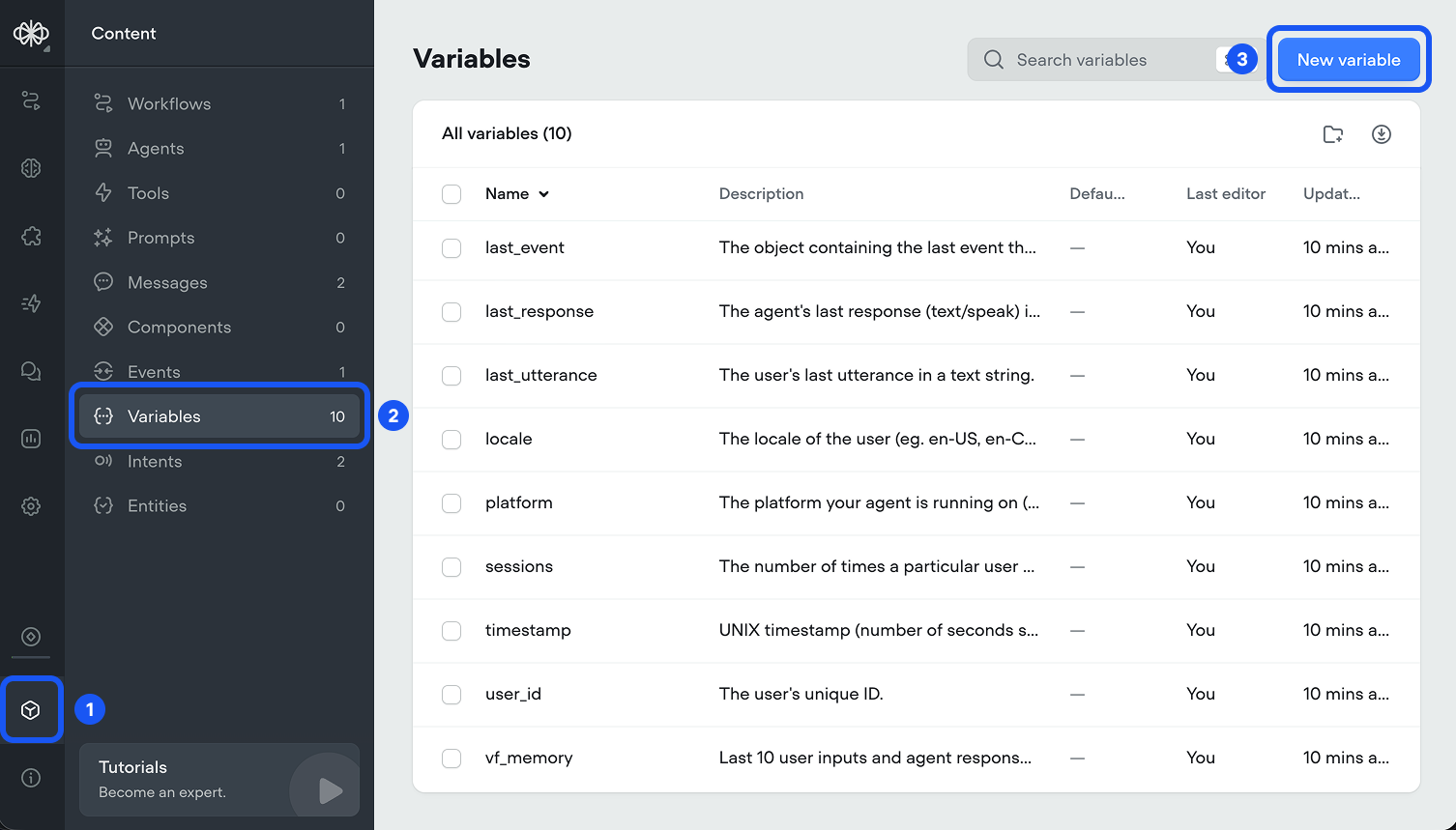
When creating a new variable, you can optionally set a default value. We recommend doing so, as this provides a fallback for your agent to use.
You can also create a new variable when you try to [use a variable in an input](/docs/variables#using-variables-during-conversations) by clicking the add button at the bottom of the dropdown that appears.
## Using variables during conversations
Variables can be used inside most inputs on Voiceflow, allowing your agent to access the value of the variable. For example, you can use variables in the [Agent step](/docs/agents)'s instructions box or as the value of a parameter in a [Tool step](/docs/tool-step)'s API call. To use a variable, simply type `{` followed by the name of the variable. Then, click the name of the variable in the dropdown list that appears.
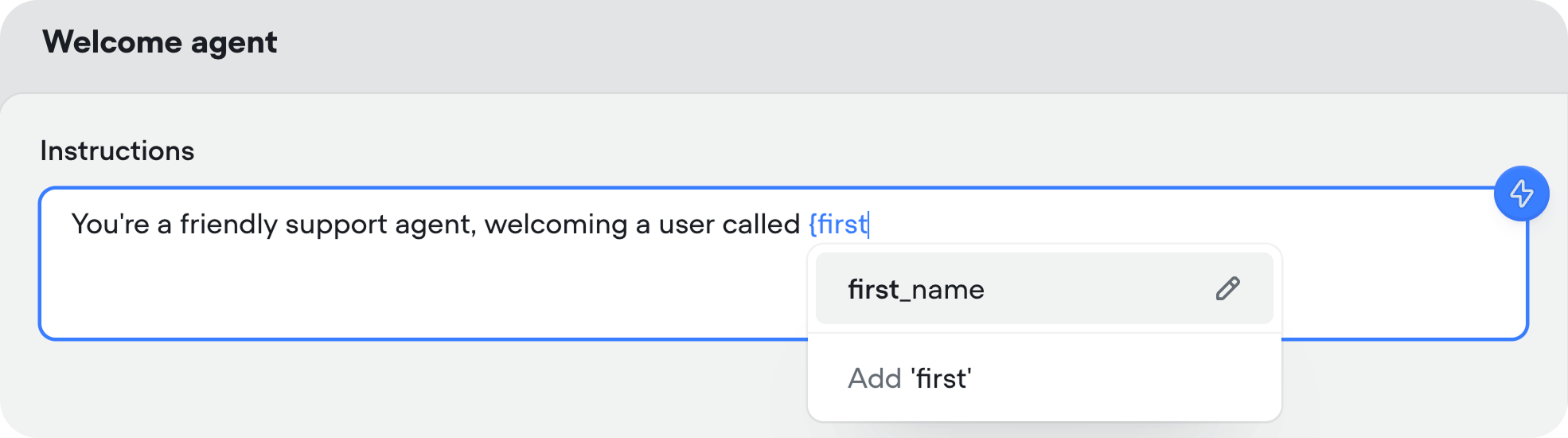
If you'd like to add complex logic to your agents, you can use variables inside the [Condition step](/docs/logic) to do so.
## Setting a variable's value during a conversation
There are various ways to set a variable during a conversation:
* The [Set step](/docs/variables-set) or the [JavaScript step](/docs/javascript-step) allow you to set a variable to any text value.
* The response from [integration tools](/docs/integrations) can be captured and stored in a variable using the capture response feature.
* Variables can be set agentically using [exit conditions](/docs/agents#exit-conditions) on an [Agent step](/docs/agents).
## Built-in variables
Each project created on Voiceflow automatically has access to some built-in variables. These are automatically set when the user begins a conversation with your agent or when certain actions take place.
| Variable name | Description | Example Data |
| --- | --- | --- |
| `intent_confidence` | The confidence interval (measured as a value from 0 to 100) for the most recently matched [intent](/docs/intents-1). **Note: intents are a legacy feature that we do not recommend using in new agent builds.** | 67 |
| `last_event` | Information about the last [event](/docs/events) that the user triggered. Defaults to `{"type":"launch","payload":{"resetState":false}}`. **Note: this variable contains an object rather than a string**. | `{"type":"event","payload":{"event":{"name":"buySyrup"}}}` |
| `last_response` | The agent's last response that it sent to the user. | Hello, I'm an agent! How can I help today? |
| `last_utterance` | The previous message that was sent by the user. | My name is Braden and I like cookies. |
| `locale` | The [locale](https://learn.microsoft.com/en-us/globalization/locale/standard-locale-names) of the user, as detected from their browser. | en-CA |
| `platform` | The platform your agent is running on. | voiceflow |
| `sessions` | The number of times a particular user has opened the agent. | 8 |
| `timestamp` | The [UNIX timestamp](https://en.wikipedia.org/wiki/Unix_time) of when the conversation began. | 873700668 |
| `user_id` | The user's unique ID, as set through the [web chat widget](/docs/chat-widget) or the [API](/docs/custom-interfaces). If using Voiceflow's [phone](/docs/telephony) integration, this is automatically set to the phone number that the agent is calling. | **Web chat or API**: example\_user **Phone**: +16471234567 |
| `vf_memory` | The last ten user inputs and agent responses in a string. This also includes tool calls. | agent: Hey what's up? user: I want to order maple syrup. |
| `vf_now` | The current date and time formatted in a human-readable way. You can modify the timezone in project settings. | Jan 1, 2025, 16:37 |
| `vf_date` | The current date formatted in a human-readable way. | Jan 1, 2025 |
| `vf_time` | The current time formatted in a human-readable way. | 16:37 |
| `vf_month` | The current month. | January |
| `vf_day` | The current day of the month. | 1 |
| `vf_year` | The current year. | 2025 |
| `vf_user_timezone` | The user's timezone in the format. If unavailable, defaults to the project's timezone. | America/Toronto |
Updated 14 days ago
---
[Using Events](/docs/using-the-events-cms)[Intents](/docs/intents-1)
Ask AI
* [Table of Contents](#)
* + [Creating variables](#creating-variables)
+ [Using variables during conversations](#using-variables-during-conversations)
+ [Setting a variable's value during a conversation](#setting-a-variables-value-during-a-conversation)
+ [Built-in variables](#built-in-variables)
