---
category: general
scraped_at: '2025-11-12T14:07:54.724310'
title: Previewing Intent Classification and Improvements
url: /docs/previewing-intent-classification-and-improvements
---
# Previewing Intent Classification and Improvements
### Purpose
Testing your intent classification ensures your agent understands user queries accurately before going live. The preview feature simulates real-world interactions, allowing you to assess and refine the agent's intent recognition.
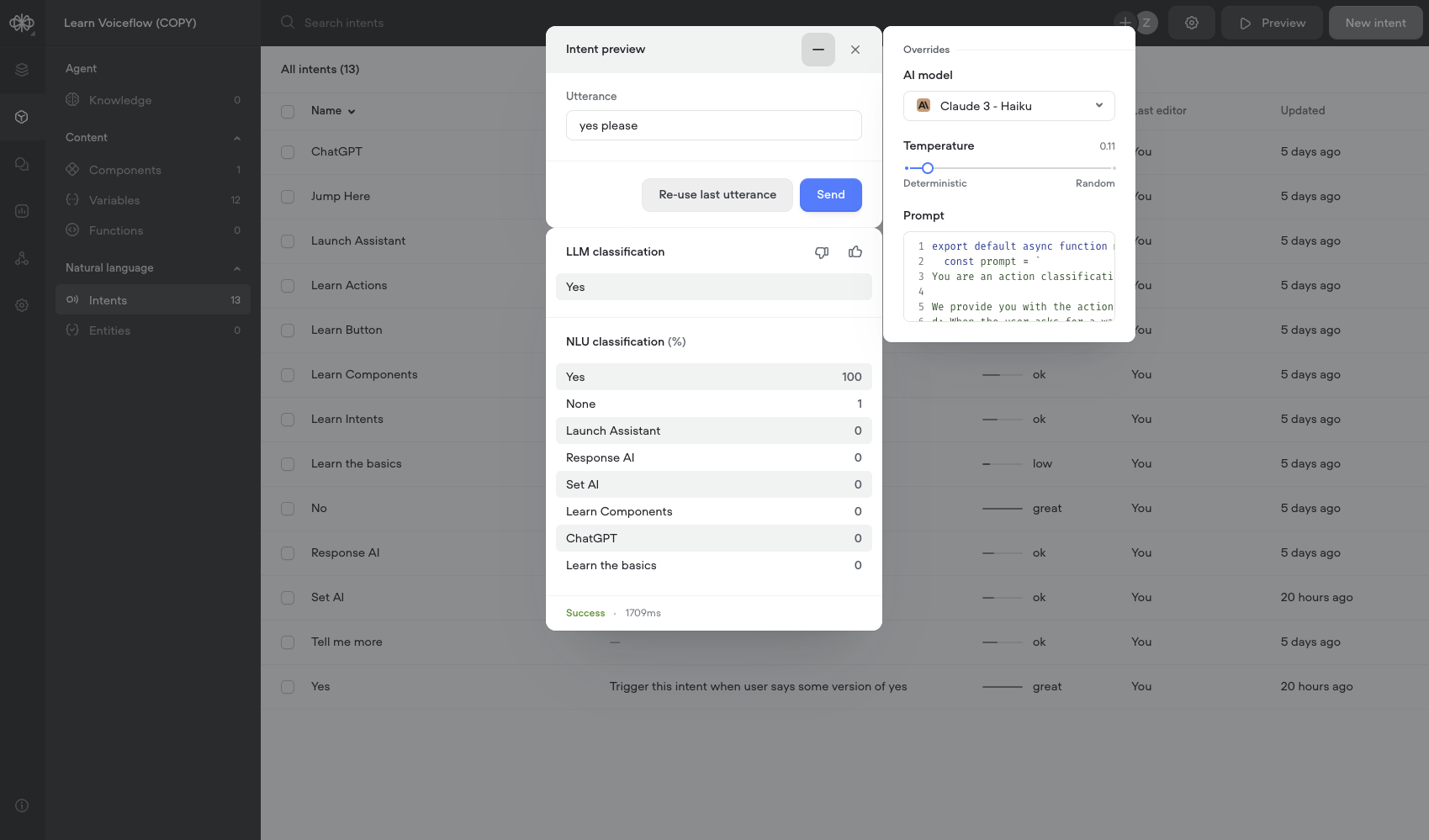
### How to Use the Preview Feature
1. **Access Preview**:
* In the Intent CMS, click the **"Preview"** button located in the header.
2. **Input Your Utterance**:
* Type a user query into the **"Utterance"** field of the preview modal. Use phrases that represent what users might say.
3. **Send the Query**:
* Click **"Send"** to process the utterance using the intent classification method you've selected.
4. **Review the Response**:
* **LLM Classification** (if enabled):
+ Displays the intent triggered by the LLM.
* **NLU Classification**:
+ Shows up to 10 intents triggered by the NLU, sorted by confidence score.
* *Note*: Only intents used in your agent will appear in the results.
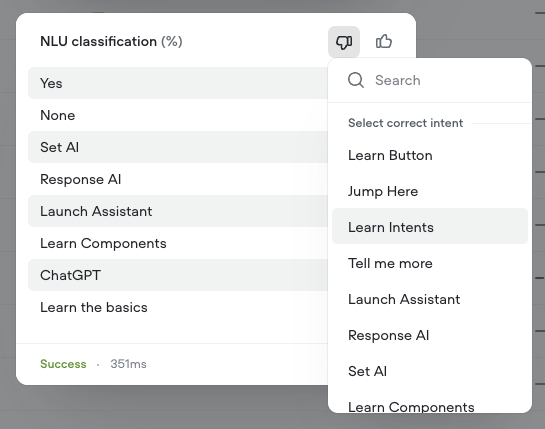
5. **Provide Feedback**:
* Click the thumbs up or thumbs down icon to indicate if the classification was correct.
* If you select thumbs down, you can specify the intended intent.
6. **Refine and Iterate**:
* Based on the results, adjust your intents, utterances, or settings to improve accuracy.
* Use **"Re-use last utterance"** to retest with the same input after making changes.
### Testing Strategies
* **Test with Variety**:
+ Use a wide range of utterances, including different phrasings, slang, and common misspellings.
* **Edge Cases**:
+ Include ambiguous or complex queries to test how the agent handles them.
* **Test Different Settings**:
+ Experiment with model settings in the preview (e.g., AI model, temperature).
+ Changes in the preview are temporary and do not affect the agent globally.
* **Monitor Confidence Levels**:
+ Low confidence scores may indicate the need for more training data or clearer intent definitions.
### Applying Successful Changes
* If satisfied with the preview results, manually update the global settings in the Intent CMS to apply them to your agent.
Updated 5 months ago
---
[Using the Intent CMS](/docs/using-the-intent-cms)[Functions](/docs/functions)
Ask AI
* [Table of Contents](#)
* + [Purpose](#purpose)
+ [How to Use the Preview Feature](#how-to-use-the-preview-feature)
+ [Testing Strategies](#testing-strategies)
+ [Applying Successful Changes](#applying-successful-changes)
