---
category: general
scraped_at: '2025-11-12T14:08:47.533264'
title: Passing custom variables into web chat
url: /docs/customization-configuration
---
# Passing custom variables into web chat
Send custom variables on web chat load like userID, email, and more.
When embedding Voiceflow’s web chat on your site, you can go beyond the default setup by passing additional parameters to the `window.voiceflow.chat.load()` function. This allows you to personalize the experience, pass metadata, and pre-fill variables for your assistant.
Here’s how to use and customize the chat.load() snippet.
# Basic configuration
The default configuration snippet loads your assistant by specifying the projectID, runtime URL, and versionID. If you [copy the code](/docs/chat-widget) from the Interfaces tab of Voiceflow's editor, these values will already be set.
JavaScript
```
window.voiceflow.chat.load({
verify: {
projectID: "YOUR_PROJECT_ID"
},
url: "https://general-runtime.voiceflow.com",
versionID: "production"
});
```
You can extend this setup with optional parameters for advanced customization, including tracking users, pre-filling variables, and annotating transcript metadata.
## Passing in a custom userID (optional)
You can assign a unique ID to each user with the userID property. This ID becomes available in your agent as the built-in `{user_id}` variable. This is useful for identifying users across sessions, persisting conversation history, and personalizing interactions. Here's an example:
JavaScript
```
window.voiceflow.chat.load({
verify: {
projectID: 'YOUR_PROJECT_ID'
},
url: 'https://general-runtime.voiceflow.com',
versionID: 'production',
userID: 'user_12345'
});
```
# Pass custom variable values (optional)
You can pre-fill variables when the assistant loads by using the `launch.event.payload` field. Here's how:
JavaScript
```
window.voiceflow.chat.load({
verify: {
projectID: 'YOUR_PROJECT_ID'
},
url: 'https://general-runtime.voiceflow.com',
versionID: 'production',
launch: {
event: {
type: 'launch',
payload: {
user_name: 'Mary',
user_email: '[email protected]'
}
}
}
});
```
These values populate the last\_event system variable and can be used in a [JavaScript step](/docs/javascript-step) at the beginning of the conversation.
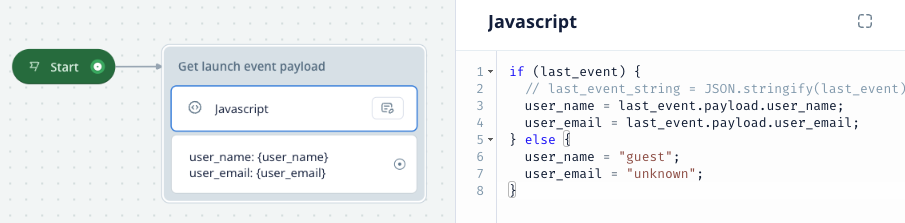
There's two important things to note when working with custom variables:
1. The JavaScript step can't create new variables. For the example in the screenshot above to work, you'd need to have already created the `user_name` and `user_email` variables like normal.
2. The `last_event` variable is set upon each new user event in the conversation (for example, when the widget loads, an intent is triggered, or a button is clicked). If you'd like to set variables with default values, set them immediately after the Start step in your agent's design.
# Annotating transcripts with user metadata (optional)
You can pass basic user profile info for use in Voiceflow's [Transcripts](/docs/transcripts) feature.. This metadata is not available to your agent's logic. It is only used for labeling conversations in the UI.
JavaScript
```
window.voiceflow.chat.load({
verify: {
projectID: '<your-project-id>'
},
url: 'https://general-runtime.voiceflow.com',
versionID: 'production',
user: {
name: 'Mary',
image: 'https://example.com/avatar.jpg'
}
});
```
Updated 6 months ago
---
[Chat persistence](/docs/chat-persistence)[Proactive messages](/docs/proactive-messages)
Ask AI
* [Table of Contents](#)
* + [Basic configuration](#basic-configuration)
+ - [Passing in a custom userID (optional)](#passing-in-a-custom-userid-optional)
+ [Pass custom variable values (optional)](#pass-custom-variable-values-optional)
+ [Annotating transcripts with user metadata (optional)](#annotating-transcripts-with-user-metadata-optional)
