---
category: general
scraped_at: '2025-11-12T14:08:28.234819'
title: Salesforce
url: /docs/salesforce
---
# Salesforce
With the Salesforce integration, your agent can log notes, create leads, and keep cases up-to-date without leaving the conversation.
Use Salesforce actions in both Agent and Tool steps to manage customer data, track interactions, and update records directly from your Voiceflow agent.
## Basic usage
[](https://w17llroiln.ufs.sh/f/JH4JLc5mceYkd20NwMlpu1oeO8lNrvZq7mJiBcVy0XgAjEbS)
> 🔐
>
> To use the Salesforce integration, you'll need to **OAuth into Salesforce** from the Voiceflow Creator. This ensures your agent can securely access and update your Salesforce account.
## What you can do with Salesforce
The Salesforce integration currently supports the following actions:
| Action | Description |
| --- | --- |
| Add comment to a case | Append a new comment to an existing Salesforce case. |
| Create case | Create a new customer service case in Salesforce. |
| Create contact | Add a new contact record to your Salesforce database. |
| Create lead | Create a new lead entry in Salesforce. |
| Update case | Modify fields or status of an existing Salesforce case. |
| Update contact | Edit information for an existing Salesforce contact. |
| Update Salesforce lead | Update details for an existing Salesforce lead. |
## Use cases
Here are some common ways to use Salesforce in your Voiceflow agent's workflow:
* Log a customer’s latest request as a new case after a support conversation.
* Automatically create a lead when a potential customer expresses interest.
* Update a contact’s phone number or email directly from the conversation.
* Append internal notes to an existing case for better team visibility.
Example:
> If a customer says, “Can you make sure my email is updated and log my refund request?”, the agent might **Update contact** with the new email and **Create case** for the refund request in Salesforce.
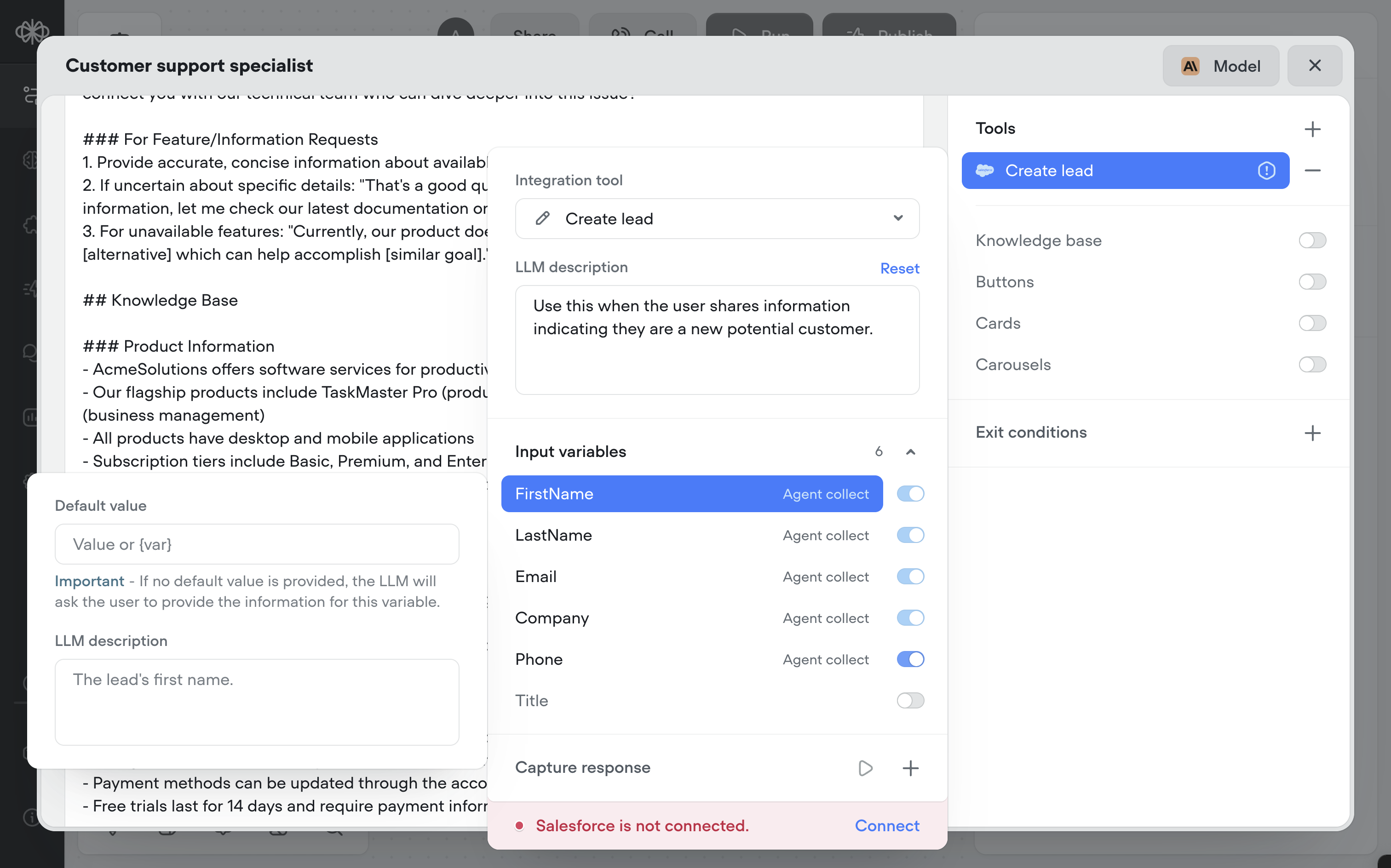
Ensure you provide an `LLM description` for each tool so the agent understands when to use it.
> E.g. for `Create lead`, you might write: `Use this when the user shares information indicating they are a new potential customer.`
> 👀
>
> ### Be wary of each action's required arguments.
>
> Each Salesforce action requires different fields (e.g., `FirstName`, `LastName`, or `Email`). Decide whether these should be *defaulted, hardcoded, or collected by the agent*. Always provide LLM descriptions for each input so the agent knows exactly how to use them.
>
> 
## Frequently asked questions
### Can I map Voiceflow variables to Salesforce fields?
> Yes. In each Tool or Agent step, you can map Voiceflow variables directly to the corresponding Salesforce fields for the action.
### Can I use Salesforce actions for multiple records in one step?
> No. Each action operates on a single record at a time. If you need to update or create multiple records, specify in the Agent's `Instructions` to perform it multiple times.
### Do I need to set up Salesforce objects before connecting to Voiceflow?
> Yes. Make sure the relevant objects and fields exist in Salesforce before mapping them in Voiceflow.
[Doc
## Integrations
Learn more about what integrations are available to supercharge your agent's workflow and capabilities.
Read doc →](https://docs.voiceflow.com/update/docs/integrations#/)
Updated 3 months ago
---
[MCP](/docs/mcp-tool)[Twilio](/docs/twilio)
Ask AI
* [Table of Contents](#)
* + [Basic usage](#basic-usage)
+ [What you can do with Salesforce](#what-you-can-do-with-salesforce)
+ [Use cases](#use-cases)
+ [Frequently asked questions](#frequently-asked-questions)
+ - [Can I map Voiceflow variables to Salesforce fields?](#can-i-map-voiceflow-variables-to-salesforce-fields)
- [Can I use Salesforce actions for multiple records in one step?](#can-i-use-salesforce-actions-for-multiple-records-in-one-step)
- [Do I need to set up Salesforce objects before connecting to Voiceflow?](#do-i-need-to-set-up-salesforce-objects-before-connecting-to-voiceflow)
