
Multi-Source Documentation MCP Server
- voiceflow-doc-mcp
- data
- voiceflow_docs
test-execution.md•4.92 kB
---
category: general
scraped_at: '2025-11-12T14:11:13.617487'
title: Test Execution
url: /docs/test-execution
---
# Test Execution
## Overview
Test Execution is the process of running your Test Suites against your Voiceflow applications to validate functionality, responses, and user experience flows.
## How Test Execution Works
### Manual Execution
You can run tests immediately in several ways:
* **From Test Suites Page**: Click the "Run Test" button on any test suite card
* **From Test Suite Editor**: Use the "Execute Test" button when viewing/editing a suite
### Status Indicators
* **Pending** ⏳: Test has been submitted and is waiting to start
* **Running** 🔄: Test is currently executing
* **Completed** ✅: Test finished successfully with all validations
* **Failed** ❌: Test failed due to validation errors or system issues
* **Scheduled** 📅: Test is queued for future execution
## Test Types
The Voiceflow CLI supports two distinct types of tests:
### Traditional Interaction-Based Tests
* **Purpose**: Test specific user inputs and validate exact agent responses
* **Structure**: Defined as a series of interactions with expected validations
* **Use Case**: Regression testing, validation of specific conversation flows
* **Execution**: Sequential interaction testing with predefined inputs
### Agent-to-Agent Testing
* **Purpose**: Simulate realistic conversations using AI-powered agents
* **Structure**: Defined with goals, personas, and user information
* **Use Case**: End-to-end conversation testing, realistic user behavior simulation
* **Execution**: AI agent interacts naturally with your Voiceflow agent to achieve specific goals
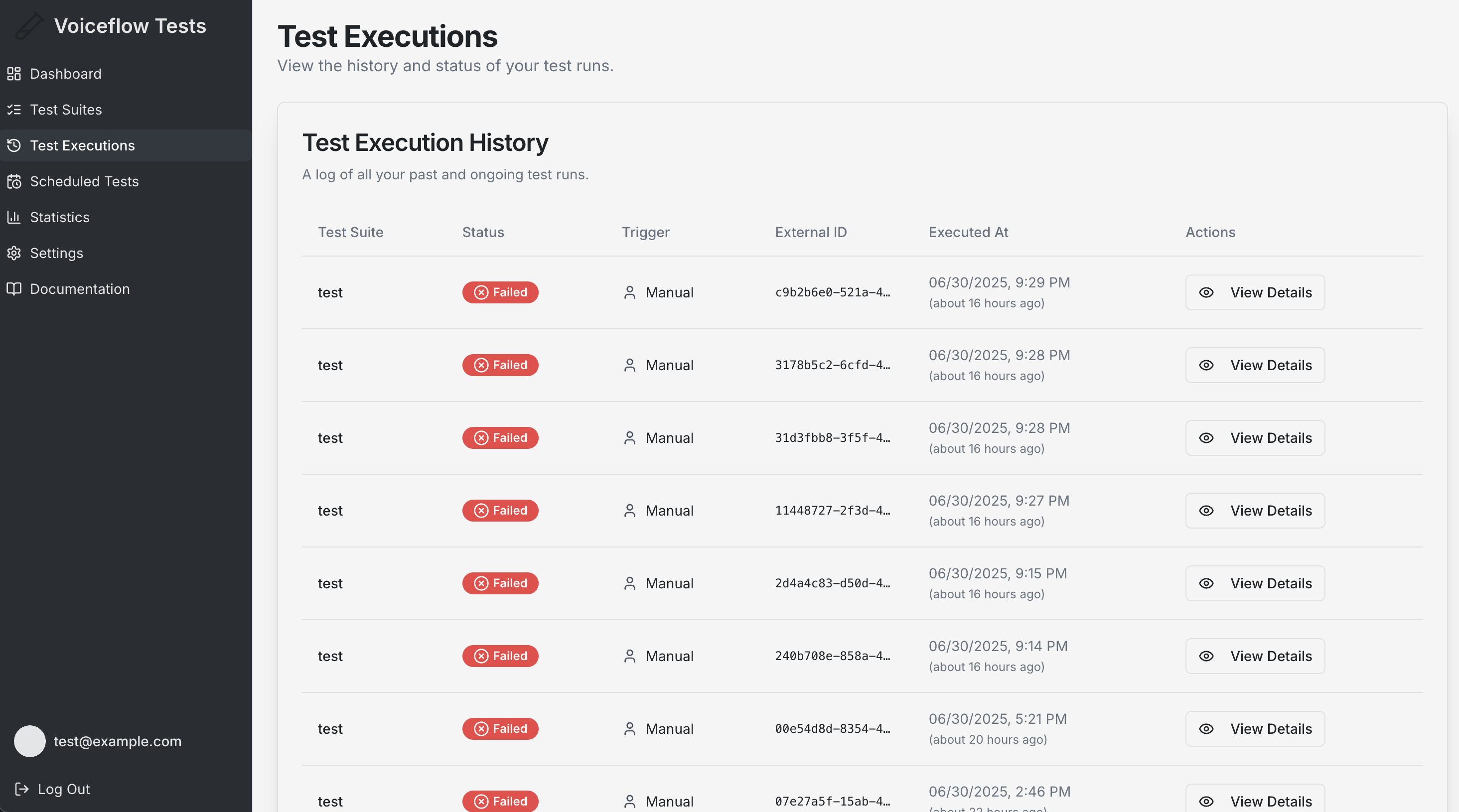
## Test Execution History
### Viewing Executions
Navigate to **Test Executions** to see:
* **Complete History**: All your past test executions
* **Execution Details**: Date, time, duration, and status for each run
* **Suite Information**: Which test suite was executed
* **Trigger Type**: Whether the test was run manually or scheduled
### Execution Details
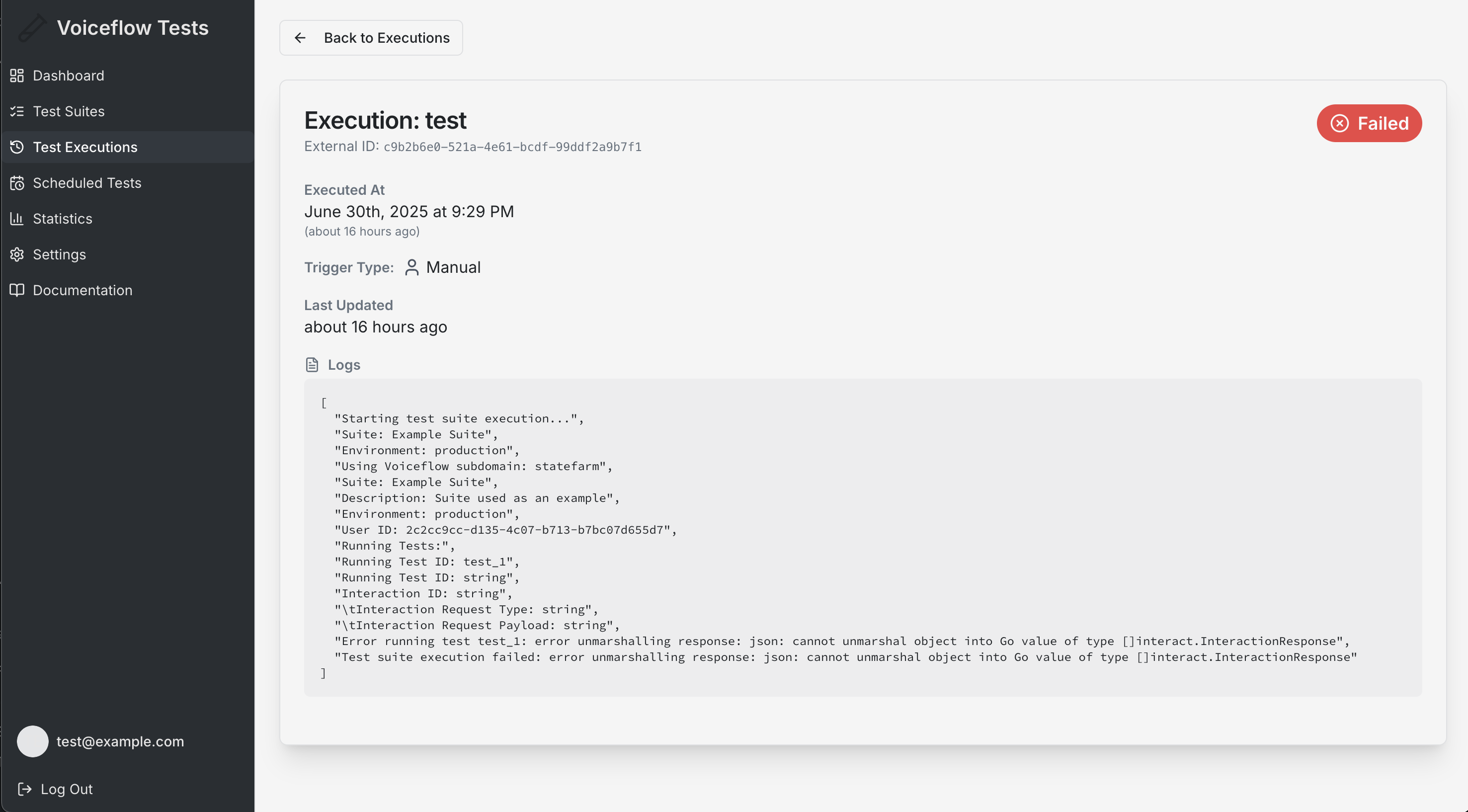
Click on any execution to view:
* **Test Logs**: Detailed step-by-step execution logs
* **Results**: Pass/fail status for each test case
* **Timing Information**: How long each test case took
* **Error Details**: Specific failure reasons and debugging information
## Execution Types
* Manual Executions: Triggered by user action
* Scheduled Executions: Automated runs at specified times
## Understanding Test Results
### Success Criteria
A test execution is considered successful when:
* All test cases pass their validation criteria
* No system errors occur during execution
* All API calls complete successfully
### Failure Analysis
When tests fail, review:
* **Validation Errors**: Which specific validations failed
* **Response Differences**: How actual responses differed from expected
* **System Issues**: API connectivity or timeout problems
* **Configuration Errors**: Incorrect test setup or parameters
### Logs and Debugging
Execution logs provide detailed information for debugging tests.
## Execution Limits and Considerations
### API Limitations
* Respect Voiceflow API rate limits
* Monitor Voiceflow token usage to avoid quota exhaustion
* Plan execution timing to optimize resources
### Performance Factors
* Test complexity affects execution time
* Network latency impacts overall duration
* API response times vary based on bot complexity
### Data Retention
* Execution history is retained for your account
* Logs and results are available for analysis
* Export capabilities for external reporting
Updated 4 months ago
---
[Scheduled Tests](/docs/scheduled-tests)[User Authentication](/docs/user-authentication)
Ask AI
* [Table of Contents](#)
* + [Overview](#overview)
+ [How Test Execution Works](#how-test-execution-works)
+ - [Manual Execution](#manual-execution)
- [Status Indicators](#status-indicators)
+ [Test Types](#test-types)
+ - [Traditional Interaction-Based Tests](#traditional-interaction-based-tests)
- [Agent-to-Agent Testing](#agent-to-agent-testing)
+ [Test Execution History](#test-execution-history)
+ - [Viewing Executions](#viewing-executions)
- [Execution Details](#execution-details)
+ [Execution Types](#execution-types)
+ [Understanding Test Results](#understanding-test-results)
+ - [Success Criteria](#success-criteria)
- [Failure Analysis](#failure-analysis)
- [Logs and Debugging](#logs-and-debugging)
+ [Execution Limits and Considerations](#execution-limits-and-considerations)
+ - [API Limitations](#api-limitations)
- [Performance Factors](#performance-factors)
- [Data Retention](#data-retention)
Latest Blog Posts
- MCP Moves to the Linux Foundation: Neutral Stewardship for Agentic InfrastructureBy Om-Shree-0709 on .mcpanthropicLinux Foundation
MCP directory API
We provide all the information about MCP servers via our MCP API.
curl -X GET 'https://glama.ai/api/mcp/v1/servers/florinel-chis/voiceflow-doc-mcp'
If you have feedback or need assistance with the MCP directory API, please join our Discord server