---
category: general
scraped_at: '2025-11-12T14:07:20.219663'
title: KB search step
url: /docs/kb-search
---
# KB search step
### Overview:
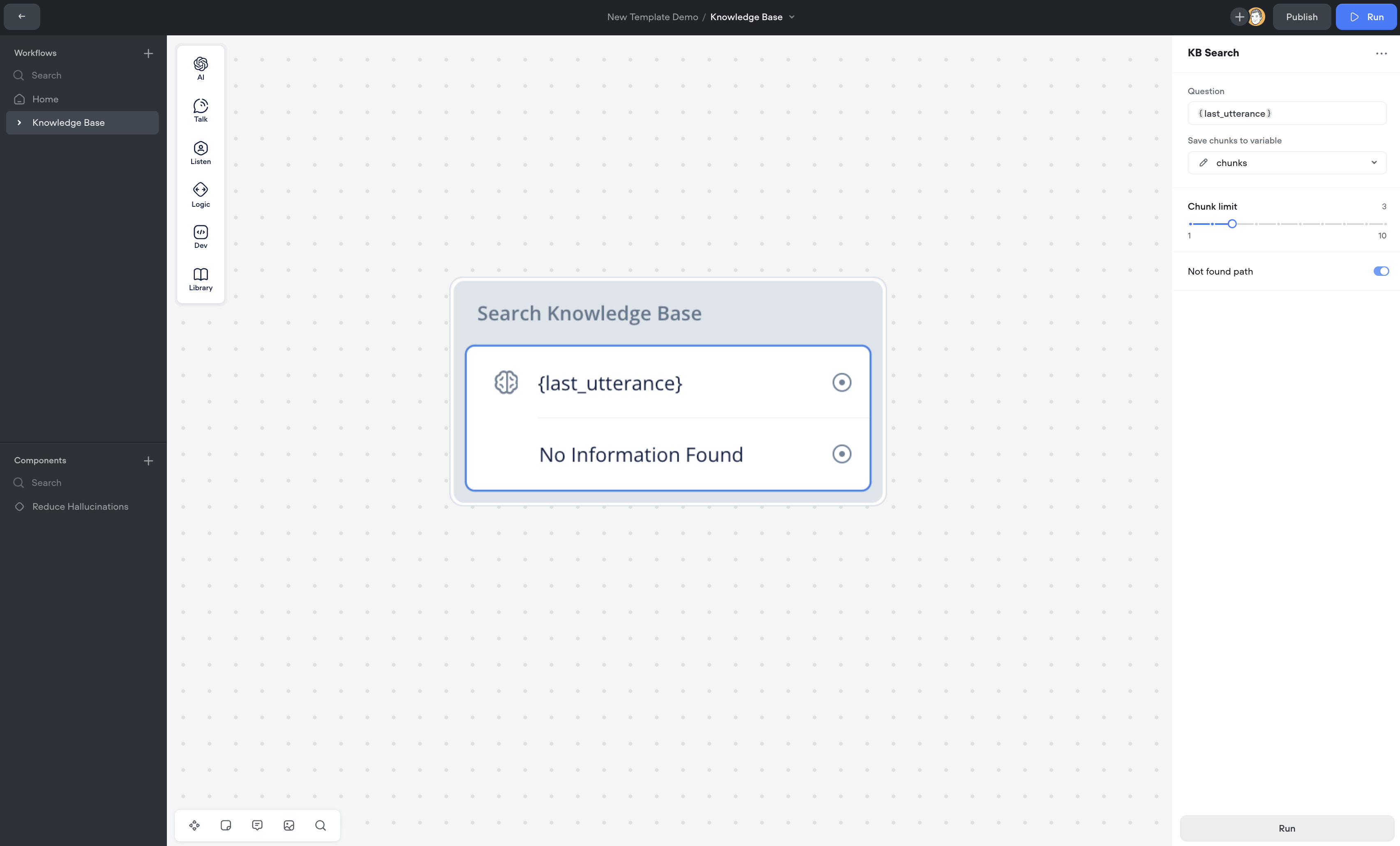
The **KB Search** step allows you to query data from your Knowledge Base directly within Voiceflow. This step is designed to simplify the process of fetching relevant data chunks, and providing greater control of how chunks and their associated metadata are consumed in your agent designs. It provides an easy-to-use interface for configuring queries, chunk limits, and handling cases where no results are found.
---
### Step-by-Step Instructions:
#### 1. **Add the KB Search Step**
* From the **Dev** section in the left-hand toolbar, drag the **KB Search Step** onto your canvas.
#### 2. **Set Up the Query**
* In the right panel, you will find a field labeled **Question**. Enter your query directly or select a variable that will contain the user’s input. This is the question you will use to search your Knowledge Base.
#### 3. **Configure Chunk Limit**
* Adjust the **Chunk Limit** slider to set the number of chunks the system should return. The default limit is set to 3, but you can adjust it from 1 to 10 depending on the volume of data you want to retrieve.
#### 4. **Enable No Match Handling**
* If you want to handle situations where no relevant data is found, toggle on the **Not Found Path**.
* Set the **Minimum chunk score**: This slider allows you to define the similarity threshold (from 0% to 100%) for returned chunks. If no data meets this threshold, the Not Found path will be triggered.
#### 5. **Save Data to a Variable**
* Under the option **Save chunks to variable**, select a variable to store the fetched data. This allows you to use the retrieved data in subsequent steps within your workflow. **NOTE**: Even if the “No Match” condition is triggered, the chunks will still be saved to the variable, allowing you to run additional logic on the returned chunks, if needed.
* Once the chunks are retrieved, they are automatically converted into a string format. This ensures that the fetched data is easily usable in text-based prompts or other workflow steps without requiring additional transformations.
#### 6. **Integrate Fetched Data**
* Once you’ve fetched the data, it will be stored in the variable you selected. You can now use this data in other steps, such as in AI prompts, conditions, or functions.
---
### Testing Experience:
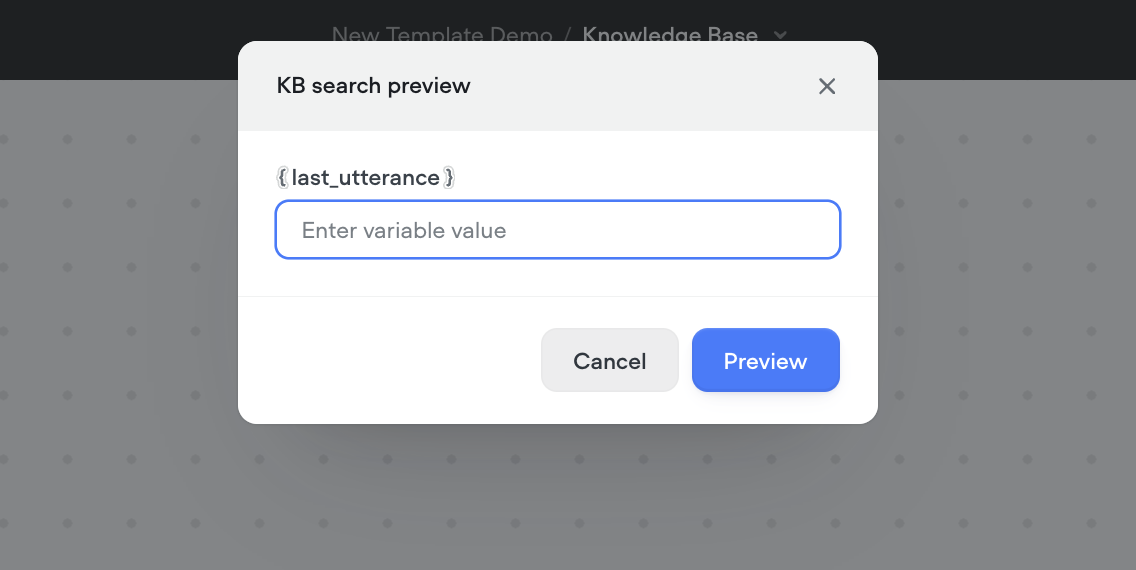
* **Running the Query**: Click the **Run** button on the editor to test your setup. If you’re using a variable as input, you’ll be prompted to enter a value for the variable to simulate the query.
* **Viewing Results**: After running the query, a preview of the returned chunks will be displayed along with their chunk scores.
+ **Chunk Scores**: The chunk scores are color-coded to indicate whether they meet the similarity threshold set in your Not Found path:
- **Red Score**: Indicates that the chunk score is below the set threshold limit.
- **Green Score**: Indicates that the chunk score is above the threshold limit.
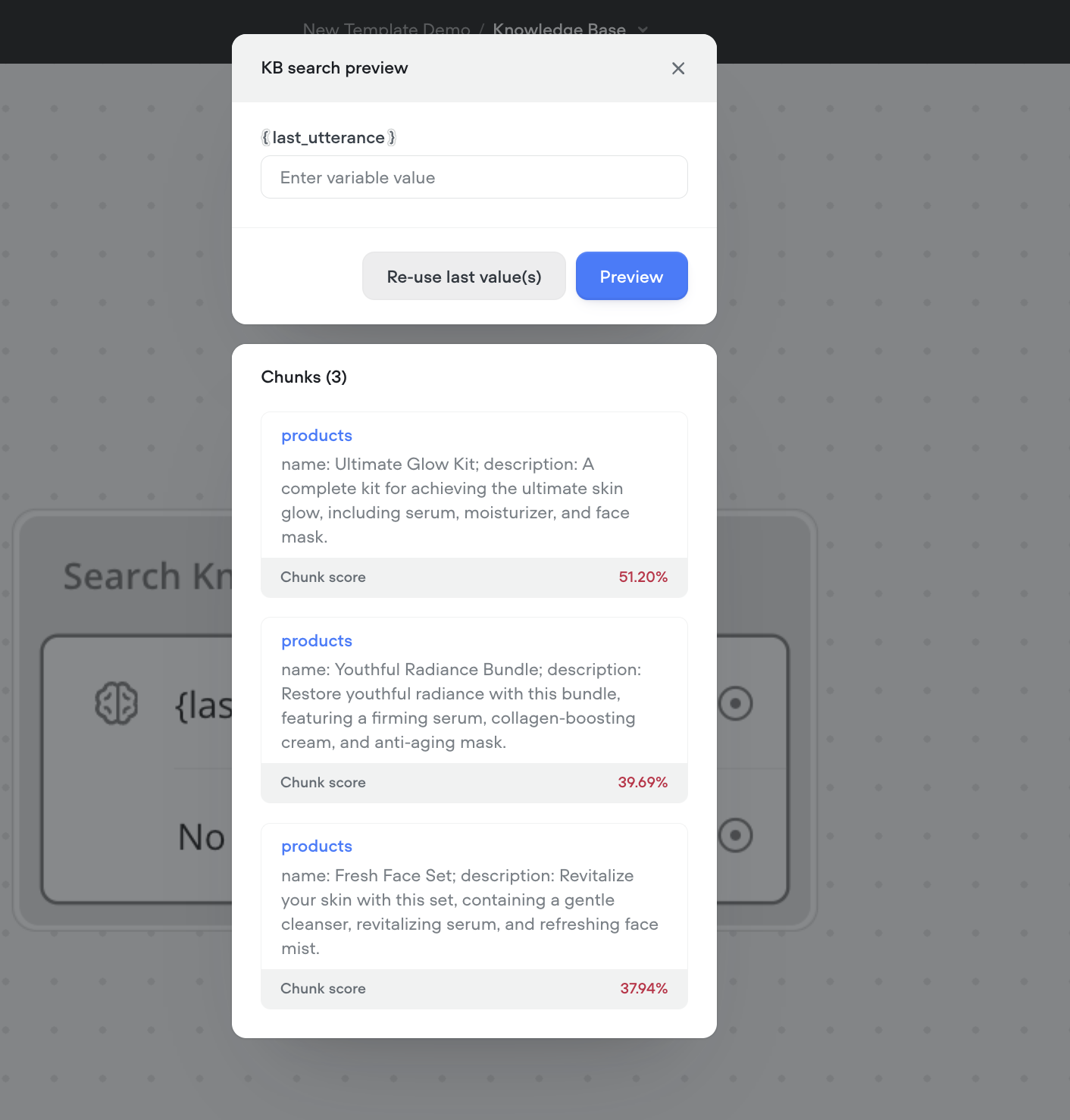
This testing experience allows you to quickly validate the relevance and accuracy of the returned chunks, helping you to fine-tune the query parameters for optimal results.
---
### Use Cases:
1. **Fetching Data for User Responses**: If you need to pull relevant information from your Knowledge Base to answer a user’s query, the KB Search Step allows you to quickly retrieve and present the most relevant chunks of data.
2. **Handling No Match Scenarios**: If your query does not find a match, you can set up a fallback or alternate action using the Not Found path to guide the conversation accordingly.
3. **Data Chunk Management**: Limit the amount of data retrieved to ensure only the most relevant chunks are used in your agent's workflow, improving efficiency and relevance.
---
### Best Practices:
* **Setting Reasonable Chunk Limits**: Adjust the chunk limit according to the context of your agent’s needs. For concise answers, keep the chunk limit lower. For detailed responses, increase the limit as necessary.
* **Utilizing No Match**: Define clear actions in the event that no data matches the query. This could include asking the user to rephrase their question or providing a fallback message.
Updated 5 months ago
---
[JavaScript step](/docs/javascript-step)[Custom action step](/docs/custom-actions)
Ask AI
* [Table of Contents](#)
* + [Overview:](#overview)
+ [Step-by-Step Instructions:](#step-by-step-instructions)
+ - [1. Add the KB Search Step](#1-add-the-kb-search-step)
- [2. Set Up the Query](#2-set-up-the-query)
- [3. Configure Chunk Limit](#3-configure-chunk-limit)
- [4. Enable No Match Handling](#4-enable-no-match-handling)
- [5. Save Data to a Variable](#5-save-data-to-a-variable)
- [6. Integrate Fetched Data](#6-integrate-fetched-data)
+ [Testing Experience:](#testing-experience)
+ [Use Cases:](#use-cases)
+ [Best Practices:](#best-practices)
