---
category: general
scraped_at: '2025-11-12T14:08:03.778982'
title: Importing data
url: /docs/importing-data-to-the-knowledge-base
---
# Importing data
Add company-specific knowledge to your agent, allowing accurate responses to be generated.
The Knowledge Base lets your agent access and answer questions using your own content. You can upload documents, connect URLs, or add text directly, and the agent will use that information to provide accurate, grounded responses. It’s an easy way to give your agent expertise on your product, company, or domain without having to script every answer manually.
[](https://yz5du1veb1.ufs.sh/f/9fKud4NeF5NS3UKNJ6HEN5yeFarYBh6C7SkfDcgJOXVT3zqL)
## Supported data sources
Voiceflow supports five different data sources:
| **Source** | **Description** |
| --- | --- |
| **URL(s)** | Paste one or more URLs to import the content from those pages. Use `sitemap.xml` to bulk import entire websites. You can only import publicly accessible URLs. |
| **Sitemap** | Import all pages from a website into your knowledge base, ideal for full-site crawls. For most websites, the sitemap is found at `https://website.com/sitemap.xml`. |
| **Upload file** | Upload `.pdf`, `.txt`, or `.docx` files (Max 10 mb). Only text can be imported into the knowledge base. |
| **Plain text** | Paste raw content directly. Great for fast prototyping or testing. |
| **Zendesk** | Import data from your Zendesk knowledge base. Requires Zendesk admin access. |
The number of data sources you can connect to your project varies depending on your plan. [Learn more on our pricing page](https://www.voiceflow.com/pricing).
## Import settings
### Refresh rate settings
When importing data from a URL or sitemap, you can optionally set a refresh rate. This allows your project to periodically re-sync in content from your website, keeping your knowledge base up to date. The following options are available:
| **Option** | **Best for...** |
| --- | --- |
| **Never** | Static content that doesn't need refreshing |
| **Daily** | Frequently updated content (e.g., blogs, news sites) |
| **Weekly** | Occasionally updated info (e.g., support centers) |
| **Monthly** | Stable content (e.g., product policies, pricing) |
Please note that when an LLM chunking strategy is enabled every re-sync will consume credits. If your content doesn't change often, we'd recommend you reduce your refresh rate frequency. No credits are consumed when syncing data with no LLM chunking strategies selected.
### LLM chunking strategies
When your agent looks up data from the knowledge base, behind the scenes, it's finding **chunks** of data that are most similar to a provided query. While you can upload manually chunked data to your knowledge base [using Voiceflow's API](/reference/post_v1-knowledge-base-docs-upload-url#/), most users will find it easiest to automatically chunk their data using an LLM chunking strategy. This will allow AI to automatically split up your data into optimized chunks, helping your agent find useful answers to your user's questions.
Voiceflow supports five different chunking strategies:
| Strategy name | Ideal use case |
| --- | --- |
| Smart chunking | Breaks and clusters content into topic-based sections. Example use cases: * Long policy documents (Legal, HR) * Real estate listings by region * Educational course catalogs |
| FAQ optimization | Converts structured data into question-and-answer pairs to help the LLM handle direct user queries. Example use cases: * Product or service information * Help center FAQ |
| Remove HTML and noise | Strips out excess formatting, inline code, and markdown artifacts that may confuse the LLM. Example use cases: * Blog posts with embed-heavy formatting * Markdown-heavy documents * Notion/CMS site exports |
| Add topic headers | Prepends each chunk with a short summary line and header to signpost the LLM on available information. Example use cases: * Company policy manuals * Research whitepapers * Developer onboarding guides |
| Summarize | Automatically extracts the most important ideas or paragraphs from large, verbose documents. Example use cases: * Investor decks * Legal agreements * Long reports or strategy briefs |
Chunking strategies aren't a "one-size-fits-all" concept so we recommend experimenting with various combinations of strategies on each of your data sources to see which helps your agent generate the best responses.
### Metadata
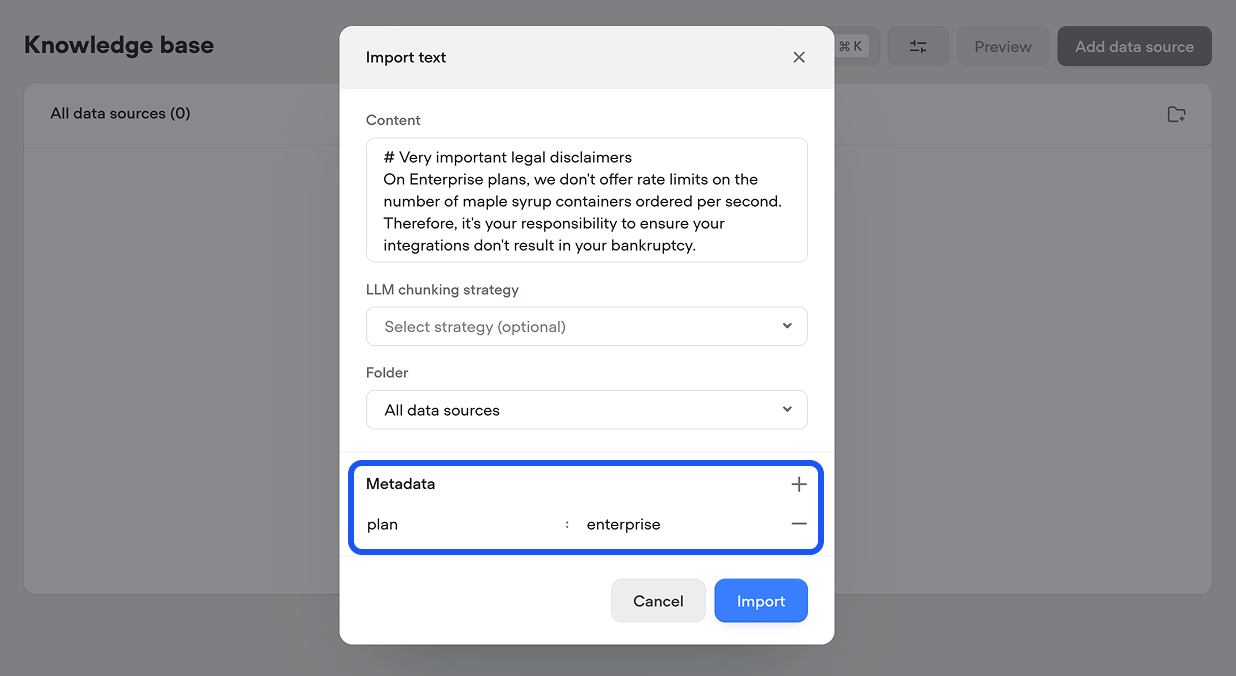
You can optionally attach metadata to each document or webpage you upload to your knowledge base. This can then be used as a filter by the [Knowledge base tool](/docs/knowledge-base) when querying data.
This can be useful if you have multiple brands, product lines or subscription tiers and want to ensure the correct category of information is returned. For example, if you're building an agent for a SaaS platform which has different policies versus self-serve customers, you could add metadata with the key `plan` and value `enterprise` or `regular` to each data source, based on which type of customer the information is relevant for.
## Troubleshooting data imports
If something goes wrong when importing your data, hover over the❗ icon to learn why.
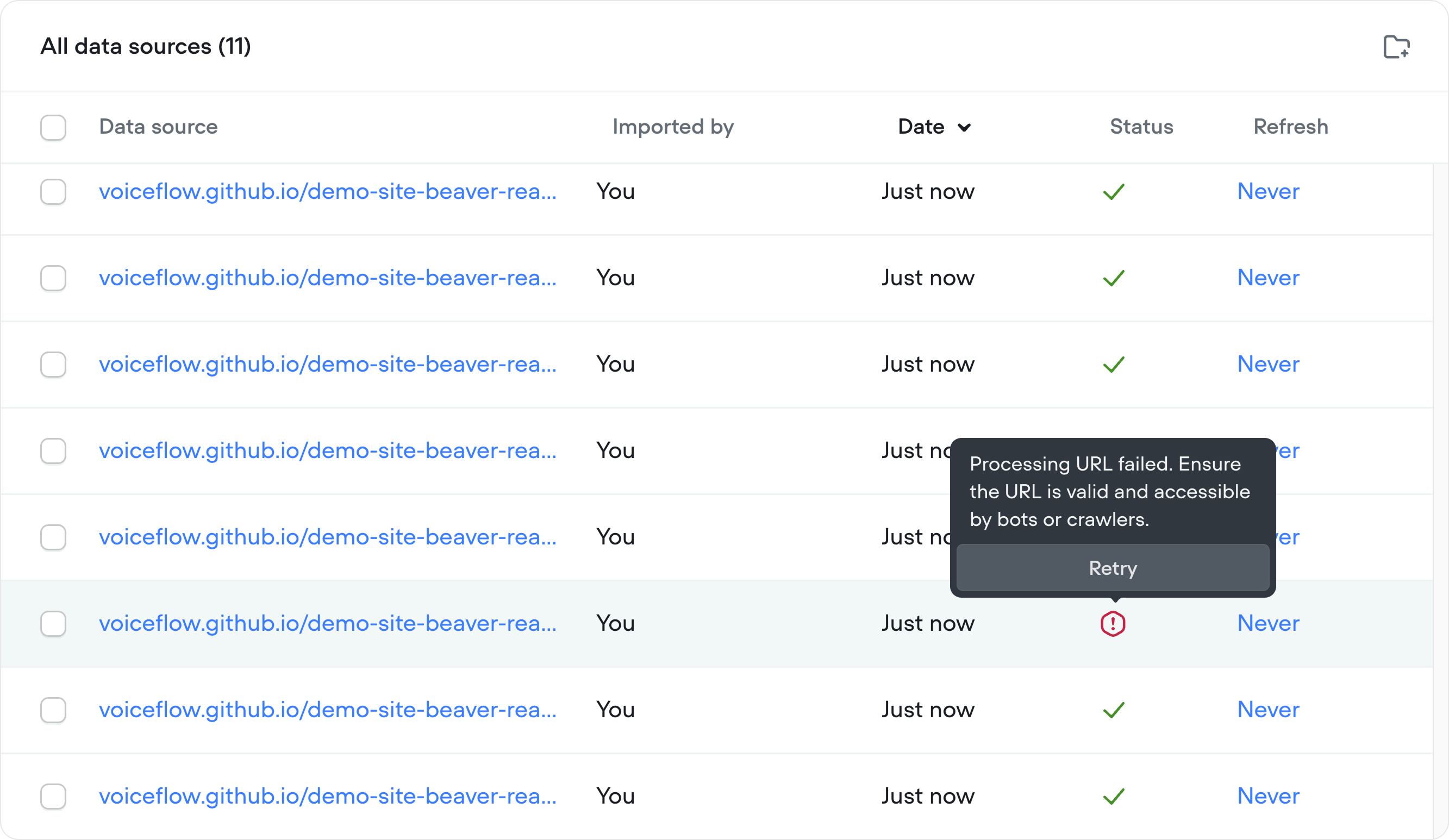
Import errors are handled gracefully. Failed files won’t break your project - the remaining files will be processed.
## Advanced: importing data using Voiceflow's API
Voiceflow's [Knowledge Base API](/reference/knowledge-overview#/) allows you to manage your Knowledge base programmatically. Common API use cases include:
* Importing content from Notion, Google Docs, or Airtable via an SDK or API request
* Managing KB entries dynamically across multiple workspaces, outside of the Voiceflow Creator
* Debugging & testing chunk processing behind the scenes
[Doc
## Document API reference
Upload files and content from websites using the Document API.
Read doc →](https://docs.voiceflow.com/reference/post_v1-knowledge-base-docs-upload-url#/)
Updated 14 days ago
---
[Knowledge base tool](/docs/knowledge-base)[Call forwarding tool](/docs/call-forwarding)
Ask AI
* [Table of Contents](#)
* + [Supported data sources](#supported-data-sources)
+ [Import settings](#import-settings)
+ - [Refresh rate settings](#refresh-rate-settings)
- [LLM chunking strategies](#llm-chunking-strategies)
- [Metadata](#metadata)
+ [Troubleshooting data imports](#troubleshooting-data-imports)
+ [Advanced: importing data using Voiceflow's API](#advanced-importing-data-using-voiceflows-api)
