A
licenseA
qualityD
maintenanceEnables AI assistants to interact with D2L Brightspace LMS, providing access to assignments, grades, course content, calendar events, and announcements through automated SSO authentication.
12
13 npm
12
MIT

The EduBase MCP Server enables AI clients (like Claude) to interact with the EduBase educational platform, managing quizzes, exams, users, classes, organizations, and more on your behalf.
Question Management
List, create, update, delete, and export quiz questions
Rich question types: multiple choice, true/false, numerical, expression, matrix, free-text, date/time, file upload, and more
LaTeX formatting, images, audio, attachments, hints, solutions, and step-by-step explanations
Dynamic/parametric questions with randomized variables and automatic grading with partial credit
Quiz Set Management
List, create, update, and delete quiz sets
Assign/remove questions and configure display modes (TEST or TURNS)
Exam Administration
Create, schedule, and manage exams (regular, championship, homework, survey)
Assign/remove users, retrieve per-user results, generate certificates, and submit AI-generated summaries
Results & Analytics
Retrieve detailed quiz play results, user performance data, and raw exam result data
User & Group Management
CRUD operations on user accounts; look up by email, username, or code
Manage groups, generate/revoke login links, and assume user identities for delegated access
Class Management
List and manage classes; assign/remove users individually or in bulk
Organization Management
Create, update, and delete organizations; manage members with permission levels; configure webhooks for event notifications (exam/quiz completions, API triggers)
Integration Management
Manage API and LMS integrations (Moodle, Canvas, D2L, Schoology, LTI); rotate API keys/secrets
Tag Management
Attach/remove tags across classes, courses, events, exams, and integrations
Deployment Flexibility
Supports stdio, SSE, and streamable HTTP transport protocols
Deployable as a remote MCP server with optional Bearer token authentication
Configurable via environment variables for Node.js, Docker, or remote deployments
Supports high-quality mathematical and scientific typesetting using LaTeX for questions, answers, and step-by-step solution materials.
Click on "Deploy Server".
Wait a few minutes for the server to deploy. Once ready, it will show a "Started" state.
In the chat, type @ followed by the MCP server name and your instructions, e.g., "@EduBase MCP Server create a 10-question math quiz on algebra for my 9th grade class"
That's it! The server will respond to your query, and you can continue using it as needed.
Here is a step-by-step guide with screenshots.


This repository contains the implementation of the Model Context Protocol (MCP) server for the EduBase platform. It allows MCP clients (for example Claude Desktop) and LLMs to interact with your EduBase account and perform tasks on your behalf. It supports stdio, SSE and streamable HTTP transport protocols.
EduBase is an innovative, modular, online educational platform that makes learning more enjoyable, simpler and interactive, suitable for educational institutions or enterprises.
EduBase revolutionizes digital learning with its unique combination of features:
Advanced Quiz System with parametrization allowing infinite variations of the same question, real-time cheating detection, beautiful LaTeX typesetting, advanced STEM-support and automatic grading
Unified Learning Environment that centralizes all your educational content — videos, exams, documents, and SCORM modules — in one intuitive system
Enterprise-Grade Security with features like SSO integration, fine-grained access controls, comprehensive auditing, and GDPR compliance
Integration with your existing systems through LTI, comprehensive API, and custom integration options
AI-Assisted Tools, such as EduBase Assistant, that can instantly transform your existing content into interactive quizzes and assessments, or translate your materials from one language to another
From higher education institutions to corporate training departments, EduBase scales to meet your specific needs while maintaining an intuitive user experience across all devices.
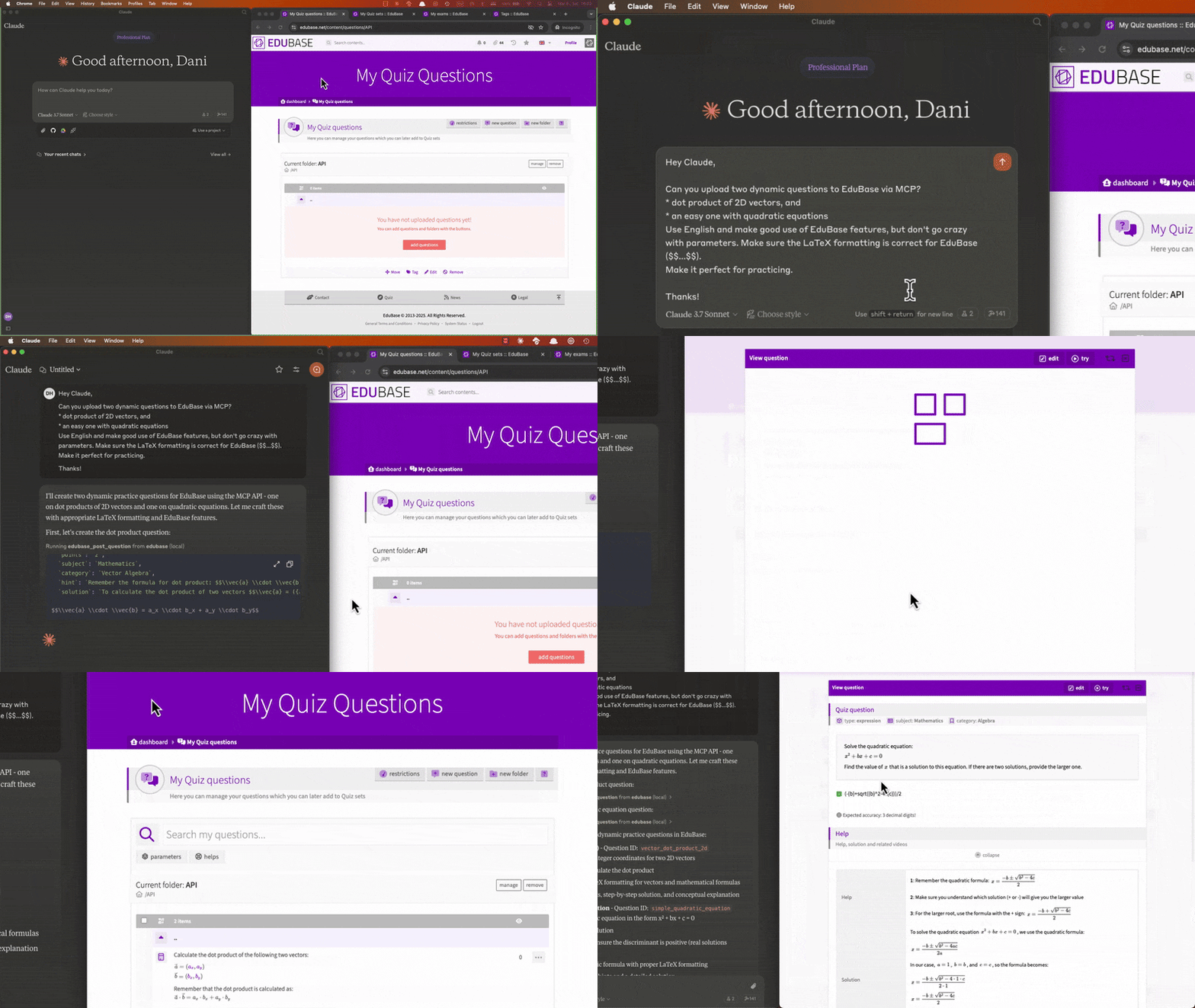
Collaboratively creating and uploading questions, scheduling exams and analyzing user results with Claude:
Once logged in, on your Dashboard, search for the Integrations menu, click "add integration" and choose the type "EduBase API".
If you don't see this option, enter the MCPGITHUB activation code or feel free to contact us to request access at info@edubase.net.
Related MCP server: Examplary MCP Server
Each documented API endpoint is available as a tool, named edubase_<method>_<endpoint>. For example, the tool for the GET /user:me endpoint is named edubase_get_user_me. The tag, permission and transfer endpoints work the same way for every content type, so they share a single tool per method with a type argument (e.g. edubase_post_content_tag for POST /exam:tag, POST /quiz:tag, etc.). See our developer documentation for more information.
Tools are grouped into toolsets, so you can expose only the tools you need. Fewer tools use less of the model's context and make it easier for the model to pick the right one. Every toolset is enabled by default.
Toolset | Tools for |
| Temporary file uploads (always enabled) |
| Questions |
| Quiz sets, their questions, settings and grading presets |
| Exams, their settings, users, certificates, branding and journeys |
| Quiz and exam results, certificate downloads |
| Users, their names, groups and login links |
| Classes and class memberships |
| Organizations, members, departments, job roles, competencies and webhooks |
| Integrations and their keys |
| Tags and tag attachments of contents |
| User permissions on contents and ownership transfers |
| Custom metrics |
Select toolsets with a comma-separated list in EDUBASE_TOOLSETS (e.g. questions,quizzes,exams). Set EDUBASE_READONLY=true to expose only the tools that read data (the get tools, and the tools that only generate download links, like edubase_post_question_export).
Set EDUBASE_DYNAMIC_TOOLSETS=true to enable toolsets on demand: sessions start with only the critical tools, and the model enables the toolsets it needs with the edubase_enable_toolsets tool (listed with edubase_list_toolsets). This keeps the initial tool list small for clients that load every tool upfront, but needs a client that refreshes the tool list when notified about changes.
When an HTTP transport is used, clients can narrow the configuration further for their own session with the EduBase-Mcp-Toolsets, EduBase-Mcp-ReadOnly and EduBase-Mcp-Dynamic headers, or the toolsets, read_only and dynamic_toolsets query parameters (e.g. https://domain.edubase.net/mcp?toolsets=exams&read_only=true). A session can never enable toolsets or write tools that the server configuration disables.
Prompts are ready-made workflows you can start from your MCP client (e.g. from the + or / menu). Clients supporting completions suggest values for the arguments as you type: question types, and your own exams, Quiz sets and classes.
Prompt | What it does | Arguments |
Create a question ( | Writes a new question and publishes it to your QuestionBase |
|
Create questions from a document ( | Turns an attached document (or a file path or URL) into questions, after you approve the plan, optionally adding them to a Quiz set |
|
Create an exam ( | Generates questions about a topic, collects them into a new Quiz set and creates an exam from it |
|
Create an exam with a journey ( | Creates an exam like above, then builds and publishes a small exam journey from it, reusing related exams of your account and creating a practice Quiz set and a follow-up exam if needed | the same as Create an exam |
Copy an exam ( | Creates a new exam from the same Quiz set and settings for a new time window |
|
Assign a class to an exam ( | Assigns the active members of a class to an exam |
|
Summarize exam results ( | Analyzes the results of an exam and optionally saves the summary to the exam |
|
Check an exam journey ( | Shows the progress of the users on an exam journey, and who is stuck |
|
Prompts are only offered when their toolsets are enabled, and in read-only mode only the last two are offered.
When the question types of an exam are left empty, clients supporting elicitation ask for them with checkboxes. These clients also ask you to confirm the changes that cannot be undone (deleting exams, Quiz sets, questions, users, organizations and integrations, transferring ownership, starting a new exam round and rotating integration keys) before they are made. Set EDUBASE_ELICITATION=false to turn these questions off.
Reference documents are available as resources, and through the edubase_mcp_reference tool for models that cannot read resources: edubase://reference/questions (the question fields and types) and edubase://reference/exam-journeys (the portable exam journey format). They cover what the EduBase skills explain, for clients without the skills. Exams and Quiz sets can be attached as resources too (edubase://exam/{exam} and edubase://quiz/{quiz}), with your contents listed and suggested. Turn these off with EDUBASE_CONTENT_RESOURCES=false, or for a session with the EduBase-Mcp-Content-Resources: false header, the content_resources=false query parameter, or the edubaseContentResources Smithery setting.
Tools creating or changing exams, Quiz sets and journeys link to their pages in EduBase.
The MCP server can be configured using environment variables. The following variables are available:
Variable | Description | Required | Default value |
| The base URL of the EduBase API, most probably | Yes |
|
| The App ID of your integration app on EduBase, the | Not if HTTP transport is used with authentication, otherwise Yes | - |
| The Secret key of your integration app on EduBase, the | Not if HTTP transport is used with authentication, otherwise Yes | - |
| Start MCP server in HTTP mode with SSE transport. Value must be | No |
|
| Start MCP server in HTTP mode with streamable HTTP transport. Value must be | No |
|
| Comma-separated list of the enabled toolsets, or | No |
|
| Only expose the tools that read data. Value must be | No |
|
| Output schemas of the tools and structured tool results: | No |
|
| Comma-separated list of the hosting providers allowed to supply session configuration in the requests when an HTTP transport is used. Currently only | No | - |
| List the exams and Quiz sets of the account as resources. Set to | No |
|
| Start sessions with only the file upload tools and let the model enable toolsets on demand. Value must be | No |
|
| Ask the user through the client to confirm the changes that cannot be undone and to pick the question types of the prompts, if the client supports elicitation. Set to | No |
|
| HTTP server will listen on this port if SSE or streamable HTTP transport mode is used. | No | 3000 |
| Enables OAuth 2.1 protected-resource behaviour: unauthenticated requests are rejected with | No |
|
| Public base URL of the EduBase deployment acting as the OAuth IdP. Used to advertise the authorization server in the protected-resource metadata document. | No | derived from |
| Public base URL of this MCP server (the OAuth resource indicator). Used in the | No | derived from |
| When an HTTP transport is used, the | No |
|
| Optional comma-separated allow-list of hostnames permitted as | No | - |
You can use the EduBase MCP server as a remote MCP server for your MCP client. To do this, you need to host the MCP server where clients can access it, and then configure the client to connect to the server. Either start it with SSE or streamable HTTP transport mode and always use HTTPS when accessing the server remotely over the internet!
You can use server in two modes:
Without client authentication: In this mode, the server will not require any authentication from the client. This is useful for testing or development purposes, or in a closed network but it is not recommended for production use. For this, you have to configure the server with the EDUBASE_API_APP and EDUBASE_API_KEY as well!
With Bearer token authentication: In this mode, the server will require a Bearer token to be sent with each request. This is the recommended way to use the server in production. You can obtain the Bearer token from your EduBase account by creating an integration app and providing the App ID and Secret key in the {app}:{secret} format, base64 encoded as a token. The server will then use this token to authenticate the client and authorize access to the API endpoints.
With OAuth 2.1 (EduBase as IdP): When EDUBASE_OAUTH=true, compatible clients (Claude Desktop, Claude.ai connectors, Cursor, ChatGPT connectors, etc.) discover the EduBase authorization server through /.well-known/oauth-protected-resource, register themselves dynamically (RFC 7591), walk the user through an EduBase consent screen, and exchange an authorization code (with PKCE S256) for an opaque access token. The MCP server forwards that token verbatim to the EduBase API, which resolves it to the auto-provisioned MCP integration, created on first consent. No App ID/Secret to copy — users just click "Connect EduBase" in their client.
For a step-by-step walkthrough, see our blog post on how to connect EduBase with Claude: The Complete MCP Integration Guide.
You can use the provided EduBase MCP server (if available) without any configuration, just by adding it as a remote server in your client with the URL https://domain.edubase.net/mcp (replace with the actual domain), if it supports OAuth authentication, or with the appropriate Bearer token in the Authorization header (Authorization: Bearer ${BASE64_ENCODED_TOKEN}).
Recommended for www.edubase.net users, as the server is maintained and updated by us, and you don't have to worry about hosting or configuring it. Just make sure to use the correct URL and authentication method when connecting your client.
Add the following to your claude_desktop_config.json:
Before running the MCP server, make sure you have Node.js installed. You can download it from nodejs.org or use a package manager like brew.
{
  "mcpServers": {
    "edubase": {
      "command": "npx",
      "args": [
        "-y",
        "@edubase/mcp"
      ],
      "env": {
        "EDUBASE_API_URL": "https://domain.edubase.net/api",
        "EDUBASE_API_APP": "your_integration_app_id",
        "EDUBASE_API_KEY": "your_integration_secret_key"
      }
    }
  }
}
Or download EduBase MCP server release or clone the repository and run npm run build to build the server. Do not forget to adjust /path/to/dist to the actual directory and configure the environmental variables!
{
  "mcpServers": {
    "edubase": {
      "command": "node",
      "args": [
        "/path/to/dist/index.js"
      ],
      "env": {
        "EDUBASE_API_URL": "https://domain.edubase.net/api",
        "EDUBASE_API_APP": "your_integration_app_id",
        "EDUBASE_API_KEY": "your_integration_secret_key"
      }
    }
  }
}Before running the MCP server, make sure you have Docker installed and is running. You can download it from docker.com or use a package manager. Do not forget to configure the environmental variables! The image is available for linux/amd64 and linux/arm64 on Docker Hub as edubase/mcp and on GitHub Packages as ghcr.io/edubase/mcp.
{
  "mcpServers": {
    "edubase": {
      "command": "docker",
      "args": [
        "run",
        "-i",
        "--rm",
        "-e",
        "EDUBASE_API_URL",
        "-e",
        "EDUBASE_API_APP",
        "-e",
        "EDUBASE_API_KEY",
        "edubase/mcp"
      ],
      "env": {
        "EDUBASE_API_URL": "https://domain.edubase.net/api",
        "EDUBASE_API_APP": "your_integration_app_id",
        "EDUBASE_API_KEY": "your_integration_secret_key"
      }
    }
  }
}You can use the provided EduBase MCP server (if available) as a remote server. We recommend Base64 encoding your EDUBASE_API_APP and EDUBASE_API_KEY and using it in as a Bearer token in the Authorization header (Authorization: Bearer ${BASE64_ENCODED_TOKEN}).
{
  "mcpServers": {
    "edubase": {
      "command": "npx",
      "args": [
        "mcp-remote",
        "https://domain.edubase.net/mcp",
        "--header",
        "Authorization: Bearer ${EDUBASE_API_APP}:${EDUBASE_API_KEY}"
      ]
    }
  }
}To install EduBase MCP server for Claude Desktop automatically via Smithery:
npx -y @smithery/cli install @EduBase/MCP --client claudeRun npm test to build the server and check the tool listing: the size budgets of the tool list and the server instructions, the tool descriptions, the toolset, read-only and dynamic toolsets modes, and the configuration handling of the HTTP transport. When new tools exceed a budget, shorten their schemas or raise the budget in test/server.test.mjs deliberately, as every client pays for the tool list in every session.
The reference documents in src/references are generated from the EduBase developer documentation, regenerate them with node scripts/sync-references.mjs <path to the developer documentation repository> when the question fields or the exam journey format change.
Merging a pull request labelled major, minor or patch commits the next version to main and starts the Publish workflow, which publishes the package to npm and the MCP Registry and the container image to Docker Hub and GitHub Packages, and tags the commit and creates a GitHub release once all of them succeeded. Without one of these labels nothing is released. A version set by hand in the pull request is released as it is. The commit, the tag and the release come from a dedicated release app, whose credentials are in the release environment. The Publish workflow runs the tests first, checks the built image before pushing it, and signs in to Docker Hub with OIDC, using the DOCKERHUB_OIDC_CONNECTIONID and DOCKERHUB_OIDC_USERNAME variables. It pushes to GitHub Packages with the job's GITHUB_TOKEN, as GitHub refuses GitHub App tokens there. Run it by hand with a version to retry or rebuild a release: whatever is already on npm and the MCP Registry is skipped, and latest only moves for the newest release.
Documentation sync point: tools, prompts and references last synced 2026-11-06 against the Developer documentation synced to EduBase release
8.6.6(the documentation pull request for8.6.6), checked against the EduBase at commita29c6af51. To bring the server forward, rungit log --oneline <commit>..HEADandgit diff <commit>..HEAD -- docs/api/endpointsin the developer documentation repository, from the commit of the documentation pull request for8.6.6, update the affected tools insrc/tools(and their prompts and toolset guides), regenerate the reference documents, and move this marker to the new HEAD commits. Where the two differ, the EduBase repository wins.
Website: www.edubase.net
Developer Documentation: developer.edubase.net
Email: info@edubase.net
Remove users from a class by their user identification strings.
Inputs: class (required), users (required).
Remove a permission level of a user from a content (class, course, event, exam, integration, organization, Quiz set, SCORM learning material, tag or video).
Inputs: type (required), user (required), content (required), permission (required). Returns: user, content, success
Remove a tag from a content (class, course, event, exam, integration, organization, Quiz set, SCORM learning material or video). The tag itself is kept.
Inputs: tag (required), type (required), content (required). Returns: tag, content, success
Delete an exam, or archive it when the user is not allowed to delete it. Confirm with the user first.
Inputs: exam (required).
Disable automatic login for an exam. The PIN code and the shortlink of the exam are removed as well.
Inputs: exam (required).
Remove the branding image and color from an exam.
Inputs: exam (required).
Stop issuing certificates for an exam. The configuration itself is kept, so the certificates can be enabled again later with edubase_post_exam_certificates. The already issued certificates are not revoked. The settings cannot be changed while the exam is locked.
Inputs: exam (required). Returns: exam, notes, renew, text1, +51 more
Remove every custom field of an exam. The built-in name, email address and phone number fields are kept, use edubase_post_exam_fields to turn those off. The values the examinees already entered are kept, but they are not shown anymore. The view_results_identifier setting of the exam is cleared as well.
Inputs: exam (required).
Remove users from an exam by their user identification strings.
Inputs: exam (required), users (required).
Delete an uploaded temporary file and/or its upload link, identified by the filebin identifier returned by edubase_post_filebin_upload.
Inputs: id (required).
Remove an integration. Confirm with the user first.
Inputs: integration (required).
Remove an organization. Confirm with the user first.
Inputs: organization (required).
Remove department from an organization. Members of the department are left without a department and lose the permissions (except for the custom ones, which are kept) and competencies given by it, departments below it are moved one level up.
Inputs: department (required), organization (required).
Remove job role from an organization. Members with the job role are left without a job role and lose the competencies given by it.
Inputs: job (required), organization (required).
Remove users from an organization by their user identification strings.
Inputs: users (required), organization (required).
Remove a webhook from an organization, no more notifications are sent to its endpoint. Use edubase_patch_organization_webhook to only disable it.
Inputs: webhook (required), organization (required).
Permanently delete a Quiz question, identified by its external unique question identifier. This cannot be undone, confirm with the user first.
Inputs: id (required).
Delete a Quiz set, or archive it when the user is not allowed to delete it. Confirm with the user first.
Inputs: quiz (required).
Remove a custom grading preset. The global presets, the presets of the organizations, and the presets that are still used by a Quiz set or an exam cannot be removed.
Inputs: preset (required).
Remove question(s) from a Quiz set, or one of its question group.
Inputs: quiz (required), questions (required), group.
Archive or forget the result of a Quiz play. An exam result is archived: it disappears from the result lists and the reports of the exam, but it is kept and can be restored by adding the archived user back to the exam. A result outside of an exam is forgotten: the play is detached from the user and only kept for the statistics. Exam results can only be archived when archiving is enabled for the exam (see the archive setting of edubase_post_exam_settings), and only the current result of the user can be archived. Results outside of an exam can only be forgotten by administrators.
Inputs: play (required).
Delete a user account. Only the users created through the API or generated by the current user can be deleted. Confirm with the user first.
Inputs: user (required).
Remove a user from classes by their class identification strings.
Inputs: user (required), classes (required).
Invalidate a login link previously generated for a user.
Inputs: url (required), user (required).
Remove a user from organizations by their organization identification strings.
Inputs: user (required), organizations (required).
Upload a local file or a file from a URL to the EduBase temporary file storage with a link requested from the API in advance.
Inputs: source (required), filebin (required), filename (required).
Get the details of a class: title, external identifier, and start and end dates.
Inputs: class (required). Returns: id, end, class, start, +1 more
List the assignments of a class, with their titles, links, status (INACTIVE, ACTIVE, STARTED, SUBMITTED, GRADED) and submission period.
Inputs: class (required). Returns: assignments
List owned and managed classes. Returns class identification strings, external identifiers and titles.
Inputs: page, limit, search. Returns: classes
List the members of a class, with their names and whether their membership is active (approved and not expired).
Inputs: class (required). Returns: members
Check if a user has a permission level on a content (class, course, event, exam, integration, organization, Quiz set, SCORM learning material, tag or video). Returns whether the user has the permission, and whether there is a permission rule with exactly these parameters.
Inputs: type (required), user (required), content (required), permission (required). Returns: user, status, content
Check if a tag is attached to a content (class, course, event, exam, integration, organization, Quiz set, SCORM learning material or video).
Inputs: tag (required), type (required), content (required). Returns: tag, status, content
List the tags attached to a content (class, course, event, exam, integration, organization, Quiz set, SCORM learning material or video).
Inputs: type (required), content (required). Returns: tags
Get the details of an exam: title, language, the Quiz set it uses, active state, status (INACTIVE, ACTIVE, PAUSED, REVIEW, EXPIRED), start and end times, deadline and Safe Exam Browser links. Use edubase_get_exam_settings for its settings.
Inputs: exam (required). Returns: id, end, exam, quiz, +10 more
Get the automatic login configuration of an exam: whether it is enabled, the PIN code, the login and results links, and whether exam accounts are generated or registered users can join automatically.
Inputs: exam (required). Returns: pin, url, exam, autoadd, +4 more
Get the branding of an exam: whether it is enabled, the type of the branding image (logo or cover) and the branding color.
Inputs: exam (required). Returns: exam, type, color, enabled
Get the certificate settings of an exam. Certificates are only issued for the successful results, so they need a grading that decides whether the test was successful (see the certificates flag in edubase_get_quiz_grading_presets). Only the state of the certificates is returned when they are not enabled for the exam. When the certificates are configured by a preset, the settings of the preset are merged into the returned configuration. The certificates issued for the individual results can be looked up with edubase_get_exam_certificates_user.
Inputs: exam (required). Returns: exam, notes, renew, text1, +51 more
List the certificate presets that can be used on exams. The public presets, the owned presets and the presets of the organizations of the user are returned.
Inputs: exam, language. Returns: exam, presets
Get (the latest) certificate details for a specific exam and user.
Inputs: exam (required), user (required). Returns: play, user, serial, expires, +3 more
Get the user data fields of an exam. These are the built-in name, email address and phone number fields, and the custom fields the examinees fill in before they start their test.
Inputs: exam (required). Returns: exam, name, email, phone, +1 more
Get the status of the journey started by an exam: the number of users at the steps, their statuses, and the outcomes of the finished journeys. Exam journeys chain exams, classes and Quiz sets into a learning path with decisions, starting when the users start the exam. Only the visible organizational members are counted. Use edubase_get_exam_journey_user for a single user and edubase_get_exam_journey_graph for the structure.
Inputs: exam (required). Returns: exam, steps, users, active, +4 more
Export the draft or the published journey started by an exam in the portable JSON format. Use the edubase-exam-journeys skill to work with the format, or read the format with edubase_mcp_reference if the skill is not available.
Inputs: exam (required), graph. Returns: exam, graph, nodes, active, +9 more
Get the journey of a user started by an exam: the status, the current step (with its deadline and the progress of a bundle), the history of the visited steps with their results and the decisions taken, and the manual changes made by the educators.
Inputs: exam (required), user (required). Returns: run, exam, step, user, +16 more
List the reports of an exam that can be downloaded with edubase_post_exam_report, and the custom user data filters they can be narrowed down with. The list is empty while the exam has no examinees or results. Needs reporting permission for the exam.
Inputs: exam (required). Returns: exam, filters, reports
Get raw results for a specific exam. Only use this if very detailed results are needed! This endpoint returns raw results, including all answers given by the user. It is not meant to be displayed to the user. This might require additional permissions!
Inputs: exam (required). Returns: exam, users, questions
List the results (attempts) of a user in an exam, with times, points, attempt index, validity and whether they passed the grading. Use edubase_get_quiz_results_play for the per-question details of an attempt.
Inputs: exam (required), user (required). Returns: results
Get the current round of an exam: its index, start time, whether it already has results and whether it is frozen. Start a new round with edubase_post_exam_round.
Inputs: exam (required). Returns: exam, round, frozen, results, +1 more
List owned and managed exams. Exams are the highest level in the EduBase Quiz hierarchy, built from Quiz sets.
Inputs: page, limit, active, search. Returns: exams
Get the settings of an exam. Surveys are never graded and their results cannot be viewed later, so the grading and the results viewing settings are not returned for them. The columns of the results export cannot be configured for surveys either, only the format and the ordering of the exported file.
Inputs: exam (required). Returns: exam, archive, grading, pausable, +27 more
Get the skills defined in the Quiz set used by an exam, with the identifier, title and description of each skill.
Inputs: exam (required). Returns: exam, skills
Get the status of an exam, showing whether new tests can be started.
Inputs: exam (required). Returns: exam, active, status, modified, +1 more
List the users assigned to an exam, with their names. Assign users with edubase_post_exam_users.
Inputs: exam (required). Returns: users
Get the details of an integration: title, type (api, moodle, canvas, d2l, schoology, lms), whether it is active and its LTI version.
Inputs: integration (required). Returns: id, lti, type, title, +2 more
Get the keys and secrets of an integration: the app and secret of API integrations, the consumer key and secret (LTI 1.0/1.1) or the JWK set URL and public key (LTI 1.3) of LMS integrations. Treat the secrets as confidential.
Inputs: integration (required). Returns: app, jwk, pem, secret, +1 more
List owned and managed integrations. Returns integration identification strings, external identifiers and titles.
Inputs: page, limit, search. Returns: integrations
Get the details of an organization: title, external identifier and description.
Inputs: organization (required). Returns: id, title, description, organization
List all competencies of an organization. Library and competencies must be enabled for the organization.
Inputs: organization (required). Returns: competencies, organization
List the requirements of a competency, ordered by their priority. Library and competencies must be enabled for the organization of the competency.
Inputs: competency (required), organization. Returns: id, title, competency, organization, +1 more
Get the competency compliance overview of an organization, grouped by departments. Organization reporters see every visible member, department leaders only the members of the departments they lead. Can be limited to the members of a job role. Library and competencies must be enabled for the organization.
Inputs: organization (required), job. Returns: scope, status, assigned, departments, +2 more
Get a department of an organization, identified by its name or external identifier: its parent, level in the hierarchy and the permissions given to its members.
Inputs: department (required), organization (required). Returns: id, level, parent, leaders, +5 more
List all departments in an organization, ordered by their hierarchy.
Inputs: organization (required). Returns: departments, organization
Get a job role of an organization, identified by its name or external identifier.
Inputs: job (required), organization (required). Returns: id, job, members, organization
List all job roles in an organization, ordered by their name. Competencies can be assigned to job roles, so every member with the job role gets them automatically.
Inputs: organization (required). Returns: jobs, organization
List the members of an organization, with their names, departments, job roles, permission levels (to the organization, its contents and its members) and management restrictions.
Inputs: organization (required). Returns: members
List owned and managed organizations. Returns organization identification strings, external identifiers and titles.
Inputs: page, limit, search. Returns: organizations
Get a webhook of an organization: its title and whether it is active.
Inputs: webhook (required), organization (required). Returns: title, active, webhook, organization
Check existing question. Questions are the lowest level in the EduBase hierarchy, serving as the building blocks for Quiz sets. To get question details, use the question export function!
Inputs: id (required). Returns: ai, id, active, question, +1 more
Get external unique question identifier by question identification string.
Inputs: question (required). Returns: id, question
List owned and managed Quiz questions. Returns the question identification strings, external identifiers and AI generated markings. Use edubase_post_question_export to read the content of a question.
Inputs: page, limit, search. Returns: questions
Get/check Quiz set. Containing questions and powering Exams.
Inputs: quiz (required). Returns: id, quiz, title, language, +1 more
List owned and managed Quiz sets. Quiz sets are named collections of questions that sit at the middle level of the EduBase Quiz hierarchy.
Inputs: page, limit, search. Returns: quizes
Get a grading preset with its thresholds and grades, including whether its threshold is configurable and whether certificates can be issued with it. List the presets with edubase_get_quiz_grading_presets.
Inputs: preset (required). Returns: own, type, used, title, +7 more
List the grading presets available for the user. The global presets, the owned custom presets and the presets of the organizations of the user are returned. A Quiz set or an exam can be specified to list only the presets that can be used on it, together with the one it is currently using.
Inputs: exam, quiz, language. Returns: exam, quiz, presets
List all questions and question groups in a Quiz set. Quiz sets contain questions (lowest level) and can be used by exams (highest level).
Inputs: quiz (required). Returns: items
List the reports of a Quiz set that can be downloaded with edubase_post_quiz_report. Only the results outside of exams are reported, the list is empty while there are no such results. Needs reporting permission for the Quiz set.
Inputs: quiz (required). Returns: quiz, reports
Get the detailed results of a single Quiz play (attempt): times, points, validity, whether it passed the grading, and the points and answer time of every question. Play identification strings are returned by edubase_get_quiz_results_user and edubase_get_exam_results_user.
Inputs: play (required). Returns: play, user, valid, time_end, +7 more
List the results (plays) of a user in a Quiz set, with times, points, validity and whether they passed the grading. Use edubase_get_quiz_results_play for the per-question details of a play.
Inputs: quiz (required), user (required). Returns: results
Get the settings of a Quiz set: question shuffling, time limits and grading. Change them with edubase_post_quiz_settings.
Inputs: quiz (required). Returns: quiz, grading, shuffle, roundtime, +2 more
Get the skills defined in a Quiz set, with the identifier, title and description of each skill.
Inputs: quiz (required). Returns: quiz, skills
Get the details of a tag: title, external identifier, color and icon.
Inputs: tag (required). Returns: id, tag, icon, color, +1 more
List owned and managed tags. Returns tag identification strings, external identifiers and titles. Attach tags to contents with edubase_post_content_tag.
Inputs: page, limit, search. Returns: tags
Get a user: name, whether the account is enabled and whether it is a generated exam account. Use edubase_get_user_search if only the email address or username is known.
Inputs: user (required). Returns: exam, name, user, status
List the classes a user is member of, with their titles, links and whether the membership is active.
Inputs: user (required). Returns: classes
Get the code of the user group a user belongs to.
Inputs: user (required). Returns: user, group
Get the latest valid login link of a user and its validity. Generate a new link with edubase_post_user_login.
Inputs: user (required). Returns: url, user, valid
Get the current user the requests are made as: identification string, name, whether the account is enabled and whether it is a generated exam account.
Inputs: no named parameters. Returns: exam, name, user, status
Get the first, last, full and display name of a user.
Inputs: user (required). Returns: user, full_name, last_name, first_name, +1 more
List the organizations a user is member of, with their titles, links, the department of the user, the permission levels and the management restrictions.
Inputs: user (required). Returns: organizations
List managed users, excluding generated exam accounts. Returns user identification strings and names. Use edubase_get_user_search to find a user by email address, username or code.
Inputs: page, limit, search. Returns: users
Look up a user by email address, username or user identification string. Returns the user identification string and whether it is a generated exam account.
Inputs: query (required). Returns: exam, user
Read a reference document of EduBase formats, for writing questions and exam journeys without the EduBase skills: questions (Fields of edubase_post_question with the question types, formatting, parameters, scoring and the other options, with examples.), exam-journeys (Portable JSON format of the exam journeys (nodes, their configuration, conditions and settings), used by edubase_get_exam_journey_graph and edubase_put_exam_journey_graph.)
Inputs: reference (required).
Get the MCP server API URL (only use for debugging).
Inputs: no named parameters.
Get the MCP server version (only use for debugging).
Inputs: no named parameters.
Update the details of an existing exam: title, external identifier, language, description, organization, start and end times, and deadline. The start time can only be changed until the first result arrives. Use edubase_post_exam_settings to change its settings.
Inputs: exam (required), id, end, start, +5 more.
Copy only those settings from another exam that are not configured yet in the target exam.
Inputs: exam (required), source (required), keep_certificate_settings. Returns: exam, source
Enable or disable an integration, or move it to another organization.
Inputs: integration (required), active, organization.
Update the title or custom fields of an organization.
Inputs: organization (required), title, custom.
Update department of an organization. Changed permissions are applied to the members of the department, except for the ones with custom permission levels.
Inputs: department (required), organization (required), id, title, +6 more.
Update the name or the external identifier of a job role in an organization. Members keep the job role and its competencies.
Inputs: job (required), organization (required), id, title.
Enable or disable a webhook of an organization.
Inputs: webhook (required), organization (required), active.
Update the details of an existing Quiz set: title, external identifier, language, description and organization. Use edubase_post_quiz_settings to change its settings and edubase_post_quiz_questions to add questions.
Inputs: quiz (required), id, title, language, +2 more.
Update an existing custom grading preset. The global presets and the presets of the organizations cannot be modified.
Inputs: preset (required), type, title, grades, +2 more. Returns: own, type, used, title, +7 more
Copy only those settings from another Quiz set that are not configured yet in the target Quiz set.
Inputs: quiz (required), source (required). Returns: quiz, source
Enable or disable a user account, identified by its user identification string.
Inputs: user (required), active.
Assign user(s) to class(es). Updates memberships if already member of a class.
Inputs: users (required), classes (required), notify, expires.
Assign user(s) to a class. Updates memberships if already member of the class.
Inputs: class (required), users (required), notify, expires.
Give a user a permission level on a content (class, course, event, exam, integration, organization, Quiz set, SCORM learning material, tag or video).
Inputs: type (required), user (required), content (required), permission (required). Returns: user, content, success
Attach a tag to a content (class, course, event, exam, integration, organization, Quiz set, SCORM learning material or video). List the available tags with edubase_get_tags.
Inputs: tag (required), type (required), content (required). Returns: tag, content, success
Transfer the ownership of a content (class, course, event, exam, integration, organization, Quiz set, SCORM learning material, tag or video) to another user. Confirm with the user first.
Inputs: type (required), user (required), content (required). Returns: user, content, success
Create a new exam from an existing Quiz set. Exams are at the top level of the EduBase Quiz hierarchy and MUST be created from existing Quiz sets. They are time-constrained, secured assessment instances of Quiz sets.
Inputs: end (required), quiz (required), start (required), title (required), +6 more. Returns: exam
Enable or reconfigure automatic login for an exam, optionally with a shortlink for the login link. Returns the configuration with the PIN code and login link, the same way as edubase_get_exam_autologin. Disable it with edubase_delete_exam_autologin.
Inputs: exam (required), se, autoadd, autojoin, +1 more. Returns: pin, url, exam, autoadd, +4 more
Configure or update the branding of an exam with an image (used as a logo or as a cover) and a color.
Inputs: exam (required), color (required), image (required), type.
Change individual certificate settings of an exam. Every setting other than enabled requires the certificates to be enabled for the exam, and the items displayed on the certificates have to be switched on before their own settings can be configured (for example show_serial before the serial_ settings). The certificates configured by a preset can only be replaced completely, see edubase_put_exam_certificates. The settings cannot be changed while the exam is locked.
Inputs: exam (required), notes, renew, text1, +49 more. Returns: exam, notes, renew, text1, +51 more
Generate download link for the latest user exam certificate. If a previous valid link exists, it will be returned instead.
Inputs: exam (required), user (required). Returns: url, play, user, valid
Change the built-in user data fields of an exam, and replace the complete list of its custom fields. The view_results_identifier setting of the exam is cleared when the selected custom field is not a unique free text field anymore.
Inputs: exam (required), name, email, phone, +1 more. Returns: exam, name, email, phone, +1 more
Publish the draft of the journey started by an exam, so the users continue on the new version. The draft can only be published if it has no errors (see the issues of edubase_get_exam_journey_graph). If some users are on nodes removed from the draft, a new node has to be specified for each of them with remap, otherwise the journey is not published and the affected nodes are listed in the error message. Needs the exam journeys feature to be enabled.
Inputs: exam (required), remap. Returns: exam, active, issues, journey, +5 more
Generate a download link for a report of an exam. The link is not authenticated, it can only be used once and expires in an hour. Only the examinees visible for the current user are included. Needs reporting permission for the exam.
Inputs: exam (required), report (required), round, format, +2 more. Returns: url, exam, valid, format, +1 more
Generate a download link for the results of an exam. The generated link is not authenticated, so it can be handed over to any service, but it can only be used once and it expires in an hour. Only those examinees are exported that are visible for the current user, and the exported columns are controlled by the export settings of the exam (see edubase_get_exam_settings). Exporting the results needs reporting permission for the exam.
Inputs: exam (required), sort, round, format, +3 more. Returns: url, exam, valid, format
Start a new round of the exam. The running tests are closed, the results of the previous round are detached from the exam accounts and the generated accounts are reset, so the exam can be taken again by another group of examinees. A new round cannot be started when the exam is locked, archived, the current round is frozen (see the freeze_round setting of edubase_post_exam_settings), or the results viewing period of the exam has already begun (see the view_results_start setting of edubase_post_exam_settings).
Inputs: exam (required), force, notify. Returns: exam, round, frozen, results, +1 more
Change individual settings of an exam. The columns of the export (every setting from export_stats on) cannot be configured for surveys, only the export_format and the export_sort settings are available for them. The export_attendance setting is read only, the attendance is configured together with its source on the interface.
Inputs: exam (required), archive, grading, pausable, +25 more. Returns: exam, archive, grading, pausable, +27 more
Enable or disable starting new tests on an exam. The exam itself stays active, only the start of further tests is controlled. The status can only be changed while the exam is active and has not closed yet. New tests cannot be started in the results viewing period. Disabling new tests also cancels the scheduled automatic disabling of the exam.
Inputs: exam (required), status (required). Returns: exam, active, status, modified, +1 more
Submit a short summary of an exam, such as an AI-generated evaluation of its results. Keep it concise, use only basic HTML formatting, and avoid personal information (names, usernames, contact details).
Inputs: exam (required), summary (required), llm, type, +2 more.
Assign existing users to an exam by their user identification strings. Use edubase_post_exam_users_generate to create new exam accounts instead.
Inputs: exam (required), users (required).
Generate exam accounts from patterns and assign them to an exam. The following placeholders can be used in the patterns: {index} (the index of the generated account), {random:N} (a random alphanumeric string of N characters, unambiguous characters only in passwords), {number:N} (a random numeric string of N characters), {name} and {Name} (the name of the account, only when names is specified, as given and capitalized) and {username} (the generated username, in the name pattern only). Patterns are stored with the exam and reused as defaults for the next call.
Inputs: exam (required), name, count, names, +4 more. Returns: exam, users, failed, duplicate
Generate an upload link for the temporary file storage (filebin). Returns the filebin identifier, the upload link, its expiration and the maximum file size. Upload the file with edubase_filebin, then reference the filebin identifier (optionally prefixed with filebin:) in the fields accepting files: question images, attachments and audio, exam branding images, and the signature, stamp and logo images of exam certificates. Only the uploading user can use the file. A previous valid link is returned unless force is set.
Inputs: type (required), force. Returns: id, url, limit, valid
Create a new API or LMS (LTI 1.0/1.1 or 1.3) integration. Returns the integration identification string, get its keys with edubase_get_integration_keys.
Inputs: title (required), lti, type, platform, +2 more. Returns: integration
Rotate the keys and secrets of an integration and return the new ones, the previous keys stop working. Confirm with the user first.
Inputs: integration (required). Returns: app, jwk, pem, secret, +1 more
Set a custom metric to a value, or increment it with a + prefixed value (e.g. +1). Returns the saved value.
Inputs: value (required), metric (required). Returns: value, metric
Create an organization with a title and optional description, website, contact details and custom fields. Returns the organization identification string.
Inputs: title (required), email, phone, custom, +3 more. Returns: organization
Create a department in an organization. Members of a department can see the members of the departments below it, but permissions are not inherited.
Inputs: title (required), organization (required), id, parent, +4 more. Returns: id, department, organization
Create a job role in an organization. Members can have one job role each, which can be used to assign competencies automatically.
Inputs: title (required), organization (required), id. Returns: id, job, organization
Assign user(s) to an organization. Updates memberships if already member of the organization.
Inputs: users (required), organization (required), job, notify, +7 more.
Assign user(s) to organization(s). Updates memberships if already member of an organization.
Inputs: users (required), organizations (required), job, notify, +7 more.
Create a webhook for an organization, called on exam results, Quiz practice results, finished exam journeys or manual API triggers, with optional authentication and retries. Returns the webhook identification string. Test it with edubase_post_organization_webhook_trigger.
Inputs: title (required), endpoint (required), organization (required), trigger_event (required), +9 more. Returns: webhook, organization
Trigger an organizational webhook call with optional custom payload. Only triggers webhooks with trigger_event set to api!.
Inputs: webhook (required), organization (required), data.
Publish or update a question, re-posting the same id updates it. Use the edubase-question-creator skill to choose the type and fill in the fields (or read the questions reference with edubase_mcp_reference if the skill is not available): the fields named after a question type are needed for that type (e.g. hotspot_image and hotspot_zones for HOTSPOT). Separate multiple values with &&&. File fields take filename=data, where data is a filebin identifier (preferred, see edubase_post_filebin_upload), base64 data or a URL.
Inputs: ai (required), id (required), type (required), answer (required), +75 more. Returns: question
Generate download link for exporting the question (in JSON format). If a previous valid link exists, it will be returned instead.
Inputs: id (required). Returns: id, url, valid, question
Set external unique question identifier for question identified by a question identification string.
Inputs: id (required), question (required).
Create a new Quiz set. Quiz sets are collections of questions that can be used for practice or to power multiple Exams.
Inputs: title (required), id, mode, type, +5 more. Returns: quiz
Create a new custom grading preset. Needs the custom grading feature to be enabled.
Inputs: type (required), title (required), grades (required), language, +1 more. Returns: preset
Assign question(s) to a Quiz set, or one of its question group. Questions can exist independently from Quiz sets.
Inputs: quiz (required), questions (required), group.
Generate a download link for a report of a Quiz set. The link is not authenticated, it can only be used once and expires in an hour. Needs reporting permission for the Quiz set.
Inputs: quiz (required), report (required), format, language. Returns: url, quiz, valid, format, +1 more
Change individual settings of a Quiz set: question shuffling, time limits, grading and grading threshold. Only the given settings are changed, and the updated settings are returned. List the available grading presets with edubase_get_quiz_grading_presets.
Inputs: quiz (required), grading, shuffle, roundtime, +2 more. Returns: quiz, grading, shuffle, roundtime, +2 more
Create a new EduBase user account with a username, name, email address and optional details (group, language, timezone, custom fields, etc.). A random initial password is generated if none is given. Returns the user identification string, and the username and password for non-exam accounts.
Inputs: email (required), username (required), last_name (required), first_name (required), +15 more. Returns: user, password, username
Assign user to class(es). Updates membership if already member of a class.
Inputs: user (required), classes (required), notify, expires.
Move a user to another user group, identified by its code. Returns whether the group was changed.
Inputs: user (required), group (required). Returns: user, changed, success
Generate login link. If a valid link with the same settings exists, it will be returned instead of creating a new one.
Inputs: user (required), exam, short, logins, +3 more. Returns: url, user, count, valid
Update the name of a user: first and last name, optionally the full and display name. Returns whether the name was changed.
Inputs: user (required), last_name (required), first_name (required), full_name, +1 more. Returns: user, changed, success
Assign user to organization(s). Updates membership if already member of an organization.
Inputs: user (required), organizations (required), job, notify, +7 more.
Replace the complete certificate configuration of an exam with a preset or with the configuration of another exam. The certificates have to be enabled for the exam, and its settings cannot be changed while it is locked.
Inputs: exam (required), preset, source. Returns: exam, notes, renew, text1, +51 more
Replace the draft of the journey started by an exam with a journey in the portable JSON format (creating and enabling the journey if needed). Publish it with edubase_post_exam_journey_publish. Use the edubase-exam-journeys skill to build the nodes and settings, or read the format with edubase_mcp_reference if the skill is not available.
Inputs: exam (required), nodes (required), schema, settings. Returns: exam, graph, nodes, active, +10 more
Replace the complete configuration of an exam with the configuration of another exam. Exam specific data and state (automatic account generation, rounds, notifications, login settings and previously used patterns) is never copied. Branding, and the attached learning materials (course, SCORM package and video) of the target exam are kept as well. The questionless setting is only copied if not a survey or championship, and it is kept unchanged while the current round of the target exam already has results.
Inputs: exam (required), source (required), keep_certificate_settings. Returns: exam, source
Replace the complete configuration of a Quiz set with the configuration of another Quiz set. Only the configuration is copied, questions and question groups are not. The question selection, filtering and export settings of the target Quiz set are kept as well.
Inputs: quiz (required), source (required). Returns: quiz, source
Recent tool additions, removals, and schema changes observed during successful MCP inspections.
Loading tool schema changelog…
Scored across 153 tools
Most tools target distinct resource-action pairs, but the set contains many near-duplicates that are easy to confuse, such as edubase_post_class_members vs edubase_post_classes_members, edubase_post_user_classes vs edubase_post_user_organizations, and the get/post/patch/put variants for settings. The detailed descriptions help clarify boundaries, but with 153 tools there is still meaningful misselection risk.
Nearly all tools follow a predictable edubase_ prefix plus HTTP-style verb and resource noun, such as edubase_get_exam, edubase_post_quiz, and edubase_delete_organization_webhook. Minor deviations like edubase_filebin, edubase_mcp_reference, the typo edubase_get_quizes, and singular/plural variants slightly reduce consistency.
153 tools is far beyond a practical MCP tool surface, even for a broad education platform API. The count creates excessive context burden and makes tool selection difficult; this server would benefit from curation or splitting into narrower tool groups.
Core assessment workflows around questions, quizzes, exams, users, classes, organizations, integrations, tags, permissions, and reporting are covered extensively. However, there are notable gaps such as no create/update/delete tools for classes or tags, and no management tools for courses, events, SCORM materials, or videos despite those content types being referenced in tag and permission tools.
Create, edit and publish Educaplay educational games and quizzes from any AI assistant.
Connect AI assistants to Edusign attendance, courses, learners, documents, and API docs via OAuth.
Create, edit, translate, and export SCORM eLearning modules from a connected AI assistant.
Enables AI assistants to retrieve event data and execute event management operations in Nunify.