Office Word MCP Server
Office-Word-MCP-Server
Сервер Model Context Protocol (MCP) для создания, чтения и обработки документов Microsoft Word. Этот сервер позволяет помощникам ИИ работать с документами Word через стандартизированный интерфейс, предоставляя богатые возможности редактирования документов.
Обзор
Office-Word-MCP-Server реализует протокол контекста модели для представления операций с документами Word в качестве инструментов и ресурсов. Он служит мостом между помощниками ИИ и документами Microsoft Word, позволяя создавать документы, добавлять контент, форматировать и анализировать.
Сервер имеет модульную архитектуру, которая разделяет задачи на основные функции, инструменты и утилиты, что делает его легко обслуживаемым и расширяемым для будущих улучшений.
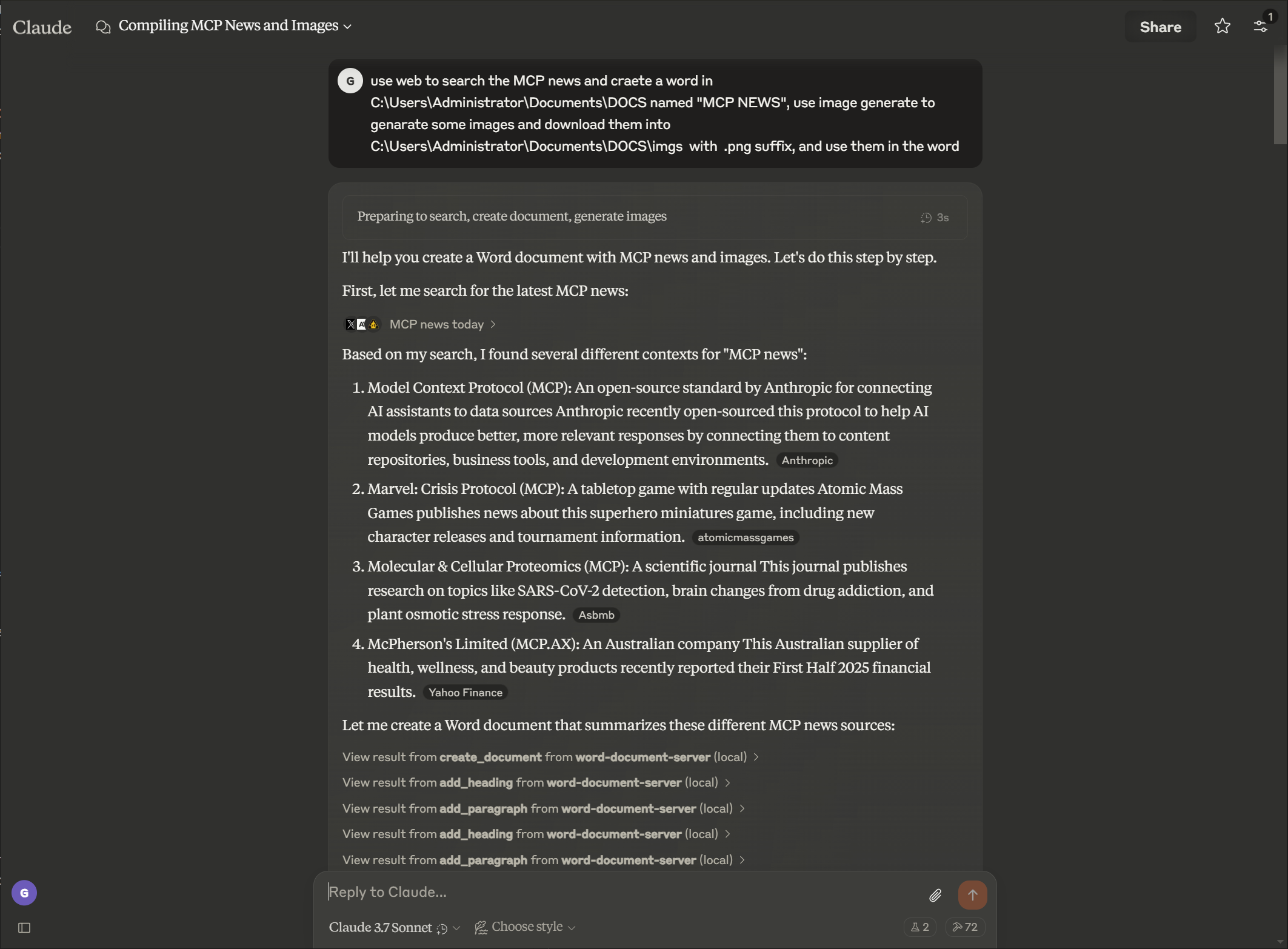
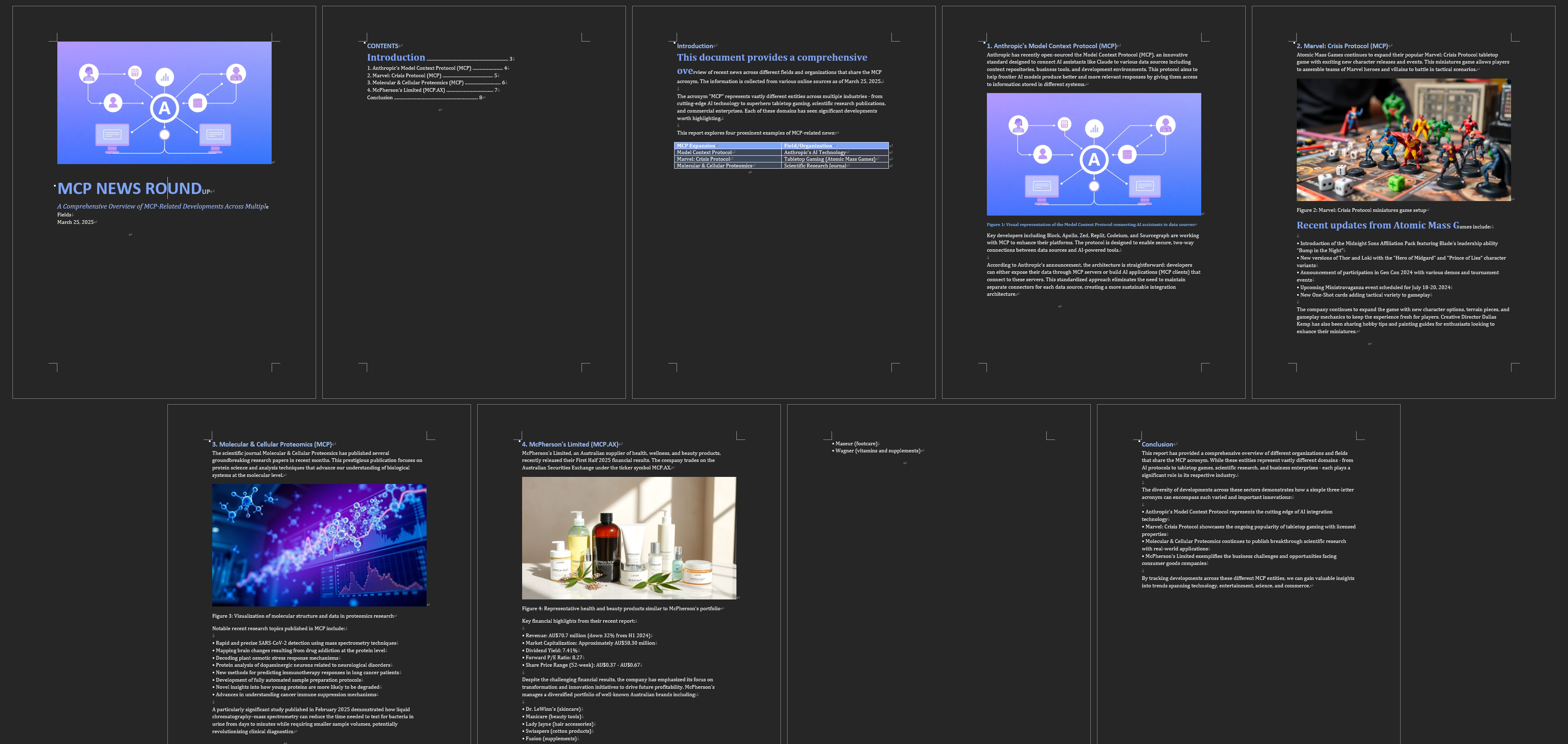
Пример
Пормпт
Выход
Related MCP server: Claude Document MCP Server
Функции
Управление документами
Создавайте новые документы Word с метаданными
Извлечение текста и анализ структуры документа
Просмотр свойств документа и статистики
Список доступных документов в каталоге
Создавайте копии существующих документов
Объединить несколько документов в один документ
Конвертировать документы Word в формат PDF
Создание контента
Добавьте заголовки с разными уровнями
Вставьте абзацы с дополнительным стилем
Создавайте таблицы с пользовательскими данными
Добавьте изображения с пропорциональным масштабированием
Вставить разрывы страниц
Добавляйте сноски и концевые примечания к документам
Преобразовать сноски в концевые сноски
Настройте стиль сносок и концевых сносок
Форматирование расширенного текста
Форматирование определенных разделов текста (жирный, курсив, подчеркивание)
Изменить цвет текста и свойства шрифта
Применение пользовательских стилей к текстовым элементам
Поиск и замена текста во всех документах
Форматирование таблицы
Форматирование таблиц с использованием границ и стилей
Создавайте строки заголовков с особым форматированием
Применить затенение ячеек и пользовательские границы
Структурируйте таблицы для лучшей читаемости
Расширенные возможности обработки документов
Удалить абзацы
Создавайте собственные стили документов
Применяйте единообразное форматирование во всех документах.
Форматируйте определенные диапазоны текста с подробным контролем
Защита документов
Добавьте защиту паролем к документам
Реализуйте ограниченное редактирование с помощью редактируемых разделов
Добавляйте цифровые подписи к документам
Проверка подлинности и целостности документа
Установка
Установка через Smithery
Чтобы автоматически установить Office Word Document Server для Claude Desktop через Smithery :
npx -y @smithery/cli install @GongRzhe/Office-Word-MCP-Server --client claudeПредпосылки
Python 3.8 или выше
менеджер пакетов pip
Базовая установка
# Clone the repository
git clone https://github.com/GongRzhe/Office-Word-MCP-Server.git
cd Office-Word-MCP-Server
# Install dependencies
pip install -r requirements.txtИспользование сценария установки
В качестве альтернативы вы можете использовать предоставленный скрипт настройки, который обрабатывает:
Проверка предварительных условий
Настройка виртуальной среды
Установка зависимостей
Генерация конфигурации MCP
python setup_mcp.pyИспользование с Claude для рабочего стола
Конфигурация
Метод 1: После локальной установки
После установки добавьте сервер в файл конфигурации Claude for Desktop:
{
"mcpServers": {
"word-document-server": {
"command": "python",
"args": ["/path/to/word_mcp_server.py"]
}
}
}Метод 2: Без установки (с использованием uvx)
Вы также можете настроить Claude for Desktop для использования сервера без локальной установки с помощью менеджера пакетов uvx:
{
"mcpServers": {
"word-document-server": {
"command": "uvx",
"args": ["--from", "office-word-mcp-server", "word_mcp_server"]
}
}
}Расположение файлов конфигурации:
macOS:
~/Library/Application Support/Claude/claude_desktop_config.jsonWindows:
%APPDATA%\Claude\claude_desktop_config.json
Перезапустите Claude for Desktop, чтобы загрузить конфигурацию.
Примеры операций
После настройки вы можете попросить Клода выполнить такие операции, как:
«Создайте новый документ с именем «report.docx» и титульным листом»
«Добавить заголовок и три абзаца в мой документ»
«Вставьте таблицу 4x4 с данными о продажах»
«Слово «важно» в абзаце 2 следует выделить жирным шрифтом и красным цветом»
«Найти и заменить все вхождения «старого термина» на «новый термин»»
«Создать собственный стиль для заголовков разделов»
«Применить форматирование к таблице в моем документе»
Ссылка на API
Создание документа и свойства
create_document(filename, title=None, author=None)
get_document_info(filename)
get_document_text(filename)
get_document_outline(filename)
list_available_documents(directory=".")
copy_document(source_filename, destination_filename=None)
convert_to_pdf(filename, output_filename=None)Добавление контента
add_heading(filename, text, level=1)
add_paragraph(filename, text, style=None)
add_table(filename, rows, cols, data=None)
add_picture(filename, image_path, width=None)
add_page_break(filename)Извлечение контента
get_document_text(filename)
get_paragraph_text_from_document(filename, paragraph_index)
find_text_in_document(filename, text_to_find, match_case=True, whole_word=False)Форматирование текста
format_text(filename, paragraph_index, start_pos, end_pos, bold=None,
italic=None, underline=None, color=None, font_size=None, font_name=None)
search_and_replace(filename, find_text, replace_text)
delete_paragraph(filename, paragraph_index)
create_custom_style(filename, style_name, bold=None, italic=None,
font_size=None, font_name=None, color=None, base_style=None)Форматирование таблицы
format_table(filename, table_index, has_header_row=None,
border_style=None, shading=None)Поиск неисправностей
Общие проблемы
Отсутствующие стили
В некоторых документах могут отсутствовать необходимые стили для операций с заголовками и таблицами.
Сервер попытается создать отсутствующие стили или использовать прямое форматирование.
Для достижения наилучших результатов используйте шаблоны со стандартными стилями Word.
Проблемы с разрешением
Убедитесь, что у сервера есть разрешение на чтение/запись путей к документам.
Используйте функцию
copy_documentдля создания редактируемых копий заблокированных документов.Проверьте права собственности на файл и разрешения в случае сбоя операций
Проблемы со вставкой изображений
Используйте абсолютные пути для файлов изображений
Проверьте совместимость формата изображения (рекомендуется JPEG, PNG)
Проверьте размер файла изображения и разрешения
Отладка
Включите подробное ведение журнала, установив переменную среды:
export MCP_DEBUG=1 # Linux/macOS
set MCP_DEBUG=1 # WindowsВнося вклад
Вклады приветствуются! Пожалуйста, не стесняйтесь отправлять запрос на включение.
Форк репозитория
Создайте ветку функций (
git checkout -b feature/amazing-feature)Зафиксируйте свои изменения (
git commit -m 'Add some amazing feature')Отправить в ветку (
git push origin feature/amazing-feature)Открыть запрос на извлечение
Лицензия
Данный проект лицензирован по лицензии MIT — подробности см. в файле LICENSE.
Благодарности
Модель контекстного протокола для спецификации протокола
python-docx для работы с документами Word
FastMCP для реализации Python MCP
Примечание: Этот сервер взаимодействует с файлами документов в вашей системе. Всегда проверяйте, что запрошенные операции являются подходящими, прежде чем подтверждать их в Claude for Desktop или других клиентах MCP.
Available Tools
54 toolsadd_endnote_to_documentC
Add an endnote to a specific paragraph in a Word document.
Inputs: filename (required), paragraph_index (required), endnote_text (required).
add_footnote_after_textC
Add a footnote after specific text with proper superscript formatting. This enhanced function ensures footnotes display correctly as superscript.
Inputs: filename (required), search_text (required), footnote_text (required), output_filename.
add_footnote_before_textC
Add a footnote before specific text with proper superscript formatting. This enhanced function ensures footnotes display correctly as superscript.
Inputs: filename (required), search_text (required), footnote_text (required), output_filename.
add_footnote_enhancedC
Enhanced footnote addition with guaranteed superscript formatting. Adds footnote at the end of a specific paragraph with proper style handling.
Inputs: filename (required), paragraph_index (required), footnote_text (required), output_filename.
add_footnote_robustC
Add footnote with robust validation and Word compliance. This is the production-ready version with comprehensive error handling.
Inputs: filename (required), search_text, paragraph_index, footnote_text, +2 more.
add_footnote_to_documentC
Add a footnote to a specific paragraph in a Word document.
Inputs: filename (required), paragraph_index (required), footnote_text (required).
add_headingA
Add a heading to a Word document with optional formatting.
Args: filename: Path to Word document text: Heading text level: Heading level (1-9) font_name: Font family (e.g., 'Helvetica') font_size: Font size in points (e.g., 14) bold: Make heading bold italic: Make heading italic border_bottom: Add bottom border (for section headers)
Inputs: filename (required), text (required), level, font_name, +4 more.
add_page_breakC
Add a page break to the document.
Inputs: filename (required).
add_paragraphB
Add a paragraph to a Word document with optional formatting.
Args: filename: Path to Word document text: Paragraph text content style: Optional paragraph style name font_name: Font family (e.g., 'Helvetica', 'Times New Roman') font_size: Font size in points (e.g., 14, 36) bold: Make text bold italic: Make text italic color: Text color as hex RGB (e.g., '000000')
Inputs: filename (required), text (required), style, font_name, +4 more.
add_pictureC
Add an image to a Word document.
Inputs: filename (required), image_path (required), width.
add_tableC
Add a table to a Word document.
Inputs: filename (required), rows (required), cols (required), data.
apply_table_alternating_rowsC
Apply alternating row colors to a table for better readability.
Inputs: filename (required), table_index (required), color1, color2.
auto_fit_table_columnsC
Set table columns to auto-fit based on content.
Inputs: filename (required), table_index (required).
convert_to_pdfC
Convert a Word document to PDF format.
Inputs: filename (required), output_filename.
copy_documentC
Create a copy of a Word document.
Inputs: source_filename (required), destination_filename.
create_custom_styleC
Create a custom style in the document.
Inputs: filename (required), style_name (required), bold, italic, +4 more.
create_documentC
Create a new Word document with optional metadata.
Inputs: filename (required), title, author.
customize_footnote_styleC
Customize footnote numbering and formatting in a Word document.
Inputs: filename (required), numbering_format, start_number, font_name, +1 more.
delete_footnote_from_documentC
Delete a footnote from a Word document. Identify the footnote either by ID (1, 2, 3, etc.) or by searching for text near it.
Inputs: filename (required), footnote_id, search_text, output_filename.
delete_footnote_robustC
Delete footnote with comprehensive cleanup and orphan removal. Ensures complete removal from document.xml, footnotes.xml, and relationships.
Inputs: filename (required), footnote_id, search_text, clean_orphans.
delete_paragraphC
Delete a paragraph from a document.
Inputs: filename (required), paragraph_index (required).
find_text_in_documentC
Find occurrences of specific text in a Word document.
Inputs: filename (required), text_to_find (required), match_case, whole_word.
format_tableC
Format a table with borders, shading, and structure.
Inputs: filename (required), table_index (required), has_header_row, border_style, +1 more.
format_table_cell_textC
Format text within a specific table cell.
Inputs: filename (required), table_index (required), row_index (required), col_index (required), +7 more.
format_textC
Format a specific range of text within a paragraph.
Inputs: filename (required), paragraph_index (required), start_pos (required), end_pos (required), +6 more.
get_all_commentsC
Extract all comments from a Word document.
Inputs: filename (required).
get_comments_by_authorC
Extract comments from a specific author in a Word document.
Inputs: filename (required), author (required).
get_comments_for_paragraphC
Extract comments for a specific paragraph in a Word document.
Inputs: filename (required), paragraph_index (required).
get_document_infoC
Get information about a Word document.
Inputs: filename (required).
get_document_outlineC
Get the structure of a Word document.
Inputs: filename (required).
get_document_textC
Extract all text from a Word document.
Inputs: filename (required).
get_document_xmlC
Get the raw XML structure of a Word document.
Inputs: filename (required).
get_paragraph_text_from_documentC
Get text from a specific paragraph in a Word document.
Inputs: filename (required), paragraph_index (required).
highlight_table_headerC
Apply special highlighting to table header row.
Inputs: filename (required), table_index (required), header_color, text_color.
insert_header_near_textA
Insert a header (with specified style) before or after the target paragraph. Specify by text or paragraph index. Args: filename (str), target_text (str, optional), header_title (str), position ('before' or 'after'), header_style (str, default 'Heading 1'), target_paragraph_index (int, optional).
Inputs: filename (required), target_text, header_title, position, +2 more.
insert_line_or_paragraph_near_textB
Insert a new line or paragraph (with specified or matched style) before or after the target paragraph. Specify by text or paragraph index. Args: filename (str), target_text (str, optional), line_text (str), position ('before' or 'after'), line_style (str, optional), target_paragraph_index (int, optional).
Inputs: filename (required), target_text, line_text, position, +2 more.
insert_numbered_list_near_textA
Insert a bulleted or numbered list before or after the target paragraph. Specify by text or paragraph index. Args: filename (str), target_text (str, optional), list_items (list of str), position ('before' or 'after'), target_paragraph_index (int, optional), bullet_type ('bullet' for bullets or 'number' for numbered lists, default: 'bullet').
Inputs: filename (required), target_text, list_items, position, +2 more.
list_available_documentsC
List all .docx files in the specified directory.
Inputs: directory.
merge_table_cellsC
Merge cells in a rectangular area of a table.
Inputs: filename (required), table_index (required), start_row (required), start_col (required), +2 more.
merge_table_cells_horizontalC
Merge cells horizontally in a single row.
Inputs: filename (required), table_index (required), row_index (required), start_col (required), +1 more.
merge_table_cells_verticalC
Merge cells vertically in a single column.
Inputs: filename (required), table_index (required), col_index (required), start_row (required), +1 more.
protect_documentC
Add password protection to a Word document.
Inputs: filename (required), password (required).
replace_block_between_manual_anchorsC
Replace all content between start_anchor_text and end_anchor_text (or next logical header if not provided).
Inputs: filename (required), start_anchor_text (required), new_paragraphs (required), end_anchor_text, +2 more.
replace_paragraph_block_below_headerC
Reemplaza el bloque de párrafos debajo de un encabezado, evitando modificar TOC.
Inputs: filename (required), header_text (required), new_paragraphs (required), detect_block_end_fn.
search_and_replaceC
Search for text and replace all occurrences.
Inputs: filename (required), find_text (required), replace_text (required).
set_table_alignment_allC
Set text alignment for all cells in a table.
Inputs: filename (required), table_index (required), horizontal, vertical.
set_table_cell_alignmentC
Set text alignment for a specific table cell.
Inputs: filename (required), table_index (required), row_index (required), col_index (required), +2 more.
set_table_cell_paddingC
Set padding/margins for a specific table cell.
Inputs: filename (required), table_index (required), row_index (required), col_index (required), +5 more.
set_table_cell_shadingC
Apply shading/filling to a specific table cell.
Inputs: filename (required), table_index (required), row_index (required), col_index (required), +2 more.
set_table_column_widthC
Set the width of a specific table column.
Inputs: filename (required), table_index (required), col_index (required), width (required), +1 more.
set_table_column_widthsC
Set the widths of multiple table columns.
Inputs: filename (required), table_index (required), widths (required), width_type.
set_table_widthC
Set the overall width of a table.
Inputs: filename (required), table_index (required), width (required), width_type.
unprotect_documentC
Remove password protection from a Word document.
Inputs: filename (required), password (required).
validate_document_footnotesC
Validate all footnotes in document for coherence and compliance. Returns detailed report on ID conflicts, orphaned content, missing styles, etc.
Inputs: filename (required).
Tool Schema Changelog
Recent tool additions, removals, and schema changes observed during successful MCP inspections.
Loading tool schema changelog…
TDQS
Scored across 54 tools
Multiple tools have overlapping purposes, especially for footnotes (e.g., add_footnote_to_document, add_footnote_enhanced, add_footnote_robust, add_footnote_before_text, add_footnote_after_text) and table formatting (e.g., set_table_cell_alignment vs. set_table_alignment_all, merge_table_cells vs. merge_table_cells_horizontal/vertical). Descriptions help somewhat, but the boundaries are unclear, leading to potential misselection.
The naming follows a mostly snake_case pattern, but conventions are mixed with inconsistent verb styles (e.g., 'add' vs. 'insert' vs. 'apply' vs. 'set' for similar operations) and some tools have overly verbose names (e.g., replace_block_between_manual_anchors). While readable, it lacks a predictable pattern across all tools.
With 54 tools, the count is excessive for a Word document server, making it heavy and overwhelming. Many tools could be consolidated (e.g., multiple footnote addition/deletion tools, redundant table formatting functions), indicating poor scoping and bloat.
The tool set covers a wide range of Word document operations, including creation, formatting, tables, footnotes, comments, and conversion to PDF. Minor gaps exist (e.g., no direct tool for adding comments or managing sections), but core workflows are well-covered, allowing agents to work around most limitations.
Maintenance
Related MCP Connectors
A comprehensive Model Context Protocol (MCP) server that enables AI assistants to interact with yo…
A Model Context Protocol server for Wix AI tools
The Mercado Pago MCP Server implements the Model Context Protocol to provide AI agents and LLMs with access to Mercado Pago's APIs and tools within compatible development environments. It acts as an intermediary that translates Mercado Pago resources into executable functions (tools) that AI applications can invoke to perform actions and automate flows. The server simplifies integration, enables using documentation to implement or improve code, and optimizes operations through natural language interactions without manual implementations.
One MCP server for the services your AI needs: memory, files, Microsoft 365, kanban and more.
Related MCP Servers
- AlicenseAqualityDmaintenanceA server providing tools to read, write, and edit Microsoft Word (docx) files through the Model Context Protocol, allowing operations like complete document reading, content creation, targeted paragraph editing, and text insertion.439MIT
- AlicenseNot gradedqualityDmaintenanceA Model Context Protocol server that allows Claude Desktop to perform document operations on Microsoft Word, Excel, and PDF files including creation, editing, and format conversion.52MIT
- FlicenseAqualityDmaintenanceA comprehensive Model Context Protocol server that processes Microsoft Word documents with full formatting support, enabling text extraction, HTML/Markdown conversion, structure analysis, and image extraction.52-
- -licenseNot gradedqualityNot gradedmaintenanceA Python server implementing Model Context Protocol for advanced Microsoft Word document manipulation, enabling programmatic automation of complex document processing tasks.-