Glama
Office Word MCP Server

Office Word MCP Server

by GongRzhe

Office-Word-MCP-Server

Schmiedeabzeichen Ein Model Context Protocol (MCP)-Server zum Erstellen, Lesen und Bearbeiten von Microsoft Word-Dokumenten. Dieser Server ermöglicht KI-Assistenten die Arbeit mit Word-Dokumenten über eine standardisierte Schnittstelle und bietet umfangreiche Funktionen zur Dokumentbearbeitung.

Überblick

Office-Word-MCP-Server implementiert das Model Context Protocol , um Word-Dokumentoperationen als Werkzeuge und Ressourcen verfügbar zu machen. Es dient als Brücke zwischen KI-Assistenten und Microsoft Word-Dokumenten und ermöglicht die Dokumenterstellung, das Hinzufügen von Inhalten, die Formatierung und die Analyse.

Der Server verfügt über eine modulare Architektur, die die Belange in Kernfunktionen, Tools und Dienstprogramme unterteilt, wodurch er äußerst wartungsfreundlich und für zukünftige Verbesserungen erweiterbar ist.

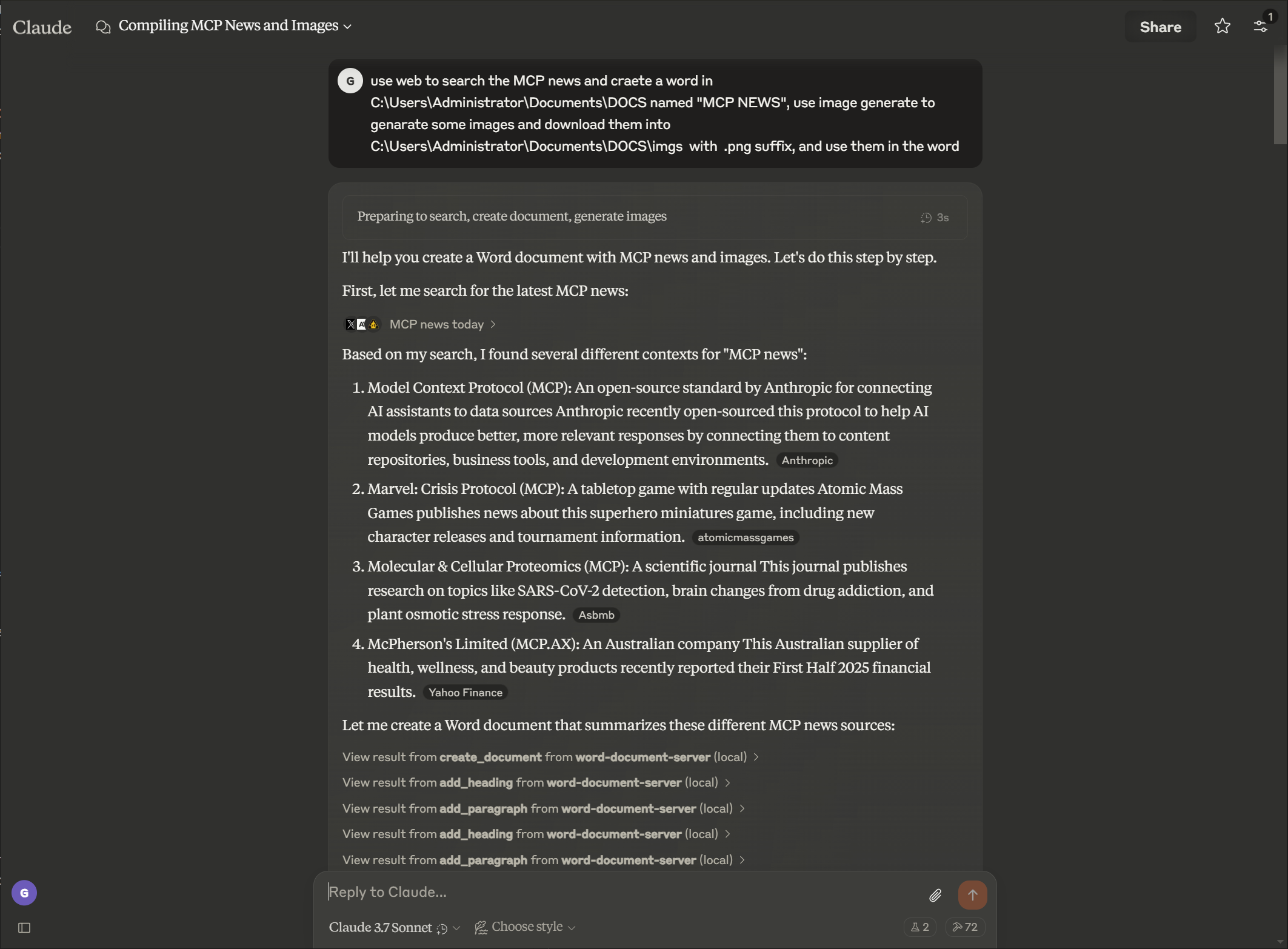
Beispiel

Eingabeaufforderung
Bild

Ausgabe

Bild

Related MCP server: Claude Document MCP Server

Merkmale

Dokumentenmanagement

  • Neue Word-Dokumente mit Metadaten erstellen

  • Text extrahieren und Dokumentstruktur analysieren

  • Anzeigen von Dokumenteigenschaften und Statistiken

  • Verfügbare Dokumente in einem Verzeichnis auflisten

  • Erstellen Sie Kopien vorhandener Dokumente

  • Mehrere Dokumente zu einem einzigen Dokument zusammenführen

  • Konvertieren Sie Word-Dokumente in das PDF-Format

Inhaltserstellung

  • Überschriften mit unterschiedlichen Ebenen hinzufügen

  • Einfügen von Absätzen mit optionaler Formatierung

  • Erstellen Sie Tabellen mit benutzerdefinierten Daten

  • Bilder mit proportionaler Skalierung hinzufügen

  • Seitenumbrüche einfügen

  • Hinzufügen von Fußnoten und Endnoten zu Dokumenten

  • Fußnoten in Endnoten umwandeln

  • Fußnoten- und Endnotenstil anpassen

Rich-Text-Formatierung

  • Formatieren Sie bestimmte Textabschnitte (fett, kursiv, unterstrichen)

  • Ändern Sie die Textfarbe und die Schrifteigenschaften

  • Anwenden benutzerdefinierter Stile auf Textelemente

  • Suchen und Ersetzen von Text in allen Dokumenten

Tabellenformatierung

  • Formatieren von Tabellen mit Rahmen und Stilen

  • Erstellen Sie Kopfzeilen mit eindeutiger Formatierung

  • Anwenden von Zellenschattierungen und benutzerdefinierten Rahmen

  • Strukturtabellen für bessere Lesbarkeit

Erweiterte Dokumentbearbeitung

  • Absätze löschen

  • Erstellen Sie benutzerdefinierte Dokumentstile

  • Wenden Sie in allen Dokumenten eine einheitliche Formatierung an

  • Formatieren Sie bestimmte Textbereiche mit detaillierter Kontrolle

Dokumentenschutz

  • Fügen Sie Dokumenten einen Kennwortschutz hinzu

  • Implementieren Sie eingeschränkte Bearbeitung mit bearbeitbaren Abschnitten

  • Fügen Sie Dokumenten digitale Signaturen hinzu

  • Überprüfen Sie die Authentizität und Integrität von Dokumenten

Installation

Installation über Smithery

So installieren Sie Office Word Document Server für Claude Desktop automatisch über Smithery :

npx -y @smithery/cli install @GongRzhe/Office-Word-MCP-Server --client claude

Voraussetzungen

  • Python 3.8 oder höher

  • Pip-Paketmanager

Grundinstallation

# Clone the repository
git clone https://github.com/GongRzhe/Office-Word-MCP-Server.git
cd Office-Word-MCP-Server

# Install dependencies
pip install -r requirements.txt

Verwenden des Setup-Skripts

Alternativ können Sie das bereitgestellte Setup-Skript verwenden, das Folgendes behandelt:

  • Voraussetzungen prüfen

  • Einrichten einer virtuellen Umgebung

  • Installieren von Abhängigkeiten

  • MCP-Konfiguration generieren

python setup_mcp.py

Verwendung mit Claude für Desktop

Konfiguration

Methode 1: Nach der lokalen Installation

  1. Fügen Sie den Server nach der Installation zu Ihrer Claude for Desktop-Konfigurationsdatei hinzu:

{
  "mcpServers": {
    "word-document-server": {
      "command": "python",
      "args": ["/path/to/word_mcp_server.py"]
    }
  }
}

Methode 2: Ohne Installation (mit uvx)

  1. Sie können Claude für Desktop auch so konfigurieren, dass der Server ohne lokale Installation verwendet wird, indem Sie den uvx-Paketmanager verwenden:

{
  "mcpServers": {
    "word-document-server": {
      "command": "uvx",
      "args": ["--from", "office-word-mcp-server", "word_mcp_server"]
    }
  }
}
  1. Speicherorte der Konfigurationsdateien:

    • macOS: ~/Library/Application Support/Claude/claude_desktop_config.json

    • Windows: %APPDATA%\Claude\claude_desktop_config.json

  2. Starten Sie Claude für Desktop neu, um die Konfiguration zu laden.

Beispieloperationen

Nach der Konfiguration können Sie Claude bitten, folgende Vorgänge auszuführen:

  • „Erstellen Sie ein neues Dokument mit dem Namen ‚report.docx‘ und einem Titelblatt.“

  • „Fügen Sie meinem Dokument eine Überschrift und drei Absätze hinzu.“

  • "Fügen Sie eine 4x4-Tabelle mit Verkaufsdaten ein"

  • „Formatieren Sie das Wort ‚wichtig‘ in Absatz 2 so, dass es fett und rot ist.“

  • „Suchen und ersetzen Sie alle Vorkommen von ‚alter Begriff‘ durch ‚neuer Begriff‘“

  • "Erstellen Sie einen benutzerdefinierten Stil für Abschnittsüberschriften"

  • „Formatierung auf die Tabelle in meinem Dokument anwenden“

API-Referenz

Dokumenterstellung und -eigenschaften

create_document(filename, title=None, author=None)
get_document_info(filename)
get_document_text(filename)
get_document_outline(filename)
list_available_documents(directory=".")
copy_document(source_filename, destination_filename=None)
convert_to_pdf(filename, output_filename=None)

Inhaltsergänzung

add_heading(filename, text, level=1)
add_paragraph(filename, text, style=None)
add_table(filename, rows, cols, data=None)
add_picture(filename, image_path, width=None)
add_page_break(filename)

Inhaltsextraktion

get_document_text(filename)
get_paragraph_text_from_document(filename, paragraph_index)
find_text_in_document(filename, text_to_find, match_case=True, whole_word=False)

Textformatierung

format_text(filename, paragraph_index, start_pos, end_pos, bold=None,
            italic=None, underline=None, color=None, font_size=None, font_name=None)
search_and_replace(filename, find_text, replace_text)
delete_paragraph(filename, paragraph_index)
create_custom_style(filename, style_name, bold=None, italic=None,
                    font_size=None, font_name=None, color=None, base_style=None)

Tabellenformatierung

format_table(filename, table_index, has_header_row=None,
             border_style=None, shading=None)

Fehlerbehebung

Häufige Probleme

  1. Fehlende Stile

    • In einigen Dokumenten fehlen möglicherweise die erforderlichen Stile für Überschriften- und Tabellenoperationen

    • Der Server versucht, fehlende Stile zu erstellen oder eine direkte Formatierung zu verwenden

    • Für optimale Ergebnisse verwenden Sie Vorlagen mit Standard-Word-Stilen

  2. Berechtigungsprobleme

    • Stellen Sie sicher, dass der Server über die Berechtigung zum Lesen/Schreiben der Dokumentpfade verfügt

    • Verwenden Sie die Funktion copy_document , um bearbeitbare Kopien gesperrter Dokumente zu erstellen

    • Überprüfen Sie den Dateibesitz und die Berechtigungen, wenn Vorgänge fehlschlagen

  3. Probleme beim Einfügen von Bildern

    • Verwenden Sie absolute Pfade für Bilddateien

    • Überprüfen Sie die Kompatibilität des Bildformats (JPEG, PNG empfohlen)

    • Überprüfen Sie die Größe und Berechtigungen der Bilddatei

Debuggen

Aktivieren Sie die detaillierte Protokollierung, indem Sie die Umgebungsvariable festlegen:

export MCP_DEBUG=1  # Linux/macOS
set MCP_DEBUG=1     # Windows

Beitragen

Beiträge sind willkommen! Senden Sie gerne einen Pull Request.

  1. Forken Sie das Repository

  2. Erstellen Sie Ihren Feature-Zweig ( git checkout -b feature/amazing-feature )

  3. Übernehmen Sie Ihre Änderungen ( git commit -m 'Add some amazing feature' )

  4. Pushen zum Zweig ( git push origin feature/amazing-feature )

  5. Öffnen einer Pull-Anfrage

Lizenz

Dieses Projekt ist unter der MIT-Lizenz lizenziert – Einzelheiten finden Sie in der Datei LICENSE.

Danksagung


Hinweis: Dieser Server interagiert mit Dokumentdateien auf Ihrem System. Überprüfen Sie immer, ob die angeforderten Vorgänge korrekt sind, bevor Sie sie in Claude für Desktop oder anderen MCP-Clients bestätigen.

Available Tools

54 tools
add_endnote_to_documentC

Add an endnote to a specific paragraph in a Word document.

Inputs: filename (required), paragraph_index (required), endnote_text (required).

add_footnote_after_textC

Add a footnote after specific text with proper superscript formatting. This enhanced function ensures footnotes display correctly as superscript.

Inputs: filename (required), search_text (required), footnote_text (required), output_filename.

add_footnote_before_textC

Add a footnote before specific text with proper superscript formatting. This enhanced function ensures footnotes display correctly as superscript.

Inputs: filename (required), search_text (required), footnote_text (required), output_filename.

add_footnote_enhancedC

Enhanced footnote addition with guaranteed superscript formatting. Adds footnote at the end of a specific paragraph with proper style handling.

Inputs: filename (required), paragraph_index (required), footnote_text (required), output_filename.

add_footnote_robustC

Add footnote with robust validation and Word compliance. This is the production-ready version with comprehensive error handling.

Inputs: filename (required), search_text, paragraph_index, footnote_text, +2 more.

add_footnote_to_documentC

Add a footnote to a specific paragraph in a Word document.

Inputs: filename (required), paragraph_index (required), footnote_text (required).

add_headingA

Add a heading to a Word document with optional formatting.

Args: filename: Path to Word document text: Heading text level: Heading level (1-9) font_name: Font family (e.g., 'Helvetica') font_size: Font size in points (e.g., 14) bold: Make heading bold italic: Make heading italic border_bottom: Add bottom border (for section headers)

Inputs: filename (required), text (required), level, font_name, +4 more.

add_page_breakC

Add a page break to the document.

Inputs: filename (required).

add_paragraphB

Add a paragraph to a Word document with optional formatting.

Args: filename: Path to Word document text: Paragraph text content style: Optional paragraph style name font_name: Font family (e.g., 'Helvetica', 'Times New Roman') font_size: Font size in points (e.g., 14, 36) bold: Make text bold italic: Make text italic color: Text color as hex RGB (e.g., '000000')

Inputs: filename (required), text (required), style, font_name, +4 more.

add_pictureC

Add an image to a Word document.

Inputs: filename (required), image_path (required), width.

add_tableC

Add a table to a Word document.

Inputs: filename (required), rows (required), cols (required), data.

apply_table_alternating_rowsC

Apply alternating row colors to a table for better readability.

Inputs: filename (required), table_index (required), color1, color2.

auto_fit_table_columnsC

Set table columns to auto-fit based on content.

Inputs: filename (required), table_index (required).

convert_to_pdfC

Convert a Word document to PDF format.

Inputs: filename (required), output_filename.

copy_documentC

Create a copy of a Word document.

Inputs: source_filename (required), destination_filename.

create_custom_styleC

Create a custom style in the document.

Inputs: filename (required), style_name (required), bold, italic, +4 more.

create_documentC

Create a new Word document with optional metadata.

Inputs: filename (required), title, author.

customize_footnote_styleC

Customize footnote numbering and formatting in a Word document.

Inputs: filename (required), numbering_format, start_number, font_name, +1 more.

delete_footnote_from_documentC

Delete a footnote from a Word document. Identify the footnote either by ID (1, 2, 3, etc.) or by searching for text near it.

Inputs: filename (required), footnote_id, search_text, output_filename.

delete_footnote_robustC

Delete footnote with comprehensive cleanup and orphan removal. Ensures complete removal from document.xml, footnotes.xml, and relationships.

Inputs: filename (required), footnote_id, search_text, clean_orphans.

delete_paragraphC

Delete a paragraph from a document.

Inputs: filename (required), paragraph_index (required).

find_text_in_documentC

Find occurrences of specific text in a Word document.

Inputs: filename (required), text_to_find (required), match_case, whole_word.

format_tableC

Format a table with borders, shading, and structure.

Inputs: filename (required), table_index (required), has_header_row, border_style, +1 more.

format_table_cell_textC

Format text within a specific table cell.

Inputs: filename (required), table_index (required), row_index (required), col_index (required), +7 more.

format_textC

Format a specific range of text within a paragraph.

Inputs: filename (required), paragraph_index (required), start_pos (required), end_pos (required), +6 more.

get_all_commentsC

Extract all comments from a Word document.

Inputs: filename (required).

get_comments_by_authorC

Extract comments from a specific author in a Word document.

Inputs: filename (required), author (required).

get_comments_for_paragraphC

Extract comments for a specific paragraph in a Word document.

Inputs: filename (required), paragraph_index (required).

get_document_infoC

Get information about a Word document.

Inputs: filename (required).

get_document_outlineC

Get the structure of a Word document.

Inputs: filename (required).

get_document_textC

Extract all text from a Word document.

Inputs: filename (required).

get_document_xmlC

Get the raw XML structure of a Word document.

Inputs: filename (required).

get_paragraph_text_from_documentC

Get text from a specific paragraph in a Word document.

Inputs: filename (required), paragraph_index (required).

highlight_table_headerC

Apply special highlighting to table header row.

Inputs: filename (required), table_index (required), header_color, text_color.

insert_header_near_textA

Insert a header (with specified style) before or after the target paragraph. Specify by text or paragraph index. Args: filename (str), target_text (str, optional), header_title (str), position ('before' or 'after'), header_style (str, default 'Heading 1'), target_paragraph_index (int, optional).

Inputs: filename (required), target_text, header_title, position, +2 more.

insert_line_or_paragraph_near_textB

Insert a new line or paragraph (with specified or matched style) before or after the target paragraph. Specify by text or paragraph index. Args: filename (str), target_text (str, optional), line_text (str), position ('before' or 'after'), line_style (str, optional), target_paragraph_index (int, optional).

Inputs: filename (required), target_text, line_text, position, +2 more.

insert_numbered_list_near_textA

Insert a bulleted or numbered list before or after the target paragraph. Specify by text or paragraph index. Args: filename (str), target_text (str, optional), list_items (list of str), position ('before' or 'after'), target_paragraph_index (int, optional), bullet_type ('bullet' for bullets or 'number' for numbered lists, default: 'bullet').

Inputs: filename (required), target_text, list_items, position, +2 more.

list_available_documentsC

List all .docx files in the specified directory.

Inputs: directory.

merge_table_cellsC

Merge cells in a rectangular area of a table.

Inputs: filename (required), table_index (required), start_row (required), start_col (required), +2 more.

merge_table_cells_horizontalC

Merge cells horizontally in a single row.

Inputs: filename (required), table_index (required), row_index (required), start_col (required), +1 more.

merge_table_cells_verticalC

Merge cells vertically in a single column.

Inputs: filename (required), table_index (required), col_index (required), start_row (required), +1 more.

protect_documentC

Add password protection to a Word document.

Inputs: filename (required), password (required).

replace_block_between_manual_anchorsC

Replace all content between start_anchor_text and end_anchor_text (or next logical header if not provided).

Inputs: filename (required), start_anchor_text (required), new_paragraphs (required), end_anchor_text, +2 more.

replace_paragraph_block_below_headerC

Reemplaza el bloque de párrafos debajo de un encabezado, evitando modificar TOC.

Inputs: filename (required), header_text (required), new_paragraphs (required), detect_block_end_fn.

search_and_replaceC

Search for text and replace all occurrences.

Inputs: filename (required), find_text (required), replace_text (required).

set_table_alignment_allC

Set text alignment for all cells in a table.

Inputs: filename (required), table_index (required), horizontal, vertical.

set_table_cell_alignmentC

Set text alignment for a specific table cell.

Inputs: filename (required), table_index (required), row_index (required), col_index (required), +2 more.

set_table_cell_paddingC

Set padding/margins for a specific table cell.

Inputs: filename (required), table_index (required), row_index (required), col_index (required), +5 more.

set_table_cell_shadingC

Apply shading/filling to a specific table cell.

Inputs: filename (required), table_index (required), row_index (required), col_index (required), +2 more.

set_table_column_widthC

Set the width of a specific table column.

Inputs: filename (required), table_index (required), col_index (required), width (required), +1 more.

set_table_column_widthsC

Set the widths of multiple table columns.

Inputs: filename (required), table_index (required), widths (required), width_type.

set_table_widthC

Set the overall width of a table.

Inputs: filename (required), table_index (required), width (required), width_type.

unprotect_documentC

Remove password protection from a Word document.

Inputs: filename (required), password (required).

validate_document_footnotesC

Validate all footnotes in document for coherence and compliance. Returns detailed report on ID conflicts, orphaned content, missing styles, etc.

Inputs: filename (required).

Tool Schema Changelog

Recent tool additions, removals, and schema changes observed during successful MCP inspections.

Loading tool schema changelog…

    TDQS

    C2.6/5.0

    Scored across 54 tools

    Disambiguation2/5

    Multiple tools have overlapping purposes, especially for footnotes (e.g., add_footnote_to_document, add_footnote_enhanced, add_footnote_robust, add_footnote_before_text, add_footnote_after_text) and table formatting (e.g., set_table_cell_alignment vs. set_table_alignment_all, merge_table_cells vs. merge_table_cells_horizontal/vertical). Descriptions help somewhat, but the boundaries are unclear, leading to potential misselection.

    Naming Consistency3/5

    The naming follows a mostly snake_case pattern, but conventions are mixed with inconsistent verb styles (e.g., 'add' vs. 'insert' vs. 'apply' vs. 'set' for similar operations) and some tools have overly verbose names (e.g., replace_block_between_manual_anchors). While readable, it lacks a predictable pattern across all tools.

    Tool Count2/5

    With 54 tools, the count is excessive for a Word document server, making it heavy and overwhelming. Many tools could be consolidated (e.g., multiple footnote addition/deletion tools, redundant table formatting functions), indicating poor scoping and bloat.

    Completeness4/5

    The tool set covers a wide range of Word document operations, including creation, formatting, tables, footnotes, comments, and conversion to PDF. Minor gaps exist (e.g., no direct tool for adding comments or managing sections), but core workflows are well-covered, allowing agents to work around most limitations.

    Maintenance

    ActivityInactive
    ResponsivenessNo recent community issues

    Related MCP Connectors

    Related MCP Servers

    • F
      license
      A
      quality
      D
      maintenance
      A comprehensive Model Context Protocol server that processes Microsoft Word documents with full formatting support, enabling text extraction, HTML/Markdown conversion, structure analysis, and image extraction.
      5
      2
      -
    • -
      license
      Not graded
      quality
      Not graded
      maintenance
      A Python server implementing Model Context Protocol for advanced Microsoft Word document manipulation, enabling programmatic automation of complex document processing tasks.
      -