Glama
Office Word MCP Server

Office Word MCP Server

by GongRzhe

Servidor Office Word MCP

Un servidor de Protocolo de Contexto de Modelo (MCP) para crear, leer y manipular documentos de Microsoft Word. Este servidor permite a los asistentes de IA trabajar con documentos de Word a través de una interfaz estandarizada, lo que proporciona amplias funciones de edición de documentos.

Descripción general

Office-Word-MCP-Server implementa el Protocolo de Contexto de Modelo para presentar las operaciones de los documentos de Word como herramientas y recursos. Actúa como puente entre los asistentes de IA y los documentos de Microsoft Word, permitiendo la creación, la adición de contenido, el formato y el análisis de documentos.

El servidor presenta una arquitectura modular que separa las preocupaciones en funcionalidades básicas, herramientas y utilidades, lo que lo hace altamente mantenible y extensible para futuras mejoras.

Ejemplo

Pormpt
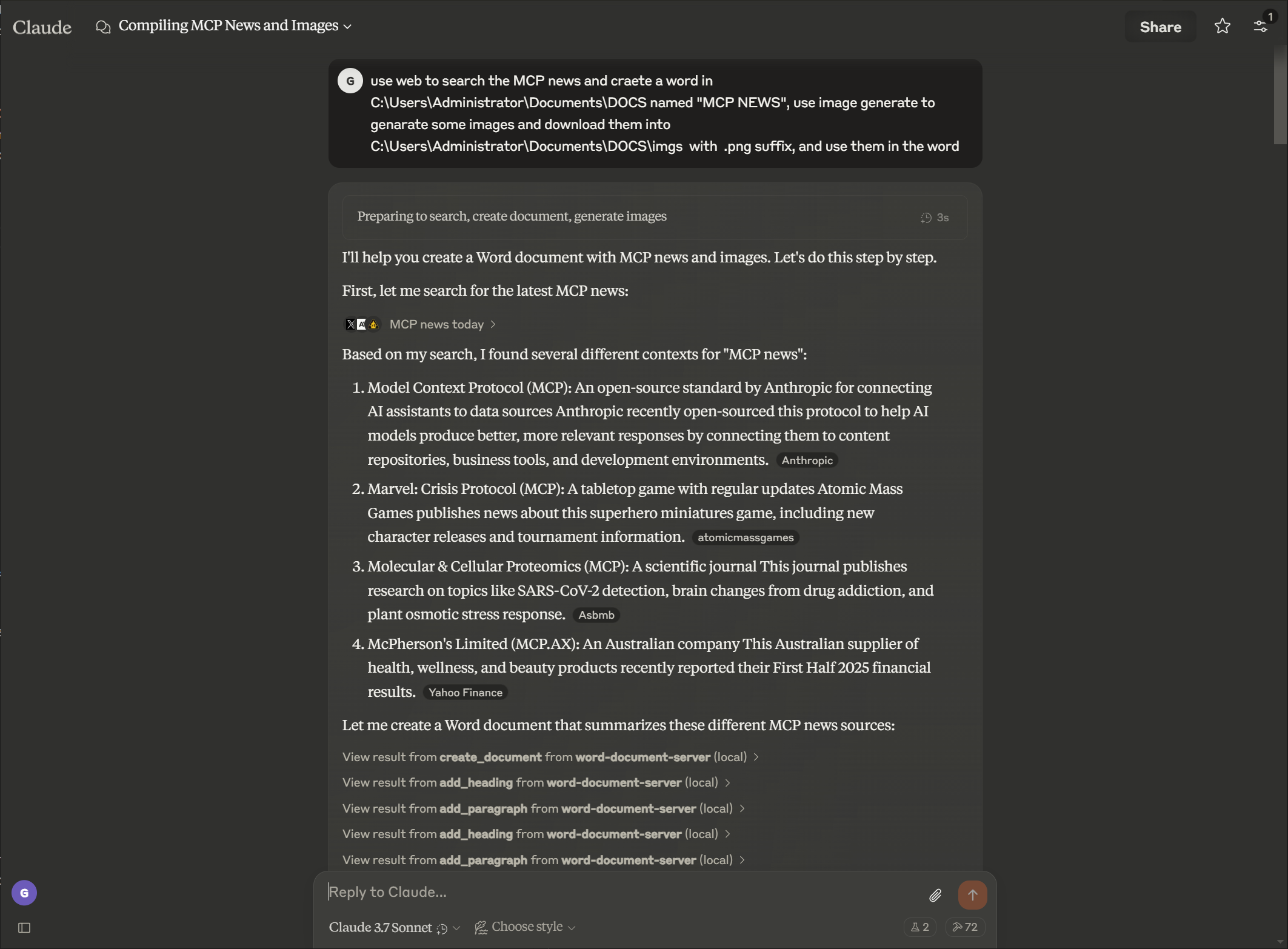
imagen

Producción

imagen

Related MCP server: Claude Document MCP Server

Características

Gestión de documentos

  • Crear nuevos documentos de Word con metadatos

  • Extraer texto y analizar la estructura del documento

  • Ver propiedades y estadísticas del documento

  • Listar los documentos disponibles en un directorio

  • Crear copias de documentos existentes

  • Fusionar varios documentos en un solo documento

  • Convertir documentos de Word a formato PDF

Creación de contenido

  • Añadir encabezados con diferentes niveles

  • Insertar párrafos con estilo opcional

  • Crear tablas con datos personalizados

  • Agregar imágenes con escala proporcional

  • Insertar saltos de página

  • Agregar notas al pie y notas finales a los documentos

  • Convertir notas al pie en notas finales

  • Personalizar el estilo de las notas al pie y las notas finales

Formato de texto enriquecido

  • Formatear secciones de texto específicas (negrita, cursiva, subrayado)

  • Cambiar el color del texto y las propiedades de la fuente

  • Aplicar estilos personalizados a elementos de texto

  • Buscar y reemplazar texto en todos los documentos

Formato de tabla

  • Formatear tablas con bordes y estilos

  • Crear filas de encabezado con formato distinto

  • Aplicar sombreado de celdas y bordes personalizados

  • Estructurar tablas para una mejor legibilidad

Manipulación avanzada de documentos

  • Eliminar párrafos

  • Crear estilos de documentos personalizados

  • Aplicar un formato consistente en todos los documentos

  • Formatee rangos específicos de texto con control detallado

Protección de documentos

  • Añadir protección con contraseña a los documentos

  • Implementar edición restringida con secciones editables

  • Añadir firmas digitales a los documentos

  • Verificar la autenticidad e integridad de los documentos

Instalación

Prerrequisitos

  • Python 3.8 o superior

  • gestor de paquetes pip

Instalación básica

# Clone the repository
git clone https://github.com/GongRzhe/Office-Word-MCP-Server.git
cd Office-Word-MCP-Server

# Install dependencies
pip install -r requirements.txt

Uso del script de configuración

Alternativamente, puede utilizar el script de configuración proporcionado que maneja:

  • Comprobación de requisitos previos

  • Configuración de un entorno virtual

  • Instalación de dependencias

  • Generando configuración de MCP

python setup_mcp.py

Uso con Claude para escritorio

Configuración

Método 1: Después de la instalación local

  1. Después de la instalación, agregue el servidor a su archivo de configuración de Claude for Desktop:

{
  "mcpServers": {
    "word-document-server": {
      "command": "python",
      "args": ["/path/to/word_mcp_server.py"]
    }
  }
}

Método 2: Sin instalación (usando uvx)

  1. También puede configurar Claude for Desktop para usar el servidor sin instalación local mediante el administrador de paquetes uvx:

{
  "mcpServers": {
    "word-document-server": {
      "command": "uvx",
      "args": ["--from", "office-word-mcp-server", "word_mcp_server"]
    }
  }
}
  1. Ubicaciones de los archivos de configuración:

    • macOS: ~/Library/Application Support/Claude/claude_desktop_config.json

    • Ventanas: %APPDATA%\Claude\claude_desktop_config.json

  2. Reinicie Claude for Desktop para cargar la configuración.

Operaciones de ejemplo

Una vez configurado, puedes pedirle a Claude que realice operaciones como:

  • "Crear un nuevo documento llamado 'informe.docx' con una página de título"

  • "Añadir un encabezado y tres párrafos a mi documento"

  • Insertar una tabla 4x4 con datos de ventas

  • "Formatee la palabra 'importante' en el párrafo 2 para que aparezca en negrita y en rojo"

  • "Buscar y reemplazar todas las instancias de 'término antiguo' con 'término nuevo'"

  • "Crear un estilo personalizado para los encabezados de sección"

  • "Aplicar formato a la tabla en mi documento"

Referencia de API

Creación de documentos y propiedades

create_document(filename, title=None, author=None)
get_document_info(filename)
get_document_text(filename)
get_document_outline(filename)
list_available_documents(directory=".")
copy_document(source_filename, destination_filename=None)
convert_to_pdf(filename, output_filename=None)

Adición de contenido

add_heading(filename, text, level=1)
add_paragraph(filename, text, style=None)
add_table(filename, rows, cols, data=None)
add_picture(filename, image_path, width=None)
add_page_break(filename)

Extracción de contenido

get_document_text(filename)
get_paragraph_text_from_document(filename, paragraph_index)
find_text_in_document(filename, text_to_find, match_case=True, whole_word=False)

Formato de texto

format_text(filename, paragraph_index, start_pos, end_pos, bold=None,
            italic=None, underline=None, color=None, font_size=None, font_name=None)
search_and_replace(filename, find_text, replace_text)
delete_paragraph(filename, paragraph_index)
create_custom_style(filename, style_name, bold=None, italic=None,
                    font_size=None, font_name=None, color=None, base_style=None)

Formato de tabla

format_table(filename, table_index, has_header_row=None,
             border_style=None, shading=None)

Solución de problemas

Problemas comunes

  1. Estilos faltantes

    • Es posible que algunos documentos carezcan de los estilos necesarios para operaciones de encabezado y tabla.

    • El servidor intentará crear los estilos faltantes o utilizar formato directo

    • Para obtener mejores resultados, utilice plantillas con estilos estándar de Word.

  2. Problemas de permisos

    • Asegúrese de que el servidor tenga permiso para leer/escribir en las rutas del documento

    • Utilice la función copy_document para crear copias editables de documentos bloqueados

    • Verifique la propiedad y los permisos de los archivos si las operaciones fallan

  3. Problemas de inserción de imágenes

    • Utilice rutas absolutas para los archivos de imagen

    • Verificar la compatibilidad del formato de imagen (se recomiendan JPEG y PNG)

    • Comprobar el tamaño y los permisos del archivo de imagen

Depuración

Habilite el registro detallado configurando la variable de entorno:

export MCP_DEBUG=1  # Linux/macOS
set MCP_DEBUG=1     # Windows

Contribuyendo

¡Agradecemos sus contribuciones! No dude en enviar una solicitud de incorporación de cambios.

  1. Bifurcar el repositorio

  2. Crea tu rama de funciones ( git checkout -b feature/amazing-feature )

  3. Confirme sus cambios ( git commit -m 'Add some amazing feature' )

  4. Empujar a la rama ( git push origin feature/amazing-feature )

  5. Abrir una solicitud de extracción

Licencia

Este proyecto está licenciado bajo la licencia MIT: consulte el archivo de LICENCIA para obtener más detalles.

Expresiones de gratitud


Nota: Este servidor interactúa con los archivos de documentos de su sistema. Verifique siempre que las operaciones solicitadas sean correctas antes de confirmarlas en Claude for Desktop u otros clientes MCP.

Available Tools

54 tools
add_endnote_to_documentC

Add an endnote to a specific paragraph in a Word document.

Inputs: filename (required), paragraph_index (required), endnote_text (required).

add_footnote_after_textC

Add a footnote after specific text with proper superscript formatting. This enhanced function ensures footnotes display correctly as superscript.

Inputs: filename (required), search_text (required), footnote_text (required), output_filename.

add_footnote_before_textC

Add a footnote before specific text with proper superscript formatting. This enhanced function ensures footnotes display correctly as superscript.

Inputs: filename (required), search_text (required), footnote_text (required), output_filename.

add_footnote_enhancedC

Enhanced footnote addition with guaranteed superscript formatting. Adds footnote at the end of a specific paragraph with proper style handling.

Inputs: filename (required), paragraph_index (required), footnote_text (required), output_filename.

add_footnote_robustC

Add footnote with robust validation and Word compliance. This is the production-ready version with comprehensive error handling.

Inputs: filename (required), search_text, paragraph_index, footnote_text, +2 more.

add_footnote_to_documentC

Add a footnote to a specific paragraph in a Word document.

Inputs: filename (required), paragraph_index (required), footnote_text (required).

add_headingA

Add a heading to a Word document with optional formatting.

Args: filename: Path to Word document text: Heading text level: Heading level (1-9) font_name: Font family (e.g., 'Helvetica') font_size: Font size in points (e.g., 14) bold: Make heading bold italic: Make heading italic border_bottom: Add bottom border (for section headers)

Inputs: filename (required), text (required), level, font_name, +4 more.

add_page_breakC

Add a page break to the document.

Inputs: filename (required).

add_paragraphB

Add a paragraph to a Word document with optional formatting.

Args: filename: Path to Word document text: Paragraph text content style: Optional paragraph style name font_name: Font family (e.g., 'Helvetica', 'Times New Roman') font_size: Font size in points (e.g., 14, 36) bold: Make text bold italic: Make text italic color: Text color as hex RGB (e.g., '000000')

Inputs: filename (required), text (required), style, font_name, +4 more.

add_pictureC

Add an image to a Word document.

Inputs: filename (required), image_path (required), width.

add_tableC

Add a table to a Word document.

Inputs: filename (required), rows (required), cols (required), data.

apply_table_alternating_rowsC

Apply alternating row colors to a table for better readability.

Inputs: filename (required), table_index (required), color1, color2.

auto_fit_table_columnsC

Set table columns to auto-fit based on content.

Inputs: filename (required), table_index (required).

convert_to_pdfC

Convert a Word document to PDF format.

Inputs: filename (required), output_filename.

copy_documentC

Create a copy of a Word document.

Inputs: source_filename (required), destination_filename.

create_custom_styleC

Create a custom style in the document.

Inputs: filename (required), style_name (required), bold, italic, +4 more.

create_documentC

Create a new Word document with optional metadata.

Inputs: filename (required), title, author.

customize_footnote_styleC

Customize footnote numbering and formatting in a Word document.

Inputs: filename (required), numbering_format, start_number, font_name, +1 more.

delete_footnote_from_documentC

Delete a footnote from a Word document. Identify the footnote either by ID (1, 2, 3, etc.) or by searching for text near it.

Inputs: filename (required), footnote_id, search_text, output_filename.

delete_footnote_robustC

Delete footnote with comprehensive cleanup and orphan removal. Ensures complete removal from document.xml, footnotes.xml, and relationships.

Inputs: filename (required), footnote_id, search_text, clean_orphans.

delete_paragraphC

Delete a paragraph from a document.

Inputs: filename (required), paragraph_index (required).

find_text_in_documentC

Find occurrences of specific text in a Word document.

Inputs: filename (required), text_to_find (required), match_case, whole_word.

format_tableC

Format a table with borders, shading, and structure.

Inputs: filename (required), table_index (required), has_header_row, border_style, +1 more.

format_table_cell_textC

Format text within a specific table cell.

Inputs: filename (required), table_index (required), row_index (required), col_index (required), +7 more.

format_textC

Format a specific range of text within a paragraph.

Inputs: filename (required), paragraph_index (required), start_pos (required), end_pos (required), +6 more.

get_all_commentsC

Extract all comments from a Word document.

Inputs: filename (required).

get_comments_by_authorC

Extract comments from a specific author in a Word document.

Inputs: filename (required), author (required).

get_comments_for_paragraphC

Extract comments for a specific paragraph in a Word document.

Inputs: filename (required), paragraph_index (required).

get_document_infoC

Get information about a Word document.

Inputs: filename (required).

get_document_outlineC

Get the structure of a Word document.

Inputs: filename (required).

get_document_textC

Extract all text from a Word document.

Inputs: filename (required).

get_document_xmlC

Get the raw XML structure of a Word document.

Inputs: filename (required).

get_paragraph_text_from_documentC

Get text from a specific paragraph in a Word document.

Inputs: filename (required), paragraph_index (required).

highlight_table_headerC

Apply special highlighting to table header row.

Inputs: filename (required), table_index (required), header_color, text_color.

insert_header_near_textA

Insert a header (with specified style) before or after the target paragraph. Specify by text or paragraph index. Args: filename (str), target_text (str, optional), header_title (str), position ('before' or 'after'), header_style (str, default 'Heading 1'), target_paragraph_index (int, optional).

Inputs: filename (required), target_text, header_title, position, +2 more.

insert_line_or_paragraph_near_textB

Insert a new line or paragraph (with specified or matched style) before or after the target paragraph. Specify by text or paragraph index. Args: filename (str), target_text (str, optional), line_text (str), position ('before' or 'after'), line_style (str, optional), target_paragraph_index (int, optional).

Inputs: filename (required), target_text, line_text, position, +2 more.

insert_numbered_list_near_textA

Insert a bulleted or numbered list before or after the target paragraph. Specify by text or paragraph index. Args: filename (str), target_text (str, optional), list_items (list of str), position ('before' or 'after'), target_paragraph_index (int, optional), bullet_type ('bullet' for bullets or 'number' for numbered lists, default: 'bullet').

Inputs: filename (required), target_text, list_items, position, +2 more.

list_available_documentsC

List all .docx files in the specified directory.

Inputs: directory.

merge_table_cellsC

Merge cells in a rectangular area of a table.

Inputs: filename (required), table_index (required), start_row (required), start_col (required), +2 more.

merge_table_cells_horizontalC

Merge cells horizontally in a single row.

Inputs: filename (required), table_index (required), row_index (required), start_col (required), +1 more.

merge_table_cells_verticalC

Merge cells vertically in a single column.

Inputs: filename (required), table_index (required), col_index (required), start_row (required), +1 more.

protect_documentC

Add password protection to a Word document.

Inputs: filename (required), password (required).

replace_block_between_manual_anchorsC

Replace all content between start_anchor_text and end_anchor_text (or next logical header if not provided).

Inputs: filename (required), start_anchor_text (required), new_paragraphs (required), end_anchor_text, +2 more.

replace_paragraph_block_below_headerC

Reemplaza el bloque de párrafos debajo de un encabezado, evitando modificar TOC.

Inputs: filename (required), header_text (required), new_paragraphs (required), detect_block_end_fn.

search_and_replaceC

Search for text and replace all occurrences.

Inputs: filename (required), find_text (required), replace_text (required).

set_table_alignment_allC

Set text alignment for all cells in a table.

Inputs: filename (required), table_index (required), horizontal, vertical.

set_table_cell_alignmentC

Set text alignment for a specific table cell.

Inputs: filename (required), table_index (required), row_index (required), col_index (required), +2 more.

set_table_cell_paddingC

Set padding/margins for a specific table cell.

Inputs: filename (required), table_index (required), row_index (required), col_index (required), +5 more.

set_table_cell_shadingC

Apply shading/filling to a specific table cell.

Inputs: filename (required), table_index (required), row_index (required), col_index (required), +2 more.

set_table_column_widthC

Set the width of a specific table column.

Inputs: filename (required), table_index (required), col_index (required), width (required), +1 more.

set_table_column_widthsC

Set the widths of multiple table columns.

Inputs: filename (required), table_index (required), widths (required), width_type.

set_table_widthC

Set the overall width of a table.

Inputs: filename (required), table_index (required), width (required), width_type.

unprotect_documentC

Remove password protection from a Word document.

Inputs: filename (required), password (required).

validate_document_footnotesC

Validate all footnotes in document for coherence and compliance. Returns detailed report on ID conflicts, orphaned content, missing styles, etc.

Inputs: filename (required).

Tool Schema Changelog

Recent tool additions, removals, and schema changes observed during successful MCP inspections.

Loading tool schema changelog…

    TDQS

    C2.6/5.0

    Scored across 54 tools

    Disambiguation2/5

    Multiple tools have overlapping purposes, especially for footnotes (e.g., add_footnote_to_document, add_footnote_enhanced, add_footnote_robust, add_footnote_before_text, add_footnote_after_text) and table formatting (e.g., set_table_cell_alignment vs. set_table_alignment_all, merge_table_cells vs. merge_table_cells_horizontal/vertical). Descriptions help somewhat, but the boundaries are unclear, leading to potential misselection.

    Naming Consistency3/5

    The naming follows a mostly snake_case pattern, but conventions are mixed with inconsistent verb styles (e.g., 'add' vs. 'insert' vs. 'apply' vs. 'set' for similar operations) and some tools have overly verbose names (e.g., replace_block_between_manual_anchors). While readable, it lacks a predictable pattern across all tools.

    Tool Count2/5

    With 54 tools, the count is excessive for a Word document server, making it heavy and overwhelming. Many tools could be consolidated (e.g., multiple footnote addition/deletion tools, redundant table formatting functions), indicating poor scoping and bloat.

    Completeness4/5

    The tool set covers a wide range of Word document operations, including creation, formatting, tables, footnotes, comments, and conversion to PDF. Minor gaps exist (e.g., no direct tool for adding comments or managing sections), but core workflows are well-covered, allowing agents to work around most limitations.

    Maintenance

    ActivityInactive
    ResponsivenessNo recent community issues

    Related MCP Connectors

    Related MCP Servers

    • F
      license
      A
      quality
      D
      maintenance
      A comprehensive Model Context Protocol server that processes Microsoft Word documents with full formatting support, enabling text extraction, HTML/Markdown conversion, structure analysis, and image extraction.
      5
      2
      -
    • -
      license
      Not graded
      quality
      Not graded
      maintenance
      A Python server implementing Model Context Protocol for advanced Microsoft Word document manipulation, enabling programmatic automation of complex document processing tasks.
      -