


A
licenseD
qualityD
maintenanceA Model Context Protocol server that enables searching for similar images by text description, integrating Inspire's backend image search capabilities with LLM interfaces like Claude Desktop.
1
3
GPL 3.0

用于 Pinterest 图像搜索和信息检索的模型上下文协议 (MCP) 服务器。
通过关键词在 Pinterest 上搜索图片
检索有关 Pinterest 图片的详细信息
通过 MCP 与 Cursor IDE 无缝集成
支持无头浏览器模式
搜索结果的限制控制
从 Pinterest 搜索和下载图片
Related MCP server: Cortex
Node.js (v18 或更高版本)
用于 MCP 集成的Cursor IDE
要通过Smithery自动为 Claude Desktop 安装 mcp-pinterest:
npx -y @smithery/cli install mcp-pinterest --client claude克隆此存储库:
git clone https://github.com/terryso/mcp-pinterest.git pinterest-mcp-server
cd pinterest-mcp-server
安装依赖项:
npm install构建服务器:
npm run build您现在可以将此服务器用作 Cursor 中的 MCP 服务器。
打开游标IDE
前往“设置”(⚙️) > 扩展程序 > MCP
点击“添加服务器”
输入以下详细信息:
名称:Pinterest MCP
类型:命令
命令: node
参数: ["/path/to/mcp-pinterest/dist/pinterest-mcp-server.js"]
或者直接编辑Cursor的MCP配置文件(通常位于~/.cursor/mcp.json ),添加以下内容:
"pinterest": {
  "command": "node",
  "args": ["/path/to/mcp-pinterest/dist/pinterest-mcp-server.js"]
}
点击“保存”
服务器公开以下 MCP 功能:
pinterest_search :按关键字在 Pinterest 上搜索图片
参数:
keyword :搜索词(必填)
limit :返回的图像数量(默认值:10)
headless :是否使用无头浏览器模式(默认值:true)
pinterest_get_image_info :获取有关 Pinterest 图像的详细信息
参数:
image_url :Pinterest 图片的 URL(必需)
pinterest_search_and_download :从 Pinterest 搜索并下载图片
参数:
keyword :搜索词(必填)
limit :返回的图像数量(默认值:10)
headless :是否使用无头浏览器模式(默认值:true)
配置完成后,您可以直接在 Cursor 的 AI 聊天中使用 Pinterest MCP 功能:
Search for robot images on PinterestAI 将使用 MCP 服务器搜索 Pinterest 并显示结果。
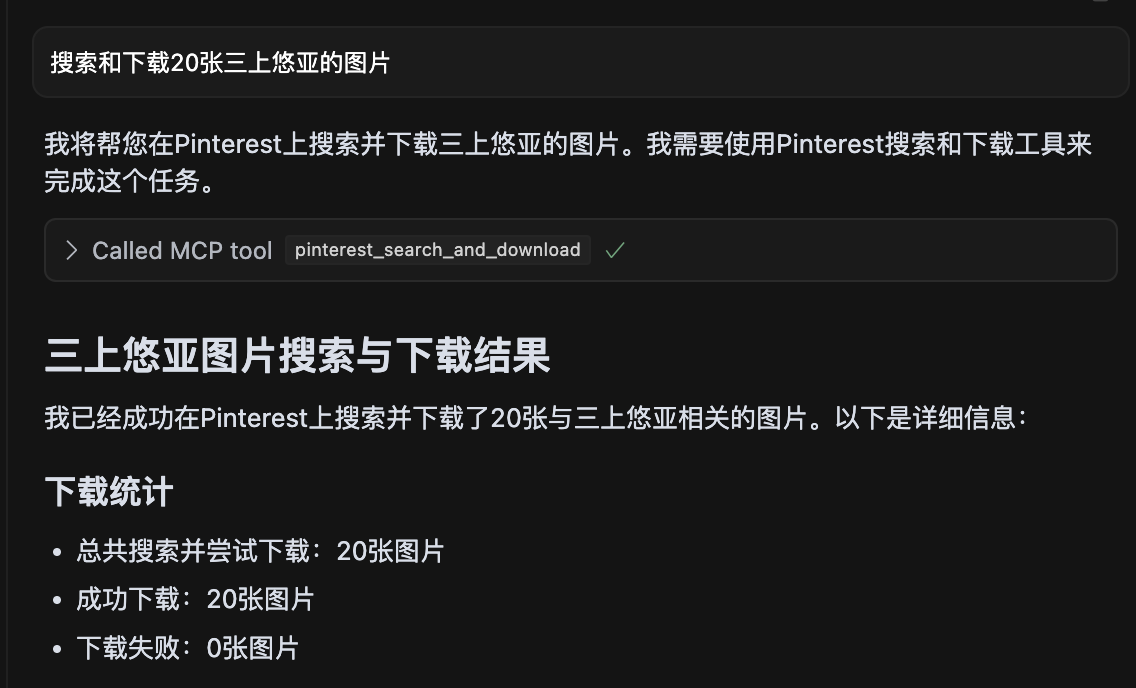
屏幕截图显示搜索了 20 张《三上悠亚》的图片,并且所有图片均已成功下载。
pinterest-mcp-server.ts :主服务器文件
dist/pinterest-mcp-server.js :为生产环境构建的 JavaScript 文件
package.json :项目配置和依赖项
要添加新的 MCP 功能:
修改pinterest-mcp-server.ts
使用 MCP SDK 注册新功能
实现函数逻辑
使用npm run build重建
如果服务器启动失败,请检查端口是否已被使用
确保使用npm install正确安装了所有依赖项
确保使用tsconfig.json文件正确配置了 TypeScript
如果遇到构建错误,请尝试运行npm install -D typescript @types/node
验证 Pinterest 访问的网络连接
该项目根据 MIT 许可证获得许可 - 有关详细信息,请参阅LICENSE文件。
服务器支持以下环境变量进行配置:
MCP_PINTEREST_DOWNLOAD_DIR :指定下载图片的根目录。如果未设置,则默认为相对于服务器脚本的../downloads目录。
MCP_PINTEREST_FILENAME_TEMPLATE :指定下载图片的文件名模板。如果未设置,则默认为pinterest_{imageId}.{fileExtension} 。
MCP_PINTEREST_PROXY_SERVER :指定用于连接 Pinterest 的代理服务器。格式应为protocol://host:port ,例如http://127.0.0.1:7890或socks5://127.0.0.1:1080 。
使用环境变量设置下载目录(推荐方法):
# Linux/macOS
export MCP_PINTEREST_DOWNLOAD_DIR=/path/to/your/download/directory
# Then start the server
node pinterest-mcp-server.js

# Windows (CMD)
set MCP_PINTEREST_DOWNLOAD_DIR=C:\path\to\your\download\directory
# Then start the server
node pinterest-mcp-server.js

# Windows (PowerShell)
$env:MCP_PINTEREST_DOWNLOAD_DIR="C:\path\to\your\download\directory"
# Then start the server
node pinterest-mcp-server.js如果未设置环境变量,服务器将使用默认下载目录(相对于服务器脚本的../downloads )。
您可以使用MCP_PINTEREST_FILENAME_TEMPLATE环境变量自定义下载图像的文件名模式:
# Linux/macOS
export MCP_PINTEREST_FILENAME_TEMPLATE="pin_{imageId}_{timestamp}.{fileExtension}"
# Then start the server
node pinterest-mcp-server.js

# Windows (CMD)
set MCP_PINTEREST_FILENAME_TEMPLATE="pin_{imageId}_{timestamp}.{fileExtension}"
# Then start the server
node pinterest-mcp-server.js

# Windows (PowerShell)
$env:MCP_PINTEREST_FILENAME_TEMPLATE="pin_{imageId}_{timestamp}.{fileExtension}"
# Then start the server
node pinterest-mcp-server.js
该模板支持以下变量:
{imageId} :Pinterest 图片的唯一 ID
{fileExtension} :文件扩展名(例如 jpg、png)
{timestamp} :当前 UTC 时间戳,格式为 YYYYMMDDHHMMSS
{index} :下载多张图片时的索引号(从1开始)
示例模板:
pinterest_{imageId}.{fileExtension} (默认)
pin_{timestamp}_{imageId}.{fileExtension}
pinterest_image_{index}_{imageId}.{fileExtension}
{timestamp}_pinterest.{fileExtension}
如果模板无效(例如,包含不受支持的变量或括号不匹配),服务器将记录警告并使用默认模板。
如果您需要使用代理访问 Pinterest(尤其是在 Pinterest 可能受到限制的地区),您可以设置代理配置:
# Linux/macOS
export MCP_PINTEREST_PROXY_SERVER="http://127.0.0.1:7890"
# Then start the server
node pinterest-mcp-server.js

# Windows (CMD)
set MCP_PINTEREST_PROXY_SERVER=http://127.0.0.1:7890
# Then start the server
node pinterest-mcp-server.js

# Windows (PowerShell)
$env:MCP_PINTEREST_PROXY_SERVER="http://127.0.0.1:7890"
# Then start the server
node pinterest-mcp-server.js
支持的代理协议:
HTTP: http://host:port
HTTPS: https://host:port
SOCKS4: socks4://host:port
SOCKS5: socks5://host:port
代理配置既影响用于搜索的浏览器,也影响图像下载过程。
服务器启动时会验证下载目录的存在及可写性。如果目录不存在,则会尝试创建;如果无法创建或写入,服务器将退出。
客户端在调用下载相关工具时不应该通过参数指定下载路径或文件名模板,因为所有下载都会使用服务器的环境变量配置或默认值。
服务器会自动清理文件名,用下划线替换非法字符(例如/ 、 \ 、 : 、 * 、 ? 、 " 、 < 、 > 、 | )。
该服务器提供以下 MCP 工具:
pinterest_search :按关键字搜索 Pinterest 图片
pinterest_get_image_info :获取有关 Pinterest 图像的详细信息
pinterest_search_and_download :搜索并下载 Pinterest 图片
详细的接口参数参考请参考MCP工具定义。
Get Pinterest image information
| Name | Required | Description | Default |
|---|---|---|---|
| image_url | Yes | Image URL |
Does the description disclose side effects, auth requirements, rate limits, or destructive behavior?
No annotations provided, and the description lacks any behavioral details such as rate limits, authentication, or error handling. It does not even mention that it fetches metadata or requires an image URL.
Agents need to know what a tool does to the world before calling it. Descriptions should go beyond structured annotations to explain consequences.
Is the description appropriately sized, front-loaded, and free of redundancy?
The description is a single short sentence, but it is under-specified and lacks necessary detail. It is not a model of conciseness; it is minimal without being helpful.
Shorter descriptions cost fewer tokens and are easier for agents to parse. Every sentence should earn its place.
Given the tool's complexity, does the description cover enough for an agent to succeed on first attempt?
For a tool that presumably returns image information, the description fails to mention what that information includes, the output format, or any prerequisites. It is completely inadequate given the lack of output schema.
Complex tools with many parameters or behaviors need more documentation. Simple tools need less. This dimension scales expectations accordingly.
Does the description clarify parameter syntax, constraints, interactions, or defaults beyond what the schema provides?
Schema description coverage is 100%, with each parameter having a clear description. The tool description adds no extra meaning, but the baseline is adequate.
Input schemas describe structure but not intent. Descriptions should explain non-obvious parameter relationships and valid value ranges.
Does the description clearly state what the tool does and how it differs from similar tools?
Description states verb 'Get' and resource 'Pinterest image information', which is clear but vague. It distinguishes from siblings (health, search, similar pins) but does not specify what 'image information' includes.
Agents choose between tools based on descriptions. A clear purpose with a specific verb and resource helps agents select the right tool.
Does the description explain when to use this tool, when not to, or what alternatives exist?
No guidance on when to use this tool versus alternatives. The description provides no context for selection.
Agents often have multiple tools that could apply. Explicit usage guidance like "use X instead of Y when Z" prevents misuse.
Search for images on Pinterest by keyword
| Name | Required | Description | Default |
|---|---|---|---|
| keyword | Yes | Search keyword | |
| limit | No | Number of images to return (default: 10) | |
| headless | No | Whether to use headless browser mode (default: true) |
Does the description disclose side effects, auth requirements, rate limits, or destructive behavior?
No annotations are provided, so the description carries full burden. It does not disclose behavioral traits such as rate limits, authentication needs, or what headless mode implies (e.g., browser dependency). The return format (e.g., JSON structure) is unstated.
Agents need to know what a tool does to the world before calling it. Descriptions should go beyond structured annotations to explain consequences.
Is the description appropriately sized, front-loaded, and free of redundancy?
The description is a single, concise sentence with no redundancy. Every word is necessary. It is front-loaded with the core action.
Shorter descriptions cost fewer tokens and are easier for agents to parse. Every sentence should earn its place.
Given the tool's complexity, does the description cover enough for an agent to succeed on first attempt?
Given no output schema, the description should explain what the tool returns (e.g., pin objects, URLs). It does not. The description fails to provide enough context for an agent to use the tool effectively, especially compared to sibling tools that might have richer descriptions.
Complex tools with many parameters or behaviors need more documentation. Simple tools need less. This dimension scales expectations accordingly.
Does the description clarify parameter syntax, constraints, interactions, or defaults beyond what the schema provides?
Schema coverage is 100% with descriptions for all three parameters. The tool description adds no extra meaning beyond the schema, which already explains limit, keyword, and headless. Baseline 3 is appropriate.
Input schemas describe structure but not intent. Descriptions should explain non-obvious parameter relationships and valid value ranges.
Does the description clearly state what the tool does and how it differs from similar tools?
The description clearly states the verb 'search', resource 'images on Pinterest', and method 'by keyword'. It distinguishes from siblings like pinterest_search_and_download (which adds download). However, it could be more specific about return type (e.g., pin data vs URLs).
Agents choose between tools based on descriptions. A clear purpose with a specific verb and resource helps agents select the right tool.
Does the description explain when to use this tool, when not to, or what alternatives exist?
No guidance on when to use this tool vs siblings like pinterest_search_and_download or pinterest_get_similar_pins. No mention of prerequisites or context where this tool is preferred.
Agents often have multiple tools that could apply. Explicit usage guidance like "use X instead of Y when Z" prevents misuse.
Search for images on Pinterest by keyword and download them
| Name | Required | Description | Default |
|---|---|---|---|
| keyword | Yes | Search keyword | |
| limit | No | Number of images to return and download (default: 10) | |
| headless | No | Whether to use headless browser mode (default: true) |
Does the description disclose side effects, auth requirements, rate limits, or destructive behavior?
No annotations provided, so description must fully disclose behavior. It omits details like download location, file format, browser automation implications (headless parameter not mentioned), and potential side effects.
Agents need to know what a tool does to the world before calling it. Descriptions should go beyond structured annotations to explain consequences.
Is the description appropriately sized, front-loaded, and free of redundancy?
A single sentence with no wasted words, but it lacks front-loading of critical context. Appropriate length for the content provided.
Shorter descriptions cost fewer tokens and are easier for agents to parse. Every sentence should earn its place.
Given the tool's complexity, does the description cover enough for an agent to succeed on first attempt?
With 3 parameters and no output schema, the description fails to explain return behavior (e.g., saved files, temporary storage) or how 'download' works. Incomplete for proper tool invocation.
Complex tools with many parameters or behaviors need more documentation. Simple tools need less. This dimension scales expectations accordingly.
Does the description clarify parameter syntax, constraints, interactions, or defaults beyond what the schema provides?
Schema coverage is 100%, so baseline is 3. The description adds no additional meaning beyond what is already in the schema for parameters.
Input schemas describe structure but not intent. Descriptions should explain non-obvious parameter relationships and valid value ranges.
Does the description clearly state what the tool does and how it differs from similar tools?
The description clearly states the verb 'Search' and 'download', the resource 'images on Pinterest', and the method 'by keyword'. It distinguishes from sibling 'pinterest_search' by adding download functionality.
Agents choose between tools based on descriptions. A clear purpose with a specific verb and resource helps agents select the right tool.
Does the description explain when to use this tool, when not to, or what alternatives exist?
No guidance on when to use this tool versus alternatives like 'pinterest_search' or 'pinterest_get_image_info'. The agent is left to infer usage from the name alone.
Agents often have multiple tools that could apply. Explicit usage guidance like "use X instead of Y when Z" prevents misuse.
Recent tool additions, removals, and schema changes observed during successful MCP inspections.
pinterest_get_image_infopinterest_searchpinterest_search_and_downloadScored across 3 tools
Each tool has a distinct purpose: retrieving metadata, searching, and searching with download. The names and descriptions make it easy to distinguish between them.
All tools use the 'pinterest_' prefix and snake_case, but 'pinterest_search_and_download' combines two verbs while the others use a single verb, introducing slight inconsistency.
Three tools is a minimal but reasonable set for an image search and download service. It covers core functionality without being too sparse or excessive.
The set covers basic search and metadata retrieval, but lacks common Pinterest operations like board management, pinning, or user actions, leaving notable gaps for broader use.
Personal knowledge base MCP server with semantic search, auto-categorization, metadata extraction
MCP Server for an Agent Task Marketplace
MCP server for Drosophila neuroscience data from VirtualFlyBrain