


A
licenseD
qualityD
maintenanceA Model Context Protocol server that enables searching for similar images by text description, integrating Inspire's backend image search capabilities with LLM interfaces like Claude Desktop.
1
3
GPL 3.0

Un servidor de Protocolo de Contexto Modelo (MCP) para la búsqueda de imágenes y la recuperación de información en Pinterest.
Buscar imágenes en Pinterest por palabras clave
Recuperar información detallada sobre las imágenes de Pinterest
Integración perfecta con Cursor IDE a través de MCP
Compatibilidad con el modo de navegador sin cabeza
Control de límites para los resultados de búsqueda
Busca y descarga imágenes de Pinterest
Related MCP server: Cortex
Node.js (v18 o superior)
IDE de Cursor para la integración de MCP
Para instalar mcp-pinterest para Claude Desktop automáticamente a través de Smithery :
npx -y @smithery/cli install mcp-pinterest --client claudeClonar este repositorio:
git clone https://github.com/terryso/mcp-pinterest.git pinterest-mcp-server
cd pinterest-mcp-server
Instalar dependencias:
npm installConstruir el servidor:
npm run buildAhora puedes usar este servidor como servidor MCP en Cursor.
Abrir cursor IDE
Vaya a Configuración (⚙️) > Extensiones > MCP
Haga clic en "Agregar servidor"
Introduzca los siguientes datos:
Nombre: Pinterest MCP
Tipo: Comando
Comando: node
Argumentos: ["/path/to/mcp-pinterest/dist/pinterest-mcp-server.js"]
或者直接编辑Cursor的MCP配置文件(通常位于~/.cursor/mcp.json ),添加以下内容:
"pinterest": {
  "command": "node",
  "args": ["/path/to/mcp-pinterest/dist/pinterest-mcp-server.js"]
}
Haga clic en "Guardar"
El servidor expone las siguientes funciones MCP:
pinterest_search : busca imágenes en Pinterest por palabra clave
Parámetros:
keyword : término de búsqueda (obligatorio)
limit : Número de imágenes a devolver (predeterminado: 10)
headless : si se debe utilizar el modo de navegador sin cabeza (valor predeterminado: verdadero)
pinterest_get_image_info : Obtenga información detallada sobre una imagen de Pinterest
Parámetros:
image_url : URL de la imagen de Pinterest (obligatorio)
pinterest_search_and_download : Busca y descarga imágenes de Pinterest
Parámetros:
keyword : término de búsqueda (obligatorio)
limit : Número de imágenes a devolver (predeterminado: 10)
headless : si se debe utilizar el modo de navegador sin cabeza (valor predeterminado: verdadero)
Una vez configurado, puedes usar las funciones de Pinterest MCP directamente en el chat de IA de Cursor:
Search for robot images on PinterestLa IA utilizará el servidor MCP para buscar en Pinterest y mostrar los resultados.
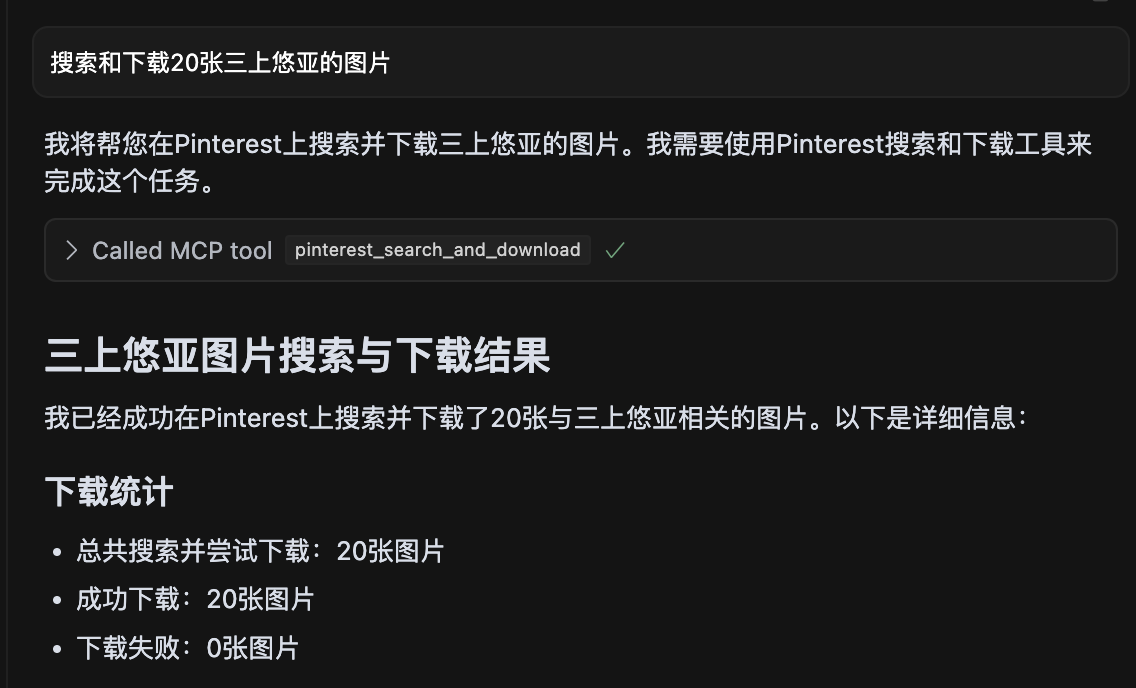
Captura de pantalla que muestra una búsqueda de 20 imágenes de 三上悠亚 con todas las imágenes descargadas correctamente.
pinterest-mcp-server.ts : Archivo del servidor principal
dist/pinterest-mcp-server.js : Archivo JavaScript creado para producción
package.json : Configuración del proyecto y dependencias
Para agregar nuevas funciones MCP:
Modificar pinterest-mcp-server.ts
Registrar nuevas funciones utilizando el SDK de MCP
Implementar la lógica de la función
Reconstruir con npm run build
Si el servidor no se inicia, verifique si el puerto ya está en uso
Asegúrese de que todas las dependencias estén instaladas correctamente con npm install
Asegúrese de que TypeScript esté configurado correctamente con un archivo tsconfig.json
Si encuentra errores de compilación, intente ejecutar npm install -D typescript @types/node
Verificar la conectividad de red para acceder a Pinterest
Este proyecto está licenciado bajo la licencia MIT: consulte el archivo de LICENCIA para obtener más detalles.
El servidor admite las siguientes variables de entorno para la configuración:
MCP_PINTEREST_DOWNLOAD_DIR : Especifica el directorio raíz para descargar imágenes. Si no se configura, el valor predeterminado es el directorio ../downloads correspondiente al script del servidor.
MCP_PINTEREST_FILENAME_TEMPLATE : Especifica la plantilla de nombre de archivo para las imágenes descargadas. Si no se configura, el valor predeterminado es pinterest_{imageId}.{fileExtension} .
MCP_PINTEREST_PROXY_SERVER : Especifica el servidor proxy que se usará para conectarse a Pinterest. El formato debe ser protocol://host:port , por ejemplo, http://127.0.0.1:7890 o socks5://127.0.0.1:1080 .
Establezca el directorio de descarga mediante una variable de entorno (método recomendado):
# Linux/macOS
export MCP_PINTEREST_DOWNLOAD_DIR=/path/to/your/download/directory
# Then start the server
node pinterest-mcp-server.js

# Windows (CMD)
set MCP_PINTEREST_DOWNLOAD_DIR=C:\path\to\your\download\directory
# Then start the server
node pinterest-mcp-server.js

# Windows (PowerShell)
$env:MCP_PINTEREST_DOWNLOAD_DIR="C:\path\to\your\download\directory"
# Then start the server
node pinterest-mcp-server.js
Si la variable de entorno no está configurada, el servidor utilizará el directorio de descarga predeterminado (relativo al ../downloads del script del servidor).
Puede personalizar el patrón del nombre de archivo para las imágenes descargadas utilizando la variable de entorno MCP_PINTEREST_FILENAME_TEMPLATE :
# Linux/macOS
export MCP_PINTEREST_FILENAME_TEMPLATE="pin_{imageId}_{timestamp}.{fileExtension}"
# Then start the server
node pinterest-mcp-server.js

# Windows (CMD)
set MCP_PINTEREST_FILENAME_TEMPLATE="pin_{imageId}_{timestamp}.{fileExtension}"
# Then start the server
node pinterest-mcp-server.js

# Windows (PowerShell)
$env:MCP_PINTEREST_FILENAME_TEMPLATE="pin_{imageId}_{timestamp}.{fileExtension}"
# Then start the server
node pinterest-mcp-server.js
La plantilla admite las siguientes variables:
{imageId} : El ID único de la imagen de Pinterest
{fileExtension} : La extensión del archivo (por ejemplo, jpg, png)
{timestamp} : Marca de tiempo UTC actual en formato AAAAMMDDHHMMSS
{index} : El número de índice al descargar varias imágenes (comienza desde 1)
Plantillas de ejemplo:
pinterest_{imageId}.{fileExtension} (predeterminado)
pin_{timestamp}_{imageId}.{fileExtension}
pinterest_image_{index}_{imageId}.{fileExtension}
{timestamp}_pinterest.{fileExtension}
Si la plantilla no es válida (por ejemplo, contiene variables no admitidas o tiene corchetes no coincidentes), el servidor registrará una advertencia y utilizará la plantilla predeterminada.
Si necesita utilizar un proxy para acceder a Pinterest (especialmente en regiones donde Pinterest podría estar restringido), puede establecer la configuración del proxy:
# Linux/macOS
export MCP_PINTEREST_PROXY_SERVER="http://127.0.0.1:7890"
# Then start the server
node pinterest-mcp-server.js

# Windows (CMD)
set MCP_PINTEREST_PROXY_SERVER=http://127.0.0.1:7890
# Then start the server
node pinterest-mcp-server.js

# Windows (PowerShell)
$env:MCP_PINTEREST_PROXY_SERVER="http://127.0.0.1:7890"
# Then start the server
node pinterest-mcp-server.js
Protocolos proxy compatibles:
HTTP: http://host:port
HTTPS: https://host:port
CALCETINES4: socks4://host:port
CALCETINES5: socks5://host:port
La configuración del proxy afecta tanto al navegador utilizado para la búsqueda como al proceso de descarga de imágenes.
El servidor verificará la existencia y la escritura en el directorio de descarga al iniciarse. Si el directorio no existe, intentará crearlo; si no se puede crear ni escribir en él, el servidor cerrará.
Los clientes no deben especificar rutas de descarga o plantillas de nombres de archivos a través de parámetros al llamar a herramientas relacionadas con la descarga, ya que todas las descargas utilizarán la configuración o los valores predeterminados de la variable de entorno del servidor.
El servidor desinfecta automáticamente los nombres de archivos reemplazando caracteres ilegales (como / , \ , : , * , ? , " , < , > , | ) con guiones bajos.
El servidor proporciona las siguientes herramientas MCP:
pinterest_search : busca imágenes de Pinterest por palabra clave
pinterest_get_image_info : Obtenga información detallada sobre una imagen de Pinterest
pinterest_search_and_download : Busca y descarga imágenes de Pinterest
Para obtener referencias detalladas de los parámetros de la interfaz, consulte las definiciones de la herramienta MCP.
Get Pinterest image information
| Name | Required | Description | Default |
|---|---|---|---|
| image_url | Yes | Image URL |
Does the description disclose side effects, auth requirements, rate limits, or destructive behavior?
No annotations provided, and the description lacks any behavioral details such as rate limits, authentication, or error handling. It does not even mention that it fetches metadata or requires an image URL.
Agents need to know what a tool does to the world before calling it. Descriptions should go beyond structured annotations to explain consequences.
Is the description appropriately sized, front-loaded, and free of redundancy?
The description is a single short sentence, but it is under-specified and lacks necessary detail. It is not a model of conciseness; it is minimal without being helpful.
Shorter descriptions cost fewer tokens and are easier for agents to parse. Every sentence should earn its place.
Given the tool's complexity, does the description cover enough for an agent to succeed on first attempt?
For a tool that presumably returns image information, the description fails to mention what that information includes, the output format, or any prerequisites. It is completely inadequate given the lack of output schema.
Complex tools with many parameters or behaviors need more documentation. Simple tools need less. This dimension scales expectations accordingly.
Does the description clarify parameter syntax, constraints, interactions, or defaults beyond what the schema provides?
Schema description coverage is 100%, with each parameter having a clear description. The tool description adds no extra meaning, but the baseline is adequate.
Input schemas describe structure but not intent. Descriptions should explain non-obvious parameter relationships and valid value ranges.
Does the description clearly state what the tool does and how it differs from similar tools?
Description states verb 'Get' and resource 'Pinterest image information', which is clear but vague. It distinguishes from siblings (health, search, similar pins) but does not specify what 'image information' includes.
Agents choose between tools based on descriptions. A clear purpose with a specific verb and resource helps agents select the right tool.
Does the description explain when to use this tool, when not to, or what alternatives exist?
No guidance on when to use this tool versus alternatives. The description provides no context for selection.
Agents often have multiple tools that could apply. Explicit usage guidance like "use X instead of Y when Z" prevents misuse.
Search for images on Pinterest by keyword
| Name | Required | Description | Default |
|---|---|---|---|
| keyword | Yes | Search keyword | |
| limit | No | Number of images to return (default: 10) | |
| headless | No | Whether to use headless browser mode (default: true) |
Does the description disclose side effects, auth requirements, rate limits, or destructive behavior?
No annotations are provided, so the description carries full burden. It does not disclose behavioral traits such as rate limits, authentication needs, or what headless mode implies (e.g., browser dependency). The return format (e.g., JSON structure) is unstated.
Agents need to know what a tool does to the world before calling it. Descriptions should go beyond structured annotations to explain consequences.
Is the description appropriately sized, front-loaded, and free of redundancy?
The description is a single, concise sentence with no redundancy. Every word is necessary. It is front-loaded with the core action.
Shorter descriptions cost fewer tokens and are easier for agents to parse. Every sentence should earn its place.
Given the tool's complexity, does the description cover enough for an agent to succeed on first attempt?
Given no output schema, the description should explain what the tool returns (e.g., pin objects, URLs). It does not. The description fails to provide enough context for an agent to use the tool effectively, especially compared to sibling tools that might have richer descriptions.
Complex tools with many parameters or behaviors need more documentation. Simple tools need less. This dimension scales expectations accordingly.
Does the description clarify parameter syntax, constraints, interactions, or defaults beyond what the schema provides?
Schema coverage is 100% with descriptions for all three parameters. The tool description adds no extra meaning beyond the schema, which already explains limit, keyword, and headless. Baseline 3 is appropriate.
Input schemas describe structure but not intent. Descriptions should explain non-obvious parameter relationships and valid value ranges.
Does the description clearly state what the tool does and how it differs from similar tools?
The description clearly states the verb 'search', resource 'images on Pinterest', and method 'by keyword'. It distinguishes from siblings like pinterest_search_and_download (which adds download). However, it could be more specific about return type (e.g., pin data vs URLs).
Agents choose between tools based on descriptions. A clear purpose with a specific verb and resource helps agents select the right tool.
Does the description explain when to use this tool, when not to, or what alternatives exist?
No guidance on when to use this tool vs siblings like pinterest_search_and_download or pinterest_get_similar_pins. No mention of prerequisites or context where this tool is preferred.
Agents often have multiple tools that could apply. Explicit usage guidance like "use X instead of Y when Z" prevents misuse.
Search for images on Pinterest by keyword and download them
| Name | Required | Description | Default |
|---|---|---|---|
| keyword | Yes | Search keyword | |
| limit | No | Number of images to return and download (default: 10) | |
| headless | No | Whether to use headless browser mode (default: true) |
Does the description disclose side effects, auth requirements, rate limits, or destructive behavior?
No annotations provided, so description must fully disclose behavior. It omits details like download location, file format, browser automation implications (headless parameter not mentioned), and potential side effects.
Agents need to know what a tool does to the world before calling it. Descriptions should go beyond structured annotations to explain consequences.
Is the description appropriately sized, front-loaded, and free of redundancy?
A single sentence with no wasted words, but it lacks front-loading of critical context. Appropriate length for the content provided.
Shorter descriptions cost fewer tokens and are easier for agents to parse. Every sentence should earn its place.
Given the tool's complexity, does the description cover enough for an agent to succeed on first attempt?
With 3 parameters and no output schema, the description fails to explain return behavior (e.g., saved files, temporary storage) or how 'download' works. Incomplete for proper tool invocation.
Complex tools with many parameters or behaviors need more documentation. Simple tools need less. This dimension scales expectations accordingly.
Does the description clarify parameter syntax, constraints, interactions, or defaults beyond what the schema provides?
Schema coverage is 100%, so baseline is 3. The description adds no additional meaning beyond what is already in the schema for parameters.
Input schemas describe structure but not intent. Descriptions should explain non-obvious parameter relationships and valid value ranges.
Does the description clearly state what the tool does and how it differs from similar tools?
The description clearly states the verb 'Search' and 'download', the resource 'images on Pinterest', and the method 'by keyword'. It distinguishes from sibling 'pinterest_search' by adding download functionality.
Agents choose between tools based on descriptions. A clear purpose with a specific verb and resource helps agents select the right tool.
Does the description explain when to use this tool, when not to, or what alternatives exist?
No guidance on when to use this tool versus alternatives like 'pinterest_search' or 'pinterest_get_image_info'. The agent is left to infer usage from the name alone.
Agents often have multiple tools that could apply. Explicit usage guidance like "use X instead of Y when Z" prevents misuse.
Recent tool additions, removals, and schema changes observed during successful MCP inspections.
pinterest_get_image_infopinterest_searchpinterest_search_and_downloadScored across 3 tools
Each tool has a distinct purpose: retrieving metadata, searching, and searching with download. The names and descriptions make it easy to distinguish between them.
All tools use the 'pinterest_' prefix and snake_case, but 'pinterest_search_and_download' combines two verbs while the others use a single verb, introducing slight inconsistency.
Three tools is a minimal but reasonable set for an image search and download service. It covers core functionality without being too sparse or excessive.
The set covers basic search and metadata retrieval, but lacks common Pinterest operations like board management, pinning, or user actions, leaving notable gaps for broader use.
Personal knowledge base MCP server with semantic search, auto-categorization, metadata extraction
MCP Server for an Agent Task Marketplace
MCP server for Drosophila neuroscience data from VirtualFlyBrain