


A
licenseD
qualityD
maintenanceA Model Context Protocol server that enables searching for similar images by text description, integrating Inspire's backend image search capabilities with LLM interfaces like Claude Desktop.
1
3
GPL 3.0

Search, inspect, and download public Pinterest images from an MCP client, using an unofficial headless-browser scraper rather than the Pinterest API.
Search images (pinterest_search): find Pinterest images by keyword. You can set how many results to return (limit, default 10) and turn headless browser mode on or off (headless, default true).
Get image info (pinterest_get_image_info): fetch details about a Pinterest image from its image_url.
Search and download (pinterest_search_and_download): search by keyword and save the images locally, with the same limit and headless options.
Download location: set it with --downloadDir or MCP_PINTEREST_DOWNLOAD_DIR (default ../downloads). The server creates and checks the directory at startup.
File names: set a template with --filenameTemplate or MCP_PINTEREST_FILENAME_TEMPLATE, using {imageId}, {fileExtension}, {timestamp} and {index}. Illegal characters are replaced automatically.
Proxy: route searches and downloads through an HTTP, HTTPS, SOCKS4 or SOCKS5 proxy with --proxyServer or MCP_PINTEREST_PROXY_SERVER, which helps in regions where Pinterest is blocked.
Setup: runs over stdio in Cursor, Claude Desktop or another MCP client, launched via npx, a global install, a local build or Docker.
Allows searching for images on Pinterest by keywords and retrieving detailed information about Pinterest images
Click on "Deploy Server".
Wait a few minutes for the server to deploy. Once ready, it will show a "Started" state.
In the chat, type @ followed by the MCP server name and your instructions, e.g., "@mcp-pinterest search for minimalist home office ideas"
That's it! The server will respond to your query, and you can continue using it as needed.
Here is a step-by-step guide with screenshots.

A Model Context Protocol (MCP) server for Pinterest image search and information retrieval.
This project is an unofficial scraper. It reads public Pinterest pages with a headless browser and does not use the official Pinterest API, which may conflict with Pinterest's Terms of Service. It is meant for personal and local development use. Pinterest's own products, and any official MCP server, are separate.
pinterest-mcp-server speaks MCP over stdio. Running the command does not open a website. Configure it in an MCP client (Cursor, Claude Desktop, or another client that launches a stdio server) with npx -y pinterest-mcp-server or the global pinterest-mcp-server bin.
Search for images on Pinterest by keywords
Retrieve detailed information about Pinterest images
Seamless integration with Cursor IDE through MCP
Support for headless browser mode
Limit control for search results
Search and download images from Pinterest
Related MCP server: Cortex
Node.js (v18 or higher)
Cursor IDE for MCP integration
The easiest way to use Pinterest MCP Server is via npx:
npx pinterest-mcp-serverYou can configure the server with command-line options:
# Specify download directory
npx pinterest-mcp-server --downloadDir /path/to/downloads

# Specify filename template
npx pinterest-mcp-server --filenameTemplate "pinterest_{id}"

# Specify both options
npx pinterest-mcp-server --downloadDir ./images --filenameTemplate "pinterest_{id}"To install the package globally and use it directly from the command line:
npm install -g pinterest-mcp-serverAfter installation, you can run the server with:
pinterest-mcp-serverWith the same command line options as the NPX version:
pinterest-mcp-server --downloadDir /path/to/downloads --filenameTemplate "pinterest_{id}"Do not use the old Smithery one-click install. The server page on smithery.ai returns 404, so this command cannot install the server:
npx -y @smithery/cli install mcp-pinterest --client claudeConfigure Cursor or Claude Desktop directly, as shown below. Dockerfile and smithery.yaml remain in the repo for people who run the stdio process themselves. They do not bring the Smithery listing back.
Clone this repository:
git clone https://github.com/terryso/mcp-pinterest.git pinterest-mcp-server
cd pinterest-mcp-server
Install dependencies:
npm installBuild the server:
npm run buildRun the server:
npm startOpen Cursor IDE
Go to Settings (⚙️) > Extensions > MCP
Click "Add Server"
Enter the following details:
Name: Pinterest MCP
Type: Command
Command: node
Args: ["/path/to/mcp-pinterest/dist/pinterest-mcp-server.js"]
或者直接编辑Cursor的MCP配置文件(通常位于~/.cursor/mcp.json),添加以下内容:
"pinterest": {
  "command": "node",
  "args": ["/path/to/mcp-pinterest/dist/pinterest-mcp-server.js"]
}
Click "Save"
You can also configure Cursor to use the npx version of the server:
Open Cursor IDE
Go to Settings (⚙️) > Extensions > MCP
Click "Add Server"
Enter the following details:
Name: Pinterest MCP
Type: Command
Command: npx
Args: ["-y", "pinterest-mcp-server"]
Click "Save"
-y lets the client install the package without an interactive prompt.
Claude Desktop does not use the Smithery install. Edit the Claude Desktop config (claude_desktop_config.json) and restart the app:
{
  "mcpServers": {
    "pinterest": {
      "command": "npx",
      "args": ["-y", "pinterest-mcp-server"]
    }
  }
}
A global install works the same way with "command": "pinterest-mcp-server" and "args": [].
For the most flexibility, you can configure the server with environment variables in your Cursor MCP configuration:
"pinterest": {
  "command": "npx",
  "env": {
    "MCP_PINTEREST_DOWNLOAD_DIR": "/Users/xxx/Desktop/Images",
    "MCP_PINTEREST_FILENAME_TEMPLATE": "pin_{imageId}_{timestamp}.{fileExtension}",
    "MCP_PINTEREST_PROXY_SERVER": "http://127.0.0.1:7890"
  },
  "args": ["-y", "pinterest-mcp-server"]
}
This configuration:
Uses npx to run the server
Sets a custom download directory on your desktop
Uses a custom filename template with both image ID and timestamp
Configures a proxy server for users in regions where Pinterest might be blocked
Add this to your ~/.cursor/mcp.json file or set up through the Cursor IDE interface.
The server exposes the following MCP functions:
pinterest_search: Search for images on Pinterest by keyword
Parameters:
keyword: Search term (required)
limit: Number of images to return (default: 10)
headless: Whether to use headless browser mode (default: true)
pinterest_get_image_info: Get detailed information about a Pinterest image
Parameters:
image_url: URL of the Pinterest image (required)
pinterest_search_and_download: Search and download images from Pinterest
Parameters:
keyword: Search term (required)
limit: Number of images to return (default: 10)
headless: Whether to use headless browser mode (default: true)
Once configured, you can use the Pinterest MCP functions directly in Cursor's AI chat:
Search for robot images on PinterestThe AI will use the MCP server to search Pinterest and display the results.
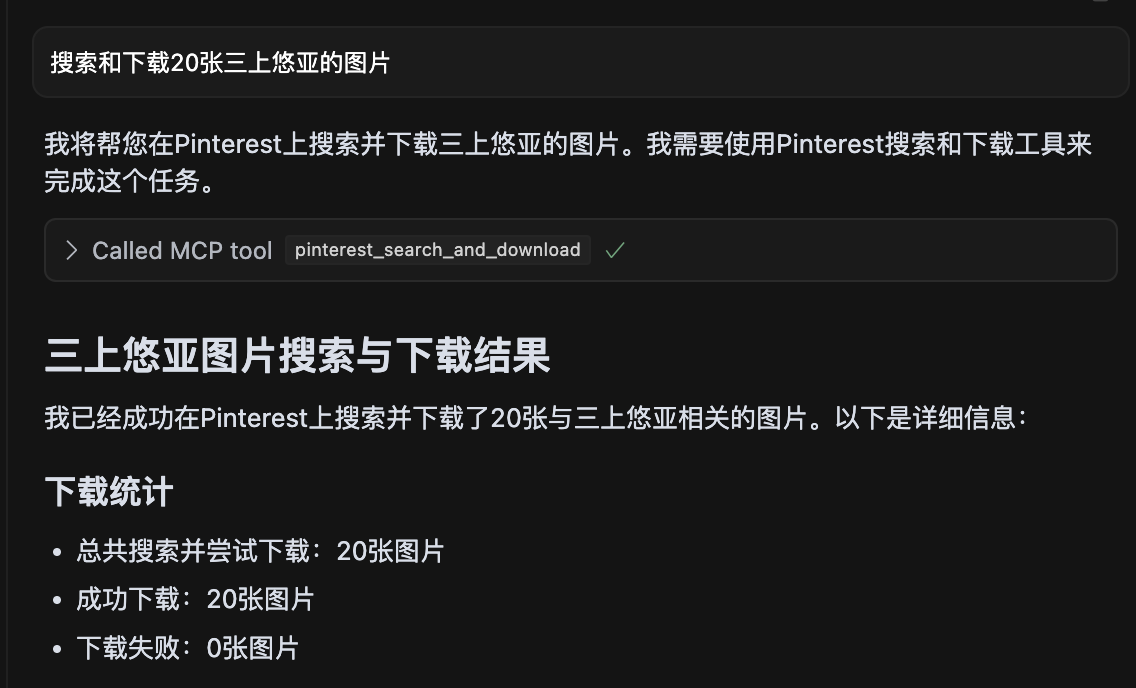
Screenshot showing a search for 20 images of 三上悠亚 with all images successfully downloaded.
The repository includes a Dockerfile. It builds the TypeScript server and starts it on stdio (node dist/pinterest-mcp-server.js):
docker build -t pinterest-mcp-server .
docker run -i --rm pinterest-mcp-server
Glama's directory can still show the server as unavailable until the repository owner Claims the listing and registers this Dockerfile in the Glama admin UI. That step needs the owner's Glama account.
pinterest-mcp-server.ts: Main server file
dist/pinterest-mcp-server.js: Built JavaScript file for production
package.json: Project configuration and dependencies
To add new MCP functions:
Modify pinterest-mcp-server.ts
Register new functions using the MCP SDK
Implement the function logic
Rebuild with npm run build
If the client cannot connect, confirm it launches this command as a stdio MCP server. Logs belong on stderr; stdout is only for JSON-RPC
Ensure all dependencies are correctly installed with npm install
Make sure TypeScript is properly configured with a tsconfig.json file
If you encounter build errors, try running npm install -D typescript @types/node
Verify network connectivity for Pinterest access
This project is licensed under the MIT License - see the LICENSE file for details.
When using the server via npx, you can configure it using the following command line options:
--downloadDir: Specifies the root directory for downloading images
npx pinterest-mcp-server --downloadDir /path/to/downloads--filenameTemplate: Specifies the filename template for downloaded images
npx pinterest-mcp-server --filenameTemplate "pin_{imageId}_{timestamp}"This server does not listen on a TCP port. MCP clients talk to it over stdin and stdout. --port is ignored.
--proxyServer: Specifies the proxy server to use for connecting to Pinterest. This sets MCP_PINTEREST_PROXY_SERVER.
npx pinterest-mcp-server --proxyServer "http://127.0.0.1:7890"You can combine multiple options:
npx pinterest-mcp-server --downloadDir ./images --filenameTemplate "pinterest_{id}" --proxyServer "http://127.0.0.1:7890"The server also supports the following environment variables for configuration:
MCP_PINTEREST_DOWNLOAD_DIR: Specifies the root directory for downloading images. If not set, the default is the ../downloads directory relative to the server script.
MCP_PINTEREST_FILENAME_TEMPLATE: Specifies the filename template for downloaded images. If not set, the default is pinterest_{imageId}.{fileExtension}.
MCP_PINTEREST_PROXY_SERVER: Specifies the proxy server to use for connecting to Pinterest. Format should be protocol://host:port, for example http://127.0.0.1:7890 or socks5://127.0.0.1:1080.
These environment variables can be set in several ways:
Directly in your terminal (as shown in the examples below)
In your Cursor or Claude Desktop MCP configuration through the env field (see Complete Configuration Example)
Through command line options with npx (as shown in the Command Line Options section)
The server does not load a .env file by itself.
Using npx with command line options:
npx pinterest-mcp-server --downloadDir /path/to/your/download/directorySet the download directory using an environment variable:
# Linux/macOS
export MCP_PINTEREST_DOWNLOAD_DIR=/path/to/your/download/directory
npx pinterest-mcp-server

# Windows (CMD)
set MCP_PINTEREST_DOWNLOAD_DIR=C:\path\to\your\download\directory
npx pinterest-mcp-server

# Windows (PowerShell)
$env:MCP_PINTEREST_DOWNLOAD_DIR="C:\path\to\your\download\directory"
npx pinterest-mcp-server
If the environment variable is not set, the server will use the default download directory (relative to the server script's ../downloads).
Using npx with command line options:
npx pinterest-mcp-server --filenameTemplate "pin_{imageId}_{timestamp}.{fileExtension}"Using an environment variable:
# Linux/macOS
export MCP_PINTEREST_FILENAME_TEMPLATE="pin_{imageId}_{timestamp}.{fileExtension}"
npx pinterest-mcp-server

# Windows (CMD)
set MCP_PINTEREST_FILENAME_TEMPLATE="pin_{imageId}_{timestamp}.{fileExtension}"
npx pinterest-mcp-server

# Windows (PowerShell)
$env:MCP_PINTEREST_FILENAME_TEMPLATE="pin_{imageId}_{timestamp}.{fileExtension}"
npx pinterest-mcp-server
The template supports the following variables:
{imageId}: The unique ID of the Pinterest image
{fileExtension}: The file extension (e.g., jpg, png)
{timestamp}: Current UTC timestamp in YYYYMMDDHHMMSS format
{index}: The index number when downloading multiple images (starts from 1)
Example templates:
pinterest_{imageId}.{fileExtension} (default)
pin_{timestamp}_{imageId}.{fileExtension}
pinterest_image_{index}_{imageId}.{fileExtension}
{timestamp}_pinterest.{fileExtension}
If the template is invalid (e.g., contains unsupported variables or has mismatched brackets), the server will log a warning and use the default template.
If you need to use a proxy to access Pinterest (especially in regions where Pinterest might be restricted), you can set the proxy configuration:
Using npx with command line options:
npx pinterest-mcp-server --proxyServer "http://127.0.0.1:7890"Using an environment variable:
# Linux/macOS
export MCP_PINTEREST_PROXY_SERVER="http://127.0.0.1:7890"
npx pinterest-mcp-server

# Windows (CMD)
set MCP_PINTEREST_PROXY_SERVER=http://127.0.0.1:7890
npx pinterest-mcp-server

# Windows (PowerShell)
$env:MCP_PINTEREST_PROXY_SERVER="http://127.0.0.1:7890"
npx pinterest-mcp-server
Supported proxy protocols:
HTTP: http://host:port
HTTPS: https://host:port
SOCKS4: socks4://host:port
SOCKS5: socks5://host:port
The proxy configuration affects both the browser used for searching and the image downloading process.
The server will verify the existence and writability of the download directory when starting. If the directory does not exist, it will attempt to create it; if it cannot be created or written to, the server will exit.
Clients should not specify download paths or filename templates through parameters when calling download-related tools, as all downloads will use the server's environment variable configuration or defaults.
The server automatically sanitizes filenames by replacing illegal characters (such as /, \, :, *, ?, ", <, >, |) with underscores.
The server provides the following MCP tools:
pinterest_search: Search for Pinterest images by keyword
pinterest_get_image_info: Get detailed information about a Pinterest image
pinterest_search_and_download: Search and download Pinterest images
For detailed interface parameter references, please refer to the MCP tool definitions.
Get Pinterest image information
| Name | Required | Description | Default |
|---|---|---|---|
| image_url | Yes | Image URL |
Does the description disclose side effects, auth requirements, rate limits, or destructive behavior?
No annotations provided, and the description lacks any behavioral details such as rate limits, authentication, or error handling. It does not even mention that it fetches metadata or requires an image URL.
Agents need to know what a tool does to the world before calling it. Descriptions should go beyond structured annotations to explain consequences.
Is the description appropriately sized, front-loaded, and free of redundancy?
The description is a single short sentence, but it is under-specified and lacks necessary detail. It is not a model of conciseness; it is minimal without being helpful.
Shorter descriptions cost fewer tokens and are easier for agents to parse. Every sentence should earn its place.
Given the tool's complexity, does the description cover enough for an agent to succeed on first attempt?
For a tool that presumably returns image information, the description fails to mention what that information includes, the output format, or any prerequisites. It is completely inadequate given the lack of output schema.
Complex tools with many parameters or behaviors need more documentation. Simple tools need less. This dimension scales expectations accordingly.
Does the description clarify parameter syntax, constraints, interactions, or defaults beyond what the schema provides?
Schema description coverage is 100%, with each parameter having a clear description. The tool description adds no extra meaning, but the baseline is adequate.
Input schemas describe structure but not intent. Descriptions should explain non-obvious parameter relationships and valid value ranges.
Does the description clearly state what the tool does and how it differs from similar tools?
Description states verb 'Get' and resource 'Pinterest image information', which is clear but vague. It distinguishes from siblings (health, search, similar pins) but does not specify what 'image information' includes.
Agents choose between tools based on descriptions. A clear purpose with a specific verb and resource helps agents select the right tool.
Does the description explain when to use this tool, when not to, or what alternatives exist?
No guidance on when to use this tool versus alternatives. The description provides no context for selection.
Agents often have multiple tools that could apply. Explicit usage guidance like "use X instead of Y when Z" prevents misuse.
Search for images on Pinterest by keyword
| Name | Required | Description | Default |
|---|---|---|---|
| keyword | Yes | Search keyword | |
| limit | No | Number of images to return (default: 10) | |
| headless | No | Whether to use headless browser mode (default: true) |
Does the description disclose side effects, auth requirements, rate limits, or destructive behavior?
No annotations are provided, so the description carries full burden. It does not disclose behavioral traits such as rate limits, authentication needs, or what headless mode implies (e.g., browser dependency). The return format (e.g., JSON structure) is unstated.
Agents need to know what a tool does to the world before calling it. Descriptions should go beyond structured annotations to explain consequences.
Is the description appropriately sized, front-loaded, and free of redundancy?
The description is a single, concise sentence with no redundancy. Every word is necessary. It is front-loaded with the core action.
Shorter descriptions cost fewer tokens and are easier for agents to parse. Every sentence should earn its place.
Given the tool's complexity, does the description cover enough for an agent to succeed on first attempt?
Given no output schema, the description should explain what the tool returns (e.g., pin objects, URLs). It does not. The description fails to provide enough context for an agent to use the tool effectively, especially compared to sibling tools that might have richer descriptions.
Complex tools with many parameters or behaviors need more documentation. Simple tools need less. This dimension scales expectations accordingly.
Does the description clarify parameter syntax, constraints, interactions, or defaults beyond what the schema provides?
Schema coverage is 100% with descriptions for all three parameters. The tool description adds no extra meaning beyond the schema, which already explains limit, keyword, and headless. Baseline 3 is appropriate.
Input schemas describe structure but not intent. Descriptions should explain non-obvious parameter relationships and valid value ranges.
Does the description clearly state what the tool does and how it differs from similar tools?
The description clearly states the verb 'search', resource 'images on Pinterest', and method 'by keyword'. It distinguishes from siblings like pinterest_search_and_download (which adds download). However, it could be more specific about return type (e.g., pin data vs URLs).
Agents choose between tools based on descriptions. A clear purpose with a specific verb and resource helps agents select the right tool.
Does the description explain when to use this tool, when not to, or what alternatives exist?
No guidance on when to use this tool vs siblings like pinterest_search_and_download or pinterest_get_similar_pins. No mention of prerequisites or context where this tool is preferred.
Agents often have multiple tools that could apply. Explicit usage guidance like "use X instead of Y when Z" prevents misuse.
Search for images on Pinterest by keyword and download them
| Name | Required | Description | Default |
|---|---|---|---|
| keyword | Yes | Search keyword | |
| limit | No | Number of images to return and download (default: 10) | |
| headless | No | Whether to use headless browser mode (default: true) |
Does the description disclose side effects, auth requirements, rate limits, or destructive behavior?
No annotations provided, so description must fully disclose behavior. It omits details like download location, file format, browser automation implications (headless parameter not mentioned), and potential side effects.
Agents need to know what a tool does to the world before calling it. Descriptions should go beyond structured annotations to explain consequences.
Is the description appropriately sized, front-loaded, and free of redundancy?
A single sentence with no wasted words, but it lacks front-loading of critical context. Appropriate length for the content provided.
Shorter descriptions cost fewer tokens and are easier for agents to parse. Every sentence should earn its place.
Given the tool's complexity, does the description cover enough for an agent to succeed on first attempt?
With 3 parameters and no output schema, the description fails to explain return behavior (e.g., saved files, temporary storage) or how 'download' works. Incomplete for proper tool invocation.
Complex tools with many parameters or behaviors need more documentation. Simple tools need less. This dimension scales expectations accordingly.
Does the description clarify parameter syntax, constraints, interactions, or defaults beyond what the schema provides?
Schema coverage is 100%, so baseline is 3. The description adds no additional meaning beyond what is already in the schema for parameters.
Input schemas describe structure but not intent. Descriptions should explain non-obvious parameter relationships and valid value ranges.
Does the description clearly state what the tool does and how it differs from similar tools?
The description clearly states the verb 'Search' and 'download', the resource 'images on Pinterest', and the method 'by keyword'. It distinguishes from sibling 'pinterest_search' by adding download functionality.
Agents choose between tools based on descriptions. A clear purpose with a specific verb and resource helps agents select the right tool.
Does the description explain when to use this tool, when not to, or what alternatives exist?
No guidance on when to use this tool versus alternatives like 'pinterest_search' or 'pinterest_get_image_info'. The agent is left to infer usage from the name alone.
Agents often have multiple tools that could apply. Explicit usage guidance like "use X instead of Y when Z" prevents misuse.
Recent tool additions, removals, and schema changes observed during successful MCP inspections.
pinterest_get_image_infopinterest_searchpinterest_search_and_downloadScored across 3 tools
Each tool has a distinct purpose: retrieving metadata, searching, and searching with download. The names and descriptions make it easy to distinguish between them.
All tools use the 'pinterest_' prefix and snake_case, but 'pinterest_search_and_download' combines two verbs while the others use a single verb, introducing slight inconsistency.
Three tools is a minimal but reasonable set for an image search and download service. It covers core functionality without being too sparse or excessive.
The set covers basic search and metadata retrieval, but lacks common Pinterest operations like board management, pinning, or user actions, leaving notable gaps for broader use.
Personal knowledge base MCP server with semantic search, auto-categorization, metadata extraction
MCP Server for an Agent Task Marketplace
MCP server for Drosophila neuroscience data from VirtualFlyBrain