


A
licenseD
qualityD
maintenanceA Model Context Protocol server that enables searching for similar images by text description, integrating Inspire's backend image search capabilities with LLM interfaces like Claude Desktop.
1
3
GPL 3.0

Pinterest 이미지 검색 및 정보 수집을 위한 MCP(모델 컨텍스트 프로토콜) 서버입니다.
키워드로 Pinterest에서 이미지 검색
Pinterest 이미지에 대한 자세한 정보를 검색합니다
MCP를 통한 Cursor IDE와의 원활한 통합
헤드리스 브라우저 모드 지원
검색 결과에 대한 제어 제한
Pinterest에서 이미지 검색 및 다운로드
Related MCP server: Cortex
Smithery를 통해 Claude Desktop에 mcp-pinterest를 자동으로 설치하려면:
지엑스피1
이 저장소를 복제하세요:
git clone https://github.com/terryso/mcp-pinterest.git pinterest-mcp-server
cd pinterest-mcp-server
종속성 설치:
npm install서버를 빌드하세요:
npm run build이제 이 서버를 Cursor의 MCP 서버로 사용할 수 있습니다.
커서 IDE 열기
설정(⚙️) > 확장 프로그램 > MCP로 이동하세요.
"서버 추가"를 클릭하세요
다음 세부 정보를 입력하세요.
이름: Pinterest MCP
유형: 명령
명령어: node
인수: ["/path/to/mcp-pinterest/dist/pinterest-mcp-server.js"]
或者直接编辑Cursor의 MCP配置文件(通常位于~/.cursor/mcp.json ),添加以下内容:
"pinterest": {
  "command": "node",
  "args": ["/path/to/mcp-pinterest/dist/pinterest-mcp-server.js"]
}
"저장"을 클릭하세요
서버는 다음과 같은 MCP 기능을 제공합니다.
pinterest_search : 키워드로 Pinterest 이미지 검색
매개변수:
keyword : 검색어 (필수)
limit : 반환할 이미지 수(기본값: 10)
headless : 헤드리스 브라우저 모드를 사용할지 여부(기본값: true)
pinterest_get_image_info : Pinterest 이미지에 대한 자세한 정보를 가져옵니다.
매개변수:
image_url : Pinterest 이미지의 URL (필수)
pinterest_search_and_download : Pinterest에서 이미지 검색 및 다운로드
매개변수:
keyword : 검색어 (필수)
limit : 반환할 이미지 수(기본값: 10)
headless : 헤드리스 브라우저 모드를 사용할지 여부(기본값: true)
구성이 완료되면 Cursor의 AI 채팅에서 Pinterest MCP 기능을 직접 사용할 수 있습니다.
Search for robot images on PinterestAI는 MCP 서버를 사용하여 Pinterest를 검색하고 결과를 표시합니다.
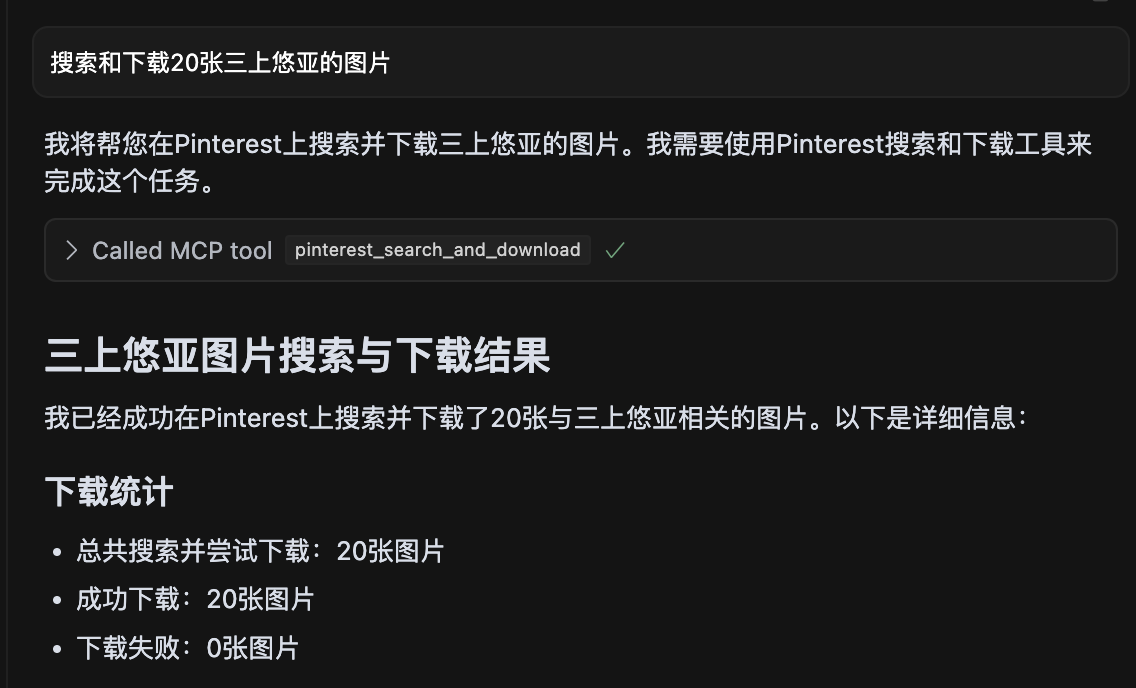
三上悠亚 이미지 20개를 검색하여 모든 이미지를 성공적으로 다운로드한 모습을 보여주는 스크린샷입니다.
pinterest-mcp-server.ts : 메인 서버 파일
dist/pinterest-mcp-server.js : 프로덕션을 위해 빌드된 JavaScript 파일
package.json : 프로젝트 구성 및 종속성
새로운 MCP 기능을 추가하려면:
pinterest-mcp-server.ts 수정
MCP SDK를 사용하여 새로운 기능 등록
함수 논리를 구현합니다
npm run build 로 다시 빌드하세요
서버가 시작되지 않으면 포트가 이미 사용 중인지 확인하세요.
npm install 사용하여 모든 종속성이 올바르게 설치되었는지 확인하세요.
tsconfig.json 파일을 사용하여 TypeScript가 올바르게 구성되었는지 확인하세요.
빌드 오류가 발생하면 npm install -D typescript @types/node 실행해 보세요.
Pinterest 접속을 위한 네트워크 연결 확인
이 프로젝트는 MIT 라이선스에 따라 라이선스가 부여되었습니다. 자세한 내용은 라이선스 파일을 참조하세요.
서버는 구성을 위해 다음과 같은 환경 변수를 지원합니다.
MCP_PINTEREST_DOWNLOAD_DIR : 이미지를 다운로드할 루트 디렉터리를 지정합니다. 설정하지 않으면 기본값은 서버 스크립트를 기준으로 ../downloads 디렉터리입니다.
MCP_PINTEREST_FILENAME_TEMPLATE : 다운로드한 이미지의 파일 이름 템플릿을 지정합니다. 설정하지 않으면 기본값은 pinterest_{imageId}.{fileExtension} 입니다.
MCP_PINTEREST_PROXY_SERVER : Pinterest 연결에 사용할 프록시 서버를 지정합니다. 형식은 protocol://host:port 여야 합니다(예: http://127.0.0.1:7890 또는 socks5://127.0.0.1:1080 .
환경 변수를 사용하여 다운로드 디렉토리를 설정합니다(권장 방법):
# Linux/macOS
export MCP_PINTEREST_DOWNLOAD_DIR=/path/to/your/download/directory
# Then start the server
node pinterest-mcp-server.js

# Windows (CMD)
set MCP_PINTEREST_DOWNLOAD_DIR=C:\path\to\your\download\directory
# Then start the server
node pinterest-mcp-server.js

# Windows (PowerShell)
$env:MCP_PINTEREST_DOWNLOAD_DIR="C:\path\to\your\download\directory"
# Then start the server
node pinterest-mcp-server.js
환경 변수가 설정되지 않으면 서버는 기본 다운로드 디렉토리(서버 스크립트의 ../downloads 를 기준으로 함)를 사용합니다.
MCP_PINTEREST_FILENAME_TEMPLATE 환경 변수를 사용하여 다운로드한 이미지의 파일 이름 패턴을 사용자 지정할 수 있습니다.
# Linux/macOS
export MCP_PINTEREST_FILENAME_TEMPLATE="pin_{imageId}_{timestamp}.{fileExtension}"
# Then start the server
node pinterest-mcp-server.js

# Windows (CMD)
set MCP_PINTEREST_FILENAME_TEMPLATE="pin_{imageId}_{timestamp}.{fileExtension}"
# Then start the server
node pinterest-mcp-server.js

# Windows (PowerShell)
$env:MCP_PINTEREST_FILENAME_TEMPLATE="pin_{imageId}_{timestamp}.{fileExtension}"
# Then start the server
node pinterest-mcp-server.js
템플릿은 다음 변수를 지원합니다.
{imageId} : Pinterest 이미지의 고유 ID
{fileExtension} : 파일 확장자(예: jpg, png)
{timestamp} : YYYYMMDDHHMMSS 형식의 현재 UTC 타임스탬프
{index} : 여러 이미지를 다운로드할 때의 인덱스 번호(1부터 시작)
예시 템플릿:
pinterest_{imageId}.{fileExtension} (기본값)
pin_{timestamp}_{imageId}.{fileExtension}
pinterest_image_{index}_{imageId}.{fileExtension}
{timestamp}_pinterest.{fileExtension}
템플릿이 유효하지 않은 경우(예: 지원되지 않는 변수가 포함되어 있거나 괄호가 일치하지 않는 경우) 서버는 경고를 기록하고 기본 템플릿을 사용합니다.
Pinterest에 접속하기 위해 프록시를 사용해야 하는 경우(특히 Pinterest가 제한될 수 있는 지역에서) 다음과 같이 프록시 구성을 설정할 수 있습니다.
# Linux/macOS
export MCP_PINTEREST_PROXY_SERVER="http://127.0.0.1:7890"
# Then start the server
node pinterest-mcp-server.js

# Windows (CMD)
set MCP_PINTEREST_PROXY_SERVER=http://127.0.0.1:7890
# Then start the server
node pinterest-mcp-server.js

# Windows (PowerShell)
$env:MCP_PINTEREST_PROXY_SERVER="http://127.0.0.1:7890"
# Then start the server
node pinterest-mcp-server.js
지원되는 프록시 프로토콜:
HTTP: http://host:port
HTTPS: https://host:port
SOCKS4: socks4://host:port
SOCKS5: socks5://host:port
프록시 구성은 검색에 사용되는 브라우저와 이미지 다운로드 프로세스 모두에 영향을 미칩니다.
서버는 시작 시 다운로드 디렉터리의 존재 여부와 쓰기 가능 여부를 확인합니다. 디렉터리가 없으면 디렉터리를 생성하려고 시도하고, 생성 또는 쓰기가 불가능하면 서버가 종료됩니다.
클라이언트는 다운로드 관련 도구를 호출할 때 매개변수를 통해 다운로드 경로나 파일 이름 템플릿을 지정해서는 안 됩니다. 모든 다운로드는 서버의 환경 변수 구성이나 기본값을 사용하게 됩니다.
서버는 불법 문자(예: / , \ , : , * , ? , " , < , > , | )를 밑줄로 바꿔서 파일 이름을 자동으로 정리합니다.
서버는 다음과 같은 MCP 도구를 제공합니다.
pinterest_search : 키워드로 Pinterest 이미지 검색
pinterest_get_image_info : Pinterest 이미지에 대한 자세한 정보를 가져옵니다.
pinterest_search_and_download : Pinterest 이미지 검색 및 다운로드
자세한 인터페이스 매개변수 참조는 MCP 도구 정의를 참조하세요.
Get Pinterest image information
| Name | Required | Description | Default |
|---|---|---|---|
| image_url | Yes | Image URL |
Does the description disclose side effects, auth requirements, rate limits, or destructive behavior?
No annotations provided, and the description lacks any behavioral details such as rate limits, authentication, or error handling. It does not even mention that it fetches metadata or requires an image URL.
Agents need to know what a tool does to the world before calling it. Descriptions should go beyond structured annotations to explain consequences.
Is the description appropriately sized, front-loaded, and free of redundancy?
The description is a single short sentence, but it is under-specified and lacks necessary detail. It is not a model of conciseness; it is minimal without being helpful.
Shorter descriptions cost fewer tokens and are easier for agents to parse. Every sentence should earn its place.
Given the tool's complexity, does the description cover enough for an agent to succeed on first attempt?
For a tool that presumably returns image information, the description fails to mention what that information includes, the output format, or any prerequisites. It is completely inadequate given the lack of output schema.
Complex tools with many parameters or behaviors need more documentation. Simple tools need less. This dimension scales expectations accordingly.
Does the description clarify parameter syntax, constraints, interactions, or defaults beyond what the schema provides?
Schema description coverage is 100%, with each parameter having a clear description. The tool description adds no extra meaning, but the baseline is adequate.
Input schemas describe structure but not intent. Descriptions should explain non-obvious parameter relationships and valid value ranges.
Does the description clearly state what the tool does and how it differs from similar tools?
Description states verb 'Get' and resource 'Pinterest image information', which is clear but vague. It distinguishes from siblings (health, search, similar pins) but does not specify what 'image information' includes.
Agents choose between tools based on descriptions. A clear purpose with a specific verb and resource helps agents select the right tool.
Does the description explain when to use this tool, when not to, or what alternatives exist?
No guidance on when to use this tool versus alternatives. The description provides no context for selection.
Agents often have multiple tools that could apply. Explicit usage guidance like "use X instead of Y when Z" prevents misuse.
Search for images on Pinterest by keyword
| Name | Required | Description | Default |
|---|---|---|---|
| keyword | Yes | Search keyword | |
| limit | No | Number of images to return (default: 10) | |
| headless | No | Whether to use headless browser mode (default: true) |
Does the description disclose side effects, auth requirements, rate limits, or destructive behavior?
No annotations are provided, so the description carries full burden. It does not disclose behavioral traits such as rate limits, authentication needs, or what headless mode implies (e.g., browser dependency). The return format (e.g., JSON structure) is unstated.
Agents need to know what a tool does to the world before calling it. Descriptions should go beyond structured annotations to explain consequences.
Is the description appropriately sized, front-loaded, and free of redundancy?
The description is a single, concise sentence with no redundancy. Every word is necessary. It is front-loaded with the core action.
Shorter descriptions cost fewer tokens and are easier for agents to parse. Every sentence should earn its place.
Given the tool's complexity, does the description cover enough for an agent to succeed on first attempt?
Given no output schema, the description should explain what the tool returns (e.g., pin objects, URLs). It does not. The description fails to provide enough context for an agent to use the tool effectively, especially compared to sibling tools that might have richer descriptions.
Complex tools with many parameters or behaviors need more documentation. Simple tools need less. This dimension scales expectations accordingly.
Does the description clarify parameter syntax, constraints, interactions, or defaults beyond what the schema provides?
Schema coverage is 100% with descriptions for all three parameters. The tool description adds no extra meaning beyond the schema, which already explains limit, keyword, and headless. Baseline 3 is appropriate.
Input schemas describe structure but not intent. Descriptions should explain non-obvious parameter relationships and valid value ranges.
Does the description clearly state what the tool does and how it differs from similar tools?
The description clearly states the verb 'search', resource 'images on Pinterest', and method 'by keyword'. It distinguishes from siblings like pinterest_search_and_download (which adds download). However, it could be more specific about return type (e.g., pin data vs URLs).
Agents choose between tools based on descriptions. A clear purpose with a specific verb and resource helps agents select the right tool.
Does the description explain when to use this tool, when not to, or what alternatives exist?
No guidance on when to use this tool vs siblings like pinterest_search_and_download or pinterest_get_similar_pins. No mention of prerequisites or context where this tool is preferred.
Agents often have multiple tools that could apply. Explicit usage guidance like "use X instead of Y when Z" prevents misuse.
Search for images on Pinterest by keyword and download them
| Name | Required | Description | Default |
|---|---|---|---|
| keyword | Yes | Search keyword | |
| limit | No | Number of images to return and download (default: 10) | |
| headless | No | Whether to use headless browser mode (default: true) |
Does the description disclose side effects, auth requirements, rate limits, or destructive behavior?
No annotations provided, so description must fully disclose behavior. It omits details like download location, file format, browser automation implications (headless parameter not mentioned), and potential side effects.
Agents need to know what a tool does to the world before calling it. Descriptions should go beyond structured annotations to explain consequences.
Is the description appropriately sized, front-loaded, and free of redundancy?
A single sentence with no wasted words, but it lacks front-loading of critical context. Appropriate length for the content provided.
Shorter descriptions cost fewer tokens and are easier for agents to parse. Every sentence should earn its place.
Given the tool's complexity, does the description cover enough for an agent to succeed on first attempt?
With 3 parameters and no output schema, the description fails to explain return behavior (e.g., saved files, temporary storage) or how 'download' works. Incomplete for proper tool invocation.
Complex tools with many parameters or behaviors need more documentation. Simple tools need less. This dimension scales expectations accordingly.
Does the description clarify parameter syntax, constraints, interactions, or defaults beyond what the schema provides?
Schema coverage is 100%, so baseline is 3. The description adds no additional meaning beyond what is already in the schema for parameters.
Input schemas describe structure but not intent. Descriptions should explain non-obvious parameter relationships and valid value ranges.
Does the description clearly state what the tool does and how it differs from similar tools?
The description clearly states the verb 'Search' and 'download', the resource 'images on Pinterest', and the method 'by keyword'. It distinguishes from sibling 'pinterest_search' by adding download functionality.
Agents choose between tools based on descriptions. A clear purpose with a specific verb and resource helps agents select the right tool.
Does the description explain when to use this tool, when not to, or what alternatives exist?
No guidance on when to use this tool versus alternatives like 'pinterest_search' or 'pinterest_get_image_info'. The agent is left to infer usage from the name alone.
Agents often have multiple tools that could apply. Explicit usage guidance like "use X instead of Y when Z" prevents misuse.
Recent tool additions, removals, and schema changes observed during successful MCP inspections.
pinterest_get_image_infopinterest_searchpinterest_search_and_downloadScored across 3 tools
Each tool has a distinct purpose: retrieving metadata, searching, and searching with download. The names and descriptions make it easy to distinguish between them.
All tools use the 'pinterest_' prefix and snake_case, but 'pinterest_search_and_download' combines two verbs while the others use a single verb, introducing slight inconsistency.
Three tools is a minimal but reasonable set for an image search and download service. It covers core functionality without being too sparse or excessive.
The set covers basic search and metadata retrieval, but lacks common Pinterest operations like board management, pinning, or user actions, leaving notable gaps for broader use.
Personal knowledge base MCP server with semantic search, auto-categorization, metadata extraction
MCP Server for an Agent Task Marketplace
MCP server for Drosophila neuroscience data from VirtualFlyBrain