


A
licenseD
qualityD
maintenanceA Model Context Protocol server that enables searching for similar images by text description, integrating Inspire's backend image search capabilities with LLM interfaces like Claude Desktop.
1
3
GPL 3.0


Сервер Model Context Protocol (MCP) для поиска изображений и информации на Pinterest.
Поиск изображений на Pinterest по ключевым словам
Получите подробную информацию об изображениях Pinterest
Полная интеграция с Cursor IDE через MCP
Поддержка режима headless-браузера
Ограничение контроля результатов поиска
Поиск и загрузка изображений из Pinterest
Related MCP server: Cortex
Node.js (v18 или выше)
Cursor IDE для интеграции MCP
Самый простой способ использовать Pinterest MCP Server — через npx:
npx pinterest-mcp-serverВы можете настроить сервер с помощью параметров командной строки:
# Specify download directory
npx pinterest-mcp-server --downloadDir /path/to/downloads

# Specify filename template
npx pinterest-mcp-server --filenameTemplate "pinterest_{id}"

# Specify both options
npx pinterest-mcp-server --downloadDir ./images --filenameTemplate "pinterest_{id}"Чтобы установить пакет глобально и использовать его непосредственно из командной строки:
npm install -g pinterest-mcp-serverПосле установки вы можете запустить сервер с помощью:
pinterest-mcp-serverС теми же параметрами командной строки, что и у версии NPX:
pinterest-mcp-server --downloadDir /path/to/downloads --filenameTemplate "pinterest_{id}"Чтобы автоматически установить mcp-pinterest для Claude Desktop через Smithery :
npx -y @smithery/cli install mcp-pinterest --client claudeКлонируйте этот репозиторий:
git clone https://github.com/terryso/mcp-pinterest.git pinterest-mcp-server
cd pinterest-mcp-server
Установите зависимости:
npm installСборка сервера:
npm run buildЗапускаем сервер:
npm startОткрыть курсор IDE
Перейдите в Настройки (⚙️) > Расширения > MCP.
Нажмите «Добавить сервер».
Введите следующие данные:
Имя: Pinterest MCP
Тип: Команда
Команда: node
Аргументы: ["/path/to/mcp-pinterest/dist/pinterest-mcp-server.js"]
或者直接编辑Cursor的MCP配置文件(通常位于~/.cursor/mcp.json ),添加以下内容:
"pinterest": {
  "command": "node",
  "args": ["/path/to/mcp-pinterest/dist/pinterest-mcp-server.js"]
}
Нажмите «Сохранить».
Вы также можете настроить Cursor на использование npx-версии сервера:
Открыть курсор IDE
Перейдите в Настройки (⚙️) > Расширения > MCP.
Нажмите «Добавить сервер».
Введите следующие данные:
Имя: Pinterest MCP
Тип: Команда
Команда: npx
Аргументы: ["pinterest-mcp-server"]
Нажмите «Сохранить».
Для большей гибкости вы можете настроить сервер с помощью переменных среды в конфигурации Cursor MCP:
"pinterest": {
  "command": "npx",
  "env": {
    "MCP_PINTEREST_DOWNLOAD_DIR": "/Users/xxx/Desktop/Images",
    "MCP_PINTEREST_FILENAME_TEMPLATE": "pin_{imageId}_{timestamp}.{fileExtension}",
    "MCP_PINTEREST_PROXY_SERVER": "http://127.0.0.1:7890"
  },
  "args": ["pinterest-mcp-server"]
}
Эта конфигурация:
Использует npx для запуска сервера
Устанавливает пользовательский каталог загрузки на рабочем столе.
Использует пользовательский шаблон имени файла с идентификатором изображения и временной меткой.
Настраивает прокси-сервер для пользователей в регионах, где Pinterest может быть заблокирован
Добавьте это в файл ~/.cursor/mcp.json или настройте через интерфейс Cursor IDE.
Сервер предоставляет следующие функции MCP:
pinterest_search : Поиск изображений на Pinterest по ключевому слову
Параметры:
keyword : Поисковый термин (обязательно)
limit : количество возвращаемых изображений (по умолчанию: 10)
headless : использовать ли режим headless браузера (по умолчанию: true)
pinterest_get_image_info : Получите подробную информацию об изображении Pinterest
Параметры:
image_url : URL-адрес изображения Pinterest (обязательно)
pinterest_search_and_download : Поиск и загрузка изображений с Pinterest
Параметры:
keyword : Поисковый термин (обязательно)
limit : количество возвращаемых изображений (по умолчанию: 10)
headless : использовать ли режим headless браузера (по умолчанию: true)
После настройки вы сможете использовать функции Pinterest MCP непосредственно в чате ИИ Cursor:
Search for robot images on PinterestИИ будет использовать сервер MCP для поиска в Pinterest и отображения результатов.
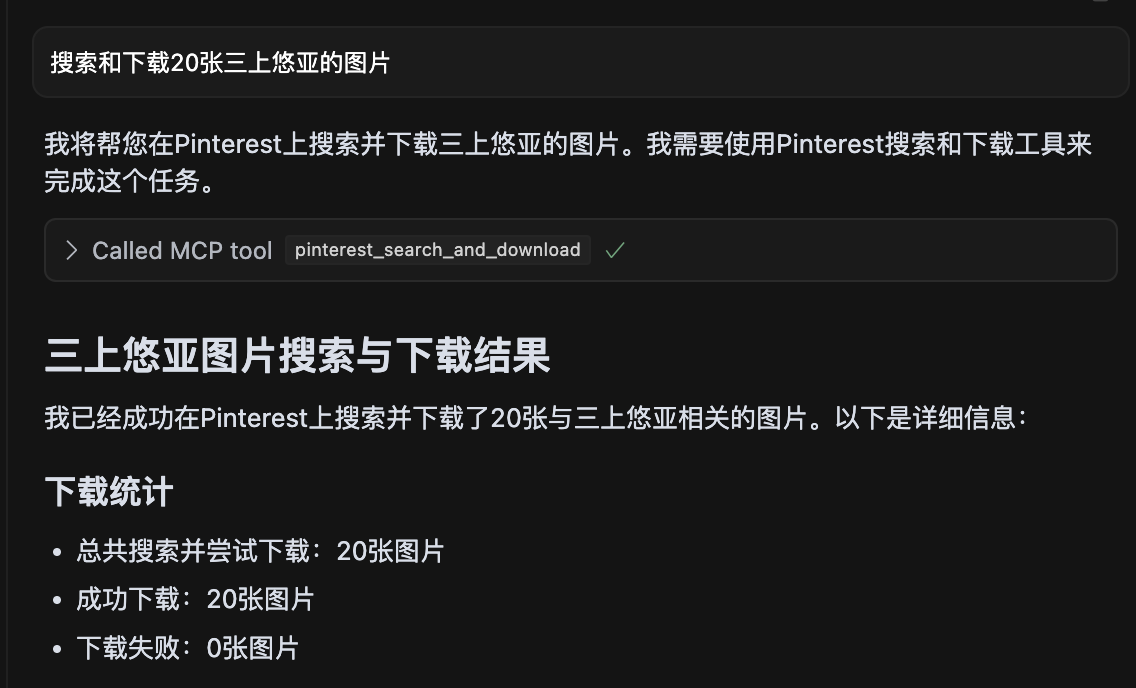
Снимок экрана, показывающий поиск 20 изображений 三上悠亚, все изображения успешно загружены.
pinterest-mcp-server.ts : Основной файл сервера
dist/pinterest-mcp-server.js : Созданный файл JavaScript для производства
package.json : Конфигурация проекта и зависимости
Чтобы добавить новые функции MCP:
Изменить pinterest-mcp-server.ts
Регистрация новых функций с использованием MCP SDK
Реализовать логику функции
Пересобрать с помощью npm run build
Если сервер не запускается, проверьте, не используется ли уже порт.
Убедитесь, что все зависимости установлены правильно с помощью npm install
Убедитесь, что TypeScript правильно настроен с помощью файла tsconfig.json
Если вы столкнулись с ошибками сборки, попробуйте запустить npm install -D typescript @types/node
Проверьте сетевое подключение для доступа к Pinterest
Данный проект лицензирован по лицензии MIT — подробности см. в файле LICENSE .
При использовании сервера через npx вы можете настроить его с помощью следующих параметров командной строки:
--downloadDir : Указывает корневой каталог для загрузки изображений.
npx pinterest-mcp-server --downloadDir /path/to/downloads--filenameTemplate : Указывает шаблон имени файла для загруженных изображений.
npx pinterest-mcp-server --filenameTemplate "pin_{imageId}_{timestamp}"--port : указывает порт, который будет прослушивать сервер (по умолчанию: 3000)
npx pinterest-mcp-server --port 8080--proxyServer : указывает прокси-сервер, используемый для подключения к Pinterest.
npx pinterest-mcp-server --proxyServer "http://127.0.0.1:7890"Вы можете комбинировать несколько вариантов:
npx pinterest-mcp-server --downloadDir ./images --filenameTemplate "pinterest_{id}" --port 8080 --proxyServer "http://127.0.0.1:7890"Сервер также поддерживает следующие переменные среды для конфигурации:
MCP_PINTEREST_DOWNLOAD_DIR : Указывает корневой каталог для загрузки изображений. Если не задано, по умолчанию используется каталог ../downloads относительно скрипта сервера.
MCP_PINTEREST_FILENAME_TEMPLATE : Указывает шаблон имени файла для загруженных изображений. Если не задано, по умолчанию используется pinterest_{imageId}.{fileExtension} .
MCP_PINTEREST_PROXY_SERVER : Указывает прокси-сервер, который будет использоваться для подключения к Pinterest. Формат должен быть protocol://host:port , например http://127.0.0.1:7890 или socks5://127.0.0.1:1080 .
Эти переменные среды можно задать несколькими способами:
Прямо в вашем терминале (как показано в примерах ниже)
В конфигурации Cursor MCP через поле env (см. Полный пример конфигурации )
В файле .env в корневом каталоге проекта
Через параметры командной строки с npx (как показано в разделе «Параметры командной строки »)
Использование npx с параметрами командной строки:
npx pinterest-mcp-server --downloadDir /path/to/your/download/directoryЗадайте каталог загрузки с помощью переменной среды:
# Linux/macOS
export MCP_PINTEREST_DOWNLOAD_DIR=/path/to/your/download/directory
npx pinterest-mcp-server

# Windows (CMD)
set MCP_PINTEREST_DOWNLOAD_DIR=C:\path\to\your\download\directory
npx pinterest-mcp-server

# Windows (PowerShell)
$env:MCP_PINTEREST_DOWNLOAD_DIR="C:\path\to\your\download\directory"
npx pinterest-mcp-server
Если переменная окружения не задана, сервер будет использовать каталог загрузки по умолчанию (относительно ../downloads серверного скрипта).
Использование npx с параметрами командной строки:
npx pinterest-mcp-server --filenameTemplate "pin_{imageId}_{timestamp}.{fileExtension}"Использование переменной среды:
# Linux/macOS
export MCP_PINTEREST_FILENAME_TEMPLATE="pin_{imageId}_{timestamp}.{fileExtension}"
npx pinterest-mcp-server

# Windows (CMD)
set MCP_PINTEREST_FILENAME_TEMPLATE="pin_{imageId}_{timestamp}.{fileExtension}"
npx pinterest-mcp-server

# Windows (PowerShell)
$env:MCP_PINTEREST_FILENAME_TEMPLATE="pin_{imageId}_{timestamp}.{fileExtension}"
npx pinterest-mcp-server
Шаблон поддерживает следующие переменные:
{imageId} : уникальный идентификатор изображения Pinterest.
{fileExtension} : расширение файла (например, jpg, png)
{timestamp} : Текущая временная метка UTC в формате ГГГГММДДЧЧММСС
{index} : номер индекса при загрузке нескольких изображений (начинается с 1)
Примеры шаблонов:
pinterest_{imageId}.{fileExtension} (по умолчанию)
pin_{timestamp}_{imageId}.{fileExtension}
pinterest_image_{index}_{imageId}.{fileExtension}
{timestamp}_pinterest.{fileExtension}
Если шаблон недействителен (например, содержит неподдерживаемые переменные или имеет несоответствующие скобки), сервер выведет предупреждение и будет использовать шаблон по умолчанию.
Если вам необходимо использовать прокси-сервер для доступа к Pinterest (особенно в регионах, где Pinterest может быть ограничен), вы можете настроить конфигурацию прокси-сервера:
Использование npx с параметрами командной строки:
npx pinterest-mcp-server --proxyServer "http://127.0.0.1:7890"Использование переменной среды:
# Linux/macOS
export MCP_PINTEREST_PROXY_SERVER="http://127.0.0.1:7890"
npx pinterest-mcp-server

# Windows (CMD)
set MCP_PINTEREST_PROXY_SERVER=http://127.0.0.1:7890
npx pinterest-mcp-server

# Windows (PowerShell)
$env:MCP_PINTEREST_PROXY_SERVER="http://127.0.0.1:7890"
npx pinterest-mcp-server
Поддерживаемые прокси-протоколы:
HTTP: http://host:port
HTTPS: https://host:port
SOCKS4: socks4://host:port
SOCKS5: socks5://host:port
Конфигурация прокси-сервера влияет как на браузер, используемый для поиска, так и на процесс загрузки изображений.
При запуске сервер проверит существование и возможность записи в каталог загрузки. Если каталог не существует, он попытается его создать; если его невозможно создать или записать в него, сервер завершит работу.
Клиентам не следует указывать пути загрузки или шаблоны имен файлов через параметры при вызове инструментов, связанных с загрузкой, поскольку все загрузки будут использовать конфигурацию переменных среды сервера или значения по умолчанию.
Сервер автоматически очищает имена файлов, заменяя недопустимые символы (такие как / , \ , : , * , ? , " , < , > , | ) на подчеркивания.
Сервер предоставляет следующие инструменты MCP:
pinterest_search : Поиск изображений Pinterest по ключевому слову
pinterest_get_image_info : Получите подробную информацию об изображении Pinterest
pinterest_search_and_download : Поиск и загрузка изображений Pinterest
Подробные справочные данные по параметрам интерфейса см. в определениях инструмента MCP.
Get Pinterest image information
| Name | Required | Description | Default |
|---|---|---|---|
| image_url | Yes | Image URL |
Does the description disclose side effects, auth requirements, rate limits, or destructive behavior?
No annotations provided, and the description lacks any behavioral details such as rate limits, authentication, or error handling. It does not even mention that it fetches metadata or requires an image URL.
Agents need to know what a tool does to the world before calling it. Descriptions should go beyond structured annotations to explain consequences.
Is the description appropriately sized, front-loaded, and free of redundancy?
The description is a single short sentence, but it is under-specified and lacks necessary detail. It is not a model of conciseness; it is minimal without being helpful.
Shorter descriptions cost fewer tokens and are easier for agents to parse. Every sentence should earn its place.
Given the tool's complexity, does the description cover enough for an agent to succeed on first attempt?
For a tool that presumably returns image information, the description fails to mention what that information includes, the output format, or any prerequisites. It is completely inadequate given the lack of output schema.
Complex tools with many parameters or behaviors need more documentation. Simple tools need less. This dimension scales expectations accordingly.
Does the description clarify parameter syntax, constraints, interactions, or defaults beyond what the schema provides?
Schema description coverage is 100%, with each parameter having a clear description. The tool description adds no extra meaning, but the baseline is adequate.
Input schemas describe structure but not intent. Descriptions should explain non-obvious parameter relationships and valid value ranges.
Does the description clearly state what the tool does and how it differs from similar tools?
Description states verb 'Get' and resource 'Pinterest image information', which is clear but vague. It distinguishes from siblings (health, search, similar pins) but does not specify what 'image information' includes.
Agents choose between tools based on descriptions. A clear purpose with a specific verb and resource helps agents select the right tool.
Does the description explain when to use this tool, when not to, or what alternatives exist?
No guidance on when to use this tool versus alternatives. The description provides no context for selection.
Agents often have multiple tools that could apply. Explicit usage guidance like "use X instead of Y when Z" prevents misuse.
Search for images on Pinterest by keyword
| Name | Required | Description | Default |
|---|---|---|---|
| keyword | Yes | Search keyword | |
| limit | No | Number of images to return (default: 10) | |
| headless | No | Whether to use headless browser mode (default: true) |
Does the description disclose side effects, auth requirements, rate limits, or destructive behavior?
No annotations are provided, so the description carries full burden. It does not disclose behavioral traits such as rate limits, authentication needs, or what headless mode implies (e.g., browser dependency). The return format (e.g., JSON structure) is unstated.
Agents need to know what a tool does to the world before calling it. Descriptions should go beyond structured annotations to explain consequences.
Is the description appropriately sized, front-loaded, and free of redundancy?
The description is a single, concise sentence with no redundancy. Every word is necessary. It is front-loaded with the core action.
Shorter descriptions cost fewer tokens and are easier for agents to parse. Every sentence should earn its place.
Given the tool's complexity, does the description cover enough for an agent to succeed on first attempt?
Given no output schema, the description should explain what the tool returns (e.g., pin objects, URLs). It does not. The description fails to provide enough context for an agent to use the tool effectively, especially compared to sibling tools that might have richer descriptions.
Complex tools with many parameters or behaviors need more documentation. Simple tools need less. This dimension scales expectations accordingly.
Does the description clarify parameter syntax, constraints, interactions, or defaults beyond what the schema provides?
Schema coverage is 100% with descriptions for all three parameters. The tool description adds no extra meaning beyond the schema, which already explains limit, keyword, and headless. Baseline 3 is appropriate.
Input schemas describe structure but not intent. Descriptions should explain non-obvious parameter relationships and valid value ranges.
Does the description clearly state what the tool does and how it differs from similar tools?
The description clearly states the verb 'search', resource 'images on Pinterest', and method 'by keyword'. It distinguishes from siblings like pinterest_search_and_download (which adds download). However, it could be more specific about return type (e.g., pin data vs URLs).
Agents choose between tools based on descriptions. A clear purpose with a specific verb and resource helps agents select the right tool.
Does the description explain when to use this tool, when not to, or what alternatives exist?
No guidance on when to use this tool vs siblings like pinterest_search_and_download or pinterest_get_similar_pins. No mention of prerequisites or context where this tool is preferred.
Agents often have multiple tools that could apply. Explicit usage guidance like "use X instead of Y when Z" prevents misuse.
Search for images on Pinterest by keyword and download them
| Name | Required | Description | Default |
|---|---|---|---|
| keyword | Yes | Search keyword | |
| limit | No | Number of images to return and download (default: 10) | |
| headless | No | Whether to use headless browser mode (default: true) |
Does the description disclose side effects, auth requirements, rate limits, or destructive behavior?
No annotations provided, so description must fully disclose behavior. It omits details like download location, file format, browser automation implications (headless parameter not mentioned), and potential side effects.
Agents need to know what a tool does to the world before calling it. Descriptions should go beyond structured annotations to explain consequences.
Is the description appropriately sized, front-loaded, and free of redundancy?
A single sentence with no wasted words, but it lacks front-loading of critical context. Appropriate length for the content provided.
Shorter descriptions cost fewer tokens and are easier for agents to parse. Every sentence should earn its place.
Given the tool's complexity, does the description cover enough for an agent to succeed on first attempt?
With 3 parameters and no output schema, the description fails to explain return behavior (e.g., saved files, temporary storage) or how 'download' works. Incomplete for proper tool invocation.
Complex tools with many parameters or behaviors need more documentation. Simple tools need less. This dimension scales expectations accordingly.
Does the description clarify parameter syntax, constraints, interactions, or defaults beyond what the schema provides?
Schema coverage is 100%, so baseline is 3. The description adds no additional meaning beyond what is already in the schema for parameters.
Input schemas describe structure but not intent. Descriptions should explain non-obvious parameter relationships and valid value ranges.
Does the description clearly state what the tool does and how it differs from similar tools?
The description clearly states the verb 'Search' and 'download', the resource 'images on Pinterest', and the method 'by keyword'. It distinguishes from sibling 'pinterest_search' by adding download functionality.
Agents choose between tools based on descriptions. A clear purpose with a specific verb and resource helps agents select the right tool.
Does the description explain when to use this tool, when not to, or what alternatives exist?
No guidance on when to use this tool versus alternatives like 'pinterest_search' or 'pinterest_get_image_info'. The agent is left to infer usage from the name alone.
Agents often have multiple tools that could apply. Explicit usage guidance like "use X instead of Y when Z" prevents misuse.
Recent tool additions, removals, and schema changes observed during successful MCP inspections.
pinterest_get_image_infopinterest_searchpinterest_search_and_downloadScored across 3 tools
Each tool has a distinct purpose: retrieving metadata, searching, and searching with download. The names and descriptions make it easy to distinguish between them.
All tools use the 'pinterest_' prefix and snake_case, but 'pinterest_search_and_download' combines two verbs while the others use a single verb, introducing slight inconsistency.
Three tools is a minimal but reasonable set for an image search and download service. It covers core functionality without being too sparse or excessive.
The set covers basic search and metadata retrieval, but lacks common Pinterest operations like board management, pinning, or user actions, leaving notable gaps for broader use.
Personal knowledge base MCP server with semantic search, auto-categorization, metadata extraction
MCP Server for an Agent Task Marketplace
MCP server for Drosophila neuroscience data from VirtualFlyBrain