


A
licenseD
qualityD
maintenanceA Model Context Protocol server that enables searching for similar images by text description, integrating Inspire's backend image search capabilities with LLM interfaces like Claude Desktop.
1
3
GPL 3.0

Pinterest の画像検索と情報取得用の Model Context Protocol (MCP) サーバー。
Pinterestでキーワードで画像を検索する
Pinterestの画像に関する詳細情報を取得する
MCP による Cursor IDE とのシームレスな統合
ヘッドレスブラウザモードのサポート
検索結果の制限制御
Pinterestから画像を検索してダウンロードする
Related MCP server: Cortex
Smithery経由で Claude Desktop 用の mcp-pinterest を自動的にインストールするには:
npx -y @smithery/cli install mcp-pinterest --client claudeこのリポジトリをクローンします:
git clone https://github.com/terryso/mcp-pinterest.git pinterest-mcp-server
cd pinterest-mcp-server
依存関係をインストールします:
npm installサーバーを構築します。
npm run buildこれで、このサーバーを Cursor の MCP サーバーとして使用できるようになりました。
オープンカーソルIDE
設定(⚙️)>拡張機能>MCPに移動します
「サーバーを追加」をクリックします
次の詳細を入力してください。
名前: Pinterest MCP
タイプ: コマンド
コマンド: node
引数: ["/path/to/mcp-pinterest/dist/pinterest-mcp-server.js"]
または、Cursor を直接押す MCP 構成ファイル (通常は~/.cursor/mcp.jsonにあります)、以下の内容を追加します。
"pinterest": {
  "command": "node",
  "args": ["/path/to/mcp-pinterest/dist/pinterest-mcp-server.js"]
}
「保存」をクリック
サーバーは次の MCP 機能を公開します。
pinterest_search : Pinterestでキーワードで画像を検索
パラメータ:
keyword : 検索語(必須)
limit : 返される画像の数(デフォルト: 10)
headless : ヘッドレスブラウザモードを使用するかどうか(デフォルト: true)
pinterest_get_image_info : Pinterest 画像の詳細情報を取得します
パラメータ:
image_url : Pinterest画像のURL(必須)
pinterest_search_and_download : Pinterest から画像を検索してダウンロードします
パラメータ:
keyword : 検索語(必須)
limit : 返される画像の数(デフォルト: 10)
headless : ヘッドレスブラウザモードを使用するかどうか(デフォルト: true)
設定が完了すると、Cursor の AI チャットで Pinterest MCP 機能を直接使用できるようになります。
Search for robot images on PinterestAI は MCP サーバーを使用して Pinterest を検索し、結果を表示します。
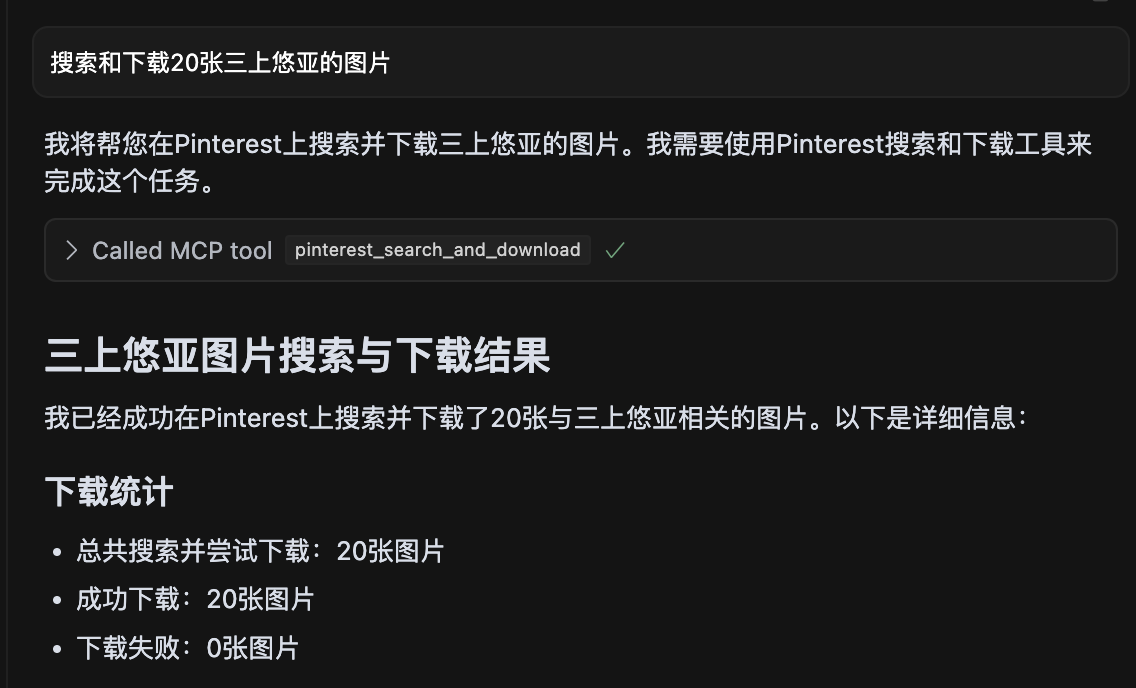
三上悠亚の画像20枚を検索し、すべての画像が正常にダウンロードされたことを示すスクリーンショット。
pinterest-mcp-server.ts : メインサーバーファイル
dist/pinterest-mcp-server.js : 本番環境用に構築された JavaScript ファイル
package.json : プロジェクトの構成と依存関係
新しい MCP 機能を追加するには:
pinterest-mcp-server.ts変更する
MCP SDKを使用して新しい関数を登録する
関数ロジックを実装する
npm run buildでリビルドする
サーバーの起動に失敗した場合は、ポートがすでに使用されていないか確認してください。
npm installですべての依存関係が正しくインストールされていることを確認します。
TypeScriptがtsconfig.jsonファイルで適切に設定されていることを確認してください
ビルドエラーが発生した場合は、 npm install -D typescript @types/nodeを実行してみてください。
Pinterest にアクセスするためのネットワーク接続を確認する
このプロジェクトは MIT ライセンスに基づいてライセンスされています - 詳細についてはLICENSEファイルを参照してください。
サーバーは、構成用に次の環境変数をサポートしています。
MCP_PINTEREST_DOWNLOAD_DIR : 画像をダウンロードするルートディレクトリを指定します。設定されていない場合は、サーバースクリプトを基準とした../downloadsディレクトリがデフォルトとなります。
MCP_PINTEREST_FILENAME_TEMPLATE : ダウンロードした画像のファイル名テンプレートを指定します。設定されていない場合、デフォルトはpinterest_{imageId}.{fileExtension}です。
MCP_PINTEREST_PROXY_SERVER : Pinterestへの接続に使用するプロキシサーバーを指定します。形式はprotocol://host:portです。例: http://127.0.0.1:7890またはsocks5://127.0.0.1:1080 。
環境変数を使用してダウンロード ディレクトリを設定します (推奨方法):
# Linux/macOS
export MCP_PINTEREST_DOWNLOAD_DIR=/path/to/your/download/directory
# Then start the server
node pinterest-mcp-server.js

# Windows (CMD)
set MCP_PINTEREST_DOWNLOAD_DIR=C:\path\to\your\download\directory
# Then start the server
node pinterest-mcp-server.js

# Windows (PowerShell)
$env:MCP_PINTEREST_DOWNLOAD_DIR="C:\path\to\your\download\directory"
# Then start the server
node pinterest-mcp-server.js
環境変数が設定されていない場合、サーバーはデフォルトのダウンロード ディレクトリ (サーバー スクリプトの../downloadsを基準としたディレクトリ) を使用します。
MCP_PINTEREST_FILENAME_TEMPLATE環境変数を使用して、ダウンロードした画像のファイル名パターンをカスタマイズできます。
# Linux/macOS
export MCP_PINTEREST_FILENAME_TEMPLATE="pin_{imageId}_{timestamp}.{fileExtension}"
# Then start the server
node pinterest-mcp-server.js

# Windows (CMD)
set MCP_PINTEREST_FILENAME_TEMPLATE="pin_{imageId}_{timestamp}.{fileExtension}"
# Then start the server
node pinterest-mcp-server.js

# Windows (PowerShell)
$env:MCP_PINTEREST_FILENAME_TEMPLATE="pin_{imageId}_{timestamp}.{fileExtension}"
# Then start the server
node pinterest-mcp-server.js
テンプレートは次の変数をサポートします。
{imageId} : Pinterest画像の一意のID
{fileExtension} : ファイル拡張子(例:jpg、png)
{timestamp} : 現在の UTC タイムスタンプ(YYYYMMDDHHMMSS 形式)
{index} : 複数の画像をダウンロードする場合のインデックス番号(1から始まる)
テンプレートの例:
pinterest_{imageId}.{fileExtension} (デフォルト)
pin_{timestamp}_{imageId}.{fileExtension}
pinterest_image_{index}_{imageId}.{fileExtension}
{timestamp}_pinterest.{fileExtension}
テンプレートが無効な場合 (サポートされていない変数が含まれている、括弧が一致していないなど)、サーバーは警告をログに記録し、デフォルトのテンプレートを使用します。
Pinterest にアクセスするためにプロキシを使用する必要がある場合 (特に Pinterest が制限されている可能性のある地域)、プロキシ構成を設定できます。
# Linux/macOS
export MCP_PINTEREST_PROXY_SERVER="http://127.0.0.1:7890"
# Then start the server
node pinterest-mcp-server.js

# Windows (CMD)
set MCP_PINTEREST_PROXY_SERVER=http://127.0.0.1:7890
# Then start the server
node pinterest-mcp-server.js

# Windows (PowerShell)
$env:MCP_PINTEREST_PROXY_SERVER="http://127.0.0.1:7890"
# Then start the server
node pinterest-mcp-server.js
サポートされているプロキシ プロトコル:
HTTP: http://host:port
HTTPS: https://host:port
SOCKS4: socks4://host:port
SOCKS5: socks5://host:port
プロキシ設定は、検索に使用されるブラウザと画像のダウンロードプロセスの両方に影響します。
サーバーは起動時にダウンロードディレクトリの存在と書き込み可能性を確認します。ディレクトリが存在しない場合は作成を試みます。ディレクトリを作成または書き込みできない場合は、サーバーは終了します。
すべてのダウンロードではサーバーの環境変数設定またはデフォルトが使用されるため、クライアントはダウンロード関連のツールを呼び出すときにパラメータを使用してダウンロード パスまたはファイル名テンプレートを指定しないでください。
サーバーは、不正な文字 ( / 、 \ 、 : 、 * 、 ? 、 " 、 < 、 > 、 |など) をアンダースコアに置き換えて、ファイル名を自動的にサニタイズします。
サーバーは次の MCP ツールを提供します。
pinterest_search : キーワードでPinterestの画像を検索
pinterest_get_image_info : Pinterest 画像の詳細情報を取得します
pinterest_search_and_download : Pinterest の画像を検索してダウンロードする
詳細なインターフェース パラメータのリファレンスについては、MCP ツール定義を参照してください。
Get Pinterest image information
| Name | Required | Description | Default |
|---|---|---|---|
| image_url | Yes | Image URL |
Does the description disclose side effects, auth requirements, rate limits, or destructive behavior?
No annotations provided, and the description lacks any behavioral details such as rate limits, authentication, or error handling. It does not even mention that it fetches metadata or requires an image URL.
Agents need to know what a tool does to the world before calling it. Descriptions should go beyond structured annotations to explain consequences.
Is the description appropriately sized, front-loaded, and free of redundancy?
The description is a single short sentence, but it is under-specified and lacks necessary detail. It is not a model of conciseness; it is minimal without being helpful.
Shorter descriptions cost fewer tokens and are easier for agents to parse. Every sentence should earn its place.
Given the tool's complexity, does the description cover enough for an agent to succeed on first attempt?
For a tool that presumably returns image information, the description fails to mention what that information includes, the output format, or any prerequisites. It is completely inadequate given the lack of output schema.
Complex tools with many parameters or behaviors need more documentation. Simple tools need less. This dimension scales expectations accordingly.
Does the description clarify parameter syntax, constraints, interactions, or defaults beyond what the schema provides?
Schema description coverage is 100%, with each parameter having a clear description. The tool description adds no extra meaning, but the baseline is adequate.
Input schemas describe structure but not intent. Descriptions should explain non-obvious parameter relationships and valid value ranges.
Does the description clearly state what the tool does and how it differs from similar tools?
Description states verb 'Get' and resource 'Pinterest image information', which is clear but vague. It distinguishes from siblings (health, search, similar pins) but does not specify what 'image information' includes.
Agents choose between tools based on descriptions. A clear purpose with a specific verb and resource helps agents select the right tool.
Does the description explain when to use this tool, when not to, or what alternatives exist?
No guidance on when to use this tool versus alternatives. The description provides no context for selection.
Agents often have multiple tools that could apply. Explicit usage guidance like "use X instead of Y when Z" prevents misuse.
Search for images on Pinterest by keyword
| Name | Required | Description | Default |
|---|---|---|---|
| keyword | Yes | Search keyword | |
| limit | No | Number of images to return (default: 10) | |
| headless | No | Whether to use headless browser mode (default: true) |
Does the description disclose side effects, auth requirements, rate limits, or destructive behavior?
No annotations are provided, so the description carries full burden. It does not disclose behavioral traits such as rate limits, authentication needs, or what headless mode implies (e.g., browser dependency). The return format (e.g., JSON structure) is unstated.
Agents need to know what a tool does to the world before calling it. Descriptions should go beyond structured annotations to explain consequences.
Is the description appropriately sized, front-loaded, and free of redundancy?
The description is a single, concise sentence with no redundancy. Every word is necessary. It is front-loaded with the core action.
Shorter descriptions cost fewer tokens and are easier for agents to parse. Every sentence should earn its place.
Given the tool's complexity, does the description cover enough for an agent to succeed on first attempt?
Given no output schema, the description should explain what the tool returns (e.g., pin objects, URLs). It does not. The description fails to provide enough context for an agent to use the tool effectively, especially compared to sibling tools that might have richer descriptions.
Complex tools with many parameters or behaviors need more documentation. Simple tools need less. This dimension scales expectations accordingly.
Does the description clarify parameter syntax, constraints, interactions, or defaults beyond what the schema provides?
Schema coverage is 100% with descriptions for all three parameters. The tool description adds no extra meaning beyond the schema, which already explains limit, keyword, and headless. Baseline 3 is appropriate.
Input schemas describe structure but not intent. Descriptions should explain non-obvious parameter relationships and valid value ranges.
Does the description clearly state what the tool does and how it differs from similar tools?
The description clearly states the verb 'search', resource 'images on Pinterest', and method 'by keyword'. It distinguishes from siblings like pinterest_search_and_download (which adds download). However, it could be more specific about return type (e.g., pin data vs URLs).
Agents choose between tools based on descriptions. A clear purpose with a specific verb and resource helps agents select the right tool.
Does the description explain when to use this tool, when not to, or what alternatives exist?
No guidance on when to use this tool vs siblings like pinterest_search_and_download or pinterest_get_similar_pins. No mention of prerequisites or context where this tool is preferred.
Agents often have multiple tools that could apply. Explicit usage guidance like "use X instead of Y when Z" prevents misuse.
Search for images on Pinterest by keyword and download them
| Name | Required | Description | Default |
|---|---|---|---|
| keyword | Yes | Search keyword | |
| limit | No | Number of images to return and download (default: 10) | |
| headless | No | Whether to use headless browser mode (default: true) |
Does the description disclose side effects, auth requirements, rate limits, or destructive behavior?
No annotations provided, so description must fully disclose behavior. It omits details like download location, file format, browser automation implications (headless parameter not mentioned), and potential side effects.
Agents need to know what a tool does to the world before calling it. Descriptions should go beyond structured annotations to explain consequences.
Is the description appropriately sized, front-loaded, and free of redundancy?
A single sentence with no wasted words, but it lacks front-loading of critical context. Appropriate length for the content provided.
Shorter descriptions cost fewer tokens and are easier for agents to parse. Every sentence should earn its place.
Given the tool's complexity, does the description cover enough for an agent to succeed on first attempt?
With 3 parameters and no output schema, the description fails to explain return behavior (e.g., saved files, temporary storage) or how 'download' works. Incomplete for proper tool invocation.
Complex tools with many parameters or behaviors need more documentation. Simple tools need less. This dimension scales expectations accordingly.
Does the description clarify parameter syntax, constraints, interactions, or defaults beyond what the schema provides?
Schema coverage is 100%, so baseline is 3. The description adds no additional meaning beyond what is already in the schema for parameters.
Input schemas describe structure but not intent. Descriptions should explain non-obvious parameter relationships and valid value ranges.
Does the description clearly state what the tool does and how it differs from similar tools?
The description clearly states the verb 'Search' and 'download', the resource 'images on Pinterest', and the method 'by keyword'. It distinguishes from sibling 'pinterest_search' by adding download functionality.
Agents choose between tools based on descriptions. A clear purpose with a specific verb and resource helps agents select the right tool.
Does the description explain when to use this tool, when not to, or what alternatives exist?
No guidance on when to use this tool versus alternatives like 'pinterest_search' or 'pinterest_get_image_info'. The agent is left to infer usage from the name alone.
Agents often have multiple tools that could apply. Explicit usage guidance like "use X instead of Y when Z" prevents misuse.
Recent tool additions, removals, and schema changes observed during successful MCP inspections.
pinterest_get_image_infopinterest_searchpinterest_search_and_downloadScored across 3 tools
Each tool has a distinct purpose: retrieving metadata, searching, and searching with download. The names and descriptions make it easy to distinguish between them.
All tools use the 'pinterest_' prefix and snake_case, but 'pinterest_search_and_download' combines two verbs while the others use a single verb, introducing slight inconsistency.
Three tools is a minimal but reasonable set for an image search and download service. It covers core functionality without being too sparse or excessive.
The set covers basic search and metadata retrieval, but lacks common Pinterest operations like board management, pinning, or user actions, leaving notable gaps for broader use.
Personal knowledge base MCP server with semantic search, auto-categorization, metadata extraction
MCP Server for an Agent Task Marketplace
MCP server for Drosophila neuroscience data from VirtualFlyBrain