Glama
nexon33

Electron Terminal MCP Server

by nexon33

电子终端 MCP 服务器

理想情况下,供应商会为终端提供自己的 MCP 集成,但与此同时,该项目提供了一个模型上下文协议 (MCP) 服务器,允许客户端与在 Electron 应用程序中运行的系统终端进行交互。它支持以编程方式执行命令、管理终端会话和检索输出。

该系统由两个主要部分组成:

  • **MCP 服务器 ( index.js ):**一个 Node.js 脚本,用于通过标准输入/输出 (stdio) 监听 MCP 请求。它使用@modelcontextprotocol/sdk并充当 Electron 后端的桥梁。如果 Electron 后端尚未运行,它会自动启动。它需要在mcp-package.json中指定"type": "module"

  • Electron 后端 ( main.js ): Electron 应用的主进程。它运行一个 Express HTTP 服务器(默认端口 3000),MCP 服务器 ( index.js ) 会与该服务器通信,以进行健康检查和 API 调用。该后端使用node-pty在隐藏的BrowserWindow实例中管理实际的终端进程,用于加载terminal.html

2. 截图

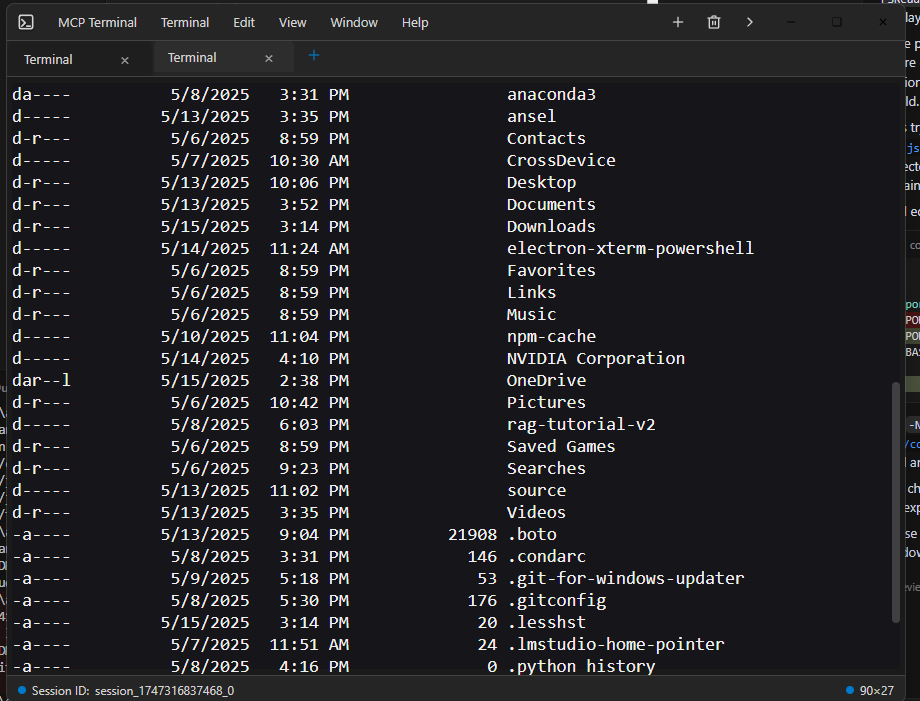
以下是 Claude Desktop 等客户端中的终端交互方式:

带有终端输出的 Claude 桌面窗口:带有终端输出的 Claude 桌面窗口
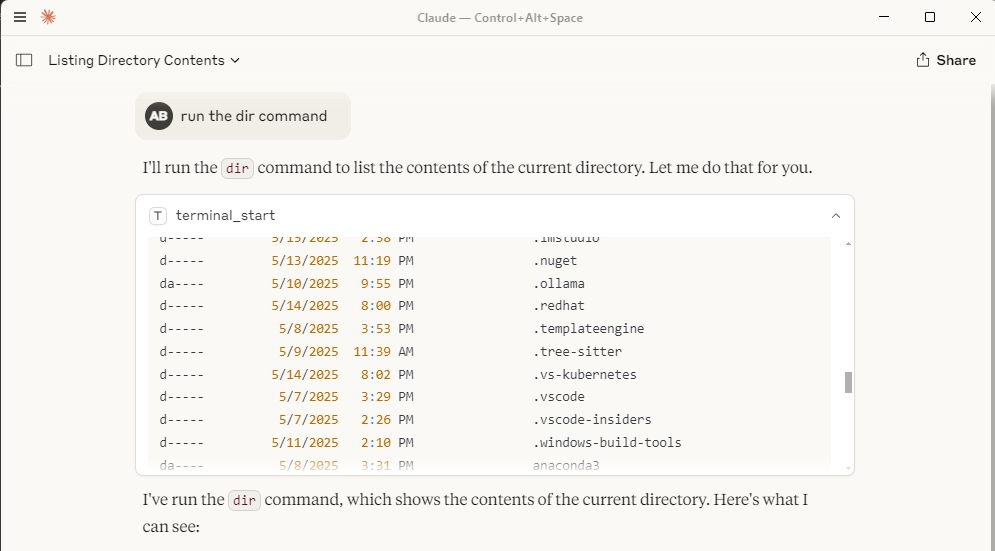
单个电子终端窗口:电子终端窗口

Related MCP server: MCP Terminal Server

3.安装

  1. **先决条件:**确保您已安装 Node.js 和 npm。

  2. **克隆:**如果尚未克隆存储库,请先克隆。

    git clone <your-repository-url>
    cd command-terminal-electron # Or your repository directory name
  3. **安装依赖项:**为 MCP 服务器和 Electron 应用程序安装 Node 模块。

    npm install
  4. **重建本机模块:**为 Electron 重建本机模块(如node-pty )。

    node rebuild.js

    (详情请参阅rebuild.js

3. 使用方法

  1. **启动 MCP 服务器:**使用 Node.js 运行index.js脚本。这将在 stdio 上监听 MCP 命令,如果 Electron 后端进程 ( main.js ) 尚未运行且未监听预期的 HTTP 端口,则会自动尝试启动它。

    node index.js

    注意:Electron 进程在后台隐藏运行,并在需要时自动(重新)启动,并且尽可能重复使用。

  2. **通过 MCP 交互:**客户端通过 stdio 连接到node index.js进程,并使用use_mcp_tool命令。服务器名称在index.js中定义为“Electron Terminal”。

    可用工具:

    • terminal_start :创建一个新的终端会话并执行初始命令。

      • 输入: { "command": "string" }

      • 输出: { "content": [...], "sessionId": "string" } GXP5

    • terminal_execute :在现有会话中执行命令。

      • 输入: { "command": "string", "sessionId": "string" }

      • 输出: { "content": [...] } (会话ID包含在文本内容中)GXP6

    • terminal_get_output :检索会话的累积输出。

      • 输入: { "sessionId": "string" }

      • 输出: { "content": [...] } GXP7

    • terminal_stop :终止特定的终端会话进程。

      • 输入: { "sessionId": "string" }

      • 输出: { "content": [...] } GXP8

    • terminal_get_sessions :列出 Electron 后端管理的所有当前活动会话。

      • 输入: {}

      • 输出: { "content": [...] } (内容包含活动会话的 JSON 字符串)GXP9

5. 与文件系统 MCP 服务器协同

此 Electron 终端 MCP 服务器与文件系统 MCP 服务器配合使用,效果极佳。您可以使用文件系统服务器浏览目录、读写文件,然后使用此终端服务器执行这些目录内或与这些文件相关的命令,从而提供全面的远程开发和交互体验,并与 Claude Desktop 内置的互联网搜索功能等功能无缝协作。

6. 要求

  • Node.js(建议使用 v20 或更高版本,我使用 node 22)

  • npm

  • 与 Electron 兼容的操作系统(Windows、macOS、Linux)

7.配置

Claude Desktop MCP 服务器配置

地点

claude_desktop_config.json文件应放置在用户的 AppData 目录中:

  • Windows: C:\Users\<username>\AppData\Roaming\Claude\claude_desktop_config.json

Claude Desktop 使用该文件来发现和配置外部 MCP 服务器。

目的和结构

配置文件定义了 Claude Desktop 可以启动和连接的 MCP 服务器。每个服务器条目指定如何启动服务器进程。

  • mcpServers :一个对象,其中每个键都是一个服务器名称,值是其启动配置。

  • 服务器配置示例( command-terminal

    • command :要运行的可执行文件(例如,Node.js 服务器的node )。

    • args :传递给命令的参数数组(例如,MCP 服务器脚本的路径)。

例子

{
  "mcpServers": {
    "command-terminal": {
      "command": "node",
      "args": [
        "C:\\Path\\to\\index.js"
      ]
    }
  }
}

字段说明

  • mcpServers :将服务器名称映射到其配置的顶级对象。

  • command-terminal :示例服务器名称。您可以在此对象中定义多个服务器。

  • command :用于启动 MCP 服务器的可执行文件。

  • args :传递给命令的参数,例如服务器脚本的路径。

8. 许可证

本项目遵循 MIT 许可证。详情请参阅 LICENSE 文件。

Available Tools

5 tools
terminal_executeD
ParametersJSON Schema
NameRequiredDescriptionDefault
commandYes
sessionIdYes

TDQS

D1/5.0
Behavior1/5

Does the description disclose side effects, auth requirements, rate limits, or destructive behavior?

Tool has no description.

Agents need to know what a tool does to the world before calling it. Descriptions should go beyond structured annotations to explain consequences.

Conciseness1/5

Is the description appropriately sized, front-loaded, and free of redundancy?

Tool has no description.

Shorter descriptions cost fewer tokens and are easier for agents to parse. Every sentence should earn its place.

Completeness1/5

Given the tool's complexity, does the description cover enough for an agent to succeed on first attempt?

Tool has no description.

Complex tools with many parameters or behaviors need more documentation. Simple tools need less. This dimension scales expectations accordingly.

Parameters1/5

Does the description clarify parameter syntax, constraints, interactions, or defaults beyond what the schema provides?

Tool has no description.

Input schemas describe structure but not intent. Descriptions should explain non-obvious parameter relationships and valid value ranges.

Purpose1/5

Does the description clearly state what the tool does and how it differs from similar tools?

Tool has no description.

Agents choose between tools based on descriptions. A clear purpose with a specific verb and resource helps agents select the right tool.

Usage Guidelines1/5

Does the description explain when to use this tool, when not to, or what alternatives exist?

Tool has no description.

Agents often have multiple tools that could apply. Explicit usage guidance like "use X instead of Y when Z" prevents misuse.

terminal_get_outputD
ParametersJSON Schema
NameRequiredDescriptionDefault
sessionIdYes

TDQS

D1/5.0
Behavior1/5

Does the description disclose side effects, auth requirements, rate limits, or destructive behavior?

Tool has no description.

Agents need to know what a tool does to the world before calling it. Descriptions should go beyond structured annotations to explain consequences.

Conciseness1/5

Is the description appropriately sized, front-loaded, and free of redundancy?

Tool has no description.

Shorter descriptions cost fewer tokens and are easier for agents to parse. Every sentence should earn its place.

Completeness1/5

Given the tool's complexity, does the description cover enough for an agent to succeed on first attempt?

Tool has no description.

Complex tools with many parameters or behaviors need more documentation. Simple tools need less. This dimension scales expectations accordingly.

Parameters1/5

Does the description clarify parameter syntax, constraints, interactions, or defaults beyond what the schema provides?

Tool has no description.

Input schemas describe structure but not intent. Descriptions should explain non-obvious parameter relationships and valid value ranges.

Purpose1/5

Does the description clearly state what the tool does and how it differs from similar tools?

Tool has no description.

Agents choose between tools based on descriptions. A clear purpose with a specific verb and resource helps agents select the right tool.

Usage Guidelines1/5

Does the description explain when to use this tool, when not to, or what alternatives exist?

Tool has no description.

Agents often have multiple tools that could apply. Explicit usage guidance like "use X instead of Y when Z" prevents misuse.

terminal_get_sessionsD
ParametersJSON Schema
NameRequiredDescriptionDefault

No parameters

TDQS

D1/5.0
Behavior1/5

Does the description disclose side effects, auth requirements, rate limits, or destructive behavior?

Tool has no description.

Agents need to know what a tool does to the world before calling it. Descriptions should go beyond structured annotations to explain consequences.

Conciseness1/5

Is the description appropriately sized, front-loaded, and free of redundancy?

Tool has no description.

Shorter descriptions cost fewer tokens and are easier for agents to parse. Every sentence should earn its place.

Completeness1/5

Given the tool's complexity, does the description cover enough for an agent to succeed on first attempt?

Tool has no description.

Complex tools with many parameters or behaviors need more documentation. Simple tools need less. This dimension scales expectations accordingly.

Parameters1/5

Does the description clarify parameter syntax, constraints, interactions, or defaults beyond what the schema provides?

Tool has no description.

Input schemas describe structure but not intent. Descriptions should explain non-obvious parameter relationships and valid value ranges.

Purpose1/5

Does the description clearly state what the tool does and how it differs from similar tools?

Tool has no description.

Agents choose between tools based on descriptions. A clear purpose with a specific verb and resource helps agents select the right tool.

Usage Guidelines1/5

Does the description explain when to use this tool, when not to, or what alternatives exist?

Tool has no description.

Agents often have multiple tools that could apply. Explicit usage guidance like "use X instead of Y when Z" prevents misuse.

terminal_startD
ParametersJSON Schema
NameRequiredDescriptionDefault
commandYes

TDQS

D1/5.0
Behavior1/5

Does the description disclose side effects, auth requirements, rate limits, or destructive behavior?

Tool has no description.

Agents need to know what a tool does to the world before calling it. Descriptions should go beyond structured annotations to explain consequences.

Conciseness1/5

Is the description appropriately sized, front-loaded, and free of redundancy?

Tool has no description.

Shorter descriptions cost fewer tokens and are easier for agents to parse. Every sentence should earn its place.

Completeness1/5

Given the tool's complexity, does the description cover enough for an agent to succeed on first attempt?

Tool has no description.

Complex tools with many parameters or behaviors need more documentation. Simple tools need less. This dimension scales expectations accordingly.

Parameters1/5

Does the description clarify parameter syntax, constraints, interactions, or defaults beyond what the schema provides?

Tool has no description.

Input schemas describe structure but not intent. Descriptions should explain non-obvious parameter relationships and valid value ranges.

Purpose1/5

Does the description clearly state what the tool does and how it differs from similar tools?

Tool has no description.

Agents choose between tools based on descriptions. A clear purpose with a specific verb and resource helps agents select the right tool.

Usage Guidelines1/5

Does the description explain when to use this tool, when not to, or what alternatives exist?

Tool has no description.

Agents often have multiple tools that could apply. Explicit usage guidance like "use X instead of Y when Z" prevents misuse.

terminal_stopD
ParametersJSON Schema
NameRequiredDescriptionDefault
sessionIdYes

TDQS

D1/5.0
Behavior1/5

Does the description disclose side effects, auth requirements, rate limits, or destructive behavior?

Tool has no description.

Agents need to know what a tool does to the world before calling it. Descriptions should go beyond structured annotations to explain consequences.

Conciseness1/5

Is the description appropriately sized, front-loaded, and free of redundancy?

Tool has no description.

Shorter descriptions cost fewer tokens and are easier for agents to parse. Every sentence should earn its place.

Completeness1/5

Given the tool's complexity, does the description cover enough for an agent to succeed on first attempt?

Tool has no description.

Complex tools with many parameters or behaviors need more documentation. Simple tools need less. This dimension scales expectations accordingly.

Parameters1/5

Does the description clarify parameter syntax, constraints, interactions, or defaults beyond what the schema provides?

Tool has no description.

Input schemas describe structure but not intent. Descriptions should explain non-obvious parameter relationships and valid value ranges.

Purpose1/5

Does the description clearly state what the tool does and how it differs from similar tools?

Tool has no description.

Agents choose between tools based on descriptions. A clear purpose with a specific verb and resource helps agents select the right tool.

Usage Guidelines1/5

Does the description explain when to use this tool, when not to, or what alternatives exist?

Tool has no description.

Agents often have multiple tools that could apply. Explicit usage guidance like "use X instead of Y when Z" prevents misuse.

Tool Schema Changelog

Recent tool additions, removals, and schema changes observed during successful MCP inspections.

  1. 1 tool updatev1.0.0
    • Changedterminal_get_sessions1 field changed
      • removedInput schema / additionalProperties
        Removed value: -false
  2. 5 tool updates
    • First observedterminal_execute
    • First observedterminal_get_output
    • First observedterminal_get_sessions
    • First observedterminal_start
    • First observedterminal_stop

TDQS

C2.2/5.0

Scored across 5 tools

Disambiguation5/5

Each tool name maps to a distinct lifecycle action: start, execute, get output, stop, and list sessions. Even without descriptions, the boundaries are clear and unlikely to cause misselection.

Naming Consistency5/5

All tool names follow the same terminal_verb pattern using snake_case. The convention is uniform and predictable across the entire set.

Tool Count5/5

Five tools is a well-scoped size for a terminal management server. Each tool covers a necessary operation without redundancy or bloat.

Completeness5/5

The set covers the full terminal session lifecycle: create, interact, read output, stop, and enumerate sessions. There are no obvious dead ends or missing core operations.

Maintenance

ActivityInactive
ResponsivenessNo issues

Related MCP Connectors

Related MCP Servers

  • A
    license
    B
    quality
    D
    maintenance
    A Model Context Protocol server that provides programmatic access to the Windows terminal, enabling AI models to interact with the Windows command line through standardized tools for writing commands, reading output, and sending control signals.
    3
    5 npm
    MIT
  • A
    license
    C
    quality
    C
    maintenance
    A server that enables AI assistants to execute terminal commands and retrieve outputs via the Model Context Protocol (MCP).
    3
    27
    MIT