Electron Terminal MCP Server
Servidor MCP de Electron Terminal
En un mundo ideal, los proveedores proporcionarían su propia integración MCP para el terminal, pero mientras tanto, este proyecto proporciona un servidor de Protocolo de Contexto de Modelo (MCP) que permite a los clientes interactuar con un terminal del sistema que se ejecuta dentro de una aplicación Electron. Esto permite ejecutar comandos, gestionar sesiones de terminal y obtener resultados mediante programación.
El sistema consta de dos partes principales:
Servidor MCP (
index.js): Un script de Node.js que recibe solicitudes MCP mediante la entrada/salida estándar (stdio). Utiliza@modelcontextprotocol/sdky actúa como puente hacia el backend de Electron. Inicia automáticamente el backend de Electron si no está en ejecución. Requiere quemcp-package.jsonespecifique"type": "module".Backend de Electron (
main.js): El proceso principal de la aplicación Electron. Ejecuta un servidor HTTP Express (puerto 3000 predeterminado) con el que se comunica el servidor MCP (index.js) para realizar comprobaciones de estado y llamadas a la API. Este backend gestiona los procesos de terminal mediantenode-ptydentro de instancias ocultasBrowserWindowque carganterminal.html.
2. Capturas de pantalla
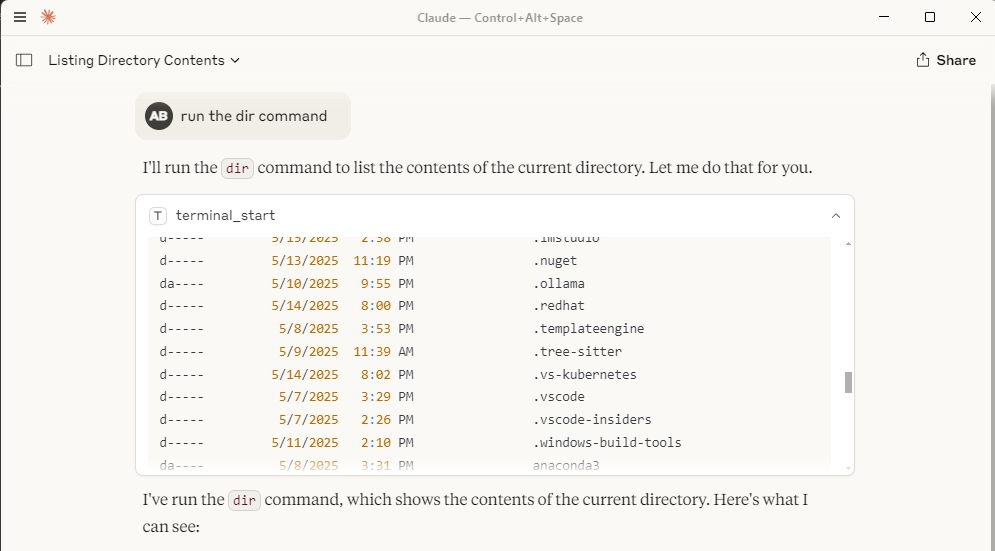
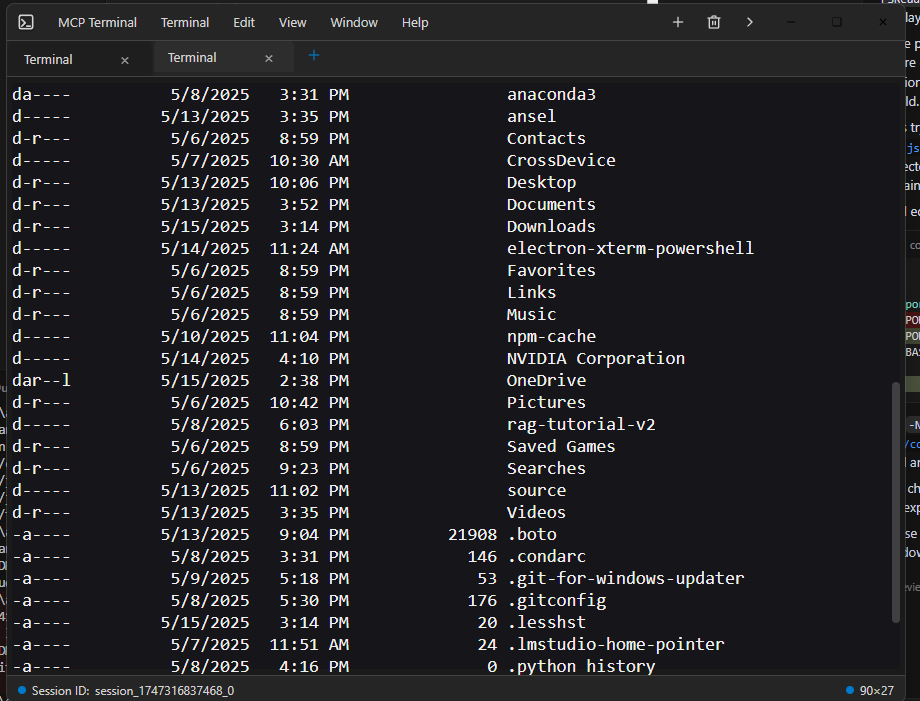
Así es como se ve la interacción del terminal dentro de un cliente como Claude Desktop:
Ventana del escritorio de Claude con salida de terminal: 
Ventana terminal de electrones individuales:
Related MCP server: MCP Terminal Server
3. Instalación
Requisitos previos: asegúrese de tener Node.js y npm instalados.
Clonar: clona el repositorio si aún no lo has hecho.
git clone <your-repository-url> cd command-terminal-electron # Or your repository directory nameInstalar dependencias: instale módulos de Node tanto para el servidor MCP como para la aplicación Electron.
npm installReconstruir módulos nativos: reconstruya módulos nativos (como
node-pty) para Electron.node rebuild.js(Consulte
rebuild.jspara obtener más detalles)
3. Uso
Iniciar el servidor MCP: Ejecute el script
index.jscon Node.js. Esto escuchará los comandos MCP en stdio e intentará iniciar automáticamente el proceso backend de Electron (main.js) si no se está ejecutando y escuchando en el puerto HTTP esperado.node index.jsNota: El proceso Electron se ejecuta oculto en segundo plano y se reinicia automáticamente cuando es necesario y siempre se reutilizará si es posible.
Interacción mediante MCP: Los clientes se conectan al proceso
node index.jsmediante stdio y usan el comandouse_mcp_tool. El nombre del servidor se define enindex.jscomo "Electron Terminal".Herramientas disponibles:
terminal_start: crea una nueva sesión de terminal y ejecuta un comando inicial.Entrada:
{ "command": "string" }Salida:
{ "content": [...], "sessionId": "string" }GXP5
terminal_execute: ejecuta un comando en una sesión existente.Entrada:
{ "command": "string", "sessionId": "string" }Salida:
{ "content": [...] }(El ID de sesión se incluye en el contenido del texto) GXP6
terminal_get_output: recupera la salida acumulada de una sesión.Entrada:
{ "sessionId": "string" }Salida:
{ "content": [...] }GXP7
terminal_stop: finaliza un proceso de sesión de terminal específico.Entrada:
{ "sessionId": "string" }Salida:
{ "content": [...] }GXP8
terminal_get_sessions: enumera todas las sesiones actualmente activas administradas por el backend de Electron.Aporte:
{}Salida:
{ "content": [...] }(El contenido contiene una cadena JSON de sesiones activas) GXP9
5. Sinergia con el servidor MCP del sistema de archivos
Este servidor MCP de Terminal Electron funciona de forma muy eficaz en conjunto con el Servidor MCP del Sistema de Archivos . Puede usar el servidor del Sistema de Archivos para explorar directorios, leer/escribir archivos y, a continuación, usar este servidor de terminal para ejecutar comandos dentro de esos directorios o relacionados con ellos, lo que proporciona una experiencia integral de desarrollo e interacción remota que se integra a la perfección, por ejemplo, con la función de búsqueda en internet integrada en Claude Desktop.
6. Requisitos
Node.js (se recomienda v20 o posterior, yo uso node 22)
npm
Sistema operativo compatible con Electron (Windows, macOS, Linux)
7. Configuración
Configuración del servidor MCP de Claude Desktop
Ubicación
El archivo claude_desktop_config.json debe ubicarse en el directorio AppData de su usuario:
Windows:
C:\Users\<username>\AppData\Roaming\Claude\claude_desktop_config.json
Claude Desktop utiliza este archivo para descubrir y configurar servidores MCP externos.
Propósito y Estructura
El archivo de configuración define los servidores MCP que Claude Desktop puede iniciar y a los que puede conectarse. Cada entrada de servidor especifica cómo iniciar el proceso del servidor.
mcpServers: un objeto donde cada clave es un nombre de servidor y el valor es su configuración de lanzamiento.Ejemplo de configuración del servidor (
command-terminal) :command: el ejecutable a ejecutar (por ejemplo,nodepara servidores Node.js).args: una matriz de argumentos pasados al comando (por ejemplo, la ruta al script del servidor MCP).
Ejemplo
{
"mcpServers": {
"command-terminal": {
"command": "node",
"args": [
"C:\\Path\\to\\index.js"
]
}
}
}Explicaciones de campo
mcpServers: mapeo de objetos de nivel superior de los nombres de servidores a sus configuraciones.command-terminal: Ejemplo de nombre de servidor. Se pueden definir varios servidores en este objeto.command: El ejecutable utilizado para iniciar el servidor MCP.args: argumentos pasados al comando, como la ruta a la secuencia de comandos de su servidor.
8. Licencia
Este proyecto está licenciado bajo la Licencia MIT. Consulte el archivo de LICENCIA para más detalles.
Available Tools
5 toolsterminal_executeD
| Name | Required | Description | Default |
|---|---|---|---|
| command | Yes | ||
| sessionId | Yes |
TDQS
Does the description disclose side effects, auth requirements, rate limits, or destructive behavior?
Tool has no description.
Agents need to know what a tool does to the world before calling it. Descriptions should go beyond structured annotations to explain consequences.
Is the description appropriately sized, front-loaded, and free of redundancy?
Tool has no description.
Shorter descriptions cost fewer tokens and are easier for agents to parse. Every sentence should earn its place.
Given the tool's complexity, does the description cover enough for an agent to succeed on first attempt?
Tool has no description.
Complex tools with many parameters or behaviors need more documentation. Simple tools need less. This dimension scales expectations accordingly.
Does the description clarify parameter syntax, constraints, interactions, or defaults beyond what the schema provides?
Tool has no description.
Input schemas describe structure but not intent. Descriptions should explain non-obvious parameter relationships and valid value ranges.
Does the description clearly state what the tool does and how it differs from similar tools?
Tool has no description.
Agents choose between tools based on descriptions. A clear purpose with a specific verb and resource helps agents select the right tool.
Does the description explain when to use this tool, when not to, or what alternatives exist?
Tool has no description.
Agents often have multiple tools that could apply. Explicit usage guidance like "use X instead of Y when Z" prevents misuse.
terminal_get_outputD
| Name | Required | Description | Default |
|---|---|---|---|
| sessionId | Yes |
TDQS
Does the description disclose side effects, auth requirements, rate limits, or destructive behavior?
Tool has no description.
Agents need to know what a tool does to the world before calling it. Descriptions should go beyond structured annotations to explain consequences.
Is the description appropriately sized, front-loaded, and free of redundancy?
Tool has no description.
Shorter descriptions cost fewer tokens and are easier for agents to parse. Every sentence should earn its place.
Given the tool's complexity, does the description cover enough for an agent to succeed on first attempt?
Tool has no description.
Complex tools with many parameters or behaviors need more documentation. Simple tools need less. This dimension scales expectations accordingly.
Does the description clarify parameter syntax, constraints, interactions, or defaults beyond what the schema provides?
Tool has no description.
Input schemas describe structure but not intent. Descriptions should explain non-obvious parameter relationships and valid value ranges.
Does the description clearly state what the tool does and how it differs from similar tools?
Tool has no description.
Agents choose between tools based on descriptions. A clear purpose with a specific verb and resource helps agents select the right tool.
Does the description explain when to use this tool, when not to, or what alternatives exist?
Tool has no description.
Agents often have multiple tools that could apply. Explicit usage guidance like "use X instead of Y when Z" prevents misuse.
terminal_get_sessionsD
| Name | Required | Description | Default |
|---|---|---|---|
No parameters | |||
TDQS
Does the description disclose side effects, auth requirements, rate limits, or destructive behavior?
Tool has no description.
Agents need to know what a tool does to the world before calling it. Descriptions should go beyond structured annotations to explain consequences.
Is the description appropriately sized, front-loaded, and free of redundancy?
Tool has no description.
Shorter descriptions cost fewer tokens and are easier for agents to parse. Every sentence should earn its place.
Given the tool's complexity, does the description cover enough for an agent to succeed on first attempt?
Tool has no description.
Complex tools with many parameters or behaviors need more documentation. Simple tools need less. This dimension scales expectations accordingly.
Does the description clarify parameter syntax, constraints, interactions, or defaults beyond what the schema provides?
Tool has no description.
Input schemas describe structure but not intent. Descriptions should explain non-obvious parameter relationships and valid value ranges.
Does the description clearly state what the tool does and how it differs from similar tools?
Tool has no description.
Agents choose between tools based on descriptions. A clear purpose with a specific verb and resource helps agents select the right tool.
Does the description explain when to use this tool, when not to, or what alternatives exist?
Tool has no description.
Agents often have multiple tools that could apply. Explicit usage guidance like "use X instead of Y when Z" prevents misuse.
terminal_startD
| Name | Required | Description | Default |
|---|---|---|---|
| command | Yes |
TDQS
Does the description disclose side effects, auth requirements, rate limits, or destructive behavior?
Tool has no description.
Agents need to know what a tool does to the world before calling it. Descriptions should go beyond structured annotations to explain consequences.
Is the description appropriately sized, front-loaded, and free of redundancy?
Tool has no description.
Shorter descriptions cost fewer tokens and are easier for agents to parse. Every sentence should earn its place.
Given the tool's complexity, does the description cover enough for an agent to succeed on first attempt?
Tool has no description.
Complex tools with many parameters or behaviors need more documentation. Simple tools need less. This dimension scales expectations accordingly.
Does the description clarify parameter syntax, constraints, interactions, or defaults beyond what the schema provides?
Tool has no description.
Input schemas describe structure but not intent. Descriptions should explain non-obvious parameter relationships and valid value ranges.
Does the description clearly state what the tool does and how it differs from similar tools?
Tool has no description.
Agents choose between tools based on descriptions. A clear purpose with a specific verb and resource helps agents select the right tool.
Does the description explain when to use this tool, when not to, or what alternatives exist?
Tool has no description.
Agents often have multiple tools that could apply. Explicit usage guidance like "use X instead of Y when Z" prevents misuse.
terminal_stopD
| Name | Required | Description | Default |
|---|---|---|---|
| sessionId | Yes |
TDQS
Does the description disclose side effects, auth requirements, rate limits, or destructive behavior?
Tool has no description.
Agents need to know what a tool does to the world before calling it. Descriptions should go beyond structured annotations to explain consequences.
Is the description appropriately sized, front-loaded, and free of redundancy?
Tool has no description.
Shorter descriptions cost fewer tokens and are easier for agents to parse. Every sentence should earn its place.
Given the tool's complexity, does the description cover enough for an agent to succeed on first attempt?
Tool has no description.
Complex tools with many parameters or behaviors need more documentation. Simple tools need less. This dimension scales expectations accordingly.
Does the description clarify parameter syntax, constraints, interactions, or defaults beyond what the schema provides?
Tool has no description.
Input schemas describe structure but not intent. Descriptions should explain non-obvious parameter relationships and valid value ranges.
Does the description clearly state what the tool does and how it differs from similar tools?
Tool has no description.
Agents choose between tools based on descriptions. A clear purpose with a specific verb and resource helps agents select the right tool.
Does the description explain when to use this tool, when not to, or what alternatives exist?
Tool has no description.
Agents often have multiple tools that could apply. Explicit usage guidance like "use X instead of Y when Z" prevents misuse.
Tool Schema Changelog
Recent tool additions, removals, and schema changes observed during successful MCP inspections.
1 tool update
v1.0.0- Changed
terminal_get_sessions1 field changed- removed
Input schema / additionalPropertiesRemoved value: -false
5 tool updates
- First observed
terminal_execute - First observed
terminal_get_output - First observed
terminal_get_sessions - First observed
terminal_start - First observed
terminal_stop
TDQS
Scored across 5 tools
Each tool name maps to a distinct lifecycle action: start, execute, get output, stop, and list sessions. Even without descriptions, the boundaries are clear and unlikely to cause misselection.
All tool names follow the same terminal_verb pattern using snake_case. The convention is uniform and predictable across the entire set.
Five tools is a well-scoped size for a terminal management server. Each tool covers a necessary operation without redundancy or bloat.
The set covers the full terminal session lifecycle: create, interact, read output, stop, and enumerate sessions. There are no obvious dead ends or missing core operations.
Maintenance
Related MCP Connectors
A comprehensive Model Context Protocol (MCP) server that enables AI assistants to interact with yo…
A Model Context Protocol server for Wix AI tools
Model Context Protocol server for Studex tools, notifications, and profile integrations
Enable secure connectivity between Sentry issues and debugging data, and LLM clients, using a Model Context Protocol (MCP) server.
Related MCP Servers
- AlicenseBqualityDmaintenanceA Model Context Protocol server that provides programmatic access to the Windows terminal, enabling AI models to interact with the Windows command line through standardized tools for writing commands, reading output, and sending control signals.35 npmMIT
- AlicenseBqualityDmaintenanceA secure terminal execution server that enables controlled command execution with security features and resource limits via the Model Context Protocol (MCP).110 npm11MIT
- AlicenseCqualityCmaintenanceA server that enables AI assistants to execute terminal commands and retrieve outputs via the Model Context Protocol (MCP).327MIT
- AlicenseBqualityBmaintenanceA Model Context Protocol server that provides comprehensive Electron application automation, debugging, and observability capabilities through Chrome DevTools Protocol integration.4260 npm71MIT