Electron Terminal MCP Server
電子端末MCPサーバー
理想的には、ベンダーがターミナル向けに独自のMCP統合を提供するはずですが、当面はこのプロジェクトで、クライアントがElectronアプリケーション内で動作するシステムターミナルと対話できるモデルコンテキストプロトコル(MCP)サーバーを提供します。これにより、コマンドの実行、ターミナルセッションの管理、プログラムによる出力の取得が可能になります。
このシステムは、主に次の 2 つの部分から構成されます。
**MCPサーバー (
index.js):**標準入出力 (stdio) 経由でMCPリクエストをリッスンするNode.jsスクリプトです。@modelcontextprotocol/sdkを使用し、Electronバックエンドへのブリッジとして機能します。Electronバックエンドがまだ実行されていない場合は、自動的に起動します。mcpmcp-package.jsonで"type": "module"を指定する必要があります。Electronバックエンド(
main.js): Electronアプリケーションのメインプロセス。MCPサーバー(index.js)がヘルスチェックやAPI呼び出しのために通信するExpress HTTPサーバー(デフォルトはポート3000)を実行します。このバックエンドは、terminal.htmlを読み込む非表示のBrowserWindowインスタンス内でnode-ptyを使用して、実際のターミナルプロセスを管理します。
2. スクリーンショット
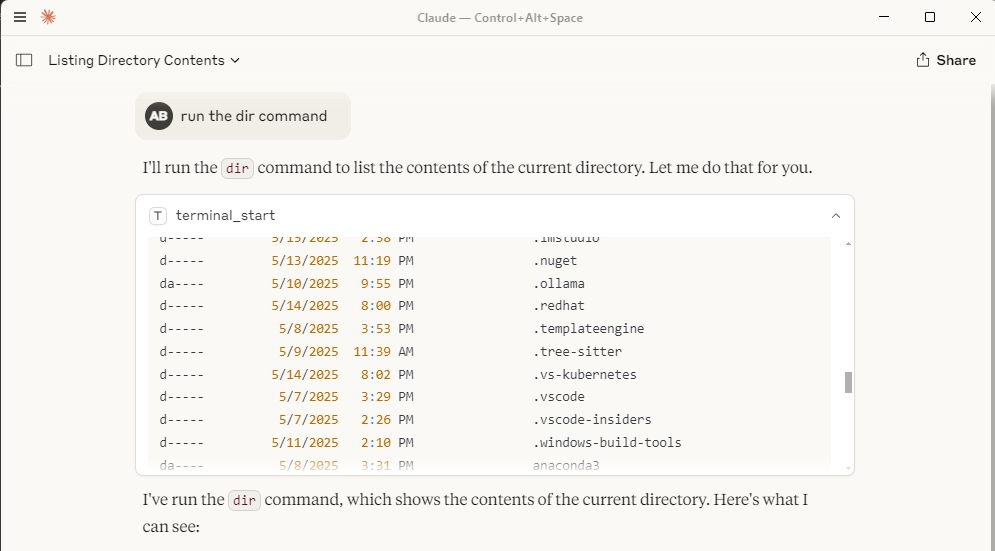
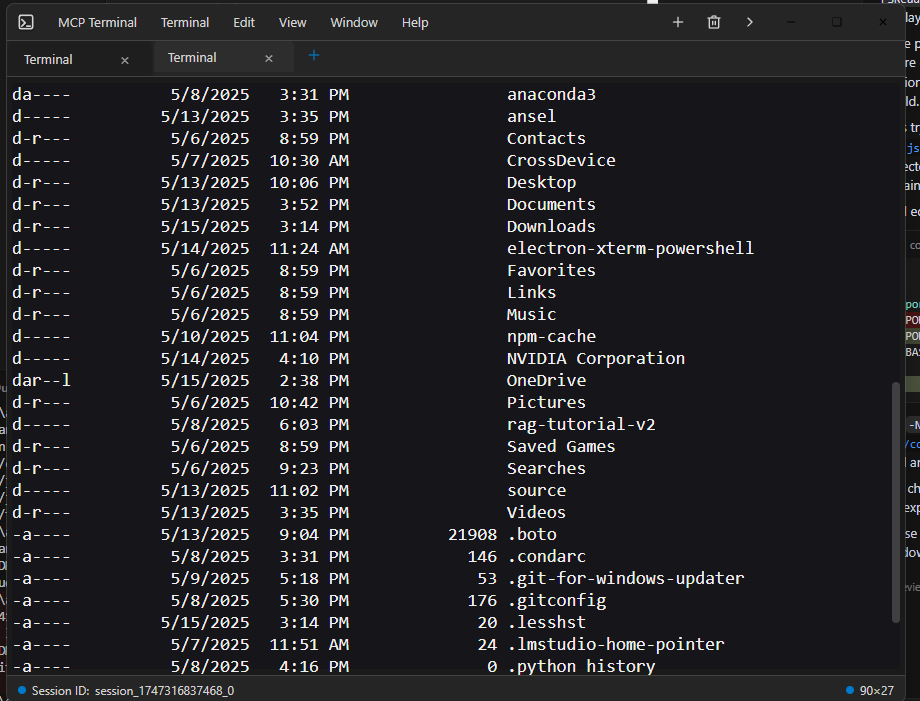
Claude Desktop のようなクライアント内でのターミナル操作は次のようになります。
ターミナル出力付きのClaudeデスクトップウィンドウ: 
個別電子端末ウィンドウ:
Related MCP server: MCP Terminal Server
3. インストール
前提条件: Node.js と npm がインストールされていることを確認してください。
**クローン:**まだリポジトリをクローンしていない場合は、クローンを作成します。
git clone <your-repository-url> cd command-terminal-electron # Or your repository directory name依存関係のインストール: MCP サーバーと Electron アプリの両方に Node モジュールをインストールします。
npm installネイティブ モジュールの再構築: Electron 用のネイティブ モジュール (
node-ptyなど) を再構築します。node rebuild.js(詳細は
rebuild.js参照)
3. 使用方法
MCPサーバーを起動します。Node.jsを使用して
index.jsスクリプトを実行します。これにより、stdioでMCPコマンドがリッスンされ、Electronバックエンドプロセス(main.js)がまだ実行されておらず、想定されるHTTPポートでリッスンしていない場合は、自動的に起動を試みます。node index.js注: Electron プロセスはバックグラウンドで隠れて実行され、必要なときに自動的に (再) 起動され、可能な場合は常に再利用されます。
**MCP経由のやり取り:**クライアントはstdio経由で
node index.jsプロセスに接続し、use_mcp_toolコマンドを使用します。サーバー名はindex.js内で「Electron Terminal」として定義されています。利用可能なツール:
terminal_start: 新しいターミナルセッションを作成し、初期コマンドを実行します。入力:
{ "command": "string" }出力:
{ "content": [...], "sessionId": "string" }GXP5
terminal_execute: 既存のセッションでコマンドを実行します。入力:
{ "command": "string", "sessionId": "string" }出力:
{ "content": [...] }(セッションIDはテキストコンテンツに含まれます) GXP6
terminal_get_output: セッションの累積出力を取得します。入力:
{ "sessionId": "string" }出力:
{ "content": [...] }GXP7
terminal_stop: 特定のターミナルセッションプロセスを終了します。入力:
{ "sessionId": "string" }出力:
{ "content": [...] }GXP8
terminal_get_sessions: Electron バックエンドによって管理されている現在アクティブなセッションをすべて一覧表示します。入力:
{}出力:
{ "content": [...] }(コンテンツにはアクティブなセッションのJSON文字列が含まれています) GXP9
5. ファイルシステムMCPサーバーとの相乗効果
このElectronターミナルMCPサーバーは、ファイルシステムMCPサーバーと連携することで非常に効果的に動作します。ファイルシステムサーバーを使用してディレクトリを参照し、ファイルの読み書きを行った後、このターミナルサーバーを使用してそれらのディレクトリ内またはファイルに関連するコマンドを実行できます。これにより、例えばclaudeデスクトップに組み込まれているインターネット検索機能とシームレスに連携する包括的なリモート開発およびインタラクションエクスペリエンスが実現します。
6. 要件
Node.js (v20以降を推奨、私はNode 22を使用)
npm
Electron と互換性のあるオペレーティング システム (Windows、macOS、Linux)
7. 構成
Claude デスクトップ MCP サーバー構成
位置
claude_desktop_config.jsonファイルは、ユーザーの AppData ディレクトリに配置する必要があります。
Windows:
C:\Users\<username>\AppData\Roaming\Claude\claude_desktop_config.json
このファイルは、Claude Desktop によって外部 MCP サーバーを検出し、構成するために使用されます。
目的と構造
設定ファイルは、Claude Desktop が起動および接続できる MCP サーバーを定義します。各サーバーエントリは、サーバープロセスの起動方法を指定します。
mcpServers: 各キーがサーバー名で、値がその起動構成であるオブジェクト。サーバー構成例 (
command-terminal) :command: 実行する実行可能ファイル (例: Node.js サーバーの場合はnode)。args: コマンドに渡される引数の配列 (例: MCP サーバー スクリプトへのパス)。
例
{
"mcpServers": {
"command-terminal": {
"command": "node",
"args": [
"C:\\Path\\to\\index.js"
]
}
}
}フィールドの説明
mcpServers: サーバー名とその構成をマッピングする最上位オブジェクト。command-terminal: サーバー名の例。このオブジェクトには複数のサーバーを定義できます。command: MCP サーバーを起動するために使用される実行可能ファイル。args: サーバー スクリプトへのパスなど、コマンドに渡される引数。
8. ライセンス
このプロジェクトはMITライセンスの下で提供されています。詳細はLICENSEファイルをご覧ください。
Available Tools
5 toolsterminal_executeD
| Name | Required | Description | Default |
|---|---|---|---|
| command | Yes | ||
| sessionId | Yes |
TDQS
Does the description disclose side effects, auth requirements, rate limits, or destructive behavior?
Tool has no description.
Agents need to know what a tool does to the world before calling it. Descriptions should go beyond structured annotations to explain consequences.
Is the description appropriately sized, front-loaded, and free of redundancy?
Tool has no description.
Shorter descriptions cost fewer tokens and are easier for agents to parse. Every sentence should earn its place.
Given the tool's complexity, does the description cover enough for an agent to succeed on first attempt?
Tool has no description.
Complex tools with many parameters or behaviors need more documentation. Simple tools need less. This dimension scales expectations accordingly.
Does the description clarify parameter syntax, constraints, interactions, or defaults beyond what the schema provides?
Tool has no description.
Input schemas describe structure but not intent. Descriptions should explain non-obvious parameter relationships and valid value ranges.
Does the description clearly state what the tool does and how it differs from similar tools?
Tool has no description.
Agents choose between tools based on descriptions. A clear purpose with a specific verb and resource helps agents select the right tool.
Does the description explain when to use this tool, when not to, or what alternatives exist?
Tool has no description.
Agents often have multiple tools that could apply. Explicit usage guidance like "use X instead of Y when Z" prevents misuse.
terminal_get_outputD
| Name | Required | Description | Default |
|---|---|---|---|
| sessionId | Yes |
TDQS
Does the description disclose side effects, auth requirements, rate limits, or destructive behavior?
Tool has no description.
Agents need to know what a tool does to the world before calling it. Descriptions should go beyond structured annotations to explain consequences.
Is the description appropriately sized, front-loaded, and free of redundancy?
Tool has no description.
Shorter descriptions cost fewer tokens and are easier for agents to parse. Every sentence should earn its place.
Given the tool's complexity, does the description cover enough for an agent to succeed on first attempt?
Tool has no description.
Complex tools with many parameters or behaviors need more documentation. Simple tools need less. This dimension scales expectations accordingly.
Does the description clarify parameter syntax, constraints, interactions, or defaults beyond what the schema provides?
Tool has no description.
Input schemas describe structure but not intent. Descriptions should explain non-obvious parameter relationships and valid value ranges.
Does the description clearly state what the tool does and how it differs from similar tools?
Tool has no description.
Agents choose between tools based on descriptions. A clear purpose with a specific verb and resource helps agents select the right tool.
Does the description explain when to use this tool, when not to, or what alternatives exist?
Tool has no description.
Agents often have multiple tools that could apply. Explicit usage guidance like "use X instead of Y when Z" prevents misuse.
terminal_get_sessionsD
| Name | Required | Description | Default |
|---|---|---|---|
No parameters | |||
TDQS
Does the description disclose side effects, auth requirements, rate limits, or destructive behavior?
Tool has no description.
Agents need to know what a tool does to the world before calling it. Descriptions should go beyond structured annotations to explain consequences.
Is the description appropriately sized, front-loaded, and free of redundancy?
Tool has no description.
Shorter descriptions cost fewer tokens and are easier for agents to parse. Every sentence should earn its place.
Given the tool's complexity, does the description cover enough for an agent to succeed on first attempt?
Tool has no description.
Complex tools with many parameters or behaviors need more documentation. Simple tools need less. This dimension scales expectations accordingly.
Does the description clarify parameter syntax, constraints, interactions, or defaults beyond what the schema provides?
Tool has no description.
Input schemas describe structure but not intent. Descriptions should explain non-obvious parameter relationships and valid value ranges.
Does the description clearly state what the tool does and how it differs from similar tools?
Tool has no description.
Agents choose between tools based on descriptions. A clear purpose with a specific verb and resource helps agents select the right tool.
Does the description explain when to use this tool, when not to, or what alternatives exist?
Tool has no description.
Agents often have multiple tools that could apply. Explicit usage guidance like "use X instead of Y when Z" prevents misuse.
terminal_startD
| Name | Required | Description | Default |
|---|---|---|---|
| command | Yes |
TDQS
Does the description disclose side effects, auth requirements, rate limits, or destructive behavior?
Tool has no description.
Agents need to know what a tool does to the world before calling it. Descriptions should go beyond structured annotations to explain consequences.
Is the description appropriately sized, front-loaded, and free of redundancy?
Tool has no description.
Shorter descriptions cost fewer tokens and are easier for agents to parse. Every sentence should earn its place.
Given the tool's complexity, does the description cover enough for an agent to succeed on first attempt?
Tool has no description.
Complex tools with many parameters or behaviors need more documentation. Simple tools need less. This dimension scales expectations accordingly.
Does the description clarify parameter syntax, constraints, interactions, or defaults beyond what the schema provides?
Tool has no description.
Input schemas describe structure but not intent. Descriptions should explain non-obvious parameter relationships and valid value ranges.
Does the description clearly state what the tool does and how it differs from similar tools?
Tool has no description.
Agents choose between tools based on descriptions. A clear purpose with a specific verb and resource helps agents select the right tool.
Does the description explain when to use this tool, when not to, or what alternatives exist?
Tool has no description.
Agents often have multiple tools that could apply. Explicit usage guidance like "use X instead of Y when Z" prevents misuse.
terminal_stopD
| Name | Required | Description | Default |
|---|---|---|---|
| sessionId | Yes |
TDQS
Does the description disclose side effects, auth requirements, rate limits, or destructive behavior?
Tool has no description.
Agents need to know what a tool does to the world before calling it. Descriptions should go beyond structured annotations to explain consequences.
Is the description appropriately sized, front-loaded, and free of redundancy?
Tool has no description.
Shorter descriptions cost fewer tokens and are easier for agents to parse. Every sentence should earn its place.
Given the tool's complexity, does the description cover enough for an agent to succeed on first attempt?
Tool has no description.
Complex tools with many parameters or behaviors need more documentation. Simple tools need less. This dimension scales expectations accordingly.
Does the description clarify parameter syntax, constraints, interactions, or defaults beyond what the schema provides?
Tool has no description.
Input schemas describe structure but not intent. Descriptions should explain non-obvious parameter relationships and valid value ranges.
Does the description clearly state what the tool does and how it differs from similar tools?
Tool has no description.
Agents choose between tools based on descriptions. A clear purpose with a specific verb and resource helps agents select the right tool.
Does the description explain when to use this tool, when not to, or what alternatives exist?
Tool has no description.
Agents often have multiple tools that could apply. Explicit usage guidance like "use X instead of Y when Z" prevents misuse.
Tool Schema Changelog
Recent tool additions, removals, and schema changes observed during successful MCP inspections.
1 tool update
v1.0.0- Changed
terminal_get_sessions1 field changed- removed
Input schema / additionalPropertiesRemoved value: -false
5 tool updates
- First observed
terminal_execute - First observed
terminal_get_output - First observed
terminal_get_sessions - First observed
terminal_start - First observed
terminal_stop
TDQS
Scored across 5 tools
Each tool name maps to a distinct lifecycle action: start, execute, get output, stop, and list sessions. Even without descriptions, the boundaries are clear and unlikely to cause misselection.
All tool names follow the same terminal_verb pattern using snake_case. The convention is uniform and predictable across the entire set.
Five tools is a well-scoped size for a terminal management server. Each tool covers a necessary operation without redundancy or bloat.
The set covers the full terminal session lifecycle: create, interact, read output, stop, and enumerate sessions. There are no obvious dead ends or missing core operations.
Maintenance
Related MCP Connectors
A comprehensive Model Context Protocol (MCP) server that enables AI assistants to interact with yo…
A Model Context Protocol server for Wix AI tools
Model Context Protocol server for Studex tools, notifications, and profile integrations
Enable secure connectivity between Sentry issues and debugging data, and LLM clients, using a Model Context Protocol (MCP) server.
Related MCP Servers
- AlicenseBqualityDmaintenanceA Model Context Protocol server that provides programmatic access to the Windows terminal, enabling AI models to interact with the Windows command line through standardized tools for writing commands, reading output, and sending control signals.35 npmMIT
- AlicenseBqualityDmaintenanceA secure terminal execution server that enables controlled command execution with security features and resource limits via the Model Context Protocol (MCP).110 npm11MIT
- AlicenseCqualityCmaintenanceA server that enables AI assistants to execute terminal commands and retrieve outputs via the Model Context Protocol (MCP).327MIT
- AlicenseBqualityBmaintenanceA Model Context Protocol server that provides comprehensive Electron application automation, debugging, and observability capabilities through Chrome DevTools Protocol integration.4260 npm71MIT