Glama
nexon33

Electron Terminal MCP Server

by nexon33

Electron Terminal MCP-Server

Idealerweise würden Anbieter eine eigene MCP-Integration für das Terminal bereitstellen. Dieses Projekt bietet jedoch einen Model Context Protocol (MCP)-Server, der Clients die Interaktion mit einem Systemterminal ermöglicht, das innerhalb einer Electron-Anwendung läuft. Es ermöglicht die Ausführung von Befehlen, die Verwaltung von Terminalsitzungen und das programmgesteuerte Abrufen von Ausgaben.

Das System besteht aus zwei Hauptteilen:

  • MCP-Server ( index.js ): Ein Node.js-Skript, das über die Standard-Ein-/Ausgabe (stdio) auf MCP-Anfragen wartet. Es verwendet @modelcontextprotocol/sdk und fungiert als Brücke zum Electron-Backend. Es startet das Electron-Backend automatisch, falls es nicht bereits läuft. In mcp-package.json muss "type": "module" angegeben werden.

  • Electron-Backend ( main.js ): Der Hauptprozess der Electron-Anwendung. Er betreibt einen Express-HTTP-Server (standardmäßig Port 3000), mit dem der MCP-Server ( index.js ) für Integritätsprüfungen und API-Aufrufe kommuniziert. Dieses Backend verwaltet die eigentlichen Terminalprozesse mithilfe von node-pty in versteckten BrowserWindow Instanzen, terminal.html laden.

2. Screenshots

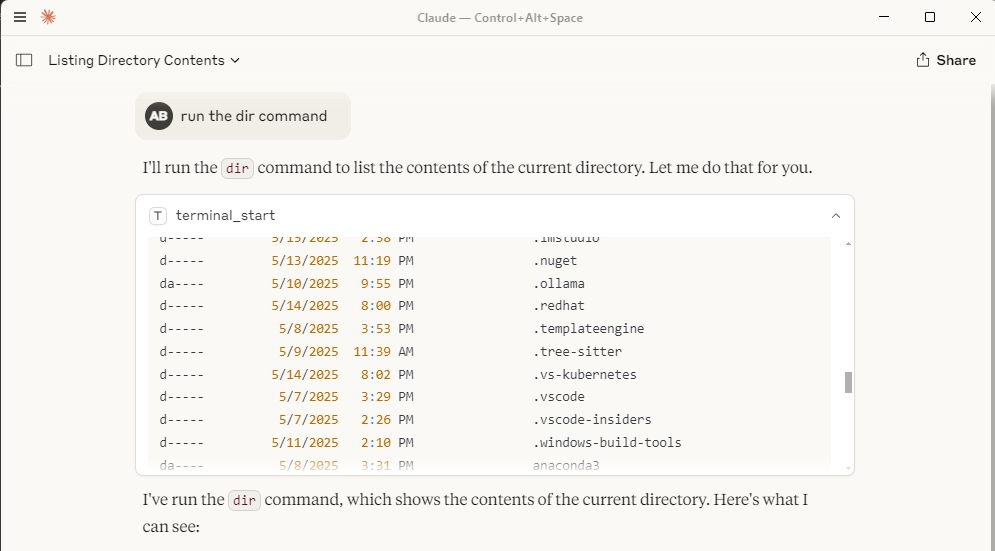
So sieht die Terminalinteraktion innerhalb eines Clients wie Claude Desktop aus:

Claude-Desktopfenster mit Terminalausgabe:Claude-Desktopfenster mit Terminalausgabe
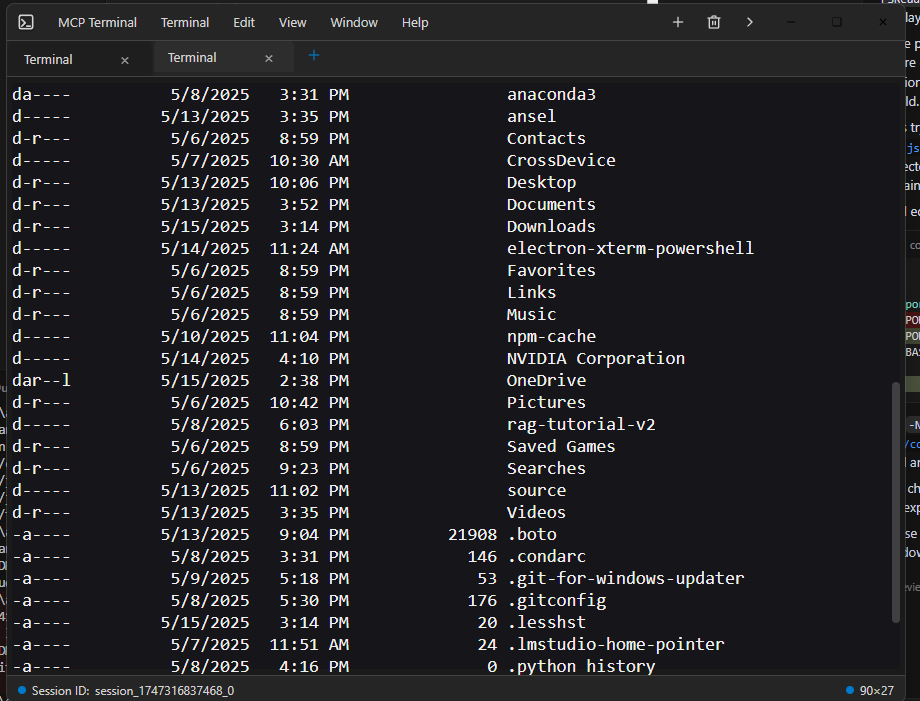
Fenster für einzelne Elektronenanschlüsse:Elektronenterminalfenster
Related MCP server: MCP Terminal Server

3. Installation

  1. Voraussetzungen: Stellen Sie sicher, dass Sie Node.js und npm installiert haben.

  2. Klonen: Klonen Sie das Repository, falls Sie dies noch nicht getan haben.

    git clone <your-repository-url>
    cd command-terminal-electron # Or your repository directory name
  3. Abhängigkeiten installieren: Installieren Sie Node-Module sowohl für den MCP-Server als auch für die Electron-App.

    npm install
  4. Native Module neu erstellen: Native Module (wie node-pty ) für Electron neu erstellen.

    node rebuild.js

    (Weitere Einzelheiten finden Sie in rebuild.js .)

3. Nutzung

  1. Starten Sie den MCP-Server: Führen Sie das Skript index.js mit Node.js aus. Dadurch wird auf stdio auf MCP-Befehle gewartet und automatisch versucht, den Electron-Backend-Prozess ( main.js ) zu starten, falls dieser nicht bereits läuft und auf dem erwarteten HTTP-Port lauscht.

    node index.js

    Hinweis: Der Electron-Prozess läuft verborgen im Hintergrund und wird bei Bedarf automatisch (neu) gestartet und nach Möglichkeit immer wiederverwendet.

  2. Interaktion über MCP: Clients verbinden sich über stdio mit dem node index.js -Prozess und verwenden den Befehl use_mcp_tool . Der Servername ist in index.js als „Electron Terminal“ definiert.

    Verfügbare Tools:

    • terminal_start : Erstellt eine neue Terminalsitzung und führt einen ersten Befehl aus.

      • Eingabe: { "command": "string" }

      • Ausgabe: { "content": [...], "sessionId": "string" } GXP5

    • terminal_execute : Führt einen Befehl in einer bestehenden Sitzung aus.

      • Eingabe: { "command": "string", "sessionId": "string" }

      • Ausgabe: { "content": [...] } (Sitzungs-ID ist im Textinhalt enthalten) GXP6

    • terminal_get_output : Ruft die kumulierte Ausgabe für eine Sitzung ab.

      • Eingabe: { "sessionId": "string" }

      • Ausgabe: { "content": [...] } GXP7

    • terminal_stop : Beendet einen bestimmten Terminalsitzungsprozess.

      • Eingabe: { "sessionId": "string" }

      • Ausgabe: { "content": [...] } GXP8

    • terminal_get_sessions : Listet alle derzeit aktiven Sitzungen auf, die vom Electron-Backend verwaltet werden.

      • Eingabe: {}

      • Ausgabe: { "content": [...] } (Inhalt enthält eine JSON-Zeichenfolge aktiver Sitzungen) GXP9

5. Synergie mit dem Filesystem MCP Server

Dieser Electron Terminal MCP-Server arbeitet sehr effektiv mit dem Filesystem MCP-Server zusammen. Sie können den Filesystem-Server verwenden, um Verzeichnisse zu durchsuchen, Dateien zu lesen/schreiben und anschließend mit diesem Terminalserver Befehle innerhalb dieser Verzeichnisse oder in Bezug auf diese Dateien auszuführen. Dies bietet eine umfassende Remote-Entwicklungs- und Interaktionserfahrung, die nahtlos mit beispielsweise der in Claude Desktop integrierten Internet-Suchfunktion zusammenarbeitet.

6. Voraussetzungen

  • Node.js (v20 oder höher empfohlen, ich verwende Node 22)

  • npm

  • Mit Electron kompatibles Betriebssystem (Windows, macOS, Linux)

7. Konfiguration

Claude Desktop MCP-Serverkonfiguration

Standort

Die Datei claude_desktop_config.json sollte im AppData-Verzeichnis Ihres Benutzers abgelegt werden:

  • Windows: C:\Users\<username>\AppData\Roaming\Claude\claude_desktop_config.json

Diese Datei wird von Claude Desktop verwendet, um externe MCP-Server zu erkennen und zu konfigurieren.

Zweck und Struktur

Die Konfigurationsdatei definiert MCP-Server, die Claude Desktop starten und mit denen es sich verbinden kann. Jeder Servereintrag gibt an, wie der Serverprozess gestartet werden soll.

  • mcpServers : Ein Objekt, bei dem jeder Schlüssel ein Servername und der Wert seine Startkonfiguration ist.

  • Beispiel für eine Serverkonfiguration ( command-terminal ) :

    • command : Die auszuführende ausführbare Datei (z. B. node für Node.js-Server).

    • args : Ein Array von Argumenten, die an den Befehl übergeben werden (z. B. der Pfad zu Ihrem MCP-Serverskript).

Beispiel

{
  "mcpServers": {
    "command-terminal": {
      "command": "node",
      "args": [
        "C:\\Path\\to\\index.js"
      ]
    }
  }
}

Felderklärungen

  • mcpServers : Objekt der obersten Ebene, das Servernamen ihren Konfigurationen zuordnet.

  • command-terminal : Beispiel-Servername. Sie können in diesem Objekt mehrere Server definieren.

  • command : Die ausführbare Datei zum Starten des MCP-Servers.

  • args : An den Befehl übergebene Argumente, z. B. der Pfad zu Ihrem Serverskript.

8. Lizenz

Dieses Projekt ist unter der MIT-Lizenz lizenziert. Weitere Informationen finden Sie in der Datei LICENSE.

Available Tools

5 tools
terminal_executeD
ParametersJSON Schema
NameRequiredDescriptionDefault
commandYes
sessionIdYes

TDQS

D1/5.0
Behavior1/5

Does the description disclose side effects, auth requirements, rate limits, or destructive behavior?

Tool has no description.

Agents need to know what a tool does to the world before calling it. Descriptions should go beyond structured annotations to explain consequences.

Conciseness1/5

Is the description appropriately sized, front-loaded, and free of redundancy?

Tool has no description.

Shorter descriptions cost fewer tokens and are easier for agents to parse. Every sentence should earn its place.

Completeness1/5

Given the tool's complexity, does the description cover enough for an agent to succeed on first attempt?

Tool has no description.

Complex tools with many parameters or behaviors need more documentation. Simple tools need less. This dimension scales expectations accordingly.

Parameters1/5

Does the description clarify parameter syntax, constraints, interactions, or defaults beyond what the schema provides?

Tool has no description.

Input schemas describe structure but not intent. Descriptions should explain non-obvious parameter relationships and valid value ranges.

Purpose1/5

Does the description clearly state what the tool does and how it differs from similar tools?

Tool has no description.

Agents choose between tools based on descriptions. A clear purpose with a specific verb and resource helps agents select the right tool.

Usage Guidelines1/5

Does the description explain when to use this tool, when not to, or what alternatives exist?

Tool has no description.

Agents often have multiple tools that could apply. Explicit usage guidance like "use X instead of Y when Z" prevents misuse.

terminal_get_outputD
ParametersJSON Schema
NameRequiredDescriptionDefault
sessionIdYes

TDQS

D1/5.0
Behavior1/5

Does the description disclose side effects, auth requirements, rate limits, or destructive behavior?

Tool has no description.

Agents need to know what a tool does to the world before calling it. Descriptions should go beyond structured annotations to explain consequences.

Conciseness1/5

Is the description appropriately sized, front-loaded, and free of redundancy?

Tool has no description.

Shorter descriptions cost fewer tokens and are easier for agents to parse. Every sentence should earn its place.

Completeness1/5

Given the tool's complexity, does the description cover enough for an agent to succeed on first attempt?

Tool has no description.

Complex tools with many parameters or behaviors need more documentation. Simple tools need less. This dimension scales expectations accordingly.

Parameters1/5

Does the description clarify parameter syntax, constraints, interactions, or defaults beyond what the schema provides?

Tool has no description.

Input schemas describe structure but not intent. Descriptions should explain non-obvious parameter relationships and valid value ranges.

Purpose1/5

Does the description clearly state what the tool does and how it differs from similar tools?

Tool has no description.

Agents choose between tools based on descriptions. A clear purpose with a specific verb and resource helps agents select the right tool.

Usage Guidelines1/5

Does the description explain when to use this tool, when not to, or what alternatives exist?

Tool has no description.

Agents often have multiple tools that could apply. Explicit usage guidance like "use X instead of Y when Z" prevents misuse.

terminal_get_sessionsD
ParametersJSON Schema
NameRequiredDescriptionDefault

No parameters

TDQS

D1/5.0
Behavior1/5

Does the description disclose side effects, auth requirements, rate limits, or destructive behavior?

Tool has no description.

Agents need to know what a tool does to the world before calling it. Descriptions should go beyond structured annotations to explain consequences.

Conciseness1/5

Is the description appropriately sized, front-loaded, and free of redundancy?

Tool has no description.

Shorter descriptions cost fewer tokens and are easier for agents to parse. Every sentence should earn its place.

Completeness1/5

Given the tool's complexity, does the description cover enough for an agent to succeed on first attempt?

Tool has no description.

Complex tools with many parameters or behaviors need more documentation. Simple tools need less. This dimension scales expectations accordingly.

Parameters1/5

Does the description clarify parameter syntax, constraints, interactions, or defaults beyond what the schema provides?

Tool has no description.

Input schemas describe structure but not intent. Descriptions should explain non-obvious parameter relationships and valid value ranges.

Purpose1/5

Does the description clearly state what the tool does and how it differs from similar tools?

Tool has no description.

Agents choose between tools based on descriptions. A clear purpose with a specific verb and resource helps agents select the right tool.

Usage Guidelines1/5

Does the description explain when to use this tool, when not to, or what alternatives exist?

Tool has no description.

Agents often have multiple tools that could apply. Explicit usage guidance like "use X instead of Y when Z" prevents misuse.

terminal_startD
ParametersJSON Schema
NameRequiredDescriptionDefault
commandYes

TDQS

D1/5.0
Behavior1/5

Does the description disclose side effects, auth requirements, rate limits, or destructive behavior?

Tool has no description.

Agents need to know what a tool does to the world before calling it. Descriptions should go beyond structured annotations to explain consequences.

Conciseness1/5

Is the description appropriately sized, front-loaded, and free of redundancy?

Tool has no description.

Shorter descriptions cost fewer tokens and are easier for agents to parse. Every sentence should earn its place.

Completeness1/5

Given the tool's complexity, does the description cover enough for an agent to succeed on first attempt?

Tool has no description.

Complex tools with many parameters or behaviors need more documentation. Simple tools need less. This dimension scales expectations accordingly.

Parameters1/5

Does the description clarify parameter syntax, constraints, interactions, or defaults beyond what the schema provides?

Tool has no description.

Input schemas describe structure but not intent. Descriptions should explain non-obvious parameter relationships and valid value ranges.

Purpose1/5

Does the description clearly state what the tool does and how it differs from similar tools?

Tool has no description.

Agents choose between tools based on descriptions. A clear purpose with a specific verb and resource helps agents select the right tool.

Usage Guidelines1/5

Does the description explain when to use this tool, when not to, or what alternatives exist?

Tool has no description.

Agents often have multiple tools that could apply. Explicit usage guidance like "use X instead of Y when Z" prevents misuse.

terminal_stopD
ParametersJSON Schema
NameRequiredDescriptionDefault
sessionIdYes

TDQS

D1/5.0
Behavior1/5

Does the description disclose side effects, auth requirements, rate limits, or destructive behavior?

Tool has no description.

Agents need to know what a tool does to the world before calling it. Descriptions should go beyond structured annotations to explain consequences.

Conciseness1/5

Is the description appropriately sized, front-loaded, and free of redundancy?

Tool has no description.

Shorter descriptions cost fewer tokens and are easier for agents to parse. Every sentence should earn its place.

Completeness1/5

Given the tool's complexity, does the description cover enough for an agent to succeed on first attempt?

Tool has no description.

Complex tools with many parameters or behaviors need more documentation. Simple tools need less. This dimension scales expectations accordingly.

Parameters1/5

Does the description clarify parameter syntax, constraints, interactions, or defaults beyond what the schema provides?

Tool has no description.

Input schemas describe structure but not intent. Descriptions should explain non-obvious parameter relationships and valid value ranges.

Purpose1/5

Does the description clearly state what the tool does and how it differs from similar tools?

Tool has no description.

Agents choose between tools based on descriptions. A clear purpose with a specific verb and resource helps agents select the right tool.

Usage Guidelines1/5

Does the description explain when to use this tool, when not to, or what alternatives exist?

Tool has no description.

Agents often have multiple tools that could apply. Explicit usage guidance like "use X instead of Y when Z" prevents misuse.

Tool Schema Changelog

Recent tool additions, removals, and schema changes observed during successful MCP inspections.

  1. 1 tool updatev1.0.0
    • Changedterminal_get_sessions1 field changed
      • removedInput schema / additionalProperties
        Removed value: -false
  2. 5 tool updates
    • First observedterminal_execute
    • First observedterminal_get_output
    • First observedterminal_get_sessions
    • First observedterminal_start
    • First observedterminal_stop

TDQS

C2.2/5.0

Scored across 5 tools

Disambiguation5/5

Each tool name maps to a distinct lifecycle action: start, execute, get output, stop, and list sessions. Even without descriptions, the boundaries are clear and unlikely to cause misselection.

Naming Consistency5/5

All tool names follow the same terminal_verb pattern using snake_case. The convention is uniform and predictable across the entire set.

Tool Count5/5

Five tools is a well-scoped size for a terminal management server. Each tool covers a necessary operation without redundancy or bloat.

Completeness5/5

The set covers the full terminal session lifecycle: create, interact, read output, stop, and enumerate sessions. There are no obvious dead ends or missing core operations.

Maintenance

ActivityInactive
ResponsivenessNo issues

Related MCP Connectors

Related MCP Servers

  • A
    license
    B
    quality
    D
    maintenance
    A Model Context Protocol server that provides programmatic access to the Windows terminal, enabling AI models to interact with the Windows command line through standardized tools for writing commands, reading output, and sending control signals.
    3
    5 npm
    MIT
  • A
    license
    C
    quality
    C
    maintenance
    A server that enables AI assistants to execute terminal commands and retrieve outputs via the Model Context Protocol (MCP).
    3
    27
    MIT