Electron Terminal MCP Server
Электронный терминал MCP сервер
В идеальном мире поставщики предоставили бы собственную интеграцию MCP для терминала, но в то же время этот проект предоставляет сервер Model Context Protocol (MCP), который позволяет клиентам взаимодействовать с системным терминалом, работающим в приложении Electron. Он позволяет выполнять команды, управлять сеансами терминала и извлекать вывод программным способом.
Система состоит из двух основных частей:
MCP Server (
index.js): скрипт Node.js, который прослушивает запросы MCP через стандартный ввод/вывод (stdio). Он использует@modelcontextprotocol/sdkи действует как мост к бэкенду Electron. Он автоматически запускает бэкенд Electron, если он еще не запущен. Он требуетmcp-package.jsonдля указания"type": "module".Electron Backend (
main.js): Основной процесс для приложения Electron. Он запускает HTTP-сервер Express (по умолчанию порт 3000), с которым сервер MCP (index.js) взаимодействует для проверки работоспособности и вызовов API. Этот бэкенд управляет фактическими процессами терминала с помощьюnode-ptyв скрытых экземплярахBrowserWindow, загружаяterminal.html.
2. Скриншоты
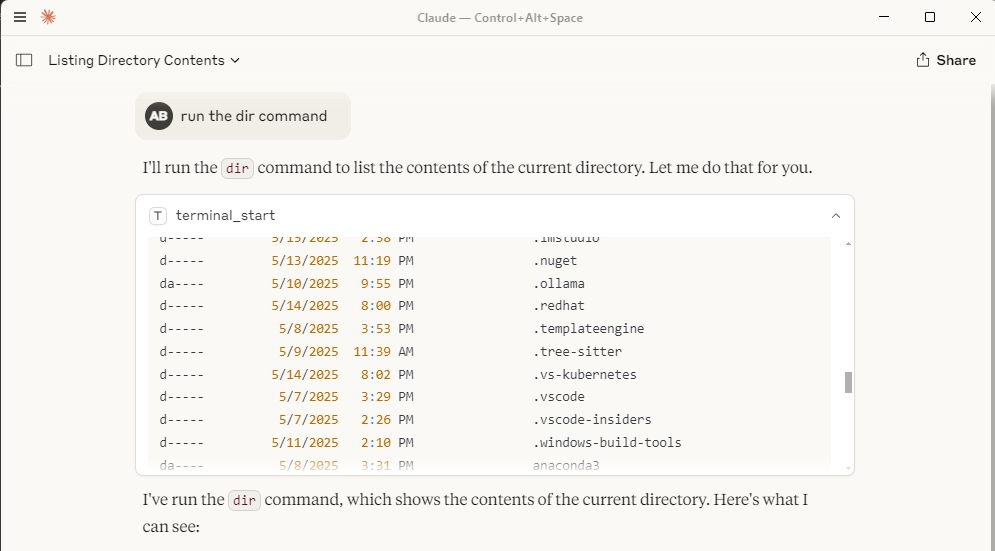
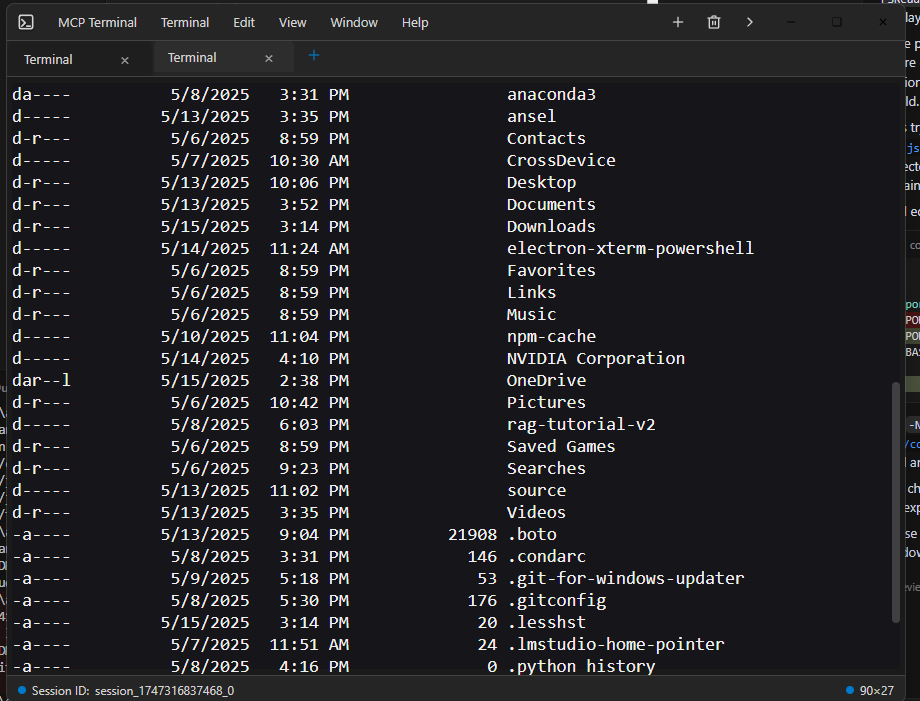
Вот как выглядит взаимодействие с терминалом в таком клиенте, как Claude Desktop:
Окно рабочего стола Клода с выводом терминала: 
Окно индивидуального электронного терминала:
Related MCP server: MCP Terminal Server
3. Установка
Предварительные условия: убедитесь, что у вас установлены Node.js и npm.
Клонировать: Клонируйте репозиторий, если вы еще этого не сделали.
git clone <your-repository-url> cd command-terminal-electron # Or your repository directory nameУстановка зависимостей: Установите модули Node для сервера MCP и приложения Electron.
npm installПересоберите собственные модули: пересоберите собственные модули (например,
node-pty) для Electron.node rebuild.js(Подробности см.
rebuild.js)
3. Использование
Запустите сервер MCP: запустите скрипт
index.jsс помощью Node.js. Он будет прослушивать команды MCP на stdio и автоматически попытается запустить бэкэнд-процесс Electron (main.js), если он еще не запущен и не прослушивает ожидаемый порт HTTP.node index.jsПримечание: процесс Electron выполняется скрытно в фоновом режиме и автоматически (пере)запускается при необходимости и всегда будет использоваться повторно, если это возможно.
Взаимодействие через MCP: Клиенты подключаются к процессу
node index.jsчерез stdio и используют командуuse_mcp_tool. Имя сервера определено вindex.jsкак "Electron Terminal".Доступные инструменты:
terminal_start: создает новый сеанс терминала и выполняет начальную команду.Ввод:
{ "command": "string" }Вывод:
{ "content": [...], "sessionId": "string" }GXP5
terminal_execute: выполняет команду в существующем сеансе.Ввод:
{ "command": "string", "sessionId": "string" }Вывод:
{ "content": [...] }(Идентификатор сеанса включен в текстовое содержимое) GXP6
terminal_get_output: извлекает накопленный вывод для сеанса.Ввод:
{ "sessionId": "string" }Вывод:
{ "content": [...] }GXP7
terminal_stop: завершает определенный процесс сеанса терминала.Ввод:
{ "sessionId": "string" }Вывод:
{ "content": [...] }GXP8
terminal_get_sessions: выводит список всех активных в данный момент сеансов, управляемых бэкэндом Electron.Вход:
{}Вывод:
{ "content": [...] }(Контент содержит строку JSON активных сеансов) GXP9
5. Синергия с файловой системой MCP Server
Этот сервер Electron Terminal MCP работает очень эффективно в сочетании с сервером Filesystem MCP . Вы можете использовать сервер Filesystem для просмотра каталогов, чтения/записи файлов, а затем использовать этот терминальный сервер для выполнения команд в этих каталогах или связанных с этими файлами, предоставляя комплексный опыт удаленной разработки и взаимодействия, который работает без проблем вместе, например, с функцией поиска в Интернете, встроенной в claude desktop.
6. Требования
Node.js (рекомендуется версия 20 или более поздняя, я использую node 22)
нпм
Операционная система, совместимая с Electron (Windows, macOS, Linux)
7. Конфигурация
Конфигурация сервера Claude Desktop MCP
Расположение
Файл claude_desktop_config.json должен быть помещен в каталог AppData вашего пользователя:
Windows:
C:\Users\<username>\AppData\Roaming\Claude\claude_desktop_config.json
Этот файл используется Claude Desktop для обнаружения и настройки внешних серверов MCP.
Цель и структура
Файл конфигурации определяет серверы MCP, которые Claude Desktop может запускать и подключать. Каждая запись сервера определяет, как запустить процесс сервера.
mcpServers: объект, где каждый ключ — это имя сервера, а значение — его конфигурация запуска.Пример конфигурации сервера (
command-terminal) :command: исполняемый файл для запуска (например,nodeдля серверов Node.js).args: массив аргументов, передаваемых команде (например, путь к скрипту вашего сервера MCP).
Пример
{
"mcpServers": {
"command-terminal": {
"command": "node",
"args": [
"C:\\Path\\to\\index.js"
]
}
}
}Пояснения к полям
mcpServers: объекты верхнего уровня, сопоставляющие имена серверов с их конфигурациями.command-terminal: Пример имени сервера. Вы можете определить несколько серверов в этом объекте.command: исполняемый файл, используемый для запуска сервера MCP.args: Аргументы, передаваемые команде, например, путь к серверному скрипту.
8. Лицензия
Этот проект лицензирован по лицензии MIT. Подробности см. в файле LICENSE.
Available Tools
5 toolsterminal_executeD
| Name | Required | Description | Default |
|---|---|---|---|
| command | Yes | ||
| sessionId | Yes |
TDQS
Does the description disclose side effects, auth requirements, rate limits, or destructive behavior?
Tool has no description.
Agents need to know what a tool does to the world before calling it. Descriptions should go beyond structured annotations to explain consequences.
Is the description appropriately sized, front-loaded, and free of redundancy?
Tool has no description.
Shorter descriptions cost fewer tokens and are easier for agents to parse. Every sentence should earn its place.
Given the tool's complexity, does the description cover enough for an agent to succeed on first attempt?
Tool has no description.
Complex tools with many parameters or behaviors need more documentation. Simple tools need less. This dimension scales expectations accordingly.
Does the description clarify parameter syntax, constraints, interactions, or defaults beyond what the schema provides?
Tool has no description.
Input schemas describe structure but not intent. Descriptions should explain non-obvious parameter relationships and valid value ranges.
Does the description clearly state what the tool does and how it differs from similar tools?
Tool has no description.
Agents choose between tools based on descriptions. A clear purpose with a specific verb and resource helps agents select the right tool.
Does the description explain when to use this tool, when not to, or what alternatives exist?
Tool has no description.
Agents often have multiple tools that could apply. Explicit usage guidance like "use X instead of Y when Z" prevents misuse.
terminal_get_outputD
| Name | Required | Description | Default |
|---|---|---|---|
| sessionId | Yes |
TDQS
Does the description disclose side effects, auth requirements, rate limits, or destructive behavior?
Tool has no description.
Agents need to know what a tool does to the world before calling it. Descriptions should go beyond structured annotations to explain consequences.
Is the description appropriately sized, front-loaded, and free of redundancy?
Tool has no description.
Shorter descriptions cost fewer tokens and are easier for agents to parse. Every sentence should earn its place.
Given the tool's complexity, does the description cover enough for an agent to succeed on first attempt?
Tool has no description.
Complex tools with many parameters or behaviors need more documentation. Simple tools need less. This dimension scales expectations accordingly.
Does the description clarify parameter syntax, constraints, interactions, or defaults beyond what the schema provides?
Tool has no description.
Input schemas describe structure but not intent. Descriptions should explain non-obvious parameter relationships and valid value ranges.
Does the description clearly state what the tool does and how it differs from similar tools?
Tool has no description.
Agents choose between tools based on descriptions. A clear purpose with a specific verb and resource helps agents select the right tool.
Does the description explain when to use this tool, when not to, or what alternatives exist?
Tool has no description.
Agents often have multiple tools that could apply. Explicit usage guidance like "use X instead of Y when Z" prevents misuse.
terminal_get_sessionsD
| Name | Required | Description | Default |
|---|---|---|---|
No parameters | |||
TDQS
Does the description disclose side effects, auth requirements, rate limits, or destructive behavior?
Tool has no description.
Agents need to know what a tool does to the world before calling it. Descriptions should go beyond structured annotations to explain consequences.
Is the description appropriately sized, front-loaded, and free of redundancy?
Tool has no description.
Shorter descriptions cost fewer tokens and are easier for agents to parse. Every sentence should earn its place.
Given the tool's complexity, does the description cover enough for an agent to succeed on first attempt?
Tool has no description.
Complex tools with many parameters or behaviors need more documentation. Simple tools need less. This dimension scales expectations accordingly.
Does the description clarify parameter syntax, constraints, interactions, or defaults beyond what the schema provides?
Tool has no description.
Input schemas describe structure but not intent. Descriptions should explain non-obvious parameter relationships and valid value ranges.
Does the description clearly state what the tool does and how it differs from similar tools?
Tool has no description.
Agents choose between tools based on descriptions. A clear purpose with a specific verb and resource helps agents select the right tool.
Does the description explain when to use this tool, when not to, or what alternatives exist?
Tool has no description.
Agents often have multiple tools that could apply. Explicit usage guidance like "use X instead of Y when Z" prevents misuse.
terminal_startD
| Name | Required | Description | Default |
|---|---|---|---|
| command | Yes |
TDQS
Does the description disclose side effects, auth requirements, rate limits, or destructive behavior?
Tool has no description.
Agents need to know what a tool does to the world before calling it. Descriptions should go beyond structured annotations to explain consequences.
Is the description appropriately sized, front-loaded, and free of redundancy?
Tool has no description.
Shorter descriptions cost fewer tokens and are easier for agents to parse. Every sentence should earn its place.
Given the tool's complexity, does the description cover enough for an agent to succeed on first attempt?
Tool has no description.
Complex tools with many parameters or behaviors need more documentation. Simple tools need less. This dimension scales expectations accordingly.
Does the description clarify parameter syntax, constraints, interactions, or defaults beyond what the schema provides?
Tool has no description.
Input schemas describe structure but not intent. Descriptions should explain non-obvious parameter relationships and valid value ranges.
Does the description clearly state what the tool does and how it differs from similar tools?
Tool has no description.
Agents choose between tools based on descriptions. A clear purpose with a specific verb and resource helps agents select the right tool.
Does the description explain when to use this tool, when not to, or what alternatives exist?
Tool has no description.
Agents often have multiple tools that could apply. Explicit usage guidance like "use X instead of Y when Z" prevents misuse.
terminal_stopD
| Name | Required | Description | Default |
|---|---|---|---|
| sessionId | Yes |
TDQS
Does the description disclose side effects, auth requirements, rate limits, or destructive behavior?
Tool has no description.
Agents need to know what a tool does to the world before calling it. Descriptions should go beyond structured annotations to explain consequences.
Is the description appropriately sized, front-loaded, and free of redundancy?
Tool has no description.
Shorter descriptions cost fewer tokens and are easier for agents to parse. Every sentence should earn its place.
Given the tool's complexity, does the description cover enough for an agent to succeed on first attempt?
Tool has no description.
Complex tools with many parameters or behaviors need more documentation. Simple tools need less. This dimension scales expectations accordingly.
Does the description clarify parameter syntax, constraints, interactions, or defaults beyond what the schema provides?
Tool has no description.
Input schemas describe structure but not intent. Descriptions should explain non-obvious parameter relationships and valid value ranges.
Does the description clearly state what the tool does and how it differs from similar tools?
Tool has no description.
Agents choose between tools based on descriptions. A clear purpose with a specific verb and resource helps agents select the right tool.
Does the description explain when to use this tool, when not to, or what alternatives exist?
Tool has no description.
Agents often have multiple tools that could apply. Explicit usage guidance like "use X instead of Y when Z" prevents misuse.
Tool Schema Changelog
Recent tool additions, removals, and schema changes observed during successful MCP inspections.
1 tool update
v1.0.0- Changed
terminal_get_sessions1 field changed- removed
Input schema / additionalPropertiesRemoved value: -false
5 tool updates
- First observed
terminal_execute - First observed
terminal_get_output - First observed
terminal_get_sessions - First observed
terminal_start - First observed
terminal_stop
TDQS
Scored across 5 tools
Each tool name maps to a distinct lifecycle action: start, execute, get output, stop, and list sessions. Even without descriptions, the boundaries are clear and unlikely to cause misselection.
All tool names follow the same terminal_verb pattern using snake_case. The convention is uniform and predictable across the entire set.
Five tools is a well-scoped size for a terminal management server. Each tool covers a necessary operation without redundancy or bloat.
The set covers the full terminal session lifecycle: create, interact, read output, stop, and enumerate sessions. There are no obvious dead ends or missing core operations.
Maintenance
Related MCP Connectors
A comprehensive Model Context Protocol (MCP) server that enables AI assistants to interact with yo…
A Model Context Protocol server for Wix AI tools
Model Context Protocol server for Studex tools, notifications, and profile integrations
Enable secure connectivity between Sentry issues and debugging data, and LLM clients, using a Model Context Protocol (MCP) server.
Related MCP Servers
- AlicenseBqualityDmaintenanceA Model Context Protocol server that provides programmatic access to the Windows terminal, enabling AI models to interact with the Windows command line through standardized tools for writing commands, reading output, and sending control signals.35 npmMIT
- AlicenseBqualityDmaintenanceA secure terminal execution server that enables controlled command execution with security features and resource limits via the Model Context Protocol (MCP).110 npm11MIT
- AlicenseCqualityCmaintenanceA server that enables AI assistants to execute terminal commands and retrieve outputs via the Model Context Protocol (MCP).327MIT
- AlicenseBqualityBmaintenanceA Model Context Protocol server that provides comprehensive Electron application automation, debugging, and observability capabilities through Chrome DevTools Protocol integration.4260 npm71MIT