Unity Editor MCP Server
MCP Unity 编辑器(游戏引擎)
,/(/. *(/,
*/(((((/. *((((((*.
.*((((((((((/. *((((((((((/.
./((((((((((((((/ *((((((((((((((/,
,/(((((((((((((/*. */(((((((((((((/*.
,%%#((/((((((* ,/(((((/(#&@@(
,%%##%%##((((((/*. ,/((((/(#&@@@@@@(
,%%######%%##((/(((/*. .*/(((//(%@@@@@@@@@@@(
,%%####%#(%%#%%##((/((((((((//#&@@@@@@&@@@@@@@@(
,%%####%( /#%#%%%##(//(#@@@@@@@%, #@@@@@@@(
,%%####%( *#%###%@@@@@@( #@@@@@@@(
,%%####%( #%#%@@@@, #@@@@@@@(
,%%##%%%( #%#%@@@@, #@@@@@@@(
,%%%#* #%#%@@@@, *%@@@(
., ,/##*. #%#%@@@@, ./&@#* *`
,/#%#####%%#/, #%#%@@@@, ,/&@@@@@@@@@&\.
`*#########%%%%###%@@@@@@@@@@@@@@@@@@&*´
`*%%###########%@@@@@@@@@@@@@@&*´
`*%%%######%@@@@@@@@@@&*´
`*#%%##%@@@@@&*´
`*%#%@&*´
███╗ ███╗ ██████╗██████╗ ██╗ ██╗███╗ ██╗██╗████████╗██╗ ██╗
████╗ ████║██╔════╝██╔══██╗ ██║ ██║████╗ ██║██║╚══██╔══╝╚██╗ ██╔╝
██╔████╔██║██║ ██████╔╝ ██║ ██║██╔██╗ ██║██║ ██║ ╚████╔╝
██║╚██╔╝██║██║ ██╔═══╝ ██║ ██║██║╚██╗██║██║ ██║ ╚██╔╝
██║ ╚═╝ ██║╚██████╗██║ ╚██████╔╝██║ ╚████║██║ ██║ ██║
╚═╝ ╚═╝ ╚═════╝╚═╝ ╚═════╝ ╚═╝ ╚═══╝╚═╝ ╚═╝ ╚═╝ MCP Unity 是 Unity 编辑器模型上下文协议 (MCP) 的实现,允许 AI 助手与你的 Unity 项目进行交互。此软件包在 Unity 和实现 MCP 协议的 Node.js 服务器之间架起了一座桥梁,使 Claude、Windsurf 和 Cursor 等 AI 代理能够在 Unity 编辑器中执行操作。
特征
IDE 集成 - 包缓存访问
MCP Unity 通过将 Unity Library/PackedCache文件夹添加到您的工作区,提供与类似 VSCode 的 IDE(Visual Studio Code、Cursor、Windsurf)的自动集成。此功能:
改进 Unity 软件包的代码智能
为 Unity 软件包提供更好的自动完成和类型信息
帮助 AI 编码助手了解项目的依赖关系
MCP 服务器工具
以下工具可用于通过 MCP 操作和查询 Unity 场景和游戏对象:
execute_menu_item:执行 Unity 菜单项(标有 MenuItem 属性的函数)示例提示: “执行菜单项‘GameObject/Create Empty’创建一个新的空GameObject”
select_gameobject:通过路径或实例 ID 选择 Unity 层次结构中的游戏对象示例提示: “选择场景中的主摄像机对象”
update_gameobject:更新 GameObject 的核心属性(名称、标签、层、活动/静态状态),如果 GameObject 不存在则创建该 GameObject示例提示: “将玩家对象的标签设置为‘敌人’并使其处于非活动状态”
update_component:更新 GameObject 上的组件字段,如果 GameObject 不包含该组件,则将其添加到 GameObject示例提示: “为 Player 对象添加一个 Rigidbody 组件,并将其质量设置为 5”
add_package:在 Unity 包管理器中安装新包示例提示: “将 TextMeshPro 包添加到我的项目”
run_tests:使用 Unity Test Runner 运行测试示例提示: “运行我的项目中的所有 EditMode 测试”
send_console_log:向 Unity 发送控制台日志示例提示: “将控制台日志发送到 Unity 编辑器”
add_asset_to_scene:将 AssetDatabase 中的资源添加到 Unity 场景示例提示: “将我的项目中的 Player 预制件添加到当前场景”
MCP 服务器资源
unity://menu-items:检索 Unity 编辑器中所有可用菜单项的列表,以方便使用execute_menu_item工具提示示例: “显示与 GameObject 创建相关的所有可用菜单项”
unity://scenes-hierarchy:检索当前 Unity 场景层次结构中所有游戏对象的列表提示示例: “显示当前场景的层次结构”
unity://gameobject/{id}:通过场景层次结构中的实例 ID 或对象路径检索有关特定 GameObject 的详细信息,包括所有 GameObject 组件及其序列化属性和字段提示示例: “获取有关玩家游戏对象的详细信息”
unity://logs:从 Unity 控制台检索所有日志的列表提示示例: “显示 Unity 控制台中最近的错误消息”
unity://packages:从 Unity 包管理器检索有关已安装和可用包的信息示例提示: “列出我的 Unity 项目中当前安装的所有软件包”
unity://assets:检索有关 Unity Asset Database 中的资产信息示例提示: “查找我的项目中的所有纹理资产”
unity://tests/{testMode}:检索有关 Unity Test Runner 中的测试的信息示例提示: “列出我的 Unity 项目中所有可用的测试”
Related MCP server: MCP For Unity
要求
安装
安装此 MCP Unity Server 是一个多步骤过程:
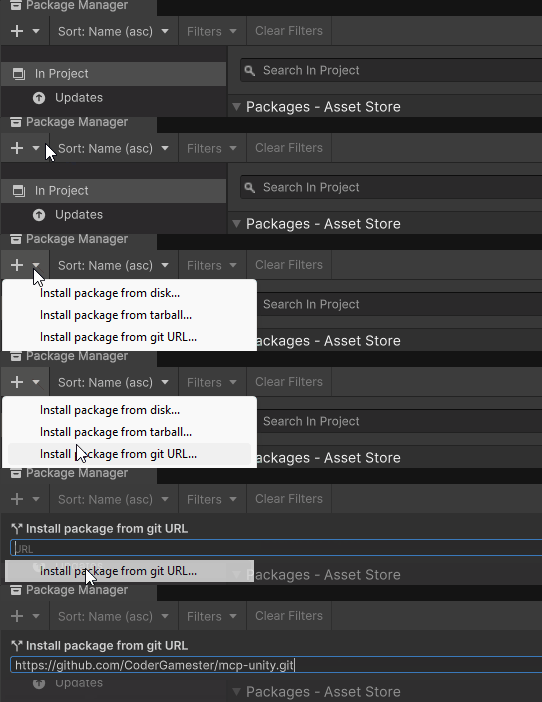
步骤 1:通过 Unity 包管理器安装 Unity MCP 服务器包
打开 Unity 包管理器(窗口 > 包管理器)
点击左上角的“+”按钮
选择“从 git URL 添加包...”
输入:
https://github.com/CoderGamester/mcp-unity.git点击“添加”
第 2 步:安装 Node.js
要运行 MCP Unity 服务器,您需要在计算机上安装 Node.js 18 或更高版本:
下载 LTS 版本的 Windows 安装程序 (.msi)(推荐)
运行安装程序并按照安装向导进行操作
通过打开 PowerShell 并运行以下命令来验证安装:
node --version下载 LTS 版本的 macOS 安装程序 (.pkg)(推荐)
运行安装程序并按照安装向导进行操作
或者,如果您安装了 Homebrew,您可以运行:
brew install node@18打开终端并运行以下命令来验证安装:
node --version
步骤3:配置AI LLM客户端
打开 Unity 编辑器
导航至“工具”>“MCP Unity”>“服务器窗口”
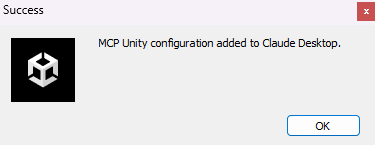
单击您的 AI LLM 客户端的“配置”按钮,如下图所示
使用给定的弹出窗口确认配置安装
打开你的AI客户端的MCP配置文件(例如Claude Desktop中的claude_desktop_config.json)并复制以下文本:
将
ABSOLUTE/PATH/TO替换为 MCP Unity 安装的绝对路径,或者直接从 Unity Editor MCP Server 窗口(工具 > MCP Unity > 服务器窗口)复制文本。
{
"mcpServers": {
"mcp-unity": {
"command": "node",
"args": [
"ABSOLUTE/PATH/TO/mcp-unity/Server~/build/index.js"
]
}
}
}启动 Unity 编辑器 MCP 服务器
打开 Unity 编辑器
导航至“工具”>“MCP Unity”>“服务器窗口”
点击“启动服务器”启动WebSocket服务器
打开 Claude Desktop 或您的 AI 编码 IDE(例如 Cursor IDE、Windsurf IDE 等)并开始执行 Unity 工具
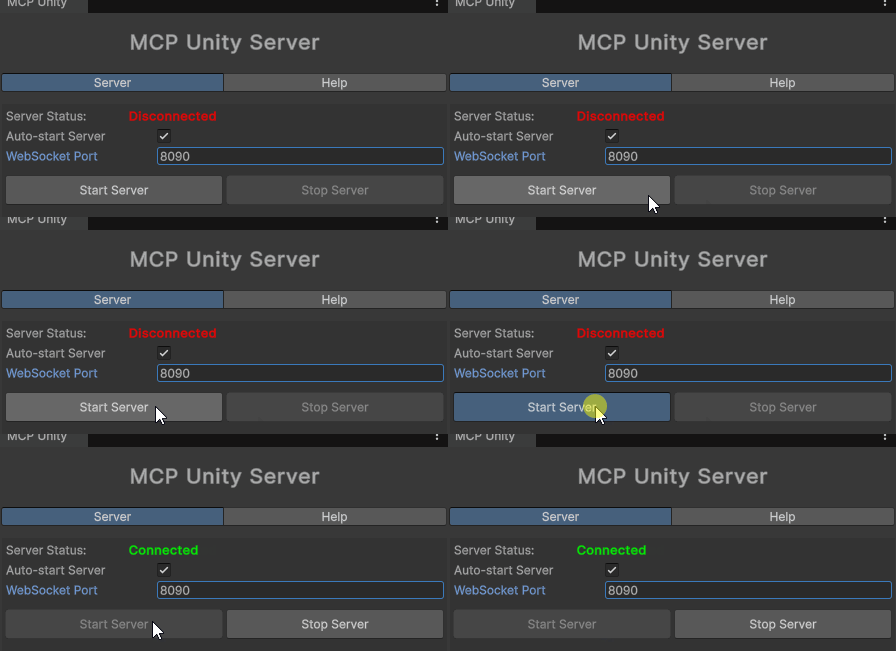
当AI客户端连接到WebSocket服务器时,会自动在窗口中显示绿色框
可选:设置 WebSocket 端口
默认情况下,WebSocket 服务器在端口 8090 上运行。您可以通过两种方式更改此端口:
打开 Unity 编辑器
导航至“工具”>“MCP Unity”>“服务器窗口”
将“WebSocket 端口”值更改为所需的端口号
Unity 将设置系统环境变量 UNITY_PORT 为新的端口号
重启 Node.js 服务器
再次单击“启动服务器”将 Unity 编辑器 Web 套接字重新连接到 Node.js MCP 服务器
在终端中设置 UNITY_PORT 环境变量
Powershell GXP6
命令提示符/终端 GXP7
重启 Node.js 服务器
再次单击“启动服务器”将 Unity 编辑器 Web 套接字重新连接到 Node.js MCP 服务器
可选:设置超时
MCP 服务器与 WebSocket 之间的连接超时时间默认为 10 秒。您可以根据操作系统进行修改:
打开 Unity 编辑器
导航至“工具”>“MCP Unity”>“服务器窗口”
将“请求超时(秒)”值更改为所需的超时秒数
Unity 将设置系统环境变量 UNITY_REQUEST_TIMEOUT 为新的超时值
重启 Node.js 服务器
再次单击“启动服务器”将 Unity 编辑器 Web 套接字重新连接到 Node.js MCP 服务器
对于非Windows操作系统,需要配置两个地方:
编辑器进程超时
打开 Unity 编辑器
导航至“工具”>“MCP Unity”>“服务器窗口”
将“请求超时(秒)”值更改为所需的超时秒数
WebSocket 超时
在终端中设置 UNITY_REQUEST_TIMEOUT 环境变量
Powershell GXP8
命令提示符/终端 GXP9
重启 Node.js 服务器
再次单击“启动服务器”将 Unity 编辑器 Web 套接字重新连接到 Node.js MCP 服务器
[!提示]
您的 AI 编码 IDE(例如,Claude Desktop、Cursor IDE、Windsurf IDE)和 MCP 服务器之间的超时取决于 IDE。
调试服务器
MCP Unity 服务器使用 Node.js 构建。它需要在build目录中将 TypeScript 代码编译为 JavaScript。要构建服务器,请打开终端并执行以下操作:
导航到服务器目录:
cd ABSOLUTE/PATH/TO/mcp-unity/Server~安装依赖项:
npm install构建服务器:
npm run build运行服务器:
node build/index.js
使用@modelcontextprotocol/inspector调试服务器:
Powershell
npx @modelcontextprotocol/inspector node Server~/build/index.js命令提示符/终端
npx @modelcontextprotocol/inspector node Server~/build/index.js在关闭终端或使用MCP Inspector进行调试之前,请不要忘记使用Ctrl + C关闭服务器。
在您的终端或 log.txt 文件中启用日志记录:
Powershell GXP16
命令提示符/终端 GXP17
故障排除
确保 WebSocket 服务器正在运行(检查 Unity 中的服务器窗口)
从 MCP 客户端发送控制台日志消息以强制 MCP 客户端和 Unity 服务器之间重新连接
在 Unity 编辑器 MCP 服务器窗口中更改端口号。(“工具”>“MCP Unity”>“服务器窗口”)
检查 Unity 控制台中的错误消息
确保 Node.js 已正确安装并可在 PATH 中访问
验证所有依赖项是否都安装在服务器目录中
run_tests工具返回以下响应:
Error:
Connection failed: Unknown error发生此错误的原因是,当切换到播放模式并重新加载域时,桥接连接丢失。
解决方法是在**“编辑”>“项目设置”>“编辑器”>“进入播放模式设置”中关闭“重新加载域”** 。
支持与反馈
如果您有任何疑问或需要支持,请在此存储库上打开一个问题。
您还可以通过以下方式联系我们:
领英:
Discord:gamester7178
贡献
欢迎贡献代码!欢迎提交 Pull 请求或创建 Issue 来表达你的请求。
按照常规提交格式提交您的更改。
执照
该项目采用MIT 许可证
致谢
Available Tools
5 toolsnotify_messageC
Sends a message to the Unity console
| Name | Required | Description | Default |
|---|---|---|---|
| message | Yes | The message to display in the Unity console | |
| type | No | The type of message (info, warning, error) |
TDQS
Does the description disclose side effects, auth requirements, rate limits, or destructive behavior?
With no annotations provided, the description carries full burden but only states what the tool does without disclosing behavioral traits. It doesn't mention whether this is a read-only operation, if it requires specific permissions, how messages appear in the console, or any rate limits. The description is minimal and lacks necessary context for a mutation tool.
Agents need to know what a tool does to the world before calling it. Descriptions should go beyond structured annotations to explain consequences.
Is the description appropriately sized, front-loaded, and free of redundancy?
The description is a single, efficient sentence with zero waste. It's appropriately sized and front-loaded, directly stating the tool's purpose without unnecessary elaboration.
Shorter descriptions cost fewer tokens and are easier for agents to parse. Every sentence should earn its place.
Given the tool's complexity, does the description cover enough for an agent to succeed on first attempt?
For a tool that sends messages (implying mutation) with no annotations and no output schema, the description is incomplete. It doesn't explain what happens after sending, return values, error conditions, or integration with Unity's console system. The minimal description leaves significant gaps in understanding the tool's behavior.
Complex tools with many parameters or behaviors need more documentation. Simple tools need less. This dimension scales expectations accordingly.
Does the description clarify parameter syntax, constraints, interactions, or defaults beyond what the schema provides?
Schema description coverage is 100%, so the schema already documents both parameters thoroughly. The description doesn't add any meaning beyond what the schema provides about message content or type options. Baseline 3 is appropriate when the schema does the heavy lifting.
Input schemas describe structure but not intent. Descriptions should explain non-obvious parameter relationships and valid value ranges.
Does the description clearly state what the tool does and how it differs from similar tools?
The description clearly states the action ('sends') and target ('message to the Unity console'), providing a specific verb+resource combination. However, it doesn't differentiate from sibling tools like 'execute_menu_item' or 'run_tests', which prevents a perfect score.
Agents choose between tools based on descriptions. A clear purpose with a specific verb and resource helps agents select the right tool.
Does the description explain when to use this tool, when not to, or what alternatives exist?
The description provides no guidance on when to use this tool versus alternatives like logging to files or using other console methods. It lacks context about appropriate scenarios or exclusions, offering only basic functional information.
Agents often have multiple tools that could apply. Explicit usage guidance like "use X instead of Y when Z" prevents misuse.
package_managerC
Manages packages in the Unity Package Manager
| Name | Required | Description | Default |
|---|---|---|---|
| branch | No | The branch to use for GitHub packages (optional) | |
| methodSource | Yes | The method source to use (registry, github, or disk) to add the package | |
| packageName | No | The package name to add from Unity registry (e.g. com.unity.textmeshpro) | |
| path | No | The path to use (folder path for disk method or subfolder for GitHub) | |
| repositoryUrl | No | The GitHub repository URL (e.g. https://github.com/username/repo.git) | |
| version | No | The version to use for registry packages (optional) |
TDQS
Does the description disclose side effects, auth requirements, rate limits, or destructive behavior?
With no annotations provided, the description carries the full burden of behavioral disclosure but only states a general purpose. It doesn't describe whether this tool performs read-only or destructive operations, what permissions are needed, how it handles errors, or what the typical output looks like, which is insufficient for a tool with multiple parameters and no output schema.
Agents need to know what a tool does to the world before calling it. Descriptions should go beyond structured annotations to explain consequences.
Is the description appropriately sized, front-loaded, and free of redundancy?
The description is a single, efficient sentence with no wasted words, making it appropriately concise. However, it lacks front-loaded detail that could immediately clarify the tool's specific actions, slightly reducing its effectiveness despite the brevity.
Shorter descriptions cost fewer tokens and are easier for agents to parse. Every sentence should earn its place.
Given the tool's complexity, does the description cover enough for an agent to succeed on first attempt?
Given the tool's complexity with 6 parameters, no annotations, and no output schema, the description is incomplete. It fails to explain what the tool does beyond a vague purpose, leaving gaps in understanding behavioral traits, return values, and proper usage context, which is inadequate for effective agent invocation.
Complex tools with many parameters or behaviors need more documentation. Simple tools need less. This dimension scales expectations accordingly.
Does the description clarify parameter syntax, constraints, interactions, or defaults beyond what the schema provides?
The schema description coverage is 100%, so all parameters are documented in the schema itself. The description adds no additional meaning about parameters beyond the general purpose, resulting in a baseline score of 3 where the schema does the heavy lifting without enhancement from the description.
Input schemas describe structure but not intent. Descriptions should explain non-obvious parameter relationships and valid value ranges.
Does the description clearly state what the tool does and how it differs from similar tools?
The description 'Manages packages in the Unity Package Manager' states a general purpose but is vague about what specific actions are performed. It doesn't specify whether it adds, removes, updates, or lists packages, and doesn't distinguish from sibling tools like 'execute_menu_item' or 'run_tests' which are unrelated to package management.
Agents choose between tools based on descriptions. A clear purpose with a specific verb and resource helps agents select the right tool.
Does the description explain when to use this tool, when not to, or what alternatives exist?
No guidance is provided on when to use this tool versus alternatives. The description doesn't mention any prerequisites, context for package management, or exclusions, leaving the agent to infer usage from the parameters alone without explicit direction.
Agents often have multiple tools that could apply. Explicit usage guidance like "use X instead of Y when Z" prevents misuse.
run_testsC
Runs Unity's Test Runner tests
| Name | Required | Description | Default |
|---|---|---|---|
| testFilter | No | Optional test filter (e.g. specific test name or namespace) | |
| testMode | No | The test mode to run (EditMode, PlayMode, or All) |
TDQS
Does the description disclose side effects, auth requirements, rate limits, or destructive behavior?
With no annotations provided, the description carries full burden but lacks behavioral details. It doesn't disclose whether this is a read-only or destructive operation, execution time, error handling, or output format (e.g., test results). The phrase 'Runs' implies execution but gives no further context on safety or side effects.
Agents need to know what a tool does to the world before calling it. Descriptions should go beyond structured annotations to explain consequences.
Is the description appropriately sized, front-loaded, and free of redundancy?
The description is a single, efficient sentence with no wasted words, making it easy to parse. It's front-loaded with the core action and resource, earning full marks for conciseness and structure.
Shorter descriptions cost fewer tokens and are easier for agents to parse. Every sentence should earn its place.
Given the tool's complexity, does the description cover enough for an agent to succeed on first attempt?
Given the complexity of running tests (which involves execution and potential side effects), no annotations, and no output schema, the description is incomplete. It doesn't explain what happens during execution, what results to expect, or any constraints, leaving significant gaps for an agent to use the tool effectively.
Complex tools with many parameters or behaviors need more documentation. Simple tools need less. This dimension scales expectations accordingly.
Does the description clarify parameter syntax, constraints, interactions, or defaults beyond what the schema provides?
The input schema has 100% description coverage, documenting both parameters clearly. The description adds no additional meaning beyond what the schema provides, such as examples of test filters or implications of test modes. With high schema coverage, the baseline score of 3 is appropriate.
Input schemas describe structure but not intent. Descriptions should explain non-obvious parameter relationships and valid value ranges.
Does the description clearly state what the tool does and how it differs from similar tools?
The description clearly states the action ('Runs') and the resource ('Unity's Test Runner tests'), making the purpose immediately understandable. However, it doesn't differentiate this tool from sibling tools like 'execute_menu_item' or 'package_manager', which could also involve Unity operations, so it doesn't reach the highest score.
Agents choose between tools based on descriptions. A clear purpose with a specific verb and resource helps agents select the right tool.
Does the description explain when to use this tool, when not to, or what alternatives exist?
The description provides no guidance on when to use this tool versus alternatives. There's no mention of prerequisites, context (e.g., when in Unity's workflow), or comparisons to siblings like 'execute_menu_item' for other Unity actions, leaving the agent to infer usage.
Agents often have multiple tools that could apply. Explicit usage guidance like "use X instead of Y when Z" prevents misuse.
select_objectC
Sets the selected object in the Unity editor by path or ID
| Name | Required | Description | Default |
|---|---|---|---|
| objectPath | Yes | The path or ID of the object to select (e.g. "Main Camera" or a Unity object ID) |
TDQS
Does the description disclose side effects, auth requirements, rate limits, or destructive behavior?
No annotations are provided, so the description carries the full burden of behavioral disclosure. It states the tool 'Sets the selected object' which implies a mutation (changing editor state), but doesn't disclose critical traits like whether this requires specific editor modes, if changes are undoable, potential side effects, or error handling. For a mutation tool with zero annotation coverage, this is a significant gap.
Agents need to know what a tool does to the world before calling it. Descriptions should go beyond structured annotations to explain consequences.
Is the description appropriately sized, front-loaded, and free of redundancy?
The description is a single, efficient sentence that front-loads the core action ('Sets the selected object') with essential details ('in the Unity editor by path or ID'). Every word earns its place with no redundancy or fluff, making it highly concise and well-structured.
Shorter descriptions cost fewer tokens and are easier for agents to parse. Every sentence should earn its place.
Given the tool's complexity, does the description cover enough for an agent to succeed on first attempt?
Given the tool's complexity (a mutation in an editor environment), lack of annotations, and no output schema, the description is incomplete. It doesn't cover behavioral aspects like permissions, side effects, or return values, leaving gaps for an AI agent to understand how to invoke it correctly in context.
Complex tools with many parameters or behaviors need more documentation. Simple tools need less. This dimension scales expectations accordingly.
Does the description clarify parameter syntax, constraints, interactions, or defaults beyond what the schema provides?
The input schema has 100% description coverage, with the parameter 'objectPath' fully documented in the schema. The description adds minimal value beyond the schema by mentioning 'path or ID' and providing an example ('Main Camera'), but doesn't elaborate on syntax, format differences, or edge cases. Baseline 3 is appropriate when the schema does the heavy lifting.
Input schemas describe structure but not intent. Descriptions should explain non-obvious parameter relationships and valid value ranges.
Does the description clearly state what the tool does and how it differs from similar tools?
The description clearly states the action ('Sets the selected object') and the resource ('in the Unity editor'), with the method ('by path or ID') specified. It distinguishes from siblings like 'execute_menu_item' or 'run_tests' by focusing on object selection. However, it doesn't explicitly differentiate from all siblings (e.g., 'notify_message' is clearly different, but the distinction could be more explicit for a perfect score).
Agents choose between tools based on descriptions. A clear purpose with a specific verb and resource helps agents select the right tool.
Does the description explain when to use this tool, when not to, or what alternatives exist?
The description provides no guidance on when to use this tool versus alternatives. It doesn't mention prerequisites (e.g., needing an open Unity project), exclusions, or comparisons to sibling tools. Usage is implied through the action but lacks explicit context for selection.
Agents often have multiple tools that could apply. Explicit usage guidance like "use X instead of Y when Z" prevents misuse.
Tool Schema Changelog
Recent tool additions, removals, and schema changes observed during successful MCP inspections.
5 tool updates
v1.0.0- First observed
execute_menu_item - First observed
notify_message - First observed
package_manager - First observed
run_tests - First observed
select_object
TDQS
Scored across 5 tools
Each tool has a clearly distinct purpose targeting different Unity Editor functionalities: executing menu items, sending console messages, managing packages, running tests, and selecting objects. There is no overlap or ambiguity in their intended uses.
The tool names follow a consistent snake_case pattern with descriptive verb_noun combinations (e.g., execute_menu_item, notify_message). However, 'package_manager' deviates slightly by using a noun-only name instead of a verb_noun structure, but overall the naming is highly readable and predictable.
With 5 tools, the server is well-scoped for its purpose of interacting with the Unity Editor. Each tool serves a specific, essential function, and there are no extraneous or redundant tools, making the count appropriate for the domain.
The toolset covers key Unity Editor operations like executing commands, messaging, package management, testing, and object selection. However, there are notable gaps for a full editor integration, such as creating or modifying assets, building projects, or accessing scene hierarchies, which limits comprehensive workflow coverage.
Maintenance
Related MCP Connectors
A comprehensive Model Context Protocol (MCP) server that enables AI assistants to control Unreal E…
MCP server for AI dialogue using various LLM models via AceDataCloud
MCP server unifying ERPs, CRMs, APIs and knowledge base for Claude, ChatGPT and Gemini.
Nifty's MCP server — exposes tasks, projects, messages, and files as tools for AI agents.
Related MCP Servers
- AlicenseNot gradedqualityAmaintenanceSeamless automation and intelligent control over your Unity projects. By integrating with the MCP server and client, it allows AI agents or external tools to interact with your Unity environment—creating, modifying, and managing GameObjects, Components, Assets, Scenes, and more.4,386Apache 2.0
- FlicenseNot gradedqualityDmaintenanceEnables AI clients to interact with and control the Unity Editor through a Python MCP server bridge, allowing natural language-based Unity project manipulation.-
- AlicenseNot gradedqualityDmaintenanceMCP server that bridges Unity with AI agents, enabling scene inspection, C# code execution, and screenshot capture via WebSocket communication.MIT
- FlicenseNot gradedqualityDmaintenanceMCP server that lets AI agents drive the full Unity lifecycle on macOS without opening the Unity Editor.2-