

A
licenseB
qualityC
maintenanceA Model Context Protocol (MCP) server that converts Mermaid diagrams to PNG images.
1
266
234
MIT

用于在 Claude Code 中渲染 Mermaid 图表的 MCP 服务器,具有实时重载功能和内置的专家指导技能。
在您优化图表时,它会自动在浏览器中实时更新渲染。非常适合迭代式图表开发和文档工作流。
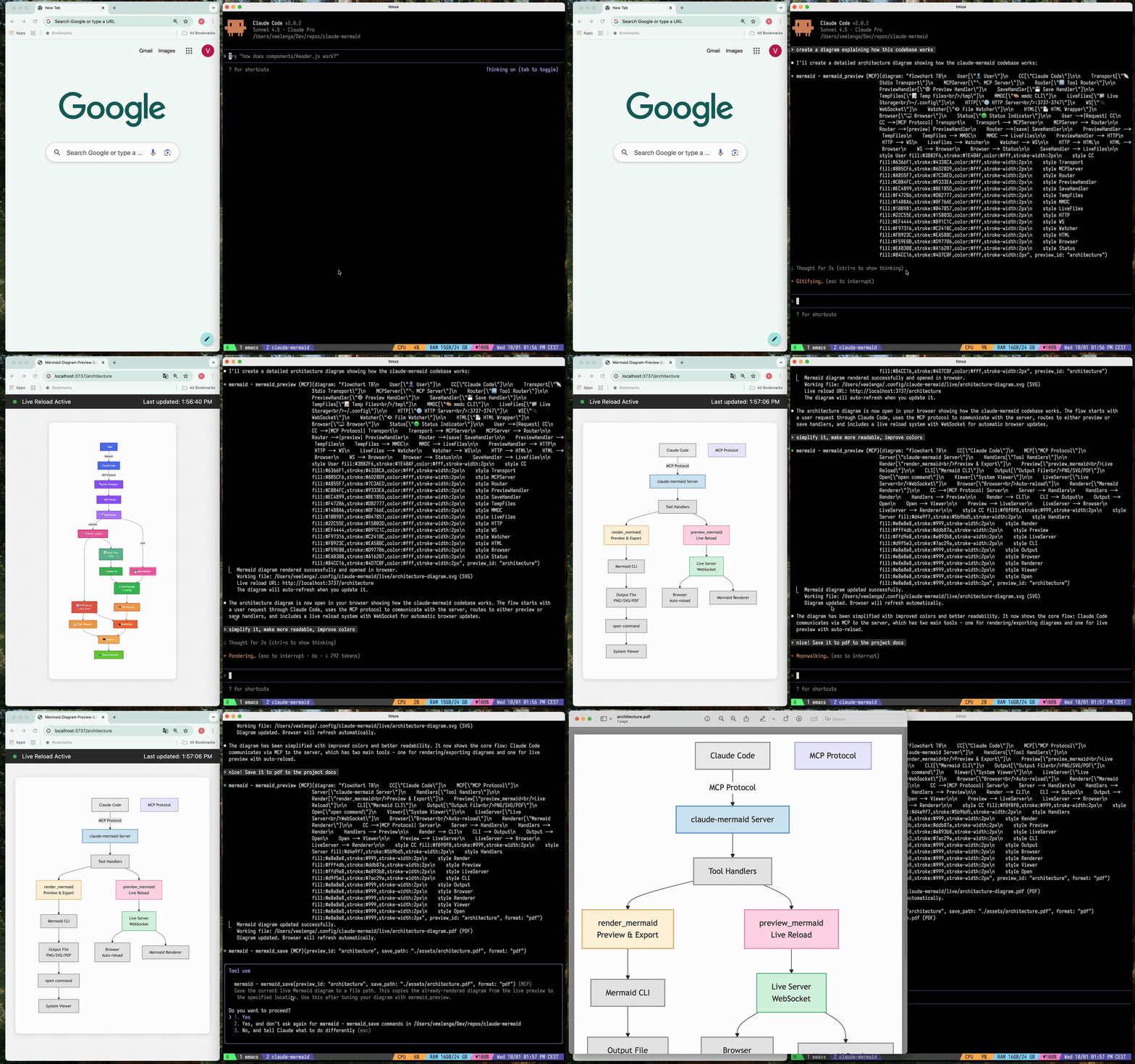
🔄 实时重载 - 图表在您编辑时会自动在浏览器中刷新
🎨 多种保存格式 - 导出为 SVG、PNG 或 PDF
🌈 主题 - 可选择默认、森林、深色或中性主题
📐 可定制 - 控制尺寸、缩放比例和背景颜色
🪄 交互式预览 - 通过拖拽平移图表,使用浏览器控件缩放,一键重置位置
⬇️ 浏览器导出 - 直接从预览中下载 SVG 或 PNG 格式的图表
🗂️ 多重预览 - 使用 preview_id 同时处理多个图表
💾 持久化工作文件 - 实时预览存储在 ~/.config/claude-mermaid/live 下
🤖 内置技能 - 包含一个 Claude 技能,提供创建图表的最佳实践和专家指导
Related MCP server: mcp-mermaid-validator
插件安装(推荐)
在 Claude Code 中,添加市场并安装插件:
/plugin marketplace add veelenga/claude-mermaid
/plugin install claude-mermaid@claude-mermaid
然后重启 Claude Code 以激活插件。
从 npm 安装:
npm install -g claude-mermaid从源码安装:
git clone https://github.com/veelenga/claude-mermaid.git
cd claude-mermaid
npm install && npm run build && npm install -g .插件安装: MCP 服务器会自动配置。只需验证:
/mcp你应该能在 MCP 服务器列表中看到 mermaid。
npm 安装: 手动配置 MCP 服务器:
claude mcp add --scope user mermaid claude-mermaid然后验证:
claude mcp list你应该看到 mermaid: claude-mermaid - ✓ Connected
虽然此服务器针对 Claude Code 进行了优化,但它适用于任何兼容 MCP 的客户端。以下是如何为其他流行工具进行配置:
添加到您的 Codex MCP 设置文件 (~/.codex/mcp_settings.json):
{
  "mcpServers": {
    "mermaid": {
      "command": "claude-mermaid"
    }
  }
}
或通过 Codex CLI 配置:
codex mcp add mermaid claude-mermaid添加到您的 Cursor MCP 配置文件 (.cursor/mcp.json 或设置中):
{
  "mcpServers": {
    "mermaid": {
      "command": "claude-mermaid"
    }
  }
}
或使用 Cursor 的设置界面:
打开 Cursor 设置 (Cmd/Ctrl + ,)
导航到 MCP Servers
添加一个新服务器,命令为:claude-mermaid
如果使用 VSCode 的 Cline 扩展:
打开 VSCode 设置 (Cmd/Ctrl + ,)
搜索 "Cline MCP"
添加到 MCP 设置 JSON 中:
{
  "mcpServers": {
    "mermaid": {
      "command": "claude-mermaid"
    }
  }
}
添加到 Windsurf 的 MCP 配置文件中:
{
  "mcpServers": {
    "mermaid": {
      "command": "claude-mermaid"
    }
  }
}
配置文件位置因平台而异:
macOS: ~/Library/Application Support/Windsurf/mcp.json
Linux: ~/.config/windsurf/mcp.json
Windows: %APPDATA%\Windsurf\mcp.json
添加到 Gemini CLI 的 MCP 配置文件 (~/.gemini/mcp.json):
{
  "mcpServers": {
    "mermaid": {
      "command": "claude-mermaid"
    }
  }
}
或使用 Gemini CLI 进行配置:
gemini config mcp add mermaid --command claude-mermaid对于任何兼容 MCP 的客户端,使用标准配置:
{
  "mcpServers": {
    "mermaid": {
      "command": "claude-mermaid"
    }
  }
}安装后,claude-mermaid 命令应在您的 PATH 中可用。
注意: 某些客户端可能需要可执行文件的完整路径:
查找路径:which claude-mermaid (Unix/macOS) 或 where claude-mermaid (Windows)
在配置中使用绝对路径:"command": "/path/to/claude-mermaid"
只需自然地要求 Claude Code 创建 Mermaid 图表即可。当作为插件安装时,内置的 mermaid-diagrams 技能会提供专家指导、最佳实践和自动工作流管理。
"Create a Mermaid diagram showing the user authentication flow"
"Draw a sequence diagram for the payment process"
"Generate a flowchart for the deployment pipeline"自定义格式:
"Create a dark theme architecture diagram with transparent background"
"Generate a forest theme flowchart and save to ./docs/flow.svg"
指定输出格式:
"Create an ER diagram and save as PDF to ./docs/schema.pdf"
"Save the flowchart as PNG to ./docs/flow.png"
注意:浏览器始终显示 SVG 以进行实时预览,同时保存为您选择的格式。
迭代优化:
"Create a class diagram for the User module"
// Browser opens with live preview
"Add the Address and Order classes with relationships"
// Diagram updates automatically in browser!"Create a flowchart and save to ./docs/auth-flow.svg:
graph LR
A[User Login] --> B{Valid Credentials?}
B -->|Yes| C[Access Granted]
B -->|No| D[Access Denied]
C --> E[Dashboard]
D --> F[Try Again]
style A fill:#e1f5ff
style C fill:#d4edda
style D fill:#f8d7da
"该图表将保存到 ./docs/auth-flow.svg 并在您的浏览器中打开,同时启用实时重载。
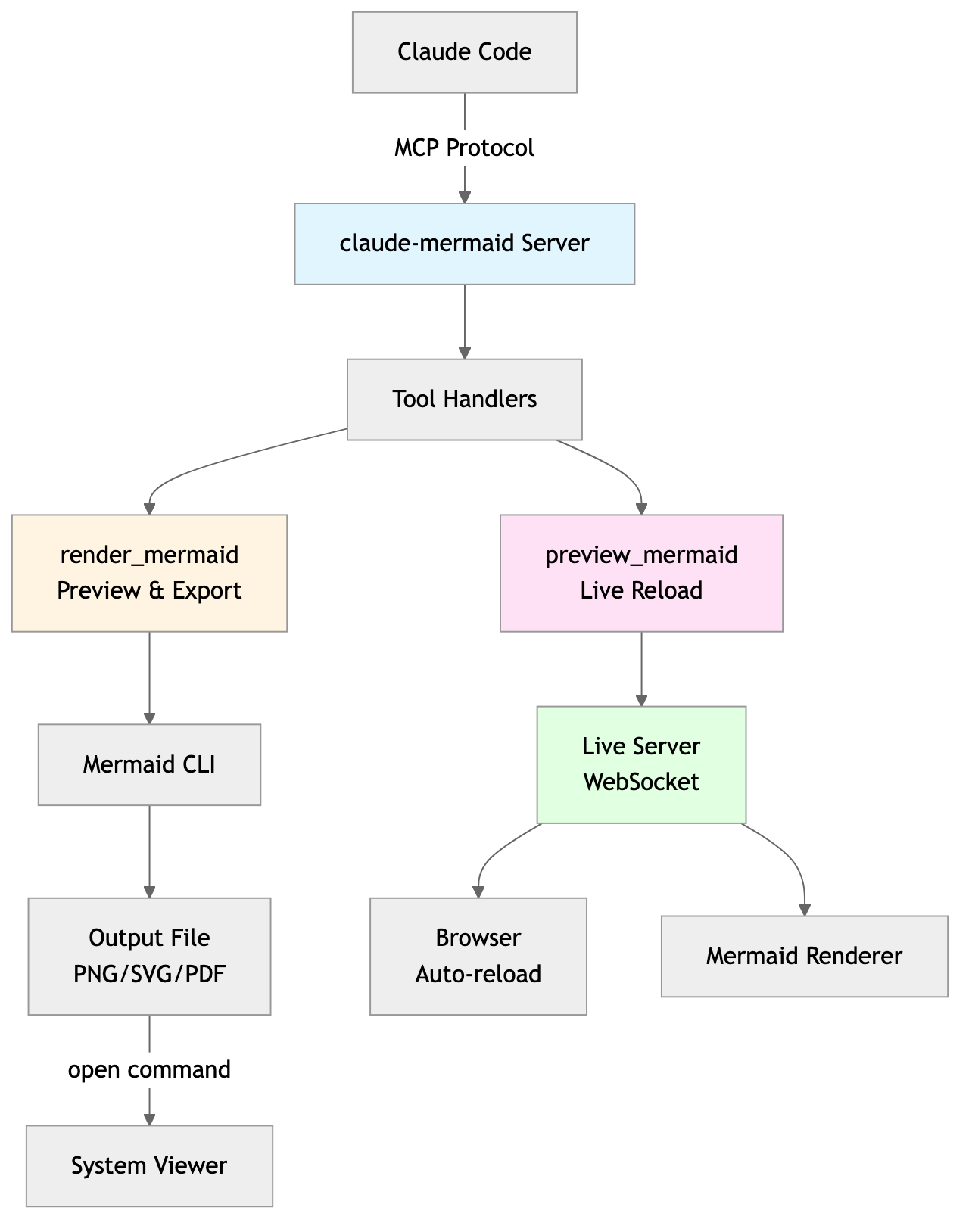
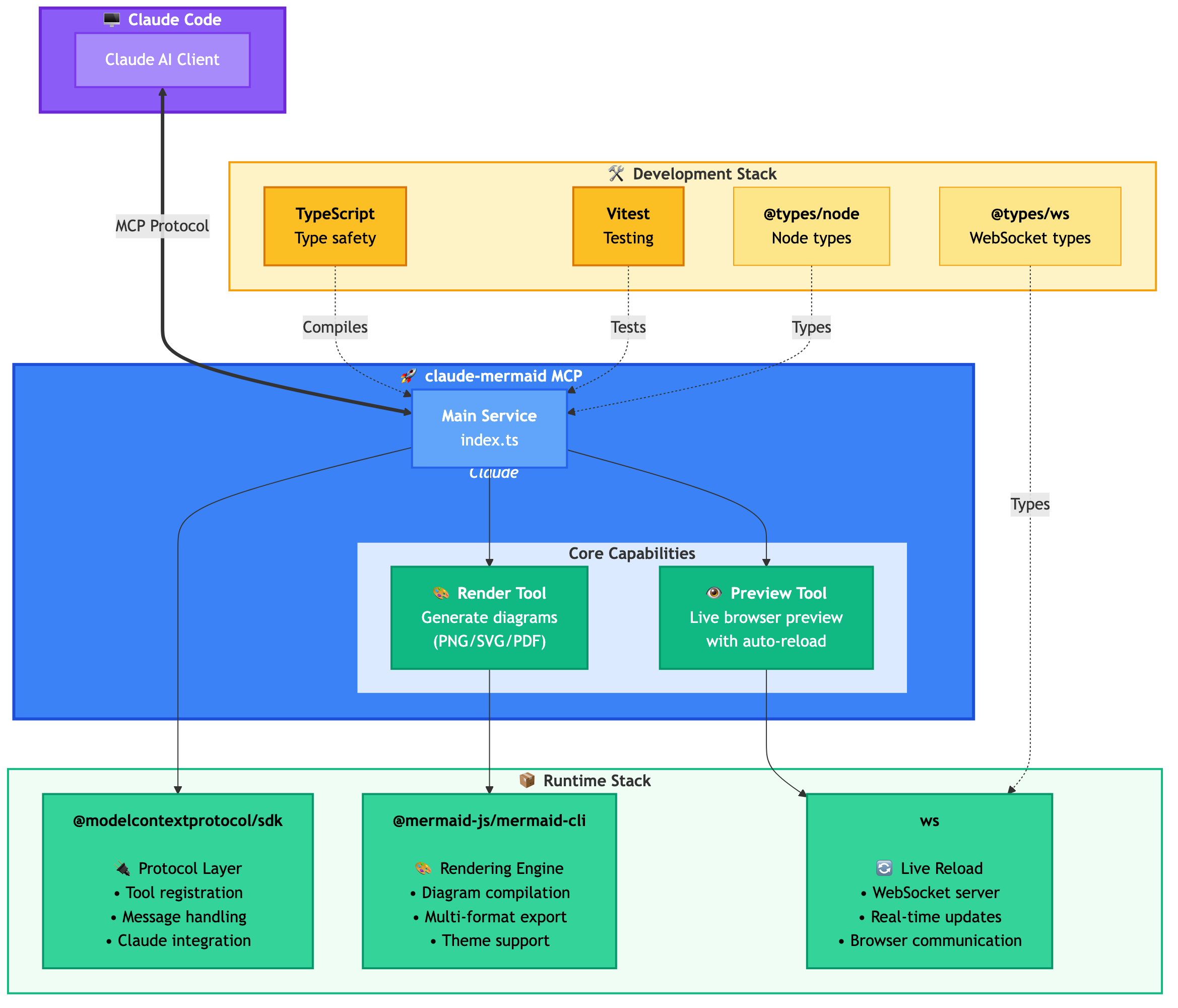
MCP 服务器公开了两个工具:
mermaid_preview — 渲染并打开实时预览
diagram (string, 必填) — Mermaid 图表代码
preview_id (string, 必填) — 此预览会话的标识符。对多个并发图表使用不同的 ID(例如 architecture, flow)。
format (string, 默认 svg) — svg, png, pdf 之一。实时预览仅适用于 svg。
theme (string, 默认 default) — default, forest, dark, neutral 之一。
background (string, 默认 white) — 背景颜色。示例:transparent, white, #F0F0F0。
width (number, 默认 800) — 图表宽度(像素)。
height (number, 默认 600) — 图表高度(像素)。
scale (number, 默认 2) — 用于更高质量输出的缩放因子。
mermaid_save — 将当前实时图表保存到路径
save_path (string, 必填) — 目标路径(例如 ./docs/diagram.svg)。
preview_id (string, 必填) — 必须与 mermaid_preview 中使用的 preview_id 匹配。
format (string, 默认 svg) — svg, png, pdf 之一。如果此格式的实时工作文件尚不存在,则会在保存前按需渲染。
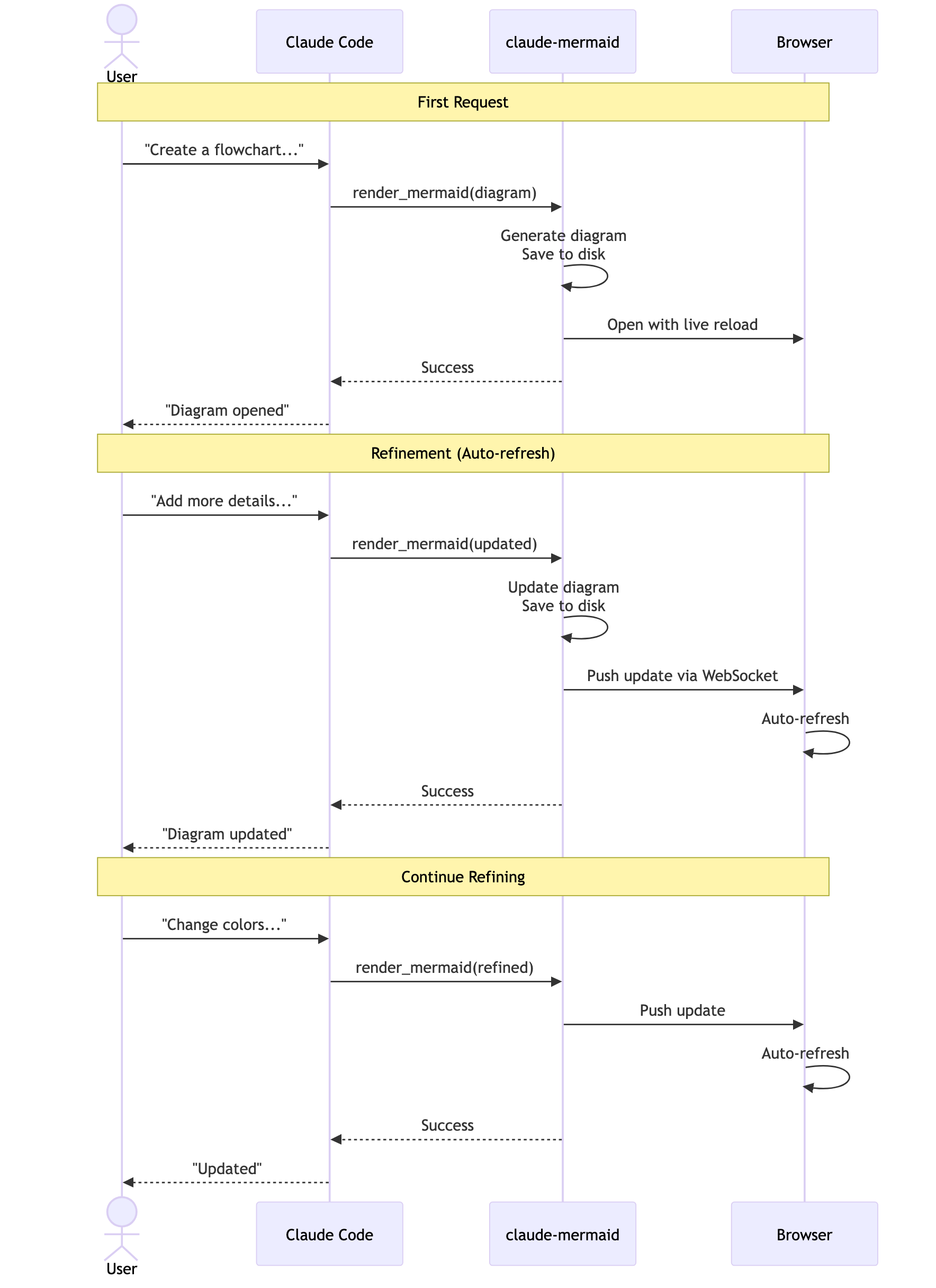
首次渲染: 在浏览器中打开 http://localhost:3737/{preview_id} 处的图表
进行更改: 通过 Claude Code 编辑图表
自动刷新: 浏览器通过 WebSocket 检测到更改并重新加载
状态指示器: 绿点 = 已连接,红点 = 正在重新连接
实时服务器使用 3737-3747 端口,并自动查找可用端口。
平移: 点击并拖动图表以移动它
缩放: 使用浏览器缩放(Ctrl/Cmd + +/- 或触控板捏合缩放)
重置位置: 点击状态栏中的 ⊙ 按钮以使图表居中
导出: 点击 ⬇ 按钮以 SVG 或 PNG 格式下载
实时预览仅适用于 svg 格式;PNG/PDF 在渲染时没有实时重载功能。
对于时序图,Mermaid 不支持在 sequenceDiagram 内部使用 style 指令。
您可以使用 --serve 标志在没有 AI 代理的情况下启动预览服务器:
claude-mermaid --serve这会在您的浏览器中打开图表库,其中包含所有先前渲染的图表。这对于在 Claude Code 会话之外浏览和导出图表非常有用。
# Install dependencies
npm install

# Build the project
npm run build

# Run tests
npm test

# Watch mode for development
npm run dev

# Start the MCP server directly
npm start错误:找不到包 'puppeteer':
这是一个罕见的环境特定问题。尝试以下解决方案:
全局安装 claude-mermaid:
npm install -g claude-mermaid在 Claude Code 中重新安装插件:
/plugin uninstall claude-mermaid
/plugin install claude-mermaid@claude-mermaid
服务器无法连接:
# Check if server is installed
claude-mermaid -v

# Reinstall if needed
npm install -g claude-mermaid

# Verify MCP configuration
claude mcp list
权限被拒绝错误:
# Make sure the binary is executable
chmod +x $(which claude-mermaid)
端口已被占用:
服务器使用 3737-3747 端口
它会自动查找可用端口
检查是否有其他进程正在使用这些端口:lsof -i :3737-3747
图表无法渲染或实时重载不起作用:
服务器日志记录在 ~/.config/claude-mermaid/logs/ 中:
mcp.log - 工具请求和图表渲染
web.log - HTTP/WebSocket 连接和实时重载
在您的 MCP 配置中启用调试日志记录:
{
  "mcpServers": {
    "mermaid": {
      "command": "claude-mermaid",
      "env": {
        "CLAUDE_MERMAID_LOG_LEVEL": "DEBUG"
      }
    }
  }
}
然后检查日志:
# View MCP operations
tail -f ~/.config/claude-mermaid/logs/mcp.log

# View WebSocket connections
tail -f ~/.config/claude-mermaid/logs/web.log可用的日志级别:DEBUG, INFO (默认), WARN, ERROR, OFF
欢迎贡献!请随时提交 Pull Request。
MIT - 详情请参阅 LICENSE 文件
如果您喜欢这个项目,您可能还会对以下内容感兴趣:
preview-skills — 用于在浏览器中可视化文件(markdown, csv, json, mermaid 等)的预览技能
托管部署可在 Fronteir AI 上使用。
Render a Mermaid diagram and open it in browser with live reload. Takes Mermaid diagram code as input and generates a live preview. Supports themes (default, forest, dark, neutral), custom backgrounds, dimensions, and quality scaling. The diagram will auto-refresh when updated. Use mermaid_save to save to disk. IMPORTANT: Automatically use this tool whenever you create a Mermaid diagram for the user. NOTE: Sequence diagrams do not support style directives - avoid using 'style' statements in sequenceDiagram.
| Name | Required | Description | Default |
|---|---|---|---|
| diagram | Yes | The Mermaid diagram code to render | |
| preview_id | Yes | ID for this preview session. Use different IDs for multiple diagrams (e.g., 'architecture', 'flow', 'sequence'). | |
| format | No | Output format (default: svg) | svg |
| theme | No | Theme of the chart (default: default) | default |
| background | No | Background color for pngs/svgs. Example: transparent, red, '#F0F0F0' (default: white) | white |
| width | No | Diagram width in pixels (default: 800) | |
| height | No | Diagram height in pixels (default: 600) | |
| scale | No | Scale factor for higher quality output (default: 2) |
Does the description disclose side effects, auth requirements, rate limits, or destructive behavior?
With no annotations provided, the description carries the full burden of behavioral disclosure. It effectively describes key behaviors: the tool opens a browser with live reload, auto-refreshes when updated, supports themes and customizations, and has limitations for sequence diagrams. However, it doesn't mention potential side effects like browser pop-ups or network requirements, leaving some behavioral aspects implicit.
Agents need to know what a tool does to the world before calling it. Descriptions should go beyond structured annotations to explain consequences.
Is the description appropriately sized, front-loaded, and free of redundancy?
The description is appropriately sized and front-loaded with the core purpose. Every sentence adds value: the first states the main action, the second details features, the third covers auto-refresh and sibling tool, and the last two provide critical usage notes. However, the structure could be slightly more streamlined by combining related points.
Shorter descriptions cost fewer tokens and are easier for agents to parse. Every sentence should earn its place.
Given the tool's complexity, does the description cover enough for an agent to succeed on first attempt?
Given the tool's complexity (8 parameters, live preview functionality) and lack of annotations or output schema, the description does a good job covering essential context: purpose, usage rules, key features, and limitations. It adequately guides an agent on how and when to use the tool, though it doesn't detail the preview interface or error handling, which are minor gaps.
Complex tools with many parameters or behaviors need more documentation. Simple tools need less. This dimension scales expectations accordingly.
Does the description clarify parameter syntax, constraints, interactions, or defaults beyond what the schema provides?
The schema description coverage is 100%, so the schema already documents all 8 parameters thoroughly. The description adds minimal parameter-specific information beyond the schema, mentioning themes and custom backgrounds generically. This meets the baseline of 3 since the schema does the heavy lifting, but the description doesn't significantly enhance parameter understanding.
Input schemas describe structure but not intent. Descriptions should explain non-obvious parameter relationships and valid value ranges.
Does the description clearly state what the tool does and how it differs from similar tools?
The description clearly states the specific action ('Render a Mermaid diagram and open it in browser with live reload') and distinguishes it from its sibling tool ('Use mermaid_save to save to disk'). It explicitly mentions the resource (Mermaid diagram) and the verb (render/preview), making the purpose unambiguous.
Agents choose between tools based on descriptions. A clear purpose with a specific verb and resource helps agents select the right tool.
Does the description explain when to use this tool, when not to, or what alternatives exist?
The description provides explicit guidance on when to use this tool ('Automatically use this tool whenever you create a Mermaid diagram for the user') and when not to use it for saving ('Use mermaid_save to save to disk'). It also includes a specific exclusion for sequence diagrams ('Sequence diagrams do not support style directives - avoid using 'style' statements in sequenceDiagram'), offering clear alternatives and limitations.
Agents often have multiple tools that could apply. Explicit usage guidance like "use X instead of Y when Z" prevents misuse.
Save the current live Mermaid diagram to a file path. This copies the already-rendered diagram from the live preview to the specified location. Use this after tuning your diagram with mermaid_preview.
| Name | Required | Description | Default |
|---|---|---|---|
| save_path | Yes | Path to save the diagram file (e.g., './docs/diagram.svg') | |
| preview_id | Yes | ID of the preview to save. Must match the preview_id used in mermaid_preview. | |
| format | No | Output format (default: svg). Must match the format used in mermaid_preview. | svg |
Does the description disclose side effects, auth requirements, rate limits, or destructive behavior?
With no annotations provided, the description carries the full burden of behavioral disclosure. It explains the tool copies an already-rendered diagram from the live preview, which is useful context beyond the input schema. However, it doesn't mention potential side effects (e.g., file overwriting), error conditions, or what happens if the preview_id doesn't exist, leaving some behavioral gaps.
Agents need to know what a tool does to the world before calling it. Descriptions should go beyond structured annotations to explain consequences.
Is the description appropriately sized, front-loaded, and free of redundancy?
The description is front-loaded with the core purpose in the first sentence, followed by a clear usage guideline. Both sentences earn their place by providing essential context and guidance without any redundant or verbose language.
Shorter descriptions cost fewer tokens and are easier for agents to parse. Every sentence should earn its place.
Given the tool's complexity, does the description cover enough for an agent to succeed on first attempt?
Given the tool's moderate complexity (3 parameters, no annotations, no output schema), the description is reasonably complete. It explains the tool's purpose, usage timing, and relationship to the sibling tool. However, it lacks details on output behavior (e.g., success/failure responses) and potential errors, which would be helpful given the absence of annotations and output schema.
Complex tools with many parameters or behaviors need more documentation. Simple tools need less. This dimension scales expectations accordingly.
Does the description clarify parameter syntax, constraints, interactions, or defaults beyond what the schema provides?
The schema description coverage is 100%, so the schema already documents all three parameters thoroughly. The description adds minimal value beyond the schema by mentioning the diagram is 'already-rendered' and comes from the 'live preview', which provides context but no additional parameter-specific details. This meets the baseline for high schema coverage.
Input schemas describe structure but not intent. Descriptions should explain non-obvious parameter relationships and valid value ranges.
Does the description clearly state what the tool does and how it differs from similar tools?
The description clearly states the specific action ('Save'), resource ('current live Mermaid diagram'), and destination ('to a file path'), distinguishing it from the sibling tool mermaid_preview by specifying it operates on the already-rendered diagram from the preview. This provides explicit verb+resource+scope differentiation.
Agents choose between tools based on descriptions. A clear purpose with a specific verb and resource helps agents select the right tool.
Does the description explain when to use this tool, when not to, or what alternatives exist?
The description explicitly states when to use this tool ('Use this after tuning your diagram with mermaid_preview'), providing clear sequencing guidance and linking it directly to the sibling tool. It also implies when not to use it (e.g., before previewing), though it doesn't name explicit alternatives beyond the sibling.
Agents often have multiple tools that could apply. Explicit usage guidance like "use X instead of Y when Z" prevents misuse.
The two tools have perfectly distinct purposes: mermaid_preview renders and displays a diagram in a browser with live updates, while mermaid_save saves the rendered diagram to disk. There is no overlap or ambiguity between them, as each handles a separate stage of the diagram workflow.
Both tools follow a consistent verb_noun pattern with the 'mermaid_' prefix: mermaid_preview and mermaid_save. The naming is clear, predictable, and uniform throughout the set, making it easy for an agent to understand their functions.
With only two tools, the set feels thin for a Mermaid diagram server, as it lacks operations like editing, exporting to different formats, or managing themes programmatically. However, it covers the core preview-and-save workflow, so it's borderline but not severely mismatched.
The tools provide basic functionality for previewing and saving diagrams, but there are notable gaps: no tool for creating or editing diagrams from scratch, no support for different output formats (e.g., PNG, SVG), and no way to manage themes or settings beyond the preview. This limits the server's utility for full diagram lifecycle management.
Unclaimed servers have limited discoverability.
If you are the server author, to access and configure the admin panel.
Render, verify, describe, and safely edit Mermaid diagrams through MCP.
MCP server to assist with JxBrowser development.
Collaborative whiteboard MCP server — create objects, connectors, C4 diagrams, and manage boards
MCP server for querying Forkast documentation
We provide all the information about MCP servers via our MCP API.
curl -X GET 'https://glama.ai/api/mcp/v1/servers/veelenga/claude-mermaid'
If you have feedback or need assistance with the MCP directory API, please join our Discord server