

A
licenseB
qualityA
maintenanceA Model Context Protocol (MCP) server that converts Mermaid diagrams to PNG images.
1
1,119 npm
235
MIT

MCP-сервер для отрисовки диаграмм Mermaid в Claude Code с функцией живой перезагрузки (live reload) и встроенным навыком для получения экспертных рекомендаций.
Автоматически отображает диаграммы в вашем браузере с обновлениями в реальном времени по мере их редактирования. Идеально подходит для итеративной разработки диаграмм и рабочих процессов документирования.
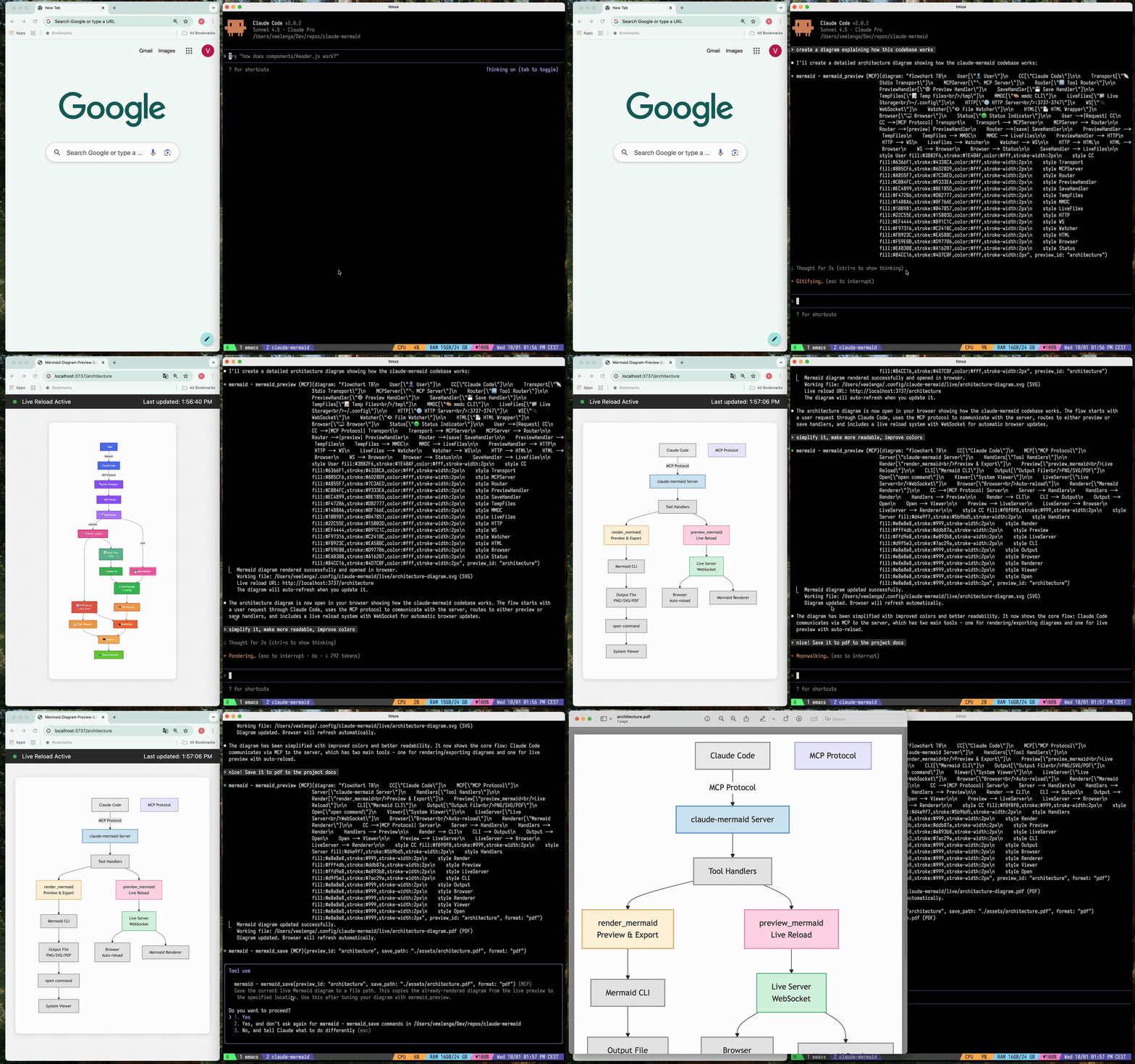
🔄 Живая перезагрузка — диаграммы автоматически обновляются в браузере по мере редактирования
🎨 Несколько форматов сохранения — экспорт в SVG, PNG или PDF
🌈 Темы — выбор между стандартной, лесной (forest), темной или нейтральной темами
📐 Настраиваемость — управление размерами, масштабом и цветами фона
🪄 Интерактивный предпросмотр — панорамирование диаграмм перетаскиванием, масштабирование элементами управления браузера, сброс позиции одним кликом
⬇️ Экспорт из браузера — скачивание диаграмм в формате SVG или PNG прямо из окна предпросмотра
🗂️ Несколько предпросмотров — используйте preview_id для одновременной работы с несколькими диаграммами
💾 Постоянные рабочие файлы — живые превью сохраняются в ~/.config/claude-mermaid/live
🤖 Встроенный навык — включает навык Claude с лучшими практиками и экспертными рекомендациями по созданию диаграмм
Related MCP server: mcp-mermaid-validator
Установка плагина (рекомендуется)
В Claude Code добавьте маркетплейс и установите плагин:
/plugin marketplace add veelenga/claude-mermaid
/plugin install claude-mermaid@claude-mermaid
Затем перезапустите Claude Code, чтобы активировать плагин.
Из npm:
npm install -g claude-mermaidИз исходного кода:
git clone https://github.com/veelenga/claude-mermaid.git
cd claude-mermaid
npm install && npm run build && npm install -g .Установка плагина: MCP-сервер настраивается автоматически. Просто проверьте:
/mcpВы должны увидеть mermaid в списке MCP-серверов.
Установка через npm: Настройте MCP-сервер вручную:
claude mcp add --scope user mermaid claude-mermaidЗатем проверьте:
claude mcp listВы должны увидеть mermaid: claude-mermaid - ✓ Connected
Хотя этот сервер оптимизирован для Claude Code, он может работать с любым MCP-совместимым клиентом. Вот как настроить его для других популярных инструментов:
Добавьте в файл настроек MCP Codex (~/.codex/mcp_settings.json):
{
  "mcpServers": {
    "mermaid": {
      "command": "claude-mermaid"
    }
  }
}
Или настройте через CLI Codex:
codex mcp add mermaid claude-mermaidДобавьте в файл конфигурации MCP Cursor (.cursor/mcp.json или настройки):
{
  "mcpServers": {
    "mermaid": {
      "command": "claude-mermaid"
    }
  }
}
Или используйте интерфейс настроек Cursor:
Откройте настройки Cursor (Cmd/Ctrl + ,)
Перейдите к MCP Servers
Добавьте новый сервер с командой: claude-mermaid
Если вы используете расширение Cline для VSCode:
Откройте настройки VSCode (Cmd/Ctrl + ,)
Найдите "Cline MCP"
Добавьте в JSON настроек MCP:
{
  "mcpServers": {
    "mermaid": {
      "command": "claude-mermaid"
    }
  }
}
Добавьте в файл конфигурации MCP Windsurf:
{
  "mcpServers": {
    "mermaid": {
      "command": "claude-mermaid"
    }
  }
}
Расположение конфигурации зависит от платформы:
macOS: ~/Library/Application Support/Windsurf/mcp.json
Linux: ~/.config/windsurf/mcp.json
Windows: %APPDATA%\Windsurf\mcp.json
Добавьте в файл конфигурации MCP Gemini CLI (~/.gemini/mcp.json):
{
  "mcpServers": {
    "mermaid": {
      "command": "claude-mermaid"
    }
  }
}
Или используйте Gemini CLI для настройки:
gemini config mcp add mermaid --command claude-mermaidДля любого MCP-совместимого клиента используйте стандартную конфигурацию:
{
  "mcpServers": {
    "mermaid": {
      "command": "claude-mermaid"
    }
  }
}
Команда claude-mermaid должна быть доступна в вашем PATH после установки.
Примечание: Некоторым клиентам может потребоваться полный путь к исполняемому файлу:
Найдите путь: which claude-mermaid (Unix/macOS) или where claude-mermaid (Windows)
Используйте абсолютный путь в конфигурации: "command": "/path/to/claude-mermaid"
Просто попросите Claude Code создать диаграммы Mermaid естественным образом. При установке в качестве плагина встроенный навык mermaid-diagrams предоставляет экспертные рекомендации, лучшие практики и автоматическое управление рабочим процессом.
"Create a Mermaid diagram showing the user authentication flow"
"Draw a sequence diagram for the payment process"
"Generate a flowchart for the deployment pipeline"С пользовательским форматированием:
"Create a dark theme architecture diagram with transparent background"
"Generate a forest theme flowchart and save to ./docs/flow.svg"
С указанием формата вывода:
"Create an ER diagram and save as PDF to ./docs/schema.pdf"
"Save the flowchart as PNG to ./docs/flow.png"
Примечание: Браузер всегда показывает SVG для живого предпросмотра, в то время как сохранение происходит в выбранный вами формат.
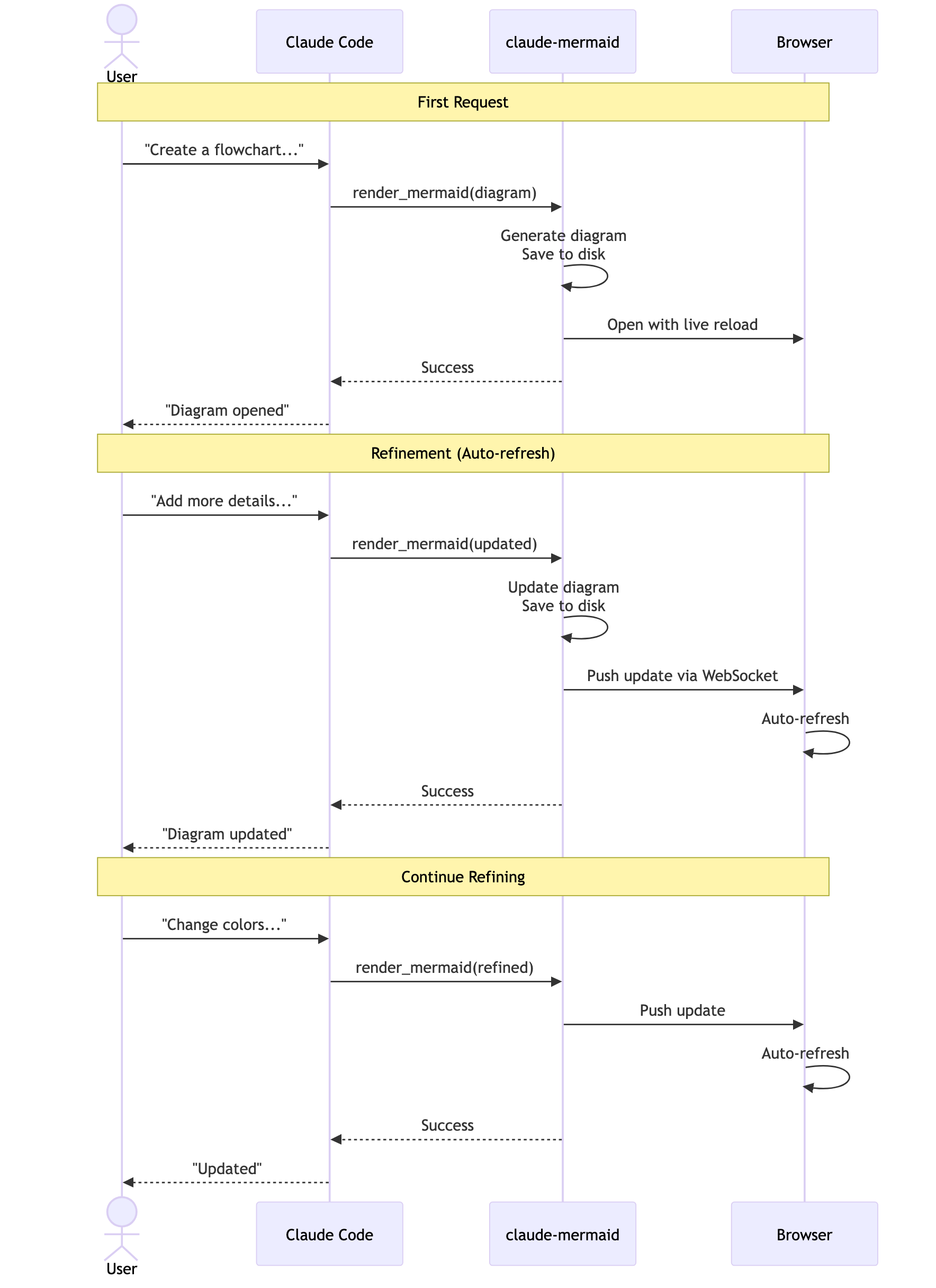
Итеративное уточнение:
"Create a class diagram for the User module"
// Browser opens with live preview
"Add the Address and Order classes with relationships"
// Diagram updates automatically in browser!"Create a flowchart and save to ./docs/auth-flow.svg:
graph LR
A[User Login] --> B{Valid Credentials?}
B -->|Yes| C[Access Granted]
B -->|No| D[Access Denied]
C --> E[Dashboard]
D --> F[Try Again]
style A fill:#e1f5ff
style C fill:#d4edda
style D fill:#f8d7da
"Диаграмма будет сохранена в ./docs/auth-flow.svg и открыта в вашем браузере с включенной живой перезагрузкой.
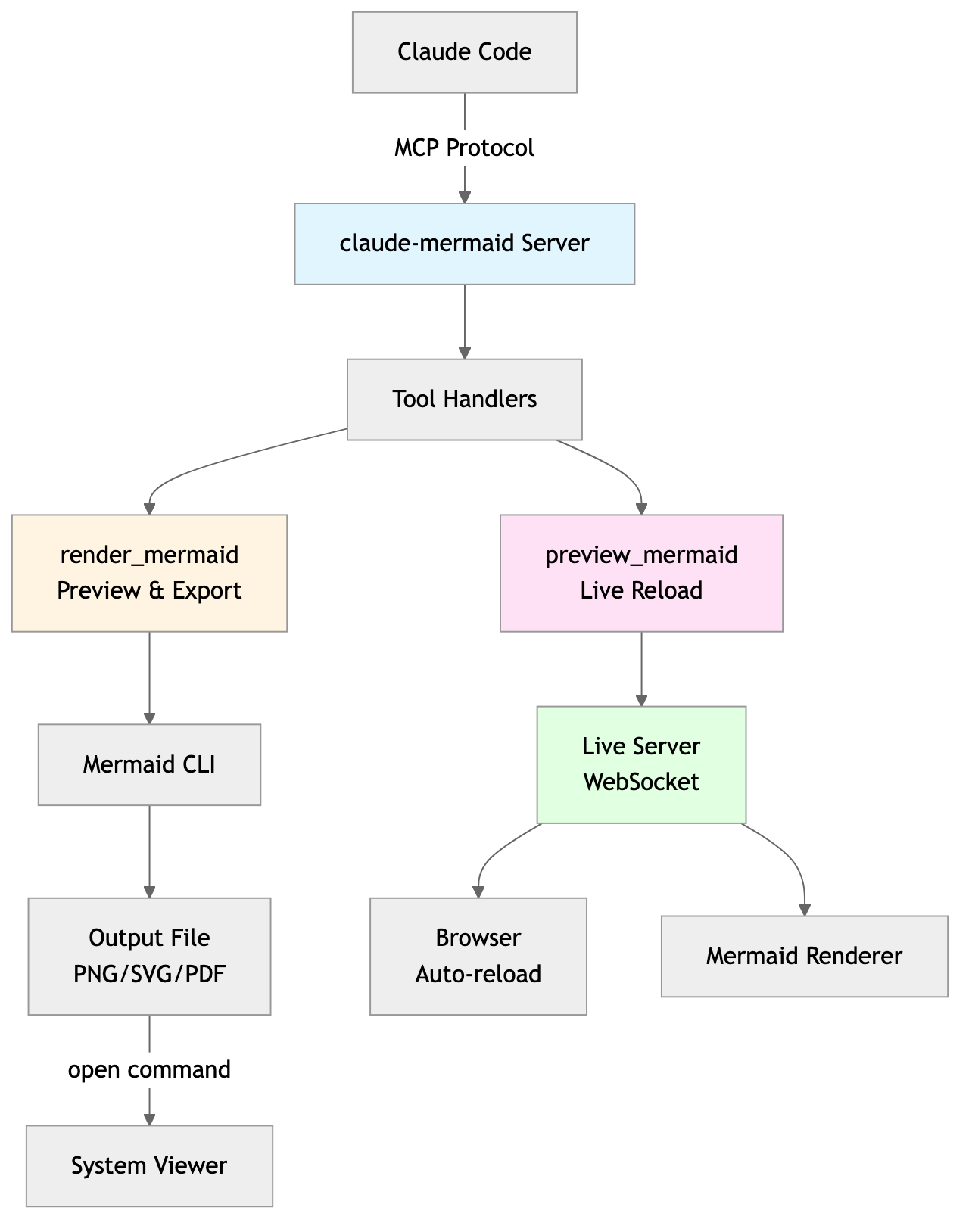
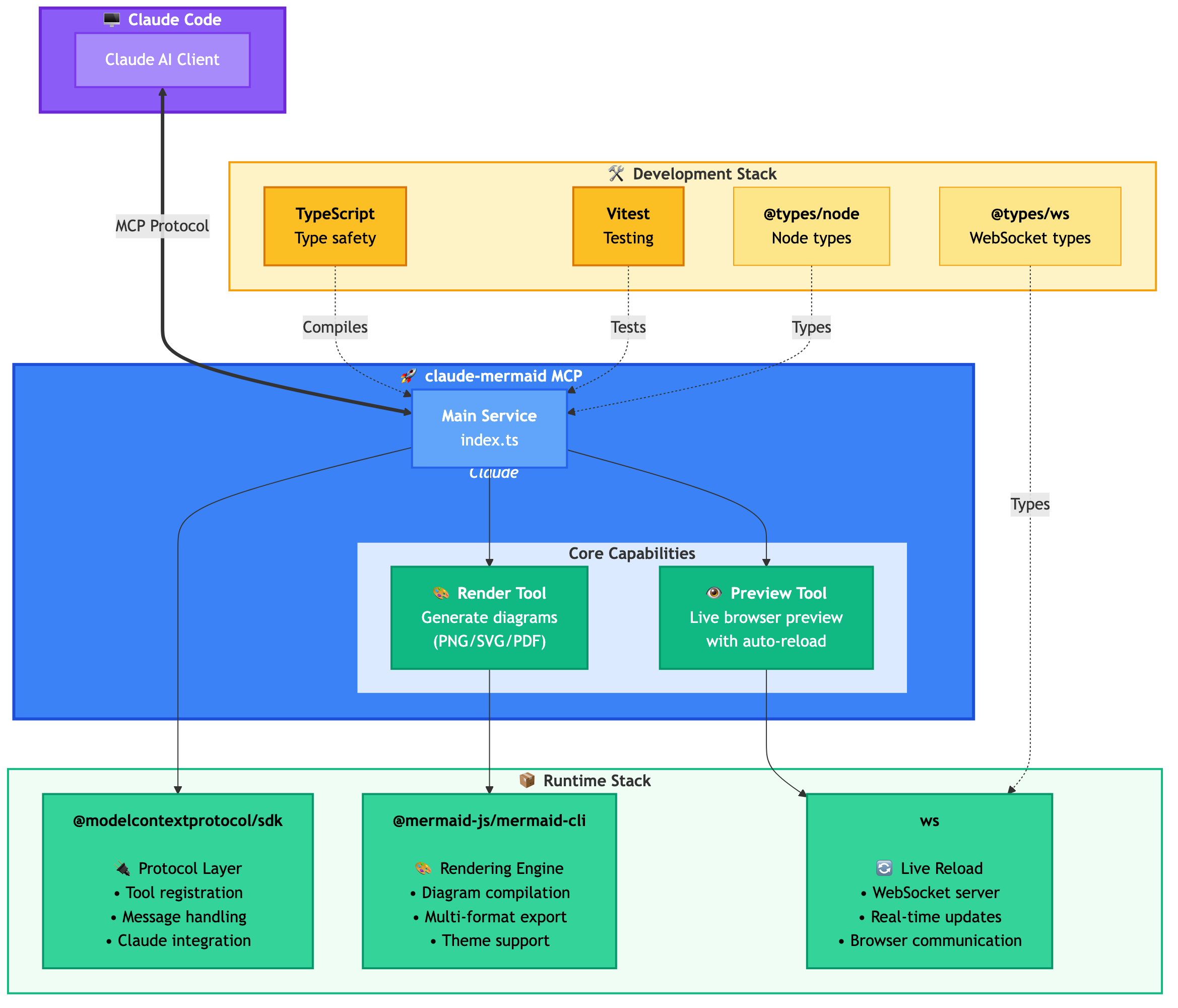
MCP-сервер предоставляет два инструмента:
mermaid_preview — отрисовка и открытие живого предпросмотра
diagram (строка, обязательно) — код диаграммы Mermaid
preview_id (строка, обязательно) — идентификатор для этой сессии предпросмотра. Используйте разные ID для нескольких одновременных диаграмм (например, architecture, flow).
format (строка, по умолчанию svg) — один из svg, png, pdf. Живой предпросмотр доступен только для svg.
theme (строка, по умолчанию default) — один из default, forest, dark, neutral.
background (строка, по умолчанию white) — цвет фона. Примеры: transparent, white, #F0F0F0.
width (число, по умолчанию 800) — ширина диаграммы в пикселях.
height (число, по умолчанию 600) — высота диаграммы в пикселях.
scale (число, по умолчанию 2) — коэффициент масштабирования для более высокого качества вывода.
mermaid_save — сохранение текущей живой диаграммы по пути
save_path (строка, обязательно) — путь назначения (например, ./docs/diagram.svg).
preview_id (строка, обязательно) — должен совпадать с preview_id, использованным в mermaid_preview.
format (строка, по умолчанию svg) — один из svg, png, pdf. Если рабочий файл для этого формата еще не существует, он отрисовывается по запросу перед сохранением.
Первая отрисовка: Открывает диаграмму в браузере по адресу http://localhost:3737/{preview_id}
Внесение изменений: Редактируйте диаграмму через Claude Code
Автообновление: Браузер обнаруживает изменения через WebSocket и перезагружается
Индикатор статуса: Зеленая точка = подключено, Красная точка = переподключение
Живой сервер использует порты 3737-3747 и автоматически находит доступный порт.
Панорамирование: Нажмите и перетащите диаграмму, чтобы переместить ее
Масштабирование: Используйте масштабирование браузера (Ctrl/Cmd + +/- или щипок на тачпаде)
Сброс позиции: Нажмите кнопку ⊙ в строке состояния, чтобы отцентрировать диаграмму
Экспорт: Нажмите кнопку ⬇ для скачивания в формате SVG или PNG
Живой предпросмотр доступен только для формата svg; PNG/PDF отрисовываются без живой перезагрузки.
Для диаграмм последовательности (sequence diagrams) Mermaid не поддерживает директивы style внутри sequenceDiagram.
Вы можете запустить сервер предпросмотра без AI-агента, используя флаг --serve:
claude-mermaid --serveЭто откроет галерею диаграмм в вашем браузере со всеми ранее отрисованными диаграммами. Полезно для просмотра и экспорта диаграмм вне сессии Claude Code.
# Install dependencies
npm install

# Build the project
npm run build

# Run tests
npm test

# Watch mode for development
npm run dev

# Start the MCP server directly
npm startОшибка: Cannot find package 'puppeteer':
Это редкая проблема, зависящая от окружения. Попробуйте следующие решения:
Установите claude-mermaid глобально:
npm install -g claude-mermaidПереустановите плагин в Claude Code:
/plugin uninstall claude-mermaid
/plugin install claude-mermaid@claude-mermaid
Сервер не подключается:
# Check if server is installed
claude-mermaid -v

# Reinstall if needed
npm install -g claude-mermaid

# Verify MCP configuration
claude mcp list
Ошибка отказа в доступе (Permission denied):
# Make sure the binary is executable
chmod +x $(which claude-mermaid)
Порт уже используется:
Сервер использует порты 3737-3747
Он автоматически найдет доступный порт
Проверьте, не использует ли другой процесс эти порты: lsof -i :3737-3747
Диаграммы не отрисовываются или живая перезагрузка не работает:
Сервер ведет логи в ~/.config/claude-mermaid/logs/:
mcp.log - запросы инструментов и отрисовка диаграмм
web.log - HTTP/WebSocket соединения и живая перезагрузка
Включите отладочное логирование в вашей конфигурации MCP:
{
  "mcpServers": {
    "mermaid": {
      "command": "claude-mermaid",
      "env": {
        "CLAUDE_MERMAID_LOG_LEVEL": "DEBUG"
      }
    }
  }
}
Затем проверьте логи:
# View MCP operations
tail -f ~/.config/claude-mermaid/logs/mcp.log

# View WebSocket connections
tail -f ~/.config/claude-mermaid/logs/web.log
Доступные уровни логирования: DEBUG, INFO (по умолчанию), WARN, ERROR, OFF
Вклад приветствуется! Пожалуйста, не стесняйтесь отправлять Pull Request.
MIT - подробности см. в файле LICENSE
Если вам нравится этот проект, вас также может заинтересовать
preview-skills — навыки предпросмотра для визуализации файлов в браузере (markdown, csv, json, mermaid и другие)
Хостинговое развертывание доступно на Fronteir AI.
Render a Mermaid diagram and open it in browser with live reload. Takes Mermaid diagram code as input and generates a live preview. Supports themes (default, forest, dark, neutral), custom backgrounds, dimensions, and quality scaling. The diagram will auto-refresh when updated. Use mermaid_save to save to disk. IMPORTANT: Automatically use this tool whenever you create a Mermaid diagram for the user. NOTE: Sequence diagrams do not support style directives - avoid using 'style' statements in sequenceDiagram.
| Name | Required | Description | Default |
|---|---|---|---|
| diagram | Yes | The Mermaid diagram code to render | |
| preview_id | Yes | ID for this preview session. Use different IDs for multiple diagrams (e.g., 'architecture', 'flow', 'sequence'). | |
| format | No | Output format (default: svg) | svg |
| theme | No | Theme of the chart (default: default) | default |
| background | No | Background color for pngs/svgs. Example: transparent, red, '#F0F0F0' (default: white) | white |
| width | No | Diagram width in pixels (default: 800) | |
| height | No | Diagram height in pixels (default: 600) | |
| scale | No | Scale factor for higher quality output (default: 2) |
Does the description disclose side effects, auth requirements, rate limits, or destructive behavior?
With no annotations provided, the description carries the full burden of behavioral disclosure. It effectively describes key behaviors: the tool opens a browser with live reload, auto-refreshes when updated, supports themes and customizations, and has limitations for sequence diagrams. However, it doesn't mention potential side effects like browser pop-ups or network requirements, leaving some behavioral aspects implicit.
Agents need to know what a tool does to the world before calling it. Descriptions should go beyond structured annotations to explain consequences.
Is the description appropriately sized, front-loaded, and free of redundancy?
The description is appropriately sized and front-loaded with the core purpose. Every sentence adds value: the first states the main action, the second details features, the third covers auto-refresh and sibling tool, and the last two provide critical usage notes. However, the structure could be slightly more streamlined by combining related points.
Shorter descriptions cost fewer tokens and are easier for agents to parse. Every sentence should earn its place.
Given the tool's complexity, does the description cover enough for an agent to succeed on first attempt?
Given the tool's complexity (8 parameters, live preview functionality) and lack of annotations or output schema, the description does a good job covering essential context: purpose, usage rules, key features, and limitations. It adequately guides an agent on how and when to use the tool, though it doesn't detail the preview interface or error handling, which are minor gaps.
Complex tools with many parameters or behaviors need more documentation. Simple tools need less. This dimension scales expectations accordingly.
Does the description clarify parameter syntax, constraints, interactions, or defaults beyond what the schema provides?
The schema description coverage is 100%, so the schema already documents all 8 parameters thoroughly. The description adds minimal parameter-specific information beyond the schema, mentioning themes and custom backgrounds generically. This meets the baseline of 3 since the schema does the heavy lifting, but the description doesn't significantly enhance parameter understanding.
Input schemas describe structure but not intent. Descriptions should explain non-obvious parameter relationships and valid value ranges.
Does the description clearly state what the tool does and how it differs from similar tools?
The description clearly states the specific action ('Render a Mermaid diagram and open it in browser with live reload') and distinguishes it from its sibling tool ('Use mermaid_save to save to disk'). It explicitly mentions the resource (Mermaid diagram) and the verb (render/preview), making the purpose unambiguous.
Agents choose between tools based on descriptions. A clear purpose with a specific verb and resource helps agents select the right tool.
Does the description explain when to use this tool, when not to, or what alternatives exist?
The description provides explicit guidance on when to use this tool ('Automatically use this tool whenever you create a Mermaid diagram for the user') and when not to use it for saving ('Use mermaid_save to save to disk'). It also includes a specific exclusion for sequence diagrams ('Sequence diagrams do not support style directives - avoid using 'style' statements in sequenceDiagram'), offering clear alternatives and limitations.
Agents often have multiple tools that could apply. Explicit usage guidance like "use X instead of Y when Z" prevents misuse.
Save the current live Mermaid diagram to a file path. This copies the already-rendered diagram from the live preview to the specified location. Use this after tuning your diagram with mermaid_preview.
| Name | Required | Description | Default |
|---|---|---|---|
| save_path | Yes | Path to save the diagram file (e.g., './docs/diagram.svg') | |
| preview_id | Yes | ID of the preview to save. Must match the preview_id used in mermaid_preview. | |
| format | No | Output format (default: svg). Must match the format used in mermaid_preview. | svg |
Does the description disclose side effects, auth requirements, rate limits, or destructive behavior?
With no annotations provided, the description carries the full burden of behavioral disclosure. It explains the tool copies an already-rendered diagram from the live preview, which is useful context beyond the input schema. However, it doesn't mention potential side effects (e.g., file overwriting), error conditions, or what happens if the preview_id doesn't exist, leaving some behavioral gaps.
Agents need to know what a tool does to the world before calling it. Descriptions should go beyond structured annotations to explain consequences.
Is the description appropriately sized, front-loaded, and free of redundancy?
The description is front-loaded with the core purpose in the first sentence, followed by a clear usage guideline. Both sentences earn their place by providing essential context and guidance without any redundant or verbose language.
Shorter descriptions cost fewer tokens and are easier for agents to parse. Every sentence should earn its place.
Given the tool's complexity, does the description cover enough for an agent to succeed on first attempt?
Given the tool's moderate complexity (3 parameters, no annotations, no output schema), the description is reasonably complete. It explains the tool's purpose, usage timing, and relationship to the sibling tool. However, it lacks details on output behavior (e.g., success/failure responses) and potential errors, which would be helpful given the absence of annotations and output schema.
Complex tools with many parameters or behaviors need more documentation. Simple tools need less. This dimension scales expectations accordingly.
Does the description clarify parameter syntax, constraints, interactions, or defaults beyond what the schema provides?
The schema description coverage is 100%, so the schema already documents all three parameters thoroughly. The description adds minimal value beyond the schema by mentioning the diagram is 'already-rendered' and comes from the 'live preview', which provides context but no additional parameter-specific details. This meets the baseline for high schema coverage.
Input schemas describe structure but not intent. Descriptions should explain non-obvious parameter relationships and valid value ranges.
Does the description clearly state what the tool does and how it differs from similar tools?
The description clearly states the specific action ('Save'), resource ('current live Mermaid diagram'), and destination ('to a file path'), distinguishing it from the sibling tool mermaid_preview by specifying it operates on the already-rendered diagram from the preview. This provides explicit verb+resource+scope differentiation.
Agents choose between tools based on descriptions. A clear purpose with a specific verb and resource helps agents select the right tool.
Does the description explain when to use this tool, when not to, or what alternatives exist?
The description explicitly states when to use this tool ('Use this after tuning your diagram with mermaid_preview'), providing clear sequencing guidance and linking it directly to the sibling tool. It also implies when not to use it (e.g., before previewing), though it doesn't name explicit alternatives beyond the sibling.
Agents often have multiple tools that could apply. Explicit usage guidance like "use X instead of Y when Z" prevents misuse.
Recent tool additions, removals, and schema changes observed during successful MCP inspections.
mermaid_previewmermaid_saveScored across 2 tools
The two tools have perfectly distinct purposes: mermaid_preview renders and displays a diagram in a browser with live updates, while mermaid_save saves the rendered diagram to disk. There is no overlap or ambiguity between them, as each handles a separate stage of the diagram workflow.
Both tools follow a consistent verb_noun pattern with the 'mermaid_' prefix: mermaid_preview and mermaid_save. The naming is clear, predictable, and uniform throughout the set, making it easy for an agent to understand their functions.
With only two tools, the set feels thin for a Mermaid diagram server, as it lacks operations like editing, exporting to different formats, or managing themes programmatically. However, it covers the core preview-and-save workflow, so it's borderline but not severely mismatched.
The tools provide basic functionality for previewing and saving diagrams, but there are notable gaps: no tool for creating or editing diagrams from scratch, no support for different output formats (e.g., PNG, SVG), and no way to manage themes or settings beyond the preview. This limits the server's utility for full diagram lifecycle management.
Render, verify, describe, and safely edit Mermaid diagrams through MCP.
MCP server to assist with JxBrowser development.
Collaborative whiteboard MCP server — create objects, connectors, C4 diagrams, and manage boards
MCP server for querying Forkast documentation