

A
licenseB
qualityC
maintenanceA Model Context Protocol (MCP) server that converts Mermaid diagrams to PNG images.
1
266
234
MIT

MCP-Server zum Rendern von Mermaid-Diagrammen in Claude Code mit Live-Reload-Funktionalität und einer integrierten Fähigkeit für Expertenanleitungen.
Diagramme werden automatisch in Ihrem Browser gerendert und in Echtzeit aktualisiert, während Sie sie verfeinern. Perfekt für iterative Diagrammentwicklung und Dokumentations-Workflows.
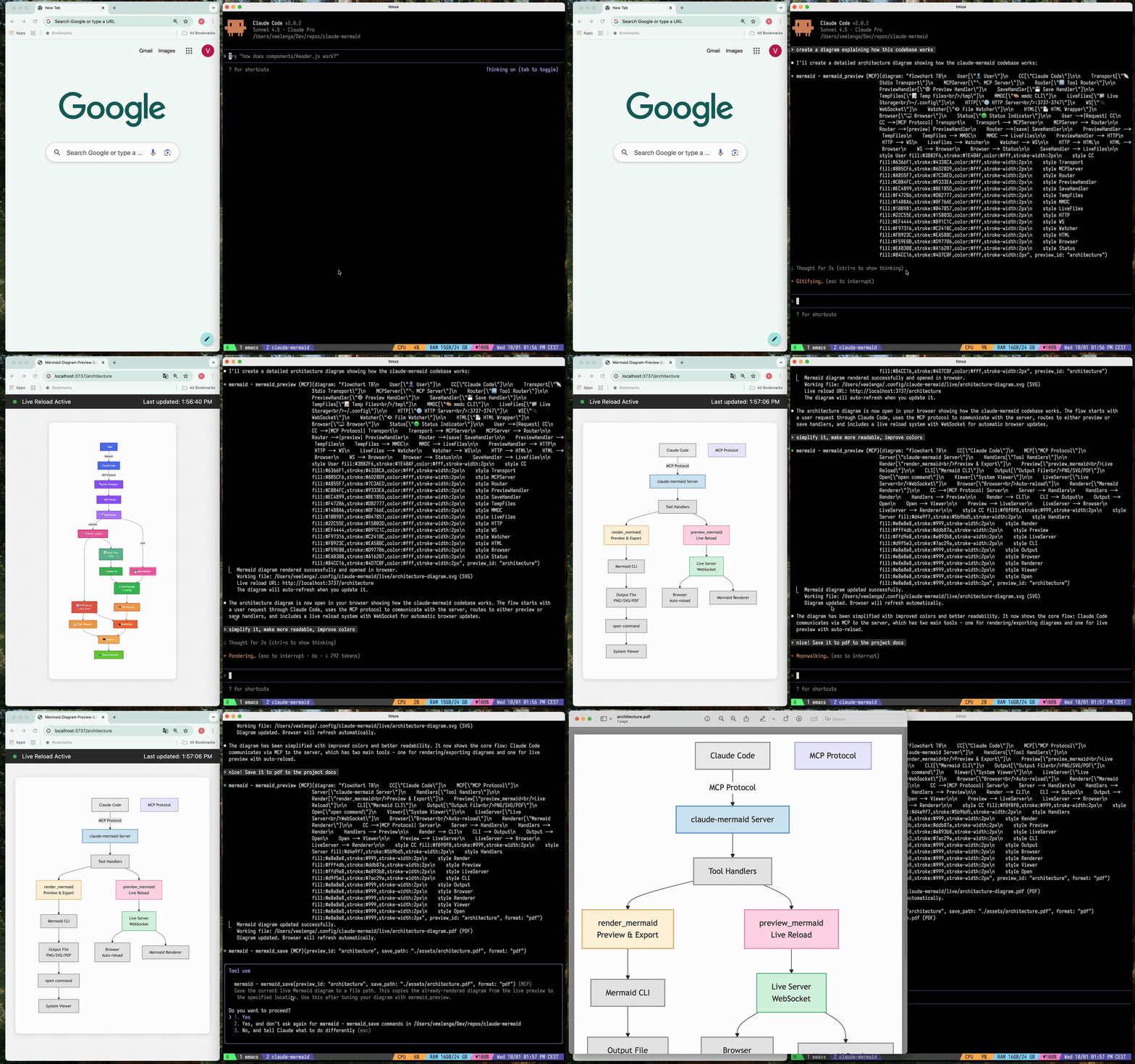
🔄 Live-Reload - Diagramme werden beim Bearbeiten automatisch im Browser aktualisiert
🎨 Mehrere Speicherformate - Export als SVG, PNG oder PDF
🌈 Themes - Wählen Sie zwischen Standard-, Forest-, Dark- oder Neutral-Themes
📐 Anpassbar - Steuern Sie Abmessungen, Skalierung und Hintergrundfarben
🪄 Interaktive Vorschau - Diagramme durch Ziehen verschieben, mit Browser-Steuerelementen zoomen, Position mit einem Klick zurücksetzen
⬇️ Browser-Export - Laden Sie Diagramme direkt aus der Vorschau als SVG oder PNG herunter
🗂️ Mehrere Vorschauen - Verwenden Sie preview_id, um gleichzeitig an mehreren Diagrammen zu arbeiten
💾 Persistente Arbeitsdateien - Live-Vorschauen werden unter ~/.config/claude-mermaid/live gespeichert
🤖 Integrierte Fähigkeit - Enthält eine Claude-Fähigkeit mit Best Practices und Expertenanleitungen zum Erstellen von Diagrammen
Related MCP server: mcp-mermaid-validator
Plugin-Installation (Empfohlen)
Fügen Sie in Claude Code den Marketplace hinzu und installieren Sie das Plugin:
/plugin marketplace add veelenga/claude-mermaid
/plugin install claude-mermaid@claude-mermaid
Starten Sie anschließend Claude Code neu, um das Plugin zu aktivieren.
Über npm:
npm install -g claude-mermaidAus dem Quellcode:
git clone https://github.com/veelenga/claude-mermaid.git
cd claude-mermaid
npm install && npm run build && npm install -g .Plugin-Installation: Der MCP-Server wird automatisch konfiguriert. Überprüfen Sie dies einfach:
/mcpSie sollten mermaid in der Liste der MCP-Server sehen.
npm-Installation: Konfigurieren Sie den MCP-Server manuell:
claude mcp add --scope user mermaid claude-mermaidÜberprüfen Sie dann:
claude mcp listSie sollten mermaid: claude-mermaid - ✓ Connected sehen.
Obwohl dieser Server für Claude Code optimiert ist, funktioniert er mit jedem MCP-kompatiblen Client. Hier erfahren Sie, wie Sie ihn für andere beliebte Tools konfigurieren:
Fügen Sie dies zu Ihrer Codex-MCP-Einstellungsdatei hinzu (~/.codex/mcp_settings.json):
{
  "mcpServers": {
    "mermaid": {
      "command": "claude-mermaid"
    }
  }
}
Oder konfigurieren Sie es über die Codex-CLI:
codex mcp add mermaid claude-mermaidFügen Sie dies zu Ihrer Cursor-MCP-Konfigurationsdatei hinzu (.cursor/mcp.json oder Einstellungen):
{
  "mcpServers": {
    "mermaid": {
      "command": "claude-mermaid"
    }
  }
}
Oder verwenden Sie die Einstellungs-UI von Cursor:
Öffnen Sie die Cursor-Einstellungen (Cmd/Ctrl + ,)
Navigieren Sie zu MCP-Servern
Fügen Sie einen neuen Server mit dem Befehl claude-mermaid hinzu
Wenn Sie die Cline-Erweiterung für VSCode verwenden:
Öffnen Sie die VSCode-Einstellungen (Cmd/Ctrl + ,)
Suchen Sie nach "Cline MCP"
Fügen Sie dies zum MCP-Einstellungs-JSON hinzu:
{
  "mcpServers": {
    "mermaid": {
      "command": "claude-mermaid"
    }
  }
}
Fügen Sie dies zur MCP-Konfigurationsdatei von Windsurf hinzu:
{
  "mcpServers": {
    "mermaid": {
      "command": "claude-mermaid"
    }
  }
}
Der Speicherort der Konfiguration variiert je nach Plattform:
macOS: ~/Library/Application Support/Windsurf/mcp.json
Linux: ~/.config/windsurf/mcp.json
Windows: %APPDATA%\Windsurf\mcp.json
Fügen Sie dies zur MCP-Konfigurationsdatei der Gemini CLI hinzu (~/.gemini/mcp.json):
{
  "mcpServers": {
    "mermaid": {
      "command": "claude-mermaid"
    }
  }
}
Oder verwenden Sie die Gemini CLI zur Konfiguration:
gemini config mcp add mermaid --command claude-mermaidVerwenden Sie für jeden MCP-kompatiblen Client die Standardkonfiguration:
{
  "mcpServers": {
    "mermaid": {
      "command": "claude-mermaid"
    }
  }
}
Der Befehl claude-mermaid sollte nach der Installation in Ihrem PATH verfügbar sein.
Hinweis: Einige Clients erfordern möglicherweise den vollständigen Pfad zur ausführbaren Datei:
Pfad finden: which claude-mermaid (Unix/macOS) oder where claude-mermaid (Windows)
Verwenden Sie den absoluten Pfad in der Konfiguration: "command": "/path/to/claude-mermaid"
Bitten Sie Claude Code einfach, Mermaid-Diagramme auf natürliche Weise zu erstellen. Wenn es als Plugin installiert ist, bietet die integrierte mermaid-diagrams-Fähigkeit Expertenanleitungen, Best Practices und automatisches Workflow-Management.
"Create a Mermaid diagram showing the user authentication flow"
"Draw a sequence diagram for the payment process"
"Generate a flowchart for the deployment pipeline"Mit benutzerdefinierter Formatierung:
"Create a dark theme architecture diagram with transparent background"
"Generate a forest theme flowchart and save to ./docs/flow.svg"
Mit spezifischem Ausgabeformat:
"Create an ER diagram and save as PDF to ./docs/schema.pdf"
"Save the flowchart as PNG to ./docs/flow.png"
Hinweis: Der Browser zeigt für die Live-Vorschau immer SVG an, während beim Speichern das von Ihnen gewählte Format verwendet wird.
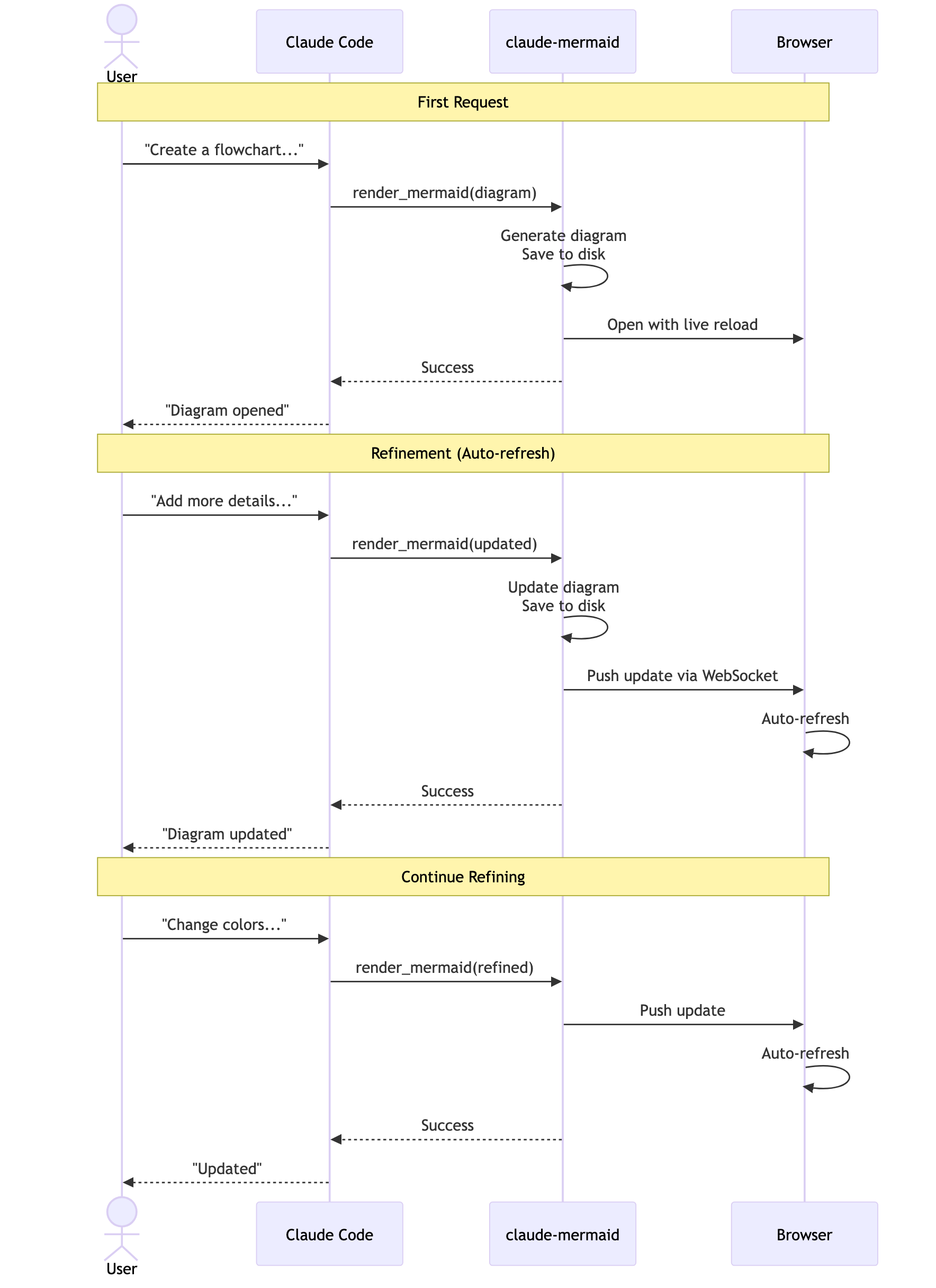
Iterative Verfeinerung:
"Create a class diagram for the User module"
// Browser opens with live preview
"Add the Address and Order classes with relationships"
// Diagram updates automatically in browser!"Create a flowchart and save to ./docs/auth-flow.svg:
graph LR
A[User Login] --> B{Valid Credentials?}
B -->|Yes| C[Access Granted]
B -->|No| D[Access Denied]
C --> E[Dashboard]
D --> F[Try Again]
style A fill:#e1f5ff
style C fill:#d4edda
style D fill:#f8d7da
"Das Diagramm wird unter ./docs/auth-flow.svg gespeichert und mit aktiviertem Live-Reload in Ihrem Browser geöffnet.
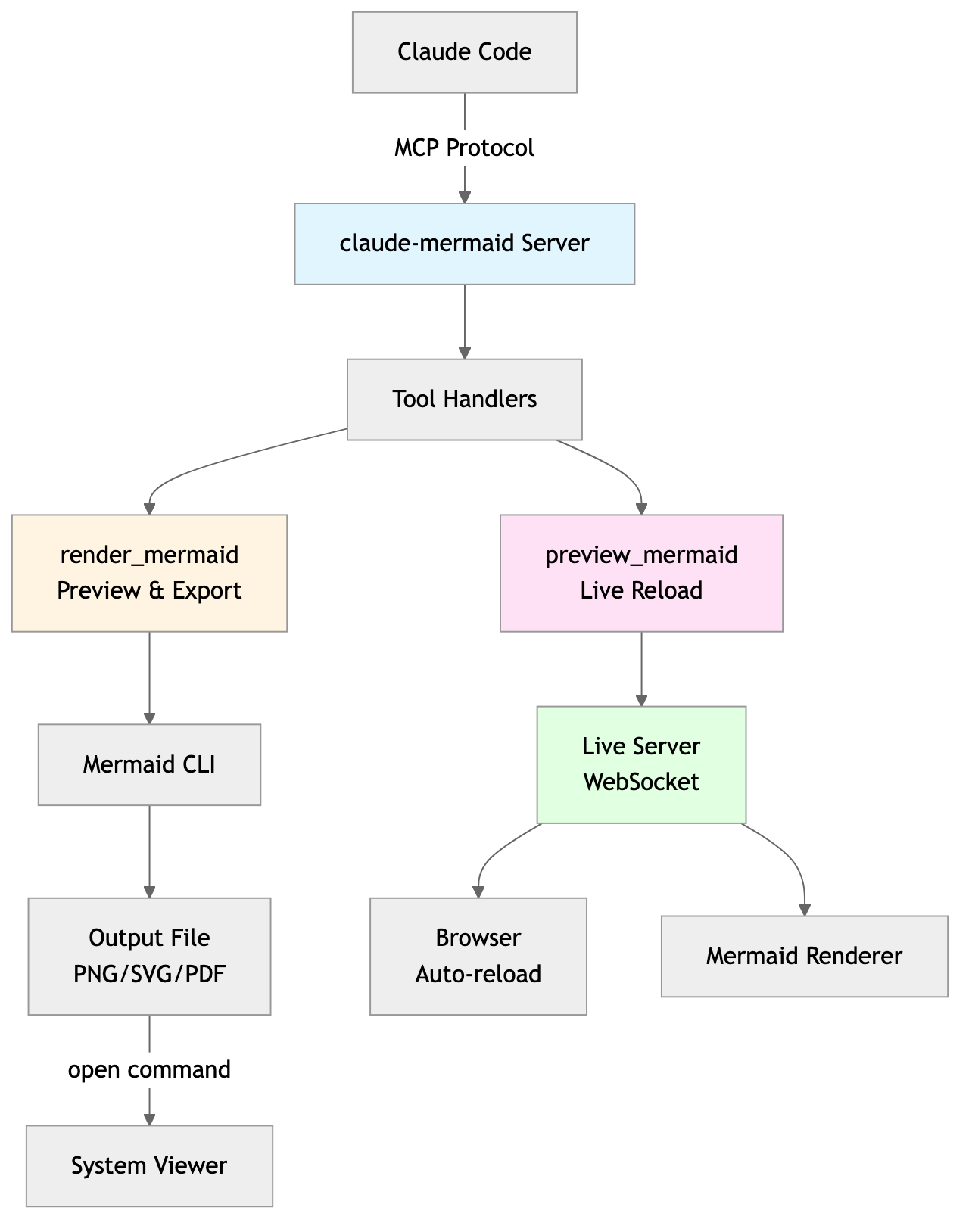
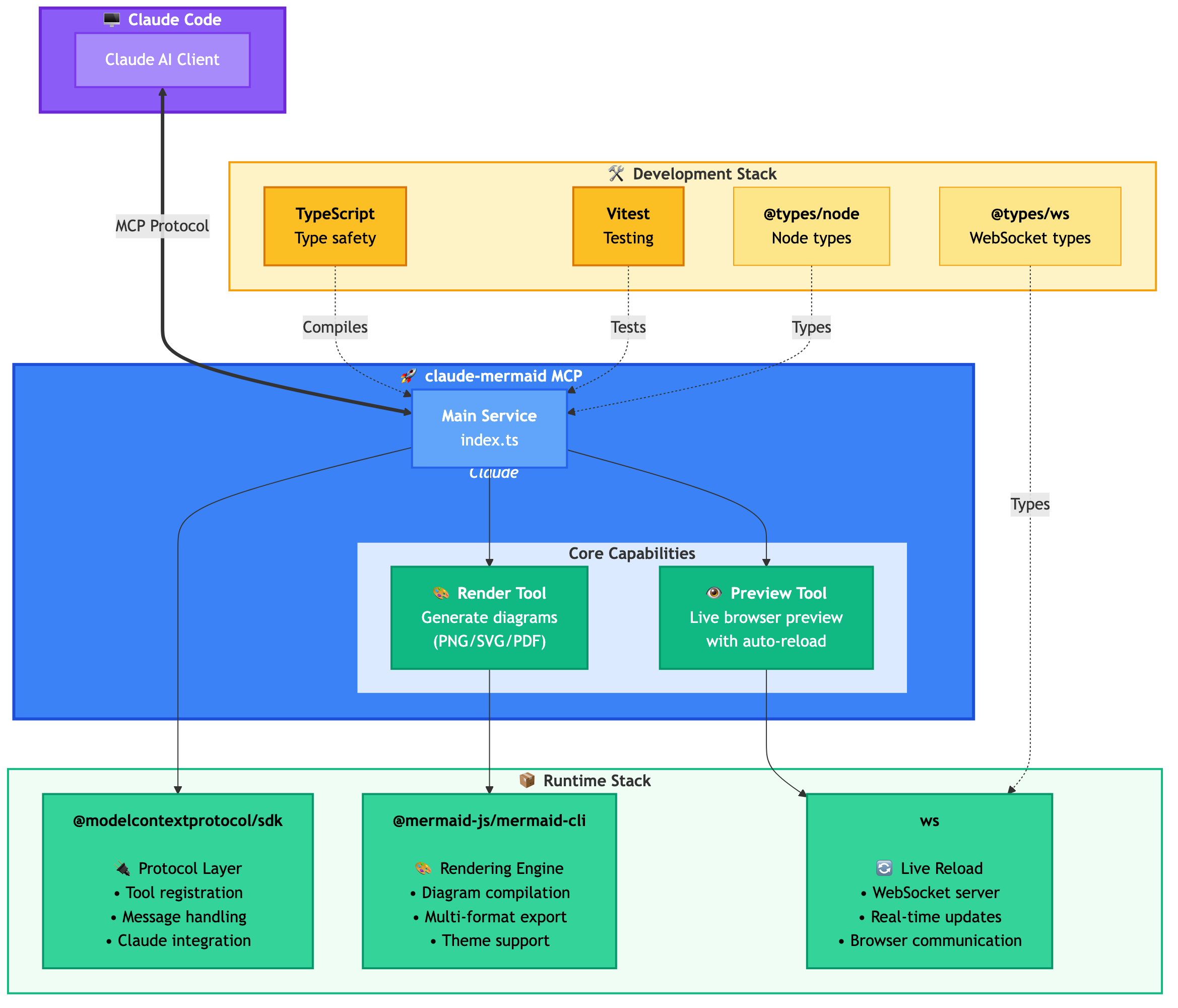
Der MCP-Server stellt zwei Tools bereit:
mermaid_preview — Rendern und Öffnen einer Live-Vorschau
diagram (String, erforderlich) — Mermaid-Diagrammcode
preview_id (String, erforderlich) — Kennung für diese Vorschau-Sitzung. Verwenden Sie unterschiedliche IDs für mehrere gleichzeitige Diagramme (z. B. architecture, flow).
format (String, Standard svg) — Eines von svg, png, pdf. Die Live-Vorschau ist nur für svg verfügbar.
theme (String, Standard default) — Eines von default, forest, dark, neutral.
background (String, Standard white) — Hintergrundfarbe. Beispiele: transparent, white, #F0F0F0.
width (Zahl, Standard 800) — Diagrammbreite in Pixeln.
height (Zahl, Standard 600) — Diagrammhöhe in Pixeln.
scale (Zahl, Standard 2) — Skalierungsfaktor für eine höhere Ausgabequalität.
mermaid_save — Speichern des aktuellen Live-Diagramms unter einem Pfad
save_path (String, erforderlich) — Zielpfad (z. B. ./docs/diagram.svg).
preview_id (String, erforderlich) — Muss mit der in mermaid_preview verwendeten preview_id übereinstimmen.
format (String, Standard svg) — Eines von svg, png, pdf. Wenn die Live-Arbeitsdatei für dieses Format noch nicht existiert, wird sie vor dem Speichern bei Bedarf gerendert.
Erstes Rendern: Öffnet das Diagramm im Browser unter http://localhost:3737/{preview_id}
Änderungen vornehmen: Bearbeiten Sie das Diagramm über Claude Code
Automatische Aktualisierung: Der Browser erkennt Änderungen über WebSocket und lädt neu
Statusanzeige: Grüner Punkt = verbunden, Roter Punkt = verbindet neu
Der Live-Server verwendet die Ports 3737-3747 und findet automatisch einen verfügbaren Port.
Verschieben: Klicken und ziehen Sie das Diagramm, um es zu bewegen
Zoomen: Verwenden Sie den Browser-Zoom (Strg/Cmd + +/- oder Pinch-to-Zoom auf dem Trackpad)
Position zurücksetzen: Klicken Sie auf die ⊙-Schaltfläche in der Statusleiste, um das Diagramm neu zu zentrieren
Exportieren: Klicken Sie auf die ⬇-Schaltfläche, um es als SVG oder PNG herunterzuladen
Die Live-Vorschau ist nur für das svg-Format verfügbar; PNG/PDF werden ohne Live-Reload gerendert.
Für Sequenzdiagramme unterstützt Mermaid keine style-Direktiven innerhalb von sequenceDiagram.
Sie können den Vorschau-Server ohne einen KI-Agenten mit dem --serve-Flag starten:
claude-mermaid --serveDies öffnet die Diagrammgalerie in Ihrem Browser mit allen zuvor gerenderten Diagrammen. Nützlich zum Durchsuchen und Exportieren von Diagrammen außerhalb einer Claude Code-Sitzung.
# Install dependencies
npm install

# Build the project
npm run build

# Run tests
npm test

# Watch mode for development
npm run dev

# Start the MCP server directly
npm startFehler: Cannot find package 'puppeteer':
Dies ist ein seltenes, umgebungsspezifisches Problem. Versuchen Sie diese Lösungen:
claude-mermaid global installieren:
npm install -g claude-mermaidDas Plugin in Claude Code neu installieren:
/plugin uninstall claude-mermaid
/plugin install claude-mermaid@claude-mermaid
Server verbindet nicht:
# Check if server is installed
claude-mermaid -v

# Reinstall if needed
npm install -g claude-mermaid

# Verify MCP configuration
claude mcp list
Fehler "Permission denied":
# Make sure the binary is executable
chmod +x $(which claude-mermaid)
Port wird bereits verwendet:
Der Server verwendet die Ports 3737-3747
Er findet automatisch einen verfügbaren Port
Überprüfen Sie, ob ein anderer Prozess diese Ports verwendet: lsof -i :3737-3747
Diagramme werden nicht gerendert oder Live-Reload funktioniert nicht:
Der Server protokolliert in ~/.config/claude-mermaid/logs/:
mcp.log - Tool-Anfragen und Diagramm-Rendering
web.log - HTTP/WebSocket-Verbindungen und Live-Reload
Aktivieren Sie das Debug-Logging in Ihrer MCP-Konfiguration:
{
  "mcpServers": {
    "mermaid": {
      "command": "claude-mermaid",
      "env": {
        "CLAUDE_MERMAID_LOG_LEVEL": "DEBUG"
      }
    }
  }
}
Überprüfen Sie dann die Protokolle:
# View MCP operations
tail -f ~/.config/claude-mermaid/logs/mcp.log

# View WebSocket connections
tail -f ~/.config/claude-mermaid/logs/web.log
Verfügbare Log-Level: DEBUG, INFO (Standard), WARN, ERROR, OFF
Beiträge sind willkommen! Bitte fühlen Sie sich frei, einen Pull Request einzureichen.
MIT - siehe LICENSE-Datei für Details
Wenn Ihnen dieses Projekt gefällt, könnten Sie sich auch für Folgendes interessieren:
preview-skills — Vorschau-Fähigkeiten zur Visualisierung von Dateien im Browser (Markdown, CSV, JSON, Mermaid und mehr)
Eine gehostete Bereitstellung ist auf Fronteir AI verfügbar.
Render a Mermaid diagram and open it in browser with live reload. Takes Mermaid diagram code as input and generates a live preview. Supports themes (default, forest, dark, neutral), custom backgrounds, dimensions, and quality scaling. The diagram will auto-refresh when updated. Use mermaid_save to save to disk. IMPORTANT: Automatically use this tool whenever you create a Mermaid diagram for the user. NOTE: Sequence diagrams do not support style directives - avoid using 'style' statements in sequenceDiagram.
| Name | Required | Description | Default |
|---|---|---|---|
| diagram | Yes | The Mermaid diagram code to render | |
| preview_id | Yes | ID for this preview session. Use different IDs for multiple diagrams (e.g., 'architecture', 'flow', 'sequence'). | |
| format | No | Output format (default: svg) | svg |
| theme | No | Theme of the chart (default: default) | default |
| background | No | Background color for pngs/svgs. Example: transparent, red, '#F0F0F0' (default: white) | white |
| width | No | Diagram width in pixels (default: 800) | |
| height | No | Diagram height in pixels (default: 600) | |
| scale | No | Scale factor for higher quality output (default: 2) |
Does the description disclose side effects, auth requirements, rate limits, or destructive behavior?
With no annotations provided, the description carries the full burden of behavioral disclosure. It effectively describes key behaviors: the tool opens a browser with live reload, auto-refreshes when updated, supports themes and customizations, and has limitations for sequence diagrams. However, it doesn't mention potential side effects like browser pop-ups or network requirements, leaving some behavioral aspects implicit.
Agents need to know what a tool does to the world before calling it. Descriptions should go beyond structured annotations to explain consequences.
Is the description appropriately sized, front-loaded, and free of redundancy?
The description is appropriately sized and front-loaded with the core purpose. Every sentence adds value: the first states the main action, the second details features, the third covers auto-refresh and sibling tool, and the last two provide critical usage notes. However, the structure could be slightly more streamlined by combining related points.
Shorter descriptions cost fewer tokens and are easier for agents to parse. Every sentence should earn its place.
Given the tool's complexity, does the description cover enough for an agent to succeed on first attempt?
Given the tool's complexity (8 parameters, live preview functionality) and lack of annotations or output schema, the description does a good job covering essential context: purpose, usage rules, key features, and limitations. It adequately guides an agent on how and when to use the tool, though it doesn't detail the preview interface or error handling, which are minor gaps.
Complex tools with many parameters or behaviors need more documentation. Simple tools need less. This dimension scales expectations accordingly.
Does the description clarify parameter syntax, constraints, interactions, or defaults beyond what the schema provides?
The schema description coverage is 100%, so the schema already documents all 8 parameters thoroughly. The description adds minimal parameter-specific information beyond the schema, mentioning themes and custom backgrounds generically. This meets the baseline of 3 since the schema does the heavy lifting, but the description doesn't significantly enhance parameter understanding.
Input schemas describe structure but not intent. Descriptions should explain non-obvious parameter relationships and valid value ranges.
Does the description clearly state what the tool does and how it differs from similar tools?
The description clearly states the specific action ('Render a Mermaid diagram and open it in browser with live reload') and distinguishes it from its sibling tool ('Use mermaid_save to save to disk'). It explicitly mentions the resource (Mermaid diagram) and the verb (render/preview), making the purpose unambiguous.
Agents choose between tools based on descriptions. A clear purpose with a specific verb and resource helps agents select the right tool.
Does the description explain when to use this tool, when not to, or what alternatives exist?
The description provides explicit guidance on when to use this tool ('Automatically use this tool whenever you create a Mermaid diagram for the user') and when not to use it for saving ('Use mermaid_save to save to disk'). It also includes a specific exclusion for sequence diagrams ('Sequence diagrams do not support style directives - avoid using 'style' statements in sequenceDiagram'), offering clear alternatives and limitations.
Agents often have multiple tools that could apply. Explicit usage guidance like "use X instead of Y when Z" prevents misuse.
Save the current live Mermaid diagram to a file path. This copies the already-rendered diagram from the live preview to the specified location. Use this after tuning your diagram with mermaid_preview.
| Name | Required | Description | Default |
|---|---|---|---|
| save_path | Yes | Path to save the diagram file (e.g., './docs/diagram.svg') | |
| preview_id | Yes | ID of the preview to save. Must match the preview_id used in mermaid_preview. | |
| format | No | Output format (default: svg). Must match the format used in mermaid_preview. | svg |
Does the description disclose side effects, auth requirements, rate limits, or destructive behavior?
With no annotations provided, the description carries the full burden of behavioral disclosure. It explains the tool copies an already-rendered diagram from the live preview, which is useful context beyond the input schema. However, it doesn't mention potential side effects (e.g., file overwriting), error conditions, or what happens if the preview_id doesn't exist, leaving some behavioral gaps.
Agents need to know what a tool does to the world before calling it. Descriptions should go beyond structured annotations to explain consequences.
Is the description appropriately sized, front-loaded, and free of redundancy?
The description is front-loaded with the core purpose in the first sentence, followed by a clear usage guideline. Both sentences earn their place by providing essential context and guidance without any redundant or verbose language.
Shorter descriptions cost fewer tokens and are easier for agents to parse. Every sentence should earn its place.
Given the tool's complexity, does the description cover enough for an agent to succeed on first attempt?
Given the tool's moderate complexity (3 parameters, no annotations, no output schema), the description is reasonably complete. It explains the tool's purpose, usage timing, and relationship to the sibling tool. However, it lacks details on output behavior (e.g., success/failure responses) and potential errors, which would be helpful given the absence of annotations and output schema.
Complex tools with many parameters or behaviors need more documentation. Simple tools need less. This dimension scales expectations accordingly.
Does the description clarify parameter syntax, constraints, interactions, or defaults beyond what the schema provides?
The schema description coverage is 100%, so the schema already documents all three parameters thoroughly. The description adds minimal value beyond the schema by mentioning the diagram is 'already-rendered' and comes from the 'live preview', which provides context but no additional parameter-specific details. This meets the baseline for high schema coverage.
Input schemas describe structure but not intent. Descriptions should explain non-obvious parameter relationships and valid value ranges.
Does the description clearly state what the tool does and how it differs from similar tools?
The description clearly states the specific action ('Save'), resource ('current live Mermaid diagram'), and destination ('to a file path'), distinguishing it from the sibling tool mermaid_preview by specifying it operates on the already-rendered diagram from the preview. This provides explicit verb+resource+scope differentiation.
Agents choose between tools based on descriptions. A clear purpose with a specific verb and resource helps agents select the right tool.
Does the description explain when to use this tool, when not to, or what alternatives exist?
The description explicitly states when to use this tool ('Use this after tuning your diagram with mermaid_preview'), providing clear sequencing guidance and linking it directly to the sibling tool. It also implies when not to use it (e.g., before previewing), though it doesn't name explicit alternatives beyond the sibling.
Agents often have multiple tools that could apply. Explicit usage guidance like "use X instead of Y when Z" prevents misuse.
The two tools have perfectly distinct purposes: mermaid_preview renders and displays a diagram in a browser with live updates, while mermaid_save saves the rendered diagram to disk. There is no overlap or ambiguity between them, as each handles a separate stage of the diagram workflow.
Both tools follow a consistent verb_noun pattern with the 'mermaid_' prefix: mermaid_preview and mermaid_save. The naming is clear, predictable, and uniform throughout the set, making it easy for an agent to understand their functions.
With only two tools, the set feels thin for a Mermaid diagram server, as it lacks operations like editing, exporting to different formats, or managing themes programmatically. However, it covers the core preview-and-save workflow, so it's borderline but not severely mismatched.
The tools provide basic functionality for previewing and saving diagrams, but there are notable gaps: no tool for creating or editing diagrams from scratch, no support for different output formats (e.g., PNG, SVG), and no way to manage themes or settings beyond the preview. This limits the server's utility for full diagram lifecycle management.
Unclaimed servers have limited discoverability.
If you are the server author, to access and configure the admin panel.
Render, verify, describe, and safely edit Mermaid diagrams through MCP.
MCP server to assist with JxBrowser development.
Collaborative whiteboard MCP server — create objects, connectors, C4 diagrams, and manage boards
MCP server for querying Forkast documentation
We provide all the information about MCP servers via our MCP API.
curl -X GET 'https://glama.ai/api/mcp/v1/servers/veelenga/claude-mermaid'
If you have feedback or need assistance with the MCP directory API, please join our Discord server