

A
licenseB
qualityA
maintenanceA Model Context Protocol (MCP) server that converts Mermaid diagrams to PNG images.
1
434 npm
235
MIT

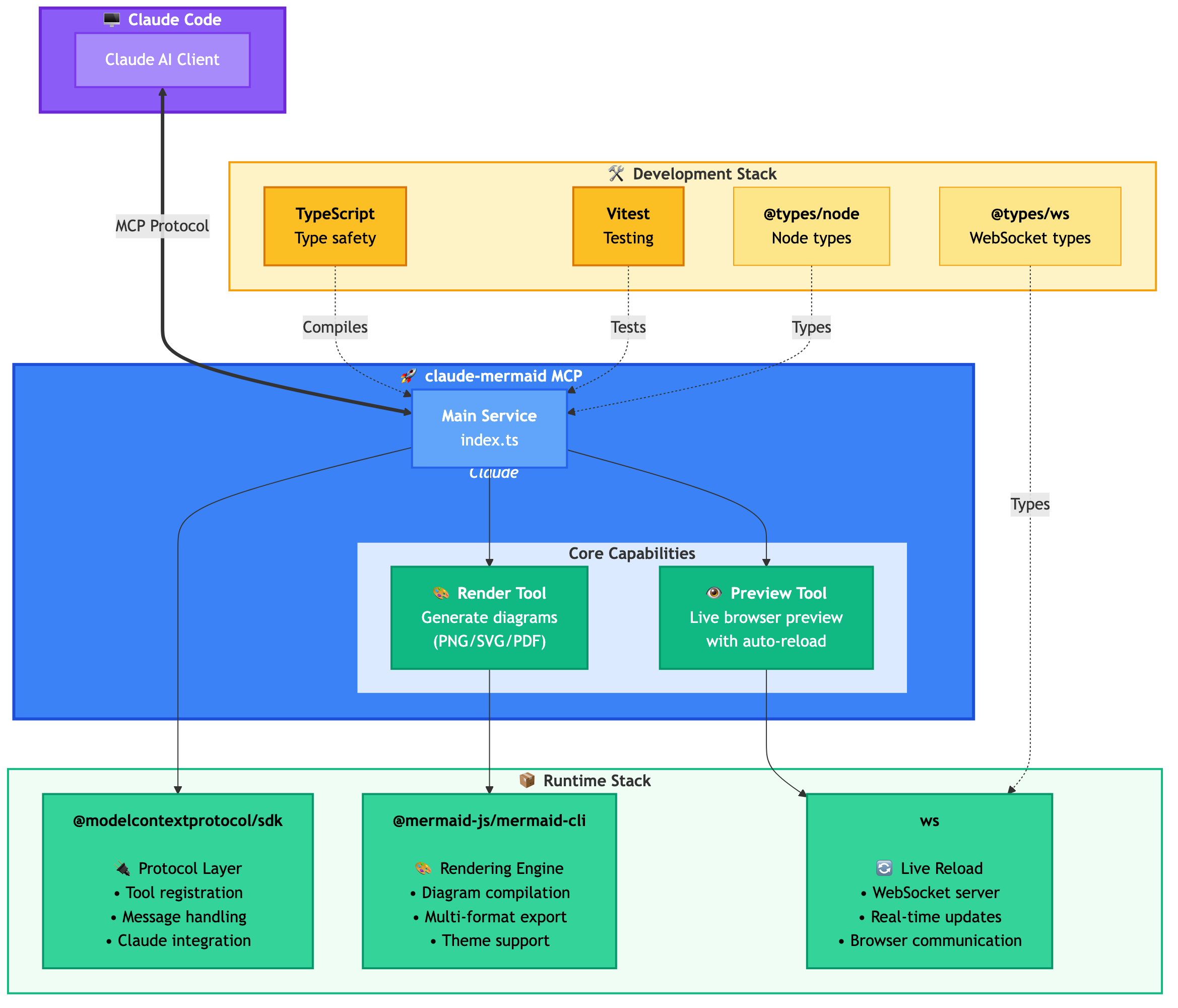
Servidor MCP para renderizar diagramas Mermaid en Claude Code con funcionalidad de recarga en vivo y una habilidad integrada para obtener orientación experta.
Renderiza diagramas automáticamente en tu navegador con actualizaciones en tiempo real a medida que los refinas. Perfecto para el desarrollo iterativo de diagramas y flujos de trabajo de documentación.
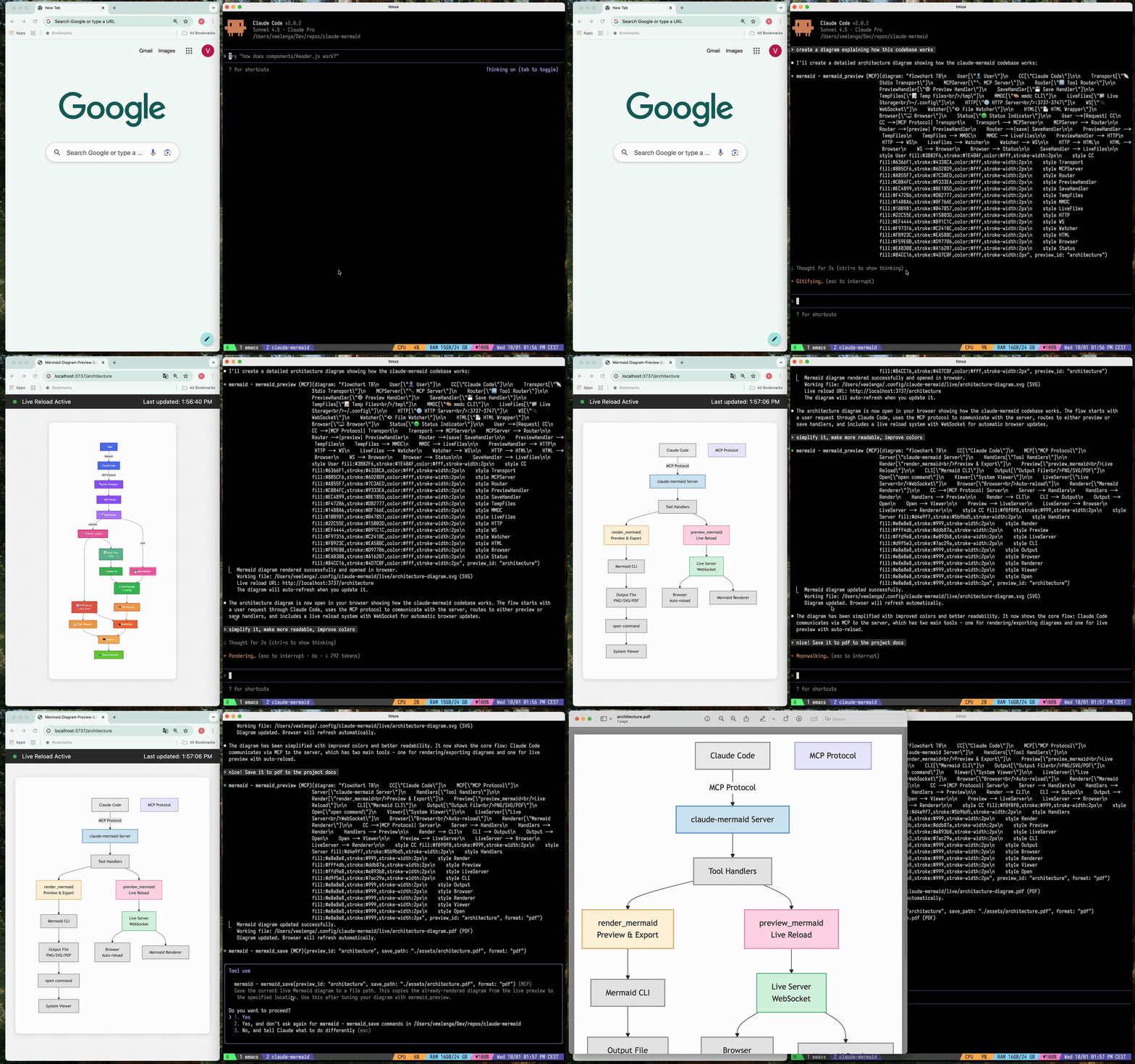
🔄 Recarga en vivo - Los diagramas se actualizan automáticamente en tu navegador mientras editas
🎨 Múltiples formatos de guardado - Exporta a SVG, PNG o PDF
🌈 Temas - Elige entre temas predeterminados, forest, dark o neutral
📐 Personalizable - Controla dimensiones, escala y colores de fondo
🪄 Previsualización interactiva - Desplaza los diagramas arrastrándolos, haz zoom con los controles del navegador, restablece la posición con un clic
⬇️ Exportación desde el navegador - Descarga diagramas como SVG o PNG directamente desde la previsualización
🗂️ Previsualizaciones múltiples - Usa preview_id para trabajar en varios diagramas simultáneamente
💾 Archivos de trabajo persistentes - Las previsualizaciones en vivo se almacenan en ~/.config/claude-mermaid/live
🤖 Habilidad integrada - Incluye una habilidad de Claude con mejores prácticas y orientación experta para crear diagramas
Related MCP server: mcp-mermaid-validator
Instalación del plugin (Recomendado)
En Claude Code, añade el marketplace e instala el plugin:
/plugin marketplace add veelenga/claude-mermaid
/plugin install claude-mermaid@claude-mermaid
Luego reinicia Claude Code para activar el plugin.
Desde npm:
npm install -g claude-mermaidDesde el código fuente:
git clone https://github.com/veelenga/claude-mermaid.git
cd claude-mermaid
npm install && npm run build && npm install -g .Instalación del plugin: El servidor MCP se configura automáticamente. Solo verifica:
/mcpDeberías ver mermaid en la lista de servidores MCP.
Instalación npm: Configura el servidor MCP manualmente:
claude mcp add --scope user mermaid claude-mermaidLuego verifica:
claude mcp listDeberías ver mermaid: claude-mermaid - ✓ Connected
Aunque este servidor está optimizado para Claude Code, puede funcionar con cualquier cliente compatible con MCP. Aquí te explicamos cómo configurarlo para otras herramientas populares:
Añádelo a tu archivo de configuración MCP de Codex (~/.codex/mcp_settings.json):
{
  "mcpServers": {
    "mermaid": {
      "command": "claude-mermaid"
    }
  }
}
O configúralo a través de la CLI de Codex:
codex mcp add mermaid claude-mermaidAñádelo a tu archivo de configuración MCP de Cursor (.cursor/mcp.json o ajustes):
{
  "mcpServers": {
    "mermaid": {
      "command": "claude-mermaid"
    }
  }
}
O usa la interfaz de ajustes de Cursor:
Abre los ajustes de Cursor (Cmd/Ctrl + ,)
Navega a MCP Servers
Añade un nuevo servidor con el comando: claude-mermaid
Si usas la extensión Cline para VSCode:
Abre los ajustes de VSCode (Cmd/Ctrl + ,)
Busca "Cline MCP"
Añade al JSON de ajustes de MCP:
{
  "mcpServers": {
    "mermaid": {
      "command": "claude-mermaid"
    }
  }
}
Añádelo al archivo de configuración MCP de Windsurf:
{
  "mcpServers": {
    "mermaid": {
      "command": "claude-mermaid"
    }
  }
}
La ubicación de la configuración varía según la plataforma:
macOS: ~/Library/Application Support/Windsurf/mcp.json
Linux: ~/.config/windsurf/mcp.json
Windows: %APPDATA%\Windsurf\mcp.json
Añádelo al archivo de configuración MCP de Gemini CLI (~/.gemini/mcp.json):
{
  "mcpServers": {
    "mermaid": {
      "command": "claude-mermaid"
    }
  }
}
O usa la CLI de Gemini para configurar:
gemini config mcp add mermaid --command claude-mermaidPara cualquier cliente compatible con MCP, usa la configuración estándar:
{
  "mcpServers": {
    "mermaid": {
      "command": "claude-mermaid"
    }
  }
}
El comando claude-mermaid debería estar disponible en tu PATH después de la instalación.
Nota: Algunos clientes pueden requerir la ruta completa al ejecutable:
Encuentra la ruta: which claude-mermaid (Unix/macOS) o where claude-mermaid (Windows)
Usa la ruta absoluta en la configuración: "command": "/ruta/a/claude-mermaid"
Simplemente pide a Claude Code que cree diagramas Mermaid de forma natural. Cuando se instala como plugin, la habilidad integrada mermaid-diagrams proporciona orientación experta, mejores prácticas y gestión automática del flujo de trabajo.
"Create a Mermaid diagram showing the user authentication flow"
"Draw a sequence diagram for the payment process"
"Generate a flowchart for the deployment pipeline"Con formato personalizado:
"Create a dark theme architecture diagram with transparent background"
"Generate a forest theme flowchart and save to ./docs/flow.svg"
Con formato de salida específico:
"Create an ER diagram and save as PDF to ./docs/schema.pdf"
"Save the flowchart as PNG to ./docs/flow.png"
Nota: El navegador siempre muestra SVG para la previsualización en vivo, mientras que guarda en el formato que elijas.
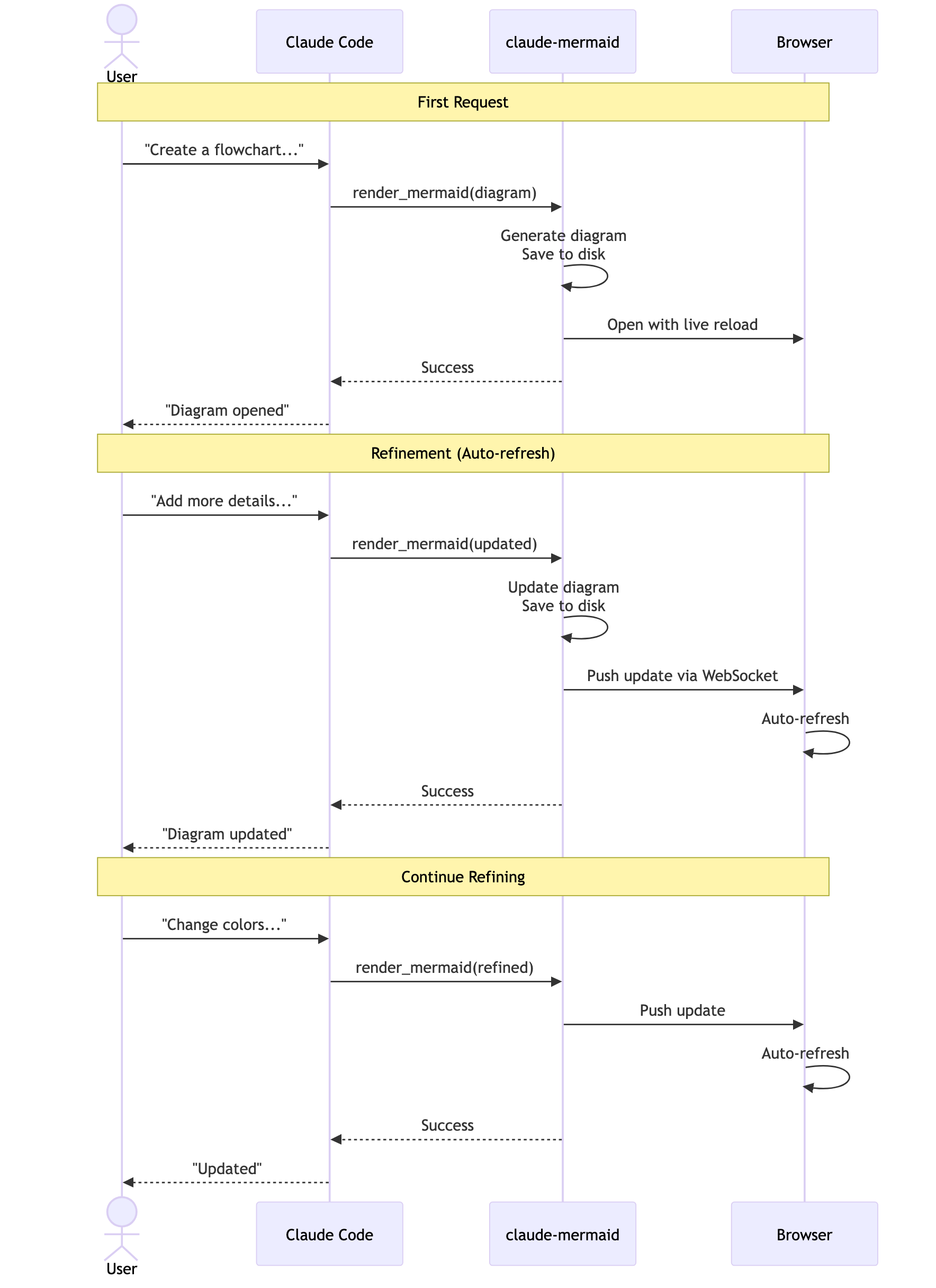
Refinamiento iterativo:
"Create a class diagram for the User module"
// Browser opens with live preview
"Add the Address and Order classes with relationships"
// Diagram updates automatically in browser!"Create a flowchart and save to ./docs/auth-flow.svg:
graph LR
A[User Login] --> B{Valid Credentials?}
B -->|Yes| C[Access Granted]
B -->|No| D[Access Denied]
C --> E[Dashboard]
D --> F[Try Again]
style A fill:#e1f5ff
style C fill:#d4edda
style D fill:#f8d7da
"El diagrama se guardará en ./docs/auth-flow.svg y se abrirá en tu navegador con la recarga en vivo activada.
Hay dos herramientas expuestas por el servidor MCP:
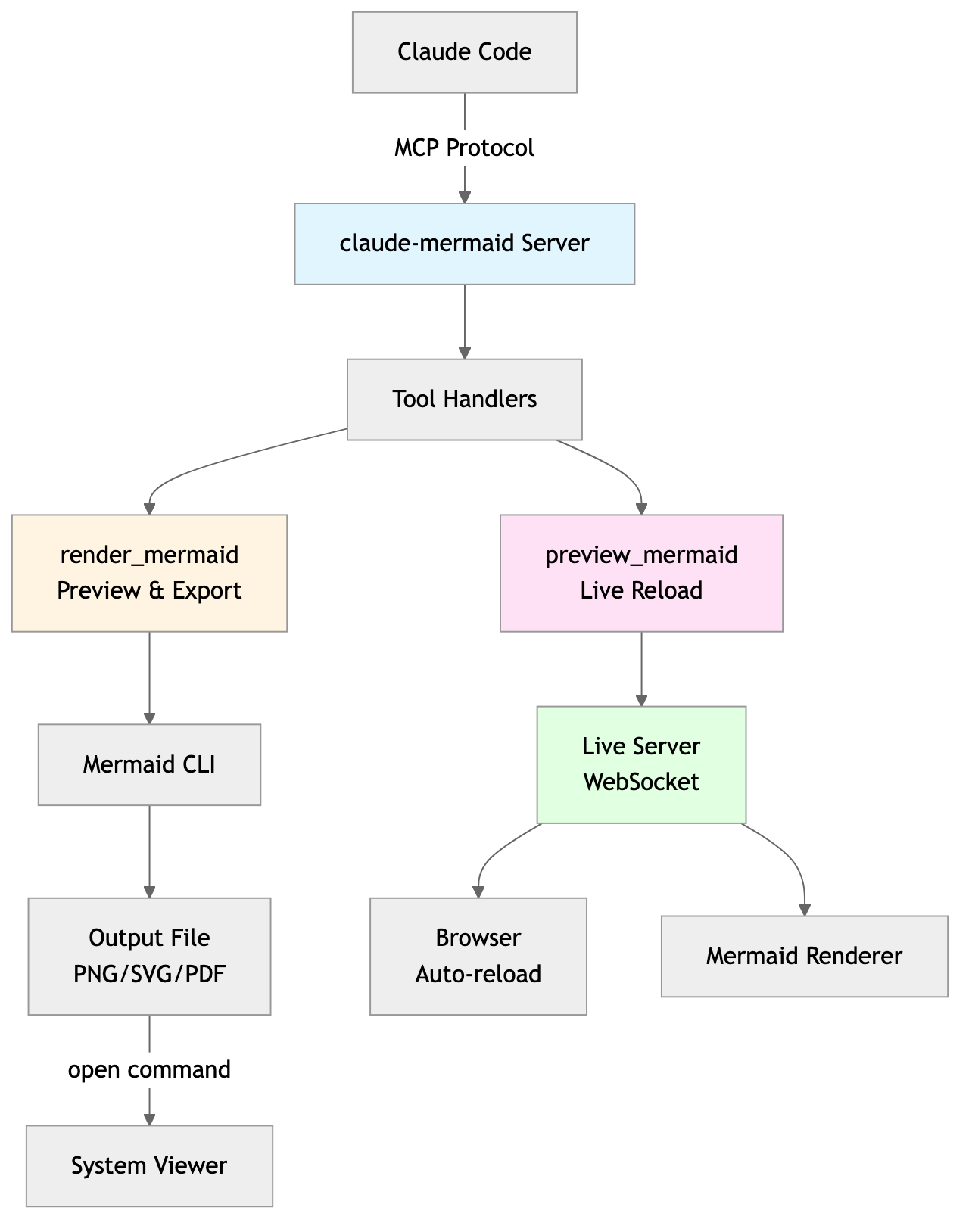
mermaid_preview — renderiza y abre una previsualización en vivo
diagram (string, requerido) — Código del diagrama Mermaid
preview_id (string, requerido) — Identificador para esta sesión de previsualización. Usa IDs diferentes para múltiples diagramas simultáneos (ej. architecture, flow).
format (string, por defecto svg) — Uno de svg, png, pdf. La previsualización en vivo solo está disponible para svg.
theme (string, por defecto default) — Uno de default, forest, dark, neutral.
background (string, por defecto white) — Color de fondo. Ejemplos: transparent, white, #F0F0F0.
width (number, por defecto 800) — Ancho del diagrama en píxeles.
height (number, por defecto 600) — Altura del diagrama en píxeles.
scale (number, por defecto 2) — Factor de escala para una salida de mayor calidad.
mermaid_save — guarda el diagrama en vivo actual en una ruta
save_path (string, requerido) — Ruta de destino (ej. ./docs/diagram.svg).
preview_id (string, requerido) — Debe coincidir con el preview_id usado en mermaid_preview.
format (string, por defecto svg) — Uno de svg, png, pdf. Si el archivo de trabajo en vivo para este formato aún no existe, se renderiza bajo demanda antes de guardarlo.
Primer renderizado: Abre el diagrama en el navegador en http://localhost:3737/{preview_id}
Realizar cambios: Edita el diagrama a través de Claude Code
Auto-actualización: El navegador detecta cambios a través de WebSocket y recarga
Indicador de estado: Punto verde = conectado, Punto rojo = reconectando
El servidor en vivo utiliza los puertos 3737-3747 y encuentra automáticamente un puerto disponible.
Desplazamiento: Haz clic y arrastra el diagrama para moverlo
Zoom: Usa el zoom del navegador (Ctrl/Cmd + +/- o pellizcar para hacer zoom en el trackpad)
Restablecer posición: Haz clic en el botón ⊙ en la barra de estado para recentrar el diagrama
Exportar: Haz clic en el botón ⬇ para descargar como SVG o PNG
La previsualización en vivo solo está disponible para el formato svg; PNG/PDF se renderizan sin recarga en vivo.
Para diagramas de secuencia, Mermaid no admite directivas style dentro de sequenceDiagram.
Puedes iniciar el servidor de previsualización sin un agente de IA usando el flag --serve:
claude-mermaid --serveEsto abre la galería de diagramas en tu navegador con todos los diagramas renderizados anteriormente. Útil para navegar y exportar diagramas fuera de una sesión de Claude Code.
# Install dependencies
npm install

# Build the project
npm run build

# Run tests
npm test

# Watch mode for development
npm run dev

# Start the MCP server directly
npm startError: Cannot find package 'puppeteer':
Este es un problema poco común específico del entorno. Prueba estas soluciones:
Instala claude-mermaid globalmente:
npm install -g claude-mermaidReinstala el plugin en Claude Code:
/plugin uninstall claude-mermaid
/plugin install claude-mermaid@claude-mermaid
El servidor no se conecta:
# Check if server is installed
claude-mermaid -v

# Reinstall if needed
npm install -g claude-mermaid

# Verify MCP configuration
claude mcp list
Error de permiso denegado:
# Make sure the binary is executable
chmod +x $(which claude-mermaid)
Puerto ya en uso:
El servidor utiliza los puertos 3737-3747
Encontrará automáticamente un puerto disponible
Comprueba si otro proceso está usando estos puertos: lsof -i :3737-3747
Los diagramas no se renderizan o la recarga en vivo no funciona:
El servidor registra los logs en ~/.config/claude-mermaid/logs/:
mcp.log - Solicitudes de herramientas y renderizado de diagramas
web.log - Conexiones HTTP/WebSocket y recarga en vivo
Habilita el registro de depuración en tu configuración MCP:
{
  "mcpServers": {
    "mermaid": {
      "command": "claude-mermaid",
      "env": {
        "CLAUDE_MERMAID_LOG_LEVEL": "DEBUG"
      }
    }
  }
}
Luego revisa los logs:
# View MCP operations
tail -f ~/.config/claude-mermaid/logs/mcp.log

# View WebSocket connections
tail -f ~/.config/claude-mermaid/logs/web.log
Niveles de registro disponibles: DEBUG, INFO (por defecto), WARN, ERROR, OFF
¡Las contribuciones son bienvenidas! Por favor, siéntete libre de enviar un Pull Request.
MIT - consulta el archivo LICENSE para más detalles
Si te gusta este proyecto, también podría interesarte
preview-skills — habilidades de previsualización para visualizar archivos en el navegador (markdown, csv, json, mermaid y más)
Un despliegue alojado está disponible en Fronteir AI.
Render a Mermaid diagram and open it in browser with live reload. Takes Mermaid diagram code as input and generates a live preview. Supports themes (default, forest, dark, neutral), custom backgrounds, dimensions, and quality scaling. The diagram will auto-refresh when updated. Use mermaid_save to save to disk. IMPORTANT: Automatically use this tool whenever you create a Mermaid diagram for the user. NOTE: Sequence diagrams do not support style directives - avoid using 'style' statements in sequenceDiagram.
| Name | Required | Description | Default |
|---|---|---|---|
| diagram | Yes | The Mermaid diagram code to render | |
| preview_id | Yes | ID for this preview session. Use different IDs for multiple diagrams (e.g., 'architecture', 'flow', 'sequence'). | |
| format | No | Output format (default: svg) | svg |
| theme | No | Theme of the chart (default: default) | default |
| background | No | Background color for pngs/svgs. Example: transparent, red, '#F0F0F0' (default: white) | white |
| width | No | Diagram width in pixels (default: 800) | |
| height | No | Diagram height in pixels (default: 600) | |
| scale | No | Scale factor for higher quality output (default: 2) |
Does the description disclose side effects, auth requirements, rate limits, or destructive behavior?
With no annotations provided, the description carries the full burden of behavioral disclosure. It effectively describes key behaviors: the tool opens a browser with live reload, auto-refreshes when updated, supports themes and customizations, and has limitations for sequence diagrams. However, it doesn't mention potential side effects like browser pop-ups or network requirements, leaving some behavioral aspects implicit.
Agents need to know what a tool does to the world before calling it. Descriptions should go beyond structured annotations to explain consequences.
Is the description appropriately sized, front-loaded, and free of redundancy?
The description is appropriately sized and front-loaded with the core purpose. Every sentence adds value: the first states the main action, the second details features, the third covers auto-refresh and sibling tool, and the last two provide critical usage notes. However, the structure could be slightly more streamlined by combining related points.
Shorter descriptions cost fewer tokens and are easier for agents to parse. Every sentence should earn its place.
Given the tool's complexity, does the description cover enough for an agent to succeed on first attempt?
Given the tool's complexity (8 parameters, live preview functionality) and lack of annotations or output schema, the description does a good job covering essential context: purpose, usage rules, key features, and limitations. It adequately guides an agent on how and when to use the tool, though it doesn't detail the preview interface or error handling, which are minor gaps.
Complex tools with many parameters or behaviors need more documentation. Simple tools need less. This dimension scales expectations accordingly.
Does the description clarify parameter syntax, constraints, interactions, or defaults beyond what the schema provides?
The schema description coverage is 100%, so the schema already documents all 8 parameters thoroughly. The description adds minimal parameter-specific information beyond the schema, mentioning themes and custom backgrounds generically. This meets the baseline of 3 since the schema does the heavy lifting, but the description doesn't significantly enhance parameter understanding.
Input schemas describe structure but not intent. Descriptions should explain non-obvious parameter relationships and valid value ranges.
Does the description clearly state what the tool does and how it differs from similar tools?
The description clearly states the specific action ('Render a Mermaid diagram and open it in browser with live reload') and distinguishes it from its sibling tool ('Use mermaid_save to save to disk'). It explicitly mentions the resource (Mermaid diagram) and the verb (render/preview), making the purpose unambiguous.
Agents choose between tools based on descriptions. A clear purpose with a specific verb and resource helps agents select the right tool.
Does the description explain when to use this tool, when not to, or what alternatives exist?
The description provides explicit guidance on when to use this tool ('Automatically use this tool whenever you create a Mermaid diagram for the user') and when not to use it for saving ('Use mermaid_save to save to disk'). It also includes a specific exclusion for sequence diagrams ('Sequence diagrams do not support style directives - avoid using 'style' statements in sequenceDiagram'), offering clear alternatives and limitations.
Agents often have multiple tools that could apply. Explicit usage guidance like "use X instead of Y when Z" prevents misuse.
Save the current live Mermaid diagram to a file path. This copies the already-rendered diagram from the live preview to the specified location. Use this after tuning your diagram with mermaid_preview.
| Name | Required | Description | Default |
|---|---|---|---|
| save_path | Yes | Path to save the diagram file (e.g., './docs/diagram.svg') | |
| preview_id | Yes | ID of the preview to save. Must match the preview_id used in mermaid_preview. | |
| format | No | Output format (default: svg). Must match the format used in mermaid_preview. | svg |
Does the description disclose side effects, auth requirements, rate limits, or destructive behavior?
With no annotations provided, the description carries the full burden of behavioral disclosure. It explains the tool copies an already-rendered diagram from the live preview, which is useful context beyond the input schema. However, it doesn't mention potential side effects (e.g., file overwriting), error conditions, or what happens if the preview_id doesn't exist, leaving some behavioral gaps.
Agents need to know what a tool does to the world before calling it. Descriptions should go beyond structured annotations to explain consequences.
Is the description appropriately sized, front-loaded, and free of redundancy?
The description is front-loaded with the core purpose in the first sentence, followed by a clear usage guideline. Both sentences earn their place by providing essential context and guidance without any redundant or verbose language.
Shorter descriptions cost fewer tokens and are easier for agents to parse. Every sentence should earn its place.
Given the tool's complexity, does the description cover enough for an agent to succeed on first attempt?
Given the tool's moderate complexity (3 parameters, no annotations, no output schema), the description is reasonably complete. It explains the tool's purpose, usage timing, and relationship to the sibling tool. However, it lacks details on output behavior (e.g., success/failure responses) and potential errors, which would be helpful given the absence of annotations and output schema.
Complex tools with many parameters or behaviors need more documentation. Simple tools need less. This dimension scales expectations accordingly.
Does the description clarify parameter syntax, constraints, interactions, or defaults beyond what the schema provides?
The schema description coverage is 100%, so the schema already documents all three parameters thoroughly. The description adds minimal value beyond the schema by mentioning the diagram is 'already-rendered' and comes from the 'live preview', which provides context but no additional parameter-specific details. This meets the baseline for high schema coverage.
Input schemas describe structure but not intent. Descriptions should explain non-obvious parameter relationships and valid value ranges.
Does the description clearly state what the tool does and how it differs from similar tools?
The description clearly states the specific action ('Save'), resource ('current live Mermaid diagram'), and destination ('to a file path'), distinguishing it from the sibling tool mermaid_preview by specifying it operates on the already-rendered diagram from the preview. This provides explicit verb+resource+scope differentiation.
Agents choose between tools based on descriptions. A clear purpose with a specific verb and resource helps agents select the right tool.
Does the description explain when to use this tool, when not to, or what alternatives exist?
The description explicitly states when to use this tool ('Use this after tuning your diagram with mermaid_preview'), providing clear sequencing guidance and linking it directly to the sibling tool. It also implies when not to use it (e.g., before previewing), though it doesn't name explicit alternatives beyond the sibling.
Agents often have multiple tools that could apply. Explicit usage guidance like "use X instead of Y when Z" prevents misuse.
Recent tool additions, removals, and schema changes observed during successful MCP inspections.
mermaid_previewmermaid_saveScored across 2 tools
The two tools have perfectly distinct purposes: mermaid_preview renders and displays a diagram in a browser with live updates, while mermaid_save saves the rendered diagram to disk. There is no overlap or ambiguity between them, as each handles a separate stage of the diagram workflow.
Both tools follow a consistent verb_noun pattern with the 'mermaid_' prefix: mermaid_preview and mermaid_save. The naming is clear, predictable, and uniform throughout the set, making it easy for an agent to understand their functions.
With only two tools, the set feels thin for a Mermaid diagram server, as it lacks operations like editing, exporting to different formats, or managing themes programmatically. However, it covers the core preview-and-save workflow, so it's borderline but not severely mismatched.
The tools provide basic functionality for previewing and saving diagrams, but there are notable gaps: no tool for creating or editing diagrams from scratch, no support for different output formats (e.g., PNG, SVG), and no way to manage themes or settings beyond the preview. This limits the server's utility for full diagram lifecycle management.
Render, verify, describe, and safely edit Mermaid diagrams through MCP.
MCP server to assist with JxBrowser development.
Collaborative whiteboard MCP server — create objects, connectors, C4 diagrams, and manage boards
MCP server for querying Forkast documentation