

A
licenseB
qualityC
maintenanceA Model Context Protocol (MCP) server that converts Mermaid diagrams to PNG images.
1
266
234
MIT

실시간 새로고침(live reload) 기능과 전문가 가이드를 위한 내장 스킬을 갖춘 Claude Code용 Mermaid 다이어그램 렌더링 MCP 서버입니다.
다이어그램을 수정할 때마다 브라우저에서 실시간으로 업데이트되어 자동으로 렌더링됩니다. 반복적인 다이어그램 개발 및 문서화 워크플로우에 최적입니다.
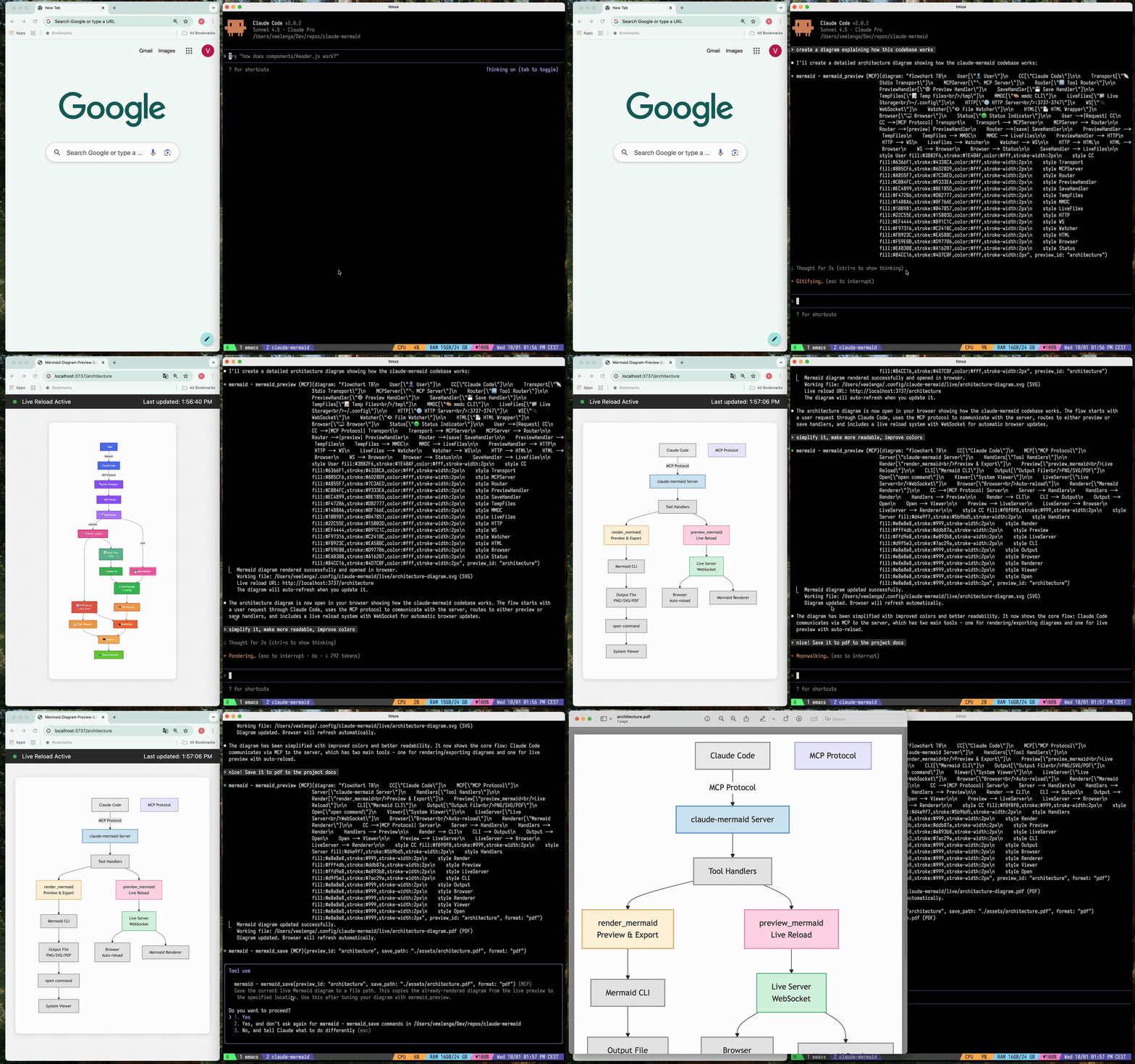
🔄 실시간 새로고침 - 편집 시 브라우저에서 다이어그램이 자동 새로고침됩니다.
🎨 다양한 저장 형식 - SVG, PNG 또는 PDF로 내보내기 가능
🌈 테마 - 기본(default), forest, dark, neutral 테마 중 선택 가능
📐 사용자 정의 - 크기, 배율, 배경색 제어 가능
🪄 대화형 미리보기 - 드래그로 다이어그램 이동, 브라우저 컨트롤로 확대/축소, 클릭 한 번으로 위치 초기화
⬇️ 브라우저 내보내기 - 미리보기에서 직접 SVG 또는 PNG로 다이어그램 다운로드
🗂️ 다중 미리보기 - preview_id를 사용하여 여러 다이어그램을 동시에 작업 가능
💾 영구 작업 파일 - 실시간 미리보기는 ~/.config/claude-mermaid/live에 저장됨
🤖 내장 스킬 - 다이어그램 작성을 위한 모범 사례와 전문가 가이드가 포함된 Claude 스킬 제공
Related MCP server: mcp-mermaid-validator
플러그인 설치 (권장)
Claude Code에서 마켓플레이스를 추가하고 플러그인을 설치하세요:
/plugin marketplace add veelenga/claude-mermaid
/plugin install claude-mermaid@claude-mermaid
그런 다음 Claude Code를 재시작하여 플러그인을 활성화하세요.
npm 사용:
npm install -g claude-mermaid소스에서 설치:
git clone https://github.com/veelenga/claude-mermaid.git
cd claude-mermaid
npm install && npm run build && npm install -g .플러그인 설치: MCP 서버가 자동으로 구성됩니다. 다음을 확인하세요:
/mcpMCP 서버 목록에 mermaid가 보여야 합니다.
npm 설치: MCP 서버를 수동으로 구성하세요:
claude mcp add --scope user mermaid claude-mermaid그런 다음 확인하세요:
claude mcp listmermaid: claude-mermaid - ✓ Connected가 보여야 합니다.
이 서버는 Claude Code에 최적화되어 있지만, 모든 MCP 호환 클라이언트와 함께 사용할 수 있습니다. 다른 인기 도구에 대한 구성 방법은 다음과 같습니다:
Codex MCP 설정 파일(~/.codex/mcp_settings.json)에 추가하세요:
{
  "mcpServers": {
    "mermaid": {
      "command": "claude-mermaid"
    }
  }
}
또는 Codex CLI를 통해 구성하세요:
codex mcp add mermaid claude-mermaidCursor MCP 구성 파일(.cursor/mcp.json 또는 설정)에 추가하세요:
{
  "mcpServers": {
    "mermaid": {
      "command": "claude-mermaid"
    }
  }
}
또는 Cursor의 설정 UI를 사용하세요:
Cursor 설정 열기 (Cmd/Ctrl + ,)
MCP Servers로 이동
다음 명령어로 새 서버 추가: claude-mermaid
VSCode용 Cline 확장 프로그램을 사용하는 경우:
VSCode 설정 열기 (Cmd/Ctrl + ,)
"Cline MCP" 검색
MCP 설정 JSON에 추가:
{
  "mcpServers": {
    "mermaid": {
      "command": "claude-mermaid"
    }
  }
}
Windsurf의 MCP 구성 파일에 추가하세요:
{
  "mcpServers": {
    "mermaid": {
      "command": "claude-mermaid"
    }
  }
}
구성 위치는 플랫폼마다 다릅니다:
macOS: ~/Library/Application Support/Windsurf/mcp.json
Linux: ~/.config/windsurf/mcp.json
Windows: %APPDATA%\Windsurf\mcp.json
Gemini CLI의 MCP 구성 파일(~/.gemini/mcp.json)에 추가하세요:
{
  "mcpServers": {
    "mermaid": {
      "command": "claude-mermaid"
    }
  }
}
또는 Gemini CLI를 사용하여 구성하세요:
gemini config mcp add mermaid --command claude-mermaidMCP 호환 클라이언트의 경우 표준 구성을 사용하세요:
{
  "mcpServers": {
    "mermaid": {
      "command": "claude-mermaid"
    }
  }
}
설치 후 claude-mermaid 명령어를 PATH에서 사용할 수 있어야 합니다.
참고: 일부 클라이언트는 실행 파일의 전체 경로가 필요할 수 있습니다:
경로 찾기: which claude-mermaid (Unix/macOS) 또는 where claude-mermaid (Windows)
구성에서 절대 경로 사용: "command": "/path/to/claude-mermaid"
Claude Code에게 자연스럽게 Mermaid 다이어그램을 생성해달라고 요청하세요. 플러그인으로 설치하면 내장된 mermaid-diagrams 스킬이 전문가 가이드, 모범 사례 및 자동 워크플로우 관리를 제공합니다.
"Create a Mermaid diagram showing the user authentication flow"
"Draw a sequence diagram for the payment process"
"Generate a flowchart for the deployment pipeline"사용자 정의 서식 사용:
"Create a dark theme architecture diagram with transparent background"
"Generate a forest theme flowchart and save to ./docs/flow.svg"
특정 출력 형식 사용:
"Create an ER diagram and save as PDF to ./docs/schema.pdf"
"Save the flowchart as PNG to ./docs/flow.png"
참고: 브라우저는 실시간 미리보기를 위해 항상 SVG를 표시하며, 선택한 형식으로 저장됩니다.
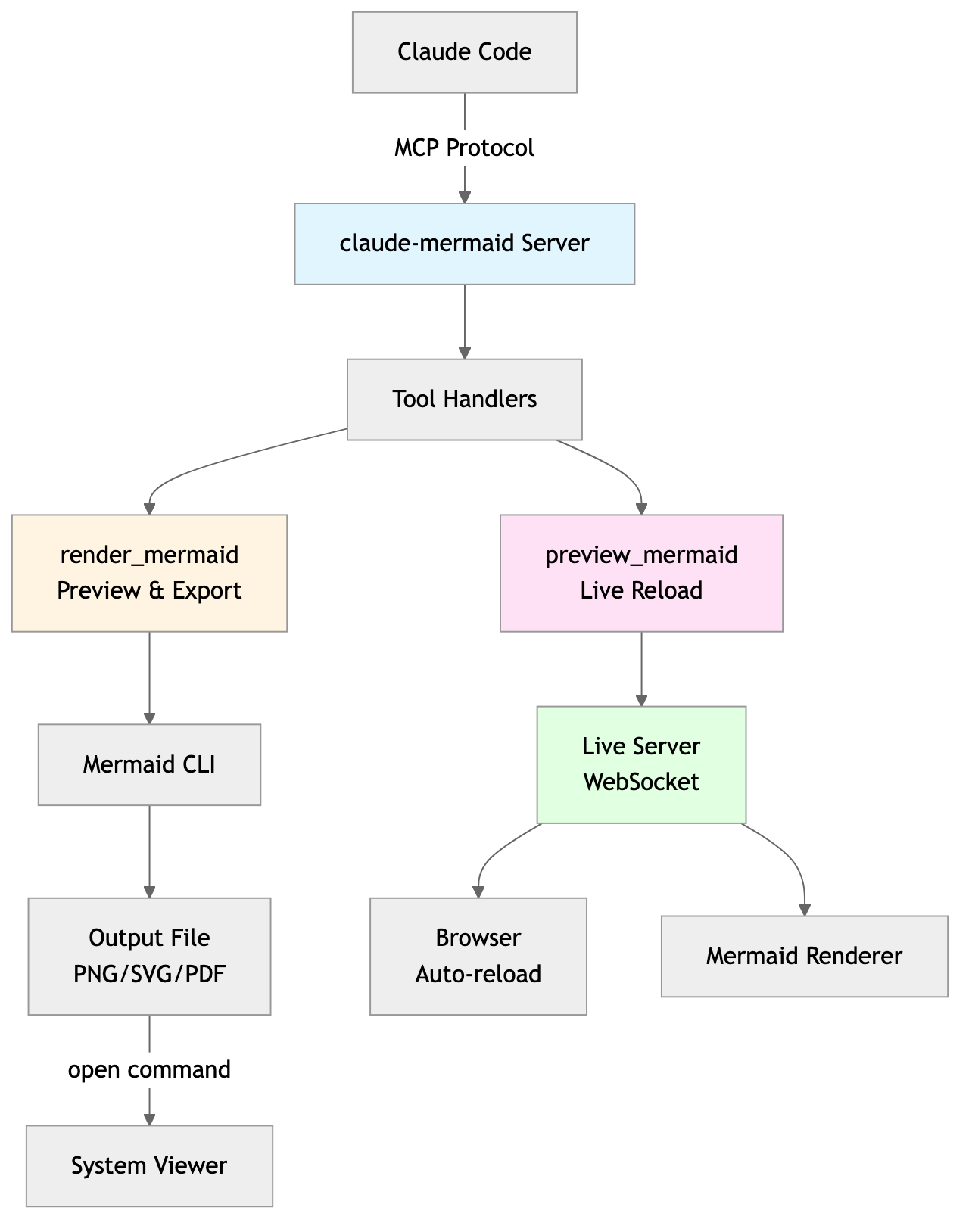
반복적인 개선:
"Create a class diagram for the User module"
// Browser opens with live preview
"Add the Address and Order classes with relationships"
// Diagram updates automatically in browser!"Create a flowchart and save to ./docs/auth-flow.svg:
graph LR
A[User Login] --> B{Valid Credentials?}
B -->|Yes| C[Access Granted]
B -->|No| D[Access Denied]
C --> E[Dashboard]
D --> F[Try Again]
style A fill:#e1f5ff
style C fill:#d4edda
style D fill:#f8d7da
"다이어그램은 ./docs/auth-flow.svg로 저장되며 실시간 새로고침이 활성화된 상태로 브라우저에서 열립니다.
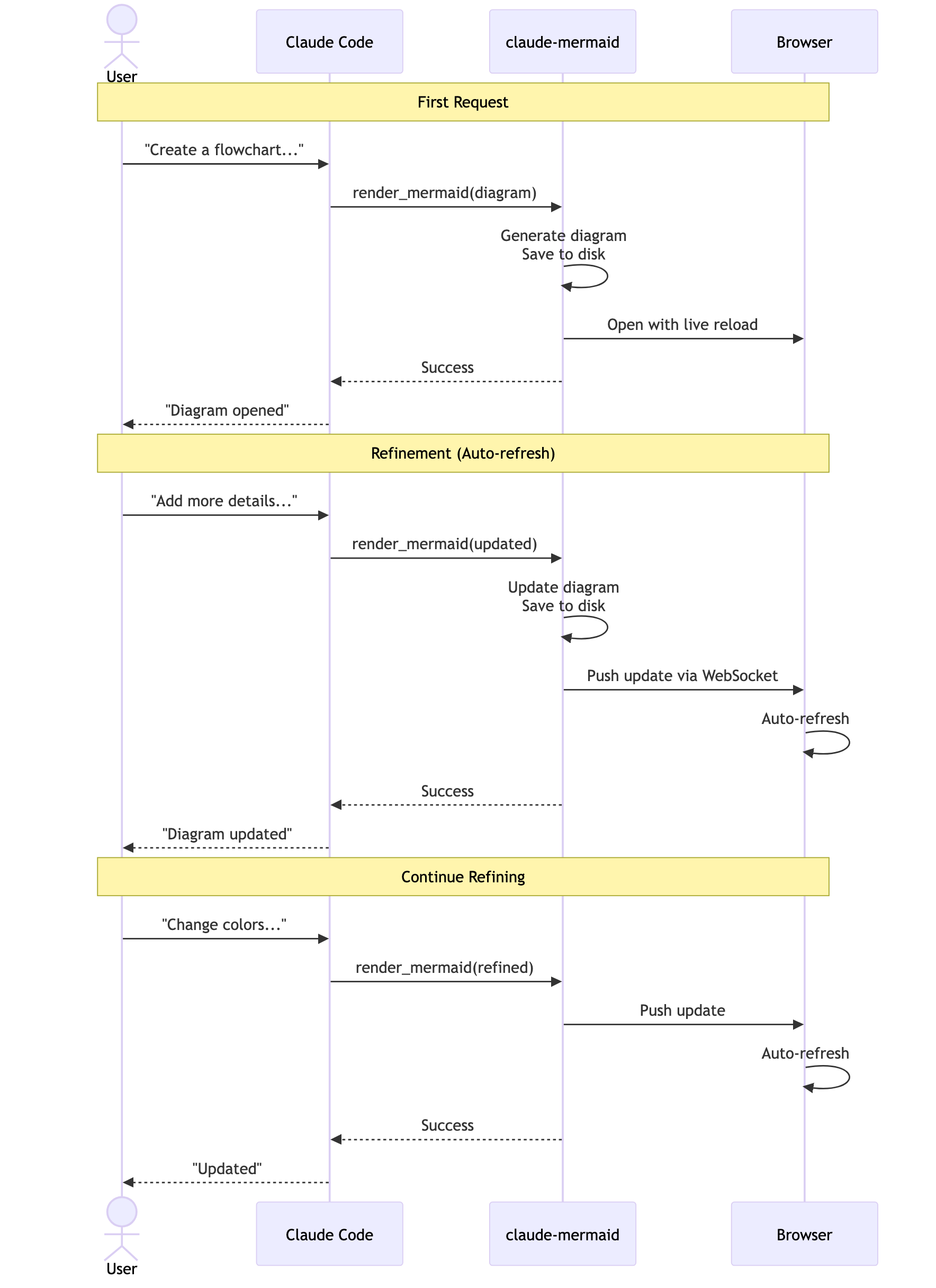
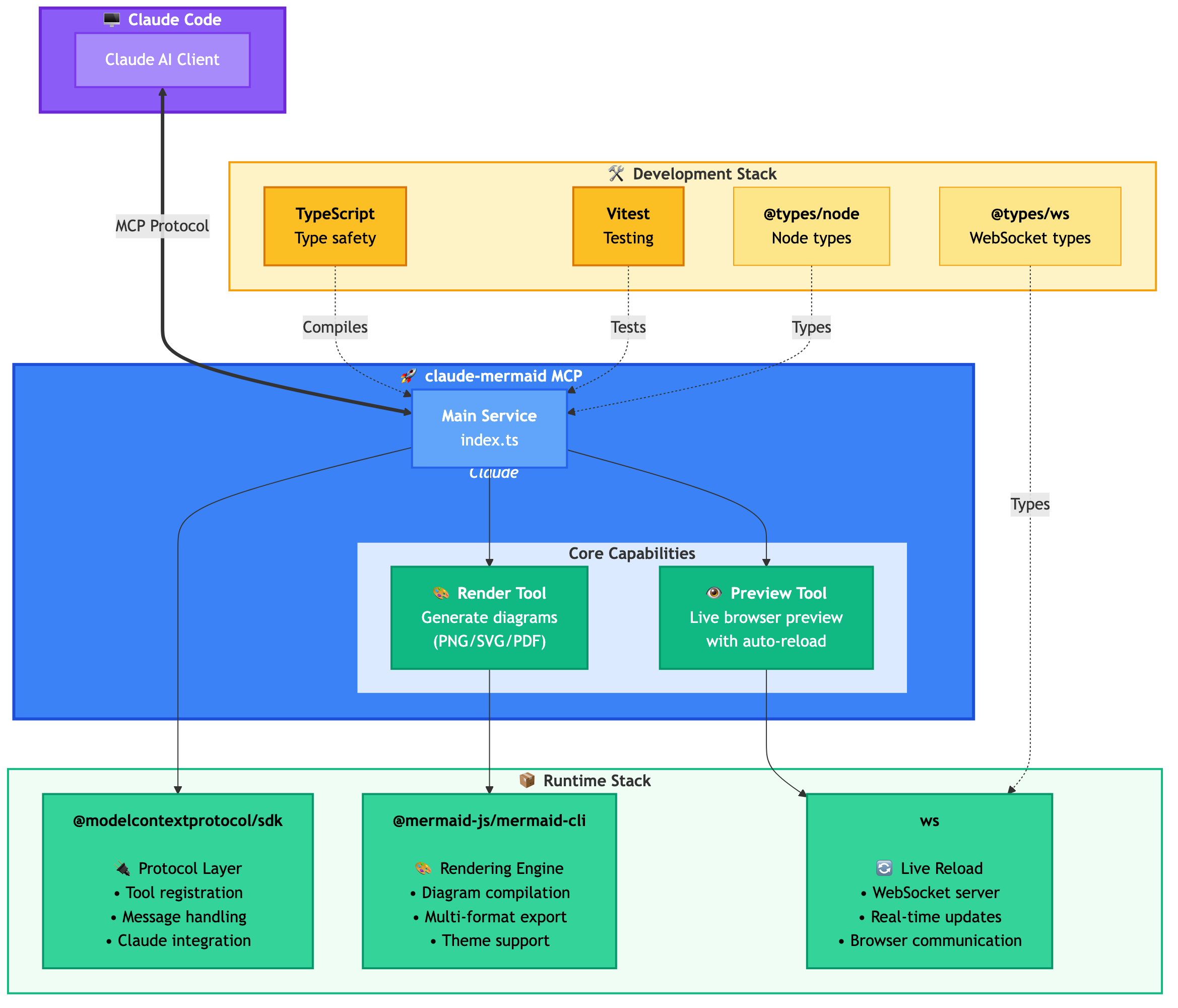
MCP 서버에서 노출하는 두 가지 도구는 다음과 같습니다:
mermaid_preview — 실시간 미리보기 렌더링 및 열기
diagram (문자열, 필수) — Mermaid 다이어그램 코드
preview_id (문자열, 필수) — 이 미리보기 세션의 식별자. 여러 다이어그램을 동시에 작업하려면 다른 ID를 사용하세요 (예: architecture, flow).
format (문자열, 기본값 svg) — svg, png, pdf 중 하나. 실시간 미리보기는 svg에서만 가능합니다.
theme (문자열, 기본값 default) — default, forest, dark, neutral 중 하나.
background (문자열, 기본값 white) — 배경색. 예: transparent, white, #F0F0F0.
width (숫자, 기본값 800) — 다이어그램 너비 (픽셀).
height (숫자, 기본값 600) — 다이어그램 높이 (픽셀).
scale (숫자, 기본값 2) — 고품질 출력을 위한 배율.
mermaid_save — 현재 실시간 다이어그램을 경로에 저장
save_path (문자열, 필수) — 대상 경로 (예: ./docs/diagram.svg).
preview_id (문자열, 필수) — mermaid_preview에서 사용된 preview_id와 일치해야 합니다.
format (문자열, 기본값 svg) — svg, png, pdf 중 하나. 이 형식에 대한 실시간 작업 파일이 아직 존재하지 않으면 저장하기 전에 요청 시 렌더링됩니다.
첫 렌더링: http://localhost:3737/{preview_id}에서 브라우저에 다이어그램을 엽니다.
변경 사항 적용: Claude Code를 통해 다이어그램을 편집합니다.
자동 새로고침: 브라우저가 WebSocket을 통해 변경 사항을 감지하고 새로고침합니다.
상태 표시기: 녹색 점 = 연결됨, 빨간색 점 = 재연결 중
실시간 서버는 3737-3747 포트를 사용하며 사용 가능한 포트를 자동으로 찾습니다.
이동(Pan): 다이어그램을 클릭하고 드래그하여 이동합니다.
확대/축소(Zoom): 브라우저 확대/축소 기능을 사용합니다 (Ctrl/Cmd + +/- 또는 트랙패드 핀치 투 줌).
위치 초기화: 상태 표시줄의 ⊙ 버튼을 클릭하여 다이어그램을 중앙에 배치합니다.
내보내기: ⬇ 버튼을 클릭하여 SVG 또는 PNG로 다운로드합니다.
실시간 미리보기는 svg 형식에서만 가능하며, PNG/PDF는 실시간 새로고침 없이 렌더링됩니다.
시퀀스 다이어그램의 경우, Mermaid는 sequenceDiagram 내부의 style 지시문을 지원하지 않습니다.
AI 에이전트 없이 --serve 플래그를 사용하여 미리보기 서버를 시작할 수 있습니다:
claude-mermaid --serve이 명령은 이전에 렌더링된 모든 다이어그램과 함께 브라우저에서 다이어그램 갤러리를 엽니다. Claude Code 세션 외부에서 다이어그램을 탐색하고 내보낼 때 유용합니다.
# Install dependencies
npm install

# Build the project
npm run build

# Run tests
npm test

# Watch mode for development
npm run dev

# Start the MCP server directly
npm start오류: Cannot find package 'puppeteer':
드물게 발생하는 환경별 문제입니다. 다음 해결 방법을 시도해보세요:
claude-mermaid 전역 설치:
npm install -g claude-mermaidClaude Code에서 플러그인 재설치:
/plugin uninstall claude-mermaid
/plugin install claude-mermaid@claude-mermaid
서버 연결 안 됨:
# Check if server is installed
claude-mermaid -v

# Reinstall if needed
npm install -g claude-mermaid

# Verify MCP configuration
claude mcp list
권한 거부 오류:
# Make sure the binary is executable
chmod +x $(which claude-mermaid)
포트 사용 중:
서버는 3737-3747 포트를 사용합니다.
사용 가능한 포트를 자동으로 찾습니다.
다른 프로세스가 이 포트를 사용 중인지 확인하세요: lsof -i :3737-3747
다이어그램이 렌더링되지 않거나 실시간 새로고침이 작동하지 않음:
서버 로그는 ~/.config/claude-mermaid/logs/에 저장됩니다:
mcp.log - 도구 요청 및 다이어그램 렌더링
web.log - HTTP/WebSocket 연결 및 실시간 새로고침
MCP 구성에서 디버그 로깅을 활성화하세요:
{
  "mcpServers": {
    "mermaid": {
      "command": "claude-mermaid",
      "env": {
        "CLAUDE_MERMAID_LOG_LEVEL": "DEBUG"
      }
    }
  }
}
그런 다음 로그를 확인하세요:
# View MCP operations
tail -f ~/.config/claude-mermaid/logs/mcp.log

# View WebSocket connections
tail -f ~/.config/claude-mermaid/logs/web.log
사용 가능한 로그 레벨: DEBUG, INFO (기본값), WARN, ERROR, OFF
기여를 환영합니다! 자유롭게 Pull Request를 제출해주세요.
MIT - 자세한 내용은 LICENSE 파일을 참조하세요.
이 프로젝트가 마음에 드셨다면 다음 프로젝트도 관심이 있으실 수 있습니다:
preview-skills — 브라우저에서 파일(마크다운, csv, json, mermaid 등)을 시각화하기 위한 미리보기 스킬
Fronteir AI에서 호스팅된 배포 버전을 사용할 수 있습니다.
Render a Mermaid diagram and open it in browser with live reload. Takes Mermaid diagram code as input and generates a live preview. Supports themes (default, forest, dark, neutral), custom backgrounds, dimensions, and quality scaling. The diagram will auto-refresh when updated. Use mermaid_save to save to disk. IMPORTANT: Automatically use this tool whenever you create a Mermaid diagram for the user. NOTE: Sequence diagrams do not support style directives - avoid using 'style' statements in sequenceDiagram.
| Name | Required | Description | Default |
|---|---|---|---|
| diagram | Yes | The Mermaid diagram code to render | |
| preview_id | Yes | ID for this preview session. Use different IDs for multiple diagrams (e.g., 'architecture', 'flow', 'sequence'). | |
| format | No | Output format (default: svg) | svg |
| theme | No | Theme of the chart (default: default) | default |
| background | No | Background color for pngs/svgs. Example: transparent, red, '#F0F0F0' (default: white) | white |
| width | No | Diagram width in pixels (default: 800) | |
| height | No | Diagram height in pixels (default: 600) | |
| scale | No | Scale factor for higher quality output (default: 2) |
Does the description disclose side effects, auth requirements, rate limits, or destructive behavior?
With no annotations provided, the description carries the full burden of behavioral disclosure. It effectively describes key behaviors: the tool opens a browser with live reload, auto-refreshes when updated, supports themes and customizations, and has limitations for sequence diagrams. However, it doesn't mention potential side effects like browser pop-ups or network requirements, leaving some behavioral aspects implicit.
Agents need to know what a tool does to the world before calling it. Descriptions should go beyond structured annotations to explain consequences.
Is the description appropriately sized, front-loaded, and free of redundancy?
The description is appropriately sized and front-loaded with the core purpose. Every sentence adds value: the first states the main action, the second details features, the third covers auto-refresh and sibling tool, and the last two provide critical usage notes. However, the structure could be slightly more streamlined by combining related points.
Shorter descriptions cost fewer tokens and are easier for agents to parse. Every sentence should earn its place.
Given the tool's complexity, does the description cover enough for an agent to succeed on first attempt?
Given the tool's complexity (8 parameters, live preview functionality) and lack of annotations or output schema, the description does a good job covering essential context: purpose, usage rules, key features, and limitations. It adequately guides an agent on how and when to use the tool, though it doesn't detail the preview interface or error handling, which are minor gaps.
Complex tools with many parameters or behaviors need more documentation. Simple tools need less. This dimension scales expectations accordingly.
Does the description clarify parameter syntax, constraints, interactions, or defaults beyond what the schema provides?
The schema description coverage is 100%, so the schema already documents all 8 parameters thoroughly. The description adds minimal parameter-specific information beyond the schema, mentioning themes and custom backgrounds generically. This meets the baseline of 3 since the schema does the heavy lifting, but the description doesn't significantly enhance parameter understanding.
Input schemas describe structure but not intent. Descriptions should explain non-obvious parameter relationships and valid value ranges.
Does the description clearly state what the tool does and how it differs from similar tools?
The description clearly states the specific action ('Render a Mermaid diagram and open it in browser with live reload') and distinguishes it from its sibling tool ('Use mermaid_save to save to disk'). It explicitly mentions the resource (Mermaid diagram) and the verb (render/preview), making the purpose unambiguous.
Agents choose between tools based on descriptions. A clear purpose with a specific verb and resource helps agents select the right tool.
Does the description explain when to use this tool, when not to, or what alternatives exist?
The description provides explicit guidance on when to use this tool ('Automatically use this tool whenever you create a Mermaid diagram for the user') and when not to use it for saving ('Use mermaid_save to save to disk'). It also includes a specific exclusion for sequence diagrams ('Sequence diagrams do not support style directives - avoid using 'style' statements in sequenceDiagram'), offering clear alternatives and limitations.
Agents often have multiple tools that could apply. Explicit usage guidance like "use X instead of Y when Z" prevents misuse.
Save the current live Mermaid diagram to a file path. This copies the already-rendered diagram from the live preview to the specified location. Use this after tuning your diagram with mermaid_preview.
| Name | Required | Description | Default |
|---|---|---|---|
| save_path | Yes | Path to save the diagram file (e.g., './docs/diagram.svg') | |
| preview_id | Yes | ID of the preview to save. Must match the preview_id used in mermaid_preview. | |
| format | No | Output format (default: svg). Must match the format used in mermaid_preview. | svg |
Does the description disclose side effects, auth requirements, rate limits, or destructive behavior?
With no annotations provided, the description carries the full burden of behavioral disclosure. It explains the tool copies an already-rendered diagram from the live preview, which is useful context beyond the input schema. However, it doesn't mention potential side effects (e.g., file overwriting), error conditions, or what happens if the preview_id doesn't exist, leaving some behavioral gaps.
Agents need to know what a tool does to the world before calling it. Descriptions should go beyond structured annotations to explain consequences.
Is the description appropriately sized, front-loaded, and free of redundancy?
The description is front-loaded with the core purpose in the first sentence, followed by a clear usage guideline. Both sentences earn their place by providing essential context and guidance without any redundant or verbose language.
Shorter descriptions cost fewer tokens and are easier for agents to parse. Every sentence should earn its place.
Given the tool's complexity, does the description cover enough for an agent to succeed on first attempt?
Given the tool's moderate complexity (3 parameters, no annotations, no output schema), the description is reasonably complete. It explains the tool's purpose, usage timing, and relationship to the sibling tool. However, it lacks details on output behavior (e.g., success/failure responses) and potential errors, which would be helpful given the absence of annotations and output schema.
Complex tools with many parameters or behaviors need more documentation. Simple tools need less. This dimension scales expectations accordingly.
Does the description clarify parameter syntax, constraints, interactions, or defaults beyond what the schema provides?
The schema description coverage is 100%, so the schema already documents all three parameters thoroughly. The description adds minimal value beyond the schema by mentioning the diagram is 'already-rendered' and comes from the 'live preview', which provides context but no additional parameter-specific details. This meets the baseline for high schema coverage.
Input schemas describe structure but not intent. Descriptions should explain non-obvious parameter relationships and valid value ranges.
Does the description clearly state what the tool does and how it differs from similar tools?
The description clearly states the specific action ('Save'), resource ('current live Mermaid diagram'), and destination ('to a file path'), distinguishing it from the sibling tool mermaid_preview by specifying it operates on the already-rendered diagram from the preview. This provides explicit verb+resource+scope differentiation.
Agents choose between tools based on descriptions. A clear purpose with a specific verb and resource helps agents select the right tool.
Does the description explain when to use this tool, when not to, or what alternatives exist?
The description explicitly states when to use this tool ('Use this after tuning your diagram with mermaid_preview'), providing clear sequencing guidance and linking it directly to the sibling tool. It also implies when not to use it (e.g., before previewing), though it doesn't name explicit alternatives beyond the sibling.
Agents often have multiple tools that could apply. Explicit usage guidance like "use X instead of Y when Z" prevents misuse.
The two tools have perfectly distinct purposes: mermaid_preview renders and displays a diagram in a browser with live updates, while mermaid_save saves the rendered diagram to disk. There is no overlap or ambiguity between them, as each handles a separate stage of the diagram workflow.
Both tools follow a consistent verb_noun pattern with the 'mermaid_' prefix: mermaid_preview and mermaid_save. The naming is clear, predictable, and uniform throughout the set, making it easy for an agent to understand their functions.
With only two tools, the set feels thin for a Mermaid diagram server, as it lacks operations like editing, exporting to different formats, or managing themes programmatically. However, it covers the core preview-and-save workflow, so it's borderline but not severely mismatched.
The tools provide basic functionality for previewing and saving diagrams, but there are notable gaps: no tool for creating or editing diagrams from scratch, no support for different output formats (e.g., PNG, SVG), and no way to manage themes or settings beyond the preview. This limits the server's utility for full diagram lifecycle management.
Unclaimed servers have limited discoverability.
If you are the server author, to access and configure the admin panel.
Render, verify, describe, and safely edit Mermaid diagrams through MCP.
MCP server to assist with JxBrowser development.
Collaborative whiteboard MCP server — create objects, connectors, C4 diagrams, and manage boards
MCP server for querying Forkast documentation
We provide all the information about MCP servers via our MCP API.
curl -X GET 'https://glama.ai/api/mcp/v1/servers/veelenga/claude-mermaid'
If you have feedback or need assistance with the MCP directory API, please join our Discord server