

A
licenseA
qualityA
maintenanceNotion MCP Server is a MCP server implementation that enables AI assistants to interact with Notion's API.
3
2,665 npm
171
MIT

该项目为Notion API实现了一个MCP 服务器。
转到https://www.notion.so/profile/integrations并创建一个新的内部集成或选择一个现有的集成。
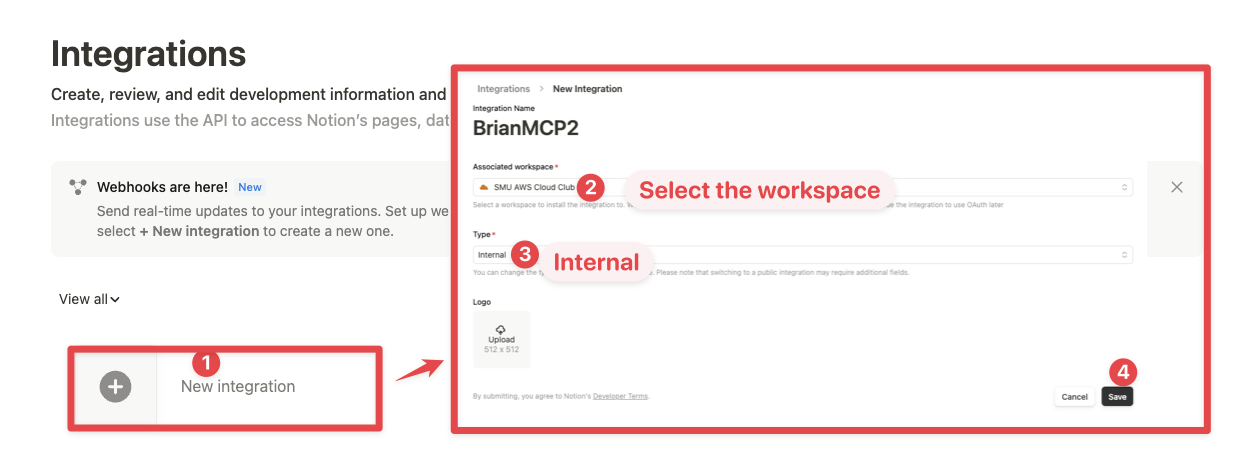
虽然我们限制了 Notion API 的公开范围(例如,您将无法通过 MCP 删除数据库),但将工作区数据暴露给 LLM 仍会带来不小的风险。注重安全的用户可能需要进一步配置集成的功能。
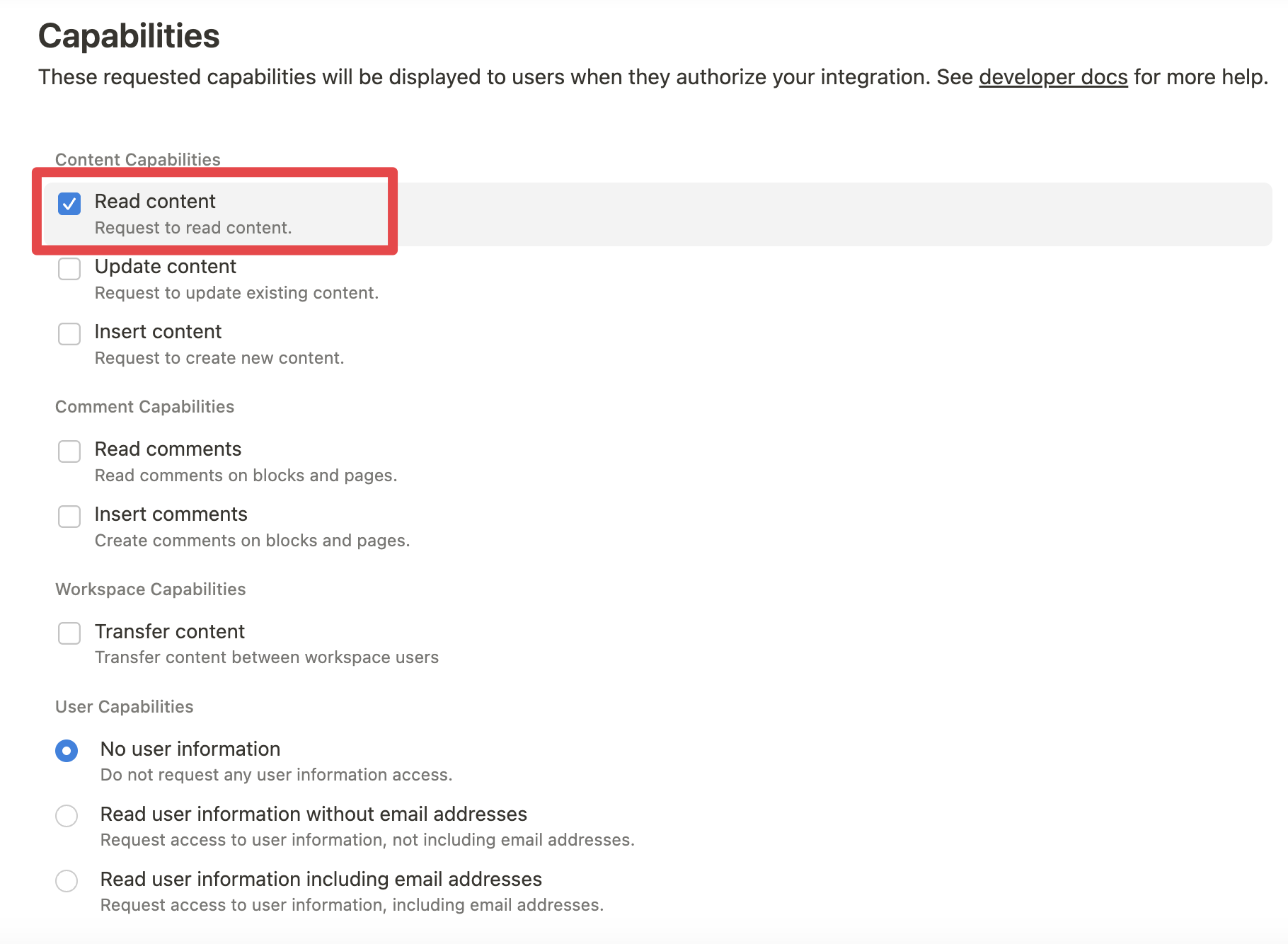
例如,您可以通过从“配置”选项卡仅授予“读取内容”访问权限来创建只读集成令牌:
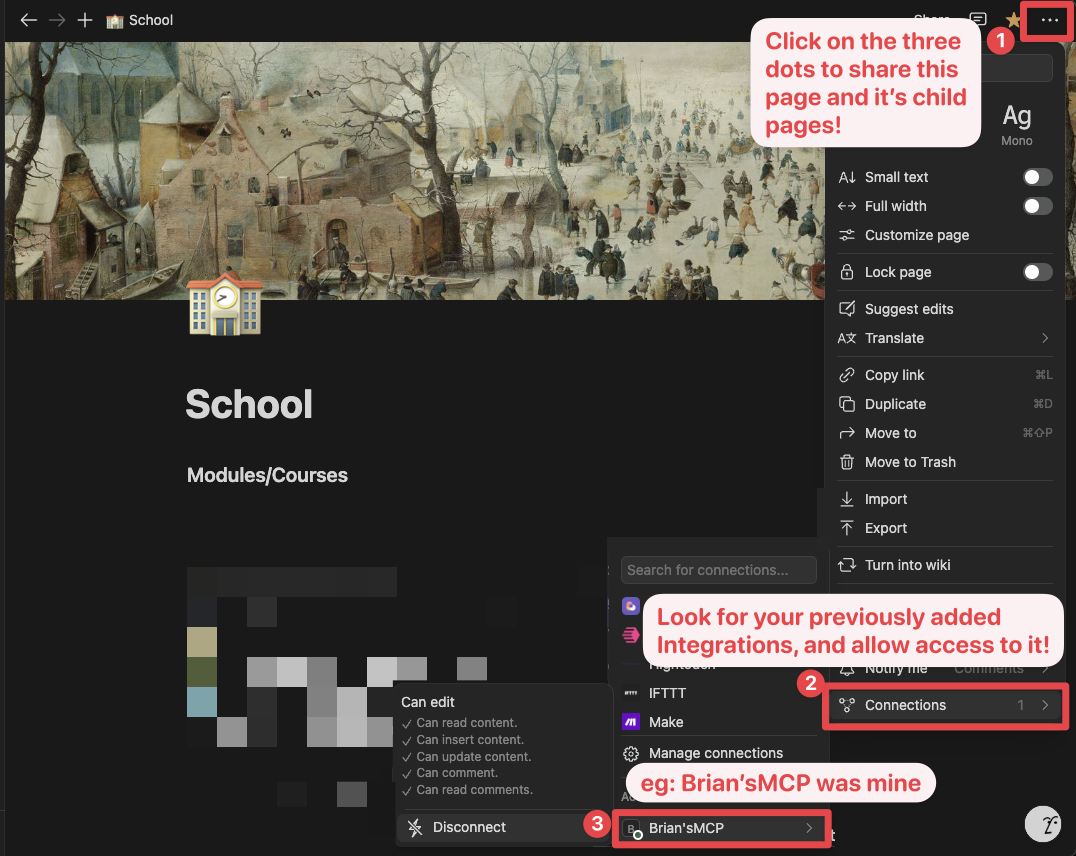
确保相关页面和数据库已连接到您的集成。
为此,您需要访问该页面,单击 3 个点,然后选择“连接到集成”。
将以下内容添加到您的.cursor/mcp.json或claude_desktop_config.json (MacOS: ~/Library/Application\ Support/Claude/claude_desktop_config.json )
{
  "mcpServers": {
    "notionApi": {
      "command": "npx",
      "args": ["-y", "@notionhq/notion-mcp-server"],
      "env": {
        "OPENAPI_MCP_HEADERS": "{\"Authorization\": \"Bearer ntn_****\", \"Notion-Version\": \"2022-06-28\" }"
      }
    }
  }
}
使用 Docker 运行 MCP 服务器有两种选择:
将以下内容添加到您的.cursor/mcp.json或claude_desktop_config.json :
{
  "mcpServers": {
    "notionApi": {
      "command": "docker",
      "args": [
        "run",
        "--rm",
        "-i",
        "-e", "OPENAPI_MCP_HEADERS",
        "mcp/notion"
      ],
      "env": {
        "OPENAPI_MCP_HEADERS": "{\"Authorization\":\"Bearer ntn_****\",\"Notion-Version\":\"2022-06-28\"}"
      }
    }
  }
}
这种方法:
使用官方 Docker Hub 镜像
通过环境变量正确处理 JSON 转义
提供更可靠的配置方法
您也可以在本地构建并运行 Docker 镜像。首先,构建 Docker 镜像:
docker-compose build然后,将以下内容添加到您的.cursor/mcp.json或claude_desktop_config.json中:
{
  "mcpServers": {
    "notionApi": {
      "command": "docker",
      "args": [
        "run",
        "--rm",
        "-i",
        "-e",
        "OPENAPI_MCP_HEADERS={\"Authorization\": \"Bearer ntn_****\", \"Notion-Version\": \"2022-06-28\"}",
        "notion-mcp-server"
      ]
    }
  }
}别忘了将ntn_****替换成你的集成密钥。你可以在集成配置选项卡中找到它:
使用以下指令
Comment "Hello MCP" on page "Getting started"AI 将正确规划两个 API 调用( v1/search和v1/comments ,以完成任务
类似地,以下指令将导致名为“Notion MCP”的新页面添加到父页面“Development”
Add a page titled "Notion MCP" to page "Development"您也可以直接引用内容ID
Get the content of page 1a6b35e6e67f802fa7e1d27686f017f2建造
npm run build执行
npx -y --prefix /path/to/local/notion-mcp-server @notionhq/notion-mcp-server发布
npm publish --access publicNotion | Create comment
| Name | Required | Description | Default |
|---|---|---|---|
| parent | Yes | The page that contains the comment | |
| rich_text | Yes |
Does the description disclose side effects, auth requirements, rate limits, or destructive behavior?
With no annotations provided, the description carries full burden for behavioral disclosure. 'Create comment' implies a write operation, but the description doesn't address permissions needed, whether the operation is idempotent, rate limits, error conditions, or what happens if the parent page doesn't exist. This leaves significant behavioral gaps for a mutation tool.
Agents need to know what a tool does to the world before calling it. Descriptions should go beyond structured annotations to explain consequences.
Is the description appropriately sized, front-loaded, and free of redundancy?
The description is extremely concise at just three words ('Notion | Create comment'), front-loading the essential information with zero wasted words. Every element earns its place by specifying the platform and core action.
Shorter descriptions cost fewer tokens and are easier for agents to parse. Every sentence should earn its place.
Given the tool's complexity, does the description cover enough for an agent to succeed on first attempt?
For a mutation tool with no annotations, no output schema, and incomplete parameter documentation, this description is inadequate. It doesn't address what the tool returns, error conditions, or behavioral expectations beyond the basic action, leaving the agent with insufficient context for reliable invocation.
Complex tools with many parameters or behaviors need more documentation. Simple tools need less. This dimension scales expectations accordingly.
Does the description clarify parameter syntax, constraints, interactions, or defaults beyond what the schema provides?
Schema description coverage is 50% (one of two parameters has a description). The description adds no parameter information beyond what's in the schema. The schema provides some context for 'parent' and 'rich_text', but with incomplete coverage, the description doesn't compensate by explaining parameter relationships or usage patterns.
Input schemas describe structure but not intent. Descriptions should explain non-obvious parameter relationships and valid value ranges.
Does the description clearly state what the tool does and how it differs from similar tools?
The description clearly states the action ('Create comment') and the resource ('Notion'), providing a specific verb+resource combination. However, it doesn't differentiate from sibling tools like 'API-retrieve-a-comment' or explain what makes this tool distinct beyond the basic action.
Agents choose between tools based on descriptions. A clear purpose with a specific verb and resource helps agents select the right tool.
Does the description explain when to use this tool, when not to, or what alternatives exist?
No guidance is provided on when to use this tool versus alternatives like 'API-retrieve-a-comment' or 'API-update-a-block'. The description offers no context about prerequisites, appropriate scenarios, or exclusions for this comment creation operation.
Agents often have multiple tools that could apply. Explicit usage guidance like "use X instead of Y when Z" prevents misuse.
Notion | Create a database
| Name | Required | Description | Default |
|---|---|---|---|
| parent | Yes | ||
| properties | Yes | Property schema of database. The keys are the names of properties as they appear in Notion and the values are [property schema objects](https://developers.notion.com/reference/property-schema-object). | |
| title | No |
Does the description disclose side effects, auth requirements, rate limits, or destructive behavior?
With no annotations, the description carries full burden but only states the action without behavioral details. It doesn't disclose that this is a write operation requiring permissions, potential rate limits, or what happens on success/failure. The description adds minimal context beyond the basic action, leaving key behavioral traits unspecified.
Agents need to know what a tool does to the world before calling it. Descriptions should go beyond structured annotations to explain consequences.
Is the description appropriately sized, front-loaded, and free of redundancy?
The description is extremely concise with just three words, front-loaded with the platform and action. There's zero wasted text, and it efficiently communicates the core purpose without unnecessary elaboration, making it easy to scan.
Shorter descriptions cost fewer tokens and are easier for agents to parse. Every sentence should earn its place.
Given the tool's complexity, does the description cover enough for an agent to succeed on first attempt?
For a tool with 3 parameters, low schema coverage (33%), no annotations, and no output schema, the description is incomplete. It doesn't address parameter meanings, behavioral aspects like permissions or effects, or what the tool returns. Given the complexity and lack of structured data, the description should provide more context to be useful.
Complex tools with many parameters or behaviors need more documentation. Simple tools need less. This dimension scales expectations accordingly.
Does the description clarify parameter syntax, constraints, interactions, or defaults beyond what the schema provides?
Schema description coverage is low at 33%, and the description provides no parameter information. It doesn't explain the meaning of 'parent', 'properties', or 'title' parameters, nor their relationships. The description fails to compensate for the schema's lack of coverage, leaving most parameters semantically unclear.
Input schemas describe structure but not intent. Descriptions should explain non-obvious parameter relationships and valid value ranges.
Does the description clearly state what the tool does and how it differs from similar tools?
The description 'Notion | Create a database' states the action (create) and resource (database) with platform context (Notion), but it's vague about what exactly is created and doesn't distinguish from siblings like API-post-database-query or API-retrieve-a-database. It lacks specificity about the database creation scope or purpose.
Agents choose between tools based on descriptions. A clear purpose with a specific verb and resource helps agents select the right tool.
Does the description explain when to use this tool, when not to, or what alternatives exist?
No guidance on when to use this tool versus alternatives is provided. The description doesn't mention prerequisites, such as needing a parent page, or when to choose this over other database-related tools like API-retrieve-a-database or API-update-a-database. Usage context is implied but not explicit.
Agents often have multiple tools that could apply. Explicit usage guidance like "use X instead of Y when Z" prevents misuse.
Notion | Delete a block
| Name | Required | Description | Default |
|---|---|---|---|
| block_id | Yes | Identifier for a Notion block |
Does the description disclose side effects, auth requirements, rate limits, or destructive behavior?
With no annotations provided, the description carries full burden for behavioral disclosure. It states 'Delete a block' but does not clarify if this is permanent, reversible, requires specific permissions, or has side effects (e.g., affecting child blocks). For a destructive operation, this lack of detail is a significant gap, though it at least correctly indicates a mutation action.
Agents need to know what a tool does to the world before calling it. Descriptions should go beyond structured annotations to explain consequences.
Is the description appropriately sized, front-loaded, and free of redundancy?
The description is extremely concise with just three words, front-loading the key information ('Delete a block') without any wasted text. It efficiently communicates the core purpose, though this brevity contributes to gaps in other dimensions.
Shorter descriptions cost fewer tokens and are easier for agents to parse. Every sentence should earn its place.
Given the tool's complexity, does the description cover enough for an agent to succeed on first attempt?
Given the tool's destructive nature, lack of annotations, and no output schema, the description is incomplete. It fails to address critical aspects like return values, error conditions, or behavioral nuances (e.g., deletion scope). For a mutation tool with high stakes, more context is needed to ensure safe and correct usage.
Complex tools with many parameters or behaviors need more documentation. Simple tools need less. This dimension scales expectations accordingly.
Does the description clarify parameter syntax, constraints, interactions, or defaults beyond what the schema provides?
The description adds no parameter semantics beyond the input schema, which has 100% coverage and fully documents the 'block_id' parameter. This meets the baseline of 3, as the schema adequately describes the parameter, but the description does not enhance understanding (e.g., by explaining block_id format or sourcing).
Input schemas describe structure but not intent. Descriptions should explain non-obvious parameter relationships and valid value ranges.
Does the description clearly state what the tool does and how it differs from similar tools?
The description 'Notion | Delete a block' clearly states the action (delete) and resource (a Notion block), making the purpose immediately understandable. It distinguishes from siblings like 'API-retrieve-a-block' or 'API-update-a-block' by specifying deletion. However, it lacks specificity about what 'delete' entails (e.g., permanent removal vs. archiving), preventing a perfect score.
Agents choose between tools based on descriptions. A clear purpose with a specific verb and resource helps agents select the right tool.
Does the description explain when to use this tool, when not to, or what alternatives exist?
The description provides no guidance on when to use this tool versus alternatives. It does not mention prerequisites (e.g., needing a valid block_id), exclusions (e.g., not for pages or databases), or comparisons to siblings like 'API-update-a-block' for modifications. This leaves the agent without context for tool selection.
Agents often have multiple tools that could apply. Explicit usage guidance like "use X instead of Y when Z" prevents misuse.
Notion | Retrieve block children
| Name | Required | Description | Default |
|---|---|---|---|
| block_id | Yes | Identifier for a [block](ref:block) | |
| page_size | No | The number of items from the full list desired in the response. Maximum: 100 | |
| start_cursor | No | If supplied, this endpoint will return a page of results starting after the cursor provided. If not supplied, this endpoint will return the first page of results. |
Does the description disclose side effects, auth requirements, rate limits, or destructive behavior?
No annotations are provided, so the description carries the full burden. It states 'Retrieve' implying a read-only operation, but lacks details on permissions, rate limits, error handling, or what 'block children' entails (e.g., nested content). The description is minimal and doesn't disclose behavioral traits beyond the basic action.
Agents need to know what a tool does to the world before calling it. Descriptions should go beyond structured annotations to explain consequences.
Is the description appropriately sized, front-loaded, and free of redundancy?
The description is extremely concise ('Notion | Retrieve block children') with no wasted words. It front-loads the key information (context and action) efficiently, though it may be overly brief for a tool with three parameters and no annotations.
Shorter descriptions cost fewer tokens and are easier for agents to parse. Every sentence should earn its place.
Given the tool's complexity, does the description cover enough for an agent to succeed on first attempt?
Given the tool has 3 parameters, no annotations, and no output schema, the description is incomplete. It doesn't explain the return values (e.g., list of child blocks), pagination behavior, or error cases. For a retrieval tool with moderate complexity, more context is needed to guide effective use.
Complex tools with many parameters or behaviors need more documentation. Simple tools need less. This dimension scales expectations accordingly.
Does the description clarify parameter syntax, constraints, interactions, or defaults beyond what the schema provides?
Schema description coverage is 100%, with clear documentation for block_id, page_size, and start_cursor. The description adds no additional parameter semantics beyond what the schema provides, such as examples or context for 'block children'. This meets the baseline for high schema coverage.
Input schemas describe structure but not intent. Descriptions should explain non-obvious parameter relationships and valid value ranges.
Does the description clearly state what the tool does and how it differs from similar tools?
The description clearly states the action ('Retrieve') and resource ('block children') with the Notion context. It distinguishes this as a read operation (vs. create/update/delete siblings like API-create-a-database or API-delete-a-block), though it doesn't explicitly differentiate from similar retrieval tools like API-retrieve-a-block or API-retrieve-a-page.
Agents choose between tools based on descriptions. A clear purpose with a specific verb and resource helps agents select the right tool.
Does the description explain when to use this tool, when not to, or what alternatives exist?
No guidance is provided on when to use this tool versus alternatives. It doesn't mention when to retrieve block children versus retrieving a block directly (API-retrieve-a-block) or searching (API-post-search), nor does it specify prerequisites like needing a valid block_id or handling pagination.
Agents often have multiple tools that could apply. Explicit usage guidance like "use X instead of Y when Z" prevents misuse.
Notion | Retrieve your token's bot user
| Name | Required | Description | Default |
|---|---|---|---|
No parameters | |||
Does the description disclose side effects, auth requirements, rate limits, or destructive behavior?
No annotations are provided, so the description carries full burden. It implies a read operation ('retrieve') but doesn't disclose behavioral traits such as authentication requirements, rate limits, error conditions, or response format. For a tool with zero annotation coverage, this minimal description fails to provide necessary operational context.
Agents need to know what a tool does to the world before calling it. Descriptions should go beyond structured annotations to explain consequences.
Is the description appropriately sized, front-loaded, and free of redundancy?
The description is a single, efficient sentence that front-loads key information: platform (Notion), action (retrieve), and resource (bot user). There is no wasted verbiage, and every word earns its place by specifying the tool's unique scope.
Shorter descriptions cost fewer tokens and are easier for agents to parse. Every sentence should earn its place.
Given the tool's complexity, does the description cover enough for an agent to succeed on first attempt?
Given no annotations, no output schema, and a simple zero-parameter design, the description is incomplete. It lacks details on what the bot user data includes, how it's returned, or any side effects. For a tool that likely returns user identity information, more context on the response structure or use cases would be helpful.
Complex tools with many parameters or behaviors need more documentation. Simple tools need less. This dimension scales expectations accordingly.
Does the description clarify parameter syntax, constraints, interactions, or defaults beyond what the schema provides?
The tool has 0 parameters with 100% schema description coverage, so the schema fully documents the lack of inputs. The description adds no parameter information, which is appropriate here. Baseline is 4 for zero parameters, as no compensation is needed.
Input schemas describe structure but not intent. Descriptions should explain non-obvious parameter relationships and valid value ranges.
Does the description clearly state what the tool does and how it differs from similar tools?
The description 'Notion | Retrieve your token's bot user' clearly states the action (retrieve) and resource (bot user) with platform context (Notion). It distinguishes from siblings like API-get-user or API-get-users by specifying 'bot user' rather than general users. However, it doesn't explicitly contrast with all sibling tools, keeping it from a perfect 5.
Agents choose between tools based on descriptions. A clear purpose with a specific verb and resource helps agents select the right tool.
Does the description explain when to use this tool, when not to, or what alternatives exist?
The description provides no guidance on when to use this tool versus alternatives. It doesn't mention prerequisites (e.g., token authentication), use cases (e.g., verifying bot identity), or exclusions (e.g., not for retrieving human users). With siblings like API-get-user available, this lack of context leaves the agent guessing about appropriate usage scenarios.
Agents often have multiple tools that could apply. Explicit usage guidance like "use X instead of Y when Z" prevents misuse.
Notion | Retrieve a user
| Name | Required | Description | Default |
|---|---|---|---|
| user_id | Yes |
Does the description disclose side effects, auth requirements, rate limits, or destructive behavior?
No annotations are provided, so the description carries full burden. It states 'Retrieve' implying a read operation, but doesn't disclose behavioral traits such as authentication needs, rate limits, error handling, or what data is returned. For a tool with zero annotation coverage, this is a significant gap in transparency.
Agents need to know what a tool does to the world before calling it. Descriptions should go beyond structured annotations to explain consequences.
Is the description appropriately sized, front-loaded, and free of redundancy?
The description is extremely concise with just three words, front-loaded with the key action and resource. There is zero waste, making it efficient for quick understanding.
Shorter descriptions cost fewer tokens and are easier for agents to parse. Every sentence should earn its place.
Given the tool's complexity, does the description cover enough for an agent to succeed on first attempt?
Given no annotations, 0% schema coverage, and no output schema, the description is incomplete. It lacks details on parameters, return values, error cases, and usage context, making it inadequate for a tool with one required parameter and behavioral uncertainties.
Complex tools with many parameters or behaviors need more documentation. Simple tools need less. This dimension scales expectations accordingly.
Does the description clarify parameter syntax, constraints, interactions, or defaults beyond what the schema provides?
Schema description coverage is 0%, so the description must compensate. It mentions 'a user' but doesn't explain the 'user_id' parameter's meaning, format (UUID), or how to obtain it. The description adds minimal value beyond the schema, failing to address the coverage gap.
Input schemas describe structure but not intent. Descriptions should explain non-obvious parameter relationships and valid value ranges.
Does the description clearly state what the tool does and how it differs from similar tools?
The description clearly states the action ('Retrieve') and resource ('a user'), making the purpose understandable. It distinguishes from siblings like 'API-get-users' (plural) by specifying retrieval of a single user. However, it doesn't specify the source ('Notion') adds context but isn't essential to the verb+resource clarity.
Agents choose between tools based on descriptions. A clear purpose with a specific verb and resource helps agents select the right tool.
Does the description explain when to use this tool, when not to, or what alternatives exist?
The description provides no guidance on when to use this tool versus alternatives like 'API-get-users' or 'API-get-self'. It lacks explicit when/when-not instructions or prerequisites, leaving usage context implied at best.
Agents often have multiple tools that could apply. Explicit usage guidance like "use X instead of Y when Z" prevents misuse.
Notion | List all users
| Name | Required | Description | Default |
|---|---|---|---|
| page_size | No | The number of items from the full list desired in the response. Maximum: 100 | |
| start_cursor | No | If supplied, this endpoint will return a page of results starting after the cursor provided. If not supplied, this endpoint will return the first page of results. |
Does the description disclose side effects, auth requirements, rate limits, or destructive behavior?
With no annotations provided, the description carries the full burden of behavioral disclosure but provides minimal information. It doesn't mention that this is a paginated API (implied by the parameters but not stated), what authentication is required, rate limits, whether it returns all users or only certain types, or what the response format looks like. The description only states what the tool does at the most basic level without behavioral context.
Agents need to know what a tool does to the world before calling it. Descriptions should go beyond structured annotations to explain consequences.
Is the description appropriately sized, front-loaded, and free of redundancy?
The description is extremely concise at just three words ('Notion | List all users'). It's front-loaded with the essential information and contains zero wasted words. While it could benefit from additional context, what's present is efficiently structured.
Shorter descriptions cost fewer tokens and are easier for agents to parse. Every sentence should earn its place.
Given the tool's complexity, does the description cover enough for an agent to succeed on first attempt?
Given that there's no output schema and no annotations, the description is incomplete for a tool with pagination parameters. It doesn't explain what the tool returns, how pagination works, or any behavioral characteristics. For a list operation with pagination controls, users need to understand the response format and pagination behavior, which is completely missing.
Complex tools with many parameters or behaviors need more documentation. Simple tools need less. This dimension scales expectations accordingly.
Does the description clarify parameter syntax, constraints, interactions, or defaults beyond what the schema provides?
The input schema has 100% description coverage, with both parameters ('page_size' and 'start_cursor') well-documented in the schema itself. The description adds no parameter information beyond what's already in the schema. According to the scoring rules, when schema_description_coverage is high (>80%), the baseline is 3 even with no param info in the description.
Input schemas describe structure but not intent. Descriptions should explain non-obvious parameter relationships and valid value ranges.
Does the description clearly state what the tool does and how it differs from similar tools?
The description clearly states the action ('List all users') and identifies the resource ('users'), making the purpose immediately understandable. However, it doesn't differentiate this tool from its sibling 'API-get-user' (singular), which appears to retrieve a specific user rather than list all users. The description is specific but lacks sibling differentiation.
Agents choose between tools based on descriptions. A clear purpose with a specific verb and resource helps agents select the right tool.
Does the description explain when to use this tool, when not to, or what alternatives exist?
The description provides no guidance on when to use this tool versus alternatives. It doesn't mention the sibling 'API-get-user' for retrieving individual users, 'API-get-self' for getting the current user, or 'API-post-search' which might also find users. There's no context about prerequisites, limitations, or typical use cases for listing all users versus other approaches.
Agents often have multiple tools that could apply. Explicit usage guidance like "use X instead of Y when Z" prevents misuse.
Notion | Append block children
| Name | Required | Description | Default |
|---|---|---|---|
| after | No | The ID of the existing block that the new block should be appended after. | |
| block_id | Yes | Identifier for a [block](ref:block). Also accepts a [page](ref:page) ID. | |
| children | Yes | Child content to append to a container block as an array of [block objects](ref:block) |
Does the description disclose side effects, auth requirements, rate limits, or destructive behavior?
No annotations are provided, so the description carries full burden but only states the action without behavioral details. It doesn't disclose if this is a mutation (implied by 'Append'), permission requirements, rate limits, error conditions, or what happens on success/failure, which is inadequate for a tool that modifies data.
Agents need to know what a tool does to the world before calling it. Descriptions should go beyond structured annotations to explain consequences.
Is the description appropriately sized, front-loaded, and free of redundancy?
The description is extremely concise with just three words, front-loading key information ('Notion | Append block children') without waste. Every word contributes to understanding the tool's domain and action efficiently.
Shorter descriptions cost fewer tokens and are easier for agents to parse. Every sentence should earn its place.
Given the tool's complexity, does the description cover enough for an agent to succeed on first attempt?
Given the tool's complexity (mutation with 3 parameters, no output schema, and no annotations), the description is incomplete. It lacks details on behavior, return values, error handling, and how it differs from siblings, making it insufficient for safe and effective use by an AI agent.
Complex tools with many parameters or behaviors need more documentation. Simple tools need less. This dimension scales expectations accordingly.
Does the description clarify parameter syntax, constraints, interactions, or defaults beyond what the schema provides?
Schema description coverage is 100%, so parameters are well-documented in the schema. The description adds no additional meaning beyond implying 'append' relates to 'block children', but doesn't explain parameter interactions or constraints, meeting the baseline for high schema coverage.
Input schemas describe structure but not intent. Descriptions should explain non-obvious parameter relationships and valid value ranges.
Does the description clearly state what the tool does and how it differs from similar tools?
The description clearly states the action ('Append') and resource ('block children') with platform context ('Notion'), making the purpose understandable. However, it doesn't distinguish this from sibling tools like 'API-update-a-block' or 'API-get-block-children' beyond the 'append' verb, missing explicit differentiation.
Agents choose between tools based on descriptions. A clear purpose with a specific verb and resource helps agents select the right tool.
Does the description explain when to use this tool, when not to, or what alternatives exist?
No guidance is provided on when to use this tool versus alternatives. The description lacks context about prerequisites (e.g., needing an existing block), exclusions, or comparisons to siblings like 'API-update-a-block' or 'API-get-block-children', leaving usage ambiguous.
Agents often have multiple tools that could apply. Explicit usage guidance like "use X instead of Y when Z" prevents misuse.
Notion | Update page properties
| Name | Required | Description | Default |
|---|---|---|---|
| archived | No | ||
| cover | No | A cover image for the page. Only [external file objects](https://developers.notion.com/reference/file-object) are supported. | |
| icon | No | A page icon for the page. Supported types are [external file object](https://developers.notion.com/reference/file-object) or [emoji object](https://developers.notion.com/reference/emoji-object). | |
| in_trash | No | Set to true to delete a block. Set to false to restore a block. | |
| page_id | Yes | The identifier for the Notion page to be updated. | |
| properties | No | The property values to update for the page. The keys are the names or IDs of the property and the values are property values. If a page property ID is not included, then it is not changed. |
Does the description disclose side effects, auth requirements, rate limits, or destructive behavior?
With no annotations provided, the description carries full burden but provides minimal behavioral information. It mentions 'Update' which implies mutation, but doesn't disclose permission requirements, whether changes are reversible, rate limits, or what happens when properties are omitted. The schema reveals additional behaviors like archiving and trash management that aren't mentioned.
Agents need to know what a tool does to the world before calling it. Descriptions should go beyond structured annotations to explain consequences.
Is the description appropriately sized, front-loaded, and free of redundancy?
The description is extremely concise with just two words plus context. Every word earns its place - 'Notion' provides context, 'Update' specifies the action, and 'page properties' identifies the resource. No wasted words or redundancy.
Shorter descriptions cost fewer tokens and are easier for agents to parse. Every sentence should earn its place.
Given the tool's complexity, does the description cover enough for an agent to succeed on first attempt?
For a mutation tool with 6 parameters, no annotations, and no output schema, this description is inadequate. It doesn't explain what successful updates return, error conditions, or the scope of changes possible. The schema reveals complex nested structures for properties, cover, and icon that aren't hinted at in the description.
Complex tools with many parameters or behaviors need more documentation. Simple tools need less. This dimension scales expectations accordingly.
Does the description clarify parameter syntax, constraints, interactions, or defaults beyond what the schema provides?
With 83% schema description coverage, the schema does most of the parameter documentation work. The description adds no specific parameter information beyond the generic 'page properties' mention. It doesn't explain what 'properties' means in the Notion context or clarify the relationship between different parameter groups.
Input schemas describe structure but not intent. Descriptions should explain non-obvious parameter relationships and valid value ranges.
Does the description clearly state what the tool does and how it differs from similar tools?
The description clearly states the action ('Update') and resource ('page properties') with the Notion context. It distinguishes this as a modification tool rather than creation or retrieval, though it doesn't explicitly differentiate from similar update tools like 'API-update-a-block' or 'API-update-a-database'.
Agents choose between tools based on descriptions. A clear purpose with a specific verb and resource helps agents select the right tool.
Does the description explain when to use this tool, when not to, or what alternatives exist?
No guidance is provided on when to use this tool versus alternatives. The description doesn't mention prerequisites like needing a page ID, when to use this versus 'API-patch-block-children' for content updates, or what constitutes appropriate 'page properties' to modify.
Agents often have multiple tools that could apply. Explicit usage guidance like "use X instead of Y when Z" prevents misuse.
Notion | Query a database
| Name | Required | Description | Default |
|---|---|---|---|
| archived | No | ||
| database_id | Yes | Identifier for a Notion database. | |
| filter | No | When supplied, limits which pages are returned based on the [filter conditions](ref:post-database-query-filter). | |
| filter_properties | No | A list of page property value IDs associated with the database. Use this param to limit the response to a specific page property value or values for pages that meet the `filter` criteria. | |
| in_trash | No | ||
| page_size | No | The number of items from the full list desired in the response. Maximum: 100 | |
| sorts | No | When supplied, orders the results based on the provided [sort criteria](ref:post-database-query-sort). | |
| start_cursor | No | When supplied, returns a page of results starting after the cursor provided. If not supplied, this endpoint will return the first page of results. |
Does the description disclose side effects, auth requirements, rate limits, or destructive behavior?
With no annotations, the description carries full burden but only states the action without behavioral details. It doesn't disclose if this is a read-only operation, its effects (e.g., no mutations), authentication needs, rate limits, or response format, leaving critical behavioral traits unspecified.
Agents need to know what a tool does to the world before calling it. Descriptions should go beyond structured annotations to explain consequences.
Is the description appropriately sized, front-loaded, and free of redundancy?
The description is extremely concise ('Notion | Query a database'), which is efficient and front-loaded. However, it may be overly brief, potentially under-specifying the tool's purpose, but it avoids waste and is structurally clear.
Shorter descriptions cost fewer tokens and are easier for agents to parse. Every sentence should earn its place.
Given the tool's complexity, does the description cover enough for an agent to succeed on first attempt?
Given the tool's complexity (8 parameters, nested objects) and lack of annotations and output schema, the description is incomplete. It doesn't address behavioral aspects, usage context, or return values, making it insufficient for an agent to fully understand the tool's operation and implications.
Complex tools with many parameters or behaviors need more documentation. Simple tools need less. This dimension scales expectations accordingly.
Does the description clarify parameter syntax, constraints, interactions, or defaults beyond what the schema provides?
Schema description coverage is 75%, providing good documentation for most parameters. The description adds no parameter-specific semantics beyond the schema, such as explaining filter or sorts usage. With high schema coverage, the baseline of 3 is appropriate, as the description doesn't compensate but doesn't detract either.
Input schemas describe structure but not intent. Descriptions should explain non-obvious parameter relationships and valid value ranges.
Does the description clearly state what the tool does and how it differs from similar tools?
The description 'Notion | Query a database' states the action (query) and resource (database) but is vague about scope and functionality. It doesn't specify what kind of query (e.g., filtering, sorting, pagination) or how it differs from sibling tools like API-retrieve-a-database or API-post-search, leaving the purpose somewhat ambiguous.
Agents choose between tools based on descriptions. A clear purpose with a specific verb and resource helps agents select the right tool.
Does the description explain when to use this tool, when not to, or what alternatives exist?
No explicit guidance on when to use this tool versus alternatives is provided. The description doesn't mention prerequisites, context, or comparisons to siblings like API-retrieve-a-database (for metadata) or API-post-search (for broader searches), offering no help in tool selection.
Agents often have multiple tools that could apply. Explicit usage guidance like "use X instead of Y when Z" prevents misuse.
Notion | Create a page
| Name | Required | Description | Default |
|---|---|---|---|
| children | No | The content to be rendered on the new page, represented as an array of [block objects](https://developers.notion.com/reference/block). | |
| cover | No | The cover image of the new page, represented as a [file object](https://developers.notion.com/reference/file-object). | |
| icon | No | The icon of the new page. Either an [emoji object](https://developers.notion.com/reference/emoji-object) or an [external file object](https://developers.notion.com/reference/file-object).. | |
| parent | Yes | ||
| properties | Yes |
Does the description disclose side effects, auth requirements, rate limits, or destructive behavior?
With no annotations provided, the description carries full burden for behavioral disclosure but only states the basic action. It doesn't mention authentication requirements, rate limits, error conditions, what happens on success (e.g., returns new page ID), or whether the operation is idempotent. For a creation tool with no annotation coverage, this is inadequate.
Agents need to know what a tool does to the world before calling it. Descriptions should go beyond structured annotations to explain consequences.
Is the description appropriately sized, front-loaded, and free of redundancy?
The description is extremely concise at just three words, front-loading the essential information ('Notion | Create a page') with zero wasted words. Every element earns its place, making it highly efficient despite potential completeness issues.
Shorter descriptions cost fewer tokens and are easier for agents to parse. Every sentence should earn its place.
Given the tool's complexity, does the description cover enough for an agent to succeed on first attempt?
For a creation tool with 5 parameters (2 required), no annotations, no output schema, and complex nested objects, the description is severely incomplete. It doesn't address what the tool returns, error handling, authentication needs, or provide any context about the Notion API integration. The conciseness comes at the expense of necessary context.
Complex tools with many parameters or behaviors need more documentation. Simple tools need less. This dimension scales expectations accordingly.
Does the description clarify parameter syntax, constraints, interactions, or defaults beyond what the schema provides?
The description adds no parameter information beyond what's in the schema (which has 60% coverage). It doesn't explain the purpose of 'parent' or 'properties' parameters, nor does it provide context about optional parameters like 'children', 'cover', and 'icon'. With moderate schema coverage, the baseline is appropriate.
Input schemas describe structure but not intent. Descriptions should explain non-obvious parameter relationships and valid value ranges.
Does the description clearly state what the tool does and how it differs from similar tools?
The description clearly states the action ('Create a page') and the resource ('Notion'), making the purpose immediately understandable. However, it doesn't differentiate this from sibling tools like 'API-create-a-database' or 'API-patch-page' beyond the basic resource type, which prevents a perfect score.
Agents choose between tools based on descriptions. A clear purpose with a specific verb and resource helps agents select the right tool.
Does the description explain when to use this tool, when not to, or what alternatives exist?
The description provides no guidance on when to use this tool versus alternatives. With siblings like 'API-patch-page' (for updates) and 'API-create-a-database' (for creating databases), there's no indication of when this specific page creation tool is appropriate, leaving usage context unclear.
Agents often have multiple tools that could apply. Explicit usage guidance like "use X instead of Y when Z" prevents misuse.
Notion | Search by title
| Name | Required | Description | Default |
|---|---|---|---|
| filter | No | A set of criteria, `value` and `property` keys, that limits the results to either only pages or only databases. Possible `value` values are `"page"` or `"database"`. The only supported `property` value is `"object"`. | |
| page_size | No | The number of items from the full list to include in the response. Maximum: `100`. | |
| query | No | The text that the API compares page and database titles against. | |
| sort | No | A set of criteria, `direction` and `timestamp` keys, that orders the results. The **only** supported timestamp value is `"last_edited_time"`. Supported `direction` values are `"ascending"` and `"descending"`. If `sort` is not provided, then the most recently edited results are returned first. | |
| start_cursor | No | A `cursor` value returned in a previous response that If supplied, limits the response to results starting after the `cursor`. If not supplied, then the first page of results is returned. Refer to [pagination](https://developers.notion.com/reference/intro#pagination) for more details. |
Does the description disclose side effects, auth requirements, rate limits, or destructive behavior?
With no annotations provided, the description carries full burden for behavioral disclosure but offers minimal information. It doesn't describe whether this is a read-only operation (implied by 'search'), authentication requirements, rate limits, pagination behavior (though hinted in schema), or what happens on errors. The description adds little beyond the basic action, leaving significant behavioral gaps for an agent to infer.
Agents need to know what a tool does to the world before calling it. Descriptions should go beyond structured annotations to explain consequences.
Is the description appropriately sized, front-loaded, and free of redundancy?
The description is extremely concise with just three words ('Notion | Search by title'), which is front-loaded and wastes no space. Every element (resource, action, scope hint) earns its place without redundancy. For a tool with rich schema documentation, this brevity is efficient and appropriate.
Shorter descriptions cost fewer tokens and are easier for agents to parse. Every sentence should earn its place.
Given the tool's complexity, does the description cover enough for an agent to succeed on first attempt?
Given the tool's complexity (5 parameters, nested objects, no output schema) and lack of annotations, the description is incomplete. It doesn't explain return values, error handling, or key behaviors like pagination (implied by 'start_cursor' in schema). For a search tool with multiple parameters and no output schema, more context is needed to help an agent use it effectively.
Complex tools with many parameters or behaviors need more documentation. Simple tools need less. This dimension scales expectations accordingly.
Does the description clarify parameter syntax, constraints, interactions, or defaults beyond what the schema provides?
Schema description coverage is 100%, so the schema already documents all 5 parameters thoroughly. The description adds minimal value beyond the schema—it implies the 'query' parameter searches titles, but this is already clear from the schema's description. No additional syntax, format details, or usage examples are provided. Baseline 3 is appropriate when schema does the heavy lifting.
Input schemas describe structure but not intent. Descriptions should explain non-obvious parameter relationships and valid value ranges.
Does the description clearly state what the tool does and how it differs from similar tools?
The description 'Notion | Search by title' states the resource (Notion) and action (search), but is vague about scope and specificity. It mentions 'by title' which adds some specificity, but doesn't clarify whether this searches only pages/databases or other objects, nor does it distinguish from sibling tools like 'API-post-database-query' which also involves searching. The description lacks a clear verb+resource+scope combination.
Agents choose between tools based on descriptions. A clear purpose with a specific verb and resource helps agents select the right tool.
Does the description explain when to use this tool, when not to, or what alternatives exist?
The description provides no guidance on when to use this tool versus alternatives. It doesn't mention sibling tools like 'API-post-database-query' (for querying databases) or 'API-retrieve-a-page' (for direct retrieval), nor does it specify use cases like finding pages/databases by title versus other search methods. There's no explicit when/when-not context or prerequisites stated.
Agents often have multiple tools that could apply. Explicit usage guidance like "use X instead of Y when Z" prevents misuse.
Notion | Retrieve a block
| Name | Required | Description | Default |
|---|---|---|---|
| block_id | Yes | Identifier for a Notion block |
Does the description disclose side effects, auth requirements, rate limits, or destructive behavior?
With no annotations provided, the description carries the full burden of behavioral disclosure. It only states the action ('Retrieve') without detailing traits like read-only nature, potential rate limits, authentication needs, or what the return includes (e.g., JSON structure, error handling). This is a significant gap for a tool with no annotation coverage.
Agents need to know what a tool does to the world before calling it. Descriptions should go beyond structured annotations to explain consequences.
Is the description appropriately sized, front-loaded, and free of redundancy?
The description is very concise ('Notion | Retrieve a block'), with no wasted words. It's front-loaded and efficient, though it could benefit from slightly more detail to improve clarity without losing brevity.
Shorter descriptions cost fewer tokens and are easier for agents to parse. Every sentence should earn its place.
Given the tool's complexity, does the description cover enough for an agent to succeed on first attempt?
Given the tool's complexity (a retrieval operation with no output schema) and lack of annotations, the description is incomplete. It doesn't explain what is retrieved (e.g., block content, properties), potential side effects, or error cases. For a tool with no structured output information, more context is needed.
Complex tools with many parameters or behaviors need more documentation. Simple tools need less. This dimension scales expectations accordingly.
Does the description clarify parameter syntax, constraints, interactions, or defaults beyond what the schema provides?
The input schema has 100% description coverage, with 'block_id' clearly documented as 'Identifier for a Notion block'. The description adds no additional meaning beyond this, such as format examples or constraints. Baseline 3 is appropriate since the schema does the heavy lifting.
Input schemas describe structure but not intent. Descriptions should explain non-obvious parameter relationships and valid value ranges.
Does the description clearly state what the tool does and how it differs from similar tools?
The description states the action ('Retrieve') and resource ('a block'), but it's vague about what retrieval entails—does it fetch metadata, content, or both? It distinguishes from siblings like 'API-delete-a-block' and 'API-update-a-block' by specifying retrieval, but lacks specificity compared to tools like 'API-retrieve-a-page' or 'API-retrieve-a-database'.
Agents choose between tools based on descriptions. A clear purpose with a specific verb and resource helps agents select the right tool.
Does the description explain when to use this tool, when not to, or what alternatives exist?
No guidance is provided on when to use this tool versus alternatives. For instance, it doesn't clarify if this should be used over 'API-retrieve-a-page' for block-level data or how it relates to 'API-get-block-children'. The description offers no context or exclusions, leaving usage unclear.
Agents often have multiple tools that could apply. Explicit usage guidance like "use X instead of Y when Z" prevents misuse.
Notion | Retrieve comments
| Name | Required | Description | Default |
|---|---|---|---|
| block_id | Yes | Identifier for a Notion block or page | |
| page_size | No | The number of items from the full list desired in the response. Maximum: 100 | |
| start_cursor | No | If supplied, this endpoint will return a page of results starting after the cursor provided. If not supplied, this endpoint will return the first page of results. |
Does the description disclose side effects, auth requirements, rate limits, or destructive behavior?
No annotations are provided, so the description carries full burden. It mentions 'Retrieve' but doesn't disclose behavioral traits like pagination (implied by start_cursor/page_size in schema), rate limits, authentication needs, or response format. For a read operation with 3 parameters, this leaves significant gaps.
Agents need to know what a tool does to the world before calling it. Descriptions should go beyond structured annotations to explain consequences.
Is the description appropriately sized, front-loaded, and free of redundancy?
Extremely concise with 'Notion | Retrieve comments'—front-loaded, zero waste, and appropriately sized for a simple retrieval tool. Every word earns its place by specifying platform and action.
Shorter descriptions cost fewer tokens and are easier for agents to parse. Every sentence should earn its place.
Given the tool's complexity, does the description cover enough for an agent to succeed on first attempt?
Given no annotations, no output schema, and 3 parameters (with 100% schema coverage), the description is incomplete. It lacks context on behavior (e.g., pagination, error handling), output format, or usage scenarios, making it inadequate for a tool with potential complexity like paginated comment retrieval.
Complex tools with many parameters or behaviors need more documentation. Simple tools need less. This dimension scales expectations accordingly.
Does the description clarify parameter syntax, constraints, interactions, or defaults beyond what the schema provides?
Schema description coverage is 100%, so the schema fully documents parameters (block_id, page_size, start_cursor). The description adds no additional meaning beyond what's in the schema, such as clarifying comment retrieval specifics. Baseline 3 is appropriate when schema does all the work.
Input schemas describe structure but not intent. Descriptions should explain non-obvious parameter relationships and valid value ranges.
Does the description clearly state what the tool does and how it differs from similar tools?
The description clearly states the action ('Retrieve') and resource ('comments'), with 'Notion' providing context. It distinguishes from siblings like API-create-a-comment (create vs. retrieve) and API-retrieve-a-block (comments vs. blocks), but could be more specific about scope (e.g., 'retrieve comments on a block/page').
Agents choose between tools based on descriptions. A clear purpose with a specific verb and resource helps agents select the right tool.
Does the description explain when to use this tool, when not to, or what alternatives exist?
No explicit guidance on when to use this tool versus alternatives like API-retrieve-a-page-property or API-post-search for comments. The description implies it's for fetching comments, but lacks context on prerequisites, typical use cases, or exclusions.
Agents often have multiple tools that could apply. Explicit usage guidance like "use X instead of Y when Z" prevents misuse.
Notion | Retrieve a database
| Name | Required | Description | Default |
|---|---|---|---|
| database_id | Yes | An identifier for the Notion database. |
Does the description disclose side effects, auth requirements, rate limits, or destructive behavior?
No annotations are provided, so the description carries full burden. It states 'Retrieve a database' but doesn't disclose behavioral traits such as whether this is a read-only operation, requires authentication, has rate limits, returns specific data formats, or handles errors. This leaves significant gaps in understanding how the tool behaves beyond its basic purpose.
Agents need to know what a tool does to the world before calling it. Descriptions should go beyond structured annotations to explain consequences.
Is the description appropriately sized, front-loaded, and free of redundancy?
The description 'Notion | Retrieve a database' is very concise and front-loaded, with no wasted words. It efficiently conveys the tool's domain and action in a single phrase. However, it might be overly terse, potentially sacrificing clarity for brevity, but it earns its place by being direct.
Shorter descriptions cost fewer tokens and are easier for agents to parse. Every sentence should earn its place.
Given the tool's complexity, does the description cover enough for an agent to succeed on first attempt?
Given the tool has no annotations, no output schema, and a simple input schema, the description is incomplete. It doesn't explain what 'retrieve' returns (e.g., database properties, schema, or content), any prerequisites, or error handling. For a retrieval tool in a complex API like Notion, more context is needed to guide effective use.
Complex tools with many parameters or behaviors need more documentation. Simple tools need less. This dimension scales expectations accordingly.
Does the description clarify parameter syntax, constraints, interactions, or defaults beyond what the schema provides?
The input schema has 100% description coverage, with 'database_id' documented as 'An identifier for the Notion database.' The description adds no additional meaning beyond this, such as format examples or constraints. Since schema coverage is high, the baseline score of 3 is appropriate, as the description doesn't compensate but also doesn't detract.
Input schemas describe structure but not intent. Descriptions should explain non-obvious parameter relationships and valid value ranges.
Does the description clearly state what the tool does and how it differs from similar tools?
The description 'Notion | Retrieve a database' states the action ('Retrieve') and resource ('a database'), but it's vague about what 'retrieve' entails (e.g., fetching metadata, schema, or content). It distinguishes from siblings like 'API-create-a-database' and 'API-update-a-database' by specifying retrieval, but lacks specificity compared to tools like 'API-retrieve-a-page' or 'API-retrieve-a-block'.
Agents choose between tools based on descriptions. A clear purpose with a specific verb and resource helps agents select the right tool.
Does the description explain when to use this tool, when not to, or what alternatives exist?
No explicit guidance is provided on when to use this tool versus alternatives. For example, it doesn't clarify if this should be used for getting database structure versus querying data (which might be done with 'API-post-database-query'), or how it differs from retrieving pages or blocks. The description implies usage for retrieval but offers no context or exclusions.
Agents often have multiple tools that could apply. Explicit usage guidance like "use X instead of Y when Z" prevents misuse.
Notion | Retrieve a page
| Name | Required | Description | Default |
|---|---|---|---|
| filter_properties | No | A list of page property value IDs associated with the page. Use this param to limit the response to a specific page property value or values. To retrieve multiple properties, specify each page property ID. For example: `?filter_properties=iAk8&filter_properties=b7dh`. | |
| page_id | Yes | Identifier for a Notion page |
Does the description disclose side effects, auth requirements, rate limits, or destructive behavior?
With no annotations provided, the description carries the full burden of behavioral disclosure. It only states 'Retrieve a page', implying a read-only operation, but fails to detail aspects like authentication requirements, rate limits, error handling, or what the retrieval includes (e.g., full content vs. metadata). This leaves significant gaps for an agent to understand how to use it effectively.
Agents need to know what a tool does to the world before calling it. Descriptions should go beyond structured annotations to explain consequences.
Is the description appropriately sized, front-loaded, and free of redundancy?
The description is very concise with 'Notion | Retrieve a page', which is front-loaded and wastes no words. However, it is arguably too brief, bordering on under-specified, as it could benefit from a bit more detail without losing efficiency.
Shorter descriptions cost fewer tokens and are easier for agents to parse. Every sentence should earn its place.
Given the tool's complexity, does the description cover enough for an agent to succeed on first attempt?
Given the complexity of a retrieval tool with no annotations and no output schema, the description is incomplete. It does not explain what is returned (e.g., page structure, properties, or content), how to handle the 'filter_properties' parameter effectively, or any behavioral traits. This leaves the agent with insufficient context for reliable use.
Complex tools with many parameters or behaviors need more documentation. Simple tools need less. This dimension scales expectations accordingly.
Does the description clarify parameter syntax, constraints, interactions, or defaults beyond what the schema provides?
Schema description coverage is 100%, so the input schema fully documents both parameters ('page_id' and 'filter_properties'). The description adds no additional meaning beyond the schema, such as explaining parameter interactions or usage examples. Baseline is 3 since the schema handles the heavy lifting, but the description does not compensate or enhance understanding.
Input schemas describe structure but not intent. Descriptions should explain non-obvious parameter relationships and valid value ranges.
Does the description clearly state what the tool does and how it differs from similar tools?
The description 'Notion | Retrieve a page' states the action ('Retrieve') and resource ('a page'), which is clear but minimal. It lacks specificity about what 'retrieve' entails (e.g., fetching metadata, content, or properties) and does not distinguish it from sibling tools like 'API-retrieve-a-block' or 'API-retrieve-a-database', leaving ambiguity in scope.
Agents choose between tools based on descriptions. A clear purpose with a specific verb and resource helps agents select the right tool.
Does the description explain when to use this tool, when not to, or what alternatives exist?
No guidance is provided on when to use this tool versus alternatives. For example, it does not clarify if this is for basic page info versus using 'API-retrieve-a-page-property' for specific properties or 'API-post-search' for broader queries, nor does it mention prerequisites like needing a valid page ID.
Agents often have multiple tools that could apply. Explicit usage guidance like "use X instead of Y when Z" prevents misuse.
Notion | Retrieve a page property item
| Name | Required | Description | Default |
|---|---|---|---|
| page_id | Yes | Identifier for a Notion page | |
| page_size | No | For paginated properties. The max number of property item objects on a page. The default size is 100 | |
| property_id | Yes | Identifier for a page [property](https://developers.notion.com/reference/page#all-property-values) | |
| start_cursor | No | For paginated properties. |
Does the description disclose side effects, auth requirements, rate limits, or destructive behavior?
No annotations are provided, so the description carries the full burden of behavioral disclosure. It only states the action ('Retrieve') without details on permissions, rate limits, error handling, or what the output looks like (e.g., property value format). This is inadequate for a tool with no annotation coverage.
Agents need to know what a tool does to the world before calling it. Descriptions should go beyond structured annotations to explain consequences.
Is the description appropriately sized, front-loaded, and free of redundancy?
The description is extremely concise with a single phrase ('Notion | Retrieve a page property item'), front-loaded with the context and action. There is no wasted text, making it efficient and easy to parse.
Shorter descriptions cost fewer tokens and are easier for agents to parse. Every sentence should earn its place.
Given the tool's complexity, does the description cover enough for an agent to succeed on first attempt?
Given the complexity of retrieving a property item (involving pagination and Notion-specific identifiers), no annotations, and no output schema, the description is incomplete. It doesn't explain the return value, pagination behavior, or any prerequisites, leaving significant gaps for an AI agent to understand how to use this tool effectively.
Complex tools with many parameters or behaviors need more documentation. Simple tools need less. This dimension scales expectations accordingly.
Does the description clarify parameter syntax, constraints, interactions, or defaults beyond what the schema provides?
The schema description coverage is 100%, so the schema already documents all parameters (page_id, page_size, property_id, start_cursor) with clear descriptions. The description adds no additional meaning beyond what the schema provides, such as examples or usage context, meeting the baseline for high schema coverage.
Input schemas describe structure but not intent. Descriptions should explain non-obvious parameter relationships and valid value ranges.
Does the description clearly state what the tool does and how it differs from similar tools?
The description clearly states the action ('Retrieve') and target ('a page property item') with the Notion context, making the purpose understandable. However, it doesn't distinguish this from sibling tools like 'API-retrieve-a-page' or 'API-retrieve-a-database', which also retrieve Notion resources, so it lacks explicit differentiation.
Agents choose between tools based on descriptions. A clear purpose with a specific verb and resource helps agents select the right tool.
Does the description explain when to use this tool, when not to, or what alternatives exist?
The description provides no guidance on when to use this tool versus alternatives. For example, it doesn't explain if this is for getting property values from a specific page, as opposed to querying a database or retrieving the page itself, which are covered by sibling tools like 'API-post-database-query' or 'API-retrieve-a-page'.
Agents often have multiple tools that could apply. Explicit usage guidance like "use X instead of Y when Z" prevents misuse.
Notion | Update a block
| Name | Required | Description | Default |
|---|---|---|---|
| archived | No | Set to true to archive (delete) a block. Set to false to un-archive (restore) a block. | |
| block_id | Yes | Identifier for a Notion block | |
| type | No | The [block object `type`](ref:block#block-object-keys) value with the properties to be updated. Currently only `text` (for supported block types) and `checked` (for `to_do` blocks) fields can be updated. |
Does the description disclose side effects, auth requirements, rate limits, or destructive behavior?
With no annotations provided, the description carries full burden for behavioral disclosure. While 'Update' implies mutation, it doesn't specify permissions required, rate limits, whether updates are reversible, or what happens when updating different block types. The description mentions 'Notion' which provides some context, but lacks crucial behavioral details for a mutation tool.
Agents need to know what a tool does to the world before calling it. Descriptions should go beyond structured annotations to explain consequences.
Is the description appropriately sized, front-loaded, and free of redundancy?
The description is extremely concise at just three words, front-loading the essential information ('Notion | Update a block') with zero wasted words. Every element earns its place: platform context, action, and resource. This is a model of efficiency in tool naming/description alignment.
Shorter descriptions cost fewer tokens and are easier for agents to parse. Every sentence should earn its place.
Given the tool's complexity, does the description cover enough for an agent to succeed on first attempt?
For a mutation tool with no annotations and no output schema, the description is insufficiently complete. It doesn't explain what 'updating a block' entails operationally, what success/failure looks like, or how this differs from other update tools in the sibling set. The 100% schema coverage helps with parameters, but the overall context for using this tool remains unclear.
Complex tools with many parameters or behaviors need more documentation. Simple tools need less. This dimension scales expectations accordingly.
Does the description clarify parameter syntax, constraints, interactions, or defaults beyond what the schema provides?
With 100% schema description coverage, the schema already documents all three parameters thoroughly. The description adds no additional parameter information beyond what's in the schema. The baseline score of 3 reflects adequate parameter documentation through the schema alone, though the description doesn't enhance understanding of parameter usage or relationships.
Input schemas describe structure but not intent. Descriptions should explain non-obvious parameter relationships and valid value ranges.
Does the description clearly state what the tool does and how it differs from similar tools?
The description clearly states the action ('Update') and resource ('a block') with the platform context ('Notion'), making the purpose immediately understandable. However, it doesn't differentiate this tool from sibling tools like 'API-patch-block-children' or 'API-patch-page' which might also update Notion content, leaving some ambiguity about when to use this specific update method.
Agents choose between tools based on descriptions. A clear purpose with a specific verb and resource helps agents select the right tool.
Does the description explain when to use this tool, when not to, or what alternatives exist?
The description provides no guidance on when to use this tool versus alternatives. With sibling tools like 'API-patch-block-children' and 'API-patch-page' that might handle similar updates, there's no indication of what makes this tool distinct or when it should be preferred over other update mechanisms in the Notion API.
Agents often have multiple tools that could apply. Explicit usage guidance like "use X instead of Y when Z" prevents misuse.
Notion | Update a database
| Name | Required | Description | Default |
|---|---|---|---|
| database_id | Yes | identifier for a Notion database | |
| description | No | An array of [rich text objects](https://developers.notion.com/reference/rich-text) that represents the description of the database that is displayed in the Notion UI. If omitted, then the database description remains unchanged. | |
| properties | No | Property schema of database. The keys are the names of properties as they appear in Notion and the values are [property schema objects](https://developers.notion.com/reference/property-schema-object). | |
| title | No | An array of [rich text objects](https://developers.notion.com/reference/rich-text) that represents the title of the database that is displayed in the Notion UI. If omitted, then the database title remains unchanged. |
Does the description disclose side effects, auth requirements, rate limits, or destructive behavior?
With no annotations provided, the description carries full burden for behavioral disclosure but offers minimal insight. It implies a mutation operation ('update'), but doesn't address critical aspects: permission requirements (e.g., edit access), side effects (e.g., changes propagate to dependent pages), idempotency, error conditions, or response format. The description fails to compensate for the lack of annotations, leaving the agent under-informed about the tool's behavior.
Agents need to know what a tool does to the world before calling it. Descriptions should go beyond structured annotations to explain consequences.
Is the description appropriately sized, front-loaded, and free of redundancy?
The description is concise but under-specified—'Notion | Update a database' is a single phrase with no wasted words, yet it lacks necessary detail. While brevity is achieved, the structure doesn't front-load actionable information (e.g., purpose or key parameters). It's more sparse than efficiently informative, failing to leverage its brevity for clarity.
Shorter descriptions cost fewer tokens and are easier for agents to parse. Every sentence should earn its place.
Given the tool's complexity, does the description cover enough for an agent to succeed on first attempt?
Given the tool's complexity (4 parameters with nested objects, mutation operation, no output schema, and no annotations), the description is incomplete. It doesn't address the mutation's impact, expected outputs, error handling, or integration with sibling tools. The high schema coverage helps with inputs, but without annotations or output schema, the description should provide more context about the update operation's behavior and results, which it fails to do.
Complex tools with many parameters or behaviors need more documentation. Simple tools need less. This dimension scales expectations accordingly.
Does the description clarify parameter syntax, constraints, interactions, or defaults beyond what the schema provides?
Schema description coverage is 100%, with each parameter well-documented in the schema itself (e.g., database_id as identifier, title/description as rich text arrays, properties as schema objects). The description adds no parameter semantics beyond what the schema provides—it doesn't explain relationships between parameters or usage examples. However, the high schema coverage justifies the baseline score of 3, as the schema adequately describes inputs.
Input schemas describe structure but not intent. Descriptions should explain non-obvious parameter relationships and valid value ranges.
Does the description clearly state what the tool does and how it differs from similar tools?
The description 'Notion | Update a database' is essentially a tautology that restates the tool name 'API-update-a-database' with the addition of 'Notion'. It doesn't specify what 'update' means operationally (e.g., modifying title, description, properties) or distinguish it from similar tools like 'API-patch-block-children' or 'API-patch-page'. While it identifies the resource (Notion database), the verb 'update' remains vague without elaboration.
Agents choose between tools based on descriptions. A clear purpose with a specific verb and resource helps agents select the right tool.
Does the description explain when to use this tool, when not to, or what alternatives exist?
The description provides no guidance on when to use this tool versus alternatives. It doesn't mention prerequisites (e.g., needing a database_id), contrast with sibling tools like 'API-retrieve-a-database' (for reading) or 'API-create-a-database' (for creation), or specify use cases (e.g., modifying schema vs. content). This leaves the agent with no contextual cues for tool selection.
Agents often have multiple tools that could apply. Explicit usage guidance like "use X instead of Y when Z" prevents misuse.
Recent tool additions, removals, and schema changes observed during successful MCP inspections.
v1.0.0API-create-a-commentAPI-create-a-databaseAPI-delete-a-blockAPI-get-block-childrenAPI-get-selfAPI-get-userAPI-get-usersAPI-patch-block-childrenAPI-patch-pageAPI-post-database-queryAPI-post-pageAPI-post-searchAPI-retrieve-a-blockAPI-retrieve-a-commentAPI-retrieve-a-databaseAPI-retrieve-a-pageAPI-retrieve-a-page-propertyAPI-update-a-blockAPI-update-a-databaseScored across 19 tools
Most tools have distinct purposes targeting specific Notion resources and actions, with clear separation between operations like create, retrieve, update, and delete. However, some potential overlap exists between 'API-retrieve-a-block' and 'API-get-block-children', as both involve block retrieval but with different scopes, which could cause minor confusion.
Tool names follow a highly consistent pattern throughout, using a structured 'API-verb-a-resource' format with hyphens separating components. All tools maintain this convention, making them predictable and easy to parse, with no deviations in style or structure.
With 19 tools, the count is slightly high but reasonable for a comprehensive Notion API server, covering a wide range of operations. It might feel a bit heavy, but each tool appears to serve a specific function in the Notion domain, justifying its inclusion without being excessive.
The tool set provides excellent coverage of the Notion API domain, including full CRUD operations for key resources like pages, databases, blocks, and comments, along with search, query, and user management. No obvious gaps are present, enabling agents to handle complete workflows without dead ends.
An MCP server that integrates with Discord to provide AI-powered features.
Driflyte MCP server which lets AI assistants query topic-specific knowledge from web and GitHub.
Nifty's MCP server — exposes tasks, projects, messages, and files as tools for AI agents.
Hosted MCP server connecting claude.ai, ChatGPT and other AI apps to your own computer