
A
licenseA
qualityA
maintenanceNotion MCP Server is a MCP server implementation that enables AI assistants to interact with Notion's API.
3
5,360 npm
182
MIT
このプロジェクトは、Notion API用のMCP サーバーを実装します。
https://www.notion.so/profile/integrationsにアクセスし、新しい内部統合を作成するか、既存の統合を選択します。
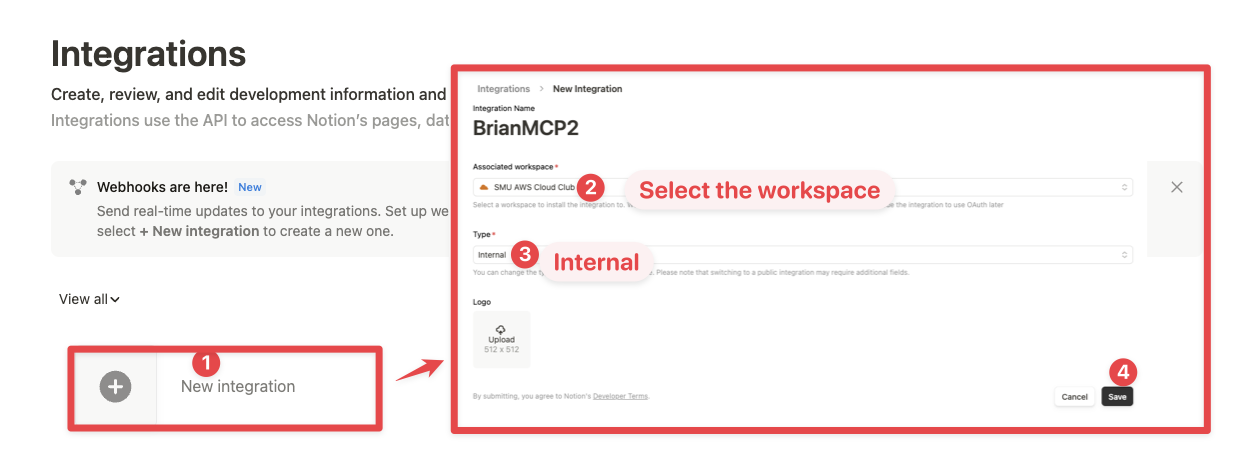
Notion APIの公開範囲は限定されています(例えば、MCP経由でデータベースを削除することはできません)。しかし、ワークスペースデータをLLMに公開することで、データへのリスクはゼロではありません。セキュリティを重視するユーザーは、統合機能をさらに設定することをお勧めします。
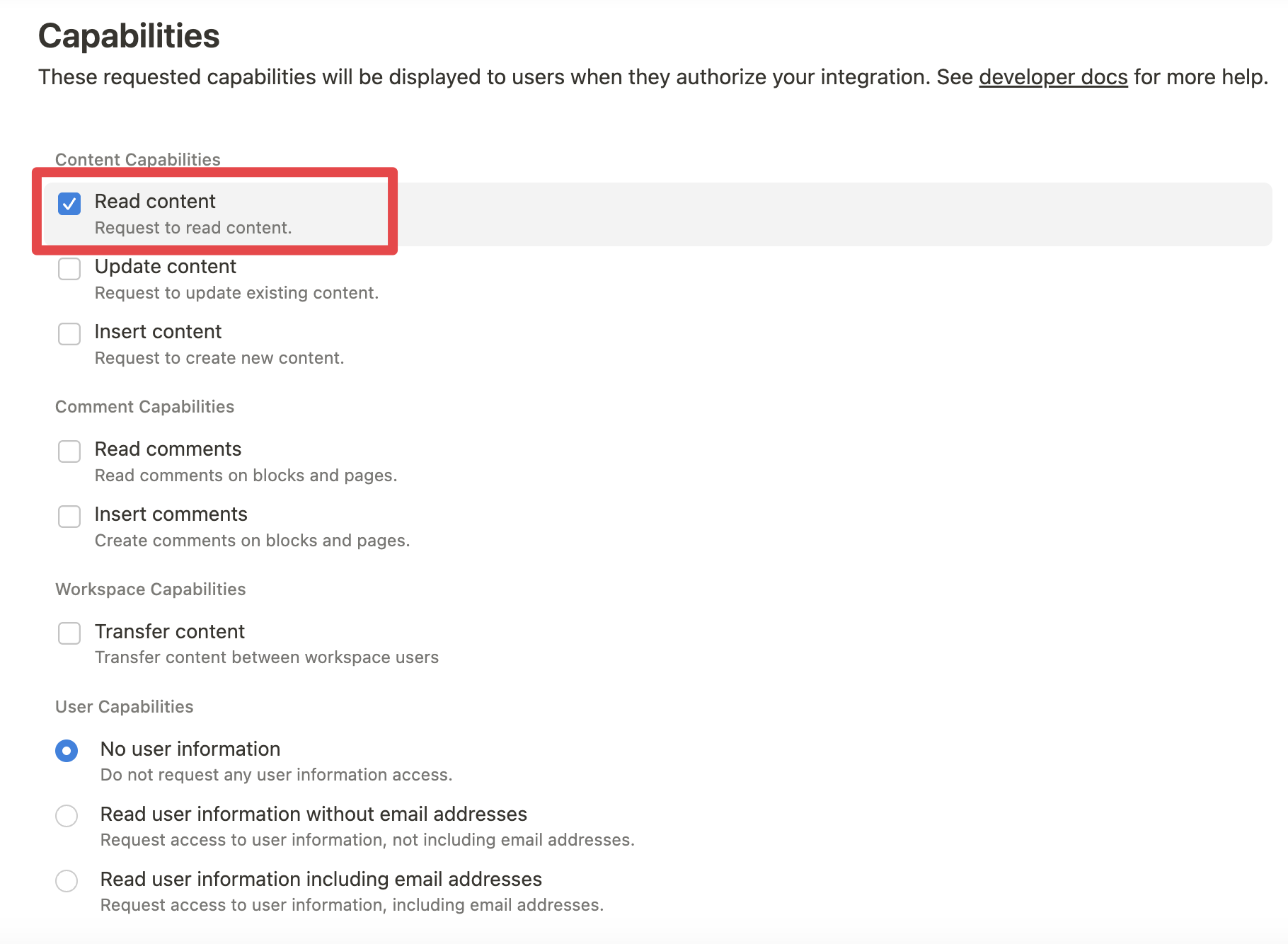
たとえば、「構成」タブから「コンテンツの読み取り」アクセス権のみを付与することで、読み取り専用の統合トークンを作成できます。
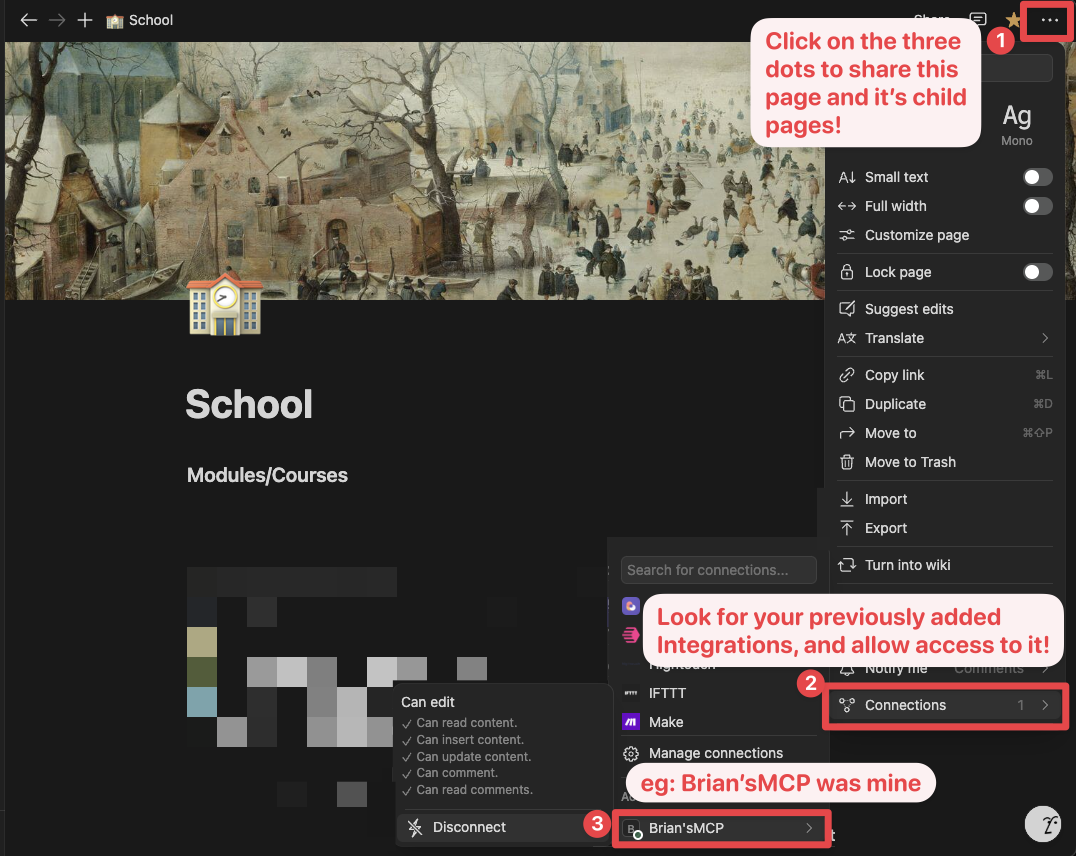
関連するページとデータベースが統合に接続されていることを確認します。
これを行うには、そのページにアクセスし、3 つのドットをクリックして、「統合に接続」を選択する必要があります。
.cursor/mcp.jsonまたはclaude_desktop_config.jsonに次のコードを追加します (MacOS: ~/Library/Application\ Support/Claude/claude_desktop_config.json )
{
  "mcpServers": {
    "notionApi": {
      "command": "npx",
      "args": ["-y", "@notionhq/notion-mcp-server"],
      "env": {
        "OPENAPI_MCP_HEADERS": "{\"Authorization\": \"Bearer ntn_****\", \"Notion-Version\": \"2022-06-28\" }"
      }
    }
  }
}
Docker を使用して MCP サーバーを実行するには、次の 2 つのオプションがあります。
.cursor/mcp.jsonまたはclaude_desktop_config.jsonに以下を追加します。
{
  "mcpServers": {
    "notionApi": {
      "command": "docker",
      "args": [
        "run",
        "--rm",
        "-i",
        "-e", "OPENAPI_MCP_HEADERS",
        "mcp/notion"
      ],
      "env": {
        "OPENAPI_MCP_HEADERS": "{\"Authorization\":\"Bearer ntn_****\",\"Notion-Version\":\"2022-06-28\"}"
      }
    }
  }
}
このアプローチ:
公式Docker Hubイメージを使用
環境変数を介してJSONエスケープを適切に処理します
より信頼性の高い構成方法を提供します
Dockerイメージをローカルでビルドして実行することもできます。まず、Dockerイメージをビルドします。
docker-compose build次に、 .cursor/mcp.jsonまたはclaude_desktop_config.jsonに次のコードを追加します。
{
  "mcpServers": {
    "notionApi": {
      "command": "docker",
      "args": [
        "run",
        "--rm",
        "-i",
        "-e",
        "OPENAPI_MCP_HEADERS={\"Authorization\": \"Bearer ntn_****\", \"Notion-Version\": \"2022-06-28\"}",
        "notion-mcp-server"
      ]
    }
  }
}ntn_****統合シークレットに置き換えることを忘れないでください。統合設定タブから確認することができます。
次の命令を使用して
Comment "Hello MCP" on page "Getting started"AIはタスクを達成するために、 v1/searchとv1/comments 2つのAPI呼び出しを正しく計画します。
同様に、次の命令を実行すると、「Notion MCP」という名前の新しいページが親ページ「Development」に追加されます。
Add a page titled "Notion MCP" to page "Development"コンテンツIDを直接参照することもできます
Get the content of page 1a6b35e6e67f802fa7e1d27686f017f2建てる
npm run build実行する
npx -y --prefix /path/to/local/notion-mcp-server @notionhq/notion-mcp-server公開
npm publish --access publicNotion | Create comment
Inputs: parent (required), rich_text (required).
Notion | Create a database
Inputs: parent (required), properties (required), title.
Notion | Delete a block
Inputs: block_id (required).
Notion | Retrieve block children
Inputs: block_id (required), page_size, start_cursor.
Notion | Retrieve your token's bot user
Inputs: no named parameters.
Notion | Retrieve a user
Inputs: user_id (required).
Notion | List all users
Inputs: page_size, start_cursor.
Notion | Append block children
Inputs: block_id (required), children (required), after.
Notion | Update page properties
Inputs: page_id (required), archived, cover, icon, +2 more.
Notion | Query a database
Inputs: database_id (required), archived, filter, filter_properties, +4 more.
Notion | Create a page
Inputs: parent (required), properties (required), children, cover, +1 more.
Notion | Search by title
Inputs: filter, page_size, query, sort, +1 more.
Notion | Retrieve a block
Inputs: block_id (required).
Notion | Retrieve comments
Inputs: block_id (required), page_size, start_cursor.
Notion | Retrieve a database
Inputs: database_id (required).
Notion | Retrieve a page
Inputs: page_id (required), filter_properties.
Notion | Retrieve a page property item
Inputs: page_id (required), property_id (required), page_size, start_cursor.
Notion | Update a block
Inputs: block_id (required), archived, type.
Notion | Update a database
Inputs: database_id (required), description, properties, title.
Recent tool additions, removals, and schema changes observed during successful MCP inspections.
Loading tool schema changelog…
Scored across 19 tools
Most tools have distinct purposes targeting specific Notion resources and actions, with clear separation between operations like create, retrieve, update, and delete. However, some potential overlap exists between 'API-retrieve-a-block' and 'API-get-block-children', as both involve block retrieval but with different scopes, which could cause minor confusion.
Tool names follow a highly consistent pattern throughout, using a structured 'API-verb-a-resource' format with hyphens separating components. All tools maintain this convention, making them predictable and easy to parse, with no deviations in style or structure.
With 19 tools, the count is slightly high but reasonable for a comprehensive Notion API server, covering a wide range of operations. It might feel a bit heavy, but each tool appears to serve a specific function in the Notion domain, justifying its inclusion without being excessive.
The tool set provides excellent coverage of the Notion API domain, including full CRUD operations for key resources like pages, databases, blocks, and comments, along with search, query, and user management. No obvious gaps are present, enabling agents to handle complete workflows without dead ends.
Hosted Notion MCP server for Claude, ChatGPT and Cursor, with each action switched per account.
An MCP server that integrates with Discord to provide AI-powered features.
Driflyte MCP server which lets AI assistants query topic-specific knowledge from web and GitHub.
Nifty's MCP server — exposes tasks, projects, messages, and files as tools for AI agents.