
A
licenseA
qualityA
maintenanceNotion MCP Server is a MCP server implementation that enables AI assistants to interact with Notion's API.
3
5,360 npm
182
MIT
Este proyecto implementa un servidor MCP para la API de Notion .
Vaya a https://www.notion.so/profile/integrations y cree una nueva integración interna o seleccione una existente.
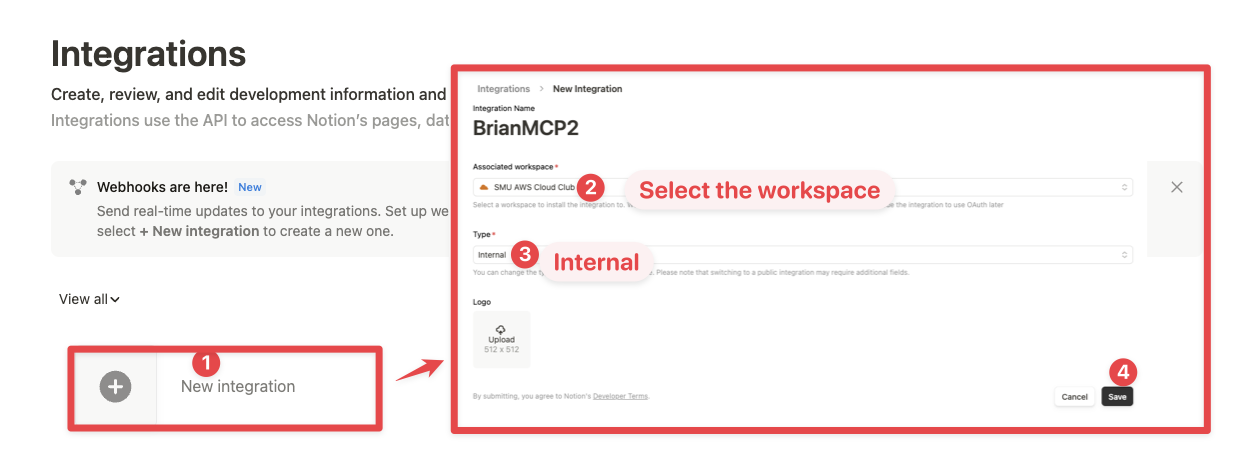
Si bien limitamos el alcance de la exposición de las API de Notion (por ejemplo, no podrá eliminar bases de datos mediante MCP), existe un riesgo considerable para los datos del espacio de trabajo al exponerlos a los LLM. Los usuarios preocupados por la seguridad deberían configurar mejor las capacidades de la integración.
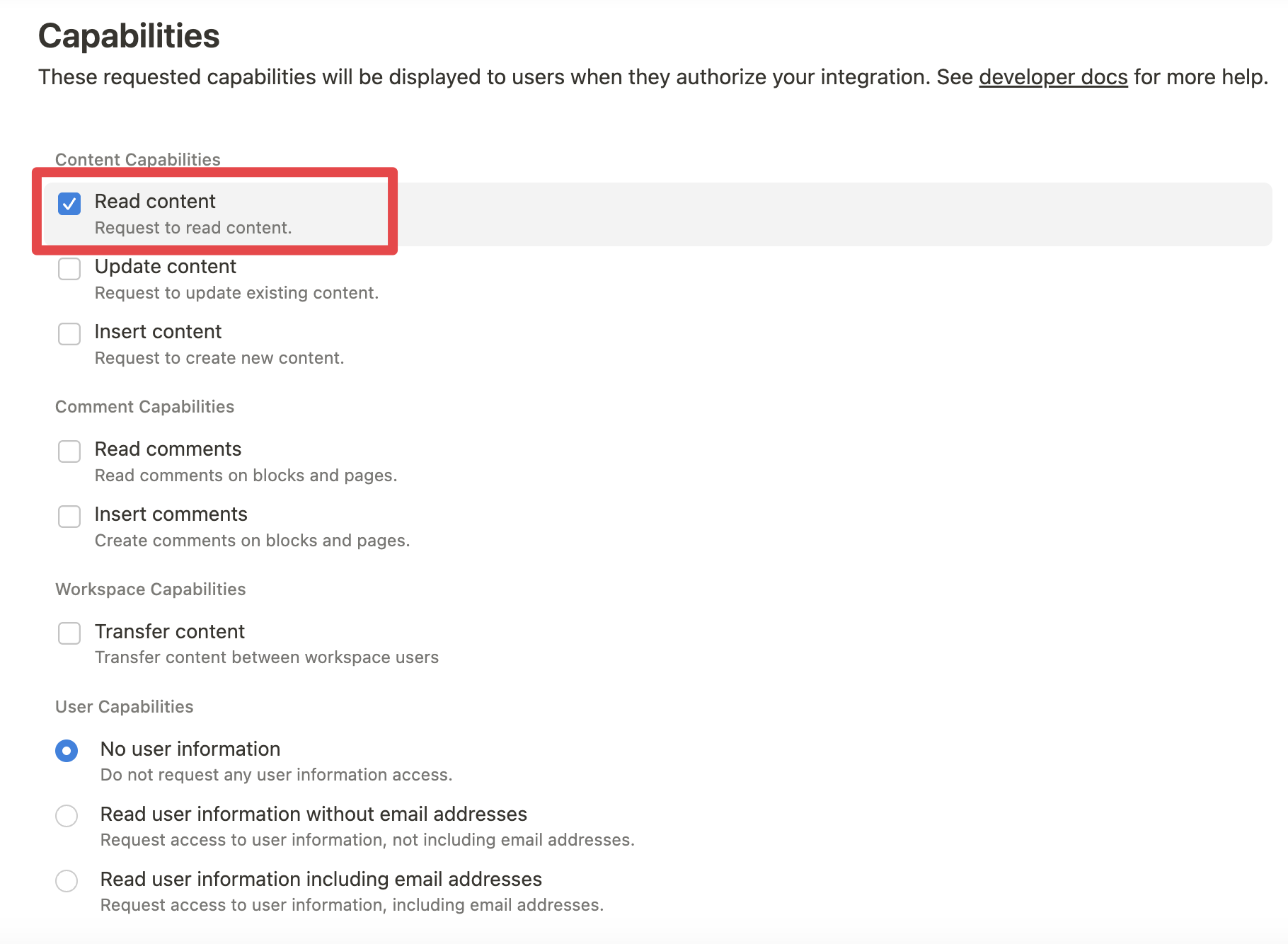
Por ejemplo, puede crear un token de integración de solo lectura otorgando únicamente acceso a "Leer contenido" desde la pestaña "Configuración":
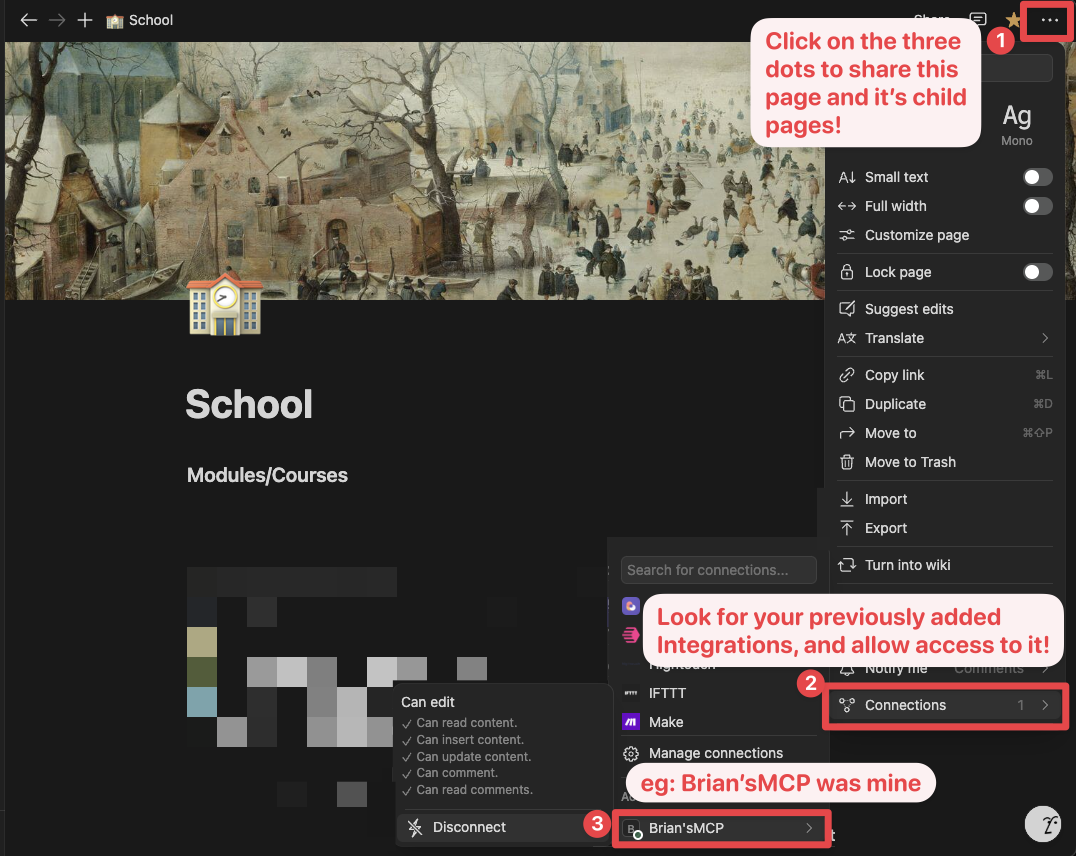
Asegúrese de que las páginas y bases de datos relevantes estén conectadas a su integración.
Para hacer esto, deberá visitar esa página, hacer clic en los 3 puntos y seleccionar "Conectar a la integración".
Agregue lo siguiente a su .cursor/mcp.json o claude_desktop_config.json (MacOS: ~/Library/Application\ Support/Claude/claude_desktop_config.json )
{
  "mcpServers": {
    "notionApi": {
      "command": "npx",
      "args": ["-y", "@notionhq/notion-mcp-server"],
      "env": {
        "OPENAPI_MCP_HEADERS": "{\"Authorization\": \"Bearer ntn_****\", \"Notion-Version\": \"2022-06-28\" }"
      }
    }
  }
}Hay dos opciones para ejecutar el servidor MCP con Docker:
Agregue lo siguiente a su .cursor/mcp.json o claude_desktop_config.json :
{
  "mcpServers": {
    "notionApi": {
      "command": "docker",
      "args": [
        "run",
        "--rm",
        "-i",
        "-e", "OPENAPI_MCP_HEADERS",
        "mcp/notion"
      ],
      "env": {
        "OPENAPI_MCP_HEADERS": "{\"Authorization\":\"Bearer ntn_****\",\"Notion-Version\":\"2022-06-28\"}"
      }
    }
  }
}
Este enfoque:
Utiliza la imagen oficial de Docker Hub
Maneja adecuadamente el escape JSON a través de variables de entorno
Proporciona un método de configuración más confiable
También puedes compilar y ejecutar la imagen de Docker localmente. Primero, compila la imagen de Docker:
docker-compose buildLuego, agrega lo siguiente a tu .cursor/mcp.json o claude_desktop_config.json :
{
  "mcpServers": {
    "notionApi": {
      "command": "docker",
      "args": [
        "run",
        "--rm",
        "-i",
        "-e",
        "OPENAPI_MCP_HEADERS={\"Authorization\": \"Bearer ntn_****\", \"Notion-Version\": \"2022-06-28\"}",
        "notion-mcp-server"
      ]
    }
  }
}
No olvides reemplazar ntn_**** con tu secreto de integración. Puedes encontrarlo en la pestaña de configuración de la integración:
Usando la siguiente instrucción
Comment "Hello MCP" on page "Getting started"La IA planificará correctamente dos llamadas API, v1/search y v1/comments , para lograr la tarea.
De manera similar, la siguiente instrucción generará una nueva página llamada "Notion MCP" agregada a la página principal "Desarrollo".
Add a page titled "Notion MCP" to page "Development"También puede hacer referencia directamente al ID de contenido
Get the content of page 1a6b35e6e67f802fa7e1d27686f017f2Construir
npm run buildEjecutar
npx -y --prefix /path/to/local/notion-mcp-server @notionhq/notion-mcp-serverPublicar
npm publish --access publicNotion | Create comment
Inputs: parent (required), rich_text (required).
Notion | Create a database
Inputs: parent (required), properties (required), title.
Notion | Delete a block
Inputs: block_id (required).
Notion | Retrieve block children
Inputs: block_id (required), page_size, start_cursor.
Notion | Retrieve your token's bot user
Inputs: no named parameters.
Notion | Retrieve a user
Inputs: user_id (required).
Notion | List all users
Inputs: page_size, start_cursor.
Notion | Append block children
Inputs: block_id (required), children (required), after.
Notion | Update page properties
Inputs: page_id (required), archived, cover, icon, +2 more.
Notion | Query a database
Inputs: database_id (required), archived, filter, filter_properties, +4 more.
Notion | Create a page
Inputs: parent (required), properties (required), children, cover, +1 more.
Notion | Search by title
Inputs: filter, page_size, query, sort, +1 more.
Notion | Retrieve a block
Inputs: block_id (required).
Notion | Retrieve comments
Inputs: block_id (required), page_size, start_cursor.
Notion | Retrieve a database
Inputs: database_id (required).
Notion | Retrieve a page
Inputs: page_id (required), filter_properties.
Notion | Retrieve a page property item
Inputs: page_id (required), property_id (required), page_size, start_cursor.
Notion | Update a block
Inputs: block_id (required), archived, type.
Notion | Update a database
Inputs: database_id (required), description, properties, title.
Recent tool additions, removals, and schema changes observed during successful MCP inspections.
Loading tool schema changelog…
Scored across 19 tools
Most tools have distinct purposes targeting specific Notion resources and actions, with clear separation between operations like create, retrieve, update, and delete. However, some potential overlap exists between 'API-retrieve-a-block' and 'API-get-block-children', as both involve block retrieval but with different scopes, which could cause minor confusion.
Tool names follow a highly consistent pattern throughout, using a structured 'API-verb-a-resource' format with hyphens separating components. All tools maintain this convention, making them predictable and easy to parse, with no deviations in style or structure.
With 19 tools, the count is slightly high but reasonable for a comprehensive Notion API server, covering a wide range of operations. It might feel a bit heavy, but each tool appears to serve a specific function in the Notion domain, justifying its inclusion without being excessive.
The tool set provides excellent coverage of the Notion API domain, including full CRUD operations for key resources like pages, databases, blocks, and comments, along with search, query, and user management. No obvious gaps are present, enabling agents to handle complete workflows without dead ends.
Hosted Notion MCP server for Claude, ChatGPT and Cursor, with each action switched per account.
An MCP server that integrates with Discord to provide AI-powered features.
Driflyte MCP server which lets AI assistants query topic-specific knowledge from web and GitHub.
Nifty's MCP server — exposes tasks, projects, messages, and files as tools for AI agents.