
A
licenseA
qualityA
maintenanceNotion MCP Server is a MCP server implementation that enables AI assistants to interact with Notion's API.
3
5,360 npm
182
MIT
이 프로젝트는 Notion API를 위한 MCP 서버를 구현합니다.
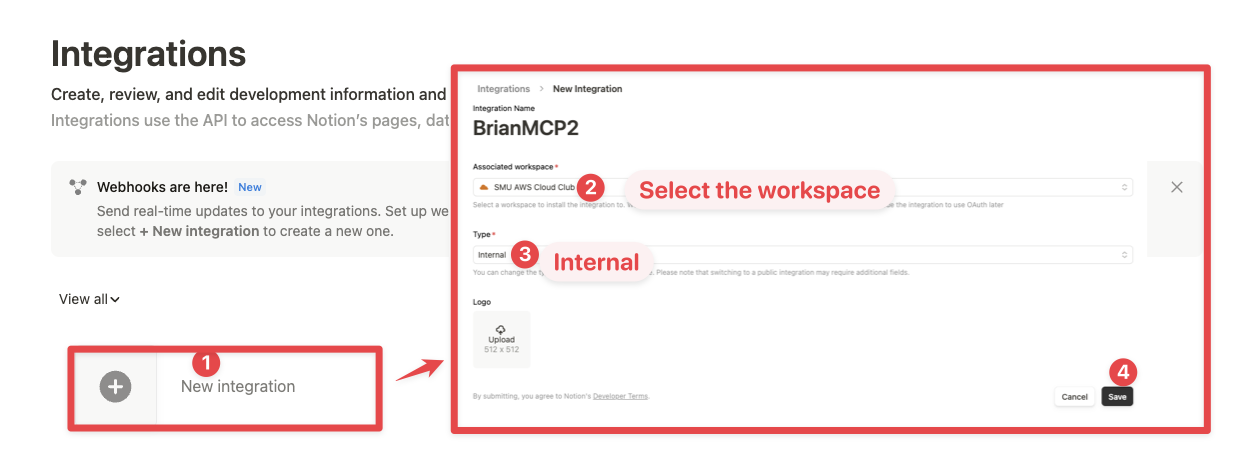
https://www.notion.so/profile/integrations 로 이동하여 새로운 내부 통합을 만들거나 기존 통합을 선택하세요.
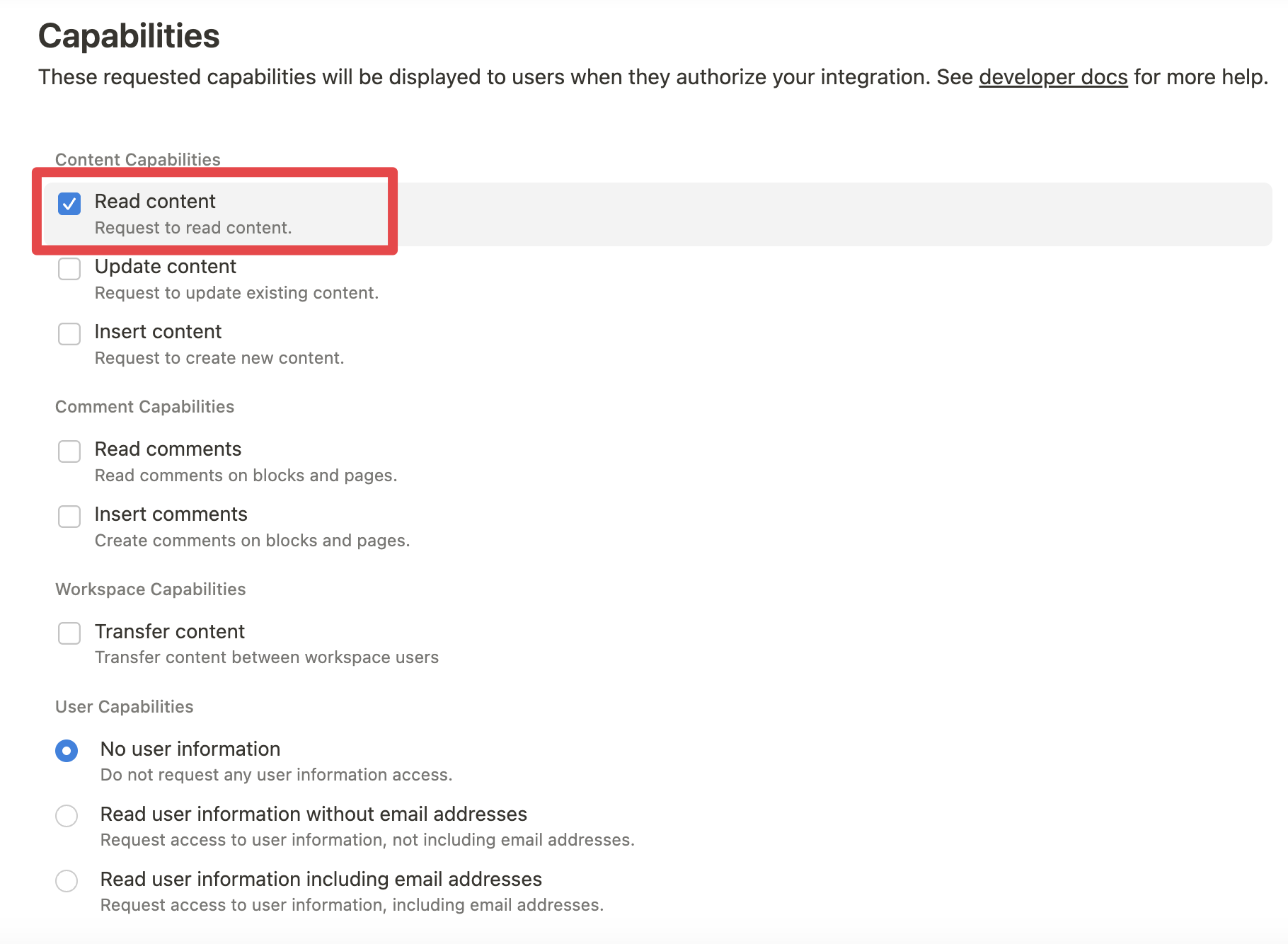
Notion API 노출 범위는 제한되어 있지만(예: MCP를 통해 데이터베이스를 삭제할 수 없음), LLM에 노출될 경우 작업 공간 데이터에 대한 위험은 상당합니다. 보안에 민감한 사용자는 통합 기능 추가 구성을 고려할 수 있습니다.
예를 들어, "구성" 탭에서 "콘텐츠 읽기" 액세스만 부여하여 읽기 전용 통합 토큰을 만들 수 있습니다.
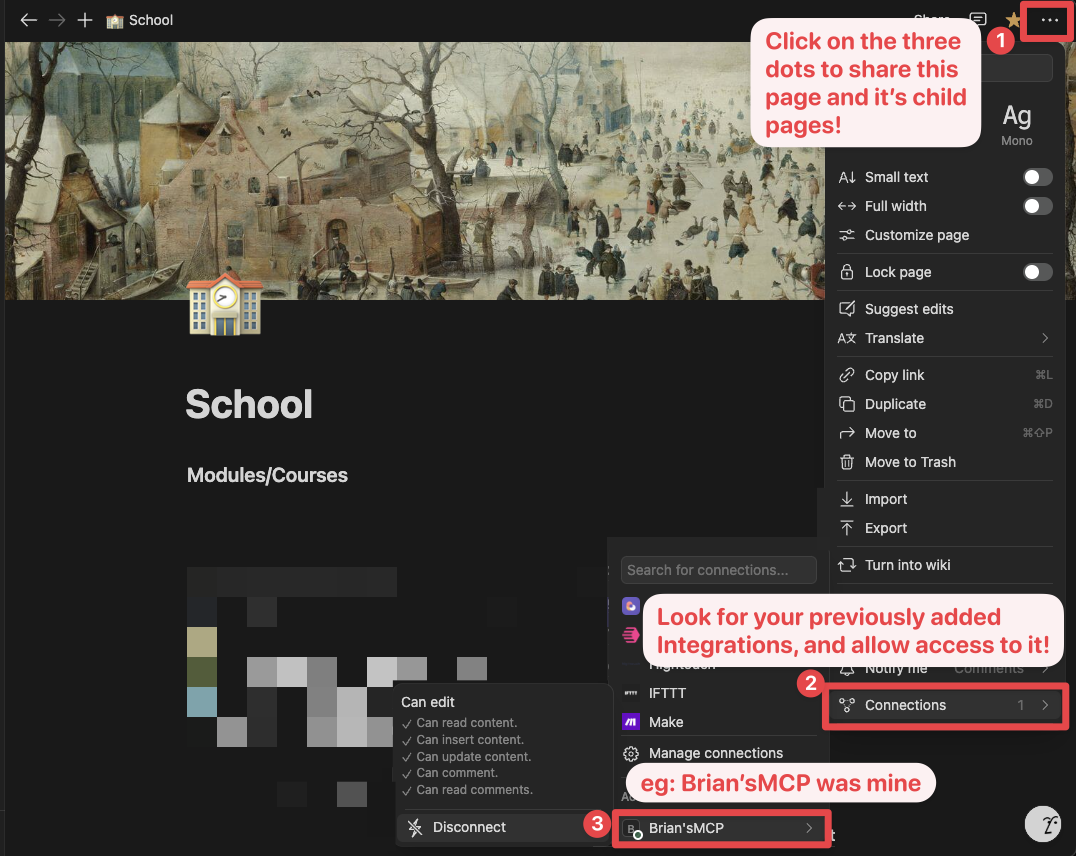
관련 페이지와 데이터베이스가 통합에 연결되어 있는지 확인하세요.
이렇게 하려면 해당 페이지를 방문하여 3개의 점을 클릭하고 "통합에 연결"을 선택해야 합니다.
.cursor/mcp.json 또는 claude_desktop_config.json 에 다음을 추가합니다(MacOS: ~/Library/Application\ Support/Claude/claude_desktop_config.json )
지엑스피1
Docker로 MCP 서버를 실행하는 데는 두 가지 옵션이 있습니다.
.cursor/mcp.json 또는 claude_desktop_config.json 에 다음을 추가하세요.
{
  "mcpServers": {
    "notionApi": {
      "command": "docker",
      "args": [
        "run",
        "--rm",
        "-i",
        "-e", "OPENAPI_MCP_HEADERS",
        "mcp/notion"
      ],
      "env": {
        "OPENAPI_MCP_HEADERS": "{\"Authorization\":\"Bearer ntn_****\",\"Notion-Version\":\"2022-06-28\"}"
      }
    }
  }
}
이 접근 방식은 다음과 같습니다.
공식 Docker Hub 이미지를 사용합니다.
환경 변수를 통해 JSON 이스케이프를 적절하게 처리합니다.
더욱 안정적인 구성 방법을 제공합니다
Docker 이미지를 로컬에서 빌드하고 실행할 수도 있습니다. 먼저 Docker 이미지를 빌드하세요.
docker-compose build그런 다음 .cursor/mcp.json 또는 claude_desktop_config.json 에 다음을 추가합니다.
{
  "mcpServers": {
    "notionApi": {
      "command": "docker",
      "args": [
        "run",
        "--rm",
        "-i",
        "-e",
        "OPENAPI_MCP_HEADERS={\"Authorization\": \"Bearer ntn_****\", \"Notion-Version\": \"2022-06-28\"}",
        "notion-mcp-server"
      ]
    }
  }
}
ntn_**** 통합 비밀번호로 바꾸는 것을 잊지 마세요. 통합 설정 탭에서 비밀번호를 확인하세요.
다음 지침을 사용하여
Comment "Hello MCP" on page "Getting started"AI는 작업을 달성하기 위해 v1/search 및 v1/comments 라는 두 개의 API 호출을 올바르게 계획합니다.
마찬가지로 다음 지침을 따르면 부모 페이지 "개발"에 "Notion MCP"라는 새 페이지가 추가됩니다.
Add a page titled "Notion MCP" to page "Development"콘텐츠 ID를 직접 참조할 수도 있습니다.
Get the content of page 1a6b35e6e67f802fa7e1d27686f017f2짓다
npm run build실행하다
npx -y --prefix /path/to/local/notion-mcp-server @notionhq/notion-mcp-server게시하다
npm publish --access publicNotion | Create comment
Inputs: parent (required), rich_text (required).
Notion | Create a database
Inputs: parent (required), properties (required), title.
Notion | Delete a block
Inputs: block_id (required).
Notion | Retrieve block children
Inputs: block_id (required), page_size, start_cursor.
Notion | Retrieve your token's bot user
Inputs: no named parameters.
Notion | Retrieve a user
Inputs: user_id (required).
Notion | List all users
Inputs: page_size, start_cursor.
Notion | Append block children
Inputs: block_id (required), children (required), after.
Notion | Update page properties
Inputs: page_id (required), archived, cover, icon, +2 more.
Notion | Query a database
Inputs: database_id (required), archived, filter, filter_properties, +4 more.
Notion | Create a page
Inputs: parent (required), properties (required), children, cover, +1 more.
Notion | Search by title
Inputs: filter, page_size, query, sort, +1 more.
Notion | Retrieve a block
Inputs: block_id (required).
Notion | Retrieve comments
Inputs: block_id (required), page_size, start_cursor.
Notion | Retrieve a database
Inputs: database_id (required).
Notion | Retrieve a page
Inputs: page_id (required), filter_properties.
Notion | Retrieve a page property item
Inputs: page_id (required), property_id (required), page_size, start_cursor.
Notion | Update a block
Inputs: block_id (required), archived, type.
Notion | Update a database
Inputs: database_id (required), description, properties, title.
Recent tool additions, removals, and schema changes observed during successful MCP inspections.
Loading tool schema changelog…
Scored across 19 tools
Most tools have distinct purposes targeting specific Notion resources and actions, with clear separation between operations like create, retrieve, update, and delete. However, some potential overlap exists between 'API-retrieve-a-block' and 'API-get-block-children', as both involve block retrieval but with different scopes, which could cause minor confusion.
Tool names follow a highly consistent pattern throughout, using a structured 'API-verb-a-resource' format with hyphens separating components. All tools maintain this convention, making them predictable and easy to parse, with no deviations in style or structure.
With 19 tools, the count is slightly high but reasonable for a comprehensive Notion API server, covering a wide range of operations. It might feel a bit heavy, but each tool appears to serve a specific function in the Notion domain, justifying its inclusion without being excessive.
The tool set provides excellent coverage of the Notion API domain, including full CRUD operations for key resources like pages, databases, blocks, and comments, along with search, query, and user management. No obvious gaps are present, enabling agents to handle complete workflows without dead ends.
Hosted Notion MCP server for Claude, ChatGPT and Cursor, with each action switched per account.
An MCP server that integrates with Discord to provide AI-powered features.
Driflyte MCP server which lets AI assistants query topic-specific knowledge from web and GitHub.
Nifty's MCP server — exposes tasks, projects, messages, and files as tools for AI agents.