
A
licenseA
qualityA
maintenanceNotion MCP Server is a MCP server implementation that enables AI assistants to interact with Notion's API.
3
5,360 npm
182
MIT
В этом проекте реализован MCP-сервер для Notion API .
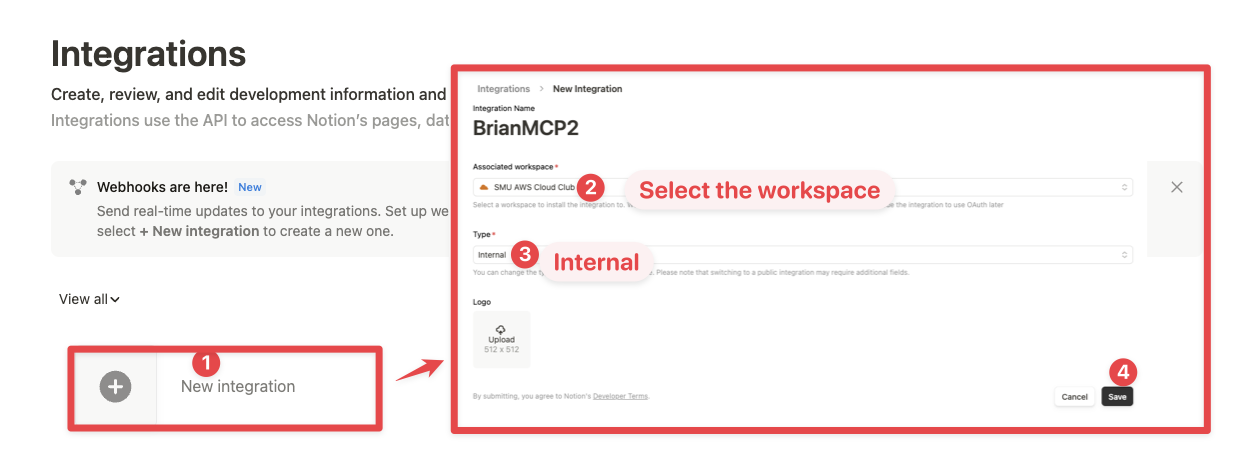
Перейдите по ссылке https://www.notion.so/profile/integrations и создайте новую внутреннюю интеграцию или выберите существующую.
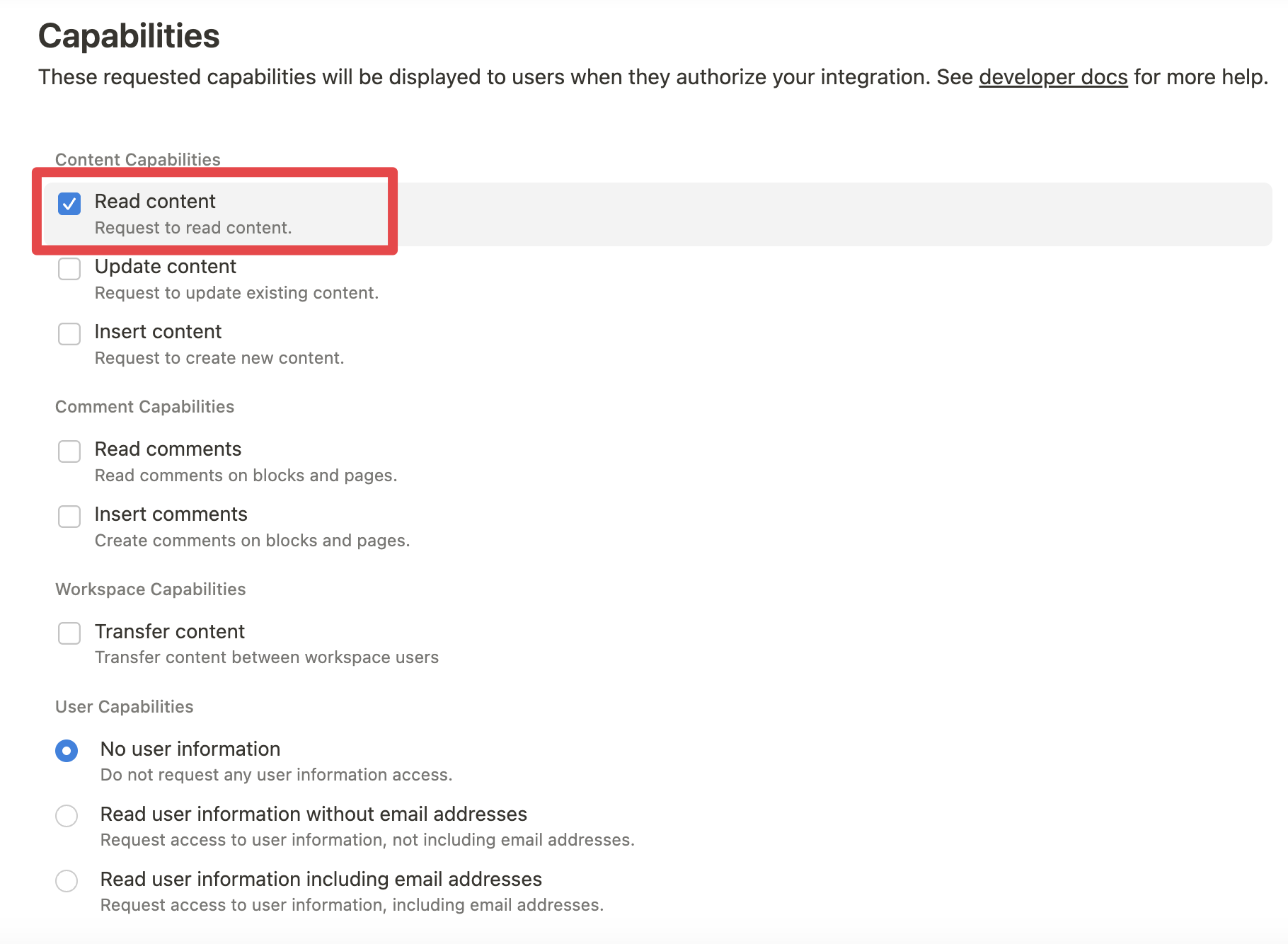
Хотя мы ограничиваем область действия Notion API (например, вы не сможете удалять базы данных через MCP), существует ненулевой риск для данных рабочей области, если они будут раскрыты LLM. Пользователи, заботящиеся о безопасности, могут захотеть дополнительно настроить возможности интеграции.
Например, вы можете создать токен интеграции, доступный только для чтения, предоставив доступ только «Чтение содержимого» на вкладке «Конфигурация»:
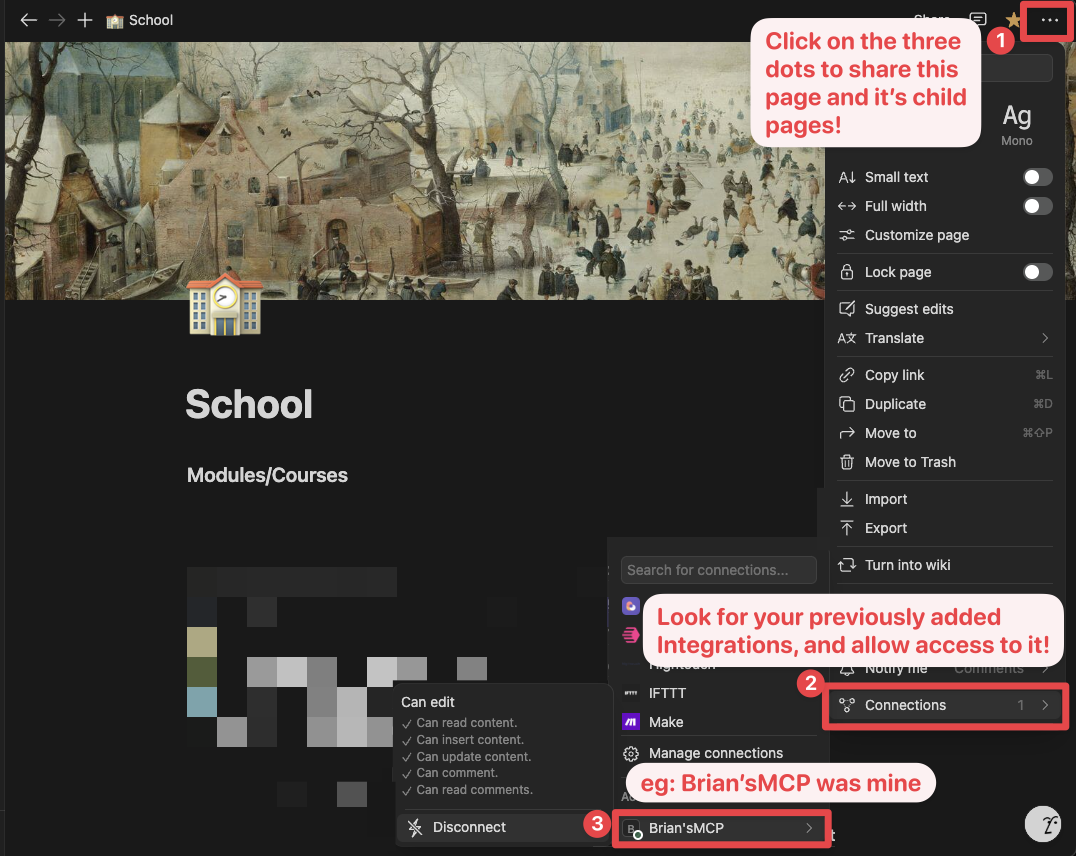
Убедитесь, что к вашей интеграции подключены соответствующие страницы и базы данных.
Для этого вам необходимо зайти на эту страницу, нажать на три точки и выбрать «Подключиться к интеграции».
Добавьте следующее в ваш .cursor/mcp.json или claude_desktop_config.json (MacOS: ~/Library/Application\ Support/Claude/claude_desktop_config.json )
{
  "mcpServers": {
    "notionApi": {
      "command": "npx",
      "args": ["-y", "@notionhq/notion-mcp-server"],
      "env": {
        "OPENAPI_MCP_HEADERS": "{\"Authorization\": \"Bearer ntn_****\", \"Notion-Version\": \"2022-06-28\" }"
      }
    }
  }
}Существует два варианта запуска сервера MCP с Docker:
Добавьте следующее в ваш .cursor/mcp.json или claude_desktop_config.json :
{
  "mcpServers": {
    "notionApi": {
      "command": "docker",
      "args": [
        "run",
        "--rm",
        "-i",
        "-e", "OPENAPI_MCP_HEADERS",
        "mcp/notion"
      ],
      "env": {
        "OPENAPI_MCP_HEADERS": "{\"Authorization\":\"Bearer ntn_****\",\"Notion-Version\":\"2022-06-28\"}"
      }
    }
  }
}
Этот подход:
Использует официальный образ Docker Hub
Правильно обрабатывает экранирование JSON через переменные среды.
Обеспечивает более надежный метод настройки
Вы также можете создать и запустить образ Docker локально. Сначала создайте образ Docker:
docker-compose buildЗатем добавьте следующее в ваш .cursor/mcp.json или claude_desktop_config.json :
{
  "mcpServers": {
    "notionApi": {
      "command": "docker",
      "args": [
        "run",
        "--rm",
        "-i",
        "-e",
        "OPENAPI_MCP_HEADERS={\"Authorization\": \"Bearer ntn_****\", \"Notion-Version\": \"2022-06-28\"}",
        "notion-mcp-server"
      ]
    }
  }
}
Не забудьте заменить ntn_**** на ваш секрет интеграции. Найдите его на вкладке конфигурации интеграции:
Используя следующую инструкцию
Comment "Hello MCP" on page "Getting started"ИИ правильно спланирует два вызова API, v1/search и v1/comments , для выполнения задачи
Аналогично, следующая инструкция приведет к созданию новой страницы с именем «Notion MCP», добавленной к родительской странице «Разработка».
Add a page titled "Notion MCP" to page "Development"Вы также можете ссылаться на идентификатор контента напрямую.
Get the content of page 1a6b35e6e67f802fa7e1d27686f017f2Строить
npm run buildВыполнять
npx -y --prefix /path/to/local/notion-mcp-server @notionhq/notion-mcp-serverПубликовать
npm publish --access publicNotion | Create comment
Inputs: parent (required), rich_text (required).
Notion | Create a database
Inputs: parent (required), properties (required), title.
Notion | Delete a block
Inputs: block_id (required).
Notion | Retrieve block children
Inputs: block_id (required), page_size, start_cursor.
Notion | Retrieve your token's bot user
Inputs: no named parameters.
Notion | Retrieve a user
Inputs: user_id (required).
Notion | List all users
Inputs: page_size, start_cursor.
Notion | Append block children
Inputs: block_id (required), children (required), after.
Notion | Update page properties
Inputs: page_id (required), archived, cover, icon, +2 more.
Notion | Query a database
Inputs: database_id (required), archived, filter, filter_properties, +4 more.
Notion | Create a page
Inputs: parent (required), properties (required), children, cover, +1 more.
Notion | Search by title
Inputs: filter, page_size, query, sort, +1 more.
Notion | Retrieve a block
Inputs: block_id (required).
Notion | Retrieve comments
Inputs: block_id (required), page_size, start_cursor.
Notion | Retrieve a database
Inputs: database_id (required).
Notion | Retrieve a page
Inputs: page_id (required), filter_properties.
Notion | Retrieve a page property item
Inputs: page_id (required), property_id (required), page_size, start_cursor.
Notion | Update a block
Inputs: block_id (required), archived, type.
Notion | Update a database
Inputs: database_id (required), description, properties, title.
Recent tool additions, removals, and schema changes observed during successful MCP inspections.
Loading tool schema changelog…
Scored across 19 tools
Most tools have distinct purposes targeting specific Notion resources and actions, with clear separation between operations like create, retrieve, update, and delete. However, some potential overlap exists between 'API-retrieve-a-block' and 'API-get-block-children', as both involve block retrieval but with different scopes, which could cause minor confusion.
Tool names follow a highly consistent pattern throughout, using a structured 'API-verb-a-resource' format with hyphens separating components. All tools maintain this convention, making them predictable and easy to parse, with no deviations in style or structure.
With 19 tools, the count is slightly high but reasonable for a comprehensive Notion API server, covering a wide range of operations. It might feel a bit heavy, but each tool appears to serve a specific function in the Notion domain, justifying its inclusion without being excessive.
The tool set provides excellent coverage of the Notion API domain, including full CRUD operations for key resources like pages, databases, blocks, and comments, along with search, query, and user management. No obvious gaps are present, enabling agents to handle complete workflows without dead ends.
Hosted Notion MCP server for Claude, ChatGPT and Cursor, with each action switched per account.
An MCP server that integrates with Discord to provide AI-powered features.
Driflyte MCP server which lets AI assistants query topic-specific knowledge from web and GitHub.
Nifty's MCP server — exposes tasks, projects, messages, and files as tools for AI agents.