
A
licenseA
qualityA
maintenanceNotion MCP Server is a MCP server implementation that enables AI assistants to interact with Notion's API.
3
5,360 npm
182
MIT
Dieses Projekt implementiert einen MCP-Server für die Notion-API .
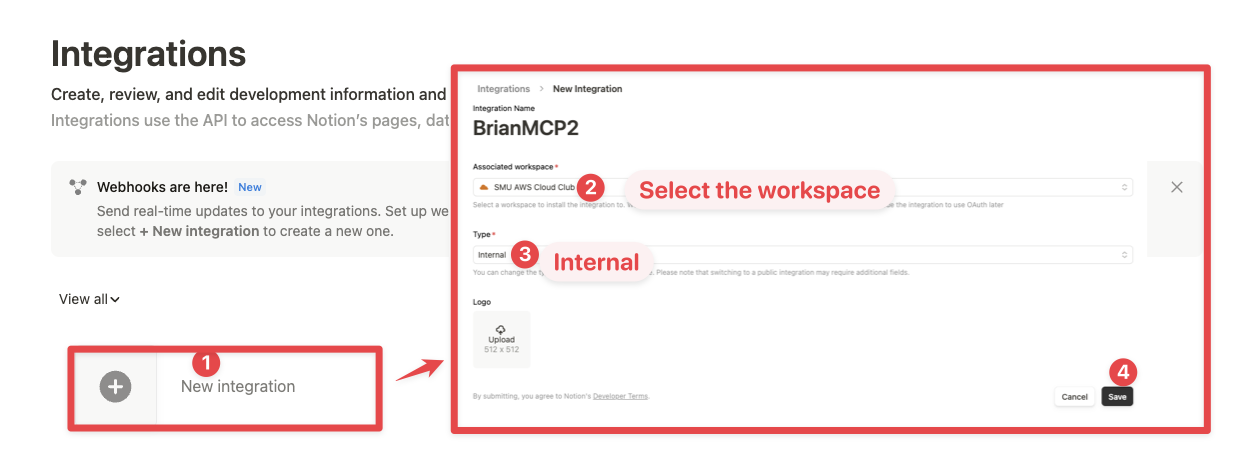
Gehen Sie zu https://www.notion.so/profile/integrations und erstellen Sie eine neue interne Integration oder wählen Sie eine vorhandene aus.
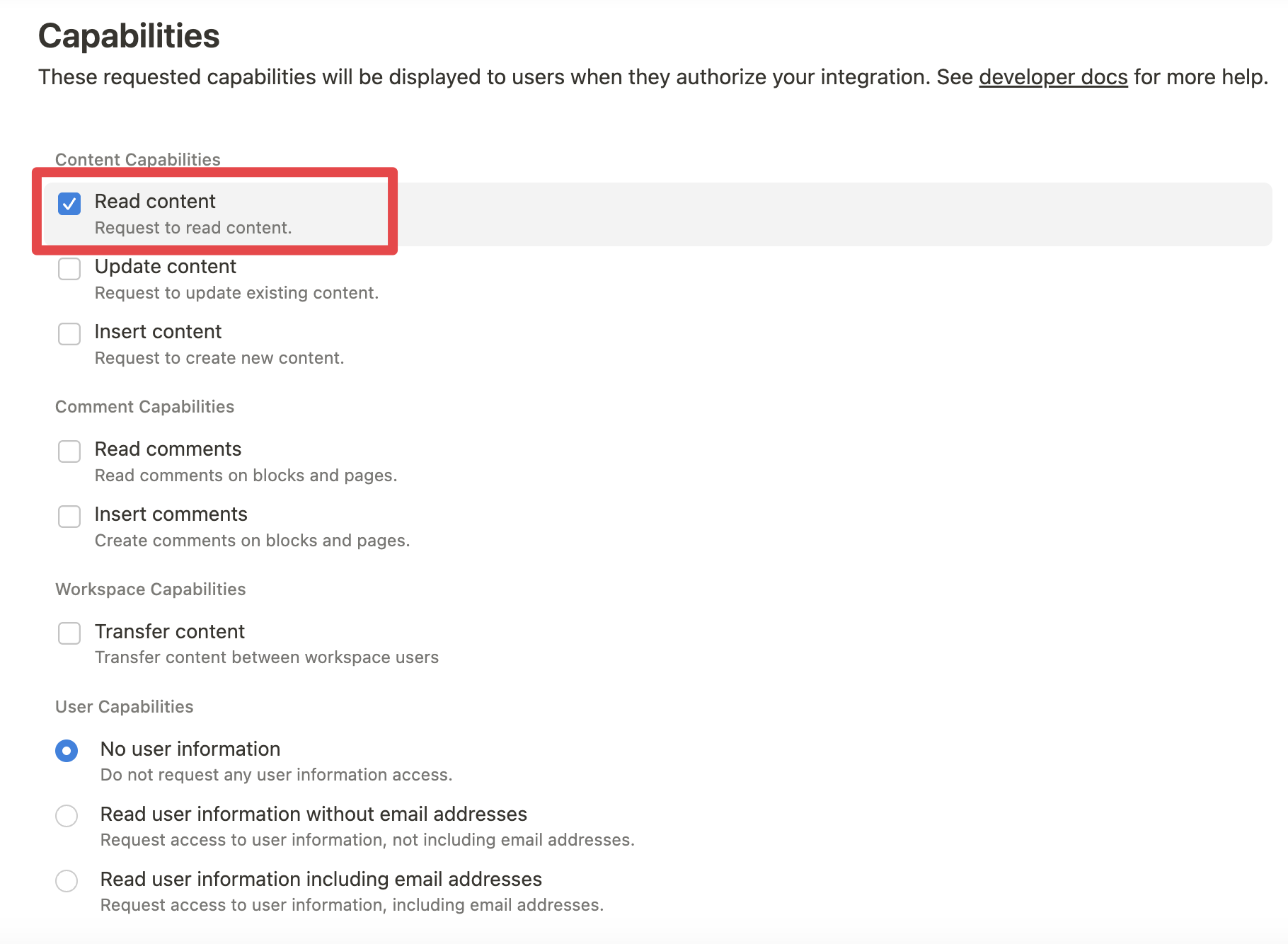
Obwohl wir den Umfang der verfügbaren Notion-APIs einschränken (z. B. können Sie Datenbanken nicht über MCP löschen), besteht ein nicht zu vernachlässigendes Risiko für Arbeitsbereichsdaten, wenn diese LLMs ausgesetzt werden. Sicherheitsbewusste Benutzer sollten die Integrationsfunktionen weiter konfigurieren.
Sie können beispielsweise ein schreibgeschütztes Integrationstoken erstellen, indem Sie auf der Registerkarte „Konfiguration“ nur den Zugriff „Inhalte lesen“ gewähren:
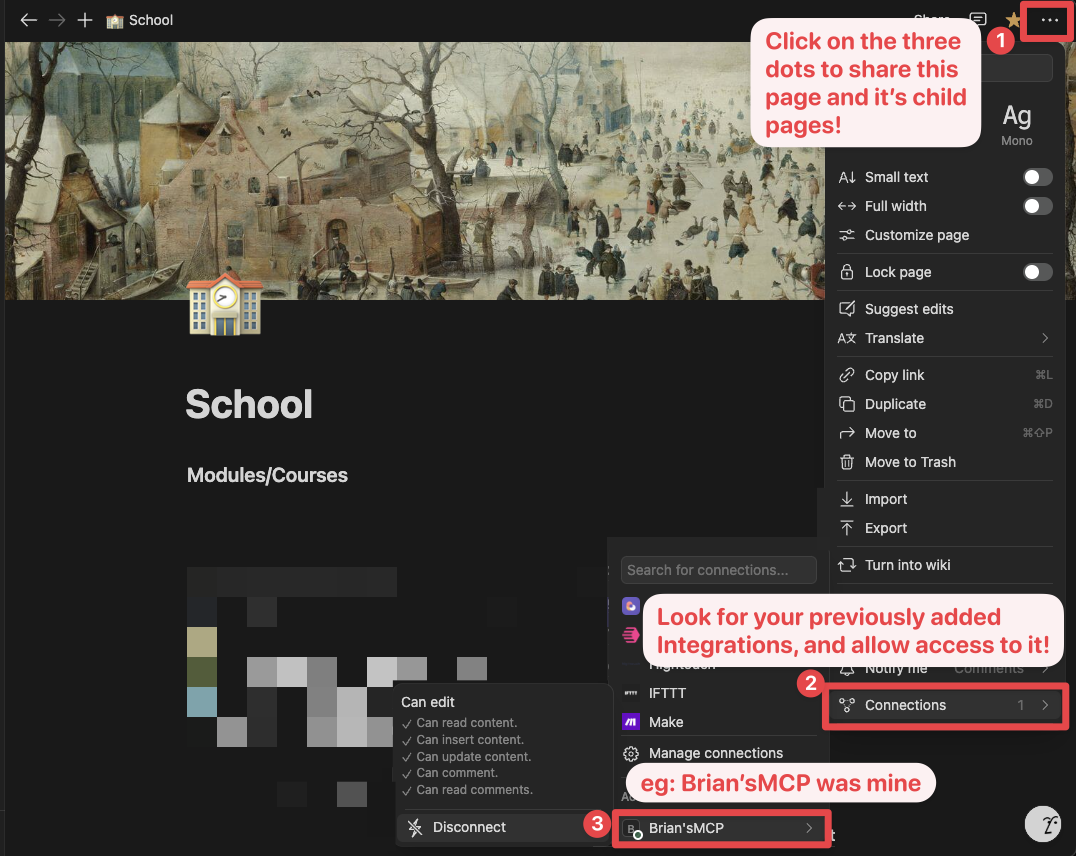
Stellen Sie sicher, dass relevante Seiten und Datenbanken mit Ihrer Integration verbunden sind.
Besuchen Sie dazu diese Seite, klicken Sie auf die drei Punkte und wählen Sie „Mit Integration verbinden“.
Fügen Sie Folgendes zu Ihrer .cursor/mcp.json oder claude_desktop_config.json hinzu (MacOS: ~/Library/Application\ Support/Claude/claude_desktop_config.json )
{
  "mcpServers": {
    "notionApi": {
      "command": "npx",
      "args": ["-y", "@notionhq/notion-mcp-server"],
      "env": {
        "OPENAPI_MCP_HEADERS": "{\"Authorization\": \"Bearer ntn_****\", \"Notion-Version\": \"2022-06-28\" }"
      }
    }
  }
}Es gibt zwei Möglichkeiten, den MCP-Server mit Docker auszuführen:
Fügen Sie Folgendes zu Ihrer .cursor/mcp.json oder claude_desktop_config.json hinzu:
{
  "mcpServers": {
    "notionApi": {
      "command": "docker",
      "args": [
        "run",
        "--rm",
        "-i",
        "-e", "OPENAPI_MCP_HEADERS",
        "mcp/notion"
      ],
      "env": {
        "OPENAPI_MCP_HEADERS": "{\"Authorization\":\"Bearer ntn_****\",\"Notion-Version\":\"2022-06-28\"}"
      }
    }
  }
}
Dieser Ansatz:
Verwendet das offizielle Docker Hub-Image
Behandelt JSON-Escape über Umgebungsvariablen ordnungsgemäß
Bietet eine zuverlässigere Konfigurationsmethode
Sie können das Docker-Image auch lokal erstellen und ausführen. Erstellen Sie zunächst das Docker-Image:
docker-compose buildFügen Sie dann Folgendes zu Ihrer .cursor/mcp.json oder claude_desktop_config.json hinzu:
{
  "mcpServers": {
    "notionApi": {
      "command": "docker",
      "args": [
        "run",
        "--rm",
        "-i",
        "-e",
        "OPENAPI_MCP_HEADERS={\"Authorization\": \"Bearer ntn_****\", \"Notion-Version\": \"2022-06-28\"}",
        "notion-mcp-server"
      ]
    }
  }
}
Vergessen Sie nicht ntn_**** durch Ihr Integrationsgeheimnis zu ersetzen. Sie finden es auf der Registerkarte „Integrationskonfiguration“:
Mit der folgenden Anleitung
Comment "Hello MCP" on page "Getting started"Die KI plant zwei API-Aufrufe, v1/search und v1/comments , korrekt, um die Aufgabe zu erfüllen
In ähnlicher Weise führt die folgende Anweisung dazu, dass der übergeordneten Seite „Entwicklung“ eine neue Seite mit dem Namen „Notion MCP“ hinzugefügt wird.
Add a page titled "Notion MCP" to page "Development"Sie können die Inhalts-ID auch direkt referenzieren
Get the content of page 1a6b35e6e67f802fa7e1d27686f017f2Bauen
npm run buildAusführen
npx -y --prefix /path/to/local/notion-mcp-server @notionhq/notion-mcp-serverVeröffentlichen
npm publish --access publicNotion | Create comment
Inputs: parent (required), rich_text (required).
Notion | Create a database
Inputs: parent (required), properties (required), title.
Notion | Delete a block
Inputs: block_id (required).
Notion | Retrieve block children
Inputs: block_id (required), page_size, start_cursor.
Notion | Retrieve your token's bot user
Inputs: no named parameters.
Notion | Retrieve a user
Inputs: user_id (required).
Notion | List all users
Inputs: page_size, start_cursor.
Notion | Append block children
Inputs: block_id (required), children (required), after.
Notion | Update page properties
Inputs: page_id (required), archived, cover, icon, +2 more.
Notion | Query a database
Inputs: database_id (required), archived, filter, filter_properties, +4 more.
Notion | Create a page
Inputs: parent (required), properties (required), children, cover, +1 more.
Notion | Search by title
Inputs: filter, page_size, query, sort, +1 more.
Notion | Retrieve a block
Inputs: block_id (required).
Notion | Retrieve comments
Inputs: block_id (required), page_size, start_cursor.
Notion | Retrieve a database
Inputs: database_id (required).
Notion | Retrieve a page
Inputs: page_id (required), filter_properties.
Notion | Retrieve a page property item
Inputs: page_id (required), property_id (required), page_size, start_cursor.
Notion | Update a block
Inputs: block_id (required), archived, type.
Notion | Update a database
Inputs: database_id (required), description, properties, title.
Recent tool additions, removals, and schema changes observed during successful MCP inspections.
Loading tool schema changelog…
Scored across 19 tools
Most tools have distinct purposes targeting specific Notion resources and actions, with clear separation between operations like create, retrieve, update, and delete. However, some potential overlap exists between 'API-retrieve-a-block' and 'API-get-block-children', as both involve block retrieval but with different scopes, which could cause minor confusion.
Tool names follow a highly consistent pattern throughout, using a structured 'API-verb-a-resource' format with hyphens separating components. All tools maintain this convention, making them predictable and easy to parse, with no deviations in style or structure.
With 19 tools, the count is slightly high but reasonable for a comprehensive Notion API server, covering a wide range of operations. It might feel a bit heavy, but each tool appears to serve a specific function in the Notion domain, justifying its inclusion without being excessive.
The tool set provides excellent coverage of the Notion API domain, including full CRUD operations for key resources like pages, databases, blocks, and comments, along with search, query, and user management. No obvious gaps are present, enabling agents to handle complete workflows without dead ends.
Hosted Notion MCP server for Claude, ChatGPT and Cursor, with each action switched per account.
An MCP server that integrates with Discord to provide AI-powered features.
Driflyte MCP server which lets AI assistants query topic-specific knowledge from web and GitHub.
Nifty's MCP server — exposes tasks, projects, messages, and files as tools for AI agents.