A
licenseA
qualityD
maintenanceAn MCP server that enables LLMs to generate spoken audio from text using OpenAI's Text-to-Speech API, supporting various voices, models, and audio formats.
1
13
1
MIT

中文 | 日本語
使用 VOICEVOX 的文本转语音 MCP 服务器
🎮 试试浏览器演示 — 直接在浏览器中测试 VoicevoxClient
让你的 AI 助手说话 — 从 Claude Desktop 等 MCP 客户端进行文本转语音
UI 音频播放器(MCP 应用) — 在聊天中直接播放音频,带有交互式播放器(ChatGPT / Claude Desktop / Claude Web 等)
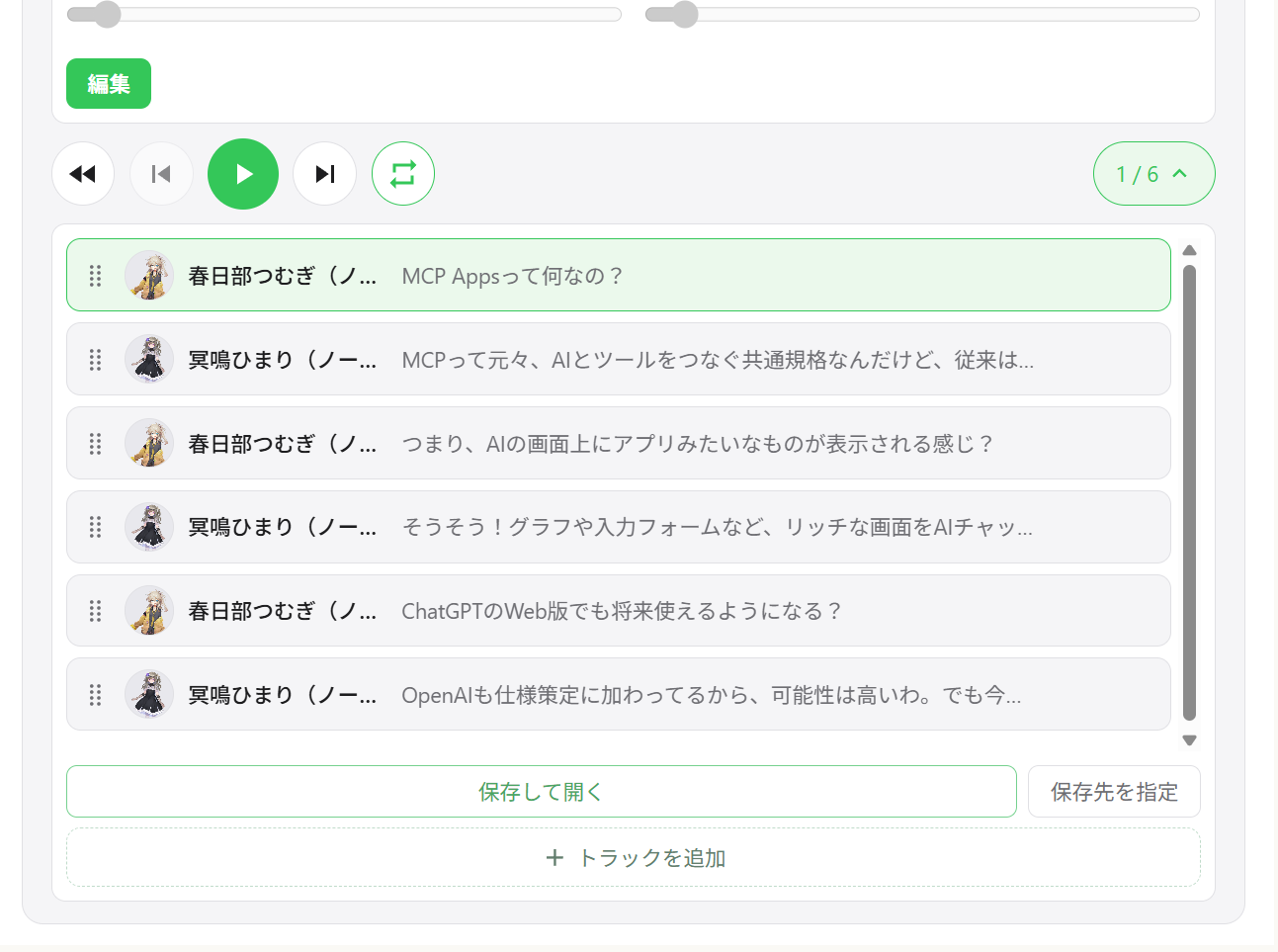
多角色对话 — 在单次调用中按片段切换说话人
流畅播放 — 队列管理、立即播放、预取、流式播放
跨平台 — 支持 Windows、macOS、Linux(包括 WSL)
Related MCP server: voiceroid_daemon-mcp
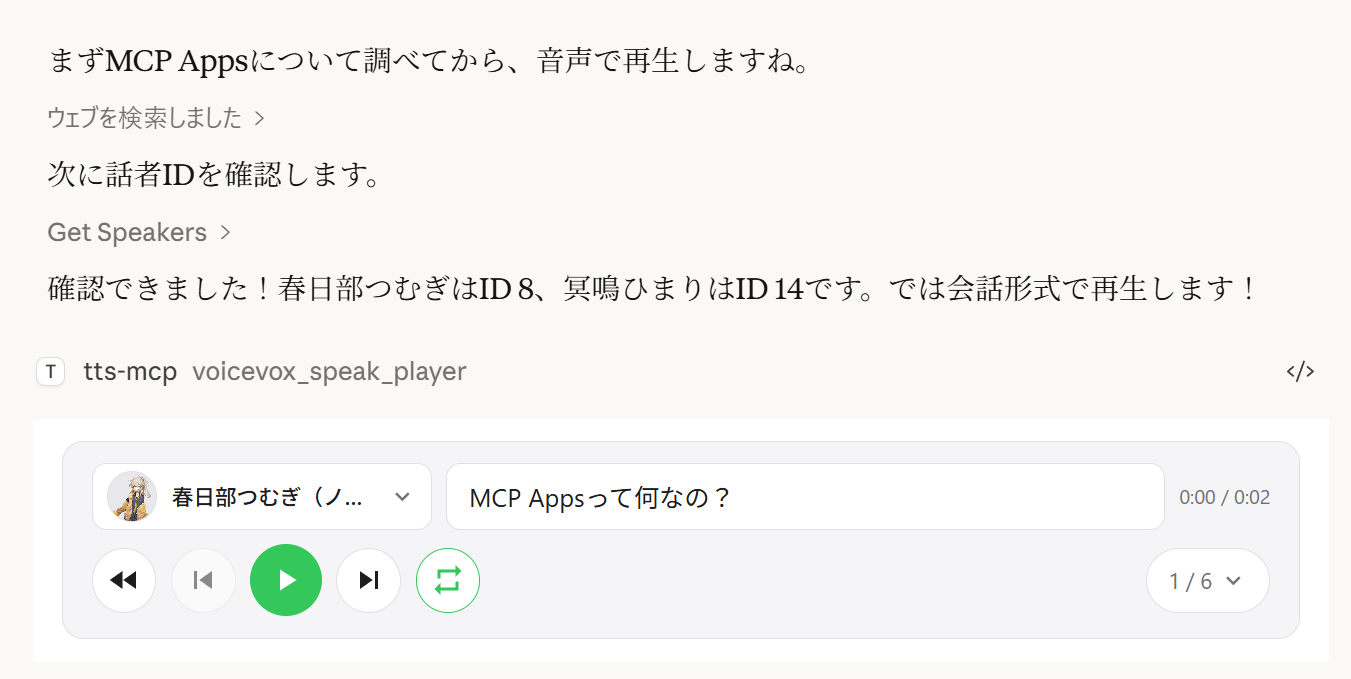
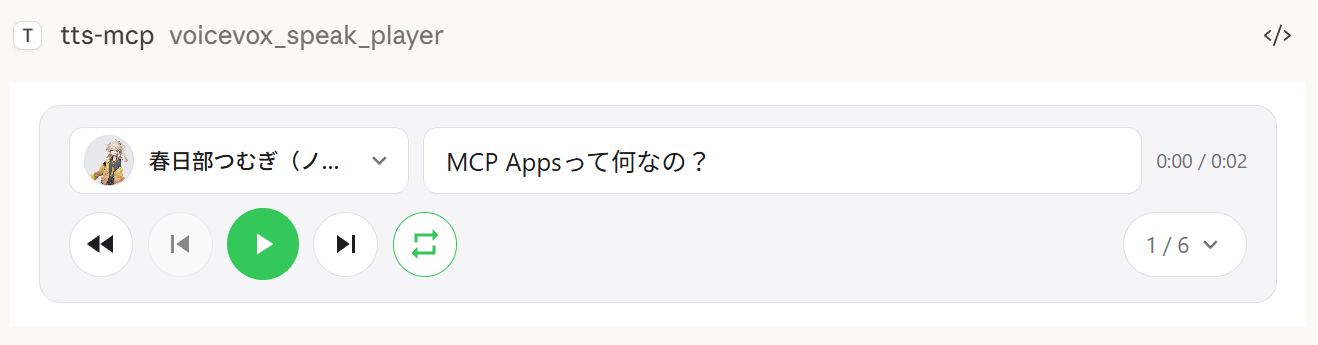
voicevox_speak_player 工具使用 MCP Apps 在聊天中直接渲染交互式音频播放器。与标准的 voicevox_speak 工具在服务器上播放音频不同,音频在客户端(浏览器/应用)播放 — 服务器上无需音频设备。
客户端播放 — 音频在 Claude Desktop 的聊天中播放,而不是在服务器上。即使在远程连接下也能工作。
播放/暂停控制 — 对话中嵌入完整的播放控制
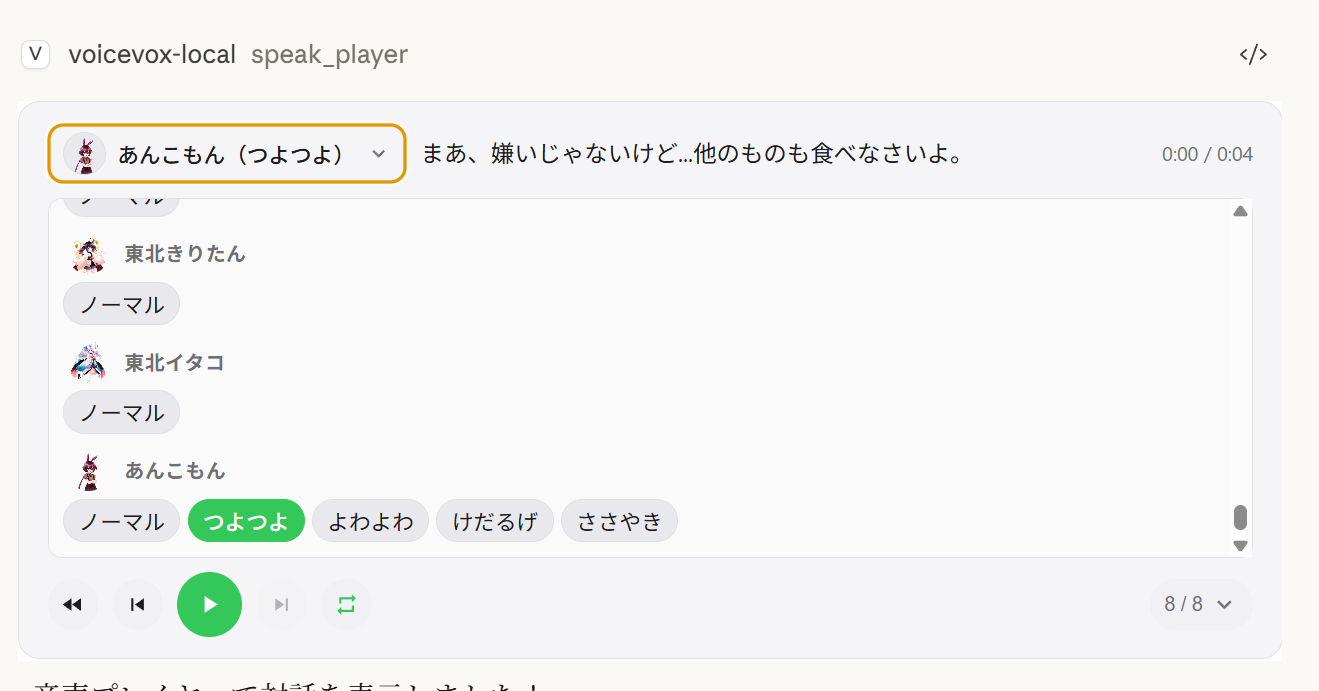
多说话人对话 — 在一个播放器中按顺序播放多个说话人,并支持音轨导航
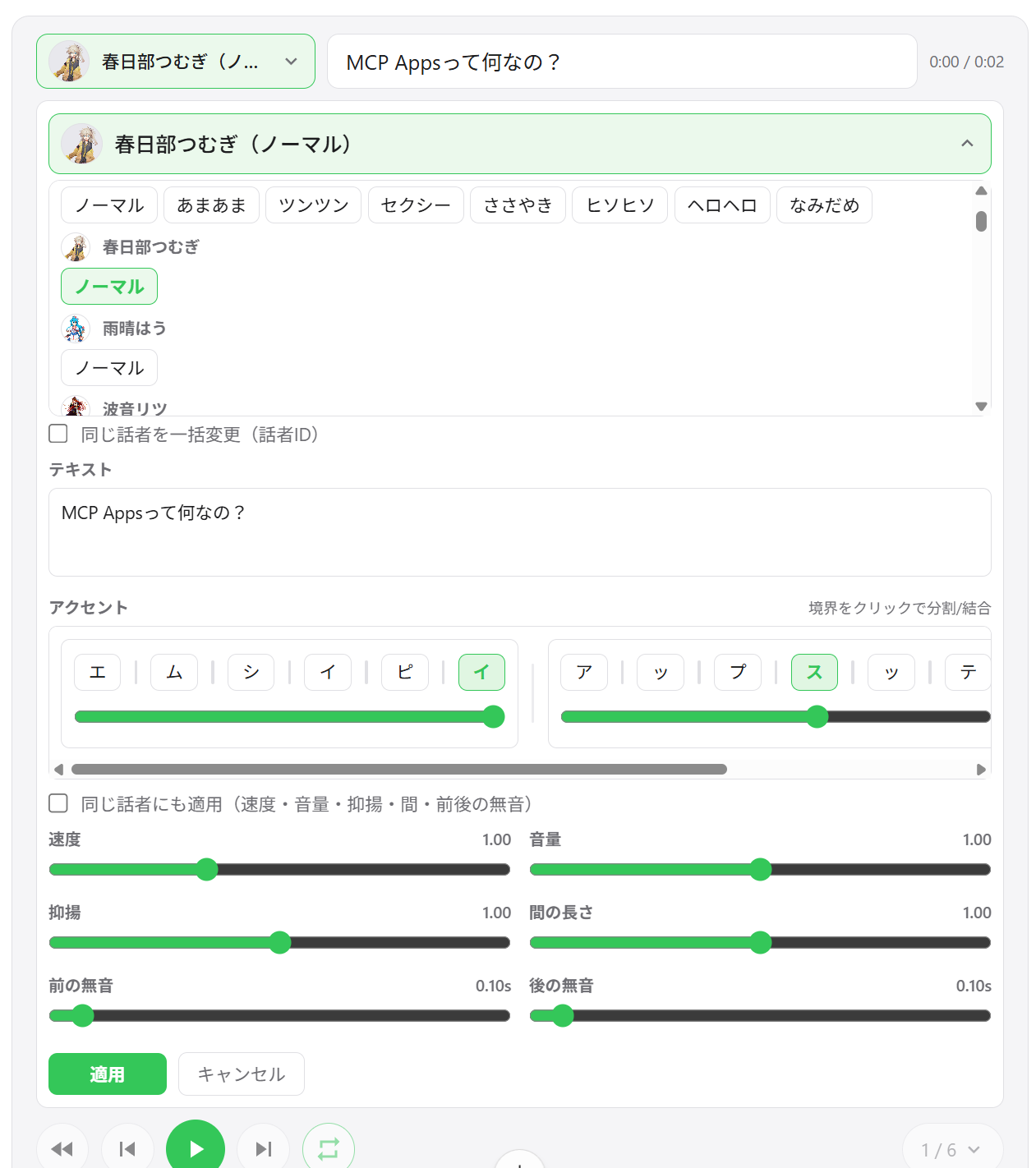
说话人切换 — 直接从播放器 UI 更改任何片段的语音
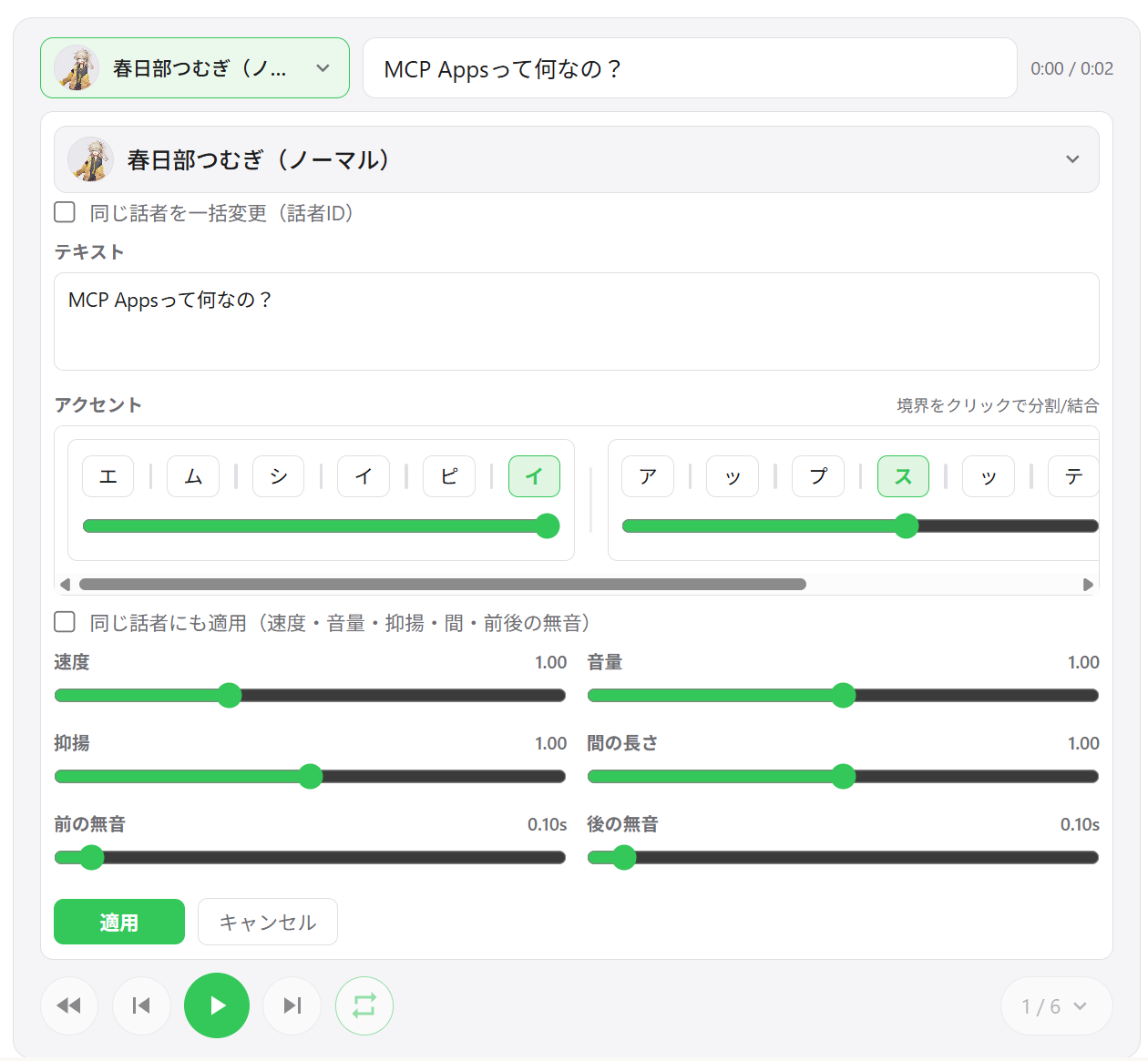
片段编辑 — 调整每个片段的速度、音量、语调、停顿长度以及前后静音
重音短语编辑 — 直接在 UI 中编辑重音位置和莫拉音高
添加 / 删除 / 重新排序片段 — 拖放音轨重新排序;内联添加新片段
WAV 导出 — 将所有音轨保存为编号的 WAV 文件,并自动打开输出文件夹
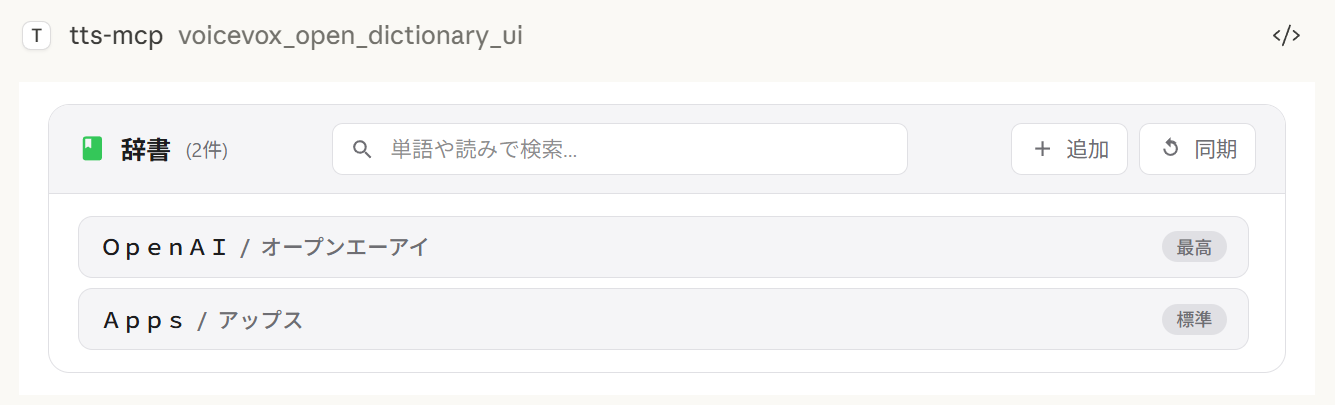
用户词典管理器 — 添加、编辑和删除 VOICEVOX 用户词典单词,并支持预览播放
跨会话状态恢复 — 播放器状态保存在服务器上;重新打开聊天会恢复之前的音轨
不同环境下的导出行为:
保存并打开 始终导出 WAV 文件。如果不支持打开文件资源管理器,导出仍然成功,保存路径会显示在 UI 中。
选择输出文件夹 在 Windows/macOS 上使用原生目录选择器。在不支持的环境中,此操作会回退到默认导出目录。
多说话人播放 | 音轨列表 | 片段编辑 |
|
|
|
说话人选择 | 词典管理器 | WAV 导出 |
|
|
|
客户端 | 连接 | 备注 |
ChatGPT | HTTP(远程) | 需要 |
Claude Desktop | stdio(本地) | 开箱即用 |
Claude Desktop | HTTP(通过 mcp-remote) | 不要设置 |
注意:
speak_player需要支持 MCP Apps 的主机。在不支持 MCP Apps 的主机中,该工具不可用,可以使用speak(服务器端播放)代替。
工具 | 描述 |
| 创建新的播放器会话并显示 UI。返回 |
| 更新现有播放器的所有片段(每次调用返回新的 |
| 读取当前播放器状态(分页)以供 AI 调整。 |
| 打开用户词典管理器 UI。 |
Node.js 20.0.0 或更高版本(或 Bun)或 Docker
VOICEVOX Engine(必须正在运行;包含在 Docker Compose 中)
ffplay(可选,推荐 — 使用 Docker 时不需要)
ffplay 是 FFmpeg 附带的轻量级播放器,支持从 stdin 播放。当可用时,它会自动启用低延迟流式播放。
💡 FFplay 是可选的。 如果没有它,播放会回退到基于临时文件的播放(Windows:PowerShell,macOS:afplay,Linux:aplay 等)。
简单设置:每个操作系统的一行安装(见下方步骤)
必需:ffplay 必须在 PATH 中(安装后重启终端/应用)
安装示例:
Windows(以下任一方式)
Winget:winget install --id=Gyan.FFmpeg -e
Chocolatey:choco install ffmpeg
Scoop:scoop install ffmpeg
官方构建:从 https://www.gyan.dev/ffmpeg/builds/ 或 https://github.com/BtbN/FFmpeg-Builds 下载,并将 bin 文件夹添加到 PATH
macOS
Homebrew:brew install ffmpeg
Linux
Debian/Ubuntu:sudo apt-get update && sudo apt-get install -y ffmpeg
Fedora:sudo dnf install -y ffmpeg
Arch:sudo pacman -S ffmpeg
PATH 设置:
Windows:将 ...\ffmpeg\bin 添加到环境变量,然后重启 PowerShell/终端和编辑器(Claude/VS Code 等)
验证:powershell -c "$env:Path" 应包含 ffmpeg 路径
macOS/Linux:通常自动检测。如有需要,用 echo $PATH 检查,重启 shell。
MCP 客户端(Claude Desktop/Code):重启应用以重新加载 PATH。
验证:
ffplay -version如果显示版本信息,则安装完成。CLI/MCP 将自动检测 ffplay 并使用 stdin 流式播放。
1. 启动 VOICEVOX Engine
2. 添加到 Claude Desktop 配置文件
配置文件位置:
Windows:%APPDATA%\Claude\claude_desktop_config.json
macOS:~/Library/Application Support/Claude/claude_desktop_config.json
{
  "mcpServers": {
    "tts-mcp": {
      "command": "npx",
      "args": ["-y", "@kajidog/mcp-tts-voicevox"]
    }
  }
}
💡 如果使用 Bun,只需将
npx替换为bunx:"command": "bunx", "args": ["@kajidog/mcp-tts-voicevox"]
3. 重启 Claude Desktop
就这样!让 Claude “打个招呼”,它就会说话!
你可以使用 Docker Compose 通过一条命令同时运行 MCP 服务器和 VOICEVOX Engine。无需安装 Node.js 或 VOICEVOX。
1. 启动容器
docker compose up -d这将启动 VOICEVOX Engine 和 MCP 服务器(HTTP 模式,端口 3000)。
2. 添加到 Claude Desktop 配置文件(使用 mcp-remote)
{
  "mcpServers": {
    "tts-mcp": {
      "command": "npx",
      "args": ["-y", "mcp-remote", "http://localhost:3000/mcp"]
    }
  }
}
3. 重启 Claude Desktop
安全(Docker):
docker-compose.yml发布端口 3000 没有认证。MCP_ALLOWED_HOSTS在这里不是防御措施 — 非浏览器客户端可以发送任意Host头 — 因此任何能访问该端口的人都可以使用服务器。设置MCP_API_KEY(并将其作为X-API-Key发送),或者将端口绑定到受信任的网络 / 仅限 localhost。还建议设置VOICEVOX_ALLOWED_OUTPUT_DIRS来限制文件写入工具可以写入的位置。
限制(Docker): Docker 容器没有音频设备,因此
voicevox_speak工具(服务器端播放)默认被禁用。请改用voicevox_speak_player— 它在客户端(Claude Desktop)播放音频,服务器上无需任何音频设备。详见 UI 音频播放器。
voicevox_speak — 文本转语音可从 Claude 调用的主要功能。
参数 | 描述 | 默认值 |
| 要朗读的文本(多个片段用换行分隔) | 必填 |
| 内联重音标记(优先于 | (未设置) |
| 说话人 ID | 1 |
| 播放速度 | 1.0 |
| 立即播放(清除队列) | true |
| 等待播放开始 | false |
| 等待播放完成 | false |
当设置了相应的
--restrict-*选项时,immediate/waitForStart/waitForEnd会从工具模式中消失。
示例:
// Simple text
{ "text": "Hello" }

// Specify speaker
{ "text": "Hello", "speaker": 3 }

// Different speakers per segment
{ "text": "1:Hello\n3:Nice weather today" }

// Wait for completion (synchronous processing)
{ "text": "Wait for this to finish before continuing", "waitForEnd": true }

// Control the accent with inline notation (`,` separates phrases, `[` marks the accent)
{ "text": "こんにちは世界", "phrases": "コン[ニ]チワ,セ[カ]イ" }phrases(以及用户词典工具的发音字段)接受带有内联重音标记的片假名:
, 分隔重音短语 — コン[ニ]チワ,セ[カ]イ
[ 标记音高下降的位置;コン[ニ]チワ 表示重音落在 ニ 上
省略短语的方括号会保留 VOICEVOX 自己的重音估计
即使提供了 phrases,text 仍然是必需的 — 在那里传入纯文本,标记就是实际朗读的内容。
voicevox_get_accent_phrases 返回给定文本的相同标记,因此你可以读取估计的重音,调整方括号,然后将其反馈到 phrases 中。
工具 | 描述 |
| 使用 UI 音频播放器朗读(见 播放器 MCP 工具) |
| 检查 VOICEVOX Engine 连接 |
| 获取可用说话人列表 |
| 停止播放并清除队列 |
| 生成音频文件 |
用户词典工具(组 dictionary):
工具 | 描述 |
| 获取文本的读音和重音位置,以内联标记形式返回 |
| 列出用户词典单词(过滤 + 分页) |
| 添加单词(发音接受内联重音标记) |
| 更新单词(省略的字段保留其值) |
| 按 UUID 删除单词 |
| 一次添加多个单词 |
| 一次更新多个单词 |
任何工具都可以通过 --disable-tools / VOICEVOX_DISABLED_TOOLS 单独禁用,或通过 --disable-groups / VOICEVOX_DISABLED_GROUPS 按组禁用。
变量 | 描述 | 默认值 |
| 引擎 URL |
|
| 默认说话人 ID |
|
| 播放速度 |
|
| 失败 API 请求的重试次数(0 表示禁用) |
|
| 初始重试延迟(毫秒,指数退避) |
|
| 单个 VOICEVOX API 请求的超时时间(毫秒)。处理长文本或引擎较慢时请调高 |
|
变量 | 描述 | 默认值 |
| 流式播放(需要 |
|
| 每个片段末尾的静音时长(秒)。增大可加长排队片段之间的停顿(在流式播放时也能防止语音结尾被截断) | 引擎默认值 |
| 立即播放 |
|
| 等待播放开始 |
|
| 等待播放结束 |
|
限制 AI 指定某些选项。
变量 | 描述 |
| 限制 |
| 限制 |
| 限制 |
# Disable individual tools
export VOICEVOX_DISABLED_TOOLS=speak_player,synthesize_file

# Disable a built-in group of tools
export VOICEVOX_DISABLED_GROUPS=player

# Combine groups and individual tools
export VOICEVOX_DISABLED_GROUPS=dictionary
export VOICEVOX_DISABLED_TOOLS=synthesize_file
VOICEVOX_DISABLED_GROUPS / --disable-groups 的内置分组:
分组 | 工具 |
|
|
|
|
|
|
|
|
变量 | 描述 | 默认值 |
| UI 播放器的组件域名(ChatGPT 必需,例如 | (未设置) |
| 在 UI 播放器中自动播放音频 |
|
| 启用从 UI 播放器导出(下载)音轨(设为 |
|
| 导出音轨的默认输出目录(在无法使用文件夹选择器时也用作回退) |
|
| 播放器缓存文件( |
|
| 启用磁盘上的持久音频缓存( |
|
| 音频缓存保留天数( |
|
| 音频缓存大小上限(MB)( |
|
| 持久化播放器状态 JSON 的路径 |
|
变量 | 描述 | 默认值 |
| 文件写入工具( | (未设置) |
变量 | 描述 | 默认值 |
| 启用 HTTP 模式 |
|
| HTTP 端口 |
|
| HTTP 主机 |
|
| 允许的主机(以逗号分隔) |
|
| 允许的来源(以逗号分隔) |
|
|
| (未设置) |
命令行参数优先于环境变量。
完整且最新的选项列表始终可通过 npx @kajidog/mcp-tts-voicevox --help 获取。
# Basic settings
npx @kajidog/mcp-tts-voicevox --url http://192.168.1.100:50021 --speaker 3 --speed 1.2

# HTTP mode
npx @kajidog/mcp-tts-voicevox --http --port 8080

# With restrictions
npx @kajidog/mcp-tts-voicevox --restrict-immediate --restrict-wait-for-end

# Disable individual tools
npx @kajidog/mcp-tts-voicevox --disable-tools speak_player,synthesize_file

# Disable a tool group
npx @kajidog/mcp-tts-voicevox --disable-groups player
参数 | 说明 |
| 显示帮助 |
| 显示版本 |
| 使用默认设置生成 |
| 配置文件路径 |
| VOICEVOX Engine URL |
| 默认说话人 ID |
| 播放速度 |
| 流式播放 |
| 每个片段末尾的静音时长(排队片段之间的停顿) |
| 立即播放 |
| 等待开始 |
| 等待结束 |
| 限制立即播放 |
| 限制 waitForStart |
| 限制 waitForEnd |
| 文件写入工具可写入的目录(逗号分隔;未设置 = 无限制) |
| 禁用工具(逗号分隔的工具名称) |
| 禁用工具组: |
| UI 播放器中的自动播放 |
| 启用/禁用 UI 播放器中的音轨导出(下载) |
| 导出音轨的默认输出目录 |
| 播放器缓存目录 |
| 持久化播放器状态文件路径 |
| 启用/禁用播放器的磁盘音频缓存 |
| 音频缓存保留天数( |
| 音频缓存大小上限(MB)( |
| HTTP 模式 |
| HTTP 端口 |
| HTTP 主机 |
| 允许的主机(逗号分隔) |
| 允许的来源(逗号分隔) |
|
|
你可以使用 JSON 配置文件来代替(或补充)环境变量和 CLI 参数。当你有许多设置需要配置时,这会非常有用。
优先级顺序: CLI 参数 > 环境变量 > 配置文件 > 默认值
npx @kajidog/mcp-tts-voicevox --init这会在当前目录中创建包含所有默认设置的 .voicevoxrc.json。根据需要编辑它。
npx @kajidog/mcp-tts-voicevox --config ./my-config.json或通过环境变量:
VOICEVOX_CONFIG=./my-config.json npx @kajidog/mcp-tts-voicevox.voicevoxrc.json{
"url": "http://192.168.1.50:50021",
"speaker": 3,
"speed": 1.2,
"http": true,
"port": 8080,
"disable-tools": ["synthesize_file"],
"disable-groups": ["dictionary"]
}键可以使用 kebab-case(use-streaming)、camelCase(useStreaming)或内部键名(defaultSpeaker)编写。如果当前目录中存在 .voicevoxrc.json,它会自动加载。
用于远程连接:
启动服务器:
# Linux/macOS
MCP_HTTP_MODE=true MCP_HTTP_PORT=3000 npx @kajidog/mcp-tts-voicevox

# Windows PowerShell
$env:MCP_HTTP_MODE='true'; $env:MCP_HTTP_PORT='3000'; npx @kajidog/mcp-tts-voicevox
Claude Desktop 配置(使用 mcp-remote):
{
  "mcpServers": {
    "tts-mcp-proxy": {
      "command": "npx",
      "args": ["-y", "mcp-remote", "http://localhost:3000/mcp"]
    }
  }
}使用 Claude Code,你可以通过 .mcp.json 中的自定义请求头为每个项目配置不同的默认说话人:
请求头 | 说明 |
| 此项目的默认说话人 ID |
| 配置了 |
示例 .mcp.json:
{
  "mcpServers": {
    "tts": {
      "type": "http",
      "url": "http://localhost:3000/mcp",
      "headers": {
        "X-Voicevox-Speaker": "113",
        "X-API-Key": "your-api-key"
      }
    }
  }
}
这允许每个项目自动使用不同的声音角色。
优先级顺序:
工具调用中的显式 speaker 参数(最高)
来自 X-Voicevox-Speaker 请求头的项目默认值
全局 VOICEVOX_DEFAULT_SPEAKER 设置(最低)
从 WSL 连接到在 Windows 上运行的 MCP 服务器:
# Method 1: From default gateway
ip route show | grep -oP 'default via \K[\d.]+'
# Usually in the format 172.x.x.1

# Method 2: From /etc/resolv.conf (WSL2)
cat /etc/resolv.conf | grep nameserver | awk '{print $2}'将 WSL 网关 IP 添加到 MCP_ALLOWED_HOSTS 以允许从 WSL 访问:
$env:MCP_HTTP_MODE='true'
$env:MCP_ALLOWED_HOSTS='localhost,127.0.0.1,172.29.176.1'
npx @kajidog/mcp-tts-voicevox
或使用 CLI 参数:
npx @kajidog/mcp-tts-voicevox --http --allowed-hosts "localhost,127.0.0.1,172.29.176.1"{
"mcpServers": {
"tts": {
"type": "http",
"url": "http://172.29.176.1:3000/mcp"
}
}
}⚠️ 在 WSL 中,
localhost指的是 WSL 本身。请使用 WSL 网关 IP 来访问 Windows 主机。
要与 ChatGPT 一起使用,请将 MCP 服务器以 HTTP 模式部署到云端,并使其能够访问 VOICEVOX Engine。
使用 Docker 部署到 Render、Railway 等平台(包含 Dockerfile)。
在本地运行 VOICEVOX Engine 并通过 ngrok 暴露,或将其与 MCP 服务器一起部署。
变量 | 示例 | 说明 |
|
| VOICEVOX Engine URL |
|
| 启用 HTTP 模式 |
|
| 部署的主机名 |
|
| UI 播放器的小部件域名(ChatGPT 必需) |
|
| 禁用服务器端播放(无音频设备) |
|
| 禁用导出功能(无法从云端下载文件) |
前往 ChatGPT 设置 → 连接器 → 添加 MCP 服务器 URL(https://your-app.onrender.com/mcp)。
基本步骤与 ChatGPT 相同,但 VOICEVOX_PLAYER_DOMAIN 的值不同。
Claude Web 要求 ui.domain 是基于哈希的专用域名。使用以下命令计算:
node -e "console.log(require('crypto').createHash('sha256').update('Your MCP server URL').digest('hex').slice(0,32)+'.claudemcpcontent.com')"示例:如果你的 MCP 服务器 URL 是 https://your-app.onrender.com/mcp:
node -e "console.log(require('crypto').createHash('sha256').update('https://your-app.onrender.com/mcp').digest('hex').slice(0,32)+'.claudemcpcontent.com')"
# Example output: 48fb73a6...claudemcpcontent.com
将此输出值设置为 VOICEVOX_PLAYER_DOMAIN。
注意:由于 ChatGPT 和 Claude Web 需要不同的
VOICEVOX_PLAYER_DOMAIN值,单个实例无法同时服务两种客户端。请为每种客户端分别部署实例,或根据目标客户端切换环境变量。
1. 检查 VOICEVOX Engine 是否正在运行
curl http://localhost:50021/speakers2. 检查特定平台的播放工具
操作系统 | 所需工具 |
Linux |
|
macOS |
|
Windows | PowerShell(预装) |
检查软件包安装:npm list -g @kajidog/mcp-tts-voicevox
验证配置文件中的 JSON 语法
重启客户端
软件包 | 说明 |
| MCP 服务器( |
通用 VOICEVOX 客户端库(可独立使用) | |
| 共享 MCP 基础设施(配置模式、HTTP/stdio 启动器)。未发布——打包到服务器中 |
| 基于 React 的音频播放器 UI,打包为单个 HTML 文件。未发布 |
git clone https://github.com/kajidog/mcp-tts-voicevox.git
cd mcp-tts-voicevox
pnpm install包管理器是 pnpm(不支持 npm / yarn)。
Command | Description |
| 构建所有包 |
| 运行测试 |
| 运行 lint(对整个工作区执行一次 Biome 检查) |
| 对每个包进行类型检查 |
| 为用户可见的更改添加 changeset |
开发服务器位于 server 包中,因此请使用过滤器运行它们:
Command | Description |
| 启动开发服务器(stdio) |
| 以 HTTP 模式启动开发服务器 |
| 使用 Bun 启动开发服务器 |
| 使用 Bun 启动 HTTP 开发服务器 |
Generate a query for voice synthesis
| Name | Required | Description | Default |
|---|---|---|---|
| text | Yes | Text for voice synthesis | |
| speaker | No | Default speaker ID (optional) | |
| speedScale | No | Playback speed (optional, default from environment) |
Does the description disclose side effects, auth requirements, rate limits, or destructive behavior?
No annotations are provided, so the description carries full burden. 'Generate a query' suggests this creates some intermediate representation, but doesn't disclose what happens next - does it return a query ID for later use? Does it validate parameters? Is it read-only or has side effects? The description lacks behavioral context about permissions, rate limits, or what 'query' means operationally.
Agents need to know what a tool does to the world before calling it. Descriptions should go beyond structured annotations to explain consequences.
Is the description appropriately sized, front-loaded, and free of redundancy?
The description is a single, efficient sentence with zero wasted words. It's appropriately sized for a tool with good schema coverage and gets straight to the point without unnecessary elaboration. Every word earns its place in conveying the core purpose.
Shorter descriptions cost fewer tokens and are easier for agents to parse. Every sentence should earn its place.
Given the tool's complexity, does the description cover enough for an agent to succeed on first attempt?
For a tool with no annotations and no output schema, the description is insufficient. It doesn't explain what the generated query is used for, what format it returns, or how it differs from actual synthesis tools. Given the complexity of voice synthesis workflows and multiple sibling tools, more context about this tool's role in the ecosystem is needed.
Complex tools with many parameters or behaviors need more documentation. Simple tools need less. This dimension scales expectations accordingly.
Does the description clarify parameter syntax, constraints, interactions, or defaults beyond what the schema provides?
Schema description coverage is 100%, so the schema already documents all three parameters (text, speaker, speedScale) with their descriptions. The tool description adds no additional parameter semantics beyond what's in the schema. The baseline score of 3 reflects adequate but minimal value addition given the comprehensive schema coverage.
Input schemas describe structure but not intent. Descriptions should explain non-obvious parameter relationships and valid value ranges.
Does the description clearly state what the tool does and how it differs from similar tools?
The description states 'Generate a query for voice synthesis' which provides a basic purpose (verb: generate, resource: query for voice synthesis). However, it's vague about what the query actually does - is it for previewing, testing, or preparing synthesis? It doesn't distinguish from sibling tools like 'synthesize_file' or 'speak' which also relate to voice synthesis.
Agents choose between tools based on descriptions. A clear purpose with a specific verb and resource helps agents select the right tool.
Does the description explain when to use this tool, when not to, or what alternatives exist?
The description provides no guidance on when to use this tool versus alternatives. With sibling tools like 'synthesize_file' and 'speak' that also handle voice synthesis, there's no indication whether this tool is for preparation, testing, or a different phase of the synthesis workflow. No context about prerequisites or exclusions is provided.
Agents often have multiple tools that could apply. Explicit usage guidance like "use X instead of Y when Z" prevents misuse.
Get detail of a speaker by id
| Name | Required | Description | Default |
|---|---|---|---|
| uuid | Yes | Speaker UUID (speaker uuid) |
Does the description disclose side effects, auth requirements, rate limits, or destructive behavior?
No annotations are provided, so the description carries the full burden of behavioral disclosure. It mentions 'Get detail' but doesn't specify if this is a read-only operation, what permissions are needed, error handling, or response format. This leaves significant gaps for a tool that likely interacts with a speaker database.
Agents need to know what a tool does to the world before calling it. Descriptions should go beyond structured annotations to explain consequences.
Is the description appropriately sized, front-loaded, and free of redundancy?
The description is a single, efficient sentence with no wasted words. It's front-loaded with the core action ('Get detail'), making it easy to scan and understand quickly.
Shorter descriptions cost fewer tokens and are easier for agents to parse. Every sentence should earn its place.
Given the tool's complexity, does the description cover enough for an agent to succeed on first attempt?
Given no annotations and no output schema, the description is incomplete. It doesn't explain what 'detail' includes (e.g., speaker attributes, capabilities), potential errors, or how this fits with sibling tools like 'synthesize_file'. For a tool with one parameter but unknown behavioral traits, more context is needed.
Complex tools with many parameters or behaviors need more documentation. Simple tools need less. This dimension scales expectations accordingly.
Does the description clarify parameter syntax, constraints, interactions, or defaults beyond what the schema provides?
Schema description coverage is 100%, with the parameter 'uuid' documented as 'Speaker UUID (speaker uuid)'. The description adds no additional meaning beyond this, such as format examples or where to obtain the UUID. Baseline 3 is appropriate since the schema does the heavy lifting.
Input schemas describe structure but not intent. Descriptions should explain non-obvious parameter relationships and valid value ranges.
Does the description clearly state what the tool does and how it differs from similar tools?
The description clearly states the verb ('Get detail') and resource ('speaker'), making the purpose understandable. However, it doesn't differentiate from sibling tools like 'get_speakers' (which likely lists speakers) or explain what 'detail' entails beyond the ID lookup.
Agents choose between tools based on descriptions. A clear purpose with a specific verb and resource helps agents select the right tool.
Does the description explain when to use this tool, when not to, or what alternatives exist?
No guidance is provided on when to use this tool versus alternatives. For example, it doesn't clarify if this should be used after 'get_speakers' to fetch more information or in what contexts (e.g., before synthesis). The description only states the basic function without context.
Agents often have multiple tools that could apply. Explicit usage guidance like "use X instead of Y when Z" prevents misuse.
Get a list of available speakers
| Name | Required | Description | Default |
|---|---|---|---|
No parameters | |||
Does the description disclose side effects, auth requirements, rate limits, or destructive behavior?
With no annotations provided, the description carries the full burden of behavioral disclosure. It states the tool retrieves a list, implying a read-only operation, but doesn't cover aspects like whether it requires authentication, has rate limits, returns paginated results, or what format the list is in. For a tool with zero annotation coverage, this is a significant gap in transparency.
Agents need to know what a tool does to the world before calling it. Descriptions should go beyond structured annotations to explain consequences.
Is the description appropriately sized, front-loaded, and free of redundancy?
The description is a single, efficient sentence ('Get a list of available speakers') that is front-loaded and wastes no words. It directly states the tool's purpose without unnecessary elaboration, making it highly concise and well-structured for its simplicity.
Shorter descriptions cost fewer tokens and are easier for agents to parse. Every sentence should earn its place.
Given the tool's complexity, does the description cover enough for an agent to succeed on first attempt?
Given the tool's complexity (simple list retrieval) but lack of annotations and output schema, the description is incomplete. It doesn't explain what the list contains, how it's formatted, or any behavioral traits. For a tool with no structured data beyond the input schema, more context is needed to be fully helpful to an agent.
Complex tools with many parameters or behaviors need more documentation. Simple tools need less. This dimension scales expectations accordingly.
Does the description clarify parameter syntax, constraints, interactions, or defaults beyond what the schema provides?
The input schema has 0 parameters with 100% coverage, so the schema fully documents the lack of inputs. The description doesn't add parameter details beyond this, which is appropriate. Since there are no parameters, the baseline is 4, as the description doesn't need to compensate for any gaps.
Input schemas describe structure but not intent. Descriptions should explain non-obvious parameter relationships and valid value ranges.
Does the description clearly state what the tool does and how it differs from similar tools?
The description states the tool's purpose ('Get a list of available speakers'), which is clear but vague. It specifies the verb ('Get') and resource ('speakers'), but doesn't distinguish it from sibling tools like 'get_speaker_detail' or explain what 'available' means in this context. This is adequate but has clear gaps in specificity.
Agents choose between tools based on descriptions. A clear purpose with a specific verb and resource helps agents select the right tool.
Does the description explain when to use this tool, when not to, or what alternatives exist?
The description provides no guidance on when to use this tool versus alternatives. It doesn't mention sibling tools like 'get_speaker_detail' for detailed information or 'synthesize_file' for synthesis operations, nor does it specify prerequisites or contexts for usage. This leaves the agent without explicit or implied usage instructions.
Agents often have multiple tools that could apply. Explicit usage guidance like "use X instead of Y when Z" prevents misuse.
Check if VOICEVOX Engine is running and reachable
| Name | Required | Description | Default |
|---|---|---|---|
No parameters | |||
Does the description disclose side effects, auth requirements, rate limits, or destructive behavior?
No annotations are provided, so the description carries the full burden of behavioral disclosure. It states the tool checks if the engine is 'running and reachable,' implying a read-only, non-destructive operation, but doesn't detail what happens on failure (e.g., error responses), latency, or any side effects. For a tool with zero annotation coverage, this leaves gaps in understanding its behavior.
Agents need to know what a tool does to the world before calling it. Descriptions should go beyond structured annotations to explain consequences.
Is the description appropriately sized, front-loaded, and free of redundancy?
The description is a single, efficient sentence: 'Check if VOICEVOX Engine is running and reachable.' It is front-loaded with the core purpose, has no wasted words, and is appropriately sized for a simple tool. Every part of the sentence earns its place by conveying essential information.
Shorter descriptions cost fewer tokens and are easier for agents to parse. Every sentence should earn its place.
Given the tool's complexity, does the description cover enough for an agent to succeed on first attempt?
Given the tool's low complexity (0 parameters, no output schema, no annotations), the description is minimally adequate. It states what the tool does but lacks details on usage context, error handling, or return values. Without an output schema, it doesn't explain what 'check' returns (e.g., status, boolean), leaving some gaps for an agent to understand fully.
Complex tools with many parameters or behaviors need more documentation. Simple tools need less. This dimension scales expectations accordingly.
Does the description clarify parameter syntax, constraints, interactions, or defaults beyond what the schema provides?
The tool has 0 parameters, and the input schema has 100% description coverage (though empty). The description doesn't need to explain parameters, so it naturally adds no value beyond the schema. A baseline score of 4 is appropriate for zero-parameter tools, as there's no parameter information to compensate for.
Input schemas describe structure but not intent. Descriptions should explain non-obvious parameter relationships and valid value ranges.
Does the description clearly state what the tool does and how it differs from similar tools?
The description clearly states the tool's purpose: 'Check if VOICEVOX Engine is running and reachable.' It uses a specific verb ('Check') and identifies the target resource ('VOICEVOX Engine'), making it easy to understand. However, it doesn't explicitly differentiate from sibling tools like 'get_speakers' or 'synthesize_file', which serve different purposes but also interact with VOICEVOX.
Agents choose between tools based on descriptions. A clear purpose with a specific verb and resource helps agents select the right tool.
Does the description explain when to use this tool, when not to, or what alternatives exist?
No guidance is provided on when to use this tool versus alternatives. The description doesn't mention prerequisites (e.g., before using other tools), exclusions, or contextual cues. For example, it doesn't specify if this should be called first to verify connectivity before invoking 'speak' or 'synthesize_file'.
Agents often have multiple tools that could apply. Explicit usage guidance like "use X instead of Y when Z" prevents misuse.
Convert text to speech and play it. Text is split by line breaks (\n) into separate speech units. Each line is processed as an independent audio segment.
| Name | Required | Description | Default |
|---|---|---|---|
| text | Yes | Text split by line breaks (\n). IMPORTANT: Each line = one speech unit (processed and played separately). Keep the FIRST LINE SHORT for quick playback start - audio begins as soon as the first line is synthesized. Example: "Hi!\nThis is a longer explanation that follows." Optional speaker prefix per line: "1:Hello\n2:World" | |
| query | No | Voice synthesis query | |
| speaker | No | Default speaker ID (optional) | |
| speedScale | No | Playback speed (optional, default from environment) | |
| immediate | No | If true, stops current playback and plays new audio immediately. If false, waits for current playback to finish. Default depends on environment variable. | |
| waitForStart | No | Wait for playback to start (optional, default: false) | |
| waitForEnd | No | Wait for playback to end (optional, default: false) |
Does the description disclose side effects, auth requirements, rate limits, or destructive behavior?
With no annotations provided, the description carries full burden and does well by disclosing key behavioral traits: text is split by line breaks into separate speech units, each line processed independently, and the first line should be short for quick playback start. It doesn't mention error handling, rate limits, or authentication needs, but covers core playback behavior adequately.
Agents need to know what a tool does to the world before calling it. Descriptions should go beyond structured annotations to explain consequences.
Is the description appropriately sized, front-loaded, and free of redundancy?
The description is front-loaded with the core purpose in the first sentence, followed by specific behavioral details in the second. Both sentences earn their place by providing essential information without redundancy. It's appropriately sized for the tool's complexity.
Shorter descriptions cost fewer tokens and are easier for agents to parse. Every sentence should earn its place.
Given the tool's complexity, does the description cover enough for an agent to succeed on first attempt?
Given no annotations and no output schema, the description does well to cover the main behavior and text processing logic. However, it doesn't address potential side effects (e.g., interrupting current playback, which is hinted at in the 'immediate' parameter schema), error cases, or what the tool returns. For a 7-parameter tool with mutation implications, it's good but not fully complete.
Complex tools with many parameters or behaviors need more documentation. Simple tools need less. This dimension scales expectations accordingly.
Does the description clarify parameter syntax, constraints, interactions, or defaults beyond what the schema provides?
Schema description coverage is 100%, so the schema already documents all 7 parameters thoroughly. The description adds minimal parameter semantics beyond the schema—it mentions line break processing and first line optimization, which relates to the 'text' parameter but doesn't significantly enhance understanding of parameters like 'query' or 'speaker'. Baseline 3 is appropriate given high schema coverage.
Input schemas describe structure but not intent. Descriptions should explain non-obvious parameter relationships and valid value ranges.
Does the description clearly state what the tool does and how it differs from similar tools?
The description clearly states the specific action ('Convert text to speech and play it') and resource (audio output), distinguishing it from siblings like 'synthesize_file' (file output) and 'stop_speaker' (playback control). It explicitly mentions text processing by line breaks, which adds specificity beyond the basic function.
Agents choose between tools based on descriptions. A clear purpose with a specific verb and resource helps agents select the right tool.
Does the description explain when to use this tool, when not to, or what alternatives exist?
The description implies usage for text-to-speech playback but doesn't explicitly state when to use this tool versus alternatives like 'synthesize_file' (for file output) or 'generate_query' (possibly for query generation). It provides some context about line break processing but lacks explicit guidance on tool selection scenarios.
Agents often have multiple tools that could apply. Explicit usage guidance like "use X instead of Y when Z" prevents misuse.
Stop current audio playback
| Name | Required | Description | Default |
|---|---|---|---|
| random_string | Yes | Dummy parameter for no-parameter tools |
Does the description disclose side effects, auth requirements, rate limits, or destructive behavior?
With no annotations provided, the description carries full burden but only states the basic action. It does not disclose behavioral traits like whether this requires specific permissions, what happens if no audio is playing, error conditions, or side effects. The description is minimal and lacks necessary context for safe invocation.
Agents need to know what a tool does to the world before calling it. Descriptions should go beyond structured annotations to explain consequences.
Is the description appropriately sized, front-loaded, and free of redundancy?
The description is a single, clear sentence with zero wasted words. It is perfectly front-loaded and appropriately sized for a simple action tool.
Shorter descriptions cost fewer tokens and are easier for agents to parse. Every sentence should earn its place.
Given the tool's complexity, does the description cover enough for an agent to succeed on first attempt?
Given no annotations and no output schema, the description is incomplete for a mutation tool. It does not explain what happens after stopping playback (e.g., success/failure response, state changes) or error handling, leaving significant gaps for the agent.
Complex tools with many parameters or behaviors need more documentation. Simple tools need less. This dimension scales expectations accordingly.
Does the description clarify parameter syntax, constraints, interactions, or defaults beyond what the schema provides?
The tool has 0 meaningful parameters (only a dummy parameter with 100% schema coverage). The description correctly omits parameter details since none are needed for the core functionality, adding appropriate value beyond the schema.
Input schemas describe structure but not intent. Descriptions should explain non-obvious parameter relationships and valid value ranges.
Does the description clearly state what the tool does and how it differs from similar tools?
The description 'Stop current audio playback' clearly states the specific action (stop) and resource (current audio playback). It distinguishes from siblings like 'speak' or 'synthesize_file' which initiate playback rather than stop it.
Agents choose between tools based on descriptions. A clear purpose with a specific verb and resource helps agents select the right tool.
Does the description explain when to use this tool, when not to, or what alternatives exist?
The description implies usage when audio is currently playing, but does not explicitly state when to use this tool versus alternatives or provide any exclusions. It lacks guidance on prerequisites or timing considerations.
Agents often have multiple tools that could apply. Explicit usage guidance like "use X instead of Y when Z" prevents misuse.
Generate an audio file and return its absolute path
| Name | Required | Description | Default |
|---|---|---|---|
| text | No | Text for voice synthesis (if both query and text provided, query takes precedence) | |
| query | No | Voice synthesis query | |
| output | Yes | Output path for the audio file | |
| speaker | No | Default speaker ID (optional) | |
| speedScale | No | Playback speed (optional, default from environment) |
Does the description disclose side effects, auth requirements, rate limits, or destructive behavior?
With no annotations provided, the description carries the full burden of behavioral disclosure. It mentions generating a file and returning a path, but lacks details on permissions, side effects (e.g., file system changes), rate limits, error handling, or audio format specifics. This is inadequate for a tool that creates files, as it doesn't clarify behavioral traits beyond the basic operation.
Agents need to know what a tool does to the world before calling it. Descriptions should go beyond structured annotations to explain consequences.
Is the description appropriately sized, front-loaded, and free of redundancy?
The description is a single, efficient sentence that front-loads the core action and return value. Every word earns its place, with no redundancy or unnecessary elaboration, making it easy to parse quickly.
Shorter descriptions cost fewer tokens and are easier for agents to parse. Every sentence should earn its place.
Given the tool's complexity, does the description cover enough for an agent to succeed on first attempt?
Given the complexity of a file-generation tool with 5 parameters, no annotations, and no output schema, the description is incomplete. It doesn't cover behavioral aspects like side effects, error cases, or audio specifics, and lacks usage context. This leaves significant gaps for an AI agent to understand how to invoke it correctly in various scenarios.
Complex tools with many parameters or behaviors need more documentation. Simple tools need less. This dimension scales expectations accordingly.
Does the description clarify parameter syntax, constraints, interactions, or defaults beyond what the schema provides?
Schema description coverage is 100%, so the schema already documents all parameters thoroughly (e.g., precedence rules for text vs. query, optional defaults). The description adds no additional parameter semantics beyond what the schema provides, such as explaining the audio generation process or file format details. Baseline 3 is appropriate when the schema does the heavy lifting.
Input schemas describe structure but not intent. Descriptions should explain non-obvious parameter relationships and valid value ranges.
Does the description clearly state what the tool does and how it differs from similar tools?
The description clearly states the action ('Generate an audio file') and the resource ('audio file'), and specifies the return value ('return its absolute path'). It distinguishes from siblings like 'speak' (which might stream audio) and 'generate_query' (which likely creates queries rather than files). However, it doesn't explicitly differentiate from all siblings (e.g., 'stop_speaker' is clearly different).
Agents choose between tools based on descriptions. A clear purpose with a specific verb and resource helps agents select the right tool.
Does the description explain when to use this tool, when not to, or what alternatives exist?
No guidance is provided on when to use this tool versus alternatives. The description doesn't mention prerequisites, context, or comparisons to siblings like 'speak' (which might be for immediate playback) or 'generate_query' (which might be for query generation without file creation).
Agents often have multiple tools that could apply. Explicit usage guidance like "use X instead of Y when Z" prevents misuse.
Recent tool additions, removals, and schema changes observed during successful MCP inspections. Dates show when Glama detected each change.
v0.3.1generate_queryget_speaker_detailget_speakersping_voicevoxspeakstop_speakersynthesize_fileEach tool has a clearly distinct purpose with no overlap: generate_query creates synthesis queries, get_speaker_detail and get_speakers handle speaker metadata, ping_voicevox checks engine status, speak plays audio, stop_speaker stops playback, and synthesize_file creates files. The descriptions make it easy to distinguish between query generation, metadata retrieval, status checking, real-time playback control, and file synthesis.
The naming is mostly consistent with a verb_noun pattern (e.g., get_speakers, stop_speaker, synthesize_file), but there are minor deviations: generate_query uses 'generate' instead of a more specific verb like 'create', and ping_voicevox uses 'ping' as a verb which is less conventional but still understandable. All tools use snake_case consistently.
With 7 tools, this server is well-scoped for a TTS system. It covers essential operations like checking engine status, retrieving speaker information, generating queries, real-time speech playback with control, and file synthesis. Each tool earns its place without feeling excessive or insufficient for the domain.
The tool set provides complete coverage for a TTS domain: it includes status checking (ping_voicevox), metadata retrieval (get_speakers, get_speaker_detail), query preparation (generate_query), real-time audio handling (speak, stop_speaker), and file output (synthesize_file). There are no obvious gaps—agents can perform the full lifecycle from setup to synthesis and playback control.
Unclaimed servers have limited discoverability.
If you are the server author, to access and configure the admin panel.
AI voice generation: text-to-speech and voice cloning from any MCP client.
MCP server for Text-to-Speech
MCP server for AI dialogue using various LLM models via AceDataCloud
MCP server exposing the AceDataCloud Fish Audio API (text-to-speech with voice conditioning)
We provide all the information about MCP servers via our MCP API.
curl -X GET 'https://glama.ai/api/mcp/v1/servers/kajidog/mcp-tts-voicevox'
If you have feedback or need assistance with the MCP directory API, please join our Discord server