
A
licenseA
qualityD
maintenanceAn MCP server that enables LLMs to generate spoken audio from text using OpenAI's Text-to-Speech API, supporting various voices, models, and audio formats.
1
2 npm
1
MIT

This server enables AI assistants to convert text to speech using VOICEVOX Engine with multi-character conversations and advanced playback control.
Core Capabilities:
Text-to-Speech Playback - Convert and play text with multi-line support, per-line speaker assignment (e.g., "1:Hello\n2:World"), configurable speed, queue management, and synchronous/asynchronous playback options
Speaker Management - List available speakers, get detailed speaker information by UUID, and configure default speakers with per-project overrides
Audio File Generation - Create and save audio files from text to specified paths
Playback Control - Stop current audio and clear queue, with immediate or queued playback modes
Voice Synthesis Query Generation - Generate intermediate query objects for advanced synthesis use cases
Health Check - Verify VOICEVOX Engine connectivity and status
Key Features:
Cross-platform compatibility (Windows, macOS, Linux, WSL)
Streaming playback with ffplay for low latency
HTTP mode for remote connections
Configurable defaults via environment variables, command-line arguments, and custom HTTP headers in mcp.json
Tool management with ability to disable specific tools and restrict options
Click on "Deploy Server".
Wait a few minutes for the server to deploy. Once ready, it will show a "Started" state.
In the chat, type @ followed by the MCP server name and your instructions, e.g., "@VOICEVOX TTS MCP Say 'Welcome to the stream!' using speaker 3"
That's it! The server will respond to your query, and you can continue using it as needed.
Here is a step-by-step guide with screenshots.
English | 日本語
A text-to-speech MCP server using VOICEVOX
🎮 Try the Browser Demo — Test VoicevoxClient directly in your browser
Make your AI assistant speak — Text-to-speech from MCP clients like Claude Desktop
UI Audio Player (MCP Apps) — Play audio directly in the chat with an interactive player (ChatGPT / Claude Desktop / Claude Web etc.)
Multi-character conversations — Switch speakers per segment in a single call
Smooth playback — Queue management, immediate playback, prefetching, streaming
Cross-platform — Works on Windows, macOS, Linux (including WSL)
Related MCP server: voiceroid_daemon-mcp
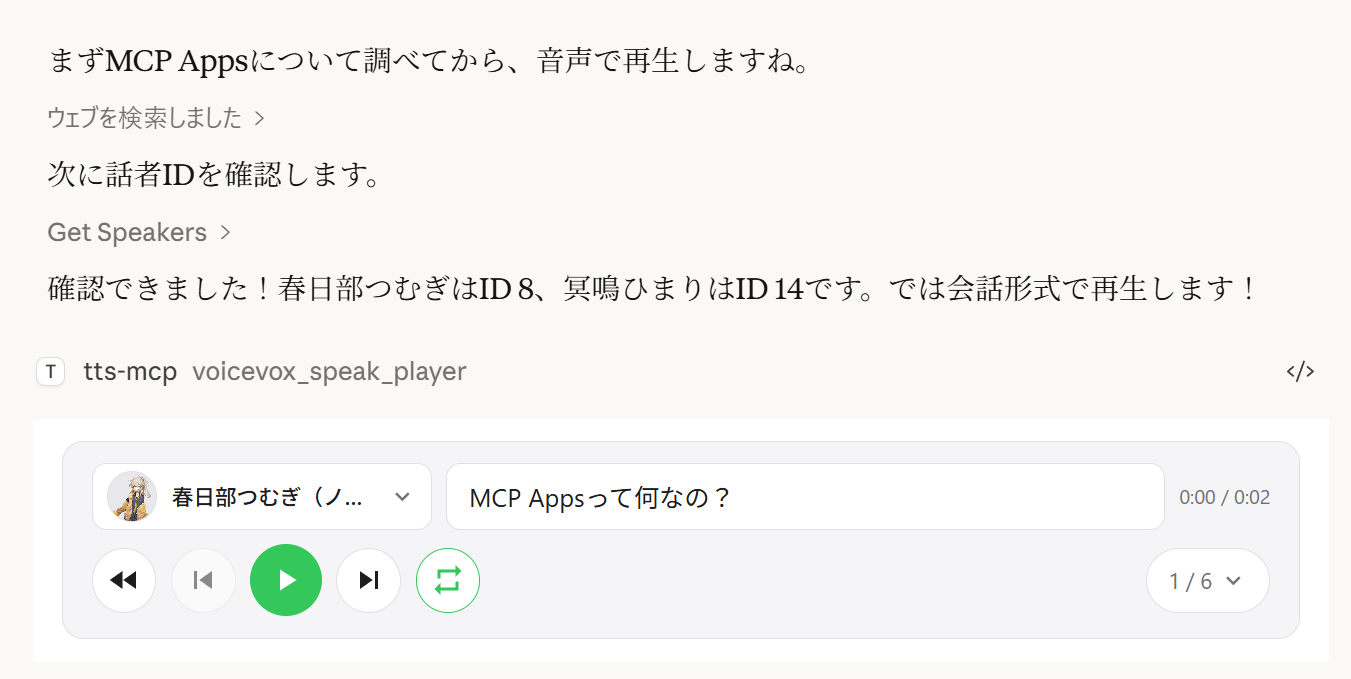
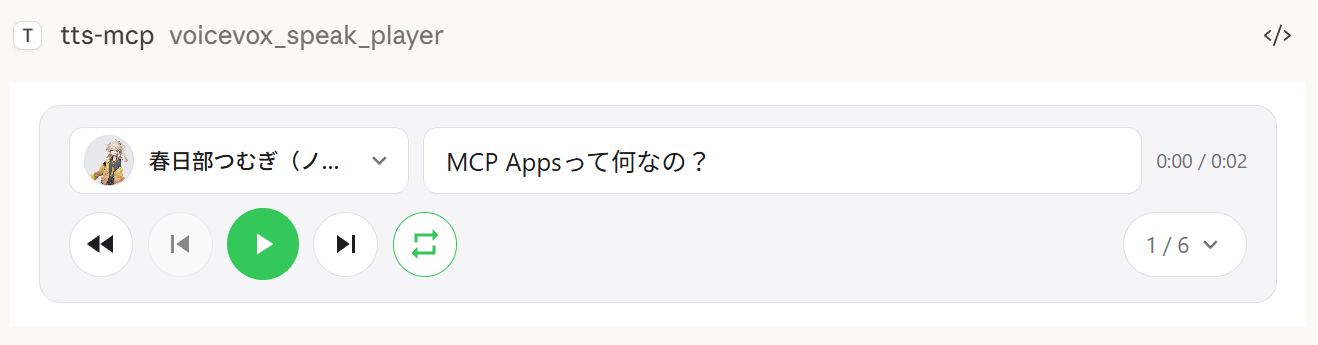
The voicevox_speak_player tool uses MCP Apps to render an interactive audio player directly inside the chat. Unlike the standard voicevox_speak tool which plays audio on the server, audio is played on the client side (in the browser/app) — no audio device needed on the server.
Client-side playback — Audio plays in Claude Desktop's chat, not on the server. Works even over remote connections.
Play/Pause controls — Full playback controls embedded in the conversation
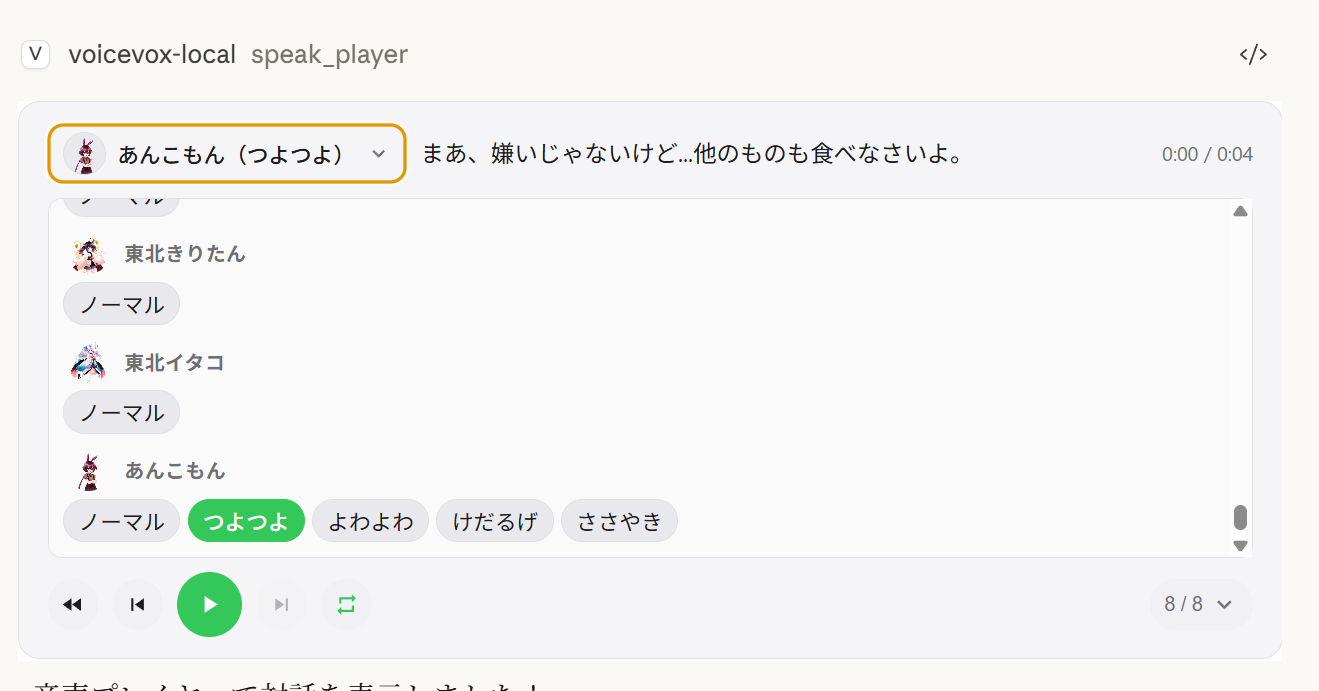
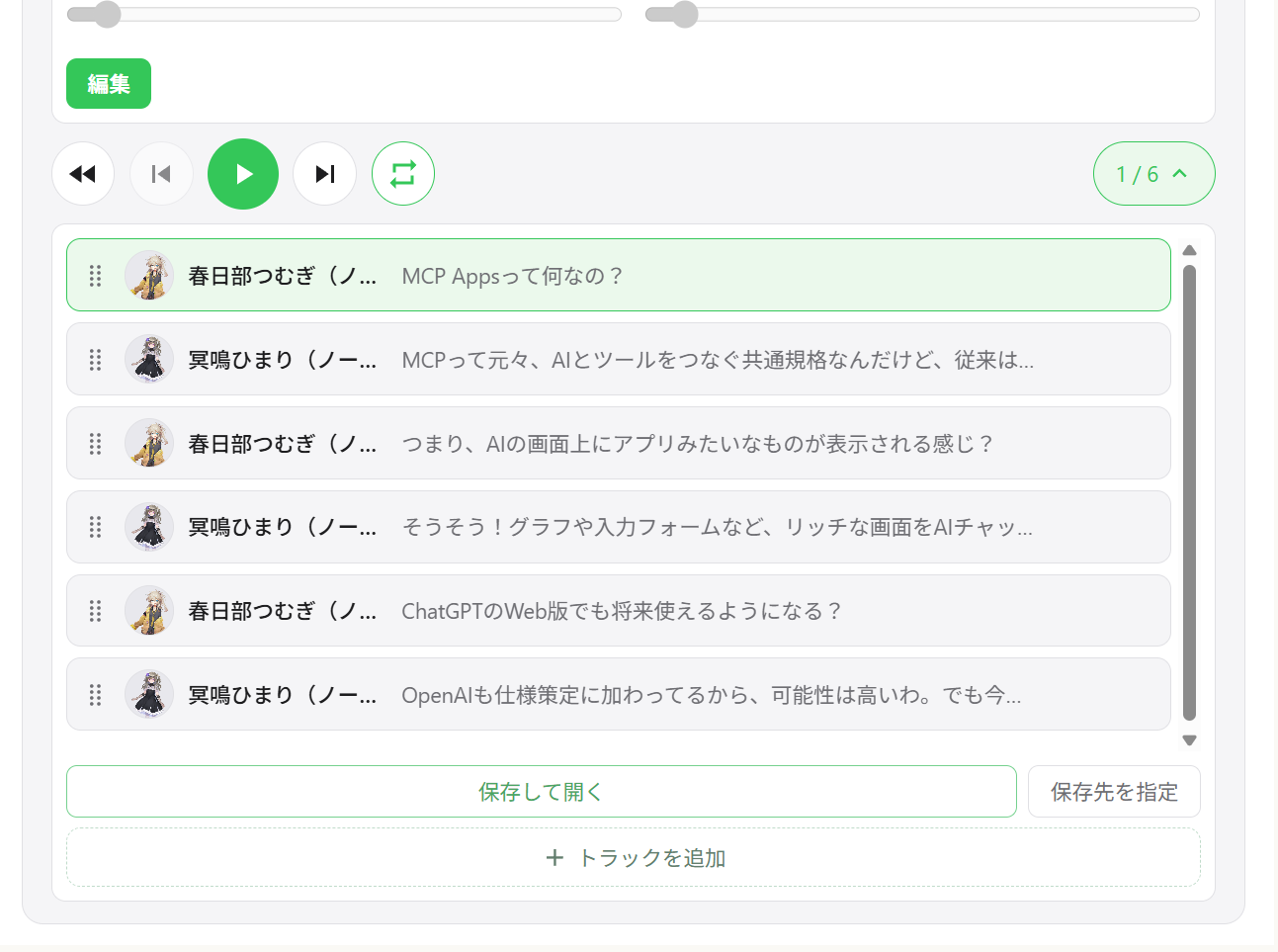
Multi-speaker dialogue — Sequential playback of multiple speakers in one player with track navigation
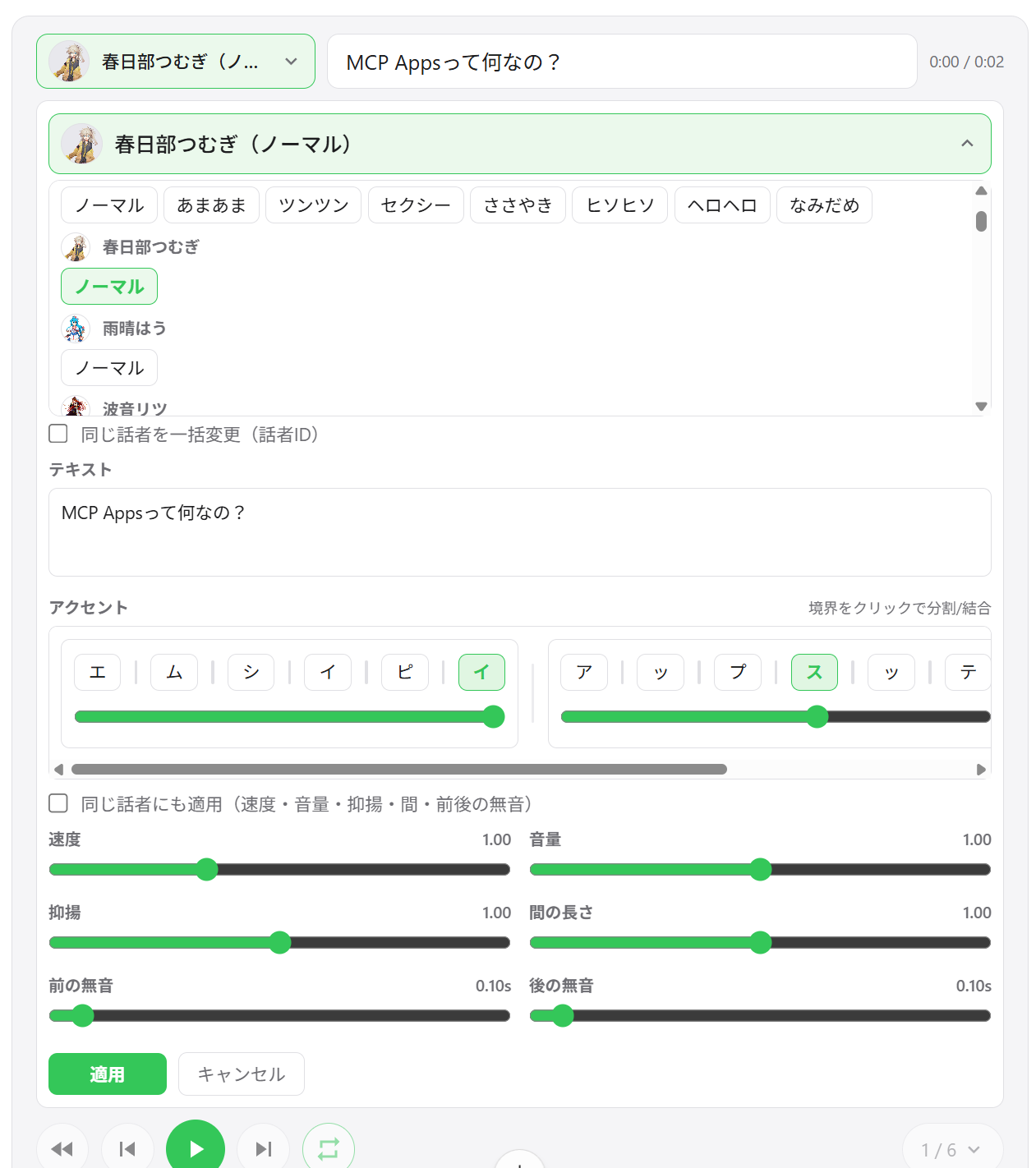
Speaker switching — Change the voice of any segment directly from the player UI
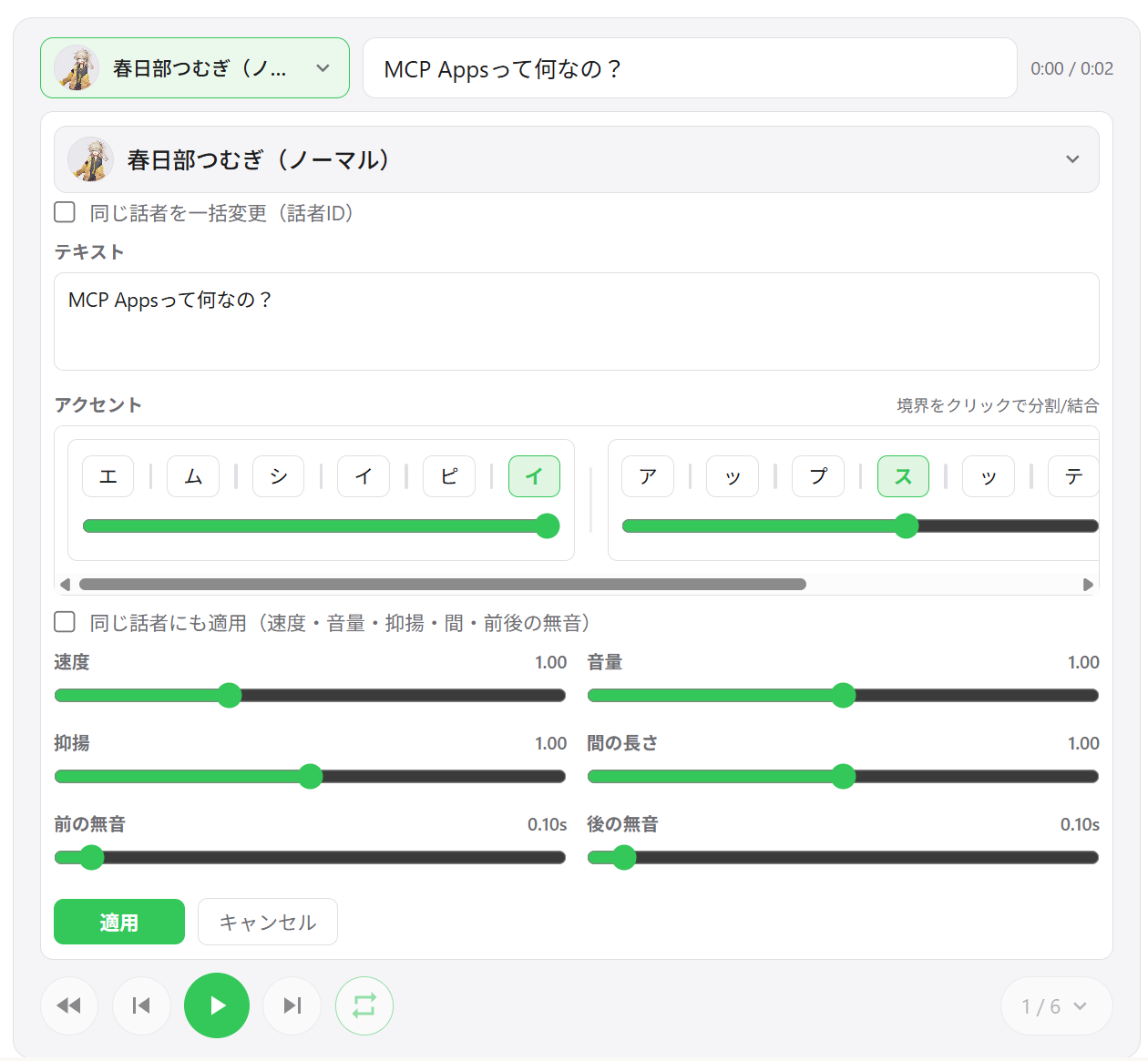
Segment editing — Adjust speed, volume, intonation, pause length, and pre/post silence per segment
Accent phrase editing — Edit accent positions and mora pitch directly in the UI
Add / delete / reorder segments — Drag-and-drop track reordering; add new segments inline
WAV export — Save all tracks as numbered WAV files and open the output folder automatically
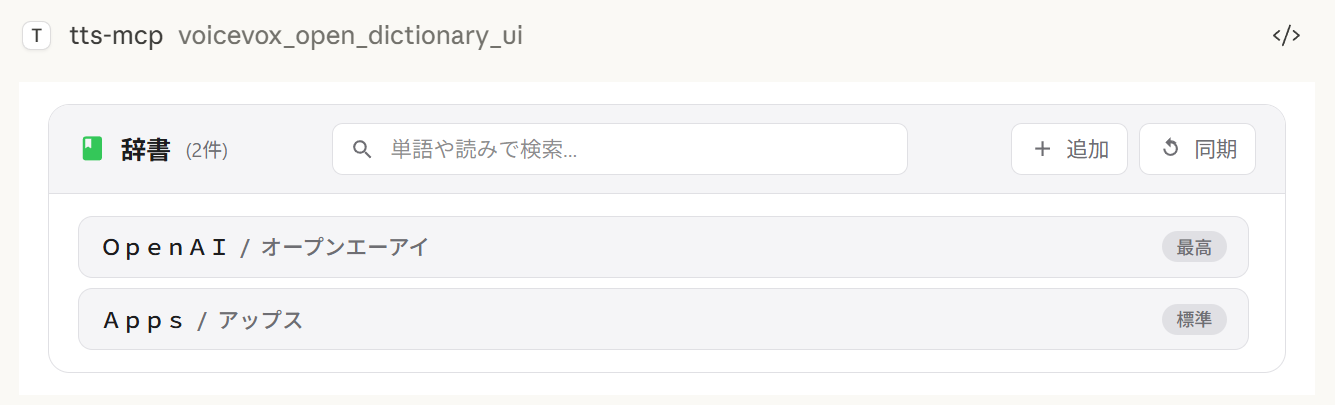
User dictionary manager — Add, edit, and delete VOICEVOX user dictionary words with preview playback
Cross-session state restore — Player state is persisted on the server; reopening the chat restores previous tracks
Export behavior by environment:
Save and open always exports WAV files. If opening the file explorer is not supported, export still succeeds and the save path is shown in the UI.
Choose output folder uses a native directory picker on Windows/macOS. On unsupported environments, this action falls back to the default export directory.
Multi-speaker playback | Track list | Segment editing |
|
|
|
Speaker selection | Dictionary manager | WAV export |
|
|
|
Client | Connection | Notes |
ChatGPT | HTTP (remote) | Requires |
Claude Desktop | stdio (local) | Works out of the box |
Claude Desktop | HTTP (via mcp-remote) | Do not set |
Note:
speak_playerrequires a host that supports MCP Apps. In hosts without MCP Apps support, the tool is not available andspeak(server-side playback) can be used instead.
Tool | Description |
| Create a new player session and display the UI. Returns |
| Update all segments for an existing player (new |
| Read the current player state (paginated) for AI tuning. |
| Open the user dictionary manager UI. |
Node.js 24.0.0 or higher (or Bun) or Docker
VOICEVOX Engine (must be running; included in Docker Compose)
ffplay (optional, recommended — not needed with Docker)
ffplay is a lightweight player included with FFmpeg that supports playback from stdin. When available, it automatically enables low-latency streaming playback.
💡 FFplay is optional. Without it, playback falls back to temp file-based playback (Windows: PowerShell, macOS: afplay, Linux: aplay, etc.).
Easy setup: One-liner installation for each OS (see steps below)
Required: ffplay must be in PATH (restart terminal/apps after installation)
Installation examples:
Windows (any of these)
Winget: winget install --id=Gyan.FFmpeg -e
Chocolatey: choco install ffmpeg
Scoop: scoop install ffmpeg
Official builds: Download from https://www.gyan.dev/ffmpeg/builds/ or https://github.com/BtbN/FFmpeg-Builds and add the bin folder to PATH
macOS
Homebrew: brew install ffmpeg
Linux
Debian/Ubuntu: sudo apt-get update && sudo apt-get install -y ffmpeg
Fedora: sudo dnf install -y ffmpeg
Arch: sudo pacman -S ffmpeg
PATH Setup:
Windows: Add ...\ffmpeg\bin to environment variables, then restart PowerShell/terminal and editor (Claude/VS Code, etc.)
Verify: powershell -c "$env:Path" should include the ffmpeg path
macOS/Linux: Usually auto-detected. Check with echo $PATH if needed, restart shell.
MCP clients (Claude Desktop/Code): Restart the app to reload PATH.
Verification:
ffplay -versionIf version info is displayed, installation is complete. CLI/MCP will automatically detect ffplay and use stdin streaming playback.
1. Start VOICEVOX Engine
2. Add to Claude Desktop config file
Config file location:
Windows: %APPDATA%\Claude\claude_desktop_config.json
macOS: ~/Library/Application Support/Claude/claude_desktop_config.json
{
  "mcpServers": {
    "tts-mcp": {
      "command": "npx",
      "args": ["-y", "@kajidog/mcp-tts-voicevox"]
    }
  }
}
💡 If using Bun, just replace
npxwithbunx:"command": "bunx", "args": ["@kajidog/mcp-tts-voicevox"]
3. Restart Claude Desktop
That's it! Ask Claude to "say hello" and it will speak!
You can run both the MCP server and VOICEVOX Engine with a single command using Docker Compose. No Node.js or VOICEVOX installation required.
1. Start the containers
docker compose up -dThis starts the VOICEVOX Engine and the MCP server (HTTP mode on port 3000).
2. Add to Claude Desktop config file (using mcp-remote)
{
  "mcpServers": {
    "tts-mcp": {
      "command": "npx",
      "args": ["-y", "mcp-remote", "http://localhost:3000/mcp"]
    }
  }
}
3. Restart Claude Desktop
Security (Docker):
docker-compose.ymlpublishes port 3000 without authentication.MCP_ALLOWED_HOSTSis not a defense here — non-browser clients can send anyHostheader they like — so anyone who can reach the port can use the server. SetMCP_API_KEY(and send it asX-API-Key), or keep the port bound to a trusted network / localhost only. Consider also settingVOICEVOX_ALLOWED_OUTPUT_DIRSto limit where file-writing tools may write.
Limitations (Docker): The Docker container has no audio device, so the
voicevox_speaktool (server-side playback) is disabled by default. Usevoicevox_speak_playerinstead — it plays audio on the client side (in Claude Desktop) and works without any audio device on the server. See UI Audio Player for details.
voicevox_speak — Text-to-SpeechThe main feature callable from Claude.
Parameter | Description | Default |
| Text to speak (multiple segments separated by newlines) | Required |
| Inline accent notation (takes priority over | (unset) |
| Speaker ID | 1 |
| Playback speed | 1.0 |
| Immediate playback (clears queue) | true |
| Wait for playback to start | false |
| Wait for playback completion | false |
immediate/waitForStart/waitForEnddisappear from the tool schema when the matching--restrict-*option is set.
Examples:
// Simple text
{ "text": "Hello" }

// Specify speaker
{ "text": "Hello", "speaker": 3 }

// Different speakers per segment
{ "text": "1:Hello\n3:Nice weather today" }

// Wait for completion (synchronous processing)
{ "text": "Wait for this to finish before continuing", "waitForEnd": true }

// Control the accent with inline notation (`,` separates phrases, `[` marks the accent)
{ "text": "こんにちは世界", "phrases": "コン[ニ]チワ,セ[カ]イ" }phrases (and the pronunciation field of the user dictionary tools) accepts katakana with an inline accent marker:
, separates accent phrases — コン[ニ]チワ,セ[カ]イ
[ marks where the pitch drops after; コン[ニ]チワ means the accent falls on ニ
Omitting the brackets for a phrase keeps VOICEVOX's own accent estimation for it
text stays required even when phrases is given — pass the plain text there and the notation is what gets spoken.
voicevox_get_accent_phrases returns the same notation for a given text, so you can read the estimated accent, tweak the bracket, and feed it back into phrases.
Tool | Description |
| Speak with UI audio player (see Player MCP Tools) |
| Check VOICEVOX Engine connection |
| Get list of available speakers |
| Stop playback and clear queue |
| Generate audio file |
User dictionary tools (group dictionary):
Tool | Description |
| Get reading and accent positions of a text as inline notation |
| List user dictionary words (filter + pagination) |
| Add a word (pronunciation accepts inline accent notation) |
| Update a word (omitted fields keep their value) |
| Delete a word by UUID |
| Add multiple words at once |
| Update multiple words at once |
Any tool can be turned off individually with --disable-tools / VOICEVOX_DISABLED_TOOLS, or by group with --disable-groups / VOICEVOX_DISABLED_GROUPS.
Variable | Description | Default |
| Engine URL |
|
| Default speaker ID |
|
| Playback speed |
|
| Retries for failed API requests (0 disables) |
|
| Initial retry delay in ms (exponential backoff) |
|
| Timeout for a single VOICEVOX API request in ms. Raise it for long text or a slow engine |
|
Variable | Description | Default |
| Streaming playback (requires |
|
| Trailing silence per segment in seconds. Increase for a longer pause between queued segments (also protects the end of speech from being cut off with streaming playback) | engine default |
| Immediate playback |
|
| Wait for playback start |
|
| Wait for playback end |
|
Restrict AI from specifying certain options.
Variable | Description |
| Restrict |
| Restrict |
| Restrict |
# Disable individual tools
export VOICEVOX_DISABLED_TOOLS=speak_player,synthesize_file

# Disable a built-in group of tools
export VOICEVOX_DISABLED_GROUPS=player

# Combine groups and individual tools
export VOICEVOX_DISABLED_GROUPS=dictionary
export VOICEVOX_DISABLED_TOOLS=synthesize_file
Built-in groups for VOICEVOX_DISABLED_GROUPS / --disable-groups:
Group | Tools |
|
|
|
|
|
|
|
|
Variable | Description | Default |
| Widget domain for UI player (required for ChatGPT, e.g. | (unset) |
| Auto-play audio in UI player |
|
| Enable track export(download) from UI player ( |
|
| Default output directory for exported tracks (also used as fallback when folder picker is unavailable) |
|
| Directory for player cache files ( |
|
| Enable persistent audio cache on disk ( |
|
| Audio cache retention in days ( |
|
| Audio cache size cap in MB ( |
|
| Path of persisted player state JSON |
|
Variable | Description | Default |
| Comma-separated directories that file-writing tools ( | (unset) |
Variable | Description | Default |
| Enable HTTP mode |
|
| HTTP port |
|
| HTTP host |
|
| Allowed hosts (comma-separated) |
|
| Allowed origins (comma-separated) |
|
| Required API key for | (unset) |
Command line arguments take priority over environment variables.
The complete, up-to-date list of options is always available via npx @kajidog/mcp-tts-voicevox --help.
# Basic settings
npx @kajidog/mcp-tts-voicevox --url http://192.168.1.100:50021 --speaker 3 --speed 1.2

# HTTP mode
npx @kajidog/mcp-tts-voicevox --http --port 8080

# With restrictions
npx @kajidog/mcp-tts-voicevox --restrict-immediate --restrict-wait-for-end

# Disable individual tools
npx @kajidog/mcp-tts-voicevox --disable-tools speak_player,synthesize_file

# Disable a tool group
npx @kajidog/mcp-tts-voicevox --disable-groups player
Argument | Description |
| Show help |
| Show version |
| Generate |
| Path to config file |
| VOICEVOX Engine URL |
| Default speaker ID |
| Playback speed |
| Streaming playback |
| Trailing silence per segment (pause between queued segments) |
| Immediate playback |
| Wait for start |
| Wait for end |
| Restrict immediate |
| Restrict waitForStart |
| Restrict waitForEnd |
| Directories that file-writing tools may write into (comma-separated; unset = no restriction) |
| Disable tools (comma-separated tool names) |
| Disable tool groups: |
| Auto-play in UI player |
| Enable/disable track export(download) in UI player |
| Default output directory for exported tracks |
| Player cache directory |
| Persisted player state file path |
| Enable/disable disk audio cache for player |
| Audio cache retention days ( |
| Audio cache size cap in MB ( |
| HTTP mode |
| HTTP port |
| HTTP host |
| Allowed hosts (comma-separated) |
| Allowed origins (comma-separated) |
| Required API key for |
You can use a JSON config file instead of (or in addition to) environment variables and CLI arguments. This is useful when you have many settings to configure.
Priority order: CLI args > Environment variables > Config file > Defaults
npx @kajidog/mcp-tts-voicevox --initThis creates .voicevoxrc.json in the current directory with all default settings. Edit it as needed.
npx @kajidog/mcp-tts-voicevox --config ./my-config.jsonOr via environment variable:
VOICEVOX_CONFIG=./my-config.json npx @kajidog/mcp-tts-voicevox.voicevoxrc.json{
"url": "http://192.168.1.50:50021",
"speaker": 3,
"speed": 1.2,
"http": true,
"port": 8080,
"disable-tools": ["synthesize_file"],
"disable-groups": ["dictionary"]
}Keys can be written in kebab-case (use-streaming), camelCase (useStreaming), or internal key names (defaultSpeaker). If .voicevoxrc.json exists in the current directory, it is loaded automatically.
For remote connections:
Start Server:
# Linux/macOS
MCP_HTTP_MODE=true MCP_HTTP_PORT=3000 npx @kajidog/mcp-tts-voicevox

# Windows PowerShell
$env:MCP_HTTP_MODE='true'; $env:MCP_HTTP_PORT='3000'; npx @kajidog/mcp-tts-voicevox
Claude Desktop Config (using mcp-remote):
{
  "mcpServers": {
    "tts-mcp-proxy": {
      "command": "npx",
      "args": ["-y", "mcp-remote", "http://localhost:3000/mcp"]
    }
  }
}With Claude Code, you can configure different default speakers per project using custom headers in .mcp.json:
Header | Description |
| Default speaker ID for this project |
| API key when |
Example .mcp.json:
{
  "mcpServers": {
    "tts": {
      "type": "http",
      "url": "http://localhost:3000/mcp",
      "headers": {
        "X-Voicevox-Speaker": "113",
        "X-API-Key": "your-api-key"
      }
    }
  }
}
This allows each project to use a different voice character automatically.
Priority order:
Explicit speaker parameter in tool call (highest)
Project default from X-Voicevox-Speaker header
Global VOICEVOX_DEFAULT_SPEAKER setting (lowest)
Connecting from WSL to an MCP server running on Windows:
# Method 1: From default gateway
ip route show | grep -oP 'default via \K[\d.]+'
# Usually in the format 172.x.x.1

# Method 2: From /etc/resolv.conf (WSL2)
cat /etc/resolv.conf | grep nameserver | awk '{print $2}'Add the WSL gateway IP to MCP_ALLOWED_HOSTS to allow access from WSL:
$env:MCP_HTTP_MODE='true'
$env:MCP_ALLOWED_HOSTS='localhost,127.0.0.1,172.29.176.1'
npx @kajidog/mcp-tts-voicevox
Or with CLI arguments:
npx @kajidog/mcp-tts-voicevox --http --allowed-hosts "localhost,127.0.0.1,172.29.176.1"{
"mcpServers": {
"tts": {
"type": "http",
"url": "http://172.29.176.1:3000/mcp"
}
}
}⚠️ Within WSL,
localhostrefers to WSL itself. Use the WSL gateway IP to access the Windows host.
To use with ChatGPT, deploy the MCP server in HTTP mode to the cloud with access to a VOICEVOX Engine.
Deploy with Docker to Render, Railway, etc. (Dockerfile included).
Run VOICEVOX Engine locally and expose it via ngrok, or deploy it alongside the MCP server.
Variable | Example | Description |
|
| VOICEVOX Engine URL |
|
| Enable HTTP mode |
|
| Deployed hostname |
|
| Widget domain for UI player (required for ChatGPT) |
|
| Disable server-side playback (no audio device) |
|
| Disable export feature (files cannot be downloaded from cloud) |
Go to ChatGPT Settings → Connectors → Add MCP server URL (https://your-app.onrender.com/mcp).
The basic steps are the same as ChatGPT, but the VOICEVOX_PLAYER_DOMAIN value is different.
Claude Web requires ui.domain to be a hash-based dedicated domain. Compute it with the following command:
node -e "console.log(require('crypto').createHash('sha256').update('Your MCP server URL').digest('hex').slice(0,32)+'.claudemcpcontent.com')"Example: If your MCP server URL is https://your-app.onrender.com/mcp:
node -e "console.log(require('crypto').createHash('sha256').update('https://your-app.onrender.com/mcp').digest('hex').slice(0,32)+'.claudemcpcontent.com')"
# Example output: 48fb73a6...claudemcpcontent.com
Set this output value as VOICEVOX_PLAYER_DOMAIN.
Note: Since ChatGPT and Claude Web require different
VOICEVOX_PLAYER_DOMAINvalues, a single instance cannot serve both clients simultaneously. Deploy separate instances for each, or switch the environment variable depending on your target client.
1. Check if VOICEVOX Engine is running
curl http://localhost:50021/speakers2. Check platform-specific playback tools
OS | Required Tool |
Linux | One of |
macOS |
|
Windows | PowerShell (pre-installed) |
Check package installation: npm list -g @kajidog/mcp-tts-voicevox
Verify JSON syntax in config file
Restart the client
Package | Description |
| MCP server ( |
General-purpose VOICEVOX client library (can be used independently) | |
| Shared MCP infrastructure (config schema, HTTP/stdio launcher). Not published — bundled into the server |
| React-based audio player UI, bundled into a single HTML file. Not published |
git clone https://github.com/kajidog/mcp-tts-voicevox.git
cd mcp-tts-voicevox
pnpm installThe package manager is pnpm (npm / yarn are not supported).
Command | Description |
| Build all packages |
| Run tests |
| Run lint (single Biome pass over the whole workspace) |
| Type-check every package |
| Add a changeset for a user-facing change |
Dev servers live in the server package, so run them with a filter:
Command | Description |
| Start dev server (stdio) |
| Start dev server in HTTP mode |
| Start dev server with Bun |
| Start HTTP dev server with Bun |
ISC
Generate a query for voice synthesis
| Name | Required | Description | Default |
|---|---|---|---|
| text | Yes | Text for voice synthesis | |
| speaker | No | Default speaker ID (optional) | |
| speedScale | No | Playback speed (optional, default from environment) |
Does the description disclose side effects, auth requirements, rate limits, or destructive behavior?
No annotations are provided, so the description carries full burden. 'Generate a query' suggests this creates some intermediate representation, but doesn't disclose what happens next - does it return a query ID for later use? Does it validate parameters? Is it read-only or has side effects? The description lacks behavioral context about permissions, rate limits, or what 'query' means operationally.
Agents need to know what a tool does to the world before calling it. Descriptions should go beyond structured annotations to explain consequences.
Is the description appropriately sized, front-loaded, and free of redundancy?
The description is a single, efficient sentence with zero wasted words. It's appropriately sized for a tool with good schema coverage and gets straight to the point without unnecessary elaboration. Every word earns its place in conveying the core purpose.
Shorter descriptions cost fewer tokens and are easier for agents to parse. Every sentence should earn its place.
Given the tool's complexity, does the description cover enough for an agent to succeed on first attempt?
For a tool with no annotations and no output schema, the description is insufficient. It doesn't explain what the generated query is used for, what format it returns, or how it differs from actual synthesis tools. Given the complexity of voice synthesis workflows and multiple sibling tools, more context about this tool's role in the ecosystem is needed.
Complex tools with many parameters or behaviors need more documentation. Simple tools need less. This dimension scales expectations accordingly.
Does the description clarify parameter syntax, constraints, interactions, or defaults beyond what the schema provides?
Schema description coverage is 100%, so the schema already documents all three parameters (text, speaker, speedScale) with their descriptions. The tool description adds no additional parameter semantics beyond what's in the schema. The baseline score of 3 reflects adequate but minimal value addition given the comprehensive schema coverage.
Input schemas describe structure but not intent. Descriptions should explain non-obvious parameter relationships and valid value ranges.
Does the description clearly state what the tool does and how it differs from similar tools?
The description states 'Generate a query for voice synthesis' which provides a basic purpose (verb: generate, resource: query for voice synthesis). However, it's vague about what the query actually does - is it for previewing, testing, or preparing synthesis? It doesn't distinguish from sibling tools like 'synthesize_file' or 'speak' which also relate to voice synthesis.
Agents choose between tools based on descriptions. A clear purpose with a specific verb and resource helps agents select the right tool.
Does the description explain when to use this tool, when not to, or what alternatives exist?
The description provides no guidance on when to use this tool versus alternatives. With sibling tools like 'synthesize_file' and 'speak' that also handle voice synthesis, there's no indication whether this tool is for preparation, testing, or a different phase of the synthesis workflow. No context about prerequisites or exclusions is provided.
Agents often have multiple tools that could apply. Explicit usage guidance like "use X instead of Y when Z" prevents misuse.
Get detail of a speaker by id
| Name | Required | Description | Default |
|---|---|---|---|
| uuid | Yes | Speaker UUID (speaker uuid) |
Does the description disclose side effects, auth requirements, rate limits, or destructive behavior?
No annotations are provided, so the description carries the full burden of behavioral disclosure. It mentions 'Get detail' but doesn't specify if this is a read-only operation, what permissions are needed, error handling, or response format. This leaves significant gaps for a tool that likely interacts with a speaker database.
Agents need to know what a tool does to the world before calling it. Descriptions should go beyond structured annotations to explain consequences.
Is the description appropriately sized, front-loaded, and free of redundancy?
The description is a single, efficient sentence with no wasted words. It's front-loaded with the core action ('Get detail'), making it easy to scan and understand quickly.
Shorter descriptions cost fewer tokens and are easier for agents to parse. Every sentence should earn its place.
Given the tool's complexity, does the description cover enough for an agent to succeed on first attempt?
Given no annotations and no output schema, the description is incomplete. It doesn't explain what 'detail' includes (e.g., speaker attributes, capabilities), potential errors, or how this fits with sibling tools like 'synthesize_file'. For a tool with one parameter but unknown behavioral traits, more context is needed.
Complex tools with many parameters or behaviors need more documentation. Simple tools need less. This dimension scales expectations accordingly.
Does the description clarify parameter syntax, constraints, interactions, or defaults beyond what the schema provides?
Schema description coverage is 100%, with the parameter 'uuid' documented as 'Speaker UUID (speaker uuid)'. The description adds no additional meaning beyond this, such as format examples or where to obtain the UUID. Baseline 3 is appropriate since the schema does the heavy lifting.
Input schemas describe structure but not intent. Descriptions should explain non-obvious parameter relationships and valid value ranges.
Does the description clearly state what the tool does and how it differs from similar tools?
The description clearly states the verb ('Get detail') and resource ('speaker'), making the purpose understandable. However, it doesn't differentiate from sibling tools like 'get_speakers' (which likely lists speakers) or explain what 'detail' entails beyond the ID lookup.
Agents choose between tools based on descriptions. A clear purpose with a specific verb and resource helps agents select the right tool.
Does the description explain when to use this tool, when not to, or what alternatives exist?
No guidance is provided on when to use this tool versus alternatives. For example, it doesn't clarify if this should be used after 'get_speakers' to fetch more information or in what contexts (e.g., before synthesis). The description only states the basic function without context.
Agents often have multiple tools that could apply. Explicit usage guidance like "use X instead of Y when Z" prevents misuse.
Get a list of available speakers
| Name | Required | Description | Default |
|---|---|---|---|
No parameters | |||
Does the description disclose side effects, auth requirements, rate limits, or destructive behavior?
With no annotations provided, the description carries the full burden of behavioral disclosure. It states the tool retrieves a list, implying a read-only operation, but doesn't cover aspects like whether it requires authentication, has rate limits, returns paginated results, or what format the list is in. For a tool with zero annotation coverage, this is a significant gap in transparency.
Agents need to know what a tool does to the world before calling it. Descriptions should go beyond structured annotations to explain consequences.
Is the description appropriately sized, front-loaded, and free of redundancy?
The description is a single, efficient sentence ('Get a list of available speakers') that is front-loaded and wastes no words. It directly states the tool's purpose without unnecessary elaboration, making it highly concise and well-structured for its simplicity.
Shorter descriptions cost fewer tokens and are easier for agents to parse. Every sentence should earn its place.
Given the tool's complexity, does the description cover enough for an agent to succeed on first attempt?
Given the tool's complexity (simple list retrieval) but lack of annotations and output schema, the description is incomplete. It doesn't explain what the list contains, how it's formatted, or any behavioral traits. For a tool with no structured data beyond the input schema, more context is needed to be fully helpful to an agent.
Complex tools with many parameters or behaviors need more documentation. Simple tools need less. This dimension scales expectations accordingly.
Does the description clarify parameter syntax, constraints, interactions, or defaults beyond what the schema provides?
The input schema has 0 parameters with 100% coverage, so the schema fully documents the lack of inputs. The description doesn't add parameter details beyond this, which is appropriate. Since there are no parameters, the baseline is 4, as the description doesn't need to compensate for any gaps.
Input schemas describe structure but not intent. Descriptions should explain non-obvious parameter relationships and valid value ranges.
Does the description clearly state what the tool does and how it differs from similar tools?
The description states the tool's purpose ('Get a list of available speakers'), which is clear but vague. It specifies the verb ('Get') and resource ('speakers'), but doesn't distinguish it from sibling tools like 'get_speaker_detail' or explain what 'available' means in this context. This is adequate but has clear gaps in specificity.
Agents choose between tools based on descriptions. A clear purpose with a specific verb and resource helps agents select the right tool.
Does the description explain when to use this tool, when not to, or what alternatives exist?
The description provides no guidance on when to use this tool versus alternatives. It doesn't mention sibling tools like 'get_speaker_detail' for detailed information or 'synthesize_file' for synthesis operations, nor does it specify prerequisites or contexts for usage. This leaves the agent without explicit or implied usage instructions.
Agents often have multiple tools that could apply. Explicit usage guidance like "use X instead of Y when Z" prevents misuse.
Check if VOICEVOX Engine is running and reachable
| Name | Required | Description | Default |
|---|---|---|---|
No parameters | |||
Does the description disclose side effects, auth requirements, rate limits, or destructive behavior?
No annotations are provided, so the description carries the full burden of behavioral disclosure. It states the tool checks if the engine is 'running and reachable,' implying a read-only, non-destructive operation, but doesn't detail what happens on failure (e.g., error responses), latency, or any side effects. For a tool with zero annotation coverage, this leaves gaps in understanding its behavior.
Agents need to know what a tool does to the world before calling it. Descriptions should go beyond structured annotations to explain consequences.
Is the description appropriately sized, front-loaded, and free of redundancy?
The description is a single, efficient sentence: 'Check if VOICEVOX Engine is running and reachable.' It is front-loaded with the core purpose, has no wasted words, and is appropriately sized for a simple tool. Every part of the sentence earns its place by conveying essential information.
Shorter descriptions cost fewer tokens and are easier for agents to parse. Every sentence should earn its place.
Given the tool's complexity, does the description cover enough for an agent to succeed on first attempt?
Given the tool's low complexity (0 parameters, no output schema, no annotations), the description is minimally adequate. It states what the tool does but lacks details on usage context, error handling, or return values. Without an output schema, it doesn't explain what 'check' returns (e.g., status, boolean), leaving some gaps for an agent to understand fully.
Complex tools with many parameters or behaviors need more documentation. Simple tools need less. This dimension scales expectations accordingly.
Does the description clarify parameter syntax, constraints, interactions, or defaults beyond what the schema provides?
The tool has 0 parameters, and the input schema has 100% description coverage (though empty). The description doesn't need to explain parameters, so it naturally adds no value beyond the schema. A baseline score of 4 is appropriate for zero-parameter tools, as there's no parameter information to compensate for.
Input schemas describe structure but not intent. Descriptions should explain non-obvious parameter relationships and valid value ranges.
Does the description clearly state what the tool does and how it differs from similar tools?
The description clearly states the tool's purpose: 'Check if VOICEVOX Engine is running and reachable.' It uses a specific verb ('Check') and identifies the target resource ('VOICEVOX Engine'), making it easy to understand. However, it doesn't explicitly differentiate from sibling tools like 'get_speakers' or 'synthesize_file', which serve different purposes but also interact with VOICEVOX.
Agents choose between tools based on descriptions. A clear purpose with a specific verb and resource helps agents select the right tool.
Does the description explain when to use this tool, when not to, or what alternatives exist?
No guidance is provided on when to use this tool versus alternatives. The description doesn't mention prerequisites (e.g., before using other tools), exclusions, or contextual cues. For example, it doesn't specify if this should be called first to verify connectivity before invoking 'speak' or 'synthesize_file'.
Agents often have multiple tools that could apply. Explicit usage guidance like "use X instead of Y when Z" prevents misuse.
Convert text to speech and play it. Text is split by line breaks (\n) into separate speech units. Each line is processed as an independent audio segment.
| Name | Required | Description | Default |
|---|---|---|---|
| text | Yes | Text split by line breaks (\n). IMPORTANT: Each line = one speech unit (processed and played separately). Keep the FIRST LINE SHORT for quick playback start - audio begins as soon as the first line is synthesized. Example: "Hi!\nThis is a longer explanation that follows." Optional speaker prefix per line: "1:Hello\n2:World" | |
| query | No | Voice synthesis query | |
| speaker | No | Default speaker ID (optional) | |
| speedScale | No | Playback speed (optional, default from environment) | |
| immediate | No | If true, stops current playback and plays new audio immediately. If false, waits for current playback to finish. Default depends on environment variable. | |
| waitForStart | No | Wait for playback to start (optional, default: false) | |
| waitForEnd | No | Wait for playback to end (optional, default: false) |
Does the description disclose side effects, auth requirements, rate limits, or destructive behavior?
With no annotations provided, the description carries full burden and does well by disclosing key behavioral traits: text is split by line breaks into separate speech units, each line processed independently, and the first line should be short for quick playback start. It doesn't mention error handling, rate limits, or authentication needs, but covers core playback behavior adequately.
Agents need to know what a tool does to the world before calling it. Descriptions should go beyond structured annotations to explain consequences.
Is the description appropriately sized, front-loaded, and free of redundancy?
The description is front-loaded with the core purpose in the first sentence, followed by specific behavioral details in the second. Both sentences earn their place by providing essential information without redundancy. It's appropriately sized for the tool's complexity.
Shorter descriptions cost fewer tokens and are easier for agents to parse. Every sentence should earn its place.
Given the tool's complexity, does the description cover enough for an agent to succeed on first attempt?
Given no annotations and no output schema, the description does well to cover the main behavior and text processing logic. However, it doesn't address potential side effects (e.g., interrupting current playback, which is hinted at in the 'immediate' parameter schema), error cases, or what the tool returns. For a 7-parameter tool with mutation implications, it's good but not fully complete.
Complex tools with many parameters or behaviors need more documentation. Simple tools need less. This dimension scales expectations accordingly.
Does the description clarify parameter syntax, constraints, interactions, or defaults beyond what the schema provides?
Schema description coverage is 100%, so the schema already documents all 7 parameters thoroughly. The description adds minimal parameter semantics beyond the schema—it mentions line break processing and first line optimization, which relates to the 'text' parameter but doesn't significantly enhance understanding of parameters like 'query' or 'speaker'. Baseline 3 is appropriate given high schema coverage.
Input schemas describe structure but not intent. Descriptions should explain non-obvious parameter relationships and valid value ranges.
Does the description clearly state what the tool does and how it differs from similar tools?
The description clearly states the specific action ('Convert text to speech and play it') and resource (audio output), distinguishing it from siblings like 'synthesize_file' (file output) and 'stop_speaker' (playback control). It explicitly mentions text processing by line breaks, which adds specificity beyond the basic function.
Agents choose between tools based on descriptions. A clear purpose with a specific verb and resource helps agents select the right tool.
Does the description explain when to use this tool, when not to, or what alternatives exist?
The description implies usage for text-to-speech playback but doesn't explicitly state when to use this tool versus alternatives like 'synthesize_file' (for file output) or 'generate_query' (possibly for query generation). It provides some context about line break processing but lacks explicit guidance on tool selection scenarios.
Agents often have multiple tools that could apply. Explicit usage guidance like "use X instead of Y when Z" prevents misuse.
Stop current audio playback
| Name | Required | Description | Default |
|---|---|---|---|
| random_string | Yes | Dummy parameter for no-parameter tools |
Does the description disclose side effects, auth requirements, rate limits, or destructive behavior?
With no annotations provided, the description carries full burden but only states the basic action. It does not disclose behavioral traits like whether this requires specific permissions, what happens if no audio is playing, error conditions, or side effects. The description is minimal and lacks necessary context for safe invocation.
Agents need to know what a tool does to the world before calling it. Descriptions should go beyond structured annotations to explain consequences.
Is the description appropriately sized, front-loaded, and free of redundancy?
The description is a single, clear sentence with zero wasted words. It is perfectly front-loaded and appropriately sized for a simple action tool.
Shorter descriptions cost fewer tokens and are easier for agents to parse. Every sentence should earn its place.
Given the tool's complexity, does the description cover enough for an agent to succeed on first attempt?
Given no annotations and no output schema, the description is incomplete for a mutation tool. It does not explain what happens after stopping playback (e.g., success/failure response, state changes) or error handling, leaving significant gaps for the agent.
Complex tools with many parameters or behaviors need more documentation. Simple tools need less. This dimension scales expectations accordingly.
Does the description clarify parameter syntax, constraints, interactions, or defaults beyond what the schema provides?
The tool has 0 meaningful parameters (only a dummy parameter with 100% schema coverage). The description correctly omits parameter details since none are needed for the core functionality, adding appropriate value beyond the schema.
Input schemas describe structure but not intent. Descriptions should explain non-obvious parameter relationships and valid value ranges.
Does the description clearly state what the tool does and how it differs from similar tools?
The description 'Stop current audio playback' clearly states the specific action (stop) and resource (current audio playback). It distinguishes from siblings like 'speak' or 'synthesize_file' which initiate playback rather than stop it.
Agents choose between tools based on descriptions. A clear purpose with a specific verb and resource helps agents select the right tool.
Does the description explain when to use this tool, when not to, or what alternatives exist?
The description implies usage when audio is currently playing, but does not explicitly state when to use this tool versus alternatives or provide any exclusions. It lacks guidance on prerequisites or timing considerations.
Agents often have multiple tools that could apply. Explicit usage guidance like "use X instead of Y when Z" prevents misuse.
Generate an audio file and return its absolute path
| Name | Required | Description | Default |
|---|---|---|---|
| text | No | Text for voice synthesis (if both query and text provided, query takes precedence) | |
| query | No | Voice synthesis query | |
| output | Yes | Output path for the audio file | |
| speaker | No | Default speaker ID (optional) | |
| speedScale | No | Playback speed (optional, default from environment) |
Does the description disclose side effects, auth requirements, rate limits, or destructive behavior?
With no annotations provided, the description carries the full burden of behavioral disclosure. It mentions generating a file and returning a path, but lacks details on permissions, side effects (e.g., file system changes), rate limits, error handling, or audio format specifics. This is inadequate for a tool that creates files, as it doesn't clarify behavioral traits beyond the basic operation.
Agents need to know what a tool does to the world before calling it. Descriptions should go beyond structured annotations to explain consequences.
Is the description appropriately sized, front-loaded, and free of redundancy?
The description is a single, efficient sentence that front-loads the core action and return value. Every word earns its place, with no redundancy or unnecessary elaboration, making it easy to parse quickly.
Shorter descriptions cost fewer tokens and are easier for agents to parse. Every sentence should earn its place.
Given the tool's complexity, does the description cover enough for an agent to succeed on first attempt?
Given the complexity of a file-generation tool with 5 parameters, no annotations, and no output schema, the description is incomplete. It doesn't cover behavioral aspects like side effects, error cases, or audio specifics, and lacks usage context. This leaves significant gaps for an AI agent to understand how to invoke it correctly in various scenarios.
Complex tools with many parameters or behaviors need more documentation. Simple tools need less. This dimension scales expectations accordingly.
Does the description clarify parameter syntax, constraints, interactions, or defaults beyond what the schema provides?
Schema description coverage is 100%, so the schema already documents all parameters thoroughly (e.g., precedence rules for text vs. query, optional defaults). The description adds no additional parameter semantics beyond what the schema provides, such as explaining the audio generation process or file format details. Baseline 3 is appropriate when the schema does the heavy lifting.
Input schemas describe structure but not intent. Descriptions should explain non-obvious parameter relationships and valid value ranges.
Does the description clearly state what the tool does and how it differs from similar tools?
The description clearly states the action ('Generate an audio file') and the resource ('audio file'), and specifies the return value ('return its absolute path'). It distinguishes from siblings like 'speak' (which might stream audio) and 'generate_query' (which likely creates queries rather than files). However, it doesn't explicitly differentiate from all siblings (e.g., 'stop_speaker' is clearly different).
Agents choose between tools based on descriptions. A clear purpose with a specific verb and resource helps agents select the right tool.
Does the description explain when to use this tool, when not to, or what alternatives exist?
No guidance is provided on when to use this tool versus alternatives. The description doesn't mention prerequisites, context, or comparisons to siblings like 'speak' (which might be for immediate playback) or 'generate_query' (which might be for query generation without file creation).
Agents often have multiple tools that could apply. Explicit usage guidance like "use X instead of Y when Z" prevents misuse.
Recent tool additions, removals, and schema changes observed during successful MCP inspections.
v0.3.1generate_queryget_speaker_detailget_speakersping_voicevoxspeakstop_speakersynthesize_fileScored across 7 tools
Each tool has a clearly distinct purpose with no overlap: generate_query creates synthesis queries, get_speaker_detail and get_speakers handle speaker metadata, ping_voicevox checks engine status, speak plays audio, stop_speaker stops playback, and synthesize_file creates files. The descriptions make it easy to distinguish between query generation, metadata retrieval, status checking, real-time playback control, and file synthesis.
The naming is mostly consistent with a verb_noun pattern (e.g., get_speakers, stop_speaker, synthesize_file), but there are minor deviations: generate_query uses 'generate' instead of a more specific verb like 'create', and ping_voicevox uses 'ping' as a verb which is less conventional but still understandable. All tools use snake_case consistently.
With 7 tools, this server is well-scoped for a TTS system. It covers essential operations like checking engine status, retrieving speaker information, generating queries, real-time speech playback with control, and file synthesis. Each tool earns its place without feeling excessive or insufficient for the domain.
The tool set provides complete coverage for a TTS domain: it includes status checking (ping_voicevox), metadata retrieval (get_speakers, get_speaker_detail), query preparation (generate_query), real-time audio handling (speak, stop_speaker), and file output (synthesize_file). There are no obvious gaps—agents can perform the full lifecycle from setup to synthesis and playback control.
AI voice generation: text-to-speech and voice cloning from any MCP client.
MCP server for Text-to-Speech
MCP server for AI dialogue using various LLM models via AceDataCloud
Remote text-to-speech MCP server with text_to_speech and list_voices tools. Free plan.