A
licenseA
qualityD
maintenanceAn MCP server that enables LLMs to generate spoken audio from text using OpenAI's Text-to-Speech API, supporting various voices, models, and audio formats.
1
13
1
MIT

Español | 日本語
Un servidor MCP de texto a voz que utiliza VOICEVOX
🎮 Prueba la demo en el navegador — Prueba VoicevoxClient directamente en tu navegador
Haz que tu asistente de IA hable — Texto a voz desde clientes MCP como Claude Desktop
Reproductor de audio en la interfaz (aplicaciones MCP) — Reproduce audio directamente en el chat con un reproductor interactivo (ChatGPT / Claude Desktop / Claude Web, etc.)
Conversaciones con múltiples personajes — Cambia de hablante por segmento en una sola llamada
Reproducción fluida — Gestión de cola, reproducción inmediata, precarga, streaming
Multiplataforma — Funciona en Windows, macOS, Linux (incluido WSL)
Related MCP server: voiceroid_daemon-mcp
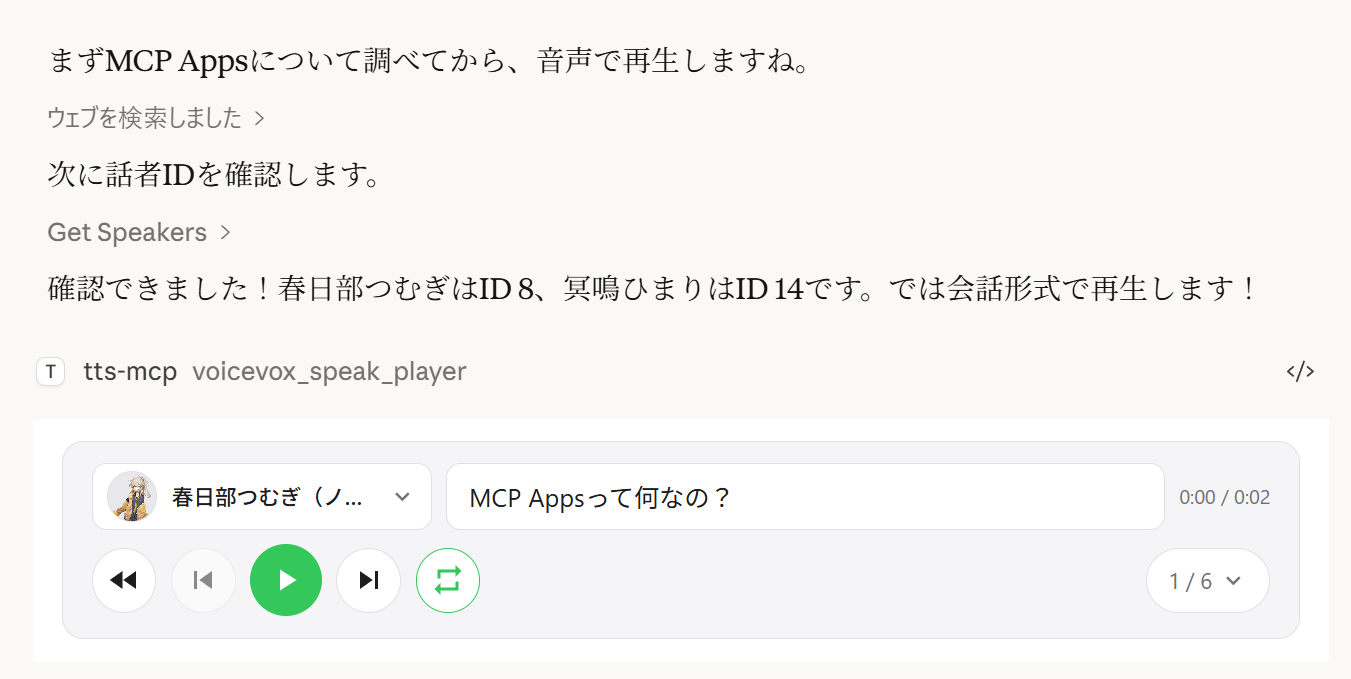
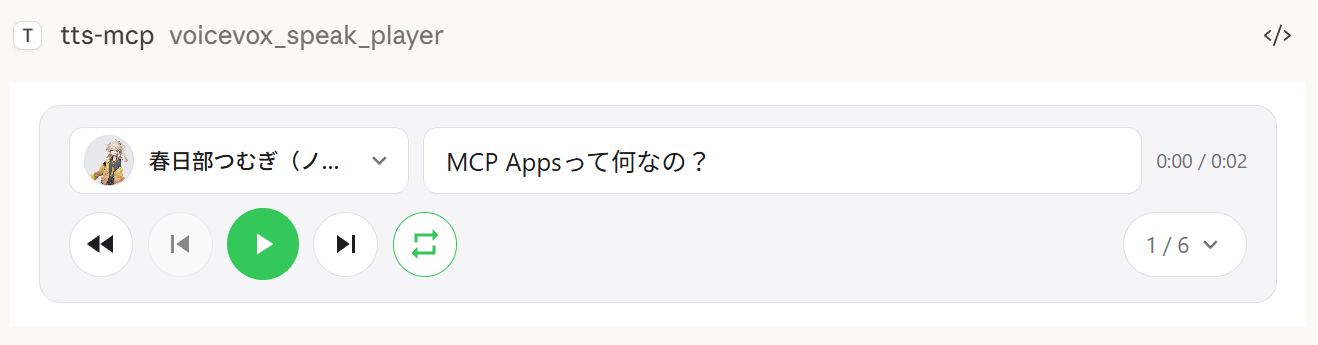
La herramienta voicevox_speak_player utiliza MCP Apps para mostrar un reproductor de audio interactivo directamente en el chat. A diferencia de la herramienta estándar voicevox_speak que reproduce el audio en el servidor, el audio se reproduce en el lado del cliente (en el navegador/aplicación) — no se necesita ningún dispositivo de audio en el servidor.
Reproducción en el lado del cliente — El audio se reproduce en el chat de Claude Desktop, no en el servidor. Funciona incluso en conexiones remotas.
Controles de reproducción/pausa — Controles completos de reproducción integrados en la conversación
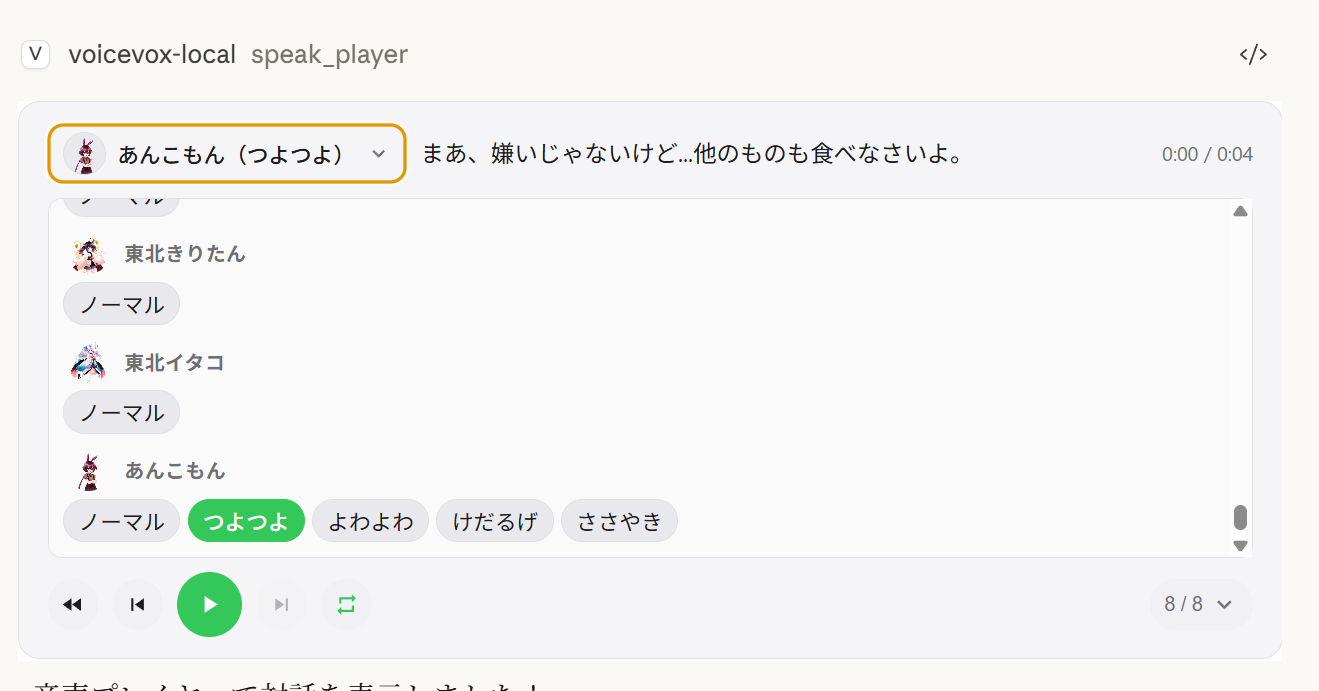
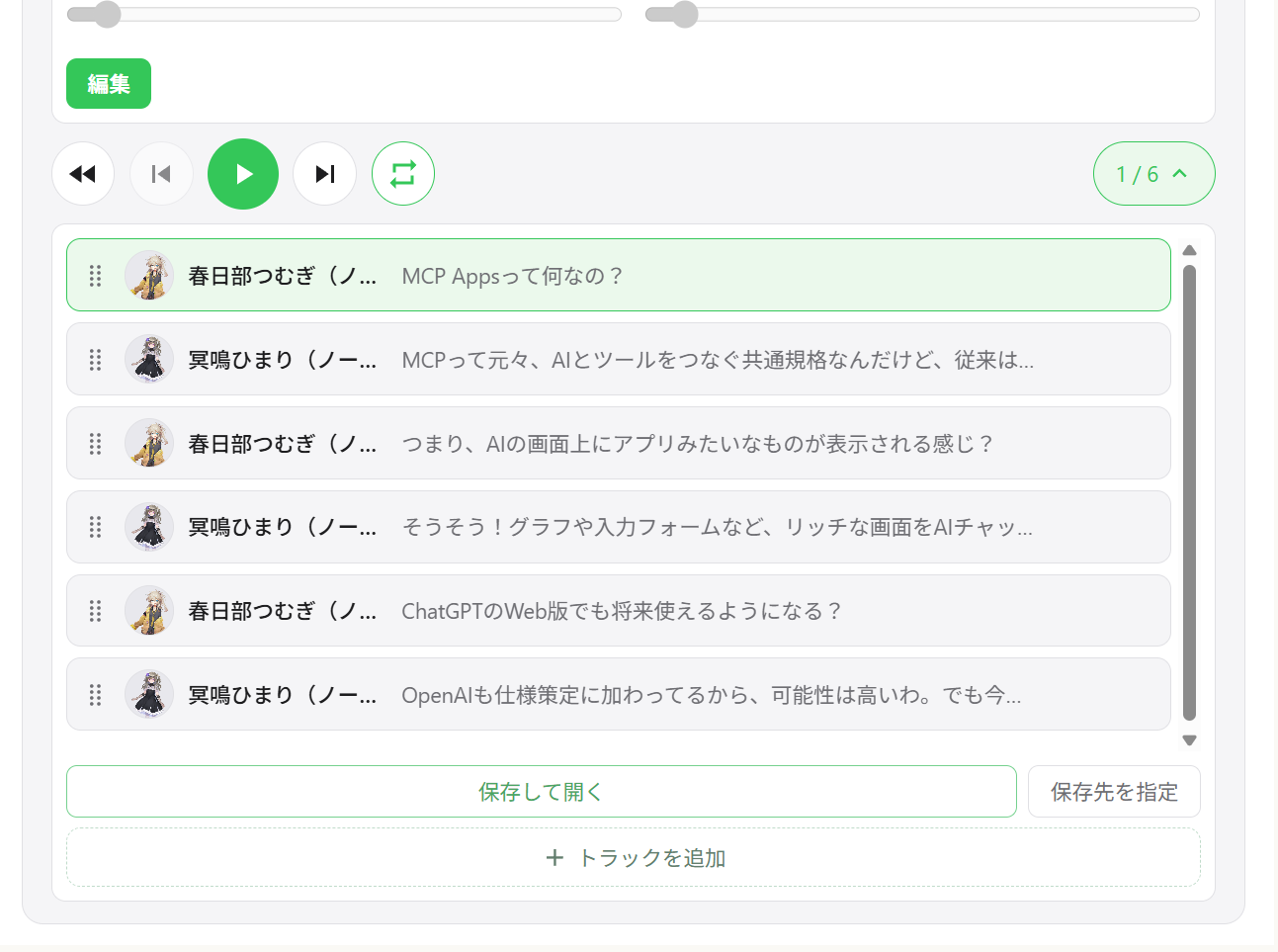
Diálogo con múltiples hablantes — Reproducción secuencial de varios hablantes en un solo reproductor con navegación entre pistas
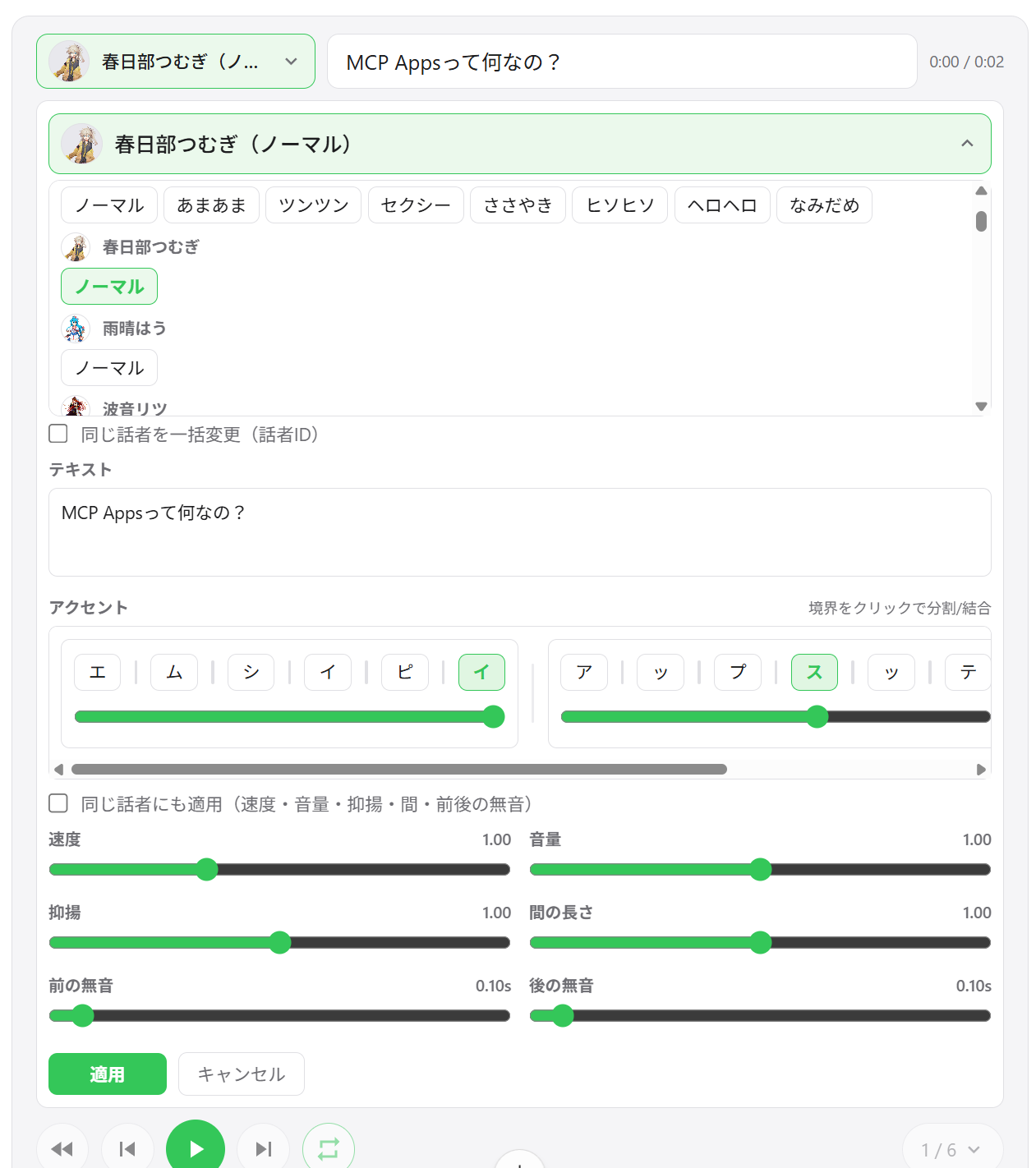
Cambio de hablante — Cambia la voz de cualquier segmento directamente desde la interfaz del reproductor
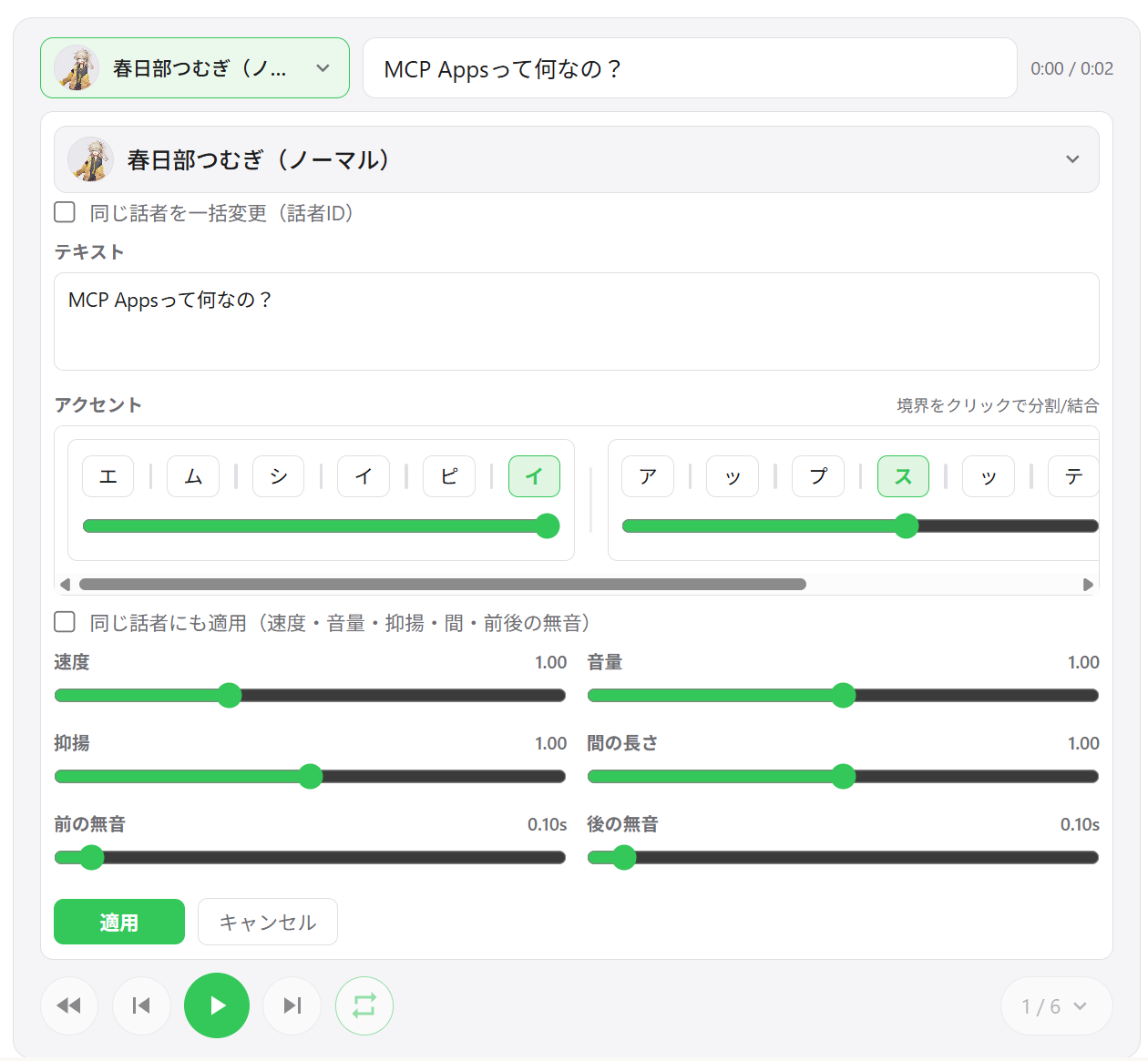
Edición de segmentos — Ajusta velocidad, volumen, entonación, duración de pausas y silencios previos/posteriores por segmento
Edición de frases de acento — Edita posiciones de acento y tono de mora directamente en la interfaz
Añadir / eliminar / reordenar segmentos — Reordenamiento de pistas con arrastrar y soltar; añade nuevos segmentos en línea
Exportación WAV — Guarda todas las pistas como archivos WAV numerados y abre la carpeta de salida automáticamente
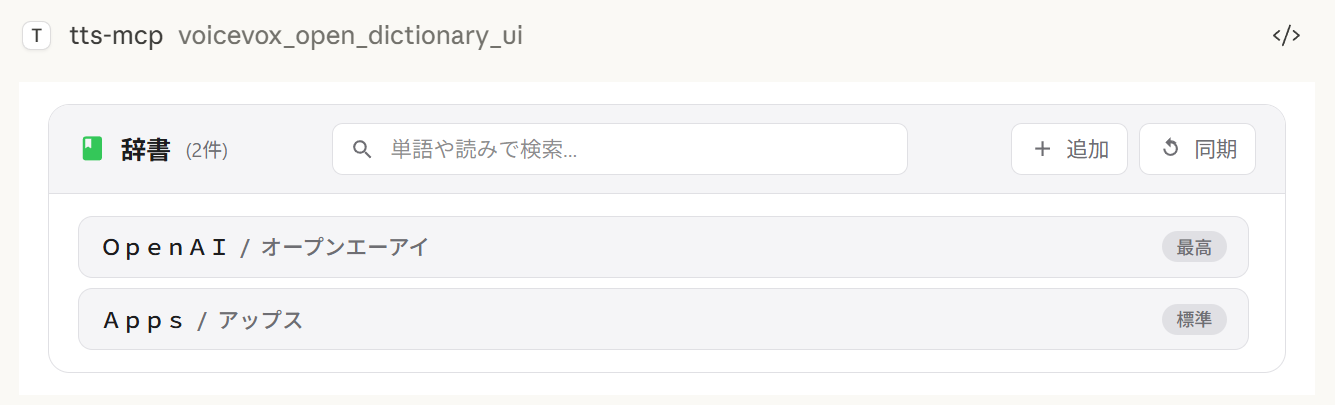
Gestor de diccionario de usuario — Añade, edita y elimina palabras del diccionario de usuario de VOICEVOX con reproducción de vista previa
Restauración de estado entre sesiones — El estado del reproductor se guarda en el servidor; al reabrir el chat se restauran las pistas anteriores
Comportamiento de exportación según el entorno:
Guardar y abrir siempre exporta archivos WAV. Si no se admite abrir el explorador de archivos, la exportación aún se realiza y la ruta de guardado se muestra en la interfaz.
Elegir carpeta de salida utiliza un selector de directorio nativo en Windows/macOS. En entornos no compatibles, esta acción se degrada al directorio de exportación predeterminado.
Reproducción con múltiples hablantes | Lista de pistas | Edición de segmentos |
|
|
|
Selección de hablante | Gestor de diccionario | Exportación WAV |
|
|
|
Cliente | Conexión | Notas |
ChatGPT | HTTP (remoto) | Requiere |
Claude Desktop | stdio (local) | Funciona sin configuración adicional |
Claude Desktop | HTTP (vía mcp-remote) | No configurar |
Nota:
speak_playerrequiere un host que admita MCP Apps. En hosts sin soporte de MCP Apps, la herramienta no está disponible y se puede usarspeak(reproducción en el servidor) en su lugar.
Herramienta | Descripción |
| Crea una nueva sesión de reproductor y muestra la interfaz. Devuelve |
| Actualiza todos los segmentos de un reproductor existente (nuevo |
| Lee el estado actual del reproductor (paginado) para ajustes de IA. |
| Abre la interfaz del gestor de diccionario de usuario. |
Node.js 20.0.0 o superior (o Bun) o Docker
Motor VOICEVOX (debe estar en ejecución; incluido en Docker Compose)
ffplay (opcional, recomendado — no necesario con Docker)
ffplay es un reproductor ligero incluido con FFmpeg que admite reproducción desde stdin. Cuando está disponible, habilita automáticamente la reproducción en streaming de baja latencia.
💡 FFplay es opcional. Sin él, la reproducción se degrada a reproducción basada en archivos temporales (Windows: PowerShell, macOS: afplay, Linux: aplay, etc.).
Configuración fácil: instalación en una línea para cada sistema operativo (ver pasos a continuación)
Requerido: ffplay debe estar en PATH (reinicia terminal/aplicaciones después de la instalación)
Ejemplos de instalación:
Windows (cualquiera de estos)
Winget: winget install --id=Gyan.FFmpeg -e
Chocolatey: choco install ffmpeg
Scoop: scoop install ffmpeg
Compilaciones oficiales: Descargar de https://www.gyan.dev/ffmpeg/builds/ o https://github.com/BtbN/FFmpeg-Builds y añadir la carpeta bin a PATH
macOS
Homebrew: brew install ffmpeg
Linux
Debian/Ubuntu: sudo apt-get update && sudo apt-get install -y ffmpeg
Fedora: sudo dnf install -y ffmpeg
Arch: sudo pacman -S ffmpeg
Configuración de PATH:
Windows: Añadir ...\ffmpeg\bin a las variables de entorno, luego reiniciar PowerShell/terminal y el editor (Claude/VS Code, etc.)
Verificar: powershell -c "$env:Path" debería incluir la ruta de ffmpeg
macOS/Linux: Normalmente se detecta automáticamente. Verificar con echo $PATH si es necesario, reiniciar el shell.
Clientes MCP (Claude Desktop/Code): Reiniciar la aplicación para recargar PATH.
Verificación:
ffplay -versionSi se muestra la información de versión, la instalación está completa. CLI/MCP detectará automáticamente ffplay y usará reproducción en streaming desde stdin.
1. Iniciar el motor VOICEVOX
2. Añadir al archivo de configuración de Claude Desktop
Ubicación del archivo de configuración:
Windows: %APPDATA%\Claude\claude_desktop_config.json
macOS: ~/Library/Application Support/Claude/claude_desktop_config.json
{
  "mcpServers": {
    "tts-mcp": {
      "command": "npx",
      "args": ["-y", "@kajidog/mcp-tts-voicevox"]
    }
  }
}
💡 Si usas Bun, simplemente reemplaza
npxconbunx:"command": "bunx", "args": ["@kajidog/mcp-tts-voicevox"]
3. Reiniciar Claude Desktop
¡Eso es todo! ¡Pídele a Claude que "salude" y hablará!
Puedes ejecutar tanto el servidor MCP como el motor VOICEVOX con un solo comando usando Docker Compose. No se requiere instalación de Node.js ni VOICEVOX.
1. Iniciar los contenedores
docker compose up -dEsto inicia el motor VOICEVOX y el servidor MCP (modo HTTP en el puerto 3000).
2. Añadir al archivo de configuración de Claude Desktop (usando mcp-remote)
{
  "mcpServers": {
    "tts-mcp": {
      "command": "npx",
      "args": ["-y", "mcp-remote", "http://localhost:3000/mcp"]
    }
  }
}
3. Reiniciar Claude Desktop
Seguridad (Docker):
docker-compose.ymlpublica el puerto 3000 sin autenticación.MCP_ALLOWED_HOSTSno es una defensa aquí — los clientes que no son navegadores pueden enviar cualquier cabeceraHostque deseen — por lo que cualquiera que pueda alcanzar el puerto puede usar el servidor. ConfiguraMCP_API_KEY(y envíalo comoX-API-Key), o mantén el puerto vinculado a una red de confianza / solo localhost. Considera también configurarVOICEVOX_ALLOWED_OUTPUT_DIRSpara limitar dónde pueden escribir las herramientas de escritura de archivos.
Limitaciones (Docker): El contenedor Docker no tiene dispositivo de audio, por lo que la herramienta
voicevox_speak(reproducción en el servidor) está deshabilitada por defecto. Usavoicevox_speak_playeren su lugar — reproduce audio en el lado del cliente (en Claude Desktop) y funciona sin ningún dispositivo de audio en el servidor. Ver Reproductor de audio en la interfaz para más detalles.
voicevox_speak — Texto a vozLa función principal que se puede llamar desde Claude.
Parámetro | Descripción | Predeterminado |
| Texto a hablar (varios segmentos separados por nuevas líneas) | Requerido |
| Notación de acento en línea (tiene prioridad sobre | (sin configurar) |
| ID del hablante | 1 |
| Velocidad de reproducción | 1.0 |
| Reproducción inmediata (limpia la cola) | true |
| Esperar a que comience la reproducción | false |
| Esperar a que termine la reproducción | false |
immediate/waitForStart/waitForEnddesaparecen del esquema de la herramienta cuando se configura la opción--restrict-*correspondiente.
Ejemplos:
// Simple text
{ "text": "Hello" }

// Specify speaker
{ "text": "Hello", "speaker": 3 }

// Different speakers per segment
{ "text": "1:Hello\n3:Nice weather today" }

// Wait for completion (synchronous processing)
{ "text": "Wait for this to finish before continuing", "waitForEnd": true }

// Control the accent with inline notation (`,` separates phrases, `[` marks the accent)
{ "text": "こんにちは世界", "phrases": "コン[ニ]チワ,セ[カ]イ" }phrases (y el campo de pronunciación de las herramientas de diccionario de usuario) acepta katakana con un marcador de acento en línea:
, separa frases de acento — コン[ニ]チワ,セ[カ]イ
[ marca dónde cae el tono después; コン[ニ]チワ significa que el acento cae en ニ
Omitir los corchetes para una frase mantiene la estimación de acento propia de VOICEVOX
text sigue siendo requerido incluso cuando se proporciona phrases — pasa el texto plano allí y la notación es lo que se habla.
voicevox_get_accent_phrases devuelve la misma notación para un texto dado, para que puedas leer el acento estimado, ajustar el corchete y volver a pasarlo a phrases.
Herramienta | Descripción |
| Hablar con reproductor de audio en la interfaz (ver Herramientas MCP del reproductor) |
| Comprobar conexión con el motor VOICEVOX |
| Obtener lista de hablantes disponibles |
| Detener reproducción y limpiar cola |
| Generar archivo de audio |
Herramientas de diccionario de usuario (grupo dictionary):
Herramienta | Descripción |
| Obtener lectura y posiciones de acento de un texto como notación en línea |
| Listar palabras del diccionario de usuario (filtro + paginación) |
| Añadir una palabra (la pronunciación acepta notación de acento en línea) |
| Actualizar una palabra (los campos omitidos mantienen su valor) |
| Eliminar una palabra por UUID |
| Añadir varias palabras a la vez |
| Actualizar varias palabras a la vez |
Cualquier herramienta puede desactivarse individualmente con --disable-tools / VOICEVOX_DISABLED_TOOLS, o por grupo con --disable-groups / VOICEVOX_DISABLED_GROUPS.
Variable | Description | Default |
| URL del motor |
|
| ID de hablante predeterminado |
|
| Velocidad de reproducción |
|
| Reintentos para solicitudes API fallidas (0 desactiva) |
|
| Retardo inicial de reintento en ms (retroceso exponencial) |
|
| Tiempo de espera para una sola solicitud API de VOICEVOX en ms. Auméntalo para texto largo o un motor lento |
|
Variable | Description | Default |
| Reproducción en streaming (requiere |
|
| Silencio final por segmento en segundos. Auméntalo para una pausa más larga entre segmentos en cola (también protege el final del habla de ser cortado con la reproducción en streaming) | predeterminado del motor |
| Reproducción inmediata |
|
| Esperar al inicio de la reproducción |
|
| Esperar al final de la reproducción |
|
Restringir que la IA especifique ciertas opciones.
Variable | Description |
| Restringir la opción |
| Restringir la opción |
| Restringir la opción |
# Disable individual tools
export VOICEVOX_DISABLED_TOOLS=speak_player,synthesize_file

# Disable a built-in group of tools
export VOICEVOX_DISABLED_GROUPS=player

# Combine groups and individual tools
export VOICEVOX_DISABLED_GROUPS=dictionary
export VOICEVOX_DISABLED_TOOLS=synthesize_file
Grupos integrados para VOICEVOX_DISABLED_GROUPS / --disable-groups:
Group | Tools |
|
|
|
|
|
|
|
|
Variable | Description | Default |
| Dominio del widget para el reproductor de UI (requerido para ChatGPT, p. ej. | (sin definir) |
| Reproducción automática de audio en el reproductor de UI |
|
| Habilitar exportación (descarga) de pistas desde el reproductor de UI ( |
|
| Directorio de salida predeterminado para pistas exportadas (también se usa como respaldo cuando el selector de carpetas no está disponible) |
|
| Directorio para archivos de caché del reproductor ( |
|
| Habilitar caché de audio persistente en disco ( |
|
| Retención de caché de audio en días ( |
|
| Límite de tamaño de caché de audio en MB ( |
|
| Ruta del JSON de estado del reproductor persistido |
|
Variable | Description | Default |
| Directorios separados por comas en los que las herramientas de escritura de archivos ( | (sin definir) |
Variable | Description | Default |
| Habilitar modo HTTP |
|
| Puerto HTTP |
|
| Host HTTP |
|
| Hosts permitidos (separados por comas) |
|
| Orígenes permitidos (separados por comas) |
|
| Clave API requerida para | (sin definir) |
Los argumentos de línea de comandos tienen prioridad sobre las variables de entorno.
La lista completa y actualizada de opciones está siempre disponible mediante npx @kajidog/mcp-tts-voicevox --help.
# Basic settings
npx @kajidog/mcp-tts-voicevox --url http://192.168.1.100:50021 --speaker 3 --speed 1.2

# HTTP mode
npx @kajidog/mcp-tts-voicevox --http --port 8080

# With restrictions
npx @kajidog/mcp-tts-voicevox --restrict-immediate --restrict-wait-for-end

# Disable individual tools
npx @kajidog/mcp-tts-voicevox --disable-tools speak_player,synthesize_file

# Disable a tool group
npx @kajidog/mcp-tts-voicevox --disable-groups player
Argumento | Descripción |
| Mostrar ayuda |
| Mostrar versión |
| Generar |
| Ruta al archivo de configuración |
| URL del motor VOICEVOX |
| ID de hablante predeterminado |
| Velocidad de reproducción |
| Reproducción en streaming |
| Silencio final por segmento (pausa entre segmentos en cola) |
| Reproducción inmediata |
| Esperar al inicio |
| Esperar al final |
| Restringir reproducción inmediata |
| Restringir waitForStart |
| Restringir waitForEnd |
| Directorios en los que las herramientas de escritura de archivos pueden escribir (separados por comas; sin definir = sin restricción) |
| Deshabilitar herramientas (nombres de herramientas separados por comas) |
| Deshabilitar grupos de herramientas: |
| Reproducción automática en el reproductor de la interfaz |
| Habilitar/deshabilitar la exportación de pistas (descarga) en el reproductor de la interfaz |
| Directorio de salida predeterminado para las pistas exportadas |
| Directorio de caché del reproductor |
| Ruta del archivo de estado persistente del reproductor |
| Habilitar/deshabilitar la caché de audio en disco para el reproductor |
| Días de retención de la caché de audio ( |
| Límite de tamaño de la caché de audio en MB ( |
| Modo HTTP |
| Puerto HTTP |
| Host HTTP |
| Hosts permitidos (separados por comas) |
| Orígenes permitidos (separados por comas) |
| Clave API requerida para |
Puede usar un archivo de configuración JSON en lugar de (o además de) las variables de entorno y los argumentos de la CLI. Esto es útil cuando tiene muchas opciones que configurar.
Orden de prioridad: Argumentos de la CLI > Variables de entorno > Archivo de configuración > Valores predeterminados
npx @kajidog/mcp-tts-voicevox --initEsto crea .voicevoxrc.json en el directorio actual con toda la configuración predeterminada. Edítelo según sea necesario.
npx @kajidog/mcp-tts-voicevox --config ./my-config.jsonO mediante una variable de entorno:
VOICEVOX_CONFIG=./my-config.json npx @kajidog/mcp-tts-voicevox.voicevoxrc.json{
"url": "http://192.168.1.50:50021",
"speaker": 3,
"speed": 1.2,
"http": true,
"port": 8080,
"disable-tools": ["synthesize_file"],
"disable-groups": ["dictionary"]
}Las claves pueden escribirse en kebab-case (use-streaming), camelCase (useStreaming) o con nombres de clave internos (defaultSpeaker). Si .voicevoxrc.json existe en el directorio actual, se carga automáticamente.
Para conexiones remotas:
Iniciar el servidor:
# Linux/macOS
MCP_HTTP_MODE=true MCP_HTTP_PORT=3000 npx @kajidog/mcp-tts-voicevox

# Windows PowerShell
$env:MCP_HTTP_MODE='true'; $env:MCP_HTTP_PORT='3000'; npx @kajidog/mcp-tts-voicevox
Configuración de Claude Desktop (usando mcp-remote):
{
  "mcpServers": {
    "tts-mcp-proxy": {
      "command": "npx",
      "args": ["-y", "mcp-remote", "http://localhost:3000/mcp"]
    }
  }
}Con Claude Code, puede configurar diferentes hablantes predeterminados por proyecto usando encabezados personalizados en .mcp.json:
Encabezado | Descripción |
| ID de hablante predeterminado para este proyecto |
| Clave API cuando |
Ejemplo de .mcp.json:
{
  "mcpServers": {
    "tts": {
      "type": "http",
      "url": "http://localhost:3000/mcp",
      "headers": {
        "X-Voicevox-Speaker": "113",
        "X-API-Key": "your-api-key"
      }
    }
  }
}
Esto permite que cada proyecto use un personaje de voz diferente automáticamente.
Orden de prioridad:
Parámetro speaker explícito en la llamada a la herramienta (más alto)
Valor predeterminado del proyecto desde el encabezado X-Voicevox-Speaker
Configuración global VOICEVOX_DEFAULT_SPEAKER (más bajo)
Conexión desde WSL a un servidor MCP que se ejecuta en Windows:
# Method 1: From default gateway
ip route show | grep -oP 'default via \K[\d.]+'
# Usually in the format 172.x.x.1

# Method 2: From /etc/resolv.conf (WSL2)
cat /etc/resolv.conf | grep nameserver | awk '{print $2}'Agregue la IP de la puerta de enlace de WSL a MCP_ALLOWED_HOSTS para permitir el acceso desde WSL:
$env:MCP_HTTP_MODE='true'
$env:MCP_ALLOWED_HOSTS='localhost,127.0.0.1,172.29.176.1'
npx @kajidog/mcp-tts-voicevox
O con argumentos de la CLI:
npx @kajidog/mcp-tts-voicevox --http --allowed-hosts "localhost,127.0.0.1,172.29.176.1"{
"mcpServers": {
"tts": {
"type": "http",
"url": "http://172.29.176.1:3000/mcp"
}
}
}⚠️ Dentro de WSL,
localhostse refiere al propio WSL. Use la IP de la puerta de enlace de WSL para acceder al host Windows.
Para usar con ChatGPT, implemente el servidor MCP en modo HTTP en la nube con acceso a un motor VOICEVOX.
Implemente con Docker en Render, Railway, etc. (se incluye el Dockerfile).
Ejecute el motor VOICEVOX localmente y expóngalo mediante ngrok, o impleméntelo junto con el servidor MCP.
Variable | Ejemplo | Descripción |
|
| URL del motor VOICEVOX |
|
| Habilitar el modo HTTP |
|
| Nombre de host implementado |
|
| Dominio del widget para el reproductor de la interfaz (requerido para ChatGPT) |
|
| Deshabilitar la reproducción del lado del servidor (sin dispositivo de audio) |
|
| Deshabilitar la función de exportación (los archivos no se pueden descargar desde la nube) |
Vaya a Configuración de ChatGPT → Conectores → Agregar URL del servidor MCP (https://your-app.onrender.com/mcp).
Los pasos básicos son los mismos que con ChatGPT, pero el valor de VOICEVOX_PLAYER_DOMAIN es diferente.
Claude Web requiere que ui.domain sea un dominio dedicado basado en hash. Calcúlelo con el siguiente comando:
node -e "console.log(require('crypto').createHash('sha256').update('Your MCP server URL').digest('hex').slice(0,32)+'.claudemcpcontent.com')"Ejemplo: si la URL de su servidor MCP es https://your-app.onrender.com/mcp:
node -e "console.log(require('crypto').createHash('sha256').update('https://your-app.onrender.com/mcp').digest('hex').slice(0,32)+'.claudemcpcontent.com')"
# Example output: 48fb73a6...claudemcpcontent.com
Establezca este valor de salida como VOICEVOX_PLAYER_DOMAIN.
Nota: Dado que ChatGPT y Claude Web requieren valores diferentes de
VOICEVOX_PLAYER_DOMAIN, una sola instancia no puede atender a ambos clientes simultáneamente. Implemente instancias separadas para cada uno, o cambie la variable de entorno según el cliente de destino.
1. Verifique si el motor VOICEVOX está en ejecución
curl http://localhost:50021/speakers2. Verifique las herramientas de reproducción específicas de la plataforma
SO | Herramienta requerida |
Linux | Una de |
macOS |
|
Windows | PowerShell (preinstalado) |
Verifique la instalación del paquete: npm list -g @kajidog/mcp-tts-voicevox
Verifique la sintaxis JSON en el archivo de configuración
Reinicie el cliente
Paquete | Descripción |
| Servidor MCP ( |
Biblioteca cliente VOICEVOX de propósito general (se puede usar de forma independiente) | |
| Infraestructura MCP compartida (esquema de configuración, lanzador HTTP/stdio). No publicada: se incluye en el servidor |
| Interfaz de reproductor de audio basada en React, incluida en un único archivo HTML. No publicada |
git clone https://github.com/kajidog/mcp-tts-voicevox.git
cd mcp-tts-voicevox
pnpm installEl administrador de paquetes es pnpm (npm / yarn no son compatibles).
Comando | Descripción |
| Compilar todos los paquetes |
| Ejecutar pruebas |
| Ejecutar lint (una sola pasada de Biome sobre todo el workspace) |
| Verificar tipos de cada paquete |
| Añadir un changeset para un cambio visible para el usuario |
Los servidores de desarrollo viven en el paquete del servidor, así que ejecútalos con un filtro:
Comando | Descripción |
| Iniciar servidor de desarrollo (stdio) |
| Iniciar servidor de desarrollo en modo HTTP |
| Iniciar servidor de desarrollo con Bun |
| Iniciar servidor de desarrollo HTTP con Bun |
ISC
Generate a query for voice synthesis
| Name | Required | Description | Default |
|---|---|---|---|
| text | Yes | Text for voice synthesis | |
| speaker | No | Default speaker ID (optional) | |
| speedScale | No | Playback speed (optional, default from environment) |
Does the description disclose side effects, auth requirements, rate limits, or destructive behavior?
No annotations are provided, so the description carries full burden. 'Generate a query' suggests this creates some intermediate representation, but doesn't disclose what happens next - does it return a query ID for later use? Does it validate parameters? Is it read-only or has side effects? The description lacks behavioral context about permissions, rate limits, or what 'query' means operationally.
Agents need to know what a tool does to the world before calling it. Descriptions should go beyond structured annotations to explain consequences.
Is the description appropriately sized, front-loaded, and free of redundancy?
The description is a single, efficient sentence with zero wasted words. It's appropriately sized for a tool with good schema coverage and gets straight to the point without unnecessary elaboration. Every word earns its place in conveying the core purpose.
Shorter descriptions cost fewer tokens and are easier for agents to parse. Every sentence should earn its place.
Given the tool's complexity, does the description cover enough for an agent to succeed on first attempt?
For a tool with no annotations and no output schema, the description is insufficient. It doesn't explain what the generated query is used for, what format it returns, or how it differs from actual synthesis tools. Given the complexity of voice synthesis workflows and multiple sibling tools, more context about this tool's role in the ecosystem is needed.
Complex tools with many parameters or behaviors need more documentation. Simple tools need less. This dimension scales expectations accordingly.
Does the description clarify parameter syntax, constraints, interactions, or defaults beyond what the schema provides?
Schema description coverage is 100%, so the schema already documents all three parameters (text, speaker, speedScale) with their descriptions. The tool description adds no additional parameter semantics beyond what's in the schema. The baseline score of 3 reflects adequate but minimal value addition given the comprehensive schema coverage.
Input schemas describe structure but not intent. Descriptions should explain non-obvious parameter relationships and valid value ranges.
Does the description clearly state what the tool does and how it differs from similar tools?
The description states 'Generate a query for voice synthesis' which provides a basic purpose (verb: generate, resource: query for voice synthesis). However, it's vague about what the query actually does - is it for previewing, testing, or preparing synthesis? It doesn't distinguish from sibling tools like 'synthesize_file' or 'speak' which also relate to voice synthesis.
Agents choose between tools based on descriptions. A clear purpose with a specific verb and resource helps agents select the right tool.
Does the description explain when to use this tool, when not to, or what alternatives exist?
The description provides no guidance on when to use this tool versus alternatives. With sibling tools like 'synthesize_file' and 'speak' that also handle voice synthesis, there's no indication whether this tool is for preparation, testing, or a different phase of the synthesis workflow. No context about prerequisites or exclusions is provided.
Agents often have multiple tools that could apply. Explicit usage guidance like "use X instead of Y when Z" prevents misuse.
Get detail of a speaker by id
| Name | Required | Description | Default |
|---|---|---|---|
| uuid | Yes | Speaker UUID (speaker uuid) |
Does the description disclose side effects, auth requirements, rate limits, or destructive behavior?
No annotations are provided, so the description carries the full burden of behavioral disclosure. It mentions 'Get detail' but doesn't specify if this is a read-only operation, what permissions are needed, error handling, or response format. This leaves significant gaps for a tool that likely interacts with a speaker database.
Agents need to know what a tool does to the world before calling it. Descriptions should go beyond structured annotations to explain consequences.
Is the description appropriately sized, front-loaded, and free of redundancy?
The description is a single, efficient sentence with no wasted words. It's front-loaded with the core action ('Get detail'), making it easy to scan and understand quickly.
Shorter descriptions cost fewer tokens and are easier for agents to parse. Every sentence should earn its place.
Given the tool's complexity, does the description cover enough for an agent to succeed on first attempt?
Given no annotations and no output schema, the description is incomplete. It doesn't explain what 'detail' includes (e.g., speaker attributes, capabilities), potential errors, or how this fits with sibling tools like 'synthesize_file'. For a tool with one parameter but unknown behavioral traits, more context is needed.
Complex tools with many parameters or behaviors need more documentation. Simple tools need less. This dimension scales expectations accordingly.
Does the description clarify parameter syntax, constraints, interactions, or defaults beyond what the schema provides?
Schema description coverage is 100%, with the parameter 'uuid' documented as 'Speaker UUID (speaker uuid)'. The description adds no additional meaning beyond this, such as format examples or where to obtain the UUID. Baseline 3 is appropriate since the schema does the heavy lifting.
Input schemas describe structure but not intent. Descriptions should explain non-obvious parameter relationships and valid value ranges.
Does the description clearly state what the tool does and how it differs from similar tools?
The description clearly states the verb ('Get detail') and resource ('speaker'), making the purpose understandable. However, it doesn't differentiate from sibling tools like 'get_speakers' (which likely lists speakers) or explain what 'detail' entails beyond the ID lookup.
Agents choose between tools based on descriptions. A clear purpose with a specific verb and resource helps agents select the right tool.
Does the description explain when to use this tool, when not to, or what alternatives exist?
No guidance is provided on when to use this tool versus alternatives. For example, it doesn't clarify if this should be used after 'get_speakers' to fetch more information or in what contexts (e.g., before synthesis). The description only states the basic function without context.
Agents often have multiple tools that could apply. Explicit usage guidance like "use X instead of Y when Z" prevents misuse.
Get a list of available speakers
| Name | Required | Description | Default |
|---|---|---|---|
No parameters | |||
Does the description disclose side effects, auth requirements, rate limits, or destructive behavior?
With no annotations provided, the description carries the full burden of behavioral disclosure. It states the tool retrieves a list, implying a read-only operation, but doesn't cover aspects like whether it requires authentication, has rate limits, returns paginated results, or what format the list is in. For a tool with zero annotation coverage, this is a significant gap in transparency.
Agents need to know what a tool does to the world before calling it. Descriptions should go beyond structured annotations to explain consequences.
Is the description appropriately sized, front-loaded, and free of redundancy?
The description is a single, efficient sentence ('Get a list of available speakers') that is front-loaded and wastes no words. It directly states the tool's purpose without unnecessary elaboration, making it highly concise and well-structured for its simplicity.
Shorter descriptions cost fewer tokens and are easier for agents to parse. Every sentence should earn its place.
Given the tool's complexity, does the description cover enough for an agent to succeed on first attempt?
Given the tool's complexity (simple list retrieval) but lack of annotations and output schema, the description is incomplete. It doesn't explain what the list contains, how it's formatted, or any behavioral traits. For a tool with no structured data beyond the input schema, more context is needed to be fully helpful to an agent.
Complex tools with many parameters or behaviors need more documentation. Simple tools need less. This dimension scales expectations accordingly.
Does the description clarify parameter syntax, constraints, interactions, or defaults beyond what the schema provides?
The input schema has 0 parameters with 100% coverage, so the schema fully documents the lack of inputs. The description doesn't add parameter details beyond this, which is appropriate. Since there are no parameters, the baseline is 4, as the description doesn't need to compensate for any gaps.
Input schemas describe structure but not intent. Descriptions should explain non-obvious parameter relationships and valid value ranges.
Does the description clearly state what the tool does and how it differs from similar tools?
The description states the tool's purpose ('Get a list of available speakers'), which is clear but vague. It specifies the verb ('Get') and resource ('speakers'), but doesn't distinguish it from sibling tools like 'get_speaker_detail' or explain what 'available' means in this context. This is adequate but has clear gaps in specificity.
Agents choose between tools based on descriptions. A clear purpose with a specific verb and resource helps agents select the right tool.
Does the description explain when to use this tool, when not to, or what alternatives exist?
The description provides no guidance on when to use this tool versus alternatives. It doesn't mention sibling tools like 'get_speaker_detail' for detailed information or 'synthesize_file' for synthesis operations, nor does it specify prerequisites or contexts for usage. This leaves the agent without explicit or implied usage instructions.
Agents often have multiple tools that could apply. Explicit usage guidance like "use X instead of Y when Z" prevents misuse.
Check if VOICEVOX Engine is running and reachable
| Name | Required | Description | Default |
|---|---|---|---|
No parameters | |||
Does the description disclose side effects, auth requirements, rate limits, or destructive behavior?
No annotations are provided, so the description carries the full burden of behavioral disclosure. It states the tool checks if the engine is 'running and reachable,' implying a read-only, non-destructive operation, but doesn't detail what happens on failure (e.g., error responses), latency, or any side effects. For a tool with zero annotation coverage, this leaves gaps in understanding its behavior.
Agents need to know what a tool does to the world before calling it. Descriptions should go beyond structured annotations to explain consequences.
Is the description appropriately sized, front-loaded, and free of redundancy?
The description is a single, efficient sentence: 'Check if VOICEVOX Engine is running and reachable.' It is front-loaded with the core purpose, has no wasted words, and is appropriately sized for a simple tool. Every part of the sentence earns its place by conveying essential information.
Shorter descriptions cost fewer tokens and are easier for agents to parse. Every sentence should earn its place.
Given the tool's complexity, does the description cover enough for an agent to succeed on first attempt?
Given the tool's low complexity (0 parameters, no output schema, no annotations), the description is minimally adequate. It states what the tool does but lacks details on usage context, error handling, or return values. Without an output schema, it doesn't explain what 'check' returns (e.g., status, boolean), leaving some gaps for an agent to understand fully.
Complex tools with many parameters or behaviors need more documentation. Simple tools need less. This dimension scales expectations accordingly.
Does the description clarify parameter syntax, constraints, interactions, or defaults beyond what the schema provides?
The tool has 0 parameters, and the input schema has 100% description coverage (though empty). The description doesn't need to explain parameters, so it naturally adds no value beyond the schema. A baseline score of 4 is appropriate for zero-parameter tools, as there's no parameter information to compensate for.
Input schemas describe structure but not intent. Descriptions should explain non-obvious parameter relationships and valid value ranges.
Does the description clearly state what the tool does and how it differs from similar tools?
The description clearly states the tool's purpose: 'Check if VOICEVOX Engine is running and reachable.' It uses a specific verb ('Check') and identifies the target resource ('VOICEVOX Engine'), making it easy to understand. However, it doesn't explicitly differentiate from sibling tools like 'get_speakers' or 'synthesize_file', which serve different purposes but also interact with VOICEVOX.
Agents choose between tools based on descriptions. A clear purpose with a specific verb and resource helps agents select the right tool.
Does the description explain when to use this tool, when not to, or what alternatives exist?
No guidance is provided on when to use this tool versus alternatives. The description doesn't mention prerequisites (e.g., before using other tools), exclusions, or contextual cues. For example, it doesn't specify if this should be called first to verify connectivity before invoking 'speak' or 'synthesize_file'.
Agents often have multiple tools that could apply. Explicit usage guidance like "use X instead of Y when Z" prevents misuse.
Convert text to speech and play it. Text is split by line breaks (\n) into separate speech units. Each line is processed as an independent audio segment.
| Name | Required | Description | Default |
|---|---|---|---|
| text | Yes | Text split by line breaks (\n). IMPORTANT: Each line = one speech unit (processed and played separately). Keep the FIRST LINE SHORT for quick playback start - audio begins as soon as the first line is synthesized. Example: "Hi!\nThis is a longer explanation that follows." Optional speaker prefix per line: "1:Hello\n2:World" | |
| query | No | Voice synthesis query | |
| speaker | No | Default speaker ID (optional) | |
| speedScale | No | Playback speed (optional, default from environment) | |
| immediate | No | If true, stops current playback and plays new audio immediately. If false, waits for current playback to finish. Default depends on environment variable. | |
| waitForStart | No | Wait for playback to start (optional, default: false) | |
| waitForEnd | No | Wait for playback to end (optional, default: false) |
Does the description disclose side effects, auth requirements, rate limits, or destructive behavior?
With no annotations provided, the description carries full burden and does well by disclosing key behavioral traits: text is split by line breaks into separate speech units, each line processed independently, and the first line should be short for quick playback start. It doesn't mention error handling, rate limits, or authentication needs, but covers core playback behavior adequately.
Agents need to know what a tool does to the world before calling it. Descriptions should go beyond structured annotations to explain consequences.
Is the description appropriately sized, front-loaded, and free of redundancy?
The description is front-loaded with the core purpose in the first sentence, followed by specific behavioral details in the second. Both sentences earn their place by providing essential information without redundancy. It's appropriately sized for the tool's complexity.
Shorter descriptions cost fewer tokens and are easier for agents to parse. Every sentence should earn its place.
Given the tool's complexity, does the description cover enough for an agent to succeed on first attempt?
Given no annotations and no output schema, the description does well to cover the main behavior and text processing logic. However, it doesn't address potential side effects (e.g., interrupting current playback, which is hinted at in the 'immediate' parameter schema), error cases, or what the tool returns. For a 7-parameter tool with mutation implications, it's good but not fully complete.
Complex tools with many parameters or behaviors need more documentation. Simple tools need less. This dimension scales expectations accordingly.
Does the description clarify parameter syntax, constraints, interactions, or defaults beyond what the schema provides?
Schema description coverage is 100%, so the schema already documents all 7 parameters thoroughly. The description adds minimal parameter semantics beyond the schema—it mentions line break processing and first line optimization, which relates to the 'text' parameter but doesn't significantly enhance understanding of parameters like 'query' or 'speaker'. Baseline 3 is appropriate given high schema coverage.
Input schemas describe structure but not intent. Descriptions should explain non-obvious parameter relationships and valid value ranges.
Does the description clearly state what the tool does and how it differs from similar tools?
The description clearly states the specific action ('Convert text to speech and play it') and resource (audio output), distinguishing it from siblings like 'synthesize_file' (file output) and 'stop_speaker' (playback control). It explicitly mentions text processing by line breaks, which adds specificity beyond the basic function.
Agents choose between tools based on descriptions. A clear purpose with a specific verb and resource helps agents select the right tool.
Does the description explain when to use this tool, when not to, or what alternatives exist?
The description implies usage for text-to-speech playback but doesn't explicitly state when to use this tool versus alternatives like 'synthesize_file' (for file output) or 'generate_query' (possibly for query generation). It provides some context about line break processing but lacks explicit guidance on tool selection scenarios.
Agents often have multiple tools that could apply. Explicit usage guidance like "use X instead of Y when Z" prevents misuse.
Stop current audio playback
| Name | Required | Description | Default |
|---|---|---|---|
| random_string | Yes | Dummy parameter for no-parameter tools |
Does the description disclose side effects, auth requirements, rate limits, or destructive behavior?
With no annotations provided, the description carries full burden but only states the basic action. It does not disclose behavioral traits like whether this requires specific permissions, what happens if no audio is playing, error conditions, or side effects. The description is minimal and lacks necessary context for safe invocation.
Agents need to know what a tool does to the world before calling it. Descriptions should go beyond structured annotations to explain consequences.
Is the description appropriately sized, front-loaded, and free of redundancy?
The description is a single, clear sentence with zero wasted words. It is perfectly front-loaded and appropriately sized for a simple action tool.
Shorter descriptions cost fewer tokens and are easier for agents to parse. Every sentence should earn its place.
Given the tool's complexity, does the description cover enough for an agent to succeed on first attempt?
Given no annotations and no output schema, the description is incomplete for a mutation tool. It does not explain what happens after stopping playback (e.g., success/failure response, state changes) or error handling, leaving significant gaps for the agent.
Complex tools with many parameters or behaviors need more documentation. Simple tools need less. This dimension scales expectations accordingly.
Does the description clarify parameter syntax, constraints, interactions, or defaults beyond what the schema provides?
The tool has 0 meaningful parameters (only a dummy parameter with 100% schema coverage). The description correctly omits parameter details since none are needed for the core functionality, adding appropriate value beyond the schema.
Input schemas describe structure but not intent. Descriptions should explain non-obvious parameter relationships and valid value ranges.
Does the description clearly state what the tool does and how it differs from similar tools?
The description 'Stop current audio playback' clearly states the specific action (stop) and resource (current audio playback). It distinguishes from siblings like 'speak' or 'synthesize_file' which initiate playback rather than stop it.
Agents choose between tools based on descriptions. A clear purpose with a specific verb and resource helps agents select the right tool.
Does the description explain when to use this tool, when not to, or what alternatives exist?
The description implies usage when audio is currently playing, but does not explicitly state when to use this tool versus alternatives or provide any exclusions. It lacks guidance on prerequisites or timing considerations.
Agents often have multiple tools that could apply. Explicit usage guidance like "use X instead of Y when Z" prevents misuse.
Generate an audio file and return its absolute path
| Name | Required | Description | Default |
|---|---|---|---|
| text | No | Text for voice synthesis (if both query and text provided, query takes precedence) | |
| query | No | Voice synthesis query | |
| output | Yes | Output path for the audio file | |
| speaker | No | Default speaker ID (optional) | |
| speedScale | No | Playback speed (optional, default from environment) |
Does the description disclose side effects, auth requirements, rate limits, or destructive behavior?
With no annotations provided, the description carries the full burden of behavioral disclosure. It mentions generating a file and returning a path, but lacks details on permissions, side effects (e.g., file system changes), rate limits, error handling, or audio format specifics. This is inadequate for a tool that creates files, as it doesn't clarify behavioral traits beyond the basic operation.
Agents need to know what a tool does to the world before calling it. Descriptions should go beyond structured annotations to explain consequences.
Is the description appropriately sized, front-loaded, and free of redundancy?
The description is a single, efficient sentence that front-loads the core action and return value. Every word earns its place, with no redundancy or unnecessary elaboration, making it easy to parse quickly.
Shorter descriptions cost fewer tokens and are easier for agents to parse. Every sentence should earn its place.
Given the tool's complexity, does the description cover enough for an agent to succeed on first attempt?
Given the complexity of a file-generation tool with 5 parameters, no annotations, and no output schema, the description is incomplete. It doesn't cover behavioral aspects like side effects, error cases, or audio specifics, and lacks usage context. This leaves significant gaps for an AI agent to understand how to invoke it correctly in various scenarios.
Complex tools with many parameters or behaviors need more documentation. Simple tools need less. This dimension scales expectations accordingly.
Does the description clarify parameter syntax, constraints, interactions, or defaults beyond what the schema provides?
Schema description coverage is 100%, so the schema already documents all parameters thoroughly (e.g., precedence rules for text vs. query, optional defaults). The description adds no additional parameter semantics beyond what the schema provides, such as explaining the audio generation process or file format details. Baseline 3 is appropriate when the schema does the heavy lifting.
Input schemas describe structure but not intent. Descriptions should explain non-obvious parameter relationships and valid value ranges.
Does the description clearly state what the tool does and how it differs from similar tools?
The description clearly states the action ('Generate an audio file') and the resource ('audio file'), and specifies the return value ('return its absolute path'). It distinguishes from siblings like 'speak' (which might stream audio) and 'generate_query' (which likely creates queries rather than files). However, it doesn't explicitly differentiate from all siblings (e.g., 'stop_speaker' is clearly different).
Agents choose between tools based on descriptions. A clear purpose with a specific verb and resource helps agents select the right tool.
Does the description explain when to use this tool, when not to, or what alternatives exist?
No guidance is provided on when to use this tool versus alternatives. The description doesn't mention prerequisites, context, or comparisons to siblings like 'speak' (which might be for immediate playback) or 'generate_query' (which might be for query generation without file creation).
Agents often have multiple tools that could apply. Explicit usage guidance like "use X instead of Y when Z" prevents misuse.
Recent tool additions, removals, and schema changes observed during successful MCP inspections. Dates show when Glama detected each change.
v0.3.1generate_queryget_speaker_detailget_speakersping_voicevoxspeakstop_speakersynthesize_fileEach tool has a clearly distinct purpose with no overlap: generate_query creates synthesis queries, get_speaker_detail and get_speakers handle speaker metadata, ping_voicevox checks engine status, speak plays audio, stop_speaker stops playback, and synthesize_file creates files. The descriptions make it easy to distinguish between query generation, metadata retrieval, status checking, real-time playback control, and file synthesis.
The naming is mostly consistent with a verb_noun pattern (e.g., get_speakers, stop_speaker, synthesize_file), but there are minor deviations: generate_query uses 'generate' instead of a more specific verb like 'create', and ping_voicevox uses 'ping' as a verb which is less conventional but still understandable. All tools use snake_case consistently.
With 7 tools, this server is well-scoped for a TTS system. It covers essential operations like checking engine status, retrieving speaker information, generating queries, real-time speech playback with control, and file synthesis. Each tool earns its place without feeling excessive or insufficient for the domain.
The tool set provides complete coverage for a TTS domain: it includes status checking (ping_voicevox), metadata retrieval (get_speakers, get_speaker_detail), query preparation (generate_query), real-time audio handling (speak, stop_speaker), and file output (synthesize_file). There are no obvious gaps—agents can perform the full lifecycle from setup to synthesis and playback control.
Unclaimed servers have limited discoverability.
If you are the server author, to access and configure the admin panel.
AI voice generation: text-to-speech and voice cloning from any MCP client.
MCP server for Text-to-Speech
MCP server for AI dialogue using various LLM models via AceDataCloud
MCP server exposing the AceDataCloud Fish Audio API (text-to-speech with voice conditioning)
We provide all the information about MCP servers via our MCP API.
curl -X GET 'https://glama.ai/api/mcp/v1/servers/kajidog/mcp-tts-voicevox'
If you have feedback or need assistance with the MCP directory API, please join our Discord server