A
licenseA
qualityD
maintenanceAn MCP server that enables LLMs to generate spoken audio from text using OpenAI's Text-to-Speech API, supporting various voices, models, and audio formats.
1
6
1
MIT

한국어 | 日本語
VOICEVOX를 사용하는 텍스트 음성 변환 MCP 서버
🎮 브라우저 데모 사용해 보기 — 브라우저에서 VoicevoxClient를 직접 테스트해 보세요
AI 어시스턴트에게 말하게 하기 — Claude Desktop 같은 MCP 클라이언트에서 텍스트 음성 변환
UI 오디오 플레이어 (MCP 앱) — 대화형 플레이어로 채팅에서 직접 오디오 재생 (ChatGPT / Claude Desktop / Claude Web 등)
다중 캐릭터 대화 — 한 번의 호출로 세그먼트별 화자 전환
부드러운 재생 — 큐 관리, 즉시 재생, 프리페칭, 스트리밍
크로스 플랫폼 — Windows, macOS, Linux (WSL 포함)에서 동작
Related MCP server: voiceroid_daemon-mcp
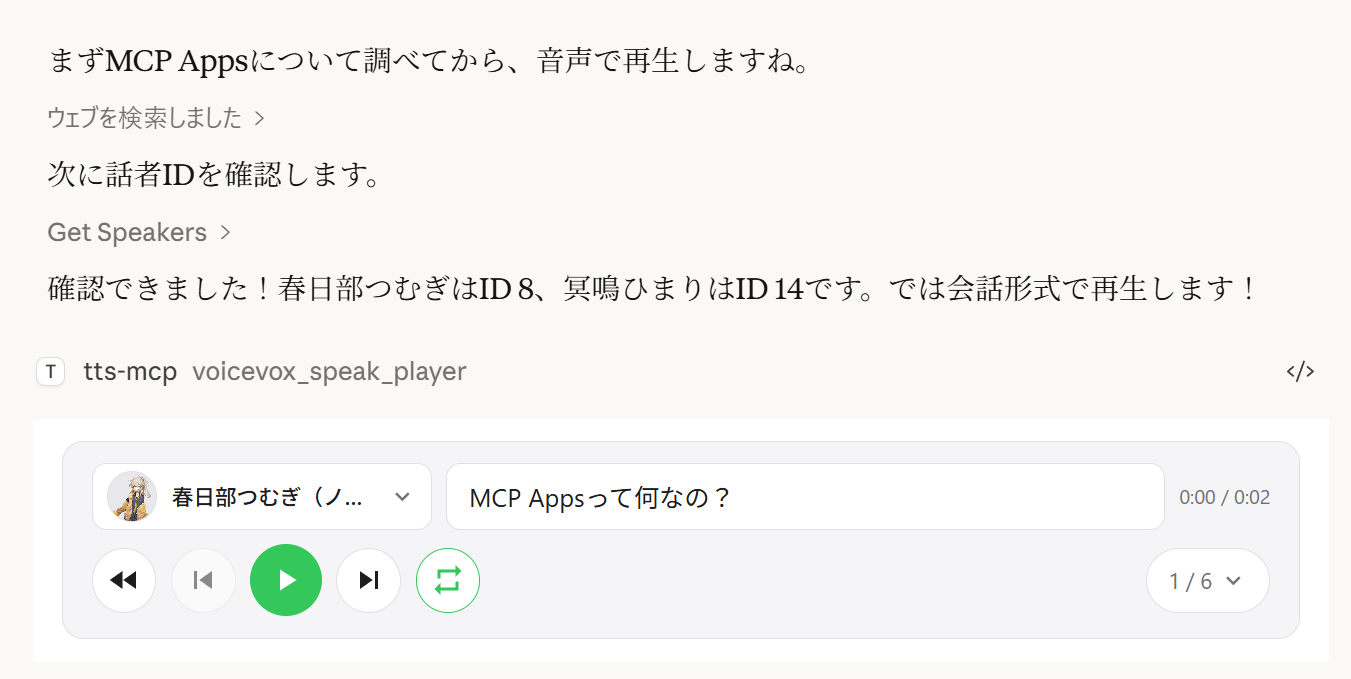
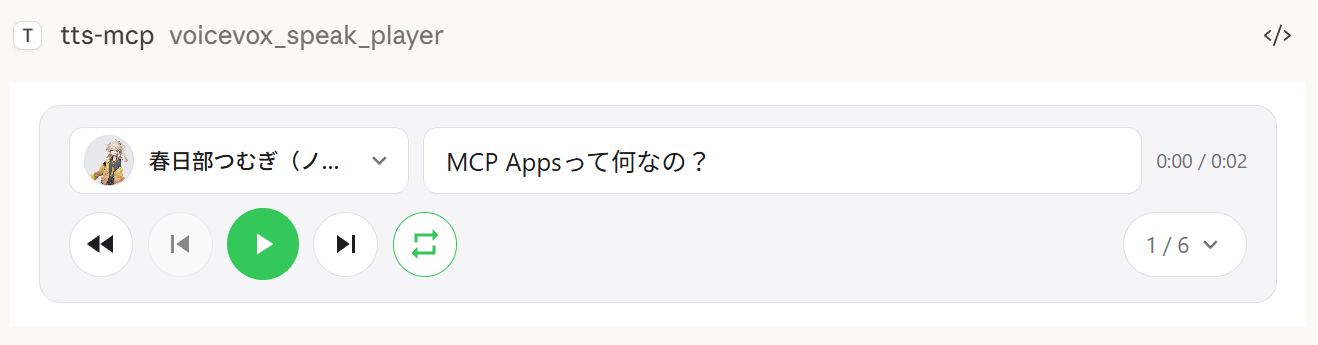
voicevox_speak_player 도구는 MCP Apps를 사용하여 채팅 안에 대화형 오디오 플레이어를 직접 렌더링합니다. 서버에서 오디오를 재생하는 표준 voicevox_speak 도구와 달리 오디오는 클라이언트 측(브라우저/앱)에서 재생됩니다 — 서버에 오디오 장치가 필요 없습니다.
클라이언트 측 재생 — 오디오는 서버가 아닌 Claude Desktop의 채팅에서 재생됩니다. 원격 연결에서도 작동합니다.
재생/일시정지 컨트롤 — 대화에 내장된 전체 재생 컨트롤
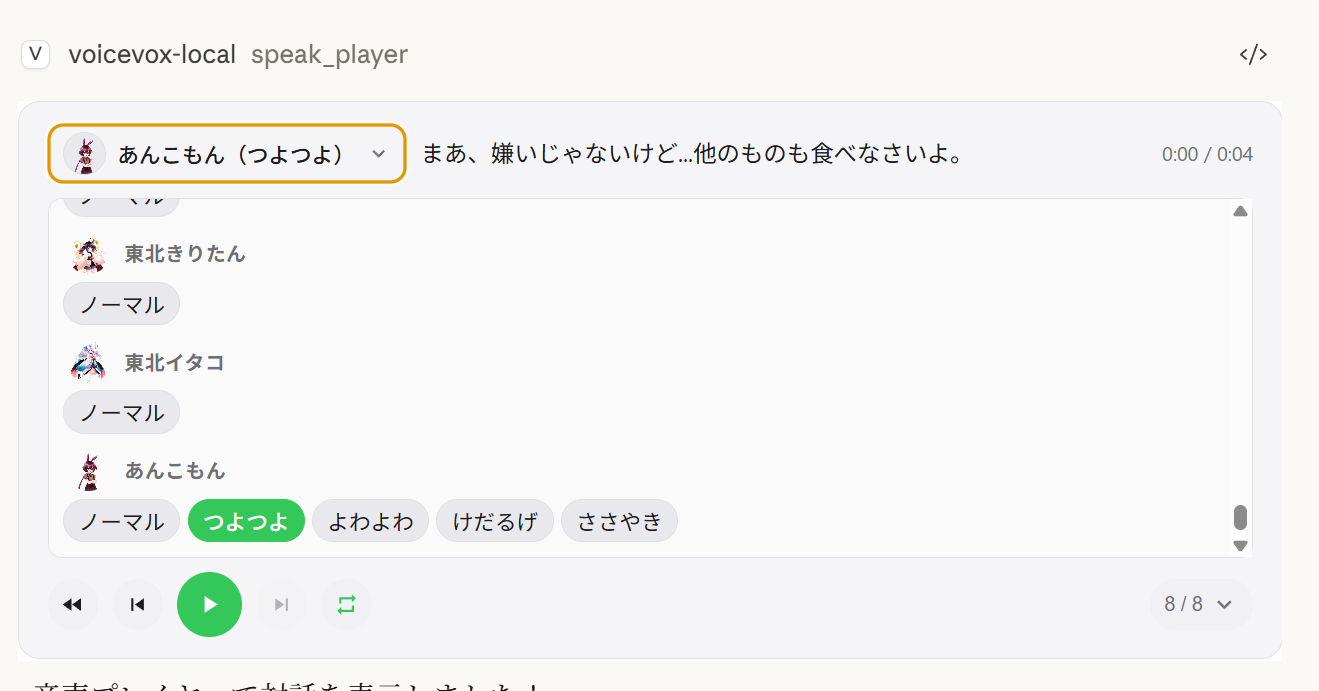
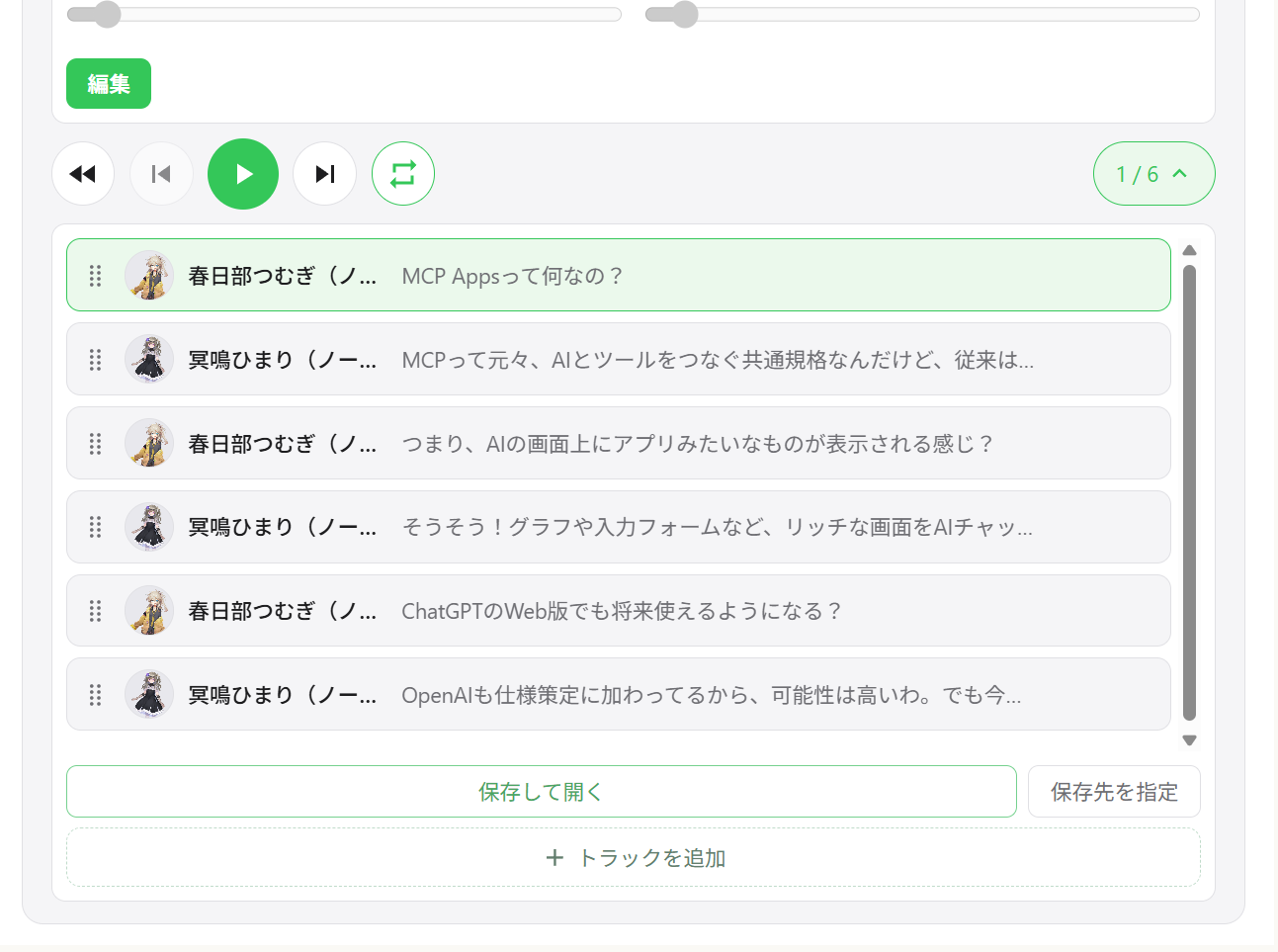
다중 화자 대화 — 트랙 탐색이 가능한 하나의 플레이어에서 여러 화자 순차 재생
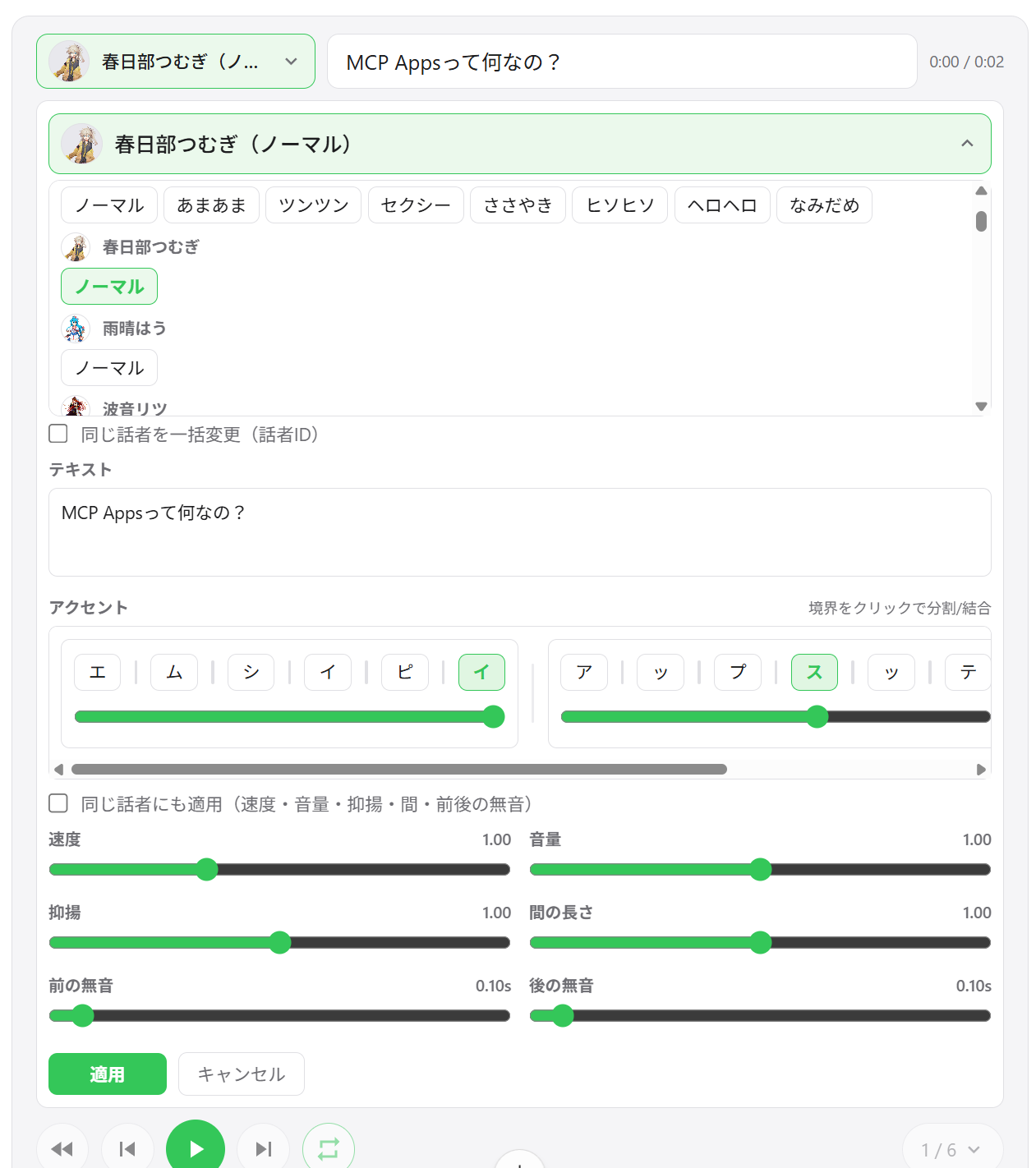
화자 전환 — 플레이어 UI에서 직접 모든 세그먼트의 음성 변경
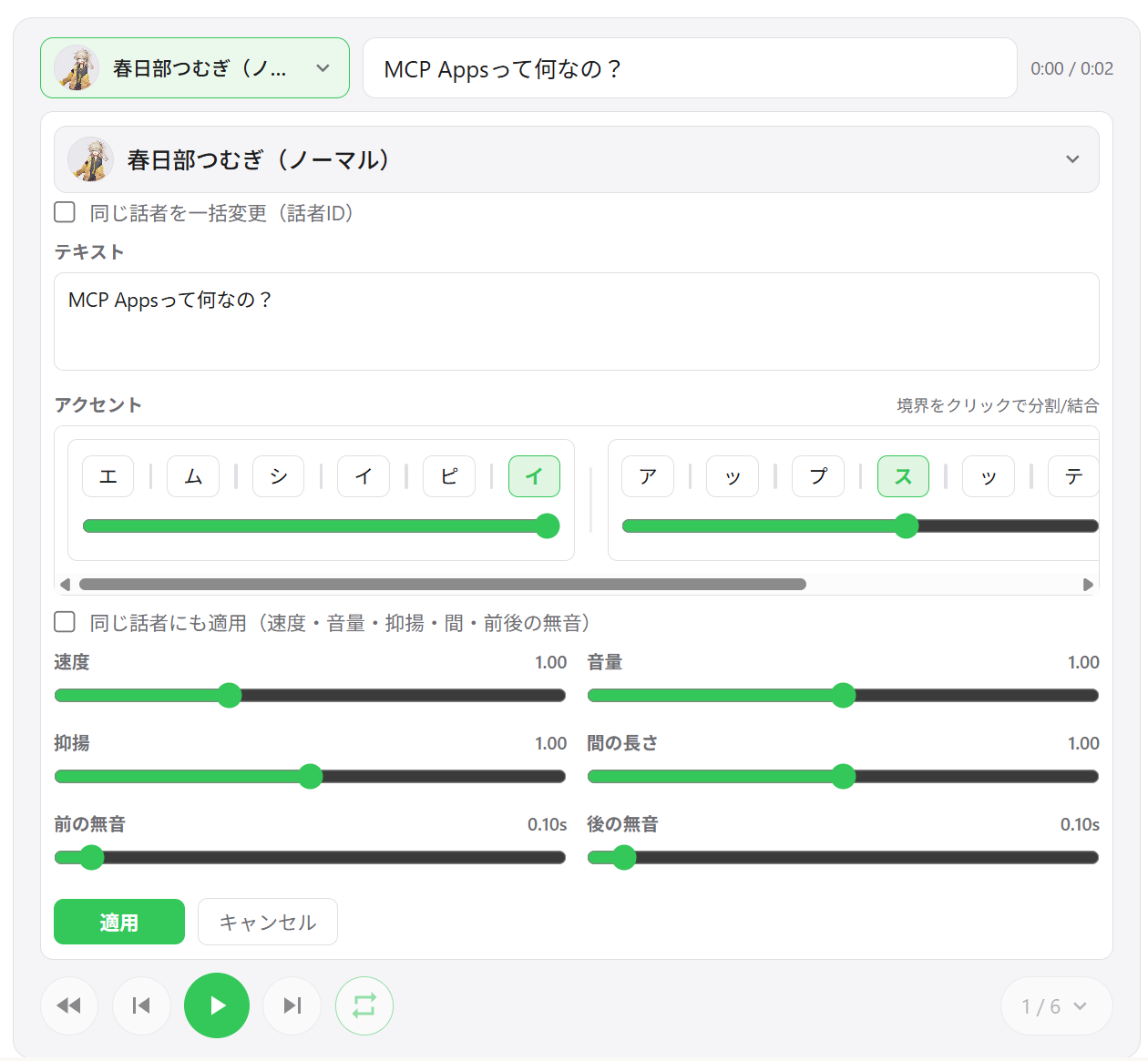
세그먼트 편집 — 세그먼트별 속도, 볼륨, 억양, 휴지 길이, 앞/뒤 무음 조정
악센트 구 편집 — UI에서 직접 악센트 위치와 모라 피치 편집
세그먼트 추가 / 삭제 / 재정렬 — 드래그 앤 드롭 트랙 재정렬, 인라인으로 새 세그먼트 추가
WAV 내보내기 — 모든 트랙을 번호가 매겨진 WAV 파일로 저장하고 출력 폴더 자동 열기
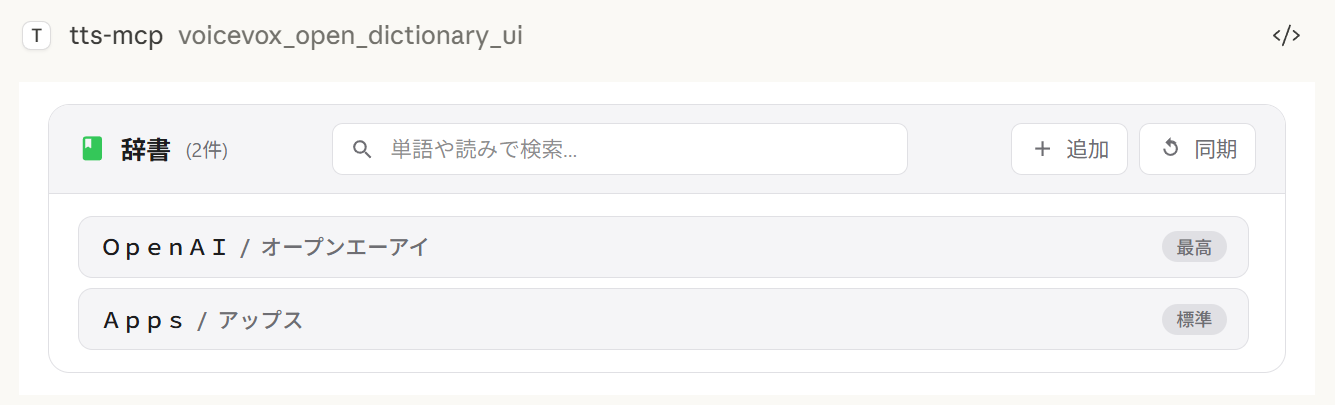
사용자 사전 관리자 — 미리듣기 재생이 포함된 VOICEVOX 사용자 사전 단어 추가, 편집, 삭제
세션 간 상태 복원 — 플레이어 상태가 서버에 유지되며, 채팅을 다시 열면 이전 트랙이 복원됩니다
환경별 내보내기 동작:
저장 및 열기는 항상 WAV 파일을 내보냅니다. 파일 탐색기 열기가 지원되지 않는 경우에도 내보내기는 성공하며 저장 경로가 UI에 표시됩니다.
출력 폴더 선택은 Windows/macOS에서 기본 디렉터리 선택기를 사용합니다. 지원되지 않는 환경에서는 이 작업이 기본 내보내기 디렉터리로 대체됩니다.
다중 화자 재생 | 트랙 목록 | 세그먼트 편집 |
|
|
|
화자 선택 | 사전 관리자 | WAV 내보내기 |
|
|
|
클라이언트 | 연결 | 참고 |
ChatGPT | HTTP (원격) |
|
Claude Desktop | stdio (로컬) | 기본 설정으로 바로 작동 |
Claude Desktop | HTTP (mcp-remote 경유) |
|
참고:
speak_player는 MCP Apps를 지원하는 호스트가 필요합니다. MCP Apps를 지원하지 않는 호스트에서는 이 도구를 사용할 수 없으며, 대신speak(서버 측 재생)를 사용할 수 있습니다.
도구 | 설명 |
| 새 플레이어 세션을 만들고 UI를 표시합니다. |
| 기존 플레이어의 모든 세그먼트를 업데이트합니다 (호출마다 새 |
| AI 튜닝을 위해 현재 플레이어 상태를 읽습니다 (페이지네이션). |
| 사용자 사전 관리자 UI를 엽니다. |
Node.js 20.0.0 이상 (또는 Bun) 또는 Docker
VOICEVOX Engine (실행 중이어야 함, Docker Compose에 포함)
ffplay (선택 사항, 권장 — Docker에서는 불필요)
ffplay는 FFmpeg에 포함된 가벼운 플레이어로 stdin에서 재생을 지원합니다. 사용 가능하면 자동으로 저지연 스트리밍 재생이 활성화됩니다.
💡 FFplay는 선택 사항입니다. 없으면 임시 파일 기반 재생으로 대체됩니다 (Windows: PowerShell, macOS: afplay, Linux: aplay 등).
간편한 설정: 각 OS별 원라이너 설치 (아래 단계 참조)
필수: ffplay가 PATH에 있어야 합니다 (설치 후 터미널/앱 재시작)
설치 예시:
Windows (다음 중 하나)
Winget: winget install --id=Gyan.FFmpeg -e
Chocolatey: choco install ffmpeg
Scoop: scoop install ffmpeg
공식 빌드: https://www.gyan.dev/ffmpeg/builds/ 또는 https://github.com/BtbN/FFmpeg-Builds에서 다운로드하고 bin 폴더를 PATH에 추가
macOS
Homebrew: brew install ffmpeg
Linux
Debian/Ubuntu: sudo apt-get update && sudo apt-get install -y ffmpeg
Fedora: sudo dnf install -y ffmpeg
Arch: sudo pacman -S ffmpeg
PATH 설정:
Windows: 환경 변수에 ...\ffmpeg\bin 추가 후 PowerShell/터미널과 편집기(Claude/VS Code 등) 재시작
확인: powershell -c "$env:Path"에 ffmpeg 경로가 포함되어야 함
macOS/Linux: 보통 자동 감지됩니다. 필요시 echo $PATH로 확인하고 셸을 재시작하세요.
MCP 클라이언트(Claude Desktop/Code): PATH를 다시 로드하려면 앱을 재시작하세요.
확인:
ffplay -version버전 정보가 표시되면 설치가 완료된 것입니다. CLI/MCP가 ffplay를 자동 감지하여 stdin 스트리밍 재생을 사용합니다.
1. VOICEVOX Engine 시작
2. Claude Desktop 설정 파일에 추가
설정 파일 위치:
Windows: %APPDATA%\Claude\claude_desktop_config.json
macOS: ~/Library/Application Support/Claude/claude_desktop_config.json
{
  "mcpServers": {
    "tts-mcp": {
      "command": "npx",
      "args": ["-y", "@kajidog/mcp-tts-voicevox"]
    }
  }
}
💡 Bun을 사용하는 경우,
npx를bunx로 바꾸기만 하면 됩니다:"command": "bunx", "args": ["@kajidog/mcp-tts-voicevox"]
3. Claude Desktop 재시작
끝입니다! Claude에게 "인사해"라고 말하면 음성으로 응답합니다!
Docker Compose를 사용하면 MCP 서버와 VOICEVOX Engine을 단일 명령으로 실행할 수 있습니다. Node.js나 VOICEVOX 설치가 필요 없습니다.
1. 컨테이너 시작
docker compose up -d이 명령은 VOICEVOX Engine과 MCP 서버(포트 3000의 HTTP 모드)를 시작합니다.
2. Claude Desktop 설정 파일에 추가 (mcp-remote 사용)
{
  "mcpServers": {
    "tts-mcp": {
      "command": "npx",
      "args": ["-y", "mcp-remote", "http://localhost:3000/mcp"]
    }
  }
}
3. Claude Desktop 재시작
보안 (Docker):
docker-compose.yml은 포트 3000을 인증 없이 공개합니다.MCP_ALLOWED_HOSTS는 여기서 방어 수단이 아닙니다 — 브라우저가 아닌 클라이언트는 원하는Host헤더를 보낼 수 있으므로 — 포트에 접근할 수 있는 사람은 누구나 서버를 사용할 수 있습니다.MCP_API_KEY를 설정하고(그리고X-API-Key로 전송)하거나, 포트를 신뢰할 수 있는 네트워크/localhost에만 바인딩하세요. 또한VOICEVOX_ALLOWED_OUTPUT_DIRS를 설정하여 파일 쓰기 도구가 쓸 수 있는 위치를 제한하는 것도 고려하세요.
제한 사항 (Docker): Docker 컨테이너에는 오디오 장치가 없으므로
voicevox_speak도구(서버 측 재생)는 기본적으로 비활성화됩니다. 대신voicevox_speak_player를 사용하세요 — 클라이언트 측(Claude Desktop)에서 오디오를 재생하며 서버에 오디오 장치가 없어도 작동합니다. 자세한 내용은 UI 오디오 플레이어를 참조하세요.
voicevox_speak — 텍스트 음성 변환Claude에서 호출할 수 있는 주요 기능입니다.
매개변수 | 설명 | 기본값 |
| 말할 텍스트 (줄바꿈으로 구분된 여러 세그먼트) | 필수 |
| 인라인 악센트 표기 ( | (설정 안 됨) |
| 화자 ID | 1 |
| 재생 속도 | 1.0 |
| 즉시 재생 (큐 비우기) | true |
| 재생 시작 대기 | false |
| 재생 완료 대기 | false |
해당하는
--restrict-*옵션이 설정되면immediate/waitForStart/waitForEnd가 도구 스키마에서 사라집니다.
예시:
// Simple text
{ "text": "Hello" }

// Specify speaker
{ "text": "Hello", "speaker": 3 }

// Different speakers per segment
{ "text": "1:Hello\n3:Nice weather today" }

// Wait for completion (synchronous processing)
{ "text": "Wait for this to finish before continuing", "waitForEnd": true }

// Control the accent with inline notation (`,` separates phrases, `[` marks the accent)
{ "text": "こんにちは世界", "phrases": "コン[ニ]チワ,セ[カ]イ" }phrases(및 사용자 사전 도구의 발음 필드)는 인라인 악센트 표시가 있는 가타카나를 허용합니다:
,는 악센트 구를 구분합니다 — コン[ニ]チワ,セ[カ]イ
[는 피치가 떨어지는 위치를 표시합니다. コン[ニ]チワ는 ニ에서 악센트가 떨어짐을 의미합니다
구에 대괄호를 생략하면 해당 구에 대해 VOICEVOX 자체의 악센트 추정을 유지합니다
phrases가 주어져도 text는 필수로 유지됩니다 — 일반 텍스트를 거기에 전달하고 표기가 실제로 발화되는 내용입니다.
voicevox_get_accent_phrases는 주어진 텍스트에 대해 동일한 표기를 반환하므로, 추정된 악센트를 읽고 대괄호를 조정한 다음 phrases에 다시 전달할 수 있습니다.
도구 | 설명 |
| UI 오디오 플레이어로 말하기 (플레이어 MCP 도구 참조) |
| VOICEVOX Engine 연결 확인 |
| 사용 가능한 화자 목록 가져오기 |
| 재생 중지 및 큐 비우기 |
| 오디오 파일 생성 |
사용자 사전 도구 (그룹 dictionary):
도구 | 설명 |
| 텍스트의 읽기와 악센트 위치를 인라인 표기로 가져오기 |
| 사용자 사전 단어 목록 (필터 + 페이지네이션) |
| 단어 추가 (발음은 인라인 악센트 표기 허용) |
| 단어 업데이트 (생략된 필드는 기존 값 유지) |
| UUID로 단어 삭제 |
| 여러 단어를 한 번에 추가 |
| 여러 단어를 한 번에 업데이트 |
모든 도구는 --disable-tools / VOICEVOX_DISABLED_TOOLS로 개별적으로, 또는 --disable-groups / VOICEVOX_DISABLED_GROUPS로 그룹별로 끌 수 있습니다.
변수 | 설명 | 기본값 |
| 엔진 URL |
|
| 기본 스피커 ID |
|
| 재생 속도 |
|
| 실패한 API 요청의 재시도 횟수(0이면 비활성화) |
|
| 초기 재시도 지연 시간(ms)(지수 백오프) |
|
| 단일 VOICEVOX API 요청의 제한 시간(ms). 긴 텍스트나 느린 엔진의 경우 늘리세요. |
|
변수 | 설명 | 기본값 |
| 스트리밍 재생( |
|
| 세그먼트당 후행 무음 시간(초). 대기 중인 세그먼트 사이의 더 긴 일시 정지를 위해 늘립니다(스트리밍 재생 시 음성 끝이 잘리지 않도록 보호하기도 합니다). | 엔진 기본값 |
| 즉시 재생 |
|
| 재생 시작 대기 |
|
| 재생 종료 대기 |
|
AI가 특정 옵션을 지정하지 못하도록 제한합니다.
변수 | 설명 |
|
|
|
|
|
|
# Disable individual tools
export VOICEVOX_DISABLED_TOOLS=speak_player,synthesize_file

# Disable a built-in group of tools
export VOICEVOX_DISABLED_GROUPS=player

# Combine groups and individual tools
export VOICEVOX_DISABLED_GROUPS=dictionary
export VOICEVOX_DISABLED_TOOLS=synthesize_file
VOICEVOX_DISABLED_GROUPS / --disable-groups용 기본 제공 그룹:
그룹 | 도구 |
|
|
|
|
|
|
|
|
변수 | 설명 | 기본값 |
| UI 플레이어용 위젯 도메인(ChatGPT에 필요, 예: | (설정 안 됨) |
| UI 플레이어에서 오디오 자동 재생 |
|
| UI 플레이어에서 트랙 내보내기(다운로드) 활성화( |
|
| 내보낸 트랙의 기본 출력 디렉터리(폴더 선택기를 사용할 수 없을 때의 대체 경로로도 사용됨) |
|
| 플레이어 캐시 파일( |
|
| 디스크의 영구 오디오 캐시 활성화( |
|
| 오디오 캐시 보존 기간(일)( |
|
| 오디오 캐시 크기 상한(MB)( |
|
| 유지되는 플레이어 상태 JSON의 경로 |
|
변수 | 설명 | 기본값 |
| 파일 쓰기 도구( | (설정 안 됨) |
변수 | 설명 | 기본값 |
| HTTP 모드 활성화 |
|
| HTTP 포트 |
|
| HTTP 호스트 |
|
| 허용된 호스트(쉼표로 구분) |
|
| 허용된 오리진(쉼표로 구분) |
|
|
| (설정 안 됨) |
명령줄 인수가 환경 변수보다 우선합니다.
전체 최신 옵션 목록은 항상 npx @kajidog/mcp-tts-voicevox --help를 통해 확인할 수 있습니다.
# Basic settings
npx @kajidog/mcp-tts-voicevox --url http://192.168.1.100:50021 --speaker 3 --speed 1.2

# HTTP mode
npx @kajidog/mcp-tts-voicevox --http --port 8080

# With restrictions
npx @kajidog/mcp-tts-voicevox --restrict-immediate --restrict-wait-for-end

# Disable individual tools
npx @kajidog/mcp-tts-voicevox --disable-tools speak_player,synthesize_file

# Disable a tool group
npx @kajidog/mcp-tts-voicevox --disable-groups player
인자 | 설명 |
| 도움말 표시 |
| 버전 표시 |
| 기본 설정으로 |
| 설정 파일 경로 |
| VOICEVOX Engine URL |
| 기본 스피커 ID |
| 재생 속도 |
| 스트리밍 재생 |
| 세그먼트별 후행 무음(대기열에 추가된 세그먼트 사이의 일시정지) |
| 즉시 재생 |
| 시작 대기 |
| 종료 대기 |
| 즉시 재생 제한 |
| waitForStart 제한 |
| waitForEnd 제한 |
| 파일 쓰기 도구가 쓸 수 있는 디렉터리(쉼표로 구분, 미설정 시 제한 없음) |
| 도구 비활성화(쉼표로 구분된 도구 이름) |
| 도구 그룹 비활성화: |
| UI 플레이어에서 자동 재생 |
| UI 플레이어에서 트랙 내보내기(다운로드) 활성화/비활성화 |
| 내보낸 트랙의 기본 출력 디렉터리 |
| 플레이어 캐시 디렉터리 |
| 유지되는 플레이어 상태 파일 경로 |
| 플레이어의 디스크 오디오 캐시 활성화/비활성화 |
| 오디오 캐시 보존 일수( |
| 오디오 캐시 크기 상한(MB)( |
| HTTP 모드 |
| HTTP 포트 |
| HTTP 호스트 |
| 허용된 호스트(쉼표로 구분) |
| 허용된 오리진(쉼표로 구분) |
|
|
환경 변수 및 CLI 인자 대신(또는 추가로) JSON 설정 파일을 사용할 수 있습니다. 구성할 설정이 많을 때 유용합니다.
우선순위: CLI 인자 > 환경 변수 > 설정 파일 > 기본값
npx @kajidog/mcp-tts-voicevox --init이 명령은 현재 디렉터리에 모든 기본 설정이 포함된 .voicevoxrc.json을 생성합니다. 필요에 따라 편집하세요.
npx @kajidog/mcp-tts-voicevox --config ./my-config.json또는 환경 변수를 통해:
VOICEVOX_CONFIG=./my-config.json npx @kajidog/mcp-tts-voicevox.voicevoxrc.json 예시{
"url": "http://192.168.1.50:50021",
"speaker": 3,
"speed": 1.2,
"http": true,
"port": 8080,
"disable-tools": ["synthesize_file"],
"disable-groups": ["dictionary"]
}키는 kebab-case(use-streaming), camelCase(useStreaming) 또는 내부 키 이름(defaultSpeaker)으로 작성할 수 있습니다. 현재 디렉터리에 .voicevoxrc.json이 있으면 자동으로 로드됩니다.
원격 연결용:
서버 시작:
# Linux/macOS
MCP_HTTP_MODE=true MCP_HTTP_PORT=3000 npx @kajidog/mcp-tts-voicevox

# Windows PowerShell
$env:MCP_HTTP_MODE='true'; $env:MCP_HTTP_PORT='3000'; npx @kajidog/mcp-tts-voicevox
Claude Desktop 설정 (mcp-remote 사용):
{
  "mcpServers": {
    "tts-mcp-proxy": {
      "command": "npx",
      "args": ["-y", "mcp-remote", "http://localhost:3000/mcp"]
    }
  }
}Claude Code에서는 .mcp.json의 사용자 지정 헤더를 사용하여 프로젝트별로 다른 기본 스피커를 구성할 수 있습니다:
헤더 | 설명 |
| 이 프로젝트의 기본 스피커 ID |
|
|
.mcp.json 예시:
{
  "mcpServers": {
    "tts": {
      "type": "http",
      "url": "http://localhost:3000/mcp",
      "headers": {
        "X-Voicevox-Speaker": "113",
        "X-API-Key": "your-api-key"
      }
    }
  }
}
이렇게 하면 각 프로젝트가 자동으로 다른 음성 캐릭터를 사용할 수 있습니다.
우선순위:
도구 호출의 명시적 speaker 매개변수(최우선)
X-Voicevox-Speaker 헤더의 프로젝트 기본값
전역 VOICEVOX_DEFAULT_SPEAKER 설정(최하위)
WSL에서 Windows에서 실행 중인 MCP 서버로 연결:
# Method 1: From default gateway
ip route show | grep -oP 'default via \K[\d.]+'
# Usually in the format 172.x.x.1

# Method 2: From /etc/resolv.conf (WSL2)
cat /etc/resolv.conf | grep nameserver | awk '{print $2}'WSL 게이트웨이 IP를 MCP_ALLOWED_HOSTS에 추가하여 WSL에서의 접근을 허용합니다:
$env:MCP_HTTP_MODE='true'
$env:MCP_ALLOWED_HOSTS='localhost,127.0.0.1,172.29.176.1'
npx @kajidog/mcp-tts-voicevox
또는 CLI 인자 사용:
npx @kajidog/mcp-tts-voicevox --http --allowed-hosts "localhost,127.0.0.1,172.29.176.1"{
"mcpServers": {
"tts": {
"type": "http",
"url": "http://172.29.176.1:3000/mcp"
}
}
}⚠️ WSL 내에서
localhost는 WSL 자체를 가리킵니다. Windows 호스트에 접근하려면 WSL 게이트웨이 IP를 사용하세요.
ChatGPT에서 사용하려면 VOICEVOX Engine에 접근할 수 있는 상태로 MCP 서버를 HTTP 모드로 클라우드에 배포하세요.
Docker를 사용하여 Render, Railway 등에 배포합니다(Dockerfile 포함).
VOICEVOX Engine을 로컬에서 실행하고 ngrok으로 노출하거나, MCP 서버와 함께 배포합니다.
변수 | 예시 | 설명 |
|
| VOICEVOX Engine URL |
|
| HTTP 모드 활성화 |
|
| 배포된 호스트 이름 |
|
| UI 플레이어용 위젯 도메인(ChatGPT에 필요) |
|
| 서버 측 재생 비활성화(오디오 장치 없음) |
|
| 내보내기 기능 비활성화(클라우드에서 파일을 다운로드할 수 없음) |
ChatGPT 설정 → 커넥터 → MCP 서버 URL 추가(https://your-app.onrender.com/mcp).
기본 단계는 ChatGPT와 동일하지만 VOICEVOX_PLAYER_DOMAIN 값이 다릅니다.
Claude Web은 ui.domain이 해시 기반 전용 도메인이어야 합니다. 다음 명령으로 계산하세요:
node -e "console.log(require('crypto').createHash('sha256').update('Your MCP server URL').digest('hex').slice(0,32)+'.claudemcpcontent.com')"예시: MCP 서버 URL이 https://your-app.onrender.com/mcp인 경우:
node -e "console.log(require('crypto').createHash('sha256').update('https://your-app.onrender.com/mcp').digest('hex').slice(0,32)+'.claudemcpcontent.com')"
# Example output: 48fb73a6...claudemcpcontent.com
이 출력 값을 VOICEVOX_PLAYER_DOMAIN으로 설정하세요.
참고: ChatGPT와 Claude Web은 서로 다른
VOICEVOX_PLAYER_DOMAIN값이 필요하므로 단일 인스턴스로 두 클라이언트를 동시에 서비스할 수 없습니다. 각각 별도의 인스턴스를 배포하거나 대상 클라이언트에 따라 환경 변수를 전환하세요.
1. VOICEVOX Engine이 실행 중인지 확인
curl http://localhost:50021/speakers2. 플랫폼별 재생 도구 확인
OS | 필수 도구 |
Linux |
|
macOS |
|
Windows | PowerShell(사전 설치됨) |
패키지 설치 확인: npm list -g @kajidog/mcp-tts-voicevox
설정 파일의 JSON 구문 확인
클라이언트 다시 시작
패키지 | 설명 |
| MCP 서버( |
범용 VOICEVOX 클라이언트 라이브러리(독립적으로 사용 가능) | |
| 공유 MCP 인프라(설정 스키마, HTTP/stdio 실행기). 게시되지 않음 — 서버에 번들됨 |
| React 기반 오디오 플레이어 UI, 단일 HTML 파일로 번들됨. 게시되지 않음 |
git clone https://github.com/kajidog/mcp-tts-voicevox.git
cd mcp-tts-voicevox
pnpm install패키지 매니저는 pnpm입니다(npm / yarn은 지원되지 않음).
Command | Description |
| 모든 패키지 빌드 |
| 테스트 실행 |
| 린트 실행 (전체 워크스페이스에 대한 단일 Biome 패스) |
| 모든 패키지 타입 검사 |
| 사용자에게 영향을 주는 변경 사항에 대한 changeset 추가 |
개발 서버는 server 패키지에 있으므로 필터를 사용하여 실행하세요:
Command | Description |
| 개발 서버 시작 (stdio) |
| HTTP 모드로 개발 서버 시작 |
| Bun으로 개발 서버 시작 |
| Bun으로 HTTP 개발 서버 시작 |
ISC
Generate a query for voice synthesis
| Name | Required | Description | Default |
|---|---|---|---|
| text | Yes | Text for voice synthesis | |
| speaker | No | Default speaker ID (optional) | |
| speedScale | No | Playback speed (optional, default from environment) |
Does the description disclose side effects, auth requirements, rate limits, or destructive behavior?
No annotations are provided, so the description carries full burden. 'Generate a query' suggests this creates some intermediate representation, but doesn't disclose what happens next - does it return a query ID for later use? Does it validate parameters? Is it read-only or has side effects? The description lacks behavioral context about permissions, rate limits, or what 'query' means operationally.
Agents need to know what a tool does to the world before calling it. Descriptions should go beyond structured annotations to explain consequences.
Is the description appropriately sized, front-loaded, and free of redundancy?
The description is a single, efficient sentence with zero wasted words. It's appropriately sized for a tool with good schema coverage and gets straight to the point without unnecessary elaboration. Every word earns its place in conveying the core purpose.
Shorter descriptions cost fewer tokens and are easier for agents to parse. Every sentence should earn its place.
Given the tool's complexity, does the description cover enough for an agent to succeed on first attempt?
For a tool with no annotations and no output schema, the description is insufficient. It doesn't explain what the generated query is used for, what format it returns, or how it differs from actual synthesis tools. Given the complexity of voice synthesis workflows and multiple sibling tools, more context about this tool's role in the ecosystem is needed.
Complex tools with many parameters or behaviors need more documentation. Simple tools need less. This dimension scales expectations accordingly.
Does the description clarify parameter syntax, constraints, interactions, or defaults beyond what the schema provides?
Schema description coverage is 100%, so the schema already documents all three parameters (text, speaker, speedScale) with their descriptions. The tool description adds no additional parameter semantics beyond what's in the schema. The baseline score of 3 reflects adequate but minimal value addition given the comprehensive schema coverage.
Input schemas describe structure but not intent. Descriptions should explain non-obvious parameter relationships and valid value ranges.
Does the description clearly state what the tool does and how it differs from similar tools?
The description states 'Generate a query for voice synthesis' which provides a basic purpose (verb: generate, resource: query for voice synthesis). However, it's vague about what the query actually does - is it for previewing, testing, or preparing synthesis? It doesn't distinguish from sibling tools like 'synthesize_file' or 'speak' which also relate to voice synthesis.
Agents choose between tools based on descriptions. A clear purpose with a specific verb and resource helps agents select the right tool.
Does the description explain when to use this tool, when not to, or what alternatives exist?
The description provides no guidance on when to use this tool versus alternatives. With sibling tools like 'synthesize_file' and 'speak' that also handle voice synthesis, there's no indication whether this tool is for preparation, testing, or a different phase of the synthesis workflow. No context about prerequisites or exclusions is provided.
Agents often have multiple tools that could apply. Explicit usage guidance like "use X instead of Y when Z" prevents misuse.
Get detail of a speaker by id
| Name | Required | Description | Default |
|---|---|---|---|
| uuid | Yes | Speaker UUID (speaker uuid) |
Does the description disclose side effects, auth requirements, rate limits, or destructive behavior?
No annotations are provided, so the description carries the full burden of behavioral disclosure. It mentions 'Get detail' but doesn't specify if this is a read-only operation, what permissions are needed, error handling, or response format. This leaves significant gaps for a tool that likely interacts with a speaker database.
Agents need to know what a tool does to the world before calling it. Descriptions should go beyond structured annotations to explain consequences.
Is the description appropriately sized, front-loaded, and free of redundancy?
The description is a single, efficient sentence with no wasted words. It's front-loaded with the core action ('Get detail'), making it easy to scan and understand quickly.
Shorter descriptions cost fewer tokens and are easier for agents to parse. Every sentence should earn its place.
Given the tool's complexity, does the description cover enough for an agent to succeed on first attempt?
Given no annotations and no output schema, the description is incomplete. It doesn't explain what 'detail' includes (e.g., speaker attributes, capabilities), potential errors, or how this fits with sibling tools like 'synthesize_file'. For a tool with one parameter but unknown behavioral traits, more context is needed.
Complex tools with many parameters or behaviors need more documentation. Simple tools need less. This dimension scales expectations accordingly.
Does the description clarify parameter syntax, constraints, interactions, or defaults beyond what the schema provides?
Schema description coverage is 100%, with the parameter 'uuid' documented as 'Speaker UUID (speaker uuid)'. The description adds no additional meaning beyond this, such as format examples or where to obtain the UUID. Baseline 3 is appropriate since the schema does the heavy lifting.
Input schemas describe structure but not intent. Descriptions should explain non-obvious parameter relationships and valid value ranges.
Does the description clearly state what the tool does and how it differs from similar tools?
The description clearly states the verb ('Get detail') and resource ('speaker'), making the purpose understandable. However, it doesn't differentiate from sibling tools like 'get_speakers' (which likely lists speakers) or explain what 'detail' entails beyond the ID lookup.
Agents choose between tools based on descriptions. A clear purpose with a specific verb and resource helps agents select the right tool.
Does the description explain when to use this tool, when not to, or what alternatives exist?
No guidance is provided on when to use this tool versus alternatives. For example, it doesn't clarify if this should be used after 'get_speakers' to fetch more information or in what contexts (e.g., before synthesis). The description only states the basic function without context.
Agents often have multiple tools that could apply. Explicit usage guidance like "use X instead of Y when Z" prevents misuse.
Get a list of available speakers
| Name | Required | Description | Default |
|---|---|---|---|
No parameters | |||
Does the description disclose side effects, auth requirements, rate limits, or destructive behavior?
With no annotations provided, the description carries the full burden of behavioral disclosure. It states the tool retrieves a list, implying a read-only operation, but doesn't cover aspects like whether it requires authentication, has rate limits, returns paginated results, or what format the list is in. For a tool with zero annotation coverage, this is a significant gap in transparency.
Agents need to know what a tool does to the world before calling it. Descriptions should go beyond structured annotations to explain consequences.
Is the description appropriately sized, front-loaded, and free of redundancy?
The description is a single, efficient sentence ('Get a list of available speakers') that is front-loaded and wastes no words. It directly states the tool's purpose without unnecessary elaboration, making it highly concise and well-structured for its simplicity.
Shorter descriptions cost fewer tokens and are easier for agents to parse. Every sentence should earn its place.
Given the tool's complexity, does the description cover enough for an agent to succeed on first attempt?
Given the tool's complexity (simple list retrieval) but lack of annotations and output schema, the description is incomplete. It doesn't explain what the list contains, how it's formatted, or any behavioral traits. For a tool with no structured data beyond the input schema, more context is needed to be fully helpful to an agent.
Complex tools with many parameters or behaviors need more documentation. Simple tools need less. This dimension scales expectations accordingly.
Does the description clarify parameter syntax, constraints, interactions, or defaults beyond what the schema provides?
The input schema has 0 parameters with 100% coverage, so the schema fully documents the lack of inputs. The description doesn't add parameter details beyond this, which is appropriate. Since there are no parameters, the baseline is 4, as the description doesn't need to compensate for any gaps.
Input schemas describe structure but not intent. Descriptions should explain non-obvious parameter relationships and valid value ranges.
Does the description clearly state what the tool does and how it differs from similar tools?
The description states the tool's purpose ('Get a list of available speakers'), which is clear but vague. It specifies the verb ('Get') and resource ('speakers'), but doesn't distinguish it from sibling tools like 'get_speaker_detail' or explain what 'available' means in this context. This is adequate but has clear gaps in specificity.
Agents choose between tools based on descriptions. A clear purpose with a specific verb and resource helps agents select the right tool.
Does the description explain when to use this tool, when not to, or what alternatives exist?
The description provides no guidance on when to use this tool versus alternatives. It doesn't mention sibling tools like 'get_speaker_detail' for detailed information or 'synthesize_file' for synthesis operations, nor does it specify prerequisites or contexts for usage. This leaves the agent without explicit or implied usage instructions.
Agents often have multiple tools that could apply. Explicit usage guidance like "use X instead of Y when Z" prevents misuse.
Check if VOICEVOX Engine is running and reachable
| Name | Required | Description | Default |
|---|---|---|---|
No parameters | |||
Does the description disclose side effects, auth requirements, rate limits, or destructive behavior?
No annotations are provided, so the description carries the full burden of behavioral disclosure. It states the tool checks if the engine is 'running and reachable,' implying a read-only, non-destructive operation, but doesn't detail what happens on failure (e.g., error responses), latency, or any side effects. For a tool with zero annotation coverage, this leaves gaps in understanding its behavior.
Agents need to know what a tool does to the world before calling it. Descriptions should go beyond structured annotations to explain consequences.
Is the description appropriately sized, front-loaded, and free of redundancy?
The description is a single, efficient sentence: 'Check if VOICEVOX Engine is running and reachable.' It is front-loaded with the core purpose, has no wasted words, and is appropriately sized for a simple tool. Every part of the sentence earns its place by conveying essential information.
Shorter descriptions cost fewer tokens and are easier for agents to parse. Every sentence should earn its place.
Given the tool's complexity, does the description cover enough for an agent to succeed on first attempt?
Given the tool's low complexity (0 parameters, no output schema, no annotations), the description is minimally adequate. It states what the tool does but lacks details on usage context, error handling, or return values. Without an output schema, it doesn't explain what 'check' returns (e.g., status, boolean), leaving some gaps for an agent to understand fully.
Complex tools with many parameters or behaviors need more documentation. Simple tools need less. This dimension scales expectations accordingly.
Does the description clarify parameter syntax, constraints, interactions, or defaults beyond what the schema provides?
The tool has 0 parameters, and the input schema has 100% description coverage (though empty). The description doesn't need to explain parameters, so it naturally adds no value beyond the schema. A baseline score of 4 is appropriate for zero-parameter tools, as there's no parameter information to compensate for.
Input schemas describe structure but not intent. Descriptions should explain non-obvious parameter relationships and valid value ranges.
Does the description clearly state what the tool does and how it differs from similar tools?
The description clearly states the tool's purpose: 'Check if VOICEVOX Engine is running and reachable.' It uses a specific verb ('Check') and identifies the target resource ('VOICEVOX Engine'), making it easy to understand. However, it doesn't explicitly differentiate from sibling tools like 'get_speakers' or 'synthesize_file', which serve different purposes but also interact with VOICEVOX.
Agents choose between tools based on descriptions. A clear purpose with a specific verb and resource helps agents select the right tool.
Does the description explain when to use this tool, when not to, or what alternatives exist?
No guidance is provided on when to use this tool versus alternatives. The description doesn't mention prerequisites (e.g., before using other tools), exclusions, or contextual cues. For example, it doesn't specify if this should be called first to verify connectivity before invoking 'speak' or 'synthesize_file'.
Agents often have multiple tools that could apply. Explicit usage guidance like "use X instead of Y when Z" prevents misuse.
Convert text to speech and play it. Text is split by line breaks (\n) into separate speech units. Each line is processed as an independent audio segment.
| Name | Required | Description | Default |
|---|---|---|---|
| text | Yes | Text split by line breaks (\n). IMPORTANT: Each line = one speech unit (processed and played separately). Keep the FIRST LINE SHORT for quick playback start - audio begins as soon as the first line is synthesized. Example: "Hi!\nThis is a longer explanation that follows." Optional speaker prefix per line: "1:Hello\n2:World" | |
| query | No | Voice synthesis query | |
| speaker | No | Default speaker ID (optional) | |
| speedScale | No | Playback speed (optional, default from environment) | |
| immediate | No | If true, stops current playback and plays new audio immediately. If false, waits for current playback to finish. Default depends on environment variable. | |
| waitForStart | No | Wait for playback to start (optional, default: false) | |
| waitForEnd | No | Wait for playback to end (optional, default: false) |
Does the description disclose side effects, auth requirements, rate limits, or destructive behavior?
With no annotations provided, the description carries full burden and does well by disclosing key behavioral traits: text is split by line breaks into separate speech units, each line processed independently, and the first line should be short for quick playback start. It doesn't mention error handling, rate limits, or authentication needs, but covers core playback behavior adequately.
Agents need to know what a tool does to the world before calling it. Descriptions should go beyond structured annotations to explain consequences.
Is the description appropriately sized, front-loaded, and free of redundancy?
The description is front-loaded with the core purpose in the first sentence, followed by specific behavioral details in the second. Both sentences earn their place by providing essential information without redundancy. It's appropriately sized for the tool's complexity.
Shorter descriptions cost fewer tokens and are easier for agents to parse. Every sentence should earn its place.
Given the tool's complexity, does the description cover enough for an agent to succeed on first attempt?
Given no annotations and no output schema, the description does well to cover the main behavior and text processing logic. However, it doesn't address potential side effects (e.g., interrupting current playback, which is hinted at in the 'immediate' parameter schema), error cases, or what the tool returns. For a 7-parameter tool with mutation implications, it's good but not fully complete.
Complex tools with many parameters or behaviors need more documentation. Simple tools need less. This dimension scales expectations accordingly.
Does the description clarify parameter syntax, constraints, interactions, or defaults beyond what the schema provides?
Schema description coverage is 100%, so the schema already documents all 7 parameters thoroughly. The description adds minimal parameter semantics beyond the schema—it mentions line break processing and first line optimization, which relates to the 'text' parameter but doesn't significantly enhance understanding of parameters like 'query' or 'speaker'. Baseline 3 is appropriate given high schema coverage.
Input schemas describe structure but not intent. Descriptions should explain non-obvious parameter relationships and valid value ranges.
Does the description clearly state what the tool does and how it differs from similar tools?
The description clearly states the specific action ('Convert text to speech and play it') and resource (audio output), distinguishing it from siblings like 'synthesize_file' (file output) and 'stop_speaker' (playback control). It explicitly mentions text processing by line breaks, which adds specificity beyond the basic function.
Agents choose between tools based on descriptions. A clear purpose with a specific verb and resource helps agents select the right tool.
Does the description explain when to use this tool, when not to, or what alternatives exist?
The description implies usage for text-to-speech playback but doesn't explicitly state when to use this tool versus alternatives like 'synthesize_file' (for file output) or 'generate_query' (possibly for query generation). It provides some context about line break processing but lacks explicit guidance on tool selection scenarios.
Agents often have multiple tools that could apply. Explicit usage guidance like "use X instead of Y when Z" prevents misuse.
Stop current audio playback
| Name | Required | Description | Default |
|---|---|---|---|
| random_string | Yes | Dummy parameter for no-parameter tools |
Does the description disclose side effects, auth requirements, rate limits, or destructive behavior?
With no annotations provided, the description carries full burden but only states the basic action. It does not disclose behavioral traits like whether this requires specific permissions, what happens if no audio is playing, error conditions, or side effects. The description is minimal and lacks necessary context for safe invocation.
Agents need to know what a tool does to the world before calling it. Descriptions should go beyond structured annotations to explain consequences.
Is the description appropriately sized, front-loaded, and free of redundancy?
The description is a single, clear sentence with zero wasted words. It is perfectly front-loaded and appropriately sized for a simple action tool.
Shorter descriptions cost fewer tokens and are easier for agents to parse. Every sentence should earn its place.
Given the tool's complexity, does the description cover enough for an agent to succeed on first attempt?
Given no annotations and no output schema, the description is incomplete for a mutation tool. It does not explain what happens after stopping playback (e.g., success/failure response, state changes) or error handling, leaving significant gaps for the agent.
Complex tools with many parameters or behaviors need more documentation. Simple tools need less. This dimension scales expectations accordingly.
Does the description clarify parameter syntax, constraints, interactions, or defaults beyond what the schema provides?
The tool has 0 meaningful parameters (only a dummy parameter with 100% schema coverage). The description correctly omits parameter details since none are needed for the core functionality, adding appropriate value beyond the schema.
Input schemas describe structure but not intent. Descriptions should explain non-obvious parameter relationships and valid value ranges.
Does the description clearly state what the tool does and how it differs from similar tools?
The description 'Stop current audio playback' clearly states the specific action (stop) and resource (current audio playback). It distinguishes from siblings like 'speak' or 'synthesize_file' which initiate playback rather than stop it.
Agents choose between tools based on descriptions. A clear purpose with a specific verb and resource helps agents select the right tool.
Does the description explain when to use this tool, when not to, or what alternatives exist?
The description implies usage when audio is currently playing, but does not explicitly state when to use this tool versus alternatives or provide any exclusions. It lacks guidance on prerequisites or timing considerations.
Agents often have multiple tools that could apply. Explicit usage guidance like "use X instead of Y when Z" prevents misuse.
Generate an audio file and return its absolute path
| Name | Required | Description | Default |
|---|---|---|---|
| text | No | Text for voice synthesis (if both query and text provided, query takes precedence) | |
| query | No | Voice synthesis query | |
| output | Yes | Output path for the audio file | |
| speaker | No | Default speaker ID (optional) | |
| speedScale | No | Playback speed (optional, default from environment) |
Does the description disclose side effects, auth requirements, rate limits, or destructive behavior?
With no annotations provided, the description carries the full burden of behavioral disclosure. It mentions generating a file and returning a path, but lacks details on permissions, side effects (e.g., file system changes), rate limits, error handling, or audio format specifics. This is inadequate for a tool that creates files, as it doesn't clarify behavioral traits beyond the basic operation.
Agents need to know what a tool does to the world before calling it. Descriptions should go beyond structured annotations to explain consequences.
Is the description appropriately sized, front-loaded, and free of redundancy?
The description is a single, efficient sentence that front-loads the core action and return value. Every word earns its place, with no redundancy or unnecessary elaboration, making it easy to parse quickly.
Shorter descriptions cost fewer tokens and are easier for agents to parse. Every sentence should earn its place.
Given the tool's complexity, does the description cover enough for an agent to succeed on first attempt?
Given the complexity of a file-generation tool with 5 parameters, no annotations, and no output schema, the description is incomplete. It doesn't cover behavioral aspects like side effects, error cases, or audio specifics, and lacks usage context. This leaves significant gaps for an AI agent to understand how to invoke it correctly in various scenarios.
Complex tools with many parameters or behaviors need more documentation. Simple tools need less. This dimension scales expectations accordingly.
Does the description clarify parameter syntax, constraints, interactions, or defaults beyond what the schema provides?
Schema description coverage is 100%, so the schema already documents all parameters thoroughly (e.g., precedence rules for text vs. query, optional defaults). The description adds no additional parameter semantics beyond what the schema provides, such as explaining the audio generation process or file format details. Baseline 3 is appropriate when the schema does the heavy lifting.
Input schemas describe structure but not intent. Descriptions should explain non-obvious parameter relationships and valid value ranges.
Does the description clearly state what the tool does and how it differs from similar tools?
The description clearly states the action ('Generate an audio file') and the resource ('audio file'), and specifies the return value ('return its absolute path'). It distinguishes from siblings like 'speak' (which might stream audio) and 'generate_query' (which likely creates queries rather than files). However, it doesn't explicitly differentiate from all siblings (e.g., 'stop_speaker' is clearly different).
Agents choose between tools based on descriptions. A clear purpose with a specific verb and resource helps agents select the right tool.
Does the description explain when to use this tool, when not to, or what alternatives exist?
No guidance is provided on when to use this tool versus alternatives. The description doesn't mention prerequisites, context, or comparisons to siblings like 'speak' (which might be for immediate playback) or 'generate_query' (which might be for query generation without file creation).
Agents often have multiple tools that could apply. Explicit usage guidance like "use X instead of Y when Z" prevents misuse.
Recent tool additions, removals, and schema changes observed during successful MCP inspections. Dates show when Glama detected each change.
v0.3.1generate_queryget_speaker_detailget_speakersping_voicevoxspeakstop_speakersynthesize_fileEach tool has a clearly distinct purpose with no overlap: generate_query creates synthesis queries, get_speaker_detail and get_speakers handle speaker metadata, ping_voicevox checks engine status, speak plays audio, stop_speaker stops playback, and synthesize_file creates files. The descriptions make it easy to distinguish between query generation, metadata retrieval, status checking, real-time playback control, and file synthesis.
The naming is mostly consistent with a verb_noun pattern (e.g., get_speakers, stop_speaker, synthesize_file), but there are minor deviations: generate_query uses 'generate' instead of a more specific verb like 'create', and ping_voicevox uses 'ping' as a verb which is less conventional but still understandable. All tools use snake_case consistently.
With 7 tools, this server is well-scoped for a TTS system. It covers essential operations like checking engine status, retrieving speaker information, generating queries, real-time speech playback with control, and file synthesis. Each tool earns its place without feeling excessive or insufficient for the domain.
The tool set provides complete coverage for a TTS domain: it includes status checking (ping_voicevox), metadata retrieval (get_speakers, get_speaker_detail), query preparation (generate_query), real-time audio handling (speak, stop_speaker), and file output (synthesize_file). There are no obvious gaps—agents can perform the full lifecycle from setup to synthesis and playback control.
Unclaimed servers have limited discoverability.
If you are the server author, to access and configure the admin panel.
AI voice generation: text-to-speech and voice cloning from any MCP client.
MCP server for Text-to-Speech
MCP server for AI dialogue using various LLM models via AceDataCloud
MCP server exposing the AceDataCloud Fish Audio API (text-to-speech with voice conditioning)
We provide all the information about MCP servers via our MCP API.
curl -X GET 'https://glama.ai/api/mcp/v1/servers/kajidog/mcp-tts-voicevox'
If you have feedback or need assistance with the MCP directory API, please join our Discord server