A
licenseA
qualityD
maintenanceAn MCP server that enables LLMs to generate spoken audio from text using OpenAI's Text-to-Speech API, supporting various voices, models, and audio formats.
1
13
1
MIT

英語 | 日本語
VOICEVOX を使用したテキスト読み上げ MCP サーバー
🎮 ブラウザデモを試す — ブラウザで VoicevoxClient を直接テスト
AI アシスタントに話させる — Claude Desktop などの MCP クライアントからテキスト読み上げ
UI オーディオプレーヤー (MCP Apps) — インタラクティブなプレーヤーでチャット内で直接音声を再生 (ChatGPT / Claude Desktop / Claude Web など)
複数キャラクターの会話 — 1 回の呼び出しでセグメントごとに話者を切り替え
スムーズな再生 — キュー管理、即時再生、プリフェッチ、ストリーミング
クロスプラットフォーム — Windows、macOS、Linux (WSL を含む) で動作
Related MCP server: voiceroid_daemon-mcp
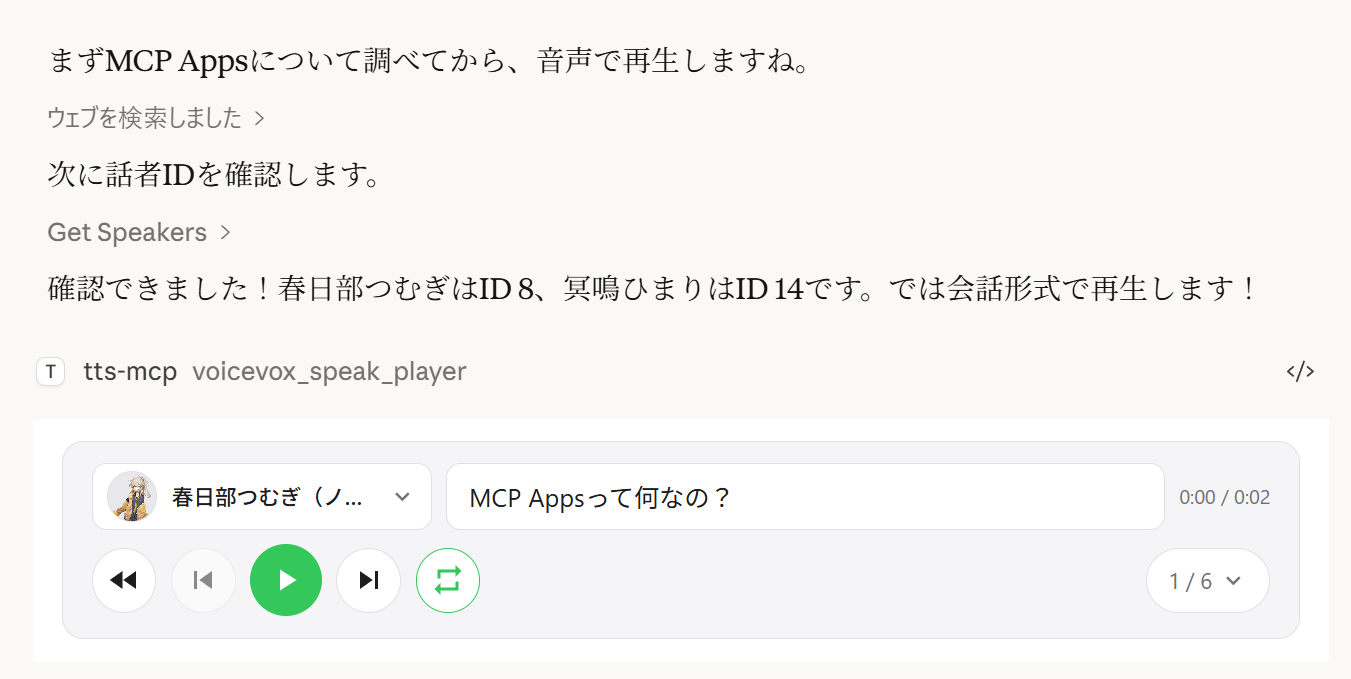
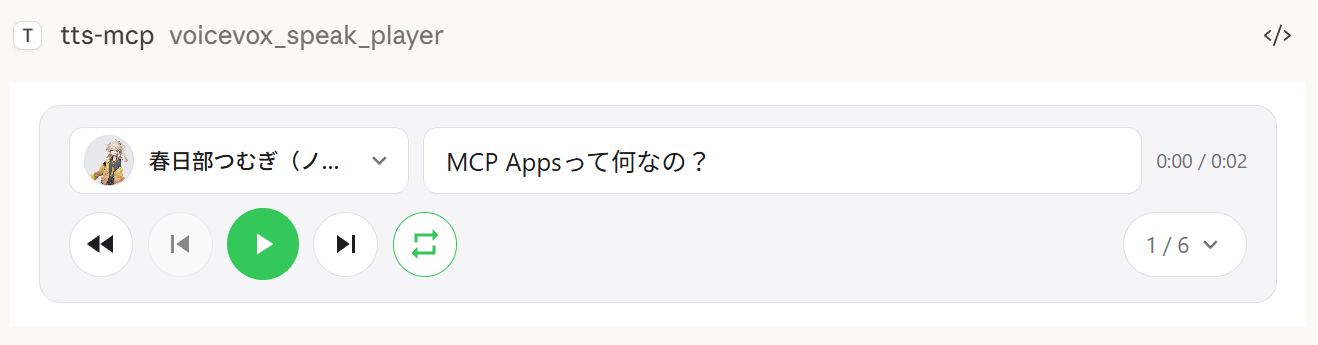
voicevox_speak_player ツールは MCP Apps を使用して、チャット内にインタラクティブなオーディオプレーヤーを直接レンダリングします。標準の voicevox_speak ツールがサーバー上で音声を再生するのに対し、音声はクライアント側 (ブラウザ/アプリ) で再生されます — サーバーにオーディオデバイスは不要です。
クライアント側再生 — 音声はサーバーではなく Claude Desktop のチャット内で再生されます。リモート接続でも動作します。
再生/一時停止コントロール — 会話に埋め込まれた完全な再生コントロール
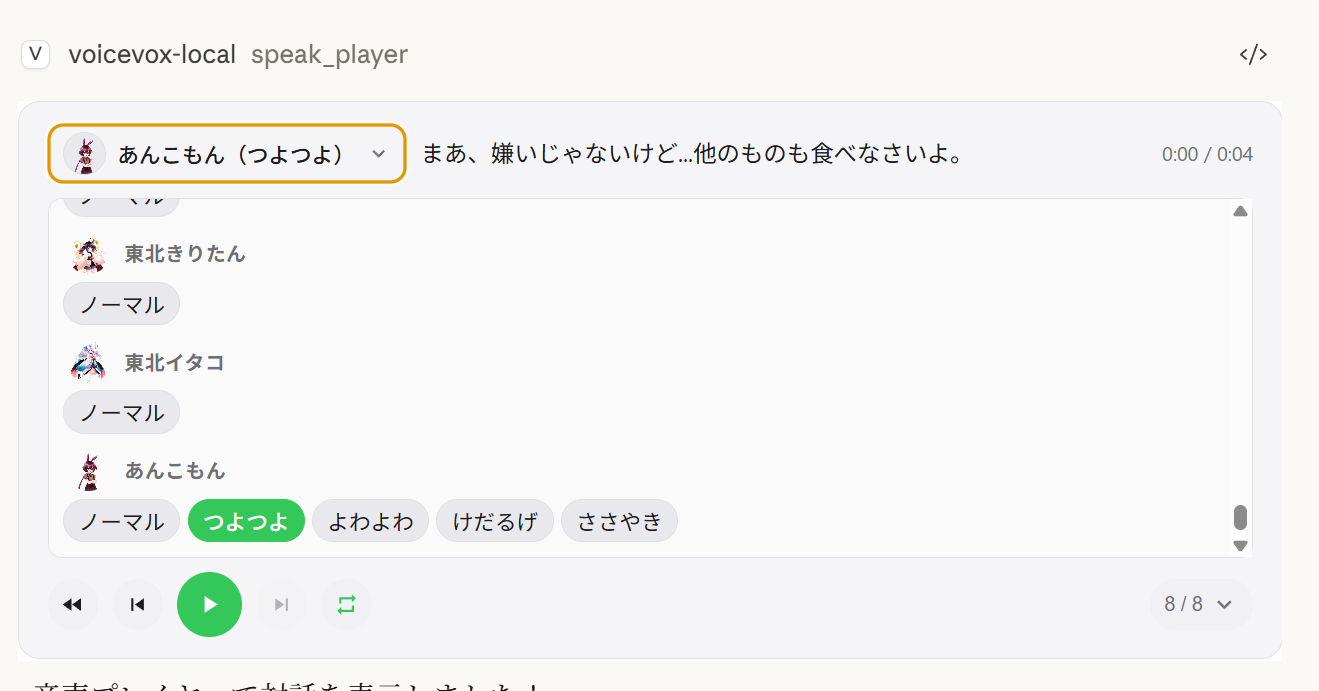
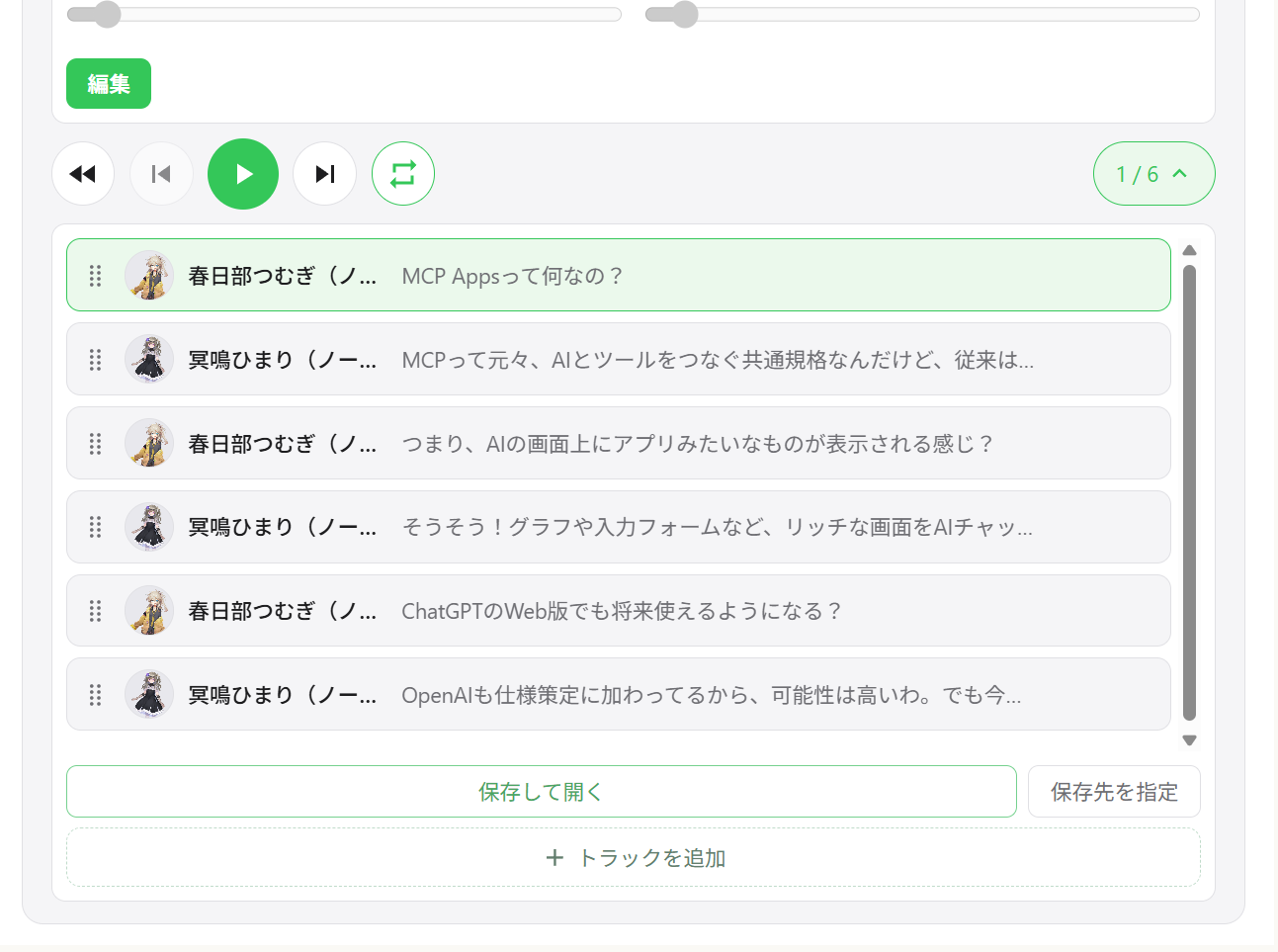
複数話者による対話 — トラックナビゲーション付きの 1 つのプレーヤーで複数の話者を順次再生
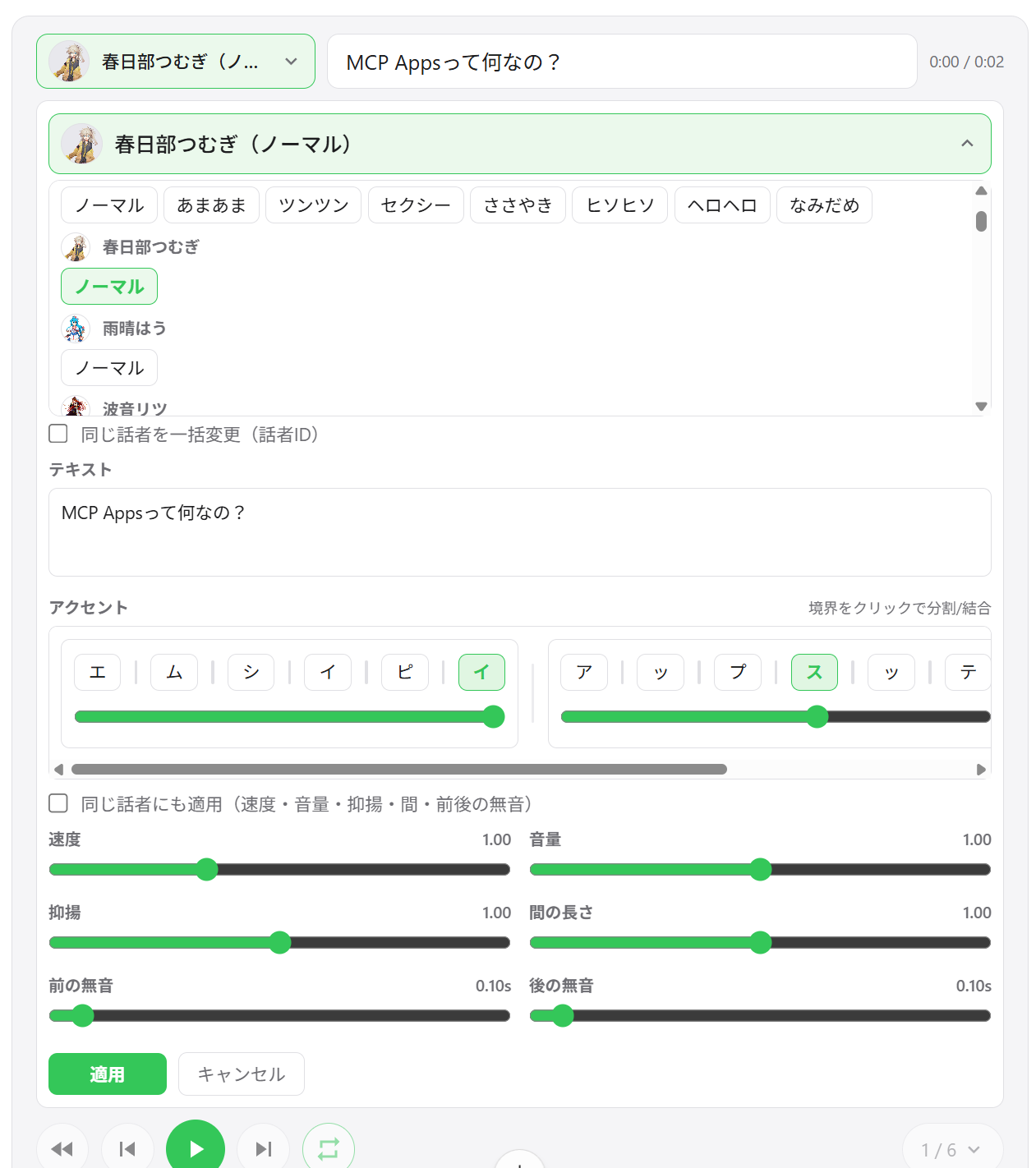
話者切り替え — プレーヤー UI から直接任意のセグメントの声を変更
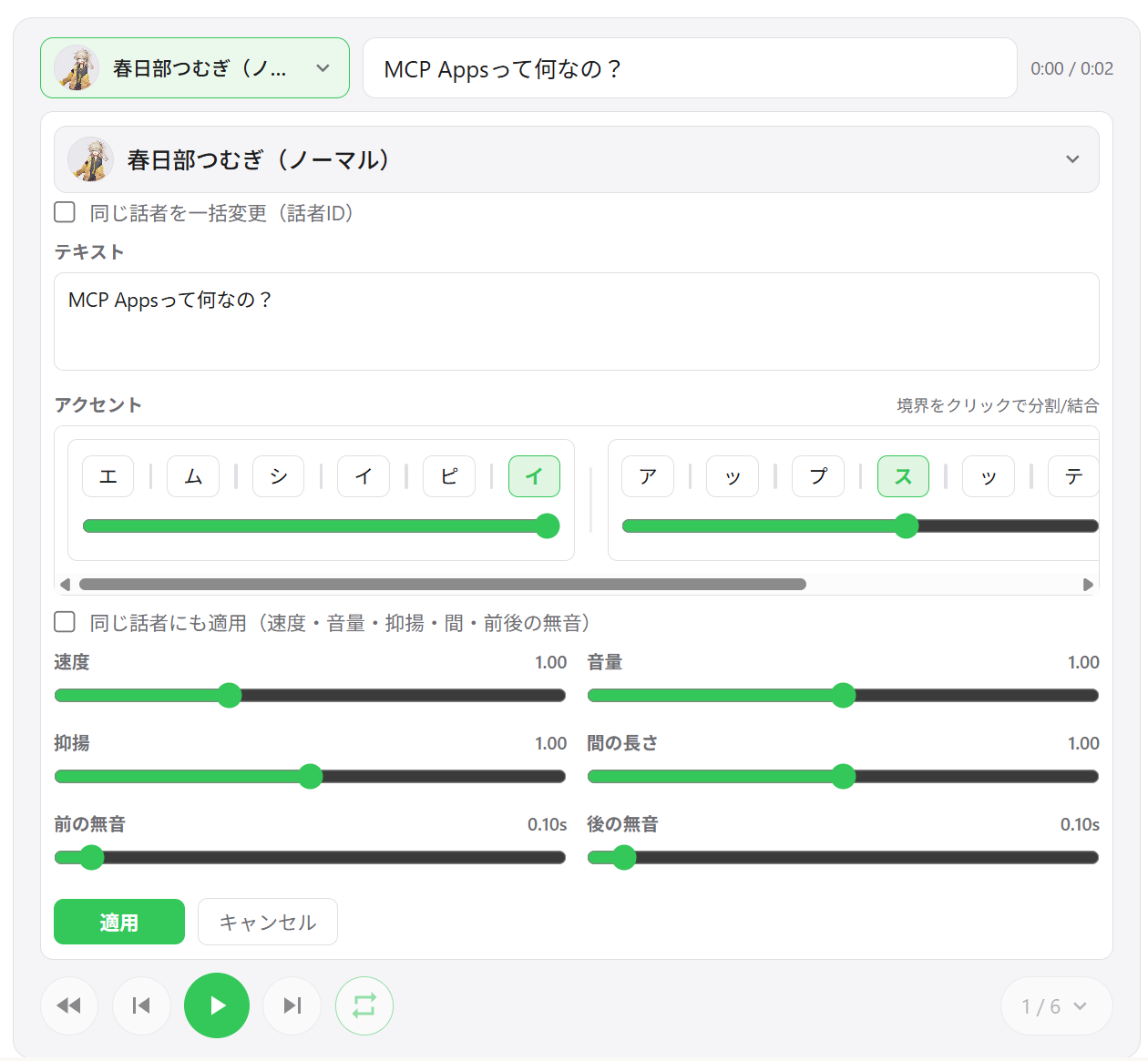
セグメント編集 — セグメントごとに速度、音量、イントネーション、ポーズ長、前後の無音を調整
アクセント句編集 — UI で直接アクセント位置とモーラのピッチを編集
セグメントの追加 / 削除 / 並べ替え — ドラッグアンドドロップでトラックを並べ替え、新しいセグメントをインラインで追加
WAV エクスポート — すべてのトラックを番号付き WAV ファイルとして保存し、出力フォルダーを自動的に開く
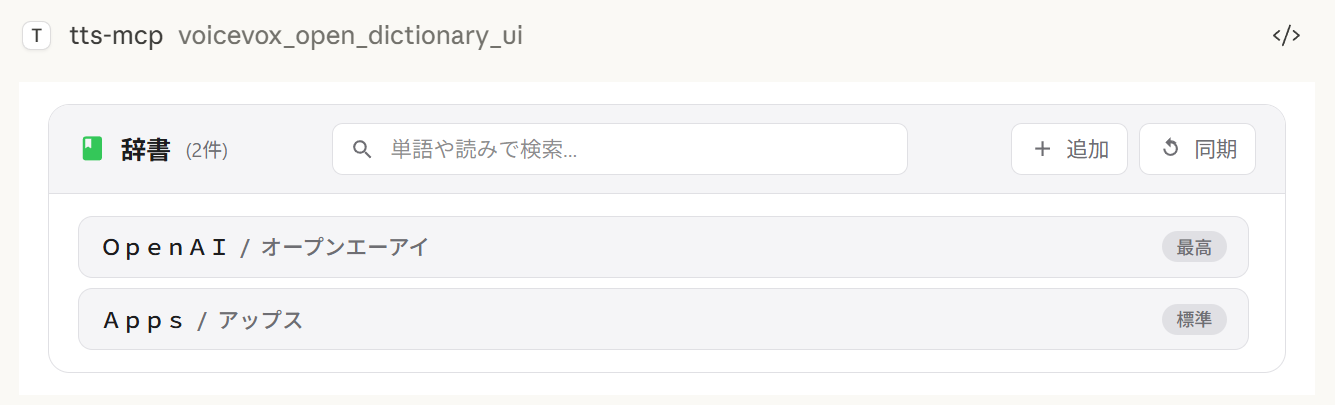
ユーザー辞書マネージャー — VOICEVOX ユーザー辞書の単語をプレビュー再生付きで追加、編集、削除
セッション間の状態復元 — プレーヤーの状態はサーバーに保持され、チャットを再度開くと以前のトラックが復元されます
環境によるエクスポート動作:
保存して開く は常に WAV ファイルをエクスポートします。ファイルエクスプローラーを開くことができない場合でも、エクスポートは成功し、保存パスが UI に表示されます。
出力フォルダーを選択 は Windows/macOS でネイティブのディレクトリピッカーを使用します。サポートされていない環境では、このアクションはデフォルトのエクスポートディレクトリにフォールバックします。
複数話者再生 | トラックリスト | セグメント編集 |
|
|
|
話者選択 | 辞書マネージャー | WAV エクスポート |
|
|
|
クライアント | 接続 | 備考 |
ChatGPT | HTTP (リモート) |
|
Claude Desktop | stdio (ローカル) | そのまま動作 |
Claude Desktop | HTTP (mcp-remote 経由) |
|
注:
speak_playerは MCP Apps をサポートするホストが必要です。MCP Apps をサポートしないホストでは、このツールは利用できず、代わりにspeak(サーバー側再生) を使用できます。
ツール | 説明 |
| 新しいプレーヤーセッションを作成し、UI を表示します。 |
| 既存のプレーヤーのすべてのセグメントを更新します (呼び出しごとに新しい |
| AI チューニング用に現在のプレーヤー状態を読み取ります (ページング付き)。 |
| ユーザー辞書マネージャー UI を開きます。 |
Node.js 20.0.0 以上 (または Bun) または Docker
VOICEVOX Engine (実行中である必要があります。Docker Compose に含まれています)
ffplay (オプション、推奨 — Docker では不要)
ffplay は FFmpeg に含まれる軽量プレーヤーで、標準入力からの再生をサポートしています。利用可能な場合、低遅延のストリーミング再生が自動的に有効になります。
💡 FFplay はオプションです。 ない場合は、一時ファイルベースの再生にフォールバックします (Windows: PowerShell、macOS: afplay、Linux: aplay など)。
簡単セットアップ: 各 OS のワンライナーインストール (以下の手順を参照)
必須: ffplay が PATH にあること (インストール後にターミナル/アプリを再起動)
インストール例:
Windows (いずれか)
Winget: winget install --id=Gyan.FFmpeg -e
Chocolatey: choco install ffmpeg
Scoop: scoop install ffmpeg
公式ビルド: https://www.gyan.dev/ffmpeg/builds/ または https://github.com/BtbN/FFmpeg-Builds からダウンロードし、bin フォルダーを PATH に追加
macOS
Homebrew: brew install ffmpeg
Linux
Debian/Ubuntu: sudo apt-get update && sudo apt-get install -y ffmpeg
Fedora: sudo dnf install -y ffmpeg
Arch: sudo pacman -S ffmpeg
PATH 設定:
Windows: 環境変数に ...\ffmpeg\bin を追加し、PowerShell/ターミナルとエディター (Claude/VS Code など) を再起動
確認: powershell -c "$env:Path" に ffmpeg のパスが含まれていること
macOS/Linux: 通常は自動検出されます。必要に応じて echo $PATH で確認し、シェルを再起動してください。
MCP クライアント (Claude Desktop/Code): PATH を再読み込みするためにアプリを再起動してください。
確認:
ffplay -versionバージョン情報が表示されればインストール完了です。CLI/MCP は ffplay を自動検出し、標準入力ストリーミング再生を使用します。
1. VOICEVOX Engine を起動
2. Claude Desktop の設定ファイルに追加
設定ファイルの場所:
Windows: %APPDATA%\Claude\claude_desktop_config.json
macOS: ~/Library/Application Support/Claude/claude_desktop_config.json
{
  "mcpServers": {
    "tts-mcp": {
      "command": "npx",
      "args": ["-y", "@kajidog/mcp-tts-voicevox"]
    }
  }
}
💡 Bun を使用する場合、
npxをbunxに置き換えるだけです:"command": "bunx", "args": ["@kajidog/mcp-tts-voicevox"]
3. Claude Desktop を再起動
これで完了です! Claude に「こんにちは」と頼むと、話してくれます!
Docker Compose を使用すると、MCP サーバーと VOICEVOX Engine の両方を 1 つのコマンドで実行できます。Node.js や VOICEVOX のインストールは不要です。
1. コンテナを起動
docker compose up -dこれにより、VOICEVOX Engine と MCP サーバー (HTTP モード、ポート 3000) が起動します。
2. Claude Desktop の設定ファイルに追加 (mcp-remote を使用)
{
  "mcpServers": {
    "tts-mcp": {
      "command": "npx",
      "args": ["-y", "mcp-remote", "http://localhost:3000/mcp"]
    }
  }
}
3. Claude Desktop を再起動
セキュリティ (Docker):
docker-compose.ymlはポート 3000 を 認証なしで 公開します。MCP_ALLOWED_HOSTSはここでは防御策にはなりません — ブラウザ以外のクライアントは任意のHostヘッダーを送信できるため、ポートに到達できる人は誰でもサーバーを使用できます。MCP_API_KEYを設定し (X-API-Keyとして送信)、またはポートを信頼できるネットワーク / localhost のみにバインドしてください。また、VOICEVOX_ALLOWED_OUTPUT_DIRSを設定して、ファイル書き込みツールが書き込める場所を制限することを検討してください。
制限事項 (Docker): Docker コンテナにはオーディオデバイスがないため、
voicevox_speakツール (サーバー側再生) はデフォルトで無効になっています。代わりにvoicevox_speak_playerを使用してください — これはクライアント側 (Claude Desktop 内) で音声を再生し、サーバーにオーディオデバイスがなくても動作します。詳細は UI オーディオプレーヤー を参照してください。
voicevox_speak — テキスト読み上げClaude から呼び出せるメイン機能。
パラメータ | 説明 | デフォルト |
| 読み上げるテキスト (複数セグメントは改行で区切る) | 必須 |
| インラインアクセント表記 ( | (未設定) |
| 話者 ID | 1 |
| 再生速度 | 1.0 |
| 即時再生 (キューをクリア) | true |
| 再生開始を待つ | false |
| 再生完了を待つ | false |
immediate/waitForStart/waitForEndは、対応する--restrict-*オプションが設定されている場合、ツールスキーマから消えます。
例:
// Simple text
{ "text": "Hello" }

// Specify speaker
{ "text": "Hello", "speaker": 3 }

// Different speakers per segment
{ "text": "1:Hello\n3:Nice weather today" }

// Wait for completion (synchronous processing)
{ "text": "Wait for this to finish before continuing", "waitForEnd": true }

// Control the accent with inline notation (`,` separates phrases, `[` marks the accent)
{ "text": "こんにちは世界", "phrases": "コン[ニ]チワ,セ[カ]イ" }phrases (およびユーザー辞書ツールの発音フィールド) は、インラインアクセントマーカー付きのカタカナを受け入れます:
, はアクセント句を区切ります — コン[ニ]チワ,セ[カ]イ
[ はピッチが下がる位置を示します。コン[ニ]チワ はアクセントが ニ に下がることを意味します
句の角括弧を省略すると、その句には VOICEVOX 独自のアクセント推定が使用されます
phrases が指定されている場合でも text は必須です — そこにプレーンテキストを渡し、表記が読み上げられます。
voicevox_get_accent_phrases は、指定されたテキストに対して同じ表記を返すため、推定されたアクセントを読み取り、角括弧を調整して phrases にフィードバックできます。
ツール | 説明 |
| UI オーディオプレーヤーで読み上げ ( プレーヤー MCP ツール を参照) |
| VOICEVOX Engine の接続を確認 |
| 利用可能な話者のリストを取得 |
| 再生を停止し、キューをクリア |
| 音声ファイルを生成 |
ユーザー辞書ツール (グループ dictionary):
ツール | 説明 |
| テキストの読みとアクセント位置をインライン表記で取得 |
| ユーザー辞書の単語を一覧表示 (フィルター + ページング) |
| 単語を追加 (発音はインラインアクセント表記を受け付け) |
| 単語を更新 (省略したフィールドは値を保持) |
| UUID で単語を削除 |
| 複数の単語を一度に追加 |
| 複数の単語を一度に更新 |
任意のツールは、--disable-tools / VOICEVOX_DISABLED_TOOLS で個別に、または --disable-groups / VOICEVOX_DISABLED_GROUPS でグループ単位で無効にできます。
変数 | 説明 | デフォルト |
| エンジンURL |
|
| デフォルトの話者ID |
|
| 再生速度 |
|
| 失敗したAPIリクエストの再試行回数(0で無効) |
|
| 初回再試行遅延(ミリ秒、指数バックオフ) |
|
| 単一のVOICEVOX APIリクエストのタイムアウト(ミリ秒)。長いテキストや遅いエンジンの場合は引き上げてください |
|
変数 | 説明 | デフォルト |
| ストリーミング再生( |
|
| セグメントごとの末尾の無音時間(秒)。キューされたセグメント間のポーズを長くするには増やします(ストリーミング再生時に音声の末尾が切れるのも防ぎます) | エンジンデフォルト |
| 即時再生 |
|
| 再生開始を待つ |
|
| 再生終了を待つ |
|
AIが特定のオプションを指定することを制限します。
変数 | 説明 |
|
|
|
|
|
|
# Disable individual tools
export VOICEVOX_DISABLED_TOOLS=speak_player,synthesize_file

# Disable a built-in group of tools
export VOICEVOX_DISABLED_GROUPS=player

# Combine groups and individual tools
export VOICEVOX_DISABLED_GROUPS=dictionary
export VOICEVOX_DISABLED_TOOLS=synthesize_file
VOICEVOX_DISABLED_GROUPS / --disable-groupsの組み込みグループ:
グループ | ツール |
|
|
|
|
|
|
|
|
変数 | 説明 | デフォルト |
| UIプレイヤーのウィジェットドメイン(ChatGPTで必要、例: | (未設定) |
| UIプレイヤーで音声を自動再生 |
|
| UIプレイヤーからのトラック書き出し(ダウンロード)を有効にする(無効にするには |
|
| 書き出したトラックのデフォルト出力ディレクトリ(フォルダピッカーが利用できない場合のフォールバックとしても使用) |
|
| プレイヤーキャッシュファイル( |
|
| ディスク上の永続的なオーディオキャッシュを有効にする( |
|
| オーディオキャッシュの保持日数( |
|
| オーディオキャッシュのサイズ上限(MB)( |
|
| 永続化されたプレイヤー状態JSONのパス |
|
変数 | 説明 | デフォルト |
| ファイル書き込みツール( | (未設定) |
変数 | 説明 | デフォルト |
| HTTPモードを有効にする |
|
| HTTPポート |
|
| HTTPホスト |
|
| 許可ホスト(カンマ区切り) |
|
| 許可オリジン(カンマ区切り) |
|
|
| (未設定) |
コマンドライン引数は環境変数より優先されます。
完全かつ最新のオプション一覧は、常にnpx @kajidog/mcp-tts-voicevox --helpで確認できます。
# Basic settings
npx @kajidog/mcp-tts-voicevox --url http://192.168.1.100:50021 --speaker 3 --speed 1.2

# HTTP mode
npx @kajidog/mcp-tts-voicevox --http --port 8080

# With restrictions
npx @kajidog/mcp-tts-voicevox --restrict-immediate --restrict-wait-for-end

# Disable individual tools
npx @kajidog/mcp-tts-voicevox --disable-tools speak_player,synthesize_file

# Disable a tool group
npx @kajidog/mcp-tts-voicevox --disable-groups player
引数 | 説明 |
| ヘルプを表示 |
| バージョンを表示 |
| デフォルト設定で |
| 設定ファイルのパス |
| VOICEVOX Engine の URL |
| デフォルトの話者 ID |
| 再生速度 |
| ストリーミング再生 |
| セグメントごとの末尾無音(キューされたセグメント間のポーズ) |
| 即時再生 |
| 開始待機 |
| 終了待機 |
| 即時再生を制限 |
| waitForStart を制限 |
| waitForEnd を制限 |
| ファイル書き込みツールが書き込み可能なディレクトリ(カンマ区切り。未設定 = 制限なし) |
| ツールを無効化(カンマ区切りのツール名) |
| ツールグループを無効化: |
| UI プレイヤーでの自動再生 |
| UI プレイヤーでのトラック書き出し(ダウンロード)の有効/無効 |
| 書き出したトラックのデフォルト出力ディレクトリ |
| プレイヤーのキャッシュディレクトリ |
| 永続化されたプレイヤー状態のファイルパス |
| プレイヤーのディスク音声キャッシュの有効/無効 |
| 音声キャッシュの保持日数( |
| 音声キャッシュのサイズ上限(MB)( |
| HTTP モード |
| HTTP ポート |
| HTTP ホスト |
| 許可するホスト(カンマ区切り) |
| 許可するオリジン(カンマ区切り) |
|
|
環境変数や CLI 引数の代わりに(またはそれらに加えて)JSON 設定ファイルを使用できます。設定項目が多い場合に便利です。
優先順位: CLI 引数 > 環境変数 > 設定ファイル > デフォルト値
npx @kajidog/mcp-tts-voicevox --initこれにより、現在のディレクトリにすべてのデフォルト設定を含む .voicevoxrc.json が作成されます。必要に応じて編集してください。
npx @kajidog/mcp-tts-voicevox --config ./my-config.jsonまたは環境変数を使用:
VOICEVOX_CONFIG=./my-config.json npx @kajidog/mcp-tts-voicevox.voicevoxrc.json の例{
"url": "http://192.168.1.50:50021",
"speaker": 3,
"speed": 1.2,
"http": true,
"port": 8080,
"disable-tools": ["synthesize_file"],
"disable-groups": ["dictionary"]
}キーは kebab-case(use-streaming)、camelCase(useStreaming)、または内部キー名(defaultSpeaker)で記述できます。現在のディレクトリに .voicevoxrc.json が存在する場合、自動的に読み込まれます。
リモート接続用:
サーバーを起動:
# Linux/macOS
MCP_HTTP_MODE=true MCP_HTTP_PORT=3000 npx @kajidog/mcp-tts-voicevox

# Windows PowerShell
$env:MCP_HTTP_MODE='true'; $env:MCP_HTTP_PORT='3000'; npx @kajidog/mcp-tts-voicevox
Claude Desktop 設定(mcp-remote 使用):
{
  "mcpServers": {
    "tts-mcp-proxy": {
      "command": "npx",
      "args": ["-y", "mcp-remote", "http://localhost:3000/mcp"]
    }
  }
}Claude Code では、.mcp.json のカスタムヘッダーを使用して、プロジェクトごとに異なるデフォルト話者を設定できます:
ヘッダー | 説明 |
| このプロジェクトのデフォルト話者 ID |
|
|
.mcp.json の例:
{
  "mcpServers": {
    "tts": {
      "type": "http",
      "url": "http://localhost:3000/mcp",
      "headers": {
        "X-Voicevox-Speaker": "113",
        "X-API-Key": "your-api-key"
      }
    }
  }
}
これにより、各プロジェクトで異なる音声キャラクターを自動的に使用できます。
優先順位:
ツール呼び出しの明示的な speaker パラメータ(最優先)
X-Voicevox-Speaker ヘッダーによるプロジェクトのデフォルト
グローバルの VOICEVOX_DEFAULT_SPEAKER 設定(最下位)
WSL から Windows 上で動作する MCP サーバーへの接続:
# Method 1: From default gateway
ip route show | grep -oP 'default via \K[\d.]+'
# Usually in the format 172.x.x.1

# Method 2: From /etc/resolv.conf (WSL2)
cat /etc/resolv.conf | grep nameserver | awk '{print $2}'WSL からのアクセスを許可するには、WSL ゲートウェイ IP を MCP_ALLOWED_HOSTS に追加します:
$env:MCP_HTTP_MODE='true'
$env:MCP_ALLOWED_HOSTS='localhost,127.0.0.1,172.29.176.1'
npx @kajidog/mcp-tts-voicevox
または CLI 引数を使用:
npx @kajidog/mcp-tts-voicevox --http --allowed-hosts "localhost,127.0.0.1,172.29.176.1"{
"mcpServers": {
"tts": {
"type": "http",
"url": "http://172.29.176.1:3000/mcp"
}
}
}⚠️ WSL 内では、
localhostは WSL 自体を指します。Windows ホストにアクセスするには WSL ゲートウェイ IP を使用してください。
ChatGPT で使用するには、VOICEVOX Engine にアクセスできる MCP サーバーを HTTP モードでクラウドにデプロイします。
Docker を使用して Render、Railway などにデプロイします(Dockerfile 同梱)。
VOICEVOX Engine をローカルで実行し、ngrok で公開するか、MCP サーバーと一緒にデプロイします。
変数 | 例 | 説明 |
|
| VOICEVOX Engine の URL |
|
| HTTP モードを有効化 |
|
| デプロイしたホスト名 |
|
| UI プレイヤー用のウィジェットドメイン(ChatGPT で必須) |
|
| サーバー側の再生を無効化(オーディオデバイスなし) |
|
| 書き出し機能を無効化(クラウドからファイルをダウンロード不可) |
ChatGPT の設定 → コネクター → MCP サーバー URL を追加(https://your-app.onrender.com/mcp)。
基本的な手順は ChatGPT と同じですが、VOICEVOX_PLAYER_DOMAIN の値が異なります。
Claude Web では、ui.domain がハッシュベースの専用ドメインである必要があります。次のコマンドで計算します:
node -e "console.log(require('crypto').createHash('sha256').update('Your MCP server URL').digest('hex').slice(0,32)+'.claudemcpcontent.com')"例: MCP サーバーの URL が https://your-app.onrender.com/mcp の場合:
node -e "console.log(require('crypto').createHash('sha256').update('https://your-app.onrender.com/mcp').digest('hex').slice(0,32)+'.claudemcpcontent.com')"
# Example output: 48fb73a6...claudemcpcontent.com
この出力値を VOICEVOX_PLAYER_DOMAIN として設定します。
注: ChatGPT と Claude Web では異なる
VOICEVOX_PLAYER_DOMAIN値が必要なため、1 つのインスタンスで両方のクライアントに同時に対応することはできません。それぞれに別々のインスタンスをデプロイするか、対象クライアントに応じて環境変数を切り替えてください。
1. VOICEVOX Engine が起動しているか確認
curl http://localhost:50021/speakers2. プラットフォーム別の再生ツールを確認
OS | 必要なツール |
Linux |
|
macOS |
|
Windows | PowerShell(プリインストール済み) |
パッケージのインストールを確認: npm list -g @kajidog/mcp-tts-voicevox
設定ファイルの JSON 構文を確認
クライアントを再起動
パッケージ | 説明 |
| MCP サーバー( |
汎用 VOICEVOX クライアントライブラリ(単独で使用可能) | |
| 共有 MCP 基盤(設定スキーマ、HTTP/stdio ランチャー)。未公開 — サーバーにバンドルされる |
| React ベースのオーディオプレイヤー UI。単一の HTML ファイルにバンドルされる。未公開 |
git clone https://github.com/kajidog/mcp-tts-voicevox.git
cd mcp-tts-voicevox
pnpm installパッケージマネージャーは pnpm です(npm / yarn はサポートされていません)。
Command | Description |
| すべてのパッケージをビルド |
| テストを実行 |
| リントを実行(ワークスペース全体に対して単一のBiomeパス) |
| すべてのパッケージを型チェック |
| ユーザー向けの変更に対するchangesetを追加 |
開発サーバーはサーバーパッケージにあるため、フィルターを付けて実行します:
Command | Description |
| 開発サーバーを起動(stdio) |
| HTTPモードで開発サーバーを起動 |
| Bunで開発サーバーを起動 |
| BunでHTTP開発サーバーを起動 |
ISC
Generate a query for voice synthesis
| Name | Required | Description | Default |
|---|---|---|---|
| text | Yes | Text for voice synthesis | |
| speaker | No | Default speaker ID (optional) | |
| speedScale | No | Playback speed (optional, default from environment) |
Does the description disclose side effects, auth requirements, rate limits, or destructive behavior?
No annotations are provided, so the description carries full burden. 'Generate a query' suggests this creates some intermediate representation, but doesn't disclose what happens next - does it return a query ID for later use? Does it validate parameters? Is it read-only or has side effects? The description lacks behavioral context about permissions, rate limits, or what 'query' means operationally.
Agents need to know what a tool does to the world before calling it. Descriptions should go beyond structured annotations to explain consequences.
Is the description appropriately sized, front-loaded, and free of redundancy?
The description is a single, efficient sentence with zero wasted words. It's appropriately sized for a tool with good schema coverage and gets straight to the point without unnecessary elaboration. Every word earns its place in conveying the core purpose.
Shorter descriptions cost fewer tokens and are easier for agents to parse. Every sentence should earn its place.
Given the tool's complexity, does the description cover enough for an agent to succeed on first attempt?
For a tool with no annotations and no output schema, the description is insufficient. It doesn't explain what the generated query is used for, what format it returns, or how it differs from actual synthesis tools. Given the complexity of voice synthesis workflows and multiple sibling tools, more context about this tool's role in the ecosystem is needed.
Complex tools with many parameters or behaviors need more documentation. Simple tools need less. This dimension scales expectations accordingly.
Does the description clarify parameter syntax, constraints, interactions, or defaults beyond what the schema provides?
Schema description coverage is 100%, so the schema already documents all three parameters (text, speaker, speedScale) with their descriptions. The tool description adds no additional parameter semantics beyond what's in the schema. The baseline score of 3 reflects adequate but minimal value addition given the comprehensive schema coverage.
Input schemas describe structure but not intent. Descriptions should explain non-obvious parameter relationships and valid value ranges.
Does the description clearly state what the tool does and how it differs from similar tools?
The description states 'Generate a query for voice synthesis' which provides a basic purpose (verb: generate, resource: query for voice synthesis). However, it's vague about what the query actually does - is it for previewing, testing, or preparing synthesis? It doesn't distinguish from sibling tools like 'synthesize_file' or 'speak' which also relate to voice synthesis.
Agents choose between tools based on descriptions. A clear purpose with a specific verb and resource helps agents select the right tool.
Does the description explain when to use this tool, when not to, or what alternatives exist?
The description provides no guidance on when to use this tool versus alternatives. With sibling tools like 'synthesize_file' and 'speak' that also handle voice synthesis, there's no indication whether this tool is for preparation, testing, or a different phase of the synthesis workflow. No context about prerequisites or exclusions is provided.
Agents often have multiple tools that could apply. Explicit usage guidance like "use X instead of Y when Z" prevents misuse.
Get detail of a speaker by id
| Name | Required | Description | Default |
|---|---|---|---|
| uuid | Yes | Speaker UUID (speaker uuid) |
Does the description disclose side effects, auth requirements, rate limits, or destructive behavior?
No annotations are provided, so the description carries the full burden of behavioral disclosure. It mentions 'Get detail' but doesn't specify if this is a read-only operation, what permissions are needed, error handling, or response format. This leaves significant gaps for a tool that likely interacts with a speaker database.
Agents need to know what a tool does to the world before calling it. Descriptions should go beyond structured annotations to explain consequences.
Is the description appropriately sized, front-loaded, and free of redundancy?
The description is a single, efficient sentence with no wasted words. It's front-loaded with the core action ('Get detail'), making it easy to scan and understand quickly.
Shorter descriptions cost fewer tokens and are easier for agents to parse. Every sentence should earn its place.
Given the tool's complexity, does the description cover enough for an agent to succeed on first attempt?
Given no annotations and no output schema, the description is incomplete. It doesn't explain what 'detail' includes (e.g., speaker attributes, capabilities), potential errors, or how this fits with sibling tools like 'synthesize_file'. For a tool with one parameter but unknown behavioral traits, more context is needed.
Complex tools with many parameters or behaviors need more documentation. Simple tools need less. This dimension scales expectations accordingly.
Does the description clarify parameter syntax, constraints, interactions, or defaults beyond what the schema provides?
Schema description coverage is 100%, with the parameter 'uuid' documented as 'Speaker UUID (speaker uuid)'. The description adds no additional meaning beyond this, such as format examples or where to obtain the UUID. Baseline 3 is appropriate since the schema does the heavy lifting.
Input schemas describe structure but not intent. Descriptions should explain non-obvious parameter relationships and valid value ranges.
Does the description clearly state what the tool does and how it differs from similar tools?
The description clearly states the verb ('Get detail') and resource ('speaker'), making the purpose understandable. However, it doesn't differentiate from sibling tools like 'get_speakers' (which likely lists speakers) or explain what 'detail' entails beyond the ID lookup.
Agents choose between tools based on descriptions. A clear purpose with a specific verb and resource helps agents select the right tool.
Does the description explain when to use this tool, when not to, or what alternatives exist?
No guidance is provided on when to use this tool versus alternatives. For example, it doesn't clarify if this should be used after 'get_speakers' to fetch more information or in what contexts (e.g., before synthesis). The description only states the basic function without context.
Agents often have multiple tools that could apply. Explicit usage guidance like "use X instead of Y when Z" prevents misuse.
Get a list of available speakers
| Name | Required | Description | Default |
|---|---|---|---|
No parameters | |||
Does the description disclose side effects, auth requirements, rate limits, or destructive behavior?
With no annotations provided, the description carries the full burden of behavioral disclosure. It states the tool retrieves a list, implying a read-only operation, but doesn't cover aspects like whether it requires authentication, has rate limits, returns paginated results, or what format the list is in. For a tool with zero annotation coverage, this is a significant gap in transparency.
Agents need to know what a tool does to the world before calling it. Descriptions should go beyond structured annotations to explain consequences.
Is the description appropriately sized, front-loaded, and free of redundancy?
The description is a single, efficient sentence ('Get a list of available speakers') that is front-loaded and wastes no words. It directly states the tool's purpose without unnecessary elaboration, making it highly concise and well-structured for its simplicity.
Shorter descriptions cost fewer tokens and are easier for agents to parse. Every sentence should earn its place.
Given the tool's complexity, does the description cover enough for an agent to succeed on first attempt?
Given the tool's complexity (simple list retrieval) but lack of annotations and output schema, the description is incomplete. It doesn't explain what the list contains, how it's formatted, or any behavioral traits. For a tool with no structured data beyond the input schema, more context is needed to be fully helpful to an agent.
Complex tools with many parameters or behaviors need more documentation. Simple tools need less. This dimension scales expectations accordingly.
Does the description clarify parameter syntax, constraints, interactions, or defaults beyond what the schema provides?
The input schema has 0 parameters with 100% coverage, so the schema fully documents the lack of inputs. The description doesn't add parameter details beyond this, which is appropriate. Since there are no parameters, the baseline is 4, as the description doesn't need to compensate for any gaps.
Input schemas describe structure but not intent. Descriptions should explain non-obvious parameter relationships and valid value ranges.
Does the description clearly state what the tool does and how it differs from similar tools?
The description states the tool's purpose ('Get a list of available speakers'), which is clear but vague. It specifies the verb ('Get') and resource ('speakers'), but doesn't distinguish it from sibling tools like 'get_speaker_detail' or explain what 'available' means in this context. This is adequate but has clear gaps in specificity.
Agents choose between tools based on descriptions. A clear purpose with a specific verb and resource helps agents select the right tool.
Does the description explain when to use this tool, when not to, or what alternatives exist?
The description provides no guidance on when to use this tool versus alternatives. It doesn't mention sibling tools like 'get_speaker_detail' for detailed information or 'synthesize_file' for synthesis operations, nor does it specify prerequisites or contexts for usage. This leaves the agent without explicit or implied usage instructions.
Agents often have multiple tools that could apply. Explicit usage guidance like "use X instead of Y when Z" prevents misuse.
Check if VOICEVOX Engine is running and reachable
| Name | Required | Description | Default |
|---|---|---|---|
No parameters | |||
Does the description disclose side effects, auth requirements, rate limits, or destructive behavior?
No annotations are provided, so the description carries the full burden of behavioral disclosure. It states the tool checks if the engine is 'running and reachable,' implying a read-only, non-destructive operation, but doesn't detail what happens on failure (e.g., error responses), latency, or any side effects. For a tool with zero annotation coverage, this leaves gaps in understanding its behavior.
Agents need to know what a tool does to the world before calling it. Descriptions should go beyond structured annotations to explain consequences.
Is the description appropriately sized, front-loaded, and free of redundancy?
The description is a single, efficient sentence: 'Check if VOICEVOX Engine is running and reachable.' It is front-loaded with the core purpose, has no wasted words, and is appropriately sized for a simple tool. Every part of the sentence earns its place by conveying essential information.
Shorter descriptions cost fewer tokens and are easier for agents to parse. Every sentence should earn its place.
Given the tool's complexity, does the description cover enough for an agent to succeed on first attempt?
Given the tool's low complexity (0 parameters, no output schema, no annotations), the description is minimally adequate. It states what the tool does but lacks details on usage context, error handling, or return values. Without an output schema, it doesn't explain what 'check' returns (e.g., status, boolean), leaving some gaps for an agent to understand fully.
Complex tools with many parameters or behaviors need more documentation. Simple tools need less. This dimension scales expectations accordingly.
Does the description clarify parameter syntax, constraints, interactions, or defaults beyond what the schema provides?
The tool has 0 parameters, and the input schema has 100% description coverage (though empty). The description doesn't need to explain parameters, so it naturally adds no value beyond the schema. A baseline score of 4 is appropriate for zero-parameter tools, as there's no parameter information to compensate for.
Input schemas describe structure but not intent. Descriptions should explain non-obvious parameter relationships and valid value ranges.
Does the description clearly state what the tool does and how it differs from similar tools?
The description clearly states the tool's purpose: 'Check if VOICEVOX Engine is running and reachable.' It uses a specific verb ('Check') and identifies the target resource ('VOICEVOX Engine'), making it easy to understand. However, it doesn't explicitly differentiate from sibling tools like 'get_speakers' or 'synthesize_file', which serve different purposes but also interact with VOICEVOX.
Agents choose between tools based on descriptions. A clear purpose with a specific verb and resource helps agents select the right tool.
Does the description explain when to use this tool, when not to, or what alternatives exist?
No guidance is provided on when to use this tool versus alternatives. The description doesn't mention prerequisites (e.g., before using other tools), exclusions, or contextual cues. For example, it doesn't specify if this should be called first to verify connectivity before invoking 'speak' or 'synthesize_file'.
Agents often have multiple tools that could apply. Explicit usage guidance like "use X instead of Y when Z" prevents misuse.
Convert text to speech and play it. Text is split by line breaks (\n) into separate speech units. Each line is processed as an independent audio segment.
| Name | Required | Description | Default |
|---|---|---|---|
| text | Yes | Text split by line breaks (\n). IMPORTANT: Each line = one speech unit (processed and played separately). Keep the FIRST LINE SHORT for quick playback start - audio begins as soon as the first line is synthesized. Example: "Hi!\nThis is a longer explanation that follows." Optional speaker prefix per line: "1:Hello\n2:World" | |
| query | No | Voice synthesis query | |
| speaker | No | Default speaker ID (optional) | |
| speedScale | No | Playback speed (optional, default from environment) | |
| immediate | No | If true, stops current playback and plays new audio immediately. If false, waits for current playback to finish. Default depends on environment variable. | |
| waitForStart | No | Wait for playback to start (optional, default: false) | |
| waitForEnd | No | Wait for playback to end (optional, default: false) |
Does the description disclose side effects, auth requirements, rate limits, or destructive behavior?
With no annotations provided, the description carries full burden and does well by disclosing key behavioral traits: text is split by line breaks into separate speech units, each line processed independently, and the first line should be short for quick playback start. It doesn't mention error handling, rate limits, or authentication needs, but covers core playback behavior adequately.
Agents need to know what a tool does to the world before calling it. Descriptions should go beyond structured annotations to explain consequences.
Is the description appropriately sized, front-loaded, and free of redundancy?
The description is front-loaded with the core purpose in the first sentence, followed by specific behavioral details in the second. Both sentences earn their place by providing essential information without redundancy. It's appropriately sized for the tool's complexity.
Shorter descriptions cost fewer tokens and are easier for agents to parse. Every sentence should earn its place.
Given the tool's complexity, does the description cover enough for an agent to succeed on first attempt?
Given no annotations and no output schema, the description does well to cover the main behavior and text processing logic. However, it doesn't address potential side effects (e.g., interrupting current playback, which is hinted at in the 'immediate' parameter schema), error cases, or what the tool returns. For a 7-parameter tool with mutation implications, it's good but not fully complete.
Complex tools with many parameters or behaviors need more documentation. Simple tools need less. This dimension scales expectations accordingly.
Does the description clarify parameter syntax, constraints, interactions, or defaults beyond what the schema provides?
Schema description coverage is 100%, so the schema already documents all 7 parameters thoroughly. The description adds minimal parameter semantics beyond the schema—it mentions line break processing and first line optimization, which relates to the 'text' parameter but doesn't significantly enhance understanding of parameters like 'query' or 'speaker'. Baseline 3 is appropriate given high schema coverage.
Input schemas describe structure but not intent. Descriptions should explain non-obvious parameter relationships and valid value ranges.
Does the description clearly state what the tool does and how it differs from similar tools?
The description clearly states the specific action ('Convert text to speech and play it') and resource (audio output), distinguishing it from siblings like 'synthesize_file' (file output) and 'stop_speaker' (playback control). It explicitly mentions text processing by line breaks, which adds specificity beyond the basic function.
Agents choose between tools based on descriptions. A clear purpose with a specific verb and resource helps agents select the right tool.
Does the description explain when to use this tool, when not to, or what alternatives exist?
The description implies usage for text-to-speech playback but doesn't explicitly state when to use this tool versus alternatives like 'synthesize_file' (for file output) or 'generate_query' (possibly for query generation). It provides some context about line break processing but lacks explicit guidance on tool selection scenarios.
Agents often have multiple tools that could apply. Explicit usage guidance like "use X instead of Y when Z" prevents misuse.
Stop current audio playback
| Name | Required | Description | Default |
|---|---|---|---|
| random_string | Yes | Dummy parameter for no-parameter tools |
Does the description disclose side effects, auth requirements, rate limits, or destructive behavior?
With no annotations provided, the description carries full burden but only states the basic action. It does not disclose behavioral traits like whether this requires specific permissions, what happens if no audio is playing, error conditions, or side effects. The description is minimal and lacks necessary context for safe invocation.
Agents need to know what a tool does to the world before calling it. Descriptions should go beyond structured annotations to explain consequences.
Is the description appropriately sized, front-loaded, and free of redundancy?
The description is a single, clear sentence with zero wasted words. It is perfectly front-loaded and appropriately sized for a simple action tool.
Shorter descriptions cost fewer tokens and are easier for agents to parse. Every sentence should earn its place.
Given the tool's complexity, does the description cover enough for an agent to succeed on first attempt?
Given no annotations and no output schema, the description is incomplete for a mutation tool. It does not explain what happens after stopping playback (e.g., success/failure response, state changes) or error handling, leaving significant gaps for the agent.
Complex tools with many parameters or behaviors need more documentation. Simple tools need less. This dimension scales expectations accordingly.
Does the description clarify parameter syntax, constraints, interactions, or defaults beyond what the schema provides?
The tool has 0 meaningful parameters (only a dummy parameter with 100% schema coverage). The description correctly omits parameter details since none are needed for the core functionality, adding appropriate value beyond the schema.
Input schemas describe structure but not intent. Descriptions should explain non-obvious parameter relationships and valid value ranges.
Does the description clearly state what the tool does and how it differs from similar tools?
The description 'Stop current audio playback' clearly states the specific action (stop) and resource (current audio playback). It distinguishes from siblings like 'speak' or 'synthesize_file' which initiate playback rather than stop it.
Agents choose between tools based on descriptions. A clear purpose with a specific verb and resource helps agents select the right tool.
Does the description explain when to use this tool, when not to, or what alternatives exist?
The description implies usage when audio is currently playing, but does not explicitly state when to use this tool versus alternatives or provide any exclusions. It lacks guidance on prerequisites or timing considerations.
Agents often have multiple tools that could apply. Explicit usage guidance like "use X instead of Y when Z" prevents misuse.
Generate an audio file and return its absolute path
| Name | Required | Description | Default |
|---|---|---|---|
| text | No | Text for voice synthesis (if both query and text provided, query takes precedence) | |
| query | No | Voice synthesis query | |
| output | Yes | Output path for the audio file | |
| speaker | No | Default speaker ID (optional) | |
| speedScale | No | Playback speed (optional, default from environment) |
Does the description disclose side effects, auth requirements, rate limits, or destructive behavior?
With no annotations provided, the description carries the full burden of behavioral disclosure. It mentions generating a file and returning a path, but lacks details on permissions, side effects (e.g., file system changes), rate limits, error handling, or audio format specifics. This is inadequate for a tool that creates files, as it doesn't clarify behavioral traits beyond the basic operation.
Agents need to know what a tool does to the world before calling it. Descriptions should go beyond structured annotations to explain consequences.
Is the description appropriately sized, front-loaded, and free of redundancy?
The description is a single, efficient sentence that front-loads the core action and return value. Every word earns its place, with no redundancy or unnecessary elaboration, making it easy to parse quickly.
Shorter descriptions cost fewer tokens and are easier for agents to parse. Every sentence should earn its place.
Given the tool's complexity, does the description cover enough for an agent to succeed on first attempt?
Given the complexity of a file-generation tool with 5 parameters, no annotations, and no output schema, the description is incomplete. It doesn't cover behavioral aspects like side effects, error cases, or audio specifics, and lacks usage context. This leaves significant gaps for an AI agent to understand how to invoke it correctly in various scenarios.
Complex tools with many parameters or behaviors need more documentation. Simple tools need less. This dimension scales expectations accordingly.
Does the description clarify parameter syntax, constraints, interactions, or defaults beyond what the schema provides?
Schema description coverage is 100%, so the schema already documents all parameters thoroughly (e.g., precedence rules for text vs. query, optional defaults). The description adds no additional parameter semantics beyond what the schema provides, such as explaining the audio generation process or file format details. Baseline 3 is appropriate when the schema does the heavy lifting.
Input schemas describe structure but not intent. Descriptions should explain non-obvious parameter relationships and valid value ranges.
Does the description clearly state what the tool does and how it differs from similar tools?
The description clearly states the action ('Generate an audio file') and the resource ('audio file'), and specifies the return value ('return its absolute path'). It distinguishes from siblings like 'speak' (which might stream audio) and 'generate_query' (which likely creates queries rather than files). However, it doesn't explicitly differentiate from all siblings (e.g., 'stop_speaker' is clearly different).
Agents choose between tools based on descriptions. A clear purpose with a specific verb and resource helps agents select the right tool.
Does the description explain when to use this tool, when not to, or what alternatives exist?
No guidance is provided on when to use this tool versus alternatives. The description doesn't mention prerequisites, context, or comparisons to siblings like 'speak' (which might be for immediate playback) or 'generate_query' (which might be for query generation without file creation).
Agents often have multiple tools that could apply. Explicit usage guidance like "use X instead of Y when Z" prevents misuse.
Recent tool additions, removals, and schema changes observed during successful MCP inspections. Dates show when Glama detected each change.
v0.3.1generate_queryget_speaker_detailget_speakersping_voicevoxspeakstop_speakersynthesize_fileEach tool has a clearly distinct purpose with no overlap: generate_query creates synthesis queries, get_speaker_detail and get_speakers handle speaker metadata, ping_voicevox checks engine status, speak plays audio, stop_speaker stops playback, and synthesize_file creates files. The descriptions make it easy to distinguish between query generation, metadata retrieval, status checking, real-time playback control, and file synthesis.
The naming is mostly consistent with a verb_noun pattern (e.g., get_speakers, stop_speaker, synthesize_file), but there are minor deviations: generate_query uses 'generate' instead of a more specific verb like 'create', and ping_voicevox uses 'ping' as a verb which is less conventional but still understandable. All tools use snake_case consistently.
With 7 tools, this server is well-scoped for a TTS system. It covers essential operations like checking engine status, retrieving speaker information, generating queries, real-time speech playback with control, and file synthesis. Each tool earns its place without feeling excessive or insufficient for the domain.
The tool set provides complete coverage for a TTS domain: it includes status checking (ping_voicevox), metadata retrieval (get_speakers, get_speaker_detail), query preparation (generate_query), real-time audio handling (speak, stop_speaker), and file output (synthesize_file). There are no obvious gaps—agents can perform the full lifecycle from setup to synthesis and playback control.
Unclaimed servers have limited discoverability.
If you are the server author, to access and configure the admin panel.
AI voice generation: text-to-speech and voice cloning from any MCP client.
MCP server for Text-to-Speech
MCP server for AI dialogue using various LLM models via AceDataCloud
MCP server exposing the AceDataCloud Fish Audio API (text-to-speech with voice conditioning)
We provide all the information about MCP servers via our MCP API.
curl -X GET 'https://glama.ai/api/mcp/v1/servers/kajidog/mcp-tts-voicevox'
If you have feedback or need assistance with the MCP directory API, please join our Discord server