godot-mcp-pilot
用于 Godot 4 的模型上下文协议 (MCP) 服务器 — 让 AI 助手(Claude、Cursor、Cline 等)直接控制您的 Godot 项目。


godot-mcp-pilot 将 Godot 引擎操作公开为 MCP 工具,让 AI 助手能够通过自然语言启动编辑器、运行项目、创建和编辑场景、编写 GDScript 以及检查资源。适用于 2D 和 3D 游戏。
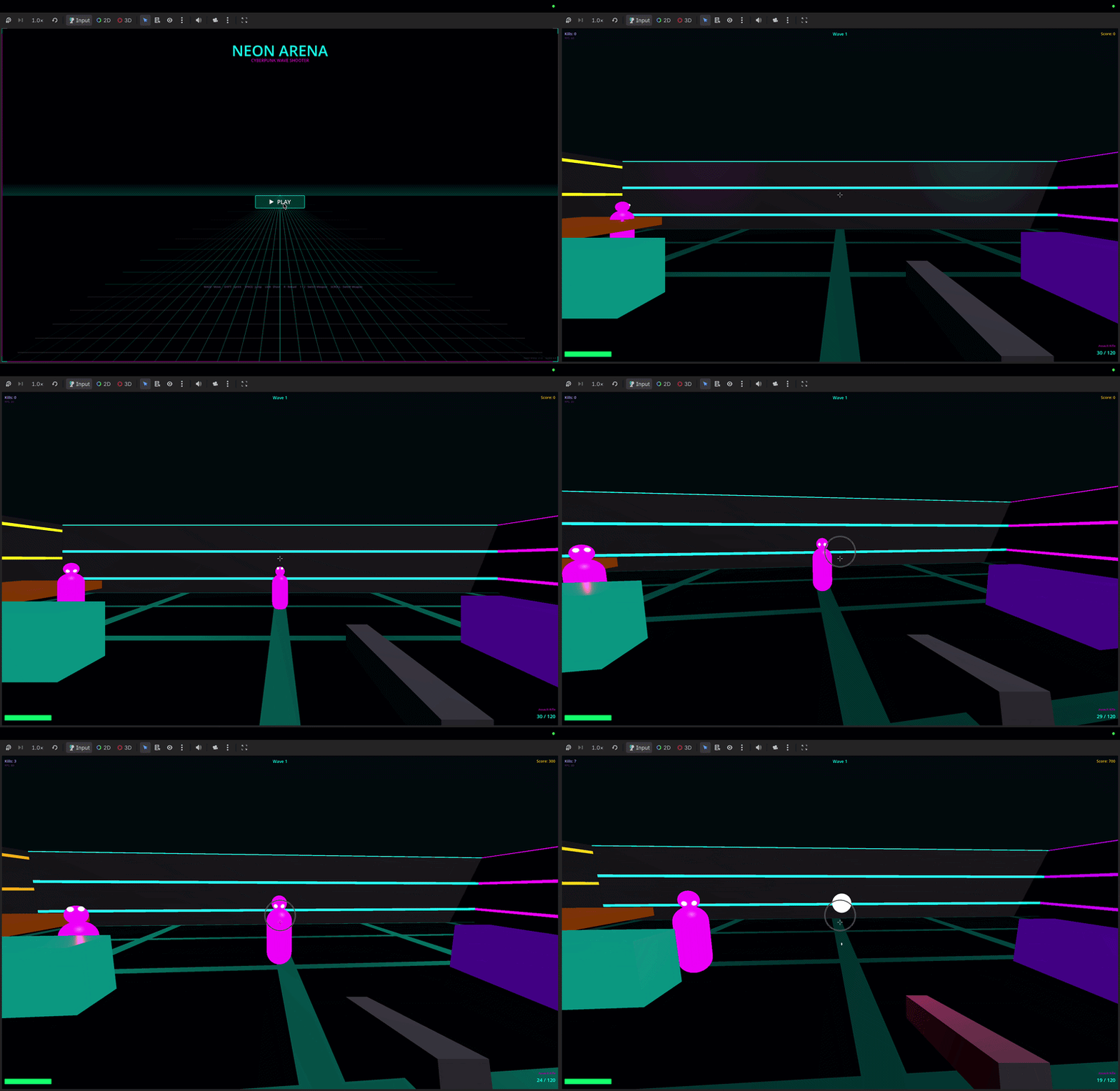
"Create a CharacterBody3D player scene with a Camera3D and collision"
"Run the project and show me any errors"
"Add a DirectionalLight3D to the scene"
"Create a 2D platformer with sprites and tilemaps"
快速开始
1. 安装
npm install -g godot-mcp-pilot
或者无需安装直接使用:
2. 运行设置向导
npx godot-mcp-pilot setup
# or, if installed globally:
godot-mcp-pilot-setup
向导将:
Related MCP server: Godot MCP Enhanced
手动设置
Claude Code (CLI / IDE 扩展)
关键: Claude Code 会从您启动它的目录中读取 .mcp.json。
该文件必须位于您的游戏项目文件夹中,而不是 godot-mcp-pilot 文件夹中。
# From inside your game project directory:
claude mcp add godot -- npx godot-mcp-pilot
这会将 .mcp.json 写入您的当前目录。然后始终从该目录启动 Claude Code:
cd ~/games/my-platformer
claude
如果 Godot 未被自动检测到(例如,您从未将其移出 ~/Downloads):
claude mcp add godot -e GODOT_PATH=/path/to/Godot.app/Contents/MacOS/Godot -- npx godot-mcp-pilot
或者在您的游戏项目根目录中手动编写 .mcp.json:
{
  "mcpServers": {
    "godot": {
      "command": "npx",
      "args": ["godot-mcp-pilot"],
      "env": {
        "GODOT_PATH": "/path/to/your/Godot"
      }
    }
  }
}
Claude Desktop
Claude Desktop 使用不同的配置文件 — 它不读取 .mcp.json。
编辑 ~/Library/Application Support/Claude/claude_desktop_config.json (macOS)
或 %APPDATA%\Claude\claude_desktop_config.json (Windows):
{
  "mcpServers": {
    "godot": {
      "command": "npx",
      "args": ["godot-mcp-pilot"],
      "env": {
        "GODOT_PATH": "/path/to/your/Godot"
      }
    }
  }
}
然后退出并重新打开 Claude Desktop。
Cursor (.cursor/mcp.json)
{
  "mcpServers": {
    "godot": {
      "command": "npx",
      "args": ["godot-mcp-pilot"],
      "env": {
        "GODOT_PATH": "/path/to/your/Godot"
      }
    }
  }
}
Godot 路径检测
服务器会自动搜索以下位置(按顺序):
操作系统 | 检查的路径 |
macOS | /Applications/Godot.app, /Applications/Godot_4.app, 版本化名称如 Godot_v4.3.app, ~/Applications/..., ~/Downloads/..., Homebrew
|
Linux | /usr/bin/godot, /usr/local/bin/godot, /snap/bin/godot, ~/.local/bin/godot
|
Windows | C:\Program Files\Godot\Godot.exe, %LOCALAPPDATA%\Godot\Godot.exe
|
如果自动检测失败,请将 GODOT_PATH 设置为 Godot 可执行文件的绝对路径。
2D 和 3D 游戏
godot-mcp-pilot 在 2D 和 3D 游戏中同样适用。请使用适当的节点类型:
| 2D | 3D |
玩家 | CharacterBody2D
| CharacterBody3D
|
根节点 | Node2D
| Node3D
|
相机 | Camera2D
| Camera3D
|
网格/精灵 | Sprite2D
| MeshInstance3D
|
碰撞 | CollisionShape2D
| CollisionShape3D
|
物理 | RigidBody2D
| RigidBody3D
|
灯光 | — | DirectionalLight3D, OmniLight3D
|
示例提示词:
"Create a 3D scene with a Node3D root, MeshInstance3D floor, and DirectionalLight3D"
"Add a CharacterBody3D with a CollisionShape3D using a CapsuleShape3D"
"Write a GDScript for 3D first-person movement"
功能
分类 | 工具 |
系统 | get_godot_version, list_projects, get_project_info
|
编辑器 / 运行 | launch_editor, run_project, stop_project, get_debug_output, run_gdscript
|
场景 | list_project_scenes, read_scene, create_scene, save_scene
|
节点 | add_node, edit_node, remove_node, duplicate_node, move_node, load_sprite, instantiate_scene
|
脚本 | list_project_scripts, read_script, create_script, modify_script, analyze_script, list_script_functions, add_script_function, remove_script_function, add_signal, add_variable
|
项目 | get_project_settings, set_project_setting, get_main_scene, set_main_scene, list_autoloads, add_autoload, remove_autoload, list_input_actions, add_input_action, remove_input_action
|
资源 | list_assets, get_asset_info
|
UIDs | get_uid, update_project_uids
|
配置
环境变量 | 默认值 | 描述 |
GODOT_PATH
| 自动检测 | Godot 可执行文件的绝对路径 |
READ_ONLY_MODE
| false
| 如果为 true,则禁用所有修改工具(对 CI/审查安全) |
DEBUG
| false
| 将调试信息打印到 stderr |
故障排除
"MCP server not connected" / 工具未显示
Claude Code: .mcp.json 必须位于您运行 claude 的目录中。打开一个新的终端,cd 进入您的游戏项目,然后从那里运行 claude。
Claude Desktop: 确保您编辑的是正确的文件(claude_desktop_config.json,而不是 .mcp.json),并完全退出并重新打开了应用程序。
未找到 Godot
在配置的 env 块中显式设置 GODOT_PATH。在 macOS 上,如果您下载了 Godot 但从未移动过它:
GODOT_PATH=/Users/yourname/Downloads/Godot.app/Contents/MacOS/Godot
查找 Godot 的位置:
# macOS / Linux
find ~/Downloads ~/Applications /Applications -name "Godot" -type f 2>/dev/null
场景解析错误 / 格式错误的 .tscn
如果 Godot 拒绝加载由 MCP 编辑的场景,请检查 instance= 行是否未加引号:
# Correct
instance=ExtResource("1_abc")

# Wrong (Godot rejects this)
instance="ExtResource(\"1_abc\")"
以无头模式运行项目以查看确切错误:
/path/to/Godot --path /path/to/project --headless --quit 2>&1
MCP 在会话期间断开连接
这是某些 MCP 主机实现中的已知问题。解决方法:关闭并重新打开您的 AI 客户端。MCP 服务器本身是无状态的 — 重新连接是安全的。
示例工作流
2D 自顶向下射击游戏
"Create a 2D scene called Main.tscn"
"Add a CharacterBody2D called Player at the center"
"Create a movement + shooting script for the Player"
"Add an Area2D called Enemy that moves toward the player"
"Run the project and show errors"
3D 平台跳跃游戏
"Create a 3D scene with a StaticBody3D floor (MeshInstance3D box, scale 20x1x20)"
"Add a CharacterBody3D player with a CapsuleShape3D collision"
"Create a 3D character controller script with jump and gravity"
"Add a Camera3D as a child of the player with offset Vector3(0, 2, 5)"
只读模式
READ_ONLY_MODE=true npx godot-mcp-pilot
禁用所有写入工具。适用于 CI/CD 或审查工作流。
开发
git clone https://github.com/pushks18/godot-mcp-pilot
cd godot-mcp-pilot
npm install
npm run build

# Run the setup wizard
npm run setup

# Development mode (ts-node, no build step)
npm run dev
项目结构
godot-mcp-pilot/
├── src/
│   ├── index.ts               # Entry point
│   ├── server.ts              # MCP server + tool routing
│   ├── config.ts              # Godot path detection, env config
│   ├── godot-process.ts       # Process management (spawn, capture)
│   ├── tools/
│   │   ├── system.ts          # Version, project listing/info
│   │   ├── execution.ts       # Launch editor, run/stop project
│   │   ├── scene.ts           # Scene CRUD + node manipulation
│   │   ├── script.ts          # GDScript read/write/analyze
│   │   ├── assets.ts          # Asset listing/inspection
│   │   ├── project_settings.ts # Settings, autoloads, input maps
│   │   └── uid.ts             # Godot 4 UID management
│   └── utils/
│       ├── path.ts            # Path validation (prevents traversal)
│       ├── tscn.ts            # .tscn parser and serializer
│       └── project_godot.ts   # project.godot reader
└── scripts/
    ├── setup.js               # Interactive setup wizard
    └── godot_operations.gd    # Bundled GDScript for runtime ops
兼容性
Godot 4.x(主要目标 — 在 4.2, 4.3, 4.4 上测试)
Godot 3.x — 基本工具可用;场景格式差异适用
MCP 协议 — 2024-11-05 规范
Node.js — 18+
安全性
所有文件路径均经过验证,以确保保留在项目目录内(无路径遍历)
launch_editor 和 run_project 仅使用安全、预定义的参数启动进程
在不受信任的环境中使用 READ_ONLY_MODE=true
服务器从不执行任意 shell 命令 — 仅执行 Godot 二进制文件
许可证
MIT


