A
licenseA
qualityD
maintenanceModel Context Protocol server for accessing Reactome pathway and systems biology data.
8
12
MIT

This server provides a Model Context Protocol (MCP) interface for querying Biomart biological databases, allowing you to:
Discover available Biomart databases (marts) and datasets within them
Explore commonly used or all available attributes and filters for specific datasets
Retrieve biological data using specified attributes and filters
Translate between biological identifiers (e.g., gene symbols to Ensembl IDs) for single or batch operations
Click on "Deploy Server".
Wait a few minutes for the server to deploy. Once ready, it will show a "Started" state.
In the chat, type @ followed by the MCP server name and your instructions, e.g., "@Biomart MCP translate these gene symbols to Ensembl IDs"
That's it! The server will respond to your query, and you can continue using it as needed.
Here is a step-by-step guide with screenshots.
Model Context Protocol (MCP) is an open protocol that standardizes how applications provide context to LLMs developed by Anthropic. Here we use the MCP python-sdk to create a MCP server that interfaces with Biomart via the pybiomart package.
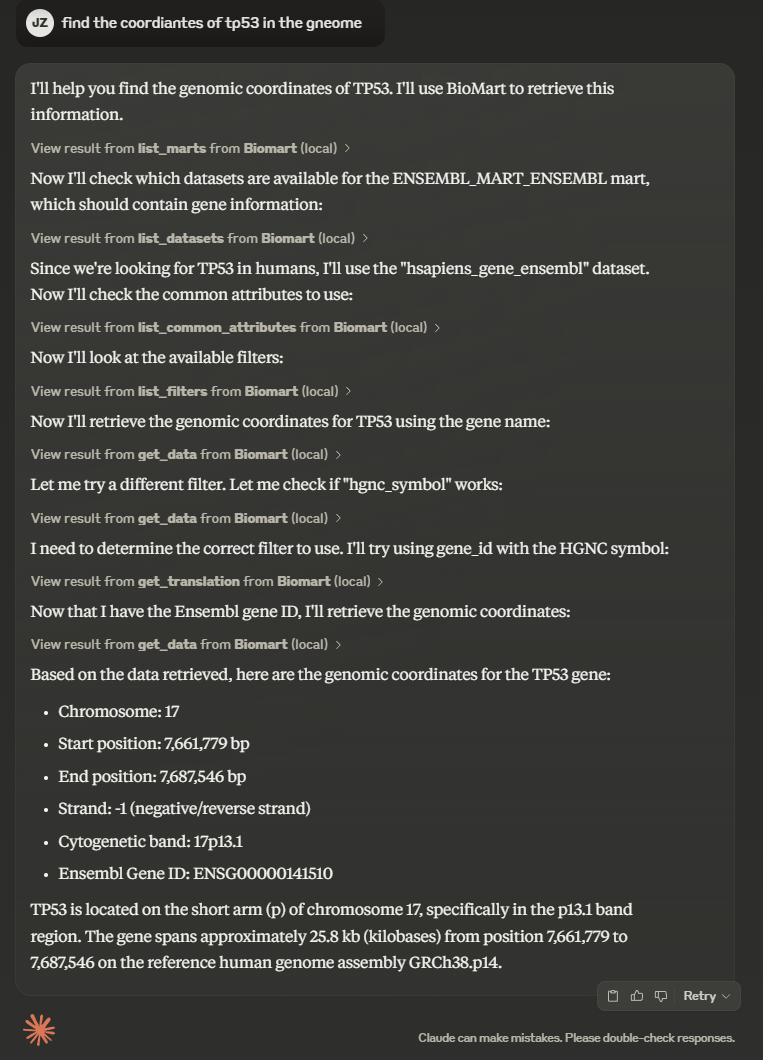
There is a short demo video showing the MCP server in action on Claude Desktop.
To install Biomart MCP for Claude Desktop automatically via Smithery:
npx -y @smithery/cli install @jzinno/biomart-mcp --client claudegit clone https://github.com/jzinno/biomart-mcp.git
cd biomart-mcpuv run --with mcp[cli] mcp install --with pybiomart biomart-mcp.pyVia Cusror's agent mode, other models can take advantage of MCP servers as well, such as those form OpenAI or DeepSeek. Click the cursor setting cogwheel and naviagate to MCP and either add the MCP server to the global config or add it to the a project scope by adding .cursor/mcp.json to the project.
Example .cursor/mcp.json:
{
    "mcpServers": {
        "Biomart": {
            "command": "uv",
            "args": [
                "run",
                "--with",
                "mcp[cli]",
                "--with",
                "pybiomart",
                "mcp",
                "run",
                "/your/path/to/biomart-mcp.py"
            ]
        }
    }
}# Create a virtual environment
uv venv
# MacOS/Linux
source .venv/bin/activate
# Windows
.venv\Scripts\activate
uv sync #or uv add mcp[cli] pybiomart
# Run the server in dev mode
mcp dev biomart-mcp.pyRelated MCP server: Ensembl MCP Server
Biomart-MCP provides several tools to interact with Biomart databases:
Mart and Dataset Discovery: List available marts and datasets to explore the Biomart database structure
Attribute and Filter Exploration: View common or all available attributes and filters for specific datasets
Data Retrieval: Query Biomart with specific attributes and filters to get biological data
ID Translation: Convert between different biological identifiers (e.g., gene symbols to Ensembl IDs)
Pull requests are welcome! Some small notes on development:
We are only using @mcp.tool() here by design, this is to maximize compatibility with clients that support MCP as seen in the docs.
We are using @lru_cache to cache results of functions that are computationally expensive or make external API calls.
We need to be mindful to not blow up the context window of the model, for example you'll see df.to_csv(index=False).replace("\r", "") in many places. This csv style return is much more token efficient than something like df.to_string() where the majority of the tokens are whitespace. Also be mindful of the fact that pulling all genes from a chromosome or similar large request will also be too large for the context window.
There of course many more features that could be added, some maybe beyond the scope of the name biomart-mcp. Here are some ideas:
Add webscraping for resource sites with bs4, for example we got the Ensembl gene ID for NOTCH1 then maybe in some cases it would be usful to grap the collated Comments and Description Text from UniProtKB section from it's page on UCSC
$...$
Translates multiple identifiers in a single batch operation.

This function is more efficient than multiple calls to get_translation when
you need to translate many identifiers at once.

Args:
    mart (str): The mart identifier (e.g., "ENSEMBL_MART_ENSEMBL")
    dataset (str): The dataset identifier (e.g., "hsapiens_gene_ensembl")
    from_attr (str): The source attribute name (e.g., "hgnc_symbol")
    to_attr (str): The target attribute name (e.g., "ensembl_gene_id")
    targets (list[str]): List of identifier values to translate (e.g., ["TP53", "BRCA1", "BRCA2"])

Returns:
    dict: A dictionary containing:
        - translations: Dictionary mapping input IDs to translated IDs
        - not_found: List of IDs that could not be translated
        - found_count: Number of successfully translated IDs
        - not_found_count: Number of IDs that could not be translated

Example:
    batch_translate("ENSEMBL_MART_ENSEMBL", "hsapiens_gene_ensembl", "hgnc_symbol", "ensembl_gene_id", ["TP53", "BRCA1", "BRCA2"])
    >>> {"translations": {"TP53": "ENSG00000141510", "BRCA1": "ENSG00000012048"}, "not_found": ["BRCA2"], "found_count": 2, "not_found_count": 1}
Inputs: dataset (required), from_attr (required), mart (required), targets (required), +1 more.
Queries Biomart for data using specified attributes and filters.

This function performs the main data retrieval from Biomart, allowing you to
query biological data by specifying which attributes to return and which filters
to apply. Includes automatic retry logic for resilience.

Args:
    mart (str): The mart identifier (e.g., "ENSEMBL_MART_ENSEMBL")
    dataset (str): The dataset identifier (e.g., "hsapiens_gene_ensembl")
    attributes (list[str]): List of attributes to retrieve (e.g., ["ensembl_gene_id", "external_gene_name"])
    filters (dict[str, str]): Dictionary of filters to apply (e.g., {"chromosome_name": "1"})

Returns:
    str: CSV-formatted results of the query.

Example:
    get_data(
        "ENSEMBL_MART_ENSEMBL",
        "hsapiens_gene_ensembl",
        ["ensembl_gene_id", "external_gene_name", "chromosome_name"],
        {"chromosome_name": "X", "biotype": "protein_coding"}
    )
    >>> "ensembl_gene_id,external_gene_name,chromosome_name
         ENSG00000000003,TSPAN6,X
         ENSG00000000005,TNMD,X
         ..."
Inputs: attributes (required), dataset (required), filters (required), mart (required).
Translates a single identifier from one attribute type to another.

This function allows conversion between different identifier types, such as
converting a gene symbol to an Ensembl ID. Results are cached to improve performance.

Args:
    mart (str): The mart identifier (e.g., "ENSEMBL_MART_ENSEMBL")
    dataset (str): The dataset identifier (e.g., "hsapiens_gene_ensembl")
    from_attr (str): The source attribute name (e.g., "hgnc_symbol")
    to_attr (str): The target attribute name (e.g., "ensembl_gene_id")
    target (str): The identifier value to translate (e.g., "TP53")

Returns:
    str: The translated identifier, or an error message if not found.

Example:
    get_translation("ENSEMBL_MART_ENSEMBL", "hsapiens_gene_ensembl", "hgnc_symbol", "ensembl_gene_id", "TP53")
    >>> "ENSG00000141510"
Inputs: dataset (required), from_attr (required), mart (required), target (required), +1 more.
Lists all available attributes for a given dataset with some filtering.

This function returns a filtered list of all attributes available for the specified
dataset. Some less commonly used attributes (homologs, microarray probes) are
filtered out to reduce the response size.

CAUTION: This function can return a large number of attributes and may be unstable
for certain datasets. Consider using list_common_attributes first.

Args:
    mart (str): The mart identifier (e.g., "ENSEMBL_MART_ENSEMBL")
    dataset (str): The dataset identifier (e.g., "hsapiens_gene_ensembl")

Returns:
    str: CSV-formatted table of all filtered attributes.

Example:
    list_all_attributes("ENSEMBL_MART_ENSEMBL", "hsapiens_gene_ensembl")
Inputs: dataset (required), mart (required).
Lists commonly used attributes available for a given dataset.

This function returns only the most frequently used attributes (defined in COMMON_ATTRIBUTES)
to avoid overwhelming the model with too many options. For a complete list,
use list_all_attributes.

Args:
    mart (str): The mart identifier (e.g., "ENSEMBL_MART_ENSEMBL")
    dataset (str): The dataset identifier (e.g., "hsapiens_gene_ensembl")

Returns:
    str: CSV-formatted table of common attributes with their display names and descriptions.

Example:
    list_common_attributes("ENSEMBL_MART_ENSEMBL", "hsapiens_gene_ensembl")
    >>> "name,display_name,description
         ensembl_gene_id,Gene stable ID,Ensembl stable ID for the gene
         external_gene_name,Gene name,The gene name
         ..."
Inputs: dataset (required), mart (required).
Lists all available biomart datasets for a given mart.

Each mart contains multiple datasets. This function returns all datasets
available in the specified mart as a CSV string.

Args:
    mart (str): The mart identifier to list datasets from.
        Valid values include: ENSEMBL_MART_ENSEMBL, ENSEMBL_MART_MOUSE,
        ENSEMBL_MART_ONTOLOGY, ENSEMBL_MART_GENOMIC, ENSEMBL_MART_SNP,
        ENSEMBL_MART_FUNCGEN

Returns:
    str: CSV-formatted table of all datasets with their display names and descriptions.

Example:
    list_datasets("ENSEMBL_MART_ENSEMBL")
    >>> "name,display_name,description
         hsapiens_gene_ensembl,Human genes,Human genes (GRCh38.p13)
         mmusculus_gene_ensembl,Mouse genes,Mouse genes (GRCm39)
         ..."
Inputs: mart (required).
Lists all available filters for a given dataset.

Filters are used to narrow down the results of a Biomart query.
This function returns all filters that can be applied to the specified dataset.

Args:
    mart (str): The mart identifier (e.g., "ENSEMBL_MART_ENSEMBL")
    dataset (str): The dataset identifier (e.g., "hsapiens_gene_ensembl")

Returns:
    str: CSV-formatted table of all filters with their display names and descriptions.

Example:
    list_filters("ENSEMBL_MART_ENSEMBL", "hsapiens_gene_ensembl")
    >>> "name,description
         chromosome_name,Chromosome/scaffold name
         start,Gene start (bp)
         end,Gene end (bp)
         ..."
Inputs: dataset (required), mart (required).
Lists all available Biomart marts (databases) from Ensembl.

Biomart organizes biological data in a hierarchy: MART -> DATASET -> ATTRIBUTES/FILTERS.
This function returns all available marts as a CSV string.

Returns:
    str: CSV-formatted table of all marts with their display names and descriptions.

Example:
    list_marts()
    >>> "name,display_name,description
         ENSEMBL_MART_ENSEMBL,Ensembl Genes,Gene annotation from Ensembl
         ENSEMBL_MART_MOUSE,Mouse strains,Strain-specific data for mouse
         ..."
Inputs: no named parameters.
Recent tool additions, removals, and schema changes observed during successful MCP inspections.
Loading tool schema changelog…
Scored across 8 tools
Each tool has a clearly distinct purpose with no overlap. The tools cover different aspects of Biomart interaction: listing marts/datasets/attributes/filters, data retrieval, and identifier translation (both single and batch). The descriptions clearly differentiate their functions, making tool selection unambiguous.
All tools follow a consistent verb_noun naming pattern with snake_case throughout. The pattern is highly predictable: list_marts, list_datasets, list_filters, list_common_attributes, list_all_attributes, get_data, get_translation, and batch_translate. This consistency makes the tool set easy to navigate and understand.
With 8 tools, this server is well-scoped for its domain of Biomart data access. Each tool serves a specific, necessary function in the workflow: discovery (listing resources), translation (identifier conversion), and data retrieval. The count is neither too sparse nor bloated, with each tool earning its place in the set.
The tool set provides complete coverage for interacting with Biomart. It supports the full workflow: discovering available marts and datasets, exploring attributes and filters, translating identifiers (both individually and in batches), and querying data with filters. There are no obvious gaps that would hinder an agent from performing typical Biomart operations.
Model Context Protocol server for Studex tools, notifications, and profile integrations
Agent-to-Agent (A2A) + Model Context Protocol (MCP) hub for peptides.
Auditable MCP server for PubMed, Europe PMC, ClinicalTrials.gov, and bioRxiv/medRxiv queries
MCP gateway federating 22 biomedical MCP servers behind one endpoint: gnomAD, ClinVar, HPO, VEP.