mcp-wcgw
用于 Claude 和其他 MCP 客户端的 Shell 与编码代理
赋能聊天应用程序在你的本地机器上进行编码、构建和运行。
wcgw 是一个集成了 Shell 和代码编辑工具的 MCP 服务器。
⚠️ 警告:此 MCP 服务器提供对你机器 Shell 和文件的无限制访问。它不会限制 LLM 执行任意命令或进行意外更改。如果 AI 产生幻觉,此工具可能会被攻击者滥用或运行危险命令。仅在你完全理解并接受在无限制情况下运行 AI 代理的相关风险时,才运行此存储库。
截至 2026 年,你可以使用 wcgw 的原因是它提供了完全交互式的 Shell 体验,你和代理都可以控制它(包括发送按键)。
结合将代理的 Shell 附加到编辑器中的 wcgw VS Code 扩展,你可以获得目前市面上最好的代理 Shell 体验。
文件编辑技巧和整体的极简主义也有助于提高代理的工作效率。
演示
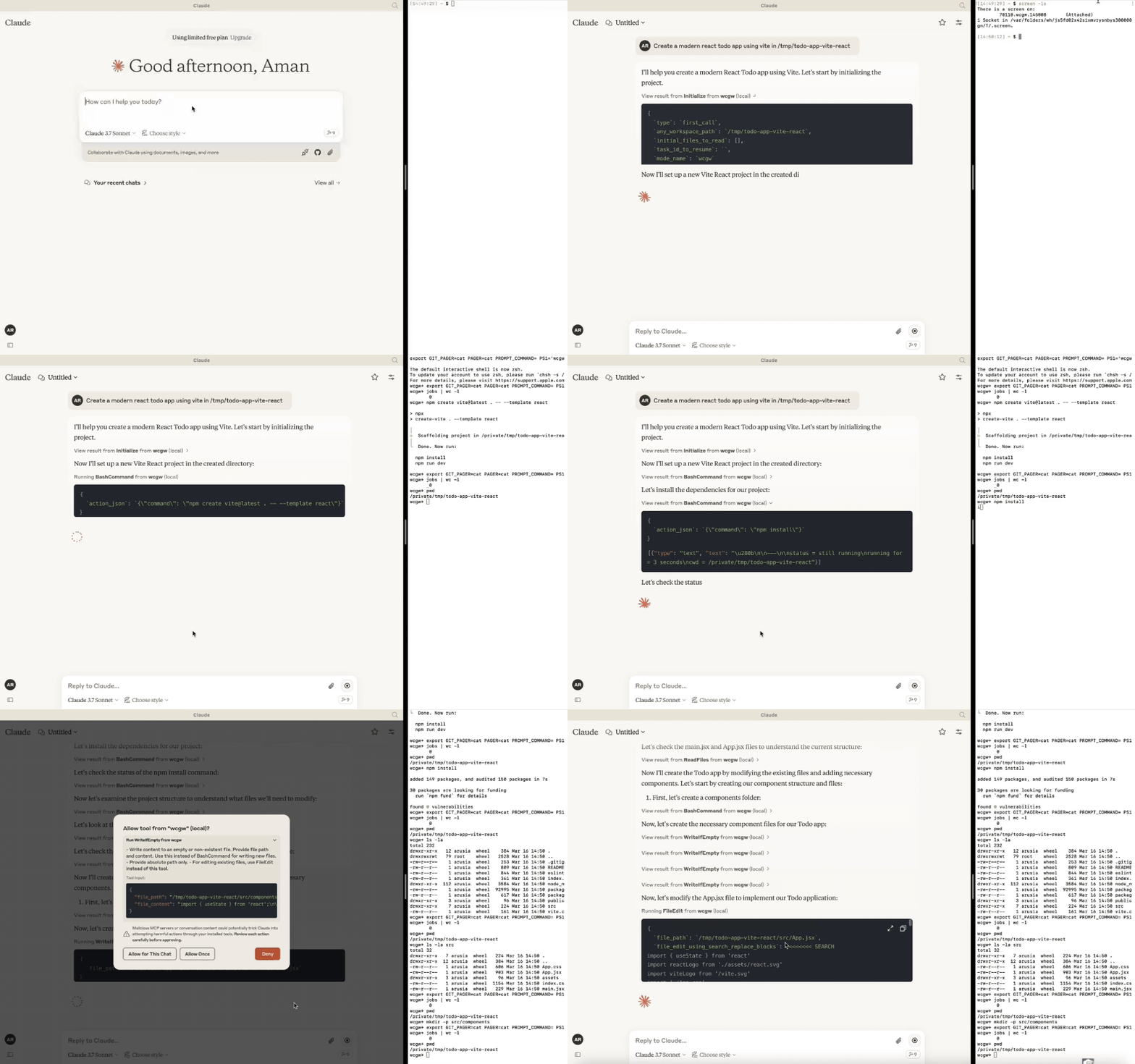
Related MCP server: Claude Code Control MCP
更新
[2025年10月6日] 模型现在可以在后台运行多个命令。ZSH 现在是受支持的 Shell。多路复用改进。
[2025年4月27日] 移除了对通过中继服务器使用 GPT 的支持。版本 >= 5 仅支持 MCP 服务器。
[2025年3月24日] 改进了 sonnet 3.7 的编写和编辑体验,CLAUDE.md 会自动加载。
[2025年2月16日] 你现在可以附加到 AI 使用的工作终端。请参阅下方的“附加到终端”部分。
[2025年1月15日] 引入了模式:architect、code-writer 和功能强大的 wcgw 模式。
[2025年1月8日] 上下文保存工具,用于将相关文件路径及其描述保存在单个文件中。可用作任务检查点或知识转移。
[2024年12月29日] 文件写入和编辑时的语法检查现已稳定。使
initialize工具调用变得有用;如果引用了任何存储库,则向 Claude 发送智能存储库结构。大文件处理也得到了改进。[2024年12月9日] 用于在 Claude 应用上粘贴上下文的 VS Code 扩展
🚀 亮点
⚡ 创建、执行、迭代:要求 Claude 不断运行编译器检查,直到修复所有错误,或者要求它不断检查长时间运行的命令的状态,直到完成。
⚡ 大文件编辑:支持大文件增量编辑,以避免 Token 限制问题。根据所需的更改百分比,智能选择进行小幅编辑还是大幅重写。
⚡ 编辑时的语法检查:如果编辑存在任何语法错误,会向 LLM 反馈,以便其重新执行。
⚡ 交互式命令处理:支持使用箭头键、中断和 ANSI 转义序列的交互式命令。
⚡ 文件保护:
AI 在被允许编辑或重写文件之前,必须至少读取一次该文件。这避免了意外覆盖。
读取超大文件时避免上下文填满。文件根据 Token 长度进行分块。
初始化时,在选择重要文件(基于 .gitignore 以及统计方法)后,返回所提供工作区的目录结构。
基于搜索-替换的文件编辑会尝试根据之前的搜索块找到正确的搜索块。否则失败(为了正确性)。
文件编辑具有空格容错匹配功能,并在缩进不匹配等问题上发出警告。如果没有匹配项,则将最接近的匹配项返回给 AI 以修复其错误。
使用类似 Aider 的搜索和替换,其性能优于基于工具调用的搜索和替换。
⚡ Shell 优化:
任何 Shell 命令后都会始终返回当前工作目录,以防止 AI 迷失方向。
命令轮询在快速超时后退出,以避免反馈缓慢。但是,状态检查具有基于命令新鲜输出流的等待容忍度。这两种方法结合在一起提供了良好的 Shell 交互体验。
支持在主交互式 Shell 之外同时运行多个后台命令。
⚡ 将存储库上下文保存在单个文件中:使用 "ContextSave" 工具进行任务检查点设置,将详细上下文保存在单个文件中。任务稍后可以在新的聊天中通过要求 "Resume
task id" 来恢复。保存的文件可用于进行其他类型的知识转移,例如从另一个 AI 获取帮助。⚡ 轻松切换各种模式:
要求它在 'architect' 模式下运行以进行规划。受 Aider 架构师模式的启发,先与 Claude 一起制定计划。这能提高准确性并防止过早编辑文件。
要求它在 'code-writer' 模式下运行以进行代码编辑和项目构建。你可以提供带有通配符支持的特定路径,以防止其他文件被编辑。
默认情况下,它在 'wcgw' 模式下运行,该模式没有任何限制且具有完全授权。
更多详细信息请参阅 模式部分
⚡ 在多路复用终端中运行:使用 VS Code 扩展 或运行
screen -x来附加到 AI 运行命令的终端。查看历史记录、中断进程或与 AI 使用的相同终端进行交互。⚡ 自动加载 CLAUDE.md/AGENTS.md:加载项目根目录中的 "CLAUDE.md" 或 "AGENTS.md" 文件,并在初始化期间作为指令发送。全局 "
/.wcgw/CLAUDE.md" 或 "/.wcgw/AGENTS.md" 文件中的指令会被加载,并与项目特定的 CLAUDE.md 一起添加。文件名区分大小写。如果存在 CLAUDE.md 则附加它,否则附加 AGENTS.md。
Claude 设置(使用 MCP)
Mac 和 Linux
首先使用 Homebrew 安装 uv:brew install uv
(重要:使用 Homebrew 安装 uv。否则请确保 uv 存在于全局位置,如 /usr/bin/)
然后使用以下 JSON 创建或更新 claude_desktop_config.json (~/Library/Application Support/Claude/claude_desktop_config.json)。
{
"mcpServers": {
"wcgw": {
"command": "uvx",
"args": ["--python", "3.12", "wcgw@latest"]
}
}
}然后重启 Claude 应用。
可选:强制使用特定 Shell
要使用特定 Shell(bash 或 zsh),请添加 --shell 参数:
{
"mcpServers": {
"wcgw": {
"command": "uvx",
"args": ["--python", "3.12", "wcgw@latest", "--shell", "/bin/bash"]
}
}
}如果设置时出现错误
如果出现 "uv ENOENT" 之类的错误,请确保已安装
uv。然后在终端运行 'which uv',并在配置中使用其输出代替 "uv"。如果仍然有问题,请检查
uv tool run --python 3.12 wcgw是否能在你的终端中运行。它应该没有输出且不应退出。尝试删除 ~/.cache/uv 文件夹。
尝试使用此工具测试过的
uv版本0.6.0。使用
npx @modelcontextprotocol/inspector@0.1.7 uv tool run --python 3.12 wcgw调试 MCP 服务器。
Windows 上的 WSL
此 MCP 服务器仅在 Windows 的 WSL 上工作。
要进行设置,请 安装 uv
然后使用以下内容添加或更新 Claude 配置文件 %APPDATA%\Claude\claude_desktop_config.json
{
"mcpServers": {
"wcgw": {
"command": "wsl.exe",
"args": ["uvx", "--python", "3.12", "wcgw@latest"]
}
}
}当你遇到错误时,在命令提示符中执行命令 wsl uv --python 3.12 wcgw。如果你得到 error /bin/bash: line 1: uv: command not found,这意味着 uv 没有全局安装,你需要指向 uv 的正确路径。
查找 uv 的安装位置:
whereis uv示例输出:
uv: /home/mywsl/.local/bin/uv
测试完整路径是否有效:
wsl /home/mywsl/.local/bin/uv tool run --python 3.12 wcgw使用完整路径更新配置:
{
"mcpServers": {
"wcgw": {
"command": "wsl.exe",
"args": ["/home/mywsl/.local/bin/uv", "tool", "run", "--python", "3.12", "wcgw"]
}
}
}将 /home/mywsl/.local/bin/uv 替换为步骤 1 中你的实际 uv 路径。
使用方法
等待几秒钟。如果一切顺利,你应该能看到此图标。
在这里

然后要求 Claude 执行 Shell 命令、读取文件、编辑文件、运行代码等。
任务检查点或知识转移
你可以通过使用 "Attach from MCP" 按钮附加 "KnowledgeTransfer" 提示词来进行任务检查点设置或知识转移。
运行 "KnowledgeTransfer" 提示词时,将调用 "ContextSave" 工具,将任务描述和所有文件内容保存在单个文件中。将生成一个任务 ID。
你可以在新的聊天中说 "Resume ''",AI 随后应使用任务 ID 调用 "Initialize" 并从那里加载上下文。
或者,你可以直接打开生成的文件并将其分享给另一个 AI 以获取帮助。
模式
有三种内置模式。你可以要求 Claude 在其中一种模式下运行,例如 "Use 'architect' mode"
模式 | 描述 | 允许 | 拒绝 | 调用提示词 |
Architect | 专为你与 Claude 一起调查和理解你的存储库而设计。 | 只读命令 | FileEdit 和 Write 工具 | Run in mode='architect' |
Code-writer | 用于代码编写和开发 | 指定用于编辑或写入的路径 Glob,指定命令 | 不匹配指定 Glob 的路径的 FileEdit,不匹配指定 Glob 的路径的 Write | Run in code writer mode, only 'tests/**' allowed, only uv command allowed |
wcgw | 默认模式,允许所有操作 | 所有操作 | 无 | 无提示词,或 "Run in wcgw mode" |
注意:在 code-writer 模式下,目前要么允许所有命令,要么都不允许。如果你提供了一份允许的命令列表,Claude 会被指示仅运行这些命令,但实际上不会进行检查。(正在开发中)
附加到工作终端进行调查
新功能:VS Code 扩展 现在会在工作区路径匹配时自动附加正在运行的终端。
如果你安装了 screen 命令,wcgw 会自动在 screen 实例上运行。如果你已经启动了 wcgw MCP 服务器,你可以列出 screen 会话:
screen -ls
并记下 wcgw screen 名称,它看起来像 93358.wcgw.235521,其中最后一个数字是时-分-秒格式。
然后你可以使用 screen -x 93358.wcgw.235521 附加到该会话。
你可以安全地中断任何正在运行的命令。
你可以安全地与终端交互,例如输入密码或输入一些文本。(警告:如果你运行新命令,任何新的 LLM 命令都会中断它。)
你不应该使用 exit 或 Ctrl-d 退出会话,而应该使用 ctrl+a+d 安全地分离,而不销毁 screen 会话。
在 ~/.screenrc 中包含以下内容以获得更好的滚动体验
defscrollback 10000
termcapinfo xterm* ti@:te@[可选] VS Code 扩展
https://marketplace.visualstudio.com/items?itemName=AmanRusia.wcgw
命令:
选择一段文本并按
cmd+',然后输入指令。这将把应用切换到 Claude 并粘贴包含你的指令、文件路径、工作区目录和所选文本的内容。
示例

通过 Docker 使用 MCP 服务器
首先构建 Docker 镜像 docker build -t wcgw https://github.com/rusiaaman/wcgw.git
然后你可以更新 /Users/username/Library/Application Support/Claude/claude_desktop_config.json 以包含
{
"mcpServers": {
"wcgw": {
"command": "docker",
"args": [
"run",
"-i",
"--rm",
"--mount",
"type=bind,src=/Users/username/Desktop,dst=/workspace/Desktop",
"wcgw"
]
}
}
}工具
服务器提供以下 MCP 工具:
Shell 操作:
Initialize:重置 Shell 并设置工作区环境参数:
any_workspace_path(string),initial_files_to_read(string[]),mode_name("wcgw"|"architect"|"code_writer"),task_id_to_resume(string)
BashCommand:执行带有超时控制的 Shell 命令参数:
command(string),wait_for_seconds(int, optional)参数:
send_text(string) 或send_specials(["Enter"|"Key-up"|...]) 或send_ascii(int[]),wait_for_seconds(int, optional)
文件操作:
ReadFiles:读取一个或多个文件的内容参数:
file_paths(string[])
WriteIfEmpty:创建新文件或写入空文件参数:
file_path(string),file_content(string)
FileEdit:使用搜索/替换块编辑现有文件参数:
file_path(string),file_edit_using_search_replace_blocks(string)
ReadImage:读取图像文件以进行显示/处理参数:
file_path(string)
项目管理:
ContextSave:保存项目上下文和文件以进行知识转移或保存任务检查点以便稍后恢复参数:
id(string),project_root_path(string),description(string),relevant_file_globs(string[])
所有工具都支持绝对路径,并包含针对常见错误的内置保护。有关详细的协议信息,请参阅 MCP 规范
Available Tools
6 toolsBashCommandADestructive
Execute a bash command. This is stateful (beware with subsequent calls).
Status of the command and the current working directory will always be returned at the end.
The first or the last line might be
(...truncated)if the output is too long.Always run
pwdif you get any file or directory not found error to make sure you're not lost.Do not run bg commands using "&", instead use this tool.
You must not use echo/cat to read/write files, use ReadFiles/FileWriteOrEdit
In order to check status of previous command, use
status_checkwith empty command argument.Only command is allowed to run at a time. You need to wait for any previous command to finish before running a new one.
Programs don't hang easily, so most likely explanation for no output is usually that the program is still running, and you need to check status again.
Do not send Ctrl-c before checking for status till 10 minutes or whatever is appropriate for the program to finish.
Only run long running commands in background. Each background command is run in a new non-reusable shell.
On running a bg command you'll get a bg command id that you should use to get status or interact.
| Name | Required | Description | Default |
|---|---|---|---|
| type | Yes | type of action. | |
| command | No | Set only if type="command" | |
| send_text | No | Set only if type="send_text" | |
| thread_id | Yes | ||
| send_ascii | No | Set only if type="send_ascii" | |
| status_check | No | Set only if type="status_check" | |
| bg_command_id | No | Set only if type!="command" and doing action on a running background command | |
| is_background | No | Set only if type="command" and running the command in background | |
| send_specials | No | Set only if type="send_specials" | |
| wait_for_seconds | No |
TDQS
Does the description disclose side effects, auth requirements, rate limits, or destructive behavior?
Even with annotations already signalling open and destructive behavior, the description adds substantial operational detail: commands are stateful, status and cwd are always returned, output may be truncated, background commands run in new non-reusable shells, and status must be polled before interrupting. These behaviors go well beyond what the annotations convey.
Agents need to know what a tool does to the world before calling it. Descriptions should go beyond structured annotations to explain consequences.
Is the description appropriately sized, front-loaded, and free of redundancy?
The bulleted format is front-loaded with the most critical caveat (statefulness) and each subsequent bullet carries actionable information for a high-complexity tool. There is minor redundancy between the one-command-at-a-time and wait-for-previous bullets, but overall the length is warranted by the tool's parameter count and interactive modes.
Shorter descriptions cost fewer tokens and are easier for agents to parse. Every sentence should earn its place.
Given the tool's complexity, does the description cover enough for an agent to succeed on first attempt?
For a 10-parameter tool with no output schema, the description does well to state that status and cwd are returned and to cover truncation, backgrounding, and status polling. The main gap is that the interactive input modes (send_text, send_ascii, send_specials) and wait_for_seconds are never explained in context, so an agent may not know how to drive an already-running command.
Complex tools with many parameters or behaviors need more documentation. Simple tools need less. This dimension scales expectations accordingly.
Does the description clarify parameter syntax, constraints, interactions, or defaults beyond what the schema provides?
With roughly 80% schema coverage the baseline is 3, but the description adds useful parameter semantics: status_check must be called with an empty command argument, bg_command_id is the handle for interacting with a background command, and only one command may run at a time. However, it does not explain wait_for_seconds or how send_text/send_ascii/send_specials should be used with a running process.
Input schemas describe structure but not intent. Descriptions should explain non-obvious parameter relationships and valid value ranges.
Does the description clearly state what the tool does and how it differs from similar tools?
The description opens with 'Execute a bash command', a specific verb+resource, and immediately distinguishes the tool from file-focused siblings by forbidding echo/cat and directing the agent to ReadFiles/FileWriteOrEdit. It also clarifies stateful execution, which sets expectations beyond what the name alone implies.
Agents choose between tools based on descriptions. A clear purpose with a specific verb and resource helps agents select the right tool.
Does the description explain when to use this tool, when not to, or what alternatives exist?
It clearly names ReadFiles/FileWriteOrEdit as the alternatives for file I/O and instructs against shell backgrounding with '&'. It lacks an explicit 'when not to use' statement for the other sibling tools, and the background instruction ('instead use this tool') is slightly ambiguous, though the intent is recoverable from the schema's is_background field.
Agents often have multiple tools that could apply. Explicit usage guidance like "use X instead of Y when Z" prevents misuse.
ContextSaveBRead-only
Saves provided description and file contents of all the relevant file paths or globs in a single text file.
Use the thread_id returned by Initialize when available; legacy clients may omit it.
Provide random 3 word unique id or whatever user provided.
Leave project path as empty string if no project path
| Name | Required | Description | Default |
|---|---|---|---|
| id | Yes | ||
| thread_id | No | ||
| description | Yes | ||
| project_root_path | Yes | ||
| relevant_file_globs | Yes |
TDQS
Does the description disclose side effects, auth requirements, rate limits, or destructive behavior?
Annotation Contradiction: the annotations declare readOnlyHint=true, yet the description says the tool 'saves' content into a single text file, implying a file-writing side effect. This directly contradicts the read-only hint. The description also does not clarify whether it reads from disk, writes a new file, overwrites anything, or what side effects occur.
Agents need to know what a tool does to the world before calling it. Descriptions should go beyond structured annotations to explain consequences.
Is the description appropriately sized, front-loaded, and free of redundancy?
The description is short, front-loaded with the core purpose, and uses bullets for parameter-specific guidance. It earns its length, but the sentence 'Provide random 3 word unique id or whatever user provided' is slightly informal and could be clearer about whether the id is required or user-supplied.
Shorter descriptions cost fewer tokens and are easier for agents to parse. Every sentence should earn its place.
Given the tool's complexity, does the description cover enough for an agent to succeed on first attempt?
For a tool with no output schema and a read/write ambiguity, the description omits important context: where the text file is saved, what happens after saving, how globs are resolved relative to project_root_path, and whether this is a mutating action. The contradiction with readOnlyHint makes the overall behavior especially incomplete for an agent deciding whether to call it.
Complex tools with many parameters or behaviors need more documentation. Simple tools need less. This dimension scales expectations accordingly.
Does the description clarify parameter syntax, constraints, interactions, or defaults beyond what the schema provides?
With 0% schema description coverage, the description must compensate, and it does: it explains thread_id as coming from Initialize, id as a random 3-word unique identifier, project_root_path as optional/empty when no project path, and relevant_file_globs as file paths or globs. It does not fully define every parameter's format, but adds substantial meaning beyond the raw schema.
Input schemas describe structure but not intent. Descriptions should explain non-obvious parameter relationships and valid value ranges.
Does the description clearly state what the tool does and how it differs from similar tools?
The description states a specific action: saving a description and file contents into a single text file. It clearly identifies the inputs (description, file paths/globs) and output artifact. However, it does not explicitly distinguish itself from FileWriteOrEdit or explain exactly what 'save' produces or where, so it stops short of a 5.
Agents choose between tools based on descriptions. A clear purpose with a specific verb and resource helps agents select the right tool.
Does the description explain when to use this tool, when not to, or what alternatives exist?
The bullets give conditional usage hints such as using the thread_id from Initialize and leaving project_root_path empty when absent. However, there is no explicit guidance on when to use this tool versus sibling tools like ReadFiles or FileWriteOrEdit, and no exclusions or alternatives are named.
Agents often have multiple tools that could apply. Explicit usage guidance like "use X instead of Y when Z" prevents misuse.
FileWriteOrEditADestructiveIdempotent
Writes or edits a file based on the percentage of changes.
Use absolute path only (~ allowed).
First write down percentage of lines that need to be replaced in the file (between 0-100) in percentage_to_change
percentage_to_change should be low if mostly new code is to be added. It should be high if a lot of things are to be replaced.
If percentage_to_change > 50, provide full file content in text_or_search_replace_blocks
If percentage_to_change <= 50, text_or_search_replace_blocks should be search/replace blocks.
Instructions for editing files.
Example
Input file
import numpy as np
from impls import impl1, impl2
def hello():
"print a greeting"
print("hello")
def call_hello():
"call hello"
hello()
print("Called")
impl1()
hello()
impl2()
Edit format on the input file
<<<<<<< SEARCH
from impls import impl1, impl2
=======
from impls import impl1, impl2
from hello import hello as hello_renamed
>>>>>>> REPLACE
<<<<<<< SEARCH
def hello():
"print a greeting"
print("hello")
=======
>>>>>>> REPLACE
<<<<<<< SEARCH
def call_hello():
"call hello"
hello()
=======
def call_hello_renamed():
"call hello renamed"
hello_renamed()
>>>>>>> REPLACE
<<<<<<< SEARCH
impl1()
hello()
impl2()
=======
impl1()
hello_renamed()
impl2()
>>>>>>> REPLACESEARCH/REPLACE block Rules:
Every "<<<<<<< SEARCH" section must EXACTLY MATCH the existing file content, character for character, including all comments, docstrings, whitespaces, etc.
Including multiple unique SEARCH/REPLACE blocks if needed. Include enough and only enough lines in each SEARCH section to uniquely match each set of lines that need to change.
Keep SEARCH/REPLACE blocks concise. Break large SEARCH/REPLACE blocks into a series of smaller blocks that each change a small portion of the file. Include just the changing lines, and a few surrounding lines (0-3 lines) if needed for uniqueness. Other than for uniqueness, avoid including those lines which do not change in search (and replace) blocks. Target 0-3 non trivial extra lines per block.
Preserve leading spaces and indentations in both SEARCH and REPLACE blocks.
| Name | Required | Description | Default |
|---|---|---|---|
| file_path | Yes | #1: absolute file path | |
| thread_id | Yes | #4: thread_id | |
| percentage_to_change | Yes | #2: predict this percentage, calculated as number of existing lines that will have some diff divided by total existing lines. | |
| text_or_search_replace_blocks | Yes | #3: content/edit blocks. Must be after #2 in the tool xml |
TDQS
Does the description disclose side effects, auth requirements, rate limits, or destructive behavior?
Annotations specify destructiveHint: true, and the description details the editing process (full content replacement or search/replace). It explains the behavior regarding percentage threshold and formatting rules. No contradiction with annotations. The description adds context beyond annotations, such as the SEARCH/REPLACE format requirements.
Agents need to know what a tool does to the world before calling it. Descriptions should go beyond structured annotations to explain consequences.
Is the description appropriately sized, front-loaded, and free of redundancy?
The description is quite long but well-structured with bullet points, headings, and an example. It is front-loaded with the main action and then details. While every part serves a purpose, it could be slightly more concise without losing necessary detail.
Shorter descriptions cost fewer tokens and are easier for agents to parse. Every sentence should earn its place.
Given the tool's complexity, does the description cover enough for an agent to succeed on first attempt?
Given the tool's complexity (4 parameters, destructive behavior, no output schema), the description covers the editing method, percentage calculation, and formatting rules thoroughly. It lacks information on error handling, file creation behavior (if file doesn't exist), and return values, but these are minor gaps.
Complex tools with many parameters or behaviors need more documentation. Simple tools need less. This dimension scales expectations accordingly.
Does the description clarify parameter syntax, constraints, interactions, or defaults beyond what the schema provides?
Although schema descriptions cover all parameters (100% coverage), the description significantly enhances meaning by explaining how percentage_to_change is calculated, the two modes for text_or_search_replace_blocks, and providing a full example with search/replace block rules. This goes well beyond the schema's brief descriptions.
Input schemas describe structure but not intent. Descriptions should explain non-obvious parameter relationships and valid value ranges.
Does the description clearly state what the tool does and how it differs from similar tools?
The description clearly states the tool writes or edits a file, with specific instructions on using percentage-based changes. It distinguishes itself from siblings like BashCommand (shell commands) and ReadFiles/ReadImage (reading), leaving no ambiguity about its purpose.
Agents choose between tools based on descriptions. A clear purpose with a specific verb and resource helps agents select the right tool.
Does the description explain when to use this tool, when not to, or what alternatives exist?
The description provides explicit guidelines on when to use full file content vs. search/replace blocks based on percentage_to_change (>50 vs <=50). It also includes a detailed example and rules for SEARCH/REPLACE blocks. However, it does not explicitly state when to avoid using this tool in favor of siblings.
Agents often have multiple tools that could apply. Explicit usage guidance like "use X instead of Y when Z" prevents misuse.
InitializeARead-only
Always call this at the start of the conversation before using any of the shell tools from wcgw.
Use
any_workspace_pathto initialize the shell in the appropriate project directory.If the user has mentioned a workspace or project root or any other file or folder use it to set
any_workspace_path.If user has mentioned any files use
initial_files_to_readto read, use absolute paths only (~ allowed)By default use mode "wcgw"
In "code-writer" mode, set the commands and globs which user asked to set, otherwise use 'all'.
Use type="first_call" if it's the first call to this tool.
Use type="user_asked_mode_change" if in a conversation user has asked to change mode.
Use type="reset_shell" if in a conversation shell is not working after multiple tries.
Use type="user_asked_change_workspace" if in a conversation user asked to change workspace
| Name | Required | Description | Default |
|---|---|---|---|
| type | Yes | ||
| mode_name | Yes | ||
| thread_id | Yes | Use the thread_id created in first_call, leave it as empty string if first_call | |
| allowed_globs | No | File globs that are allowed to be edited. Set to 'all' to allow all files, or provide a list of glob patterns. Only required when mode_name is 'code_writer'. | |
| allowed_commands | No | Shell commands that are allowed to be executed. Set to 'all' to allow all commands, or provide a list of command patterns. Only required when mode_name is 'code_writer'. | |
| task_id_to_resume | Yes | ||
| any_workspace_path | Yes | Workspace to initialise in. Don't use ~ by default, instead use empty string | |
| initial_files_to_read | Yes | Array of one or more files to read. Provide [] if no files mentioned. |
TDQS
Does the description disclose side effects, auth requirements, rate limits, or destructive behavior?
The description adds behavioral context beyond annotations by detailing the initialization steps (setting workspace, reading files, configuring mode). It does not contradict the readOnlyHint=true annotation, as no destructive actions are mentioned. The description could mention if any session state is persisted.
Agents need to know what a tool does to the world before calling it. Descriptions should go beyond structured annotations to explain consequences.
Is the description appropriately sized, front-loaded, and free of redundancy?
The description is concise and uses a bulleted list format that is easy to scan. Each sentence carries clear instructions. It could be slightly more organized by grouping related parameters, but overall it is efficient and front-loaded.
Shorter descriptions cost fewer tokens and are easier for agents to parse. Every sentence should earn its place.
Given the tool's complexity, does the description cover enough for an agent to succeed on first attempt?
For a tool with 8 parameters, no output schema, and annotations, the description covers main usage scenarios but lacks information about what the agent receives or any side effects. It assumes prior knowledge of the wcgw shell tools. This is adequate but could be more complete.
Complex tools with many parameters or behaviors need more documentation. Simple tools need less. This dimension scales expectations accordingly.
Does the description clarify parameter syntax, constraints, interactions, or defaults beyond what the schema provides?
The description adds meaning beyond the schema for key parameters like any_workspace_path, initial_files_to_read, mode_name, and allowed_globs. It explains default values and usage context. However, task_id_to_resume and thread_id are not elaborated, but schema coverage is high enough.
Input schemas describe structure but not intent. Descriptions should explain non-obvious parameter relationships and valid value ranges.
Does the description clearly state what the tool does and how it differs from similar tools?
The description clearly states it is an initialization tool to be called at the start of the conversation before using shell tools. It specifies the resource (shell) and distinguishes from sibling tools by being a prerequisite.
Agents choose between tools based on descriptions. A clear purpose with a specific verb and resource helps agents select the right tool.
Does the description explain when to use this tool, when not to, or what alternatives exist?
The description provides explicit when-to-use guidelines for different call types (first_call, user_asked_mode_change, etc.) and explains when to set parameters like mode_name and allowed_globs. However, it does not explicitly say when not to use this tool or mention alternatives.
Agents often have multiple tools that could apply. Explicit usage guidance like "use X instead of Y when Z" prevents misuse.
ReadFilesARead-only
Read full file content of one or more files.
Use the thread_id returned by Initialize for this conversation when available; legacy clients may omit it.
Provide absolute paths only (~ allowed)
Only if the task requires line numbers understanding:
You may extract a range of lines. E.g.,
/path/to/file:1-10for lines 1-10. You can drop start or end like/path/to/file:1-or/path/to/file:-10
| Name | Required | Description | Default |
|---|---|---|---|
| thread_id | No | ||
| file_paths | Yes |
TDQS
Does the description disclose side effects, auth requirements, rate limits, or destructive behavior?
Annotations already mark the tool read-only and closed-world, so no further safety disclosure is needed. The description adds useful operational behavior: path expectations, line-range syntax, and thread_id sourcing. It does not cover error or return behavior, but this is a minor gap for a simple read tool.
Agents need to know what a tool does to the world before calling it. Descriptions should go beyond structured annotations to explain consequences.
Is the description appropriately sized, front-loaded, and free of redundancy?
Four tight bullet points lead with the core purpose, and the conditional line-range rule is clearly nested. There is no filler; every sentence contributes to correct invocation.
Shorter descriptions cost fewer tokens and are easier for agents to parse. Every sentence should earn its place.
Given the tool's complexity, does the description cover enough for an agent to succeed on first attempt?
For a two-parameter, read-only tool with no output schema, the description is nearly complete: it covers paths, line ranges, and thread_id. It does not specify how multiple file contents are returned, but the simple nature of the tool makes the output inferable.
Complex tools with many parameters or behaviors need more documentation. Simple tools need less. This dimension scales expectations accordingly.
Does the description clarify parameter syntax, constraints, interactions, or defaults beyond what the schema provides?
Schema description coverage is 0%, so the description must carry parameter meaning, and it does. It explains file_paths as absolute paths with optional range syntax and clarifies thread_id availability ('returned by Initialize', 'legacy clients may omit it'), adding real semantics beyond the bare schema.
Input schemas describe structure but not intent. Descriptions should explain non-obvious parameter relationships and valid value ranges.
Does the description clearly state what the tool does and how it differs from similar tools?
Description opens with 'Read full file content of one or more files,' a specific verb-resource pair with clear scope (full content, multiple files). This distinguishes it from siblings such as FileWriteOrEdit, ReadImage, and BashCommand without needing to open schemas.
Agents choose between tools based on descriptions. A clear purpose with a specific verb and resource helps agents select the right tool.
Does the description explain when to use this tool, when not to, or what alternatives exist?
Provides concrete guidance: absolute paths only with ~ allowed, line-range extraction only when line numbers are needed, and reuse of thread_id from Initialize. It does not explicitly state when not to use this tool or name alternatives, but the conditional usage is clear.
Agents often have multiple tools that could apply. Explicit usage guidance like "use X instead of Y when Z" prevents misuse.
ReadImageBRead-only
Read an image from the shell. Use the thread_id returned by Initialize when available; legacy clients may omit it.
| Name | Required | Description | Default |
|---|---|---|---|
| file_path | Yes | ||
| thread_id | No |
TDQS
Does the description disclose side effects, auth requirements, rate limits, or destructive behavior?
Annotations already declare readOnlyHint=true and openWorldHint=false, and the description does not contradict them. The added note about thread_id and legacy clients is useful behavioral context beyond the structured fields, but the description does not disclose other behaviors such as error cases or what happens when the image cannot be read.
Agents need to know what a tool does to the world before calling it. Descriptions should go beyond structured annotations to explain consequences.
Is the description appropriately sized, front-loaded, and free of redundancy?
Two sentences with no filler. The primary action is front-loaded, and the optional parameter guidance is placed in the second sentence where it belongs.
Shorter descriptions cost fewer tokens and are easier for agents to parse. Every sentence should earn its place.
Given the tool's complexity, does the description cover enough for an agent to succeed on first attempt?
For a simple read-only tool with minimal schema, the description covers the main input and the key optional parameter. Still, it lacks an explicit distinction from ReadFiles and does not mention what the tool returns, which would help an agent use it more reliably.
Complex tools with many parameters or behaviors need more documentation. Simple tools need less. This dimension scales expectations accordingly.
Does the description clarify parameter syntax, constraints, interactions, or defaults beyond what the schema provides?
Schema description coverage is 0%, so the description carries the burden of explaining parameters. It adds meaningful semantics for thread_id ('returned by Initialize... legacy clients may omit it'), but it says nothing about file_path beyond the schema's name and type.
Input schemas describe structure but not intent. Descriptions should explain non-obvious parameter relationships and valid value ranges.
Does the description clearly state what the tool does and how it differs from similar tools?
The description states a clear action ('Read an image') and a resource/context ('from the shell'), so an agent can generally tell what the tool does. However, it does not explicitly distinguish ReadImage from the sibling ReadFiles, leaving some ambiguity about when the image-specific tool is preferred.
Agents choose between tools based on descriptions. A clear purpose with a specific verb and resource helps agents select the right tool.
Does the description explain when to use this tool, when not to, or what alternatives exist?
The only guidance is about the thread_id parameter: use the one from Initialize when available, and legacy clients may omit it. There is no guidance about when to use ReadImage versus alternatives like ReadFiles or BashCommand, so tool-selection context is missing.
Agents often have multiple tools that could apply. Explicit usage guidance like "use X instead of Y when Z" prevents misuse.
Tool Schema Changelog
Recent tool additions, removals, and schema changes observed during successful MCP inspections.
4 tool updates
v5.6.6- Changed
BashCommand1 field changed- removed
Input schema / additionalPropertiesRemoved value: -false
- Changed
ContextSave1 field changed- added
Input schema / properties / thread_idAdded value: +{ + "default": "", + "type": "string" +}
- Changed
ReadFiles1 field changed- added
Input schema / properties / thread_idAdded value: +{ + "default": "", + "type": "string" +}
- Changed
ReadImage1 field changed- added
Input schema / properties / thread_idAdded value: +{ + "default": "", + "type": "string" +}
2 tool updates
v5.6.2- Changed
BashCommand11 fields changed- removed
Input schema / $defsRemoved value: -{ - "ActionJsonSchema": { - "additionalProperties": false, - "properties": { - "bg_command_id": { - "anyOf": [ - { - "type": "string" - }, - { - "type": "null" - } - ], - "default": null, - "description": "Set only if type!=\"command\" and doing action on a running background command" - }, - "command": { - "anyOf": [ - { - "type": "string" - }, - { - "type": "null" - } - ], - "default": null, - "description": "Set only if type=\"command\"" - }, - "is_background": { - "default": false, - "description": "Set only if type=\"command\" and running the command in background", - "type": "boolean" - }, - "send_ascii": { - "anyOf": [ - { - "items": { - "type": "integer" - }, - "type": "array" - }, - { - "type": "null" - } - ], - "default": null, - "description": "Set only if type=\"send_ascii\"" - }, - "send_specials": { - "anyOf": [ - { - "items": { - "enum": [ - "Enter", - "Key-up", - "Key-down", - "Key-left", - "Key-right", - "Ctrl-c", - "Ctrl-d" - ], - "type": "string" - }, - "type": "array" - }, - { - "type": "null" - } - ], - "default": null, - "description": "Set only if type=\"send_specials\"" - }, - "send_text": { - "anyOf": [ - { - "type": "string" - }, - { - "type": "null" - } - ], - "default": null, - "description": "Set only if type=\"send_text\"" - }, - "status_check": { - "anyOf": [ - { - "const": true, - "type": "boolean" - }, - { - "type": "null" - } - ], - "default": null, - "description": "Set only if type=\"status_check\"" - }, - "type": { - "description": "type of action.", - "enum": [ - "command", - "status_check", - "send_text", - "send_specials", - "send_ascii" - ], - "type": "string" - } - }, - "required": [ - "type" - ], - "type": "object" - } -} - removed
Input schema / properties / action_jsonRemoved value: -{ - "$ref": "#/$defs/ActionJsonSchema" -} - added
Input schema / properties / bg_command_idAdded value: +{ + "anyOf": [ + { + "type": "string" + }, + { + "type": "null" + } + ], + "default": null, + "description": "Set only if type!=\"command\" and doing action on a running background command" +} - added
Input schema / properties / commandAdded value: +{ + "anyOf": [ + { + "type": "string" + }, + { + "type": "null" + } + ], + "default": null, + "description": "Set only if type=\"command\"" +} - added
Input schema / properties / is_backgroundAdded value: +{ + "default": false, + "description": "Set only if type=\"command\" and running the command in background", + "type": "boolean" +} - added
Input schema / properties / send_asciiAdded value: +{ + "anyOf": [ + { + "items": { + "type": "integer" + }, + "type": "array" + }, + { + "type": "null" + } + ], + "default": null, + "description": "Set only if type=\"send_ascii\"" +} - added
Input schema / properties / send_specialsAdded value: +{ + "anyOf": [ + { + "items": { + "enum": [ + "Enter", + "Key-up", + "Key-down", + "Key-left", + "Key-right", + "Ctrl-c", + "Ctrl-d" + ], + "type": "string" + }, + "type": "array" + }, + { + "type": "null" + } + ], + "default": null, + "description": "Set only if type=\"send_specials\"" +} - added
Input schema / properties / send_textAdded value: +{ + "anyOf": [ + { + "type": "string" + }, + { + "type": "null" + } + ], + "default": null, + "description": "Set only if type=\"send_text\"" +} - added
Input schema / properties / status_checkAdded value: +{ + "anyOf": [ + { + "const": true, + "type": "boolean" + }, + { + "type": "null" + } + ], + "default": null, + "description": "Set only if type=\"status_check\"" +} - added
Input schema / properties / typeAdded value: +{ + "description": "type of action.", + "enum": [ + "command", + "status_check", + "send_text", + "send_specials", + "send_ascii" + ], + "type": "string" +} - changed
Input schema / requiredPrevious value: -[ - "action_json", - "thread_id" -]New value: +[ + "type", + "thread_id" +]
- Changed
Initialize4 fields changed- removed
Input schema / $defsRemoved value: -{ - "CodeWriterMode": { - "additionalProperties": false, - "properties": { - "allowed_commands": { - "anyOf": [ - { - "const": "all", - "type": "string" - }, - { - "items": { - "type": "string" - }, - "type": "array" - } - ] - }, - "allowed_globs": { - "anyOf": [ - { - "const": "all", - "type": "string" - }, - { - "items": { - "type": "string" - }, - "type": "array" - } - ] - } - }, - "required": [ - "allowed_globs", - "allowed_commands" - ], - "type": "object" - } -} - added
Input schema / properties / allowed_commandsAdded value: +{ + "anyOf": [ + { + "const": "all", + "type": "string" + }, + { + "items": { + "type": "string" + }, + "type": "array" + }, + { + "type": "null" + } + ], + "default": null, + "description": "Shell commands that are allowed to be executed. Set to 'all' to allow all commands, or provide a list of command patterns. Only required when mode_name is 'code_writer'." +} - added
Input schema / properties / allowed_globsAdded value: +{ + "anyOf": [ + { + "const": "all", + "type": "string" + }, + { + "items": { + "type": "string" + }, + "type": "array" + }, + { + "type": "null" + } + ], + "default": null, + "description": "File globs that are allowed to be edited. Set to 'all' to allow all files, or provide a list of glob patterns. Only required when mode_name is 'code_writer'." +} - removed
Input schema / properties / code_writer_configRemoved value: -{ - "anyOf": [ - { - "$ref": "#/$defs/CodeWriterMode" - }, - { - "type": "null" - } - ], - "default": null -}
2 tool updates
v1.0.0- Changed
BashCommand2 fields changed- added
Input schema / $defs / ActionJsonSchema / properties / bg_command_idAdded value: +{ + "anyOf": [ + { + "type": "string" + }, + { + "type": "null" + } + ], + "default": null, + "description": "Set only if type!=\"command\" and doing action on a running background command" +} - added
Input schema / $defs / ActionJsonSchema / properties / is_backgroundAdded value: +{ + "default": false, + "description": "Set only if type=\"command\" and running the command in background", + "type": "boolean" +}
- Changed
Initialize2 fields changed- changed
Input schema / properties / any_workspace_path / descriptionPrevious value: -"Workspce to initialise in. Don't use ~ by default, instead use empty string"New value: +"Workspace to initialise in. Don't use ~ by default, instead use empty string" - added
Input schema / properties / initial_files_to_read / descriptionAdded value: +"Array of one or more files to read. Provide [] if no files mentioned."
6 tool updates
- First observed
BashCommand - First observed
ContextSave - First observed
FileWriteOrEdit - First observed
Initialize - First observed
ReadFiles - First observed
ReadImage
TDQS
Scored across 6 tools
Each tool serves a clearly distinct role: initialize the session, run shell commands, read text files, read images, write/edit files, and save context. The small amount of overlap between BashCommand and the file tools is explicitly resolved by usage rules that forbid echo/cat for reading and writing.
All names are PascalCase and generally readable, but the pattern is mixed: ReadFiles and ReadImage are verb-noun, ContextSave and FileWriteOrEdit are noun-verb, BashCommand is noun-like, and Initialize is a bare verb. The inconsistency is noticeable but not chaotic.
Six tools is a well-scoped count for a shell/file-oriented MCP server. Each tool earns its place, and the set is neither bloated nor too thin for its apparent purpose.
The server covers the core workspace lifecycle: initialization, command execution, file reading, image reading, file writing/editing, and context saving. Generic operations like listing, deleting, or renaming are delegated to BashCommand, which works but makes for a slight indirectness rather than a true gap.
Maintenance
Related MCP Connectors
Source-checked CLI guides and model-aware planning for Claude Code, Codex, and Grok Build.
- OolkinOAuthcom.oolkin
AI colleagues that keep your standards, your project and their reasoning between sessions
Coding agents build full-stack apps in persistent workspaces and share them by link.
Shared memory for coding agents. Stop re-explaining your codebase every session.
Related MCP Servers
- AlicenseAqualityAmaintenanceA fully featured coding agent that uses symbolic operations (enabled by language servers) and works well even in large code bases. Essentially a free to use alternative to Cursor and Windsurf Agents, Cline, Roo Code and others.2942,103 PyPI29,611MIT
- FlicenseNot gradedqualityDmaintenanceEnables programmatic execution of coding tasks and autonomous file operations using Claude AI. It allows agents to search codebases, run shell commands, and track file changes through the Model Context Protocol.-
- AlicenseNot gradedqualityDmaintenanceProvides AI-driven development tools including file system operations, multi-language code analysis with tree-sitter, Git operations, code execution, and system information retrieval.MIT
- AlicenseNot gradedqualityAmaintenanceAutonomous spec-to-product coding-agent CLI. Its MCP server exposes 34 tools over stdio: project state and task-queue ops, memory retrieve/store, code search, quality and verification reports, repo hotspots/co-changes, and structured findings/learnings.4,923 npm1,065Business Source 1.1

