mcp-wcgw
Claudeおよびその他のMCPクライアント向けシェル・コーディングエージェント
チャットアプリケーションがローカルマシン上でコーディング、ビルド、実行を行えるようにします。
wcgwは、シェルとコード編集ツールが密接に統合されたMCPサーバーです。
⚠️ 警告: このMCPサーバーは、マシンのシェルとファイルへの無制限のアクセスを提供します。LLMが任意のコマンドを実行したり、意図しない変更を加えたりすることを制限しません。このツールは、攻撃者に悪用されたり、AIがハルシネーションを起こして危険なコマンドを実行したりする可能性があります。AIエージェントを制限なしで実行することに伴うリスクを完全に理解し、受け入れる場合にのみ、このリポジトリを実行してください。
2026年現在、wcgwを使用する理由は、ユーザーとエージェントの両方が制御できる(キー入力の送信を含む)完全にインタラクティブなシェル体験を提供するためです。エディタ内でエージェントのシェルをアタッチするwcgw VS Code拡張機能と組み合わせることで、現在利用可能な最高のエージェント型シェル体験を得ることができます。ファイル編集のテクニックと全体的なミニマリズムも、エージェントの生産性向上に寄与します。
デモ
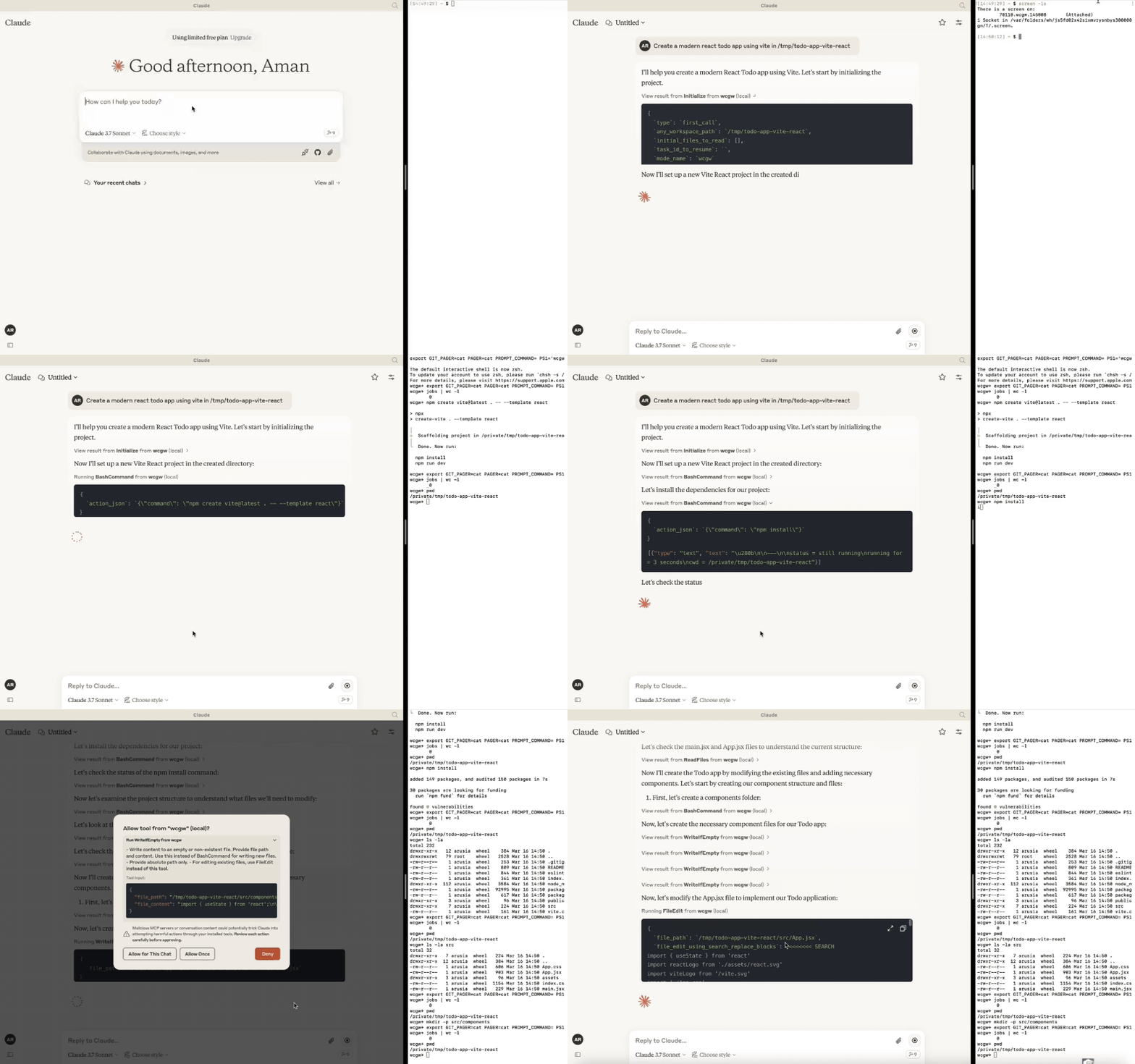
Related MCP server: Claude Code Control MCP
更新情報
[2025年10月6日] モデルがバックグラウンドで複数のコマンドを実行できるようになりました。ZSHがサポート対象のシェルになりました。多重化(Multiplexing)の改善。
[2025年4月27日] リレーサーバー経由のGPTサポートを削除しました。バージョン5以降ではMCPサーバーのみがサポートされます。
[2025年3月24日] Sonnet 3.7向けの書き込みおよび編集体験を改善しました。CLAUDE.mdが自動的に読み込まれます。
[2025年2月16日] AIが使用する作業ターミナルにアタッチできるようになりました。以下の「ターミナルへのアタッチ」セクションを参照してください。
[2025年1月15日] モードを導入しました:アーキテクト、コードライター、および全能のwcgwモード。
[2025年1月8日] 関連するファイルパスと説明を単一のファイルに保存するコンテキスト保存ツール。タスクのチェックポイントや知識の転送に使用できます。
[2024年12月29日] ファイル書き込みおよび編集時の構文チェックが安定しました。
initializeツール呼び出しを有用なものにしました。リポジトリが参照された場合、スマートなリポジトリ構造をClaudeに送信します。大きなファイルの処理も改善されました。[2024年12月9日] Claudeアプリにコンテキストを貼り付けるためのVS Code拡張機能
🚀 ハイライト
⚡ 作成、実行、反復: すべてのエラーが修正されるまでコンパイラチェックを実行し続けるようClaudeに依頼したり、長時間実行されるコマンドのステータスを完了までチェックし続けるよう依頼したりできます。
⚡ 大きなファイルの編集: トークン制限の問題を回避するため、大きなファイルの増分編集をサポートしています。必要な変更の割合に基づいて、小さな編集を行うか、大きな書き換えを行うかをスマートに選択します。
⚡ 編集時の構文チェック: LLMの編集に構文エラーがある場合、フィードバックを報告してやり直させることができます。
⚡ インタラクティブなコマンド処理: 矢印キー、割り込み、ANSIエスケープシーケンスを使用したインタラクティブなコマンドをサポートしています。
⚡ ファイル保護:
AIは、ファイルを編集または書き換える前に、少なくとも一度はそのファイルを読み取る必要があります。これにより、誤った上書きを防ぎます。
非常に大きなファイルを読み込む際のコンテキストの枯渇を防ぎます。ファイルはトークン長に基づいてチャンク化されます。
初期化時に、重要なファイルを選択した後(.gitignoreおよび統計的アプローチに基づく)、提供されたワークスペースのディレクトリ構造が返されます。
検索・置換に基づくファイル編集では、以前の検索ブロックに基づいて複数のマッチがある場合、正しい検索ブロックを見つけようとします。そうでない場合は失敗します(正確性のため)。
ファイル編集はスペースを許容するマッチングを行い、インデントの不一致などの問題には警告を出します。マッチしない場合は、AIが間違いを修正できるように最も近いマッチが返されます。
ツール呼び出しベースの検索・置換よりもパフォーマンスの高い、Aiderのような検索・置換を使用しています。
⚡ シェルの最適化:
AIが迷子にならないよう、シェルコマンドの実行後には常に現在の作業ディレクトリが返されます。
コマンドのポーリングは、低速なフィードバックを避けるために短いタイムアウトで終了します。ただし、ステータスチェックにはコマンドからの新しい出力ストリーミングに基づく待機許容値があります。これら両方のアプローチを組み合わせることで、優れたシェル操作体験を提供します。
メインのインタラクティブシェルと並行して、複数のバックグラウンドコマンドを同時にサポートします。
⚡ リポジトリコンテキストを単一ファイルに保存: 「ContextSave」ツールを使用したタスクのチェックポイント作成により、詳細なコンテキストを単一ファイルに保存します。タスクは後で新しいチャットで「Resume
task id」と入力することで再開できます。保存されたファイルは、別のAIから助けを得るなど、他の種類の知識転送にも使用できます。⚡ さまざまなモードを簡単に切り替え:
計画のために「アーキテクト」モードで実行するよう依頼してください。Aiderのアーキテクトモードに触発されており、最初にClaudeと協力して計画を立てます。これにより精度が向上し、時期尚早なファイル編集を防ぎます。
コード編集やプロジェクト構築のために「コードライター」モードで実行するよう依頼してください。ワイルドカードをサポートした特定のパスを指定することで、他のファイルが編集されるのを防ぐことができます。
デフォルトでは、制限がなく完全な権限を持つ「wcgw」モードで実行されます。
詳細はモードセクションを参照してください。
⚡ 多重化ターミナルで実行: VS Code拡張機能を使用するか、
screen -xを実行して、AIがコマンドを実行するターミナルにアタッチします。履歴を表示したり、プロセスを中断したり、AIが使用しているのと同じターミナルを操作したりできます。⚡ CLAUDE.md/AGENTS.mdを自動読み込み: プロジェクトルートにある「CLAUDE.md」または「AGENTS.md」ファイルを読み込み、初期化中に指示として送信します。グローバルな「
/.wcgw/CLAUDE.md」または「/.wcgw/AGENTS.md」ファイル内の指示も読み込まれ、プロジェクト固有のCLAUDE.mdと共に追加されます。ファイル名は大文字と小文字を区別します。CLAUDE.mdが存在する場合はそれがアタッチされ、存在しない場合はAGENTS.mdがアタッチされます。
Claudeのセットアップ (mcpを使用)
MacおよびLinux
まず、Homebrewを使用してuvをインストールします: brew install uv
(重要: uvのインストールにはHomebrewを使用してください。それ以外の場合は、/usr/bin/のようなグローバルな場所にuvが存在することを確認してください)
次に、claude_desktop_config.json (~/Library/Application Support/Claude/claude_desktop_config.json) を作成または更新し、以下のJSONを記述します。
{
"mcpServers": {
"wcgw": {
"command": "uvx",
"args": ["--python", "3.12", "wcgw@latest"]
}
}
}その後、Claudeアプリを再起動します。
オプション: 特定のシェルを強制する
特定のシェル(bashまたはzsh)を使用するには、--shell引数を追加します:
{
"mcpServers": {
"wcgw": {
"command": "uvx",
"args": ["--python", "3.12", "wcgw@latest", "--shell", "/bin/bash"]
}
}
}セットアップでエラーが発生した場合
「uv ENOENT」のようなエラーが発生した場合は、
uvがインストールされていることを確認してください。次に、ターミナルで「which uv」を実行し、その出力を設定の「uv」の代わりに使用してください。それでも問題が解決しない場合は、ターミナルで
uv tool run --python 3.12 wcgwが実行できるか確認してください。出力はなく、終了もしないはずです。~/.cache/uv フォルダを削除してみてください。
このツールがテストされた
uvバージョン0.6.0を使用してみてください。npx @modelcontextprotocol/inspector@0.1.7 uv tool run --python 3.12 wcgwを使用してMCPサーバーをデバッグしてください。
Windows (WSL上)
このMCPサーバーはWindows上のWSLでのみ動作します。
セットアップするには、uvをインストールしてください。
次に、Claudeの設定ファイル %APPDATA%\Claude\claude_desktop_config.json を追加または更新し、以下を記述します。
{
"mcpServers": {
"wcgw": {
"command": "wsl.exe",
"args": ["uvx", "--python", "3.12", "wcgw@latest"]
}
}
}エラーが発生した場合は、コマンドプロンプトで wsl uv --python 3.12 wcgw コマンドを実行してください。error /bin/bash: line 1: uv: command not found というエラーが出る場合は、uvがグローバルにインストールされていないことを意味するため、uvの正しいパスを指定する必要があります。
uvがどこにインストールされているかを確認します:
whereis uv出力例:
uv: /home/mywsl/.local/bin/uv
フルパスが機能するかテストします:
wsl /home/mywsl/.local/bin/uv tool run --python 3.12 wcgwフルパスで設定を更新します:
{
"mcpServers": {
"wcgw": {
"command": "wsl.exe",
"args": ["/home/mywsl/.local/bin/uv", "tool", "run", "--python", "3.12", "wcgw"]
}
}
}/home/mywsl/.local/bin/uv をステップ1で確認した実際のuvパスに置き換えてください。
使用方法
数秒待ってください。すべてが正しく設定されていれば、このアイコンが表示されるはずです。
こちらです

その後、Claudeにシェルコマンドの実行、ファイルの読み取り、ファイルの編集、コードの実行などを依頼してください。
タスクのチェックポイントまたは知識の転送
「Attach from MCP」ボタンを使用して「KnowledgeTransfer」プロンプトをアタッチすることで、タスクのチェックポイント作成や知識の転送を行うことができます。
「KnowledgeTransfer」プロンプトを実行すると、「ContextSave」ツールが呼び出され、タスクの説明とすべてのファイル内容が単一のファイルに保存されます。タスクのIDが生成されます。
新しいチャットで「Resume ''」と言うと、AIはタスクIDを指定して「Initialize」を呼び出し、そこからコンテキストを読み込むはずです。
または、生成されたファイルを直接開き、別のAIに共有して助けを求めることもできます。
モード
3つの組み込みモードがあります。Claudeに対して「'architect'モードを使用してください」のように、いずれかのモードで実行するよう依頼できます。
モード | 説明 | 許可される操作 | 拒否される操作 | 呼び出しプロンプト |
Architect | Claudeと協力してリポジトリを調査・理解するために設計されています。 | 読み取り専用コマンド | FileEditおよびWriteツール | Run in mode='architect' |
Code-writer | コード作成および開発用 | 編集または書き込み用の指定パスグロブ、指定コマンド | 指定されたグロブに一致しないパスのFileEdit、指定されたグロブに一致しないパスのWrite | Run in code writer mode, only 'tests/**' allowed, only uv command allowed |
wcgw | すべてが許可されるデフォルトモード | すべて | なし | プロンプトなし、または「Run in wcgw mode」 |
注: コードライターモードでは、現時点ではすべてのコマンドが許可されるか、まったく許可されないかのどちらかです。許可されるコマンドのリストを指定した場合、Claudeはそのコマンドのみを実行するように指示されますが、実際のチェックは行われません。(開発中)
調査のために作業ターミナルにアタッチする
新機能: VS Code拡張機能は、ワークスペースパスが一致する場合、実行中のターミナルを自動的にアタッチします。
screenコマンドがインストールされている場合、wcgwは自動的にscreenインスタンス上で実行されます。wcgw MCPサーバーを起動している場合は、screenセッションを一覧表示できます:
screen -ls
93358.wcgw.235521 のようなwcgw screen名(最後の数字は時-分-秒形式)をメモしてください。
その後、screen -x 93358.wcgw.235521 を使用してセッションにアタッチできます。
実行中のコマンドは安全に中断できます。
パスワードの入力やテキストの入力など、ターミナルを安全に操作できます。(警告: 新しいコマンドを実行すると、新しいLLMコマンドによって中断されます。)
exit や Ctrl-d を使用してセッションを終了するのではなく、ctrl+a+d を使用してscreenセッションを破棄せずに安全にデタッチしてください。
より良いスクロール体験のために、~/.screenrc に以下を含めてください
defscrollback 10000
termcapinfo xterm* ti@:te@[オプション] VS Code拡張機能
https://marketplace.visualstudio.com/items?itemName=AmanRusia.wcgw
コマンド:
テキストを選択して
cmd+'を押し、指示を入力します。これにより、アプリがClaudeに切り替わり、指示、ファイルパス、ワークスペースディレクトリ、および選択したテキストを含むテキストが貼り付けられます。
例

Docker経由でMCPサーバーを使用する
まずDockerイメージをビルドします: docker build -t wcgw https://github.com/rusiaaman/wcgw.git
次に、/Users/username/Library/Application Support/Claude/claude_desktop_config.json を更新して以下を含めます
{
"mcpServers": {
"wcgw": {
"command": "docker",
"args": [
"run",
"-i",
"--rm",
"--mount",
"type=bind,src=/Users/username/Desktop,dst=/workspace/Desktop",
"wcgw"
]
}
}
}ツール
サーバーは以下のMCPツールを提供します:
シェル操作:
Initialize: シェルのリセットとワークスペース環境のセットアップパラメータ:
any_workspace_path(string),initial_files_to_read(string[]),mode_name("wcgw"|"architect"|"code_writer"),task_id_to_resume(string)
BashCommand: タイムアウト制御付きのシェルコマンド実行パラメータ:
command(string),wait_for_seconds(int, optional)パラメータ:
send_text(string) またはsend_specials(["Enter"|"Key-up"|...]) またはsend_ascii(int[]), `wait
Available Tools
6 toolsBashCommandADestructive
Execute a bash command. This is stateful (beware with subsequent calls).
Status of the command and the current working directory will always be returned at the end.
The first or the last line might be
(...truncated)if the output is too long.Always run
pwdif you get any file or directory not found error to make sure you're not lost.Do not run bg commands using "&", instead use this tool.
You must not use echo/cat to read/write files, use ReadFiles/FileWriteOrEdit
In order to check status of previous command, use
status_checkwith empty command argument.Only command is allowed to run at a time. You need to wait for any previous command to finish before running a new one.
Programs don't hang easily, so most likely explanation for no output is usually that the program is still running, and you need to check status again.
Do not send Ctrl-c before checking for status till 10 minutes or whatever is appropriate for the program to finish.
Only run long running commands in background. Each background command is run in a new non-reusable shell.
On running a bg command you'll get a bg command id that you should use to get status or interact.
| Name | Required | Description | Default |
|---|---|---|---|
| type | Yes | type of action. | |
| command | No | Set only if type="command" | |
| send_text | No | Set only if type="send_text" | |
| thread_id | Yes | ||
| send_ascii | No | Set only if type="send_ascii" | |
| status_check | No | Set only if type="status_check" | |
| bg_command_id | No | Set only if type!="command" and doing action on a running background command | |
| is_background | No | Set only if type="command" and running the command in background | |
| send_specials | No | Set only if type="send_specials" | |
| wait_for_seconds | No |
TDQS
Does the description disclose side effects, auth requirements, rate limits, or destructive behavior?
Even with annotations already signalling open and destructive behavior, the description adds substantial operational detail: commands are stateful, status and cwd are always returned, output may be truncated, background commands run in new non-reusable shells, and status must be polled before interrupting. These behaviors go well beyond what the annotations convey.
Agents need to know what a tool does to the world before calling it. Descriptions should go beyond structured annotations to explain consequences.
Is the description appropriately sized, front-loaded, and free of redundancy?
The bulleted format is front-loaded with the most critical caveat (statefulness) and each subsequent bullet carries actionable information for a high-complexity tool. There is minor redundancy between the one-command-at-a-time and wait-for-previous bullets, but overall the length is warranted by the tool's parameter count and interactive modes.
Shorter descriptions cost fewer tokens and are easier for agents to parse. Every sentence should earn its place.
Given the tool's complexity, does the description cover enough for an agent to succeed on first attempt?
For a 10-parameter tool with no output schema, the description does well to state that status and cwd are returned and to cover truncation, backgrounding, and status polling. The main gap is that the interactive input modes (send_text, send_ascii, send_specials) and wait_for_seconds are never explained in context, so an agent may not know how to drive an already-running command.
Complex tools with many parameters or behaviors need more documentation. Simple tools need less. This dimension scales expectations accordingly.
Does the description clarify parameter syntax, constraints, interactions, or defaults beyond what the schema provides?
With roughly 80% schema coverage the baseline is 3, but the description adds useful parameter semantics: status_check must be called with an empty command argument, bg_command_id is the handle for interacting with a background command, and only one command may run at a time. However, it does not explain wait_for_seconds or how send_text/send_ascii/send_specials should be used with a running process.
Input schemas describe structure but not intent. Descriptions should explain non-obvious parameter relationships and valid value ranges.
Does the description clearly state what the tool does and how it differs from similar tools?
The description opens with 'Execute a bash command', a specific verb+resource, and immediately distinguishes the tool from file-focused siblings by forbidding echo/cat and directing the agent to ReadFiles/FileWriteOrEdit. It also clarifies stateful execution, which sets expectations beyond what the name alone implies.
Agents choose between tools based on descriptions. A clear purpose with a specific verb and resource helps agents select the right tool.
Does the description explain when to use this tool, when not to, or what alternatives exist?
It clearly names ReadFiles/FileWriteOrEdit as the alternatives for file I/O and instructs against shell backgrounding with '&'. It lacks an explicit 'when not to use' statement for the other sibling tools, and the background instruction ('instead use this tool') is slightly ambiguous, though the intent is recoverable from the schema's is_background field.
Agents often have multiple tools that could apply. Explicit usage guidance like "use X instead of Y when Z" prevents misuse.
ContextSaveBRead-only
Saves provided description and file contents of all the relevant file paths or globs in a single text file.
Use the thread_id returned by Initialize when available; legacy clients may omit it.
Provide random 3 word unique id or whatever user provided.
Leave project path as empty string if no project path
| Name | Required | Description | Default |
|---|---|---|---|
| id | Yes | ||
| thread_id | No | ||
| description | Yes | ||
| project_root_path | Yes | ||
| relevant_file_globs | Yes |
TDQS
Does the description disclose side effects, auth requirements, rate limits, or destructive behavior?
Annotation Contradiction: the annotations declare readOnlyHint=true, yet the description says the tool 'saves' content into a single text file, implying a file-writing side effect. This directly contradicts the read-only hint. The description also does not clarify whether it reads from disk, writes a new file, overwrites anything, or what side effects occur.
Agents need to know what a tool does to the world before calling it. Descriptions should go beyond structured annotations to explain consequences.
Is the description appropriately sized, front-loaded, and free of redundancy?
The description is short, front-loaded with the core purpose, and uses bullets for parameter-specific guidance. It earns its length, but the sentence 'Provide random 3 word unique id or whatever user provided' is slightly informal and could be clearer about whether the id is required or user-supplied.
Shorter descriptions cost fewer tokens and are easier for agents to parse. Every sentence should earn its place.
Given the tool's complexity, does the description cover enough for an agent to succeed on first attempt?
For a tool with no output schema and a read/write ambiguity, the description omits important context: where the text file is saved, what happens after saving, how globs are resolved relative to project_root_path, and whether this is a mutating action. The contradiction with readOnlyHint makes the overall behavior especially incomplete for an agent deciding whether to call it.
Complex tools with many parameters or behaviors need more documentation. Simple tools need less. This dimension scales expectations accordingly.
Does the description clarify parameter syntax, constraints, interactions, or defaults beyond what the schema provides?
With 0% schema description coverage, the description must compensate, and it does: it explains thread_id as coming from Initialize, id as a random 3-word unique identifier, project_root_path as optional/empty when no project path, and relevant_file_globs as file paths or globs. It does not fully define every parameter's format, but adds substantial meaning beyond the raw schema.
Input schemas describe structure but not intent. Descriptions should explain non-obvious parameter relationships and valid value ranges.
Does the description clearly state what the tool does and how it differs from similar tools?
The description states a specific action: saving a description and file contents into a single text file. It clearly identifies the inputs (description, file paths/globs) and output artifact. However, it does not explicitly distinguish itself from FileWriteOrEdit or explain exactly what 'save' produces or where, so it stops short of a 5.
Agents choose between tools based on descriptions. A clear purpose with a specific verb and resource helps agents select the right tool.
Does the description explain when to use this tool, when not to, or what alternatives exist?
The bullets give conditional usage hints such as using the thread_id from Initialize and leaving project_root_path empty when absent. However, there is no explicit guidance on when to use this tool versus sibling tools like ReadFiles or FileWriteOrEdit, and no exclusions or alternatives are named.
Agents often have multiple tools that could apply. Explicit usage guidance like "use X instead of Y when Z" prevents misuse.
FileWriteOrEditADestructiveIdempotent
Writes or edits a file based on the percentage of changes.
Use absolute path only (~ allowed).
First write down percentage of lines that need to be replaced in the file (between 0-100) in percentage_to_change
percentage_to_change should be low if mostly new code is to be added. It should be high if a lot of things are to be replaced.
If percentage_to_change > 50, provide full file content in text_or_search_replace_blocks
If percentage_to_change <= 50, text_or_search_replace_blocks should be search/replace blocks.
Instructions for editing files.
Example
Input file
import numpy as np
from impls import impl1, impl2
def hello():
"print a greeting"
print("hello")
def call_hello():
"call hello"
hello()
print("Called")
impl1()
hello()
impl2()
Edit format on the input file
<<<<<<< SEARCH
from impls import impl1, impl2
=======
from impls import impl1, impl2
from hello import hello as hello_renamed
>>>>>>> REPLACE
<<<<<<< SEARCH
def hello():
"print a greeting"
print("hello")
=======
>>>>>>> REPLACE
<<<<<<< SEARCH
def call_hello():
"call hello"
hello()
=======
def call_hello_renamed():
"call hello renamed"
hello_renamed()
>>>>>>> REPLACE
<<<<<<< SEARCH
impl1()
hello()
impl2()
=======
impl1()
hello_renamed()
impl2()
>>>>>>> REPLACESEARCH/REPLACE block Rules:
Every "<<<<<<< SEARCH" section must EXACTLY MATCH the existing file content, character for character, including all comments, docstrings, whitespaces, etc.
Including multiple unique SEARCH/REPLACE blocks if needed. Include enough and only enough lines in each SEARCH section to uniquely match each set of lines that need to change.
Keep SEARCH/REPLACE blocks concise. Break large SEARCH/REPLACE blocks into a series of smaller blocks that each change a small portion of the file. Include just the changing lines, and a few surrounding lines (0-3 lines) if needed for uniqueness. Other than for uniqueness, avoid including those lines which do not change in search (and replace) blocks. Target 0-3 non trivial extra lines per block.
Preserve leading spaces and indentations in both SEARCH and REPLACE blocks.
| Name | Required | Description | Default |
|---|---|---|---|
| file_path | Yes | #1: absolute file path | |
| thread_id | Yes | #4: thread_id | |
| percentage_to_change | Yes | #2: predict this percentage, calculated as number of existing lines that will have some diff divided by total existing lines. | |
| text_or_search_replace_blocks | Yes | #3: content/edit blocks. Must be after #2 in the tool xml |
TDQS
Does the description disclose side effects, auth requirements, rate limits, or destructive behavior?
Annotations specify destructiveHint: true, and the description details the editing process (full content replacement or search/replace). It explains the behavior regarding percentage threshold and formatting rules. No contradiction with annotations. The description adds context beyond annotations, such as the SEARCH/REPLACE format requirements.
Agents need to know what a tool does to the world before calling it. Descriptions should go beyond structured annotations to explain consequences.
Is the description appropriately sized, front-loaded, and free of redundancy?
The description is quite long but well-structured with bullet points, headings, and an example. It is front-loaded with the main action and then details. While every part serves a purpose, it could be slightly more concise without losing necessary detail.
Shorter descriptions cost fewer tokens and are easier for agents to parse. Every sentence should earn its place.
Given the tool's complexity, does the description cover enough for an agent to succeed on first attempt?
Given the tool's complexity (4 parameters, destructive behavior, no output schema), the description covers the editing method, percentage calculation, and formatting rules thoroughly. It lacks information on error handling, file creation behavior (if file doesn't exist), and return values, but these are minor gaps.
Complex tools with many parameters or behaviors need more documentation. Simple tools need less. This dimension scales expectations accordingly.
Does the description clarify parameter syntax, constraints, interactions, or defaults beyond what the schema provides?
Although schema descriptions cover all parameters (100% coverage), the description significantly enhances meaning by explaining how percentage_to_change is calculated, the two modes for text_or_search_replace_blocks, and providing a full example with search/replace block rules. This goes well beyond the schema's brief descriptions.
Input schemas describe structure but not intent. Descriptions should explain non-obvious parameter relationships and valid value ranges.
Does the description clearly state what the tool does and how it differs from similar tools?
The description clearly states the tool writes or edits a file, with specific instructions on using percentage-based changes. It distinguishes itself from siblings like BashCommand (shell commands) and ReadFiles/ReadImage (reading), leaving no ambiguity about its purpose.
Agents choose between tools based on descriptions. A clear purpose with a specific verb and resource helps agents select the right tool.
Does the description explain when to use this tool, when not to, or what alternatives exist?
The description provides explicit guidelines on when to use full file content vs. search/replace blocks based on percentage_to_change (>50 vs <=50). It also includes a detailed example and rules for SEARCH/REPLACE blocks. However, it does not explicitly state when to avoid using this tool in favor of siblings.
Agents often have multiple tools that could apply. Explicit usage guidance like "use X instead of Y when Z" prevents misuse.
InitializeARead-only
Always call this at the start of the conversation before using any of the shell tools from wcgw.
Use
any_workspace_pathto initialize the shell in the appropriate project directory.If the user has mentioned a workspace or project root or any other file or folder use it to set
any_workspace_path.If user has mentioned any files use
initial_files_to_readto read, use absolute paths only (~ allowed)By default use mode "wcgw"
In "code-writer" mode, set the commands and globs which user asked to set, otherwise use 'all'.
Use type="first_call" if it's the first call to this tool.
Use type="user_asked_mode_change" if in a conversation user has asked to change mode.
Use type="reset_shell" if in a conversation shell is not working after multiple tries.
Use type="user_asked_change_workspace" if in a conversation user asked to change workspace
| Name | Required | Description | Default |
|---|---|---|---|
| type | Yes | ||
| mode_name | Yes | ||
| thread_id | Yes | Use the thread_id created in first_call, leave it as empty string if first_call | |
| allowed_globs | No | File globs that are allowed to be edited. Set to 'all' to allow all files, or provide a list of glob patterns. Only required when mode_name is 'code_writer'. | |
| allowed_commands | No | Shell commands that are allowed to be executed. Set to 'all' to allow all commands, or provide a list of command patterns. Only required when mode_name is 'code_writer'. | |
| task_id_to_resume | Yes | ||
| any_workspace_path | Yes | Workspace to initialise in. Don't use ~ by default, instead use empty string | |
| initial_files_to_read | Yes | Array of one or more files to read. Provide [] if no files mentioned. |
TDQS
Does the description disclose side effects, auth requirements, rate limits, or destructive behavior?
The description adds behavioral context beyond annotations by detailing the initialization steps (setting workspace, reading files, configuring mode). It does not contradict the readOnlyHint=true annotation, as no destructive actions are mentioned. The description could mention if any session state is persisted.
Agents need to know what a tool does to the world before calling it. Descriptions should go beyond structured annotations to explain consequences.
Is the description appropriately sized, front-loaded, and free of redundancy?
The description is concise and uses a bulleted list format that is easy to scan. Each sentence carries clear instructions. It could be slightly more organized by grouping related parameters, but overall it is efficient and front-loaded.
Shorter descriptions cost fewer tokens and are easier for agents to parse. Every sentence should earn its place.
Given the tool's complexity, does the description cover enough for an agent to succeed on first attempt?
For a tool with 8 parameters, no output schema, and annotations, the description covers main usage scenarios but lacks information about what the agent receives or any side effects. It assumes prior knowledge of the wcgw shell tools. This is adequate but could be more complete.
Complex tools with many parameters or behaviors need more documentation. Simple tools need less. This dimension scales expectations accordingly.
Does the description clarify parameter syntax, constraints, interactions, or defaults beyond what the schema provides?
The description adds meaning beyond the schema for key parameters like any_workspace_path, initial_files_to_read, mode_name, and allowed_globs. It explains default values and usage context. However, task_id_to_resume and thread_id are not elaborated, but schema coverage is high enough.
Input schemas describe structure but not intent. Descriptions should explain non-obvious parameter relationships and valid value ranges.
Does the description clearly state what the tool does and how it differs from similar tools?
The description clearly states it is an initialization tool to be called at the start of the conversation before using shell tools. It specifies the resource (shell) and distinguishes from sibling tools by being a prerequisite.
Agents choose between tools based on descriptions. A clear purpose with a specific verb and resource helps agents select the right tool.
Does the description explain when to use this tool, when not to, or what alternatives exist?
The description provides explicit when-to-use guidelines for different call types (first_call, user_asked_mode_change, etc.) and explains when to set parameters like mode_name and allowed_globs. However, it does not explicitly say when not to use this tool or mention alternatives.
Agents often have multiple tools that could apply. Explicit usage guidance like "use X instead of Y when Z" prevents misuse.
ReadFilesARead-only
Read full file content of one or more files.
Use the thread_id returned by Initialize for this conversation when available; legacy clients may omit it.
Provide absolute paths only (~ allowed)
Only if the task requires line numbers understanding:
You may extract a range of lines. E.g.,
/path/to/file:1-10for lines 1-10. You can drop start or end like/path/to/file:1-or/path/to/file:-10
| Name | Required | Description | Default |
|---|---|---|---|
| thread_id | No | ||
| file_paths | Yes |
TDQS
Does the description disclose side effects, auth requirements, rate limits, or destructive behavior?
Annotations already mark the tool read-only and closed-world, so no further safety disclosure is needed. The description adds useful operational behavior: path expectations, line-range syntax, and thread_id sourcing. It does not cover error or return behavior, but this is a minor gap for a simple read tool.
Agents need to know what a tool does to the world before calling it. Descriptions should go beyond structured annotations to explain consequences.
Is the description appropriately sized, front-loaded, and free of redundancy?
Four tight bullet points lead with the core purpose, and the conditional line-range rule is clearly nested. There is no filler; every sentence contributes to correct invocation.
Shorter descriptions cost fewer tokens and are easier for agents to parse. Every sentence should earn its place.
Given the tool's complexity, does the description cover enough for an agent to succeed on first attempt?
For a two-parameter, read-only tool with no output schema, the description is nearly complete: it covers paths, line ranges, and thread_id. It does not specify how multiple file contents are returned, but the simple nature of the tool makes the output inferable.
Complex tools with many parameters or behaviors need more documentation. Simple tools need less. This dimension scales expectations accordingly.
Does the description clarify parameter syntax, constraints, interactions, or defaults beyond what the schema provides?
Schema description coverage is 0%, so the description must carry parameter meaning, and it does. It explains file_paths as absolute paths with optional range syntax and clarifies thread_id availability ('returned by Initialize', 'legacy clients may omit it'), adding real semantics beyond the bare schema.
Input schemas describe structure but not intent. Descriptions should explain non-obvious parameter relationships and valid value ranges.
Does the description clearly state what the tool does and how it differs from similar tools?
Description opens with 'Read full file content of one or more files,' a specific verb-resource pair with clear scope (full content, multiple files). This distinguishes it from siblings such as FileWriteOrEdit, ReadImage, and BashCommand without needing to open schemas.
Agents choose between tools based on descriptions. A clear purpose with a specific verb and resource helps agents select the right tool.
Does the description explain when to use this tool, when not to, or what alternatives exist?
Provides concrete guidance: absolute paths only with ~ allowed, line-range extraction only when line numbers are needed, and reuse of thread_id from Initialize. It does not explicitly state when not to use this tool or name alternatives, but the conditional usage is clear.
Agents often have multiple tools that could apply. Explicit usage guidance like "use X instead of Y when Z" prevents misuse.
ReadImageBRead-only
Read an image from the shell. Use the thread_id returned by Initialize when available; legacy clients may omit it.
| Name | Required | Description | Default |
|---|---|---|---|
| file_path | Yes | ||
| thread_id | No |
TDQS
Does the description disclose side effects, auth requirements, rate limits, or destructive behavior?
Annotations already declare readOnlyHint=true and openWorldHint=false, and the description does not contradict them. The added note about thread_id and legacy clients is useful behavioral context beyond the structured fields, but the description does not disclose other behaviors such as error cases or what happens when the image cannot be read.
Agents need to know what a tool does to the world before calling it. Descriptions should go beyond structured annotations to explain consequences.
Is the description appropriately sized, front-loaded, and free of redundancy?
Two sentences with no filler. The primary action is front-loaded, and the optional parameter guidance is placed in the second sentence where it belongs.
Shorter descriptions cost fewer tokens and are easier for agents to parse. Every sentence should earn its place.
Given the tool's complexity, does the description cover enough for an agent to succeed on first attempt?
For a simple read-only tool with minimal schema, the description covers the main input and the key optional parameter. Still, it lacks an explicit distinction from ReadFiles and does not mention what the tool returns, which would help an agent use it more reliably.
Complex tools with many parameters or behaviors need more documentation. Simple tools need less. This dimension scales expectations accordingly.
Does the description clarify parameter syntax, constraints, interactions, or defaults beyond what the schema provides?
Schema description coverage is 0%, so the description carries the burden of explaining parameters. It adds meaningful semantics for thread_id ('returned by Initialize... legacy clients may omit it'), but it says nothing about file_path beyond the schema's name and type.
Input schemas describe structure but not intent. Descriptions should explain non-obvious parameter relationships and valid value ranges.
Does the description clearly state what the tool does and how it differs from similar tools?
The description states a clear action ('Read an image') and a resource/context ('from the shell'), so an agent can generally tell what the tool does. However, it does not explicitly distinguish ReadImage from the sibling ReadFiles, leaving some ambiguity about when the image-specific tool is preferred.
Agents choose between tools based on descriptions. A clear purpose with a specific verb and resource helps agents select the right tool.
Does the description explain when to use this tool, when not to, or what alternatives exist?
The only guidance is about the thread_id parameter: use the one from Initialize when available, and legacy clients may omit it. There is no guidance about when to use ReadImage versus alternatives like ReadFiles or BashCommand, so tool-selection context is missing.
Agents often have multiple tools that could apply. Explicit usage guidance like "use X instead of Y when Z" prevents misuse.
Tool Schema Changelog
Recent tool additions, removals, and schema changes observed during successful MCP inspections.
4 tool updates
v5.6.6- Changed
BashCommand1 field changed- removed
Input schema / additionalPropertiesRemoved value: -false
- Changed
ContextSave1 field changed- added
Input schema / properties / thread_idAdded value: +{ + "default": "", + "type": "string" +}
- Changed
ReadFiles1 field changed- added
Input schema / properties / thread_idAdded value: +{ + "default": "", + "type": "string" +}
- Changed
ReadImage1 field changed- added
Input schema / properties / thread_idAdded value: +{ + "default": "", + "type": "string" +}
2 tool updates
v5.6.2- Changed
BashCommand11 fields changed- removed
Input schema / $defsRemoved value: -{ - "ActionJsonSchema": { - "additionalProperties": false, - "properties": { - "bg_command_id": { - "anyOf": [ - { - "type": "string" - }, - { - "type": "null" - } - ], - "default": null, - "description": "Set only if type!=\"command\" and doing action on a running background command" - }, - "command": { - "anyOf": [ - { - "type": "string" - }, - { - "type": "null" - } - ], - "default": null, - "description": "Set only if type=\"command\"" - }, - "is_background": { - "default": false, - "description": "Set only if type=\"command\" and running the command in background", - "type": "boolean" - }, - "send_ascii": { - "anyOf": [ - { - "items": { - "type": "integer" - }, - "type": "array" - }, - { - "type": "null" - } - ], - "default": null, - "description": "Set only if type=\"send_ascii\"" - }, - "send_specials": { - "anyOf": [ - { - "items": { - "enum": [ - "Enter", - "Key-up", - "Key-down", - "Key-left", - "Key-right", - "Ctrl-c", - "Ctrl-d" - ], - "type": "string" - }, - "type": "array" - }, - { - "type": "null" - } - ], - "default": null, - "description": "Set only if type=\"send_specials\"" - }, - "send_text": { - "anyOf": [ - { - "type": "string" - }, - { - "type": "null" - } - ], - "default": null, - "description": "Set only if type=\"send_text\"" - }, - "status_check": { - "anyOf": [ - { - "const": true, - "type": "boolean" - }, - { - "type": "null" - } - ], - "default": null, - "description": "Set only if type=\"status_check\"" - }, - "type": { - "description": "type of action.", - "enum": [ - "command", - "status_check", - "send_text", - "send_specials", - "send_ascii" - ], - "type": "string" - } - }, - "required": [ - "type" - ], - "type": "object" - } -} - removed
Input schema / properties / action_jsonRemoved value: -{ - "$ref": "#/$defs/ActionJsonSchema" -} - added
Input schema / properties / bg_command_idAdded value: +{ + "anyOf": [ + { + "type": "string" + }, + { + "type": "null" + } + ], + "default": null, + "description": "Set only if type!=\"command\" and doing action on a running background command" +} - added
Input schema / properties / commandAdded value: +{ + "anyOf": [ + { + "type": "string" + }, + { + "type": "null" + } + ], + "default": null, + "description": "Set only if type=\"command\"" +} - added
Input schema / properties / is_backgroundAdded value: +{ + "default": false, + "description": "Set only if type=\"command\" and running the command in background", + "type": "boolean" +} - added
Input schema / properties / send_asciiAdded value: +{ + "anyOf": [ + { + "items": { + "type": "integer" + }, + "type": "array" + }, + { + "type": "null" + } + ], + "default": null, + "description": "Set only if type=\"send_ascii\"" +} - added
Input schema / properties / send_specialsAdded value: +{ + "anyOf": [ + { + "items": { + "enum": [ + "Enter", + "Key-up", + "Key-down", + "Key-left", + "Key-right", + "Ctrl-c", + "Ctrl-d" + ], + "type": "string" + }, + "type": "array" + }, + { + "type": "null" + } + ], + "default": null, + "description": "Set only if type=\"send_specials\"" +} - added
Input schema / properties / send_textAdded value: +{ + "anyOf": [ + { + "type": "string" + }, + { + "type": "null" + } + ], + "default": null, + "description": "Set only if type=\"send_text\"" +} - added
Input schema / properties / status_checkAdded value: +{ + "anyOf": [ + { + "const": true, + "type": "boolean" + }, + { + "type": "null" + } + ], + "default": null, + "description": "Set only if type=\"status_check\"" +} - added
Input schema / properties / typeAdded value: +{ + "description": "type of action.", + "enum": [ + "command", + "status_check", + "send_text", + "send_specials", + "send_ascii" + ], + "type": "string" +} - changed
Input schema / requiredPrevious value: -[ - "action_json", - "thread_id" -]New value: +[ + "type", + "thread_id" +]
- Changed
Initialize4 fields changed- removed
Input schema / $defsRemoved value: -{ - "CodeWriterMode": { - "additionalProperties": false, - "properties": { - "allowed_commands": { - "anyOf": [ - { - "const": "all", - "type": "string" - }, - { - "items": { - "type": "string" - }, - "type": "array" - } - ] - }, - "allowed_globs": { - "anyOf": [ - { - "const": "all", - "type": "string" - }, - { - "items": { - "type": "string" - }, - "type": "array" - } - ] - } - }, - "required": [ - "allowed_globs", - "allowed_commands" - ], - "type": "object" - } -} - added
Input schema / properties / allowed_commandsAdded value: +{ + "anyOf": [ + { + "const": "all", + "type": "string" + }, + { + "items": { + "type": "string" + }, + "type": "array" + }, + { + "type": "null" + } + ], + "default": null, + "description": "Shell commands that are allowed to be executed. Set to 'all' to allow all commands, or provide a list of command patterns. Only required when mode_name is 'code_writer'." +} - added
Input schema / properties / allowed_globsAdded value: +{ + "anyOf": [ + { + "const": "all", + "type": "string" + }, + { + "items": { + "type": "string" + }, + "type": "array" + }, + { + "type": "null" + } + ], + "default": null, + "description": "File globs that are allowed to be edited. Set to 'all' to allow all files, or provide a list of glob patterns. Only required when mode_name is 'code_writer'." +} - removed
Input schema / properties / code_writer_configRemoved value: -{ - "anyOf": [ - { - "$ref": "#/$defs/CodeWriterMode" - }, - { - "type": "null" - } - ], - "default": null -}
2 tool updates
v1.0.0- Changed
BashCommand2 fields changed- added
Input schema / $defs / ActionJsonSchema / properties / bg_command_idAdded value: +{ + "anyOf": [ + { + "type": "string" + }, + { + "type": "null" + } + ], + "default": null, + "description": "Set only if type!=\"command\" and doing action on a running background command" +} - added
Input schema / $defs / ActionJsonSchema / properties / is_backgroundAdded value: +{ + "default": false, + "description": "Set only if type=\"command\" and running the command in background", + "type": "boolean" +}
- Changed
Initialize2 fields changed- changed
Input schema / properties / any_workspace_path / descriptionPrevious value: -"Workspce to initialise in. Don't use ~ by default, instead use empty string"New value: +"Workspace to initialise in. Don't use ~ by default, instead use empty string" - added
Input schema / properties / initial_files_to_read / descriptionAdded value: +"Array of one or more files to read. Provide [] if no files mentioned."
6 tool updates
- First observed
BashCommand - First observed
ContextSave - First observed
FileWriteOrEdit - First observed
Initialize - First observed
ReadFiles - First observed
ReadImage
TDQS
Scored across 6 tools
Each tool serves a clearly distinct role: initialize the session, run shell commands, read text files, read images, write/edit files, and save context. The small amount of overlap between BashCommand and the file tools is explicitly resolved by usage rules that forbid echo/cat for reading and writing.
All names are PascalCase and generally readable, but the pattern is mixed: ReadFiles and ReadImage are verb-noun, ContextSave and FileWriteOrEdit are noun-verb, BashCommand is noun-like, and Initialize is a bare verb. The inconsistency is noticeable but not chaotic.
Six tools is a well-scoped count for a shell/file-oriented MCP server. Each tool earns its place, and the set is neither bloated nor too thin for its apparent purpose.
The server covers the core workspace lifecycle: initialization, command execution, file reading, image reading, file writing/editing, and context saving. Generic operations like listing, deleting, or renaming are delegated to BashCommand, which works but makes for a slight indirectness rather than a true gap.
Maintenance
Related MCP Connectors
Source-checked CLI guides and model-aware planning for Claude Code, Codex, and Grok Build.
- OolkinOAuthcom.oolkin
AI colleagues that keep your standards, your project and their reasoning between sessions
Coding agents build full-stack apps in persistent workspaces and share them by link.
Shared memory for coding agents. Stop re-explaining your codebase every session.
Related MCP Servers
- AlicenseAqualityAmaintenanceA fully featured coding agent that uses symbolic operations (enabled by language servers) and works well even in large code bases. Essentially a free to use alternative to Cursor and Windsurf Agents, Cline, Roo Code and others.2942,103 PyPI29,611MIT
- FlicenseNot gradedqualityDmaintenanceEnables programmatic execution of coding tasks and autonomous file operations using Claude AI. It allows agents to search codebases, run shell commands, and track file changes through the Model Context Protocol.-
- AlicenseNot gradedqualityDmaintenanceProvides AI-driven development tools including file system operations, multi-language code analysis with tree-sitter, Git operations, code execution, and system information retrieval.MIT
- AlicenseNot gradedqualityAmaintenanceAutonomous spec-to-product coding-agent CLI. Its MCP server exposes 34 tools over stdio: project state and task-queue ops, memory retrieve/store, code search, quality and verification reports, repo hotspots/co-changes, and structured findings/learnings.4,923 npm1,065Business Source 1.1

