Glama
rusiaaman
by rusiaaman

Claude 및 기타 mcp 클라이언트를 위한 셸 및 코딩 에이전트

채팅 애플리케이션이 로컬 머신에서 코딩, 빌드 및 실행할 수 있도록 지원합니다.

wcgw는 셸과 코드 편집 도구가 긴밀하게 통합된 MCP 서버입니다.

⚠️ 경고: 이 MCP 서버는 사용자의 머신 셸과 파일에 대한 필터링되지 않은 액세스 권한을 제공합니다. LLM이 임의의 명령을 실행하거나 의도치 않은 변경을 수행하는 것을 제한하지 않습니다. 이 도구는 공격자에 의해 악용되거나 AI가 환각을 일으킬 경우 위험한 명령을 실행할 수 있습니다. AI 에이전트를 제한 없이 실행하는 것과 관련된 위험을 완전히 이해하고 수용하는 경우에만 이 저장소를 실행하십시오.

2026년 현재 wcgw를 사용할 수 있는 이유는 사용자와 에이전트 모두가 제어할 수 있는(키 입력 전송 포함) 완전한 대화형 셸 경험을 제공하기 때문입니다. 에이전트의 셸을 편집기에 연결하는 wcgw vscode 확장 프로그램과 결합하면, 현재 존재하는 가장 뛰어난 에이전트형 셸 경험을 얻을 수 있습니다. 파일 편집 트릭과 전반적인 미니멀리즘은 에이전트가 더 생산적으로 작업할 수 있도록 돕습니다.

Tests Mypy strict Build codecov

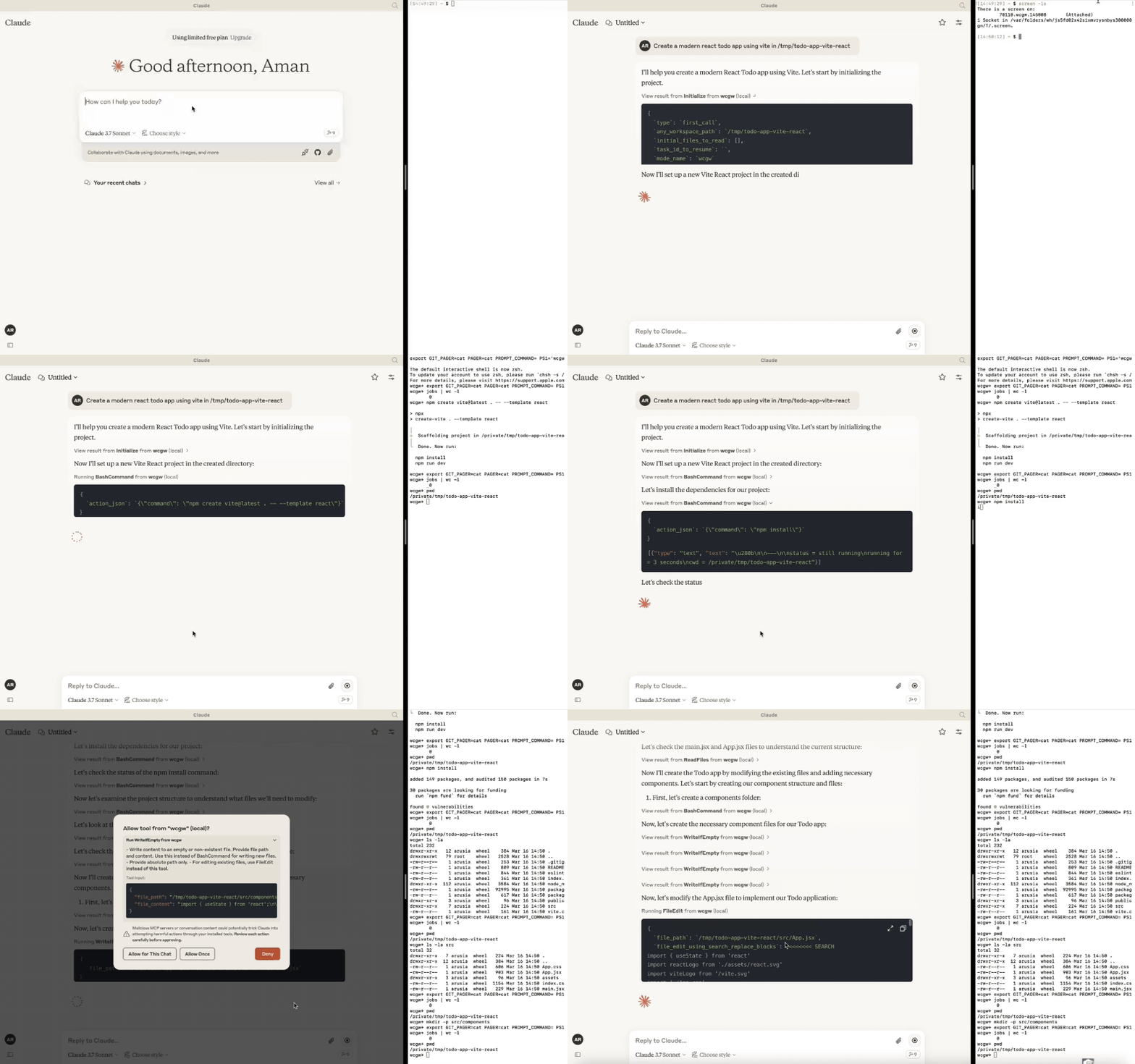
데모

Workflow Demo

Related MCP server: Claude Code Control MCP

업데이트

  • [2025년 10월 6일] 모델이 이제 백그라운드에서 여러 명령을 실행할 수 있습니다. ZSH가 지원되는 셸로 추가되었습니다. 멀티플렉싱이 개선되었습니다.

  • [2025년 4월 27일] 릴레이 서버를 통한 GPT 지원이 제거되었습니다. 버전 5 이상에서는 MCP 서버만 지원됩니다.

  • [2025년 3월 24일] sonnet 3.7에 대한 쓰기 및 편집 경험이 개선되었으며, CLAUDE.md가 자동으로 로드됩니다.

  • [2025년 2월 16일] 이제 AI가 사용하는 작업 터미널에 연결할 수 있습니다. 아래의 "attach-to-terminal" 섹션을 참조하십시오.

  • [2025년 1월 15일] 모드 도입: 아키텍트, 코드 작성자, 그리고 모든 권한을 가진 wcgw 모드.

  • [2025년 1월 8일] 관련 파일 경로와 설명을 단일 파일에 저장하는 컨텍스트 저장 도구. 작업 체크포인트나 지식 전달용으로 사용할 수 있습니다.

  • [2024년 12월 29일] 파일 쓰기 및 편집 시 구문 검사가 안정화되었습니다. initialize 도구 호출을 유용하게 만들었습니다. 저장소가 참조되면 Claude에 스마트 저장소 구조를 전송합니다. 대용량 파일 처리도 개선되었습니다.

  • [2024년 12월 9일] Claude 앱에 컨텍스트를 붙여넣기 위한 Vscode 확장 프로그램

🚀 주요 기능

  • 생성, 실행, 반복: 모든 오류가 수정될 때까지 컴파일러 검사를 계속 실행하도록 Claude에게 요청하거나, 긴 작업이 완료될 때까지 상태를 계속 확인하도록 요청할 수 있습니다.

  • 대용량 파일 편집: 토큰 제한 문제를 방지하기 위해 대용량 파일의 증분 편집을 지원합니다. 필요한 변경 비율에 따라 작은 편집을 수행할지 전체 재작성을 수행할지 스마트하게 선택합니다.

  • 편집 시 구문 검사: LLM의 편집 내용에 구문 오류가 있는 경우 피드백을 보고하여 다시 작업할 수 있도록 합니다.

  • 대화형 명령 처리: 화살표 키, 인터럽트 및 ansi 이스케이프 시퀀스를 사용하는 대화형 명령을 지원합니다.

  • 파일 보호:

    • AI는 파일을 편집하거나 재작성하기 전에 최소 한 번은 파일을 읽어야 합니다. 이는 실수로 덮어쓰는 것을 방지합니다.

    • 매우 큰 파일을 읽을 때 컨텍스트가 가득 차는 것을 방지합니다. 파일은 토큰 길이에 따라 청크로 나뉩니다.

    • 초기화 시 제공된 작업 공간의 디렉토리 구조가 중요한 파일( .gitignore 및 통계적 접근 방식 기반)을 선택한 후 반환됩니다.

    • 검색-바꾸기 기반의 파일 편집은 이전 검색 블록을 기반으로 여러 일치 항목이 있는 경우 올바른 검색 블록을 찾으려고 시도합니다. 그렇지 않으면 실패합니다(정확성을 위해).

    • 파일 편집은 간격 허용 일치를 사용하며, 들여쓰기 불일치와 같은 문제에 대해 경고합니다. 일치하는 항목이 없으면 AI가 실수를 수정할 수 있도록 가장 가까운 일치 항목이 AI에게 반환됩니다.

    • 도구 호출 기반 검색 및 바꾸기보다 성능이 뛰어난 Aider 스타일의 검색 및 바꾸기를 사용합니다.

  • 셸 최적화:

    • AI가 길을 잃지 않도록 모든 셸 명령 후 현재 작업 디렉토리가 항상 반환됩니다.

    • 명령 폴링은 느린 피드백을 방지하기 위해 짧은 시간 초과 후 종료됩니다. 그러나 상태 확인은 명령에서 나오는 새로운 출력 스트리밍을 기반으로 대기 허용 오차를 가집니다. 이 두 가지 접근 방식을 결합하여 좋은 셸 상호 작용 경험을 제공합니다.

    • 메인 대화형 셸과 함께 여러 개의 동시 백그라운드 명령을 지원합니다.

  • 단일 파일에 저장소 컨텍스트 저장: "ContextSave" 도구를 사용한 작업 체크포인트는 상세한 컨텍스트를 단일 파일에 저장합니다. 작업은 나중에 "Resume task id"라고 요청하여 새 채팅에서 재개할 수 있습니다. 저장된 파일은 다른 AI의 도움을 받는 등 다른 종류의 지식 전달에 사용할 수 있습니다.

  • 다양한 모드 간 간편한 전환:

    • 계획을 위해 '아키텍트' 모드에서 실행하도록 요청하십시오. adier의 아키텍트 모드에서 영감을 받아, 먼저 Claude와 협력하여 계획을 세우십시오. 정확도가 향상되고 성급한 파일 편집을 방지합니다.

    • 코드 편집 및 프로젝트 빌드를 위해 '코드 작성자' 모드에서 실행하도록 요청하십시오. 다른 파일이 편집되는 것을 방지하기 위해 와일드카드 지원이 포함된 특정 경로를 제공할 수 있습니다.

    • 기본적으로 제한이 없고 모든 권한이 있는 'wcgw' 모드에서 실행됩니다.

    • 모드 섹션에서 자세한 내용을 확인하십시오.

  • 멀티플렉스 터미널에서 실행: vscode 확장 프로그램을 사용하거나 screen -x를 실행하여 AI가 명령을 실행하는 터미널에 연결하십시오. 기록을 보거나 프로세스를 중단하거나 AI가 사용하는 것과 동일한 터미널과 상호 작용하십시오.

  • CLAUDE.md/AGENTS.md 자동 로드: 프로젝트 루트에 있는 "CLAUDE.md" 또는 "AGENTS.md" 파일을 로드하여 초기화 중에 지침으로 보냅니다. 전역 "/.wcgw/CLAUDE.md" 또는 "/.wcgw/AGENTS.md" 파일의 지침이 로드되어 프로젝트별 CLAUDE.md와 함께 추가됩니다. 파일 이름은 대소문자를 구분합니다. CLAUDE.md가 있으면 첨부되고, 그렇지 않으면 AGENTS.md가 첨부됩니다.

Claude 설정 (mcp 사용)

Mac 및 linux

먼저 homebrew를 사용하여 uv를 설치하십시오: brew install uv

(중요: uv를 설치하려면 homebrew를 사용하십시오. 그렇지 않으면 uv가 /usr/bin/과 같은 전역 위치에 있는지 확인하십시오.)

그런 다음 다음 json으로 claude_desktop_config.json (~/Library/Application Support/Claude/claude_desktop_config.json)을 생성하거나 업데이트하십시오.

{
  "mcpServers": {
    "wcgw": {
      "command": "uvx",
      "args": ["--python", "3.12", "wcgw@latest"]
    }
  }
}

그런 다음 claude 앱을 다시 시작하십시오.

선택 사항: 특정 셸 강제 지정

특정 셸(bash 또는 zsh)을 사용하려면 --shell 인수를 추가하십시오:

{
  "mcpServers": {
    "wcgw": {
      "command": "uvx",
      "args": ["--python", "3.12", "wcgw@latest", "--shell", "/bin/bash"]
    }
  }
}

설정 중 오류가 발생한 경우

  • "uv ENOENT"와 같은 오류가 발생하면 uv가 설치되어 있는지 확인하십시오. 그런 다음 터미널에서 'which uv'를 실행하고 구성에서 "uv" 대신 해당 출력을 사용하십시오.

  • 여전히 문제가 있으면 uv tool run --python 3.12 wcgw가 터미널에서 실행되는지 확인하십시오. 출력 없이 종료되지 않아야 합니다.

  • ~/.cache/uv 폴더를 제거해 보십시오.

  • 이 도구가 테스트된 uv 버전 0.6.0을 사용해 보십시오.

  • npx @modelcontextprotocol/inspector@0.1.7 uv tool run --python 3.12 wcgw를 사용하여 mcp 서버를 디버깅하십시오.

Windows on wsl

이 mcp 서버는 Windows의 wsl에서만 작동합니다.

설정하려면 uv를 설치하십시오.

그런 다음 다음 내용으로 claude 구성 파일 %APPDATA%\Claude\claude_desktop_config.json을 추가하거나 업데이트하십시오.

{
  "mcpServers": {
    "wcgw": {
      "command": "wsl.exe",
      "args": ["uvx", "--python", "3.12", "wcgw@latest"]
    }
  }
}

오류가 발생하면 명령 프롬프트에서 wsl uv --python 3.12 wcgw 명령을 실행하십시오. error /bin/bash: line 1: uv: command not found 오류가 발생하면 uv가 전역적으로 설치되지 않은 것이므로 올바른 uv 경로를 지정해야 합니다.

  1. uv가 설치된 위치 찾기:

whereis uv

출력 예시: uv: /home/mywsl/.local/bin/uv

  1. 전체 경로가 작동하는지 테스트:

wsl /home/mywsl/.local/bin/uv tool run --python 3.12 wcgw
  1. 전체 경로로 구성 업데이트:

{
  "mcpServers": {
    "wcgw": {
      "command": "wsl.exe",
      "args": ["/home/mywsl/.local/bin/uv", "tool", "run", "--python", "3.12", "wcgw"]
    }
  }
}

/home/mywsl/.local/bin/uv를 1단계에서 확인한 실제 uv 경로로 바꾸십시오.

사용법

몇 초만 기다리십시오. 모든 것이 올바르게 진행되면 이 아이콘을 볼 수 있습니다.

mcp icon 여기

mcp icon

그런 다음 claude에게 셸 명령 실행, 파일 읽기, 파일 편집, 코드 실행 등을 요청하십시오.

작업 체크포인트 또는 지식 전달

  • "Attach from MCP" 버튼을 사용하여 "KnowledgeTransfer" 프롬프트를 첨부하여 작업 체크포인트나 지식 전달을 수행할 수 있습니다.

  • "KnowledgeTransfer" 프롬프트를 실행하면 "ContextSave" 도구가 호출되어 작업 설명과 모든 파일 내용을 단일 파일에 저장합니다. 작업 ID가 생성됩니다.

  • 새 채팅에서 "Resume ''"라고 말하면 AI가 작업 ID와 함께 "Initialize"를 호출하고 거기서 컨텍스트를 로드해야 합니다.

  • 또는 생성된 파일을 직접 열어 다른 AI와 공유하여 도움을 받을 수 있습니다.

모드

세 가지 내장 모드가 있습니다. Claude에게 "Use 'architect' mode"와 같이 모드 중 하나로 실행하도록 요청할 수 있습니다.

모드

설명

허용

거부

호출 프롬프트

Architect

사용자가 Claude와 함께 저장소를 조사하고 이해하도록 설계되었습니다.

읽기 전용 명령

FileEdit 및 Write 도구

Run in mode='architect'

Code-writer

코드 작성 및 개발용

편집 또는 쓰기를 위한 지정된 경로 glob, 지정된 명령

지정된 glob과 일치하지 않는 경로에 대한 FileEdit, 지정된 glob과 일치하지 않는 경로에 대한 Write

Run in code writer mode, only 'tests/**' allowed, only uv command allowed

wcgw

모든 것이 허용되는 기본 모드

모든 것

없음

프롬프트 없음, 또는 "Run in wcgw mode"

참고: 코드 작성자 모드에서는 현재 모든 명령이 허용되거나 전혀 허용되지 않습니다. 허용된 명령 목록을 제공하면 Claude는 해당 명령만 실행하도록 지시받지만 실제 확인은 이루어지지 않습니다. (작업 중)

조사를 위해 작업 터미널에 연결

새 기능: vscode 확장 프로그램은 이제 작업 공간 경로가 일치하면 실행 중인 터미널을 자동으로 연결합니다.

screen 명령이 설치되어 있으면 wcgw가 screen 인스턴스에서 자동으로 실행됩니다. wcgw mcp 서버를 시작했다면 screen 세션을 나열할 수 있습니다:

screen -ls

마지막 숫자가 시-분-초 형식인 93358.wcgw.235521과 같은 wcgw screen 이름을 기록해 두십시오.

그런 다음 screen -x 93358.wcgw.235521을 사용하여 세션에 연결할 수 있습니다.

실행 중인 명령을 안전하게 중단할 수 있습니다.

비밀번호 입력이나 텍스트 입력 등 터미널과 안전하게 상호 작용할 수 있습니다. (경고: 새 명령을 실행하면 새로운 LLM 명령이 이를 중단시킵니다.)

exit 또는 Ctrl-d를 사용하여 세션을 종료해서는 안 되며, 대신 ctrl+a+d를 사용하여 screen 세션을 파괴하지 않고 안전하게 분리해야 합니다.

더 나은 스크롤 경험을 위해 ~/.screenrc에 다음을 포함하십시오.

defscrollback 10000
termcapinfo xterm* ti@:te@

[선택 사항] Vs code 확장 프로그램

https://marketplace.visualstudio.com/items?itemName=AmanRusia.wcgw

명령:

  • 텍스트를 선택하고 cmd+'를 누른 다음 지침을 입력하십시오. 앱이 Claude로 전환되고 지침, 파일 경로, 작업 공간 디렉토리 및 선택한 텍스트가 포함된 텍스트가 붙여넣어집니다.

예시

example

Docker를 통한 mcp 서버 사용

먼저 docker 이미지를 빌드하십시오: docker build -t wcgw https://github.com/rusiaaman/wcgw.git

그런 다음 /Users/username/Library/Application Support/Claude/claude_desktop_config.json을 업데이트하여 다음을 포함하십시오.

{
  "mcpServers": {
    "wcgw": {
      "command": "docker",
      "args": [
        "run",
        "-i",
        "--rm",
        "--mount",
        "type=bind,src=/Users/username/Desktop,dst=/workspace/Desktop",
        "wcgw"
      ]
    }
  }
}

도구

서버는 다음 MCP 도구를 제공합니다:

셸 작업:

  • Initialize: 셸 재

Available Tools

6 tools
BashCommandA
Destructive
  • Execute a bash command. This is stateful (beware with subsequent calls).

  • Status of the command and the current working directory will always be returned at the end.

  • The first or the last line might be (...truncated) if the output is too long.

  • Always run pwd if you get any file or directory not found error to make sure you're not lost.

  • Do not run bg commands using "&", instead use this tool.

  • You must not use echo/cat to read/write files, use ReadFiles/FileWriteOrEdit

  • In order to check status of previous command, use status_check with empty command argument.

  • Only command is allowed to run at a time. You need to wait for any previous command to finish before running a new one.

  • Programs don't hang easily, so most likely explanation for no output is usually that the program is still running, and you need to check status again.

  • Do not send Ctrl-c before checking for status till 10 minutes or whatever is appropriate for the program to finish.

  • Only run long running commands in background. Each background command is run in a new non-reusable shell.

  • On running a bg command you'll get a bg command id that you should use to get status or interact.

ParametersJSON Schema
NameRequiredDescriptionDefault
typeYestype of action.
commandNoSet only if type="command"
send_textNoSet only if type="send_text"
thread_idYes
send_asciiNoSet only if type="send_ascii"
status_checkNoSet only if type="status_check"
bg_command_idNoSet only if type!="command" and doing action on a running background command
is_backgroundNoSet only if type="command" and running the command in background
send_specialsNoSet only if type="send_specials"
wait_for_secondsNo

TDQS

A4.6/5.0
Behavior5/5

Does the description disclose side effects, auth requirements, rate limits, or destructive behavior?

Even with annotations already signalling open and destructive behavior, the description adds substantial operational detail: commands are stateful, status and cwd are always returned, output may be truncated, background commands run in new non-reusable shells, and status must be polled before interrupting. These behaviors go well beyond what the annotations convey.

Agents need to know what a tool does to the world before calling it. Descriptions should go beyond structured annotations to explain consequences.

Conciseness5/5

Is the description appropriately sized, front-loaded, and free of redundancy?

The bulleted format is front-loaded with the most critical caveat (statefulness) and each subsequent bullet carries actionable information for a high-complexity tool. There is minor redundancy between the one-command-at-a-time and wait-for-previous bullets, but overall the length is warranted by the tool's parameter count and interactive modes.

Shorter descriptions cost fewer tokens and are easier for agents to parse. Every sentence should earn its place.

Completeness4/5

Given the tool's complexity, does the description cover enough for an agent to succeed on first attempt?

For a 10-parameter tool with no output schema, the description does well to state that status and cwd are returned and to cover truncation, backgrounding, and status polling. The main gap is that the interactive input modes (send_text, send_ascii, send_specials) and wait_for_seconds are never explained in context, so an agent may not know how to drive an already-running command.

Complex tools with many parameters or behaviors need more documentation. Simple tools need less. This dimension scales expectations accordingly.

Parameters4/5

Does the description clarify parameter syntax, constraints, interactions, or defaults beyond what the schema provides?

With roughly 80% schema coverage the baseline is 3, but the description adds useful parameter semantics: status_check must be called with an empty command argument, bg_command_id is the handle for interacting with a background command, and only one command may run at a time. However, it does not explain wait_for_seconds or how send_text/send_ascii/send_specials should be used with a running process.

Input schemas describe structure but not intent. Descriptions should explain non-obvious parameter relationships and valid value ranges.

Purpose5/5

Does the description clearly state what the tool does and how it differs from similar tools?

The description opens with 'Execute a bash command', a specific verb+resource, and immediately distinguishes the tool from file-focused siblings by forbidding echo/cat and directing the agent to ReadFiles/FileWriteOrEdit. It also clarifies stateful execution, which sets expectations beyond what the name alone implies.

Agents choose between tools based on descriptions. A clear purpose with a specific verb and resource helps agents select the right tool.

Usage Guidelines4/5

Does the description explain when to use this tool, when not to, or what alternatives exist?

It clearly names ReadFiles/FileWriteOrEdit as the alternatives for file I/O and instructs against shell backgrounding with '&'. It lacks an explicit 'when not to use' statement for the other sibling tools, and the background instruction ('instead use this tool') is slightly ambiguous, though the intent is recoverable from the schema's is_background field.

Agents often have multiple tools that could apply. Explicit usage guidance like "use X instead of Y when Z" prevents misuse.

ContextSaveB
Read-only

Saves provided description and file contents of all the relevant file paths or globs in a single text file.

  • Use the thread_id returned by Initialize when available; legacy clients may omit it.

  • Provide random 3 word unique id or whatever user provided.

  • Leave project path as empty string if no project path

ParametersJSON Schema
NameRequiredDescriptionDefault
idYes
thread_idNo
descriptionYes
project_root_pathYes
relevant_file_globsYes

TDQS

B3/5.0
Behavior1/5

Does the description disclose side effects, auth requirements, rate limits, or destructive behavior?

Annotation Contradiction: the annotations declare readOnlyHint=true, yet the description says the tool 'saves' content into a single text file, implying a file-writing side effect. This directly contradicts the read-only hint. The description also does not clarify whether it reads from disk, writes a new file, overwrites anything, or what side effects occur.

Agents need to know what a tool does to the world before calling it. Descriptions should go beyond structured annotations to explain consequences.

Conciseness4/5

Is the description appropriately sized, front-loaded, and free of redundancy?

The description is short, front-loaded with the core purpose, and uses bullets for parameter-specific guidance. It earns its length, but the sentence 'Provide random 3 word unique id or whatever user provided' is slightly informal and could be clearer about whether the id is required or user-supplied.

Shorter descriptions cost fewer tokens and are easier for agents to parse. Every sentence should earn its place.

Completeness2/5

Given the tool's complexity, does the description cover enough for an agent to succeed on first attempt?

For a tool with no output schema and a read/write ambiguity, the description omits important context: where the text file is saved, what happens after saving, how globs are resolved relative to project_root_path, and whether this is a mutating action. The contradiction with readOnlyHint makes the overall behavior especially incomplete for an agent deciding whether to call it.

Complex tools with many parameters or behaviors need more documentation. Simple tools need less. This dimension scales expectations accordingly.

Parameters4/5

Does the description clarify parameter syntax, constraints, interactions, or defaults beyond what the schema provides?

With 0% schema description coverage, the description must compensate, and it does: it explains thread_id as coming from Initialize, id as a random 3-word unique identifier, project_root_path as optional/empty when no project path, and relevant_file_globs as file paths or globs. It does not fully define every parameter's format, but adds substantial meaning beyond the raw schema.

Input schemas describe structure but not intent. Descriptions should explain non-obvious parameter relationships and valid value ranges.

Purpose4/5

Does the description clearly state what the tool does and how it differs from similar tools?

The description states a specific action: saving a description and file contents into a single text file. It clearly identifies the inputs (description, file paths/globs) and output artifact. However, it does not explicitly distinguish itself from FileWriteOrEdit or explain exactly what 'save' produces or where, so it stops short of a 5.

Agents choose between tools based on descriptions. A clear purpose with a specific verb and resource helps agents select the right tool.

Usage Guidelines3/5

Does the description explain when to use this tool, when not to, or what alternatives exist?

The bullets give conditional usage hints such as using the thread_id from Initialize and leaving project_root_path empty when absent. However, there is no explicit guidance on when to use this tool versus sibling tools like ReadFiles or FileWriteOrEdit, and no exclusions or alternatives are named.

Agents often have multiple tools that could apply. Explicit usage guidance like "use X instead of Y when Z" prevents misuse.

FileWriteOrEditA
DestructiveIdempotent
  • Writes or edits a file based on the percentage of changes.

  • Use absolute path only (~ allowed).

  • First write down percentage of lines that need to be replaced in the file (between 0-100) in percentage_to_change

  • percentage_to_change should be low if mostly new code is to be added. It should be high if a lot of things are to be replaced.

  • If percentage_to_change > 50, provide full file content in text_or_search_replace_blocks

  • If percentage_to_change <= 50, text_or_search_replace_blocks should be search/replace blocks.

Instructions for editing files.

Example

Input file

import numpy as np
from impls import impl1, impl2

def hello():
    "print a greeting"

    print("hello")

def call_hello():
    "call hello"

    hello()
    print("Called")
    impl1()
    hello()
    impl2()

Edit format on the input file

<<<<<<< SEARCH
from impls import impl1, impl2
=======
from impls import impl1, impl2
from hello import hello as hello_renamed
>>>>>>> REPLACE
<<<<<<< SEARCH
def hello():
    "print a greeting"

    print("hello")
=======
>>>>>>> REPLACE
<<<<<<< SEARCH
def call_hello():
    "call hello"

    hello()
=======
def call_hello_renamed():
    "call hello renamed"

    hello_renamed()
>>>>>>> REPLACE
<<<<<<< SEARCH
    impl1()
    hello()
    impl2()
=======
    impl1()
    hello_renamed()
    impl2()
>>>>>>> REPLACE

SEARCH/REPLACE block Rules:

Every "<<<<<<< SEARCH" section must EXACTLY MATCH the existing file content, character for character, including all comments, docstrings, whitespaces, etc.

Including multiple unique SEARCH/REPLACE blocks if needed. Include enough and only enough lines in each SEARCH section to uniquely match each set of lines that need to change.

Keep SEARCH/REPLACE blocks concise. Break large SEARCH/REPLACE blocks into a series of smaller blocks that each change a small portion of the file. Include just the changing lines, and a few surrounding lines (0-3 lines) if needed for uniqueness. Other than for uniqueness, avoid including those lines which do not change in search (and replace) blocks. Target 0-3 non trivial extra lines per block.

Preserve leading spaces and indentations in both SEARCH and REPLACE blocks.

ParametersJSON Schema
NameRequiredDescriptionDefault
file_pathYes#1: absolute file path
thread_idYes#4: thread_id
percentage_to_changeYes#2: predict this percentage, calculated as number of existing lines that will have some diff divided by total existing lines.
text_or_search_replace_blocksYes#3: content/edit blocks. Must be after #2 in the tool xml

TDQS

A4.4/5.0
Behavior4/5

Does the description disclose side effects, auth requirements, rate limits, or destructive behavior?

Annotations specify destructiveHint: true, and the description details the editing process (full content replacement or search/replace). It explains the behavior regarding percentage threshold and formatting rules. No contradiction with annotations. The description adds context beyond annotations, such as the SEARCH/REPLACE format requirements.

Agents need to know what a tool does to the world before calling it. Descriptions should go beyond structured annotations to explain consequences.

Conciseness4/5

Is the description appropriately sized, front-loaded, and free of redundancy?

The description is quite long but well-structured with bullet points, headings, and an example. It is front-loaded with the main action and then details. While every part serves a purpose, it could be slightly more concise without losing necessary detail.

Shorter descriptions cost fewer tokens and are easier for agents to parse. Every sentence should earn its place.

Completeness4/5

Given the tool's complexity, does the description cover enough for an agent to succeed on first attempt?

Given the tool's complexity (4 parameters, destructive behavior, no output schema), the description covers the editing method, percentage calculation, and formatting rules thoroughly. It lacks information on error handling, file creation behavior (if file doesn't exist), and return values, but these are minor gaps.

Complex tools with many parameters or behaviors need more documentation. Simple tools need less. This dimension scales expectations accordingly.

Parameters5/5

Does the description clarify parameter syntax, constraints, interactions, or defaults beyond what the schema provides?

Although schema descriptions cover all parameters (100% coverage), the description significantly enhances meaning by explaining how percentage_to_change is calculated, the two modes for text_or_search_replace_blocks, and providing a full example with search/replace block rules. This goes well beyond the schema's brief descriptions.

Input schemas describe structure but not intent. Descriptions should explain non-obvious parameter relationships and valid value ranges.

Purpose5/5

Does the description clearly state what the tool does and how it differs from similar tools?

The description clearly states the tool writes or edits a file, with specific instructions on using percentage-based changes. It distinguishes itself from siblings like BashCommand (shell commands) and ReadFiles/ReadImage (reading), leaving no ambiguity about its purpose.

Agents choose between tools based on descriptions. A clear purpose with a specific verb and resource helps agents select the right tool.

Usage Guidelines4/5

Does the description explain when to use this tool, when not to, or what alternatives exist?

The description provides explicit guidelines on when to use full file content vs. search/replace blocks based on percentage_to_change (>50 vs <=50). It also includes a detailed example and rules for SEARCH/REPLACE blocks. However, it does not explicitly state when to avoid using this tool in favor of siblings.

Agents often have multiple tools that could apply. Explicit usage guidance like "use X instead of Y when Z" prevents misuse.

InitializeA
Read-only
  • Always call this at the start of the conversation before using any of the shell tools from wcgw.

  • Use any_workspace_path to initialize the shell in the appropriate project directory.

  • If the user has mentioned a workspace or project root or any other file or folder use it to set any_workspace_path.

  • If user has mentioned any files use initial_files_to_read to read, use absolute paths only (~ allowed)

  • By default use mode "wcgw"

  • In "code-writer" mode, set the commands and globs which user asked to set, otherwise use 'all'.

  • Use type="first_call" if it's the first call to this tool.

  • Use type="user_asked_mode_change" if in a conversation user has asked to change mode.

  • Use type="reset_shell" if in a conversation shell is not working after multiple tries.

  • Use type="user_asked_change_workspace" if in a conversation user asked to change workspace

ParametersJSON Schema
NameRequiredDescriptionDefault
typeYes
mode_nameYes
thread_idYesUse the thread_id created in first_call, leave it as empty string if first_call
allowed_globsNoFile globs that are allowed to be edited. Set to 'all' to allow all files, or provide a list of glob patterns. Only required when mode_name is 'code_writer'.
allowed_commandsNoShell commands that are allowed to be executed. Set to 'all' to allow all commands, or provide a list of command patterns. Only required when mode_name is 'code_writer'.
task_id_to_resumeYes
any_workspace_pathYesWorkspace to initialise in. Don't use ~ by default, instead use empty string
initial_files_to_readYesArray of one or more files to read. Provide [] if no files mentioned.

TDQS

A4.2/5.0
Behavior4/5

Does the description disclose side effects, auth requirements, rate limits, or destructive behavior?

The description adds behavioral context beyond annotations by detailing the initialization steps (setting workspace, reading files, configuring mode). It does not contradict the readOnlyHint=true annotation, as no destructive actions are mentioned. The description could mention if any session state is persisted.

Agents need to know what a tool does to the world before calling it. Descriptions should go beyond structured annotations to explain consequences.

Conciseness4/5

Is the description appropriately sized, front-loaded, and free of redundancy?

The description is concise and uses a bulleted list format that is easy to scan. Each sentence carries clear instructions. It could be slightly more organized by grouping related parameters, but overall it is efficient and front-loaded.

Shorter descriptions cost fewer tokens and are easier for agents to parse. Every sentence should earn its place.

Completeness3/5

Given the tool's complexity, does the description cover enough for an agent to succeed on first attempt?

For a tool with 8 parameters, no output schema, and annotations, the description covers main usage scenarios but lacks information about what the agent receives or any side effects. It assumes prior knowledge of the wcgw shell tools. This is adequate but could be more complete.

Complex tools with many parameters or behaviors need more documentation. Simple tools need less. This dimension scales expectations accordingly.

Parameters4/5

Does the description clarify parameter syntax, constraints, interactions, or defaults beyond what the schema provides?

The description adds meaning beyond the schema for key parameters like any_workspace_path, initial_files_to_read, mode_name, and allowed_globs. It explains default values and usage context. However, task_id_to_resume and thread_id are not elaborated, but schema coverage is high enough.

Input schemas describe structure but not intent. Descriptions should explain non-obvious parameter relationships and valid value ranges.

Purpose5/5

Does the description clearly state what the tool does and how it differs from similar tools?

The description clearly states it is an initialization tool to be called at the start of the conversation before using shell tools. It specifies the resource (shell) and distinguishes from sibling tools by being a prerequisite.

Agents choose between tools based on descriptions. A clear purpose with a specific verb and resource helps agents select the right tool.

Usage Guidelines4/5

Does the description explain when to use this tool, when not to, or what alternatives exist?

The description provides explicit when-to-use guidelines for different call types (first_call, user_asked_mode_change, etc.) and explains when to set parameters like mode_name and allowed_globs. However, it does not explicitly say when not to use this tool or mention alternatives.

Agents often have multiple tools that could apply. Explicit usage guidance like "use X instead of Y when Z" prevents misuse.

ReadFilesA
Read-only
  • Read full file content of one or more files.

  • Use the thread_id returned by Initialize for this conversation when available; legacy clients may omit it.

  • Provide absolute paths only (~ allowed)

  • Only if the task requires line numbers understanding:

    • You may extract a range of lines. E.g., /path/to/file:1-10 for lines 1-10. You can drop start or end like /path/to/file:1- or /path/to/file:-10

ParametersJSON Schema
NameRequiredDescriptionDefault
thread_idNo
file_pathsYes

TDQS

A4.5/5.0
Behavior4/5

Does the description disclose side effects, auth requirements, rate limits, or destructive behavior?

Annotations already mark the tool read-only and closed-world, so no further safety disclosure is needed. The description adds useful operational behavior: path expectations, line-range syntax, and thread_id sourcing. It does not cover error or return behavior, but this is a minor gap for a simple read tool.

Agents need to know what a tool does to the world before calling it. Descriptions should go beyond structured annotations to explain consequences.

Conciseness5/5

Is the description appropriately sized, front-loaded, and free of redundancy?

Four tight bullet points lead with the core purpose, and the conditional line-range rule is clearly nested. There is no filler; every sentence contributes to correct invocation.

Shorter descriptions cost fewer tokens and are easier for agents to parse. Every sentence should earn its place.

Completeness4/5

Given the tool's complexity, does the description cover enough for an agent to succeed on first attempt?

For a two-parameter, read-only tool with no output schema, the description is nearly complete: it covers paths, line ranges, and thread_id. It does not specify how multiple file contents are returned, but the simple nature of the tool makes the output inferable.

Complex tools with many parameters or behaviors need more documentation. Simple tools need less. This dimension scales expectations accordingly.

Parameters5/5

Does the description clarify parameter syntax, constraints, interactions, or defaults beyond what the schema provides?

Schema description coverage is 0%, so the description must carry parameter meaning, and it does. It explains file_paths as absolute paths with optional range syntax and clarifies thread_id availability ('returned by Initialize', 'legacy clients may omit it'), adding real semantics beyond the bare schema.

Input schemas describe structure but not intent. Descriptions should explain non-obvious parameter relationships and valid value ranges.

Purpose5/5

Does the description clearly state what the tool does and how it differs from similar tools?

Description opens with 'Read full file content of one or more files,' a specific verb-resource pair with clear scope (full content, multiple files). This distinguishes it from siblings such as FileWriteOrEdit, ReadImage, and BashCommand without needing to open schemas.

Agents choose between tools based on descriptions. A clear purpose with a specific verb and resource helps agents select the right tool.

Usage Guidelines4/5

Does the description explain when to use this tool, when not to, or what alternatives exist?

Provides concrete guidance: absolute paths only with ~ allowed, line-range extraction only when line numbers are needed, and reuse of thread_id from Initialize. It does not explicitly state when not to use this tool or name alternatives, but the conditional usage is clear.

Agents often have multiple tools that could apply. Explicit usage guidance like "use X instead of Y when Z" prevents misuse.

ReadImageB
Read-only

Read an image from the shell. Use the thread_id returned by Initialize when available; legacy clients may omit it.

ParametersJSON Schema
NameRequiredDescriptionDefault
file_pathYes
thread_idNo

TDQS

B3.3/5.0
Behavior3/5

Does the description disclose side effects, auth requirements, rate limits, or destructive behavior?

Annotations already declare readOnlyHint=true and openWorldHint=false, and the description does not contradict them. The added note about thread_id and legacy clients is useful behavioral context beyond the structured fields, but the description does not disclose other behaviors such as error cases or what happens when the image cannot be read.

Agents need to know what a tool does to the world before calling it. Descriptions should go beyond structured annotations to explain consequences.

Conciseness5/5

Is the description appropriately sized, front-loaded, and free of redundancy?

Two sentences with no filler. The primary action is front-loaded, and the optional parameter guidance is placed in the second sentence where it belongs.

Shorter descriptions cost fewer tokens and are easier for agents to parse. Every sentence should earn its place.

Completeness3/5

Given the tool's complexity, does the description cover enough for an agent to succeed on first attempt?

For a simple read-only tool with minimal schema, the description covers the main input and the key optional parameter. Still, it lacks an explicit distinction from ReadFiles and does not mention what the tool returns, which would help an agent use it more reliably.

Complex tools with many parameters or behaviors need more documentation. Simple tools need less. This dimension scales expectations accordingly.

Parameters3/5

Does the description clarify parameter syntax, constraints, interactions, or defaults beyond what the schema provides?

Schema description coverage is 0%, so the description carries the burden of explaining parameters. It adds meaningful semantics for thread_id ('returned by Initialize... legacy clients may omit it'), but it says nothing about file_path beyond the schema's name and type.

Input schemas describe structure but not intent. Descriptions should explain non-obvious parameter relationships and valid value ranges.

Purpose4/5

Does the description clearly state what the tool does and how it differs from similar tools?

The description states a clear action ('Read an image') and a resource/context ('from the shell'), so an agent can generally tell what the tool does. However, it does not explicitly distinguish ReadImage from the sibling ReadFiles, leaving some ambiguity about when the image-specific tool is preferred.

Agents choose between tools based on descriptions. A clear purpose with a specific verb and resource helps agents select the right tool.

Usage Guidelines2/5

Does the description explain when to use this tool, when not to, or what alternatives exist?

The only guidance is about the thread_id parameter: use the one from Initialize when available, and legacy clients may omit it. There is no guidance about when to use ReadImage versus alternatives like ReadFiles or BashCommand, so tool-selection context is missing.

Agents often have multiple tools that could apply. Explicit usage guidance like "use X instead of Y when Z" prevents misuse.

Tool Schema Changelog

Recent tool additions, removals, and schema changes observed during successful MCP inspections.

  1. 4 tool updatesv5.6.6
    • ChangedBashCommand1 field changed
      • removedInput schema / additionalProperties
        Removed value: -false
    • ChangedContextSave1 field changed
      • addedInput schema / properties / thread_id
        Added value: +{
        +  "default": "",
        +  "type": "string"
        +}
    • ChangedReadFiles1 field changed
      • addedInput schema / properties / thread_id
        Added value: +{
        +  "default": "",
        +  "type": "string"
        +}
    • ChangedReadImage1 field changed
      • addedInput schema / properties / thread_id
        Added value: +{
        +  "default": "",
        +  "type": "string"
        +}
  2. 2 tool updatesv5.6.2
    • ChangedBashCommand11 fields changed
      • removedInput schema / $defs
        Removed value: -{
        -  "ActionJsonSchema": {
        -    "additionalProperties": false,
        -    "properties": {
        -      "bg_command_id": {
        -        "anyOf": [
        -          {
        -            "type": "string"
        -          },
        -          {
        -            "type": "null"
        -          }
        -        ],
        -        "default": null,
        -        "description": "Set only if type!=\"command\" and doing action on a running background command"
        -      },
        -      "command": {
        -        "anyOf": [
        -          {
        -            "type": "string"
        -          },
        -          {
        -            "type": "null"
        -          }
        -        ],
        -        "default": null,
        -        "description": "Set only if type=\"command\""
        -      },
        -      "is_background": {
        -        "default": false,
        -        "description": "Set only if type=\"command\" and running the command in background",
        -        "type": "boolean"
        -      },
        -      "send_ascii": {
        -        "anyOf": [
        -          {
        -            "items": {
        -              "type": "integer"
        -            },
        -            "type": "array"
        -          },
        -          {
        -            "type": "null"
        -          }
        -        ],
        -        "default": null,
        -        "description": "Set only if type=\"send_ascii\""
        -      },
        -      "send_specials": {
        -        "anyOf": [
        -          {
        -            "items": {
        -              "enum": [
        -                "Enter",
        -                "Key-up",
        -                "Key-down",
        -                "Key-left",
        -                "Key-right",
        -                "Ctrl-c",
        -                "Ctrl-d"
        -              ],
        -              "type": "string"
        -            },
        -            "type": "array"
        -          },
        -          {
        -            "type": "null"
        -          }
        -        ],
        -        "default": null,
        -        "description": "Set only if type=\"send_specials\""
        -      },
        -      "send_text": {
        -        "anyOf": [
        -          {
        -            "type": "string"
        -          },
        -          {
        -            "type": "null"
        -          }
        -        ],
        -        "default": null,
        -        "description": "Set only if type=\"send_text\""
        -      },
        -      "status_check": {
        -        "anyOf": [
        -          {
        -            "const": true,
        -            "type": "boolean"
        -          },
        -          {
        -            "type": "null"
        -          }
        -        ],
        -        "default": null,
        -        "description": "Set only if type=\"status_check\""
        -      },
        -      "type": {
        -        "description": "type of action.",
        -        "enum": [
        -          "command",
        -          "status_check",
        -          "send_text",
        -          "send_specials",
        -          "send_ascii"
        -        ],
        -        "type": "string"
        -      }
        -    },
        -    "required": [
        -      "type"
        -    ],
        -    "type": "object"
        -  }
        -}
      • removedInput schema / properties / action_json
        Removed value: -{
        -  "$ref": "#/$defs/ActionJsonSchema"
        -}
      • addedInput schema / properties / bg_command_id
        Added value: +{
        +  "anyOf": [
        +    {
        +      "type": "string"
        +    },
        +    {
        +      "type": "null"
        +    }
        +  ],
        +  "default": null,
        +  "description": "Set only if type!=\"command\" and doing action on a running background command"
        +}
      • addedInput schema / properties / command
        Added value: +{
        +  "anyOf": [
        +    {
        +      "type": "string"
        +    },
        +    {
        +      "type": "null"
        +    }
        +  ],
        +  "default": null,
        +  "description": "Set only if type=\"command\""
        +}
      • addedInput schema / properties / is_background
        Added value: +{
        +  "default": false,
        +  "description": "Set only if type=\"command\" and running the command in background",
        +  "type": "boolean"
        +}
      • addedInput schema / properties / send_ascii
        Added value: +{
        +  "anyOf": [
        +    {
        +      "items": {
        +        "type": "integer"
        +      },
        +      "type": "array"
        +    },
        +    {
        +      "type": "null"
        +    }
        +  ],
        +  "default": null,
        +  "description": "Set only if type=\"send_ascii\""
        +}
      • addedInput schema / properties / send_specials
        Added value: +{
        +  "anyOf": [
        +    {
        +      "items": {
        +        "enum": [
        +          "Enter",
        +          "Key-up",
        +          "Key-down",
        +          "Key-left",
        +          "Key-right",
        +          "Ctrl-c",
        +          "Ctrl-d"
        +        ],
        +        "type": "string"
        +      },
        +      "type": "array"
        +    },
        +    {
        +      "type": "null"
        +    }
        +  ],
        +  "default": null,
        +  "description": "Set only if type=\"send_specials\""
        +}
      • addedInput schema / properties / send_text
        Added value: +{
        +  "anyOf": [
        +    {
        +      "type": "string"
        +    },
        +    {
        +      "type": "null"
        +    }
        +  ],
        +  "default": null,
        +  "description": "Set only if type=\"send_text\""
        +}
      • addedInput schema / properties / status_check
        Added value: +{
        +  "anyOf": [
        +    {
        +      "const": true,
        +      "type": "boolean"
        +    },
        +    {
        +      "type": "null"
        +    }
        +  ],
        +  "default": null,
        +  "description": "Set only if type=\"status_check\""
        +}
      • addedInput schema / properties / type
        Added value: +{
        +  "description": "type of action.",
        +  "enum": [
        +    "command",
        +    "status_check",
        +    "send_text",
        +    "send_specials",
        +    "send_ascii"
        +  ],
        +  "type": "string"
        +}
      • changedInput schema / required
        Previous value: -[
        -  "action_json",
        -  "thread_id"
        -]New value: +[
        +  "type",
        +  "thread_id"
        +]
    • ChangedInitialize4 fields changed
      • removedInput schema / $defs
        Removed value: -{
        -  "CodeWriterMode": {
        -    "additionalProperties": false,
        -    "properties": {
        -      "allowed_commands": {
        -        "anyOf": [
        -          {
        -            "const": "all",
        -            "type": "string"
        -          },
        -          {
        -            "items": {
        -              "type": "string"
        -            },
        -            "type": "array"
        -          }
        -        ]
        -      },
        -      "allowed_globs": {
        -        "anyOf": [
        -          {
        -            "const": "all",
        -            "type": "string"
        -          },
        -          {
        -            "items": {
        -              "type": "string"
        -            },
        -            "type": "array"
        -          }
        -        ]
        -      }
        -    },
        -    "required": [
        -      "allowed_globs",
        -      "allowed_commands"
        -    ],
        -    "type": "object"
        -  }
        -}
      • addedInput schema / properties / allowed_commands
        Added value: +{
        +  "anyOf": [
        +    {
        +      "const": "all",
        +      "type": "string"
        +    },
        +    {
        +      "items": {
        +        "type": "string"
        +      },
        +      "type": "array"
        +    },
        +    {
        +      "type": "null"
        +    }
        +  ],
        +  "default": null,
        +  "description": "Shell commands that are allowed to be executed. Set to 'all' to allow all commands, or provide a list of command patterns. Only required when mode_name is 'code_writer'."
        +}
      • addedInput schema / properties / allowed_globs
        Added value: +{
        +  "anyOf": [
        +    {
        +      "const": "all",
        +      "type": "string"
        +    },
        +    {
        +      "items": {
        +        "type": "string"
        +      },
        +      "type": "array"
        +    },
        +    {
        +      "type": "null"
        +    }
        +  ],
        +  "default": null,
        +  "description": "File globs that are allowed to be edited. Set to 'all' to allow all files, or provide a list of glob patterns. Only required when mode_name is 'code_writer'."
        +}
      • removedInput schema / properties / code_writer_config
        Removed value: -{
        -  "anyOf": [
        -    {
        -      "$ref": "#/$defs/CodeWriterMode"
        -    },
        -    {
        -      "type": "null"
        -    }
        -  ],
        -  "default": null
        -}
  3. 2 tool updatesv1.0.0
    • ChangedBashCommand2 fields changed
      • addedInput schema / $defs / ActionJsonSchema / properties / bg_command_id
        Added value: +{
        +  "anyOf": [
        +    {
        +      "type": "string"
        +    },
        +    {
        +      "type": "null"
        +    }
        +  ],
        +  "default": null,
        +  "description": "Set only if type!=\"command\" and doing action on a running background command"
        +}
      • addedInput schema / $defs / ActionJsonSchema / properties / is_background
        Added value: +{
        +  "default": false,
        +  "description": "Set only if type=\"command\" and running the command in background",
        +  "type": "boolean"
        +}
    • ChangedInitialize2 fields changed
      • changedInput schema / properties / any_workspace_path / description
        Previous value: -"Workspce to initialise in. Don't use ~ by default, instead use empty string"New value: +"Workspace to initialise in. Don't use ~ by default, instead use empty string"
      • addedInput schema / properties / initial_files_to_read / description
        Added value: +"Array of one or more files to read. Provide [] if no files mentioned."
  4. 6 tool updates
    • First observedBashCommand
    • First observedContextSave
    • First observedFileWriteOrEdit
    • First observedInitialize
    • First observedReadFiles
    • First observedReadImage

TDQS

A3.8/5.0

Scored across 6 tools

Disambiguation5/5

Each tool serves a clearly distinct role: initialize the session, run shell commands, read text files, read images, write/edit files, and save context. The small amount of overlap between BashCommand and the file tools is explicitly resolved by usage rules that forbid echo/cat for reading and writing.

Naming Consistency3/5

All names are PascalCase and generally readable, but the pattern is mixed: ReadFiles and ReadImage are verb-noun, ContextSave and FileWriteOrEdit are noun-verb, BashCommand is noun-like, and Initialize is a bare verb. The inconsistency is noticeable but not chaotic.

Tool Count5/5

Six tools is a well-scoped count for a shell/file-oriented MCP server. Each tool earns its place, and the set is neither bloated nor too thin for its apparent purpose.

Completeness4/5

The server covers the core workspace lifecycle: initialization, command execution, file reading, image reading, file writing/editing, and context saving. Generic operations like listing, deleting, or renaming are delegated to BashCommand, which works but makes for a slight indirectness rather than a true gap.

Maintenance

ActivityMaintained
ResponsivenessResponsive

Related MCP Connectors

Related MCP Servers

  • A
    license
    A
    quality
    A
    maintenance
    A fully featured coding agent that uses symbolic operations (enabled by language servers) and works well even in large code bases. Essentially a free to use alternative to Cursor and Windsurf Agents, Cline, Roo Code and others.
    29
    42,103 PyPI
    29,611
    MIT
  • A
    license
    Not graded
    quality
    A
    maintenance
    Autonomous spec-to-product coding-agent CLI. Its MCP server exposes 34 tools over stdio: project state and task-queue ops, memory retrieve/store, code search, quality and verification reports, repo hotspots/co-changes, and structured findings/learnings.
    4,923 npm
    1,065
    Business Source 1.1