mcp-wcgw
Агент для работы с оболочкой и кодом для Claude и других MCP-клиентов
Предоставление чат-приложениям возможности писать код, собирать и запускать его на вашей локальной машине.
wcgw — это MCP-сервер с тесно интегрированными инструментами оболочки и редактирования кода.
⚠️ Предупреждение: Этот MCP-сервер предоставляет нефильтрованный доступ к оболочке и файлам вашей машины. Он не ограничивает LLM в выполнении произвольных команд или внесении непреднамеренных изменений. Этот инструмент может быть использован злоумышленниками или для выполнения опасных команд в случае галлюцинаций ИИ. Запускайте этот репозиторий только в том случае, если вы полностью понимаете и принимаете риски, связанные с запуском ИИ-агентов без ограничений.
По состоянию на 2026 год причина, по которой вы можете использовать wcgw, заключается в том, что он предоставляет полностью интерактивный опыт работы с оболочкой, который можете контролировать вы и агент (включая отправку нажатий клавиш).
В сочетании с расширением wcgw для vscode, которое подключает оболочку агента к вашему редактору, вы можете получить лучший опыт работы с агентской оболочкой из существующих.
Трюки с редактированием файлов и общий минимализм также помогают агенту быть более продуктивным.
Демо
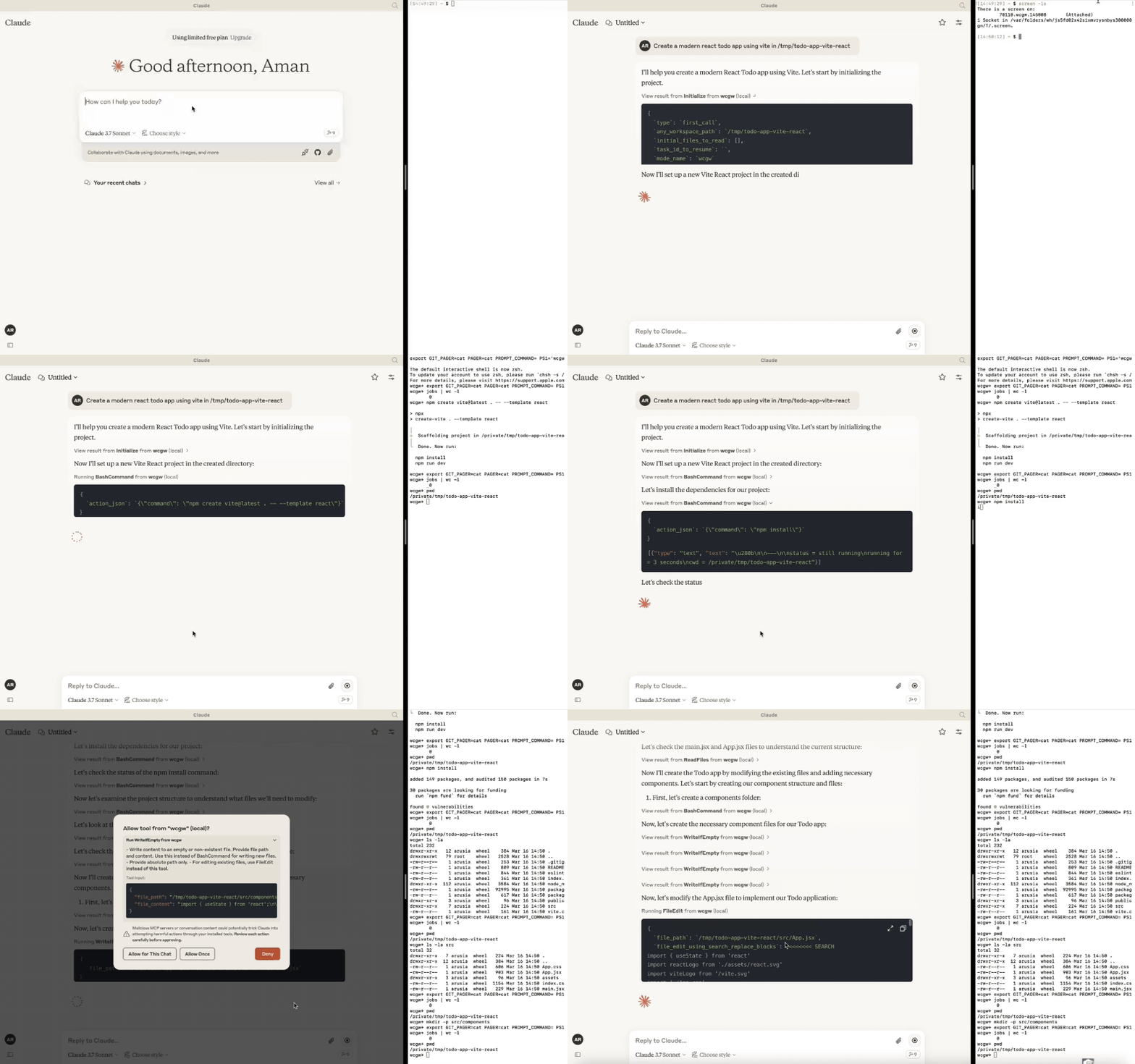
Related MCP server: Claude Code Control MCP
Обновления
[6 окт. 2025 г.] Модель теперь может запускать несколько команд в фоновом режиме. ZSH теперь является поддерживаемой оболочкой. Улучшения мультиплексирования.
[27 апр. 2025 г.] Удалена поддержка GPT через ретрансляционный сервер. В версии >= 5 поддерживается только MCP-сервер.
[24 мар. 2025 г.] Улучшен опыт написания и редактирования для sonnet 3.7, CLAUDE.md загружается автоматически.
[16 февр. 2025 г.] Теперь вы можете подключиться к рабочему терминалу, который использует ИИ. См. раздел "attach-to-terminal" ниже.
[15 янв. 2025 г.] Введены режимы: архитектор, разработчик (code-writer) и всемогущий режим wcgw.
[8 янв. 2025 г.] Инструмент сохранения контекста для сохранения соответствующих путей к файлам вместе с описанием в одном файле. Может использоваться как контрольная точка задачи или для передачи знаний.
[29 дек. 2024 г.] Проверка синтаксиса при записи и редактировании файлов теперь стабильна. Сделан полезным вызов инструмента
initialize; отправка структуры умного репозитория в claude, если ссылается какой-либо репозиторий. Также улучшена обработка больших файлов.[9 дек. 2024 г.] Расширение Vscode для вставки контекста в приложение Claude
🚀 Основные моменты
⚡ Создание, выполнение, итерация: Попросите claude продолжать выполнять проверки компилятора, пока все ошибки не будут исправлены, или попросите его продолжать проверять статус долго выполняющейся команды, пока она не завершится.
⚡ Редактирование больших файлов: Поддерживает инкрементальное редактирование больших файлов, чтобы избежать проблем с лимитом токенов. Умный выбор между небольшими правками или полной перезаписью на основе % необходимых изменений.
⚡ Проверка синтаксиса при правках: Сообщает LLM, если в ее правках есть синтаксические ошибки, чтобы она могла их переделать.
⚡ Интерактивная обработка команд: Поддерживает интерактивные команды с использованием клавиш со стрелками, прерывания и escape-последовательностей ansi.
⚡ Защита файлов:
ИИ должен прочитать файл хотя бы один раз, прежде чем ему будет разрешено редактировать или перезаписывать его. Это предотвращает случайную перезапись.
Предотвращает заполнение контекста при чтении очень больших файлов. Файлы разбиваются на части в зависимости от длины токена.
При инициализации возвращается структура каталогов предоставленного рабочего пространства после выбора важных файлов (на основе .gitignore, а также статистического подхода).
Редактирование файлов на основе поиска-замены пытается найти правильный блок поиска, если он имеет несколько совпадений на основе предыдущих блоков поиска. В противном случае выдает ошибку (для корректности).
Редактирование файлов имеет сопоставление с допуском к пробелам, с предупреждением о таких проблемах, как несоответствие отступов. Если совпадений нет, ближайшее совпадение возвращается ИИ для исправления ошибок.
Используется поиск и замена в стиле Aider, который имеет лучшую производительность, чем поиск и замена на основе вызова инструментов.
⚡ Оптимизация оболочки:
Текущий рабочий каталог всегда возвращается после любой команды оболочки, чтобы ИИ не терялся.
Опрос команд завершается после быстрого тайм-аута, чтобы избежать медленной обратной связи. Однако проверка статуса имеет допуск ожидания, основанный на потоковой передаче свежих выходных данных от команды. Оба этих подхода в сочетании обеспечивают хороший опыт взаимодействия с оболочкой.
Поддерживает несколько одновременных фоновых команд наряду с основной интерактивной оболочкой.
⚡ Сохранение контекста репозитория в одном файле: Контрольные точки задач с использованием инструмента "ContextSave" сохраняют подробный контекст в одном файле. Задачи позже можно возобновить в новом чате, попросив "Resume
task id". Сохраненный файл можно использовать для других видов передачи знаний, например, для получения помощи от другого ИИ.⚡ Легкое переключение между различными режимами:
Попросите его работать в режиме 'architect' для планирования. Вдохновленный режимом архитектора adier, сначала работайте с Claude, чтобы составить план. Это приводит к большей точности и предотвращает преждевременное редактирование файлов.
Попросите его работать в режиме 'code-writer' для редактирования кода и сборки проекта. Вы можете указать конкретные пути с поддержкой подстановочных знаков, чтобы предотвратить редактирование других файлов.
По умолчанию он работает в режиме 'wcgw', который не имеет ограничений и обладает полной авторизацией.
Подробнее в разделе Режимы
⚡ Запуск в мультиплексном терминале: Используйте расширение vscode или запустите
screen -x, чтобы подключиться к терминалу, в котором ИИ выполняет команды. Просматривайте историю, прерывайте процессы или взаимодействуйте с тем же терминалом, который использует ИИ.⚡ Автоматическая загрузка CLAUDE.md/AGENTS.md: Загружает файл "CLAUDE.md" или "AGENTS.md" в корне проекта и отправляет его в качестве инструкций во время инициализации. Инструкции в глобальном файле "
/.wcgw/CLAUDE.md" или "/.wcgw/AGENTS.md" загружаются и добавляются вместе с CLAUDE.md, специфичным для проекта. Имя файла чувствительно к регистру. CLAUDE.md прикрепляется, если он присутствует, в противном случае прикрепляется AGENTS.md.
Настройка Claude (с использованием mcp)
Mac и linux
Сначала установите uv с помощью homebrew brew install uv
(Важно: используйте homebrew для установки uv. В противном случае убедитесь, что uv присутствует в глобальном расположении, например /usr/bin/)
Затем создайте или обновите claude_desktop_config.json (~/Library/Application Support/Claude/claude_desktop_config.json) с помощью следующего json.
{
"mcpServers": {
"wcgw": {
"command": "uvx",
"args": ["--python", "3.12", "wcgw@latest"]
}
}
}Затем перезапустите приложение claude.
Дополнительно: Принудительное использование определенной оболочки
Чтобы использовать определенную оболочку (bash или zsh), добавьте аргумент --shell:
{
"mcpServers": {
"wcgw": {
"command": "uvx",
"args": ["--python", "3.12", "wcgw@latest", "--shell", "/bin/bash"]
}
}
}Если возникла ошибка при настройке
Если возникла ошибка типа "uv ENOENT", убедитесь, что
uvустановлен. Затем выполните 'which uv' в терминале и используйте его вывод вместо "uv" в конфигурации.Если проблема сохраняется, проверьте, что
uv tool run --python 3.12 wcgwзапускается в вашем терминале. Он не должен выдавать вывод и не должен завершаться.Попробуйте удалить папку ~/.cache/uv
Попробуйте использовать версию
uv0.6.0, на которой тестировался этот инструмент.Отладьте mcp-сервер с помощью
npx @modelcontextprotocol/inspector@0.1.7 uv tool run --python 3.12 wcgw
Windows в wsl
Этот mcp-сервер работает только в wsl на windows.
Чтобы настроить его, установите uv
Затем добавьте или обновите файл конфигурации claude %APPDATA%\Claude\claude_desktop_config.json следующим образом
{
"mcpServers": {
"wcgw": {
"command": "wsl.exe",
"args": ["uvx", "--python", "3.12", "wcgw@latest"]
}
}
}Когда вы столкнетесь с ошибкой, выполните команду wsl uv --python 3.12 wcgw в командной строке. Если вы получили error /bin/bash: line 1: uv: command not found, это означает, что uv не был установлен глобально, и вам нужно указать правильный путь к uv.
Найдите, где установлен uv:
whereis uvПример вывода:
uv: /home/mywsl/.local/bin/uv
Проверьте, работает ли полный путь:
wsl /home/mywsl/.local/bin/uv tool run --python 3.12 wcgwОбновите конфигурацию полным путем:
{
"mcpServers": {
"wcgw": {
"command": "wsl.exe",
"args": ["/home/mywsl/.local/bin/uv", "tool", "run", "--python", "3.12", "wcgw"]
}
}
}Замените /home/mywsl/.local/bin/uv на ваш фактический путь к uv из шага 1.
Использование
Подождите несколько секунд. Вы должны увидеть этот значок, если все сделано правильно.
здесь

Затем попросите claude выполнять команды оболочки, читать файлы, редактировать файлы, запускать ваш код и т. д.
Контрольная точка задачи или передача знаний
Вы можете создать контрольную точку задачи или передать знания, прикрепив подсказку "KnowledgeTransfer" с помощью кнопки "Attach from MCP".
При запуске подсказки "KnowledgeTransfer" будет вызван инструмент "ContextSave", сохраняющий описание задачи и все содержимое файлов вместе в одном файле. Будет сгенерирован идентификатор задачи.
Вы можете в новом чате сказать "Resume ''", ИИ должен затем вызвать "Initialize" с идентификатором задачи и загрузить контекст оттуда.
Или вы можете напрямую открыть созданный файл и поделиться им с другим ИИ для получения помощи.
Режимы
Существует три встроенных режима. Вы можете попросить Claude работать в одном из режимов, например "Use 'architect' mode"
Режим | Описание | Разрешает | Запрещает | Вызов подсказки |
Architect | Разработан для того, чтобы вы могли работать с Claude для исследования и понимания вашего репозитория. | Команды только для чтения | Инструменты FileEdit и Write | Run in mode='architect' |
Code-writer | Для написания кода и разработки | Указанные пути для редактирования или записи, указанные команды | FileEdit для путей, не соответствующих указанному glob, Write для путей, не соответствующих указанному glob | Run in code writer mode, only 'tests/**' allowed, only uv command allowed |
wcgw | Режим по умолчанию, где разрешено все | Все | Ничего | Нет подсказки или "Run in wcgw mode" |
Примечание: в режиме code-writer на данный момент разрешены либо все команды, либо ни одной. Если вы предоставите список разрешенных команд, Claude получит инструкцию выполнять только эти команды, но фактическая проверка не выполняется. (В разработке)
Подключитесь к рабочему терминалу для исследования
НОВОЕ: расширение vscode теперь автоматически подключает запущенный терминал, если путь к рабочему пространству совпадает.
Если у вас установлена команда screen, wcgw автоматически запускается в экземпляре screen. Если вы запустили mcp-сервер wcgw, вы можете вывести список сеансов screen:
screen -ls
И запишите имя экрана wcgw, которое будет выглядеть примерно так: 93358.wcgw.235521, где последнее число указано в формате час-минута-секунда.
Затем вы можете подключиться к сеансу с помощью screen -x 93358.wcgw.235521
Вы можете безопасно прервать любую выполняемую команду.
Вы можете безопасно взаимодействовать с терминалом, например, для ввода паролей или ввода текста. (Предупреждение: если вы запустите новую команду, любая новая команда LLM прервет ее.)
Вам не следует выходить из сеанса с помощью exit или Ctrl-d, вместо этого вам следует использовать ctrl+a+d для безопасного отсоединения, не уничтожая сеанс screen.
Включите следующее в ~/.screenrc для лучшего опыта прокрутки
defscrollback 10000
termcapinfo xterm* ti@:te@[Дополнительно] Расширение Vs code
https://marketplace.visualstudio.com/items?itemName=AmanRusia.wcgw
Команды:
Выделите текст и нажмите
cmd+', а затем введите инструкции. Это переключит приложение на Claude и вставит текст, содержащий ваши инструкции, путь к файлу, каталог рабочего пространства и выделенный текст.
Примеры

Использование mcp-сервера через docker
Сначала соберите образ docker docker build -t wcgw https://github.com/rusiaaman/wcgw.git
Затем вы можете обновить `/Users/username/Library/Application Support/Claude/claude_desktop_config.
Available Tools
6 toolsBashCommandADestructive
Execute a bash command. This is stateful (beware with subsequent calls).
Status of the command and the current working directory will always be returned at the end.
The first or the last line might be
(...truncated)if the output is too long.Always run
pwdif you get any file or directory not found error to make sure you're not lost.Do not run bg commands using "&", instead use this tool.
You must not use echo/cat to read/write files, use ReadFiles/FileWriteOrEdit
In order to check status of previous command, use
status_checkwith empty command argument.Only command is allowed to run at a time. You need to wait for any previous command to finish before running a new one.
Programs don't hang easily, so most likely explanation for no output is usually that the program is still running, and you need to check status again.
Do not send Ctrl-c before checking for status till 10 minutes or whatever is appropriate for the program to finish.
Only run long running commands in background. Each background command is run in a new non-reusable shell.
On running a bg command you'll get a bg command id that you should use to get status or interact.
| Name | Required | Description | Default |
|---|---|---|---|
| type | Yes | type of action. | |
| command | No | Set only if type="command" | |
| send_text | No | Set only if type="send_text" | |
| thread_id | Yes | ||
| send_ascii | No | Set only if type="send_ascii" | |
| status_check | No | Set only if type="status_check" | |
| bg_command_id | No | Set only if type!="command" and doing action on a running background command | |
| is_background | No | Set only if type="command" and running the command in background | |
| send_specials | No | Set only if type="send_specials" | |
| wait_for_seconds | No |
TDQS
Does the description disclose side effects, auth requirements, rate limits, or destructive behavior?
Even with annotations already signalling open and destructive behavior, the description adds substantial operational detail: commands are stateful, status and cwd are always returned, output may be truncated, background commands run in new non-reusable shells, and status must be polled before interrupting. These behaviors go well beyond what the annotations convey.
Agents need to know what a tool does to the world before calling it. Descriptions should go beyond structured annotations to explain consequences.
Is the description appropriately sized, front-loaded, and free of redundancy?
The bulleted format is front-loaded with the most critical caveat (statefulness) and each subsequent bullet carries actionable information for a high-complexity tool. There is minor redundancy between the one-command-at-a-time and wait-for-previous bullets, but overall the length is warranted by the tool's parameter count and interactive modes.
Shorter descriptions cost fewer tokens and are easier for agents to parse. Every sentence should earn its place.
Given the tool's complexity, does the description cover enough for an agent to succeed on first attempt?
For a 10-parameter tool with no output schema, the description does well to state that status and cwd are returned and to cover truncation, backgrounding, and status polling. The main gap is that the interactive input modes (send_text, send_ascii, send_specials) and wait_for_seconds are never explained in context, so an agent may not know how to drive an already-running command.
Complex tools with many parameters or behaviors need more documentation. Simple tools need less. This dimension scales expectations accordingly.
Does the description clarify parameter syntax, constraints, interactions, or defaults beyond what the schema provides?
With roughly 80% schema coverage the baseline is 3, but the description adds useful parameter semantics: status_check must be called with an empty command argument, bg_command_id is the handle for interacting with a background command, and only one command may run at a time. However, it does not explain wait_for_seconds or how send_text/send_ascii/send_specials should be used with a running process.
Input schemas describe structure but not intent. Descriptions should explain non-obvious parameter relationships and valid value ranges.
Does the description clearly state what the tool does and how it differs from similar tools?
The description opens with 'Execute a bash command', a specific verb+resource, and immediately distinguishes the tool from file-focused siblings by forbidding echo/cat and directing the agent to ReadFiles/FileWriteOrEdit. It also clarifies stateful execution, which sets expectations beyond what the name alone implies.
Agents choose between tools based on descriptions. A clear purpose with a specific verb and resource helps agents select the right tool.
Does the description explain when to use this tool, when not to, or what alternatives exist?
It clearly names ReadFiles/FileWriteOrEdit as the alternatives for file I/O and instructs against shell backgrounding with '&'. It lacks an explicit 'when not to use' statement for the other sibling tools, and the background instruction ('instead use this tool') is slightly ambiguous, though the intent is recoverable from the schema's is_background field.
Agents often have multiple tools that could apply. Explicit usage guidance like "use X instead of Y when Z" prevents misuse.
ContextSaveBRead-only
Saves provided description and file contents of all the relevant file paths or globs in a single text file.
Use the thread_id returned by Initialize when available; legacy clients may omit it.
Provide random 3 word unique id or whatever user provided.
Leave project path as empty string if no project path
| Name | Required | Description | Default |
|---|---|---|---|
| id | Yes | ||
| thread_id | No | ||
| description | Yes | ||
| project_root_path | Yes | ||
| relevant_file_globs | Yes |
TDQS
Does the description disclose side effects, auth requirements, rate limits, or destructive behavior?
Annotation Contradiction: the annotations declare readOnlyHint=true, yet the description says the tool 'saves' content into a single text file, implying a file-writing side effect. This directly contradicts the read-only hint. The description also does not clarify whether it reads from disk, writes a new file, overwrites anything, or what side effects occur.
Agents need to know what a tool does to the world before calling it. Descriptions should go beyond structured annotations to explain consequences.
Is the description appropriately sized, front-loaded, and free of redundancy?
The description is short, front-loaded with the core purpose, and uses bullets for parameter-specific guidance. It earns its length, but the sentence 'Provide random 3 word unique id or whatever user provided' is slightly informal and could be clearer about whether the id is required or user-supplied.
Shorter descriptions cost fewer tokens and are easier for agents to parse. Every sentence should earn its place.
Given the tool's complexity, does the description cover enough for an agent to succeed on first attempt?
For a tool with no output schema and a read/write ambiguity, the description omits important context: where the text file is saved, what happens after saving, how globs are resolved relative to project_root_path, and whether this is a mutating action. The contradiction with readOnlyHint makes the overall behavior especially incomplete for an agent deciding whether to call it.
Complex tools with many parameters or behaviors need more documentation. Simple tools need less. This dimension scales expectations accordingly.
Does the description clarify parameter syntax, constraints, interactions, or defaults beyond what the schema provides?
With 0% schema description coverage, the description must compensate, and it does: it explains thread_id as coming from Initialize, id as a random 3-word unique identifier, project_root_path as optional/empty when no project path, and relevant_file_globs as file paths or globs. It does not fully define every parameter's format, but adds substantial meaning beyond the raw schema.
Input schemas describe structure but not intent. Descriptions should explain non-obvious parameter relationships and valid value ranges.
Does the description clearly state what the tool does and how it differs from similar tools?
The description states a specific action: saving a description and file contents into a single text file. It clearly identifies the inputs (description, file paths/globs) and output artifact. However, it does not explicitly distinguish itself from FileWriteOrEdit or explain exactly what 'save' produces or where, so it stops short of a 5.
Agents choose between tools based on descriptions. A clear purpose with a specific verb and resource helps agents select the right tool.
Does the description explain when to use this tool, when not to, or what alternatives exist?
The bullets give conditional usage hints such as using the thread_id from Initialize and leaving project_root_path empty when absent. However, there is no explicit guidance on when to use this tool versus sibling tools like ReadFiles or FileWriteOrEdit, and no exclusions or alternatives are named.
Agents often have multiple tools that could apply. Explicit usage guidance like "use X instead of Y when Z" prevents misuse.
FileWriteOrEditADestructiveIdempotent
Writes or edits a file based on the percentage of changes.
Use absolute path only (~ allowed).
First write down percentage of lines that need to be replaced in the file (between 0-100) in percentage_to_change
percentage_to_change should be low if mostly new code is to be added. It should be high if a lot of things are to be replaced.
If percentage_to_change > 50, provide full file content in text_or_search_replace_blocks
If percentage_to_change <= 50, text_or_search_replace_blocks should be search/replace blocks.
Instructions for editing files.
Example
Input file
import numpy as np
from impls import impl1, impl2
def hello():
"print a greeting"
print("hello")
def call_hello():
"call hello"
hello()
print("Called")
impl1()
hello()
impl2()
Edit format on the input file
<<<<<<< SEARCH
from impls import impl1, impl2
=======
from impls import impl1, impl2
from hello import hello as hello_renamed
>>>>>>> REPLACE
<<<<<<< SEARCH
def hello():
"print a greeting"
print("hello")
=======
>>>>>>> REPLACE
<<<<<<< SEARCH
def call_hello():
"call hello"
hello()
=======
def call_hello_renamed():
"call hello renamed"
hello_renamed()
>>>>>>> REPLACE
<<<<<<< SEARCH
impl1()
hello()
impl2()
=======
impl1()
hello_renamed()
impl2()
>>>>>>> REPLACESEARCH/REPLACE block Rules:
Every "<<<<<<< SEARCH" section must EXACTLY MATCH the existing file content, character for character, including all comments, docstrings, whitespaces, etc.
Including multiple unique SEARCH/REPLACE blocks if needed. Include enough and only enough lines in each SEARCH section to uniquely match each set of lines that need to change.
Keep SEARCH/REPLACE blocks concise. Break large SEARCH/REPLACE blocks into a series of smaller blocks that each change a small portion of the file. Include just the changing lines, and a few surrounding lines (0-3 lines) if needed for uniqueness. Other than for uniqueness, avoid including those lines which do not change in search (and replace) blocks. Target 0-3 non trivial extra lines per block.
Preserve leading spaces and indentations in both SEARCH and REPLACE blocks.
| Name | Required | Description | Default |
|---|---|---|---|
| file_path | Yes | #1: absolute file path | |
| thread_id | Yes | #4: thread_id | |
| percentage_to_change | Yes | #2: predict this percentage, calculated as number of existing lines that will have some diff divided by total existing lines. | |
| text_or_search_replace_blocks | Yes | #3: content/edit blocks. Must be after #2 in the tool xml |
TDQS
Does the description disclose side effects, auth requirements, rate limits, or destructive behavior?
Annotations specify destructiveHint: true, and the description details the editing process (full content replacement or search/replace). It explains the behavior regarding percentage threshold and formatting rules. No contradiction with annotations. The description adds context beyond annotations, such as the SEARCH/REPLACE format requirements.
Agents need to know what a tool does to the world before calling it. Descriptions should go beyond structured annotations to explain consequences.
Is the description appropriately sized, front-loaded, and free of redundancy?
The description is quite long but well-structured with bullet points, headings, and an example. It is front-loaded with the main action and then details. While every part serves a purpose, it could be slightly more concise without losing necessary detail.
Shorter descriptions cost fewer tokens and are easier for agents to parse. Every sentence should earn its place.
Given the tool's complexity, does the description cover enough for an agent to succeed on first attempt?
Given the tool's complexity (4 parameters, destructive behavior, no output schema), the description covers the editing method, percentage calculation, and formatting rules thoroughly. It lacks information on error handling, file creation behavior (if file doesn't exist), and return values, but these are minor gaps.
Complex tools with many parameters or behaviors need more documentation. Simple tools need less. This dimension scales expectations accordingly.
Does the description clarify parameter syntax, constraints, interactions, or defaults beyond what the schema provides?
Although schema descriptions cover all parameters (100% coverage), the description significantly enhances meaning by explaining how percentage_to_change is calculated, the two modes for text_or_search_replace_blocks, and providing a full example with search/replace block rules. This goes well beyond the schema's brief descriptions.
Input schemas describe structure but not intent. Descriptions should explain non-obvious parameter relationships and valid value ranges.
Does the description clearly state what the tool does and how it differs from similar tools?
The description clearly states the tool writes or edits a file, with specific instructions on using percentage-based changes. It distinguishes itself from siblings like BashCommand (shell commands) and ReadFiles/ReadImage (reading), leaving no ambiguity about its purpose.
Agents choose between tools based on descriptions. A clear purpose with a specific verb and resource helps agents select the right tool.
Does the description explain when to use this tool, when not to, or what alternatives exist?
The description provides explicit guidelines on when to use full file content vs. search/replace blocks based on percentage_to_change (>50 vs <=50). It also includes a detailed example and rules for SEARCH/REPLACE blocks. However, it does not explicitly state when to avoid using this tool in favor of siblings.
Agents often have multiple tools that could apply. Explicit usage guidance like "use X instead of Y when Z" prevents misuse.
InitializeARead-only
Always call this at the start of the conversation before using any of the shell tools from wcgw.
Use
any_workspace_pathto initialize the shell in the appropriate project directory.If the user has mentioned a workspace or project root or any other file or folder use it to set
any_workspace_path.If user has mentioned any files use
initial_files_to_readto read, use absolute paths only (~ allowed)By default use mode "wcgw"
In "code-writer" mode, set the commands and globs which user asked to set, otherwise use 'all'.
Use type="first_call" if it's the first call to this tool.
Use type="user_asked_mode_change" if in a conversation user has asked to change mode.
Use type="reset_shell" if in a conversation shell is not working after multiple tries.
Use type="user_asked_change_workspace" if in a conversation user asked to change workspace
| Name | Required | Description | Default |
|---|---|---|---|
| type | Yes | ||
| mode_name | Yes | ||
| thread_id | Yes | Use the thread_id created in first_call, leave it as empty string if first_call | |
| allowed_globs | No | File globs that are allowed to be edited. Set to 'all' to allow all files, or provide a list of glob patterns. Only required when mode_name is 'code_writer'. | |
| allowed_commands | No | Shell commands that are allowed to be executed. Set to 'all' to allow all commands, or provide a list of command patterns. Only required when mode_name is 'code_writer'. | |
| task_id_to_resume | Yes | ||
| any_workspace_path | Yes | Workspace to initialise in. Don't use ~ by default, instead use empty string | |
| initial_files_to_read | Yes | Array of one or more files to read. Provide [] if no files mentioned. |
TDQS
Does the description disclose side effects, auth requirements, rate limits, or destructive behavior?
The description adds behavioral context beyond annotations by detailing the initialization steps (setting workspace, reading files, configuring mode). It does not contradict the readOnlyHint=true annotation, as no destructive actions are mentioned. The description could mention if any session state is persisted.
Agents need to know what a tool does to the world before calling it. Descriptions should go beyond structured annotations to explain consequences.
Is the description appropriately sized, front-loaded, and free of redundancy?
The description is concise and uses a bulleted list format that is easy to scan. Each sentence carries clear instructions. It could be slightly more organized by grouping related parameters, but overall it is efficient and front-loaded.
Shorter descriptions cost fewer tokens and are easier for agents to parse. Every sentence should earn its place.
Given the tool's complexity, does the description cover enough for an agent to succeed on first attempt?
For a tool with 8 parameters, no output schema, and annotations, the description covers main usage scenarios but lacks information about what the agent receives or any side effects. It assumes prior knowledge of the wcgw shell tools. This is adequate but could be more complete.
Complex tools with many parameters or behaviors need more documentation. Simple tools need less. This dimension scales expectations accordingly.
Does the description clarify parameter syntax, constraints, interactions, or defaults beyond what the schema provides?
The description adds meaning beyond the schema for key parameters like any_workspace_path, initial_files_to_read, mode_name, and allowed_globs. It explains default values and usage context. However, task_id_to_resume and thread_id are not elaborated, but schema coverage is high enough.
Input schemas describe structure but not intent. Descriptions should explain non-obvious parameter relationships and valid value ranges.
Does the description clearly state what the tool does and how it differs from similar tools?
The description clearly states it is an initialization tool to be called at the start of the conversation before using shell tools. It specifies the resource (shell) and distinguishes from sibling tools by being a prerequisite.
Agents choose between tools based on descriptions. A clear purpose with a specific verb and resource helps agents select the right tool.
Does the description explain when to use this tool, when not to, or what alternatives exist?
The description provides explicit when-to-use guidelines for different call types (first_call, user_asked_mode_change, etc.) and explains when to set parameters like mode_name and allowed_globs. However, it does not explicitly say when not to use this tool or mention alternatives.
Agents often have multiple tools that could apply. Explicit usage guidance like "use X instead of Y when Z" prevents misuse.
ReadFilesARead-only
Read full file content of one or more files.
Use the thread_id returned by Initialize for this conversation when available; legacy clients may omit it.
Provide absolute paths only (~ allowed)
Only if the task requires line numbers understanding:
You may extract a range of lines. E.g.,
/path/to/file:1-10for lines 1-10. You can drop start or end like/path/to/file:1-or/path/to/file:-10
| Name | Required | Description | Default |
|---|---|---|---|
| thread_id | No | ||
| file_paths | Yes |
TDQS
Does the description disclose side effects, auth requirements, rate limits, or destructive behavior?
Annotations already mark the tool read-only and closed-world, so no further safety disclosure is needed. The description adds useful operational behavior: path expectations, line-range syntax, and thread_id sourcing. It does not cover error or return behavior, but this is a minor gap for a simple read tool.
Agents need to know what a tool does to the world before calling it. Descriptions should go beyond structured annotations to explain consequences.
Is the description appropriately sized, front-loaded, and free of redundancy?
Four tight bullet points lead with the core purpose, and the conditional line-range rule is clearly nested. There is no filler; every sentence contributes to correct invocation.
Shorter descriptions cost fewer tokens and are easier for agents to parse. Every sentence should earn its place.
Given the tool's complexity, does the description cover enough for an agent to succeed on first attempt?
For a two-parameter, read-only tool with no output schema, the description is nearly complete: it covers paths, line ranges, and thread_id. It does not specify how multiple file contents are returned, but the simple nature of the tool makes the output inferable.
Complex tools with many parameters or behaviors need more documentation. Simple tools need less. This dimension scales expectations accordingly.
Does the description clarify parameter syntax, constraints, interactions, or defaults beyond what the schema provides?
Schema description coverage is 0%, so the description must carry parameter meaning, and it does. It explains file_paths as absolute paths with optional range syntax and clarifies thread_id availability ('returned by Initialize', 'legacy clients may omit it'), adding real semantics beyond the bare schema.
Input schemas describe structure but not intent. Descriptions should explain non-obvious parameter relationships and valid value ranges.
Does the description clearly state what the tool does and how it differs from similar tools?
Description opens with 'Read full file content of one or more files,' a specific verb-resource pair with clear scope (full content, multiple files). This distinguishes it from siblings such as FileWriteOrEdit, ReadImage, and BashCommand without needing to open schemas.
Agents choose between tools based on descriptions. A clear purpose with a specific verb and resource helps agents select the right tool.
Does the description explain when to use this tool, when not to, or what alternatives exist?
Provides concrete guidance: absolute paths only with ~ allowed, line-range extraction only when line numbers are needed, and reuse of thread_id from Initialize. It does not explicitly state when not to use this tool or name alternatives, but the conditional usage is clear.
Agents often have multiple tools that could apply. Explicit usage guidance like "use X instead of Y when Z" prevents misuse.
ReadImageBRead-only
Read an image from the shell. Use the thread_id returned by Initialize when available; legacy clients may omit it.
| Name | Required | Description | Default |
|---|---|---|---|
| file_path | Yes | ||
| thread_id | No |
TDQS
Does the description disclose side effects, auth requirements, rate limits, or destructive behavior?
Annotations already declare readOnlyHint=true and openWorldHint=false, and the description does not contradict them. The added note about thread_id and legacy clients is useful behavioral context beyond the structured fields, but the description does not disclose other behaviors such as error cases or what happens when the image cannot be read.
Agents need to know what a tool does to the world before calling it. Descriptions should go beyond structured annotations to explain consequences.
Is the description appropriately sized, front-loaded, and free of redundancy?
Two sentences with no filler. The primary action is front-loaded, and the optional parameter guidance is placed in the second sentence where it belongs.
Shorter descriptions cost fewer tokens and are easier for agents to parse. Every sentence should earn its place.
Given the tool's complexity, does the description cover enough for an agent to succeed on first attempt?
For a simple read-only tool with minimal schema, the description covers the main input and the key optional parameter. Still, it lacks an explicit distinction from ReadFiles and does not mention what the tool returns, which would help an agent use it more reliably.
Complex tools with many parameters or behaviors need more documentation. Simple tools need less. This dimension scales expectations accordingly.
Does the description clarify parameter syntax, constraints, interactions, or defaults beyond what the schema provides?
Schema description coverage is 0%, so the description carries the burden of explaining parameters. It adds meaningful semantics for thread_id ('returned by Initialize... legacy clients may omit it'), but it says nothing about file_path beyond the schema's name and type.
Input schemas describe structure but not intent. Descriptions should explain non-obvious parameter relationships and valid value ranges.
Does the description clearly state what the tool does and how it differs from similar tools?
The description states a clear action ('Read an image') and a resource/context ('from the shell'), so an agent can generally tell what the tool does. However, it does not explicitly distinguish ReadImage from the sibling ReadFiles, leaving some ambiguity about when the image-specific tool is preferred.
Agents choose between tools based on descriptions. A clear purpose with a specific verb and resource helps agents select the right tool.
Does the description explain when to use this tool, when not to, or what alternatives exist?
The only guidance is about the thread_id parameter: use the one from Initialize when available, and legacy clients may omit it. There is no guidance about when to use ReadImage versus alternatives like ReadFiles or BashCommand, so tool-selection context is missing.
Agents often have multiple tools that could apply. Explicit usage guidance like "use X instead of Y when Z" prevents misuse.
Tool Schema Changelog
Recent tool additions, removals, and schema changes observed during successful MCP inspections.
4 tool updates
v5.6.6- Changed
BashCommand1 field changed- removed
Input schema / additionalPropertiesRemoved value: -false
- Changed
ContextSave1 field changed- added
Input schema / properties / thread_idAdded value: +{ + "default": "", + "type": "string" +}
- Changed
ReadFiles1 field changed- added
Input schema / properties / thread_idAdded value: +{ + "default": "", + "type": "string" +}
- Changed
ReadImage1 field changed- added
Input schema / properties / thread_idAdded value: +{ + "default": "", + "type": "string" +}
2 tool updates
v5.6.2- Changed
BashCommand11 fields changed- removed
Input schema / $defsRemoved value: -{ - "ActionJsonSchema": { - "additionalProperties": false, - "properties": { - "bg_command_id": { - "anyOf": [ - { - "type": "string" - }, - { - "type": "null" - } - ], - "default": null, - "description": "Set only if type!=\"command\" and doing action on a running background command" - }, - "command": { - "anyOf": [ - { - "type": "string" - }, - { - "type": "null" - } - ], - "default": null, - "description": "Set only if type=\"command\"" - }, - "is_background": { - "default": false, - "description": "Set only if type=\"command\" and running the command in background", - "type": "boolean" - }, - "send_ascii": { - "anyOf": [ - { - "items": { - "type": "integer" - }, - "type": "array" - }, - { - "type": "null" - } - ], - "default": null, - "description": "Set only if type=\"send_ascii\"" - }, - "send_specials": { - "anyOf": [ - { - "items": { - "enum": [ - "Enter", - "Key-up", - "Key-down", - "Key-left", - "Key-right", - "Ctrl-c", - "Ctrl-d" - ], - "type": "string" - }, - "type": "array" - }, - { - "type": "null" - } - ], - "default": null, - "description": "Set only if type=\"send_specials\"" - }, - "send_text": { - "anyOf": [ - { - "type": "string" - }, - { - "type": "null" - } - ], - "default": null, - "description": "Set only if type=\"send_text\"" - }, - "status_check": { - "anyOf": [ - { - "const": true, - "type": "boolean" - }, - { - "type": "null" - } - ], - "default": null, - "description": "Set only if type=\"status_check\"" - }, - "type": { - "description": "type of action.", - "enum": [ - "command", - "status_check", - "send_text", - "send_specials", - "send_ascii" - ], - "type": "string" - } - }, - "required": [ - "type" - ], - "type": "object" - } -} - removed
Input schema / properties / action_jsonRemoved value: -{ - "$ref": "#/$defs/ActionJsonSchema" -} - added
Input schema / properties / bg_command_idAdded value: +{ + "anyOf": [ + { + "type": "string" + }, + { + "type": "null" + } + ], + "default": null, + "description": "Set only if type!=\"command\" and doing action on a running background command" +} - added
Input schema / properties / commandAdded value: +{ + "anyOf": [ + { + "type": "string" + }, + { + "type": "null" + } + ], + "default": null, + "description": "Set only if type=\"command\"" +} - added
Input schema / properties / is_backgroundAdded value: +{ + "default": false, + "description": "Set only if type=\"command\" and running the command in background", + "type": "boolean" +} - added
Input schema / properties / send_asciiAdded value: +{ + "anyOf": [ + { + "items": { + "type": "integer" + }, + "type": "array" + }, + { + "type": "null" + } + ], + "default": null, + "description": "Set only if type=\"send_ascii\"" +} - added
Input schema / properties / send_specialsAdded value: +{ + "anyOf": [ + { + "items": { + "enum": [ + "Enter", + "Key-up", + "Key-down", + "Key-left", + "Key-right", + "Ctrl-c", + "Ctrl-d" + ], + "type": "string" + }, + "type": "array" + }, + { + "type": "null" + } + ], + "default": null, + "description": "Set only if type=\"send_specials\"" +} - added
Input schema / properties / send_textAdded value: +{ + "anyOf": [ + { + "type": "string" + }, + { + "type": "null" + } + ], + "default": null, + "description": "Set only if type=\"send_text\"" +} - added
Input schema / properties / status_checkAdded value: +{ + "anyOf": [ + { + "const": true, + "type": "boolean" + }, + { + "type": "null" + } + ], + "default": null, + "description": "Set only if type=\"status_check\"" +} - added
Input schema / properties / typeAdded value: +{ + "description": "type of action.", + "enum": [ + "command", + "status_check", + "send_text", + "send_specials", + "send_ascii" + ], + "type": "string" +} - changed
Input schema / requiredPrevious value: -[ - "action_json", - "thread_id" -]New value: +[ + "type", + "thread_id" +]
- Changed
Initialize4 fields changed- removed
Input schema / $defsRemoved value: -{ - "CodeWriterMode": { - "additionalProperties": false, - "properties": { - "allowed_commands": { - "anyOf": [ - { - "const": "all", - "type": "string" - }, - { - "items": { - "type": "string" - }, - "type": "array" - } - ] - }, - "allowed_globs": { - "anyOf": [ - { - "const": "all", - "type": "string" - }, - { - "items": { - "type": "string" - }, - "type": "array" - } - ] - } - }, - "required": [ - "allowed_globs", - "allowed_commands" - ], - "type": "object" - } -} - added
Input schema / properties / allowed_commandsAdded value: +{ + "anyOf": [ + { + "const": "all", + "type": "string" + }, + { + "items": { + "type": "string" + }, + "type": "array" + }, + { + "type": "null" + } + ], + "default": null, + "description": "Shell commands that are allowed to be executed. Set to 'all' to allow all commands, or provide a list of command patterns. Only required when mode_name is 'code_writer'." +} - added
Input schema / properties / allowed_globsAdded value: +{ + "anyOf": [ + { + "const": "all", + "type": "string" + }, + { + "items": { + "type": "string" + }, + "type": "array" + }, + { + "type": "null" + } + ], + "default": null, + "description": "File globs that are allowed to be edited. Set to 'all' to allow all files, or provide a list of glob patterns. Only required when mode_name is 'code_writer'." +} - removed
Input schema / properties / code_writer_configRemoved value: -{ - "anyOf": [ - { - "$ref": "#/$defs/CodeWriterMode" - }, - { - "type": "null" - } - ], - "default": null -}
2 tool updates
v1.0.0- Changed
BashCommand2 fields changed- added
Input schema / $defs / ActionJsonSchema / properties / bg_command_idAdded value: +{ + "anyOf": [ + { + "type": "string" + }, + { + "type": "null" + } + ], + "default": null, + "description": "Set only if type!=\"command\" and doing action on a running background command" +} - added
Input schema / $defs / ActionJsonSchema / properties / is_backgroundAdded value: +{ + "default": false, + "description": "Set only if type=\"command\" and running the command in background", + "type": "boolean" +}
- Changed
Initialize2 fields changed- changed
Input schema / properties / any_workspace_path / descriptionPrevious value: -"Workspce to initialise in. Don't use ~ by default, instead use empty string"New value: +"Workspace to initialise in. Don't use ~ by default, instead use empty string" - added
Input schema / properties / initial_files_to_read / descriptionAdded value: +"Array of one or more files to read. Provide [] if no files mentioned."
6 tool updates
- First observed
BashCommand - First observed
ContextSave - First observed
FileWriteOrEdit - First observed
Initialize - First observed
ReadFiles - First observed
ReadImage
TDQS
Scored across 6 tools
Each tool serves a clearly distinct role: initialize the session, run shell commands, read text files, read images, write/edit files, and save context. The small amount of overlap between BashCommand and the file tools is explicitly resolved by usage rules that forbid echo/cat for reading and writing.
All names are PascalCase and generally readable, but the pattern is mixed: ReadFiles and ReadImage are verb-noun, ContextSave and FileWriteOrEdit are noun-verb, BashCommand is noun-like, and Initialize is a bare verb. The inconsistency is noticeable but not chaotic.
Six tools is a well-scoped count for a shell/file-oriented MCP server. Each tool earns its place, and the set is neither bloated nor too thin for its apparent purpose.
The server covers the core workspace lifecycle: initialization, command execution, file reading, image reading, file writing/editing, and context saving. Generic operations like listing, deleting, or renaming are delegated to BashCommand, which works but makes for a slight indirectness rather than a true gap.
Maintenance
Related MCP Connectors
Source-checked CLI guides and model-aware planning for Claude Code, Codex, and Grok Build.
- OolkinOAuthcom.oolkin
AI colleagues that keep your standards, your project and their reasoning between sessions
Coding agents build full-stack apps in persistent workspaces and share them by link.
Shared memory for coding agents. Stop re-explaining your codebase every session.
Related MCP Servers
- AlicenseAqualityAmaintenanceA fully featured coding agent that uses symbolic operations (enabled by language servers) and works well even in large code bases. Essentially a free to use alternative to Cursor and Windsurf Agents, Cline, Roo Code and others.2942,103 PyPI29,611MIT
- FlicenseNot gradedqualityDmaintenanceEnables programmatic execution of coding tasks and autonomous file operations using Claude AI. It allows agents to search codebases, run shell commands, and track file changes through the Model Context Protocol.-
- AlicenseNot gradedqualityDmaintenanceProvides AI-driven development tools including file system operations, multi-language code analysis with tree-sitter, Git operations, code execution, and system information retrieval.MIT
- AlicenseNot gradedqualityAmaintenanceAutonomous spec-to-product coding-agent CLI. Its MCP server exposes 34 tools over stdio: project state and task-queue ops, memory retrieve/store, code search, quality and verification reports, repo hotspots/co-changes, and structured findings/learnings.4,923 npm1,065Business Source 1.1

