WebEvalAgent MCP Server
Official🚀 operative.sh web-eval-agent MCP 服务器
让编码代理自行调试,您有更好的事情要做。

🔥 增强你的调试能力
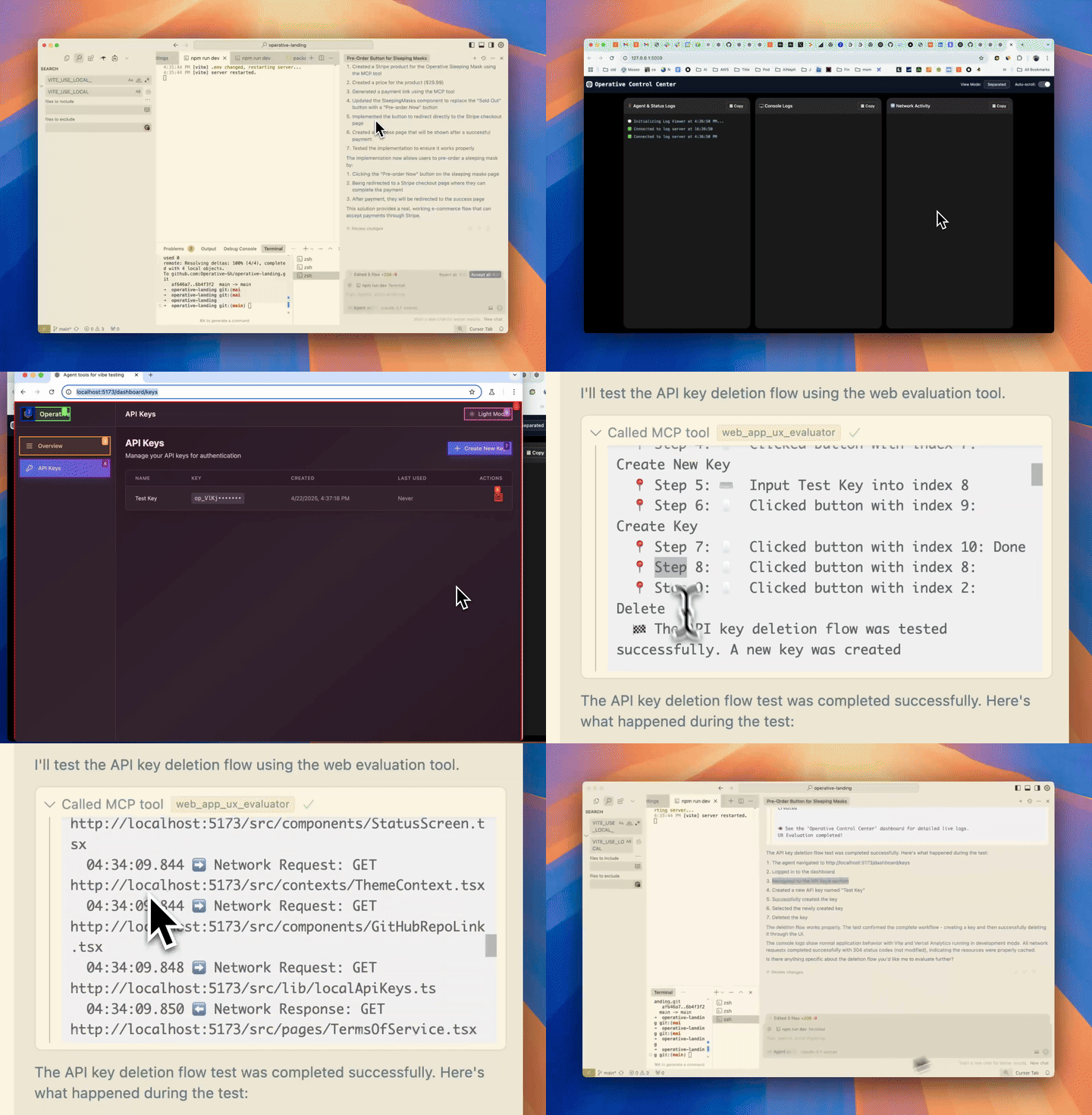
operative.sh的 MCP 服务器启动一个由浏览器支持的代理,直接在代码编辑器中自主执行和调试 Web 应用程序。
Related MCP server: agnt
⚡ 功能
🌐 使用 BrowserUse浏览你的 Web 应用程序(使用可操作的后端时速度提高 2 倍)
📊捕获网络流量- 请求被智能过滤并返回到上下文窗口
🚨收集控制台错误- 捕获日志和错误
🤖自主调试- Cursor 代理调用 Web QA 代理 mcp 服务器来测试它编写的代码是否按预期端到端工作。
🧰 MCP 工具参考
工具 | 目的 |
| 🤖 自动化 UX 评估器,可驱动浏览器、捕获屏幕截图、控制台和网络日志,并返回丰富的 UX 报告。 |
| 🔒 打开一个交互式(非无头)浏览器,以便您可以登录一次;保存的 cookies/本地存储将被后续的 |
关键论点
web_eval_agenturl(必需) – 正在运行的应用程序的地址 (例如http://localhost:3000)task(必需) ——用自然语言描述要测试的内容(“运行注册流程并记录任何用户体验问题”)headless_browser(可选,默认为false) – 设置为true以隐藏浏览器窗口
setup_browser_stateurl(可选) – 首先打开的页面(方便直接进入登录屏幕)
您可以直接从 IDE 聊天中触发这些工具,例如:
Evaluate my app at http://localhost:3000 – run web_eval_agent with the task "Try the full signup flow and report UX issues".🏁 快速启动(macOS/Linux)
先决条件(通常不需要):
brew:
/bin/bash -c "$(curl -fsSL https://raw.githubusercontent.com/Homebrew/install/HEAD/install.sh)"npm:(
brew install npm)jq:
brew install jq
获取 API 密钥(免费)后运行安装程序
curl -LSf https://operative.sh/install.sh -o install.sh && bash install.sh && rm install.sh访问您最喜欢的 IDE 并重新启动以应用更改
在聊天模式下发送提示来调用网络评估代理工具!例如
Test my app on http://localhost:3000. Use web-eval-agent.🛠️ 手动安装
在 operative.sh 获取您的 API 密钥
curl -LsSf https://astral.sh/uv/install.sh | sh)安装剧作家:
npm install -g chromium playwright && uvx --with playwright playwright install --with-deps使用 API 密钥将以下 JSON 添加到相关代码编辑器
重新启动代码编辑器
🔃 更新
uv cache clean刷新 MCP 服务器
"web-eval-agent": {
"command": "uvx",
"args": [
"--refresh-package",
"webEvalAgent",
"--from",
"git+https://github.com/Operative-Sh/web-eval-agent.git",
"webEvalAgent"
],
"env": {
"OPERATIVE_API_KEY": "<YOUR_KEY>"
}
}Operative Discord 服务器
🛠️ 手动安装(Mac + Cursor/Cline/Windsurf)
在 operative.sh 获取您的 API 密钥
curl -LsSf https://astral.sh/uv/install.sh | sh)安装剧作家:
npm install -g chromium playwright && uvx --with playwright playwright install --with-deps使用 API 密钥将以下 JSON 添加到相关代码编辑器
重新启动代码编辑器
手动安装(Windows + Cursor/Cline/Windsurf)
我们正在改进这一点,如果您有任何问题,请提出问题!
在代码编辑器终端中完成所有这些操作
curl -LSf https://operative.sh/install.sh -o install.sh && bash install.sh && rm install.sh在 operative.sh 获取您的 API 密钥
安装 uv
(curl -LsSf https://astral.sh/uv/install.sh | sh)uvx --from git+https://github.com/Operative-Sh/web-eval-agent.git playwright install重启代码编辑器
🚨 问题
代码编辑器未收到更新,请更新或重新安装最新版本:运行
uv cache clean获取最新版本如有任何问题,请随时在此 repo 或 discord 中打开问题!
5/5 - 未更改的静态应用程序无法进行屏幕录制,已修复!
uv clean+ 重启即可修复
变更日志
4/29 - 代理覆盖更新 - 暂停/播放/停止浏览器中的代理运行
📋 MCP 服务器输出报告示例
📊 Web Evaluation Report for http://localhost:5173 complete!
📝 Task: Test the API-key deletion flow by navigating to the API Keys section, deleting a key, and judging the UX.
🔍 Agent Steps
📍 1. Navigate → http://localhost:5173
📍 2. Click "Login" (button index 2)
📍 3. Click "API Keys" (button index 4)
📍 4. Click "Create Key" (button index 9)
📍 5. Type "Test API Key" (input index 2)
📍 6. Click "Done" (button index 3)
📍 7. Click "Delete" (button index 10)
📍 8. Click "Delete" (confirm index 3)
🏁 Flow tested successfully – UX felt smooth and intuitive.
🖥️ Console Logs (10)
1. [debug] [vite] connecting…
2. [debug] [vite] connected.
3. [info] Download the React DevTools …
…
🌐 Network Requests (10)
1. GET /src/pages/SleepingMasks.tsx 304
2. GET /src/pages/MCPRegistryRegistry.tsx 304
…
⏱️ Chronological Timeline
01:16:23.293 🖥️ Console [debug] [vite] connecting…
01:16:23.303 🖥️ Console [debug] [vite] connected.
01:16:23.312 ➡️ GET /src/pages/SleepingMasks.tsx
01:16:23.318 ⬅️ 304 /src/pages/SleepingMasks.tsx
…
01:17:45.038 🤖 🏁 Flow finished – deletion verified
01:17:47.038 🤖 📋 Conclusion repeated above
👁️ See the "Operative Control Center" dashboard for live logs.星史
使用< 3@operative.sh构建
Available Tools
2 toolssetup_browser_stateA
Sets up and saves browser state for future use.
This tool should only be called in one scenario:
The user explicitly requests to set up browser state/authentication
Launches a non-headless browser for user interaction, allows login/authentication, and saves the browser state (cookies, local storage, etc.) to a local file.
Args: url: Optional URL to navigate to upon opening the browser. ctx: The MCP context (used for progress reporting, not directly here).
Returns: list[TextContent]: Confirmation of state saving or error messages.
Inputs: url.
web_eval_agentA
Evaluate the user experience / interface of a web application.
This tool allows the AI to assess the quality of user experience and interface design of a web application by performing specific tasks and analyzing the interaction flow.
Before this tool is used, the web application should already be running locally on a port.
Args: url: Required. The localhost URL of the web application to evaluate, including the port number. Example: http://localhost:3000, http://localhost:8080, http://localhost:4200, http://localhost:5173, etc. Try to avoid using the path segments of the URL, and instead use the root URL. task: Required. The specific UX/UI aspect to test (e.g., "test the checkout flow", "evaluate the navigation menu usability", "check form validation feedback") Be as detailed as possible in your task description. It could be anywhere from 2 sentences to 2 paragraphs. headless_browser: Optional. Whether to hide the browser window popup during evaluation. If headless_browser is True, only the operative control center browser will show, and no popup browser will be shown.
Returns: list[list[TextContent, ImageContent]]: A detailed evaluation of the web application's UX/UI, including observations, issues found, and recommendations for improvement and screenshots of the web application during the evaluation
Inputs: url (required), task (required), headless_browser.
Tool Schema Changelog
Recent tool additions, removals, and schema changes observed during successful MCP inspections.
Loading tool schema changelog…
TDQS
Scored across 2 tools
The two tools have completely distinct purposes with no overlap. setup_browser_state handles browser authentication and state saving, while web_eval_agent performs UX/UI evaluation of web applications. An agent would never confuse these tools as they serve different phases of the workflow.
Both tools follow a consistent verb_noun pattern with snake_case naming. setup_browser_state and web_eval_agent use clear action-oriented verbs followed by descriptive nouns, creating a predictable naming convention throughout the server.
With only 2 tools, this server feels severely under-equipped for its apparent purpose of web evaluation. A comprehensive web evaluation system would typically need tools for navigation, interaction simulation, accessibility testing, performance measurement, and result analysis beyond just setup and evaluation.
The tool surface is severely incomplete for web evaluation. While setup and evaluation are covered, there are significant gaps: no tools for configuring evaluation parameters, managing browser sessions, analyzing results programmatically, testing specific components, or handling different evaluation methodologies. The server provides only basic endpoints without supporting the full evaluation workflow.
Maintenance
Related MCP Connectors
Find UI bugs, verify fixes and run tests on your web app from your AI coding agent.
Browser-based QA for AI-built software. Test pages with real browsers via agents.
AI-powered web automation. Navigate websites using AI agents for one page or a thousand
Related MCP Servers
- AlicenseNot gradedqualityCmaintenanceEnables AI assistants to debug frontend applications by providing direct access to browser DevTools, React state, DOM inspection, and runtime debugging capabilities. Bridges the gap between AI and complex web applications for autonomous debugging and issue resolution.1MIT
- AlicenseNot gradedqualityBmaintenanceBridges AI coding agents with the browser to provide visual debugging, real-time error capture, screenshot capabilities, DOM inspection, and interactive wireframing through a reverse proxy with injected developer tools.22Apache 2.0
- FlicenseNot gradedqualityDmaintenanceEnables AI agents to automate and debug real Chromium browsers with capabilities like screenshots, video recording, performance analysis, visual regression testing, and OCR text extraction.13-
- AlicenseNot gradedqualityCmaintenanceEnables AI coding agents to access live console logs, errors, and network requests from web applications via a local WebSocket connection, without copying data to chat.19MIT
Appeared in Searches
- Tools for enabling LLMs to interact with web pages and perform end-to-end testing
- IDE extensions and AI coding assistants like GitHub Copilot and ChatGPT
- Browser automation and control for Codex CLI
- MCP servers for curated context in Cursor IDE to plan, debug, and iterate on features
- Web page automation tools for form submission and queries