WebEvalAgent MCP Server
Official🚀 operative.sh web-eval-agent MCP-сервер
Позвольте кодирующему агенту отладить себя, у вас есть дела поважнее.

🔥 Усильте свою отладку
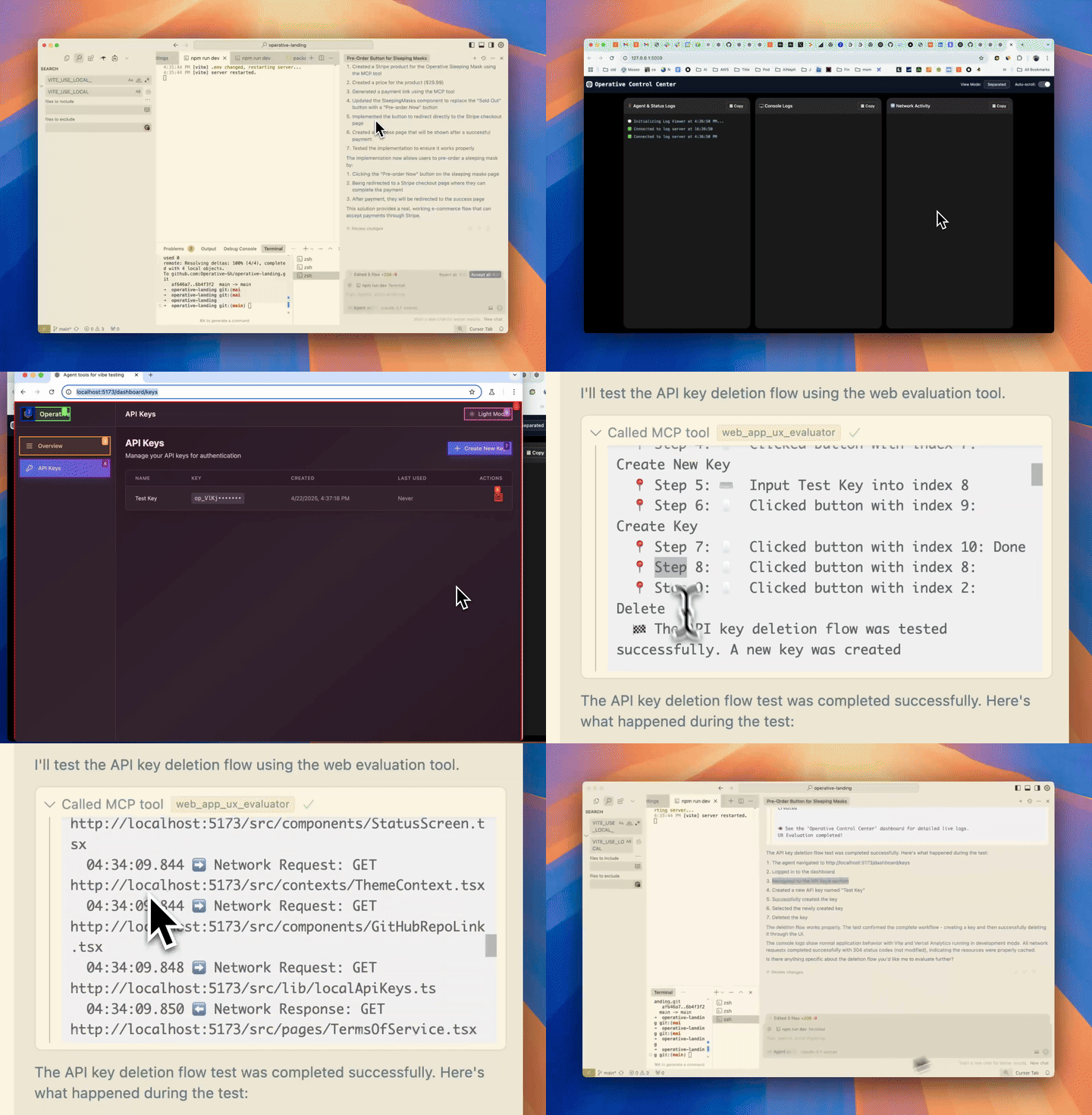
MCP-сервер operative.sh запускает браузерный агент для автономного выполнения и отладки веб-приложений непосредственно в редакторе кода.
Related MCP server: agnt
⚡ Особенности
🌐 Навигация по веб-приложению с помощью BrowserUse (в 2 раза быстрее с работающим бэкэндом)
📊 Захват сетевого трафика — запросы интеллектуально фильтруются и возвращаются в контекстное окно
🚨 Собирайте ошибки консоли — записывайте логи и ошибки
🤖 Автономная отладка — агент курсора вызывает сервер mcp веб-агента контроля качества, чтобы проверить, работает ли написанный им код так, как ожидалось, от начала до конца.
🧰 Справочник по инструментам MCP
Инструмент | Цель |
| 🤖 Автоматизированный оценщик UX, который управляет браузером, делает снимки экрана, ведет журналы консоли и сети и возвращает подробный отчет о UX. |
| 🔒 Открывает интерактивный (не headless) браузер, позволяющий войти в систему один раз; сохраненные файлы cookie/локальное хранилище повторно используются при последующих запусках |
Ключевые аргументы
web_eval_agenturl(обязательно) – адрес запущенного приложения (напримерhttp://localhost:3000)task(обязательно) – описание на естественном языке того, что нужно протестировать («пройдите процесс регистрации и отметьте любые проблемы с пользовательским опытом»)headless_browser(необязательно, по умолчаниюfalse) — установите значениеtrue, чтобы скрыть окно браузера
setup_browser_stateurl(необязательно) – страница, которая будет открыта первой (удобно для перехода непосредственно на экран входа в систему)
Вы можете активировать эти инструменты прямо из чата IDE, например:
Evaluate my app at http://localhost:3000 – run web_eval_agent with the task "Try the full signup flow and report UX issues".🏁 Быстрый старт (macOS/Linux)
Предварительные условия (обычно не требуются):
brew:
/bin/bash -c "$(curl -fsSL https://raw.githubusercontent.com/Homebrew/install/HEAD/install.sh)"npm: (
brew install npm)jq:
brew install jq
Запустите установщик после получения ключа API (бесплатно)
Устанавливает драматурга
Вставляет JSON в ваш редактор кода (Cursor/Cline/Windsurf)!
curl -LSf https://operative.sh/install.sh -o install.sh && bash install.sh && rm install.shОткройте вашу любимую IDE и перезапустите ее, чтобы применить изменения.
Отправьте запрос в режиме чата для вызова инструмента веб-агента оценки! Например:
Test my app on http://localhost:3000. Use web-eval-agent.🛠️ Ручная установка
Получите свой ключ API на operative.sh
curl -LsSf https://astral.sh/uv/install.sh | sh)Установить драматурга:
npm install -g chromium playwright && uvx --with playwright playwright install --with-depsДобавьте нижеприведенный JSON в соответствующий редактор кода с ключом API
Перезапустите редактор кода.
🔃 Обновление
uv cache cleanобновить MCP сервер
"web-eval-agent": {
"command": "uvx",
"args": [
"--refresh-package",
"webEvalAgent",
"--from",
"git+https://github.com/Operative-Sh/web-eval-agent.git",
"webEvalAgent"
],
"env": {
"OPERATIVE_API_KEY": "<YOUR_KEY>"
}
}Оперативный Discord-сервер
🛠️ Ручная установка (Mac + Cursor/Cline/Windsurf)
Получите свой ключ API на operative.sh
curl -LsSf https://astral.sh/uv/install.sh | sh)Установить драматурга:
npm install -g chromium playwright && uvx --with playwright playwright install --with-depsДобавьте нижеприведенный JSON в соответствующий редактор кода с ключом API
Перезапустите редактор кода.
Ручная установка (Windows + Cursor/Cline/Windsurf)
Мы дорабатываем этот вопрос. Если у вас возникнут какие-либо проблемы, пожалуйста, сообщите нам об этом!
Сделайте все это в терминале редактора кода.
curl -LSf https://operative.sh/install.sh -o install.sh && bash install.sh && rm install.shПолучите свой ключ API на operative.sh
Установить uv
(curl -LsSf https://astral.sh/uv/install.sh | sh)uvx --from git+https://github.com/Operative-Sh/web-eval-agent.git playwright installПерезапустить редактор кода
🚨 Проблемы
Обновления не приходят в редакторах кода, обновите или переустановите до последней версии: Запустите
uv cache cleanдля последней версииЕсли у вас возникнут какие-либо проблемы, смело открывайте тему в этом репозитории или в Discord!
5/5 - статические приложения без изменений не транслировались на экран, исправлено!
uv clean+ перезапуск для исправления
Журнал изменений
29 апреля - Обновление наложения агента - пауза/воспроизведение/остановка работы агента в браузере
📋 Пример отчета о выводе сервера MCP
📊 Web Evaluation Report for http://localhost:5173 complete!
📝 Task: Test the API-key deletion flow by navigating to the API Keys section, deleting a key, and judging the UX.
🔍 Agent Steps
📍 1. Navigate → http://localhost:5173
📍 2. Click "Login" (button index 2)
📍 3. Click "API Keys" (button index 4)
📍 4. Click "Create Key" (button index 9)
📍 5. Type "Test API Key" (input index 2)
📍 6. Click "Done" (button index 3)
📍 7. Click "Delete" (button index 10)
📍 8. Click "Delete" (confirm index 3)
🏁 Flow tested successfully – UX felt smooth and intuitive.
🖥️ Console Logs (10)
1. [debug] [vite] connecting…
2. [debug] [vite] connected.
3. [info] Download the React DevTools …
…
🌐 Network Requests (10)
1. GET /src/pages/SleepingMasks.tsx 304
2. GET /src/pages/MCPRegistryRegistry.tsx 304
…
⏱️ Chronological Timeline
01:16:23.293 🖥️ Console [debug] [vite] connecting…
01:16:23.303 🖥️ Console [debug] [vite] connected.
01:16:23.312 ➡️ GET /src/pages/SleepingMasks.tsx
01:16:23.318 ⬅️ 304 /src/pages/SleepingMasks.tsx
…
01:17:45.038 🤖 🏁 Flow finished – deletion verified
01:17:47.038 🤖 📋 Conclusion repeated above
👁️ See the "Operative Control Center" dashboard for live logs.История Звезды
Создано с помощью <3 @ operative.sh
Available Tools
2 toolssetup_browser_stateA
Sets up and saves browser state for future use.
This tool should only be called in one scenario:
The user explicitly requests to set up browser state/authentication
Launches a non-headless browser for user interaction, allows login/authentication, and saves the browser state (cookies, local storage, etc.) to a local file.
Args: url: Optional URL to navigate to upon opening the browser. ctx: The MCP context (used for progress reporting, not directly here).
Returns: list[TextContent]: Confirmation of state saving or error messages.
Inputs: url.
web_eval_agentA
Evaluate the user experience / interface of a web application.
This tool allows the AI to assess the quality of user experience and interface design of a web application by performing specific tasks and analyzing the interaction flow.
Before this tool is used, the web application should already be running locally on a port.
Args: url: Required. The localhost URL of the web application to evaluate, including the port number. Example: http://localhost:3000, http://localhost:8080, http://localhost:4200, http://localhost:5173, etc. Try to avoid using the path segments of the URL, and instead use the root URL. task: Required. The specific UX/UI aspect to test (e.g., "test the checkout flow", "evaluate the navigation menu usability", "check form validation feedback") Be as detailed as possible in your task description. It could be anywhere from 2 sentences to 2 paragraphs. headless_browser: Optional. Whether to hide the browser window popup during evaluation. If headless_browser is True, only the operative control center browser will show, and no popup browser will be shown.
Returns: list[list[TextContent, ImageContent]]: A detailed evaluation of the web application's UX/UI, including observations, issues found, and recommendations for improvement and screenshots of the web application during the evaluation
Inputs: url (required), task (required), headless_browser.
Tool Schema Changelog
Recent tool additions, removals, and schema changes observed during successful MCP inspections.
Loading tool schema changelog…
TDQS
Scored across 2 tools
The two tools have completely distinct purposes with no overlap. setup_browser_state handles browser authentication and state saving, while web_eval_agent performs UX/UI evaluation of web applications. An agent would never confuse these tools as they serve different phases of the workflow.
Both tools follow a consistent verb_noun pattern with snake_case naming. setup_browser_state and web_eval_agent use clear action-oriented verbs followed by descriptive nouns, creating a predictable naming convention throughout the server.
With only 2 tools, this server feels severely under-equipped for its apparent purpose of web evaluation. A comprehensive web evaluation system would typically need tools for navigation, interaction simulation, accessibility testing, performance measurement, and result analysis beyond just setup and evaluation.
The tool surface is severely incomplete for web evaluation. While setup and evaluation are covered, there are significant gaps: no tools for configuring evaluation parameters, managing browser sessions, analyzing results programmatically, testing specific components, or handling different evaluation methodologies. The server provides only basic endpoints without supporting the full evaluation workflow.
Maintenance
Related MCP Connectors
Find UI bugs, verify fixes and run tests on your web app from your AI coding agent.
Browser-based QA for AI-built software. Test pages with real browsers via agents.
AI-powered web automation. Navigate websites using AI agents for one page or a thousand
Related MCP Servers
- AlicenseNot gradedqualityCmaintenanceEnables AI assistants to debug frontend applications by providing direct access to browser DevTools, React state, DOM inspection, and runtime debugging capabilities. Bridges the gap between AI and complex web applications for autonomous debugging and issue resolution.1MIT
- AlicenseNot gradedqualityBmaintenanceBridges AI coding agents with the browser to provide visual debugging, real-time error capture, screenshot capabilities, DOM inspection, and interactive wireframing through a reverse proxy with injected developer tools.22Apache 2.0
- FlicenseNot gradedqualityDmaintenanceEnables AI agents to automate and debug real Chromium browsers with capabilities like screenshots, video recording, performance analysis, visual regression testing, and OCR text extraction.13-
- AlicenseNot gradedqualityCmaintenanceEnables AI coding agents to access live console logs, errors, and network requests from web applications via a local WebSocket connection, without copying data to chat.19MIT
Appeared in Searches
- Tools for enabling LLMs to interact with web pages and perform end-to-end testing
- IDE extensions and AI coding assistants like GitHub Copilot and ChatGPT
- Browser automation and control for Codex CLI
- MCP servers for curated context in Cursor IDE to plan, debug, and iterate on features
- Web page automation tools for form submission and queries