Glama
refreshdotdev

WebEvalAgent MCP Server

Official

🚀 operative.sh 웹 평가 에이전트 MCP 서버

코딩 에이전트가 스스로 디버깅하도록 하세요. 그러면 더 중요한 일을 할 수 있을 겁니다.

데모

🔥 디버깅을 더욱 강화하세요

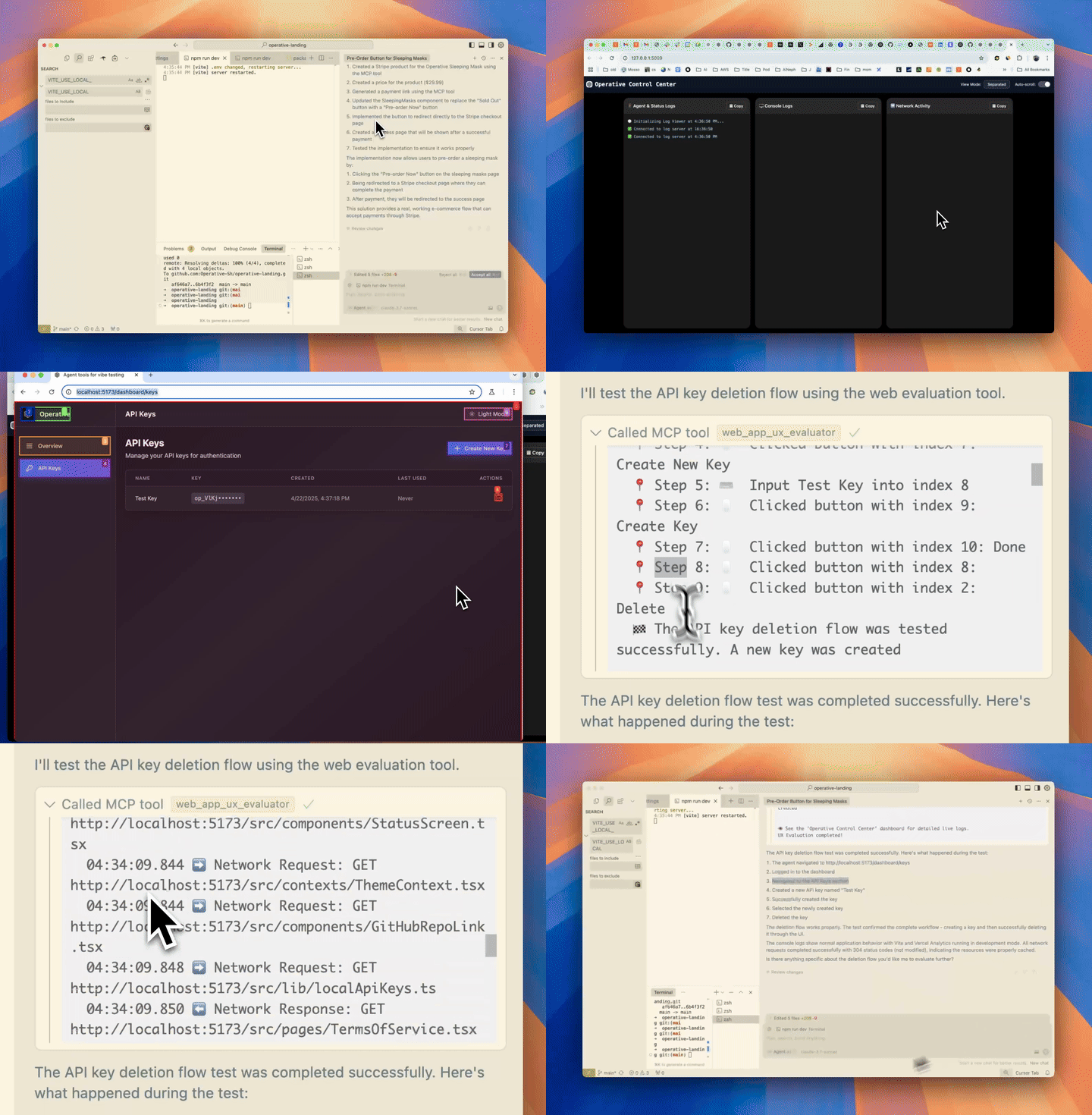
operative.sh 의 MCP 서버는 브라우저에서 구동되는 에이전트를 시작하여 코드 편집기에서 직접 웹 앱을 자율적으로 실행하고 디버깅합니다.

Related MCP server: agnt

⚡ 특징

  • 🌐 BrowserUse를 사용하여 웹앱을 탐색하세요 (작동 백엔드로 2배 더 빠름)

  • 📊 네트워크 트래픽 캡처 - 요청은 지능적으로 필터링되어 컨텍스트 창으로 반환됩니다.

  • 🚨 콘솔 오류 수집 - 로그 및 오류 캡처

  • 🤖 자율 디버깅 - 커서 에이전트는 웹 QA 에이전트 MCP 서버를 호출하여 작성한 코드가 예상대로 종단 간 작동하는지 테스트합니다.

🧰 MCP 도구 참조

도구

목적

web_eval_agent

🤖 브라우저를 구동하고, 스크린샷, 콘솔 및 네트워크 로그를 캡처하고, 풍부한 UX 보고서를 반환하는 자동 UX 평가기입니다.

setup_browser_state

🔒 한 번만 로그인할 수 있도록 대화형(헤드리스 아님) 브라우저를 엽니다. 저장된 쿠키/로컬 스토리지는 이후 web_eval_agent 실행 시 재사용됩니다.

주요 주장

  • web_eval_agent

    • url(필수) – 실행 중인 앱의 주소(예 http://localhost:3000 )

    • task(필수) – 테스트할 내용에 대한 자연어 설명("가입 흐름을 살펴보고 UX 문제가 있는지 확인하세요")

    • headless_browser(선택 사항, 기본값 false ) – 브라우저 창을 숨기려면 true 로 설정

  • setup_browser_state

    • url(선택 사항) – 먼저 열리는 페이지(로그인 화면으로 바로 이동하는 데 편리함)

예를 들어 IDE 채팅에서 이러한 도구를 직접 트리거할 수 있습니다.

지엑스피1

🏁 빠른 시작(macOS/Linux)

  1. 필수 조건(일반적으로 필요하지 않음):

  • 추출: /bin/bash -c "$(curl -fsSL https://raw.githubusercontent.com/Homebrew/install/HEAD/install.sh)"

  • npm: ( brew install npm )

  • jq: brew install jq

  1. API 키(무료)를 받은 후 설치 프로그램을 실행하세요.

curl -LSf https://operative.sh/install.sh -o install.sh && bash install.sh && rm install.sh
  1. 좋아하는 IDE를 방문하여 변경 사항을 적용하려면 다시 시작하세요.

  2. 채팅 모드에서 웹 평가 에이전트 도구를 호출하라는 메시지를 보내세요! 예:

Test my app on http://localhost:3000. Use web-eval-agent.

🛠️ 수동 설치

  1. operative.sh에서 API 키를 받으세요

  2. uv 설치

curl -LsSf https://astral.sh/uv/install.sh | sh)
  1. Playwright 설치:

npm install -g chromium playwright && uvx --with playwright playwright install --with-deps
  1. API 키와 함께 아래 JSON을 관련 코드 편집기에 추가하세요.

  2. 코드 편집기를 다시 시작하세요

🔃 업데이트 중

  • uv cache clean

  • MCP 서버 새로 고침

    "web-eval-agent": {
      "command": "uvx",
      "args": [
        "--refresh-package",
        "webEvalAgent",
        "--from",
        "git+https://github.com/Operative-Sh/web-eval-agent.git",
        "webEvalAgent"
      ],
      "env": {
        "OPERATIVE_API_KEY": "<YOUR_KEY>"
      }
    }

운영 디스코드 서버

🛠️ 수동 설치(Mac + Cursor/Cline/Windsurf)

  1. operative.sh에서 API 키를 받으세요

  2. uv 설치

curl -LsSf https://astral.sh/uv/install.sh | sh)
  1. Playwright 설치:

npm install -g chromium playwright && uvx --with playwright playwright install --with-deps
  1. API 키와 함께 아래 JSON을 관련 코드 편집기에 추가하세요.

  2. 코드 편집기를 다시 시작하세요

수동 설치(Windows + Cursor/Cline/Windsurf)

이 문제를 개선하기 위해 노력하고 있습니다. 문제가 있으면 이슈를 열어주세요!

  1. 이 모든 작업을 코드 편집기 터미널에서 수행하세요.

  2. curl -LSf https://operative.sh/install.sh -o install.sh && bash install.sh && rm install.sh

  3. operative.sh에서 API 키를 받으세요

  4. uv 설치 (curl -LsSf https://astral.sh/uv/install.sh | sh)

  5. uvx --from git+https://github.com/Operative-Sh/web-eval-agent.git playwright install

  6. 코드 편집기를 다시 시작하세요

🚨 문제

  • 코드 편집기에서 업데이트가 수신되지 않습니다. 최신 버전으로 업데이트하거나 다시 설치하세요. 최신 버전으로 uv cache clean 실행하세요.

  • 문제가 있으면 이 저장소나 디스코드에서 문제를 제기하세요!

  • 5/5 - 변경 사항이 없는 정적 앱이 스크린캐스팅되지 않는 문제가 해결되었습니다! uv clean 후 재시작하여 문제를 해결하세요.

변경 사항

  • 4/29 - 에이전트 오버레이 업데이트 - 브라우저에서 에이전트 실행 일시 중지/재생/중지

📋 MCP 서버 출력 보고서 예시

📊 Web Evaluation Report for http://localhost:5173 complete!
📝 Task: Test the API-key deletion flow by navigating to the API Keys section, deleting a key, and judging the UX.

🔍 Agent Steps
  📍 1. Navigate → http://localhost:5173
  📍 2. Click     "Login"        (button index 2)
  📍 3. Click     "API Keys"     (button index 4)
  📍 4. Click     "Create Key"   (button index 9)
  📍 5. Type      "Test API Key" (input index 2)
  📍 6. Click     "Done"         (button index 3)
  📍 7. Click     "Delete"       (button index 10)
  📍 8. Click     "Delete"       (confirm index 3)
🏁 Flow tested successfully – UX felt smooth and intuitive.

🖥️ Console Logs (10)
  1. [debug] [vite] connecting…
  2. [debug] [vite] connected.
  3. [info]  Download the React DevTools …
     …

🌐 Network Requests (10)
  1. GET /src/pages/SleepingMasks.tsx                   304
  2. GET /src/pages/MCPRegistryRegistry.tsx             304
     …

⏱️ Chronological Timeline
  01:16:23.293 🖥️ Console [debug] [vite] connecting…
  01:16:23.303 🖥️ Console [debug] [vite] connected.
  01:16:23.312 ➡️ GET /src/pages/SleepingMasks.tsx
  01:16:23.318 ⬅️ 304 /src/pages/SleepingMasks.tsx
     …
  01:17:45.038 🤖 🏁 Flow finished – deletion verified
  01:17:47.038 🤖 📋 Conclusion repeated above
👁️  See the "Operative Control Center" dashboard for live logs.

스타 역사

별 역사 차트


<3 @ operative.sh 로 빌드됨

Install Server
A
license - permissive license
A
quality
F
maintenance

Maintenance

Maintainers
Response time
Release cycle
Releases (12mo)
Commit activity
Issues opened vs closed

Resources

Unclaimed servers have limited discoverability.

Looking for Admin?

If you are the server author, to access and configure the admin panel.

Related MCP Servers

  • A
    license
    -
    quality
    D
    maintenance
    Enables AI assistants to debug frontend applications by providing direct access to browser DevTools, React state, DOM inspection, and runtime debugging capabilities. Bridges the gap between AI and complex web applications for autonomous debugging and issue resolution.
    1
    MIT
  • A
    license
    -
    quality
    A
    maintenance
    Bridges AI coding agents with the browser to provide visual debugging, real-time error capture, screenshot capabilities, DOM inspection, and interactive wireframing through a reverse proxy with injected developer tools.
    36
    5
    Apache 2.0
  • A
    license
    -
    quality
    C
    maintenance
    Enables AI assistants to control and inspect a live Chrome browser for automated web debugging, performance analysis, and Lighthouse audits. It allows agents to capture screenshots, monitor network requests, and measure Core Web Vitals using plain-English prompts.
    2,322,781
    Apache 2.0

View all related MCP servers

Related MCP Connectors

  • Live browser debugging for AI assistants — DOM, console, network via MCP.

  • AI QA tester — real browsers scan sites for bugs, SEO, perf, and accessibility issues via chat.

  • Browser-backed QA with evidence and fix-ready reports for coding agents.

View all MCP Connectors

Latest Blog Posts

MCP directory API

We provide all the information about MCP servers via our MCP API.

curl -X GET 'https://glama.ai/api/mcp/v1/servers/refreshdotdev/web-eval-agent'

If you have feedback or need assistance with the MCP directory API, please join our Discord server