WebEvalAgent MCP Server
Official🚀 operative.sh web-eval-agent MCP-Server
Überlassen Sie dem Codieragenten die Fehlerbehebung selbst, Sie haben Besseres zu tun.

🔥 Optimieren Sie Ihr Debugging
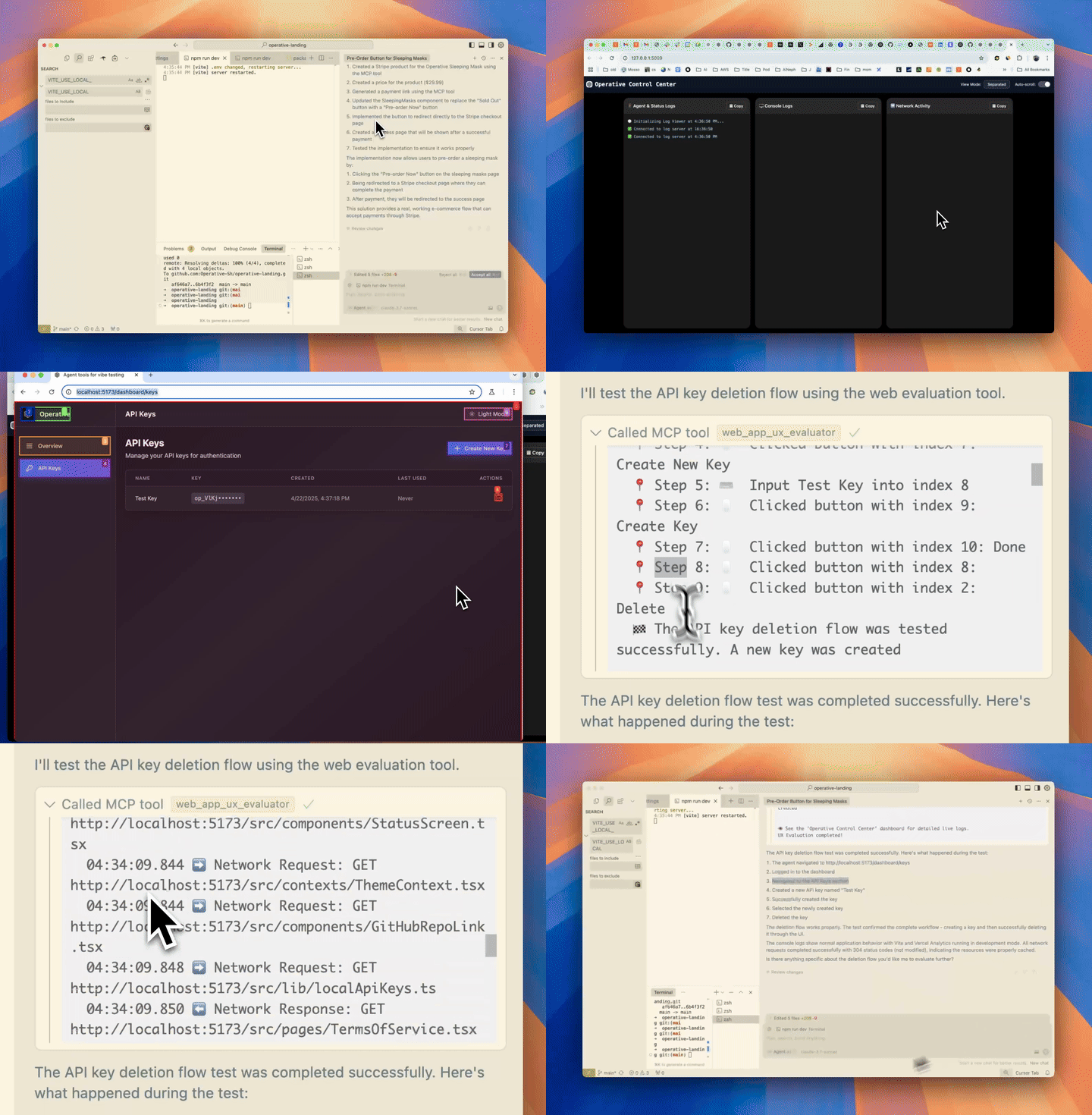
Der MCP-Server von operative.sh startet einen browserbasierten Agenten, um Web-Apps direkt in Ihrem Code-Editor autonom auszuführen und zu debuggen.
Related MCP server: agnt
⚡ Funktionen
🌐 Navigieren Sie mit BrowserUse durch Ihre Webanwendung (2x schneller mit operativem Backend)
📊 Erfassen Sie den Netzwerkverkehr – Anfragen werden intelligent gefiltert und in das Kontextfenster zurückgegeben
🚨 Konsolenfehler erfassen – erfasst Protokolle und Fehler
🤖 Autonomes Debuggen – der Cursor-Agent ruft den MCP-Server des Web-QA-Agenten auf, um zu testen, ob der von ihm geschriebene Code durchgängig wie erwartet funktioniert.
🧰 MCP-Tool-Referenz
Werkzeug | Zweck |
| 🤖 Automatisierter UX-Evaluator, der den Browser steuert, Screenshots, Konsolen- und Netzwerkprotokolle erfasst und einen ausführlichen UX-Bericht zurückgibt. |
| 🔒 Öffnet einen interaktiven (nicht-headless) Browser, sodass Sie sich einmal anmelden können; die gespeicherten Cookies/der lokale Speicher werden bei nachfolgenden |
Hauptargumente
web_eval_agenturl(erforderlich) – Adresse der laufenden App (z. B.http://localhost:3000)task(erforderlich) – Beschreibung in natürlicher Sprache, was getestet werden soll („den Anmeldefluss durchlaufen und etwaige UX-Probleme notieren“)headless_browser(optional, Standardfalse) – auftruesetzen, um das Browserfenster auszublenden
setup_browser_stateurl(optional) – zuerst zu öffnende Seite (praktisch, um direkt auf einem Anmeldebildschirm zu landen)
Sie können diese Tools direkt aus Ihrem IDE-Chat auslösen, zum Beispiel:
Evaluate my app at http://localhost:3000 – run web_eval_agent with the task "Try the full signup flow and report UX issues".🏁 Schnellstart (macOS/Linux)
Voraussetzungen (normalerweise nicht erforderlich):
brew:
/bin/bash -c "$(curl -fsSL https://raw.githubusercontent.com/Homebrew/install/HEAD/install.sh)"npm: (
brew install npm)jq:
brew install jq
Führen Sie das Installationsprogramm aus, nachdem Sie einen API-Schlüssel erhalten haben (kostenlos)
Installiert Dramatiker
Fügt JSON für Sie in Ihren Code-Editor (Cursor/Cline/Windsurf) ein!
curl -LSf https://operative.sh/install.sh -o install.sh && bash install.sh && rm install.shBesuchen Sie Ihre bevorzugte IDE und starten Sie neu, um die Änderungen anzuwenden
Senden Sie eine Aufforderung im Chat-Modus, um das Web-Evaluierungs-Agent-Tool aufzurufen! zB
Test my app on http://localhost:3000. Use web-eval-agent.🛠️ Manuelle Installation
Holen Sie sich Ihren API-Schlüssel bei operative.sh
curl -LsSf https://astral.sh/uv/install.sh | sh)Installieren Sie Playwright:
npm install -g chromium playwright && uvx --with playwright playwright install --with-depsFügen Sie das folgende JSON mit dem API-Schlüssel zu Ihrem entsprechenden Code-Editor hinzu
Starten Sie Ihren Code-Editor neu
🔃 Aktualisierung
uv cache cleanMCP-Server aktualisieren
"web-eval-agent": {
"command": "uvx",
"args": [
"--refresh-package",
"webEvalAgent",
"--from",
"git+https://github.com/Operative-Sh/web-eval-agent.git",
"webEvalAgent"
],
"env": {
"OPERATIVE_API_KEY": "<YOUR_KEY>"
}
}Operativer Discord-Server
🛠️ Manuelle Installation (Mac + Cursor/Cline/Windsurf)
Holen Sie sich Ihren API-Schlüssel bei operative.sh
curl -LsSf https://astral.sh/uv/install.sh | sh)Installieren Sie Playwright:
npm install -g chromium playwright && uvx --with playwright playwright install --with-depsFügen Sie das folgende JSON mit dem API-Schlüssel zu Ihrem entsprechenden Code-Editor hinzu
Starten Sie Ihren Code-Editor neu
Manuelle Installation (Windows + Cursor/Cline/Windsurf)
Wir verfeinern dies. Bitte öffnen Sie ein Problem, wenn Sie Probleme haben!
Führen Sie dies alles in Ihrem Code-Editor-Terminal aus
curl -LSf https://operative.sh/install.sh -o install.sh && bash install.sh && rm install.shHolen Sie sich Ihren API-Schlüssel bei operative.sh
UV installieren
(curl -LsSf https://astral.sh/uv/install.sh | sh)uvx --from git+https://github.com/Operative-Sh/web-eval-agent.git playwright installCode-Editor neu starten
🚨 Probleme
Updates werden in Code-Editoren nicht empfangen, aktualisieren oder neu installieren für die neueste Version: Führen Sie
uv cache cleanfür die neueste ausBei Problemen können Sie gerne ein Problem in diesem Repo oder im Discord eröffnen!
5/5 – Statische Apps ohne Änderungen führten kein Screencasting durch, behoben!
uv clean+ Neustart, um das Problem zu beheben
Änderungsprotokoll
29.04. – Agent-Overlay-Update – Agent-Ausführung im Browser pausieren/abspielen/stoppen
📋 Beispiel für einen MCP-Server-Ausgabebericht
📊 Web Evaluation Report for http://localhost:5173 complete!
📝 Task: Test the API-key deletion flow by navigating to the API Keys section, deleting a key, and judging the UX.
🔍 Agent Steps
📍 1. Navigate → http://localhost:5173
📍 2. Click "Login" (button index 2)
📍 3. Click "API Keys" (button index 4)
📍 4. Click "Create Key" (button index 9)
📍 5. Type "Test API Key" (input index 2)
📍 6. Click "Done" (button index 3)
📍 7. Click "Delete" (button index 10)
📍 8. Click "Delete" (confirm index 3)
🏁 Flow tested successfully – UX felt smooth and intuitive.
🖥️ Console Logs (10)
1. [debug] [vite] connecting…
2. [debug] [vite] connected.
3. [info] Download the React DevTools …
…
🌐 Network Requests (10)
1. GET /src/pages/SleepingMasks.tsx 304
2. GET /src/pages/MCPRegistryRegistry.tsx 304
…
⏱️ Chronological Timeline
01:16:23.293 🖥️ Console [debug] [vite] connecting…
01:16:23.303 🖥️ Console [debug] [vite] connected.
01:16:23.312 ➡️ GET /src/pages/SleepingMasks.tsx
01:16:23.318 ⬅️ 304 /src/pages/SleepingMasks.tsx
…
01:17:45.038 🤖 🏁 Flow finished – deletion verified
01:17:47.038 🤖 📋 Conclusion repeated above
👁️ See the "Operative Control Center" dashboard for live logs.Sternengeschichte
Erstellt mit <3 @ operative.sh
Maintenance
Resources
Unclaimed servers have limited discoverability.
Looking for Admin?
If you are the server author, to access and configure the admin panel.
Related MCP Servers
- Alicense-qualityDmaintenanceEnables AI assistants to debug frontend applications by providing direct access to browser DevTools, React state, DOM inspection, and runtime debugging capabilities. Bridges the gap between AI and complex web applications for autonomous debugging and issue resolution.1MIT
- Alicense-qualityAmaintenanceBridges AI coding agents with the browser to provide visual debugging, real-time error capture, screenshot capabilities, DOM inspection, and interactive wireframing through a reverse proxy with injected developer tools.365Apache 2.0
- Alicense-qualityCmaintenanceEnables AI assistants to control and inspect a live Chrome browser for automated web debugging, performance analysis, and Lighthouse audits. It allows agents to capture screenshots, monitor network requests, and measure Core Web Vitals using plain-English prompts.2,322,781Apache 2.0
- Flicense-qualityDmaintenanceEnables AI agents to automate and debug real Chromium browsers with capabilities like screenshots, video recording, performance analysis, visual regression testing, and OCR text extraction.13
Related MCP Connectors
Live browser debugging for AI assistants — DOM, console, network via MCP.
AI QA tester — real browsers scan sites for bugs, SEO, perf, and accessibility issues via chat.
Browser-backed QA with evidence and fix-ready reports for coding agents.
Appeared in Searches
- Tools for enabling LLMs to interact with web pages and perform end-to-end testing
- IDE extensions and AI coding assistants like GitHub Copilot and ChatGPT
- Browser automation and control for Codex CLI
- MCP servers for curated context in Cursor IDE to plan, debug, and iterate on features
- Web page automation tools for form submission and queries
Latest Blog Posts
- Who's Calling? MCP Hosts Are an Identity Blind Spot (And the Spec Knows It)By Om-Shree-0709 on .mcpAgent IdentityOAuth 2.1
- Your AI Chatbot Just Exposed Your CEO's Salary to an InternBy Om-Shree-0709 on .Agent IdentityMCP SecurityOAuth Delegation
- Why MCP Servers Need Execution Sandboxing (And Why Your Current Stack Isn't Enough)By Om-Shree-0709 on .Agentic AiPrompt InjectionWebAssembly
MCP directory API
We provide all the information about MCP servers via our MCP API.
curl -X GET 'https://glama.ai/api/mcp/v1/servers/refreshdotdev/web-eval-agent'
If you have feedback or need assistance with the MCP directory API, please join our Discord server